
Software as a Service (SaaS) is one of the most transformative technology shifts of the modern era — and whether you know it or not, you almost certainly use it every day. From checking your Gmail inbox to managing a project in Asana or watching a show on Netflix, SaaS is quietly running in the background.
“If someone asks me what cloud computing is, I try not to get bogged down with definitions. I tell them that, simply put, cloud computing is a better way to run your business.”
— Marc Benioff, Co-founder & CEO, Salesforce
Yet despite how pervasive it has become, many business leaders, IT professionals, and curious learners still have questions: What exactly is SaaS? How does it work? How is it different from traditional software — or from IaaS and PaaS? What are the real benefits and limitations?
This complete guide answers every one of those questions. Whether you’re evaluating your first SaaS product, building one, or simply want to understand the cloud landscape, this is the only resource you need.
Table of Contents
- What Is SaaS?
- A Brief History of SaaS
- How SaaS Works
- Key Characteristics of SaaS
- SaaS vs. Traditional (On-Premises) Software
- SaaS vs. IaaS vs. PaaS
- SaaS vs. Cloud Computing
- Benefits of SaaS
- Disadvantages and Limitations of SaaS
- SaaS Pricing Models
- Types of SaaS Applications
- Examples of Popular SaaS Products
- SaaS Architecture: Multi-Tenancy Explained
- SaaS Security and Compliance
- SaaS Integration and APIs
- SaaS for Businesses: Small, Mid-Size, and Enterprise
- How to Choose a SaaS Product
- SaaS Metrics That Matter
- SaaS Market Size and Growth
- The Future of SaaS
- Frequently Asked Questions
What Is SaaS?
Software as a Service (SaaS) is a cloud-based software delivery model in which a vendor hosts an application on its own infrastructure and makes it available to customers over the internet — typically via a web browser — on a subscription basis.
Instead of purchasing software outright and installing it on local computers or servers, users simply log in through a browser or app. The SaaS provider handles everything else:
- Hardware provisioning
- Software updates and security patches
- Data backups and disaster recovery
- Infrastructure scaling
The customer pays a recurring fee — usually monthly or annually — for access.
A simple, practical definition: SaaS is renting software rather than owning it.
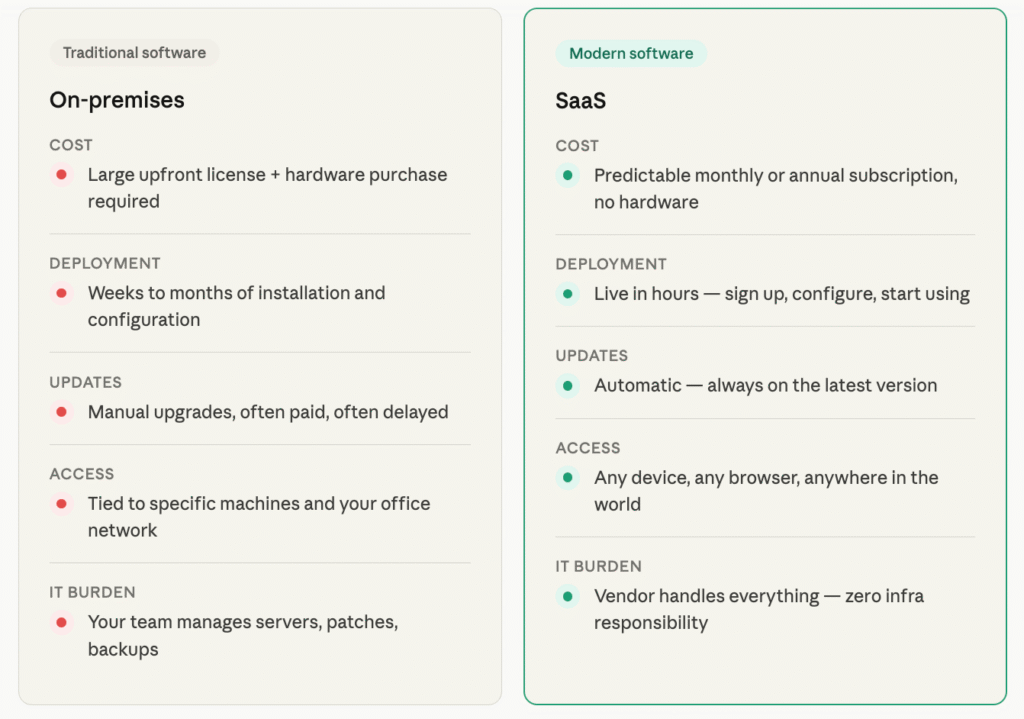
The SaaS model stands in contrast to traditional software delivery, where you paid a large upfront license fee, received physical media (or a download), installed it manually, and were responsible for every upgrade and maintenance task thereafter.
“Our differentiators were ease of use, a business model of shared risk, and low-risk commitment — everything that software was not.”
— Marc Benioff, Behind the Cloud (describing Salesforce’s original SaaS vision)
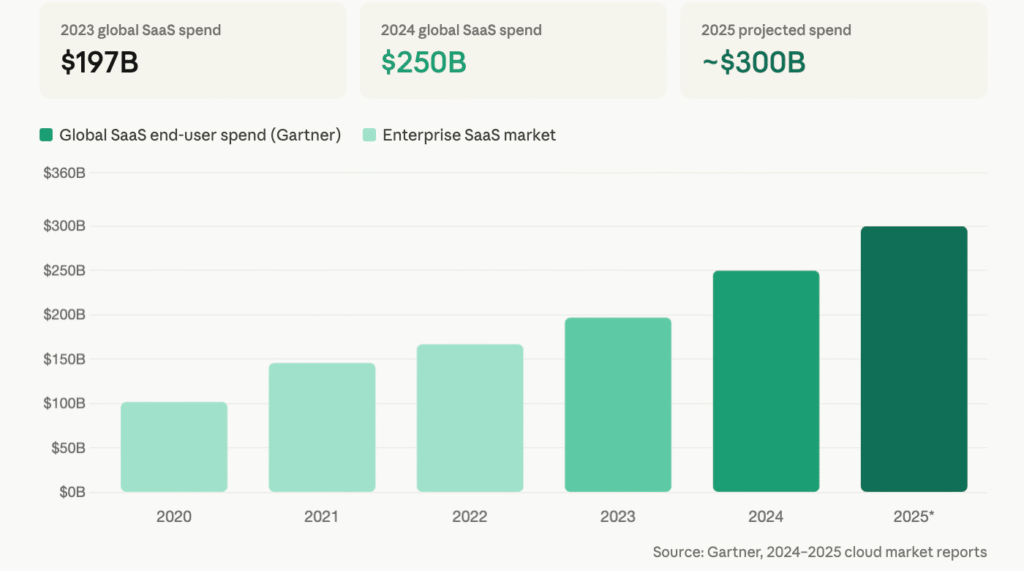
Today, SaaS is the dominant software delivery model globally. According to Gartner, the enterprise SaaS market expanded by 16.7% in 2024, reaching $218.5 billion, with CRM accounting for 51.4% of that revenue. The SaaS market is projected to approach $300 billion by 2025.
A Brief History of SaaS
Understanding where SaaS came from helps explain why it works the way it does.
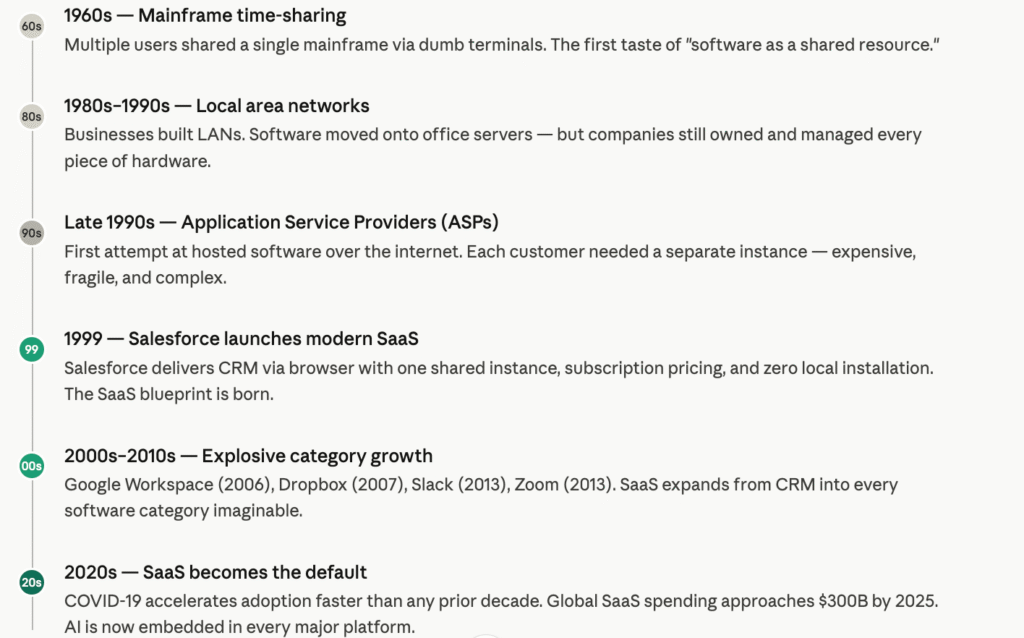
The 1960s: Time-Sharing on Mainframes
The conceptual roots of SaaS trace back to mainframe computing in the 1960s. Large, expensive mainframe computers were connected to “dumb terminals” — workstations with no computing power of their own. Multiple users could access and share the mainframe’s software simultaneously. This time-sharing model was the earliest form of centralized software delivery.
The 1980s–1990s: Local Area Networks (LANs)
As computing costs fell through the 1980s, businesses started building local area networks (LANs). Servers within a company’s office hosted software that employees could access from their desks. The company, however, owned and managed all the hardware and software — a significantly heavier operational burden than time-sharing.
The Late 1990s: Application Service Providers (ASPs)
When the internet emerged commercially in the mid-1990s, a new model appeared: Application Service Providers (ASPs). ASPs hosted software on remote servers and delivered it to clients via the internet. However, the ASP model had significant flaws:
- Each customer required a separate, dedicated software instance
- Some local software still needed to be installed on users’ machines
- Configuration was complex and expensive
- Data aggregation across customers was limited or impossible
1999: Salesforce and the Birth of Modern SaaS
The pivotal moment for modern SaaS came in 1999, when Salesforce launched its CRM platform as cloud-hosted software delivered entirely through a web browser. Salesforce’s approach — one software instance shared by many customers, accessible from any internet-connected device, with a simple subscription pricing model — became the blueprint for the entire SaaS industry. The term “Software as a Service” was coined in the early 2000s, formally distinguishing this new model from the older ASP approach.
“The world is being reshaped by the convergence of social, mobile, cloud, big data, community and other powerful forces. The combination of these technologies unlocks an incredible opportunity to connect everything together in a new way.”
— Marc Benioff, Salesforce
The 2000s–2010s: Explosive Growth
Through the 2000s and 2010s, SaaS expanded rapidly across virtually every software category:
- 2006 — Google launched Google Apps (now Google Workspace)
- 2007 — Dropbox launched
- 2013 — Slack and Zoom launched
What once was limited to CRM quickly spread to ERP, HR, marketing automation, project management, accounting, security, and beyond.
2020s: The SaaS-First Era
By the early 2020s, SaaS had become the default expectation for enterprise software. The COVID-19 pandemic accelerated adoption dramatically, as remote work made cloud-based, browser-accessible software essential overnight.
“As enterprises continue to seek greater flexibility, improved resilience and optimized performance, there is sustained demand for cloud migration and modernization services. Enterprises want to transform their IT infrastructure by leveraging multiple platforms for AI and prioritizing modernization by migrating existing workloads to the cloud.”
— Hardeep Singh, Principal Analyst, Gartner (2025)
How SaaS Works
At its core, SaaS works through a cloud delivery model. Here is the step-by-step process:
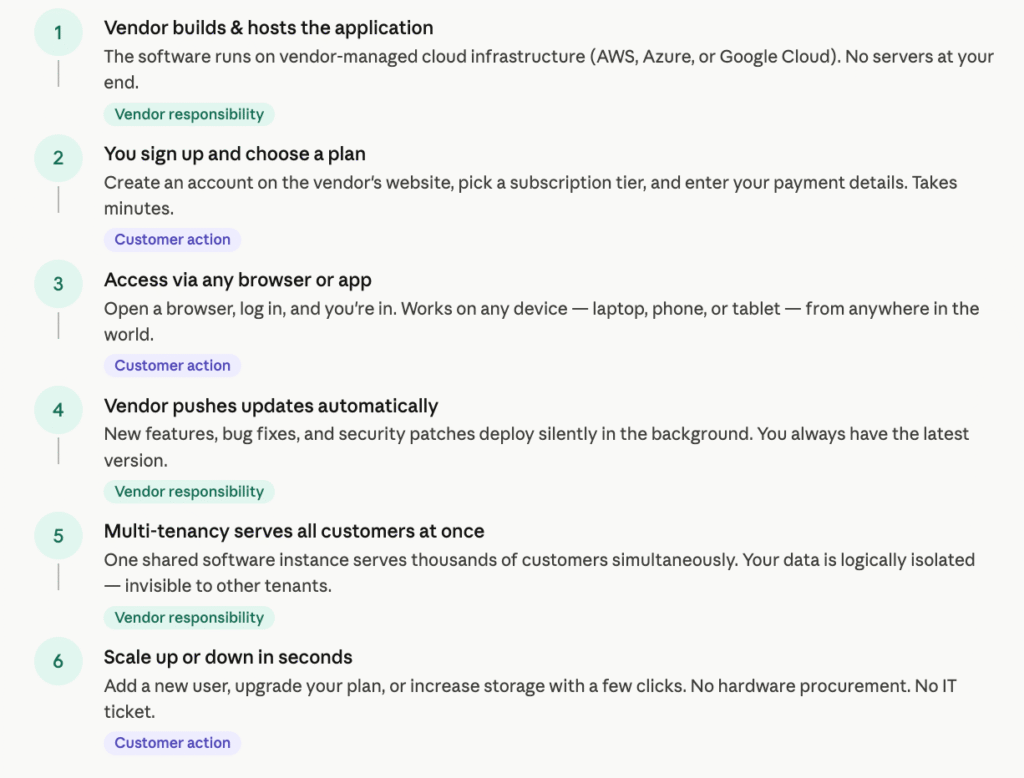
- The vendor builds and hosts the application on cloud infrastructure — either their own data centers or on a third-party cloud platform like AWS, Microsoft Azure, or Google Cloud.
- The vendor manages everything at the infrastructure layer: servers, databases, operating systems, networking, load balancers, backups, and security.
- The customer creates an account, chooses a plan, and pays a subscription fee.
- The customer accesses the application through a web browser, desktop app, or mobile app — no local installation required.
- The vendor pushes updates automatically, meaning all customers are always on the latest version without any action needed on their part.
- Data is stored in the cloud, meaning users can access their data from any device, anywhere in the world.
The Role of Multi-Tenancy
One of the most critical technical underpinnings of SaaS is multi-tenant architecture. In a multi-tenant system, a single instance of the application serves multiple customers simultaneously. Each tenant’s data, configurations, and user accounts are logically isolated — they cannot see or access each other’s information — but the underlying software and hardware are shared.
This is what makes SaaS economically viable: a vendor can serve thousands of customers at once without multiplying their infrastructure costs proportionally.
Service Level Agreements (SLAs)
When a business subscribes to a SaaS product, the commercial relationship is governed by a Service Level Agreement (SLA). The SLA is a legal contract that specifies:
- Uptime guarantees (e.g., 99.9% availability — meaning no more than ~8.7 hours of downtime per year)
- Security commitments (data encryption, access controls, audit logs)
- Support response times (e.g., critical issues resolved within 4 hours)
- Data ownership (confirming the customer owns their data and can export it)
- Disaster recovery protocols and recovery time objectives (RTO/RPO)
Businesses should always review the SLA carefully before committing to a SaaS vendor.
Key Characteristics of SaaS
All SaaS applications share a core set of characteristics that distinguish them from other software delivery models:
- Hosted and Managed by the Vendor — The SaaS provider is responsible for all server provisioning, infrastructure management, software maintenance, and operational tasks. Customers have zero responsibility for the underlying technology stack.
- Internet-Based Delivery — SaaS applications are delivered over the internet and accessed via a web browser or lightweight native app. They work on virtually any device — desktops, laptops, smartphones, and tablets.
- Multi-Tenant Architecture — A single software instance serves multiple customers simultaneously, with logical data separation between tenants.
- Subscription Pricing — SaaS is sold on a subscription basis — monthly, annually, or per-use — rather than as a one-time license purchase.
- Automatic Updates — Software updates, feature releases, and security patches are applied by the vendor automatically and uniformly. Customers always use the current version.
- Scalability on Demand — SaaS applications can scale computing resources dynamically — up during peak demand, down during quiet periods — without any action from the customer.
- Minimal IT Overhead for the Customer — Since the vendor handles infrastructure and maintenance, internal IT teams are freed from routine server management, patch deployment, and backup management.
SaaS vs. Traditional (On-Premises) Software
To fully appreciate SaaS, it helps to understand what it replaced.
“The total cost for 200 people to use a low-end on-premises CRM product in the 1990s could exceed $1.8 million in the first year alone.”
— Marc Benioff, Behind the Cloud
| Dimension | Traditional On-Premises Software | SaaS |
|---|---|---|
| Deployment | Install on local servers/computers | Access via browser; no installation |
| Upfront Cost | High (license fee + hardware) | Low or zero (subscription only) |
| Ongoing Cost | Maintenance, IT staff, hardware refresh | Predictable subscription fee |
| Updates | Manual; often costly upgrades | Automatic; included in subscription |
| Accessibility | Tied to specific machines/network | Any device, anywhere, any time |
| Scalability | Requires hardware procurement | Instant, on-demand |
| IT Burden | Very high | Minimal |
| Customization | Extensive | Limited to vendor-provided options |
| Data Control | Full control | Shared with vendor |
| Time to Deploy | Weeks to months | Hours to days |
The trade-off is clear: SaaS offers dramatically lower barriers to access, faster deployment, and less IT overhead — but it comes at the cost of reduced customization and less direct control over your data and infrastructure.
SaaS vs. IaaS vs. PaaS: The Three Cloud Service Models
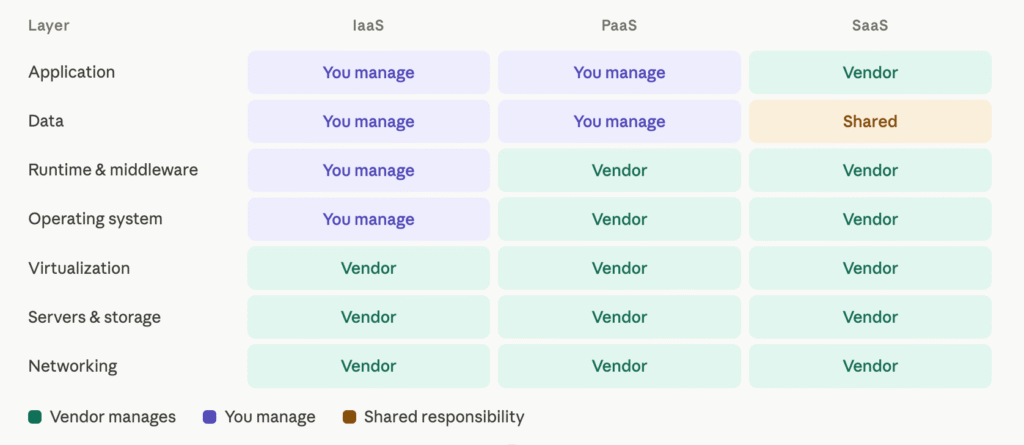
SaaS sits within a broader framework of three primary cloud computing service models, each offering a different level of abstraction and control.
Infrastructure as a Service (IaaS)
IaaS provides the foundational building blocks of computing infrastructure: virtual machines, cloud storage, networking, and data centers — delivered via the internet on a pay-as-you-go basis.
- Examples: Amazon Web Services (AWS EC2), Microsoft Azure Virtual Machines, Google Compute Engine
- Best for: Organizations that need maximum flexibility and control; developers building custom environments
- Drawback: Requires skilled IT staff to manage and maintain the virtual environment
According to Gartner, the worldwide IaaS market grew 22.5% in 2024, reaching $171.8 billion. Amazon held 37.7% market share, followed by Microsoft at 23.9%.
Platform as a Service (PaaS)
PaaS builds on IaaS by also providing managed operating systems, middleware, development frameworks, databases, and runtime environments. Developers can build, test, and deploy applications without managing the underlying infrastructure.
- Examples: Google App Engine, AWS Elastic Beanstalk, Microsoft Azure App Service, Heroku
- Best for: Development teams that want to build custom applications quickly without infrastructure overhead
- Drawback: Less customization at the OS and infrastructure level; still requires development expertise
Software as a Service (SaaS)
SaaS is the topmost layer, where the provider manages everything — infrastructure, OS, middleware, and the application itself. Customers simply use the software.
- Best for: Businesses wanting ready-to-use software with minimal IT overhead
- Drawback: Minimal customization; data is stored with the vendor; vendor lock-in risk
The Shared Responsibility Stack
| Layer | IaaS | PaaS | SaaS |
|---|---|---|---|
| Application | Customer | Customer | Provider |
| Data | Customer | Customer | Shared |
| Runtime | Customer | Provider | Provider |
| Middleware | Customer | Provider | Provider |
| Operating System | Customer | Provider | Provider |
| Virtualization | Provider | Provider | Provider |
| Servers | Provider | Provider | Provider |
| Storage | Provider | Provider | Provider |
| Networking | Provider | Provider | Provider |
SaaS vs. Cloud Computing: What’s the Difference?
This is one of the most common points of confusion in discussions about software delivery.
- Cloud computing is the broad umbrella term for delivering IT resources — computing power, storage, databases, networking, software, analytics, and more — over the internet on demand. It includes IaaS, PaaS, SaaS, and newer models like Function as a Service (FaaS/serverless) and Database as a Service (DBaaS).
- SaaS is a specific subset of cloud computing that refers specifically to delivering software applications via the cloud.
“The use of AI technologies in IT and business operations is unabatedly accelerating the role of cloud computing in supporting business operations and outcomes.”
— Sid Nag, VP Analyst, Gartner (November 2024)
Gartner’s Sid Nag has further projected that public cloud end-user spending will “eclipse the one trillion dollar mark before the end of this decade,” driven in large part by the mass adoption of generative AI.
Analogy: Cloud computing is like the entire transportation network (roads, airports, ports, vehicles). SaaS is like a specific ride-sharing service — it uses the transportation network but is just one application running on top of it.
Benefits of SaaS
SaaS has fundamentally changed how businesses acquire and use software. Here is a comprehensive look at the advantages:
Lower Upfront Costs
Traditional software required large capital expenditures: software licenses, server hardware, installation services, and consulting fees. SaaS eliminates all of these, shifting IT spending from capital expenditure (CapEx) to operational expenditure (OpEx) — preferable for cash flow management and financial planning.
Rapid Deployment
On-premises software deployments could take weeks or months. SaaS can typically be deployed in hours or days. This speed of deployment creates faster time-to-value for the business.
Predictable, Manageable Costs
SaaS pricing is transparent and predictable. You know exactly what you’ll pay each month or year, which simplifies budgeting. There are no surprise costs from hardware failures, emergency patches, or version upgrade fees.
Automatic Updates and Always-Current Software
With SaaS, every customer is always on the latest version. Security patches are applied immediately by the vendor. New features are rolled out continuously — you never fall behind on a version or face the complexity and cost of a major upgrade project.
Accessibility from Anywhere
Because SaaS applications run in the browser, they’re accessible from any internet-connected device — desktop, laptop, tablet, or smartphone — from any location in the world. This proved especially critical during the COVID-19 pandemic, which accelerated SaaS adoption faster than at any previous point in history.
On-Demand Scalability
SaaS scales effortlessly. Adding a new team member is as simple as creating a new user account. Moving from 50 users to 5,000 users doesn’t require infrastructure upgrades. Most SaaS platforms can also scale their backend infrastructure dynamically to handle usage spikes without any customer involvement.
Reduced IT Burden
SaaS significantly reduces the workload on internal IT teams. There are no servers to patch, no backups to manage, no upgrade projects to plan. IT staff can focus on higher-value work — implementing new capabilities, supporting users, and driving digital transformation — rather than routine maintenance.
Built-In Reliability and Disaster Recovery
Enterprise-grade SaaS vendors invest heavily in redundant infrastructure, data center diversity, and disaster recovery capabilities. Many offer 99.9% or even 99.99% uptime SLAs. For many small and mid-sized businesses, SaaS vendors can deliver a level of reliability that would be prohibitively expensive to replicate in-house.
Collaboration Enablement
Because all users access the same shared instance, collaboration features are native and seamless. Multiple users can work on the same document simultaneously (as in Google Docs), see each other’s updates in real time, and share data instantly without exporting or emailing files.
Access to Enterprise-Grade Features
SaaS democratizes access to sophisticated software. Capabilities that once required million-dollar licenses and dedicated IT teams — advanced CRM, ERP, analytics, marketing automation — are now available to startups and small businesses on affordable subscription plans.
Continuous Innovation
SaaS vendors are in constant competition for customer retention, which drives continuous product improvement. Customers benefit from a steady stream of new features, integrations, and enhancements — often on a quarterly or even monthly release cadence.
Disadvantages and Limitations of SaaS
SaaS is not without its drawbacks. Businesses should understand these limitations before committing to a SaaS strategy.
Limited Customization
SaaS applications are built for a broad customer base. Deep customization — the kind available with custom-built or on-premises software — is typically not possible. You work within the vendor’s framework, using the features and configurations they provide. For businesses with highly specialized workflows, this can be a significant constraint.
Data Security and Privacy Concerns
Storing sensitive business data on third-party servers creates inherent security and compliance risks. According to the 2024 State of SaaS Security report — which analyzed over 6,600 SaaS environments across more than 50 enterprises — misconfigurations in critical SaaS applications like Salesforce and Microsoft 365 have become top attack vectors.
“While SaaS vendors provide varying degrees of security controls, it’s up to customers to configure them correctly. Misconfigurations expose sensitive data and create vulnerabilities. Organizations must take ownership of securing their SaaS environments.”
— Reco, State of SaaS Security 2024 (based on analysis of 6,600+ enterprise SaaS environments)
Vendor Lock-In
Migrating away from a SaaS provider can be extremely difficult. Your data, workflows, integrations, and team habits become deeply embedded in the platform over time. If a vendor increases prices, discontinues a feature, gets acquired, or goes out of business, switching can be costly and disruptive.
Dependence on Internet Connectivity
SaaS requires a reliable internet connection. If your internet service goes down, access to your business-critical software disappears with it. While some SaaS apps offer limited offline functionality, most are fully dependent on connectivity.
Limited Control Over Infrastructure
With SaaS, you have no visibility into or control over the underlying infrastructure. The July 2024 CrowdStrike outage illustrated this risk starkly: a flawed update to a single security product rippled across industries worldwide, grounding flights, shutting down hospitals, and disrupting financial systems.
“We’re no longer just dependent on our direct SaaS providers — we’re dependent on their entire supply chain as well. Fourth-party risk — the risk introduced by your vendors’ vendors — remains largely invisible.”
— JPMorgan Chase CISO Pat Opet, open letter to third-party suppliers (2025)
Potential Performance Issues
In multi-tenant environments, your application performance can be affected by the activity of other tenants (the “noisy neighbor” problem), high traffic periods, or vendor infrastructure issues.
Ongoing Subscription Costs
While SaaS reduces upfront costs, subscription fees accumulate over time. For large organizations or software used over many years, the total cost of ownership can sometimes exceed the cost of an equivalent on-premises solution. A 2024 industry report found that 50% of SaaS licenses were unused for over 90 days — highlighting significant waste in many organizations’ software portfolios.
Data Portability Challenges
Exporting your data from a SaaS platform and migrating it to another system can be complex. Data formats may not be standardized, APIs may be rate-limited, and some vendors deliberately make data export cumbersome to discourage churn.
SaaS Pricing Models
One of the most distinctive features of SaaS is its flexible, subscription-based pricing. SaaS vendors have developed several pricing structures:
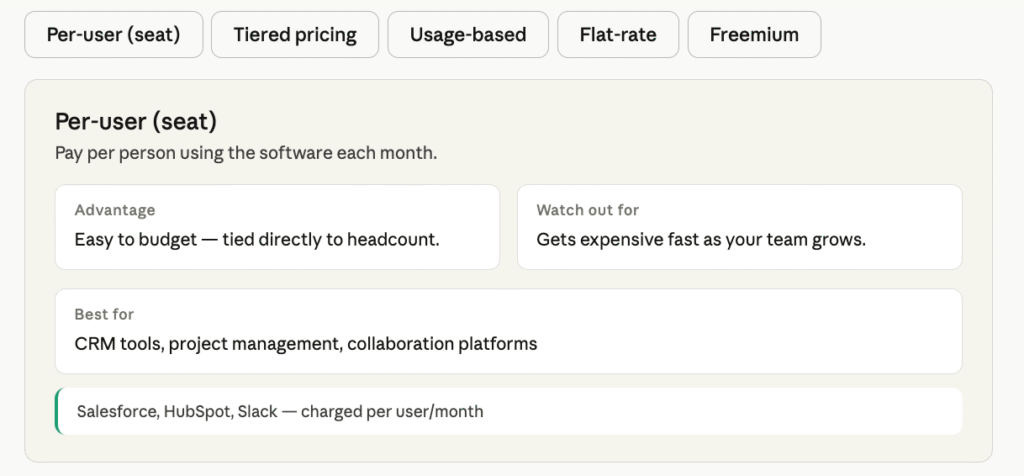
1. Per-User (Per-Seat) Pricing
The most common model. You pay a fixed monthly or annual fee per user. More users = higher cost.
- Example: Salesforce charges per user per month
- Advantage: Easy to understand and budget for
- Disadvantage: Can become expensive as headcount grows; may discourage broader adoption
2. Tiered Pricing
Vendors offer multiple pre-packaged tiers (e.g., Starter, Professional, Enterprise), each with different features and user limits at different price points.
- Example: HubSpot’s Free, Starter, Professional, and Enterprise tiers
- Advantage: Allows businesses to start small and upgrade as needs grow
- Disadvantage: Important features are often locked in higher tiers, creating upgrade pressure
3. Usage-Based (Pay-as-You-Go) Pricing
Customers pay based on actual consumption — API calls made, data processed, emails sent, transactions completed.
- Example: AWS charges for actual compute and storage used; Twilio charges per message sent
- Advantage: Aligns cost with actual value received; no waste for low-usage periods
- Disadvantage: Unpredictable billing; can be hard to budget
4. Flat-Rate Pricing
A single fixed price gives unlimited access to all features for unlimited users. Simple and transparent, but relatively rare.
- Example: Basecamp has historically used a flat annual rate
- Advantage: Maximum simplicity; encourages adoption
- Disadvantage: Limits revenue growth for vendors as the customer base scales
5. Freemium
A free tier with limited features provides user acquisition at scale. Vendors monetize by converting free users to paid plans.
- Example: Dropbox, Slack, Zoom, and Notion all offer freemium tiers
- Advantage: Low barrier to entry; viral adoption; users experience value before committing
- Disadvantage: Many users never convert; free tier support is costly
6. Annual vs. Monthly Billing
Most SaaS vendors offer discounts (typically 15–20%) for annual upfront payment versus monthly billing. Annual contracts also reduce churn for vendors.
Types of SaaS Applications
SaaS has expanded to cover virtually every software category. Here are the major types:
- Customer Relationship Management (CRM) — Manages customer interactions, sales pipelines, contact records, and communication history
- Enterprise Resource Planning (ERP) — Integrates core business processes: finance, supply chain, manufacturing, HR, and procurement
- Human Capital Management (HCM) / HR Software — Handles recruiting, onboarding, payroll, performance management, and workforce planning
- Project Management and Collaboration — Tracks tasks, projects, timelines, team communication, and workflow automation
- Marketing Automation — Manages email campaigns, lead nurturing, social media, advertising, and analytics
- Accounting and Finance — Handles invoicing, expense tracking, financial reporting, payroll, and tax preparation
- Communication and Messaging — Real-time team chat, video conferencing, VoIP calling, and unified communications
- Customer Support tool (Help Desk / Ticketing) — Manages inbound support requests, ticketing, knowledge bases, and agent workflows
- Business Intelligence and Analytics — Data visualization, reporting dashboards, and self-service analytics
- Content Management (CMS) — Manages website content, digital assets, and publishing workflows
- E-Commerce and Retail — Online storefronts, inventory management, order fulfillment, and payment processing
- Security Software — Identity and access management, endpoint security, SIEM, and compliance tools
- Learning Management Systems (LMS) — Delivers online training, eLearning courses, certifications, and skills assessments
- Supply Chain Management — Manages procurement, vendor relationships, logistics, and inventory
- Legal and Contract Management — Document drafting, electronic signatures, contract lifecycle management, and compliance tracking
Examples of Popular SaaS Products
| Category | Leading SaaS Examples |
|---|---|
| CRM | Salesforce, HubSpot, Zoho CRM, Pipedrive |
| ERP | Oracle NetSuite, SAP S/4HANA Cloud, Microsoft Dynamics 365 |
| HR / HCM | Workday, BambooHR, ADP Workforce Now, Rippling |
| Project Management | Asana, Monday.com, Jira, Trello, ClickUp, Notion |
| Collaboration | Slack, Microsoft Teams, Google Workspace |
| Video Conferencing | Zoom, Google Meet, Microsoft Teams, Webex |
| Accounting | QuickBooks Online, Xero, FreshBooks |
| Marketing Automation | HubSpot, Marketo, Mailchimp, ActiveCampaign |
| Customer Support | Zendesk, Freshdesk, Intercom, ServiceNow |
| File Storage | Dropbox, Box, Google Drive |
| Business Intelligence | Tableau, Power BI, Looker, Sisense |
| eCommerce | Shopify, BigCommerce |
| Design | Canva, Figma, Adobe Creative Cloud |
| DevOps / Code | GitHub, GitLab, Datadog, PagerDuty |
| Security | Okta, CrowdStrike, Splunk |
| Entertainment | Netflix, Spotify, Adobe Creative Cloud |
SaaS Architecture: Multi-Tenancy Explained
Architecture is the backbone of every SaaS platform. Understanding the technical choices behind SaaS helps explain its capabilities and constraints.
Single-Instance, Multi-Tenant Architecture
The gold standard of SaaS architecture. One codebase and one set of infrastructure serve all customers simultaneously. Each tenant’s data is logically separated — usually via a tenant_id in the database schema — but the application and database infrastructure are shared.
- Advantages: Maximum cost efficiency for the vendor; consistent, simultaneous updates for all tenants; easiest to maintain and scale
- Challenges: Requires careful data isolation; performance isolation; compliance complexity when tenants have different data residency requirements
Siloed (Dedicated) Multi-Tenant Architecture
Each tenant gets their own dedicated database or infrastructure stack, even though the application logic is shared. More expensive but offers stronger data isolation.
- Advantages: Easier compliance and data residency; one tenant’s performance issues don’t affect others
- Challenges: Much higher infrastructure costs; more complex deployment pipelines
Hybrid Architecture
Some SaaS platforms offer a hybrid approach where most tenants share infrastructure, but enterprise clients can opt into dedicated, isolated environments — often called “private cloud” or “dedicated tenancy” tiers.
Key Architectural Components
A modern SaaS platform typically includes the following components:
- Load Balancers — Distribute incoming traffic evenly across multiple application servers
- Application Servers — Run the application logic; often containerized using Docker/Kubernetes
- Database Layer — Stores all customer data; may be relational (PostgreSQL, MySQL), NoSQL (MongoDB, DynamoDB), or hybrid
- CDN (Content Delivery Network) — Serves static assets from servers geographically close to the user, improving performance globally
- Caching Layer — Tools like Redis or Memcached cache frequently accessed data in memory, reducing database load
- Message Queues — Asynchronous job processing (SQS, RabbitMQ, or Kafka) for tasks that don’t need to be completed synchronously
- API Gateway — Manages and routes API requests, enforces authentication, applies rate limiting
- Monitoring and Observability — Real-time monitoring of application health and performance (Datadog, New Relic, Prometheus)
SaaS Security and Compliance
Security is one of the most scrutinized aspects of SaaS adoption. When you move data to a third-party platform, you must trust that platform to protect it.
Shared Security Model
In SaaS, security is a shared responsibility:
- The vendor is responsible for: The infrastructure, the application, the network, and the physical data centers
- The customer is responsible for: User access management, password policies, data classification, and configuration settings
“While SaaS vendors provide varying degrees of security controls, it’s up to customers to configure them correctly. Misconfigurations expose sensitive data and create vulnerabilities. Organizations must take ownership of securing their SaaS environments.”
— Reco, State of SaaS Security 2024
Data Encryption
Reputable SaaS vendors encrypt data at two levels:
- In transit: All data moving between the user’s browser and the vendor’s servers is encrypted using TLS (typically TLS 1.2 or 1.3)
- At rest: Data stored in databases and file systems is encrypted using AES-256 or similar standards
Identity and Access Management (IAM)
SaaS platforms provide role-based access controls (RBAC) that allow administrators to define exactly what each user can see and do. Enterprise tiers typically offer Single Sign-On (SSO) via SAML or OAuth, enabling organizations to manage SaaS access through their existing identity provider (Okta, Azure Active Directory, or Google Identity).
Multi-Factor Authentication (MFA)
Most enterprise SaaS applications support or require MFA, adding a second verification layer beyond passwords to prevent unauthorized access even when credentials are compromised.
Data Residency and Sovereignty
Where is your data physically stored? This matters enormously for compliance in regulated industries. The EU’s GDPR, for example, restricts the transfer of EU citizens’ personal data outside the European Economic Area. Leading SaaS vendors now offer regional data hosting options.
Gartner projects that 90% of organizations will have hybrid cloud deployments by 2027, partly driven by demand for data residency control. As Gartner’s Hardeep Singh noted, enterprises seek “to gradually transition to the cloud while keeping control over their data and operations.”
Compliance Certifications to Look For
When evaluating a SaaS vendor’s security posture, check for these certifications:
- SOC 2 Type II — Independent audit verifying security controls are effective over time
- ISO 27001 — International standard for information security management systems
- GDPR — Compliance with EU data protection regulations
- HIPAA — Required for healthcare data in the United States
- PCI DSS — Required for platforms that process payment card data
- FedRAMP — Required for SaaS platforms serving US federal government agencies
According to 2025 research from Wing Security, organizations with strong SaaS risk management systems are 25% more likely to secure favorable cyber insurance terms — making SaaS security posture a direct financial concern, not merely a compliance checkbox.
Penetration Testing and Vulnerability Management
Enterprise SaaS vendors conduct regular penetration tests — either internally or by third-party security firms — to identify and remediate vulnerabilities before attackers can exploit them. Bug bounty programs are increasingly common.
SaaS Integration and APIs
Modern businesses use dozens of SaaS tools, and they need those tools to work together. Integration is therefore one of the most important considerations when evaluating a SaaS product.
APIs (Application Programming Interfaces)
Virtually all modern SaaS applications expose REST APIs (or increasingly, GraphQL APIs) that allow other software systems to read from and write to them programmatically. APIs are the foundation of SaaS integration — they make it possible for your CRM to talk to your email platform, your accounting software to pull data from your ERP, or your custom application to extend a SaaS product’s functionality.
Native Integrations
Many SaaS vendors build pre-built integrations with other popular SaaS tools, available in an “integration marketplace” or app store. These native integrations often require minimal configuration — you connect your accounts, map your fields, and the data flows automatically.
iPaaS (Integration Platform as a Service)
For more complex multi-system integrations, businesses often use an iPaaS platform. Tools like Zapier, Make (formerly Integromat), MuleSoft, Boomi, or Workato allow non-technical users and developers to build automated workflows connecting multiple SaaS applications without custom code.
Webhooks
Webhooks allow SaaS applications to push real-time notifications to other systems when specific events occur (e.g., “a new customer was created” or “a payment failed”). Unlike APIs that require polling, webhooks push data the moment something happens — more efficient and real-time.
Open Standards
Well-designed SaaS platforms support open standards for data portability and interoperability:
- CSV/Excel exports
- SFTP file transfers
- OAuth 2.0 for authentication
- SAML for SSO
- Standard data formats like JSON or XML
SaaS for Different Business Sizes
Startups and Small Businesses
For small businesses and startups, SaaS is almost always the right choice. The key reasons:
- No capital required for infrastructure
- Instant access to enterprise-grade capabilities
- Minimal IT staff required
- Month-to-month subscriptions preserve cash flow flexibility
- Freemium tiers allow experimentation with no risk
A 10-person startup can now access the same CRM, project management, HR, and accounting software as a Fortune 500 company — previously unimaginable with on-premises software.
Mid-Size Businesses
Mid-size companies (50–5,000 employees) typically run a mixed environment of multiple SaaS tools, and integration becomes a critical challenge. At this scale, businesses need to think carefully about:
- Creating a coherent “stack” of integrated SaaS tools rather than a fragmented set of siloed apps
- Implementing proper user lifecycle management (provisioning and deprovisioning access as employees join and leave)
- Evaluating total cost of ownership as subscription spending scales with headcount
- Compliance requirements that may vary by department (finance, HR, healthcare)
Enterprise Organizations
Large enterprises (5,000+ employees) have the most complex SaaS environments. According to 2024 industry data, large organizations used an average of 131 SaaS applications. Research from Wing Security projects that by 2027, mid-market organizations will surpass 1,000 SaaS apps.
Key enterprise SaaS considerations include:
- Vendor security audits and negotiated SLAs
- Private cloud or dedicated tenancy options for sensitive data
- Enterprise SSO and advanced RBAC for identity governance at scale
- Data residency and sovereignty requirements across global operations
- Custom API integrations with existing legacy systems
- Software Asset Management (SAM) to track, govern, and optimize SaaS spending
Gartner’s analysis of the 2024 enterprise SaaS market found Microsoft, Salesforce, and SAP collectively leading the market with the highest revenue shares, demonstrating their capacity for adaptation and innovation in the evolving cloud landscape.
How to Choose a SaaS Product
Selecting the right SaaS product requires more than comparing feature lists. Here is a structured evaluation framework:
- Define Your Requirements First — Document your business requirements clearly before looking at vendors: what problem are you solving, who will use the product, what integrations are essential, what are your compliance requirements, and what’s your budget?
- Security and Compliance — Verify that the vendor holds the certifications relevant to your industry (SOC 2, HIPAA, GDPR, etc.). Ask for their latest audit reports.
- Total Cost of Ownership (TCO) — Factor in onboarding and implementation costs, training time, integration development, potential data migration costs, and the cost of add-ons you’ll likely need.
- Integration Ecosystem — Does the product integrate with the tools you already use? How extensive is the API? Is there an iPaaS connector available for your other key tools?
- Scalability — Will the product grow with you? Evaluate performance at your expected usage scale. Understand the pricing impact as you add users, data, or transactions over time.
- Vendor Stability and Reputation — Research the vendor’s funding, customer base, customer reviews (G2, Capterra, Gartner Peer Insights), support quality, and company history.
- Data Portability — Can you easily export your data in a standard format if you decide to switch? Ask about data export options before you sign.
- Support and SLA — What support tiers are available? What are the response time commitments? Is 24/7 support available?
- Free Trial and Proof of Concept — Most SaaS vendors offer a free trial (typically 14–30 days). Use it rigorously — not just to explore features, but to test your specific use cases, integration requirements, and performance with realistic data volumes.
SaaS Metrics That Matter
Whether you’re a buyer evaluating a vendor’s health or a SaaS business owner, these metrics tell the true story of SaaS performance:
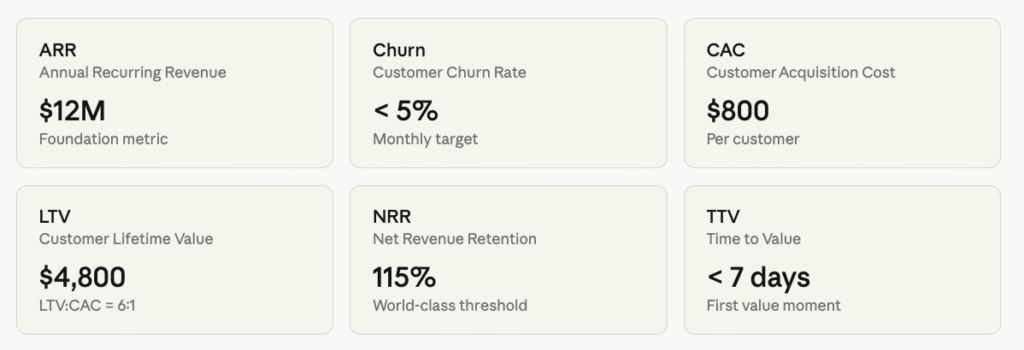
- MRR / ARR (Monthly / Annual Recurring Revenue) — The total predictable revenue generated per month or per year. The foundational financial metric for any SaaS business.
- Churn Rate — The percentage of customers or revenue lost per period. A 5% monthly churn rate means the business loses over 45% of its customers annually.
- CAC (Customer Acquisition Cost) — How much the vendor spends on average to acquire a new customer. High CAC relative to LTV is unsustainable.
- LTV / CLV (Customer Lifetime Value) — The total revenue expected from a customer over the entire duration of their relationship with the vendor. An LTV:CAC ratio of 3:1 or higher indicates business efficiency.
- NRR (Net Revenue Retention) — Revenue retained from existing customers, accounting for churn, downgrades, and expansion (upsells/cross-sells). NRR above 100% means the customer base is growing in revenue even without new customer acquisitions — the hallmark of a healthy SaaS business.
- DAU / MAU (Daily / Monthly Active Users) — How many users actively engage with the product. High engagement correlates with low churn.
- TTV (Time to Value) — How long it takes a new customer to experience the core value of the product. Shorter TTV correlates with higher retention.
- ARPU (Average Revenue Per User) — Total revenue divided by total users. Useful for understanding pricing efficiency and customer segment mix.
SaaS Market Size and Growth
The numbers tell a remarkable story of adoption and growth.
According to Gartner, global SaaS end-user spending reached approximately $247–250 billion in 2024 and is on track to approach $300 billion in 2025, representing roughly 20% year-over-year growth. Within the enterprise segment specifically, the market reached $218.5 billion in 2024, growing 16.7% year-over-year, with CRM alone accounting for 51.4% of that revenue.
“Public cloud end-user spending will eclipse the one trillion dollar mark before the end of this decade.”
— Sid Nag, Vice President Analyst, Gartner
Key regional and vertical trends:
- North America remains the largest regional market, with the US dominating enterprise cloud spending
- Asia-Pacific is the fastest-growing region, driven by rapid digitalization in India, Southeast Asia, and China
- Vertical SaaS (industry-specific solutions) is projected to reach $157.4 billion by 2025, growing at a 23.9% CAGR
- The COVID-19 pandemic was a massive accelerant — between 2020 and 2022, SaaS adoption grew faster than in the entire preceding decade
- Verticals with the fastest SaaS adoption include financial services, healthcare, retail, manufacturing, and education
The Future of SaaS
SaaS is not standing still. Several major trends are reshaping what SaaS means and how it works.
AI-Native SaaS
Artificial intelligence is being embedded deeply into SaaS applications — not as a separate module, but as a native part of the product experience. AI-powered features include:
- Intelligent automation of repetitive workflows
- Predictive analytics and forecasting
- Natural language search and commands
- AI-generated content
- Intelligent assistants (“copilots”) that help users navigate complex tasks
“If there is a SaaSpocalypse, it may be eaten by the Sasquatch — because there are a lot of companies using a lot of SaaS, and it just got better with agents.”
— Marc Benioff, Salesforce CEO, Q4 2026 earnings call
Gartner predicts that 33% of enterprise software applications will include agentic AI by 2028, enabling autonomous task execution. Already, 35% of SaaS companies currently use AI, with 42% planning adoption, and 38% incorporate generative AI into their products.
Vertical SaaS
Rather than generic horizontal platforms built for all industries, vertical SaaS products are built specifically for one industry — healthcare, construction, legal, real estate, manufacturing. The vertical SaaS market is projected to reach $157.4 billion by 2025 at a 23.9% CAGR. These specialized products can achieve much deeper workflow integration and compliance alignment than horizontal tools.
Composable SaaS and Modular Architectures
The future of enterprise software is increasingly composable — assembling best-of-breed SaaS modules and connecting them with APIs and iPaaS rather than relying on a single monolithic suite. This gives businesses more flexibility but also increases integration complexity.
Product-Led Growth (PLG)
The traditional enterprise software sales model (outbound sales teams, long procurement cycles) is being replaced by product-led growth, where the product itself drives adoption. Freemium, viral features, and self-service onboarding allow SaaS products to grow from individual users to enterprise accounts without a traditional sales process.
Embedded Finance in SaaS
SaaS platforms are increasingly adding financial services — payments, lending, insurance, banking — directly into their products. A construction management SaaS might offer project financing; a restaurant software platform might offer a business checking account. This “embedded finance” model creates new revenue streams and deeper customer relationships.
Sustainability and Green SaaS
As energy consumption from cloud data centers grows, SaaS vendors face increasing pressure to commit to carbon neutrality and renewable energy. Sustainable cloud practices are becoming a procurement consideration, especially for large enterprise customers with ESG commitments.
Consolidation and SaaS Rationalization
The era of explosive SaaS proliferation is giving way to consolidation. Enterprises are actively reducing the number of SaaS tools they use, favoring integrated platforms over point solutions.
According to a TechTarget/Gartner survey, 40% of organizations have already begun to consolidate their cybersecurity tools and vendors, with an additional 21% planning to do so — reflecting a broader enterprise trend of reducing SaaS sprawl and implementing formal governance programs to control costs and reduce security risk.
Frequently Asked Questions
What is the difference between SaaS and cloud software?
All SaaS is cloud software, but not all cloud software is SaaS. SaaS specifically means the vendor hosts and manages the application for you, accessible via browser. You can also use cloud infrastructure (IaaS) to host your own software — that is cloud computing but not SaaS.
Is Google Workspace SaaS?
Yes. Google Workspace (Gmail, Google Docs, Google Drive, Google Meet, etc.) is a classic example of SaaS — hosted by Google, accessed via browser, subscription-based, and automatically updated.
What are the biggest risks of SaaS?
The primary risks are:
- Data security and privacy (your data is stored with the vendor)
- Vendor lock-in (migrating away is difficult)
- Dependency on internet connectivity
- Limited customization compared to on-premises or custom software
Can SaaS work offline?
Most SaaS applications require an internet connection. Some offer limited offline functionality — for example, Google Docs allows offline editing via a browser extension — but the core SaaS experience is online.
Is SaaS suitable for highly regulated industries like healthcare and finance?
Yes, but you must carefully vet vendors for relevant compliance certifications (HIPAA for healthcare, SOC 2 and PCI DSS for finance, GDPR for EU data) and negotiate appropriate data processing agreements.
What is a SaaS subscription?
A SaaS subscription is the recurring payment (monthly or annual) that gives you access to a SaaS application. Unlike a perpetual software license (a one-time purchase), a subscription must be renewed continuously. If you stop paying, you lose access.
How is SaaS priced?
SaaS is most commonly priced per user per month, in tiers based on features, or based on usage. Most vendors offer annual billing discounts of 15–25% versus monthly billing.
What is SaaS sprawl?
SaaS sprawl refers to the uncontrolled growth in the number of SaaS applications used within an organization, often acquired without IT oversight (shadow IT). It creates security risks, wasted spending, and integration complexity. A 2024 industry report found that 50% of SaaS licenses went unused for over 90 days.
What is vertical SaaS?
Vertical SaaS refers to software built specifically for a single industry (e.g., healthcare, construction, legal) rather than for all businesses generally. Vertical SaaS products offer deeper industry-specific functionality and compliance alignment.
Who coined the term SaaS?
The term “Software as a Service” was popularized in the early 2000s, largely by industry analysts at firms like Gartner and by the emergence of Salesforce as the first major modern SaaS company (founded 1999).
Conclusion
Software as a Service has fundamentally redefined how businesses access, use, and pay for software. It has democratized access to enterprise-grade capabilities, dramatically reduced IT overhead, enabled the global remote workforce, and created an entirely new economic model for the software industry.
“The world has fundamentally changed. Every CEO I talk to is not leading the same company they led three years ago.”
— Marc Benioff, Salesforce (on the pace of digital transformation driven by cloud and AI)
With global SaaS spending approaching $300 billion annually and Gartner projecting the broader cloud market to eclipse $1 trillion before the end of this decade, understanding SaaS is no longer optional for business leaders, IT professionals, and technology decision-makers. It is essential literacy for navigating the modern digital economy.
Whether you’re evaluating your first SaaS tool, auditing your organization’s SaaS stack, or building a SaaS product of your own, the principles covered in this guide will serve as your foundation.
Data sources: Gartner (2024–2025 cloud and SaaS market reports), Reco State of SaaS Security 2024, Wing Security 2025 SaaS Security Predictions, JPMorgan Chase CISO open letter (2025), TechTarget/Gartner vendor consolidation survey. Expert quotes sourced from Marc Benioff’s Behind the Cloud (2009), public earnings calls, and attributed analyst commentary.