
An AI agent is a software system that uses a large language model (LLM) to decide what to do next, takes actions through tools, observes the results, and keeps going until it reaches a goal. A chatbot answers a question and stops. An agent can look up an order, check a policy, draft a reply, ask for approval, and send it, choosing each step based on what it learned in the step before.
Building one is less mysterious than it sounds. Every agent, whether it is a no-code automation or a custom system written from scratch, is made of the same handful of parts: a model, a set of instructions, tools, memory, a control loop, and guardrails. This guide explains each component, helps you decide whether your problem needs an agent at all, and walks through eleven steps to design, build, test, and run one.
Quick answer: Define one narrow job with clear success criteria, map the steps a person would follow, choose a build approach, pick a model, write instructions, give the agent a small set of well-described tools, add needed memory, wrap everything in a loop, add guardrails and human approval for risky actions, then test before deployment.
What Are the Core Components of an AI Agent?
Almost every AI agent contains six components.
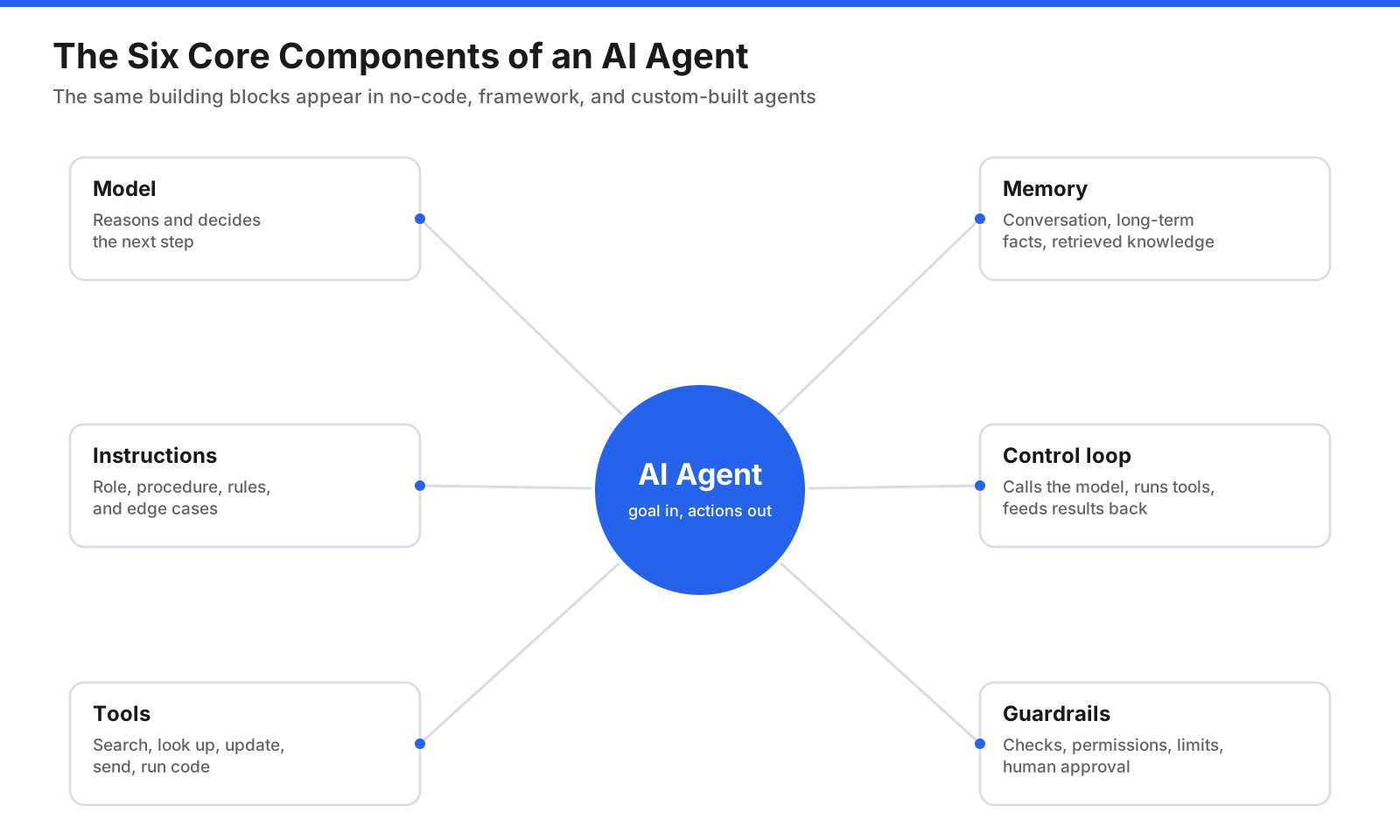
Six components make up nearly every AI agent, regardless of the platform used to build it.
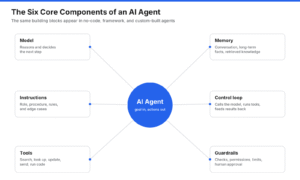
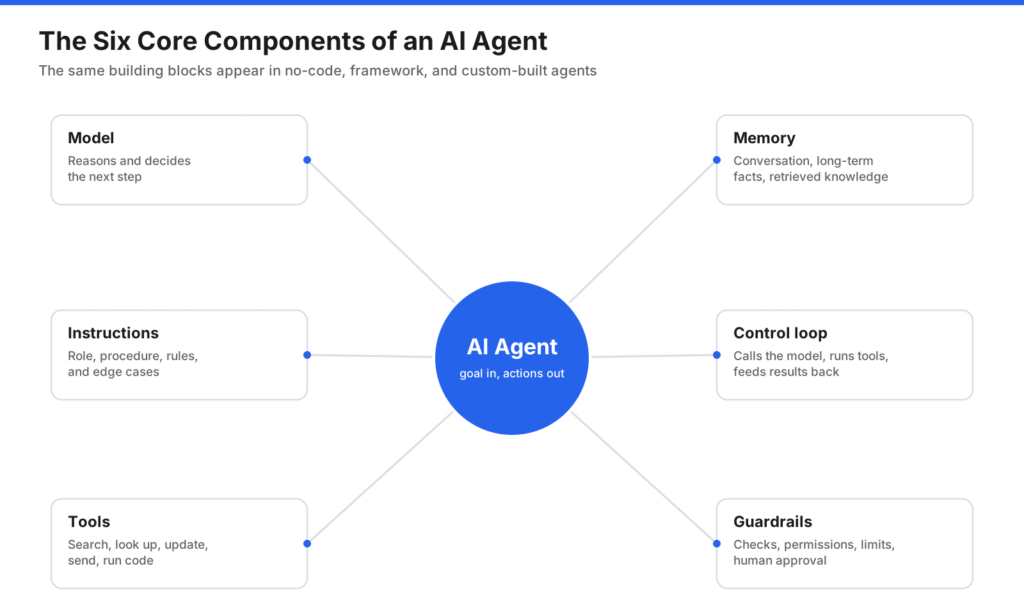
The model is the reasoning engine. It reads the goal, instructions, conversation, and earlier action results, then decides what to do next. Instructions tell the model its role, job, rules, and how to handle problems. Tools are actions such as searching a knowledge base, querying a database, calling an API, sending email, creating a ticket, or running code. Memory provides context: short-term memory holds the current conversation and recent tool results, while long-term memory stores facts and outcomes across sessions. Retrieval-augmented generation (RAG) brings relevant document passages into context. The control loop sends context to the model, runs chosen tools, feeds results back, and repeats. Guardrails include input and output checks, tool limits, spending and step limits, and human approval for consequential actions.
How Does an AI Agent Work?
An agent works in a repeated “reason and act” cycle: it receives information, reasons about what to do, acts, and observes the result.
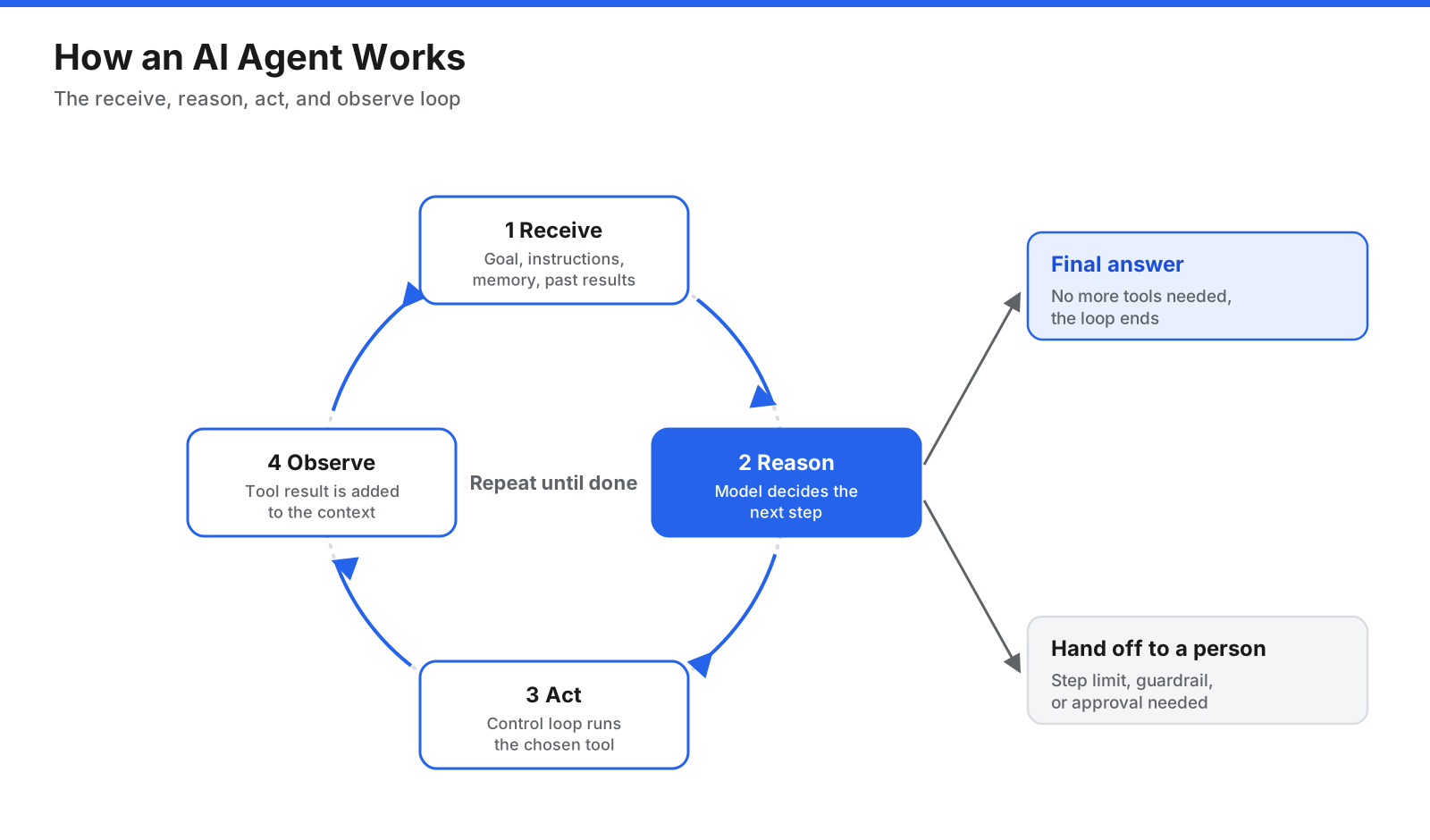
The agent repeats this loop until it reaches the goal, hits a limit, or needs a person to step in.
- Receive. Start with a goal, instructions, memory, and earlier results.
- Reason. The model decides whether to answer, ask a question, or call a tool.
- Act. The control loop runs the selected tool with the supplied arguments.
- Observe. The result is added to context for the next pass.
The loop ends when the model produces a final answer, reaches a maximum number of steps, or a guardrail hands the task to a person. Without exit conditions, an agent can loop forever, repeat failed actions, or run up costs. Every production agent needs a clear stopping rule.
Do You Need an Agent or a Workflow?
Agents trade predictability for flexibility. They are slower and more expensive than fixed code, and their behavior can vary from run to run. If a task always follows the same steps in the same order, a traditional script or fixed workflow is usually better.
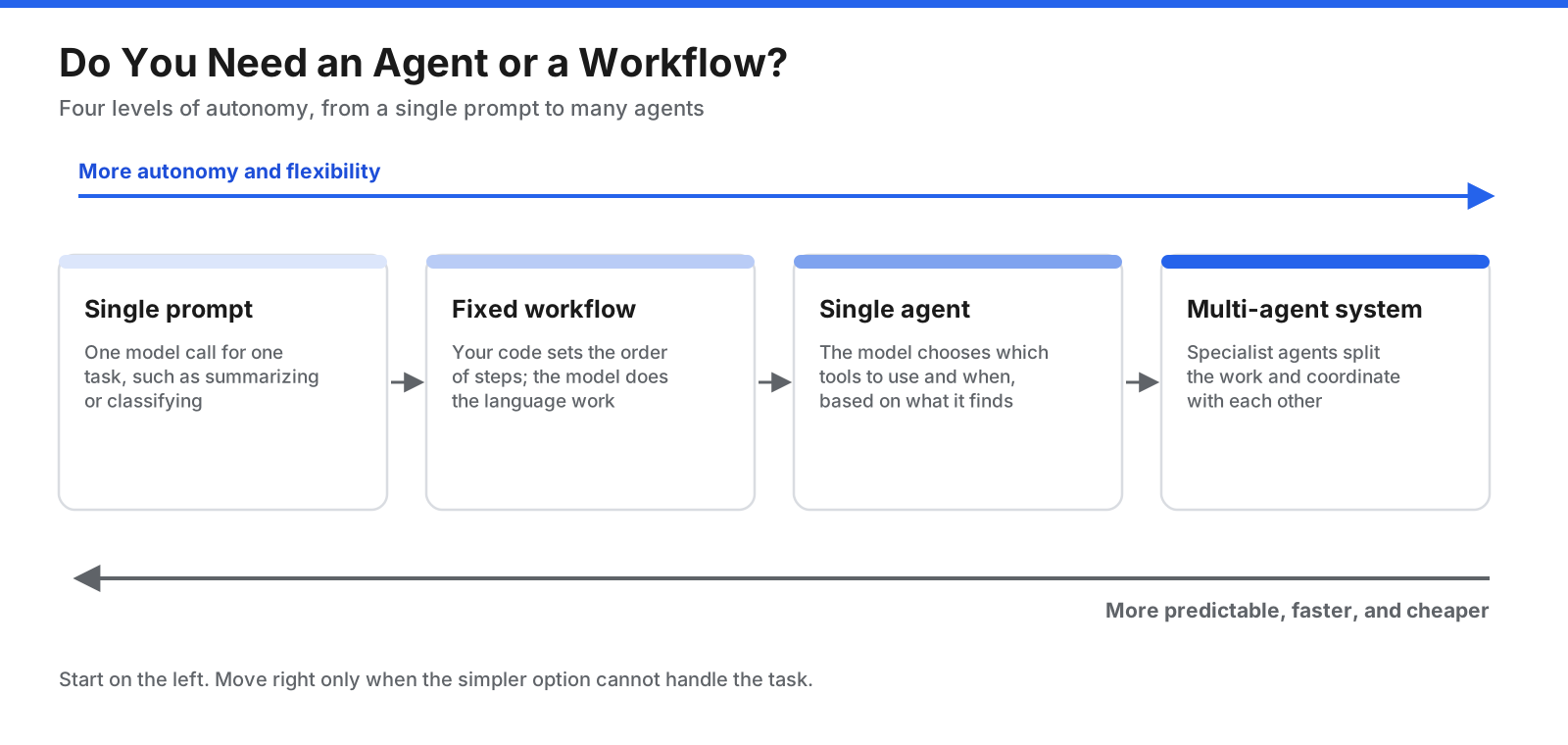
Move to the right only when the task needs the extra flexibility. Each step adds cost and unpredictability.
- A single prompt handles one defined task, such as summarizing a document or classifying a support ticket.
- A fixed workflow chains model calls and tools in a sequence defined in code.
- A single agent chooses which tools to use and in what order based on what it finds.
- A multi-agent system splits work across specialized agents that coordinate with each other.
An agent fits tasks that require judgment, depend on information discovered along the way, involve messy inputs, or have outgrown brittle rule-based automation. Start with the simplest approach and add autonomy only when it is needed.
How Do You Build an AI Agent Step by Step?
The process works for a simple personal agent and a production business agent. The scale changes, but the order stays the same.
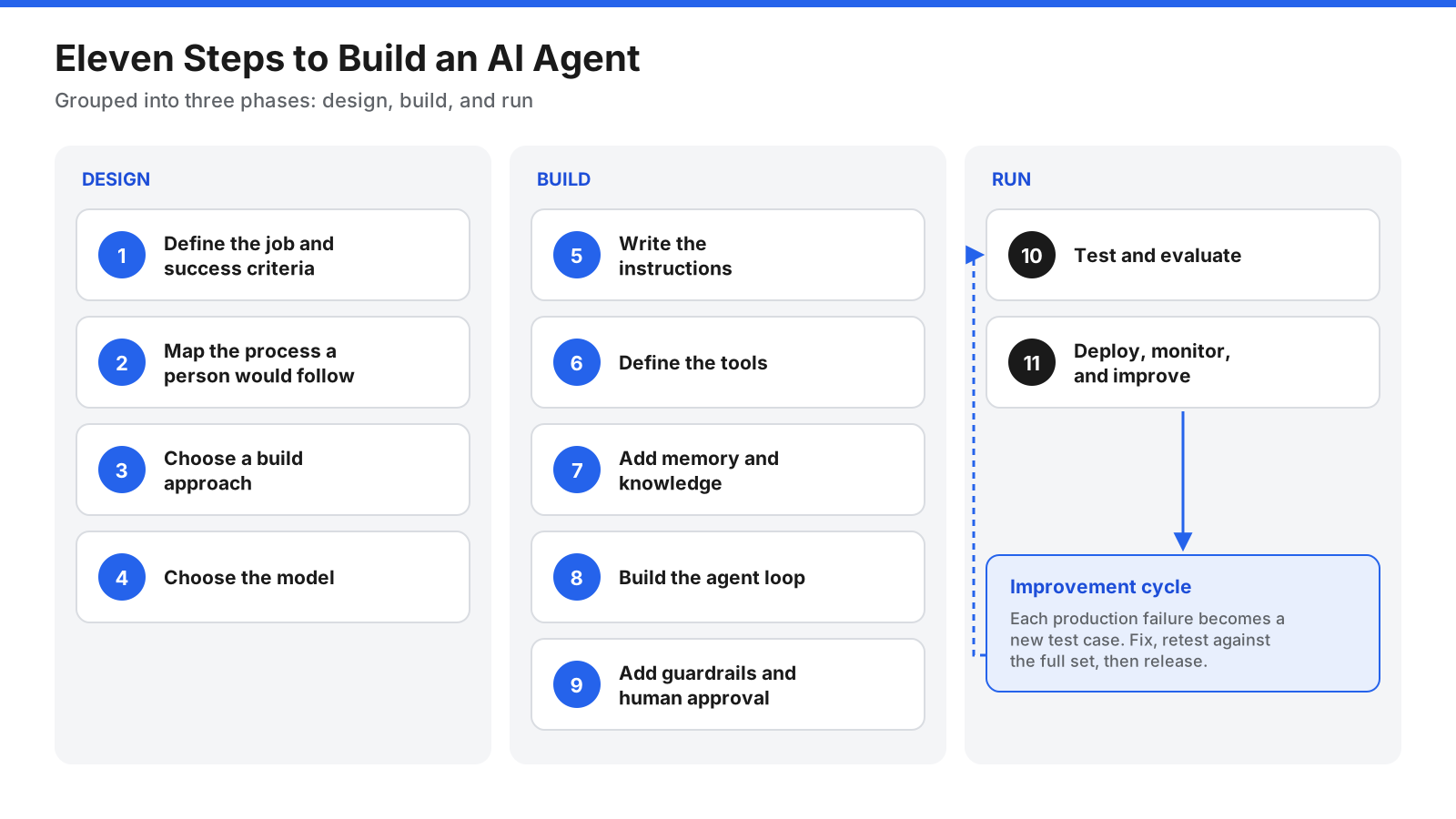
Design decisions made early shape everything that follows, so spend time on the first two steps.
Step 1: Define the Job and Success Criteria
Start with one narrow job. “Help customers” is too broad. “Answer order status questions and process refunds under a set amount” is specific and measurable. Write down the goal, boundaries, and success criteria, such as tasks completed correctly, appropriate handoffs, response time, and cost per task. Collect ten to twenty example tasks, including easy cases, difficult cases, and cases the agent should refuse.
Step 2: Map the Process a Person Would Follow
Write out how a skilled person completes the job today. Note each decision, lookup, and system used. Each lookup or action is a candidate tool; the exercise also shows which steps need judgment and which are fixed. Fixed steps are often better handled by ordinary code, reserving the model for decisions that need it.
Step 3: Choose a Build Approach
There are three broad approaches, each suited to different skills, timelines, and control requirements.
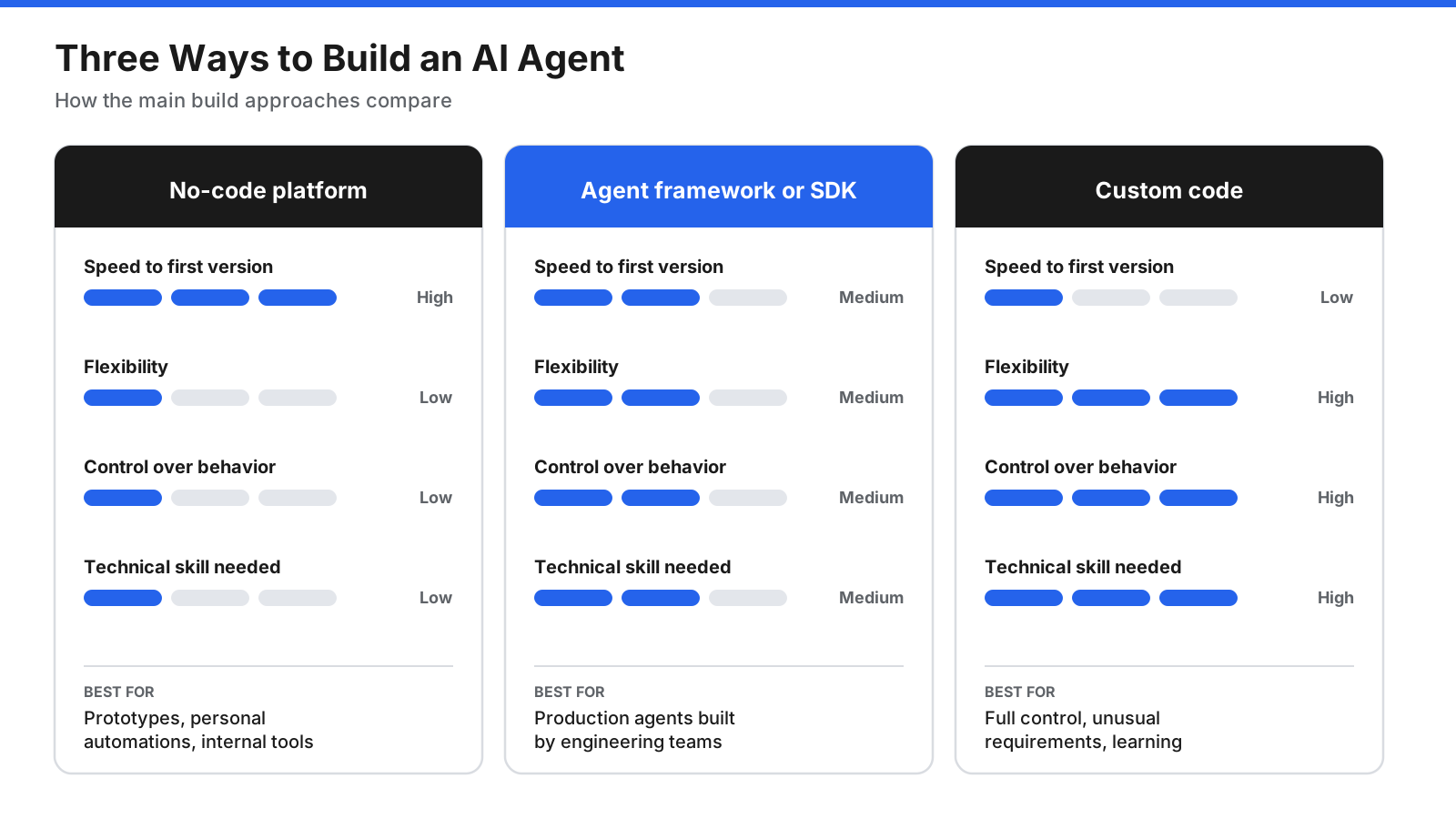
No approach is best for every case. Many teams prototype on a no-code platform and rebuild in code once the design is proven.
No-code and low-code platforms use a visual interface to connect a model, add integrations, write instructions, and test. They are fast for prototypes and internal tools, but offer less control. Agent frameworks and SDKs provide building blocks for tool calling, memory, tracing, coordination, and model connections. Custom code gives full control over the loop but means you must handle retries, tracing, and other plumbing. Compare model support, tool integration, evaluation, privacy, hosting, and how difficult it would be to move later.
Step 4: Choose the Model
Model choice affects reasoning, instruction following, tool-calling reliability, and cost. Start a prototype with a capable model to learn whether the job is possible, then test smaller, cheaper models against the same test set. Consider tool-calling accuracy, context window, speed, cost per task, and hosting or data requirements. Most teams do not need to train a model; clear instructions, good tools, and retrieval solve many agent problems.
Step 5: Write the Instructions
Treat instructions as a job description and operating manual. Cover the role and goal, procedure, tool guidance, rules and boundaries, edge cases, and output format. Specific instructions change behavior more reliably than broad requests such as “be helpful.” Use example tasks to check whether each instruction has the intended effect.
Step 6: Define the Tools
Each tool needs a name, a description the model can use to decide when to call it, and a schema defining accepted inputs. For example, a get_order_status tool could look up an order’s current status and require an order ID. Start with a small set of focused tools, explain when to use each one and what it returns, return compact useful results, provide helpful errors, and separate read-only tools from tools that change data or contact people. The Model Context Protocol (MCP) is an open standard that can help agents discover and call tools and data sources consistently.
Step 7: Add Memory and Knowledge
An agent needs the right information at the right time. Too little context encourages guessing; too much can slow the agent and increase cost.
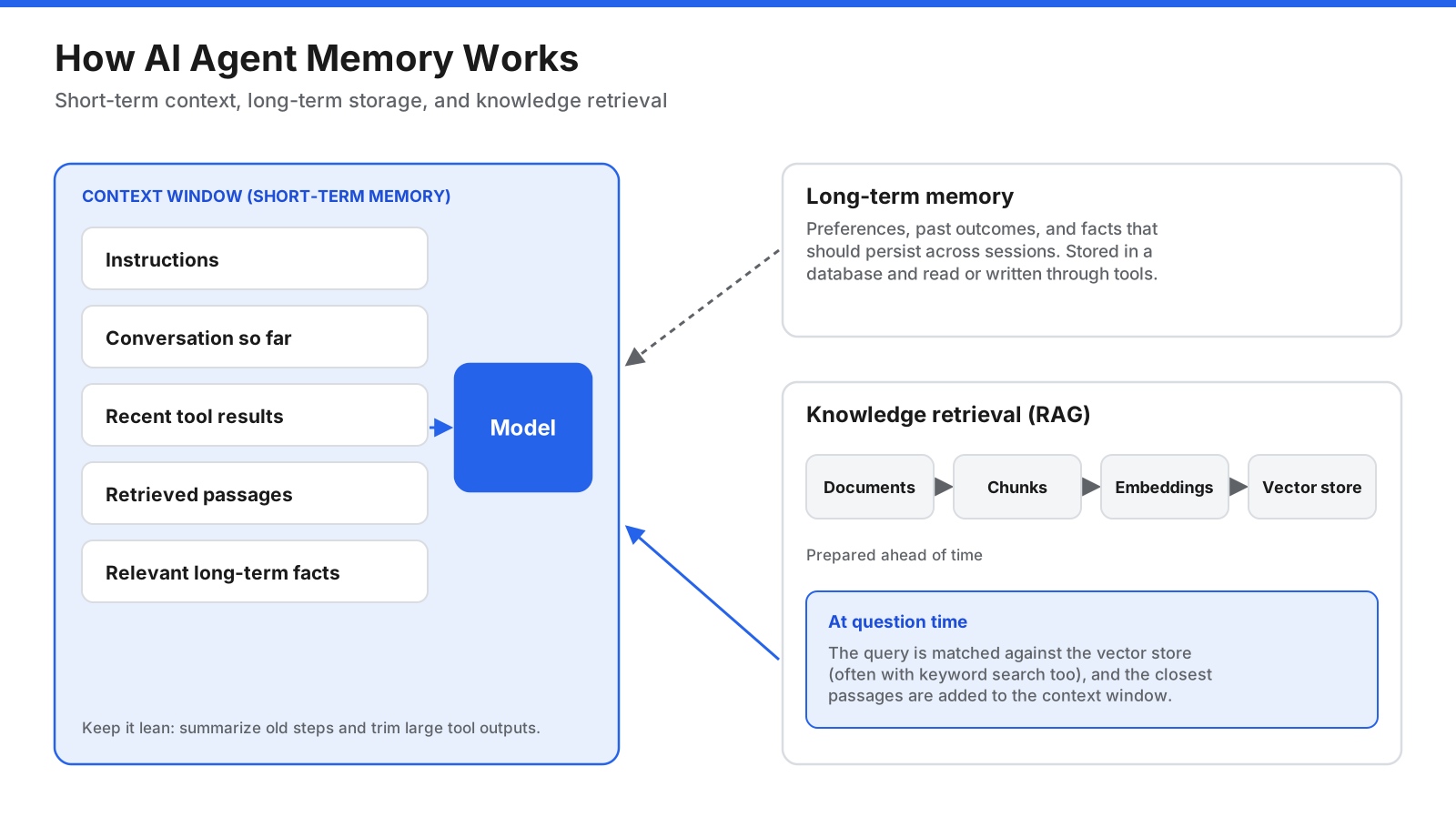
Short-term memory holds the current task. Long-term memory and knowledge retrieval bring in information only when relevant.
Short-term memory is conversation history and recent tool results in the context window. For long tasks, summarize older steps or drop outputs that are no longer needed. Long-term memory stores facts or outcomes that should persist across sessions, usually in a database accessed through tools. Knowledge retrieval (RAG) searches documents such as policies and manuals, then brings relevant passages into context. A typical setup chunks documents, creates embeddings, stores them in a vector database, and retrieves close matches for a query, often alongside keyword search. Start simple and add long-term memory or retrieval only when the task needs it.
Step 8: Build the Agent Loop
The loop connects the parts. A basic implementation starts with system instructions and the user goal, calls the model with tool definitions, returns if there are no tool calls, checks whether approval is required, runs tools, adds results to the conversation, and repeats up to a maximum step count. A production version also needs retries, timeouts, logging, cost tracking, and handling for invalid tool arguments.
MAX_STEPS = 10

def run_agent(user_goal):
    messages = [
        {"role": "system", "content": INSTRUCTIONS},
        {"role": "user", "content": user_goal},
    ]

    for step in range(MAX_STEPS):
        response = call_model(messages, tools=TOOL_DEFINITIONS)

        if not response.tool_calls:
            return response.text

        messages.append(response.as_message())

        for call in response.tool_calls:
            if needs_approval(call):
                return request_human_approval(call)
            result = run_tool(call.name, call.arguments)
            messages.append(tool_result_message(call.id, result))

    return "Step limit reached. Handing this task to a person."
Step 9: Add Guardrails and Human Approval
An agent that can act can also make consequential mistakes. Layer several protections so no single check has to catch everything.
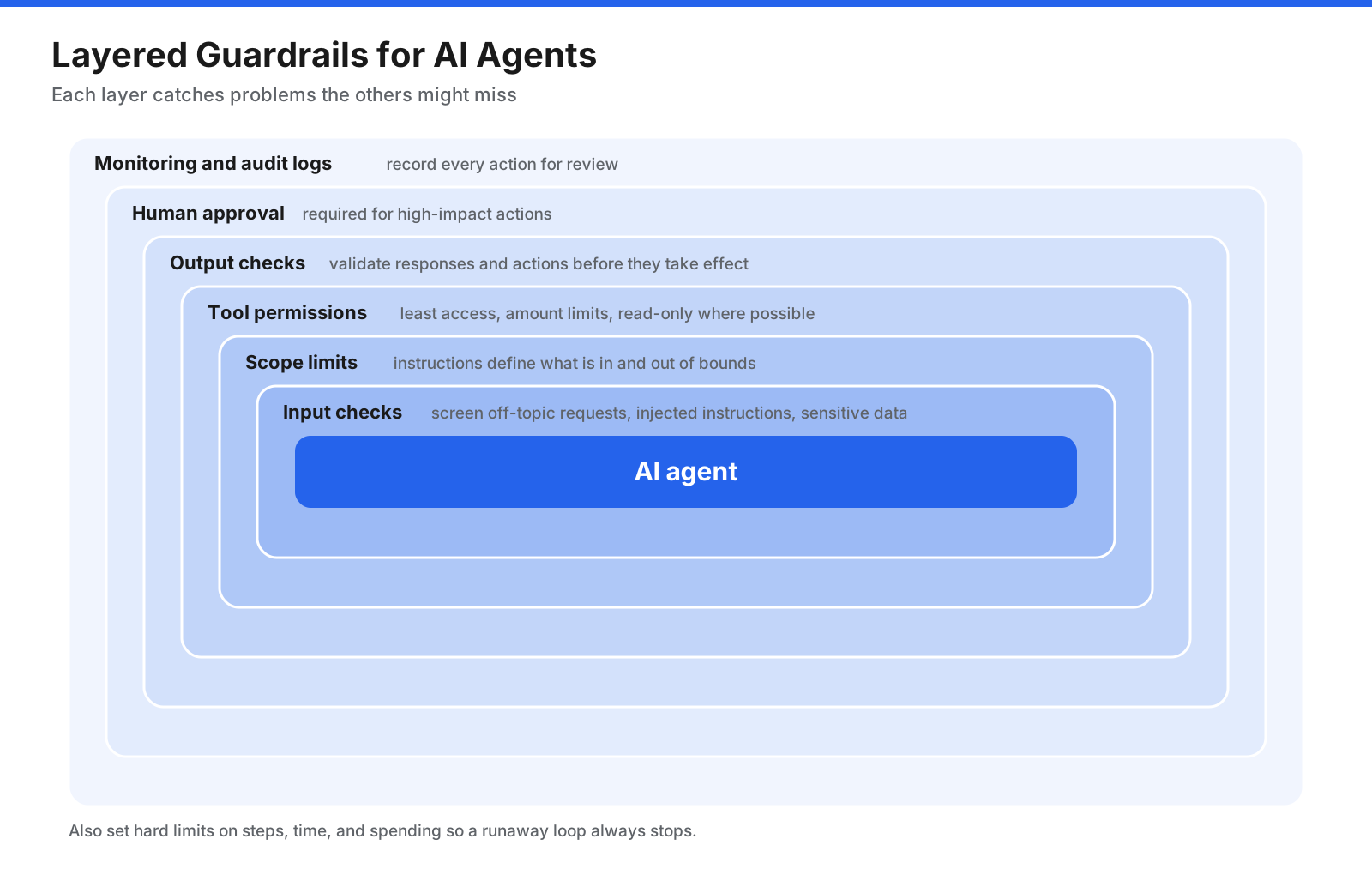
Layered guardrails mean a problem missed by one check can still be caught by another.
- Input checks screen for off-topic requests, attempts to override instructions, and sensitive data.
- Scope limits define what the agent may and may not do.
- Tool permissions grant only the access needed, such as read-only database access or refunds below a limit.
- Output checks validate responses and actions before they take effect.
- Human approval protects high-impact actions such as sending customer messages, deleting records, making payments, or changing production systems.
- Step, time, and spending limits stop runaway loops.
- Monitoring and audit logs record what happened for later review.
Treat content from web pages, emails, and uploaded files as untrusted data, not instructions. Keep high-impact tools behind approval when an agent processes outside content.
Step 10: Test and Evaluate
Because the same input can produce different outputs, use the example tasks from Step 1 as an evaluation set whenever you change instructions, tools, or the model. Component tests check individual tools and retrieval. Task tests run the whole agent and assess completion, tool choice, policy compliance, and handoff. Behavior checks assess tone, accuracy, and refusals. Automate exact checks where possible, add human review for judgment calls, and use traces to record model calls, tool calls, inputs, and outputs so failures are easier to diagnose.
Step 11: Deploy, Monitor, and Improve
Launch with limited scope, such as a small user group or subset of request types. Keep people involved for consequential actions until the agent proves itself on live traffic. Monitor task completion, handoff and error rates, user feedback, steps per task, response time, and cost. Review traces regularly and turn production failures into new test cases. Deployment begins an ongoing cycle of observing, fixing, and retesting.
When Should You Use Multiple Agents?
A single agent with good tools can handle a surprising amount of work. Multiple agents may help when instructions become too long, the agent has too many tools to choose reliably, or a task naturally splits into specialties.
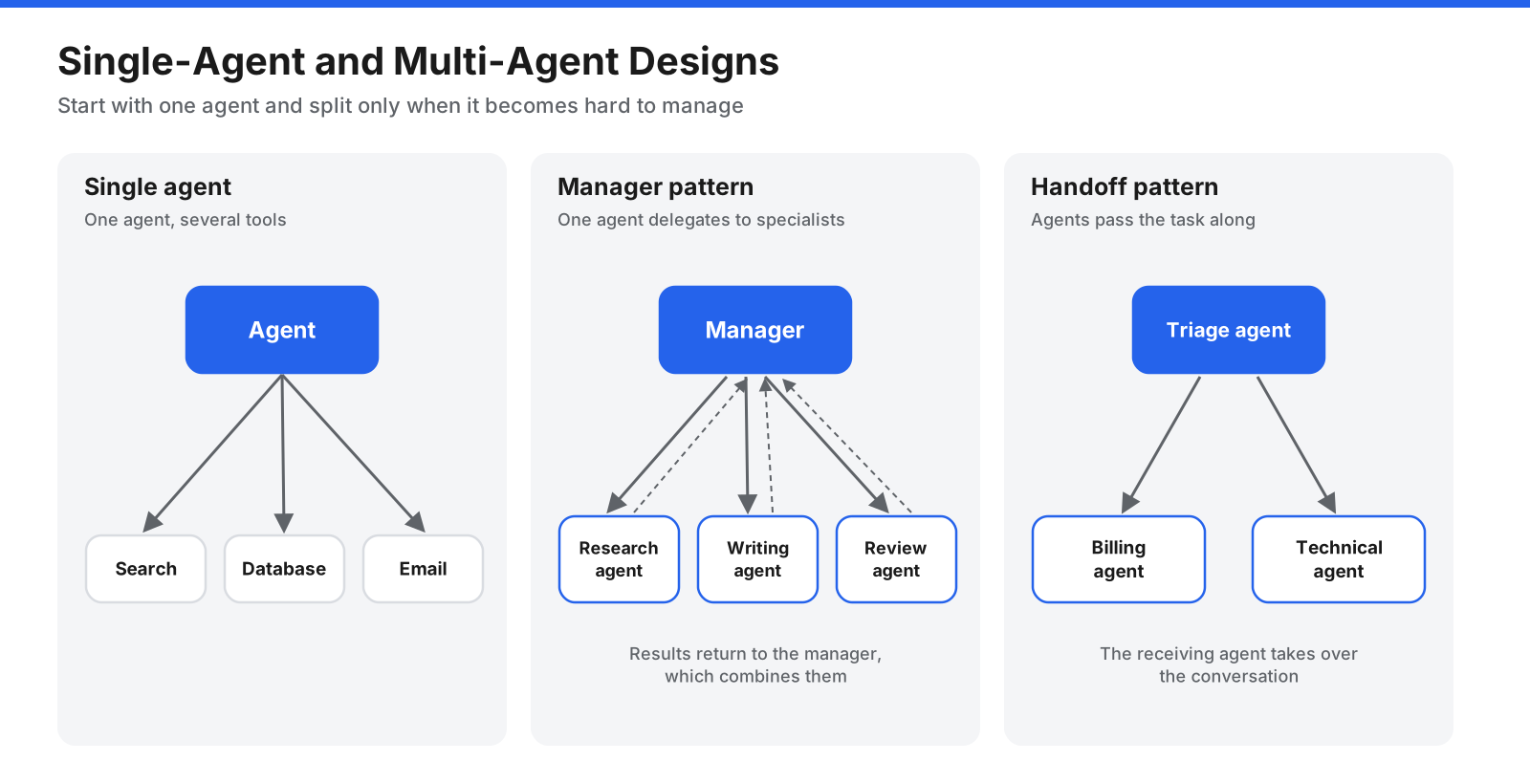
Most teams should start with a single agent and split it only when it becomes hard to manage or test.
- Manager pattern. A central agent breaks the request into parts, delegates to specialists, and combines their results.
- Handoff pattern. Agents pass the task from one to another, such as triage handing a request to billing or technical support.
Each extra agent adds model calls, latency, and more ways for context to be lost. Before splitting an agent, improve its instructions, consolidate overlapping tools, or try a fixed workflow.
What Are the Five Types of AI Agents?
Classic AI textbooks describe five types based on how agents make decisions. The terms predate LLMs, but remain useful for thinking about reasoning and memory requirements.
| Agent type | How it decides | Simple example |
|---|---|---|
| Simple reflex agent | Reacts to current input using fixed condition-action rules | A thermostat turns on heating below a set temperature |
| Model-based reflex agent | Keeps an internal picture of the world to handle what it cannot currently see | A robot vacuum remembers which areas it has cleaned |
| Goal-based agent | Chooses actions that move it toward a defined goal | A navigation app plans a route |
| Utility-based agent | Weighs options to choose the best overall outcome | A system chooses the fastest and cheapest delivery option |
| Learning agent | Improves behavior over time based on feedback | A recommendation system adapts to user choices |
Most LLM-based agents combine several traits. They work toward goals, weigh tradeoffs, keep context, and can improve through feedback and evaluation.
What Are Common Mistakes When Building AI Agents?
- Building an agent for a fixed process. A script or workflow is usually faster, cheaper, and more reliable when steps never change.
- Starting too broad. Narrow the job first, then expand once it works.
- Giving the agent too many tools. Overlapping or vague tools confuse the model.
- Writing vague instructions. Specific procedures and rules change behavior more than general advice.
- Skipping evaluation. Without a test set, it is hard to tell whether changes helped.
- Ignoring cost and latency. Each loop resends context, and long conversations can be expensive.
- Granting too much access. Use minimum permissions and approval for high-impact actions.
- Trusting external content. Treat web pages, emails, and documents as data, not commands.
- Treating launch as the finish line. Monitoring and iteration remain part of the build.
How Much Does It Cost to Build an AI Agent?
Costs vary from almost nothing for a personal no-code automation to a significant engineering investment for a production system that handles sensitive data. A no-code prototype can take hours, while a custom agent integrating several internal systems and meeting security and evaluation requirements can take weeks or months.
Running costs mainly come from model usage, often charged by tokens. Agents resend context on every loop, so steps per task and tool-output size matter. Other costs include tool and API fees, vector database storage, hosting, monitoring, maintenance, evaluation, prompt and tool updates, and human review. Control costs by using smaller models for simple steps, limiting loop iterations, trimming tool outputs, caching repeated work, and routing only difficult tasks to a more capable model.
Frequently Asked Questions
Can you build an AI agent without coding?
Yes. No-code and low-code platforms let you connect a model, choose integrations, and write instructions in plain language. They work well for prototypes, personal automations, and internal tools. Custom integrations and stricter controls may call for a framework or custom code.
How long does it take to build an AI agent?
A simple no-code agent may work in an afternoon. A basic coded agent with a few tools can take a few days. A production agent with business integrations, guardrails, approval steps, and evaluation can take several weeks or longer.
Do you need to train your own model to build an AI agent?
No. Most agents use an existing model and get specialized behavior from instructions, tools, and retrieved knowledge. Fine-tuning may help for narrow, high-volume tasks with many good examples, but it is rarely the first step.
Is a chatbot the same as an AI agent?
Not quite. A chatbot usually responds within a conversation. An agent uses tools to take actions in other systems and chooses steps toward a goal. Many modern assistants include agent features, so the distinction is not always sharp.
What programming language is best for building AI agents?
Python is common because agent frameworks, data tools, and machine learning libraries often support it first. TypeScript and JavaScript are also widely used, especially in web applications. Any language that can make HTTP requests can call a model API, so a team’s existing language is often a good choice.
What is the Model Context Protocol (MCP)?
MCP is an open standard for connecting AI agents to tools and data sources. An MCP server exposes capabilities that compatible agents can discover and use consistently, reducing the need for separate custom integrations.
How do you keep an AI agent safe?
Combine least-privilege permissions, human approval for high-impact actions, input and output validation, step and spending limits, treatment of external content as untrusted data, and action logs. Test these protections as carefully as the agent’s main job.
Start Small and Improve Through Testing
Building an AI agent comes down to a sequence of clear choices. Define one narrow job and how to measure it. Map the process, choose an approach and model, write specific instructions, design focused tools, and add only the memory the task needs. Wrap it in a loop with stopping rules, layered guardrails, and human approval for consequential actions.
Much of an agent’s quality comes after the first version runs. Evaluation, tracing, and turning failures into new test cases help distinguish a promising prototype from an agent people can depend on. Start with the simplest design that could work, measure it honestly, and add autonomy only when results show you need it.