
The best note taking app is the one you actually open when an idea arrives. Some people need quick notes on a phone; others need handwriting, private encrypted notes, or linked knowledge that grows over years. There is no single winner.
This guide compares 12 note taking apps available in October 2026, grouped by how people use them. The list is vendor neutral. No company paid for placement. Prices come from app pricing pages or dated third-party summaries where noted.
Quick picks:
- Best free for Apple: Apple Notes
- Best free across platforms: Microsoft OneNote
- Best for Android and Google: Google Keep
- Best for Galaxy users: Samsung Notes
- Best classic notebook: Evernote
- Best notes plus projects: Notion
- Best linked notes you own: Obsidian
- Best writing app for Apple: Bear
- Best free open source: Joplin
- Best encrypted notes: Standard Notes
- Best handwriting: Goodnotes and Notability
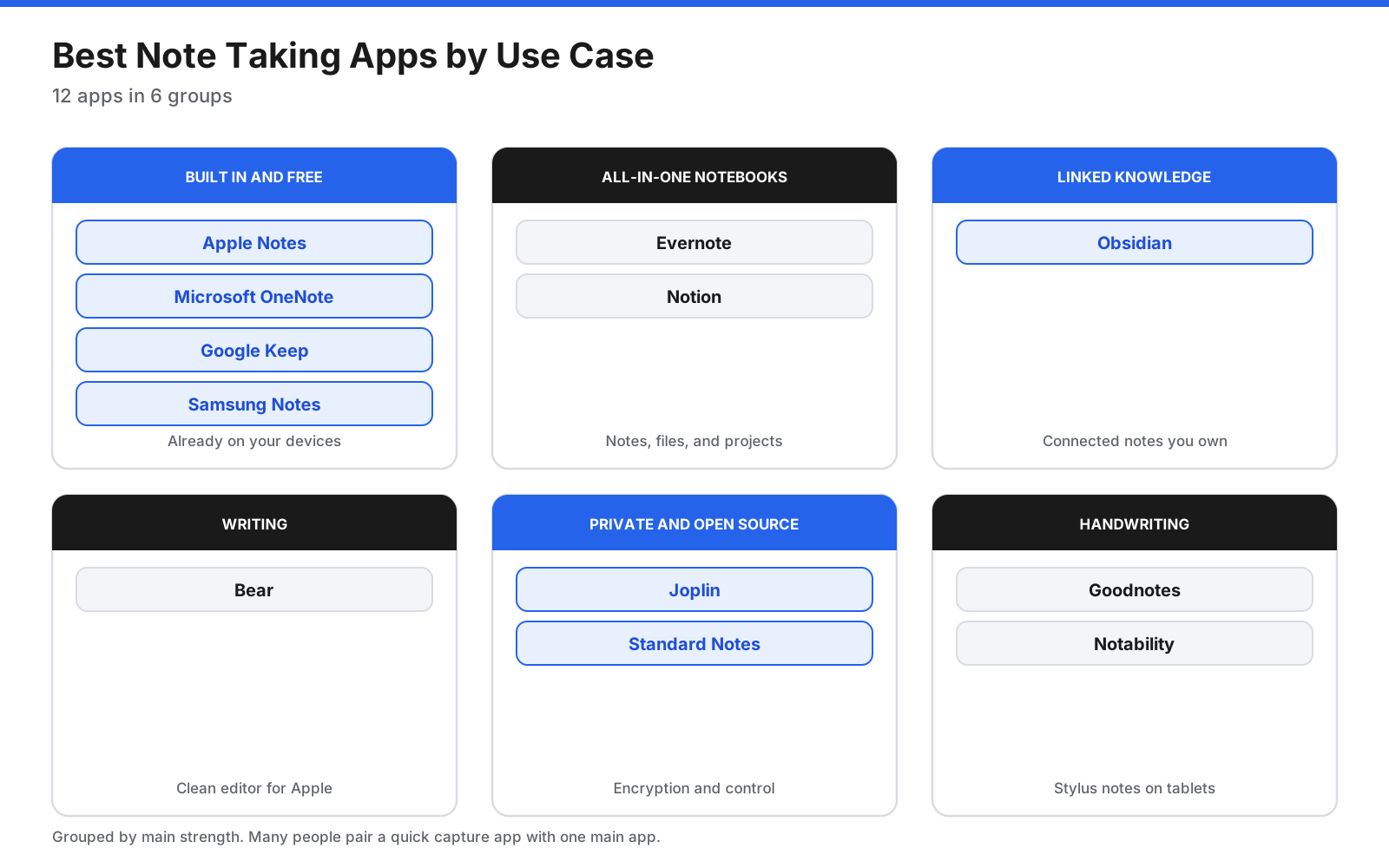
Start with the group that matches how you take notes.
What Types of Note Taking Apps Are There?
- Quick capture: short notes, lists, and reminders, such as Google Keep and Apple Notes.
- Notebooks: notebooks, sections, pages, attachments, web clips, and search, such as OneNote and Evernote.
- Workspaces: notes combined with databases, tasks, and collaboration, such as Notion.
- Linked knowledge: notes connected by links, such as Obsidian.
- Writing: a clean editor for longer text, such as Bear.
- Private and open source: encryption and data control, such as Standard Notes and Joplin.
- Handwriting: stylus notes and PDF markup, such as Goodnotes and Notability.
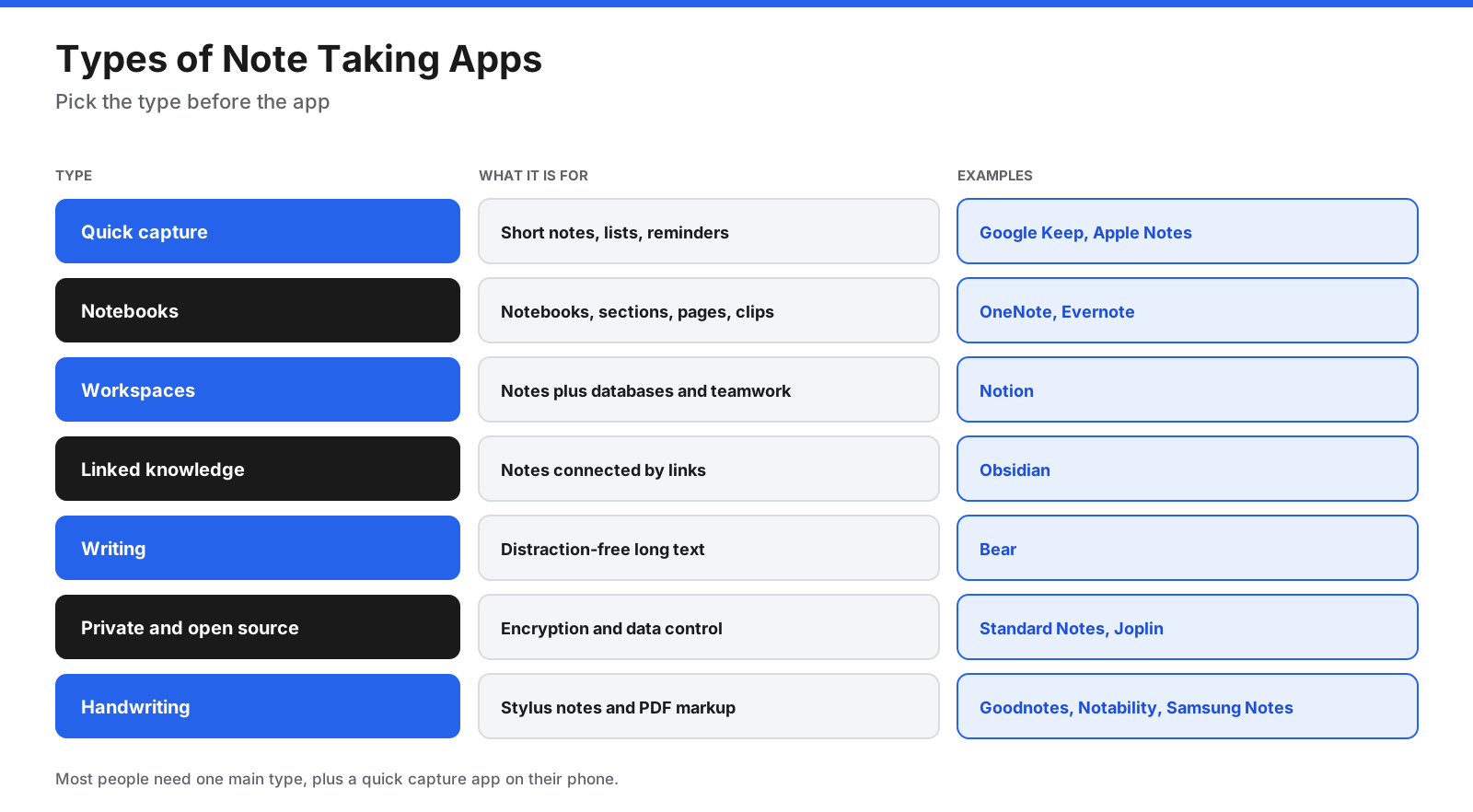
Most people need one main type, plus a quick capture app on their phone.
What Should You Look for in a Note Taking App?
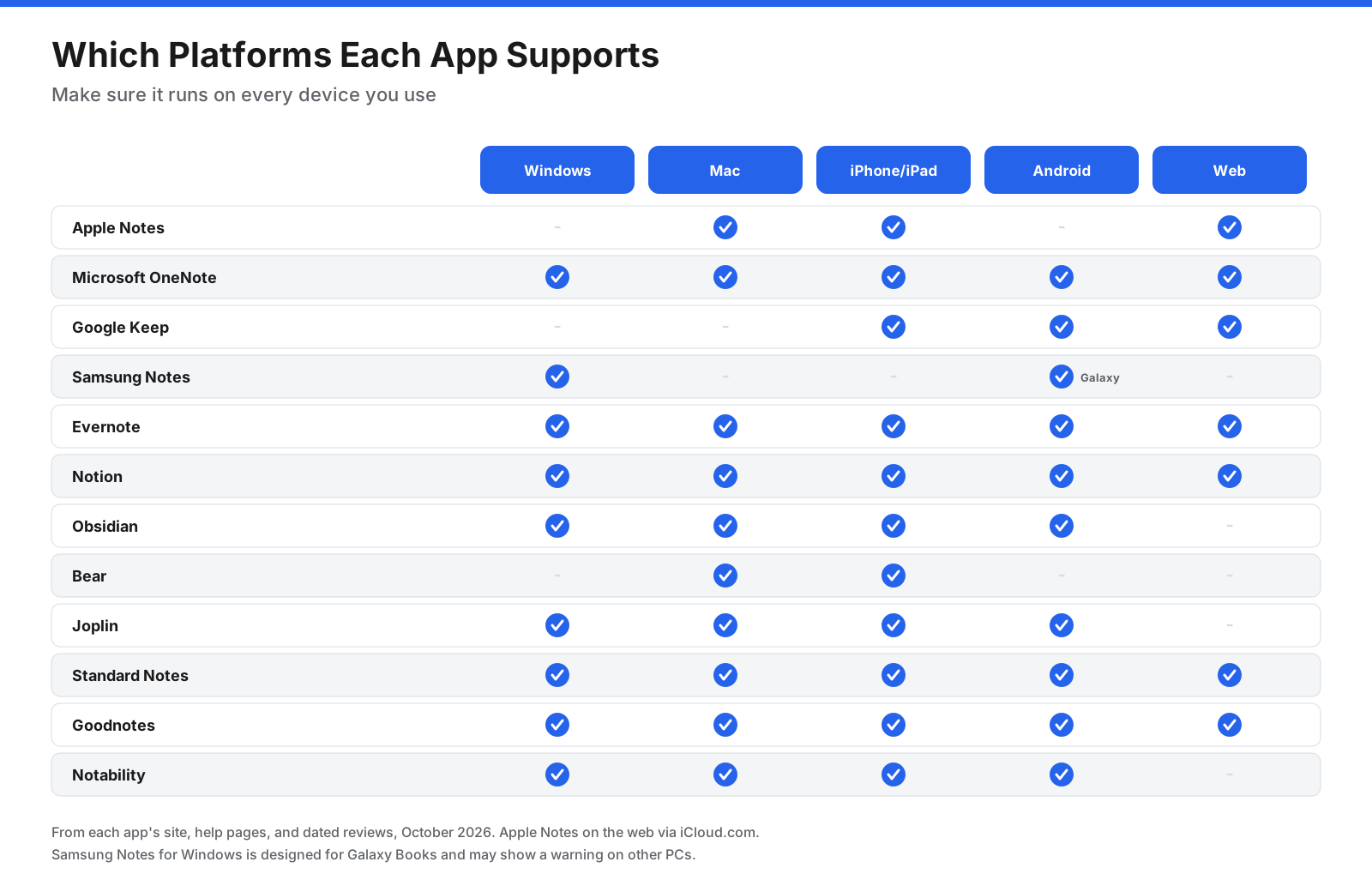
Check platform support, sync costs, capture speed, organization, handwriting, privacy, export options, and price. Make sure the app runs on every device you use and lets you export notes in a standard format such as Markdown or PDF.
What Are the Best Note Taking Apps?
Prices below are in US dollars unless stated, and come from each app’s pricing page or a dated third-party source as noted.
1. Apple Notes
Built into iPhone, iPad, and Mac, with scans, audio transcription, handwriting, PDFs, tags, locked notes, and collaboration. Platforms: Apple devices and iCloud.com. Pricing: Free; iCloud 50 GB from $0.99/month per Zapier’s December 2025 review. Limitations: No native Windows or Android app. Best for: Apple users who want fast, free notes.
2. Microsoft OneNote
A free digital notebook with notebooks, sections, pages, a freeform canvas, drawing, images, and audio. Platforms: Windows, Mac, iPhone, iPad, Android, web. Pricing: Free; OneDrive 100 GB from $1.99/month and Microsoft 365 from $7.20/month per Zapier. Limitations: Canvas can get messy; OneNote for Windows 10 support ended in October 2025. Best for: Students and cross-platform users.
3. Google Keep
Simple cards for notes, checklists, voice memos, and reminders, integrated with Gmail, Docs, and Calendar. Platforms: Android, iPhone, iPad, web. Pricing: Free with Google account; Google One 100 GB from $1.99/month per Zapier. Limitations: No notebooks or rich formatting. Best for: Quick lists and reminders on Android.
4. Samsung Notes
Galaxy app for typing, S Pen handwriting, PDF annotation, audio, and drawing. Platforms: Galaxy devices and Windows. Pricing: Free on Samsung devices. Limitations: Tied to Samsung; Android Authority reported OneNote sync ending after July 2026. Best for: Galaxy and S Pen users.
5. Evernote
Full-featured notebook for web clips, scanned documents, PDFs, audio, tasks, and search across attachments. Platforms: Windows, Mac, iOS, Android, web. Pricing: Free plan has 50 notes, one notebook, one device; Starter $99/year and Advanced $249.99/year per a July 2026 Carly pricing summary. Limitations: Free tier is restrictive and paid plans are expensive. Best for: Research and searchable reference libraries.
6. Notion
Combines notes with databases, project boards, wikis, and team collaboration. Platforms: Windows, Mac, iOS, Android, web. Pricing: Free for individuals; Plus $10/seat/month and Business $20/seat/month billed annually. Limitations: More than needed for simple notes; offline pages must be marked. Best for: Teams linking notes, tasks, and projects.
7. Obsidian
Stores plain Markdown files locally and connects notes with links, backlinks, graph view, Canvas, and plugins. Platforms: Windows, Mac, Linux, iOS, Android. Pricing: Free; Sync from $4/month and Publish from $8/site/month billed annually. Limitations: Learning curve, no live co-editing, sync requires a service or own setup. Best for: Writers and researchers who want linked notes they own.
8. Bear
Writing-focused Apple app with Markdown, nested tags, and a clean editor. Platforms: Mac, iPhone, iPad, Apple Watch; web clipper. Pricing: Free on one device; Pro $2.99/month or $29.99/year per a June 2026 review. Limitations: Apple-only; sync requires Pro. Best for: Apple writers who want a distraction-free editor.
9. Joplin
Free open-source Markdown notebooks with web clipper, Evernote import, offline-first use, and optional end-to-end encryption. Platforms: Windows, Mac, Linux, iOS, Android. Pricing: Free app; Joplin Cloud from €2.99/month or €28.69/year. Limitations: Less polished interface and some setup for sync/encryption. Best for: Evernote switchers and users who want open-source notes.
10. Standard Notes
Privacy-focused notes with end-to-end encryption on every plan. Free includes plain text, offline access, per-note passwords, and unlimited sync. Platforms: Web, Windows, Mac, Linux, iOS, Android. Pricing: Free plain text; Productivity $90/year; Professional $120/year. Limitations: Free plan is plain text and paid plans cost more than many alternatives. Best for: Users who prioritize encrypted notes.
11. Goodnotes
Digital notebooks with pens, highlighters, PDF annotation, handwriting search, and templates. Platforms: iPad, iPhone, Mac, Android, Windows, web. Pricing: Free for 3 notebooks, 100 MB, and 20 minutes of audio; Essential $11.99/year; Pro $35.99/year; AI Pass $9.99/month. Limitations: Cross-platform sync requires Pro. Best for: Handwriting and PDF annotation on tablets.
12. Notability
Combines handwriting, typing, and audio recording, with AI transcription and study tools on higher plans. Platforms: iPad, iPhone, Mac, Windows, Android. Pricing: Free Starter has 5 notes; Lite $11.99/year, Plus $15.99/year, Pro $79.99/year. Limitations: Free is limited and advanced AI features require Pro. Best for: Students recording lectures while writing.
How Do the Note Taking Apps Compare?
Use this table to compare platform reach, free access, and entry paid prices. Prices may change, so verify them before subscribing.
| App | Platforms | Free option | Entry paid price |
|---|---|---|---|
| Apple Notes | Apple, web | Yes, 5 GB iCloud | $0.99/month storage |
| OneNote | All major, web | Yes, 5 GB OneDrive | $1.99/month storage |
| Google Keep | Android, iOS, web | Yes, 15 GB Google | $1.99/month storage |
| Samsung Notes | Galaxy, Windows | Yes | Free |
| Evernote | All major, web | 50 notes, one device | $99/year |
| Notion | All major, web | Free for individuals | $10/seat/month annual |
| Obsidian | All major except web | Full app | Sync from $4/month annual |
| Bear | Apple | One device | $29.99/year |
| Joplin | All major | Full app | €28.69/year |
| Standard Notes | All major, web | Plain text | $90/year |
| Goodnotes | All major, web | 3 notebooks | $11.99/year |
| Notability | iPad, iPhone, Mac, Windows, Android | 5 notes | $11.99/year |
Which Note Taking Apps Are Free?
Fully free apps include Apple Notes, OneNote, Google Keep, Samsung Notes, Obsidian, and Joplin. The first four are free with a device or account, while Obsidian and Joplin offer optional paid sync.
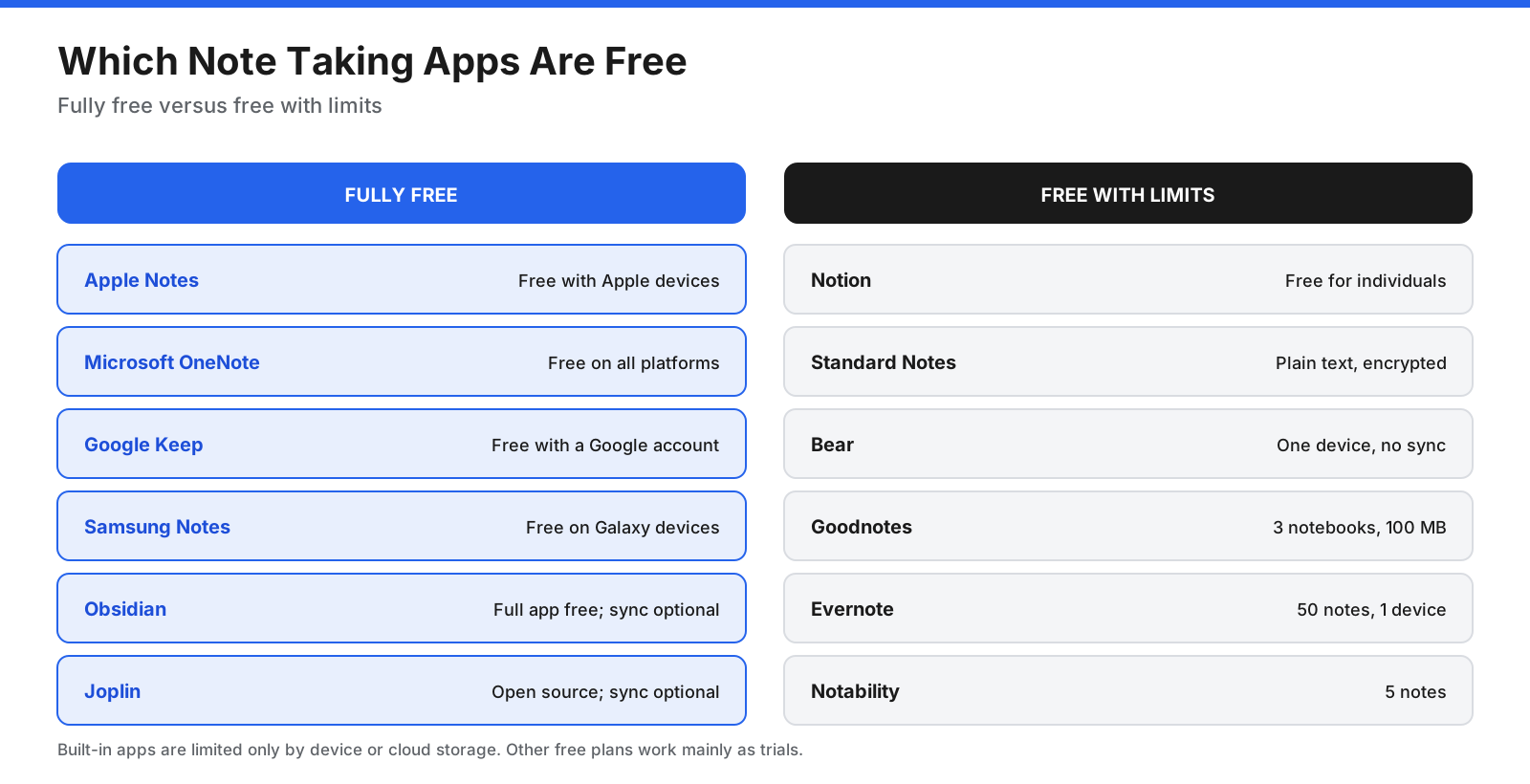
Free with limits: Notion is free for individuals, Standard Notes is free for plain text, Bear is free on one device, Goodnotes offers three notebooks, Evernote allows 50 notes on one device, and Notability allows five notes. For many people, the best free choice is the app built into their devices or OneNote for mixed platforms.
How Much Do Paid Note Taking Apps Cost per Year?
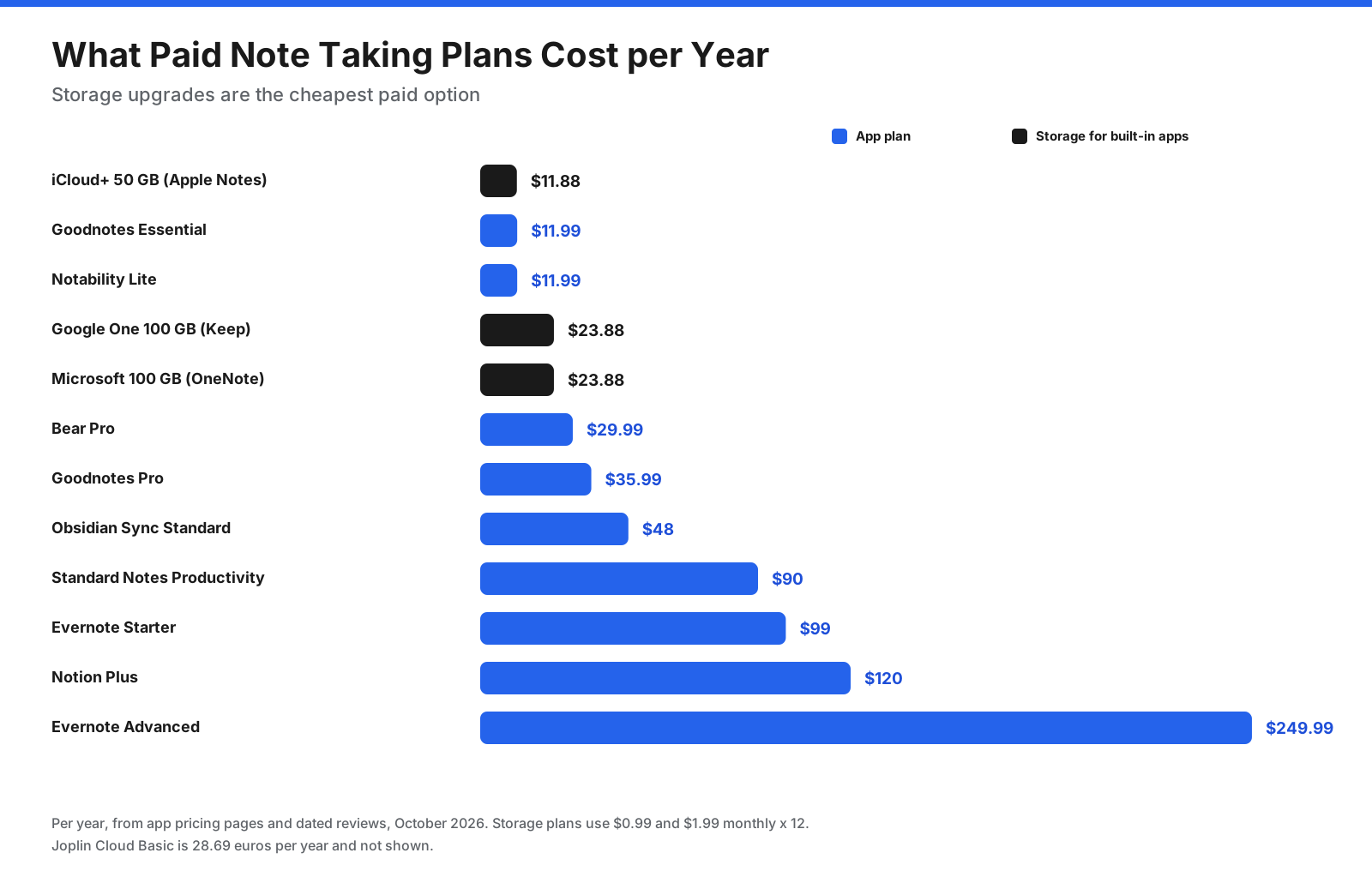
Storage upgrades for built-in apps are usually the cheapest paid option. Bear, Goodnotes, and Notability cost under $40 per year for their main paid tiers. Evernote, Notion, and Standard Notes cost more but include additional features such as collaboration, AI, encryption, or extra storage.
Which Note Taking Apps Are Most Private?
Privacy depends on where notes are stored and who can read them.
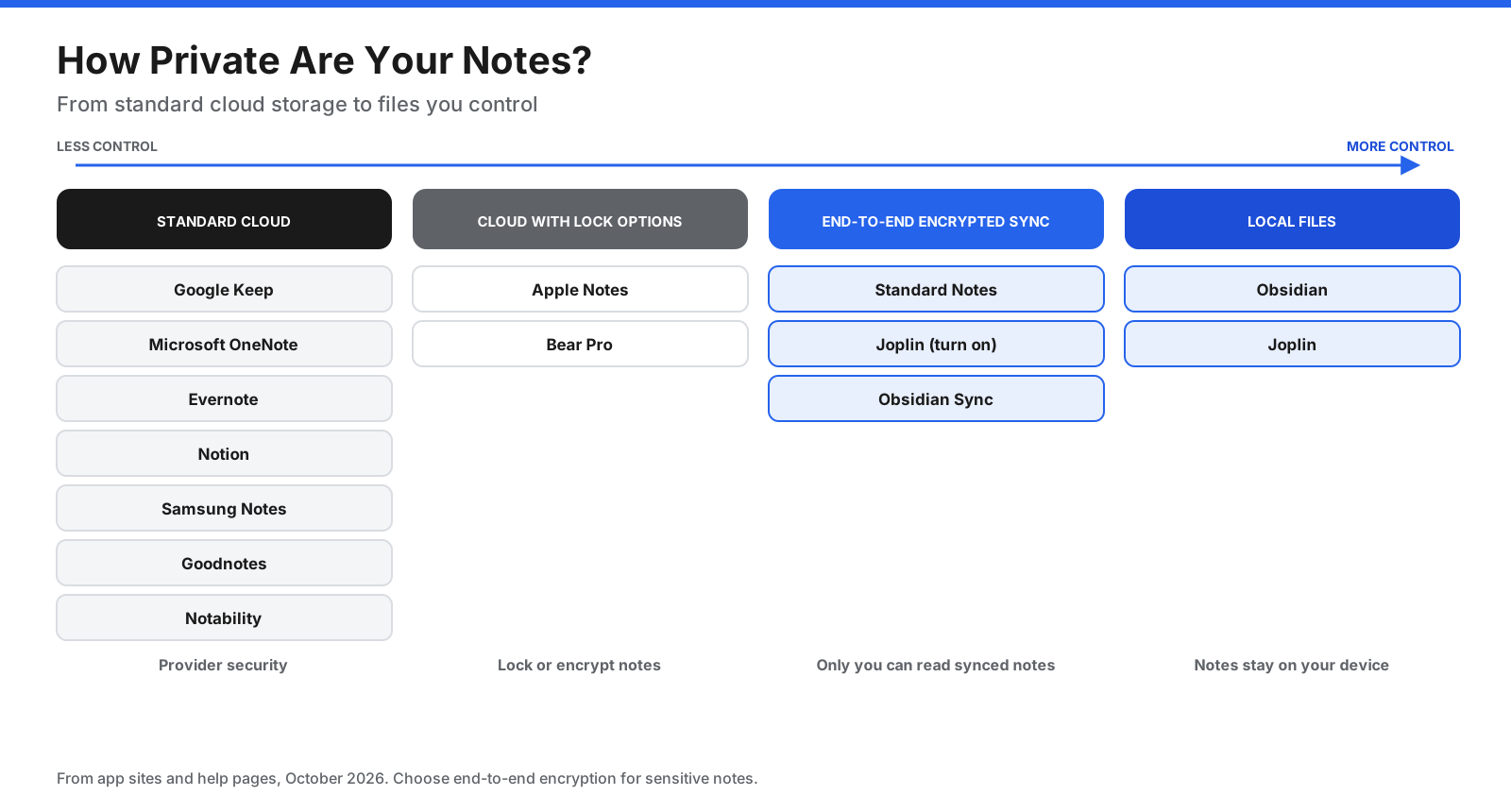
End-to-end encrypted: Standard Notes encrypts notes on every plan. Joplin offers encryption that you enable in settings. Obsidian Sync is end-to-end encrypted.
Local-first: Obsidian and Joplin keep notes on your device, so you control where copies go. Most cloud apps store notes on company servers. Apple Notes lets you lock individual notes, and Bear Pro supports note encryption.
For sensitive notes, choose an end-to-end encrypted app or keep them in a local, encrypted vault.
What Is the Best Note Taking App for iPad?
For handwriting with Apple Pencil, Goodnotes and Notability are the leading choices. Goodnotes is strong for organized notebooks, planners, and PDF annotation. Notability suits people who record audio while writing, such as during lectures, and offers AI transcription and summaries on Pro. Apple Notes is a capable free choice for quick handwritten notes, while OneNote offers a free canvas across devices.
What Are the Best Note Taking Apps for Windows and Android?
On Windows, OneNote is a natural starting point because it is free and cross-platform. Obsidian and Joplin are good free choices for Markdown and offline use; Notion and Evernote suit workspaces and classic notebooks. Goodnotes and Notability also offer Windows apps for handwriting on touchscreen laptops.
On Android, Google Keep is best for quick capture, while Samsung Notes is useful on Galaxy devices. OneNote, Notion, Obsidian, Joplin, and Standard Notes support longer notes. If you switch between Windows and Android, compare OneNote, Notion, Obsidian, Joplin, and Standard Notes.
What Is the Best Note Taking App for Students?
- Handwriting and PDF annotation: Goodnotes or Notability.
- Recording lectures: Notability or Apple Notes.
- Free notes across devices: OneNote.
- Courses and assignments: Notion.
- Connected study notes over years: Obsidian.
Check for student pricing or education plans before paying.
How Do You Choose the Right Note Taking App?
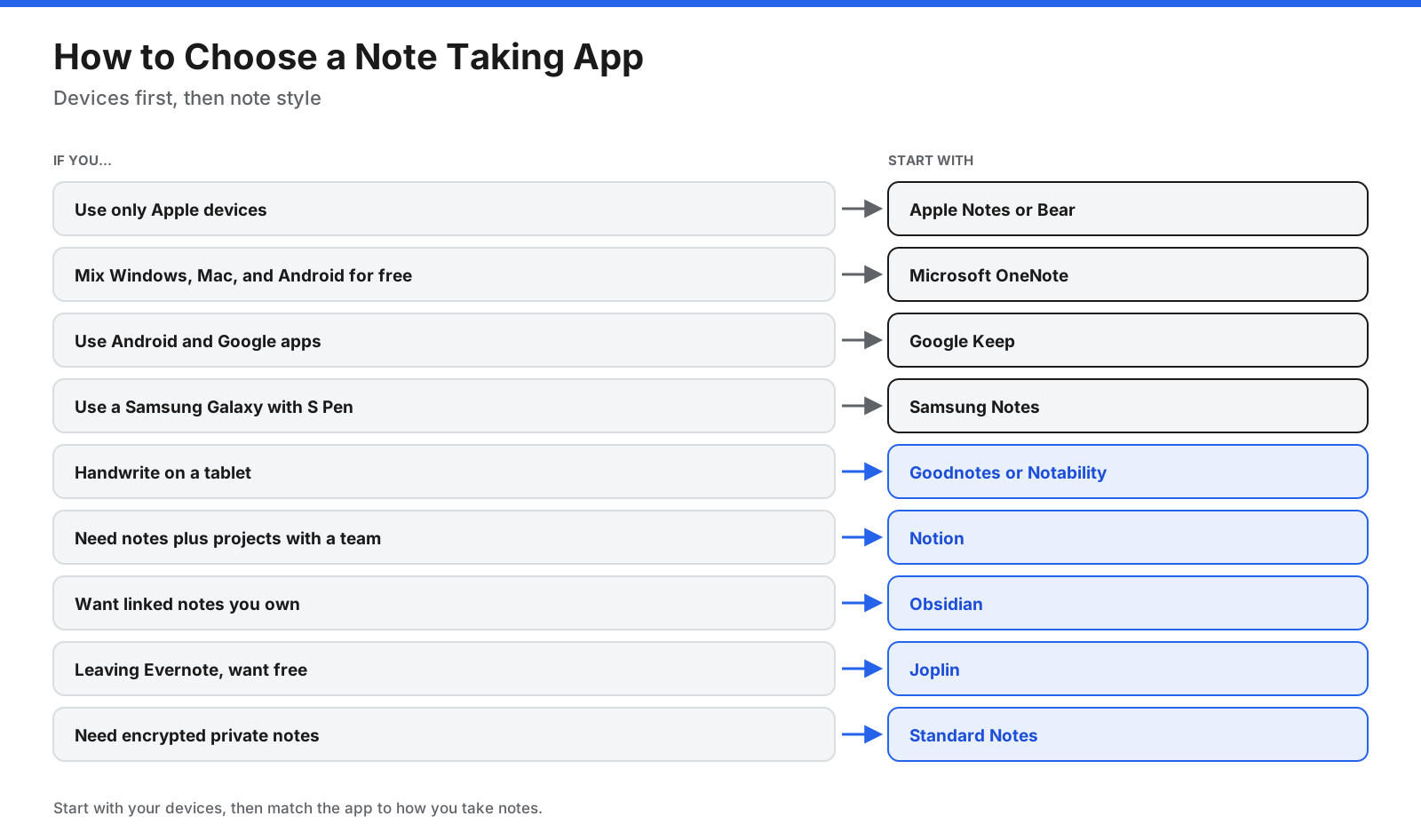
- List the devices you use and check app compatibility.
- Decide whether you mostly type, handwrite, capture quick lists, or write long notes.
- Check whether you need end-to-end encryption.
- Try the free version for two weeks with your real notes.
- Check export options before moving a large archive.
Many people use two apps: a quick capture tool such as Apple Notes or Google Keep, and a main app for longer or structured notes.
How Do You Move Your Notes to a New App?
- Export your notes. Common formats include Markdown, HTML, PDF, or the app’s own format.
- Use an importer. Joplin imports Evernote exports; Obsidian’s Importer plugin supports Notion, Evernote, and other sources.
- Check formatting and attachments. Images, tables, and links may need fixes.
- Keep the old app for a few weeks. This helps you find anything that did not transfer.
Frequently Asked Questions
What is the best note taking app?
It depends on your devices and needs. Apple Notes is best for Apple users, OneNote for free cross-platform notes, Notion for teams, Obsidian for linked notes, and Goodnotes or Notability for tablet handwriting.
What is the best free note taking app?
OneNote is a strong free choice across Windows, Mac, iPad, Android, and web. Apple Notes, Google Keep, and Samsung Notes are also free on their platforms, while Obsidian and Joplin have optional paid sync.
Is there a better note taking app than OneNote?
OneNote is hard to beat for free notes across platforms. Notion suits teams, Obsidian suits linked notes, Goodnotes suits handwriting, and Standard Notes suits privacy.
Is Goodnotes free?
Goodnotes has a free plan with up to three notebooks, 100 MB of storage, and 20 minutes of audio. Essential starts at $11.99 per year.
Is Goodnotes or Samsung Notes better?
Samsung Notes is a good free choice for Galaxy devices and S Pen users. Goodnotes offers notebook organization, templates, and PDF tools across more platforms.
Which app is best for free notes on Android?
Google Keep is best for quick notes, Samsung Notes for Galaxy devices, and OneNote for longer organized notes.
What is the best note taking app for Mac?
Apple Notes is the best free choice. Bear suits focused writing, and Obsidian suits linked notes stored as files.
What is the best note taking app for Windows?
OneNote is the best free starting point. Obsidian, Joplin, Notion, and Evernote are also available.
Is Evernote still worth it?
Evernote remains useful for search and web clipping, but its free plan is limited and paid plans cost more than many alternatives. It suits people who rely on its specific features.
What is the most secure note taking app?
Standard Notes encrypts notes end to end on every plan. Joplin with encryption enabled and Obsidian Sync are also private options.
Can you use more than one note taking app?
Yes. Use a quick capture app for lists and ideas and a main app such as OneNote, Notion, or Obsidian for longer notes. Review quick notes weekly.
What about AI note taking apps?
Evernote, Notion, Goodnotes, and Notability include AI features. If you mainly need meeting transcription, a dedicated AI meeting assistant may fit better than a general note app.
The Bottom Line
The best note taking app is the one that fits your devices and the way you think. Start with Apple Notes on Apple, OneNote on Windows, Google Keep on Android, or Samsung Notes on Galaxy devices. Choose Notion for teams and projects, Obsidian for linked notes, Bear for Apple writing, Joplin for open-source notes, Standard Notes for encrypted privacy, and Goodnotes or Notability for handwriting.
Try your top choice for two weeks, check that you can export your notes, and verify current prices before subscribing.