

A rank tracker shows where your website appears in search results for the keywords you care about, and how those positions change over time. The right tool depends on whether you need a simple weekly check, daily location-specific rankings, client-ready reports, or rank tracking alongside keyword research and site audits.
Quick answer: Consider SE Ranking if you want rank tracking within a broader SEO toolkit, AccuRanker if tracking is the core job and you need detailed reporting, Semrush if you want rankings alongside wider SEO and marketing features, Ahrefs if backlink and competitor research are already central to your workflow, and Mangools SERPWatcher or Wincher if you prefer a simpler tracker. For a free starting point, Google Search Console shows how your own site performs in Google Search, but it is not a like-for-like replacement for a dedicated rank tracker.
This guide compares the tools by practical fit, tracking workflow, reporting, location options, and the limits to check before paying. Prices and plan allowances change, so use the official pricing links for current terms. Reviewed October 2026. My SaaS Journey has not independently benchmarked these products.
Best rank tracker tools at a glance
| Tool | Best for | Why consider it | Check before buying |
|---|---|---|---|
| SE Ranking | Rank tracking plus an SEO toolkit | Combines position monitoring with keyword research, site audits, and competitor analysis | Keyword allowance, update frequency, user seats, and agency reporting add-ons |
| AccuRanker | Dedicated rank tracking and reporting | Specialist workflow for tracking, segmentation, and reporting across keyword sets | Entry cost, keyword tiers, refresh options, and separately priced extras |
| Semrush Position Tracking | Teams needing an all-in-one SEO platform | Ranking data sits alongside keyword research, competitor analysis, and site auditing | Included tracked keywords, projects, locations, and additional user costs |
| Ahrefs Rank Tracker | SEO teams focused on backlinks and competitors | Connects ranking monitoring with backlink and organic search research | Rank update cadence and the tracked keyword allowance on your plan |
| Mangools SERPWatcher | Freelancers and smaller sites | A relatively approachable tracking interface within the Mangools suite | Keyword limits, update frequency, and suite plan restrictions |
| Wincher | Simple ongoing keyword monitoring | Focuses on tracking search positions without requiring a large SEO workflow | Keyword capacity, locations, reports, and team access |
| Nightwatch | Local and granular ranking workflows | Useful to evaluate when location-specific tracking and reporting matter | Local coverage, AI visibility features, keyword tiers, and plan currency |
| ProRankTracker | Dedicated rank reports for clients and teams | Built around tracking and reporting search positions across different result types | Keyword or prompt counting, supported search engines, and white-label features |
| Google Search Console | Free baseline data for your own site | Shows Google Search queries, impressions, clicks, and average position | It does not provide the same controlled daily tracking and competitor monitoring as a paid rank tracker |
This is a shortlist by use case, not a claim that one tool wins every accuracy test. Ranking data can differ by location, device, search settings, and the time a result is collected.
1. SE Ranking: A broad SEO toolkit with rank tracking
SE Ranking is worth considering if you want keyword positions and the rest of your routine SEO work in one platform. Alongside rank tracking, its product range includes keyword and competitor research, website auditing, and reporting workflows.
Best for: Small and midsize SEO teams, consultants, and agencies that need rank monitoring plus other recurring SEO tasks.
What to evaluate: Check how many keywords and projects are included, how often the plan updates rankings, which search engines and locations are supported, and whether client reporting or extra seats require an add-on. A plan can look affordable until your real keyword list and reporting requirements are included.
Trade-off: A broader platform may offer more value if you use its research and audit tools, but it may be more than you need if ranking checks are your only requirement. See the official SE Ranking pricing page for current limits.
2. AccuRanker: A specialist option for rank-focused teams
AccuRanker focuses on rank tracking rather than positioning itself as a complete SEO suite. That can be useful when ranking reports are a core deliverable and the team wants detailed ways to segment keywords and monitor search performance.
Best for: Agencies, in-house SEO teams, and consultants with substantial keyword lists or recurring reporting needs.
What to evaluate: Compare the keyword tier you need, daily versus on-demand refresh availability, location and device options, integrations, and report customization. Ask whether every feature you need is included in the base plan or sold separately.
Trade-off: A dedicated tracker may be a strong operational fit, but you may still need separate tools for technical audits, backlink research, and content research. Review AccuRanker pricing before estimating total cost.
3. Semrush Position Tracking: Rankings within a wider marketing platform
Semrush includes Position Tracking as part of a broader SEO and digital marketing toolkit. It can suit teams that want to compare rankings with keyword research, competitor discovery, site audits, and other search marketing tasks.
Best for: Marketing teams that will use multiple parts of the Semrush platform, not only the rank tracker.
What to evaluate: Check the number of tracked keywords, projects, locations, devices, competitor comparisons, and reporting features in your subscription. If several colleagues need access, include extra-user charges in the total cost.
Trade-off: The wider suite can reduce tool switching, but it may not be cost-effective if all you need is a focused ranking dashboard. See the official Semrush pricing page and the Position Tracking feature overview.
4. Ahrefs Rank Tracker: A fit for backlink-led SEO workflows
Ahrefs is widely used for backlink and organic search research, and Rank Tracker connects ranking monitoring with that broader SEO context. It can be convenient if your team already uses Ahrefs to investigate competitors, pages, and referring domains.
Best for: SEO practitioners who want rank history alongside backlink and competitor research.
What to evaluate: Check the number of keywords included in your plan, the update frequency for organic rankings, supported locations, reporting needs, and any additional user costs. Do not assume every tier refreshes rankings daily.
Trade-off: Ahrefs may make sense as part of a wider SEO workflow, but a specialist tracker may provide a more focused fit if frequent ranking updates and client reporting are your main requirements. See Ahrefs pricing and its Rank Tracker overview.
5. Mangools SERPWatcher: A simpler option for smaller SEO projects
SERPWatcher is the rank tracking component of Mangools. It is worth considering if you prefer a clear dashboard and a smaller SEO toolkit rather than a complex reporting environment.
Best for: Freelancers, bloggers, and small website owners who want to monitor a manageable set of keywords.
What to evaluate: Review the number of tracked keywords, refresh frequency, reporting and sharing options, and which features are available at each Mangools tier. Check whether your location and device requirements are supported.
Trade-off: A simpler interface can be easier to maintain, but large agencies may need more granular segmentation, integrations, and white-label reporting. See Mangools pricing.
6. Wincher: Focused keyword monitoring
Wincher is designed around keyword rank tracking. It is a candidate for teams that want to follow positions and report on changes without adopting a large all-in-one marketing suite.
Best for: Small businesses, content teams, and consultants with a defined list of keywords to monitor.
What to evaluate: Confirm keyword capacity, update frequency, search engines, local tracking, competitor comparisons, reporting, and user access. Make sure the plan accommodates every country, city, and device you need to monitor.
Trade-off: A focused tracker can keep the workflow straightforward, but teams that also need detailed backlink research or technical audits may still need another platform. Check Wincher’s official pricing.
7. Nightwatch: For local and granular tracking needs
Nightwatch is worth evaluating when the location of a search matters as much as the keyword itself. Local businesses and agencies may need to understand visibility in specific cities or areas, rather than relying on one broad national position.
Best for: Local SEO consultants and teams that need location-specific monitoring and visual reporting.
What to evaluate: Test the locations and search surfaces available for your market, how keywords are counted, which reports are included, and whether AI visibility features are part of the plan or an add-on. Feature availability may vary by subscription.
Trade-off: Granular tracking is useful only if you set up locations that match your customers and business footprint. See Nightwatch pricing for the current plan structure.
8. ProRankTracker: Tracking and reporting across client work
ProRankTracker is a dedicated platform for monitoring and reporting keyword positions. It can be relevant for consultants and agencies that need repeatable reports across several websites or clients.
Best for: SEO professionals who need structured rank reports for multiple projects.
What to evaluate: Check how the platform counts keywords, URLs, locations, and other tracked items; what report branding is included; and which search engines and result types are supported by your chosen tier.
Trade-off: A reporting-focused tracker may fit an agency workflow, but it will not automatically replace a separate keyword research or technical SEO platform. Review ProRankTracker pricing.
9. Google Search Console: The free baseline every site owner should know
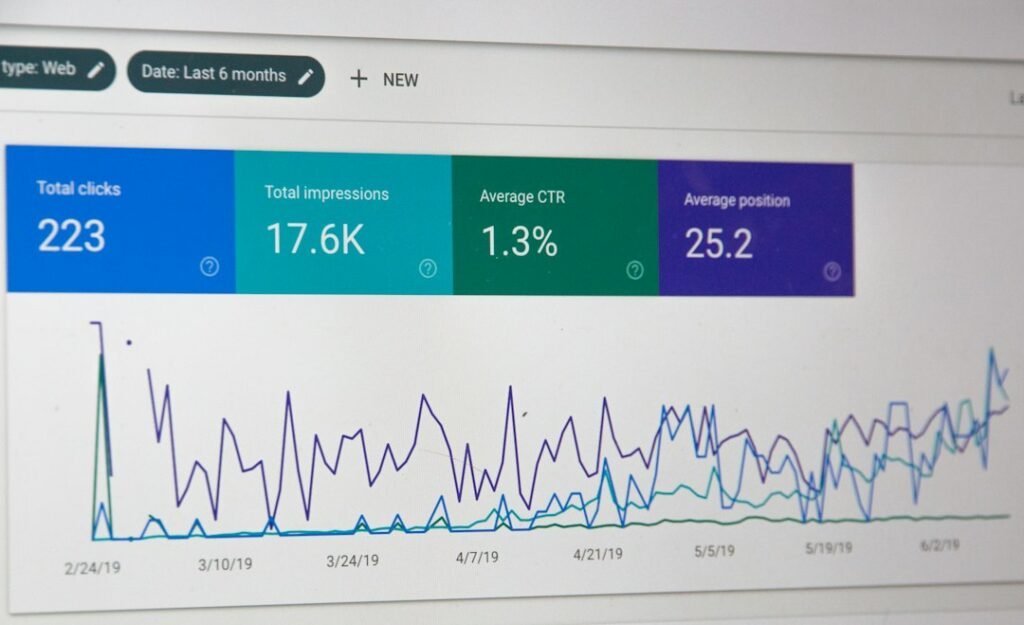
Google Search Console is free and reports how your verified website performs in Google Search. The Performance report includes queries, clicks, impressions, click-through rate, and average position.
Best for: Website owners who want first-party Google Search performance data without paying for a rank tracker.
What it does well: You can discover queries that already bring impressions, compare performance over time, and identify pages whose visibility may deserve further investigation.
What it does not replace: Average position is an aggregate metric, not a fixed live rank for one keyword in one city and on one device. Search Console also does not provide the same competitor tracking and controlled daily keyword monitoring as dedicated tools.
Choose it when: You are starting SEO measurement or want a reliable baseline. Pair it with a dedicated tracker only when you need more precise position monitoring, location comparisons, or client reports.
How to choose a rank tracker without overpaying
Start with your keyword count
Export the keywords you actually want to monitor. Separate high-priority commercial terms from informational terms and local variants. Then compare that list with each tool’s included keyword allowance. Some platforms count the same keyword separately by location or device, so check the vendor’s definition before comparing prices.
Decide how often you need updates
Daily updates can help when you actively monitor launches, local campaigns, or ranking changes. Weekly updates may be sufficient for a small site where positions change gradually. More frequent checks do not automatically mean the tool is more accurate or that a short-term movement requires action.
Confirm location and device coverage
Search results vary by country, city, language, device, and search context. If you serve customers in a specific region, verify that the tracker can collect results at the required geographic level. For local SEO, make sure the tool supports the type of local result you need to monitor.
Look beyond the headline rank
Useful rank reports help you identify which page ranks, how visibility changes, whether a search result feature appears, and which competitors move into view. For some businesses, tracking local packs or AI-generated search features may matter. Verify precisely which surfaces a product tracks, and do not assume that an AI visibility feature measures the same thing as traditional organic rank.
Calculate the full reporting cost
- Tracked keyword capacity across all projects and locations.
- Additional seats for colleagues or clients.
- White-label or branded reports.
- API access, exports, and integrations.
- Historical data retention and reporting limits.
- Separate charges for local tracking or AI search monitoring.
Estimate cost using the plan you would actually need six months from now, not just the entry price on a pricing page.
A practical rank tracking setup
- Choose a focused keyword set. Start with your most important service, product, and content terms instead of importing every possible keyword.
- Set the right search context. Define the country, city where relevant, language, search engine, and device.
- Record a baseline. Save the starting positions and date so future reports have context.
- Connect first-party data. Where supported, connect Google Search Console and analytics to compare rank movement with impressions, clicks, and conversions.
- Review meaningful changes. Investigate sustained drops, new competitors, changing search intent, and pages that appear to compete for the same query. Do not react to every small daily movement.
- Report actions, not just numbers. Explain what changed, which pages were affected, and what you plan to investigate or improve next.
Frequently asked questions
What is a rank tracker?
A rank tracker monitors where a website appears in search results for selected keywords over time. Depending on the tool, you can segment rankings by location, device, search engine, competitor, and search result feature.
What is the best rank tracker tool?
The best fit depends on your needs. SE Ranking is worth evaluating for a broader SEO toolkit, AccuRanker for dedicated rank tracking, Semrush for an all-in-one marketing workflow, Ahrefs for teams already focused on backlink and competitor research, and Mangools or Wincher for simpler monitoring.
Can I track keyword rankings for free?
Yes. Google Search Console provides free performance data for your own verified site, including queries and average position. It is useful for monitoring search performance, but it is not a full substitute for daily rank tracking by location or competitor monitoring.
How often should keyword rankings be checked?
Daily tracking can help active campaigns and local SEO programs, while weekly checks may be enough for smaller sites with stable content. Choose an update schedule based on the decisions you will make from the data, rather than assuming more frequent updates always improve results.
Are rank trackers always accurate?
No rank tracker can guarantee that every user will see the same position. Results can vary by location, device, personalization, search features, and collection time. Use consistent tracking settings and review longer-term trends alongside Search Console data.
Do rank trackers monitor AI search results?
Some vendors offer AI visibility or answer monitoring, but coverage differs by tool and plan. Before buying, confirm which AI products and result types are included, whether the feature counts mentions or citations, how often it updates, and whether it is an add-on.
Should I choose a rank tracker or an all-in-one SEO suite?
Choose a dedicated tracker if ranking reports are your main need and you already have tools for research and audits. Consider an all-in-one suite if you will use keyword research, competitor analysis, backlink data, and technical audits alongside rank monitoring.
Related SEO resources
- What Are the Best SEO Tools in 2026 for Different SEO Jobs?
- Ahrefs vs Semrush: Which SEO Tool Is Better for You?
Official product and pricing pages
- SE Ranking pricing
- AccuRanker pricing
- Semrush pricing
- Ahrefs pricing
- Mangools pricing
- Wincher pricing
- Nightwatch pricing
- ProRankTracker pricing
- Google Search Console
Editorial note: This guide was prepared using official product pages and pricing links reviewed in October 2026. Features, pricing, and tracking allowances may change. My SaaS Journey has not independently benchmarked the tools in this article.















































