

An AI meeting assistant records your calls, writes a summary, pulls out decisions and action items, and lets you search or ask questions about what was said. Some also prepare agendas before a meeting, coach you during it, and update your CRM or project tools afterward. For people who spend much of the week in meetings, these tools can reduce manual note-taking and make follow-up faster.
Tools differ in how they capture calls, what they do with transcripts, how much they cost, and how they handle privacy. Some send a bot into your call. Others capture audio from your device without a bot joining. Zoom, Microsoft Teams, and Google Meet also offer built-in AI features on eligible plans.
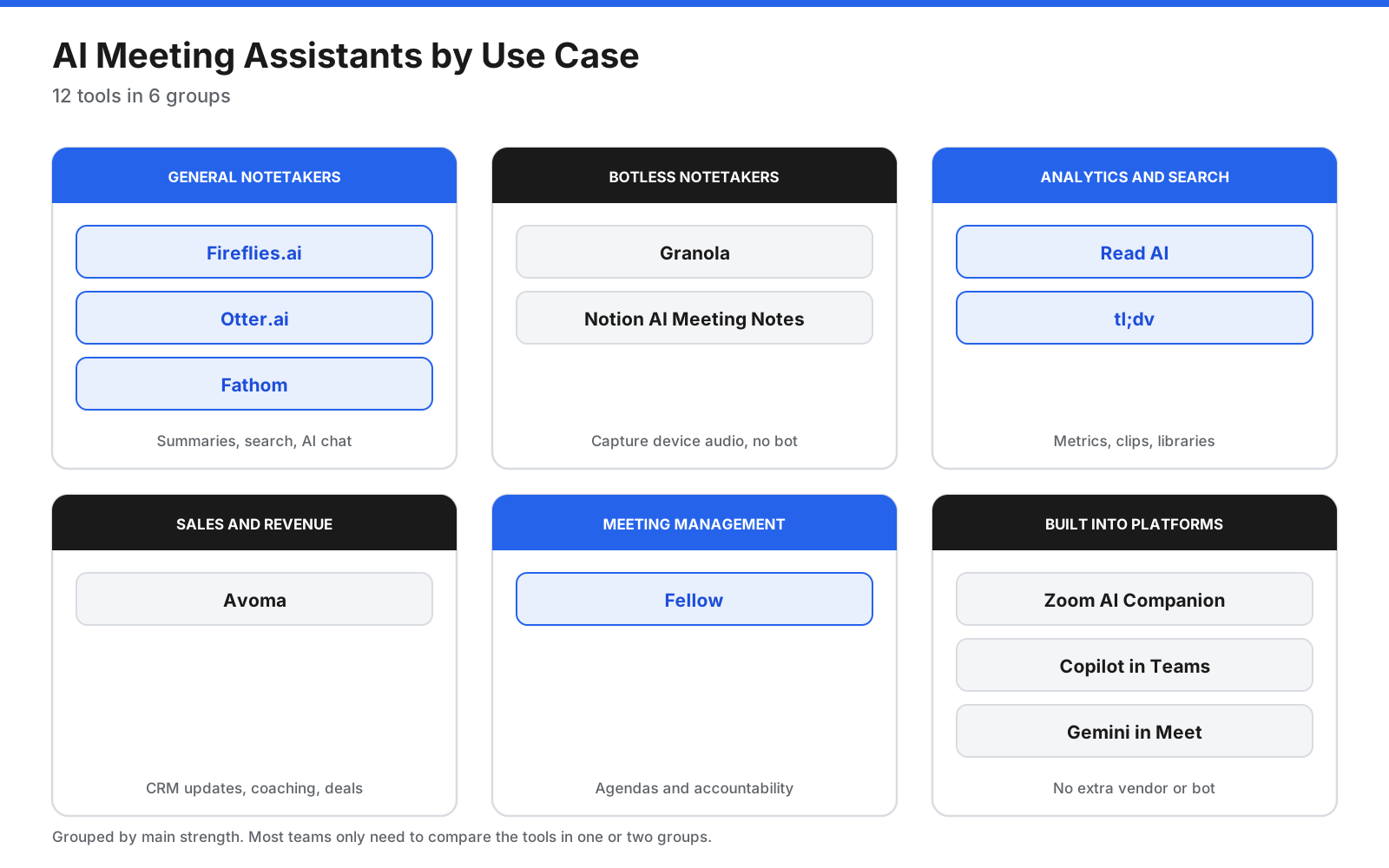
This guide compares 12 AI meeting assistants by use case. Pricing and plan limits can change, so check each vendor’s current pricing page before purchasing.
Quick picks
- Best all-round notetaker: Fireflies.ai
- Best for searching past meetings: Otter.ai
- Best free option for individuals: Fathom
- Best botless notetaker: Granola
- Best meeting analytics and cross-app search: Read AI
- Best recording library and clips: tl;dv
- Best for sales teams: Avoma
- Best for agendas and meeting management: Fellow
- Best built-in option for Zoom: Zoom AI Companion
- Best for Microsoft 365: Microsoft 365 Copilot in Teams
- Best for Google Workspace: Gemini in Google Meet
- Best for Notion teams: Notion AI Meeting Notes
What does an AI meeting assistant do?
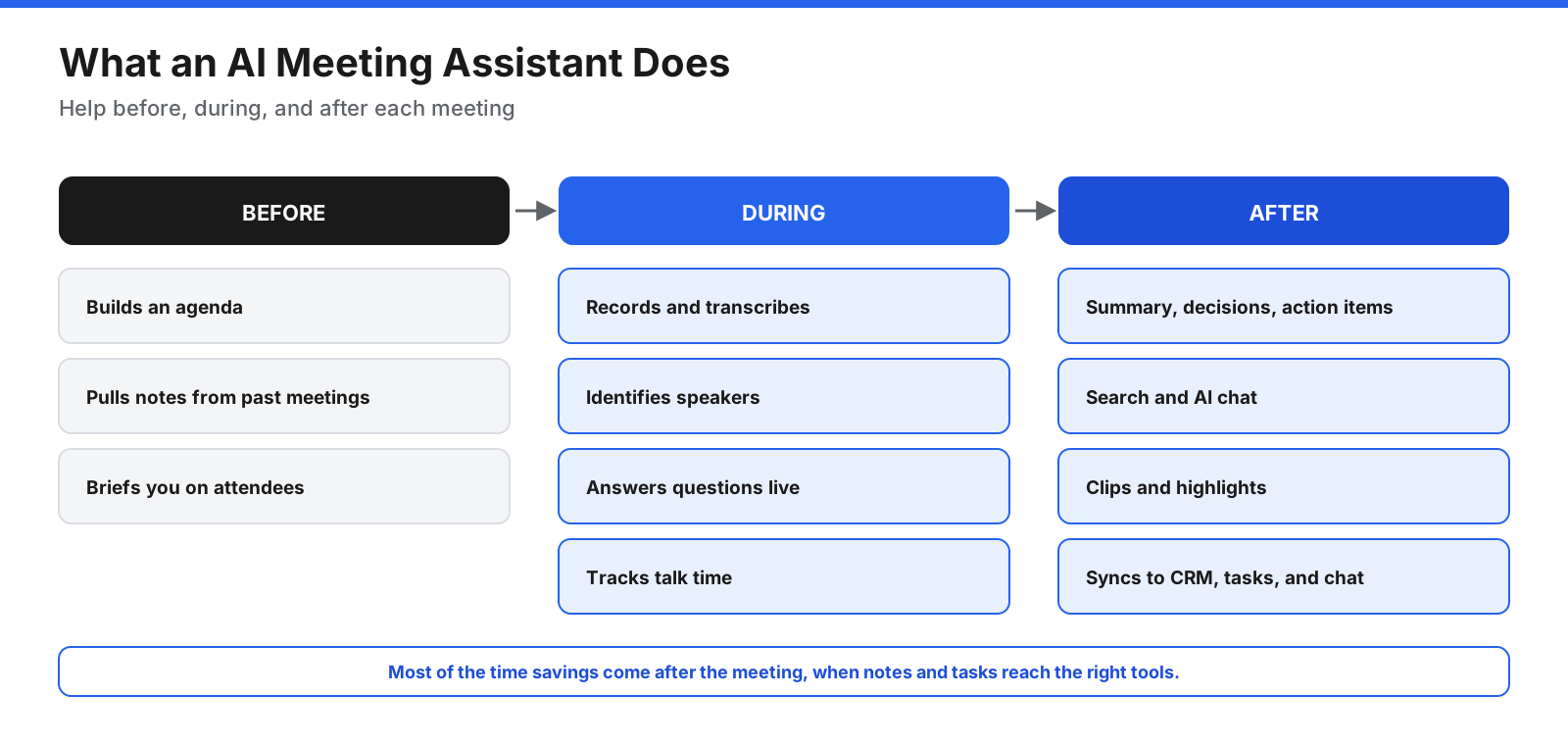
An AI meeting assistant supports three stages of a meeting. Before a meeting, some tools build agendas or pull in notes from earlier conversations. During a meeting, they record audio, transcribe speech, identify speakers, and may show live notes or analytics. After a meeting, they produce summaries, decisions, and action items, and may let you search transcripts, create clips, or sync notes to tools such as Slack, Notion, Asana, HubSpot, or Salesforce.
Bot or botless: how do they capture calls?
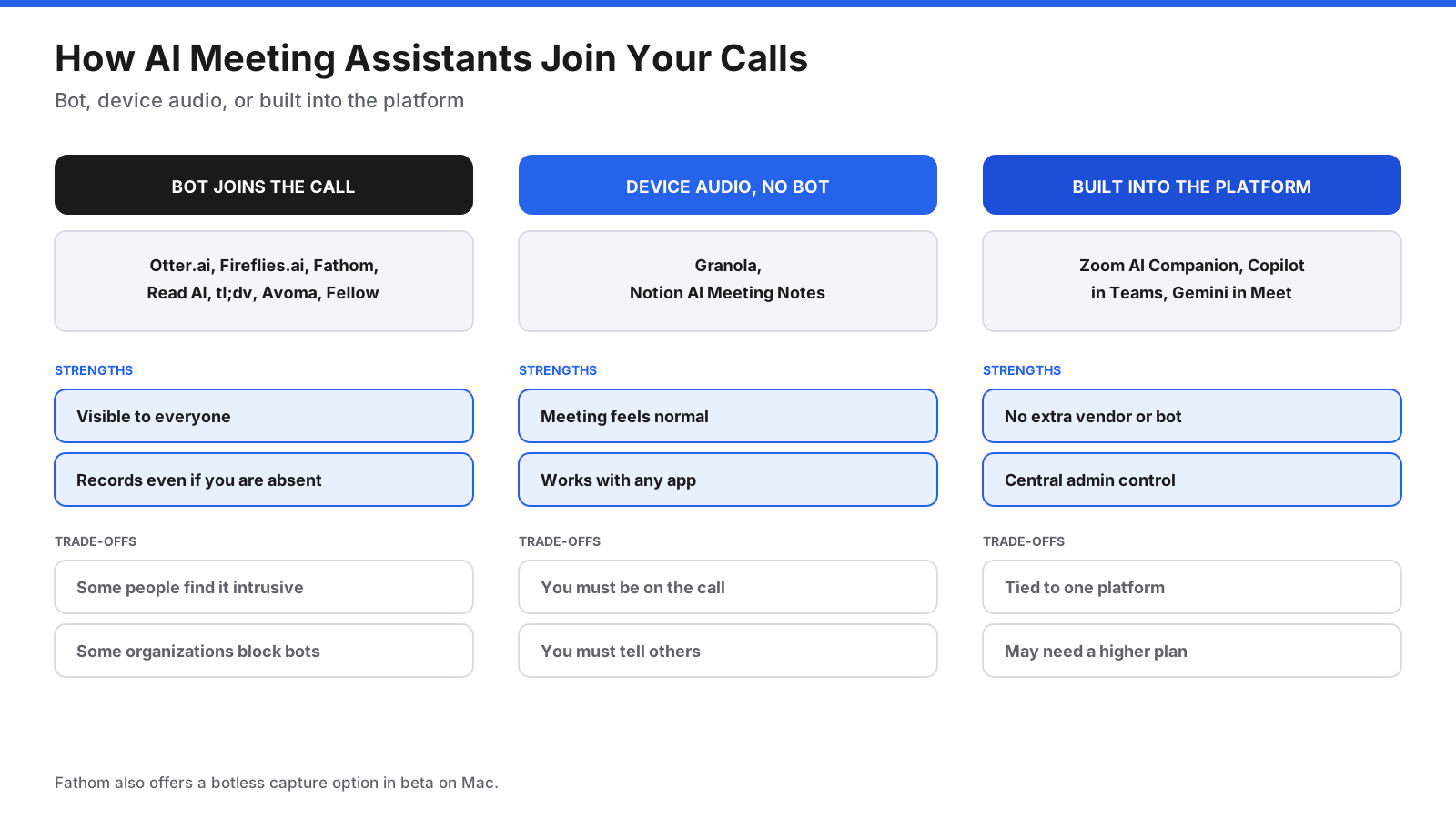
A bot joins the call. Fireflies.ai, Otter.ai, Fathom, Read AI, tl;dv, Avoma, and Fellow commonly use a visible notetaker participant. This can make recording obvious and may allow capture when you are not present, but some participants find bots intrusive and some organizations block them.
Device audio without a bot. Granola and Notion AI Meeting Notes capture audio from your computer or device. The meeting feels more natural and the tools can work with different meeting apps, but you generally need to be present on the device and should tell participants that AI notes are being taken.
Built into the meeting platform. Zoom AI Companion, Microsoft 365 Copilot in Teams, and Gemini in Google Meet work within their own ecosystems. They can simplify administration and keep work inside a system your organization already manages, but are tied to the relevant platform and plan.
What should you look for?
- Platform support: Confirm support for Zoom, Teams, Meet, and in-person meetings if needed.
- Capture method: Decide whether a visible bot, device audio, or built-in assistant fits your team.
- Summary quality: Check how accurately it identifies decisions, action items, and owners.
- Search and AI chat: See whether you can ask questions across many meetings.
- Integrations: Check your CRM, project tools, note apps, and chat platforms.
- Free plan limits: Compare meeting counts, summary limits, storage, and history.
- Team controls: Shared folders, permissions, and admin settings matter as usage grows.
- Privacy and security: Review retention, model-training policies, compliance claims, and consent features.
- Languages: Confirm transcript and summary language support for your team.
12 best AI meeting assistants
1. Fireflies.ai
Fireflies.ai is a bot-based notetaker for Zoom, Google Meet, and Microsoft Teams. It produces transcripts, summaries, and action items. Its AI assistant can answer questions about meetings, and topic tracking helps teams find conversations where a subject came up. It also offers integrations with CRM and project tools.
Pricing: A free plan is available with limits on AI summaries and storage. Paid tiers add more storage, summaries, analytics, and administrative controls. Limitations: Storage on the free plan can fill quickly, and the interface may feel busy. Best for: Teams that want search, topic tracking, and integrations in one tool.
2. Otter.ai
Otter.ai offers a live transcript, summaries, action items, and AI chat across conversations. It supports shared workspaces, imports of recorded audio and video, and selected CRM integrations.
Pricing: A free Basic plan includes a monthly transcription allowance and a per-conversation time cap; paid Pro and Business plans increase limits. Limitations: The free conversation cap may be too short for regular meetings, and technical vocabulary can be difficult for transcription systems. Otter has also faced a putative class action over recording and consent practices; allegations are not findings. Best for: Teams that want searchable meeting archives and AI chat.
3. Fathom
Fathom records and transcribes meetings, creates summaries and highlights, and lets users share clips. Paid plans add more advanced summaries, team search, action items, and CRM features.
Pricing: The free plan offers unlimited recordings and transcripts with limits on some AI features. Paid tiers add team and sales workflows. Limitations: Exact limits for some free AI features may not be obvious, and integrations can vary by platform. Best for: Individuals and small teams looking for a strong free starting point.
4. Granola
Granola is a botless notetaker that captures device audio and combines an AI transcript with your own rough notes. It supports templates and AI chat across notes.
Pricing: A free plan includes AI notes and chat with limited history; paid plans add longer history, integrations, advanced models, and enterprise controls. Limitations: It does not provide video playback, and you need to be present on the device. Best for: People who prefer not to have a bot join calls and want notes shaped by their own observations.
5. Read AI
Read AI produces meeting reports, summaries, action items, engagement measures, and talk-time insights. Its search assistant can connect information across meetings, email, and other apps.
Pricing: A limited free plan is available; paid tiers expand reports, playback, integrations, and administration. Limitations: The free allowance is small for regular use, and playback may require a higher tier. Best for: Managers and teams who value analytics and cross-app search.
6. tl;dv
tl;dv records and transcribes meetings, adds timestamps and clips, and builds a searchable video library. It can suit product, research, and customer-success teams that revisit calls.
Pricing: A free tier is available, while paid plans add more AI notes and team features. Pricing details have changed, so confirm the current rates directly. Limitations: Free AI-note allowances can be restrictive, and automatic joining may occasionally fail. Best for: Teams that need a library of recordings and shareable clips.
7. Avoma
Avoma is designed for revenue teams. It combines AI notes with scheduling, conversation intelligence, coaching, deal tracking, and CRM updates.
Pricing: Paid plans are sold by recorder seat, with add-ons for conversation and revenue intelligence; a free trial may be available, but not a permanent free plan. Limitations: Costs can rise when add-ons are included, and many features are unnecessary for non-sales teams. Best for: Sales and customer-success teams that want notes, CRM workflows, coaching, and forecasting.
8. Fellow
Fellow combines an AI notetaker with collaborative agendas, recurring meeting notes, action items, and templates. It emphasizes the structure around meetings, not just the transcript.
Pricing: A limited free plan is available, with paid tiers adding more recordings, AI notes, integrations, and administration. Limitations: Entry-level recording allowances may not suit teams with many meetings. Best for: Managers who want better agendas and accountability as well as AI notes.
9. Zoom AI Companion
Zoom AI Companion can create meeting summaries, answer questions during meetings, draft chat replies and emails, and help with scheduling. Its My Notes feature may also support personal note-taking in other meeting apps through connectors.
Pricing: Core AI Companion features are included with eligible paid Zoom Workplace plans; some standalone options may be available. Limitations: It works best inside Zoom, and features outside Zoom may have different requirements. Best for: Organizations already paying for Zoom that want to avoid adding another vendor.
10. Microsoft 365 Copilot in Teams
Microsoft 365 Copilot in Teams can summarize meetings, list action items, answer private questions during a call, and support follow-up across Microsoft 365 content. Admins can manage availability through meeting policies.
Pricing: A Copilot license is required on top of an eligible Microsoft 365 plan. Limitations: It adds per-user cost and is closely tied to Teams and the Microsoft ecosystem. Some meeting configurations, including end-to-end encrypted meetings, may not support all features. Best for: Microsoft 365 organizations that want meeting AI connected to email, documents, and chat.
11. Gemini in Google Meet
Gemini in Google Meet can create notes, summaries, action items, and transcripts in Google Docs. Availability depends on the Google Workspace edition and eligible plans. Google has also introduced in-person meeting note features for eligible users.
Pricing: Meeting notes are included with eligible Workspace plans, not every edition. Check current plan details before upgrading. Limitations: It is designed for Google Meet and depends on the subscription. Best for: Organizations already using Google Workspace on an eligible plan.
12. Notion AI Meeting Notes
Notion AI Meeting Notes captures audio through the Notion desktop app and saves summaries and action items into Notion pages. It can keep meeting notes close to projects and documents, and support search across a Notion workspace.
Pricing: Full access is tied to eligible paid Notion plans, with limited trial access on some other plans. Limitations: Browser and mobile capture options differ, and it is most useful if your team already works in Notion. Best for: Teams that manage projects and documentation in Notion.
How do the tools compare?
| Tool | Capture method | Free option | Best fit |
|---|---|---|---|
| Fireflies.ai | Bot | Yes, limited summaries and storage | Search and integrations |
| Otter.ai | Bot or app | Yes, monthly minutes and meeting cap | Searchable meeting archive |
| Fathom | Bot, with some botless options | Yes, unlimited recordings | Individuals and small teams |
| Granola | Device audio | Yes, limited history | Botless notes |
| Read AI | Bot | Yes, limited reports | Analytics and cross-app search |
| tl;dv | Bot | Yes, limited AI notes | Recording library and clips |
| Avoma | Bot | Trial, not permanent free | Sales workflows |
| Fellow | Bot | Yes, limited lifetime allowance | Agendas and accountability |
| Zoom AI Companion | Built in | Included with eligible paid plans | Existing Zoom users |
| Copilot in Teams | Built in | No standalone free plan | Microsoft 365 organizations |
| Gemini in Meet | Built in | Depends on Workspace plan | Google Workspace users |
| Notion AI Meeting Notes | Device audio | Limited trial on some plans | Notion teams |
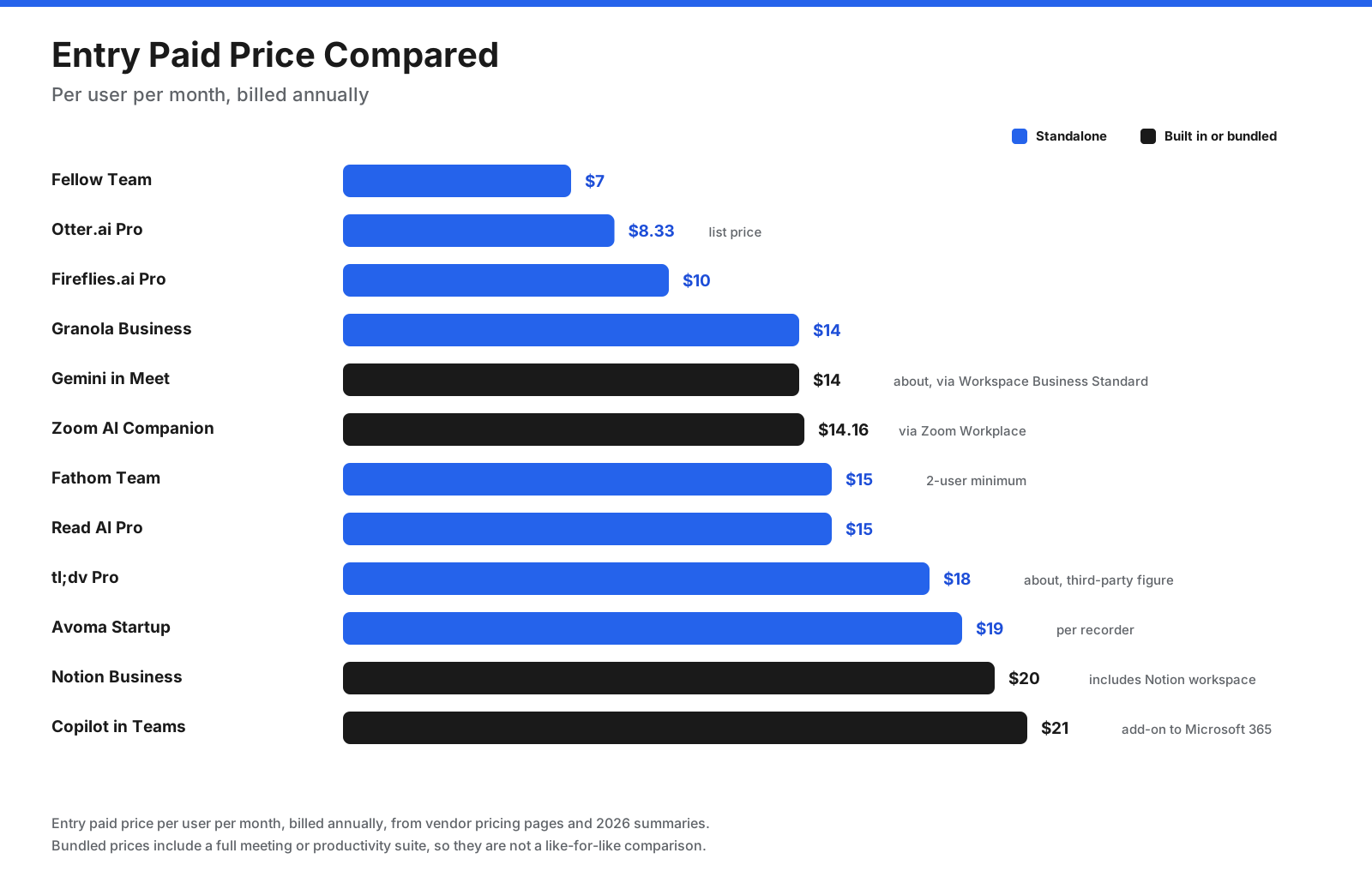
Standalone tools can be an economical way to add AI notes to an existing meeting platform. Built-in options may cost less incrementally if your company already pays for the required suite, but Copilot and some Workspace or Notion features require eligible subscriptions. Verify current prices and billing terms with each vendor.
What do the free plans actually offer?
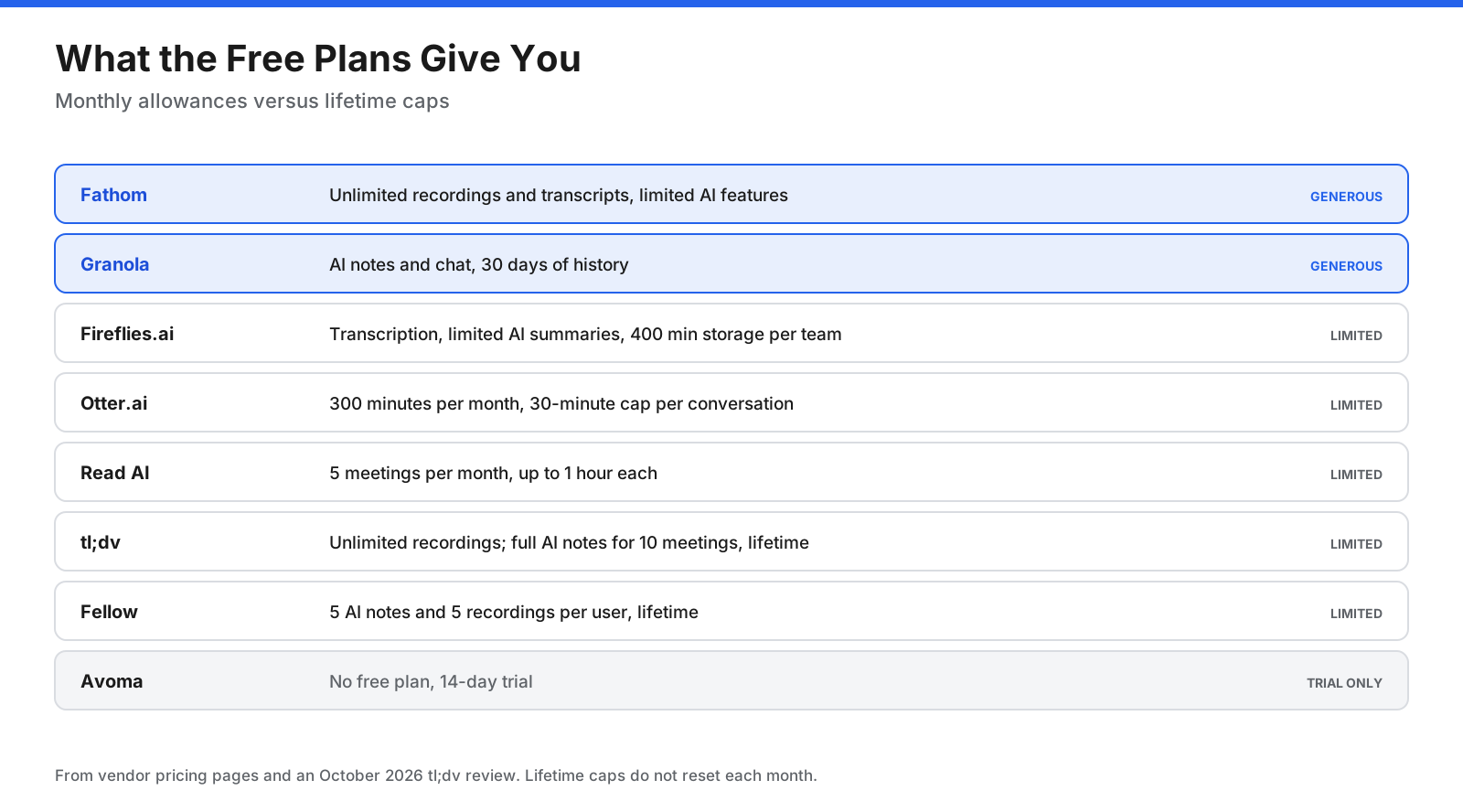
Free plans differ in whether limits reset monthly or apply for the lifetime of an account. Fathom is a useful starting point for individuals who want unlimited recordings and transcripts, though some AI features are limited. Granola suits users who want botless notes and can work with a limited history. Otter’s monthly minutes may be enough for occasional short calls, but its per-conversation cap matters. Fireflies.ai, Read AI, tl;dv, and Fellow all restrict some combination of storage, reports, or AI notes.
Standalone tool or built-in AI?
If your company already pays for Zoom Workplace, Microsoft 365 with Copilot, or an eligible Google Workspace plan, check those features before buying another product. Built-in assistants reduce the number of vendors to approve and can keep notes in systems your IT team already manages.
A standalone tool may be better if you meet across multiple platforms, need deeper CRM and sales features, want a searchable library of many calls, or do not have a plan that includes AI notes. Some teams use built-in assistants for internal meetings and a standalone tool for sales calls or research interviews.
Is it legal to use an AI note taker in meetings?
Recording laws vary by location. Some US states require consent from everyone in a conversation, while others allow one-party consent. Other countries have their own requirements, and privacy laws may apply to recordings and transcripts. This guide is not legal advice; check the rules that apply to your organization with your legal team.
AI notetakers have also drawn legal attention. A putative class action filed in California in August 2025 alleged that Otter’s notetaker recorded people without appropriate consent and used recordings to train models. Those allegations are unproven and should not be treated as findings.
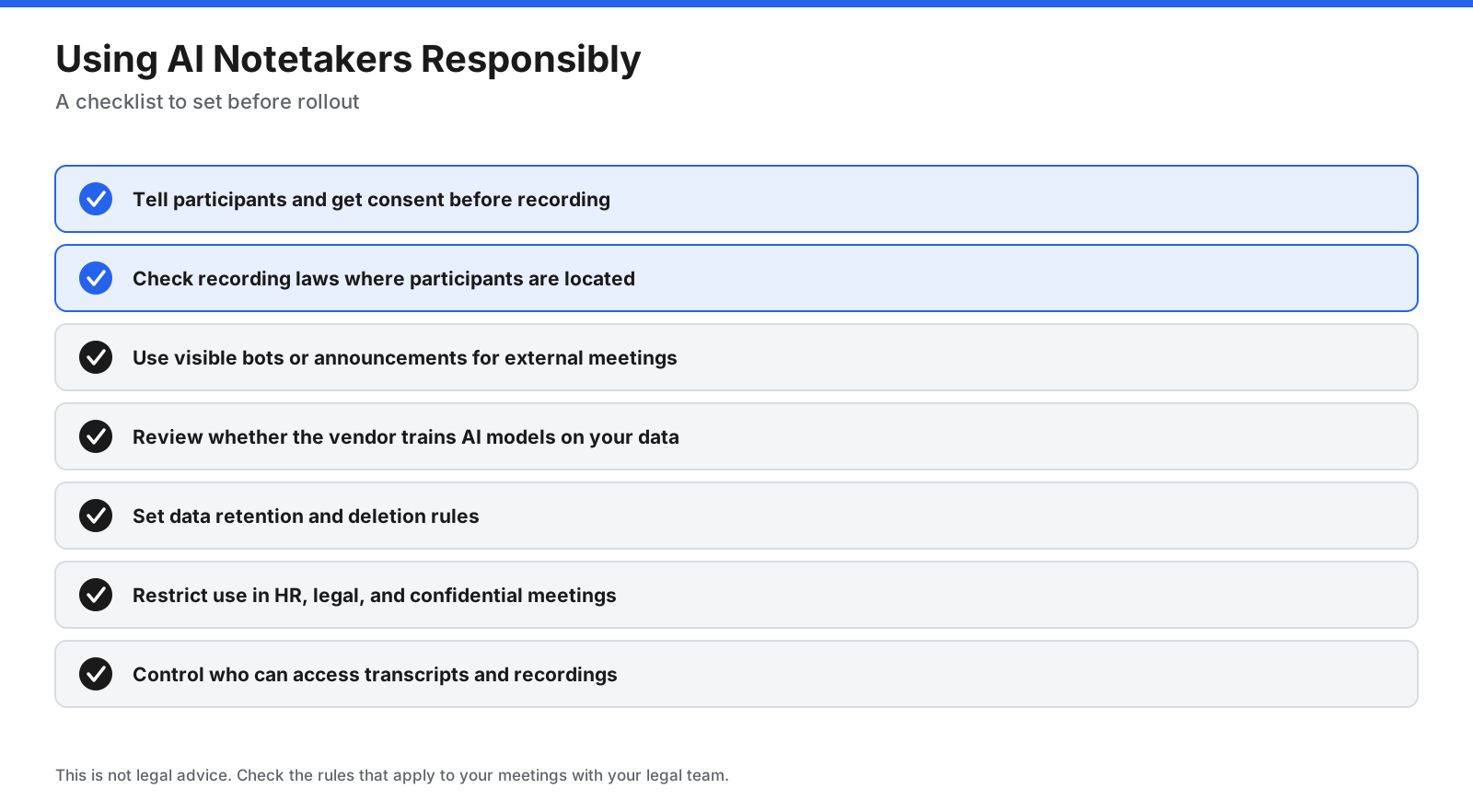
Tell participants when an AI assistant is recording, especially in external meetings. Avoid recording sensitive HR, legal, or medical conversations unless approved. Check whether the vendor uses your data to train models, set retention rules, and restrict access to transcripts and recordings.
How do you choose the right AI meeting assistant?
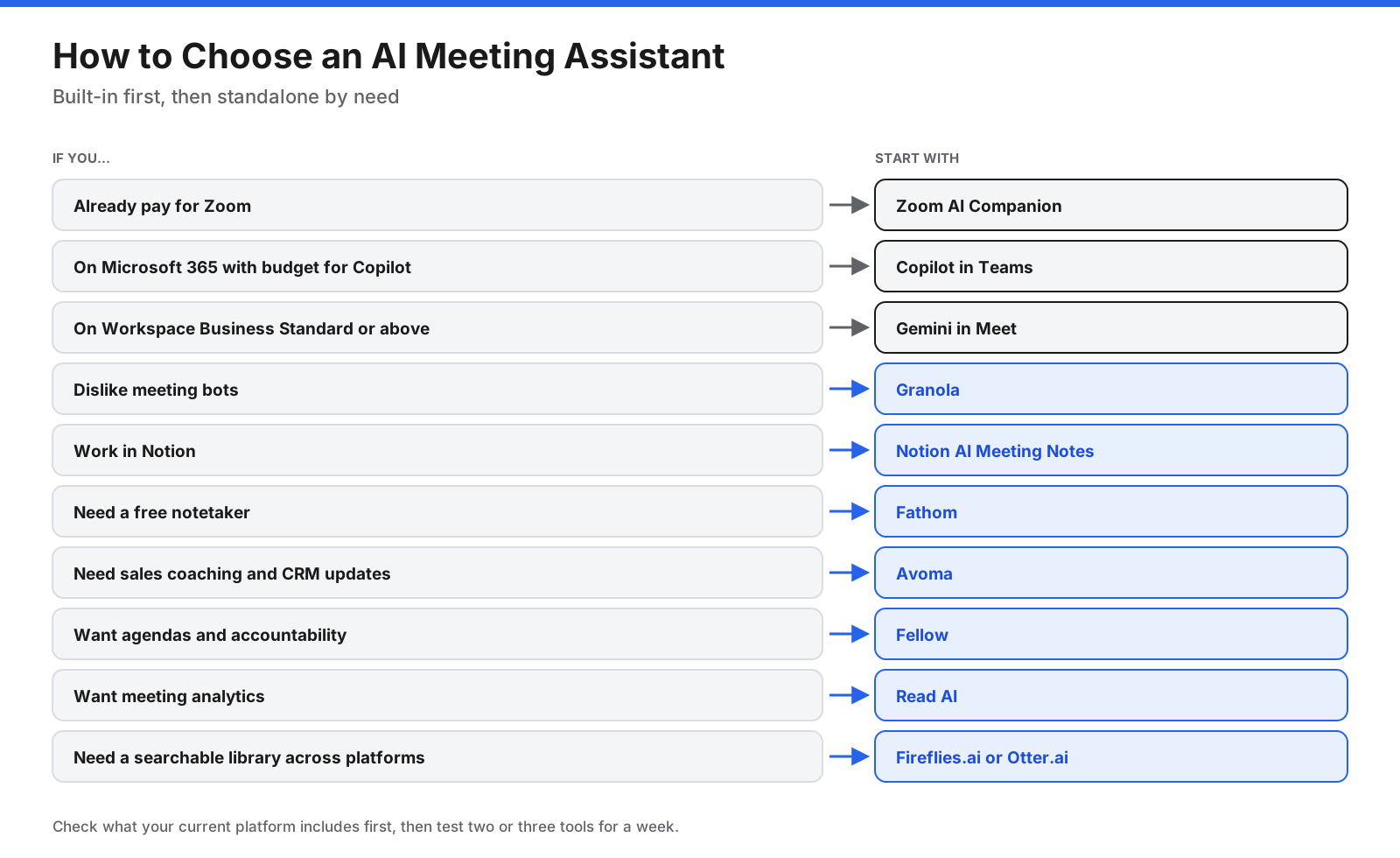
- What do you already pay for? Check Zoom, Microsoft 365, Google Workspace, or Notion first.
- Which meeting platforms do you use? A standalone tool is more useful if you switch between platforms.
- Are bots acceptable? If not, consider Granola, Notion AI Meeting Notes, or a built-in assistant.
- Who will use it? Sales teams may need CRM sync and coaching; managers may value agendas and analytics; individuals may need only a free plan.
- What are your privacy requirements? Review security certifications, data retention, and model-training policies.
Test two or three shortlisted tools during a normal week of meetings. Compare their summaries, check whether action items and owners are accurate, and ask your team which notes they would actually use.
How can you get more value from an AI meeting assistant?
- Use templates by meeting type. Sales calls, one-to-ones, stand-ups, and interviews need different summaries.
- Connect it to your workflow. Send action items to your project tool and summaries to the right chat channel.
- Review before sharing. AI can miss context or assign an action to the wrong person.
- Name meetings clearly. Clear titles and attendee lists make notes easier to organize and search.
- Agree on team rules. Decide which meetings get recorded, who can access notes, and how long recordings stay available.
Frequently asked questions
What is the best AI meeting assistant?
There is no single best choice for everyone. Fireflies.ai and Otter.ai are strong all-round options, Fathom is a good free starting point, Granola is suited to botless notes, and Avoma focuses on sales teams. If you already pay for an eligible Zoom, Microsoft 365, or Google Workspace plan, start with its built-in features.
What is the best free AI meeting assistant?
Fathom is a strong option for people who want unlimited recordings and transcripts, with some AI feature limits. Granola suits people who prefer botless notes. Fireflies.ai and Otter.ai also have free plans with storage or minute restrictions.
Can ChatGPT take meeting minutes?
ChatGPT can turn a transcript or notes you provide into meeting minutes. Dedicated meeting assistants may add calendar integrations, speaker identification, automated recording, and CRM synchronization.
What is the best AI note taker for in-person meetings?
Tools that capture audio from a phone or laptop can work for in-person meetings. Granola and Notion AI Meeting Notes use device audio, Otter.ai can record in its mobile app, and Google Meet offers note features on eligible plans. Confirm device and plan requirements before choosing.
Do Zoom, Teams, and Google Meet have built-in AI notes?
Yes. Zoom AI Companion is included with eligible paid Zoom Workplace plans. Microsoft 365 Copilot in Teams requires a Copilot license. Gemini meeting notes are available with eligible Google Workspace plans.
Is Otter or Fireflies better?
Otter is known for live transcripts and AI chat across meetings. Fireflies offers topic tracking, storage options, and broad integrations. Compare the current free-plan limits and integrations against your own workflow.
Which AI meeting assistant is best for sales teams?
Avoma is designed for revenue teams, with CRM updates, coaching, and forecasting. Fathom Business and Fireflies.ai also offer sales-oriented features, while Otter supports selected CRM integrations and sales workflows.
Are AI meeting assistants secure?
Security features vary by vendor and plan. Review encryption, compliance certifications, retention settings, access controls, and whether meeting data is used to train AI models. Do not assume that every feature is included on every plan.
Do you need consent to use an AI note taker?
Requirements depend on where participants are located and the type of meeting. Tell participants when an assistant is recording, and check applicable laws and company policies with your legal team.
The bottom line
The best AI meeting assistant depends on where you meet and what you need after the call. If your organization already pays for Zoom, Microsoft 365 with Copilot, or an eligible Google Workspace plan, try the built-in assistant first.
If you need a standalone tool, compare Fireflies.ai and Otter.ai for general use, Fathom for a free starting point, Granola for botless notes, Read AI for analytics, tl;dv for clips, Fellow for meeting structure, and Avoma for sales workflows. Test your shortlist with real meetings, set clear consent and retention rules, and confirm current prices before committing.