

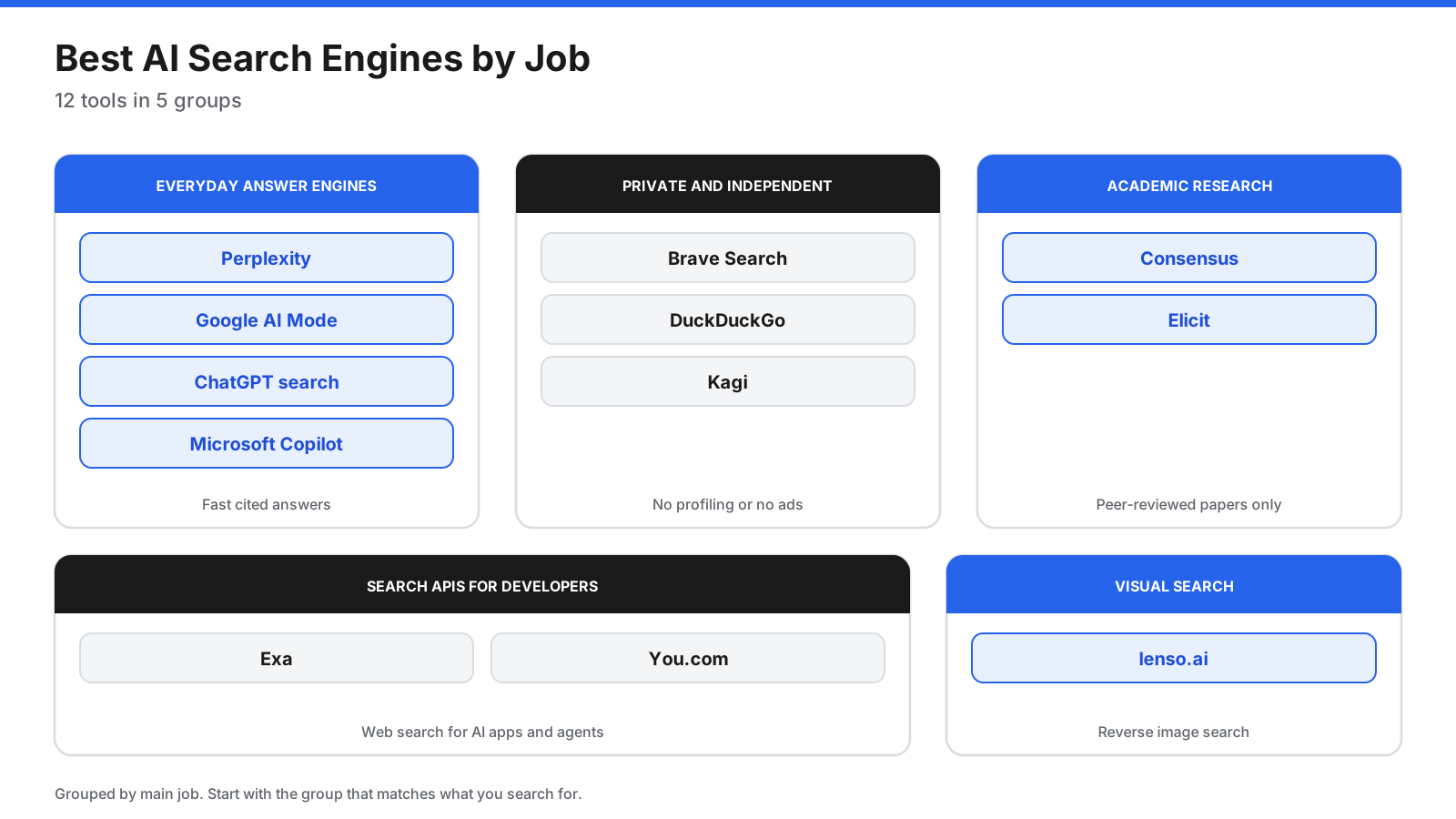
Search has changed. Instead of returning only a list of links, AI search engines can read pages, summarize what they say, and show links to sources. You can ask follow-up questions and compare information across multiple pages. But there is no single best AI search engine for everyone: some tools focus on everyday answers, others on privacy, academic research, developer APIs, or reverse image search.
This guide compares 12 options by their main use case, free access, pricing model, and limitations. Prices and plan limits change, so verify details on each provider’s official site before subscribing.
Quick picks
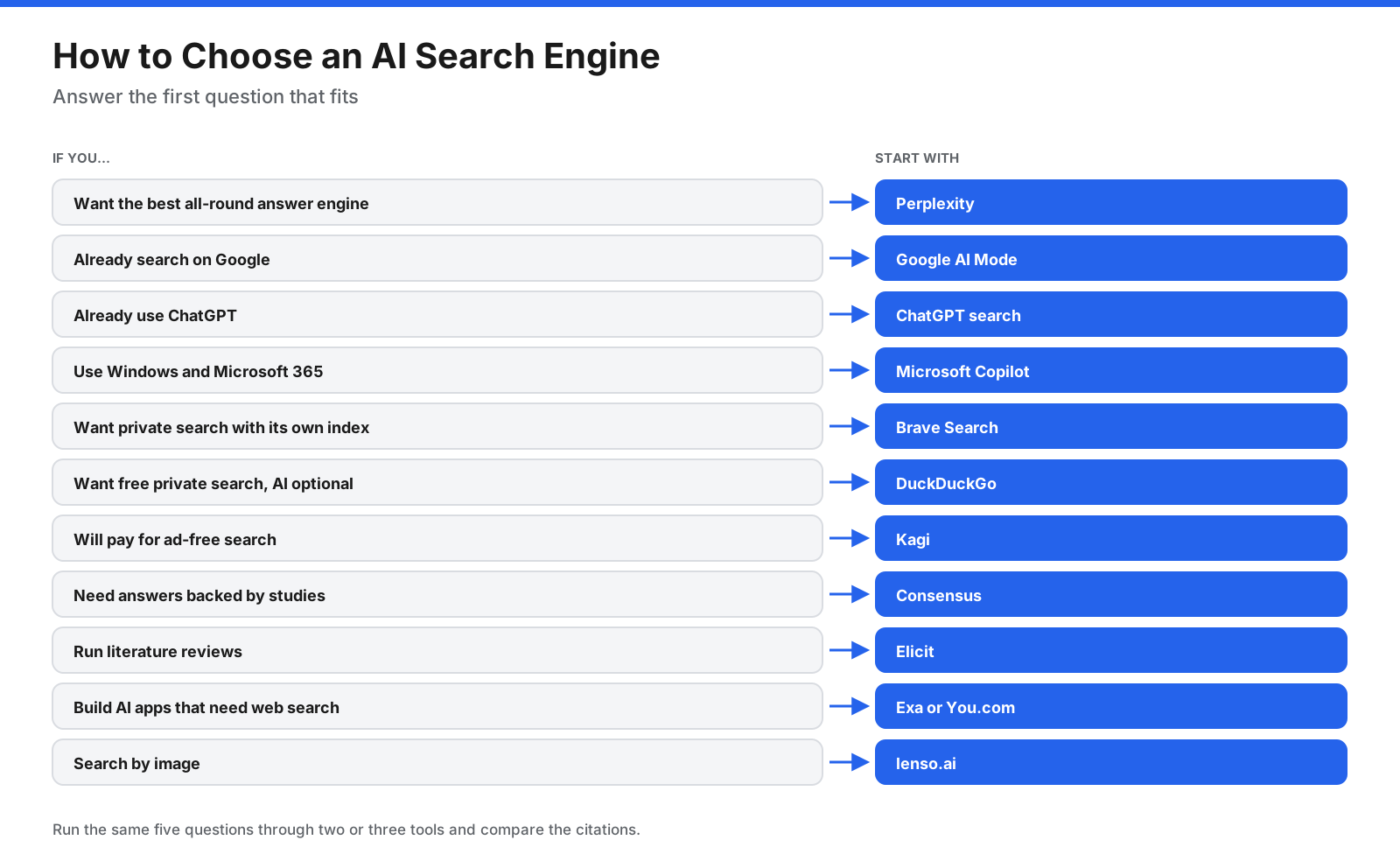
- Best all-round answer engine: Perplexity
- Best for existing Google users: Google AI Mode
- Best search inside a chat assistant: ChatGPT Search
- Best for Windows and Microsoft 365: Microsoft Copilot
- Best private search with its own index: Brave Search
- Best free private search with optional AI: DuckDuckGo
- Best paid, ad-free search: Kagi
- Best for scientific research: Consensus
- Best for literature reviews: Elicit
- Best search API for AI developers: Exa
- Best simple search API with a free tier: You.com
- Best reverse image search: lenso.ai
How does an AI search engine work?
An AI search engine typically combines a search index with a language model. You ask a question, the system may break it into smaller searches, retrieves relevant pages, summarizes the information, and returns an answer with source links. Some products use their own search index; others rely partly on results from established search providers.
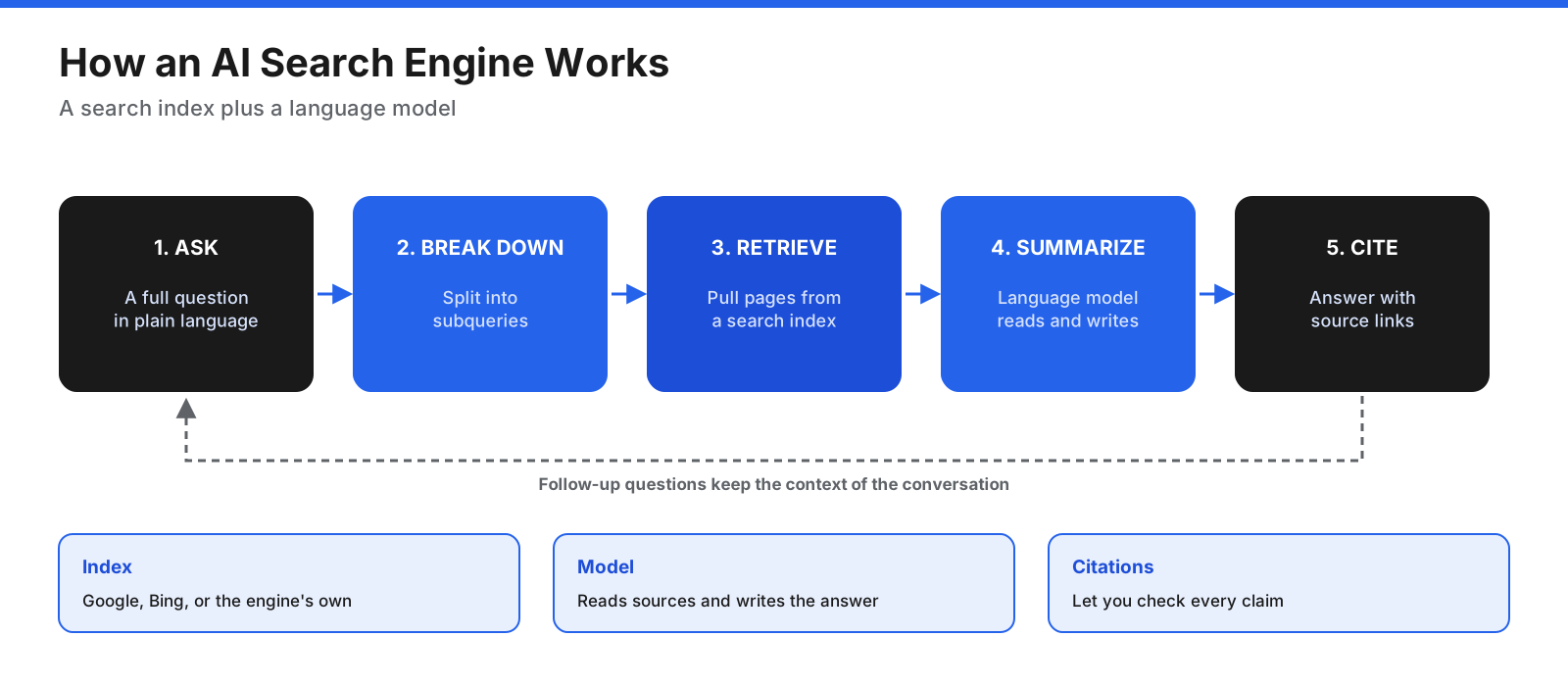
Answer quality depends on both retrieval and summarization. A model can misread a source, merge facts incorrectly, or make a claim that its sources do not support. Always open citations for important decisions.
AI search vs traditional search
| Question | Traditional search | AI search |
|---|---|---|
| What you type | Keywords | Full questions in plain language |
| What you get | Ranked links | Summary with source links |
| Follow-ups | Usually start a new search | Continue in the same thread |
| Main risk | You must assess pages yourself | The summary may misread sources |
| Best for | Specific sites, local results, shopping | Research, comparisons, explanations |
Many people benefit from using both. Traditional search remains useful when you know the site or need local results. AI search can save time when you need to understand a topic or compare multiple sources.
What should you look for?
- Citations: Can you check the source behind each claim?
- Freshness: Does it search the live web?
- Follow-ups: Does it retain context across questions?
- Research depth: Can it read many sources and create a report?
- Privacy: How are searches stored, profiled, or used?
- Source control: Can you focus on research papers or specific sites?
- Price: What is included in the free plan?
- Integration: Does it fit your browser, operating system, or workflow?
12 best AI search engines
1. Perplexity
Perplexity is a dedicated conversational answer engine. It returns answers with numbered citations, suggests follow-up questions, and provides research-focused modes for more detailed reports. It is a strong starting point for general research, comparisons, and everyday questions.
Pricing: A free plan covers basic searches with limits on advanced features. Pro has commonly been listed at $20 per month, while higher-priced plans offer additional capabilities. Limitations: Advanced search is limited on free access, and the range of modes can be confusing. Best for: People who want a dedicated AI search and research tool.
2. Google AI Mode and AI Overviews
AI Overviews are summaries shown above regular Google results for some queries. AI Mode is a separate conversational search experience for complex questions and follow-ups. It benefits from Google’s wider ecosystem, including Maps, Shopping, and YouTube.
Pricing: AI Mode and AI Overviews are available free in Google Search, though some advanced or agentic features may have eligibility limits. Limitations: Generated answers can be wrong, and AI Mode is a distinct experience from the usual results page. Best for: People who already use Google for everyday search.
3. ChatGPT Search
ChatGPT Search brings web results and source links into a conversation. You can move from finding information to writing, analysis, and planning without switching tools.
Pricing: Web search is available to free users, subject to product usage limits. Paid plans add broader capabilities. Limitations: It is a general assistant as well as a search tool, so results may feel less structured than a dedicated search product. Best for: People who want search and follow-on work in one conversation.
4. Microsoft Copilot
Copilot works across Bing, Edge, Windows, and Microsoft 365. It can provide cited answers in search and connect with Microsoft’s software ecosystem.
Pricing: A basic version is free. Additional Microsoft 365 features depend on the subscription. Limitations: The value is greatest for people who already use Microsoft products. Best for: Windows, Edge, Bing, and Microsoft 365 users.
5. Brave Search
Brave Search uses its own search index. Its AI answer features combine summaries with source links, while its results page also includes conventional links and other result types. Brave says it does not profile users for search.
Pricing: Search is free and ad-supported, with a paid ad-free option. Limitations: Some users may prefer the coverage or familiarity of larger search engines; optional fallback settings can affect result sources. Best for: Privacy-minded users who want an independent index.
6. DuckDuckGo
DuckDuckGo provides free private search with optional AI features. Search Assist generates short answers when it considers them useful, while Duck.ai offers access to AI chat. Users can also disable AI-generated answers through settings or use its no-AI search option.
Pricing: Search is free; paid subscriptions add services and higher AI limits. Limitations: Answers are generally brief and it is not focused on long research reports. Best for: People who want private search and control over whether AI appears.
7. Kagi
Kagi is a subscription-funded search engine without ads. Kagi Assistant adds AI chat and research features, including access to different models on eligible plans.
Pricing: A limited trial is available, followed by paid plans with different search allowances and features. Limitations: It requires payment beyond the trial, and lower tiers may not suit heavy users. Best for: Frequent searchers who value ad-free results and control.
8. Consensus
Consensus searches academic papers and summarizes research findings with citations. It is more focused on evidence from scientific literature than on general web answers.
Pricing: A free plan includes a limited number of advanced searches; paid plans expand access. Confirm current prices on its site. Limitations: It is not designed for shopping, local results, or general news. Best for: Students, researchers, clinicians, and people investigating research questions.
9. Elicit
Elicit is built for literature reviews. It searches academic papers, summarizes them, extracts data into tables, and can help prepare research reports.
Pricing: A free Basic plan is available, with advanced research features and larger allowances on paid tiers. Verify the current tier prices because published plan details can change. Limitations: It is more specialized than a general answer engine, and some of its most useful features are paid. Best for: Researchers reviewing many papers or extracting comparable findings.
10. Exa
Exa is a search engine and API designed for AI applications rather than everyday consumer search. Developers can use it to retrieve web content for agents, chatbots, and research systems.
Pricing: Usage-based API pricing and free credits are available. Costs vary by search mode and content retrieval. Limitations: It is a developer tool, not a standard search app. Best for: Developers who need web search in an AI product.
11. You.com
You.com offers search APIs for developers who need web results and content in AI applications. Its developer offerings include web search, content extraction, and answer-oriented endpoints.
Pricing: A free starting tier or credits may be available, with paid usage billed by API calls or content retrieved. Check the current plan page. Limitations: Its API focus makes it less suitable for people who simply want a daily search engine. Best for: Developers who want to add web search to an application.
12. lenso.ai
lenso.ai specializes in reverse image search. You upload an image and it looks for matching or similar images online, which can help creators investigate where images appear.
Pricing: Searching may be available for free, while viewing sources and advanced features can require a subscription. Confirm current plan details directly. Limitations: Source access may be restricted on free plans, and results can take time. Best for: Photographers, creators, and people checking image matches.
How do the tools compare?
| Tool | Best for | Free option | Pricing model |
|---|---|---|---|
| Perplexity | General answers and research | Yes, advanced limits | Subscription |
| Google AI Mode | Existing Google users | Yes | Free core search |
| ChatGPT Search | Search in a chat assistant | Yes, usage caps | Free and paid plans |
| Microsoft Copilot | Windows and Microsoft users | Yes | Free and suite plans |
| Brave Search | Private independent search | Yes, ad-supported | Free and premium |
| DuckDuckGo | Private search with optional AI | Yes | Free and subscriptions |
| Kagi | Ad-free search | Limited trial | Subscription |
| Consensus | Scientific literature | Limited free plan | Free and paid plans |
| Elicit | Literature reviews | Basic plan | Free and paid plans |
| Exa | AI developers | Credits | Usage-based API |
| You.com | Search APIs | Free tier or credits | Usage-based API |
| lenso.ai | Reverse image search | Limited search | Free and paid plans |
Which AI search engines are free?
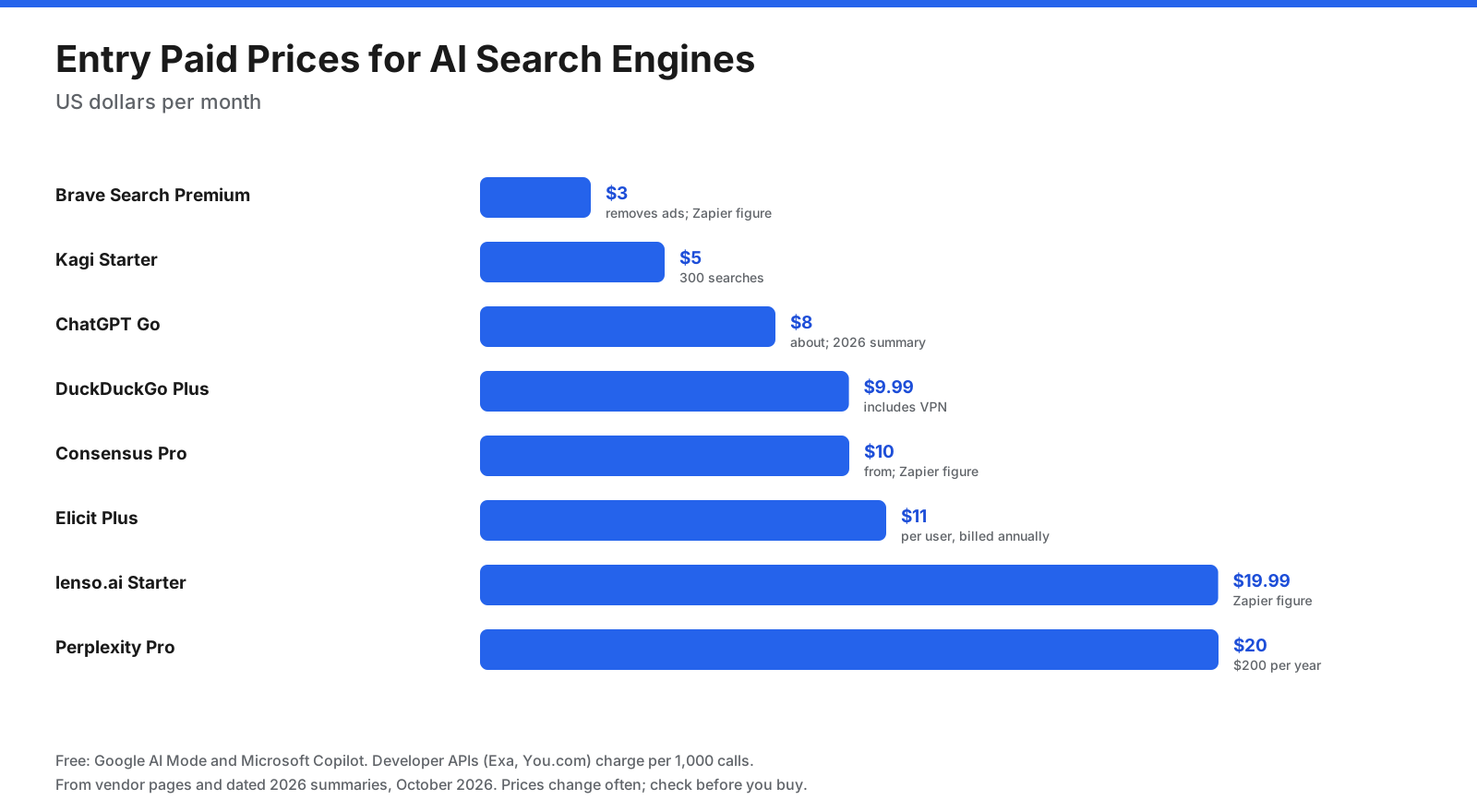
Google AI Mode, Microsoft Copilot, Brave Search, and DuckDuckGo offer useful free search experiences. Perplexity and ChatGPT also provide free access with limits on advanced features. Consensus and Elicit offer free plans for research, while Kagi is primarily a paid product after its trial. Exa and You.com offer developer-oriented free credits or tiers.
How do AI search engines make money?
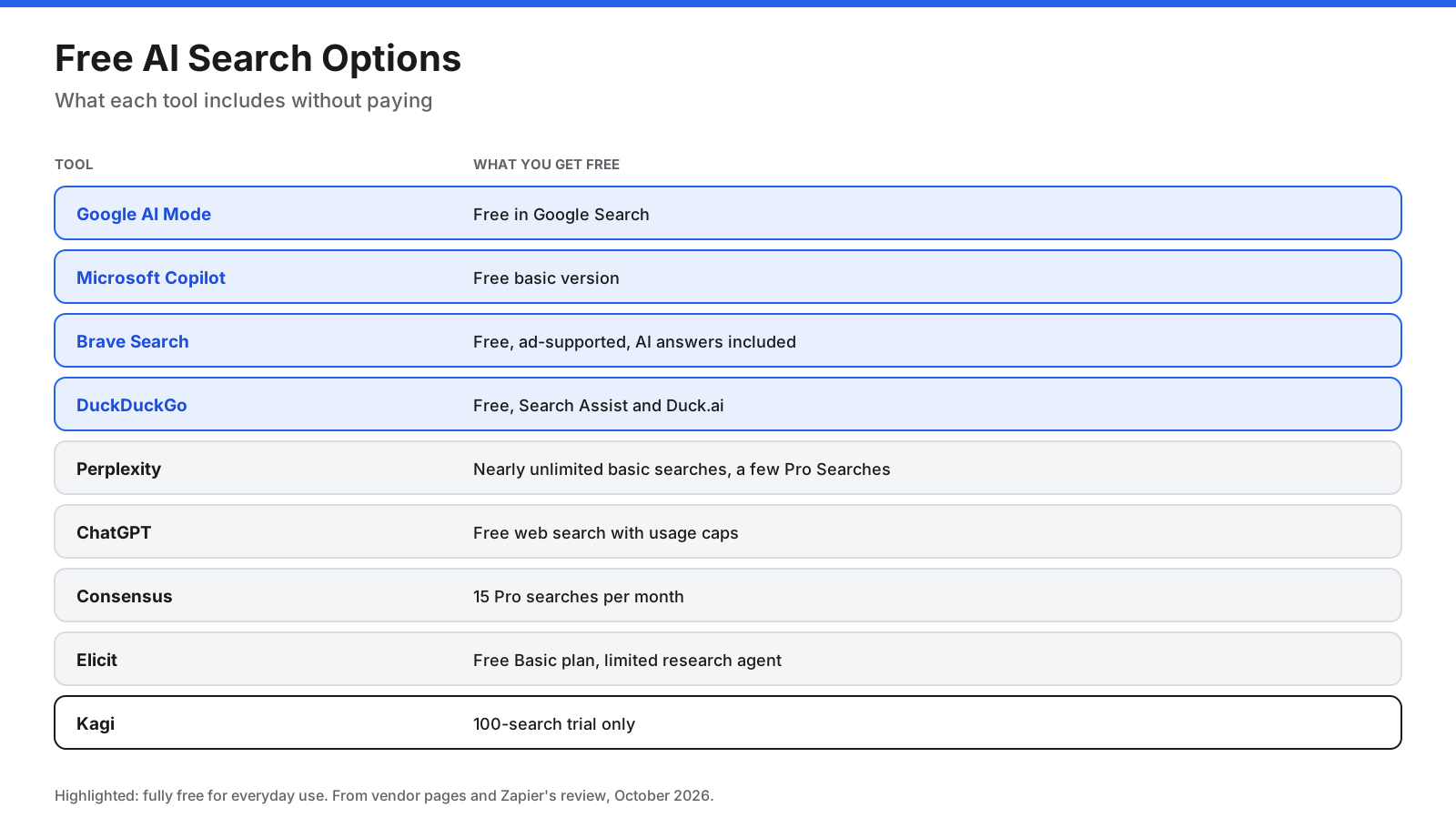
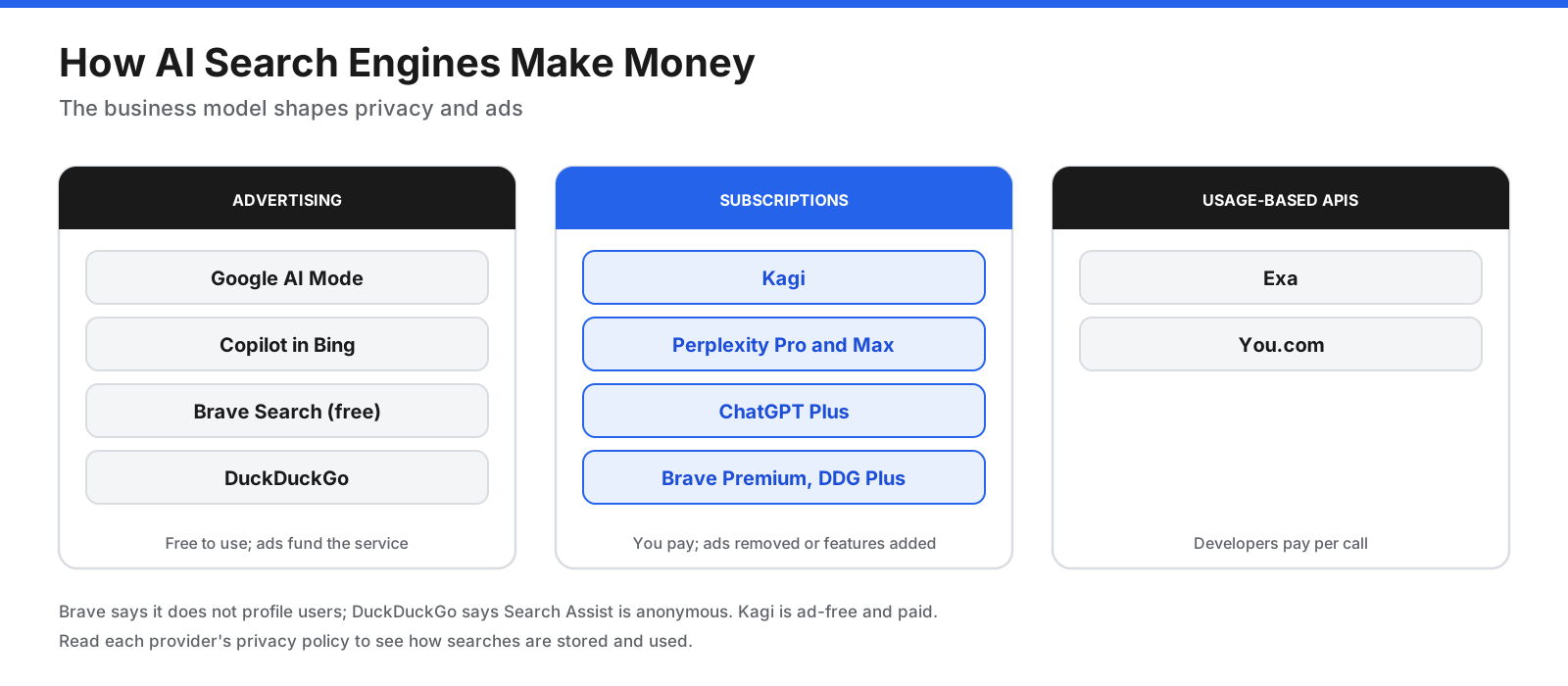
Most use one of three models. Advertising supports free access, subscriptions fund ad-free search or advanced features, and developer APIs charge by request or content retrieved. None of these models is automatically better. Read each provider’s privacy policy to understand how it handles searches and account data.
How accurate are AI search answers?
AI search can save time, but a fluent answer is not proof that it is correct. A model may misread a source, combine claims from different pages, or cite a page that does not support its statement.
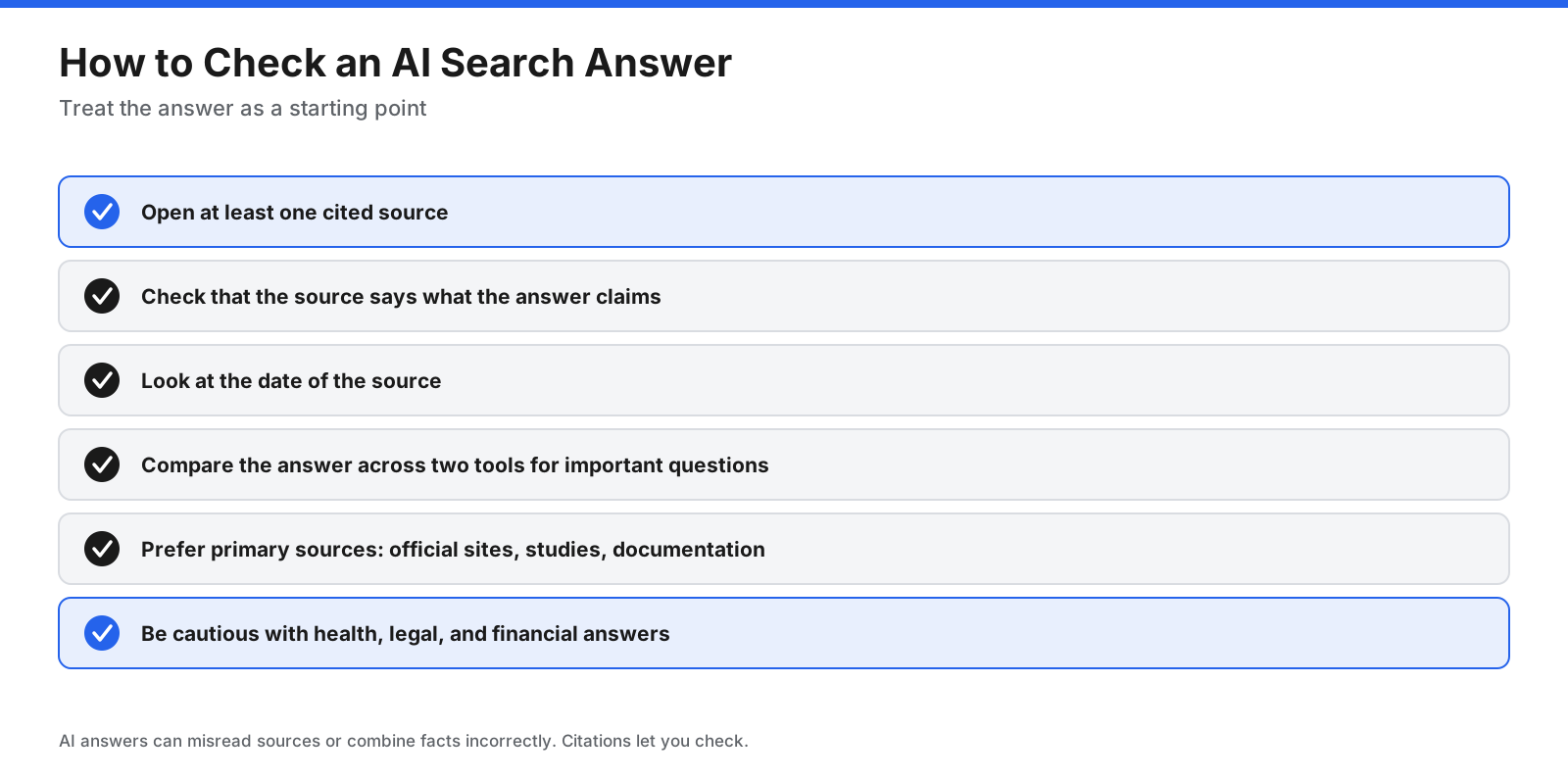
- Open the citations and check that they support the answer.
- Check publication dates and whether the information is current.
- Compare results across two tools for important questions.
- Prefer primary sources, original research, official documentation, and direct statements.
- For health, legal, and financial matters, use AI search for background and confirm important decisions with a qualified professional.
Can you turn off AI in search?
Yes, in some products. DuckDuckGo provides settings and a no-AI search option. Google’s Web filter can show a list of links without AI Overviews. Kagi presents traditional search results, with AI features available separately. Turning off generated answers does not remove all machine learning from search, since ranking systems may still use it.
Which AI search engine is best for research?
For academic work, Consensus is suited to quick questions grounded in research papers, while Elicit is useful for literature reviews and extracting findings into tables. Perplexity can be better for broader business or market research that combines news, company sites, and reports.
Which AI search engine is best for developers?
For coding questions, general assistants such as Perplexity, ChatGPT Search, and Copilot can help find documentation and forum answers. For building an app or agent that needs web search, compare Exa and You.com. Review cost per request, latency, result quality, data retention, and enterprise controls before integrating an API.
How do you choose the right AI search engine?
- Define the job. Everyday answers, private search, academic research, developer APIs, or image matching need different tools.
- Set a budget. Start with free plans if they cover your needs; compare paid features and usage caps.
- Review privacy. Read how searches are stored and used, especially for sensitive topics.
- Test your own questions. Run the same questions through two or three tools and compare their citations.
- Keep traditional search available. It can be faster for specific websites, local results, and shopping.
Frequently asked questions
What is the best AI search engine?
Perplexity is a strong dedicated answer engine. Google AI Mode is convenient for existing Google users, and Brave Search is a good option for privacy-minded users. The right choice depends on your needs.
What is the best free AI search engine?
Google AI Mode, Microsoft Copilot, Brave Search, and DuckDuckGo offer useful free everyday search. Perplexity and ChatGPT also have free options with limits on advanced features.
Is Perplexity better than Google?
Perplexity focuses on conversational answers and research. Google combines AI features with established search, Maps, Shopping, and other services. Many users can benefit from both.
Which AI search engine does not track you?
Brave and DuckDuckGo describe privacy protections for their search products, while Kagi is funded by subscriptions rather than advertising. Review current privacy policies before searching sensitive information.
Is there a search engine that does not use AI?
Most modern search engines use machine learning in ranking, but some let you turn off AI-generated summaries. DuckDuckGo offers a no-AI search option, and Google’s Web filter shows traditional links without AI Overviews.
What is the best AI search engine for research papers?
Consensus and Elicit focus on academic literature. Consensus is suited to focused research questions; Elicit is useful for literature reviews and data extraction.
What is the best AI search engine for developers?
For web search in an AI application, Exa and You.com offer APIs. Compare pricing, result quality, latency, and data policies for your intended workload.
Can AI chat assistants search the web?
Yes. ChatGPT, Microsoft Copilot, and Google’s AI products can search the web. Dedicated search engines tend to emphasize citations and the search experience.
Are AI search engines accurate?
They can be useful but make mistakes. Open citations, check dates, and compare primary sources for important questions.
The bottom line
The best AI search engine depends on what you search for. Perplexity is a strong all-round answer engine; Google AI Mode and ChatGPT Search fit people who already use those ecosystems. Brave Search, DuckDuckGo, and Kagi offer different approaches to privacy. Consensus and Elicit focus on academic work, while Exa and You.com help developers add search to AI products. Test a shortlist with your own questions, verify its citations, and confirm current prices before paying.