

AI coding tools have moved from autocomplete to agents that plan, edit multiple files, run tests, and open pull requests. Developers use them to write boilerplate, explain unfamiliar code, fix bugs, write tests, migrate frameworks, and review changes. Non-developers use AI app builders to turn a description into a working prototype.
The right choice depends on where you work. Some tools live inside your editor. Others run in the terminal or cloud and work through tasks on their own. App builders run in the browser and suit people who do not code every day. Code review tools sit in your pull request workflow.
This guide compares 13 AI coding tools by workflow, published pricing, strengths, limitations, and fit. Pricing and usage limits change often, so confirm current terms on each vendor’s site before buying. Placement is not paid for. This guide was drafted with help from Claude, an AI model made by Anthropic, which also makes Claude Code. Claude Code is described using the same criteria as the other tools.
Quick Picks: 13 Best AI Coding Tools
- GitHub Copilot: best for adding AI to an editor you already use.
- Cursor: best AI-first code editor.
- JetBrains AI with Junie: best for JetBrains IDE users.
- Google Antigravity and Gemini Code Assist: best free agent-first IDE option.
- Claude Code: best terminal agent for large codebases.
- OpenAI Codex: best coding agent for ChatGPT users.
- Aider: best open-source terminal assistant.
- Amazon Q Developer: best for AWS developers.
- Tabnine: best for strict privacy and on-premises deployment.
- Replit: best browser-based builder for beginners.
- Bolt.new: best for full-stack browser prototypes.
- v0: best for generating UI quickly.
- CodeRabbit: best for AI code review.
What Are the Main Types of AI Coding Tools?
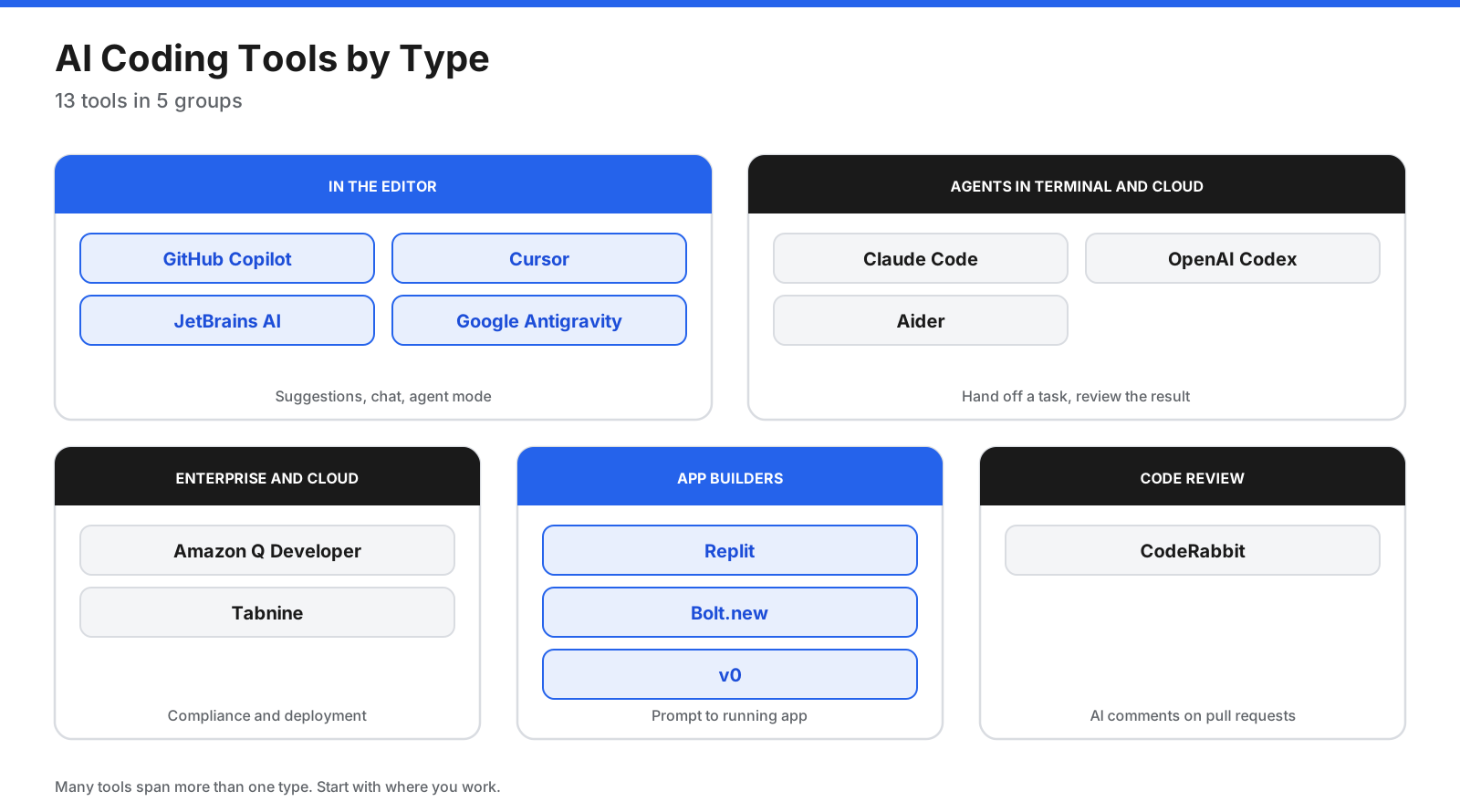
AI coding tools fall into five broad types. Many cover more than one, but each has a core strength.
- Editor assistants and AI editors suggest code as you type, answer questions, and make multi-file edits. Examples include GitHub Copilot, Cursor, JetBrains AI, and Google Antigravity.
- Coding agents take a task, inspect a codebase, plan, edit files, run commands and tests, and report back or open a pull request. Claude Code, OpenAI Codex, and Aider fit here.
- Enterprise and cloud ecosystem tools focus on compliance, deployment options, and integration with a specific cloud. Amazon Q Developer and Tabnine are examples.
- AI app builders generate an app from a description in the browser. Replit, Bolt.new, and v0 suit beginners, designers, and prototypes.
- AI code review tools comment on pull requests, flag bugs and security issues, and suggest fixes. CodeRabbit is a leading example.
How Do AI Coding Tools Work?
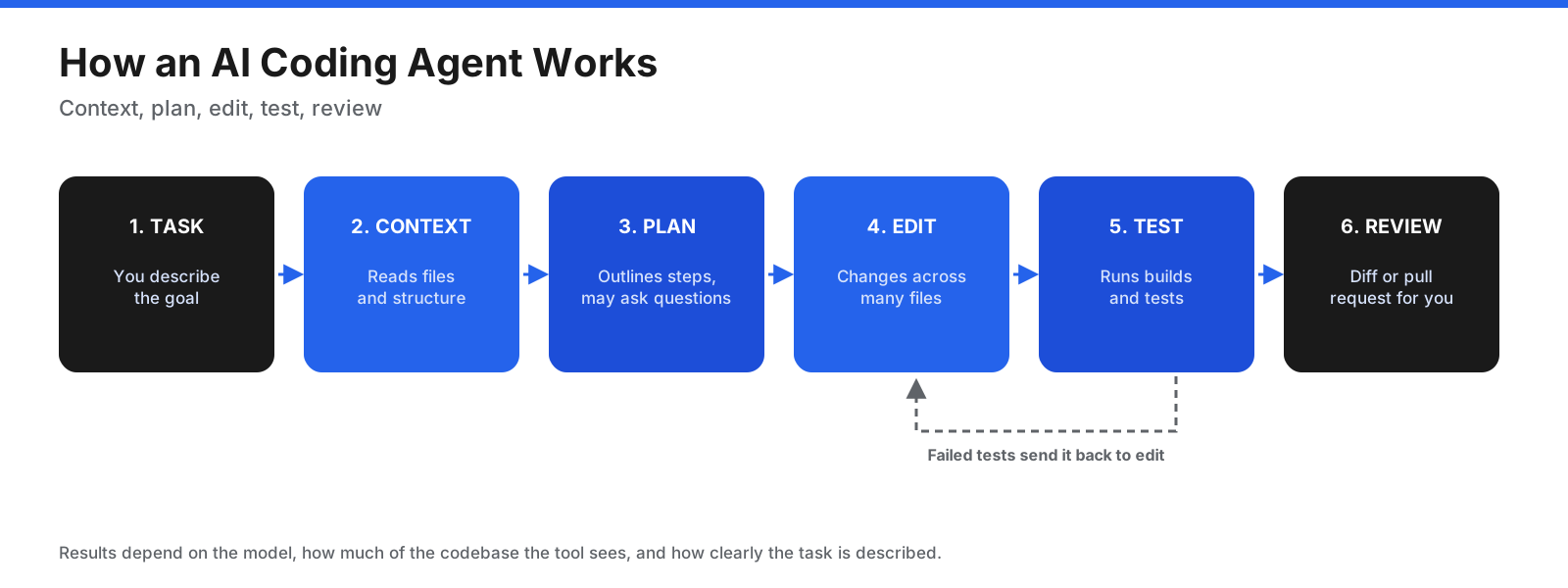
Most modern coding agents follow a similar loop: you describe the task, the tool gathers relevant context, plans steps, edits files, runs commands or tests, then presents a diff or pull request for review. Failed tests may lead it to make another attempt. Results depend on the model, codebase context, and clarity of your instructions.
Which Features Matter Most?
- Where it runs: your current editor, an AI editor, terminal, browser, or cloud.
- Model choice: some tools use one provider’s models, while others let you choose.
- Codebase context: how well it understands a repository beyond the open file.
- Agent capabilities: multi-file edits, tests, commands, and pull requests.
- Pricing: flat plans, credits, tokens, or requests. Heavy agent use can exceed allowances.
- Privacy and deployment: data retention, training opt-outs, private cloud, or on-premises options.
- Team features: admin controls, SSO, usage reports, and policy management.
- Integrations: GitHub, GitLab, issue trackers, chat, and CI pipelines.
What Are the Best AI Coding Tools?
Prices below are indicative US dollar figures from vendor pricing pages or the named review sources available for this guide. Confirm current prices and allowances before purchase.
1. GitHub Copilot
Copilot adds code completions, chat, multi-file edits, and agent mode to editors such as Visual Studio Code and JetBrains IDEs. Its coding agent can work from GitHub issues and open pull requests. Zapier’s March 2026 review recommends it for pair programming and value.
Pricing: The free tier has been listed with 2,000 inline suggestions and 50 chat requests per month. Pro is $10 per month, Pro+ $39, and Max $100, each with monthly AI credit allowances. Limitations: It may provide less repository context than Cursor, and heavy agent work consumes credits. Best for: Developers who want AI in their existing editor, especially GitHub teams.
2. Cursor
Cursor is an AI-first code editor with multi-file agent mode, cloud agents, automations, and code review features on higher plans. Zapier recommends it for complex, multi-file projects.
Pricing: The entry paid Plus tier has been listed at $8 per month with limited model access. Premium at $30 adds cloud agents and outside models, which may incur separate API-priced usage. Higher individual tiers run to $100 and $200 per month, while team seats start at $30 per user. Limitations: Outside-model use can make spending variable, and the editor has a learning curve. Best for: Developers who want an editor built around AI agents.
3. JetBrains AI with Junie
JetBrains AI adds an assistant and Junie, an autonomous coding agent, to IDEs such as IntelliJ IDEA, PyCharm, and WebStorm. Junie can plan tasks, write multi-file code, run tests, and iterate on failures.
Pricing: AI Free includes unlimited code completion and a small credit allowance. AI Pro has been reported at $10 per month and AI Ultimate at $30, though JetBrains’ own page may not display prices in every region. Limitations: Cloud features consume credits. Best for: Developers who already work in JetBrains IDEs.
4. Google Antigravity and Gemini Code Assist
Antigravity is Google’s agent-first coding platform, available as a desktop app, an IDE based on VS Code, extensions, and command-line tooling. Gemini Code Assist Standard and Enterprise remain options for organizations.
Pricing: Antigravity’s individual plan has been listed as free with weekly rate limits. Google AI Pro has been listed at $20 per month. Gemini Code Assist Standard has been listed at $19 per user per month on an annual commitment and Enterprise at $45. Limitations: Numeric free-tier limits may not be published, and product changes can make older tutorials outdated. Best for: Individuals who want to try an agent-first IDE and organizations using Google Cloud.
5. Claude Code
Claude Code works across a codebase, edits files, runs commands and tests, and can turn issues into pull requests. It is available in terminal, IDE, web, and desktop workflows. Zapier recommends it for large codebases.
Pricing: Included in eligible paid Claude plans: Pro at $20 monthly or $17 per month billed annually, Max starting at $100, and Team and Enterprise options. The Free plan does not include Claude Code. Limitations: New terminal users face a learning curve. Coding and chat share subscription usage, so frequent use may require a higher tier or API billing. Best for: Developers comfortable with terminals and larger repositories.
6. OpenAI Codex
Codex is OpenAI’s coding agent, available through the Codex CLI, IDE extension, ChatGPT apps, and Codex Cloud, where tasks can run in parallel.
Pricing: Included in eligible ChatGPT plans. Limited coding has been offered on Free and Go; Plus is $20 per month, Pro starts at $100, and Business has been listed at $20 per seat monthly on an annual contract. API use is billed separately. Limitations: It is limited to OpenAI models, and usage may be shared with ChatGPT. Best for: Developers already using ChatGPT who want a coding agent across devices.
7. Aider
Aider is an open-source AI pair programmer that runs in your terminal. It edits code in a local repository and can make Git commits, making it easier to inspect or undo changes. It connects to multiple model providers and local models through your own configuration.
Pricing: The tool is free. You pay for model API use, or may pay nothing when using a local model. Limitations: You set up keys and models yourself, and built-in team management is limited. Best for: Developers who want a flexible, Git-friendly assistant.
8. Amazon Q Developer
Amazon Q Developer helps implement features, refactor code, generate tests, and upgrade Java applications, with integration into AWS services.
Pricing: The free tier has been listed with 50 agentic requests per month and 1,000 lines of Java upgrade transformations. Pro is $19 per user per month. Limitations: It is most useful in AWS environments. Best for: Teams building on AWS.
9. Tabnine
Tabnine focuses on privacy and enterprise control. It offers coding assistance and agent features, including deployment options for organizations with strict data requirements.
Pricing: Zapier’s March 2026 review listed the Code Assistant Platform at $39 per user per month and Agentic Platform at $59, billed annually. Limitations: It can cost more than consumer-focused tools. Verify current plan details directly. Best for: Regulated organizations that need private deployment or strict data controls.
10. Replit
Replit lets users build, run, and deploy apps in the browser with an AI agent and without local setup. It is approachable for beginners who want to build and host a prototype.
Pricing: Free Mode is available. Core has been listed at $20 monthly or $18 per month billed annually, with credits. Pro has been listed at $100 monthly or $90 annually billed monthly, with a larger credit allowance and parallel agents. Limitations: Agents can report fixes that need further checking, and users have less control over the stack than in a local IDE. Best for: Beginners and people who want to build and host without setting up a development environment.
11. Bolt.new
Bolt.new generates and runs full-stack web apps in the browser, with hosting and database features included.
Pricing: The free tier has been listed with one million tokens per month and a daily limit. Pro has been listed at $25 per month with ten million tokens, custom domains, and token rollover. Teams has been listed at $30 per member monthly. Limitations: Larger projects can consume tokens quickly and complex apps still need developer review. Best for: Founders and developers who want a working prototype quickly.
12. v0
v0 by Vercel generates user interfaces and web apps from prompts, with deployment to Vercel and GitHub sync.
Pricing: Free has been listed with seven messages per day. Plus has been listed at $30 per user monthly and Business at $100 per user monthly. Limitations: It focuses on the front end, so backend logic often needs other tools. Best for: Designers and front-end developers who want to generate UI quickly.
13. CodeRabbit
CodeRabbit reviews pull requests with AI, adding comments, change summaries, security scanning, and suggested fixes in pull requests, CLI, and IDE workflows.
Pricing: Essentials has been listed at $24 per user monthly, Team at $48, and Advanced at $72, with annual discounts and a trial. A free plan is available for open-source projects. Limitations: AI review does not replace human review of architecture and business logic. Best for: Teams that want a consistent first pass on pull requests.
How Do the AI Coding Tools Compare?
| Tool | Type | Free option | Entry paid price reported |
|---|---|---|---|
| GitHub Copilot | Editor assistant | Limited suggestions and chats | $10/month |
| Cursor | AI editor | Limited agent use | $8/month |
| JetBrains AI | IDE assistant and agent | AI Free | $10/month, review figure |
| Google Antigravity | Agent-first IDE | Free with weekly limits | $20/month for Google AI Pro |
| Claude Code | Coding agent | Not on Claude Free | $17/month annual Pro price |
| OpenAI Codex | Coding agent | Limited access | $20/month ChatGPT Plus |
| Aider | Open-source terminal assistant | Yes, model costs may apply | Free |
| Amazon Q Developer | AWS assistant | 50 agentic requests/month | $19/user/month |
| Tabnine | Enterprise assistant | Limited completions | $39/user/month annual |
| Replit | Browser app builder | Free Mode | $18/month annual billing |
| Bolt.new | Browser app builder | Free token allowance | $25/month |
| v0 | UI generator | Seven messages/day | $30/user/month |
| CodeRabbit | Code review | Open-source plan | $24/user/month |
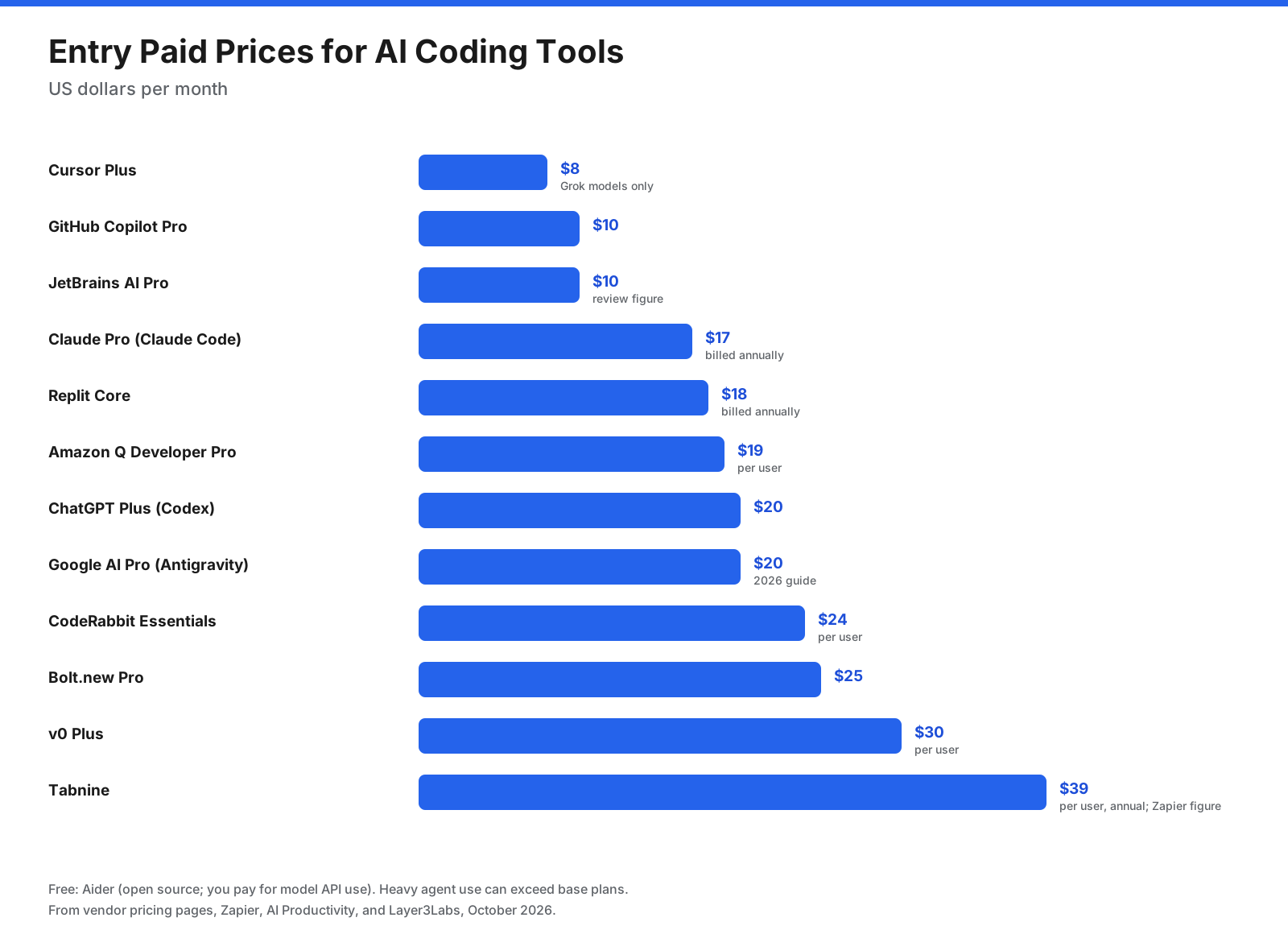
Most individual plans fall around $10 to $30 per month, but agent-heavy usage can cost more. Compare what is included, how credits are counted, and whether external model use is billed separately.
What Are the Best Free AI Coding Tools?
Free tiers are useful for learning, side projects, and testing tools before paying.
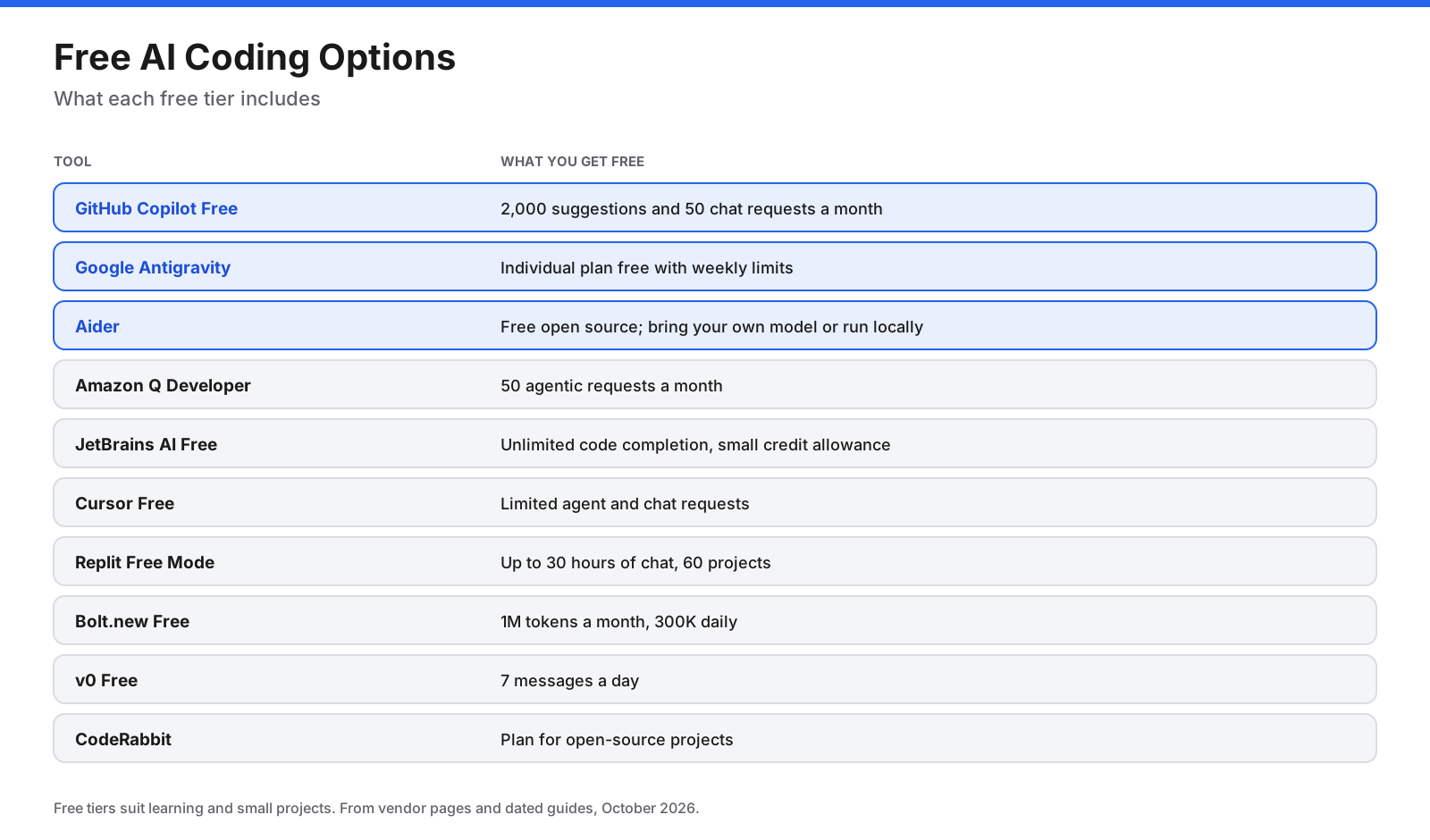
- Everyday editor use: GitHub Copilot Free and JetBrains AI Free.
- Agent work: Google Antigravity, Amazon Q Developer’s free tier, and Aider with a local model.
- Browser app building: Replit Free Mode, Bolt.new’s free tokens, and v0’s daily messages.
- Open-source review: CodeRabbit’s open-source plan.
Free tiers have usage caps. Daily professional work often needs a paid plan, but a free tier can help you test fit before committing.
How Much Do AI Coding Tools Cost for a Team?
Team plans add admin controls and shared billing, so per-seat prices can be higher than individual plans. Using the reported entry figures, a team of five might pay approximately:
- Amazon Q Developer Pro: 5 × $19 = $95 per month.
- Gemini Code Assist Standard: 5 × $19 = $95 per month on an annual commitment.
- ChatGPT Business with Codex: 5 × $20 = $100 per month billed annually.
- Claude Team standard seats: 5 × $20 = $100 per month billed annually.
- CodeRabbit Essentials: 5 × $24 = $120 per month.
- Cursor Teams: 5 × $30 = $150 per month, plus any separate model usage.
- Tabnine Code Assistant Platform: 5 × $39 = $195 per month billed annually.
These estimates exclude taxes, higher usage tiers, and add-on consumption. Confirm current terms before budgeting. Teams often pair an editor or agent with a separate review tool.
Which AI Coding Tools Are Best for Beginners and Students?
Choose tools that explain code as well as generate it. Replit runs in the browser without setup. GitHub Copilot Free can explain code in its chat panel, JetBrains AI Free suits students using JetBrains IDEs, and Antigravity provides a free agent-first IDE option. Use AI to understand errors and concepts, but practice writing and debugging code yourself so you can review generated output.
Editor, Terminal Agent, or App Builder?
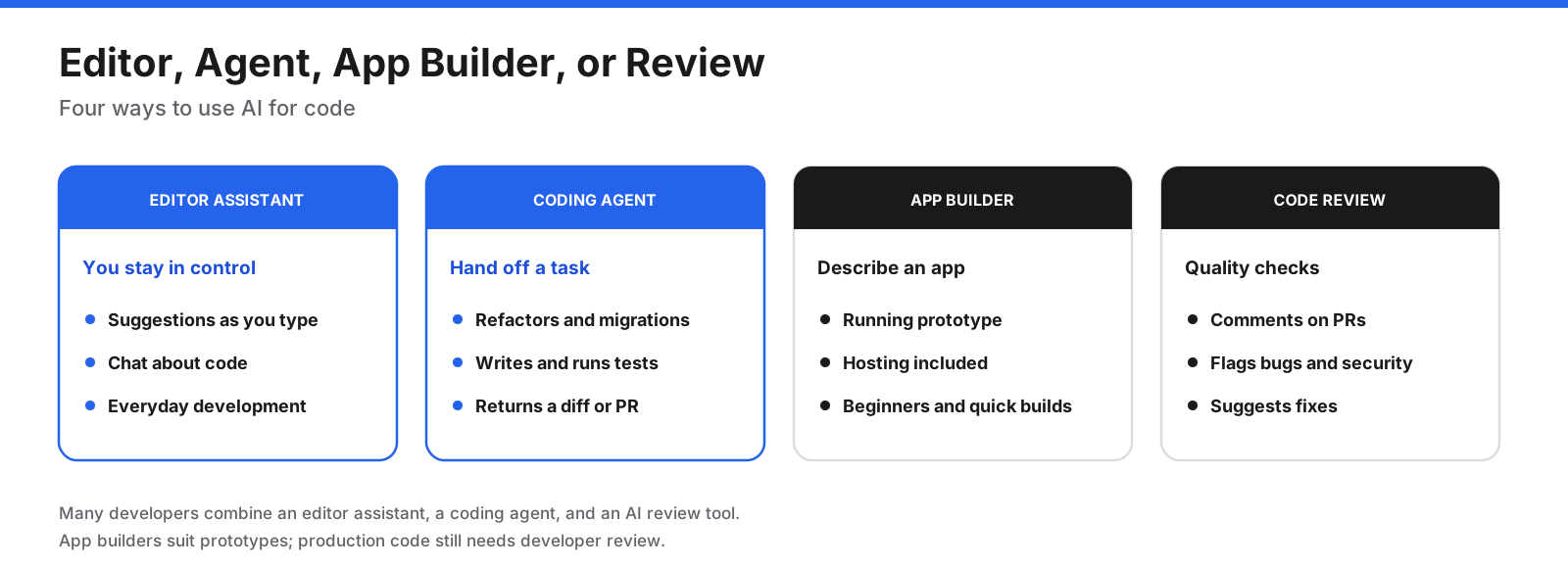
- Editor assistants: suggestions and chat while you code, with control line by line.
- Terminal and cloud agents: multi-step refactors, migrations, and tests, followed by review of the changes.
- App builders: turn a description into a running prototype in the browser.
- Code review tools: provide a first pass on every pull request.
Many developers combine all three: an editor assistant for daily coding, an agent for larger tasks, and automated review for pull requests.
What Is Vibe Coding?
Vibe coding means building software mainly by describing what you want in natural language and letting AI write the code, often with little direct editing. Replit, Bolt.new, v0, and Lovable are popular for this approach. It can be fast for prototypes and internal tools. For apps handling customer data, payments, or production traffic, an experienced developer should review security, data handling, and maintainability before launch.
How Do You Keep AI-Generated Code Safe?
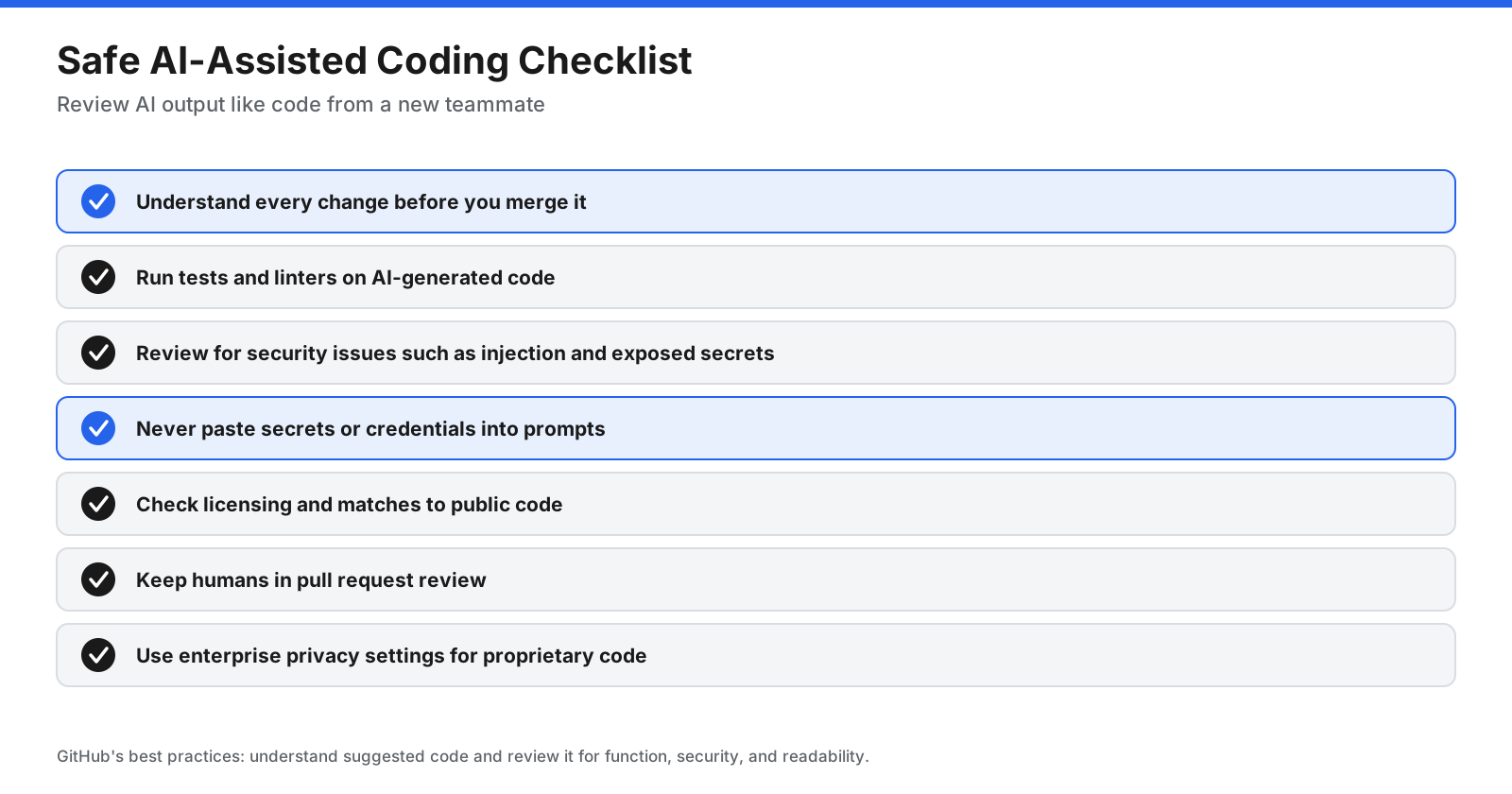
- Understand before merging. Review functionality, security, readability, and maintainability.
- Run tests and linters. Automated checks catch many mistakes.
- Check security. Look for injection risks, missing input validation, and exposed secrets.
- Protect credentials. Never paste passwords, API keys, or private keys into prompts.
- Watch licensing. Understand how the tool handles code that may match public repositories.
- Keep human review. People should approve changes to critical systems.
- Use privacy controls. For proprietary code, evaluate training opt-outs, retention, and private deployment.
How Do You Get Better Results?
- Describe the goal, constraints, and expected tests rather than simply asking to fix something.
- Break large tasks into smaller steps and ask for a plan first.
- Point the tool toward relevant files and documentation.
- Share project conventions and coding rules.
- Request tests alongside new code.
- Start a fresh session with a clear summary when a long conversation drifts.
Will AI Coding Tools Replace Developers?
These tools change how developers spend their time rather than removing the need for them. They can handle boilerplate, tests, and routine changes, while people still decide what to build, design systems, review changes, and own quality and security. Developers who learn to direct and review AI tools effectively are better placed to benefit from them.
How Do You Choose the Right AI Coding Tool?
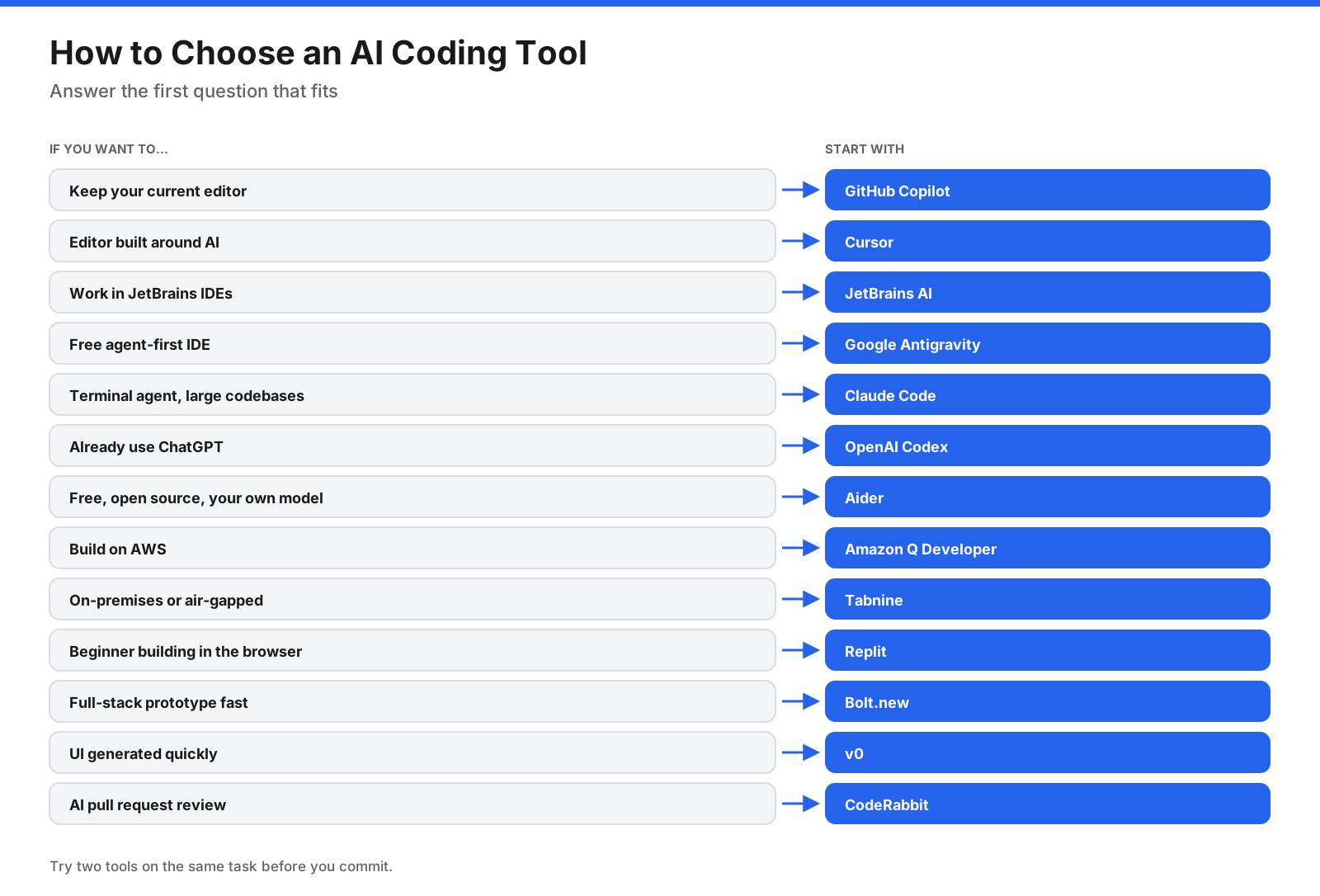
- Decide where you want AI to help: editor, terminal, browser, or pull requests.
- Check model choice, privacy, and how code is handled.
- Estimate usage because agent work can exceed base limits.
- Try free tiers on the same real task and compare results.
- Set review rules, tests, and secret-handling policies before team-wide adoption.
Frequently Asked Questions
Which AI coding tool should most developers start with?
GitHub Copilot is easy to add to existing editors, Cursor is an AI-first editor, Claude Code and Codex are coding agents, and Replit suits beginners building in the browser.
What is the best free AI for coding?
GitHub Copilot Free, JetBrains AI Free, Google Antigravity, and Amazon Q Developer offer free access with limits. Aider is open source, though model API use may cost money.
Is Claude or ChatGPT better for coding?
Results depend on the task, language, and workflow. Claude Code is a terminal-oriented agent, while Codex works across ChatGPT and supported coding environments. Test both on your own code.
Is ChatGPT good for coding?
ChatGPT can explain code, write functions, and debug. Eligible paid plans include Codex for agent-style coding.
What are the best Cursor alternatives?
GitHub Copilot, JetBrains AI, Google Antigravity, Claude Code, and OpenAI Codex are options. The best fit depends on your editor, codebase, and preferred workflow.
What is the best AI code generator?
Replit, Bolt.new, and v0 are options for generating apps. For code inside an existing project, GitHub Copilot, Cursor, Claude Code, and Codex are worth comparing.
What are the best AI code review tools?
CodeRabbit is dedicated to code review. GitHub Copilot, Cursor, and Codex also offer review features on some plans.
What are the best vibe coding tools?
Replit, Bolt.new, v0, and Lovable are popular for generating apps from natural-language descriptions. Have generated apps reviewed before using live customer data.
Can AI write a complete app?
AI app builders can create working prototypes and simple tools. Production apps still need human review for security, performance, and maintainability.
Do AI coding tools work with every programming language?
Most support popular languages, but results can be weaker for rare languages, internal frameworks, or new libraries. Provide documentation and review output carefully.
Should my company allow AI coding tools?
Many companies allow them with guardrails. Choose plans with appropriate admin controls and data protections, define what code may be shared, require tests and human review, and track usage.
Is AI-generated code safe?
It can be, if you review it like other code. Run tests, check for security issues, protect secrets, and keep human review in your pull request process.
The Bottom Line
The best AI coding tool depends on where you work. GitHub Copilot, Cursor, JetBrains AI, and Google Antigravity bring AI into the editor. Claude Code, Codex, and Aider act as coding agents. Amazon Q Developer and Tabnine suit AWS and privacy-focused organizations. Replit, Bolt.new, and v0 turn descriptions into apps, while CodeRabbit adds AI to code review. Try two tools on the same task, review every change before merging, and confirm current plans and limits on each vendor’s site.