
AI transcription software turns spoken audio into written text automatically. Upload a recording or let a tool join a live meeting, and within minutes you can have a searchable transcript, speaker labels, timestamps and a summary. The best choice depends on whether you mainly transcribe meetings, long audio and video files, podcasts, or sensitive recordings.
This guide compares 10 AI transcription tools using the pricing and feature information provided for this article. Prices and plan limits can change, so confirm details with each vendor before buying.
Quick picks
- Best for live meetings: Otter.ai
- Best free meeting notetaker: Fireflies.ai
- Best for high-volume file transcription: TurboScribe
- Best when human accuracy matters: Rev
- Best for podcasters and video creators: Descript
- Best pay-as-you-go option: Sonix
- Best for multilingual subtitles: Happy Scribe
- Best for bilingual meetings: Notta
- Best private, offline option: MacWhisper or another local Whisper app
- Best built-in option: Microsoft Word Transcribe
What is AI transcription software?
AI transcription software uses automatic speech recognition (ASR) to convert speech into text. Many tools also provide speaker identification, timestamps, punctuation, summaries, action items and searchable archives.
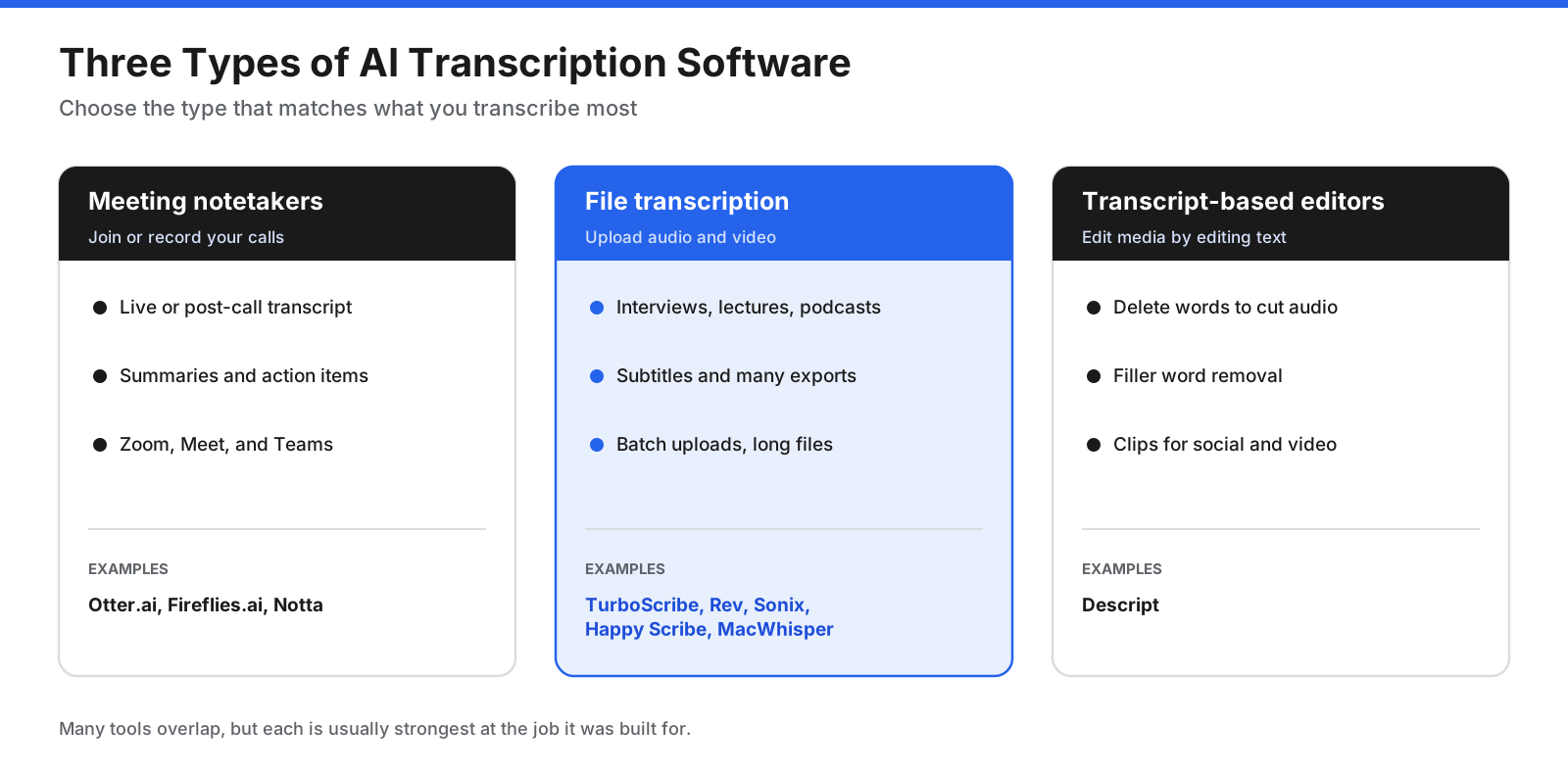
Meeting notetakers join or record calls and produce transcripts and summaries. File transcription tools process uploaded interviews, lectures, podcasts and videos. Transcript-based editors let you edit audio or video by editing the transcript. Pick the type first: a meeting assistant may be a poor fit for processing dozens of long recordings.
How does AI transcription work?
A typical workflow cleans and segments audio, converts speech to words, adds punctuation, identifies speakers, aligns timestamps and may generate a summary. Each stage can introduce errors, so clean audio makes the later stages more reliable.
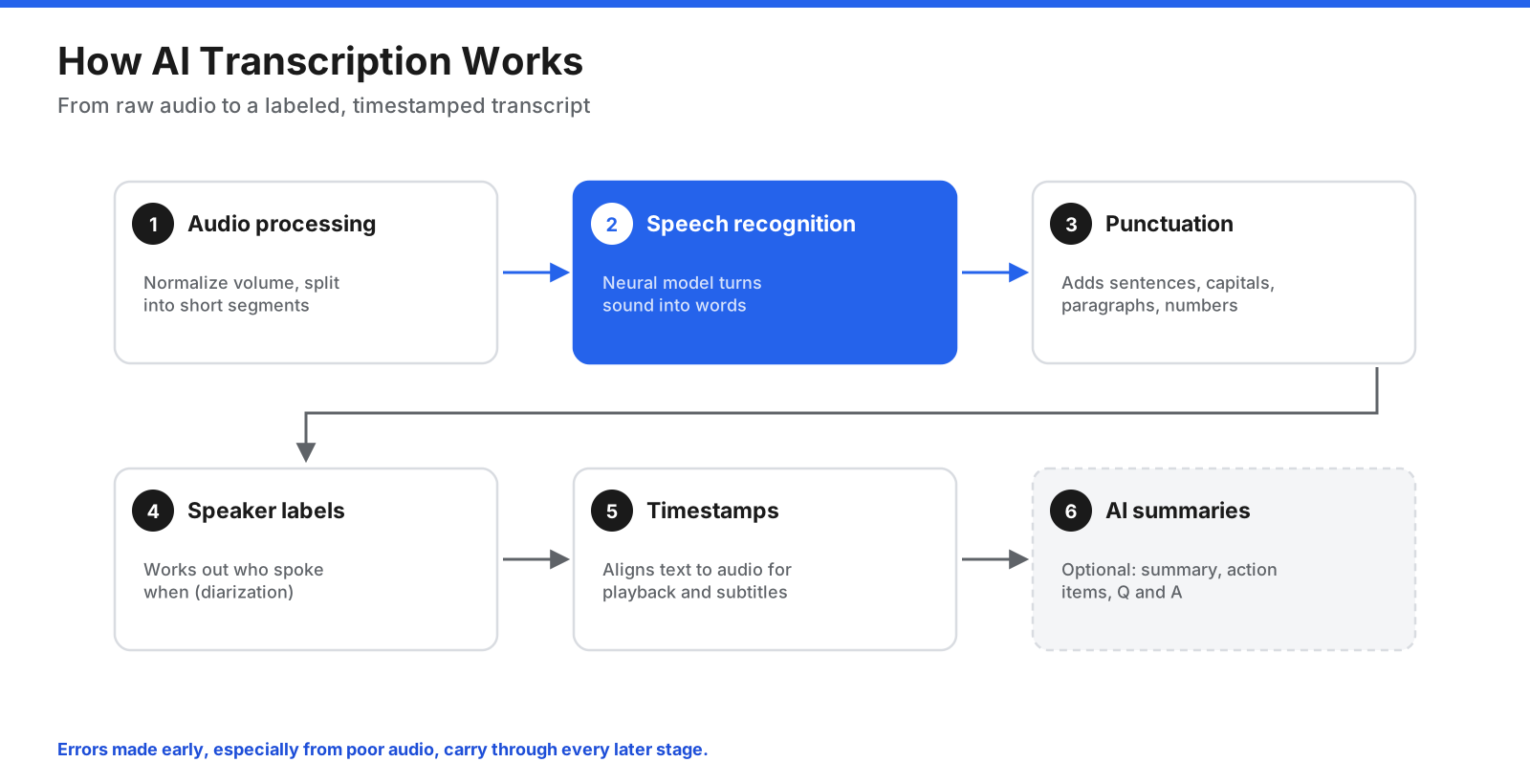
- Audio processing: normalizes volume and splits the recording into segments.
- Speech recognition: a model converts sound into words.
- Punctuation and formatting: adds capitalization and readable paragraphs.
- Speaker identification: labels who spoke when.
- Timestamps: align text with the original audio and support subtitles.
- AI summaries: optionally create action items, chapters or answers about the recording.
How we evaluated AI transcription software
Compare tools on the criteria that affect day-to-day use, not just vendor accuracy claims.
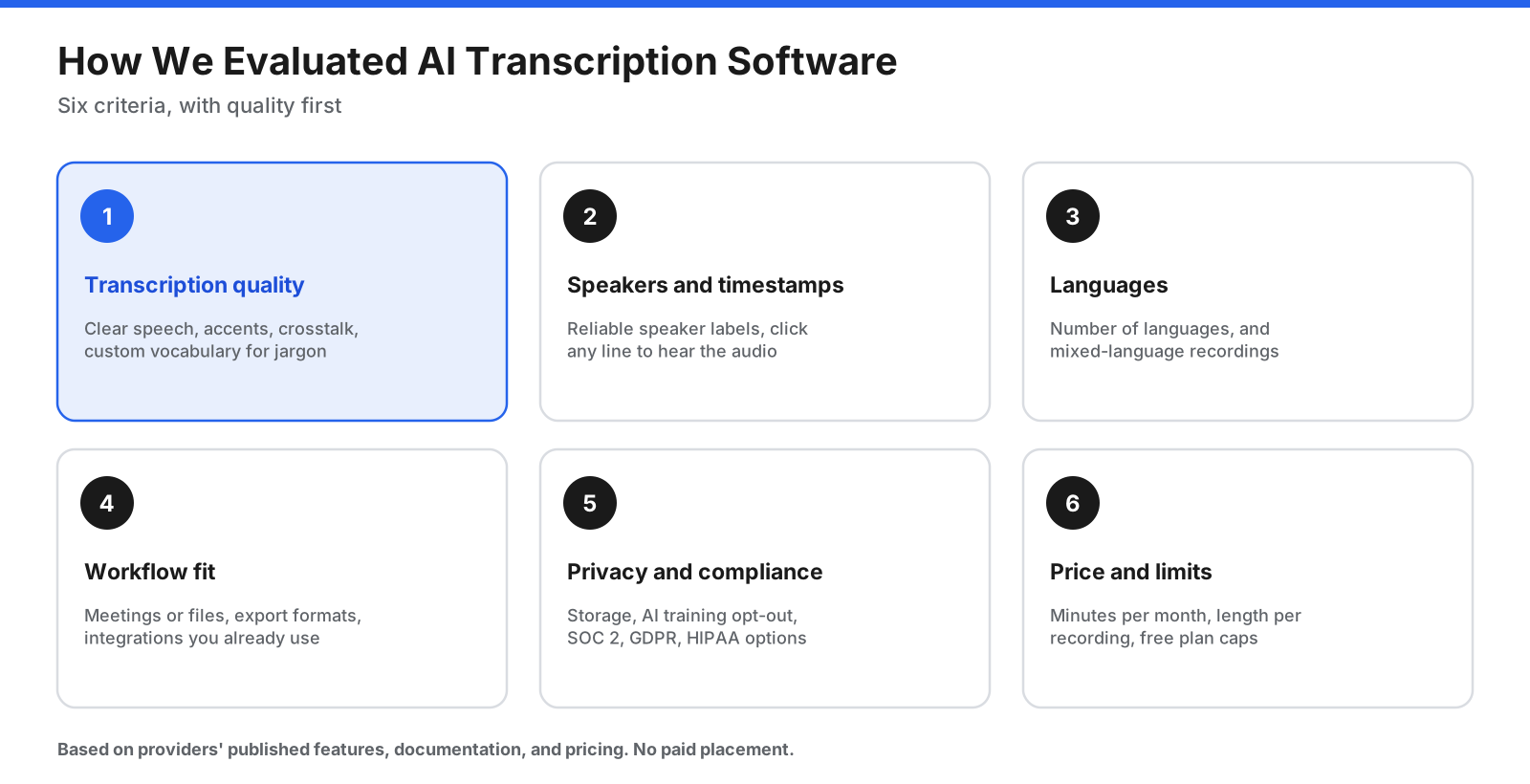
- Transcription quality: clear speech, accents, overlapping voices and technical vocabulary.
- Speakers and timestamps: reliable speaker labels and clickable transcript timing.
- Languages: supported languages and mixed-language recordings.
- Workflow fit: meetings or uploads, export formats and integrations.
- Privacy and compliance: data processing, retention, training opt-outs and relevant certifications.
- Price and limits: monthly minutes, per-recording limits and free-plan restrictions.
The best AI transcription software compared
1. Otter.ai: best for live meetings
Otter.ai joins Zoom, Google Meet and Microsoft Teams calls, transcribes them live, and creates summaries and action items. It also supports mobile recording and file imports.
Pricing in the supplied October 2026 research: Free Basic includes 300 minutes per user per month, a 30-minute conversation limit and three lifetime file imports. Pro is $8.33 per user per month billed annually or $16.99 monthly. Business is $19.99 per user per month billed annually or $30 monthly. Enterprise is custom.
Why choose it: live transcripts, searchable meeting history, highlights and meeting Q&A. Trade-offs: the free conversation limit and lifetime imports are restrictive for regular use, and heavy file transcription may fit another product better. A proposed lawsuit filed in August 2025 alleged recording without participant consent; the claims had not been tested in court in the source material.
Best for: professionals who spend much of the day in video meetings.
2. Fireflies.ai: best free meeting notetaker
Fireflies transcribes meetings, creates summaries and action items, and offers integrations, conversation analytics and shared meeting libraries.
Pricing: the free plan includes transcription in 100+ languages, limited AI summaries and 400 minutes of storage per team. Pro is $10 per seat per month billed annually; Business is $19; Enterprise is $39, all billed annually in the supplied research.
Why choose it: a generous entry point for meeting transcription and connections to CRM and collaboration tools. Trade-offs: the 400-minute free storage cap can fill quickly; HIPAA compliance is listed on Enterprise.
Best for: sales and customer-success teams.
3. TurboScribe: best for high-volume file transcription
TurboScribe focuses on uploaded audio and video files, with speaker recognition and multiple export formats.
Pricing: free users can transcribe three files per day, each up to 30 minutes. Unlimited is $10 per month billed annually ($120 per year), with unlimited transcription for one person, files up to 10 hours and 5 GB, batches of up to 50 files and translation into 134+ languages.
Why choose it: predictable costs for researchers, journalists, podcasters and students with many long recordings. Trade-offs: it is not a live meeting assistant and has fewer team and compliance features than business-focused tools.
Best for: individuals who transcribe lots of recorded audio.
4. Rev: best when human accuracy matters
Rev combines AI transcription with the option to order a human-made transcript when recordings are important for legal, research or publication work.
Pricing: free includes 45 AI minutes per month. Essentials is $25.49 per seat per month billed annually; Pro is $47.99; Unlimited is quote-based. Human transcription is $1.99 per minute, with the vendor claiming 99%+ accuracy and delivery in 12 hours or less.
Why choose it: human review is available when audio is difficult or errors carry consequences. Trade-offs: AI plans cost more than many AI-only tools, and human transcription can become expensive for long files.
Best for: journalists, researchers and legal professionals who may need human-verified transcripts.
5. Descript: best for podcasters and video creators
Descript is an audio and video editor built around a transcript. Editing words in the transcript edits the recording; it also offers filler-word removal, audio cleanup and clip creation.
Pricing: Free includes one media hour per month and 720p exports with a watermark. Hobbyist is $16 per month billed annually, Creator $24 and Business $50; monthly billing costs more.
Why choose it: text-based editing helps people edit podcasts, interviews and talking-head videos without a steep editing learning curve. Trade-offs: it is more than you need if you only want transcripts, and AI features may use a separate credit system.
Best for: podcasters, YouTubers and marketing teams.
6. Sonix: best pay-as-you-go option
Sonix is a browser-based file transcription service with pay-as-you-go pricing for irregular workloads.
Pricing: Pay As You Go is $10 per audio hour. Core is $25 per month or $275 per year and includes five hours monthly; Advanced is $50 monthly or $550 yearly with 20 hours; Pro is $80 monthly or $880 yearly with 40 hours. A free trial includes 30 minutes.
Why choose it: occasional users can pay only for the audio they process. It supports 54+ languages for transcription and translation. Trade-offs: hourly costs add up for heavy use, and it is primarily a file tool rather than a meeting assistant.
Best for: researchers and teams with uneven transcription volumes.
7. Happy Scribe: best for multilingual work and subtitles
Happy Scribe offers AI and human transcription plus subtitle editing and exports.
Pricing: the free tier is a 10-minute trial. Basic is $8.50 per month billed annually, Pro $19 and Business $59. Extra AI minutes cost $0.20 each; human transcription starts at $2 per minute, with 99% accuracy claimed by the vendor.
Why choose it: AI transcription supports 150+ languages and AI translation 80+ languages. Trade-offs: monthly minutes and recording-length limits can be restrictive, and the free tier is short.
Best for: video teams and educators publishing in multiple languages.
8. Notta: best for bilingual meetings
Notta joins Zoom, Google Meet, Microsoft Teams and Webex, and supports bilingual transcription and translation.
Pricing: Free includes 120 minutes per month but limits each conversation to three minutes. Pro is $8.17 per month billed annually; Business is $16.67 per month billed annually. Enterprise pricing is custom. Bilingual features may require add-ons.
Why choose it: bilingual transcription is useful when a meeting switches between languages. Trade-offs: the free conversation limit is too short for most meetings and regular bilingual use may require paid add-ons.
Best for: international teams whose meetings mix languages.
9. MacWhisper and Whisper-based apps: best private, offline option
OpenAI’s Whisper is an open-source speech-recognition model that can run locally. MacWhisper packages it for macOS; other apps also run Whisper on a user’s computer.
Pricing: Whisper is free. MacWhisper has a free version using smaller local models and a paid one-time Pro license. Confirm current Pro pricing with the developer.
Why choose it: core transcription can stay on your device, which helps with confidential interviews and sensitive research. Trade-offs: speed depends on hardware, and local apps may lack meeting bots, team sharing and integrations. Optional cloud features may send data off-device.
Best for: privacy-conscious users comfortable with desktop software.
10. Microsoft Word Transcribe: best built-in option
Microsoft Word’s Transcribe feature can record live or transcribe an uploaded audio file and insert the transcript into a document.
Pricing: included with Microsoft 365. The supplied research lists 300 upload minutes per month for a standard subscription or 30,000 minutes with a Microsoft Copilot license.
Why choose it: transcripts land directly in Word, and supported formats include WAV, MP4, M4A and MP3, with more than 80 language locales. Trade-offs: access differs by platform and tenant, monthly limits may be modest, and advanced exports and meeting bots are not its focus.
Best for: Microsoft 365 users who transcribe occasionally. Zoom, Teams and Google Meet may also include transcripts on some paid plans, so check subscriptions you already have.
How do the tools compare?
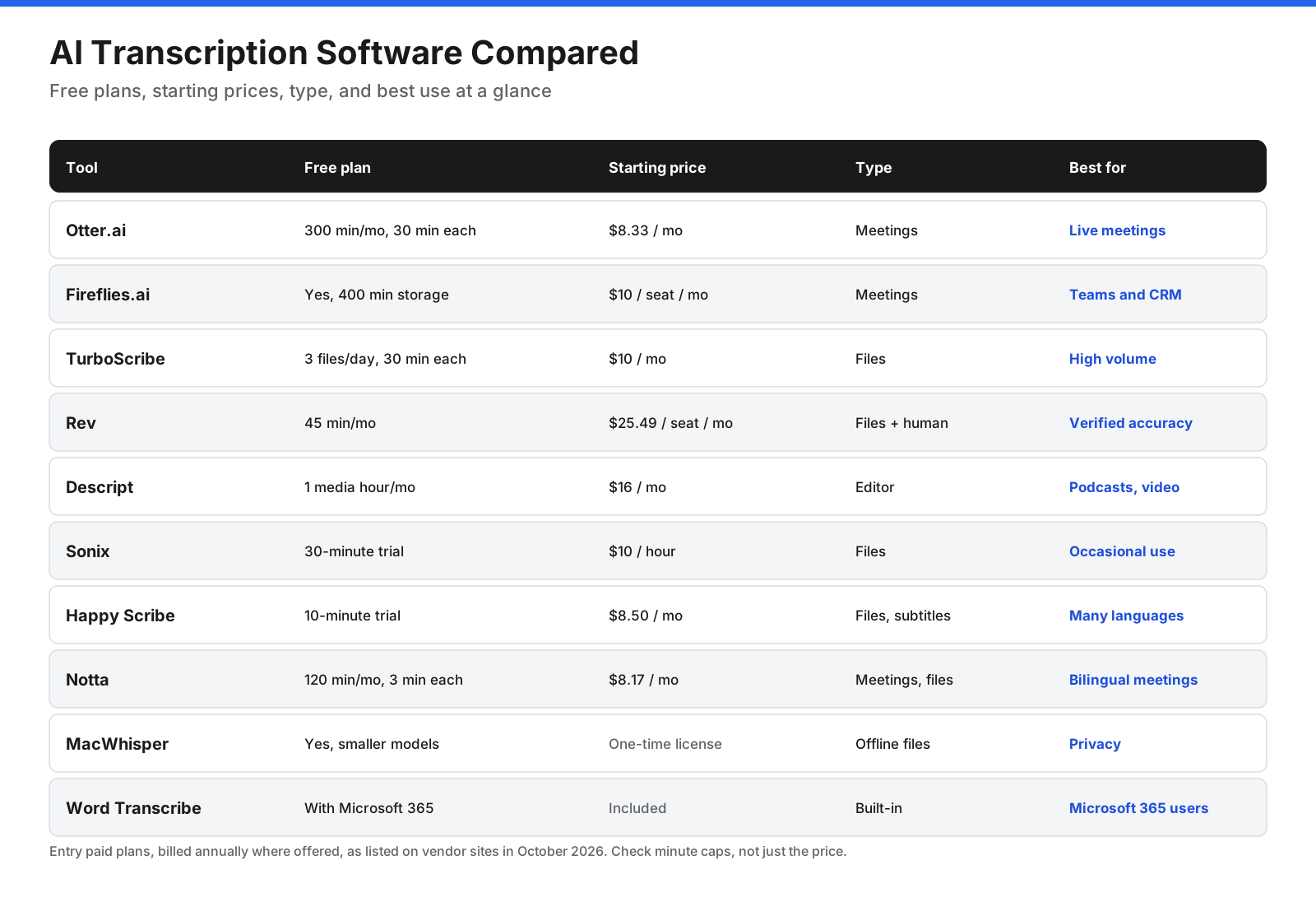
| Tool | Free plan | Starting paid price | Best for |
|---|---|---|---|
| Otter.ai | 300 min/month; 30 min per conversation | $8.33/month | Live meetings |
| Fireflies.ai | 400 min team storage | $10/seat/month | Teams and CRM |
| TurboScribe | 3 files/day, 30 min each | $10/month billed annually | High-volume files |
| Rev | 45 min/month | $25.49/seat/month | Human-verified accuracy |
| Descript | 1 media hour/month | $16/month | Podcasts and video |
| Sonix | 30-minute trial | $10/audio hour | Occasional use |
| Happy Scribe | 10-minute trial | $8.50/month | Languages and subtitles |
| Notta | 120 min/month; 3 min per conversation | $8.17/month | Bilingual meetings |
| MacWhisper | Smaller local models | One-time Pro license | Offline privacy |
| Word Transcribe | With Microsoft 365 | Included | Existing Microsoft 365 users |
Prices above reflect the article’s October 2026 research and should be rechecked before purchase. Free plan limits differ, so compare minutes and per-recording limits rather than price alone.
How accurate is AI transcription?
AI transcription can work very well on clear audio, but recording quality often matters more than the product. Word error rate (WER) measures substitutions, deletions and insertions divided by the total words actually spoken. Lower WER indicates fewer errors.
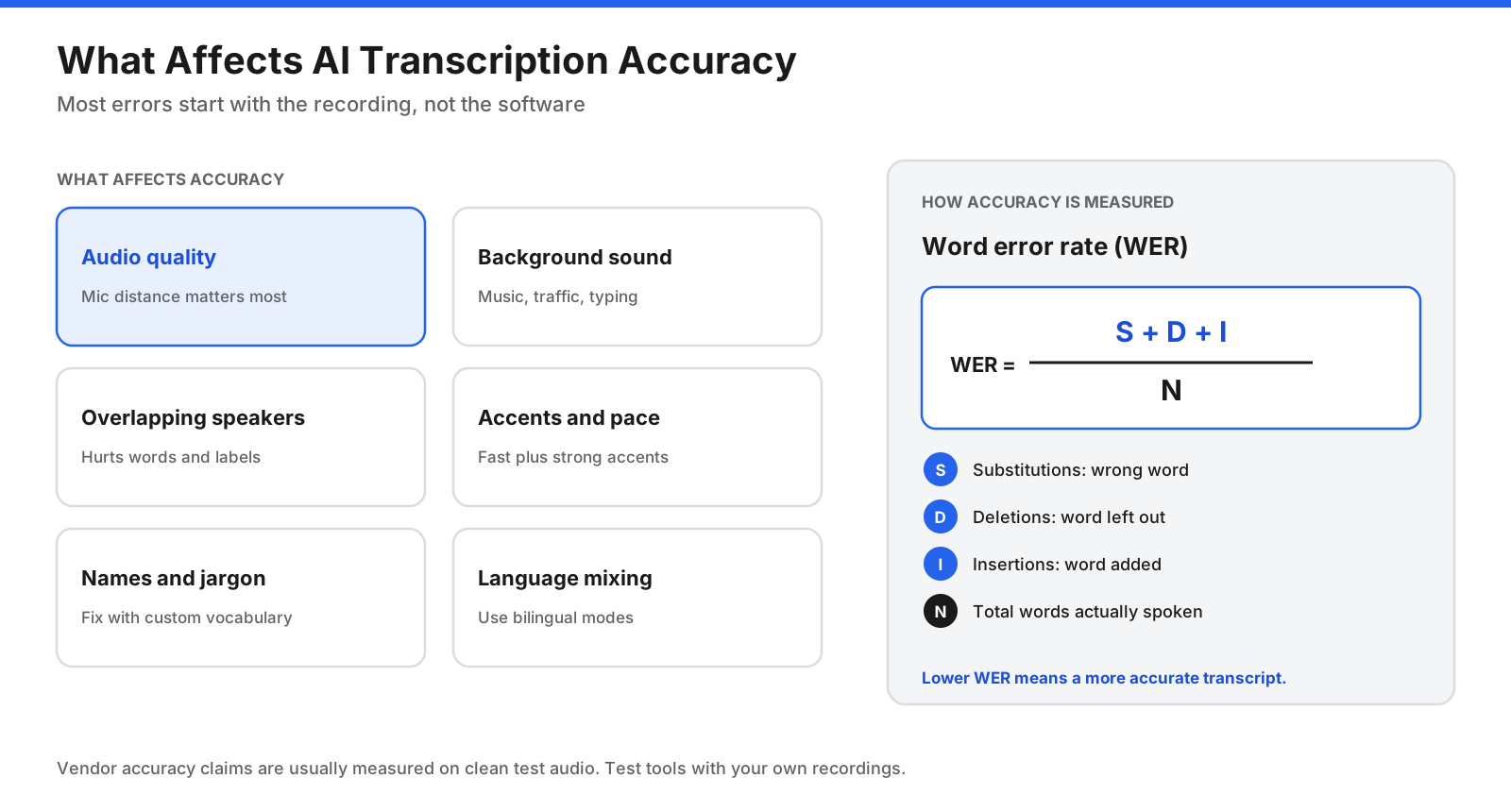
- Audio quality: a microphone close to the speaker usually helps most.
- Background sound: traffic, music, typing and fans compete with speech.
- Overlapping speakers: crosstalk affects both words and speaker labels.
- Accents and pace: strong accents combined with fast speech can cause errors.
- Names and jargon: custom vocabulary can help with product names and acronyms.
- Language mixing: use multilingual or bilingual modes when available.
Vendor accuracy figures often use clean test audio and are not directly comparable. Test two or three free plans with the same recording. Always check important quotes, names and numbers against the audio before publishing or relying on a transcript.
Is AI transcription private and compliant?
Transcripts can contain confidential meetings, customer calls, interviews or medical and legal information. Check four things before uploading recordings.
- Consent: recording laws vary by location. Tell participants when meetings are recorded and transcribed, and check the rules that apply to you. This is general information, not legal advice.
- AI training: read whether recordings or transcripts may be used to train models and whether you can opt out.
- Storage and retention: confirm where data is stored, how long it is retained and whether you can delete it.
- Compliance: check SOC 2 reports, GDPR commitments and, for healthcare, HIPAA support and a signed business associate agreement (BAA).
The supplied research lists HIPAA options for Otter.ai Enterprise and Fireflies.ai Enterprise. Confirm requirements directly with the provider before transcribing patient information. Offline Whisper-based tools can keep core processing on your device, but check whether optional features use the cloud.
Can ChatGPT or free tools do transcription?
Yes, with limits. Whisper is open source, and speech-to-text models are available to developers through an API. General-purpose chatbots are often more useful for summarizing or analyzing an existing transcript than producing long, timestamped transcripts.
- Free plans: Otter.ai, Fireflies.ai, TurboScribe and Rev offer free tiers with limits.
- Built-in features: Microsoft Word Transcribe and some Zoom, Teams and Google Meet plans include transcription.
- Offline apps: Whisper and apps such as MacWhisper can run locally.
Free plans are useful for testing and light use. If you transcribe several hours each month, a paid plan may save time with longer limits and better exports.
How do you choose the right AI transcription software?
Start with your main use case, then consider budget, languages and privacy.

- Mostly meeting notes: Otter.ai or Fireflies.ai.
- Many long recordings: TurboScribe.
- Human-verified transcripts: Rev.
- Podcast or video editing: Descript.
- Occasional transcription: Sonix pay-as-you-go.
- Many languages or subtitles: Happy Scribe.
- Meetings mixing two languages: Notta.
- Confidential recordings: MacWhisper or another offline Whisper app.
- Already pay for Microsoft 365: try Word Transcribe first.
Before committing, run the same 10-minute recording through two or three free plans. Compare names and jargon, speaker labels and how easily you can correct and export the result.
How can you get better transcripts from any tool?
Recording habits make a difference no matter which AI transcription software you choose.
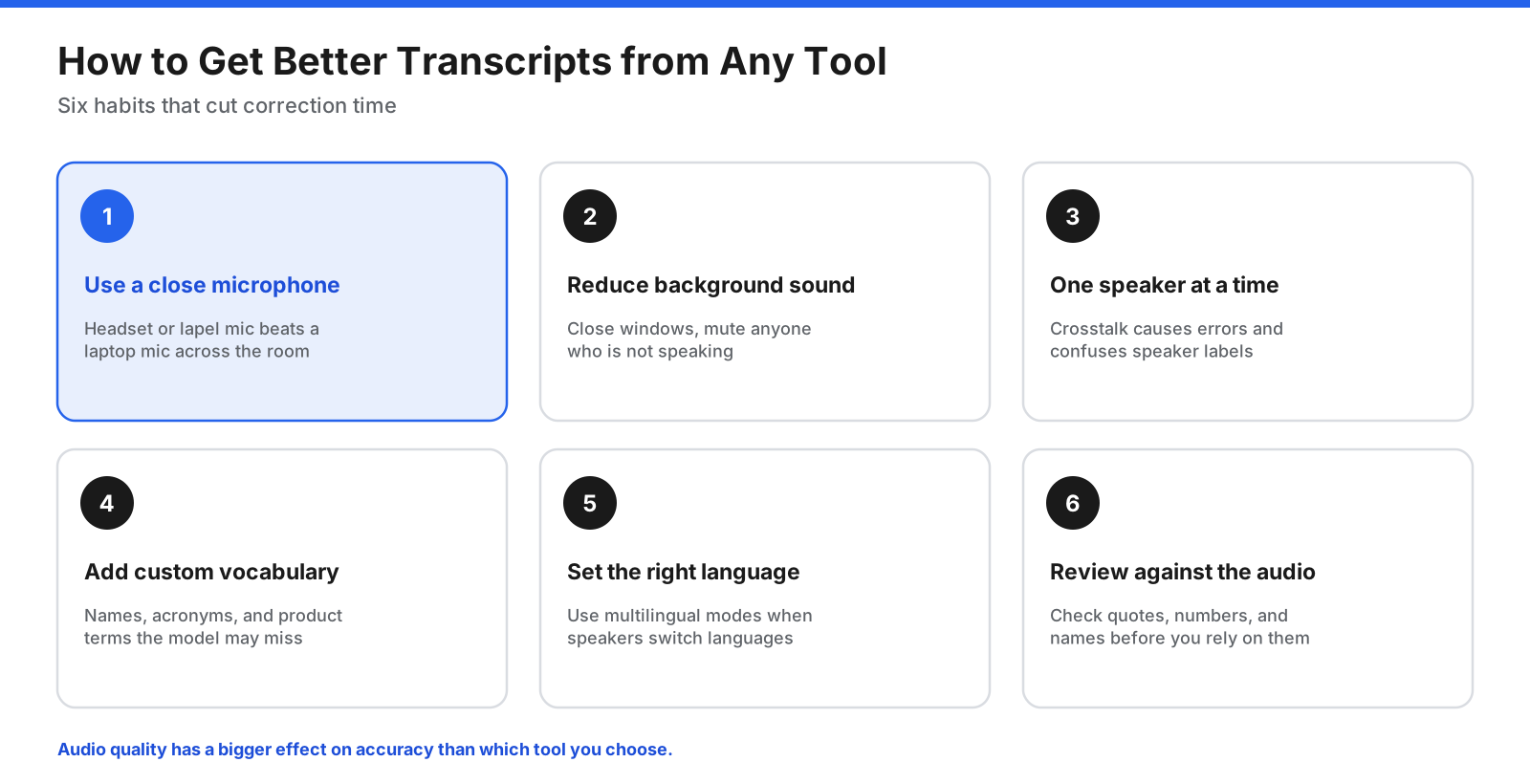
- Use a good microphone close to the speaker. For interviews, place the recorder between speakers.
- Reduce background sound and mute participants who are not speaking in online meetings.
- Avoid talking over one another, which causes errors and confuses speaker labels.
- Add names, acronyms and product terms to custom vocabulary when supported.
- Set the correct language and use bilingual mode if speakers switch languages.
- Review important sections against the audio, especially quotes, numbers and names.
Frequently asked questions
What is the best AI transcription software?
It depends on the job. Otter.ai and Fireflies.ai suit meetings, TurboScribe suits large volumes of recorded files, Descript suits creators, and Rev is useful when human review may be needed. Offline Whisper apps are worth considering for confidential audio.
What is the best free AI transcription software?
Otter.ai offers 300 minutes per month with a 30-minute conversation cap; TurboScribe allows three files per day up to 30 minutes each; Fireflies.ai offers free meeting transcription with limited storage. Microsoft 365 users can try Word Transcribe, and Whisper-based apps have free offline options.
Is Otter.ai better than TurboScribe?
They serve different needs. Otter.ai is designed for live meetings and summaries; TurboScribe is designed for uploaded files and high-volume transcription. Choose based on whether you mostly record meetings or upload recordings.
How accurate is AI transcription?
Accuracy is strongest with clear audio and one speaker at a time. Background noise, overlapping voices, accents, poor microphones and specialist vocabulary can cause errors. Test tools with your own recordings and review important transcripts.
Can ChatGPT transcribe audio?
Speech-to-text models and Whisper are available in OpenAI’s ecosystem, but ChatGPT is often more useful for summarizing, editing or analyzing an existing transcript than for long, timestamped transcription workflows.
Which AI transcription software is HIPAA compliant?
The supplied research lists HIPAA options on some enterprise tiers, including Otter.ai and Fireflies.ai. Confirm the exact plan and obtain a signed BAA before processing patient information.
Will AI replace human transcriptionists?
AI handles many everyday meetings, lectures and interviews. Human transcription remains useful for legal proceedings, medical records, poor-quality audio and situations where errors have serious consequences.
Is it legal to record and transcribe meetings?
It depends on the location and circumstances. Some jurisdictions require everyone’s consent. Tell participants at the start and check the applicable rules or seek legal advice for a specific situation.
The bottom line
The best AI transcription software is the one built for your workflow. Otter.ai and Fireflies.ai suit meetings, TurboScribe is attractive for large volumes of recorded audio, Sonix fits occasional use, Descript suits creators, Happy Scribe supports multilingual work, and Rev offers the option of human review. For privacy, consider a local Whisper app; if you already pay for Microsoft 365, Word Transcribe may be enough.
Test a shortlist with your own recordings, use a good microphone, tell participants when you are transcribing them, and review any transcript that matters before relying on it.