

AI writing tools can help you get past a blank page, outline a report, rewrite a clumsy paragraph, tighten an email, draft marketing copy, or brainstorm a novel. The best option depends on what you write and how much of the work you want to keep doing yourself. Many writers benefit from pairing a general assistant with an editor.
This guide compares 12 tools across general writing, editing, marketing, SEO, fiction, and office apps. Pricing below reflects the source document’s October 2026 figures; confirm current prices and terms with vendors before purchasing. Placement is not paid.
Disclosure: Claude helped draft this comparison and is also reviewed below. Its entry uses Anthropic’s published pricing and the same structure as the other tools.
Quick picks
- General writing: ChatGPT
- Long documents and careful editing: Claude
- Google Docs and Gmail: Gemini
- Grammar and clarity: Grammarly
- Paraphrasing and summaries: QuillBot
- In-depth style editing: ProWritingAid
- Marketing and brand voice: Jasper
- Low-cost short content: Rytr
- SEO articles: Surfer
- Fiction prose: Sudowrite
- Novel planning: Novelcrafter
- Writing inside Word: Microsoft 365 Copilot
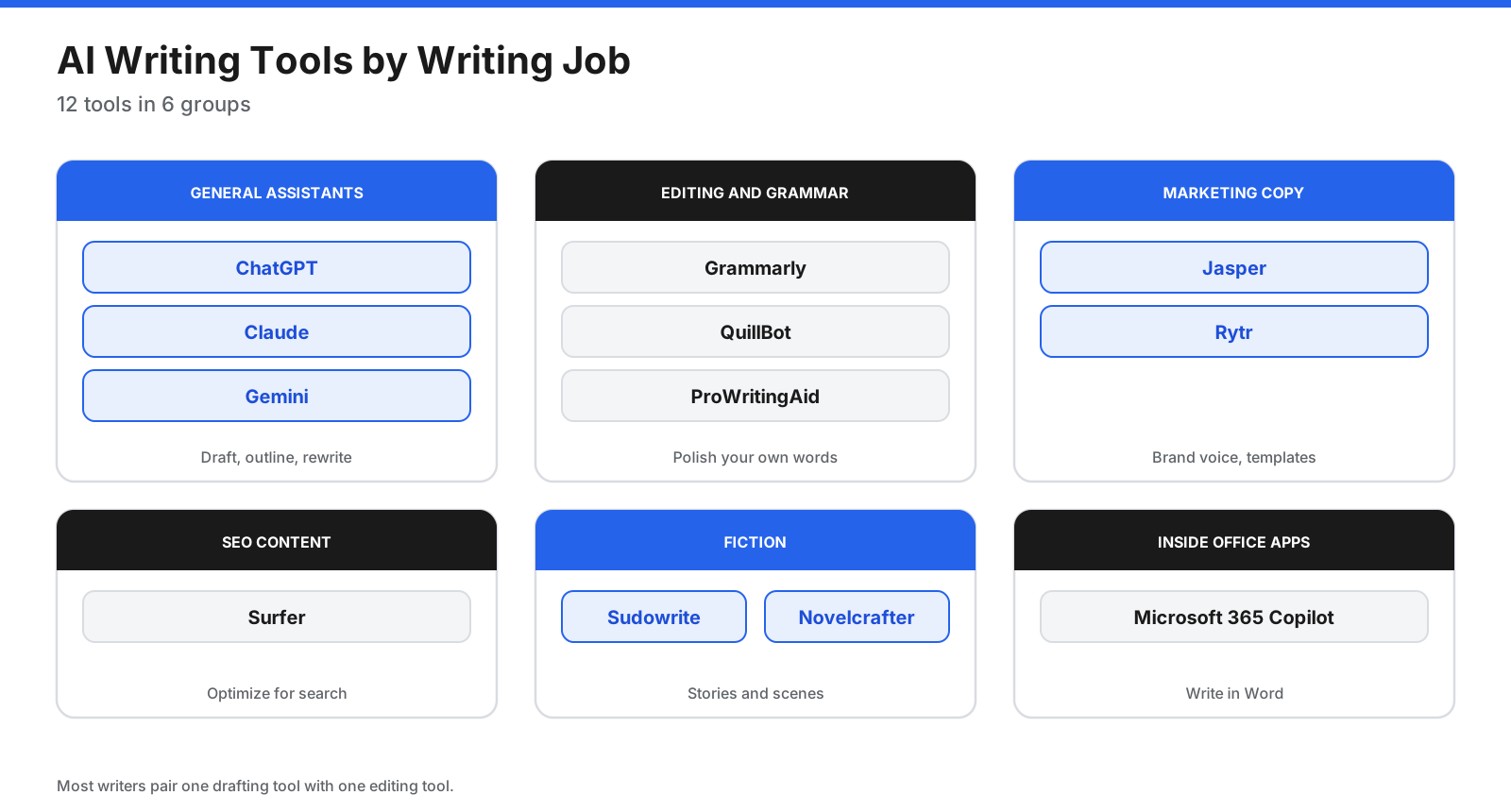
What types of AI writing tools are there?
- General assistants: ChatGPT, Claude, and Gemini draft, outline, summarize, rewrite, and brainstorm.
- Editing and grammar: Grammarly, QuillBot, and ProWritingAid improve existing text for spelling, clarity, tone, and style.
- Marketing copy: Jasper and Rytr offer templates and brand-voice controls for ads, email, social posts, and landing pages.
- SEO content: Surfer combines writing assistance with search-focused optimization.
- Fiction: Sudowrite and Novelcrafter support story planning, characters, and scenes.
- In-app assistants: Microsoft 365 Copilot and Gemini add AI to familiar office tools.
Which features matter most?
- Writing quality: Does the result sound natural or generic?
- Voice control: Can it follow your tone or brand style?
- Context: Can it use long documents, uploads, and notes?
- Editing: Are rewrites and tone adjustments useful?
- Integrations: Does it work in your browser, email, Docs, or Word?
- Usage limits and price: Check credits, words, prompts, and billing terms.
- Privacy: Understand how submitted text is handled and what business plans provide.
How to use AI in your writing process
AI works best as a collaborator at specific stages, not as a replacement for your thinking.
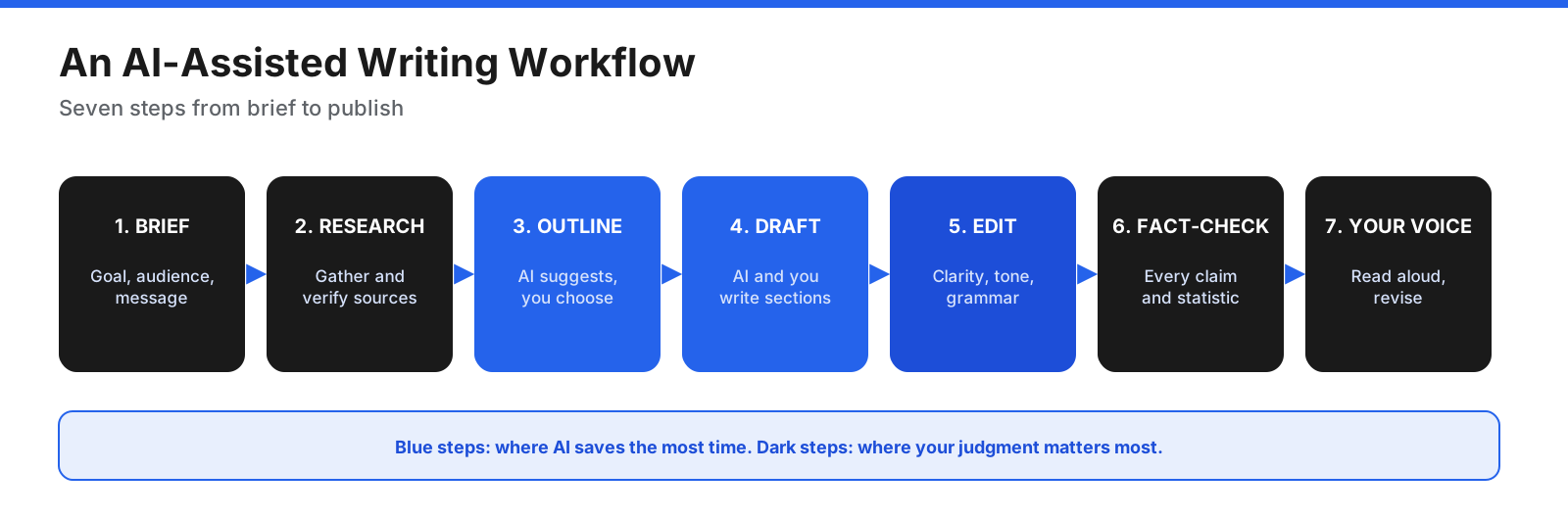
- Define the brief. Decide the goal, audience, key message, and length.
- Research. Gather sources and notes, then verify them.
- Outline. Ask for possible structures, then choose and adjust one.
- Draft. Write key sections yourself and use AI for routine first drafts.
- Edit. Improve clarity, grammar, and tone.
- Fact-check. Check claims, quotes, and statistics against reliable sources.
- Make it yours. Read the final text aloud and revise anything that does not sound like you.
What are the best AI writing tools?
Prices are monthly US-dollar figures from the source document’s October 2026 research unless otherwise stated.
1. ChatGPT
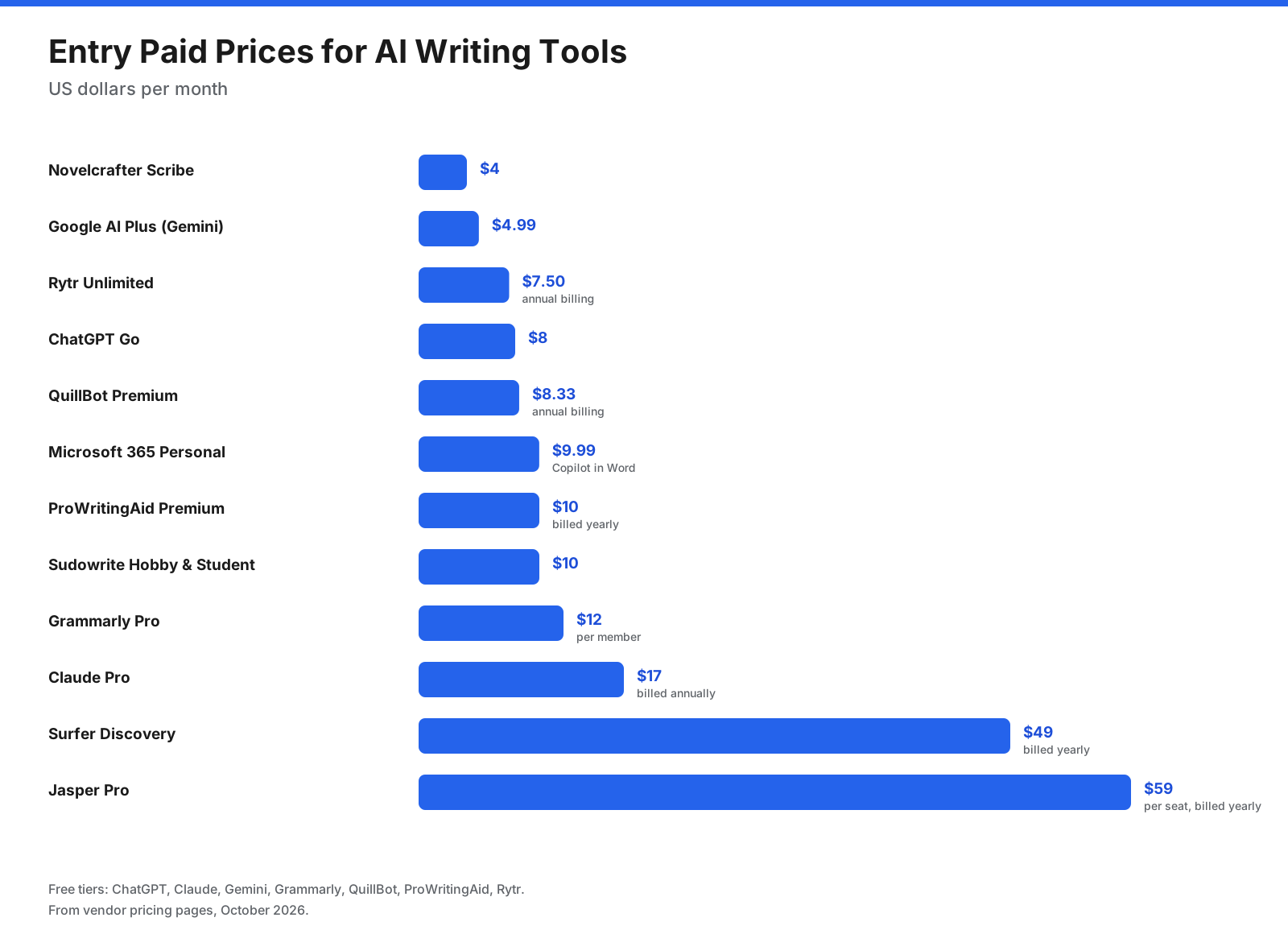
OpenAI’s general assistant can draft, outline, rewrite, brainstorm, work with uploaded files, search the web, and create documents. The source lists a free tier with usage caps, Go at $8/month, Plus at $20/month, and Business at $20 per person monthly with annual commitment. Output can sound generic without clear instructions, and free limits can interrupt longer projects. Best for: everyday writing across work, school, and personal projects.
2. Claude
Anthropic’s assistant drafts, edits, and summarizes text, works with uploaded documents, and supports projects with shared context. The source lists a free tier, Pro at $17/month with annual payment or $20 month-to-month, and Max from $100/month. Free usage is limited. Best for: long documents, reports, and detailed editing.
3. Gemini
Google’s assistant is available as an app and integrates with Google apps such as Gmail and Docs on eligible plans. The source lists free use with limits, Google AI Plus at $4.99/month, Pro at $19.99/month, and Ultra from $99.99/month. Its deepest integrations favor Google users. Best for: people who write mainly in Docs and Gmail.
4. Grammarly
Grammarly checks spelling, grammar, clarity, and tone in browsers, email, and documents, with AI drafting and rewriting. The source lists a free plan with grammar fixes and 100 AI prompts monthly, and Pro at $12 per member/month. The cited plans page did not clearly state Pro’s billing period, so confirm at checkout. Best for: clearer writing wherever you type.
5. QuillBot
QuillBot focuses on paraphrasing and summarizing, with grammar checking, translation, citations, AI detection, and a humanizer. The free plan paraphrases up to 100 words at a time and summarizes up to 1,200 words. Premium is listed at $8.33/month billed annually. Paraphrasing can change meaning, so review carefully and follow school or workplace rules. Best for: frequent rewriting and summarizing.
6. ProWritingAid
This style editor offers more than 25 analysis reports, a custom style guide, rephrasing, and creative suggestions. The source lists a free plan checking 500 words at a time, Premium at $10/month billed yearly, $30 month-to-month, or $399 lifetime; Premium Pro costs more. Its many reports may be excessive for short tasks. Best for: authors and long-form writers who want detailed style feedback.
7. Jasper
Jasper is a marketing platform with brand voice controls, knowledge assets, and marketing workflows. The source lists Pro at $69 per seat/month billed monthly or $59 billed yearly, with a 7-day trial; Business pricing is custom. It can be expensive when simpler tools cover the same basics. Best for: marketing teams producing on-brand content at scale.
8. Rytr
Rytr is a lower-cost writer with templates for email, social posts, ads, and short blog content. The source lists 10,000 characters/month on the free plan, Unlimited at $7.50/month, and Premium at $24.16/month on annual billing. It is more basic than higher-priced platforms. Best for: freelancers and small businesses creating short content on a budget.
9. Surfer
Surfer combines search-focused content optimization with an AI writing assistant, detector, and humanizer. The source lists Discovery at $49/month billed yearly, Standard at $99, and Pro at $182. It is specialized for SEO, and optimization scores should never override clarity or accuracy. Best for: content teams producing articles intended to rank in search.
10. Sudowrite
Sudowrite is designed for fiction, with story-aware tools to write, rewrite, describe, and expand scenes, plus style matching and series continuity. The source lists Hobby & Student at $10/month, Professional at $22, and Max at $44, with yearly savings and a free trial. Output can lean on familiar tropes and needs substantial revision. Best for: novelists and screenwriters.
11. Novelcrafter
Novelcrafter provides a novel-planning workspace and a Codex for characters, locations, and lore. The source lists Scribe at $4/month, Hobbyist at $8, Artisan at $14, and Specialist at $20, with a 21-day trial. AI use with your own keys is billed by the model provider, and setup has a learning curve. Best for: authors who want control over story planning and AI settings.
12. Microsoft 365 Copilot
Copilot in Word drafts documents, rewrites selected text, summarizes files, and can reference other work files when available. The source lists Microsoft 365 Personal at $9.99/month or $99.99/year, Premium at $19.99/month, and Copilot Business at $18 per user/month billed annually. It suits existing Microsoft 365 users best, and home-plan usage limits apply. Best for: professionals writing reports, proposals, and documents in Word.
How do the AI writing tools compare?
| Tool | Main job | Free option | Entry paid price |
|---|---|---|---|
| ChatGPT | General assistant | Yes, with limits | $8/month |
| Claude | General assistant | Yes, with limits | $17/month annual |
| Gemini | General assistant, Google apps | Yes, with limits | $4.99/month |
| Grammarly | Grammar and clarity | 100 AI prompts/month | $12/member/month |
| QuillBot | Paraphrasing and summaries | 100-word paraphrases | $8.33/month annual |
| ProWritingAid | Style editing | 500 words at a time | $10/month yearly |
| Jasper | Marketing copy | 7-day trial | $59/seat/month yearly |
| Rytr | Short content | 10,000 characters/month | $7.50/month annual |
| Surfer | SEO content | No | $49/month yearly |
| Sudowrite | Fiction | Free trial | $10/month |
| Novelcrafter | Novel planning | 21-day trial | $4/month |
| Microsoft 365 Copilot | Writing in Word | No | $9.99/month |
What are the best free AI writing tools?
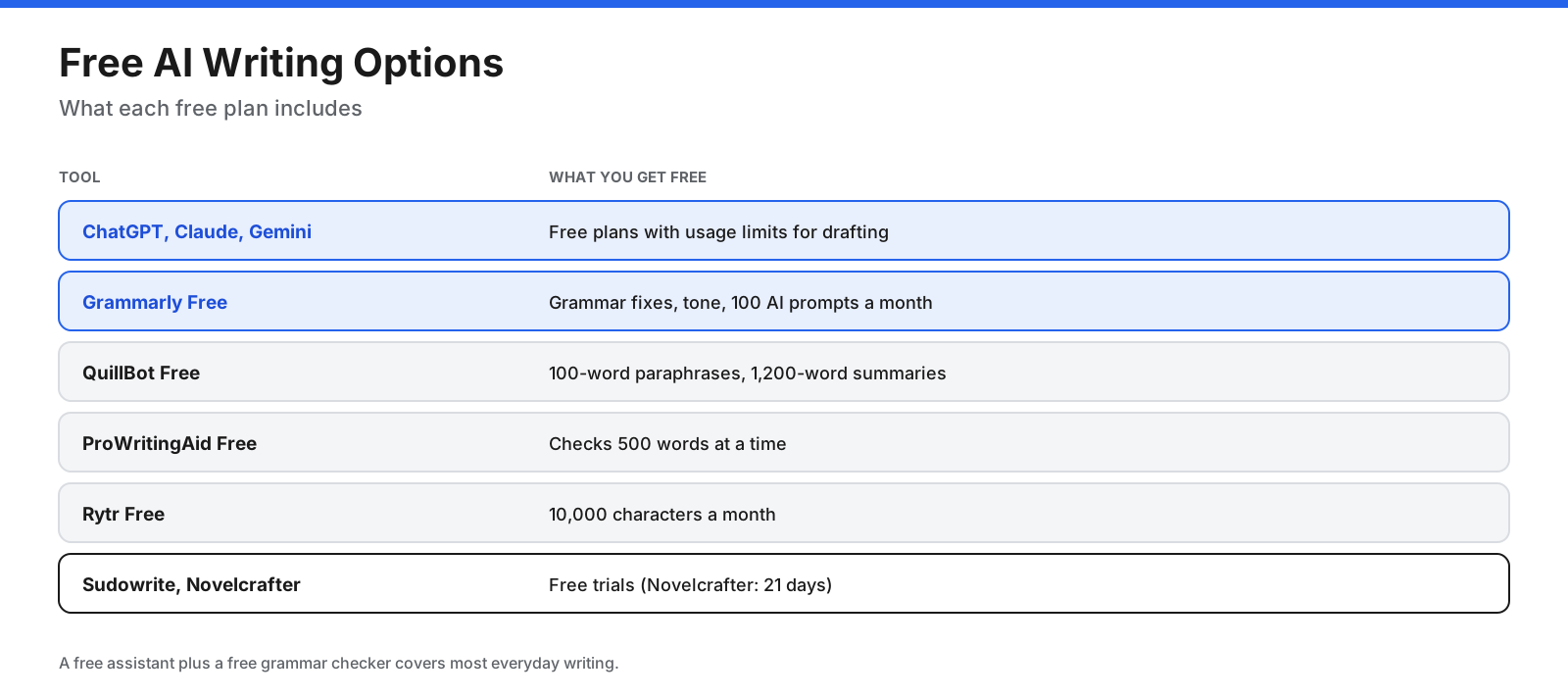
- Drafting and brainstorming: free ChatGPT, Claude, and Gemini plans.
- Grammar and clarity: Grammarly Free.
- Paraphrasing and summaries: QuillBot Free.
- Style checks: ProWritingAid Free for short pieces.
- Short marketing copy: Rytr Free.
A free general assistant plus a free grammar checker covers many everyday needs.
Which AI is best for writing essays?
Use AI as a tutor and editor, not a ghostwriter. Ask it to suggest outlines, summarize readings you provide, improve clarity, and help identify citation details, then verify every citation yourself. Follow your institution’s academic integrity policy; submitting AI-written work as your own may be misconduct.
Is ChatGPT or Claude better for writing?
Both can be strong general assistants, and the better result depends on the task, instructions, and your preferences. Give both the same brief, a sample of your style, and the same revision request. Gemini is worth testing if you work in Google Docs. Jasper, Surfer, or Sudowrite may be better for specialized marketing, SEO, or fiction work.
Which tools work best for specific formats?
- Email: Gemini in Gmail, Copilot in Outlook, and Grammarly for tone.
- Reports and proposals: Claude, ChatGPT, or Copilot in Word, followed by verification.
- Blog posts: a general assistant for outlining, Surfer for search optimization, and an editor for clarity.
- Social posts and ads: Jasper or Rytr.
- Academic work: outlining, source summaries, and grammar support within your institution’s rules.
- Fiction: Sudowrite or Novelcrafter for scenes and continuity, with ProWritingAid for style.
What are the limits of AI writing tools?
AI can invent facts, quotes, and citations; produce generic or repetitive prose; miss recent developments; reflect bias; and mishandle sensitive text depending on the service’s terms. Treat its output as a first draft, verify every factual claim, and read privacy terms before submitting confidential material.
Can AI writing be detected?
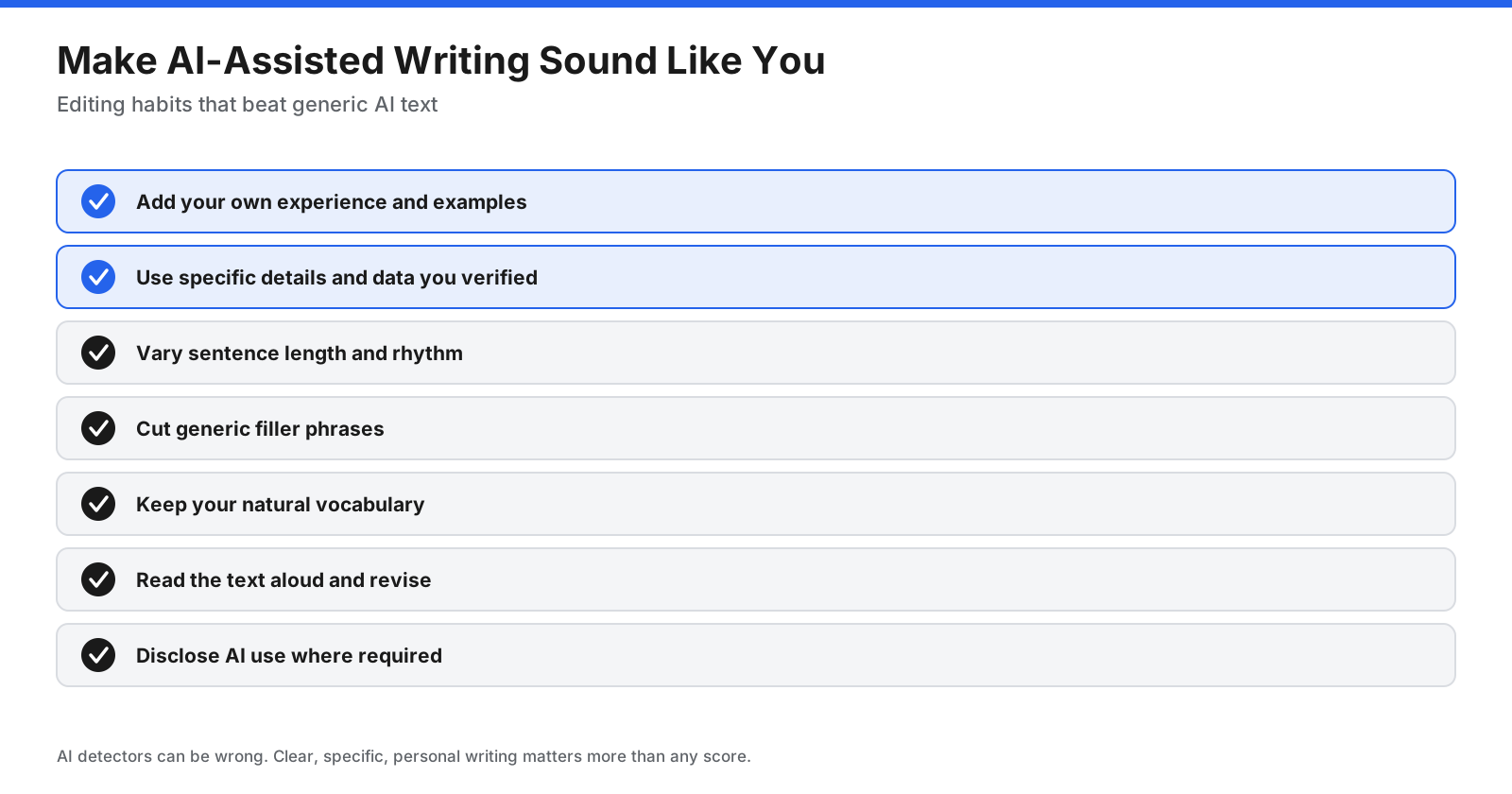
AI detectors estimate whether text may have been generated by AI, but they can produce false positives and false negatives. Treat scores as signals, not proof. Rather than trying to fool detectors, add your own experience, use verified specifics, vary sentence rhythm, cut filler, and read the draft aloud.
Is it legal to publish writing created with AI?
Copyright and platform rules vary. The source document cites a January 2025 US Copyright Office report stating that copyright protects original human expression and that purely AI-generated material may not be protected, while human selection, arrangement, and modification can matter. Amazon KDP disclosure rules distinguish AI-generated from AI-assisted content according to the source’s cited Authors Guild summary. You remain responsible for what you publish. This is general information, not legal advice; verify current policies and consult a qualified lawyer for important projects.
Should you disclose that you used AI?
Disclosure requirements depend on the destination. Schools, publishers, clients, employers, and self-publishing platforms may set their own rules. Check the applicable policy or contract. Even where disclosure is not required, transparency can build trust, especially when research or factual claims are involved.
How can you write better prompts?
- State the audience, goal, tone, length, and format.
- Provide examples of your writing style.
- Share source material, notes, facts, and links rather than asking the model to invent details.
- Ask for multiple headlines or outlines, then choose.
- Edit in rounds with specific instructions.
- List phrases to avoid and points that must be included.
How do teams use AI writing tools safely?
- Consider business plans with suitable privacy and admin controls.
- Do not paste sensitive customer, financial, or legal information into consumer tools.
- Maintain a style guide for consistent brand voice.
- Require human review for accuracy and tone.
- Keep source links for facts and statistics.
Which AI writing tool should you pick?
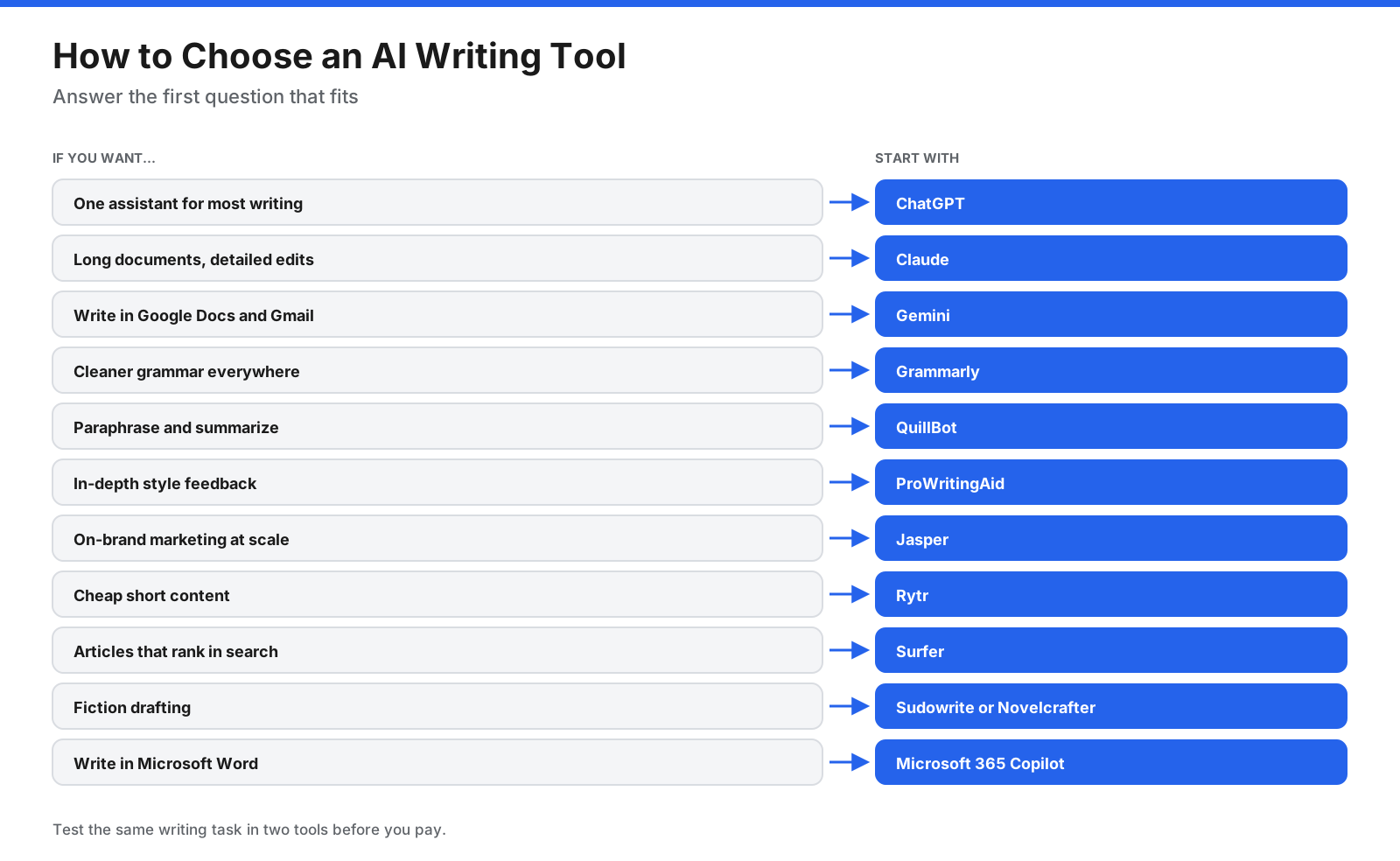
- List what you write most: email, reports, essays, marketing, SEO, or fiction.
- Decide whether you mainly need drafting, editing, or both.
- Check where you write: browser, Google Docs, Word, or a dedicated app.
- Test free plans or trials with the same writing task.
- Review privacy and pricing before committing.
What does a simple AI writing stack look like?
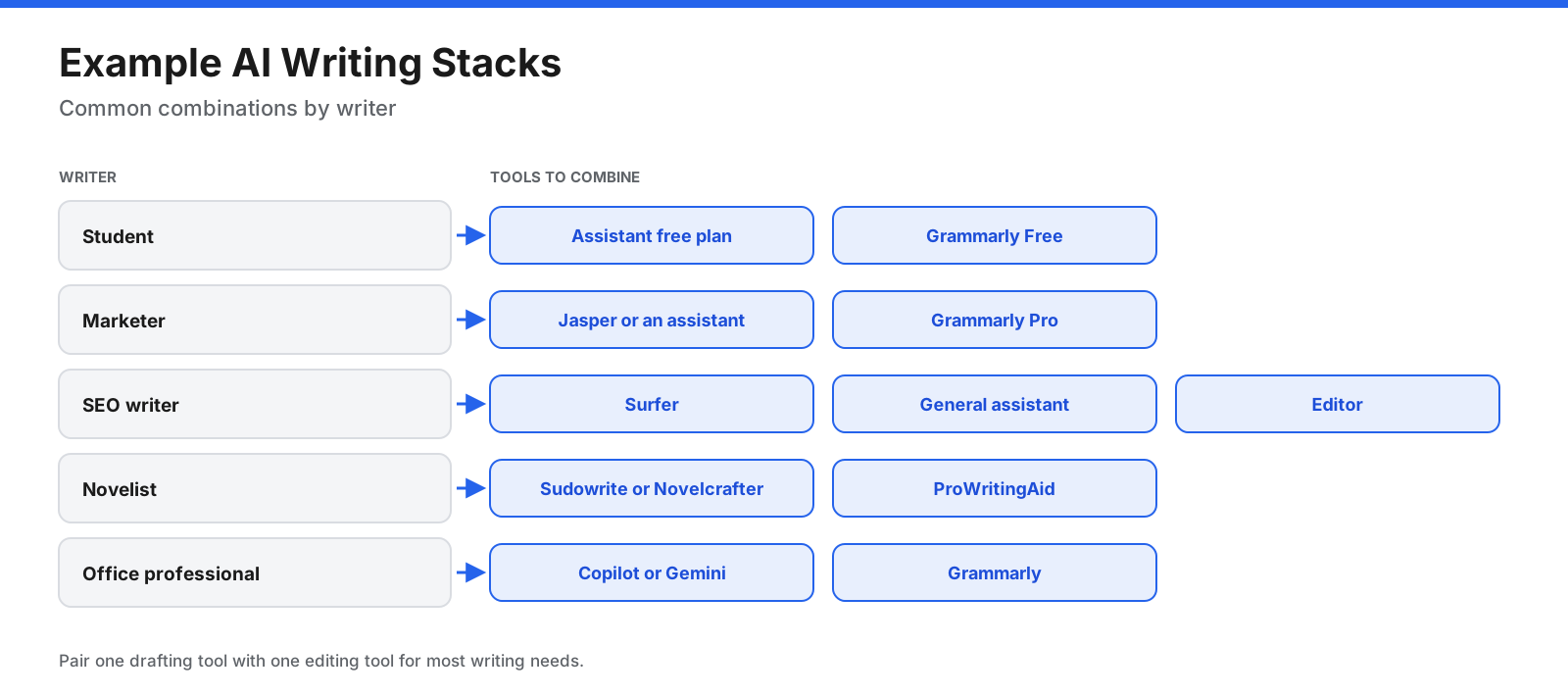
- Student: a free general assistant plus Grammarly Free.
- Marketer: Jasper or a general assistant plus Grammarly Pro.
- SEO writer: Surfer, a general assistant, and an editor.
- Novelist: Sudowrite or Novelcrafter plus ProWritingAid.
- Office professional: Copilot or Gemini in Docs plus Grammarly.
Frequently asked questions
Which AI writing tool is best overall?
There is no single best tool. ChatGPT, Claude, and Gemini are versatile; Grammarly focuses on grammar and clarity; Jasper suits marketing; Surfer suits SEO; and Sudowrite suits fiction.
What is the best free AI writing tool?
Free ChatGPT, Claude, and Gemini plans handle many drafting tasks. Grammarly Free helps with grammar, Rytr suits short marketing copy, and QuillBot supports quick paraphrasing.
Which AI is better than ChatGPT for writing?
It depends on the task. Claude and Gemini are alternatives for general writing, while Jasper, Surfer, and Sudowrite specialize in marketing, SEO, and fiction.
What is the best AI for creative writing?
Sudowrite is built for fiction, and Novelcrafter provides deep story planning. General assistants can also help brainstorm and revise.
What is the best AI writing assistant for business?
Jasper focuses on brand voice and marketing. Grammarly Pro adds team style guides, while Copilot and Gemini work inside office apps.
How much do AI writing tools cost?
Many individual plans in the source cost roughly $5 to $20 per month. Marketing and SEO platforms can cost more, with Surfer listed from $49 and Jasper from $59 per seat monthly on annual billing. Confirm prices with vendors.
What is the best AI tool for editing?
Grammarly is useful for grammar, clarity, and tone; ProWritingAid offers deeper style reports; QuillBot helps with paraphrasing and summarizing. General assistants can edit when given specific instructions.
Is it illegal to publish a book written by AI?
Rules depend on jurisdiction, the human contribution, and platform policies. The source notes US copyright and Amazon KDP disclosure considerations; consult current official guidance for your situation.
Can teachers detect AI writing?
Detectors can be wrong. Follow your school’s policy and use AI appropriately for brainstorming and editing.
Can AI writing tools write in other languages?
Yes. General assistants support many languages, and some specialist tools support dozens. Have a fluent speaker review important content.
Are AI writing tools safe for confidential work?
Review privacy terms, use appropriate business plans, and avoid submitting sensitive information to consumer tools without authorization.
Do AI writing tools replace human writers?
They can speed up drafting and editing, but people still provide ideas, experience, judgment, accuracy, and voice.
How do I make AI writing sound human?
Add your own experience, use verified specifics, vary sentence length, remove filler, and read the text aloud. Editing in your own voice matters more than any tool setting.
The bottom line
The best AI writing tool depends on what you write. ChatGPT, Claude, and Gemini help with drafting and brainstorming. Grammarly, QuillBot, and ProWritingAid polish existing text. Jasper and Rytr serve marketing, Surfer serves SEO, Sudowrite and Novelcrafter serve fiction, and Microsoft 365 Copilot brings AI into Word. Pair a drafting tool with an editor, fact-check everything, keep your own voice, and confirm current pricing and privacy terms before committing.