

Automation tools take repetitive work off your plate. They move data between apps, route approvals, update records, send follow-ups, configure servers, and increasingly, hand routine judgment calls to AI agents. Done well, automation frees people for work that needs a human and cuts the errors that come from copying information by hand.
The challenge is that “automation tool” now covers very different products. A marketing team automating email sequences, an operations team connecting SaaS apps, a finance team automating invoice entry in a legacy desktop system, and an IT team configuring hundreds of servers all need different software. Picking the wrong type wastes months.
This guide sorts 12 of the best automation tools into six types, explains how they differ, and shows what each costs as of October 2026. It also covers usage-based pricing, what to automate first, and how to keep automation safe as AI takes on more steps. This is a vendor-neutral guide: no tool paid to be included.
Quick Picks
- Best for connecting everyday business apps: Zapier
- Best visual builder for complex multi-step flows: Make
- Best for self-hosting and technical teams: n8n
- Best for companies standardized on Microsoft 365: Microsoft Power Automate
- Best for building AI agents and AI workflows: Gumloop
- Best AI assistant for inbox, meetings, and scheduling: Lindy
- Best RPA platform overall: UiPath
- Best RPA alternative with a free community edition: Automation Anywhere
- Best enterprise integration across departments: Workato
- Best for hybrid and legacy system integration: Boomi
- Best for IT and infrastructure automation: Red Hat Ansible
- Best low-cost marketing automation: Brevo
What Are the Main Types of Automation Tools?
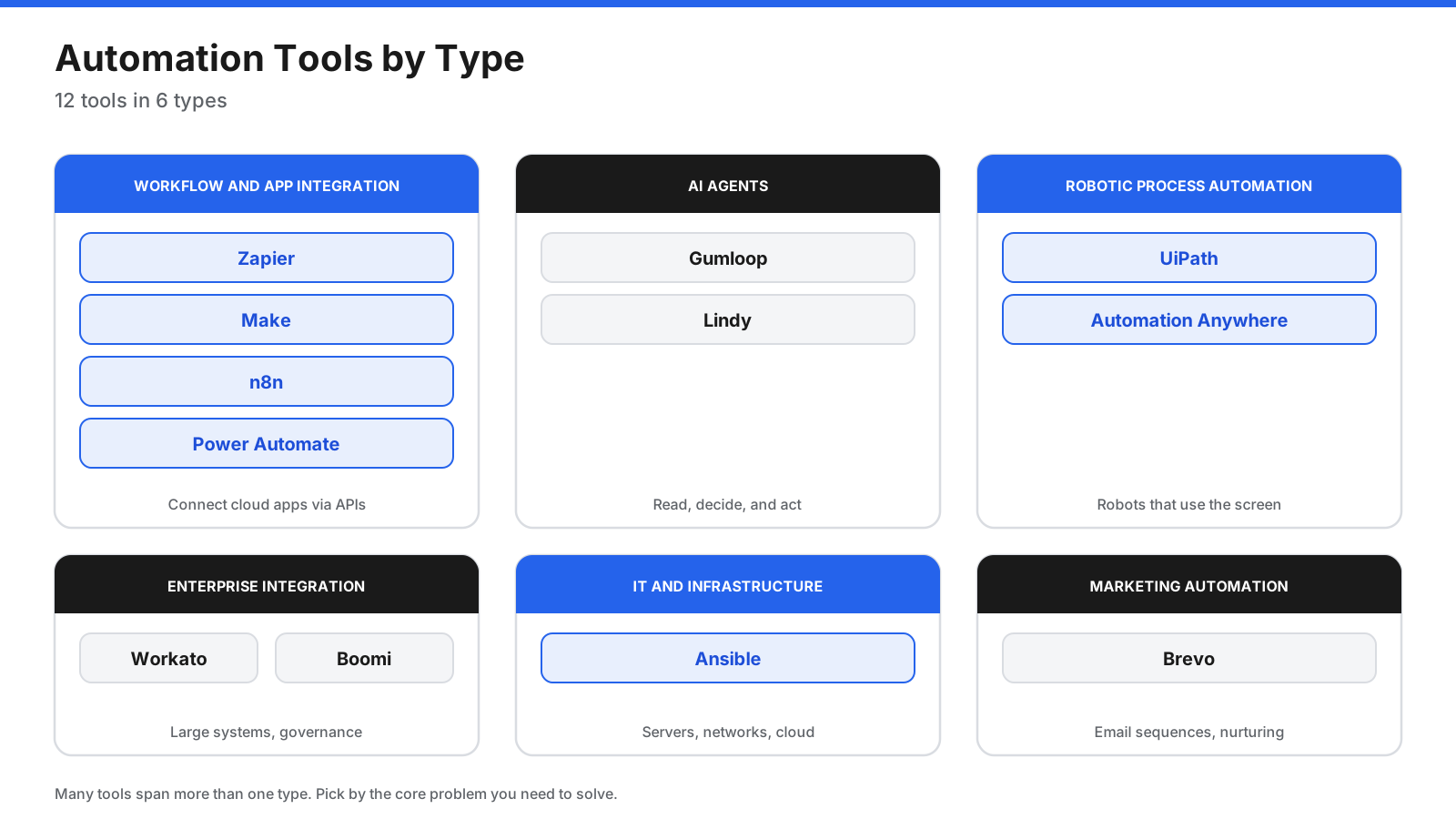
Most automation tools fall into one of six types. Many products now span more than one, but knowing the core type tells you what a tool does best.
- Workflow and app integration tools connect cloud apps through their APIs. When something happens in one app, the tool runs actions in others. Zapier, Make, n8n, and Power Automate cloud flows fit here.
- AI agent platforms add language models to automation, so a workflow can read an email, classify a request, draft a reply, or decide the next step. Gumloop and Lindy are examples.
- Robotic process automation (RPA) uses software robots that click, type, and read screens the way a person would. It is useful when an application has no API, such as an older desktop or mainframe system. UiPath and Automation Anywhere lead this category.
- Enterprise integration platforms connect large systems such as ERP, CRM, HR, and databases with governance, monitoring, and API management. Workato and Boomi are common choices.
- IT and infrastructure automation configures servers, networks, and cloud resources from code. Ansible is a widely used open-source example.
- Marketing automation runs email sequences, lead nurturing, and audience segmentation. Brevo is a lower-cost option in this group.
API Automation, RPA, or AI Agents: What Is the Difference?
The three common approaches differ in how they interact with systems and where they fit best.
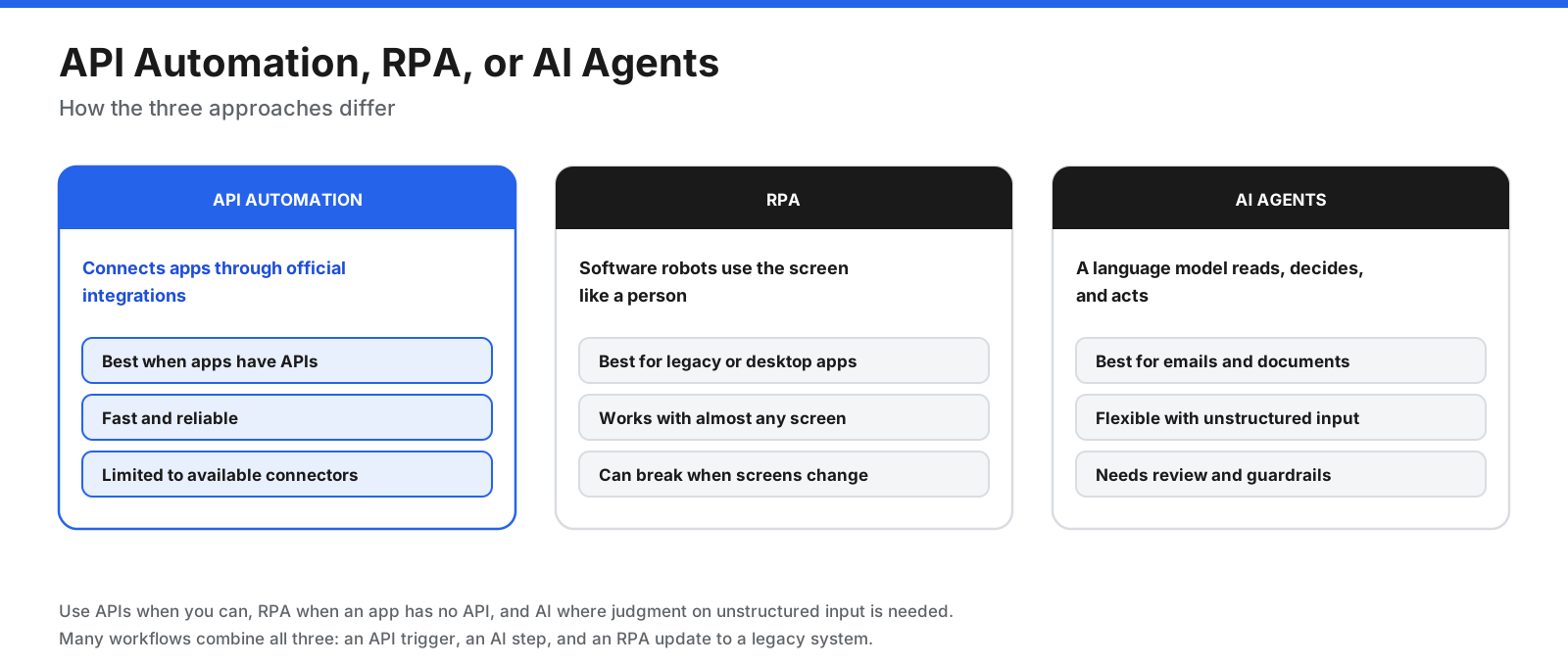
API automation is usually the most reliable option. It uses official connections between apps, so it is fast and does not break when a screen layout changes. Its limit is that it can only do what the app’s API allows.
RPA works through the user interface. A software robot logs in, clicks buttons, and copies data between fields. It can automate almost anything a person does on screen, which makes it valuable for older systems, but changes to a screen can break a robot.
AI agents handle tasks that need interpretation, such as reading a customer email and deciding which team should handle it. They are flexible, but their output can vary, so they need clear instructions, limits on what they can do, and human approval for actions with outside impact.
Many working setups combine all three: an API trigger starts the process, an AI step classifies the request, and an RPA robot updates a legacy system at the end.
How Do Automation Tools Charge for Usage?
Automation pricing is confusing because each vendor measures usage differently. Understanding the unit matters more than the headline price.
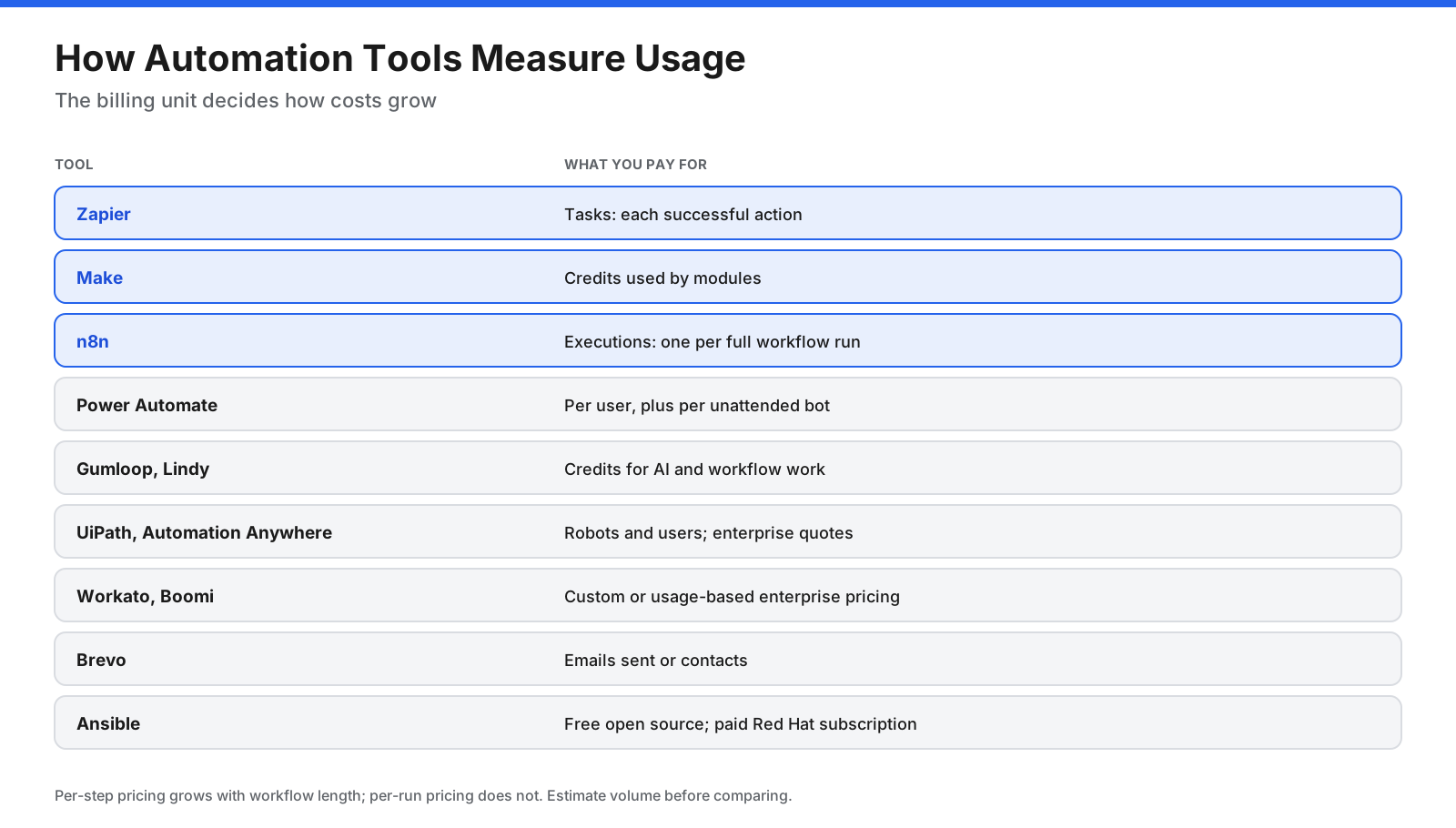
- Tasks (Zapier): Each successful action in a workflow counts.
- Credits (Make, Gumloop, Lindy): Steps, AI calls, or work time use credits, and the cost per step varies.
- Executions (n8n): One full run of a workflow counts once, regardless of steps, according to n8n’s pricing page.
- Users and bots (Power Automate, UiPath, Automation Anywhere): You pay per person who builds or runs automations, and per unattended robot.
- Enterprise usage (Workato, Boomi): Pricing depends on connections, volume, and features, usually through sales.
- Contacts or emails (Brevo): Marketing automation is priced by list size or sending volume.
A workflow with many steps that runs often can cost far more on a per-step model than on a per-run model. Estimate monthly volume before comparing prices.
What Should You Look for in an Automation Tool?
- The right type for the job: API, RPA, AI agent, integration, IT, or marketing.
- Connectors: Does it support the apps and systems you use today?
- Builder style: A simple step list, a visual canvas, or code.
- AI features: Can it call language models, and can you control which model and data it uses?
- Error handling: Retries, alerts, and logs for failed runs.
- Governance: Roles, approvals, audit logs, single sign-on, and environment controls.
- Hosting and data residency: Cloud, self-hosted, or region-specific hosting.
- Total cost: Usage units, seats, robots, and add-ons at your expected volume.
What Are the Best Automation Tools?
Workflow and App Integration
1. Zapier
Zapier connects thousands of cloud apps with automated workflows built from a trigger and a series of actions. It also includes tables, forms, and AI steps, so small teams can build complete processes without code.
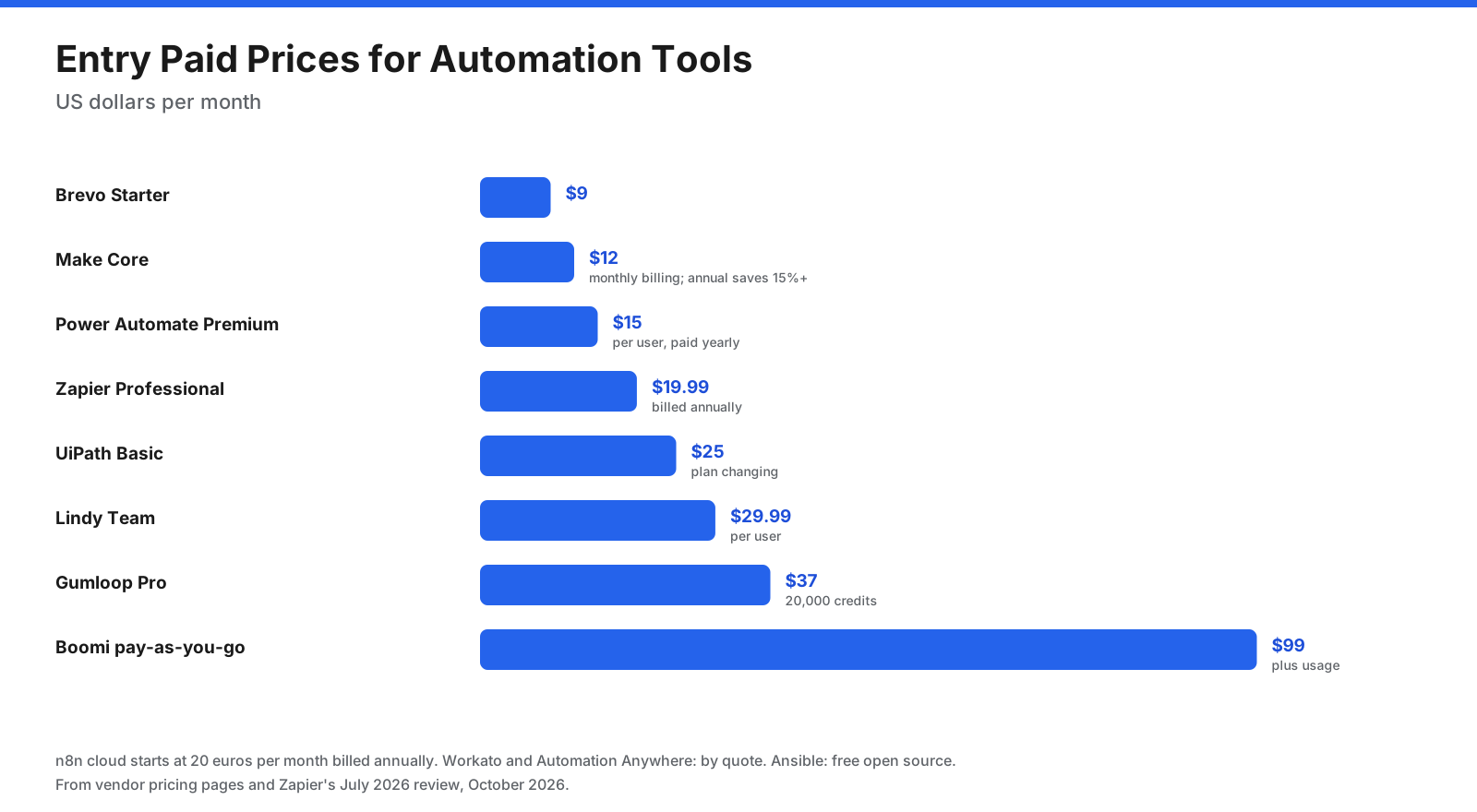
Pricing: The free tier covers 100 tasks a month, limited to two-step Zaps. Professional costs $19.99 per month billed annually and Team costs $69 per month billed annually for 25 users, according to Zapier’s review and pricing page.
Downsides: Task-based billing becomes expensive for high-volume, many-step workflows.
Best for: Small and mid-sized teams that want to connect popular apps quickly.
2. Make
Make lets you design automations on a visual canvas, with routers for branching, filters, iterators, and data mapping between modules. It suits workflows with complex logic or heavy data transformation.
Pricing: The free tier provides 1,000 credits a month, two active scenarios, and scheduling no more often than every 15 minutes. The 10,000-credit tier is listed at $12 per month for Core, $21 for Pro, and $38 for Teams on monthly billing, with annual billing saving 15% or more.
Downsides: New users need more time to get comfortable with the canvas than with a linear builder, and each module uses a different number of credits.
Best for: Operations teams building branching workflows that move and transform data.
3. n8n
n8n combines a visual workflow editor with code steps and AI agent features. It runs as a hosted service or on infrastructure you manage.
Pricing: You can self-host the Community Edition at no cost. Hosted plans start at €20 a month on annual billing for 2,500 executions.
Downsides: Self-hosting requires technical staff, and the interface assumes some technical knowledge.
Best for: Technical teams that want control over data, hosting, and costs.
4. Microsoft Power Automate
Power Automate covers cloud workflows and desktop automation in the Microsoft ecosystem. Cloud flows connect Microsoft 365, Dynamics, and other services, while desktop flows add RPA for Windows applications.
Pricing: Premium is listed at $15 per user per month with yearly payment. Unattended robots are licensed separately: Process is $150 per bot per month, and Hosted Process is $215 per bot per month. A 30-day free trial is available.
Downsides: It works best inside Microsoft’s ecosystem, and licensing can be complex for larger deployments.
Best for: Organizations that run on Microsoft 365, Teams, SharePoint, and Dynamics.
AI Agents and AI Workflows
5. Gumloop
Gumloop is an AI automation platform for building agents and workflows across tools. Use cases include CRM agents, lead generation, support agents, SEO automation, and data analysis, with access to more than 35 AI models.
Pricing: Pro starts at $37 per month with 20,000 credits, unlimited agents and seats, and a 14-day free trial. Enterprise is custom and adds options such as a virtual private cloud, SCIM and SAML, and audit logs.
Downsides: No free plan is listed beyond the trial, and Pro adds an 8% platform fee on top of credit usage.
Best for: Teams that want to build AI-driven workflows without writing code.
6. Lindy
Lindy is an AI assistant for inbox, calendar, meetings, and Slack. It can record meetings and take notes, manage scheduling and follow-ups, draft email replies, and run scheduled routines. It says it waits for approval before actions with outside impact, such as sending emails.
Pricing: The free plan includes $50 in credits that last seven days. Team is listed at $29.99 per user per month with 3,000 monthly credits. Enterprise is custom and covers HIPAA requirements, single sign-on, and audit logging. Confirm current tiers before buying.
Downsides: Credit use varies by task size, and monthly credits do not roll over.
Best for: Busy professionals and small teams handing off email triage, meeting notes, and scheduling.
Robotic Process Automation (RPA)
7. UiPath
UiPath automates work across desktop, web, and legacy applications and combines robots with AI agents, document processing, and process mining.
Pricing: The Community plan is free. Basic starts at $25 per month with a two-robot limit, though UiPath notes that Basic is changing. Standard and Enterprise are priced through sales, with a 60-day trial for Standard.
Downsides: Enterprise deployments need planning, governance, and skilled developers, and robots need maintenance when applications change.
Best for: Organizations automating high-volume processes in systems without good APIs.
8. Automation Anywhere
Automation Anywhere is a cloud-based RPA and intelligent automation platform. Its Community Edition gives students, developers, and small businesses free access to RPA, AI document automation, and analytics.
Pricing: Community Edition is free. Paid plans are priced by request.
Downsides: Paid pricing is not published, and enterprise rollouts require dedicated automation teams.
Best for: Enterprises comparing RPA platforms and developers learning RPA for free.
Enterprise Integration
9. Workato
Workato connects enterprise systems and orchestrates processes across departments, with governance and AI features for large organizations.
Pricing: Workato does not publish prices. Contact sales for a quote; a free trial is offered from its website.
Downsides: It is built for enterprise scale, so smaller teams may find it more than they need.
Best for: Large organizations standardizing automation across IT, finance, HR, and sales.
10. Boomi
Boomi connects cloud, on-premises, and legacy systems, with tools for data mapping, API management, and data quality.
Pricing: Pay-as-you-go costs $99 per month plus usage with no contract. Subscription editions for integration, API management, and data are priced through sales, and a 30-day free trial is available.
Downsides: It is more technical than no-code workflow tools and is aimed at IT teams.
Best for: Organizations that need to connect older on-premises systems with modern cloud apps.
IT and Infrastructure Automation
11. Red Hat Ansible
Ansible is open-source automation that reduces complexity and runs across environments. It uses an agentless design that connects to machines over SSH, and you describe desired system states in human-readable YAML playbooks. Red Hat Ansible Automation Platform adds enterprise governance for IT operations, security response, infrastructure, network, and cloud automation.
Pricing: Open-source Ansible is free. Red Hat Ansible Automation Platform is sold by subscription, with a free trial.
Downsides: It requires scripting skills and is designed for IT teams rather than business users.
Best for: IT, network, and DevOps teams automating configuration, patching, and provisioning.
Marketing Automation
12. Brevo
Brevo is an email and marketing automation platform with campaigns, SMS, transactional email, and multi-step automation workflows. It is a lower-cost option for small businesses.
Pricing: The free plan allows up to 300 emails per day once an account is approved for sending. Starter costs $9 per month and Standard costs $18 per month, with Standard adding unlimited multi-step workflows. Professional costs $350 per month for larger volumes.
Downsides: Advanced automation features sit on Standard and higher plans, and costs rise with email volume.
Best for: Small businesses that want email marketing and automation at a low price.
How Do the Automation Tools Compare?
| Tool | Type | Free option | Entry paid price |
|---|---|---|---|
| Zapier | Workflow | 100 tasks/month | $19.99/month billed annually |
| Make | Workflow | 1,000 credits/month | $12/month (monthly billing) |
| n8n | Workflow | Free Community Edition (self-hosted) | €20/month, annual billing |
| Power Automate | Workflow and RPA | 30-day trial | $15/user/month paid yearly |
| Gumloop | AI agents | 14-day trial | $37/month |
| Lindy | AI assistant | $50 credits for 7 days | $29.99/user/month |
| UiPath | RPA | Community plan | $25/month |
| Automation Anywhere | RPA | Community Edition | By request |
| Workato | Enterprise integration | Trial | Quote |
| Boomi | Enterprise integration | 30-day trial | $99/month plus usage |
| Ansible | IT automation | Open source | Red Hat subscription |
| Brevo | Marketing automation | Up to 300 emails/day | $9/month |
Do You Need Coding Skills to Use Automation Tools?
It depends on the type of tool. The skill needed rises as you move from business apps to infrastructure.
- No coding needed: Zapier, Power Automate cloud flows, Lindy, and Brevo are built for business users who configure steps in a visual builder.
- Some technical comfort helps: Make, Gumloop, and n8n are visual, but complex workflows involve data mapping, expressions, and API concepts. n8n also lets you add code steps.
- Developer or specialist skills: Enterprise RPA with UiPath or Automation Anywhere, integration platforms such as Workato and Boomi, and infrastructure automation with Ansible usually need trained developers or IT engineers.
Many organizations split the work: business teams build simple automations themselves, while a central team handles complex, high-risk, or cross-system automation and sets the rules for everyone else.
What Can You Automate in Each Department?
Automation pays off fastest when you target specific, repetitive work in each team.
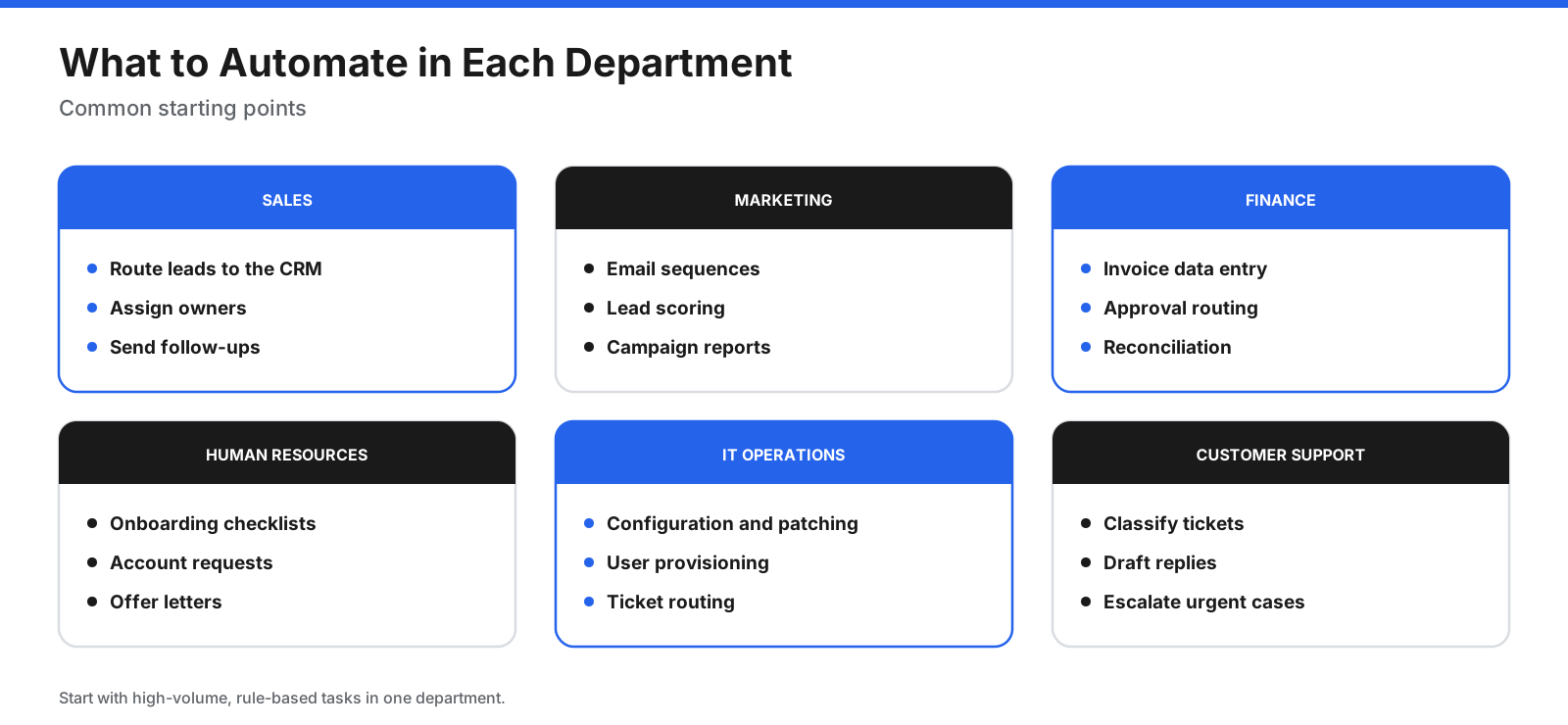
- Sales: Send new leads from forms to your CRM, assign owners, and trigger follow-up tasks. Workflow tools such as Zapier or Make handle this well.
- Marketing: Run welcome sequences, nurture campaigns, and lead scoring in a marketing automation tool such as Brevo.
- Finance: Extract invoice data, route approvals, and enter records into accounting or ERP systems, often with RPA when systems lack APIs.
- Human resources: Create onboarding checklists, request accounts, and generate offer letters from templates.
- IT operations: Configure servers, apply patches, provision users, and route tickets. Ansible handles infrastructure, while workflow tools connect IT service management systems.
- Customer support: Classify incoming tickets, draft replies, and escalate urgent cases, using AI agents with human review.
What Should You Automate First?
Not every process is worth automating. The best first candidates share a few traits.
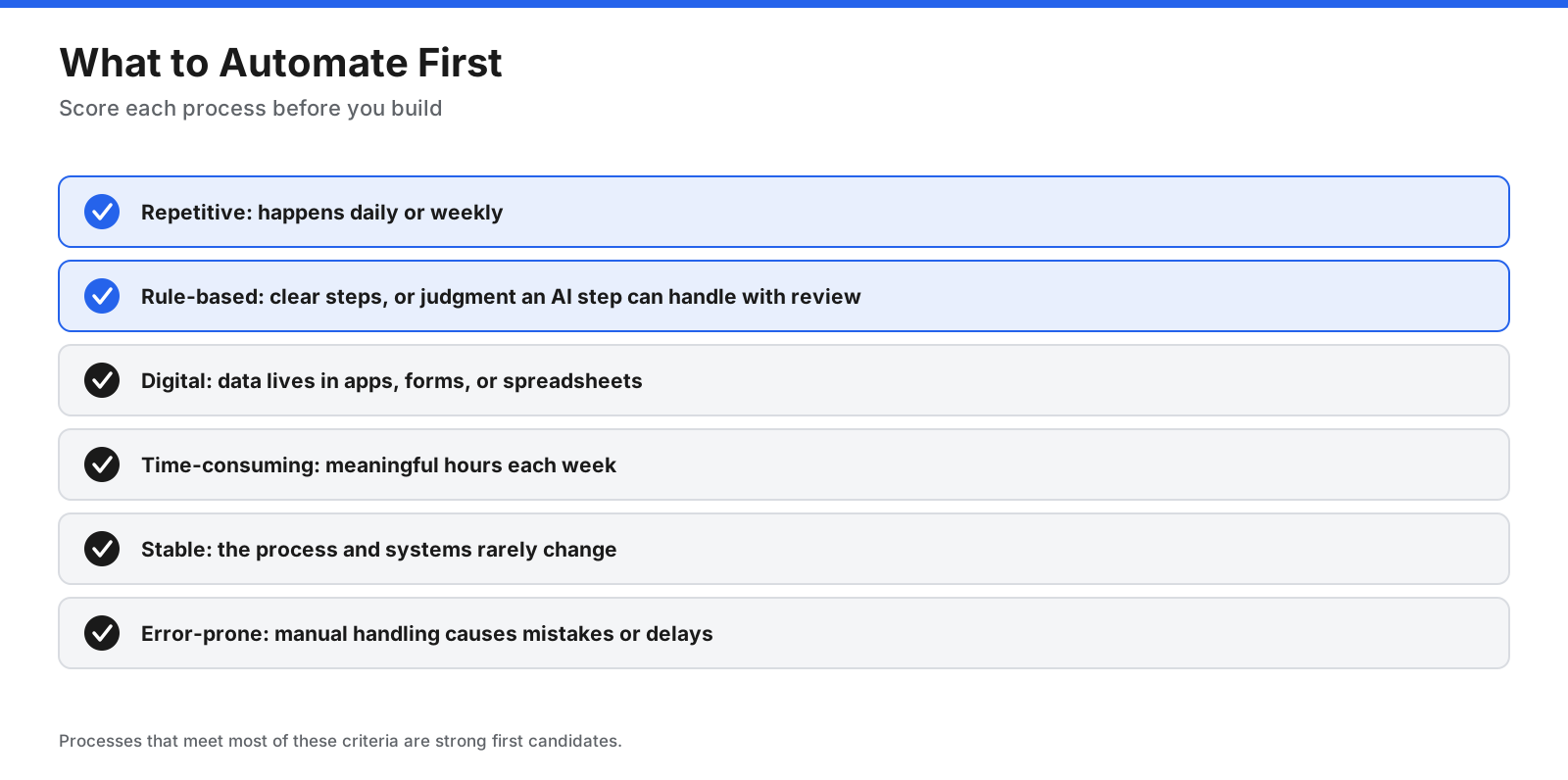
- Repetitive and frequent: The task happens daily or weekly.
- Rule-based: The steps follow clear rules, or the judgment involved can be handled by an AI step with review.
- Digital and structured: The data lives in apps, forms, or spreadsheets rather than on paper.
- Time-consuming: It takes meaningful time across the team each week.
- Stable: The process and the systems behind it rarely change.
- Error-prone: Manual handling causes mistakes or delays.
Start with one process, measure the time it takes before and after, and use that result to decide what to automate next. Document each automation with an owner, so someone is responsible when a connected app changes.
How Do You Measure the Value of Automation?
Measuring results helps you decide what to automate next and justify the cost of tools. A simple approach works for most teams.
- Time the manual process. Record how long one run takes and how often it happens each month.
- Calculate monthly hours. For example, a task that takes five minutes and runs 400 times a month uses 2,000 minutes, or about 33 hours.
- Subtract the remaining human time. Include review, approvals, and exception handling that still need a person.
- Add the cost of the tool. Count subscriptions, usage charges, and the time spent building and maintaining the automation.
- Track quality. Note fewer errors, faster response times, and better data, which often matter as much as hours saved.
Review the numbers after the first month and again after a quarter. Automations that save little time or break often may not be worth keeping.
What Are Common Automation Mistakes?
Most automation problems come from process and ownership issues, not the tools themselves.
- Automating a broken process. Fix unclear or inconsistent steps first, or you will only produce errors faster.
- Choosing the wrong type of tool. Using RPA when an API exists, or a simple workflow tool for a process that needs enterprise governance, creates extra maintenance.
- Ignoring usage costs. A workflow that runs thousands of times a month can exceed its plan quickly on per-task or per-credit pricing.
- No error handling. Without alerts and retries, failed runs can go unnoticed for weeks.
- No owner. When the person who built an automation leaves, nobody knows how it works. Assign an owner and keep short documentation.
- Letting AI act without checks. AI steps can misread inputs, so add review for decisions that affect customers, money, or data.
How Is Automation Used in IT Operations?
IT teams were early adopters of automation, and the scope keeps growing. Common uses include:
- Configuration and patching: Tools such as Ansible apply consistent settings and updates across servers and network devices.
- Provisioning: Creating user accounts, virtual machines, and cloud resources from templates rather than by hand.
- Ticket routing: Workflow tools send incoming requests and alerts to the right team in the IT service management system.
- Runbooks: Standard fixes for known issues, such as restarting a service or clearing disk space, can run automatically with approval steps.
- Reporting: Scheduled workflows gather status data and send summaries to stakeholders.
Red Hat says its Ansible Automation Platform can turn AI-driven insights into governed, auditable automated actions, showing how IT automation and AI operations are converging.
How Do You Keep AI Automation Safe?
As AI agents take on more steps, governance matters as much as features.
- Require approval for outside actions. Lindy, for example, says it waits for approval before sending emails. Use similar checkpoints for payments, deletions, and customer messages.
- Limit permissions. Give each automation only the access it needs, and use separate service accounts where possible.
- Protect credentials. Prefer tools that manage authentication securely. Zapier says credentials are not exposed to the AI model in its workflows.
- Keep logs. Use audit logs and run histories so you can trace what happened when something goes wrong.
- Check compliance needs. For regulated data, look for options such as HIPAA agreements, single sign-on, data residency, and self-hosting.
- Review AI output. Sample AI decisions regularly to catch errors before they affect customers.
How Do You Choose the Right Automation Tool?
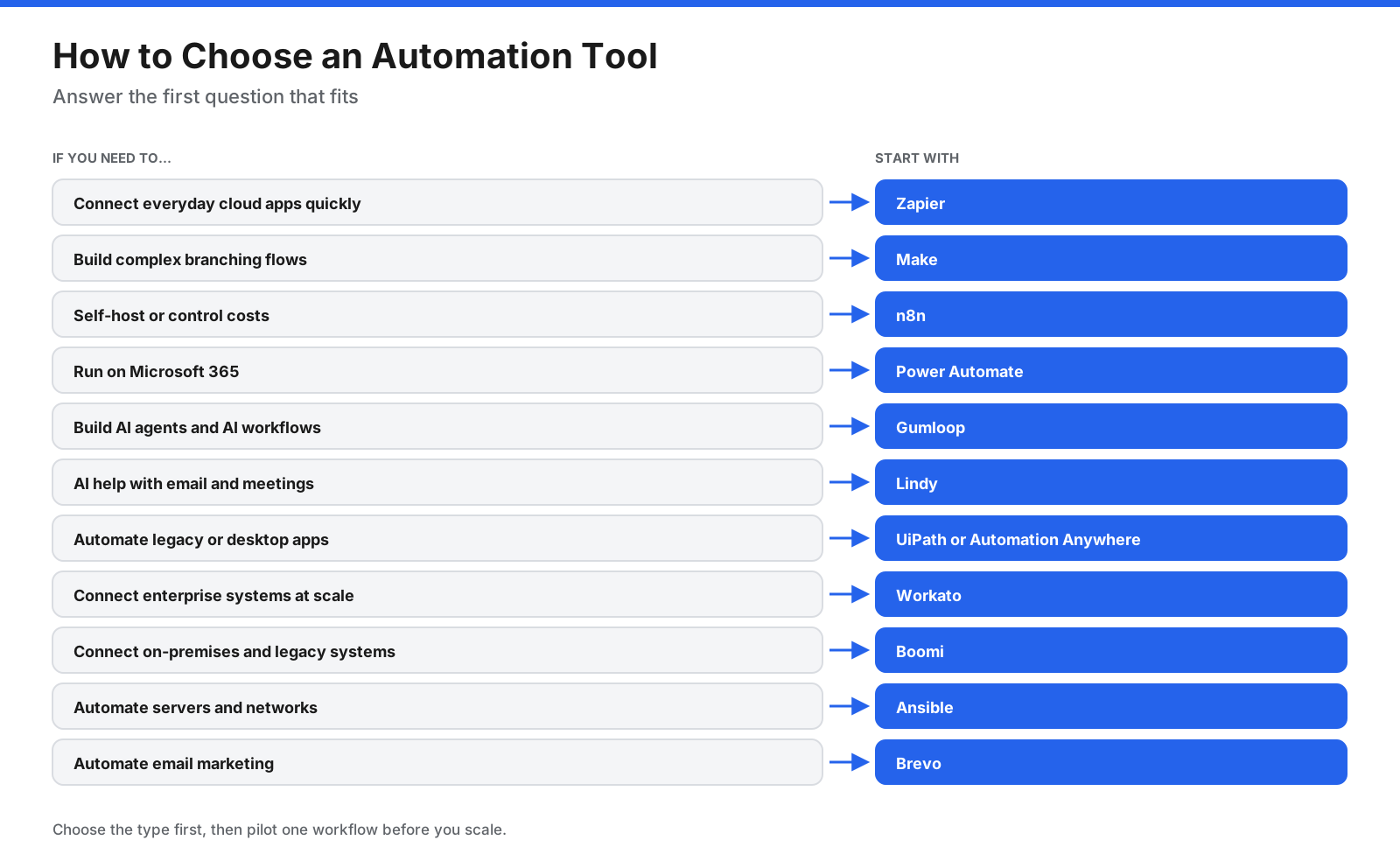
- Name the process. Write down the exact steps, apps, and people involved.
- Pick the type. API workflow, AI agent, RPA, enterprise integration, IT automation, or marketing automation.
- Check connectors and hosting. Confirm the tool supports your apps and your data requirements.
- Estimate usage. Count tasks, credits, executions, users, or robots at your expected volume.
- Pilot one workflow. Build it, measure the result, and only then expand.
Frequently Asked Questions
What is the best automation tool?
It depends on the type of work. Zapier is an easy way to connect cloud apps, Make handles complex visual workflows, n8n suits self-hosting, Power Automate fits Microsoft organizations, UiPath leads RPA, and Ansible is a standard for IT automation.
What are the top 10 automation tools?
Widely used automation tools include Zapier, Make, n8n, Microsoft Power Automate, UiPath, Automation Anywhere, Workato, Boomi, Ansible, and AI automation platforms such as Gumloop and Lindy. Marketing teams often add tools such as Brevo.
What is the best free automation tool?
n8n’s Community Edition and open-source Ansible are free to self-host. Zapier, Make, and Brevo have free plans with limits, and UiPath and Automation Anywhere offer free community editions.
What are the best AI automation tools?
Gumloop is built for AI agents and AI workflows, Lindy works as an AI assistant for email and meetings, and n8n, Zapier, Make, and UiPath add AI steps or agents to their platforms.
What is the difference between RPA and workflow automation?
Workflow automation connects apps through their APIs, while RPA uses software robots that operate the user interface like a person. RPA is useful for older systems without APIs, and workflow automation is usually faster and more reliable when APIs exist.
Which automation tool is in demand now?
Skills in AI agent platforms, workflow tools such as n8n and Power Automate, RPA platforms such as UiPath, and infrastructure tools such as Ansible are widely sought as organizations combine AI with existing automation.
What is the best automation tool for small businesses?
Zapier and Make are popular for connecting small-business apps, and Brevo covers email marketing automation at a low price. Small teams on Microsoft 365 may prefer Power Automate.
What is the best IT automation tool?
Ansible is widely used for automating server configuration, patching, provisioning, and network changes. Red Hat Ansible Automation Platform adds enterprise governance and support.
What are the top automated testing tools?
Software test automation is a separate category from business automation. Popular options include open-source frameworks such as Selenium, Playwright, and Cypress, and UiPath also offers test automation through its Test Cloud.
Is RPA still useful now that AI agents exist?
Yes. RPA remains useful for older systems that have no API, while AI agents handle reading and deciding on unstructured input. Vendors such as UiPath now combine robots and AI agents in the same platform.
Do automation tools replace jobs?
Automation usually replaces specific repetitive tasks rather than whole roles. Teams typically redirect time saved to customer work, analysis, and improving processes, though the effect varies by organization and role.
Can you use more than one automation tool?
Yes. Many organizations use a workflow tool for cloud apps, RPA for legacy systems, an IT automation tool for infrastructure, and a marketing automation platform for campaigns. Keep each automation documented with an owner so the overall setup stays manageable.
The Bottom Line
The best automation tool depends on what you need to automate. Zapier, Make, n8n, and Power Automate connect apps and data. Gumloop and Lindy bring AI agents into everyday work. UiPath and Automation Anywhere automate legacy and desktop systems, Workato and Boomi connect enterprise platforms, Ansible automates IT infrastructure, and Brevo handles marketing campaigns.
Start with one high-volume, rule-based process, choose the type of tool that fits it, estimate usage in that tool’s billing unit, and confirm current pricing with each vendor before you scale.