
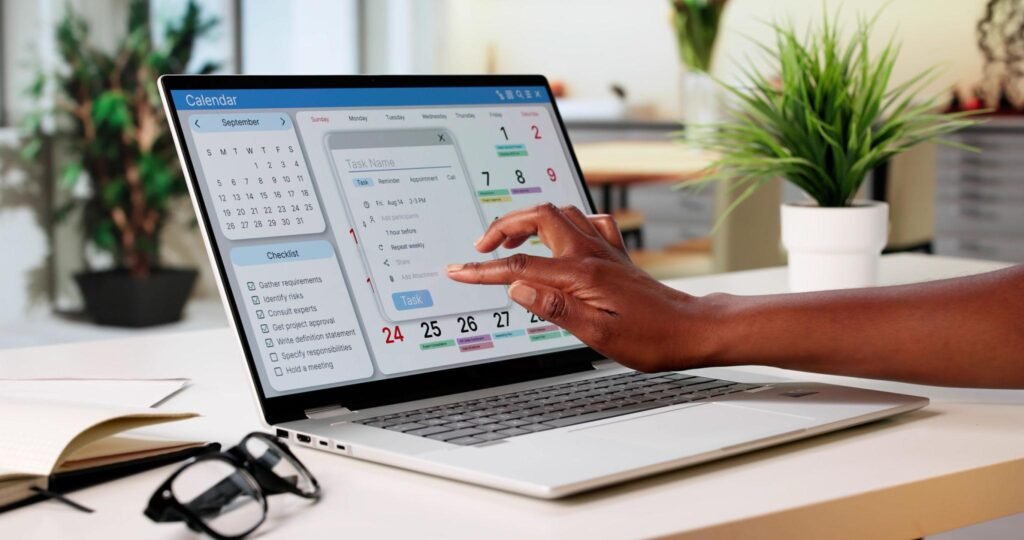

A good productivity app helps you decide what matters, put it on your calendar, protect time to do it, and see where your hours actually went. The wrong setup does the opposite: a pile of apps you check instead of working. With thousands of options in every app store, the hard part is choosing a small set that fits how you work.
This guide compares 12 productivity apps by the job they do: managing tasks, planning your calendar, staying focused, and tracking time and habits. For each app, you will find its strengths, limitations, price information available in October 2026, and the kind of user it suits. You will also find a simple system for combining apps, free options, time-blocking advice, and recommendations for students and people who struggle with focus.
This is a vendor-neutral guide. No app paid to be included. Note-taking apps and AI meeting assistants have their own guides, so this list focuses on tasks, time, and focus.
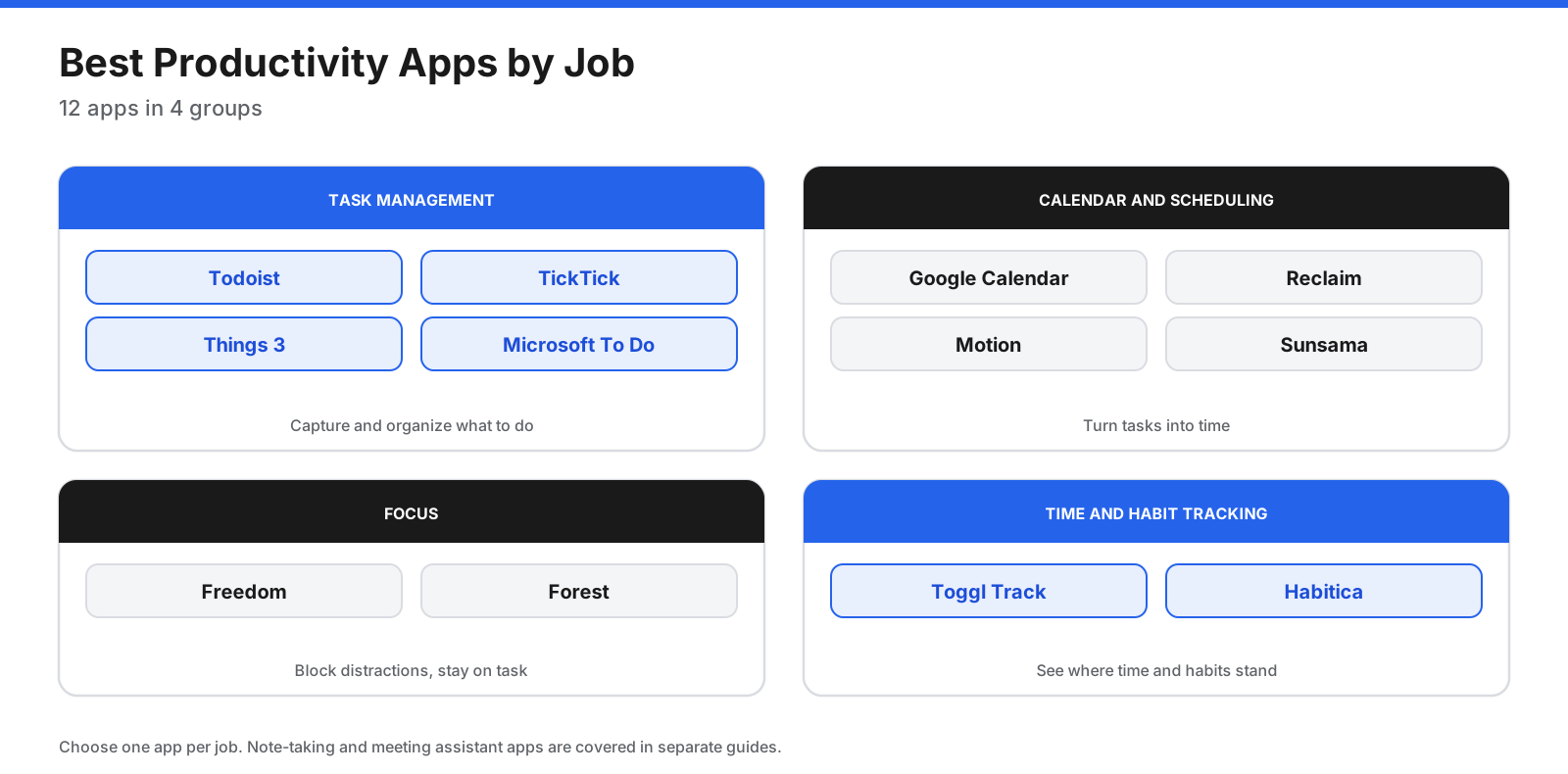
Quick Picks: The Best Productivity Apps
- Best to-do list app overall: Todoist
- Best all-in-one task app with a timer and habits: TickTick
- Best task manager for Apple users: Things 3
- Best free to-do app for Microsoft users: Microsoft To Do
- Best free calendar: Google Calendar
- Best AI scheduling assistant: Reclaim
- Best AI planner for tasks and projects together: Motion
- Best daily planner for intentional workdays: Sunsama
- Best distraction blocker across devices: Freedom
- Best gamified focus timer: Forest
- Best time tracker: Toggl Track
- Best gamified habit tracker: Habitica
What Makes a Good Productivity App?
The best productivity app is the one you keep using. Before comparing features, check these basics:
- Fast capture: Add a task or idea in seconds from your phone, desktop, or a keyboard shortcut.
- Works where you work: Apps for your phone, computer, and browser should sync reliably.
- Fits your calendar: Tasks and events should be visible together so your plans match the time you have.
- Low upkeep: The app should not take more time to maintain than it saves.
- Integrations: It should connect to the email, calendar, and team tools you already use.
- Fair pricing: The free plan should be useful, and paid features should justify their cost.
- Privacy and data export: You should be able to protect your information and take it with you if you switch.
How Do You Build a Simple Productivity System?
Most people get better results from a small system than from a single “perfect” app. A simple system has five steps, and each can be handled by one app.
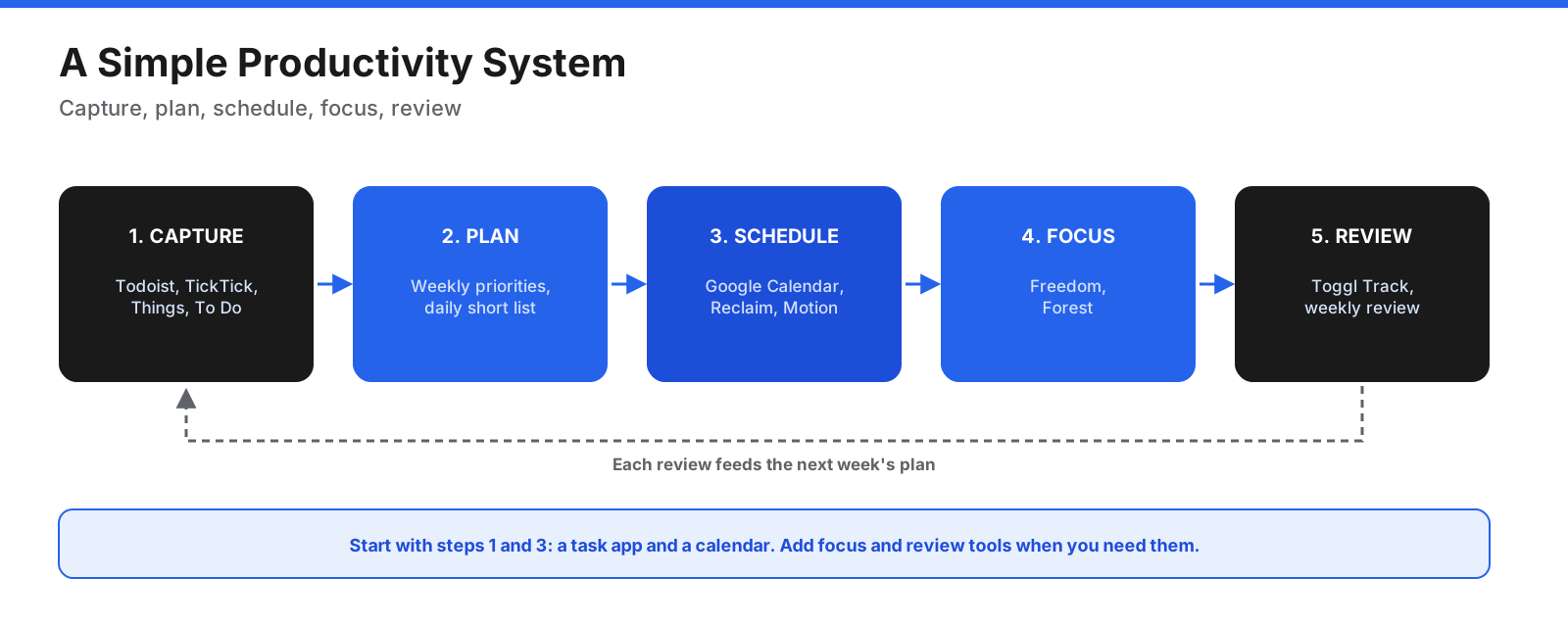
- Capture: Put every task, request, and idea in one to-do app, such as Todoist, TickTick, Things 3, or Microsoft To Do.
- Plan: Once a week, choose what matters. Each morning, pick a short list for today.
- Schedule: Move important tasks onto your calendar as time blocks, manually in Google Calendar or automatically with Reclaim, Motion, or Sunsama.
- Focus: Use a distraction blocker such as Freedom or a focus timer such as Forest during deep work.
- Review: Check where your time went with Toggl Track, then adjust next week’s plan.
You do not need all five apps. Many people can start with a to-do app and a calendar, then add focus or tracking tools only when needed.
What Are the Best Productivity Apps?
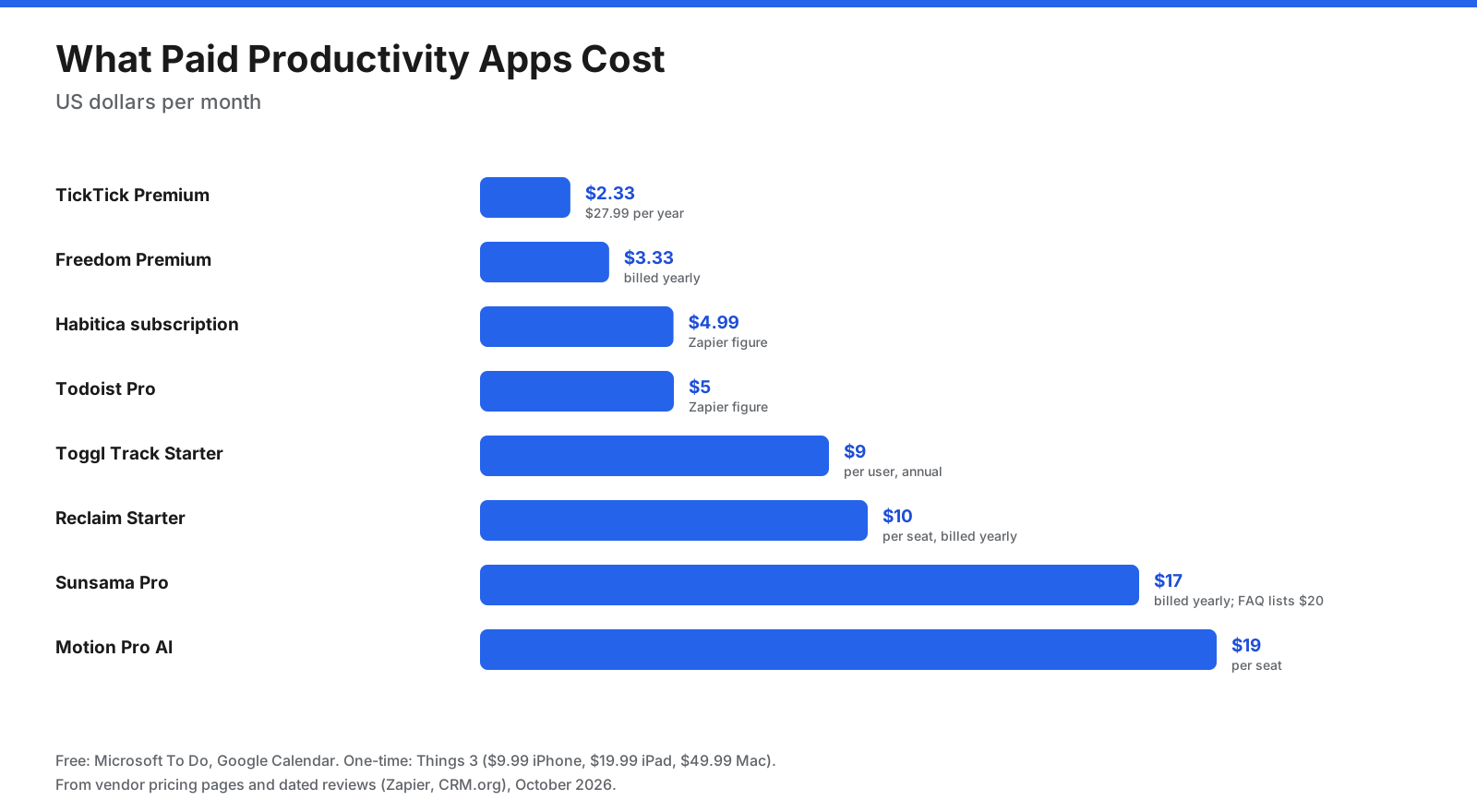
Prices below are in US dollars and reflect provider pages or dated third-party reviews available in October 2026. Pricing can change, and some vendor pages did not display figures when checked, so confirm the current amount before subscribing.
Task Management
1. Todoist: Best To-Do List App Overall
Todoist is a fast, clean to-do list app for phones, computers, and the web. You can add tasks in natural language, organize them into projects, and view work as a list, board, or calendar on paid plans. Zapier’s March 2026 review selected it as its best to-do list app, noting its balance of power and simplicity.
Pricing: The free Beginner plan includes up to five personal projects, three custom filters, and one week of activity history. Pro is listed at $5 per month in the cited review and adds more projects, calendar and board layouts, reminders, and full history. A Business plan adds shared team workspaces.
Downsides: Reminders and calendar layouts require Pro, and the free plan’s five-project limit may feel restrictive as your workload grows.
Best for: Anyone who wants a simple, reliable to-do list across devices.
2. TickTick: Best All-in-One Task App
TickTick combines a to-do list with a calendar view, a Pomodoro-style focus timer, and a habit tracker. It supports lists, tags, smart filters, and a Kanban view on Premium, making it a useful productivity hub for people who prefer fewer separate apps.
Pricing: The free plan allows up to nine lists with up to 99 tasks per list. Premium is listed at $27.99 per year or about $2.80 per month and adds full calendar views, the focus timer, custom filters, and multiple reminders, according to a February 2026 CRM.org review.
Downsides: The many features can feel busy, and some useful calendar functions require Premium.
Best for: People who want tasks, a calendar, a focus timer, and habits in one inexpensive app.
3. Things 3: Best for Apple Users
Things 3 is a polished task manager built only for Apple devices. It organizes work into Today, Upcoming, Anytime, and Someday views, supports projects with headings and Markdown notes, and works with Apple’s Shortcuts for automation.
Pricing: It is a one-time purchase per device: $49.99 for Mac, $19.99 for iPad, and $9.99 for iPhone, with a 15-day Mac trial, according to an October 2026 Toolradar pricing summary. There is no subscription.
Downsides: It is not available on Windows, Android, or the web, and each platform is purchased separately.
Best for: Apple users who want a polished task manager without a recurring subscription.
4. Microsoft To Do: Best Free Option for Microsoft Users
Microsoft To Do is a free task manager tied to a Microsoft account. Its My Day view helps you choose what to work on today, and it connects with Outlook tasks so flagged emails and Outlook tasks can appear alongside your lists.
Pricing: Free with a Microsoft account.
Downsides: It has fewer advanced features, such as automation and detailed filters, than Todoist or TickTick.
Best for: Microsoft 365 and Outlook users who want a free, straightforward task list.
Calendar and Scheduling
5. Google Calendar: Best Free Calendar
Google Calendar is a free calendar for anyone with a Google account and can act as the hub of a productivity system. It supports multiple calendars, sharing, reminders, and appointment schedules that let people book time through a booking page. Some appointment scheduling features require an eligible Workspace or Google One subscription.
Pricing: Free with a Google account. Google Workspace business plans are listed from $6 per user per month in the cited review.
Downsides: Google Calendar does not automatically schedule your tasks, so time blocking is manual unless you add a tool such as Reclaim or Motion.
Best for: Anyone who needs a reliable, free calendar.
6. Reclaim: Best AI Scheduling Assistant
Reclaim works on top of a Google or Outlook calendar. It protects focus time, places recurring habits such as lunch or exercise in available slots, adds buffers after meetings, schedules tasks, and offers scheduling links. It can adjust plans when your calendar changes.
Pricing: Lite is free for one user with a one-week scheduling range. Starter costs $10 per seat per month billed yearly or $12 monthly. Business costs $15 per seat per month billed yearly or $18 monthly, according to Reclaim’s pricing page.
Downsides: The free plan only schedules one week ahead and syncs one calendar.
Best for: Busy professionals who want focus time and habits protected automatically.
7. Motion: Best AI Planner for Tasks and Projects
Motion combines tasks, projects, and an AI calendar that plans your day. Add tasks with deadlines and estimated durations, and Motion schedules them around meetings and reshuffles the plan when priorities or appointments change. It also includes AI documents, notes, and a meeting assistant.
Pricing: Pro AI is listed at $19 per seat per month and Business AI at $29 per seat per month, with annual billing saving 33%. A free trial is available.
Downsides: It costs more than simple task apps, and automatic rescheduling may take time to trust and tune.
Best for: Professionals and small teams who want AI to plan tasks and calendar time together.
8. Sunsama: Best Guided Daily Planner
Sunsama is a daily planning app built around a guided morning routine. You can pull tasks from email, calendars, and tools such as Asana, Notion, Todoist, Jira, and Slack, decide what is realistic for the day, and place work on your calendar.
Pricing: The pricing page lists Pro at $17 per month billed yearly or $22 monthly, while its FAQ lists $20 and $25. Check the current price before subscribing. A 14-day trial is available without a credit card.
Downsides: There is no free plan, and the daily planning ritual takes a few minutes each morning.
Best for: Knowledge workers who want a calm, intentional plan for each day.
Focus Apps
9. Freedom: Best Cross-Device Distraction Blocker
Freedom blocks distracting websites and apps across your computer, phone, and tablet at the same time. You can start a session on demand or schedule recurring blocks. Locked Mode on Premium makes it harder to end a session early.
Pricing: The free plan includes on-demand blocking sessions across unlimited devices. Premium costs $3.33 per month billed yearly or $8.99 monthly. A lifetime license is listed at $99.50, discounted from $199, on Freedom’s pricing page.
Downsides: Website exceptions are limited to Mac and Windows, and app blocking is not available on Chromebook.
Best for: Anyone who loses time to social media, news, or email during focus hours.
10. Forest: Best Gamified Focus Timer
Forest turns focus into a game. Start a timer and grow a virtual tree; if you leave to use another app, the tree dies. Forest also includes app blocking, scheduled blocks, breathing breaks, and group focus sessions. Through a partnership with Trees for the Future, users can spend in-app coins to help plant actual trees.
Pricing: The core app is free on iPhone, iPad, and Android, with an optional Forest Plus subscription whose price varies by region. Browser extensions are available for Chrome and Firefox.
Downsides: It works best on phones and has fewer desktop controls than dedicated blockers.
Best for: Students and anyone who wants a simple, motivating reason to stay off their phone.
Time and Habit Tracking
11. Toggl Track: Best Time Tracker
Toggl Track records how you spend your time with one-click timers, calendar integrations, and reports. It suits freelancers who bill by the hour and anyone who wants to understand where their week actually went.
Pricing: The free plan covers up to three users and includes timers, focus mode, calendar integrations, and personal reports. Starter costs $9 per user per month and Premium costs $16, with lower prices on annual billing.
Downsides: Team features such as billable rates and timesheet approvals require paid plans.
Best for: Freelancers, consultants, and anyone who wants better data about their time.
12. Habitica: Best Gamified Habit Tracker
Habitica treats everyday life like a role-playing game. Create an avatar, earn rewards for completing habits and to-dos, and lose health when you skip them. Parties let friends hold one another accountable.
Pricing: The core app is free. An optional subscription costs $4.99 per month, and group plans start at $9 per month, according to Zapier’s review.
Downsides: The game elements are not for everyone, and Habitica suits personal habits better than complex work projects.
Best for: People who stay motivated through rewards, streaks, and friendly accountability.
How Do the Productivity Apps Compare?
| App | Job | Free option | Entry paid price |
|---|---|---|---|
| Todoist | Tasks | 5 projects | $5/month |
| TickTick | Tasks, timer, habits | 9 lists | $27.99/year |
| Things 3 | Tasks (Apple) | 15-day Mac trial | $9.99 iPhone, one-time |
| Microsoft To Do | Tasks | Free | Free |
| Google Calendar | Calendar | Free | Workspace from $6/user/month |
| Reclaim | AI scheduling | Lite plan | $10/seat/month billed yearly |
| Motion | AI planning | Trial | $19/seat/month |
| Sunsama | Daily planning | 14-day trial | $17/month billed yearly |
| Freedom | Distraction blocking | On-demand sessions | $3.33/month billed yearly |
| Forest | Focus timer | Core app free | Forest Plus varies by region |
| Toggl Track | Time tracking | Up to 3 users | $9/user/month annual |
| Habitica | Habits | Free | $4.99/month |
Prices and free-plan limits can change. Sunsama’s published price differs between its pricing table and FAQ, so verify the current figure directly before purchase.
How Is AI Changing Productivity Apps?
AI now appears in many productivity apps, and it tends to help in three areas:
- Scheduling: Motion’s AI calendar plans your day around meetings and deadlines. Reclaim uses AI to protect focus time, habits, and buffers, and adjusts when plans change.
- Capture and planning: Todoist’s pricing page lists Ramble sessions for capturing tasks and Task Assist on Pro. Sunsama’s Pro plan includes AI features and integrations.
- Documents and meetings: Motion bundles AI documents, notes, and a meeting assistant into its plans.
AI is most useful for repetitive planning tasks, such as finding open time, breaking a large task into steps, and rescheduling when a meeting moves. It is less reliable at deciding what matters most. Keep that judgment for your weekly review, and check how each app handles calendar and task data before connecting a work account.
What Are the Best Free Productivity Apps?
You can build a complete productivity system for free.
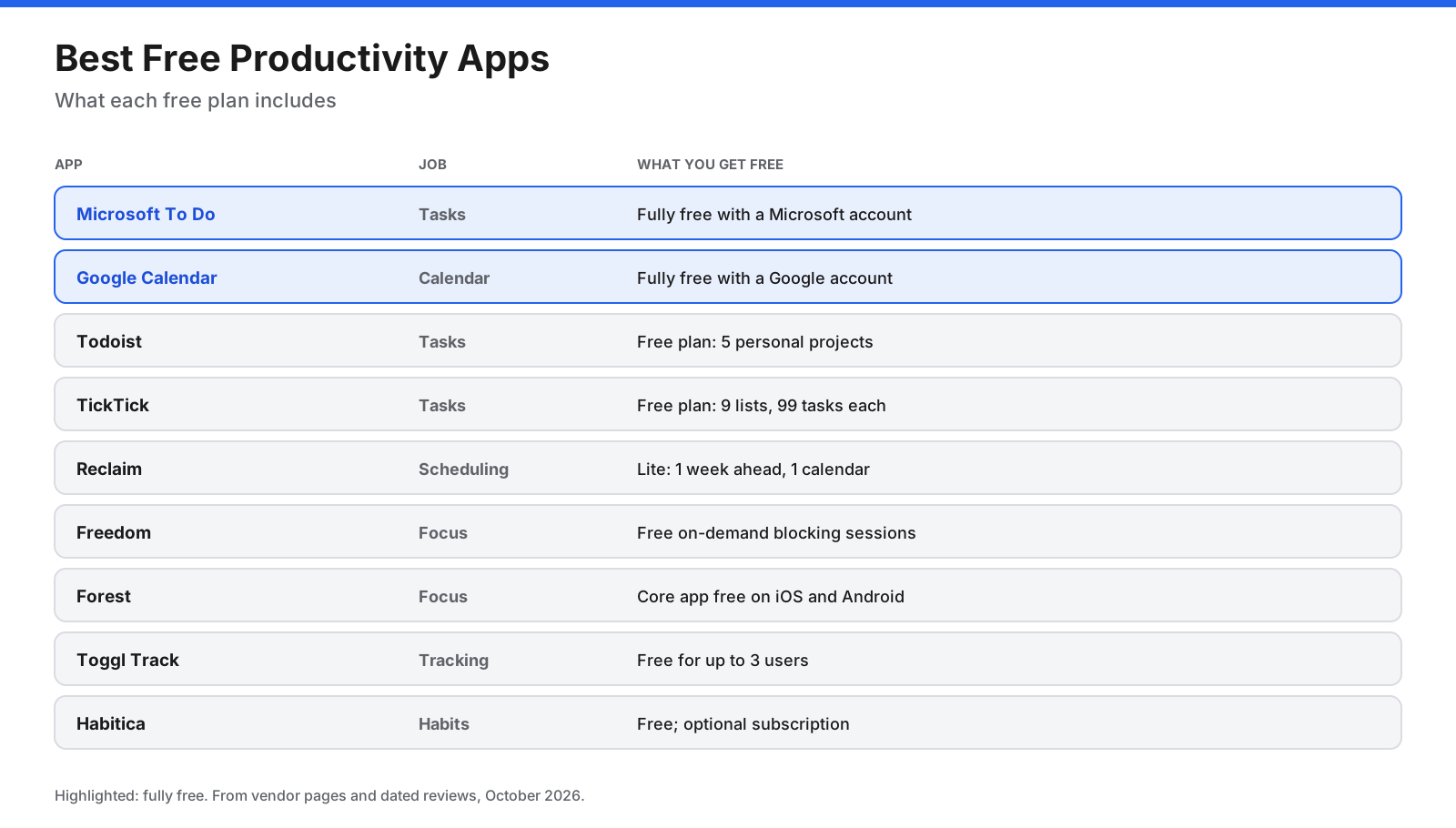
- Tasks: Microsoft To Do is fully free. Todoist and TickTick have useful free plans with limits.
- Calendar: Google Calendar is free with a Google account.
- Scheduling: Reclaim’s free Lite plan protects focus time and habits one week ahead.
- Focus: Freedom’s free plan offers on-demand blocking, and Forest’s core app is free.
- Tracking: Toggl Track is free for up to three users, and Habitica offers free habit tracking.
A free stack of Microsoft To Do or Todoist, Google Calendar, and Freedom covers task capture, scheduling, and focus without spending anything.
What Is the Best Time Blocking App?
Time blocking means scheduling specific tasks as blocks on your calendar rather than keeping them only on a list. It turns a to-do list into a realistic plan and shows when you have committed to more than your day can hold.
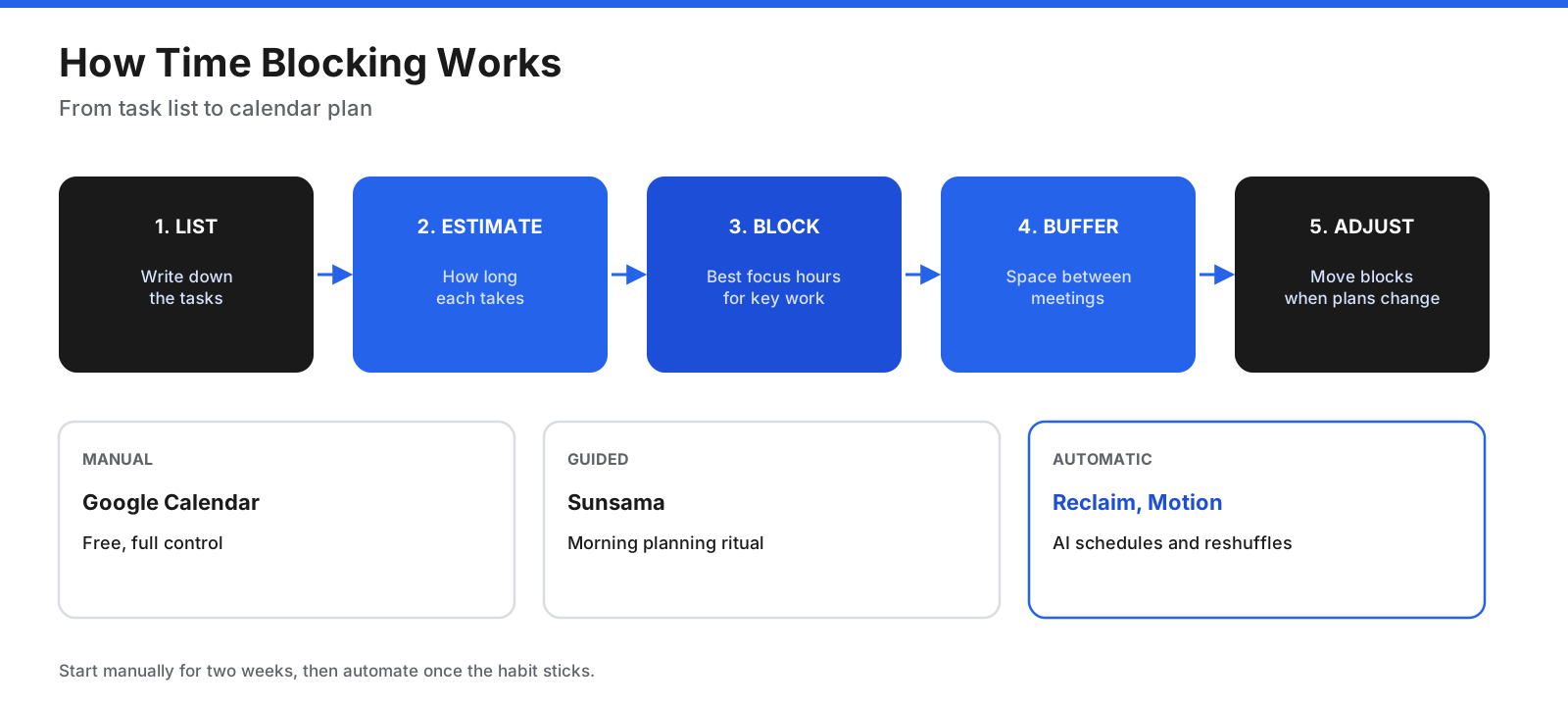
- Manual: Drag tasks onto Google Calendar yourself. It is free and gives you full control.
- Guided: Sunsama walks you through planning each morning and placing tasks on your calendar.
- Automatic: Reclaim and Motion schedule tasks, focus time, and habits, then adjust when meetings move.
If you are new to time blocking, start manually for two weeks. Once the habit sticks, an automatic tool can save planning time.
What Are the Best Productivity Apps for Students?
Students juggle classes, assignments, exams, and part-time work, often on a tight budget. These apps fit that situation well:
- TickTick: Tasks, calendar view, focus timer, and habits in one inexpensive app.
- Todoist: A free plan that can organize coursework by class or project.
- Google Calendar: Free for class schedules, deadlines, and study blocks.
- Forest: A motivating way to stay off your phone while studying.
- Freedom: Blocks distracting sites across laptop and phone during exam prep.
- Habitica: Turns study habits, reading, and exercise into a game.
A simple student system is a task app for assignments, a calendar for classes and study blocks, and a focus app during study sessions.
Which Productivity Apps Help With Focus and Attention?
Many people search for productivity apps that help with ADHD or attention challenges. Apps cannot treat a condition, but some features may make it easier to start and stay on tasks. Look for the following features, and speak with a qualified professional for personal advice.
- Visual timers and short sessions: Forest and TickTick’s focus timer break work into manageable sessions.
- External structure: Sunsama’s guided daily plan and Reclaim’s automatic scheduling reduce the number of decisions you make each day.
- Distraction blocking: Freedom removes tempting sites and apps during set times.
- Rewards and accountability: Habitica’s game elements and party features add motivation.
- Low-friction capture: Todoist’s natural-language input lets you record a thought quickly.
Which Productivity Apps Work Best on Each Device?
- iPhone and iPad: Things 3 is built for Apple devices. Todoist, TickTick, Forest, and Freedom also have iOS apps, and Apple’s Reminders and Calendar are free options.
- Android: Todoist, TickTick, Microsoft To Do, Google Calendar, Forest, Freedom, and Motion offer Android apps. Things 3 does not.
- Mac: Things 3 has a dedicated Mac app with a 15-day trial. Freedom can block websites and apps on Mac.
- Windows: Microsoft To Do fits naturally with Outlook and Microsoft 365. Freedom blocks websites and apps on Windows.
- Chromebook: Freedom can block the internet or specific websites, but not apps.
- Browser: Forest offers Chrome and Firefox extensions, while Reclaim, Sunsama, and Google Calendar work in the browser.
If you switch between an iPhone and a Windows PC, choose a cross-platform task app such as Todoist, TickTick, or Microsoft To Do rather than an Apple-only option.
How Do You Run a Weekly Review?
A weekly review keeps your productivity system trustworthy. It takes about 20 to 30 minutes and works with any app in this guide.
- Empty your inboxes. Move emails, notes, and messages that need action into your task app.
- Review last week. Check completed tasks and, if you use Toggl Track, where your time went.
- Clean up your list. Delete tasks that no longer matter and reschedule overdue ones.
- Choose next week’s priorities. Pick three to five outcomes that matter most.
- Block time. Put those priorities on your calendar before meetings fill the week, manually or with Reclaim, Motion, or Sunsama.
- Set up focus sessions. Schedule Freedom blocks or plan Forest sessions for deep work.
Doing this at the same time each week, such as Friday afternoon or Monday morning, helps make it a habit.
Which Productivity Apps Work for Teams?
Most apps in this guide started with individuals, but several now offer team plans:
- Todoist Business: Adds a shared team workspace, roles and permissions, shared templates, and team projects.
- Reclaim Business: Adds a team out-of-office calendar, delegated access, and scheduling links.
- Motion Business AI: Adds team capacity planning, dashboards, timeline and Gantt charts, and time tracking.
- Toggl Track: Paid plans add billable rates, team reports, and timesheet approvals.
- Sunsama Enterprise: Adds single sign-on, SCIM, and audit logs.
For larger teams managing projects with many stakeholders, a dedicated project management tool may be a better fit, with personal productivity apps used alongside it.
Subscription, Free, or One-Time Purchase?
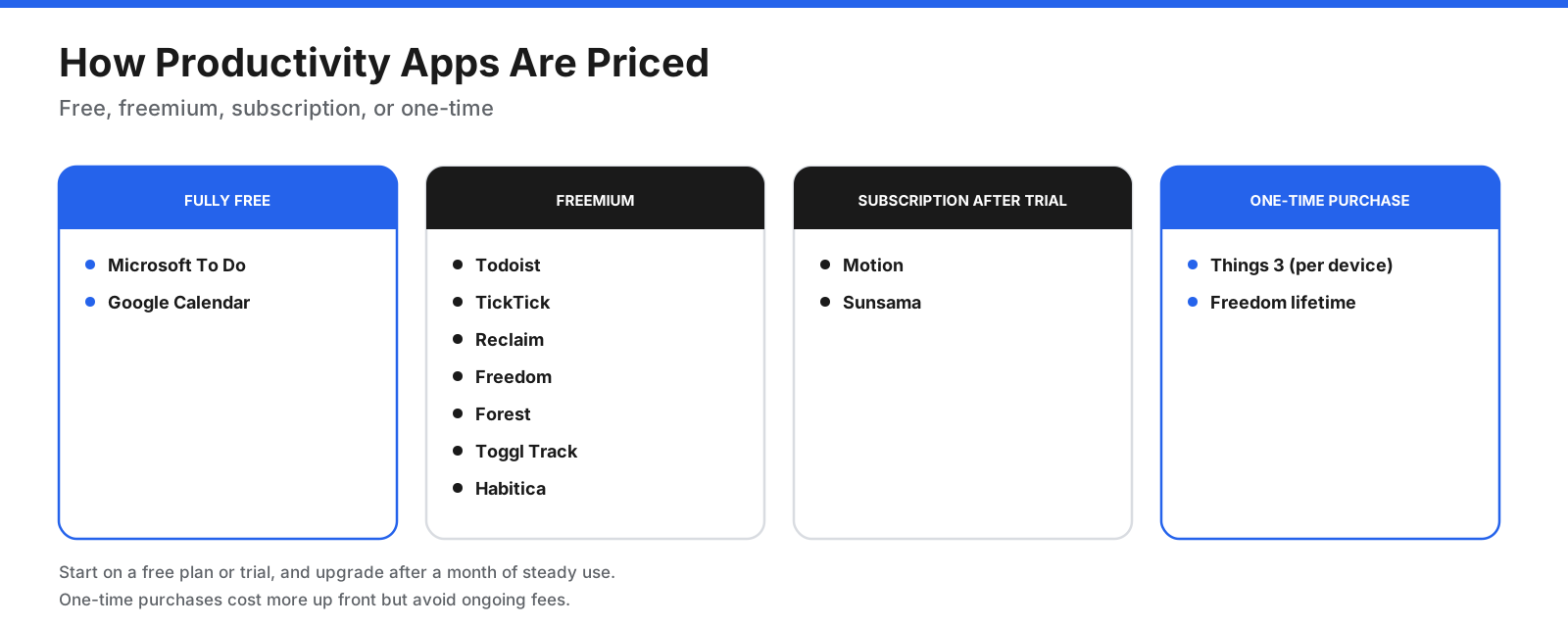
- Fully free: Microsoft To Do and Google Calendar.
- Freemium: Todoist, TickTick, Reclaim, Freedom, Forest, Toggl Track, and Habitica offer free plans with paid upgrades.
- Subscription after a trial: Motion and Sunsama have no permanent free plan.
- One-time purchase: Things 3 is bought once per device, and Freedom offers a lifetime license.
If you are trying a new system, start on a free plan or trial and upgrade only after a month of steady use.
What Mistakes Should You Avoid With Productivity Apps?
- App-hopping: Switching apps every few weeks resets your system. Commit to one set for at least a month.
- Too many tools: Two apps doing the same job split your tasks and attention.
- Over-organizing: Complex tags, folders, and filters can take longer to maintain than the work itself.
- Ignoring the calendar: A long to-do list without time on the calendar leads to missed deadlines.
- Skipping the review: Without a weekly review, lists fill with stale tasks and lose trust.
- Paying too early: Use free plans until you know which features you actually need.
How Do You Choose the Right Productivity App?
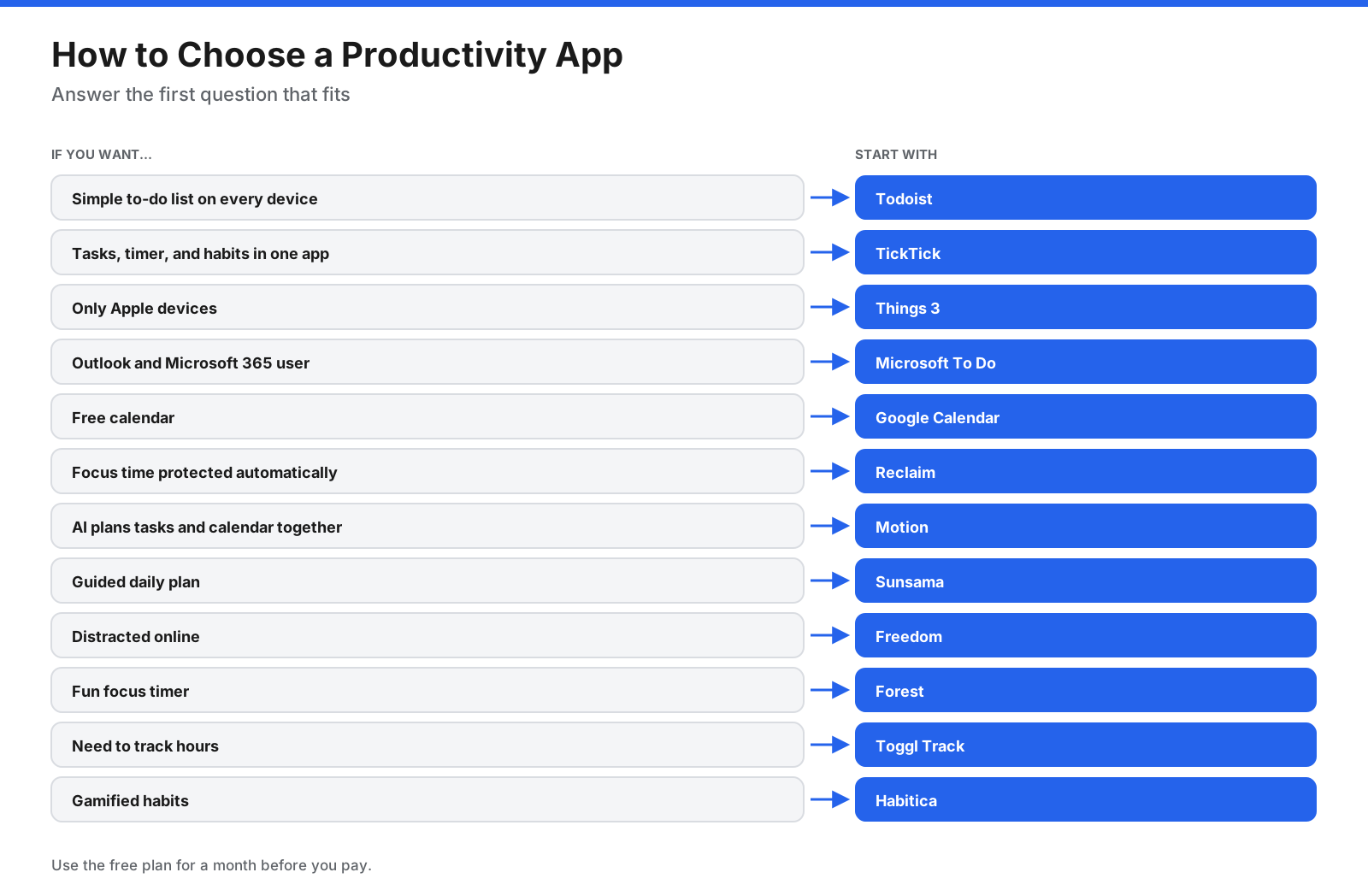
- Name your main problem. Too many tasks, not enough time, constant distraction, or unclear habits?
- Pick one app for that job. Start with the matching group in this guide.
- Check your devices. Make sure the app works on every device you use.
- Use the free plan for a month. Build the habit before paying.
- Add a second app only when needed. Most people need a task app and a calendar first.
Frequently Asked Questions
What is the best productivity app?
Todoist is a strong all-round choice for most people because it is simple, fast, and works across devices. TickTick is a useful alternative if you want a focus timer and habits built in, while Things 3 suits Apple users.
What are the best free productivity apps?
Microsoft To Do and Google Calendar are fully free. Todoist, TickTick, Reclaim, Freedom, Forest, Toggl Track, and Habitica also offer useful free plans or core features.
What is the best to-do list app?
Todoist is a good choice for most people. TickTick offers more features for a modest annual price, Things 3 suits Apple users, and Microsoft To Do is a good free option for Outlook users.
What is the best time blocking app?
Reclaim and Motion automate time blocking, Sunsama guides you through it each morning, and Google Calendar lets you do it manually for free.
What is the best productivity calendar app?
Google Calendar is a widely used free calendar. Add Reclaim or Motion if you want AI to schedule tasks and focus time around your existing events.
What are the best productivity apps for students?
TickTick, Todoist, Google Calendar, Forest, and Freedom can help students manage assignments, schedules, and focused study time at little or no cost.
What are the best productivity apps for iPhone?
Things 3 is a top choice for iPhone users, along with Todoist, TickTick, Forest, and Freedom. Apple’s Reminders and Calendar are also free options.
What are the best productivity apps for Android?
Todoist, TickTick, Microsoft To Do, Google Calendar, Forest, and Freedom all work on Android. Things 3 is not available on Android.
What are the best productivity apps for Mac?
Things 3 is a favorite among Mac users, and Todoist, TickTick, Freedom, and Toggl Track also work on Mac. Freedom can block apps as well as websites.
What are the best AI productivity apps?
Motion and Reclaim use AI to schedule tasks and focus time. Sunsama includes AI planning features, and Todoist Pro includes Task Assist, according to its pricing page.
How many productivity apps should I use?
Most people need two or three: a task app, a calendar, and optionally a focus or time-tracking app. More apps can add work rather than remove it.
Do productivity apps actually work?
They work when they support a simple, consistent routine. The app matters less than the habits of capturing tasks, planning your week, scheduling time, and reviewing what you did.
The Bottom Line
The best productivity apps solve one job each. Todoist, TickTick, Things 3, and Microsoft To Do manage tasks. Google Calendar, Reclaim, Motion, and Sunsama turn tasks into a realistic schedule. Freedom and Forest protect focus, while Toggl Track and Habitica help you understand time and habits.
Start with a task app and a calendar, use free plans for a month, and add focus or tracking tools only when you need them. Prices change often, so check each app’s pricing page before paying.




















































































