


CRM software is where a business keeps track of every customer and prospect: who they are, what was said, which deals are open, and what should happen next. A good CRM gives sales, marketing, and service teams one shared record, automates routine follow-ups, and turns pipeline data into forecasts leaders can trust.
Choosing one is harder than it looks. Enterprise platforms can do almost anything but need specialists to run them. Simple pipeline tools are quick to adopt but may run out of room. Prices range from under $10 per user to several hundred, and onboarding fees, add-ons, and AI credits can change what you actually pay.
This guide compares 12 of the best CRM software platforms by company size and sales style, using published pricing as of October 2026. You will see what each one does best, its starting and mid-tier prices, the hidden costs to watch for, and how much a 10-person sales team would pay per year. If you only need a free plan, our separate guide to free CRMs covers that in detail. This guide is vendor neutral, with no paid placements, and outside opinions name their source.
Quick picks:
- Best for large and complex sales organizations: Salesforce Sales Cloud
- Best for Microsoft-centric enterprises: Microsoft Dynamics 365 Sales
- Best all-round CRM for growing businesses: HubSpot Sales Hub
- Best value for money: Zoho CRM
- Best low-cost CRM with built-in AI: Freshsales
- Best pipeline CRM for small sales teams: Pipedrive
- Best for high-volume calling and outbound sales: Close
- Best for unlimited contacts at a low price: Nutshell
- Best visual, flexible CRM for teams already using monday.com: monday CRM
- Best for Google Workspace users: Copper
- Best for startups: Attio
- Best for small businesses that sell and get paid online: Keap
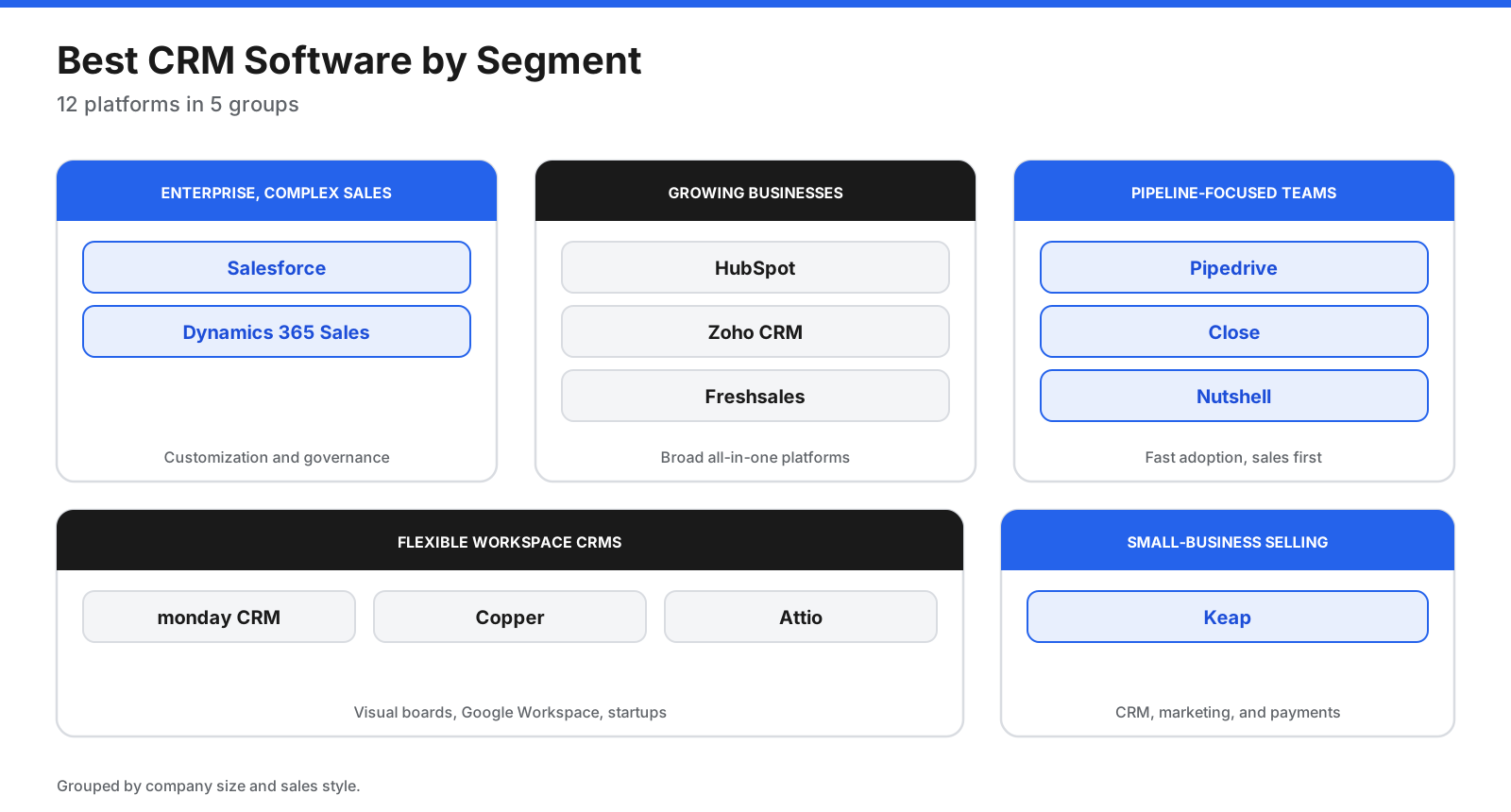
growing businesses wanting all-in-one platforms (HubSpot, Zoho CRM, Freshsales), pipeline-focused sales teams (Pipedrive, Close, Nutshell), flexible workspace CRMs (monday CRM, Copper, Attio), and small-business marketing and payments (Keap) Start with your company size and how your team sells.
What Types of CRM Software Are There?
CRM platforms are often described by what they focus on.
- Operational CRM automates day-to-day sales, marketing, and service work, such as lead routing, follow-up tasks, and email sequences. Most CRMs in this guide fit here.
- Analytical CRM focuses on reporting, forecasting, and customer insights. Enterprise platforms such as Salesforce and Dynamics 365 lead in this area.
- Collaborative CRM shares customer information across teams, so sales, marketing, and support see the same history.
In practice, modern CRMs combine all three. The bigger difference is how much complexity a platform is designed to handle and how much setup it needs.
Which CRM Fits Your Company Size?
The right CRM depends heavily on how many people will use it and how complex your sales process is. (Pipedrive, Zoho CRM, Freshsales, Copper, monday CRM), mid-sized and growing companies (HubSpot Sales Hub, Zoho CRM Enterprise, Close, Attio), and large enterprises (Salesforce Sales Cloud, Microsoft Dynamics 365 Sales)
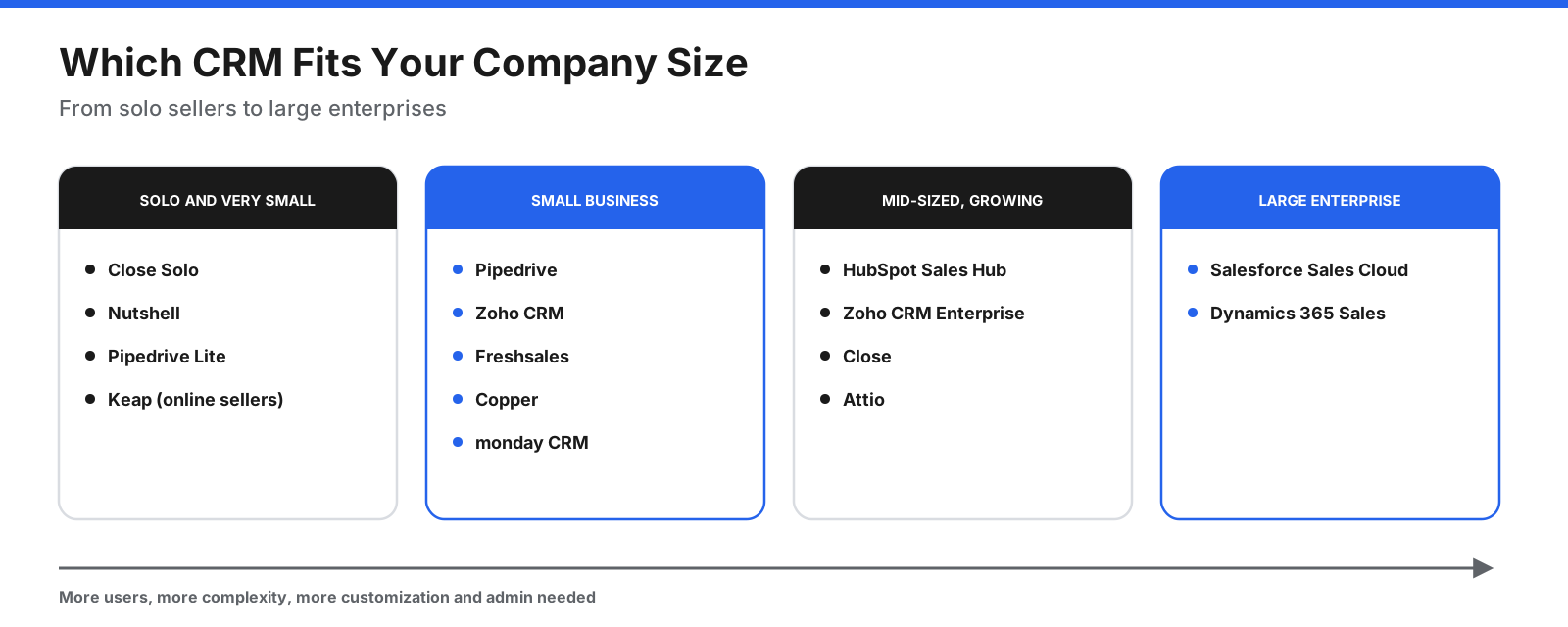
- Solo and very small teams need something simple and affordable, often with built-in email or calling.
- Small businesses benefit from pipeline management, email sync, and basic automation that a non-specialist can configure.
- Mid-sized companies need stronger automation, reporting, permissions, and integrations, and often marketing and service tools in the same platform.
- Large enterprises need deep customization, complex permissions, multiple business units, advanced forecasting, and an ecosystem of partners and admins.
What Features Should CRM Software Have?
reporting and forecasting, integrations and API, mobile apps, AI assistance, roles and permissions, and easy data import and export
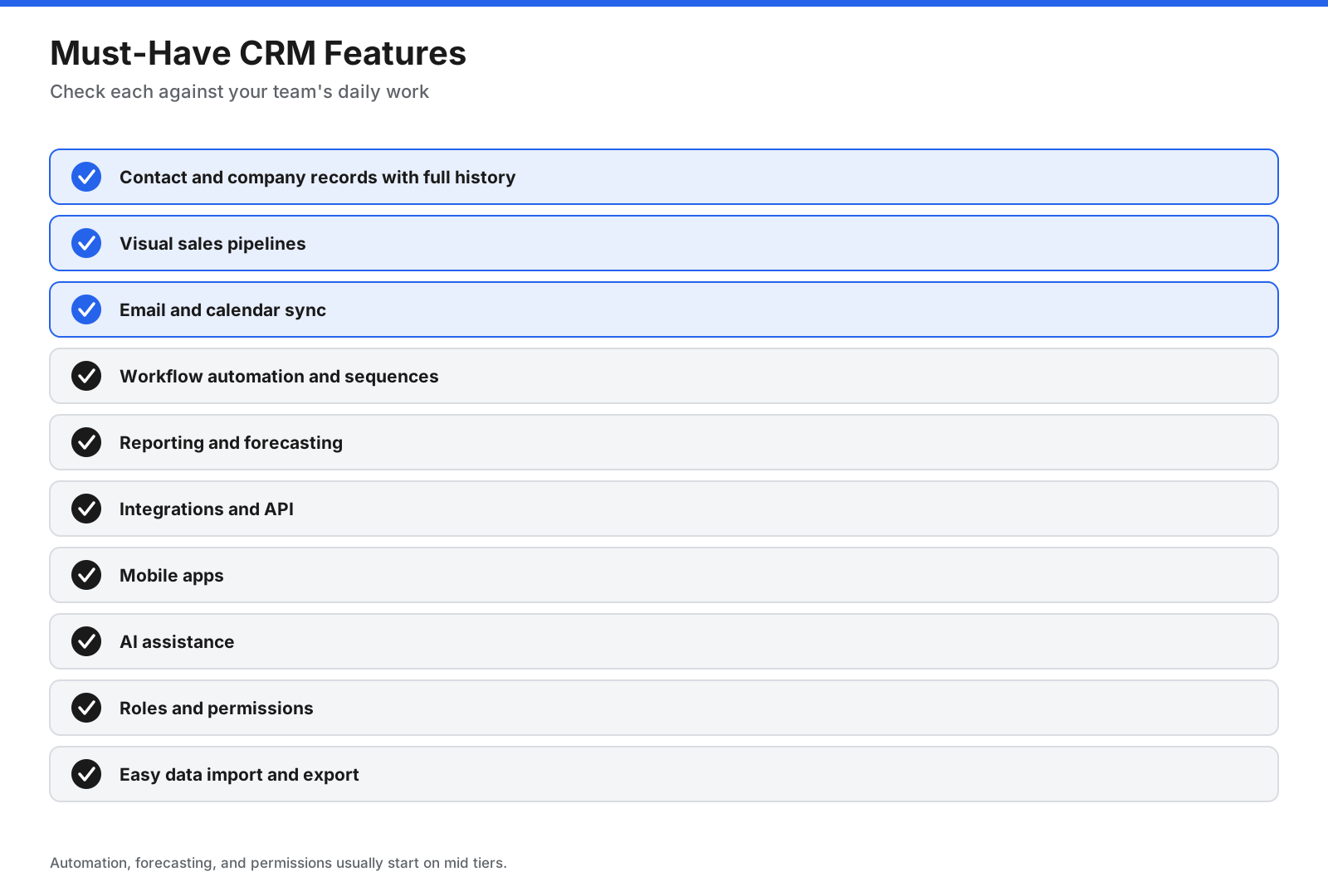
- Contact and company records: A complete history of emails, calls, meetings, and notes.
- Visual pipelines: Deals moving through stages you define.
- Email and calendar sync: Automatic logging of conversations and meetings.
- Workflow automation: Tasks, reminders, lead routing, and email sequences.
- Reporting and forecasting: Pipeline value, win rates, and sales forecasts.
- Integrations and API: Connections to email, marketing, support, accounting, and data tools.
- Mobile apps: Access for field and traveling sales teams.
- AI assistance: Summaries, suggested next steps, email drafting, and data enrichment.
- Roles and permissions: Control over who sees and edits what.
- Import and export: Easy movement of data in and out.
What Are the Best CRM Software Platforms?
Prices are per user per month in US dollars unless noted. Figures come from vendor pricing pages as of October 2026, except where a dated third-party source is named.
Enterprise and Complex Sales
1. Salesforce Sales Cloud
Salesforce is the most widely recognized CRM platform, with deep customization, a large app marketplace, and AI agents through Agentforce. Zapier’s June 2026 review ranks it first for extensibility and says, “It’s hard to place Salesforce anywhere other than the first spot on this list.”
Pricing: Starter Suite costs $25 and Pro Suite $100, billed annually, according to a 2026 Redress Compliance summary of Salesforce list prices. Enterprise is about $175, Unlimited about $330, and Agentforce 1 about $550. Salesforce’s own pricing page did not load when checked.
Downsides: Zapier notes it is hard to migrate away from. Advanced setups usually need a dedicated admin or partner, and costs rise quickly at higher editions.
Best for: Mid-sized and large organizations with complex sales processes and the resources to customize.
2. Microsoft Dynamics 365 Sales
Dynamics 365 Sales is Microsoft’s enterprise CRM, built to work with Outlook, Teams, Excel, and the rest of Microsoft 365. Higher plans include Copilot and AI agents for opportunity summaries, email and meeting help, and recommended actions.
Pricing: Professional costs $65 per user per month billed yearly, Enterprise $105 with Copilot and agent capabilities, and Premium $150 with 1,000 Copilot credits per user per month, according to Microsoft’s pricing page. Microsoft also offers a free trial.
Downsides: It is expensive for small teams, and AI agents may require extra Copilot credits and an Azure subscription.
Best for: Enterprises standardized on Microsoft 365 that want CRM inside their existing tools.
Growing Businesses and All-in-One Platforms
3. HubSpot Sales Hub
HubSpot combines a user-friendly CRM with sales, marketing, service, and content tools on one platform, plus its Breeze AI. Zapier picks it for versatility and praises its intuitive interface and two-way data sync.
Pricing: Starter costs $9 per seat per month billed annually or $15 monthly. Professional costs $90 annually or $100 monthly with a one-time $1,500 onboarding fee, and Enterprise costs $150 per seat per month with a $3,500 onboarding fee, according to HubSpot’s September 2026 pricing guide.
Downsides: Zapier notes that enterprise-level plans are expensive, and the jump from Starter to Professional is large.
Best for: Growing companies that want sales and marketing on one easy-to-use platform.
4. Zoho CRM
Zoho CRM offers a wide feature set at a low price and connects with dozens of other Zoho business apps. Zapier picks it for “all-in-one value” and notes its strong AI features.
Pricing: Standard costs $14 per user per month billed annually or $20 monthly, Professional $23 or $35, Enterprise $40 or $50, and Ultimate $52 billed annually, according to an October 2026 Toolradar summary. Zoho’s own page showed regional pricing when checked.
Downsides: Zapier mentions some cluttered screens and occasional bugs.
Best for: Cost-conscious businesses that want enterprise-style features without enterprise prices.
5. Freshsales
Freshsales, from Freshworks, is a sales CRM with built-in phone, email, and chat, plus Freddy AI for insights and an optional AI agent.
Pricing: Growth costs $9 per user per month, Pro $39, and Enterprise $59, all billed annually, according to Freshworks’ pricing page. A 21-day free trial includes full features. The Freddy AI Agent add-on costs $49 per 100 sessions.
Downsides: Monthly prices are not shown on the pricing page, and advanced features sit on Pro and Enterprise.
Best for: Small and mid-sized teams that want built-in calling and AI at a low entry price.
Pipeline-Focused Sales Teams
6. Pipedrive
Pipedrive is built around a visual sales pipeline and is known for being easy to adopt. Zapier picks it for ease of use and calls it “designed by salespeople.”
Pricing: Lite costs $14 per seat per month, Growth $39, Premium $59, and Ultimate $79, all billed annually, according to Pipedrive’s pricing page. Annual billing saves up to 42%, and a 14-day trial needs no credit card. Add-ons such as LeadBooster and Campaigns cost extra.
Downsides: Zapier notes costs can rise quickly with add-ons, and automation and email sync start on Growth.
Best for: Small and mid-sized sales teams that live in their pipeline.
7. Close
Close is a sales CRM with built-in calling, SMS, email, and a power dialer, designed for teams that make many calls. Its AI sales agent, Chloe, is available on every plan, according to Close’s pricing page.
Pricing: Solo costs $9 per month billed annually or $19 monthly for one user. Essentials costs $35 annually or $49 monthly, Growth $99 or $109, and Scale $139 or $149. Calling and SMS usage is billed at cost, and a 14-day trial is available.
Downsides: Workflow automation starts on Growth, and Zapier notes reports are not very customizable.
Best for: Inside sales and outbound teams that rely on phone and email outreach.
8. Nutshell
Nutshell is an easy-to-use CRM with unlimited contacts on every plan. Zapier picks it for sales management and calls it “very intuitive.”
Pricing: Plans range from $13 to $79 per user per month on monthly billing, with annual billing saving $6 to $10 per user each month, according to Nutshell’s pricing page. The entry tier caps open leads at 100. Marketing and prospecting tools are add-ons, and a 14-day trial is available.
Downsides: Custom pipelines and sales automation start on higher tiers.
Best for: Small businesses that want unlimited contacts and a gentle learning curve.
Flexible Workspace CRMs
9. monday CRM
monday CRM brings monday.com’s visual boards and automations to sales, with customizable pipelines, contact management, and email integration.
Pricing: Basic is $12 a seat each month on yearly billing ($18 on monthly billing), Standard is $17 ($25), and Pro $28 or $41, with plans starting from 3 seats, according to monday.com’s pricing page. Ultimate is custom.
Downsides: The 3-seat minimum raises the entry cost, and the page lists conflicting annual discount figures, so confirm pricing with sales.
Best for: Teams already using monday.com or that prefer a visual, highly customizable workspace.
10. Copper
Copper is a CRM built for Google Workspace, with Gmail, Calendar, Drive, Sheets, and Contacts integration and a Chrome extension. Zapier picks it for Google Workspace users.
Pricing: Basic costs $23 per seat per month billed annually or $29 monthly with 2,500 contacts, Professional $59 or $69 with 15,000 contacts, and Business $99 or $134 with unlimited contacts, according to Copper’s pricing page.
Downsides: Zapier notes it does not integrate with the Microsoft ecosystem.
Best for: Businesses that run on Gmail and Google Workspace.
11. Attio
Attio is an AI-native CRM with a flexible data model that teams can shape around their own processes. Zapier picks it as the best CRM for startups.
Pricing: On Attio’s pricing page, Plus is $35 a user each month on yearly billing ($44 if paid monthly) and Pro is $79 ($99 monthly). Teams of up to 3 seats can start on the free plan.
Downsides: Zapier notes AI and automation share one credit pool, and setup takes time because the data model is flexible.
Best for: Startups and modern go-to-market teams that want to customize their CRM.
Small-Business Marketing and Payments
12. Keap
Keap combines CRM, marketing automation, and payments for small businesses that sell services or products online. It includes contact records, lead scoring, pipelines, landing pages, email and text marketing, appointment scheduling, quotes, invoices, and recurring payments.
Pricing: Keap sells one all-features plan starting at $299 per month, or $2,988 per year billed annually, with 2 users included and extra users at $39 per month each, according to Keap’s pricing page. Contact pricing is tiered, and an implementation package is required.
Downsides: The starting price is high for a very small business, and annual contracts carry an early termination fee.
Best for: Small businesses that want marketing automation, CRM, and payments in one system.
How Do the CRM Platforms Compare?
CRM pricing comparison
Salesforce Complex sales $25/user (Starter Suite) $100/user (Pro Suite) Dynamics 365 Sales Microsoft enterprises $65/user $105/user (Enterprise)
HubSpot Sales Hub Growing businesses $9/seat annual $90/seat + $1,500 onboarding
Zoho CRM Value $14/user annual $23/user (Professional)
Freshsales Low-cost AI CRM $9/user annual $39/user (Pro)
Pipedrive Pipeline sales $14/seat annual $39/seat (Growth)
Close Calling and outbound $35/user annual (Essentials) $99/user (Growth)
Nutshell Unlimited contacts $13/user monthly $42/user monthly
monday CRM Visual workspace $12/seat annual, 3 seats min $17/seat (Standard)
Copper Google Workspace $23/seat annual $59/seat (Professional)
Attio Startups $35/user annual $79/user (Pro)
Keap Small-business $299/month, 2 users One plan marketing 3-seat minimum,
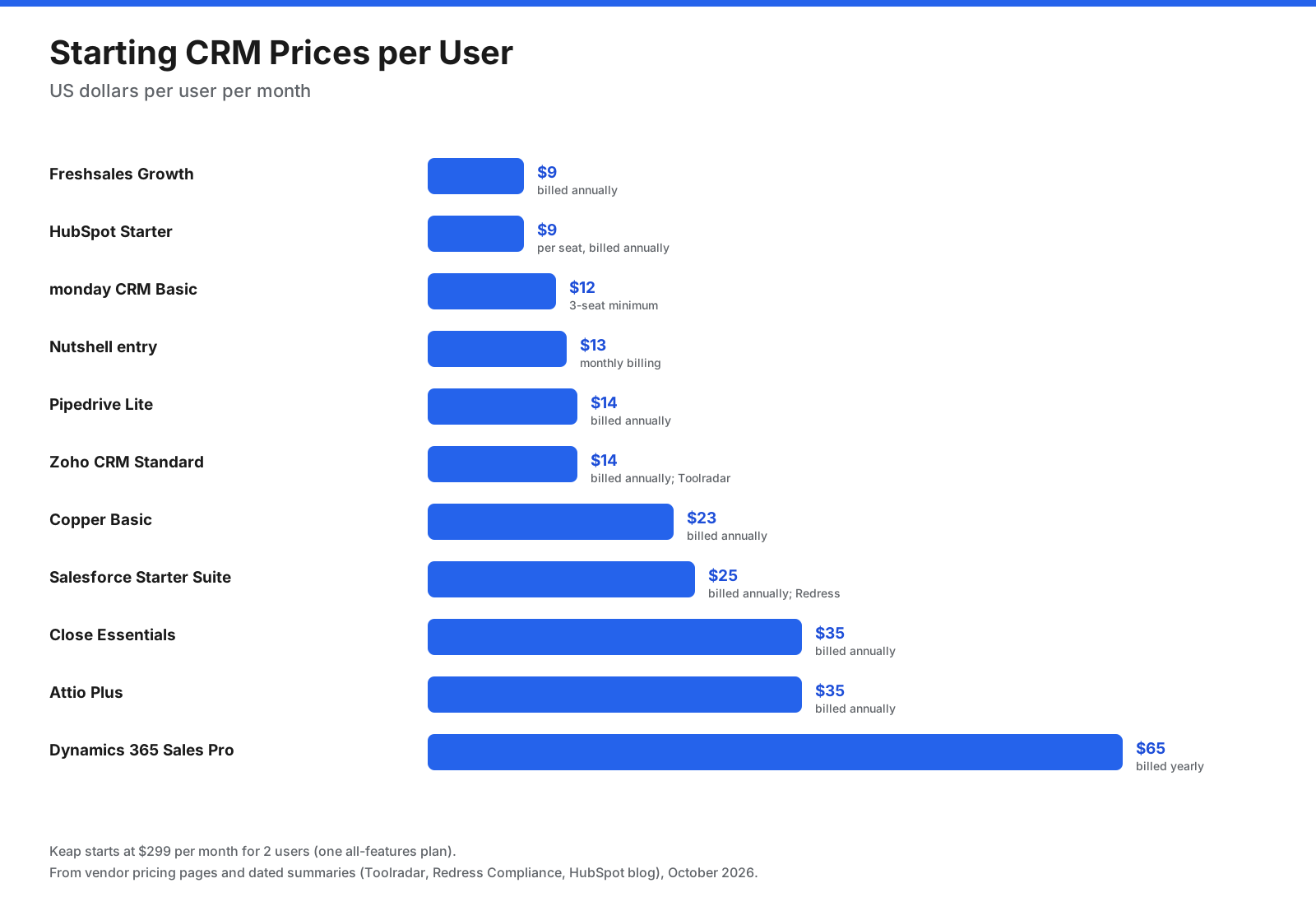
Nutshell 13 dollars monthly, Pipedrive Lite 14 dollars, Zoho CRM Standard 14 dollars, Copper Basic 23 dollars, Salesforce Starter Suite 25 dollars, Close Essentials 35 dollars, Attio Plus 35 dollars, Dynamics 365 Sales Professional 65 dollars. Keap starts at 299 dollars per month for 2 users
How Much Does a CRM Cost for a 10-Person Sales Team?
Entry tiers rarely include the automation a growing team needs. A fairer comparison uses each vendor’s mid tier, where automation and better reporting usually start.
2,760 dollars, Freshsales Pro 4,680 dollars, Pipedrive Growth 4,680 dollars, Copper Professional 7,080 dollars, Attio Pro 9,480 dollars, HubSpot Professional 10,800 dollars plus 1,500 dollars onboarding, Close Growth 11,880 dollars, Salesforce Pro Suite 12,000 dollars, Dynamics 365 Sales Enterprise 12,600 dollars
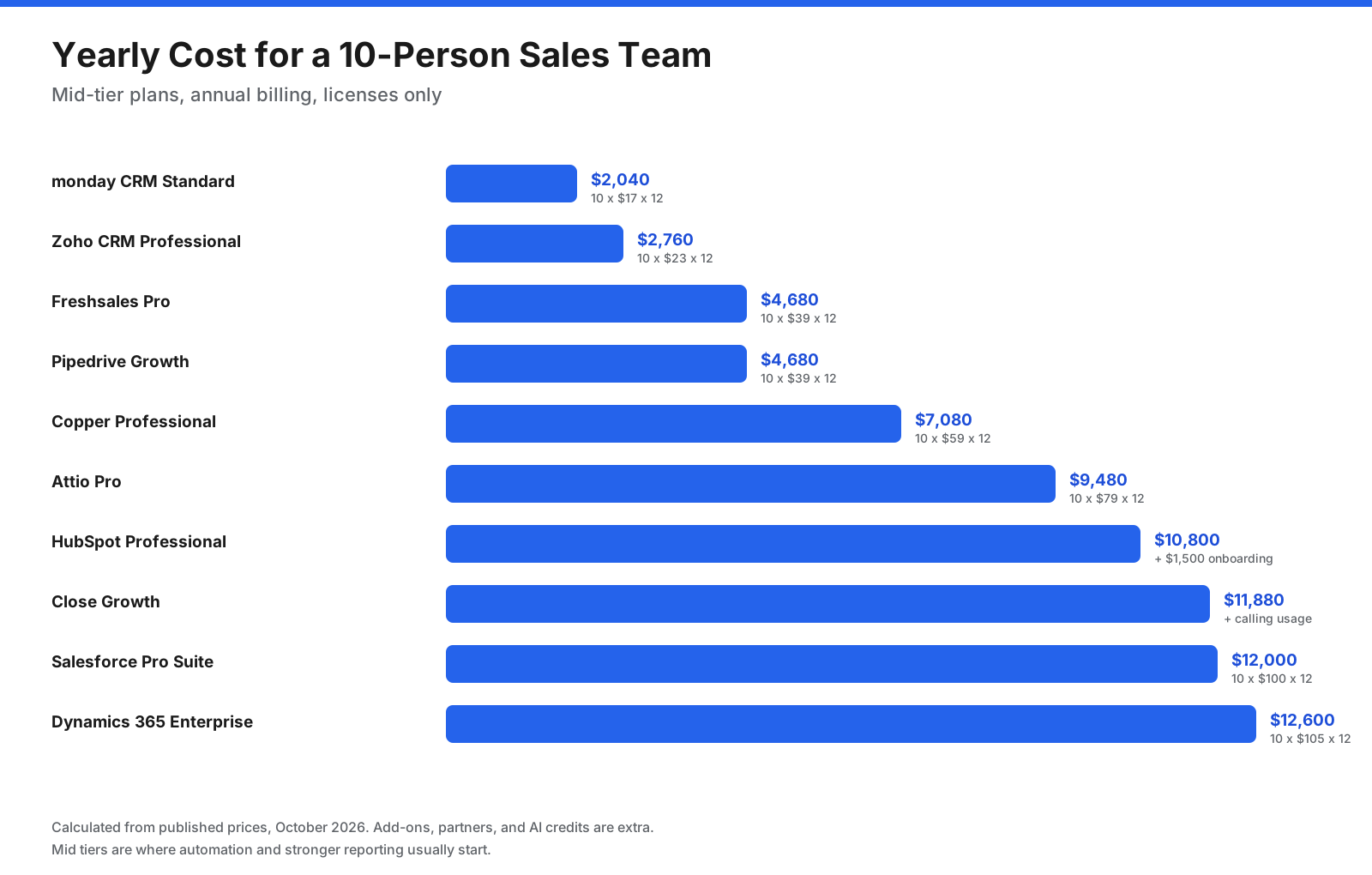
- monday CRM Standard: 10 × $17 × 12 = $2,040
- Zoho CRM Professional: 10 × $23 × 12 = $2,760
- Freshsales Pro: 10 × $39 × 12 = $4,680
- Pipedrive Growth: 10 × $39 × 12 = $4,680
- Copper Professional: 10 × $59 × 12 = $7,080
- Attio Pro: 10 × $79 × 12 = $9,480
- HubSpot Sales Hub Professional: 10 × $90 × 12 = $10,800, plus a $1,500 onboarding fee
- Close Growth: 10 × $99 × 12 = $11,880, plus calling usage
- Salesforce Pro Suite: 10 × $100 × 12 = $12,000
- Dynamics 365 Sales Enterprise: 10 × $105 × 12 = $12,600
These figures cover licenses only. Add-ons, implementation partners, and AI credits can add significantly
to the total.
What Hidden Costs Should You Watch For?
- Onboarding fees: HubSpot charges $1,500 for Professional and $3,500 for Enterprise onboarding, and Keap requires an implementation package.
- Add-ons: Pipedrive’s LeadBooster and Campaigns, Nutshell’s marketing and prospecting tools, and Freshsales’ AI agent sessions cost extra.
- Usage charges: Close bills calling and SMS at cost, and Dynamics 365 AI agents can use pay-as- you-go Copilot credits.
- Minimum seats: monday CRM plans start at 3 seats.
- Contract terms: Annual plans save money but are harder to cancel. Keap charges a $299 early termination fee on annual contracts.
- Admin time: Enterprise CRMs often need a dedicated administrator or an implementation partner.
Which Integrations Matter Most for a CRM?
A CRM becomes more valuable when it connects to the other tools your team uses every day. Prioritize these integrations when you compare platforms.
- Email and calendar: Gmail or Outlook sync is the single biggest time saver, because conversations and meetings log automatically. Copper is built around Google Workspace, and Dynamics 365 Sales around Microsoft 365.
- Marketing tools: Forms, email campaigns, and ad platforms should send leads straight into the CRM with their source.
- Customer support: Support tickets on a customer record help sales see account health before renewals.
- Accounting and billing: Invoices and payments on the customer record help with renewals and collections. Keap includes invoicing and payments natively.
- Calling and messaging: Built-in or connected calling logs calls and recordings. Close and Freshsales include calling.
- Automation platforms: Tools such as Zapier or Make connect apps that lack native integrations. Check whether each integration is native, requires an add-on, or depends on a third-party connector, because this affects reliability and cost.
HubSpot vs Salesforce: Which Is Better?
HubSpot and Salesforce are the two names that come up most in CRM comparisons, and they suit different organizations.
- Ease of use: HubSpot is generally easier to set up and use. Zapier praises its intuitive interface.
- Customization: Salesforce offers deeper customization and a larger app ecosystem, which is why Zapier ranks it first for extensibility.
- Price: HubSpot starts lower, with Starter at $9 per seat annually, while Salesforce Starter Suite starts at $25. At mid tiers, HubSpot Professional costs $90 plus onboarding, and Salesforce Pro Suite costs $100.
- Marketing: HubSpot’s marketing tools are tightly integrated with its CRM, which suits companies that want sales and marketing on one platform.
- Scale: Salesforce is built for large, complex organizations with many business units.
Choose HubSpot if you want a fast start and an all-in-one platform. Choose Salesforce if you need deep customization and have the resources to manage it.
What Are the Best Salesforce Alternatives?
If Salesforce feels too complex or expensive, these options cover most needs.
- HubSpot Sales Hub for ease of use and integrated marketing.
- Microsoft Dynamics 365 Sales for enterprises on Microsoft 365.
- Zoho CRM for a broad feature set at a lower price.
- Pipedrive for small teams focused on pipeline management.
- Attio for startups that want a flexible, modern CRM.
How Is AI Changing CRM Software?
AI is now built into most major CRMs, and vendors are adding agents that act on your behalf.
- Salesforce offers AI agents through Agentforce, with Agentforce 1 as its top edition.
- Microsoft Dynamics 365 Sales includes Copilot and prebuilt agents on Enterprise and Premium.
- HubSpot includes its Breeze AI assistant.
- Freshsales offers Freddy AI and an AI agent add-on.
- Close includes Chloe, an AI sales agent, on every plan.
- Attio describes itself as AI-native, with AI and automation sharing a credit pool.
Common AI features include call and email summaries, suggested next steps, email drafts, lead scoring, and data enrichment. AI works best when your CRM data is clean and complete, so data quality is still the foundation.
Which CRM Is Best for Your Industry or Situation?
- Startups: Attio and HubSpot are strong choices. Attio is flexible and AI-native, and HubSpot scales from free to enterprise.
- Real estate: Look for a CRM with mobile apps, email and text follow-up, and pipelines for buyers and sellers. Pipedrive, Close, and Zoho CRM cover these needs, and dedicated real estate CRMs add listing-specific features.
- B2B sales teams: Salesforce, HubSpot, and Pipedrive support account-based selling, complex deals, and forecasting.
- Service businesses: Keap combines CRM with scheduling, quotes, invoices, and payments.
- Google Workspace companies: Copper works inside Gmail and Google Calendar.
- Microsoft 365 companies: Dynamics 365 Sales works inside Outlook and Teams.
- Outbound and inside sales: Close offers built-in calling, SMS, and dialers.
Which Reports Should Sales Leaders Track in a CRM?
A CRM is only as useful as the decisions it supports. These reports give sales leaders a clear view of
pipeline health.
- Pipeline value by stage: How much potential revenue sits at each stage, and where deals pile up.
- Win rate: The share of opportunities that close, overall and by rep, product, or source.
- Sales cycle length: How long deals take from first contact to close, which helps with planning and forecasting.
- Stage conversion rates: Where deals drop out, which shows which part of the process needs attention.
- Activity by rep: Calls, emails, and meetings logged, which helps coaching when paired with outcomes.
- Forecast versus actual: How closely forecasts match results, which shows how reliable your pipeline data is.
Most CRMs include basic versions of these reports on entry tiers, while custom dashboards and forecasting usually start on mid tiers.
How Do You Get a Sales Team to Use the CRM?
Adoption is the most common reason CRM projects disappoint. These habits help a new system stick.
- Keep it simple at launch. Start with a few required fields and stages, and add more only when the team asks.
- Automate data entry. Email and calendar sync mean reps spend less time typing and more time selling.
- Use the CRM in meetings. Run pipeline reviews from the CRM, so updating it becomes part of the routine.
- Show reps the benefit. Reminders, templates, and AI summaries should save reps time, not just give managers reports.
- Assign an owner. One person should handle questions, small changes, and data quality.
- Review adoption monthly. Check logins and updates, and fix friction quickly.
Cloud or On-Premises CRM: Which Do You Need?
Every CRM in this guide is offered as a cloud service, which means the vendor handles hosting, updates, security patches, and backups. Cloud CRMs are quicker to start, accessible from anywhere, and usually priced per user per month. Some organizations still prefer self-hosted or private deployments for data residency, regulatory, or integration reasons. If that applies to you, ask vendors about data location options, private cloud deployments, and compliance certifications, or consider an open-source CRM that you host yourself. Our free CRM guide covers open-source options such as Twenty and SuiteCRM.
How Do You Implement a New CRM?
connect email, calendar, and key apps, train the team with simple usage rules, and measure adoption and pipeline metrics, then refine
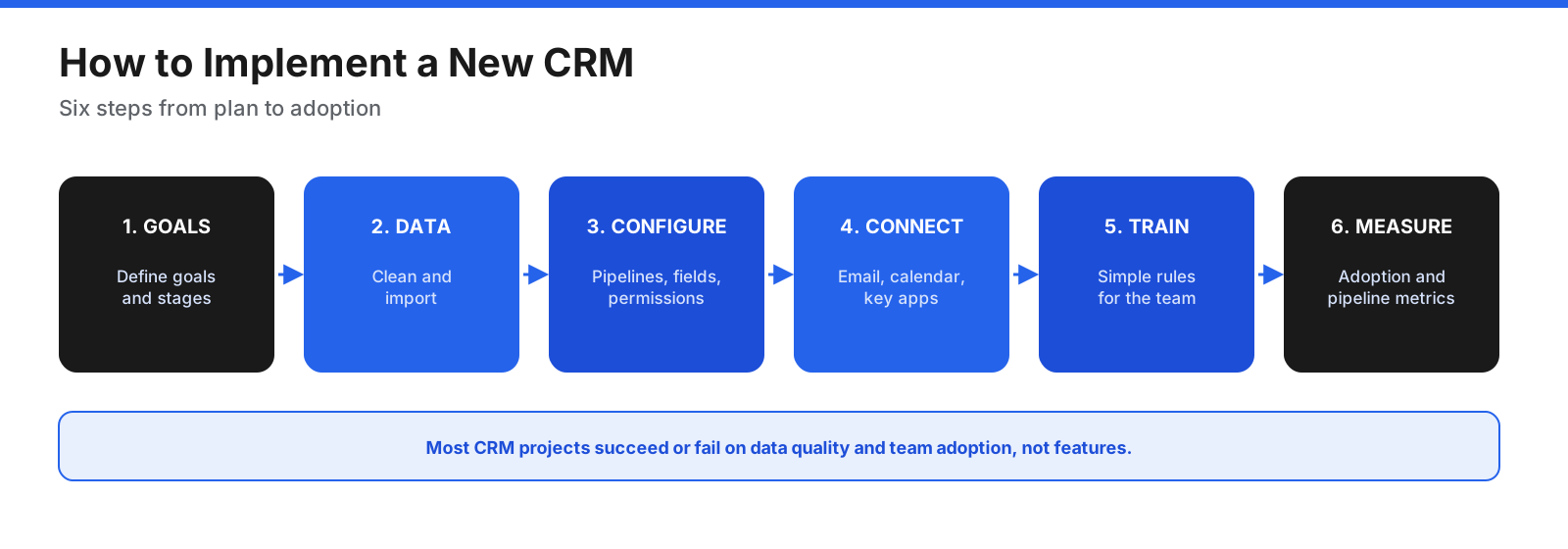
- Define goals and stages. Agree on what the CRM should improve, and map your sales stages.
- Clean and import data. Remove duplicates and outdated contacts before importing.
- Configure the system. Set up pipelines, custom fields, and user permissions.
- Connect key tools. Sync email and calendars, and connect marketing, support, and accountingapps
- Train the team. Keep rules simple, such as logging every call and updating deal stages weekly.
- Measure and refine. Track adoption and pipeline metrics, then adjust fields and automations.
How Do You Choose the Right CRM Software?
Dynamics 365 Sales; growing business wanting sales and marketing together leads to HubSpot; best value leads to Zoho CRM; low cost with built-in calling and AI leads to Freshsales; small pipeline-focused team leads to Pipedrive; outbound calling team leads to Close; unlimited contacts on a budget leads to Nutshell; visual workspace leads to monday CRM; Google Workspace users lead to Copper; startup wanting flexibility leads to Attio; small business selling online leads to Keap
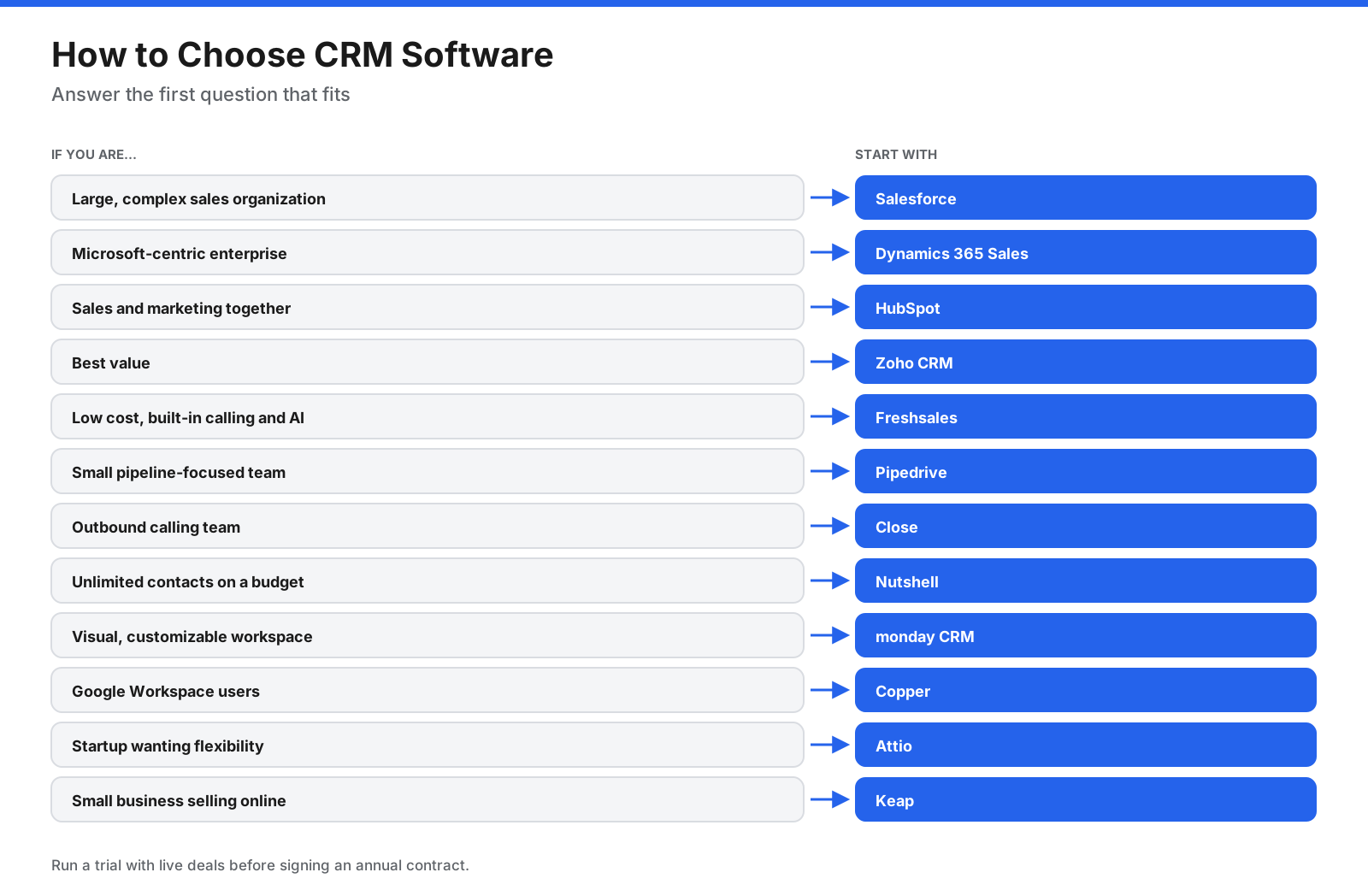
- Map your sales process. List stages, handoffs, and the data each step needs.
- Count users and growth. Estimate how many people will use the CRM in two years.
- Pick the right tier. Identify the tier that includes the automation and reporting you need.
- Calculate total cost. Include onboarding, add-ons, usage charges, and admin time.
- Run a trial with live workflows. Most CRMs offer 14 to 30 day trials. Test with live deals and your own data.
Frequently Asked Questions
What is the best CRM software?
Salesforce is the most extensible CRM and Zapier’s top pick, while HubSpot is easier to use and better for growing businesses that want sales and marketing together. Zoho CRM offers the best value, and Pipedrive is the easiest pipeline CRM for small teams.
What is the #1 CRM platform?
Salesforce is widely regarded as the leading CRM platform for large organizations because of its customization and ecosystem. HubSpot is the most common choice among small and mid-sized businesses that want ease of use.
What is the best CRM for small business?
Pipedrive, Zoho CRM, Freshsales, and HubSpot Starter are strong choices for small businesses. Nutshell offers unlimited contacts, and Copper suits businesses on Google Workspace.
What is the best CRM for startups?
Attio is Zapier’s pick for startups because of its flexible, AI-native design. HubSpot is a safe choice if you want a platform that grows from free to enterprise.
What is the best CRM for real estate?
Real estate teams need mobile access, fast follow-up, and buyer and seller pipelines. Pipedrive, Close, and Zoho CRM cover these needs, and dedicated real estate CRMs add property-specific features.
Is HubSpot or Salesforce better?
HubSpot is easier to use and better for growing businesses that want marketing and sales together. Salesforce is better for large organizations that need deep customization and have admin resources.
Which CRM is best for beginners?
Beginners tend to get comfortable fastest with Pipedrive, Nutshell, or HubSpot, since each has a clean layout and a large library of tutorials.
How much does CRM software cost?
Entry plans range from about $9 to $35 per user per month. Mid-tier plans with automation usually cost $17 to $105 per user, and enterprise editions can reach several hundred dollars per user.
Will AI replace CRM software?
AI is changing how CRMs work, with assistants and agents that summarize, draft, and recommend actions, but it relies on the customer data stored in the CRM. AI is becoming part of CRM software rather than a replacement for it.
Do I need a CRM administrator?
Small teams using Pipedrive, Nutshell, or HubSpot Starter rarely need a dedicated administrator. Larger deployments of Salesforce or Dynamics 365 usually need an in-house admin or an implementation partner to manage customization, permissions, and integrations.
Can I switch CRMs later?
Yes. Most CRMs let you export contacts, companies, and deals to CSV, and many offer import tools for moving from other platforms. Custom fields, automations, and reports usually need to be rebuilt, so switching becomes harder as your setup grows.
How long does CRM implementation take?
Simple CRMs such as Pipedrive or Nutshell can be running in days. Enterprise platforms such as Salesforce or Dynamics 365 often take weeks or months, depending on customization and data migration.
The Bottom Line
The best CRM software depends on your size and how you sell. Salesforce and Dynamics 365 Sales suit large, complex organizations. HubSpot, Zoho CRM, and Freshsales fit growing businesses that want broad features. Pipedrive, Close, and Nutshell suit pipeline-focused sales teams. monday CRM, Copper, and Attio offer flexible workspaces, and Keap combines CRM with marketing and payments for small businesses. Compare mid-tier prices for your team size, add onboarding and add-on costs, and run a trial with live deals before you sign an annual contract.




















































































