

ChatGPT and Google Gemini are two of the most widely used AI assistants. Both can write and edit, research the web, analyze files, generate images, hold voice conversations, write code, and take on multi-step tasks. Both have free plans and paid plans at similar prices, so choosing between them is harder than it was a couple of years ago.
The biggest differences now come from what surrounds each assistant. ChatGPT, from OpenAI, is a standalone product that connects to many work apps and includes coding and agent tools such as Codex and ChatGPT Work. Gemini, from Google, is built into Gmail, Docs, Drive, Android, and Chrome, and its paid plans bundle Google services such as extra cloud storage.
This guide compares ChatGPT and Gemini task by task, then covers pricing, free plans, privacy, business use, and how to choose. It uses published plans and help pages as of October 2026 and attributes opinions to reviewers. It avoids benchmark scores, which change with model releases. Neither company paid for placement.
Quick verdict:
- Choose ChatGPT if you want an all-purpose assistant that works across many apps, or you need its coding and agent tools.
- Choose Gemini if you live in Gmail, Docs, Drive, and Android, want AI video generation, or value the storage and extras bundled with Google’s plans.
- Try both free plans first. Zapier’s April 2026 comparison concludes that not much separates them on most everyday tasks, so your apps and habits usually decide.
| Category | ChatGPT | Gemini |
|---|---|---|
| Maker | OpenAI | |
| Built around | Standalone assistant with connected apps | Google apps, Android, and Chrome |
| Free plan | Yes, with limits; ads in the US | Yes, with limits |
| Entry paid plan | Go, $8/month in the US | Google AI Plus, $4.99/month |
| About $20 plan | Plus, $20/month | Google AI Pro, $19.99/month |
| Top consumer plan | Pro, from $100/month | Google AI Ultra, from $99.99/month |
| Coding tools | Codex | Jules, Antigravity |
| Agent | ChatGPT Work | Gemini Agent, AI Ultra and US first |
| Video generation | Sora discontinued in 2026 | Veo in Gemini and Flow |
| Extras on paid plans | Ad-free use and higher limits | Google storage, YouTube Premium on some plans |
What Is the Difference Between ChatGPT and Gemini?
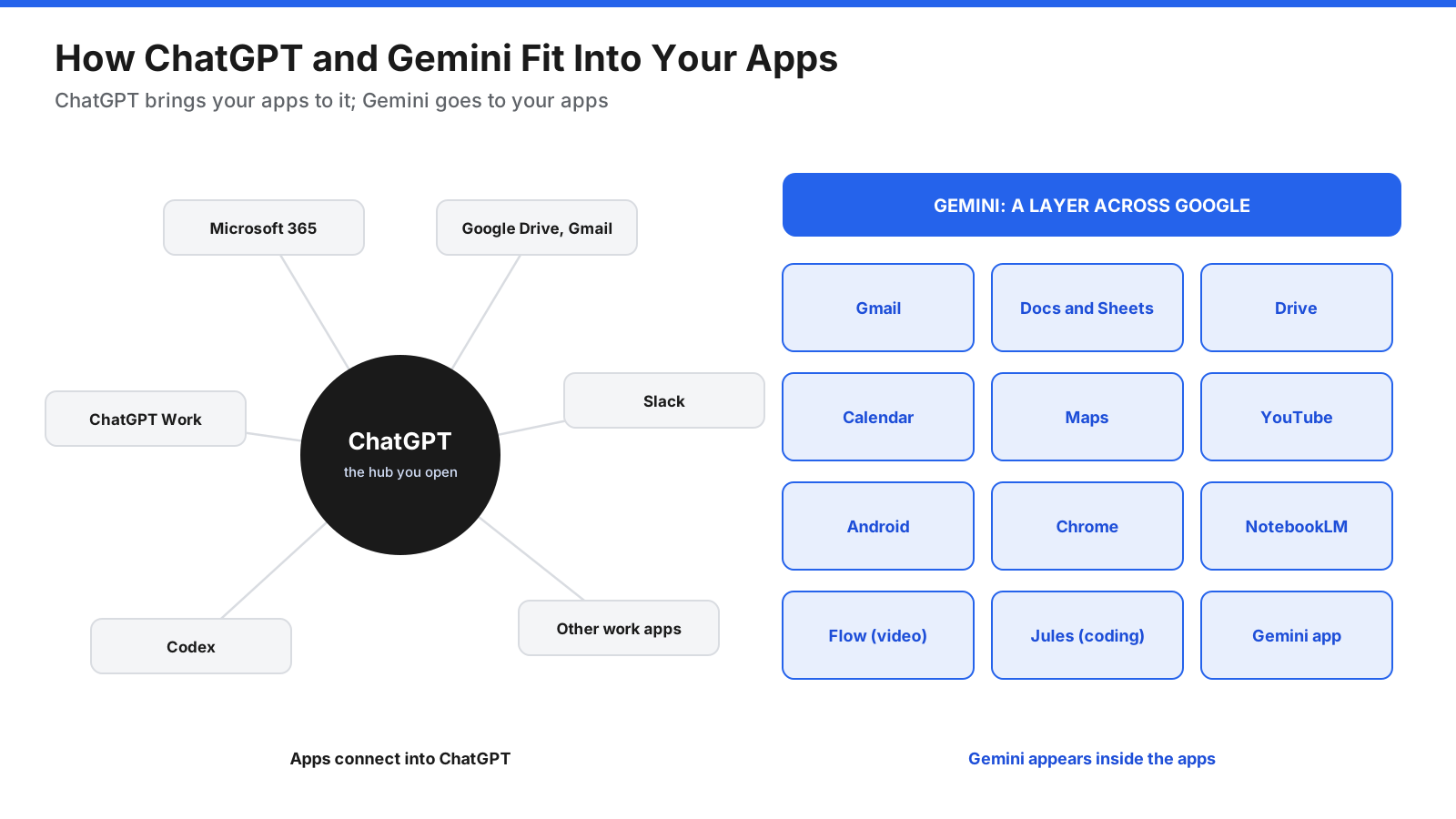
The core difference is ecosystem. ChatGPT is designed to be the place you go to get work done, with connectors that bring in data from Microsoft 365, Google Drive, Slack, and other apps. Gemini is designed to appear wherever you already work in Google’s products, from a side panel in Gmail and Docs to the assistant on an Android phone.
That shapes what each does best. ChatGPT puts more weight on agents and coding: ChatGPT Work handles multi-step projects across your apps, and Codex works on software. Gemini puts more weight on media and Google services: it generates video with Google’s Veo models, connects to Gmail, Calendar, Maps, and YouTube, and its paid plans include Google One storage.
For most everyday tasks, such as drafting an email, summarizing a document, or answering a question, both perform well. Zapier’s reviewer says not much separates them overall.
What Do ChatGPT and Gemini Have in Common?
Both offer chat with web search and cited sources, deep research, canvas-style editing for documents and code, image generation and editing, voice conversations with live camera and screen sharing on mobile, file uploads, custom assistants, memory and personalization, apps for web, iOS, Android, and desktop, and business plans with admin controls and no training on business data by default.
What Is ChatGPT?
ChatGPT is OpenAI’s AI assistant. It launched in late 2022 and has grown from a chatbot into a workspace for writing, analysis, coding, and agent tasks. In July 2026, OpenAI introduced ChatGPT Work, an agent for multi-step projects, along with a desktop app that combines Chat, Work, and Codex, according to The Next Web.
ChatGPT connects to many work tools, including Microsoft and Google apps. Zapier’s review says it connects to more than 140 work apps. Custom GPTs, projects, memory, image generation, and voice mode round out the main features.
What Is Gemini?
Gemini is Google’s AI assistant and the name of the models behind it. You can use it in the Gemini app on the web and mobile, as the assistant on Android phones, in Chrome, and inside Gmail, Docs, Sheets, and other Google Workspace apps on eligible plans.
Gemini’s strengths include long-context file analysis, Deep Research, image generation with Google’s Nano Banana models, video generation with Veo, and NotebookLM, which Google’s plan page now refers to as Gemini Notebook. Google’s paid AI plans also bundle Google One storage, and some include YouTube Premium.
How Do ChatGPT and Gemini Fit Into Your Other Apps?
Where an assistant lives affects how often you use it. ChatGPT works as a hub: you open ChatGPT, connect the apps you need, and bring their data into the conversation. This suits people who use a mix of tools from different companies, including Microsoft 365.
Gemini works as a layer across Google. It appears as a side panel in Gmail and Docs, answers questions about Drive files, uses Maps and YouTube in answers, and replaces Google Assistant on Android. Zapier’s review describes this ecosystem-wide integration as a major differentiator for Gemini.
How Do ChatGPT and Gemini Compare Task by Task?
Writing and Editing
Both write clear drafts, rewrite text in different tones, and edit long documents in a canvas view. Writing quality depends on your prompt and the model you select, and preferences vary. Gemini’s advantage is that it can draft directly inside Gmail and Docs on eligible plans. ChatGPT’s advantage is its memory and project features, which help it keep your style and context across conversations.
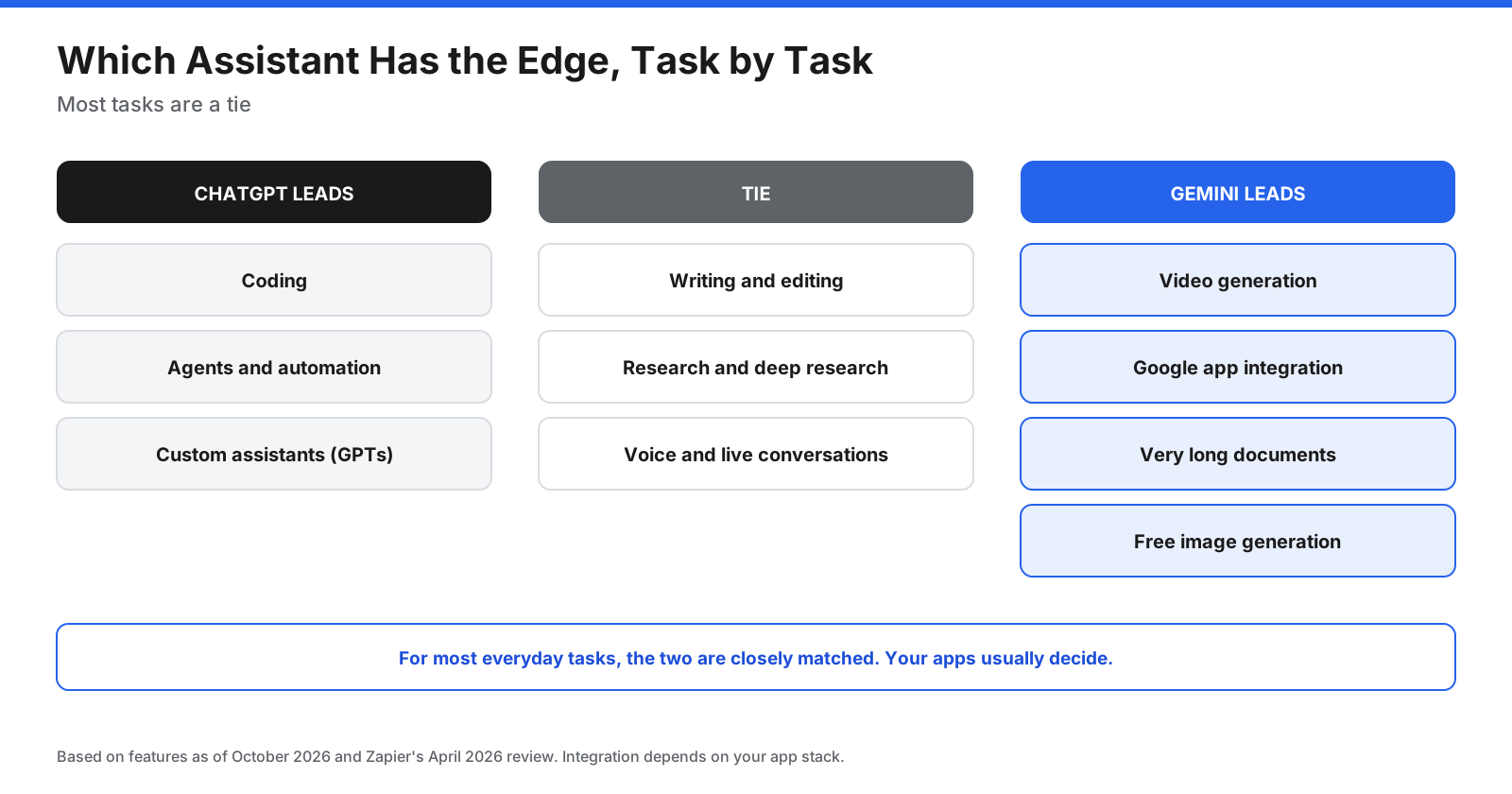
Verdict: Tie. Choose based on where you write: inside Google apps favors Gemini, while a standalone writing workspace favors ChatGPT.
Research and Deep Research
Both assistants search the web with citations and offer deep research modes that browse many sources and produce long reports. Google lists Deep Research on its free plan. Zapier’s review calls research a tie, with a slight edge for ChatGPT because you can adjust a deep research task while it runs.
Verdict: Tie. Gemini is more accessible on its free plan, and ChatGPT gives more control during long research tasks.
Coding
ChatGPT includes Codex, OpenAI’s coding agent, which runs in ChatGPT, the cloud, an IDE extension, and the command line. Google offers Jules, an asynchronous coding agent, and Antigravity, a coding environment, with higher limits on Google AI Pro and Ultra, according to Google’s plan page. Zapier’s review says ChatGPT is ahead of Gemini on agent features and coding performance.
Verdict: ChatGPT for most developers, based on Zapier’s assessment and the maturity of Codex. Gemini is a strong option for developers already using Google Cloud and Android tools.
Image Generation
Both generate and edit images from text prompts. Zapier’s review says both use leading image models, that Gemini makes four images per prompt, and that Gemini gives free users a higher daily quota.
Verdict: Tie, with an edge to Gemini for free users.
Video Generation
Gemini generates video with Google’s Veo models, which can include audio, in the Gemini app and in Flow, Google’s filmmaking tool. Google’s plan page lists video generation on AI Plus and above, with Flow credits that increase by plan. OpenAI announced in March 2026 that it would discontinue Sora in its consumer app and API, according to Engadget.
Verdict: Gemini. Zapier calls video a clear win for Gemini.
Voice and Live Conversations
Both offer natural voice conversations on mobile, with the option to share your camera or screen so the assistant can talk about what it sees. Gemini Live is also built into Android, which makes it quicker to start on Android phones. ChatGPT’s voice mode is available across its apps.
Verdict: Tie. Android users may find Gemini more convenient.
Files, Long Documents, and Context
Both accept PDFs, spreadsheets, images, and other files. Google’s plan page lists a 1 million token context window on Google AI Pro, which lets Gemini work with very long documents or many files at once. Zapier’s review says both offer up to 1 million tokens, but OpenAI’s limits vary by plan and mode.
Verdict: Slight edge to Gemini for very long documents, especially on Google AI Pro.
Agents and Automation
ChatGPT Work handles multi-step tasks across connected apps and files, produces finished documents and spreadsheets, and can run scheduled tasks. Gemini Agent is Google’s equivalent, but Google’s plan page lists it as early access on Google AI Ultra, and a September 2026 review says it launched in the US first. Zapier’s review also gives agents to ChatGPT.
Verdict: ChatGPT. Its agent features are available on more plans and are more mature.
Integrations
Gemini’s integrations with Gmail, Docs, Drive, Calendar, Maps, and YouTube are deeper than ChatGPT’s Google app integrations. ChatGPT connects to a wider range of third-party work apps, including Microsoft apps, and its custom GPTs and connectors make it flexible across different tool stacks.
Verdict: Depends on your stack. Google users should lean toward Gemini, and Microsoft or mixed-tool users toward ChatGPT.
Custom Assistants and Memory
ChatGPT’s custom GPTs let you build assistants with instructions, files, and actions, and share them with others. Gemini’s Gems let you save custom instructions and files for repeated tasks. Both offer memory that personalizes responses over time. Zapier’s review mentions Gemini’s Personal Intelligence feature, which draws on your Google apps for more personal answers.
Verdict: Slight edge to ChatGPT for building and sharing custom assistants. Gemini’s personalization is stronger if you use many Google services.
How Much Do ChatGPT and Gemini Cost?
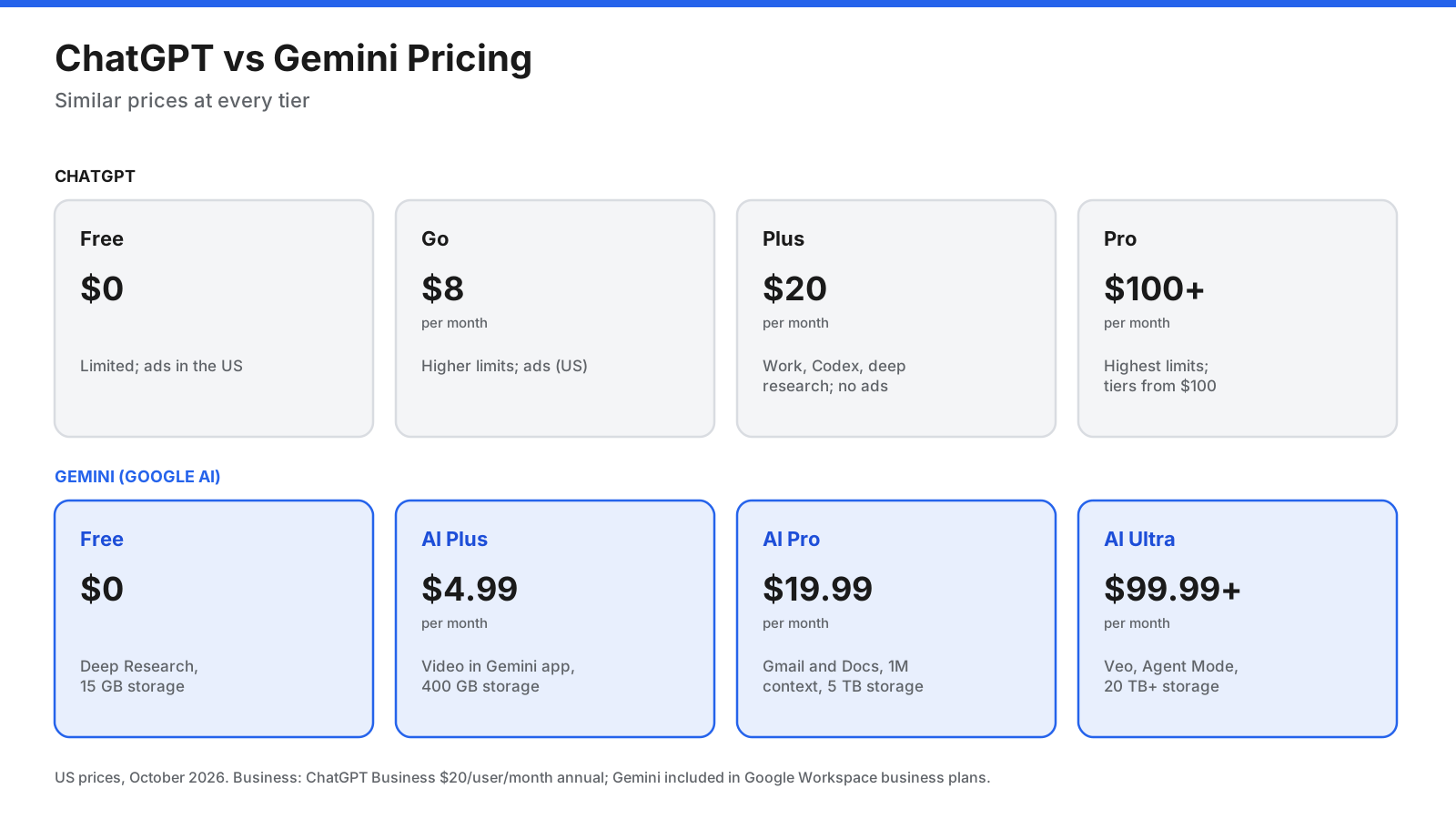
Both companies offer consumer tiers at similar prices, plus business plans. Prices below are US dollars per month as listed in the source material; check the provider’s current page before subscribing.
ChatGPT plans
- Free: $0, with limited access to advanced features. OpenAI began testing ads for Free and Go users in the US in early 2026, according to exchange4media.
- Go: $8 per month in the US, with higher limits than Free. Ads apply in the US.
- Plus: $20 per month, with ChatGPT Work, Codex, deep research, and higher limits, ad-free.
- Pro: Tiers from $100 per month, with the highest limits and longer Codex and Work sessions.
- Business: $20 per user per month billed annually, or $25 monthly, with a two-seat minimum, according to the source material.
Gemini (Google AI) plans
- Free: $0, with 15 GB of Google storage, Deep Research, and image generation.
- Google AI Plus: $4.99 per month, with 400 GB of storage, video generation in the Gemini app, and Gemini in Gmail.
- Google AI Pro: $19.99 per month, with 5 TB of storage, Gemini in Gmail and Docs, a 1 million token context window, Jules, and YouTube Premium Lite.
- Google AI Ultra: From $99.99 per month, with the highest limits, Veo, early access to Agent Mode, at least 20 TB of storage, and YouTube Premium.
For businesses, Gemini is included in Google Workspace business plans. The source material lists Business Standard at $14 per user per month billed annually.
What Do You Get for About $20 a Month?
Most paying users choose between ChatGPT Plus at $20 and Google AI Pro at $19.99. The price is almost the same, but the packages differ.
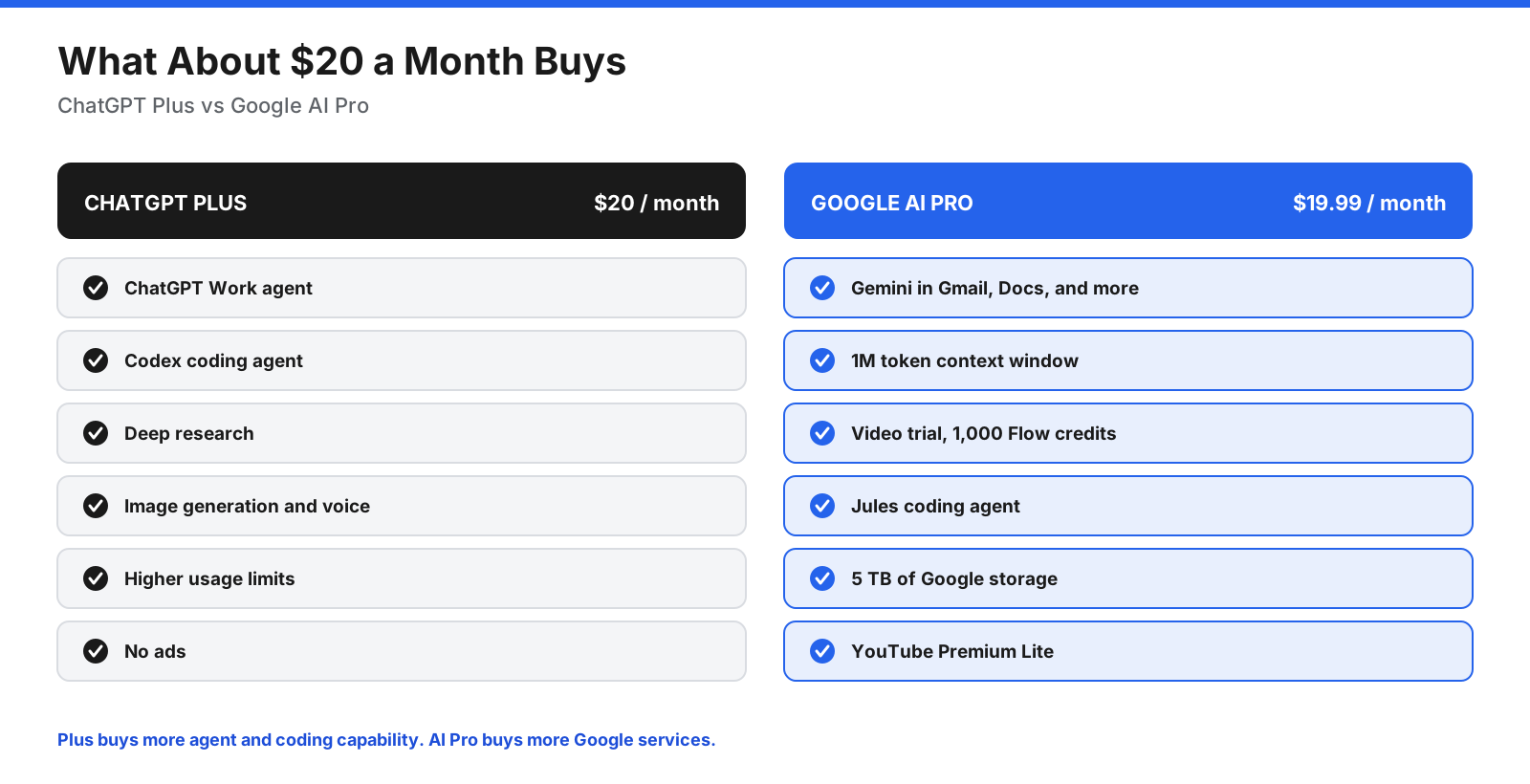
ChatGPT Plus is the stronger choice if you want agents and coding tools, or if you work across many non-Google apps. Google AI Pro is the stronger choice if you already pay for Google One storage or YouTube Premium, since the bundle can replace those costs, and if you want AI inside Gmail and Docs.
How Do the Usage Limits Compare?
Price is only part of the picture. How much you can use each assistant before hitting a limit matters, especially for deep research, long files, coding, and agent tasks.
Google explains that Gemini app usage limits are based on compute, reset every five hours until you reach a weekly limit, and grow with each plan: Google AI Plus offers twice the Free allowance, Google AI Pro four times, and Google AI Ultra up to 20 times the Pro allowance. You can buy AI credits to extend your limits.
OpenAI does not publish fixed message counts for its paid plans. ChatGPT’s pricing page says limits apply to Plus, offers Pro in several usage tiers, and lets Business and Enterprise workspaces buy credits for more access. Agent and coding tasks draw on the same allowance, so a long ChatGPT Work or Codex session uses more than a short chat.
Light users may rarely notice limits on either $20 plan. Heavy users who run many deep research reports, long agent tasks, or large coding jobs should test their usual workload during the first month and upgrade only if they hit the cap regularly.
What Do the Free Plans Include?
Both free plans are useful for everyday questions, writing help, and image generation. Gemini’s free plan includes Deep Research, image generation and editing, and 15 GB of Google storage, according to Google’s plan page. Zapier’s review says Gemini’s free plan is the more generous of the two.
ChatGPT’s free plan gives limited access to its most capable features, then falls back to lighter models when you reach the cap. In the US, Free and Go users may see ads. Paid plans remain ad-free.
Verdict: Gemini has the more generous free plan.
How Do ChatGPT and Gemini Handle Your Data?
Both companies may use conversations from personal accounts to improve their models, and both let you turn this off. Their settings and retention periods differ.
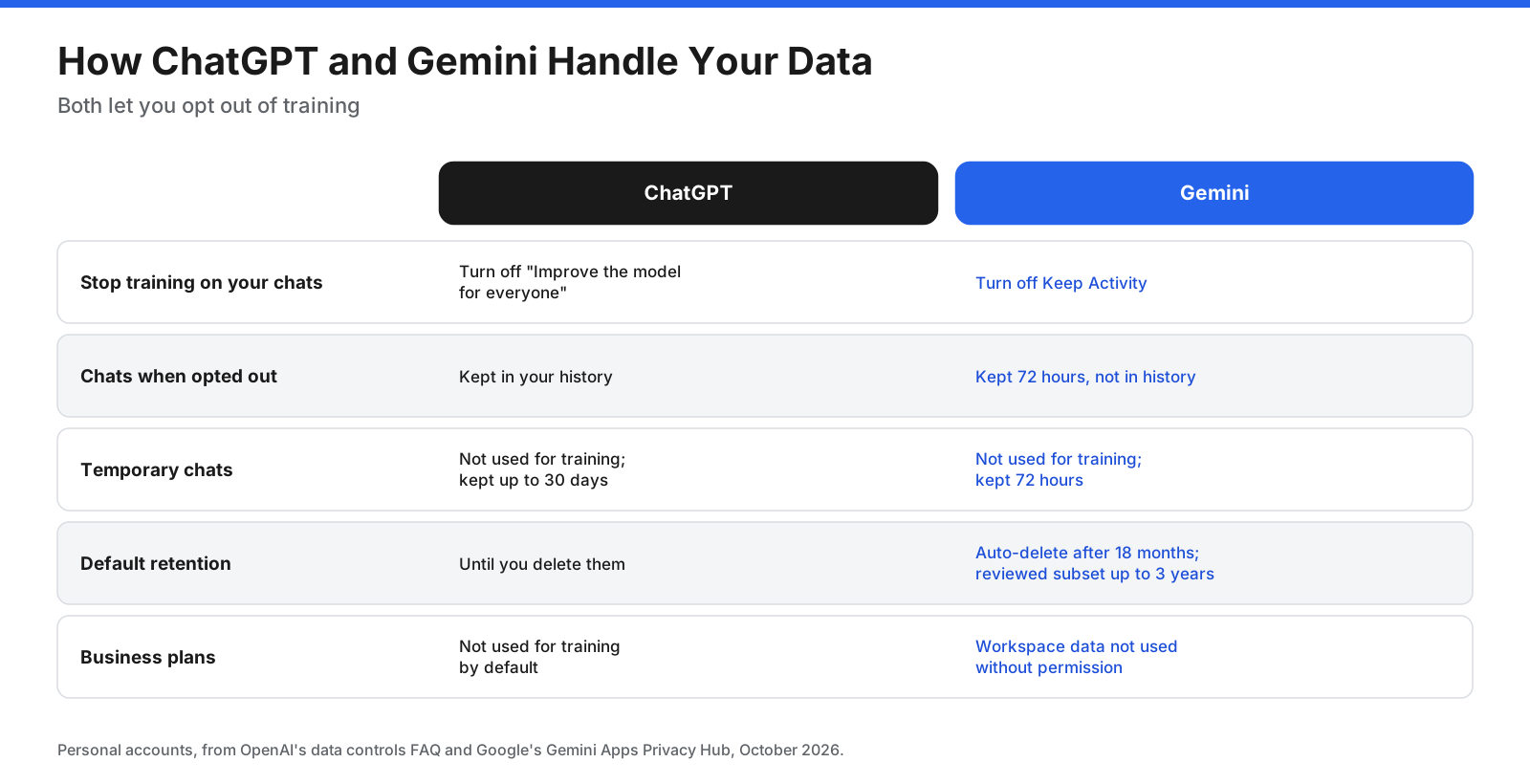
ChatGPT: According to OpenAI’s data controls help article, turning off “Improve the model for everyone” stops new conversations from being used for training while keeping chat history. Temporary chats are not used for training and may be kept for up to 30 days for safety. Business, Enterprise, and Edu workspace content is not used for training by default.
Gemini: According to Google’s Gemini Apps Privacy Hub, chats saved with Keep Activity on may be used to improve Google services, including training models. Activity auto-deletes after 18 months by default. A subset of chats is reviewed by human reviewers, disconnected from your account, and reviewed chats are kept for up to three years. With Keep Activity off, chats are kept for 72 hours. For Google Workspace accounts, Google says customer data is not used to train models without permission and chats are not reviewed by humans.
Verdict: Both offer opt-outs. ChatGPT’s setting separates training from chat history, which some people find simpler. If privacy matters, use a business plan from either company.
Which Is Better for Business Teams?
For organizations, the decision usually follows the productivity suite you already use. If your company runs on Google Workspace, Gemini is included in Workspace business plans and works inside Gmail, Docs, Sheets, Meet, and Drive with your existing permissions. Google says Workspace data stays within your organization and is not used for training without permission.
If your company uses Microsoft 365 or a mix of tools, ChatGPT Business at $20 per user per month billed annually offers a shared workspace, admin controls, connectors to many work apps, and Codex for engineering teams. OpenAI does not train on Business workspace data by default.
Many companies use both: Gemini inside Google Workspace for email and documents, and ChatGPT for agents, analysis, and coding.
What Are the Downsides of ChatGPT and Gemini?
ChatGPT downsides:
- Video generation is no longer a focus after OpenAI discontinued Sora in its consumer app and API.
- Free and Go users in the US may see ads.
- Integration with Google apps is shallower than Gemini’s.
- Usage limits on paid plans are not published as fixed numbers.
Gemini downsides:
- Gemini Agent is limited to the most expensive plan and started in the US.
- Zapier’s review rates its coding and agent features behind ChatGPT’s.
- It works best for people already using Google services.
- On personal accounts, a subset of chats is reviewed by humans and kept for up to three years.
Which Is Better for Students and Learning?
Both assistants offer learning features. ChatGPT has a study mode that guides you through problems step by step instead of giving the answer straight away. Gemini offers a similar guided learning experience, and NotebookLM lets you upload course materials and turn them into summaries, study guides, and audio overviews.
For students who already use Google Docs and Drive for coursework, Gemini fits naturally into existing files. For students who want one assistant for writing, math, and coding practice, ChatGPT is a flexible choice. Whichever you use, check your school’s rules on AI use, and treat answers as a starting point rather than a final source.
How Do the Mobile Apps and Devices Compare?
Both assistants have apps for iOS and Android, web versions, and desktop access. The difference shows up on Android, where Gemini is built into the phone as the default assistant. You can open it from the power button or a gesture, ask about what is on your screen, and use it with Google apps such as Maps, Calendar, and Messages.
ChatGPT’s mobile app offers voice conversations, camera input, and access to your chats, projects, and GPTs. Its desktop app for Mac and Windows combines Chat, Work, and Codex in one place, which suits people who do longer tasks at a computer. On iPhone, both are standalone apps, so the choice depends more on features than convenience.
How Do You Switch Between ChatGPT and Gemini?
Moving from one assistant to the other is simpler than moving most software, because there is little to migrate. A few steps help you keep what you have built.
- Export or save what matters. OpenAI’s help center says Free, Go, Plus, and Pro users can export their ChatGPT data themselves. Save important chats, prompts, and outputs before you cancel a plan.
- Copy your custom instructions. Move your preferences, tone, and background details into the other assistant’s personalization settings.
- Rebuild custom assistants. Recreate your most-used GPTs as Gems in Gemini, or Gems as GPTs in ChatGPT, using the same instructions and files.
- Reconnect your apps. Set up the connectors or Google app extensions you need.
- Review privacy settings. Check training and activity settings in the new assistant before you upload sensitive files.
Which Should You Choose: ChatGPT or Gemini?
Use these questions to decide, then test both free plans with your own tasks.
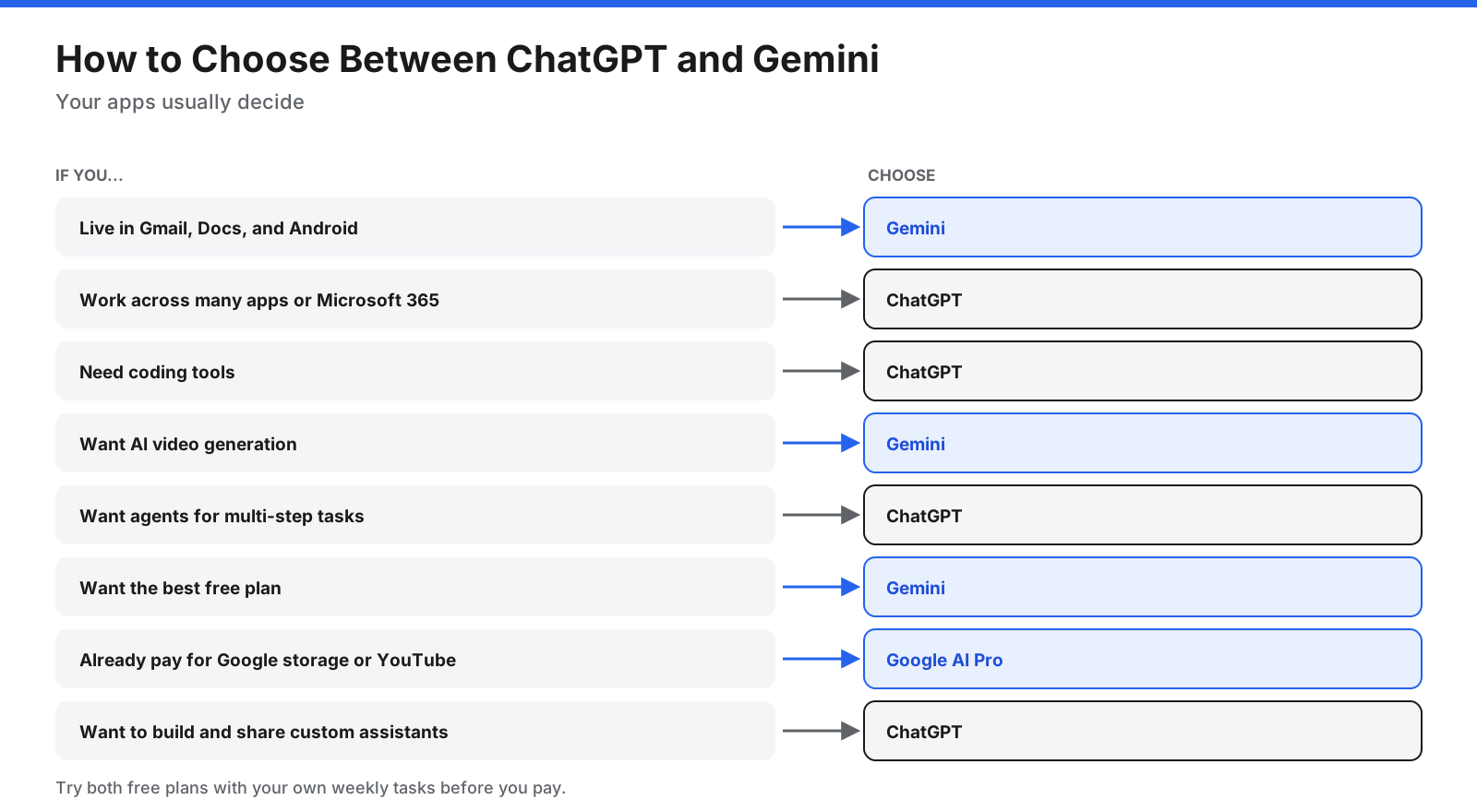
- Choose Gemini if you use Gmail, Docs, Drive, and Android every day, want video generation, want the most capable free plan, or would use the storage and YouTube extras in Google’s plans.
- Choose ChatGPT if you work across many different apps, use Microsoft 365, write code, want agents for multi-step projects, or plan to build and share custom GPTs.
To compare them fairly, run the same five tasks you do every week in both assistants, using the same prompts and files. Judge the results on accuracy, how much editing they need, and how easily each fits into your workflow.
Can You Use ChatGPT and Gemini Together?
Yes. Many people use Gemini inside Google apps for email and documents, and ChatGPT for research, analysis, coding, and agent tasks. Using both free plans side by side is a low-cost way to see which one you reach for more often. Zapier’s review suggests the same approach.
If you pay for one, choose the one that matches where you spend most of your working day, and keep the free plan of the other for second opinions.
Frequently Asked Questions
Is Gemini better than ChatGPT?
Neither is better for everyone. Gemini is stronger for Google app integration, video generation, very long documents, and its free plan. ChatGPT is stronger for coding, agents, and working across many non-Google apps. For everyday writing and research, they perform similarly.
Which is more accurate, ChatGPT or Gemini?
Both can make mistakes, and accuracy changes with each model update. Both offer web search with citations, which makes it easier to check answers. For important facts, verify the sources either assistant provides.
Is Gemini free?
Yes. Gemini’s free plan includes chat, Deep Research, image generation, and 15 GB of Google storage. Paid plans start at $4.99 per month for Google AI Plus.
Is ChatGPT free?
Yes. ChatGPT’s free plan includes chat, search, and limited access to advanced features. In the US, Free users may see ads. Paid plans start at $8 per month for Go in the US.
Which is better for coding, ChatGPT or Gemini?
Zapier’s April 2026 review gives coding to ChatGPT, citing Codex. Gemini offers Jules and Antigravity, with higher limits on Google AI Pro and Ultra. Developers should test both on their own codebase.
Can ChatGPT or Gemini make videos?
Gemini can generate videos with Google’s Veo models in the Gemini app and in Flow on paid plans. OpenAI announced in March 2026 that it would discontinue Sora in its consumer app and API.
Does Gemini use my conversations for training?
On personal accounts with Keep Activity on, Google may use your chats to improve its services, including training models, and a subset is reviewed by humans. You can turn Keep Activity off. Google says Workspace business data is not used for training without permission.
Is Gemini or ChatGPT better on Android and iPhone?
On Android, Gemini is built into the phone as the default assistant, which makes it faster to reach. On iPhone, both are available as apps, so the choice depends on features rather than convenience.
Is ChatGPT Plus or Google AI Pro better value?
They cost almost the same. ChatGPT Plus is better value if you will use ChatGPT Work, Codex, and custom GPTs. Google AI Pro is better value if you will use 5 TB of Google storage, YouTube Premium Lite, and Gemini inside Gmail and Docs, since those extras can replace subscriptions you already pay for.
Does ChatGPT show ads?
OpenAI began testing ads for Free and Go users in the US in early 2026, according to exchange4media. Plus, Pro, Business, Enterprise, and Education plans remain ad-free.
Which is better for writing, ChatGPT or Gemini?
Both write well, and preferences vary. Gemini is convenient if you write in Gmail and Docs, since it works inside them on eligible plans. ChatGPT is convenient for longer projects because projects and memory keep your context and style across conversations.
What happened to Gemini Advanced?
Gemini Advanced was Google’s earlier name for its paid Gemini tier. Google now sells Gemini access through Google AI plans: Google AI Plus, Google AI Pro, and Google AI Ultra.
What about Claude and Microsoft Copilot?
Claude, from Anthropic, and Microsoft Copilot are other assistants often compared with ChatGPT and Gemini. Copilot is the natural choice inside Microsoft 365. Claude is a separate assistant with its own plans and features, and it deserves its own comparison rather than a short summary here.
The Bottom Line
ChatGPT and Gemini are closely matched for everyday writing, research, images, and voice. The choice comes down to your apps and the work you do most. Gemini is the better fit for people who live in Google’s apps, want video generation, or value the storage and extras in Google’s plans. ChatGPT is the better fit for people who work across many tools, write code, or want agents that handle multi-step projects.
Start with both free plans, test them on your own weekly tasks, and pay for the one you reach for most. Check current prices and limits on OpenAI’s and Google’s sites before you subscribe, since both companies update their plans often.




















































































