


A business VPN gives employees a secure, encrypted connection to company resources and the internet, wherever they work. It also gives administrators central control over who can connect, which systems they can reach, and how traffic leaves the network. That control separates a business VPN from the consumer VPN apps people install on their phones.
Choosing the best VPN for business is harder than it used to be because the category now covers three kinds of products: managed team VPN services with dedicated IP addresses, zero trust network access (ZTNA) tools that connect people to specific apps instead of whole networks, and VPN clients that pair with firewalls you already own. This guide compares 11 options across those groups, with pricing from vendor pages as of October 2026, security hardening advice from the NSA and CISA, and a rollout plan.
This guide is vendor neutral. No provider paid for placement, and there are no affiliate links. Where a price comes from a third-party review rather than the vendor, that is stated.
Quick Picks by Need
- Simplest managed team VPN: NordLayer or GoodAccess
- Privacy-focused provider with dedicated IPs: Proton VPN for Business
- Larger company moving to SASE: Check Point Harmony SASE
- App-level zero trust access for small teams: Twingate
- Device-to-device mesh for technical teams: Tailscale
- Free tier for up to 50 users: Cloudflare One (Zero Trust), according to a third-party tracker
- Self-hosted control: OpenVPN Access Server or WireGuard
- Already running Cisco or Fortinet firewalls: Cisco Secure Client or FortiClient
What Is a Business VPN?
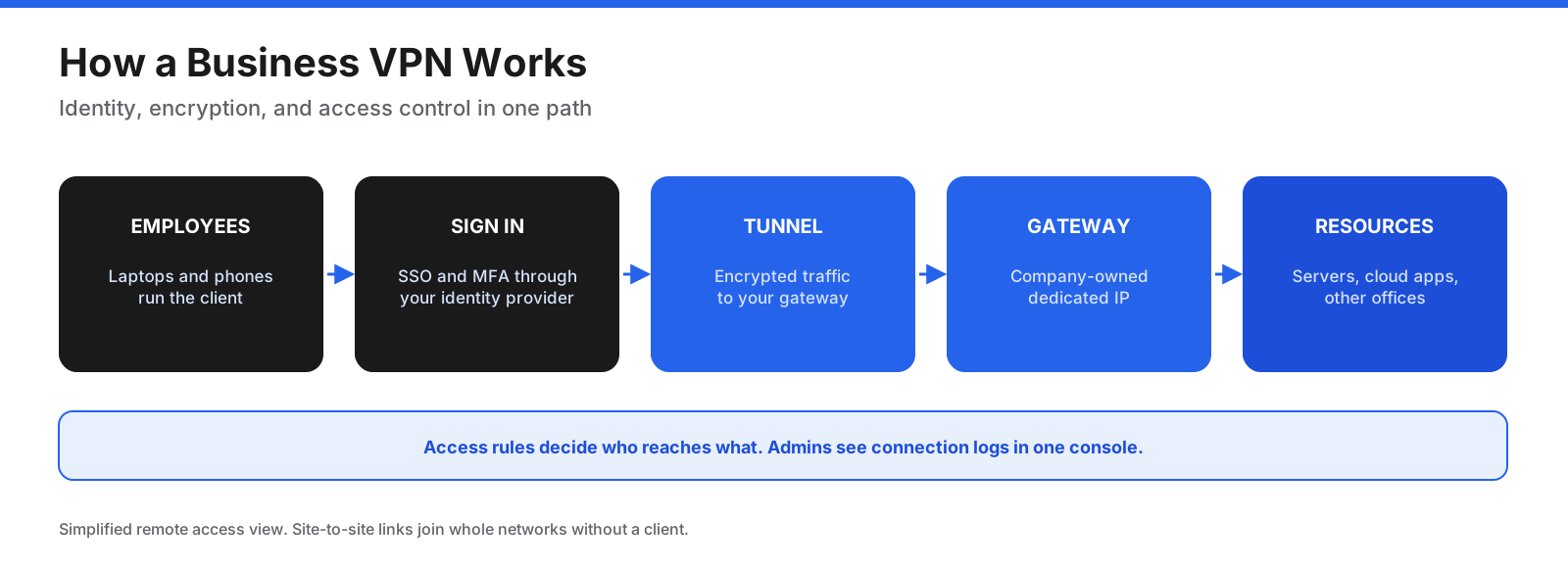
A business VPN is a service or system that creates encrypted tunnels between users’ devices and a gateway your company controls. Traffic inside the tunnel cannot be read by someone on the same Wi-Fi network or by the internet provider in between. The gateway can then pass the user through to internal systems, cloud apps that only accept your company’s IP address, or the wider internet.
Business VPNs differ from consumer VPNs in a few important ways:
- Central admin console: Add and remove users, assign them to teams, and set access rules from one dashboard.
- Dedicated gateways and IPs: Your company gets its own server or static IP address, which can be allowlisted in cloud apps, firewalls, and databases.
- Identity integration: Users sign in through your identity provider with single sign-on (SSO) and multi-factor authentication (MFA).
- Access control: Decide which teams can reach which networks, servers, or applications.
- Logs for audits: Admins can see who connected, when, and to what. Businesses need these audit trails.
- Per-user billing: You pay per seat, connection, or gateway rather than per household.
What Are the Types of Business VPN?
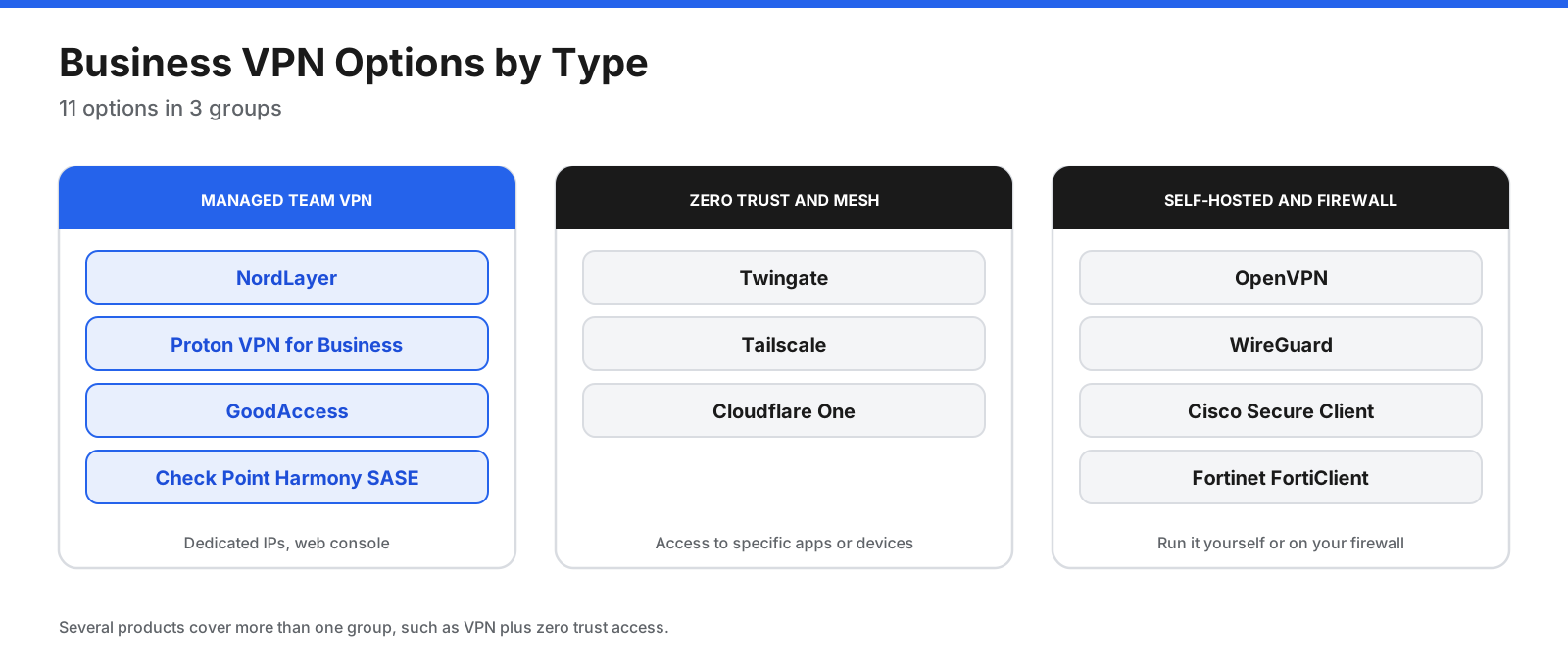
There are three common setups, and many products support more than one:
- Remote access VPN: Individual employees connect from laptops and phones to the company network or a cloud gateway. This is what most small businesses need.
- Site-to-site VPN: Two or more offices, or an office and a cloud environment, are joined by a permanent encrypted link. Users do not run a client for this part.
- Zero trust network access (ZTNA): Instead of placing users on a network, the system checks identity and device health for every request and connects users only to the specific applications they are allowed to use.
How Do Business VPN Options Compare?
The 11 options in this guide fall into three groups. The right group depends on your size, technical skills, and the infrastructure you already run.
| Tool | Type | Entry paid price | Free option | Minimum |
|---|---|---|---|---|
| NordLayer | Managed team VPN | $8/user/month (Lite, annual) | 14-day money-back guarantee | 5 users |
| Proton VPN for Business | Managed team VPN | $6.99/user/month (Essentials, annual) | 14-day trial | 2 users |
| GoodAccess | Managed team VPN with ZTNA | $7/user/month (Essential, annual) | 14-day trial | 5 users |
| Check Point Harmony SASE | SASE with ZTNA and VPN | $8/user/month (Essentials, per TechRepublic) | None reported | 10 users |
| Twingate | ZTNA | $5/user/month (Teams, annual) | Free up to 5 users | None |
| Tailscale | Mesh VPN | $8/user/month (Standard) | Free for personal use | None |
| Cloudflare One | ZTNA and secure web gateway | About $7/user/month (third-party figure) | Free up to 50 users (third-party figure) | None |
| OpenVPN | Self-hosted or cloud VPN | $11/connection/month (Growth) | Free up to 2 connections | None |
| WireGuard | Open-source VPN protocol | Free | Free | Your own server |
| Cisco Secure Client | Firewall-based VPN and ZTNA client | Quote through partners | None | 25 users (Advantage) |
| Fortinet FortiClient | Firewall-based VPN and ZTNA client | Quote through partners | Trial of EMS | Varies |
1. NordLayer
Best for: Small and midsize businesses that want a managed VPN with dedicated gateways and little setup work.
NordLayer is the business network security service from the company behind NordVPN. You manage users, teams, and gateways from a web control panel, and employees connect through apps for major desktop and mobile platforms. Its pricing page lists SSO on all plans and supports NordLynx as well as OpenVPN over UDP and TCP.
What stands out:
- Dedicated gateways: Core and Premium plans require a dedicated IP server add-on, which gives the team a static IP for allowlisting.
- Network controls: Higher plans list DNS filtering, IP allowlisting, split tunneling, and Always On VPN.
- Device posture: Available as an add-on or custom option on higher plans, according to the pricing page.
Pricing: NordLayer lists Lite at $8 per user per month, Core at $11, and Premium at $14 on annual billing, with a minimum of 5 users. Core and Premium require a dedicated IP server at $40 per month. An enterprise offer starts at 200 users. All plans include a 14-day money-back guarantee.
Watch out for: The pricing page shows conflicting feature details between plan cards and the comparison table. Confirm the features of each plan with NordLayer before buying.
2. Proton VPN for Business
Best for: Privacy-focused teams that want dedicated servers and IP addresses from a provider based in Switzerland.
Proton offers its VPN to businesses as standalone plans and as part of its wider business suite. Its business VPN page lists more than 20,000 servers in 140+ countries, dedicated IP addresses in 20+ countries, and private gateways with access policies for network segmentation.
What stands out:
- Identity and deployment: Professional plans support SSO with Okta, Google Workspace, Microsoft Entra ID, or any SAML 2.0 provider, plus SCIM provisioning.
- Device management: The app can be deployed silently through MDM tools such as Intune, Jamf, and Workspace One.
- Threat blocking: NetShield blocks malware, phishing, and ads at the DNS level.
- Endpoint controls: Always-on VPN, a kill switch, and split tunneling.
Pricing: VPN Essentials is $6.99 per user per month and VPN Professional is $9.99 per user per month on yearly billing, each with a minimum of 2 users. Professional adds dedicated servers and IPs, gateways, SSO, SCIM, and activity monitoring. A bundle with Proton Pass is $10.99 per user per month. Every plan offers a 14-day free trial and a 30-day money-back guarantee.
Watch out for: Gateways, SSO, and dedicated IPs are only on Professional and higher, so businesses that need allowlisting will usually need that tier.
3. GoodAccess
Best for: Small businesses that want a static IP and a simple path to zero trust access controls.
GoodAccess combines a cloud VPN with zero trust access control. Every plan includes a dedicated static IP, which makes it easier to restrict access to cloud apps and servers to your team’s gateway.
What stands out: Static IP on every plan; zero trust access control and SSO on Premium and Enterprise; a branch connector on Premium for linking clouds and offices, with extra connectors at $29 per month; and gateway access logs on all plans, with 90-day retention on Essential and Premium.
Pricing: Essential is $7 per user per month billed annually ($9 monthly) and Premium is $11 per user per month billed annually ($14 monthly), with a minimum of 5 users. Each additional dedicated gateway costs $49 per month. Enterprise starts at 50 users with custom pricing. There is no free plan, but a 14-day trial requires no credit card.
Watch out for: SSO and zero trust controls are not included on Essential, so growing teams will usually need Premium.
4. Check Point Harmony SASE (Formerly Perimeter 81)
Best for: Midsize and larger organizations that want VPN, zero trust access, and web security from one provider.
Check Point acquired Perimeter 81 and now sells the service as Harmony SASE. SASE combines network access and security services in the cloud. TechRepublic’s review lists ZTNA, agentless browser access for contractors, DNS and web filtering, device posture checks, and support for IPsec and WireGuard.
What stands out: Contractors can reach specific web apps through a browser without installing a client; web filtering, malware protection, and a firewall sit alongside VPN access; and device posture checks support Windows, macOS, Linux, Android, and iOS.
Pricing: Check Point does not publish prices on its main pages. TechRepublic’s review, published in December 2024 and updated in December 2025, lists Essentials at $8 per user per month on annual billing with a 10-user minimum, Premium at $12, Premium Plus at $16 with a 20-user minimum, and Enterprise by quote with a 50-user minimum. The review reports a 30-day money-back guarantee and no free trial. Confirm current pricing with Check Point or a partner.
Watch out for: SSO is not included on the entry plan according to the review, and the 10-user minimum rules it out for very small teams.
5. Twingate
Best for: Small and midsize teams that want zero trust access to specific apps and servers without running a VPN server.
Twingate replaces the traditional VPN model with app-level access. Install a lightweight connector inside each network you want to reach, define the resources people can use, and Twingate connects authorized users directly to those resources. Users do not join the whole network, reducing the damage a compromised account can do.
What stands out: Starter covers up to 5 users, 50 resources, and 10 remote networks, with peer-to-peer connections and split tunneling. Paid plans add SSO, native device posture checks, and MFA for SSH and bastion hosts. Business adds just-in-time and usage-based access policies, plus exit networks for routing internet traffic through a chosen location.
Pricing: Teams is $5 per user per month billed yearly for up to 100 users, and Business is $10 per user per month billed yearly for up to 500 users. The comparison table shows $12 for monthly billing on both. Enterprise is custom, with static IPs available as an add-on.
Watch out for: The free Starter plan keeps logs for only 24 hours and offers community support only. Static IPs for allowlisting are an Enterprise add-on.
6. Tailscale
Best for: Technical teams and developers who want a private mesh network between laptops, servers, and cloud machines.
Tailscale builds an encrypted peer-to-peer network, called a tailnet, between every device you add. Instead of routing all traffic through a central gateway, devices connect directly where possible. Access control lists decide which users and devices can talk to which.
What stands out: Mesh connections can reduce latency compared with hub-and-spoke VPNs; subnet routers and exit nodes reach whole networks or route internet traffic through a chosen device; basic posture checks are available on all plans, with MDM and EDR integrations on paid plans; and Premium adds just-in-time access, network flow logs, and log streaming.
Pricing: Tailscale lists a free Personal plan for up to 6 users for non-commercial use, Standard at $8 per user per month, Premium at $18 per user per month, and custom Enterprise pricing. Tailnets on custom domains count as business use and get a 14-day trial.
Watch out for: The free plan is for personal use only. Tailscale suits teams comfortable with networking concepts such as subnets and ACLs.
7. Cloudflare One (Zero Trust)
Best for: Small teams that want free zero trust access and web filtering, and larger companies building toward SASE.
Cloudflare’s zero trust platform combines Access, which protects internal apps behind identity checks, with Gateway, which filters web and DNS traffic. Employees run the WARP client on their devices, and Cloudflare’s global network handles the connection.
What stands out: A third-party pricing tracker, CostBench, lists a free plan for up to 50 users with ZTNA, secure web gateway, DNS filtering, and basic device posture checks. Connections run through Cloudflare’s global edge network. Paid plans add longer log retention and more data protection features.
Pricing: Cloudflare’s own plans page invites customers to start with the free plan and contact sales for SASE packaging. CostBench lists pay-as-you-go pricing at $7 per user per month and 24-hour free-plan log retention. Check Cloudflare for current figures.
Watch out for: Cloudflare has many components, so setup takes more planning than a simple team VPN.
8. OpenVPN (Access Server and CloudConnexa)
Best for: Businesses that want a well-known VPN standard, either self-hosted or delivered as a cloud service.
OpenVPN Inc. sells two business products built on the open-source OpenVPN protocol. Access Server is self-hosted on your own server or cloud instance. CloudConnexa is a cloud-delivered service that includes zero trust and site-to-site features.
What stands out: Choose self-hosting for full control or a hosted service; OpenVPN says free plans have no feature limits; clients exist for most operating systems and many routers.
Pricing: OpenVPN lists a free plan with up to 2 connections for both products. Growth costs $11 per connection per month, with monthly or annual billing. Enterprise covers 500+ connections with custom pricing and 24/7 support.
Watch out for: Pricing is per connection, not per user. If each employee connects from a laptop and a phone at the same time, budget for more connections.
9. WireGuard
Best for: Technical teams that want a fast, modern, free VPN they fully control.
WireGuard is an open-source VPN protocol known for a small codebase and fast connections. Several commercial products, including Tailscale and NordLayer’s NordLynx, build on it. You can also run WireGuard directly on a Linux server, many firewalls, and some routers.
What stands out: It is free and open source, configuration is simple, and it is widely regarded as faster and lighter than older VPN protocols.
Pricing: Free. You pay only for the server or cloud instance it runs on and your own time.
Watch out for: WireGuard on its own has no admin console, SSO, user management, or access logs. For more than a handful of users, most businesses choose a managed product built on WireGuard instead.
10. Cisco Secure Client (Formerly AnyConnect)
Best for: Organizations that already run Cisco firewalls or Meraki networks.
Cisco Secure Client is Cisco’s endpoint agent that includes its AnyConnect VPN, along with optional modules for endpoint protection and Cisco Umbrella cloud security. It connects to a Cisco headend such as an ASA firewall, Secure Firewall Threat Defense, or Meraki MX.
What stands out: A mature enterprise VPN with a long track record; Premier licensing adds posture checks, SAML authentication, and network visibility; optional modules connect to Cisco’s wider security products.
Pricing: Cisco’s ordering guide lists Advantage for basic VPN starting at 25 unique users, as a 12- to 60-month subscription or a perpetual license. Premier adds posture, SAML, and more on subscription only. VPN Only is a perpetual license counted by concurrent connections per headend. Prices come through Cisco partners.
Watch out for: You need a compatible Cisco headend, and licensing has several moving parts. Keep firewall software patched, since VPN gateways are frequent targets.
11. Fortinet FortiClient
Best for: Organizations standardized on FortiGate firewalls or moving to Fortinet’s FortiSASE.
FortiClient is Fortinet’s endpoint agent. Its VPN/ZTNA edition provides remote access VPN and zero trust access, central management through FortiClient Cloud, and web filtering. Higher editions add endpoint protection, sandboxing, and managed services. FortiSASE, Fortinet’s cloud service, includes the FortiClient agent.
What stands out: One agent for VPN and ZTNA; central management, logging, and reporting through FortiClient Cloud or EMS; and an on-premises option for air-gapped environments, according to Fortinet.
Pricing: Fortinet does not list prices on the product page and points to its ordering guide. Pricing comes through Fortinet partners.
Watch out for: FortiClient makes the most sense alongside FortiGate firewalls or FortiSASE. As with any VPN gateway, apply firmware updates quickly.
How Much Does a Business VPN Cost?
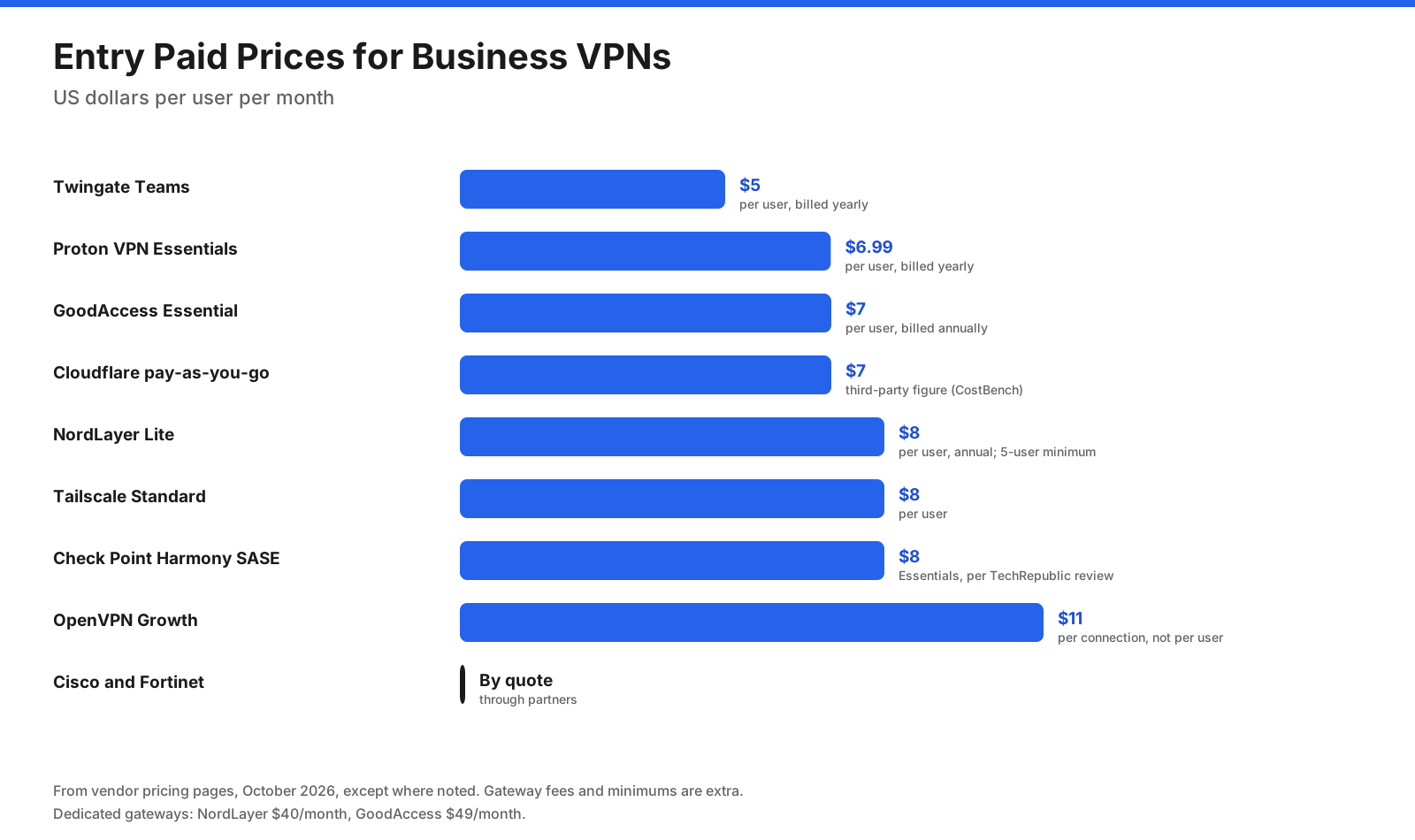
Most managed business VPNs cost between $5 and $18 per user per month, with discounts for annual billing. Many add a fixed monthly fee for a dedicated server or gateway, which matters for small teams because it raises the cost per person.
A few points help when comparing quotes:
- Gateway fees: NordLayer lists $40 per month for a dedicated server on Core and Premium. GoodAccess lists $49 per month per additional gateway.
- User minimums: NordLayer and GoodAccess start at 5 users, Proton at 2, and Check Point Harmony SASE at 10 according to TechRepublic.
- Seats versus connections: OpenVPN bills per connection, so one person on two devices can count twice.
- Feature tiers: SSO, device posture, and zero trust controls often sit on the second tier, not the entry plan.
- Monthly billing: Monthly rates can be much higher than annual ones. GoodAccess lists $9 monthly versus $7 annually on Essential, and Twingate lists $12 monthly versus $5 or $10 annually.
For a 10-person team, a managed VPN on its entry tier typically costs $70 to $80 a month before gateway fees, based on the list prices above. A team that needs SSO and a dedicated gateway should budget roughly $100 to $200 a month. Check vendor pages for current rates.
Are There Free Business VPN Options?
Several providers offer free plans that suit very small teams or a proof of concept.
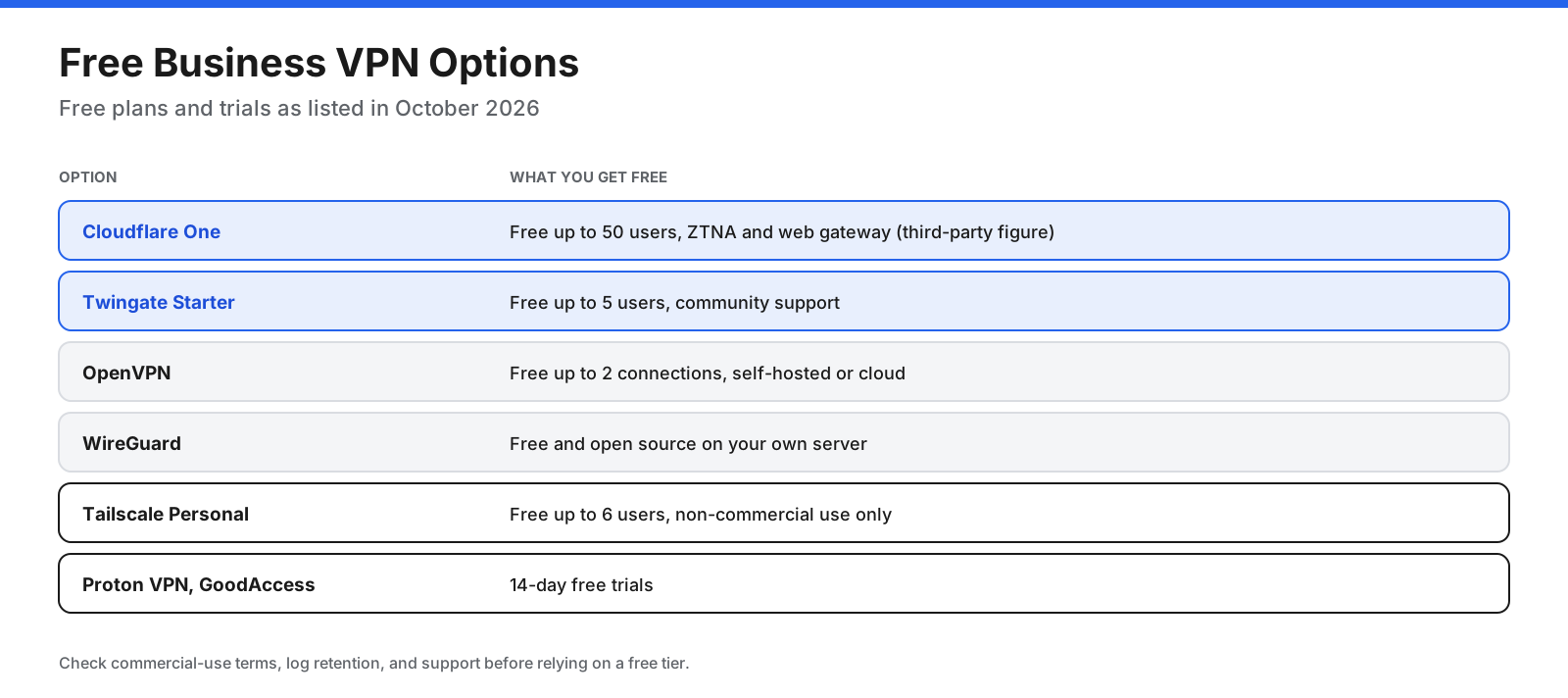
- Cloudflare One: Free for up to 50 users, according to CostBench, with 24-hour log retention.
- Twingate Starter: Free for up to 5 users with community support.
- OpenVPN: Free for up to 2 connections on Access Server and CloudConnexa.
- WireGuard: Free and open source if you can run your own server.
- Tailscale Personal: Free for up to 6 users, but for non-commercial use only.
- Trials: Proton VPN for Business and GoodAccess offer 14-day free trials.
Avoid using a free consumer VPN for company work. Consumer services do not give you admin control, audit logs, or a dedicated IP, and their privacy terms may not meet your company’s obligations.
Do You Need a VPN or Zero Trust Network Access?
Many companies searching for a business VPN are also weighing VPN alternatives for business, mainly ZTNA. The two approaches solve the same problem in different ways.
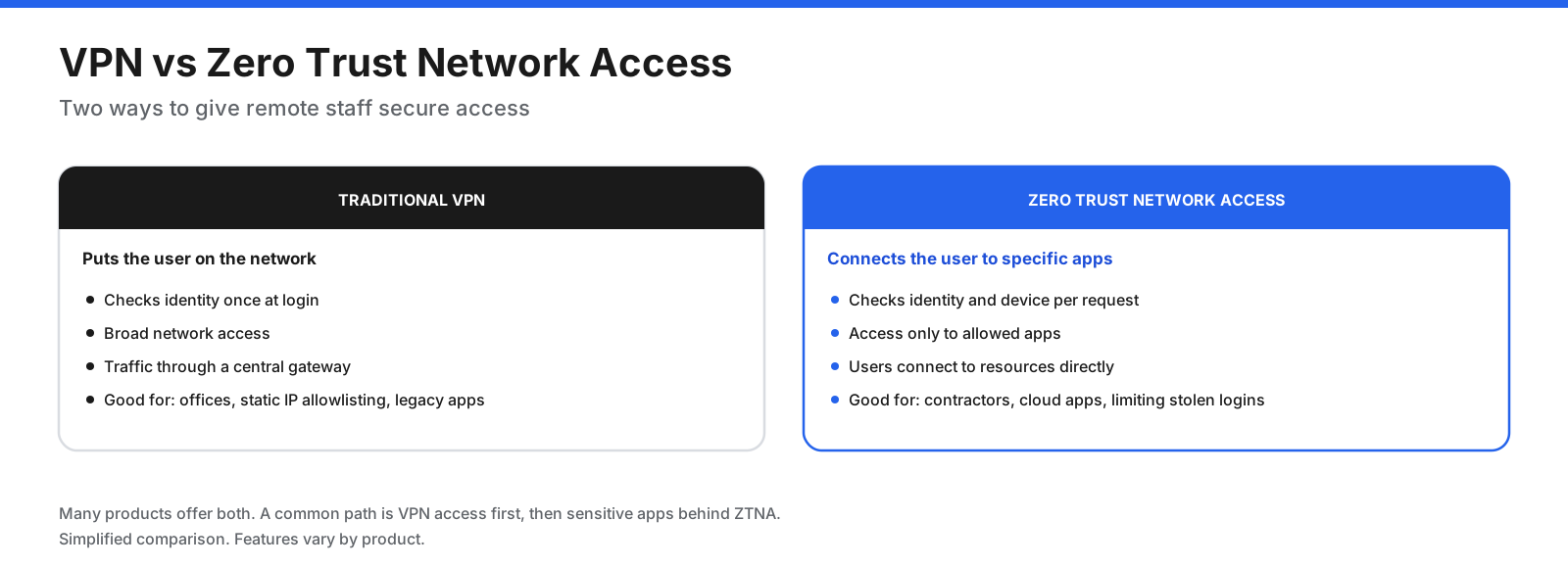
A traditional VPN authenticates the user once and then places them on the network. Once connected, the user can often reach far more than they need. That makes setup simple but means a stolen password or compromised laptop can expose a wide part of your network.
ZTNA checks who the user is and whether their device meets your rules every time they try to reach an application. Users only see the apps they are allowed to use. This limits damage from a compromised account and works well for contractors and cloud-first companies.
You do not have to choose one or the other. GoodAccess, Check Point Harmony SASE, OpenVPN CloudConnexa, Cisco Secure Client, and FortiClient support both approaches, and Twingate and Cloudflare are built around ZTNA. A common path is to start with VPN access for everyone and then move sensitive apps behind zero trust rules.
How Do You Choose the Best VPN for Your Business?
Work through these questions in order. The first one that clearly applies usually points you to the right group of tools.
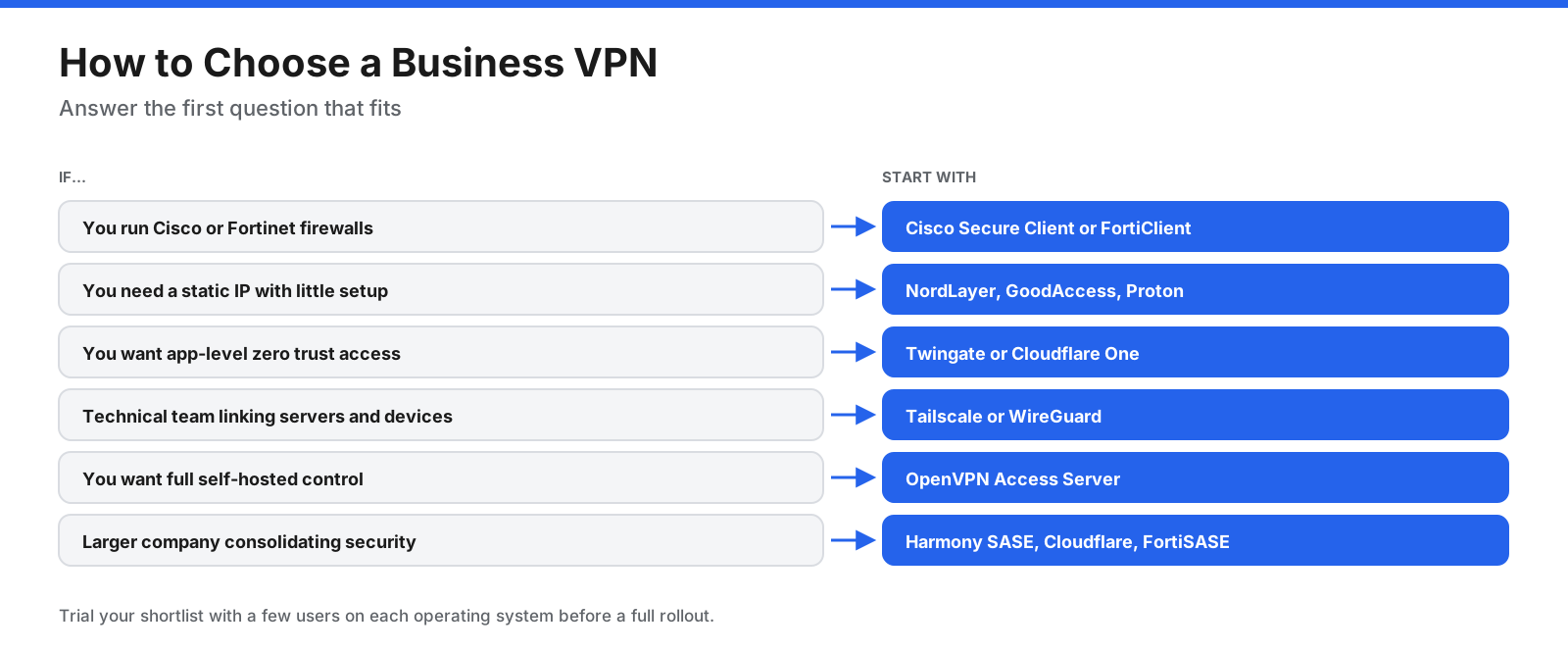
Beyond that, compare these factors:
- What people need to reach: Internal servers, cloud apps that require a fixed IP, office printers and file shares, or just safer internet on public Wi-Fi.
- Identity integration: Check that the tool supports your identity provider for SSO and enforces MFA.
- Device posture: If people use personal devices, look for checks on operating system version, disk encryption, and endpoint protection.
- Platforms: Confirm clients for every operating system your team uses, including Linux and mobile.
- Gateway locations: Choose providers with gateways near your staff and the services they use.
- Logs and retention: Make sure log retention meets your audit and compliance needs.
- Support: Small teams can manage with documentation, but larger rollouts benefit from live support and a named contact.
- Total cost: Add per-user fees, gateway fees, and minimum seat counts, then compare annual and monthly billing.
How Do You Keep a Business VPN Secure?
A VPN gateway is a door into your network, which makes it a target. In joint guidance published in September 2021, the NSA and CISA warned that VPN servers are entry points into protected networks and attractive targets. Their recommendations, along with common practice, form a good checklist.
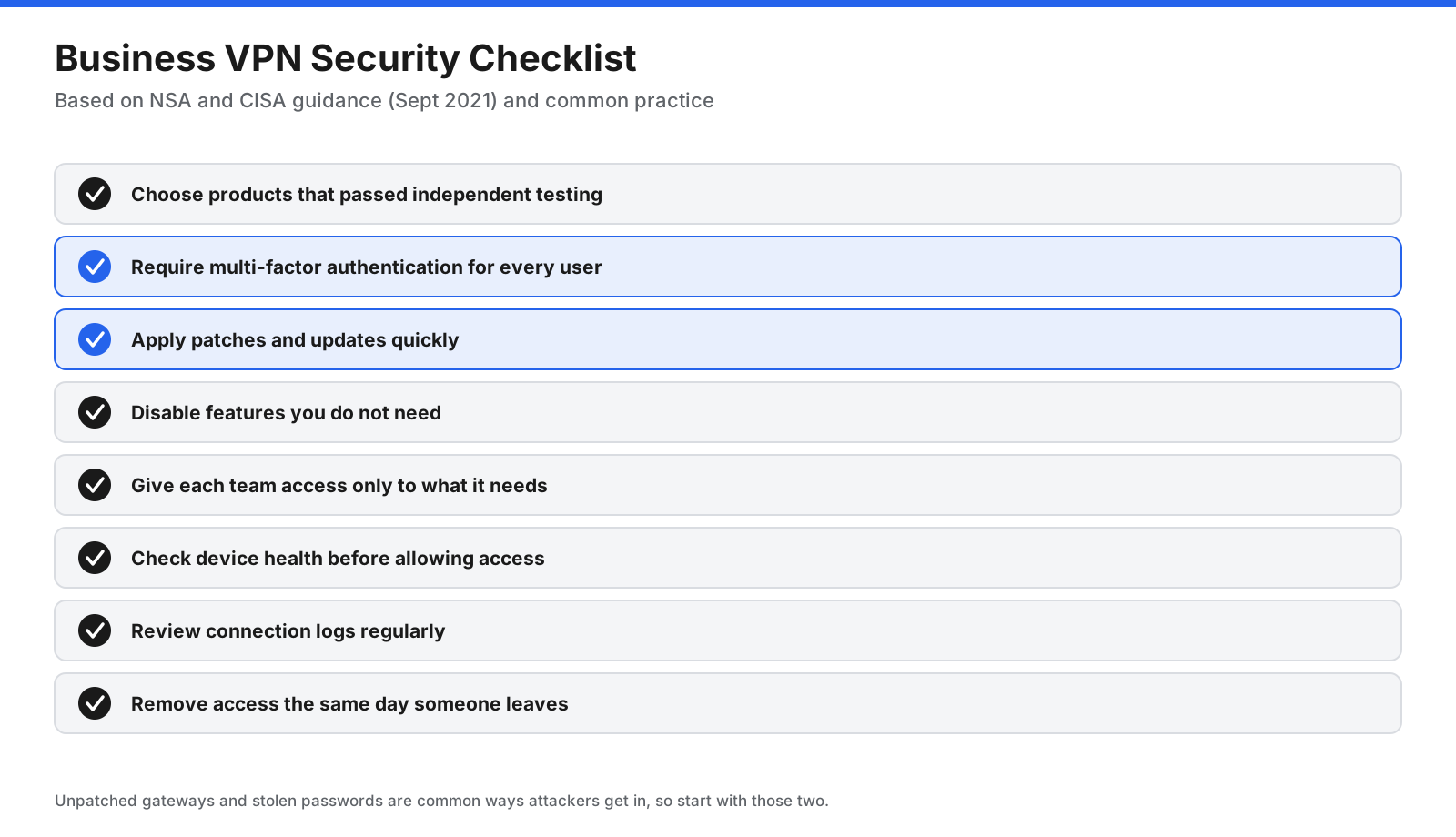
- Choose tested products. The NSA and CISA recommend selecting VPNs that have passed independent testing and appear on NIAP’s Product Compliant List.
- Require MFA. Passwords alone are not enough for a gateway into your network.
- Patch quickly. Attackers have exploited known vulnerabilities in VPN devices. Apply updates as soon as vendors release them.
- Reduce the attack surface. Turn off features you do not use.
- Limit access. Give each team access to the systems it needs rather than the whole network.
- Check device health. Use posture checks if your tool supports them.
- Review logs. Look for unusual login times, locations, and failed attempts.
- Offboard immediately. Remove VPN access the same day an employee or contractor leaves.
Managed cloud services handle gateway patching for you. If you run your own gateway, firewall, or VPN server, patching is your responsibility.
How Do You Set Up a Business VPN?
Rollouts go smoothly when you plan access before installing anything. These steps apply to most products.
- List what people need to reach. Note each internal system, cloud app, and office network, and which teams need each one.
- Pick a model. Decide between a managed team VPN, ZTNA, a mesh network, or a firewall-based VPN.
- Run a trial. Use a free plan or trial with a small group, including at least one person on each operating system you support.
- Connect your identity provider. Set up SSO and require MFA before adding more users.
- Create gateways and connectors. Set up a dedicated gateway or install connectors in each network you need to reach.
- Define access rules. Create groups by team and grant each group only the resources it needs.
- Allowlist your gateway IP. Add your dedicated IP to the cloud apps, databases, and firewalls that should only accept company traffic.
- Deploy the client. Use MDM where possible so settings are consistent, and turn on Always On VPN or a kill switch for remote staff.
- Train your team. Explain when to connect, how to sign in, and who to contact with problems.
- Review and adjust. Check logs and user feedback after the first few weeks, then tighten access rules.
What Mistakes Should You Avoid?
- Using consumer VPN accounts. Shared personal accounts give you no control, no audit trail, and no clean way to remove access.
- Granting full network access to everyone. Broad access increases the impact of one stolen login.
- Skipping MFA. Password-only access is one of the most common ways attackers get in.
- Leaving gateways unpatched. Self-hosted VPN servers and firewalls need regular updates.
- Forgetting about contractors. Give contractors time-limited, app-specific access rather than full VPN accounts.
- Ignoring connection counts. Per-connection pricing can double your bill if people use several devices.
- Not planning for performance. Routing all traffic, including video calls, through a distant gateway can slow people down. Use split tunneling where your security policy allows.
Which VPN Is Best for a Small Business?
For a small business, the best VPN is usually the one that takes the least time to run. Managed services such as NordLayer, GoodAccess, and Proton VPN for Business give you a dedicated IP and a web console without a server to maintain. Twingate’s free Starter plan suits teams of up to 5 people who mainly need access to a few internal tools, and Cloudflare’s free plan suits teams of up to 50 who are comfortable with a little more setup.
If your office already has a business firewall from Cisco, Fortinet, or another vendor, check whether it includes remote access VPN licenses before buying a separate service. Many small businesses already own a VPN appliance without realizing it. If you rely on an outside IT provider or MSP, ask which tools they already support, since that affects setup and ongoing cost.
Frequently Asked Questions
What is the best VPN for corporate use?
There is no single best option for every company. Firms with Cisco or Fortinet firewalls often use Cisco Secure Client or FortiClient. Companies that want a managed service with a static IP often choose NordLayer, GoodAccess, or Proton VPN for Business. Cloud-first companies often use zero trust tools such as Twingate, Cloudflare One, or Check Point Harmony SASE.
How much does a VPN cost for a business?
Most managed business VPNs cost $5 to $18 per user per month on list prices, plus $40 to $49 per month for each dedicated gateway on services that charge for them. Several providers offer free plans for small teams, and enterprise firewall-based VPNs are priced through partners.
What is the difference between a business VPN and a personal VPN?
A business VPN gives administrators central control over users, access rules, dedicated IP addresses, SSO, and logs. A personal VPN protects one person’s privacy and usually offers none of those controls.
Is a VPN enough to secure remote workers?
No. A VPN encrypts traffic and controls network access, but you also need MFA, endpoint protection, patching, and security training. Zero trust access controls further limit what a compromised account can reach.
Can a business VPN track employee activity?
Business VPNs log connection details such as who connected, when, from where, and which resources they reached. Some also include web filtering logs. What admins can see depends on the product and your settings, so tell employees what you log.
Can the FBI or other authorities track a VPN?
A VPN hides traffic from the local network and internet provider, but the VPN provider and your company’s admins can see connection data. Providers, like other companies, can receive legal requests for the data they hold. Business VPNs keep logs for audits by design, so they are not tools for anonymity.
What is a site-to-site VPN?
A site-to-site VPN connects two or more networks, such as offices or an office and a cloud environment, with a permanent encrypted link. Users on each network can reach the others without running a VPN client.
Is ZTNA replacing VPNs?
Many organizations are moving sensitive apps behind ZTNA, but VPNs remain common for network-level access, legacy apps, and site-to-site links. Many vendors now offer both in one product.
Do I need a dedicated IP for my business VPN?
You need one if you want to restrict cloud apps, databases, or firewalls to traffic from your company. Most managed business VPNs offer dedicated IPs on mid-tier plans or as an add-on.
Can I use a free VPN for my business?
Free consumer VPNs are not suitable for company data. Free business tiers from Cloudflare, Twingate, and OpenVPN are a better fit for small teams, as long as you check user limits, log retention, and support terms.
Does a business VPN slow down internet speed?
Encryption and routing add some overhead, and speed depends on the distance to the gateway and the protocol. Choosing gateways near your users, using modern protocols such as WireGuard, and using split tunneling can reduce the impact.
The Bottom Line
The best VPN for business depends on your size, your skills, and what your team needs to reach. Small teams that want a static IP and a simple console should start with a managed service such as NordLayer, GoodAccess, or Proton VPN for Business. Teams that want app-level access should trial Twingate or Cloudflare One, and technical teams should look at Tailscale or WireGuard. Companies with Cisco or Fortinet firewalls should check the VPN licenses they may already own.
Whichever you choose, require MFA, limit access to what each team needs, and keep gateways patched. Run a trial with a small group before rolling out, and confirm current pricing and plan features on each vendor’s site, because both change often.




















































































