


Video conferencing software is now basic business infrastructure. Teams use it for daily standups, sales teams for client demos, HR for interviews, marketers for webinars, and clinics for telehealth visits. The best platforms make joining easy, keep audio and video stable on weak connections, and add tools such as recording, transcripts, AI summaries, and breakout rooms.
The right choice depends less on brand and more on the kind of meetings you run. A company on Microsoft 365 may already own a capable meeting tool. A consultant who meets new clients every day needs guests to join from a link without friction. A marketing team running webinars for thousands needs registration and analytics, and a clinic needs a HIPAA-ready platform with a business associate agreement.
This guide compares 11 video conferencing platforms grouped by meeting type, with free plan limits and pricing published as of October 2026. You will also find a feature checklist, a security checklist, guidance on webinars and telehealth, and tips for better meetings. The comparison is independent, with no sponsored placements, and outside opinions name their source.
Quick Picks
- Best all-round video conferencing platform: Zoom Workplace
- Best for organizations on Microsoft 365: Microsoft Teams
- Best for organizations on Google Workspace: Google Meet
- Best for enterprise video and audio quality: Webex
- Best for traditional business meetings: GoTo Meeting
- Best for meetings with phone system integration and built-in AI: RingCentral Video
- Best budget option for small businesses: Zoho Meeting
- Best for client meetings in the browser: Whereby
- Best free and open-source option: Jitsi Meet
- Best for webinars and virtual events: Livestorm
- Best for telehealth: Doxy.me
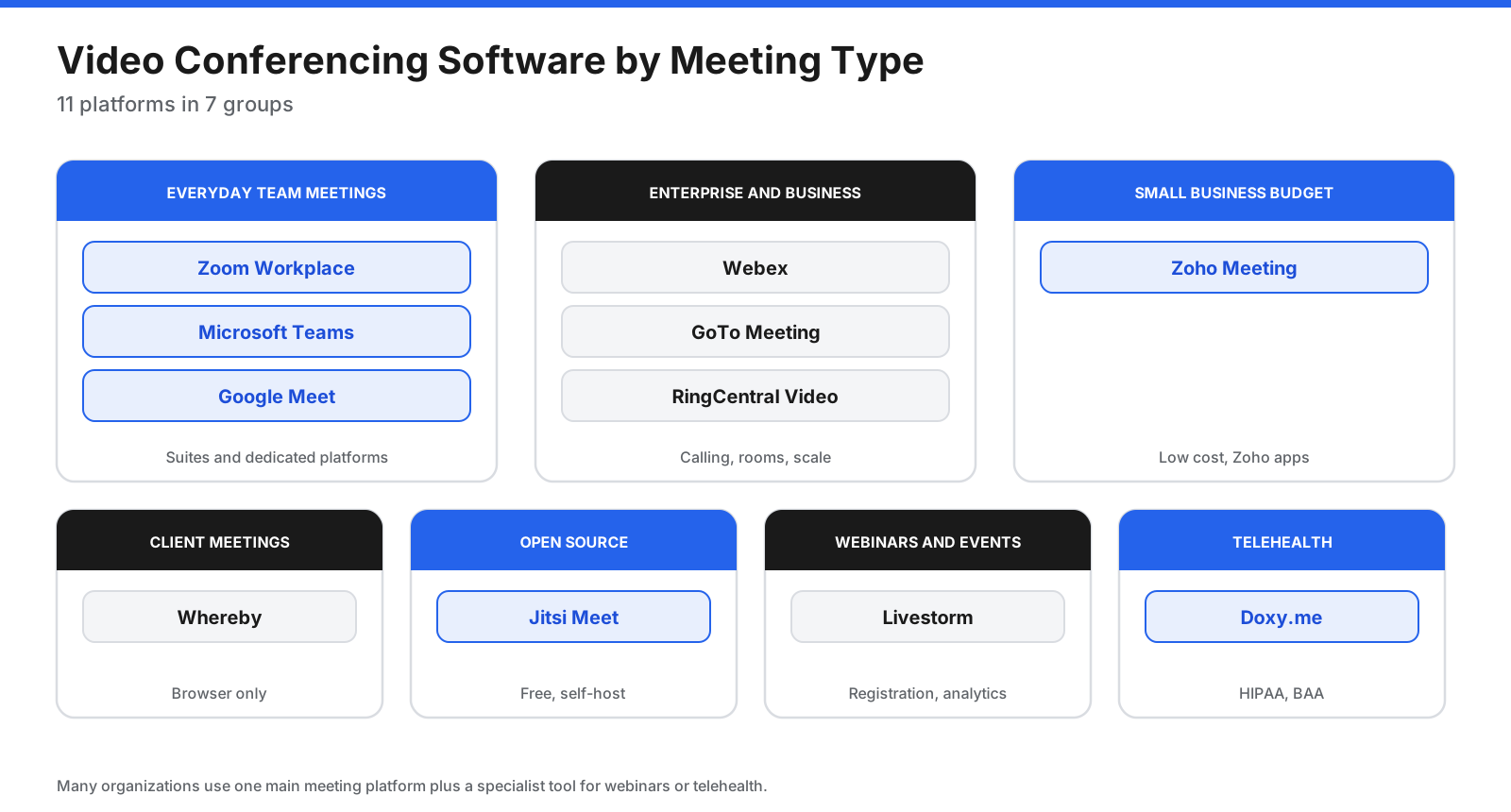
What Types of Meetings Do You Need to Support?
Before comparing platforms, list the meetings your organization runs. Each type puts different demands on the software.
- Internal team meetings: Frequent, recurring, and often small. Integration with chat, calendar, and documents matters most.
- Client and sales calls: Guests from other companies must join easily, often from a browser, with a professional look.
- Large all-hands meetings: Hundreds of attendees, with stable video and moderation tools.
- Webinars and virtual events: Registration pages, attendee management, polls, Q&A, and analytics.
- Interviews and training: Recording, waiting rooms, breakout rooms, and screen sharing.
- Regulated meetings: Healthcare, legal, and financial calls that need encryption, access controls, and compliance agreements.
Many organizations use one main platform for internal meetings and a specialist tool for webinars or telehealth.
What Features Should Video Conferencing Software Have?
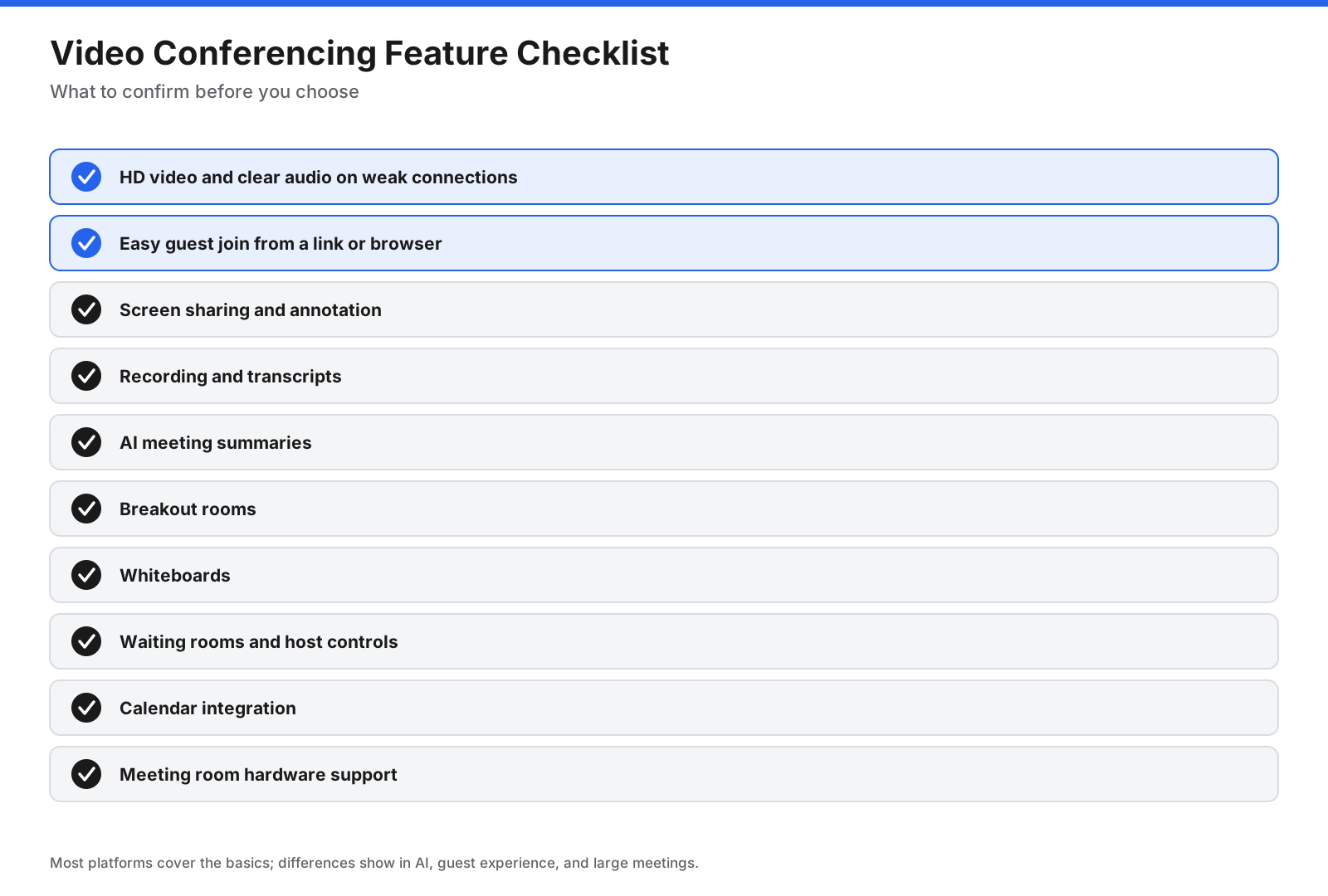
- Reliable audio and video: Calls should hold up on weaker connections.
- Easy guest access: Links that open in a browser help outside guests join quickly.
- Screen sharing and annotation: Essential for demos, training, and reviews.
- Recording and transcripts: Useful for people who miss meetings and for documentation.
- AI summaries: Automatic notes, action items, and recaps save time after meetings.
- Breakout rooms and whiteboards: Helpful for workshops and training.
- Host controls: Waiting rooms, passcodes, mute controls, and participant removal.
- Calendar integration: Scheduling from Google Calendar or Outlook.
- Room hardware support: Important if you equip conference rooms.
What Are the Best Video Conferencing Platforms?
Prices are per user or host per month in US dollars unless noted, taken from each provider’s pricing page in October 2026 unless a different source is cited.
Everyday Team Meetings
1. Zoom Workplace
Zoom remains one of the most widely used meeting platforms, known for stable calls and easy joining. Zoom Workplace adds chat, whiteboards, notes, and AI features on paid plans. Zapier’s November 2025 review picks it for reliable, large video calls and says it is easy to invite outside guests.
Pricing: Zoom’s free Basic tier caps each meeting at 40 minutes and 100 people, with a few AI summaries a month. Pro is $16.99 per user monthly, or the equivalent of $14.16 on yearly billing, and lifts the cap to 30 hours, adds unlimited AI summaries, and includes 10 GB of cloud space while keeping a 100-person ceiling. Business is $21.99 monthly, or $18.33 yearly, and raises the ceiling to 300.
Limitations: Zapier notes it is not bundled with other office software, so it can add cost for organizations that already pay for a suite.
Best for: Organizations that want a dependable, dedicated meeting platform that guests already know.
2. Microsoft Teams
Microsoft Teams combines video meetings with chat, file sharing, and Microsoft 365 apps. Zapier picks it for integrating team chat with video conferencing and notes good video quality on large calls.
Pricing: On the free version, calls with three or more people stop at one hour, while two-person calls can run for 30 hours, and up to 100 people can join. Teams Essentials is $4 per user each month on yearly billing and allows 300 people for up to 30 hours. Microsoft 365 Business Basic, at $7, bundles Teams with email and browser versions of Office.
Limitations: Zapier’s reviewer says it can be confusing if you are not using Teams as your team chat app.
Best for: Organizations that already run on Microsoft 365.
3. Google Meet
Google Meet is built into Google Workspace and runs in the browser on computers, with direct links from Google Calendar and Gmail. Zapier picks it for Google Workspace users and highlights support for up to 100,000 view-only participants on eligible plans.
Pricing: Anyone with a personal Google account can host group calls lasting an hour and two-person calls lasting a full day, for up to 100 people. A 2026 pricing summary puts Google Workspace Business Starter at roughly $7 per user each month on yearly billing, which removes the one-hour cap on group calls.
Limitations: Zapier notes it can lag on large calls and does not degrade calls as gracefully as Zoom.
Best for: Organizations that run on Google Workspace.
Enterprise and Business Calls
4. Webex
Webex, from Cisco, focuses on enterprise meetings, calling, and conference room systems. Zapier picks it for video quality and praises its audio quality, whiteboards, and document annotation.
Pricing: The free tier stops meetings after 40 minutes and holds up to 100 people. Webex Meet runs $12 a month, or $144 for a full year, and supports 200 people in meetings lasting up to a day. Adding business calling through Webex Suite brings the yearly price to $270, and quoted Enterprise plans scale to 1,000 people.
Limitations: Zapier notes it can be expensive for large organizations, and some users report stability problems.
Best for: Enterprises that want meetings, calling, and room systems from one vendor.
5. GoTo Meeting
GoTo Meeting is a long-established business meeting platform with plans built around the number of participants per meeting.
Pricing: Professional includes up to 150 participants and Business up to 250, priced per organizer and billed annually, with Enterprise on quote. GoTo’s pricing page did not show dollar amounts when checked, and a free trial is available.
Limitations: There is no ongoing free plan, and fewer extras are included than in all-in-one suites.
Best for: Businesses that want a straightforward, meeting-focused tool.
6. RingCentral Video
RingCentral Video is part of RingCentral’s business communications platform, which also includes phone systems. Its page says video meetings include a Personal AI Assistant for transcripts, notes, and recaps at no extra cost on paid plans.
Pricing: Free Meetings users get unlimited meetings of up to 50 minutes with 100 participants, and guests can join from a browser without a download. Paid users get meetings of up to 24 hours with 300 participants, and video is free for RingEX phone customers, according to RingCentral’s video page. Paid prices are listed on a separate pricing page.
Limitations: It makes the most sense if you also use RingCentral for business phones.
Best for: Businesses that want meetings and their phone system from one provider.
Small Business on a Budget
7. Zoho Meeting
Zoho Meeting is a low-cost meeting and webinar tool that plugs into Zoho CRM and the wider Zoho suite.
Pricing: Zoho’s free tier gives hosts one-hour meetings for groups of up to 100. Its Standard and Professional plans are priced by how many people can attend, in bands from 10 up to 250, and allow day-long meetings, with a discount of more than 15% for paying yearly. US dollar figures were not visible on Zoho’s page when checked.
Limitations: It has a smaller ecosystem than Zoom, Teams, or Meet.
Best for: Small businesses, especially those already using Zoho apps.
Client Meetings in the Browser
8. Whereby
Whereby runs entirely in the browser, so guests join from a link without downloads or accounts. Hosts get permanent room links, which suits consultants, coaches, and agencies that meet clients regularly.
Pricing: The free tier is a single room for one host, capped at four guests and half-hour sessions. A single host can upgrade to Pro for $10.99 a month to get 100 guests and no session cap, while Business is $13.99 for each host, with three hosts minimum, and allows 200 guests. Paying yearly is 17% cheaper.
Limitations: The free plan is very limited, and it lacks large webinar features.
Best for: Professionals who meet clients and want the simplest possible join experience.
Open Source and Self-Hosted
9. Jitsi Meet
Jitsi Meet is free, open-source video conferencing that you can use on the hosted meet.jit.si service or run on your own servers. Zapier picks it as the best self-hosted option.
Pricing: Jitsi costs nothing. Meetings on the public meet.jit.si service are not cut off after a fixed time, though an account is needed to start one there, and a self-hosted server can handle as many people as its hardware allows.
Limitations: Zapier notes it is not as feature-rich as other options and can occasionally lag.
Best for: Organizations that want free meetings or full control over where meeting data lives.
Webinars and Virtual Events
10. Livestorm
Livestorm is a browser-based platform for webinars and virtual events, including live, on-demand, and multi-session events, with registration, engagement tools, and analytics.
Pricing: Pro costs €2.50 per attendee, bought as a yearly pack of attendee credits, with sessions of up to four hours and up to 3,000 live attendees per event. One credit is used per unique participant per session, and registrants who never join are not charged. Enterprise is custom with sessions of up to 12 hours.
Limitations: Usage-based pricing requires estimating attendance, and new attendees cannot join once credits run out.
Best for: Marketing and customer education teams running webinars and virtual events.
Telehealth
11. Doxy.me
Doxy.me is a telehealth platform built for healthcare providers. Its pricing page lists HIPAA compliance and a business associate agreement (BAA).
Pricing: A free version is available for providers who use telehealth occasionally. The Premium plan, billed per user annually, adds unlimited calls, screen sharing, file transfer, group calls of up to 25 participants, virtual waiting rooms, patient invites by email or SMS, and clinic management tools. Its price was not shown on the page, and a free trial needs no credit card.
Limitations: It is designed for healthcare visits rather than general business meetings.
Best for: Clinicians and practices that need a simple, HIPAA-ready telehealth tool.
How Do the Video Conferencing Platforms Compare?
| Platform | Best for | Free plan limit | Entry paid price |
|---|---|---|---|
| Zoom Workplace | All-round meetings | 40 minutes, up to 100 | $14.16 per user, yearly |
| Microsoft Teams | Microsoft 365 users | 60 min group, 100 people | $4/user/month annual |
| Google Meet | Google Workspace users | 60 min group, 100 people | About $7/user/month annual |
| Webex | Enterprise quality | 40 min, 100 people | $144/year |
| GoTo Meeting | Business meetings | Trial only | Check site |
| RingCentral Video | Meetings plus phones | 50 min, 100 people | Check site |
| Zoho Meeting | Small business budget | 60 min, 100 people | Check site |
| Whereby | Browser client meetings | 30 min, 4 attendees | $10.99/month |
| Jitsi Meet | Free, open source | No set limit | Free |
| Livestorm | Webinars and events | Free plan mentioned | €2.50 per attendee |
| Doxy.me | Telehealth | Free version | Check site |
What Is the Best Free Video Conferencing Software?
Free plans work well for short meetings, small groups, and occasional use.
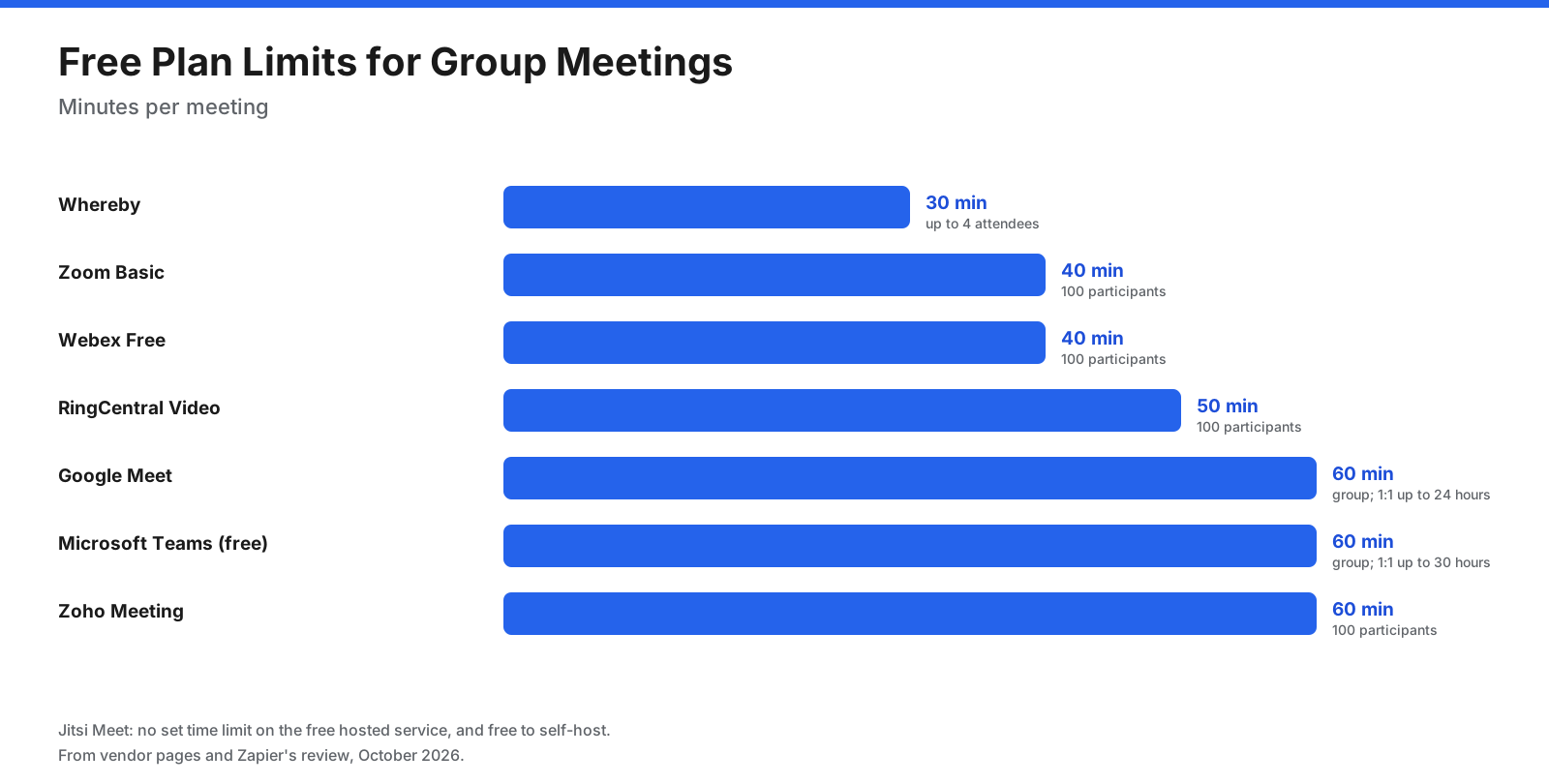
- Longest free group meetings: Google Meet, Microsoft Teams, and Zoho Meeting each allow 60 minutes, and RingCentral Video allows 50.
- No set time limit: Jitsi Meet, which is free and open source.
- Long one-to-one calls: Google Meet allows 24 hours and Teams 30 hours for one-to-one calls on free plans.
- Simplest guest join: RingCentral Video and Whereby let guests join from a browser without downloads.
If your meetings regularly run longer than an hour or include outside guests, a paid plan or a suite you already pay for is usually worth it.
How Much Does Video Conferencing Cost?
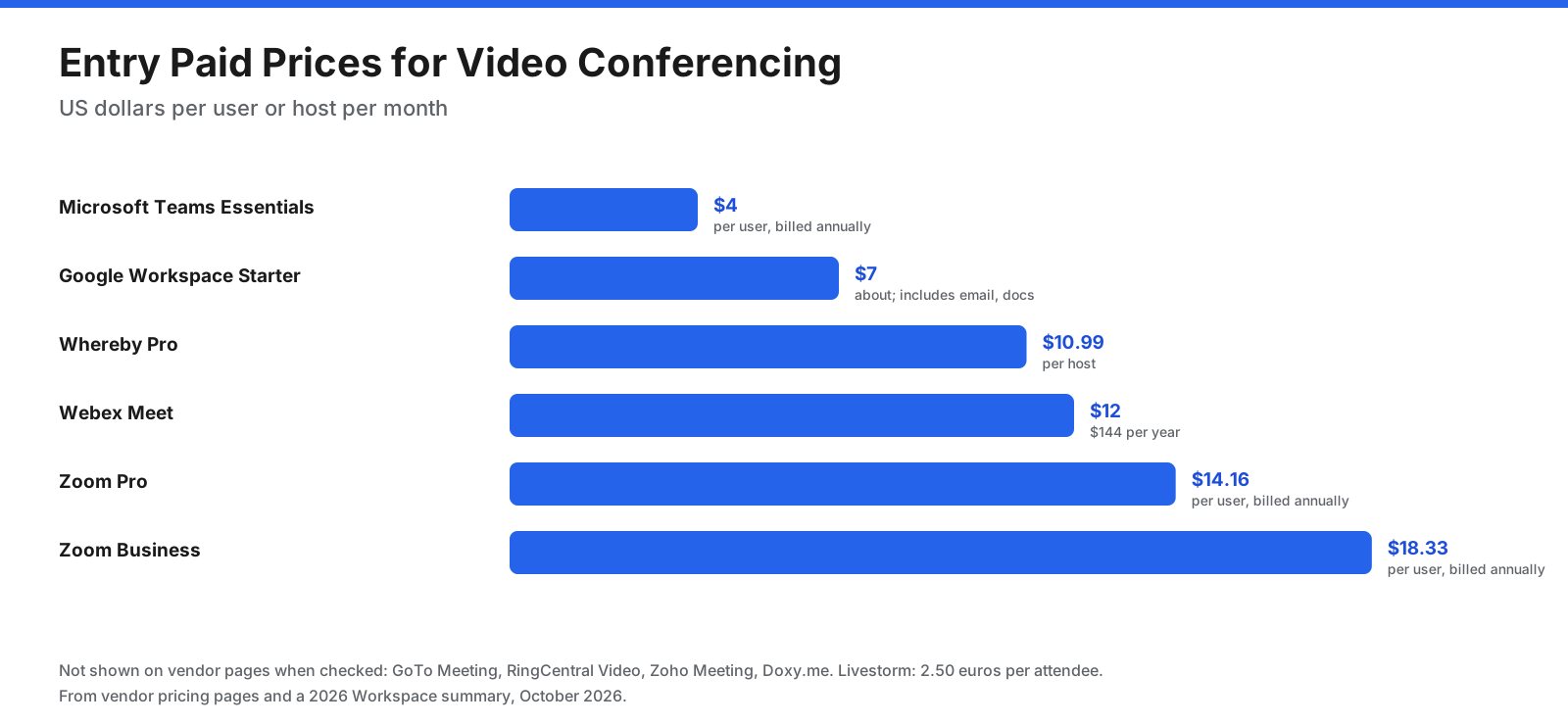
For a team of 20 people on annual billing, approximate yearly costs are:
- Microsoft Teams Essentials: 20 × $4 × 12 = $960.
- Google Workspace Business Starter: 20 × $7 × 12 = about $1,680, including email and documents.
- Webex Meet: 20 × $144 = $2,880.
- Zoom Pro: 20 × $14.16 × 12 = about $3,398.
Many organizations do not need a license for every employee. Only people who host meetings need paid seats on most platforms, while attendees join for free.
Do You Need Separate Webinar Software?
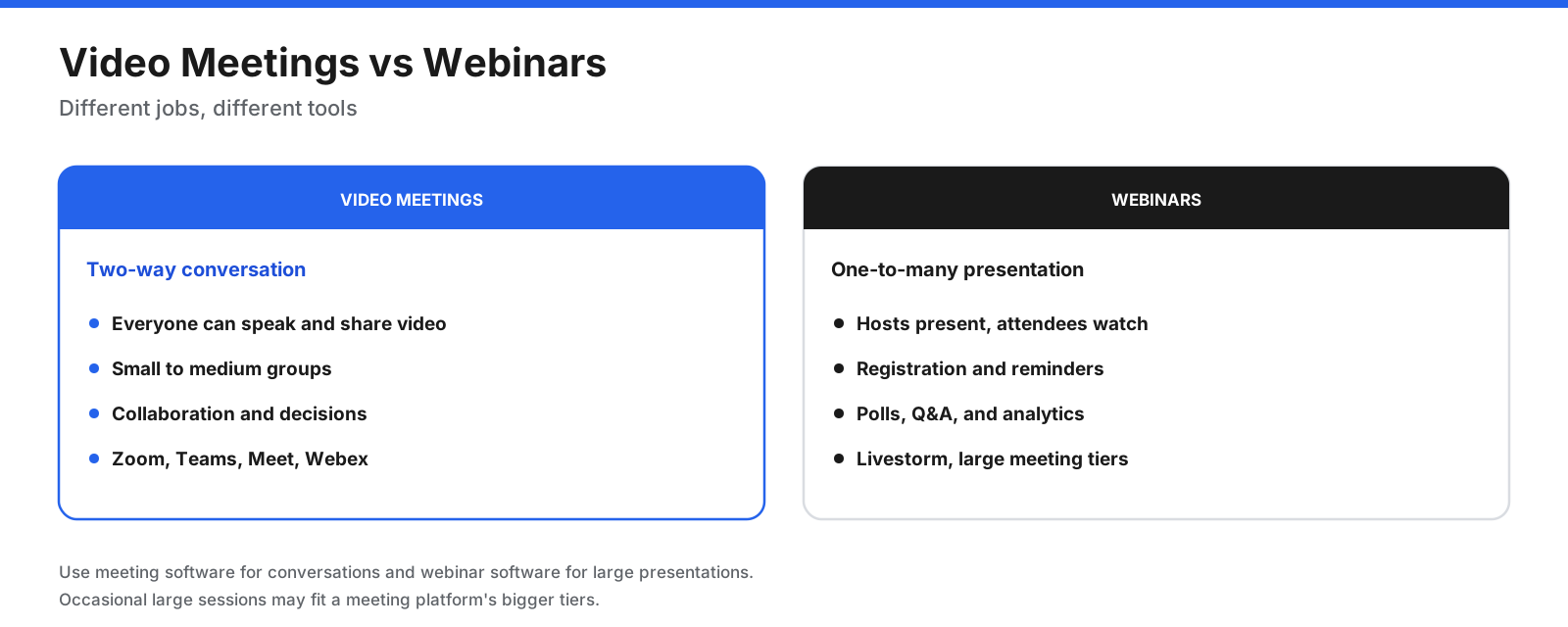
- Meetings are two-way conversations where everyone can speak, share, and collaborate.
- Webinars are one-to-many presentations with registration, reminders, attendee management, polls, Q&A, and analytics.
If you run occasional large meetings, the larger tiers of Zoom, Teams, or Webex may be enough. If webinars drive leads or customer education, a dedicated platform such as Livestorm offers better registration, engagement, and reporting.
What Is the Most Secure Video Conferencing Software?
Security needs vary from basic host controls to strict regulatory requirements.
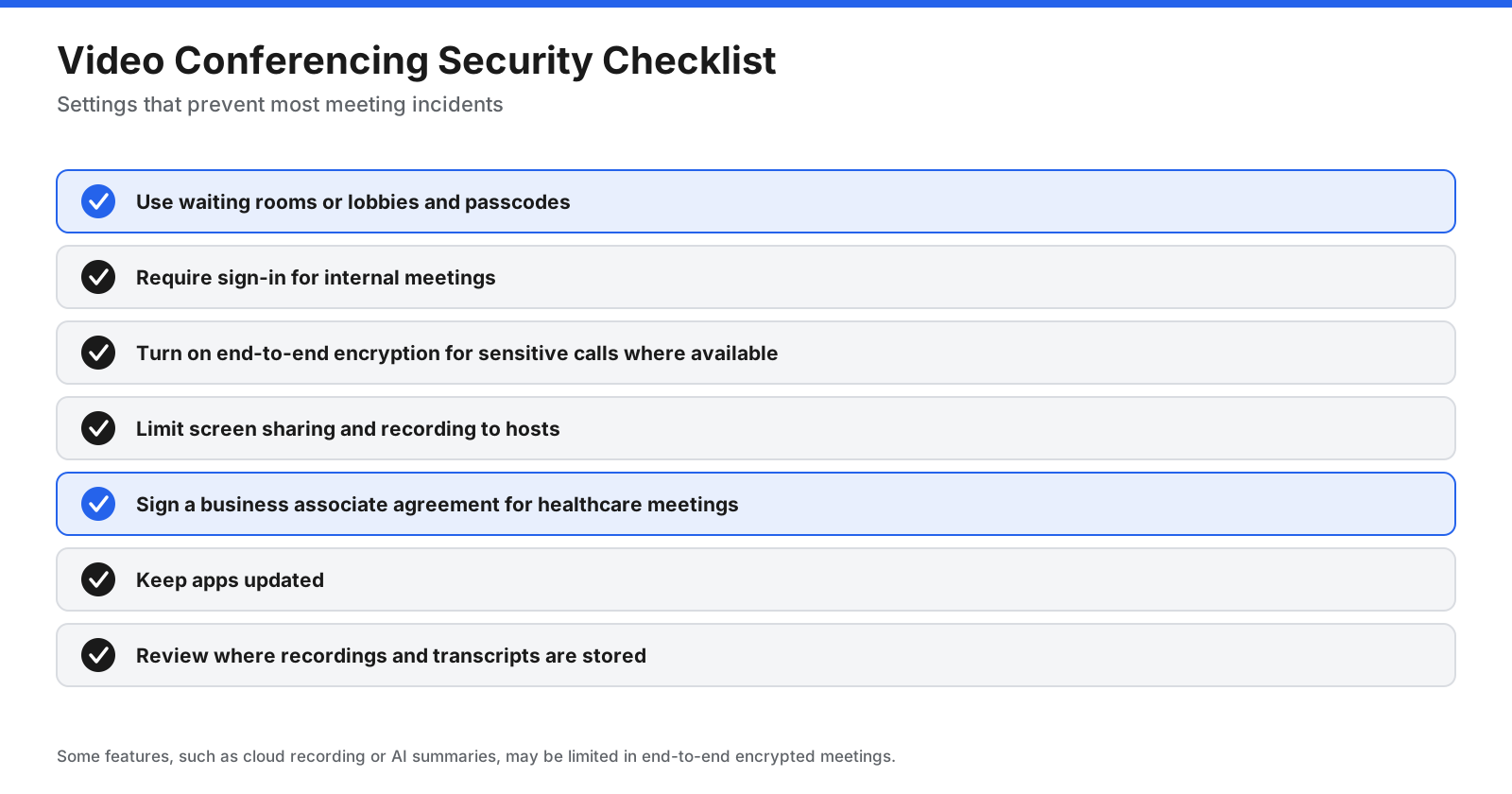
- Control entry. Use waiting rooms, lobbies, and passcodes, and require sign-in for internal meetings.
- Encrypt sensitive calls. RingCentral lists dynamic end-to-end encryption among its features, and other major platforms offer end-to-end encryption options for sensitive meetings. Some features, such as cloud recording or AI summaries, may not be available in end-to-end encrypted meetings.
- Limit sharing and recording. Restrict screen sharing and recording to hosts unless needed.
- Sign a BAA for healthcare. HIPAA-covered organizations need a business associate agreement. Doxy.me lists a BAA on its pricing page, and other vendors offer BAAs on specific plans.
- Keep software updated. Updates patch security issues.
- Review data settings. Check where recordings and transcripts are stored and how long they are kept.
For organizations with strict data control needs, self-hosting Jitsi Meet keeps meeting infrastructure on your own servers.
What Is the Best HIPAA-Compliant Video Conferencing Software?
Healthcare providers need a platform that supports HIPAA requirements and signs a business associate agreement. Doxy.me is built specifically for telehealth and lists HIPAA compliance and a BAA on its pricing page. Patients join visits through a virtual waiting room, and providers can invite patients by email or SMS on Premium.
General business platforms can also be used for healthcare when the vendor signs a BAA and the account is configured correctly. Ask each vendor which plans include a BAA, and confirm settings for recording, storage, and access before using it for patient visits.
How Is AI Changing Video Meetings?
AI features are now standard on most paid meeting plans.
- Summaries and notes: Zoom’s paid plans include unlimited AI meeting summaries, and RingCentral includes an AI assistant for transcripts, notes, and recaps at no extra cost on paid plans.
- Transcripts: Searchable transcripts help people who missed a meeting.
- Action items: AI tools extract tasks and owners from discussions.
- In-meeting questions: Some platforms let you ask what was decided if you join late.
Our separate guide to AI meeting assistants covers dedicated note-taking tools that work across platforms. Check privacy settings for AI features, especially for confidential or regulated meetings.
How Do You Get Better Video Meeting Quality?
Software is only part of the experience. These steps improve quality on any platform.
- Use a wired connection or strong Wi-Fi. Video quality drops quickly on weak networks.
- Use a headset or good microphone. Clear audio matters more than sharp video.
- Light your face from the front. A window or lamp in front of you beats overhead lighting.
- Close bandwidth-heavy apps. Pause large downloads and cloud syncs during calls.
- Mute when not speaking. It reduces background sound in larger meetings.
- Test before important calls. Most platforms offer a test meeting or preview screen.
How Do You Run More Productive Video Meetings?
Good software cannot fix a meeting that has no purpose. These habits make video meetings shorter and more useful on any platform.
- Send an agenda. List the decisions or outcomes you need, so people can prepare.
- Invite only who is needed. Smaller meetings move faster. Share recordings or summaries with everyone else.
- Start with the decision. State what you need to decide in the first two minutes.
- Use the tools on purpose. Share your screen only when people need to see something, and use polls or reactions to gather quick input.
- Assign a note taker or use AI notes. Make sure action items and owners are captured.
- End with next steps. Confirm who does what by when, and send the summary right after.
- Protect focus time. Avoid back-to-back meetings where possible, and try shorter default lengths, such as 25 or 50 minutes.
What Is the Best Video Call App for Phones?
Zoom, Microsoft Teams, Google Meet, Webex, RingCentral, Zoho Meeting, and Doxy.me all work on iPhone and Android, either through apps or the phone’s browser. RingCentral says guests can join its meetings from a supported mobile browser without downloading anything, and Whereby runs entirely in the browser.
For calls on the go, choose a platform whose mobile app you already use for work, so your calendar and contacts sync automatically. Use headphones to avoid echo, and switch to audio only when your connection is weak. For personal calls with friends and family, consumer apps such as FaceTime, WhatsApp, and Signal are often simpler than business platforms.
Which Video Conferencing Software Is Best for Training and Education?
Training sessions, workshops, and classes need tools that keep participants engaged.
- Breakout rooms let trainers split a large group into small discussions.
- Whiteboards support brainstorming and visual explanations. Webex offers whiteboards and document annotation, and Zoom Workplace includes whiteboards on paid plans.
- Recording and transcripts let learners review sessions later.
- Polls and Q&A check understanding and keep attention.
- Registration and analytics matter for external training programs, where webinar tools such as Livestorm help.
Schools and universities often use the platform included with their Microsoft 365 or Google Workspace for Education plans, plus a dedicated virtual classroom for live teaching.
How Do You Equip Meeting Rooms for Hybrid Work?
Hybrid teams often need conference rooms that connect smoothly with remote participants. Major platforms, including Zoom, Microsoft Teams, Google Meet, and Webex, support certified room systems from hardware partners, and Webex also makes its own room devices.
When choosing room hardware, match it to your main meeting platform, size cameras and microphones to the room, and check that guests can join meetings hosted on other platforms if your clients use different tools.
What Should You Ask Vendors Before You Buy?
Sales pages rarely answer every question that matters once a platform is in daily use. Ask these before you sign.
- Who needs a paid license? Confirm whether only hosts pay, or whether panelists, co-hosts, and admins also need seats.
- What are the participant and length limits on each tier? Check both, because large meetings often hit one before the other.
- Which AI features are included, and where is the data processed? Ask whether transcripts and summaries are stored, for how long, and whether they are used to train models.
- How do recordings work? Check cloud storage limits, retention settings, and download options.
- Can you sign a BAA or meet other compliance needs? Healthcare, finance, and public sector buyers should confirm in writing.
- What happens at renewal? Ask about price changes, minimum seat counts, and how to cancel.
- How do guests from other platforms join? If clients use different tools, test cross-platform joining and room hardware compatibility.
How Do You Choose the Right Video Conferencing Software?
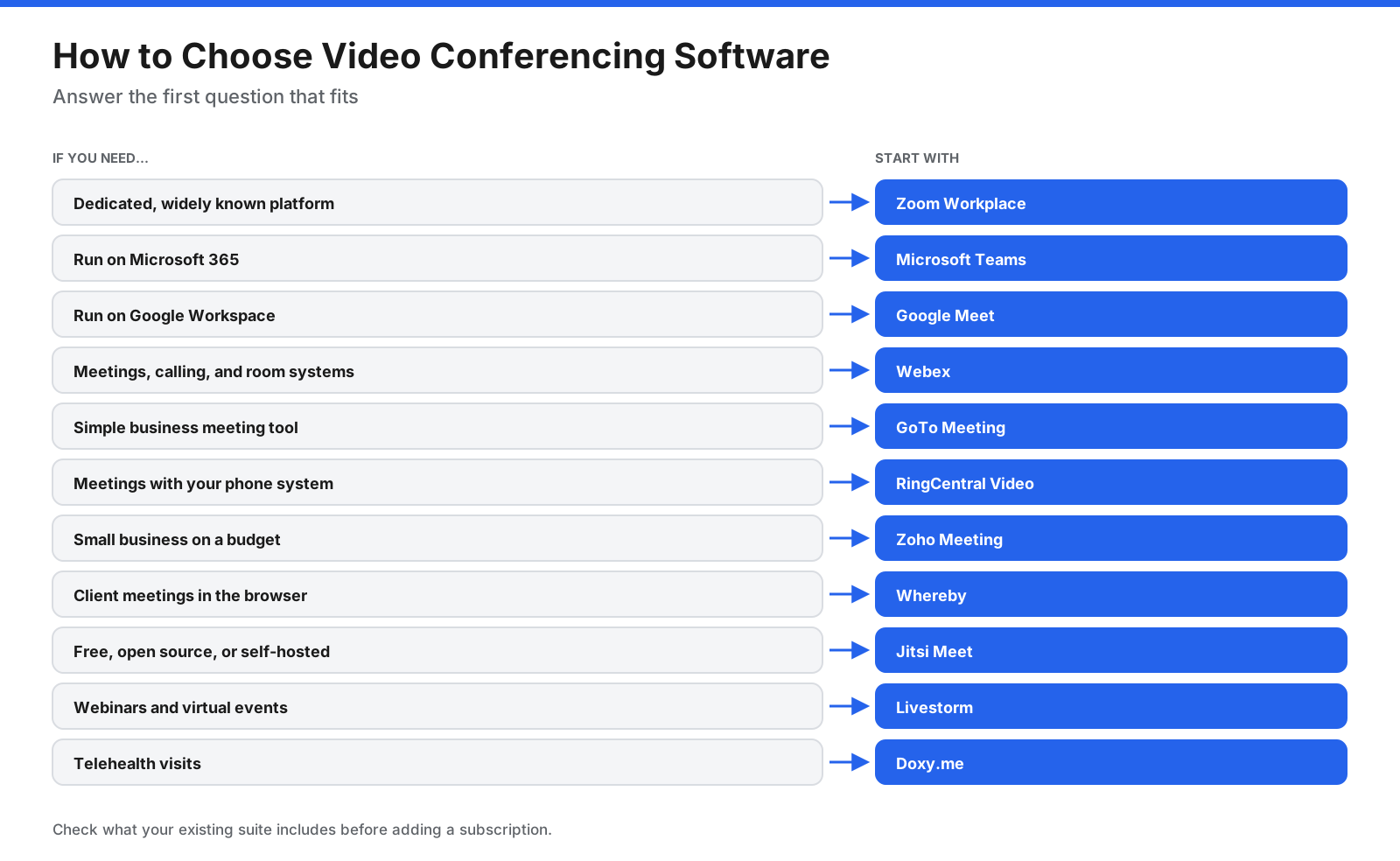
- Check your existing suite. If you pay for Microsoft 365 or Google Workspace, test Teams or Meet first.
- List your meeting types. Internal, client, large events, webinars, or regulated meetings.
- Count hosts, not attendees. Most platforms charge for people who host meetings.
- Test the guest experience. Join from a browser and a phone as an outside guest.
- Review security and compliance. Confirm encryption, data storage, and BAA availability if needed.
Frequently Asked Questions
What is the best video conferencing software?
Zoom Workplace is the best all-round choice for many organizations because it is reliable and familiar to guests. Microsoft Teams and Google Meet are better value if you already use Microsoft 365 or Google Workspace, and Webex suits enterprises that want meetings, calling, and room systems together.
What is the best free video conferencing software?
Google Meet, Microsoft Teams, and Zoho Meeting allow 60-minute group meetings for free, and Jitsi Meet is free and open source with no set time limit.
What is replacing Zoom?
Zoom remains widely used, but many organizations rely on the meeting tools in their existing suites, such as Microsoft Teams or Google Meet. Our Zoom alternatives guide compares the main options in detail.
What is the most popular video conferencing platform?
Zoom, Microsoft Teams, and Google Meet are the most widely used platforms. Teams and Meet are common inside organizations that use Microsoft 365 or Google Workspace, while Zoom is popular for meetings with outside guests.
Is Zoom, Teams, or Google Meet better?
Zoom is best as a dedicated meeting platform, Teams is best for Microsoft 365 organizations that want chat and meetings together, and Google Meet is best for Google Workspace users who want browser-based meetings.
What is the best video conferencing software for small business?
Microsoft Teams Essentials, Google Meet with Workspace, and Zoho Meeting offer low prices for small businesses. Whereby suits small firms that mainly meet clients.
What is the best HIPAA-compliant video conferencing software?
Doxy.me is built for telehealth and lists HIPAA compliance and a BAA. Some general platforms also offer BAAs on specific plans, so confirm with each vendor.
What is the most secure video conferencing software?
Security depends on settings as much as the platform. Look for waiting rooms, passcodes, end-to-end encryption options, and admin controls. Self-hosted Jitsi Meet gives full control over infrastructure.
What is the best webinar software?
Livestorm is built for webinars and virtual events, with registration, engagement tools, and analytics. Large meeting tiers of Zoom, Teams, and Webex can handle occasional large sessions.
Can people join a video meeting without downloading software?
Yes. Google Meet runs in the browser on computers, Whereby runs entirely in the browser, and RingCentral Video lets guests join from a desktop or mobile browser. Zoom, Teams, and Webex also offer web options, though their desktop apps usually provide the full feature set.
How many people can join a video meeting?
Free plans usually allow 100 participants. Paid plans raise the limit, such as 300 on Zoom Business, Teams Essentials, and RingCentral paid plans, 200 on Webex Meet, and up to 1,000 on Webex Enterprise. Webinar platforms such as Livestorm handle up to 3,000 live attendees per event.
Do attendees need to pay for video conferencing?
Usually not. Most platforms charge for hosts, while attendees join for free from an app or browser.
The Bottom Line
The best video conferencing software depends on the meetings you run. Zoom Workplace is the strongest dedicated platform, while Microsoft Teams and Google Meet offer the best value inside their suites. Webex, GoTo Meeting, and RingCentral Video suit business and enterprise calling needs, Zoho Meeting fits tight budgets, Whereby makes client meetings simple, and Jitsi Meet is free and open source. For webinars, choose Livestorm, and for telehealth, Doxy.me.
Start with what you already pay for, test the guest experience, and confirm current pricing and compliance terms with each provider before you commit.




















































































