


Claude and ChatGPT are two of the most widely used AI assistants. Claude is made by Anthropic, and ChatGPT is made by OpenAI. Both can write, summarize, analyze documents, search the web, write code, and work through multi-step tasks, and both offer free plans and paid plans starting at about $20 per month.
Because they overlap so much, the choice often comes down to the details: which models you get on each plan, which extra features you need, how usage limits work, and how each company handles your data. Independent reviewers increasingly describe the core models as close in quality, which makes those details matter more.
This guide compares Claude and ChatGPT using each company’s published information on plans, models, features, API pricing, and data use, as of October 2026. Where it reports which tool is better for a task, it attributes that view to independent reviewers rather than stating it as fact. Neither company paid for placement.
Quick verdict:
- Choose ChatGPT if you want one app that does almost everything, including image generation, custom GPTs, a broad set of extras, and a cheaper entry plan (ChatGPT Go at $8 per month).
- Choose Claude if your work is mainly writing, coding, analysis, and working through long documents, where many reviewers say Claude stands out.
- Use both if AI is central to your work. Many heavy users pay for one and use the other’s free plan, or subscribe to both for different jobs.
What Is the Difference Between Claude and ChatGPT?
At a high level, the two assistants offer similar core abilities but differ in features, pricing structure, and defaults. The biggest day-to-day differences are image generation, entry pricing, and how each handles training on consumer chats.
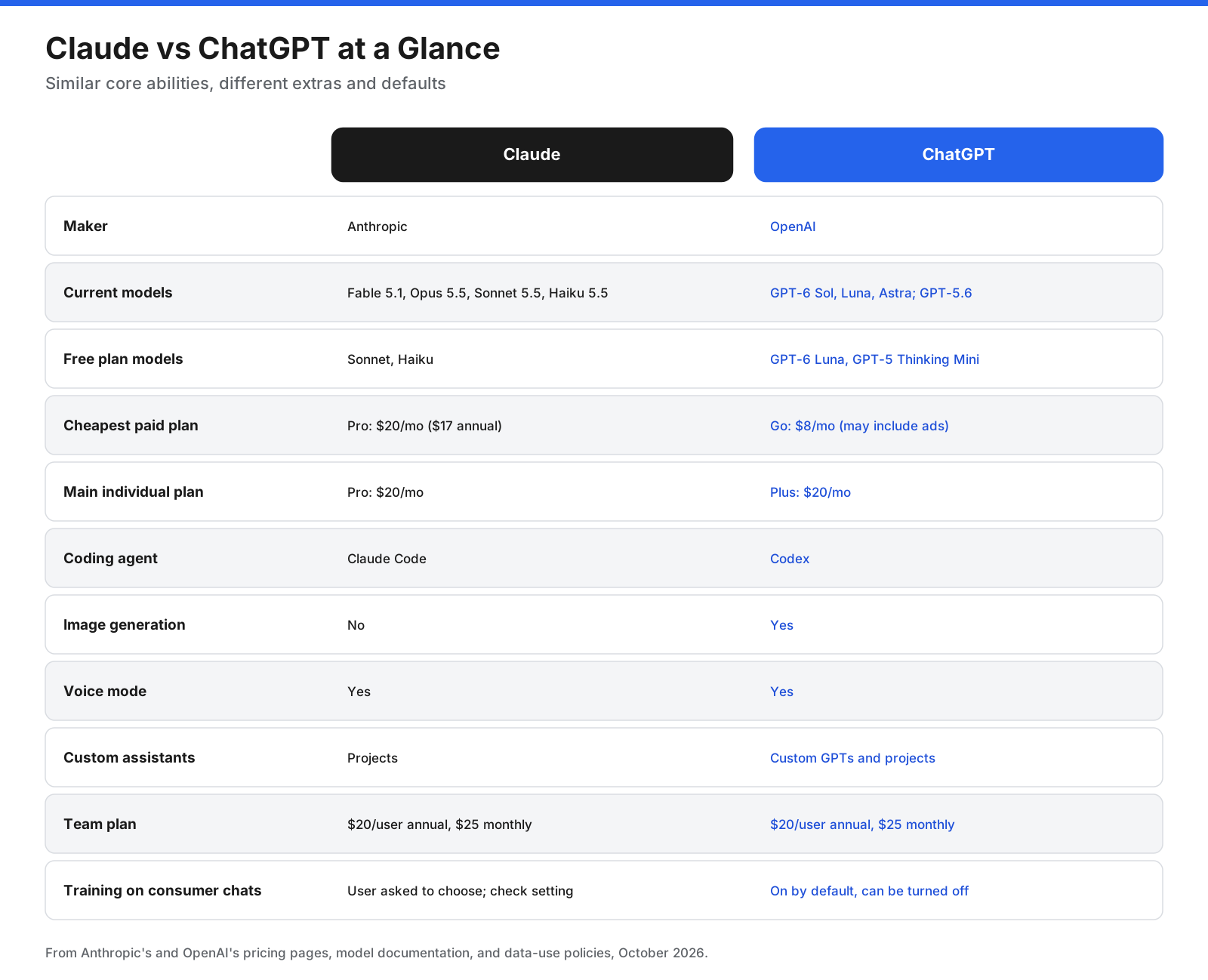
| Feature | Claude | ChatGPT |
|---|---|---|
| Maker | Anthropic | OpenAI |
| Current models | Fable 5.1, Opus 5.5, Sonnet 5.5, Haiku 5.5 | GPT-6 Sol, GPT-6 Luna, GPT-6 Astra, GPT-5.6 family |
| Cheapest paid plan | Pro, $20/month or $17/month billed annually | Go, $8/month; may include ads |
| Main individual plan | Pro, $20/month | Plus, $20/month |
| Coding tool | Claude Code | Codex |
| Image generation | No | Yes |
| Voice mode | Yes | Yes |
| Web search and deep research | Web search on all plans; Research on paid plans | Web search and deep research, with plan limits |
| Custom assistants | Projects | Custom GPTs and projects |
| Team plan | $20/user/month annually, $25 monthly for Standard seats | $20/user/month annually, $25 monthly |
| Consumer chat training | Users choose; check the setting | On by default, can be turned off |
What Is Claude?
Claude is an AI assistant from Anthropic, an AI safety company. It is available on the web, desktop apps, and mobile apps, and through an API for developers.
Anthropic’s current models, as listed in its developer documentation, include:
- Claude Fable 5.1: recommended for demanding reasoning and long-running agentic work.
- Claude Opus 5.5: recommended by Anthropic for most workloads, released September 22, 2026.
- Claude Sonnet 5.5: a faster, lower-cost model, released September 28, 2026.
- Claude Haiku 5.5: the fastest model, for high-volume, cost-sensitive tasks, released October 7, 2026.
All four support a context window of up to 1 million tokens through the API, which means they can work with very long documents and large codebases in a single conversation. In the Claude apps, every plan includes web search, Artifacts, file creation with code execution, memory, connectors to other apps, and projects. Paid plans add Claude Code, Anthropic’s coding agent, and Research for in-depth investigations.
What Is ChatGPT?
ChatGPT is OpenAI’s AI assistant, available on the web, desktop, and mobile. OpenAI’s models are also available through its API.
OpenAI released new models in September and October 2026. GPT-6 Astra is its most capable model, released to paid users in a restricted form in September. GPT-6 Sol powers ChatGPT for Plus, Pro, Business, and Enterprise users, while GPT-6 Luna powers Free and Go users. ChatGPT also includes image generation, voice mode, deep research, an agent mode called ChatGPT Work, the Codex coding agent, memory, projects, custom GPTs on paid plans, and scheduled tasks.
How Do Claude and ChatGPT Compare by Task?
The two assistants can handle most everyday tasks well. The differences show up in specialized work and in the features around the model.
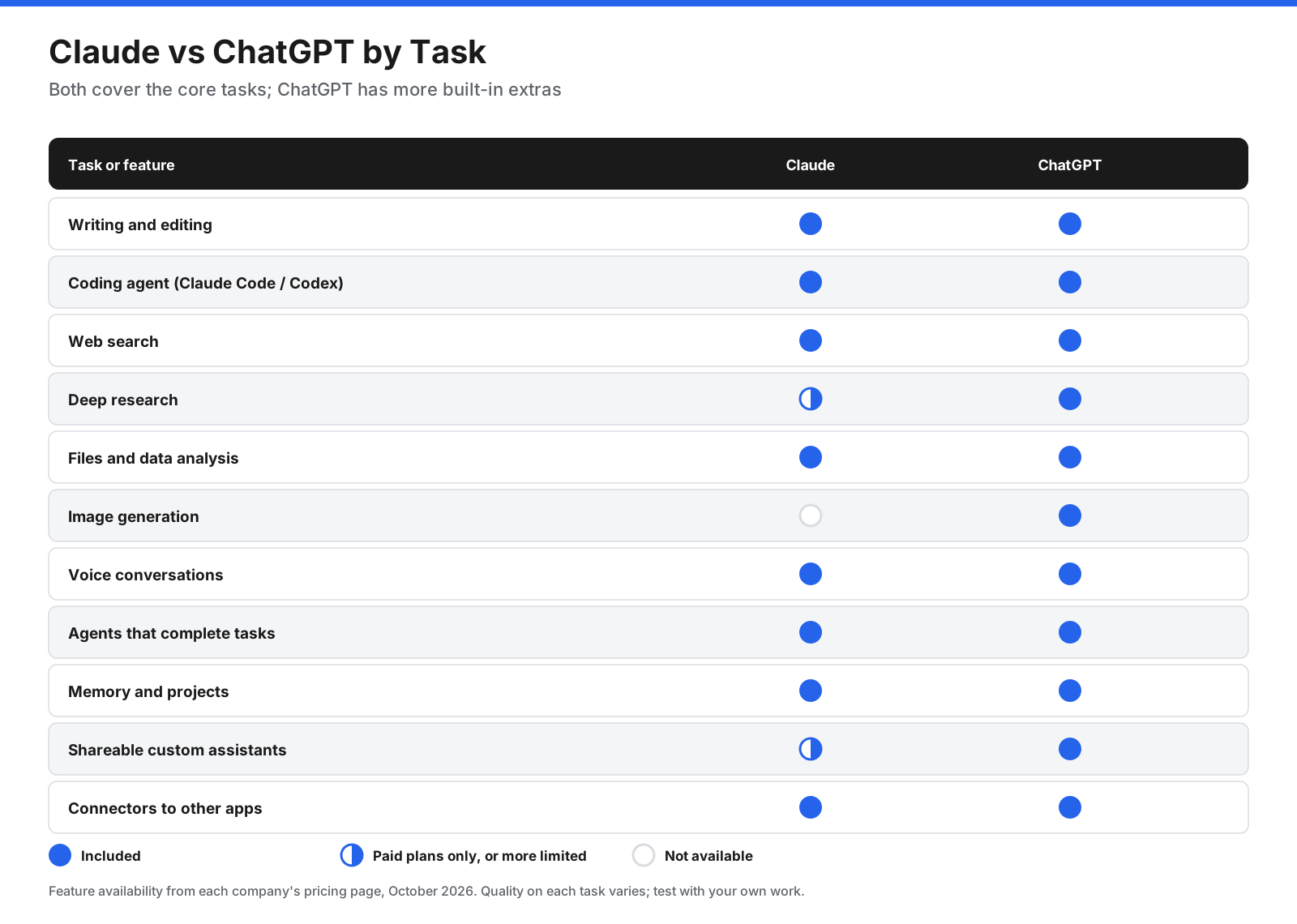
Writing and editing
Both assistants can draft emails, articles, reports, and marketing copy, and edit for tone and clarity. Many reviewers, including Zapier’s October 2026 comparison, say Claude’s writing tends to sound more natural and that it works well as a collaborative editor. ChatGPT is also a strong writer, and some users prefer its style or its document-editing features. Writing quality is subjective, so give both the same task in your own voice and compare the results.
Coding
Both companies offer dedicated coding agents that go beyond chat: Claude Code from Anthropic and Codex from OpenAI. Both can read a codebase, make changes across multiple files, run tests, and work from the command line or an editor. Claude Code is included with Claude Pro and higher plans. Codex is included with ChatGPT, with limited access on Free and Go and fuller access on Plus and Pro. Zapier’s comparison describes Claude Code as a leading tool for many developers while calling Codex a strong competitor. Developer preferences vary by language, project size, and workflow, so try both on a task from your own work.
Research and web search
Both assistants can search the web and cite sources. Claude offers Research on paid plans, while ChatGPT offers deep research on all plans, with limited use on Free and Go and more on Plus and Pro. Both can produce longer, sourced reports. Open and check sources when the accuracy of a claim matters.
Documents and data analysis
Both can read uploaded files, including PDFs, spreadsheets, and images, and run code to analyze data and create charts. Claude’s models support a context window of up to 1 million tokens through the API, useful for very long documents, contracts, or codebases. ChatGPT lists a reasoning context window of up to 400,000 tokens on Pro and 256,000 tokens on Business and Enterprise. Both can create files such as spreadsheets, documents, and presentations.
Images, voice, and multimodal features
This is ChatGPT’s clearest advantage. ChatGPT can generate and edit images directly in the chat, with limited use on the free plan. Claude cannot generate images, although it can analyze images you upload and create diagrams and visuals using code. Both offer voice conversations. ChatGPT also supports camera and screen sharing in voice mode, according to Zapier’s comparison.
Agents that complete tasks
Both assistants can carry out multi-step tasks rather than just answering questions. ChatGPT Work can use a browser and complete tasks on the web, with longer sessions on Pro. Claude can work through longer tasks, produce finished files, and, with Claude Code, work directly on a computer’s files and run commands. Zapier rates their agentic abilities as roughly even, with different strengths.
Memory, projects, and customization
Both offer memory, which lets the assistant remember details across conversations, and projects, which group chats with shared files and instructions. ChatGPT also offers custom GPTs, shareable assistants built for specific tasks, on paid plans. Claude’s equivalent is projects with custom instructions, which can be shared within Team and Enterprise workspaces.
Connections to other apps
Claude connects to other apps through connectors, included on every plan, including Free. These are built on the Model Context Protocol (MCP), an open standard Anthropic created for connecting AI assistants to tools and data. ChatGPT also connects to apps and supports MCP. Both work with automation platforms such as Zapier.
What Are the Strengths and Weaknesses of Each?
Claude strengths:
- Writing that many reviewers describe as natural and easy to edit.
- Claude Code, a widely used coding agent, included from the Pro plan.
- A context window of up to 1 million tokens through the API for long documents and codebases.
- Connectors, file creation, memory, and projects included on the free plan.
- A prompt that asks consumer users to choose whether chats are used for training.
Claude weaknesses:
- No image generation.
- Tighter usage limits, according to several reviewers, especially with long conversations and large files.
- No paid plan below $17 to $20 per month.
- Fewer built-in extras than ChatGPT, such as custom GPTs.
ChatGPT strengths:
- Image generation built into the chat.
- A broad set of extras, including custom GPTs, Canvas, scheduled tasks, and agent mode across devices.
- A cheaper entry plan, Go at $8 per month, and generous limits for text chats on most plans.
- Intelligent UI, which can answer with charts, buttons, and interactive tools.
- A large user base, with many tutorials, templates, and shared custom GPTs.
ChatGPT weaknesses:
- Consumer chats are used for training by default unless you turn it off.
- The Go plan may include ads.
- The range of models and plans can be confusing, and top-tier access requires Pro plans of $100 or more per month.
How Do Claude and ChatGPT Compare for Business Teams?
For organizations, admin controls, data protection, and pricing per seat matter more than individual features. Both offer team plans at $20 per user per month billed annually, or $25 billed monthly. Claude Team supports 2 to 150 seats, with Standard and Premium seat types and shared projects, connectors, Claude Code, and Research. ChatGPT Business requires at least two seats and includes business data protections, with Business data excluded from training by default.
At the enterprise level, Claude Enterprise lists SCIM user provisioning, audit logs, role-based access, a Compliance API, custom data retention, IP allowlisting, and a HIPAA-ready option. ChatGPT Enterprise uses custom pricing and includes admin and security controls. For most businesses, the decision comes down to which tool your teams prefer for daily work, how each fits your security and compliance requirements, and which integrations you need. Running a pilot with a small group on each is often the best way to decide.
Can You Trust the Answers?
Both Claude and ChatGPT can make mistakes, including stating incorrect facts with confidence, misreading documents, or citing sources that do not support a claim. A few habits reduce the risk: ask for sources when facts matter and open them to check; verify numbers, dates, names, and quotes; give the assistant source material rather than relying on general knowledge; use web search or research modes for anything that may have changed recently; and review code before running it, especially changes to production systems.
How Much Do Claude and ChatGPT Cost?
Both have free plans, $20 individual plans, higher-usage plans for heavy users, and business plans.
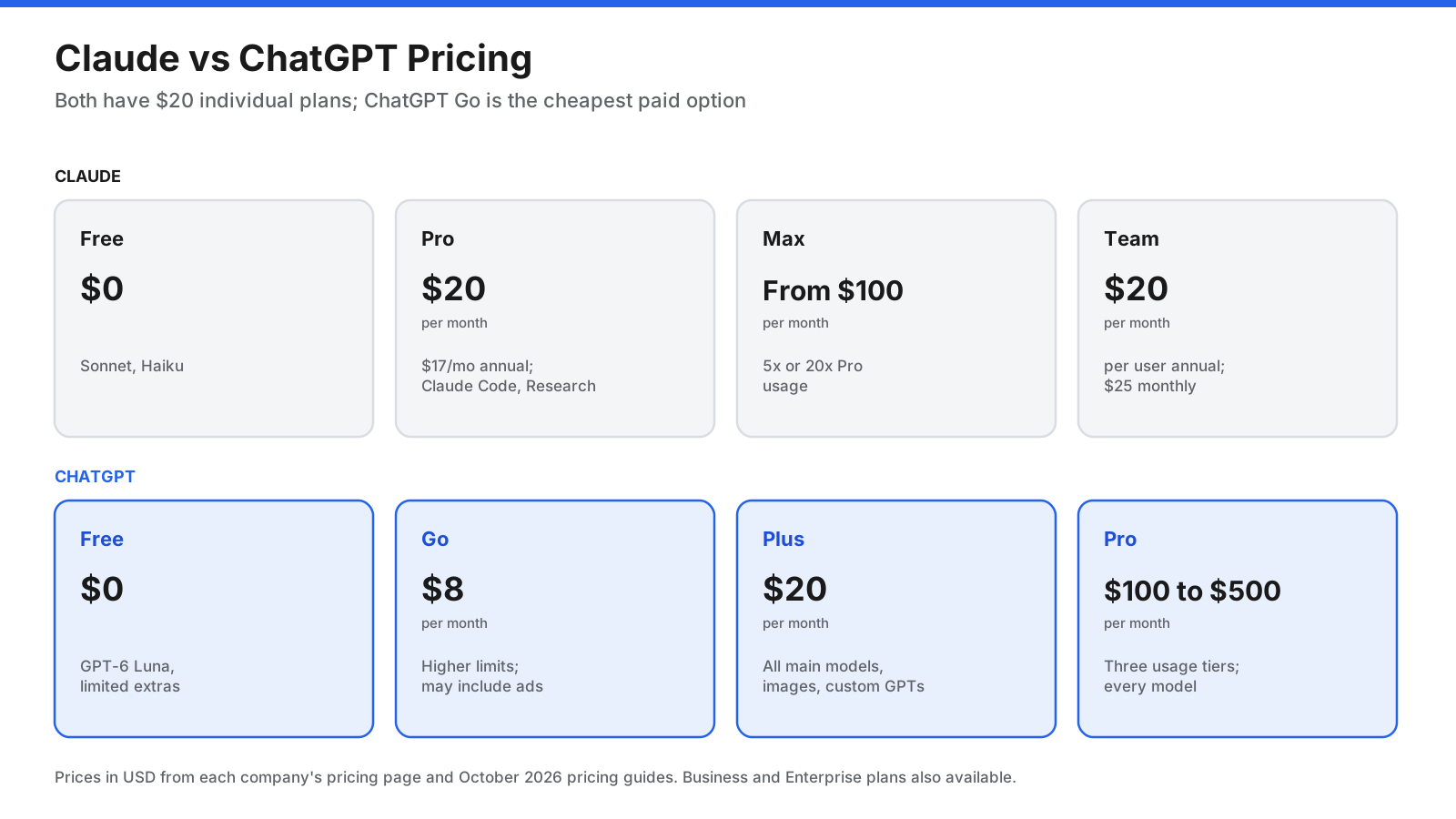
Claude plans:
- Free: Sonnet and Haiku models, web search, Artifacts, file creation, memory, connectors, and up to five projects.
- Pro: $20 per month, or $17 per month billed annually ($200 per year). Adds Opus, Claude Code, Research, unlimited projects, and at least five times the Free plan’s usage per session.
- Max: From $100 per month, with five or twenty times Pro’s usage per session, plus monthly API credits and priority access.
- Team: $20 per seat per month billed annually ($25 monthly) for Standard seats, and $100 ($125 monthly) for Premium seats with five times the usage, for 2 to 150 seats.
- Enterprise: $20 per seat per month billed annually with a 20-seat minimum, plus usage at API rates, with admin, security, and compliance features.
ChatGPT plans:
- Free: GPT-6 Luna, with limited image generation, voice, deep research, and Codex.
- Go: $8 per month, with higher limits and longer memory. OpenAI notes that Go may include ads.
- Plus: $20 per month, with current models except the Pro-only model, expanded limits, custom GPTs, and agent mode on devices.
- Pro: Three usage tiers at $100, $200, or $500 per month, with the highest limits and access to every model.
- Business: $20 per user per month billed annually ($25 monthly), with a two-seat minimum.
- Enterprise: Custom pricing.
Claude Pro vs ChatGPT Plus
At $20 per month each, the main individual plans are priced the same, though Claude Pro is cheaper with annual billing at $17 per month. ChatGPT Plus includes image generation, custom GPTs, agent mode on mobile, and broader extras. Claude Pro includes Claude Code, Research, the Opus model, and unlimited projects.
How Do Usage Limits Work?
Usage limits are a common frustration with both. Claude’s limits reset on a rolling five-hour window, with weekly limits on paid plans, and long conversations or large files use more of the allowance. Zapier’s comparison notes that Claude has tighter usage limits, and that the author uses ChatGPT for large data jobs for that reason. ChatGPT describes its limits in relative terms such as expanded and unlimited subject to abuse guardrails for text chats on most plans, with tighter limits on image generation and deep research. If you hit limits often, the higher tiers, Claude Max or ChatGPT Pro, raise them significantly.
How Does API Pricing Compare?
For developers building with the models, both companies charge per million tokens of input and output.
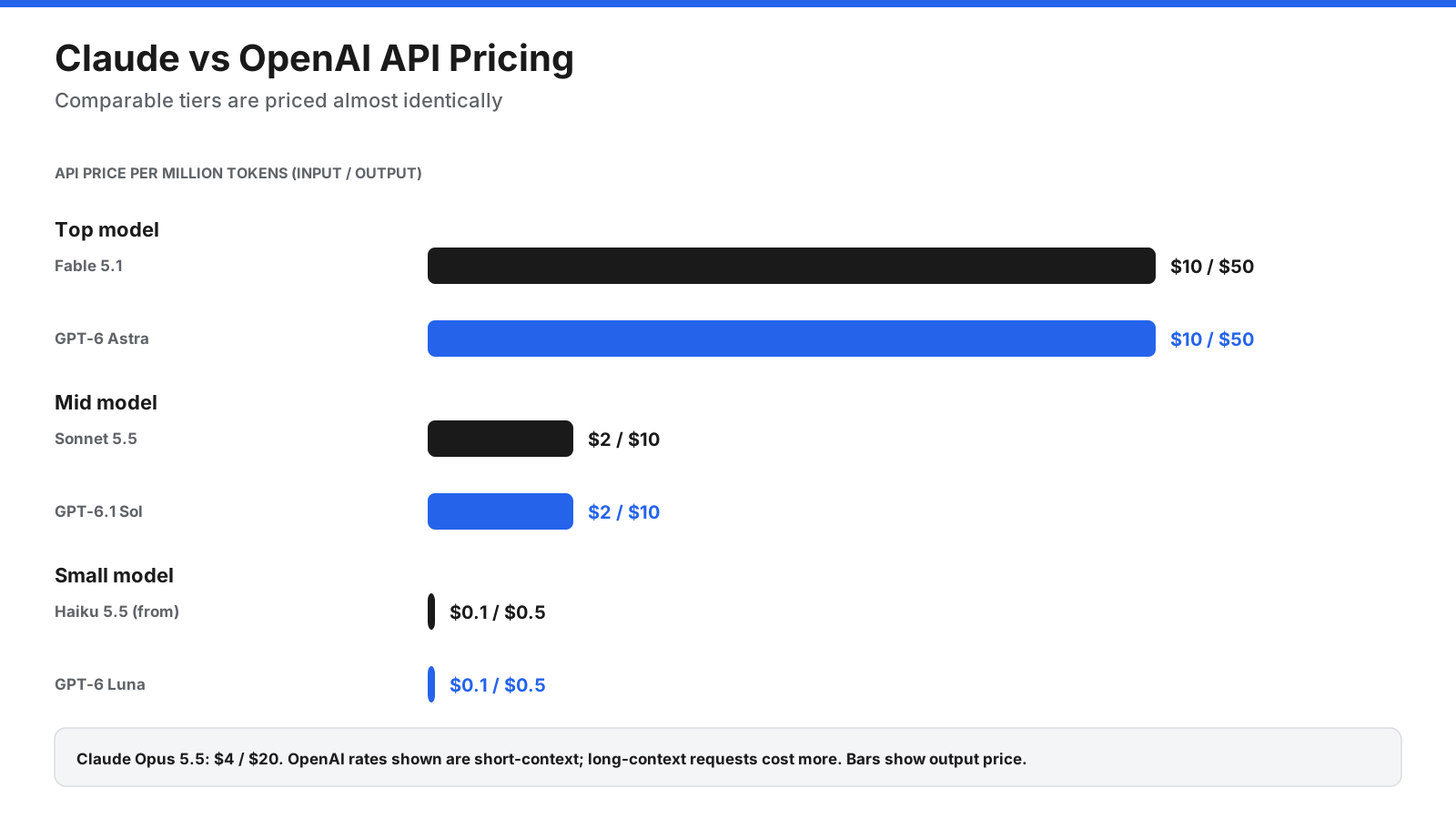
| Tier | Claude (input/output per million tokens) | OpenAI (input/output per million tokens, short context) |
|---|---|---|
| Top model | Fable 5.1: $10 / $50 | GPT-6 Astra: $10 / $50 |
| Main model | Opus 5.5: $4 / $20 | Not listed in source table |
| Mid model | Sonnet 5.5: $2 / $10 | GPT-6.1 Sol: $2 / $10 |
| Small model | Haiku 5.5: from $0.10 / $0.50 | GPT-6 Luna: $0.10 / $0.50 |
OpenAI lists higher rates for long-context requests, and both companies offer discounts such as batch processing and prompt caching. For most workloads, the choice between APIs comes down to model performance on your tasks rather than price.
How Do Claude and ChatGPT Handle Your Data?
If you use either assistant for work, it matters whether your conversations are used to train future models.
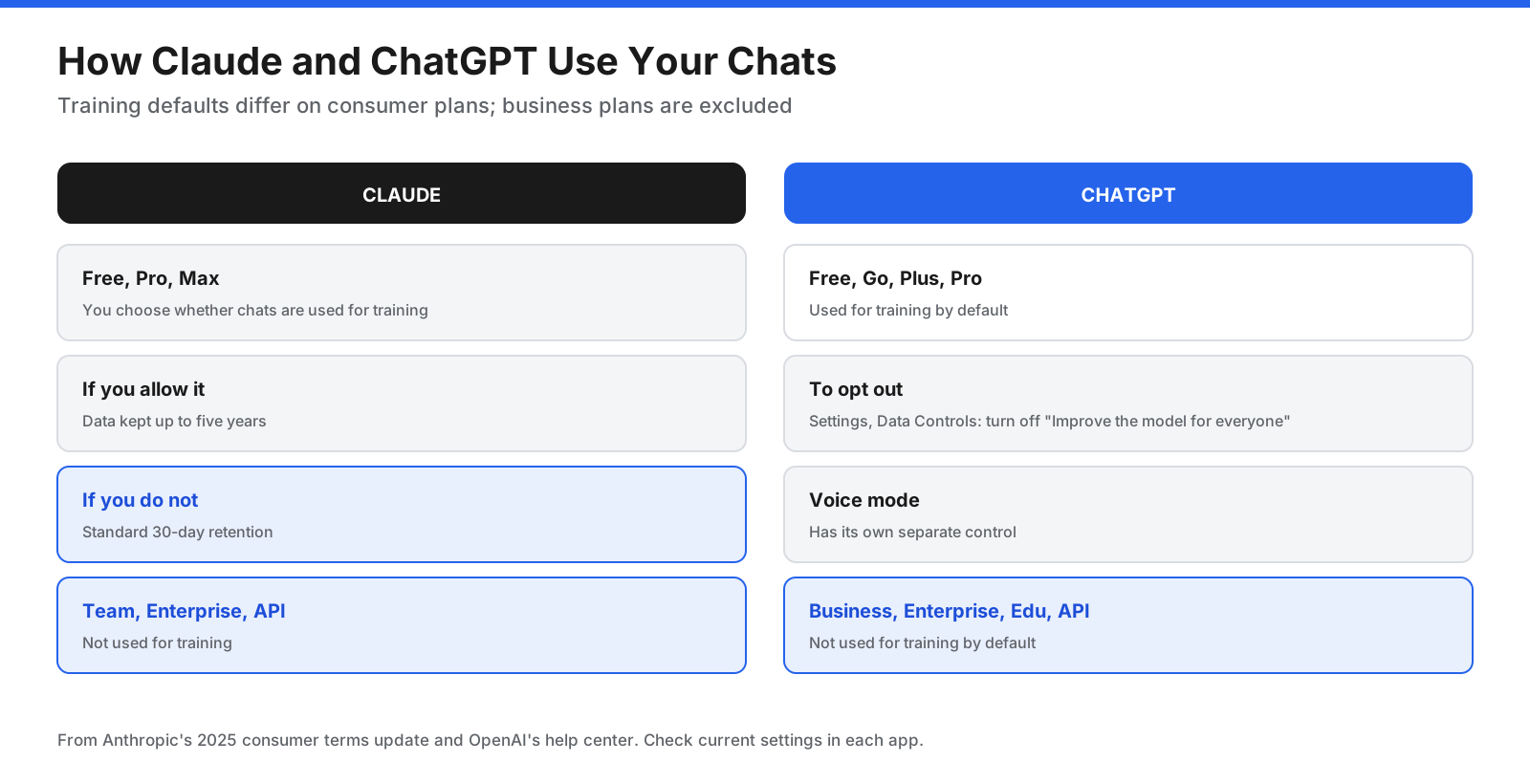
Claude: Since Anthropic updated its consumer terms in 2025, users of Claude Free, Pro, and Max choose whether their chats and coding sessions can be used to improve Claude, and can change this at any time in privacy settings. If they allow it, data is kept for up to five years; if not, the standard 30-day retention applies. Deleted conversations are excluded from future training. Check the setting, since accepting the prompt without changing the toggle allows training. Claude Team, Enterprise, the API, Claude Gov, and Claude for Education are not used for training.
ChatGPT: For consumer accounts (Free, Go, Plus, and Pro), OpenAI’s help center says data sharing for model training is on by default. You can turn it off in Settings, under Data Controls, by switching off “Improve the model for everyone.” Voice mode has a separate control. ChatGPT Business, Enterprise, Edu, and the API are excluded from training by default.
For business use, both companies’ business plans provide stronger protections than consumer plans, including admin controls and contractual data terms. Claude Enterprise lists a HIPAA-ready option.
What About Gemini?
Many people searching for Claude vs ChatGPT also compare Google’s Gemini. Gemini is Google’s AI assistant, built into Google Workspace apps such as Gmail, Docs, and Sheets, and available as a standalone app. If your organization lives in Google Workspace, Gemini’s integration with those apps is a strong reason to include it in your comparison alongside Claude and ChatGPT.
Which Is Better for Different Types of Users?
- Students: Both free plans handle explanations, summaries, and study help. ChatGPT’s free plan includes limited image generation and deep research, which some students find useful. Claude’s free plan includes projects and file creation, which help organize course materials. Check your school’s rules on AI use.
- Writers and marketers: Many reviewers favor Claude for drafting and editing long-form content. ChatGPT’s image generation is useful for social posts and quick visuals, so marketers who need both often use both tools.
- Developers: Both Claude Code and Codex are strong options. Claude Code is included from Claude Pro, and Codex is included in ChatGPT with fuller access on Plus and Pro. API pricing at comparable tiers is nearly identical, so test each on your own codebase.
- Analysts and researchers: Both can analyze spreadsheets, run code, and produce sourced research reports. Claude’s long context window helps with large documents, while ChatGPT’s deep research is available in limited form even on the free plan.
- Small businesses: Both team plans cost the same per seat. ChatGPT’s broader feature set suits teams that want one tool for many tasks, while Claude suits teams focused on writing, documents, and code. Both exclude business data from training by default.
What Should You Look for in an AI Assistant?
Before comparing features, decide which of these matter most to you:
- Quality on your tasks: writing, coding, analysis, or research.
- Features you will use: image generation, voice, agents, coding tools, or connectors to your apps.
- Usage limits: how much you can use the assistant before hitting a limit on the plan you would buy.
- Price: the plan that fits your usage, not just the cheapest one.
- Data use and privacy: whether your chats are used for training, and what business protections are available.
Which Should You Choose: Claude or ChatGPT?
The right choice depends on what you use AI for most.
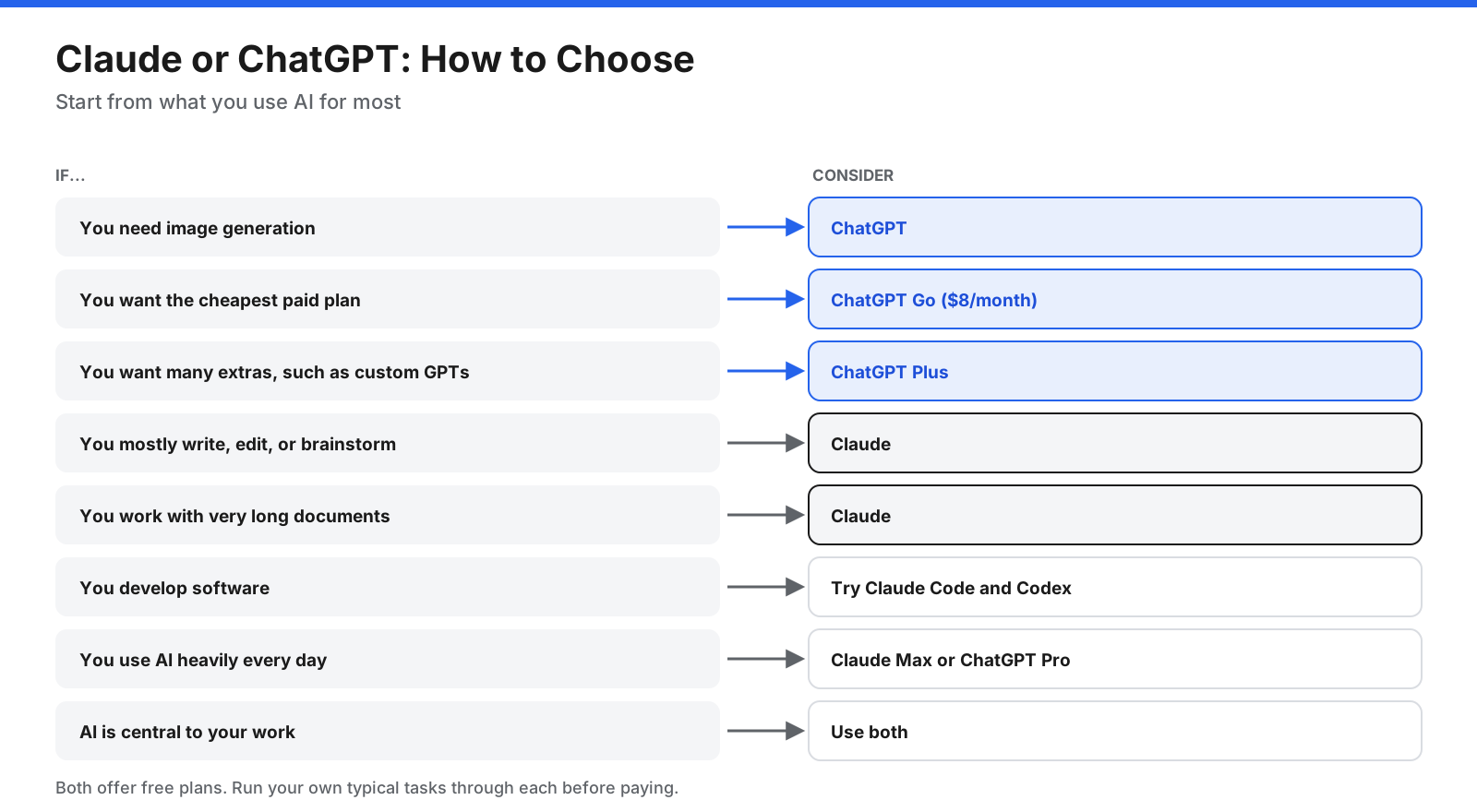
- You need image generation: ChatGPT.
- You want the cheapest paid plan: ChatGPT Go at $8 per month.
- You want many extras, such as custom GPTs and agent mode on mobile: ChatGPT Plus.
- You mostly write, edit, or brainstorm: Claude, which many reviewers favor for writing.
- You develop software: try both Claude Code and Codex on your own projects.
- You work with very long documents or large codebases: Claude, whose models support up to 1 million tokens of context through the API.
- You use AI heavily every day: Claude Max or ChatGPT Pro, depending on which you prefer.
- AI is central to your work: consider both.
Both offer free plans. Run your own typical tasks through each before paying.
Can You Use Claude and ChatGPT Together?
Yes, and many heavy users do. A common pattern is to subscribe to one and use the other’s free plan, or to use each for what it does best, such as Claude for writing and analysis and ChatGPT for image generation and quick tasks. Because both offer projects and memory, keeping related work in one tool is usually more convenient than switching mid-task.
How Do You Test Claude and ChatGPT Fairly?
Reviews and benchmarks help, but the best evidence is how each assistant handles your own work. A simple, fair test takes less than an hour.
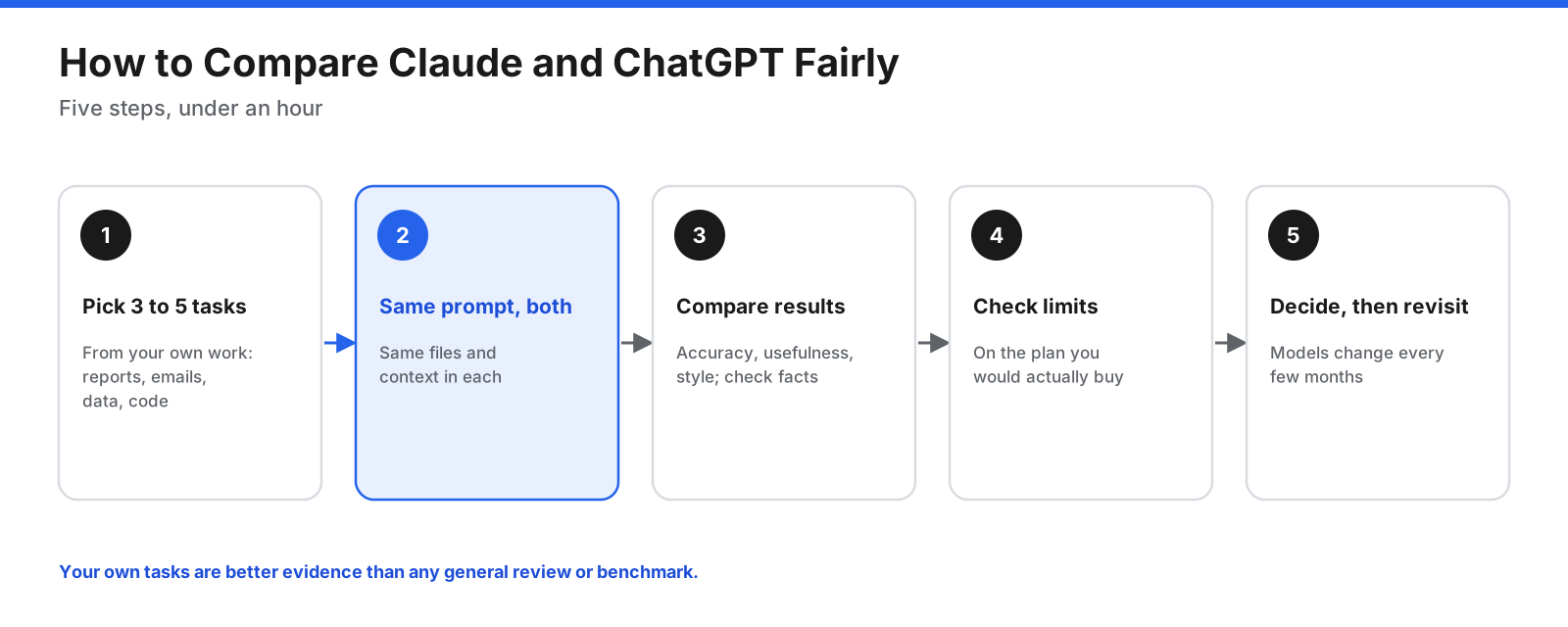
- Pick three to five typical tasks from your own work, such as a report to summarize, an email to draft, a dataset to analyze, or a bug to fix.
- Use the same prompt in both, with the same files and context.
- Compare the results on accuracy, usefulness, and whether the style fits your needs. Check facts and figures, since both can make mistakes.
- Check usage limits on the plan you would buy, especially if you plan to work with large files or long conversations.
- Decide, then revisit. Both companies release new models every few months, so a test from six months ago may no longer hold.
Frequently Asked Questions
Is Claude better than ChatGPT?
Neither is better for everything. Independent reviewers increasingly describe the core models as close in quality. Many reviewers favor Claude for writing, coding, and working with long documents, while ChatGPT offers more built-in features, including image generation, custom GPTs, and a cheaper entry plan. The best choice depends on your tasks.
What can Claude do that ChatGPT cannot?
The two overlap heavily, so the differences are mostly in defaults and extras. Claude includes connectors to other apps and file creation on its free plan, includes Claude Code and Research on its $20 Pro plan, and lets consumer users choose whether their chats are used for training rather than having training on by default. ChatGPT offers image generation and custom GPTs.
Why are people moving from ChatGPT to Claude?
Common reasons given in reviews and user discussions include Claude’s writing style, its coding tools, its handling of long documents, and its approach to privacy settings. Others stay with or move to ChatGPT for its broader feature set and image generation. Preferences vary widely by task.
Which is better for coding, Claude or ChatGPT?
Both offer strong coding agents: Claude Code and Codex. Many developers and reviewers favor Claude Code, while others prefer Codex. Test both on your own codebase.
Which is better for writing, Claude or ChatGPT?
Many reviewers say Claude’s writing sounds more natural and that it is a strong editing partner. ChatGPT is also a capable writer. Test both with your own writing tasks.
Is Claude free?
Yes. Claude’s free plan includes the Sonnet and Haiku models, web search, file creation, memory, connectors, and up to five projects. Paid plans start at $20 per month, or $17 per month billed annually.
Is Claude Pro worth it compared with ChatGPT Plus?
Both cost $20 per month. Claude Pro includes Claude Code, Research, and the Opus model, and costs $17 per month with annual billing. ChatGPT Plus includes image generation, custom GPTs, and a wider set of extras. Choose based on which features you will use.
Which is more private, Claude or ChatGPT?
On consumer plans, Claude asks users to make a choice about training, while ChatGPT has training turned on by default with an option to turn it off. Check Claude’s setting, since accepting the prompt without changing it allows training. On both, you can opt out. On business plans and through the API, both exclude your data from training by default.
Can Claude search the internet?
Yes. Web search is included on every Claude plan, including Free, and paid plans add Research for longer, multi-source investigations. ChatGPT also includes web search and deep research.
Does ChatGPT have ads?
OpenAI’s pricing page says the ChatGPT Go plan may include ads. Its other plans are not described as including ads.
The Bottom Line
Claude and ChatGPT are closer than ever in core ability, so the decision rests on features, pricing, limits, and data policies. ChatGPT is the better choice if you want an all-in-one assistant with image generation, custom GPTs, and a cheaper $8 entry plan. Claude is a strong choice if your work centers on writing, coding, analysis, and long documents, and if you prefer to choose whether your consumer chats are used for training.
Both offer free plans, so the simplest way to decide is to run a few of your own tasks through each. If AI is central to your work, using both is a reasonable choice. Because both companies release new models regularly, revisit the comparison periodically.




















































































