
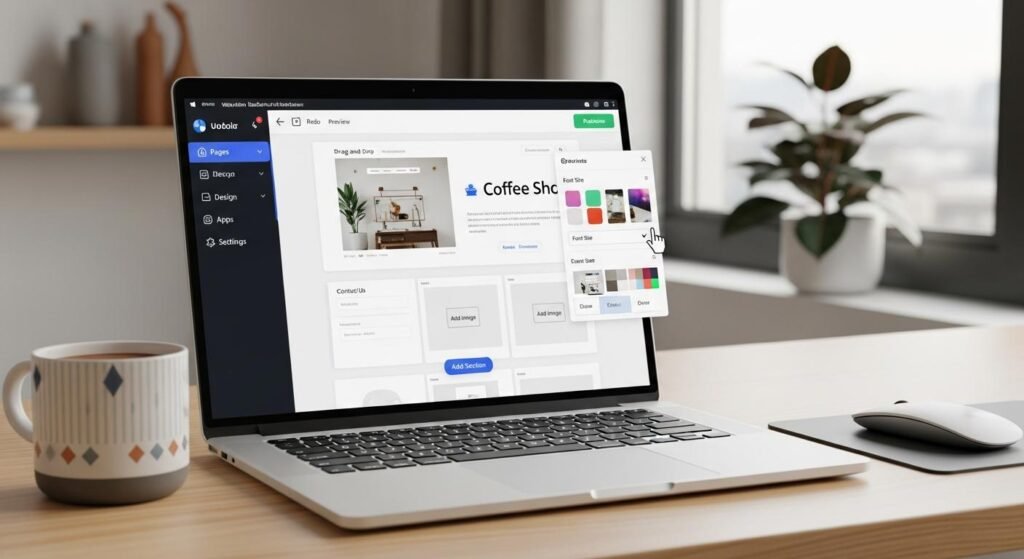

A website builder lets you create and publish a website without hiring a developer or managing a server. You choose a template, edit the text, images, and layout in a visual editor, connect a domain, and publish. Hosting, SSL certificates, and software updates are handled for you, which makes website builders a common starting point for small businesses, creators, and freelancers.
The best choice depends on what you are building. A restaurant, online store, newsletter, photography portfolio, and startup landing page need different features. This guide compares 12 website builders across five use cases, including published pricing from October 2026, free plans, yearly costs, ecommerce fees, AI tools, and SEO. There are no sponsored placements.
Quick Picks: Which Website Builder Is Best?
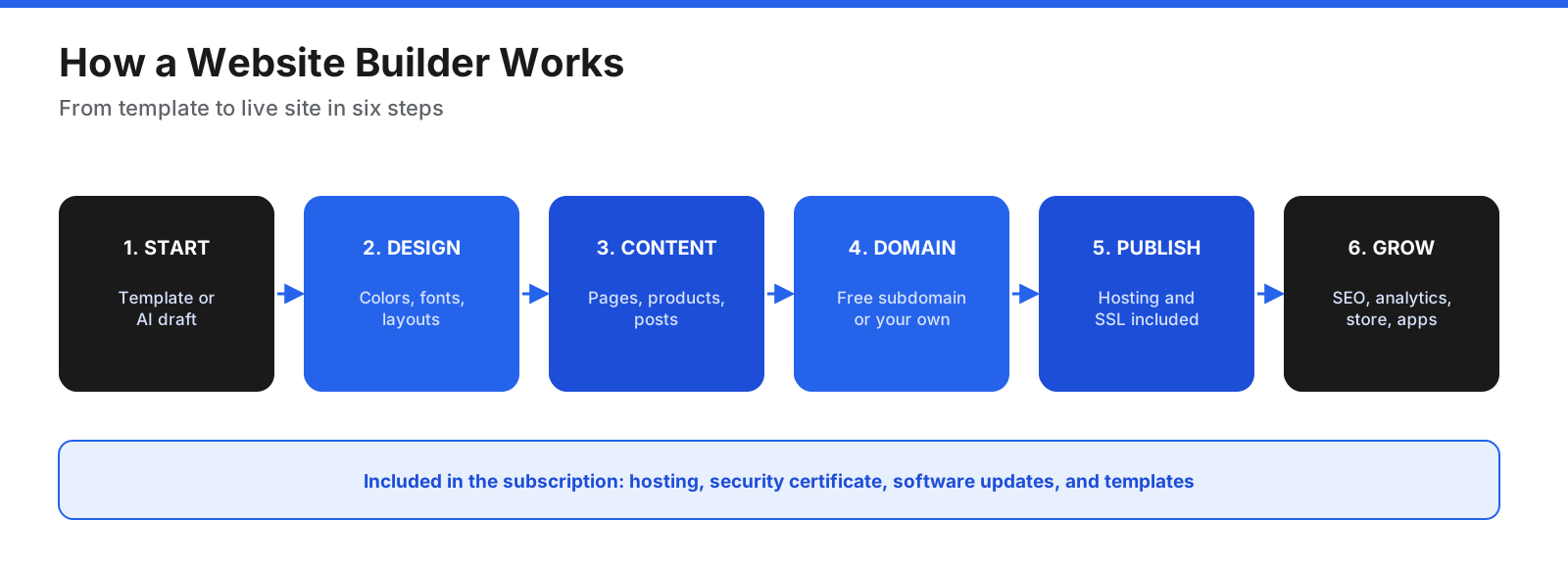
- Best overall for small businesses: Wix
- Best for design-focused brands and creatives: Squarespace
- Best for quick setup with AI help: GoDaddy Website Builder
- Best for dedicated online stores: Shopify
- Best free option for local sellers: Square Online
- Best for blogs and flexible content sites: WordPress.com
- Best for newsletters and paid memberships: Ghost
- Best for designers who want full control: Webflow
- Best for startup and product landing pages: Framer
- Best low-cost builder with hosting and email: Hostinger Website Builder
- Best AI builder for service businesses: Durable
- Best for simple one-page sites: Carrd
How Does a Website Builder Work?
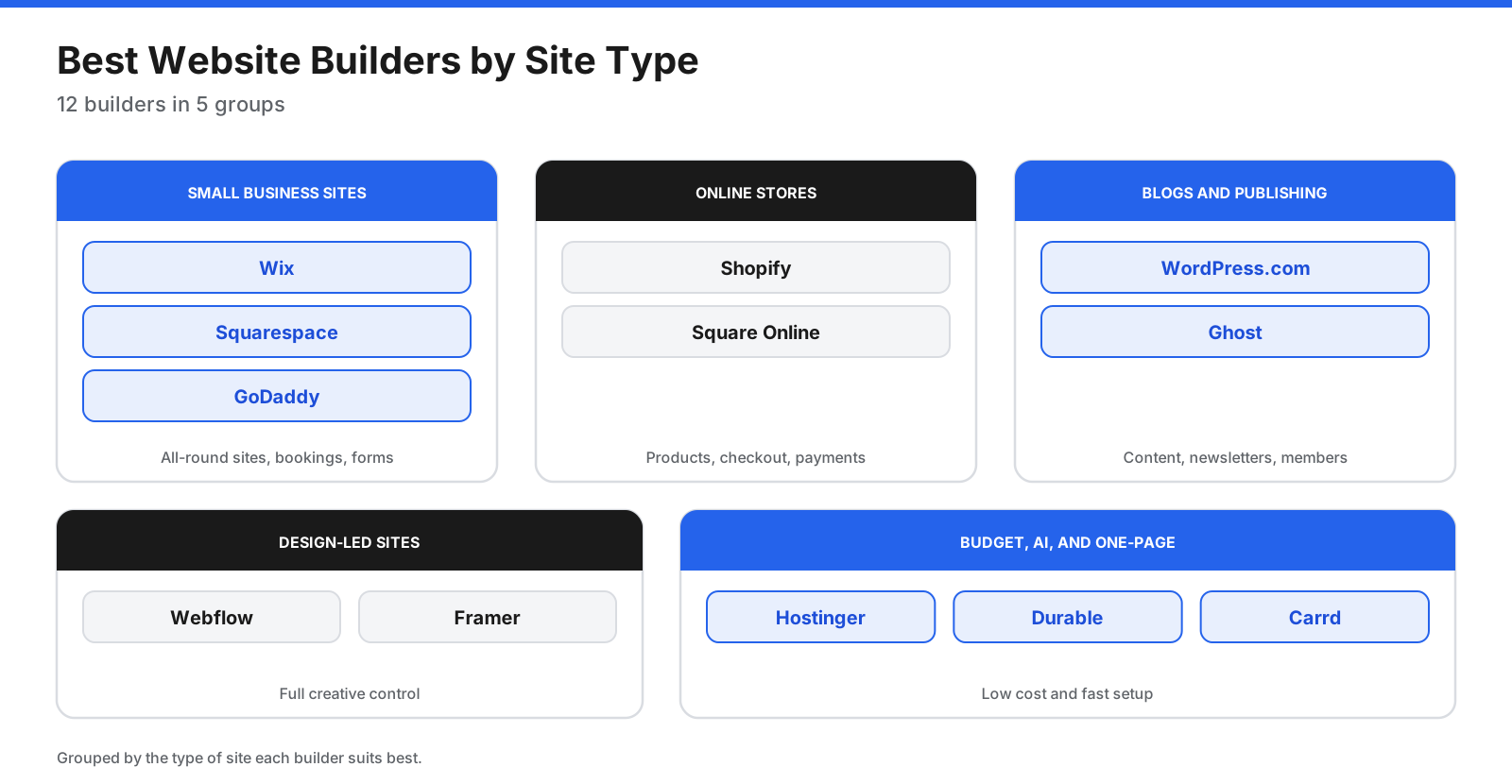
Website builders bundle most of what you need to run a site into one subscription. The usual process is straightforward:
- Choose a template or describe your site. Start with a design or let an AI builder generate a first draft from a few details about your business.
- Customize the design. Change colors, fonts, images, and layouts in a visual editor.
- Add content. Create pages and blog posts, upload products, and add forms or booking tools.
- Connect a domain. Use a free subdomain while testing, then connect your own domain on a paid plan.
- Publish. The platform hosts the site, adds SSL, and maintains the software.
- Grow. Add SEO settings, analytics, email marketing, payments, or apps as your needs expand.
What Should You Look for in a Website Builder?
- Ease of use: How quickly can you build a good-looking site without help?
- Design flexibility: Can you change layouts freely, or are you limited to template sections?
- Ecommerce: Can you sell products, services, or subscriptions, and what fees apply?
- Blogging and content: Does it handle categories, tags, and a growing library of posts?
- SEO tools: Can you edit page titles, meta descriptions, URLs, redirects, and structured data?
- Total cost: Include renewal rates, domain fees, apps, and transaction fees.
- Integrations: Does it connect to your booking, email, accounting, or CRM tools?
- Portability: Can you export your content if you move later?
What Are the Best Website Builders?
Prices below are US-dollar figures from vendor pricing pages or dated outside reviews, as identified in the source material. Prices and promotions can change, so confirm the current offer before buying.
Small Business Websites
1. Wix
Best for: Small businesses that want a flexible, feature-rich site with bookings or a store built in.
Wix offers hundreds of templates, a drag-and-drop editor, an AI site generator, and built-in tools for bookings, online stores, events, and email marketing. Tooltester’s September 2026 review ranked it first with a 4.5 out of 5 score.
Pricing: The free plan publishes on a Wix URL with Wix branding. Annual paid plans were listed at about $17 per month for Light, $29 for Core, and $39 for Business, based on the regional plans page and Tooltester. Wix says prices vary by location.
Downsides: Zapier’s review notes that Wix can be slow and the free version does not let you choose your subdomain. Switching templates after launch is harder than on some rivals. US prices should be verified.
2. Squarespace
Best for: Creatives, consultants, restaurants, and brands that care most about a polished look.
Squarespace is known for design-led templates and includes blogging, online stores, appointment scheduling, member areas, and email campaigns. Tooltester rates it 4.3 out of 5 and calls it excellent for blogging.
Pricing: The pricing page listed Basic at $19 per month annually or $25 monthly, Core at $29 or $39, Plus at $49 or $65, and Advanced at $99 or $139. Basic adds a 2% fee on online store sales; Core and above charge 0%. A 14-day trial is available.
Downsides: There is no free plan beyond the trial, and design freedom is limited by its section and template structure. The source material flags the Basic plan price for re-verification.
3. GoDaddy Website Builder
Best for: Local businesses that want a simple site live quickly, especially if they already buy domains from GoDaddy.
GoDaddy’s builder is paired with its Airo AI tools. Describe your business and the AI generates a site that you can refine. GoDaddy says users can view, edit, and export generated code, and deploy with SSL, forms, and analytics.
Pricing: The website builder page offered a free start with 50 AI credits a month and no credit card. Tooltester listed paid plans from free to $34.99 per month, but GoDaddy’s pages did not show plan prices when checked. Confirm current pricing directly.
Downsides: Design control is more limited than in Wix or Squarespace, and unused AI credits expire each billing cycle.
Online Stores
4. Shopify
Best for: Businesses that sell products online and plan to grow sales.
Shopify handles products, inventory, checkout, shipping, taxes, and payments. Its app store adds features such as reviews, subscriptions, and loyalty programs, and its point-of-sale system connects online and in-person sales.
Pricing: Basic costs $29 per month billed yearly or $39 monthly; Grow costs $89 or $105; Advanced costs $359 or $399. Online card rates start at 2.9% plus 30 cents on Basic. Using a payment provider other than Shopify Payments adds a 2% third-party transaction fee on Basic. Most plans offered a three-day trial followed by $1 per month for three months.
Downsides: Shopify is built for commerce, so content-heavy sites and blogs are less flexible than on WordPress.com or Squarespace. Paid apps can raise the monthly bill.
5. Square Online
Best for: Local businesses already using Square for in-person sales.
Square Online lets you build a free online store that syncs with Square’s point-of-sale system, making it useful for restaurants, cafes, and retailers that already take payments in person. Zapier’s review picks it as the best free website builder for ecommerce.
Pricing: Free has no monthly fee, with online processing fees of 3.3% plus 30 cents. Plus costs $49 per month and Premium $149, with online rates of 2.9% plus 30 cents. Plus and Premium include a 30-day trial.
Downsides: Design options are more limited than in full website builders, and reviewers say it can feel simple or laggy.
Blogs and Publishing
6. WordPress.com
Best for: Bloggers, publishers, and businesses that want a content-rich site with plugins.
WordPress.com is the hosted version of WordPress. It handles hosting, security, and updates while offering a flexible editor, themes, and plugin access on paid plans. It suits blogs, content sites, and businesses that expect to grow.
Pricing: The free plan includes 1 GB storage, a WordPress.com subdomain, and ads shown to visitors. Personal costs $4 per month billed yearly or $9 monthly; Premium $8 or $18; Business $25 or $40; and Commerce $45 or $70. Paid plans from Personal up include plugin installation.
Downsides: WordPress has a steeper learning curve than drag-and-drop builders. Tooltester gives it 3.8 out of 5.
7. Ghost
Best for: Writers, creators, and publishers who want a newsletter and website in one place.
Ghost is an open-source publishing platform for newsletters, blogs, and paid memberships. It combines a clean writing editor, email newsletters, and paid subscriptions so media businesses can publish and earn from their audience.
Pricing: Ghost(Pro) plans billed yearly start at $18 per month for Starter with 1,000 members, $29 for Publisher, and $199 for Business. Publisher and higher plans charge no Ghost transaction fee on paid subscriptions, although payment processor fees still apply. Starter does not support paid subscriptions.
Downsides: Ghost is focused on publishing rather than online stores or complex business sites. Member limits on lower plans mean costs rise as the audience grows.
Design-Led Sites
8. Webflow
Best for: Designers, agencies, and marketing teams that want full creative control.
Webflow gives designers detailed control over layout, spacing, grids, and interactions. Its CMS manages collections such as blog posts and case studies. Agencies can build client sites and hand over routine content editing.
Pricing: The free Starter site is limited to two static pages on a webflow.io address. Connecting a domain starts with Basic at $15 per month billed yearly; CMS is $25 yearly billed monthly; ecommerce plans start at $29 per month billed yearly.
Downsides: It has a steep learning curve, and the free plan is limited to two pages. Tooltester rates it 3.83 out of 5.
9. Framer
Best for: Startups and SaaS companies that want a modern marketing site launched quickly.
Framer is popular with startups and product teams for landing pages and marketing sites. You design on a canvas, add animations and effects, and publish quickly, with AI tools to generate or edit sections.
Pricing: You can publish for free on a Framer subdomain. Basic is listed at $10 per month and Pro at $30 per month; you need one of those plans to use your own domain.
Downsides: Framer is less suited to online stores and very large content sites than Shopify or WordPress.com.
Budget, AI, and One-Page Sites
10. Hostinger Website Builder
Best for: Budget-conscious small businesses that want a site, domain, and email in one package.
Hostinger bundles an AI-assisted builder with hosting, a free domain for the first year, and email mailboxes. Tooltester calls it an affordable newcomer and rates it 4.1 out of 5.
Pricing: Premium costs $2.99 per month and Unlimited $3.99 per month when prepaid for 48 months, renewing at $10.99 and $16.99 per month. A 14-day free trial and 30-day money-back guarantee are available.
Downsides: The lowest prices require a long upfront commitment, and renewal prices are much higher than introductory rates.
11. Durable
Best for: Service businesses that want a simple site and marketing tools with minimal effort.
Durable is an AI website builder for contractors, consultants, and local shops. It generates a site from a few business details and includes bookings, a simple CRM, and AI-written blog and social posts.
Pricing: The free plan includes a durable.site subdomain and 300 AI credits. Launch is listed at $25 per month and Grow at $49, with lower prices shown in the plan comparison and 15% off yearly billing.
Downsides: Tooltester rates Durable 3.6 out of 5, and AI-generated sites offer less design control than traditional builders. The source material flags its displayed plan prices for verification.
12. Carrd
Best for: Freelancers, creators, and anyone who needs a simple page online quickly.
Carrd builds responsive one-page sites such as personal profiles, landing pages, link-in-bio pages, and event pages. It is quick to learn and inexpensive.
Pricing: Pro Lite costs $9 per year for three sites, Pro Standard costs $19 per year for ten sites with custom domains, and Pro Plus costs $49 per year for 25 sites with advanced forms and password protection. A seven-day Pro trial requires no credit card.
Downsides: Carrd is limited to one-page sites, so it is not suited to stores, blogs, or multi-page business sites.
Which Website Builder Fits Your Type of Business?
- Restaurants and cafes: Square Online for ordering tied to in-person sales, or Wix and Squarespace for menus, reservations, and photos.
- Consultants and coaches: Squarespace or Wix for appointment scheduling and client forms.
- Contractors and home services: Durable or GoDaddy for a quick AI-built site with contact forms and reviews, or Wix for more design control.
- Photographers and artists: Squarespace for image-led templates, or Framer and Webflow for custom portfolio layouts.
- Retailers and product brands: Shopify for a dedicated store, or Wix for a smaller catalog alongside content.
- Writers and media businesses: Ghost for newsletters and paid memberships, or WordPress.com for large content libraries.
- Startups and software companies: Framer or Webflow for modern marketing sites.
- Freelancers and creators: Carrd for a simple one-page profile, or Squarespace for several pages.
If your business fits more than one category, choose the builder that supports your most important revenue activity, such as bookings, sales, or subscriptions, and add other tools around it.
How Do the Website Builders Compare?
| Builder | Best for | Free plan | Entry paid price |
|---|---|---|---|
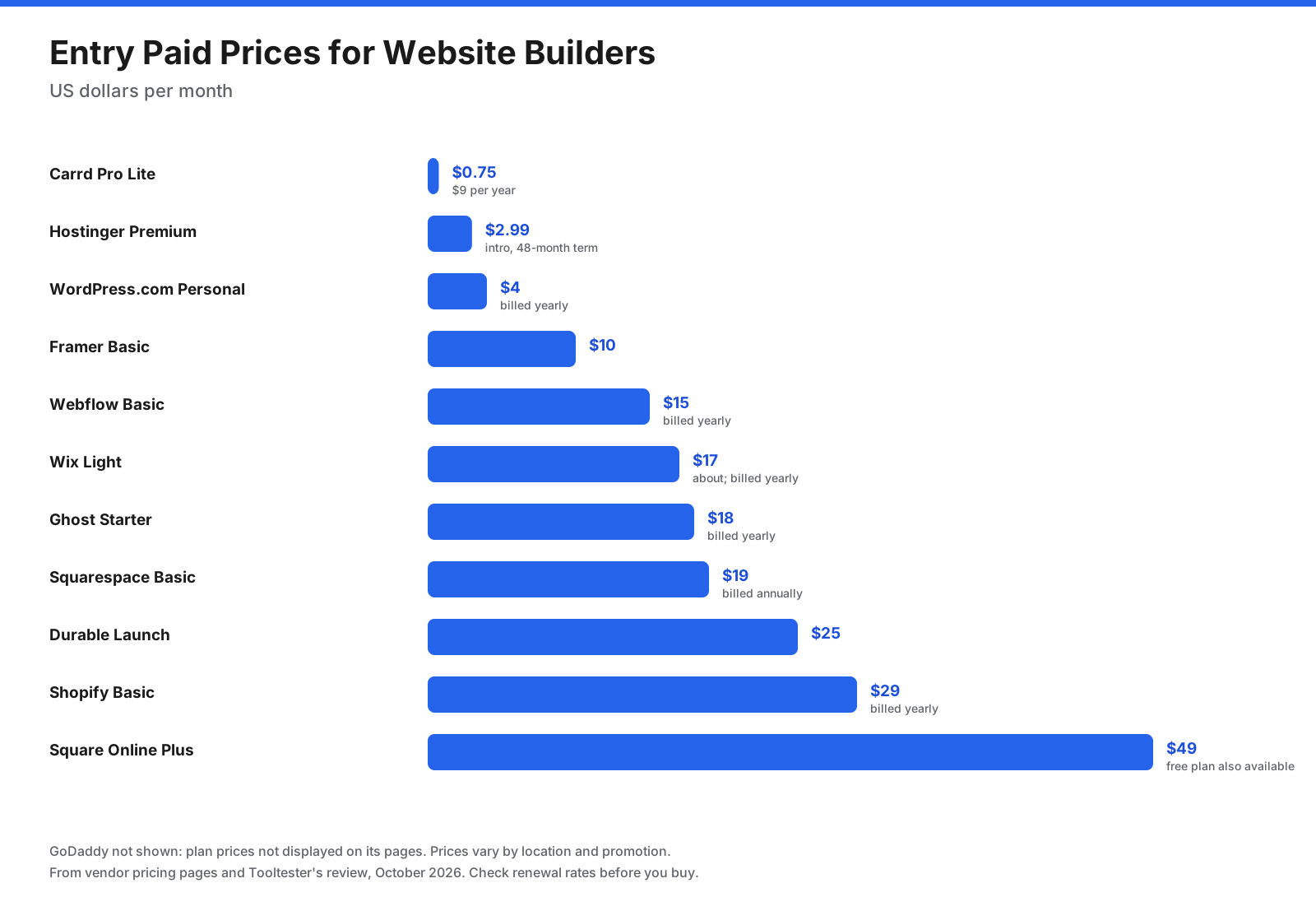
| Wix | Small business sites | Yes, with Wix branding | About $17/month billed yearly |
| Squarespace | Design-led brands | 14-day trial | $19/month billed annually |
| GoDaddy | Fast AI setup | Yes, 50 AI credits a month | Check site |
| Shopify | Online stores | Trial | $29/month billed yearly |
| Square Online | Local sellers | Yes, fees only | $49/month |
| WordPress.com | Blogs and content | Yes, with ads | $4/month billed yearly |
| Ghost | Newsletters and memberships | No | $18/month billed yearly |
| Webflow | Designers | 2 pages | $15/month billed yearly |
| Framer | Startup sites | Yes | $10/month |
| Hostinger | Budget bundle | 14-day trial | $2.99/month for 48 months |
| Durable | AI for service businesses | Yes | $25/month |
| Carrd | One-page sites | Yes | $9/year |
What Is the Best Free Website Builder?
Many builders offer a free plan, but trade-offs usually include a branded subdomain, visible ads, or tight page limits.
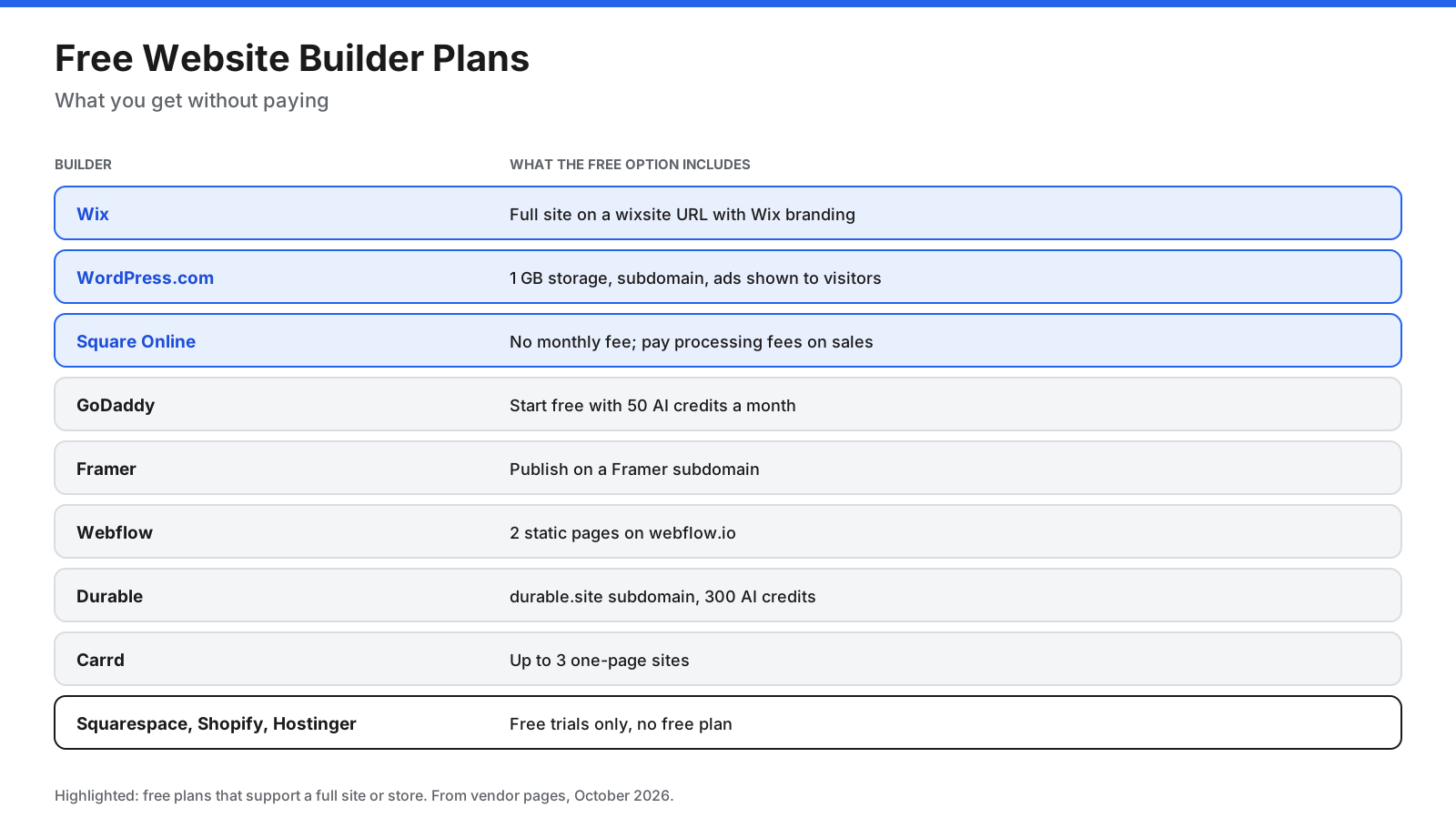
- Best free plan for a full website: Wix and WordPress.com, both with branding or ads on a subdomain.
- Best free plan for selling: Square Online, with no monthly fee and processing fees on each sale.
- Best free plan for a simple page: Carrd.
- Free trials only: Squarespace (14 days), Shopify (three days, then $1 per month for three months), and Hostinger (14 days).
For a business, a custom domain is usually worth paying for because it looks more professional and is easier for customers to remember.
How Much Does a Website Builder Cost per Year?
Monthly prices can hide long upfront terms and renewal rates. Comparing yearly cost gives a clearer picture.
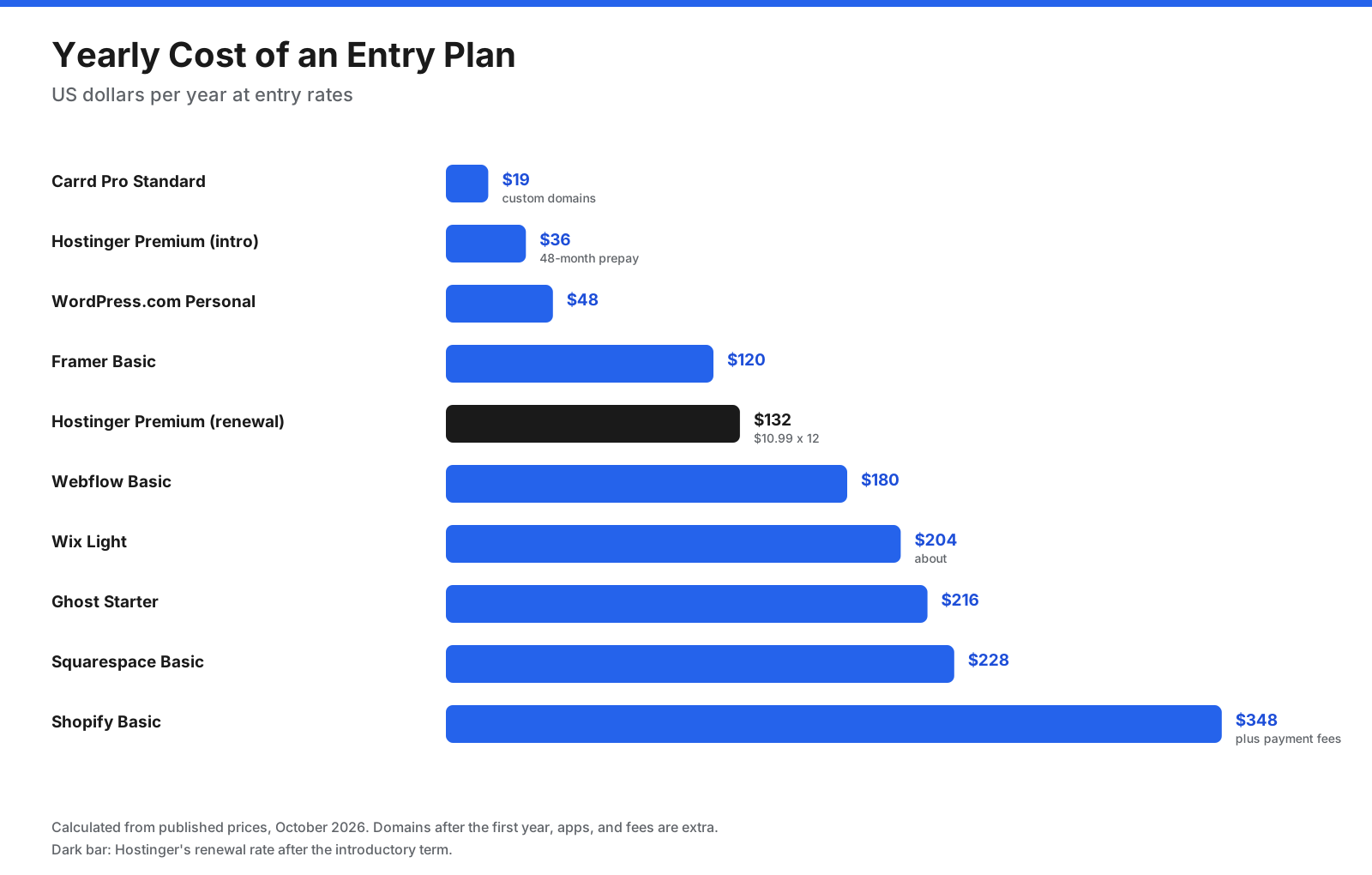
- Carrd Pro Standard: $19 per year with custom domains.
- Hostinger Premium: $2.99 × 12 = about $36 per year at the 48-month introductory rate, rising to $10.99 × 12 = about $132 per year at renewal.
- WordPress.com Personal: $4 × 12 = $48 per year.
- Framer Basic: $10 × 12 = $120 per year.
- Webflow Basic: $15 × 12 = $180 per year.
- Wix Light: about $17 × 12 = about $204 per year.
- Ghost Starter: $18 × 12 = $216 per year.
- Squarespace Basic: $19 × 12 = $228 per year.
- Shopify Basic: $29 × 12 = $348 per year, plus payment fees.
Add the cost of a domain after any free first year, premium apps or plugins, and transaction fees if you sell online.
Which Website Builder Is Best for Ecommerce?
- Shopify is the strongest choice for a growing online store, with inventory, checkout, shipping, and a large app ecosystem.
- Square Online is best for local businesses already using Square, with a free plan and in-person sales sync.
- Wix and Squarespace suit businesses that sell a moderate number of products alongside a content-rich site.
- WordPress.com Commerce suits content-heavy stores that need plugins.
Watch the fees. Squarespace Basic adds a 2% fee on store sales, Shopify adds a 2% third-party fee on Basic if you do not use Shopify Payments, and Square Online’s free plan charges higher online processing rates than paid plans. On a store doing $5,000 a month in sales, a 2% fee adds $100 a month.
Are AI Website Builders Worth It?
Most major website builders now include AI. Wix, GoDaddy, Hostinger, Durable, and Framer can generate a first draft from a short description, and many can write text, suggest images, or create sections on request.
AI builders are useful for getting a first version live quickly, especially for service businesses that need a few standard pages. They are less useful when you need a distinctive design, complex site structure, or precise brand control. Treat the AI draft as a starting point: rewrite the text in your own voice, replace stock images with your own photos, and check every page before publishing.
AI features often use credits. GoDaddy’s free plan includes 50 AI credits a month, Durable’s free plan includes 300 credits, and Hostinger includes 5 or 15 credits depending on plan. Unused credits often expire, so check how many you will need.
Which Website Builder Is Best for SEO?
All major website builders cover SEO basics such as editable page titles, meta descriptions, custom URLs, mobile-friendly templates, and SSL. Differences show up in advanced control and site speed.
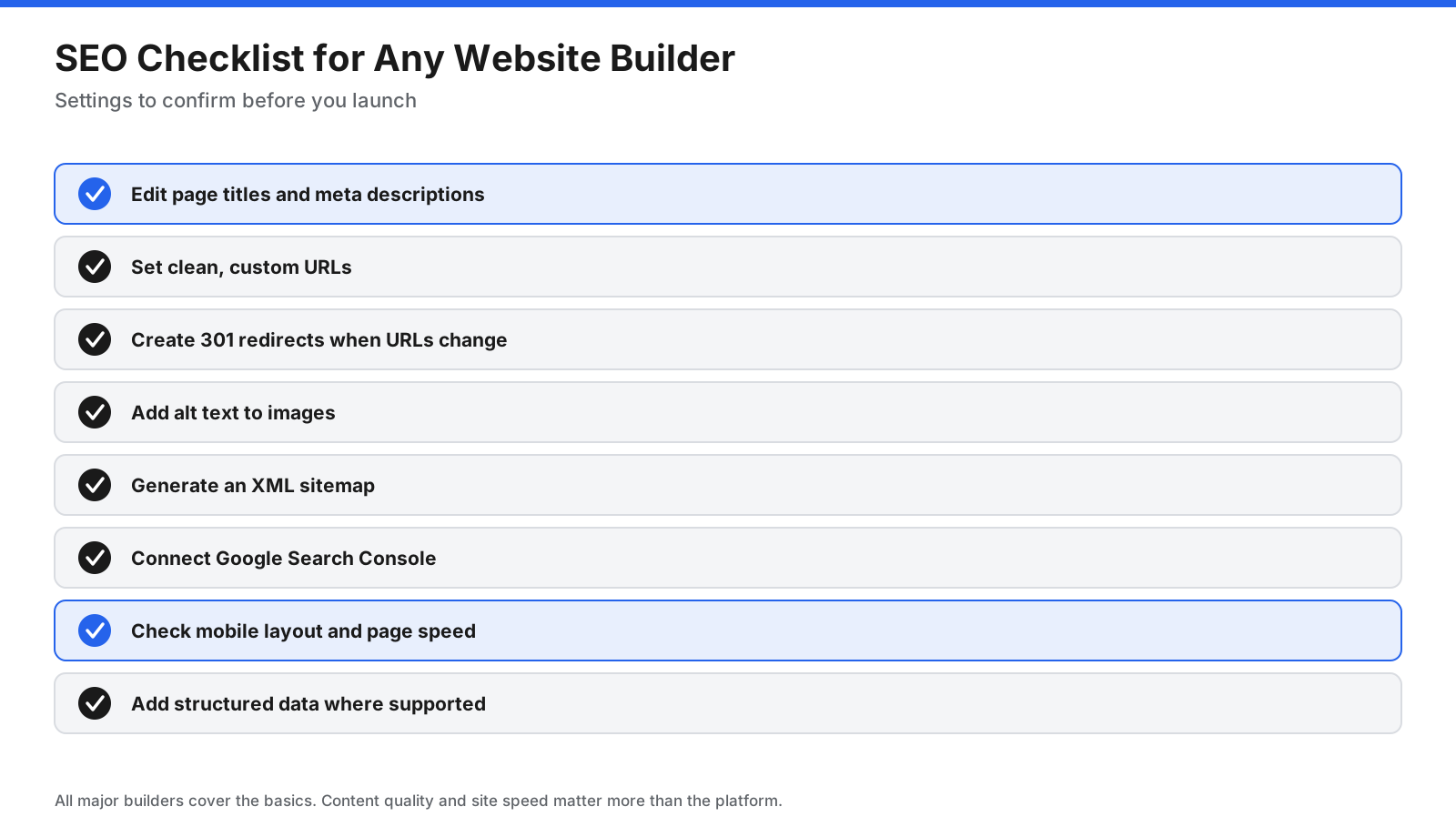
- WordPress.com with plugins gives you a wide range of SEO tools.
- Webflow offers detailed control over meta tags, structured data, and clean code.
- Wix and Squarespace include built-in SEO settings and guided checklists that suit beginners.
- Shopify handles product SEO well, with apps for more advanced needs.
The builder matters less than what you publish. Useful content, a clear site structure, fast pages, and links from other sites have a bigger effect on rankings than the platform itself.
Should You Use a Website Builder, WordPress, or a Developer?
- Website builder: Fastest and simplest. Hosting, security, and updates are included. You trade some flexibility and portability for convenience.
- Self-hosted WordPress: Free software that you install on your own hosting. You get control and plugins, but you are responsible for updates, backups, and security.
- Custom development: A developer builds exactly what you need. This offers the most control but costs the most and takes the longest.
Most small businesses, creators, and freelancers are well served by a website builder. Consider self-hosted WordPress or custom development when you need unusual features, complete control over data, or a very large site.
Can You Switch Website Builders Later?
You can, but it usually takes work. Most builders do not export your design, so you typically rebuild the layout on the new platform and move your content. WordPress.com can export content in a standard WordPress format, Ghost is open source, and GoDaddy says its AI builder lets you export generated code.
Plan for portability from the start. Keep copies of your images and text, register your domain in a way you control, and set up 301 redirects from old URLs to new ones when you move, so you keep your search traffic.
How Do You Choose the Right Website Builder?
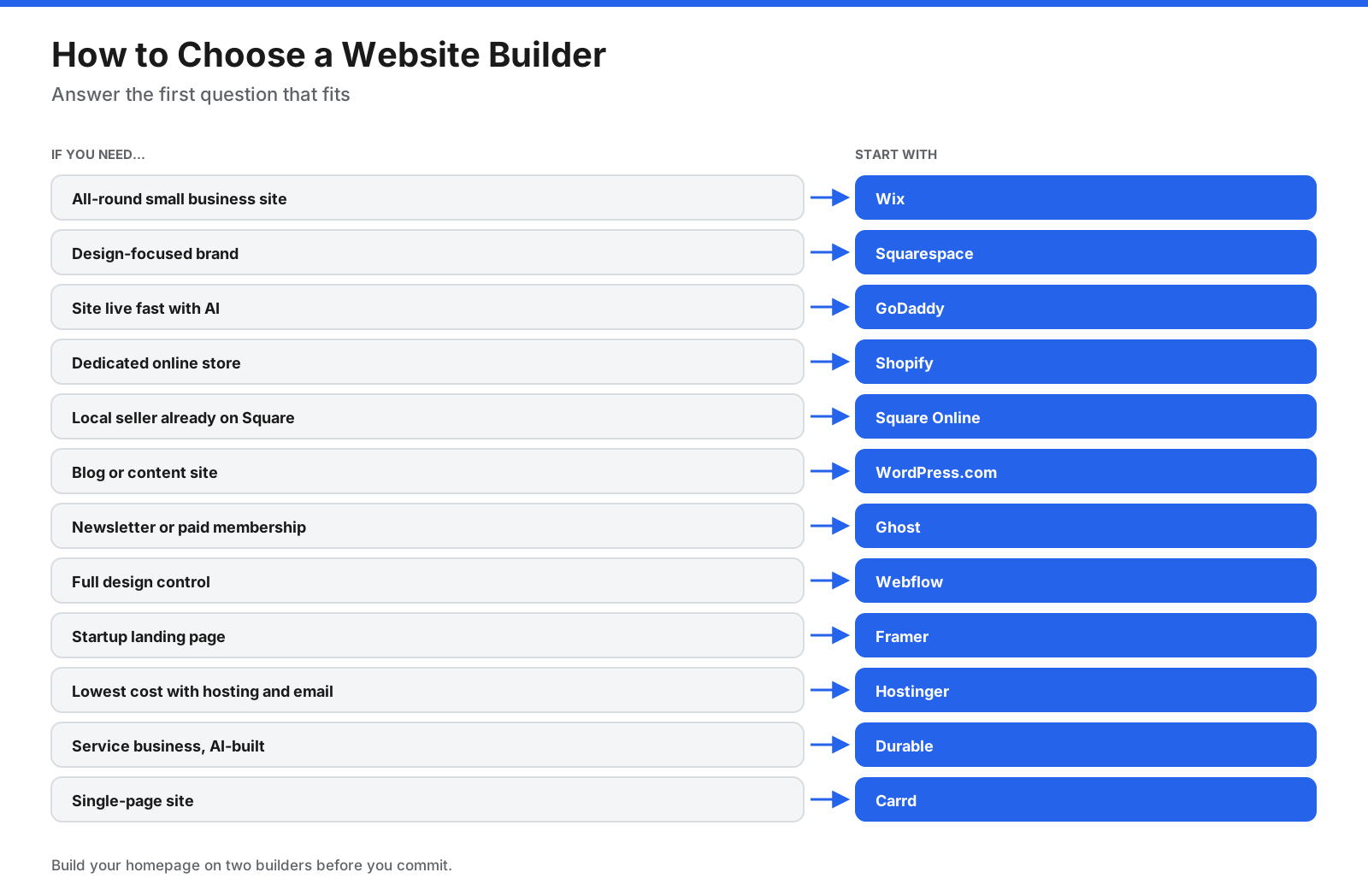
- Define the site’s main job. Showcase services, sell products, publish content, or capture leads.
- List must-have features. Bookings, store, blog, memberships, or multiple languages.
- Compare yearly cost. Include renewal rates, domain fees, apps, and transaction fees.
- Test two builders. Use free plans or trials to build your homepage in each.
- Check SEO and export options. Confirm you can manage SEO settings and move your content later.
Frequently Asked Questions
What is the best website builder?
Wix is the strongest all-round choice for most small businesses and is Tooltester’s top pick. Squarespace is better for design-focused brands, Shopify for online stores, and WordPress.com for content-heavy sites.
What is the best website builder for small business?
Wix, Squarespace, and GoDaddy are popular choices. Wix offers many features, Squarespace has polished templates, and GoDaddy focuses on fast AI-assisted setup.
What is the best free website builder?
Wix and WordPress.com offer full websites on free plans with branding or ads. Square Online is free for selling with processing fees, and Carrd works for simple one-page sites.
What is the easiest website builder to use?
GoDaddy, Wix, and Squarespace are among the easiest for beginners. AI builders such as Durable and Hostinger can create a first draft from a short description.
What is the cheapest website builder?
Carrd is the cheapest paid option at $9 to $19 per year. Hostinger offers low introductory prices from $2.99 per month on a 48-month plan, and WordPress.com Personal costs $4 per month billed yearly.
Is Wix or Squarespace better?
Wix offers more features and design flexibility, while Squarespace offers polished templates and a more structured editor. Wix has a free plan, and Squarespace offers a 14-day trial.
What is the best website builder for ecommerce?
Shopify is the best choice for dedicated online stores. Square Online suits local businesses that already use Square, and Wix and Squarespace work well for smaller catalogs.
What is the best AI website builder?
Wix, GoDaddy, Hostinger, and Durable all generate sites with AI. Durable focuses on service businesses, while GoDaddy says its AI builder lets you view and export generated code.
What is the best website builder for SEO?
WordPress.com with plugins and Webflow offer the most SEO control. Wix and Squarespace include built-in tools that suit beginners. Content quality matters more than the platform.
What is the best website builder for photographers and portfolios?
Squarespace is popular for image-focused templates. Framer and Webflow suit designers who want custom layouts, and Carrd works for a simple one-page portfolio.
Do you need to buy a domain for a website builder?
You can publish on a free subdomain, but a custom domain looks more professional and is easier to remember. Some annual plans include a domain free for the first year, after which a yearly renewal fee applies.
Do you own your website on a website builder?
You own your content, but the platform hosts the site and its design. If you leave, you usually take your text, images, and domain with you and rebuild the design on the new platform.
The Bottom Line
The best website builder depends on what your site needs to do. Wix is the best all-round choice for small businesses, Squarespace suits design-led brands, and GoDaddy gets you online quickly with AI. Shopify and Square Online are built for selling, WordPress.com and Ghost for publishing, Webflow and Framer for design control, and Hostinger, Durable, and Carrd for low cost, AI, and simple pages.
Build your homepage on two builders before you commit, compare the full yearly cost including renewals and fees, and check each provider’s pricing page for current rates.




















































































