

Ransomware is one of the most disruptive forms of cybercrime because it does not just steal information. It can stop organizations from working. Hospitals divert ambulances, factories halt production, and public services go offline while attackers demand payment. Verizon’s 2026 Data Breach Investigations Report found ransomware in 48% of the breaches it analyzed, up from 44% a year earlier.
Ransomware, defined: Ransomware is malicious software that encrypts or locks a victim’s files and systems, then demands payment, usually in cryptocurrency, for the key to restore access. Most modern attacks also steal data first and threaten to publish it if the victim refuses to pay.
This guide explains how ransomware works, its history and types, the ransomware-as-a-service business model, warning signs, incident response, recovery, prevention, and the main categories of ransomware protection software. It follows official guidance from CISA, the FBI, NIST, and other primary sources. References appear at the end.
How Is Ransomware Different From Other Malware?
Most malware tries to stay hidden while it steals data, spies on users, or uses computing resources. Ransomware is designed to be noticed. Its goal is to create a crisis that pushes the victim to pay quickly.
The FBI describes ransomware as malware that blocks access to files, systems, or networks and demands a ransom for their return. CISA notes that attackers often threaten to sell or leak stolen data or authentication information if the ransom is not paid. In MITRE ATT&CK, the encryption step is technique T1486, Data Encrypted for Impact.
What makes ransomware distinctive is not one technique but the combination of intrusion, network spread, data theft, destruction of recovery options, and encryption. Modern incidents are often human-operated: an intruder may spend days or weeks inside a network before triggering encryption.
A Short History of Ransomware
Ransomware has evolved from a novelty distributed on floppy disks into an organized criminal industry. Each era added a new pressure point: encryption, cryptocurrency, self-spreading worms, and threats to leak stolen data.
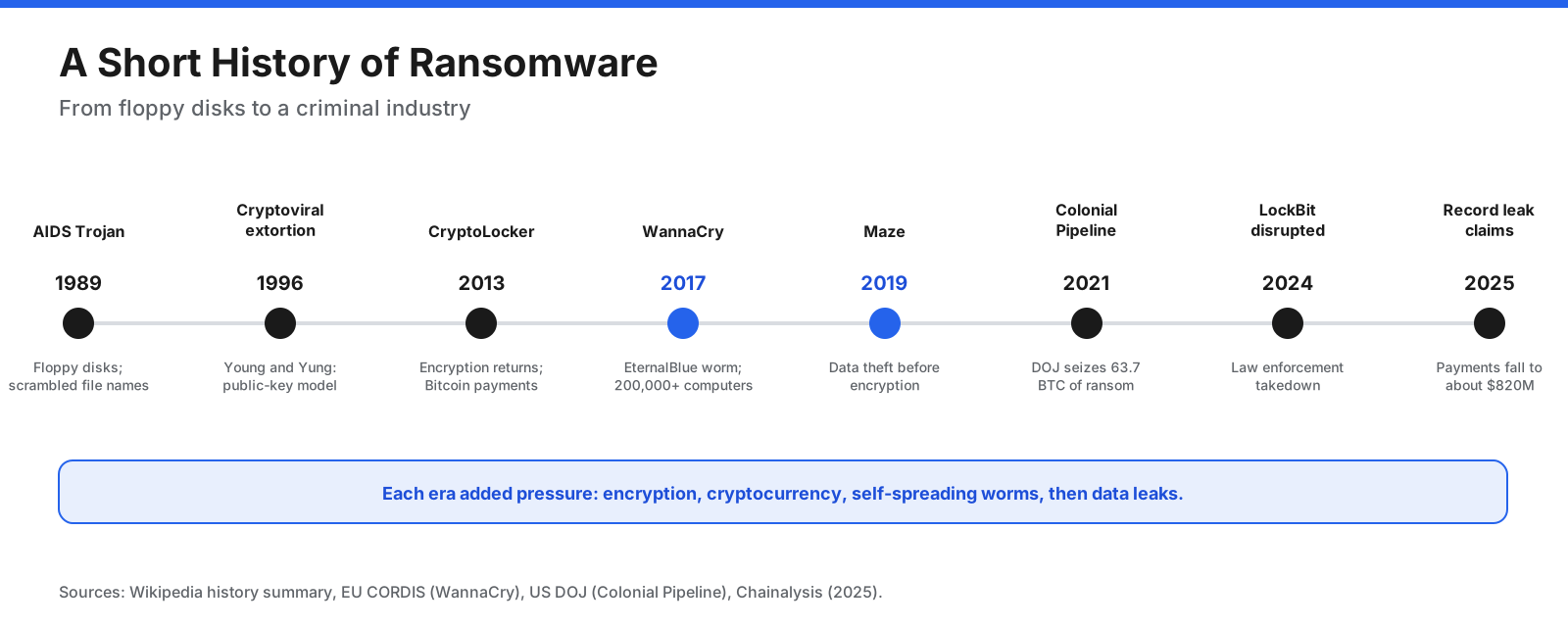
- 1989, the AIDS Trojan: Distributed on floppy disks by Joseph Popp, it hid files and encrypted their names. Its key could be extracted from the code, so victims did not need to pay.
- 1996, cryptoviral extortion: Researchers Adam Young and Moti Yung described using public-key cryptography so only the attacker held the decryption key.
- 2013, CryptoLocker: It revived file-encrypting ransomware at scale and collected payments in Bitcoin.
- 2017, WannaCry: A self-spreading worm using the EternalBlue exploit hit more than 200,000 computers in 150 countries, according to the European Commission’s CORDIS service. Several UK hospitals cancelled operations.
- 2019, double extortion: The Maze group popularized stealing data before encryption and threatening to leak it. Backups alone no longer removed the pressure to pay.
- 2021, Colonial Pipeline: The DarkSide attack disrupted pipeline operations. The company paid about 75 bitcoins, and the US Department of Justice later announced the seizure of 63.7 bitcoins.
- 2024 and 2025: Law enforcement disrupted major groups, including LockBit in 2024. Chainalysis reported record ransomware leak-site claims in 2025 even as estimated payments fell.
How Big Is the Ransomware Problem?
Different reports measure different parts of ransomware. Breach investigations, cryptocurrency tracing, and victim complaints together provide a fuller picture, but their figures should not be treated as interchangeable.
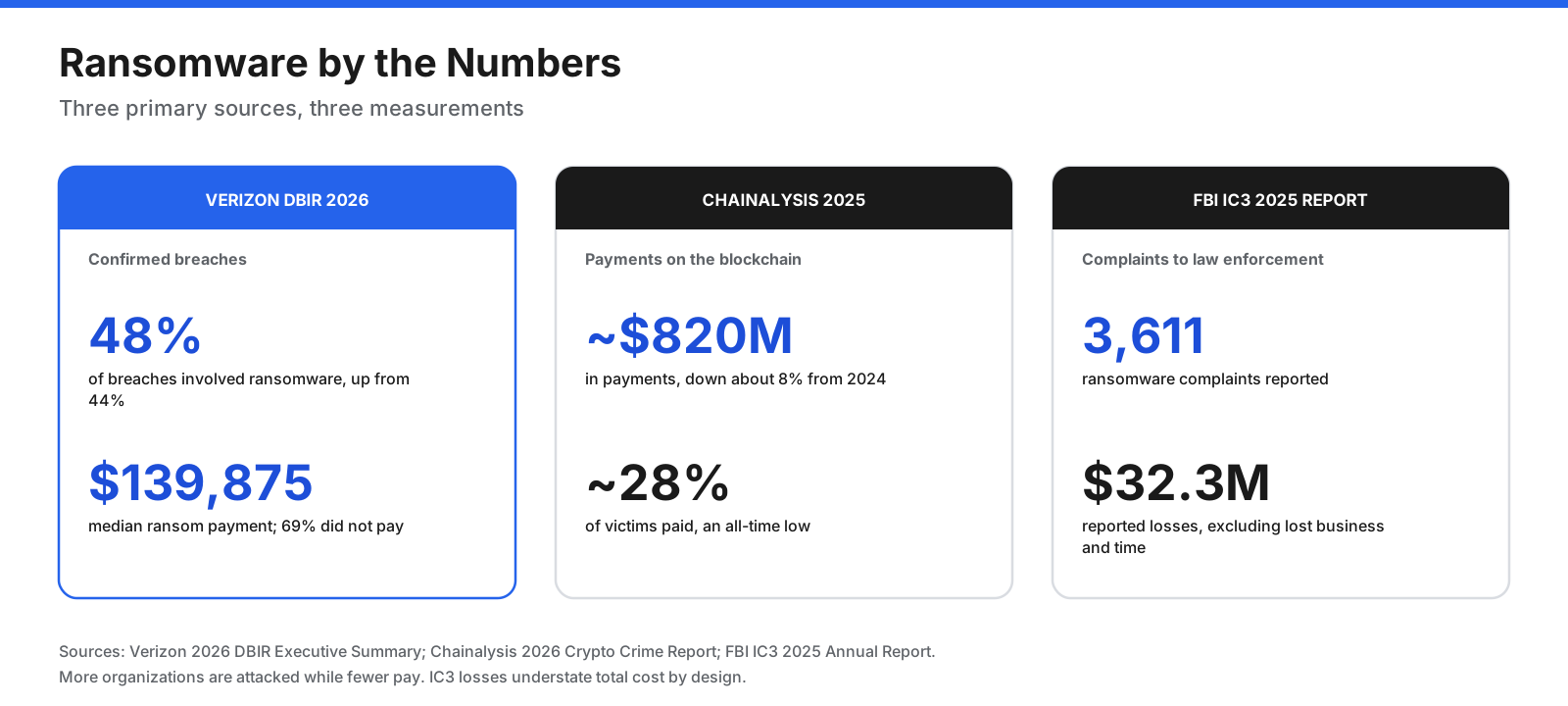
- Breach data: Verizon’s 2026 DBIR found ransomware in 48% of analyzed breaches. The median ransom payment was $139,875, and 69% of victims in its data did not pay.
- Cryptocurrency payments: Chainalysis estimated ransomware payments totaled about $820 million in 2025, roughly 8% below its updated 2024 estimate. It estimated that about 28% of victims paid, while claimed attacks on leak sites reached a record high.
- Law-enforcement complaints: The FBI’s 2025 Internet Crime Complaint Center report recorded 3,611 ransomware complaints with $32.3 million in reported losses. The FBI cautions that reported losses do not normally include lost business, time, wages, files, or equipment, so the figure understates the total impact.
The common thread is that ransomware remains a major threat even as payment behavior changes. Attackers can also target smaller organizations and increase pressure by stealing data before encrypting it.
How Does a Ransomware Attack Work?
Many enterprise attacks follow a recognizable sequence. The attacker first gains access, establishes persistence, escalates privileges, moves through the network, disables recovery options, steals data, and then encrypts files and demands payment.
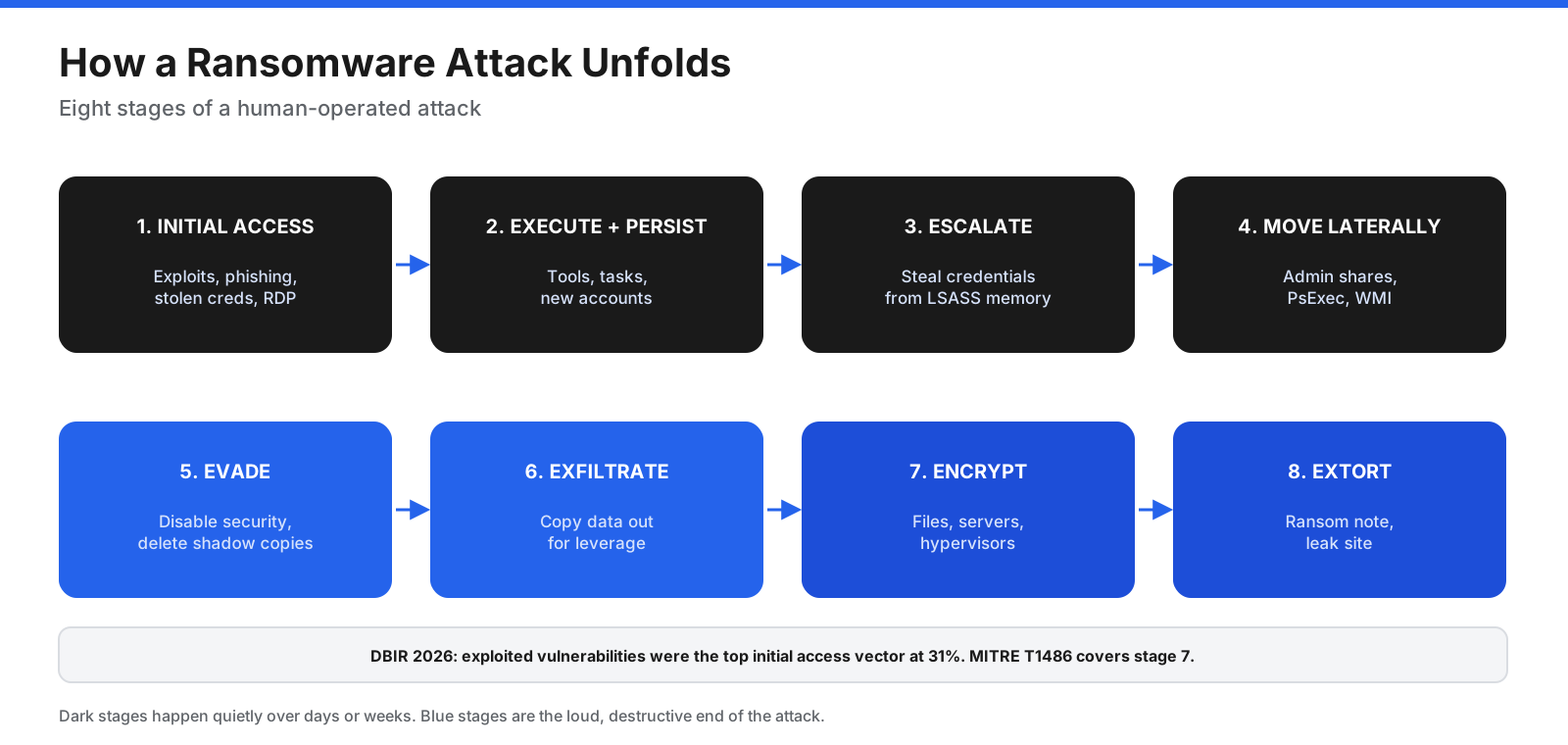
- Initial access. Common routes include exploited vulnerabilities, phishing, stolen credentials, exposed remote access services such as Remote Desktop Protocol (RDP), and compromised suppliers. Verizon’s 2026 data found exploitation of vulnerabilities was the most common initial access vector for breaches overall.
- Execution and persistence. The attacker runs tools and creates ways to return, such as scheduled tasks, new accounts, or remote management software.
- Privilege escalation and credential theft. Stolen credentials can help an intruder obtain administrator or domain administrator rights.
- Discovery and lateral movement. The attacker maps the network, locates file servers and backups, and spreads using valid accounts, administrative shares, and remote execution tools.
- Defense evasion. Security tools may be disabled, and Windows Volume Shadow Copies or backup catalogs may be deleted to prevent easy rollback.
- Data exfiltration. Sensitive data is copied to attacker-controlled storage so it can be used as leverage.
- Encryption. Files, network shares, databases, virtual machines, or other systems are made unusable.
- Extortion. Ransom notes appear and attackers demand payment, often threatening to publish stolen data on a leak site.
The ransom note is the final step. Monitoring for unusual sign-ins, mass file changes, disabled security tools, deleted backups, and unexplained outbound transfers can give defenders an opportunity to act earlier.
How Does Ransomware Encryption Work?
Modern ransomware commonly uses hybrid encryption. Symmetric encryption is fast enough for large files, while public-key cryptography protects the symmetric keys so the victim cannot simply reverse the process.
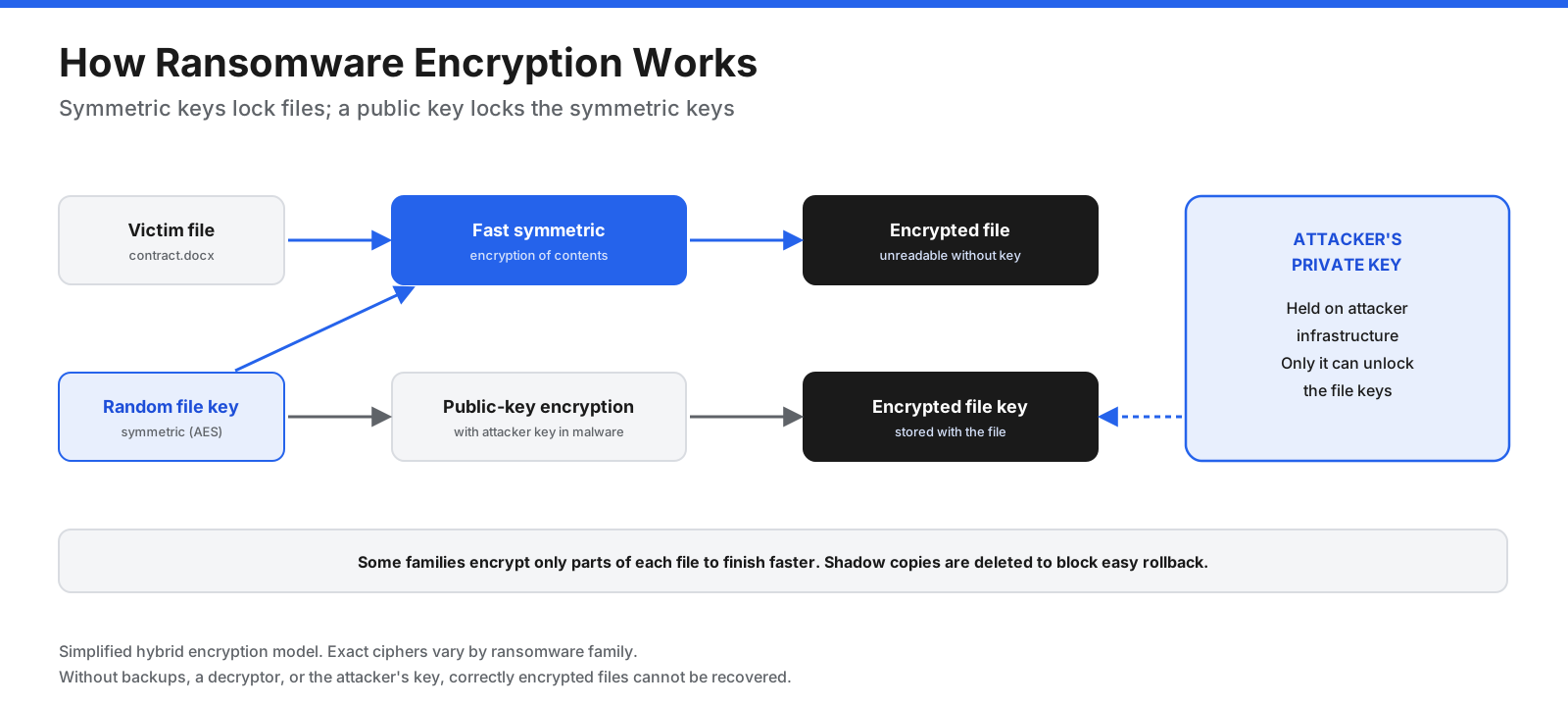
- A file key is generated. The malware creates a random symmetric key for a file or session. Ciphers such as AES or ChaCha20 can encrypt large amounts of data quickly.
- The file is encrypted. The ransomware uses the symmetric key to encrypt the file contents.
- The key is protected. The symmetric key is encrypted with the attacker’s public key. Only the matching private key can recover it.
- Recovery options may be targeted. Some families encrypt only parts of files to work faster, and attackers may delete shadow copies and accessible backups.
When the encryption is correctly implemented, there is no general mathematical shortcut to recover the files. Recovery usually depends on clean backups, a decryptor for a vulnerable or known ransomware family, keys recovered by investigators, or a product’s rollback feature. Removing malware does not automatically decrypt files that it has already encrypted.
What Are the Types of Ransomware?
| Type | What it does | Example or note |
|---|---|---|
| Crypto ransomware | Encrypts files and demands payment for the key. | CryptoLocker, WannaCry |
| Locker ransomware | Locks a screen or system without necessarily encrypting files. | WinLock |
| Scareware | Displays fake warnings or fake law-enforcement notices demanding payment. | Often does not encrypt data. |
| Leakware (doxware) | Steals data and threatens to publish it. | May be used with or without encryption. |
| Double extortion | Encrypts data and threatens to leak stolen copies. | Popularized by Maze in 2019. |
| Multi-extortion | Adds pressure by contacting customers or partners, or launching denial-of-service attacks. | Raises pressure even when backups exist. |
| Wiper disguised as ransomware | Destroys data without a realistic recovery path. | Payment may restore nothing. |
| Ransomware-as-a-service (RaaS) | A criminal business model in which developers rent tools to affiliates. | Separates development from intrusion work. |
How Does Ransomware-as-a-Service Work?
Ransomware has become a specialized supply chain. Operators develop the malware and maintain infrastructure, while affiliates carry out intrusions and deploy the payload. Other roles may include initial access brokers, negotiators, leak-site operators, and money launderers.
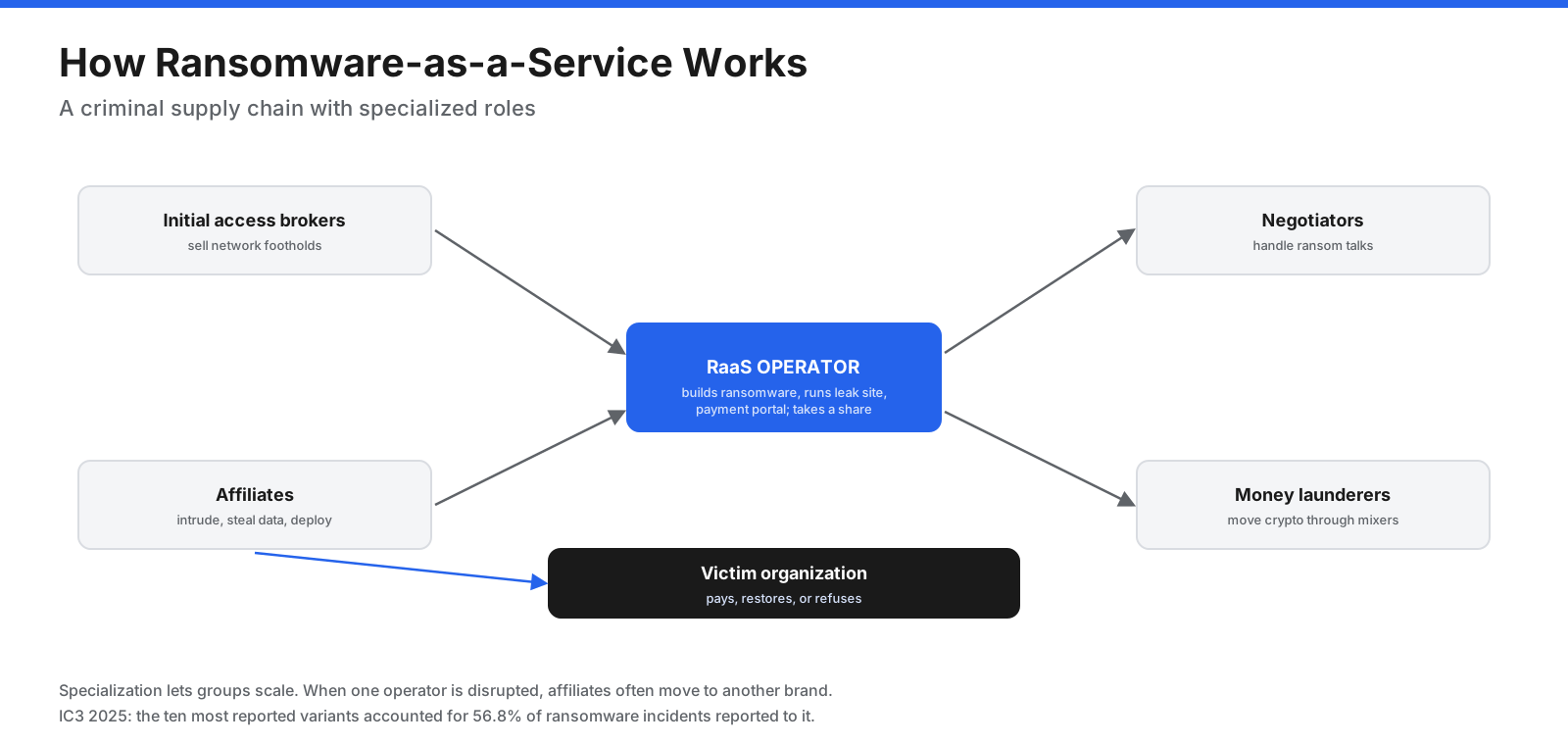
- Operators build and maintain ransomware, payment portals, and leak sites, and take a share of payments.
- Affiliates break into networks, steal data, and deploy ransomware in exchange for a share of the ransom.
- Initial access brokers sell footholds such as stolen VPN credentials or compromised servers.
- Support roles may handle negotiations, leak-site operations, and laundering cryptocurrency.
This structure helps explain why groups may rebrand or reappear after law-enforcement action. Affiliates can move to another operator, and existing code and techniques may be reused.
How Do You Know If You Have Ransomware?
Ransomware may become obvious when encryption starts, but earlier signs can reveal an intrusion before files become unusable.
Signs encryption may have occurred:
- Files no longer open or have new, unusual extensions.
- Ransom notes appear in folders or on the desktop.
- The desktop wallpaper or login message changes.
- Applications and services fail because their data or configuration files are encrypted.
Earlier warning signs of an intrusion:
- Security tools are unexpectedly disabled or removed.
- Shadow copies disappear or backup jobs fail.
- New administrator accounts or unusual sign-ins appear.
- Remote administration and scanning tools run without an authorized reason.
- Large unexplained outbound data transfers or sudden spikes in file modifications occur.
What Should You Do During a Ransomware Attack?
The joint #StopRansomware Guide from CISA, the FBI, the NSA, and MS-ISAC provides response guidance. The following steps summarize its approach. If an incident is active, contact your incident-response team or qualified security responders promptly.
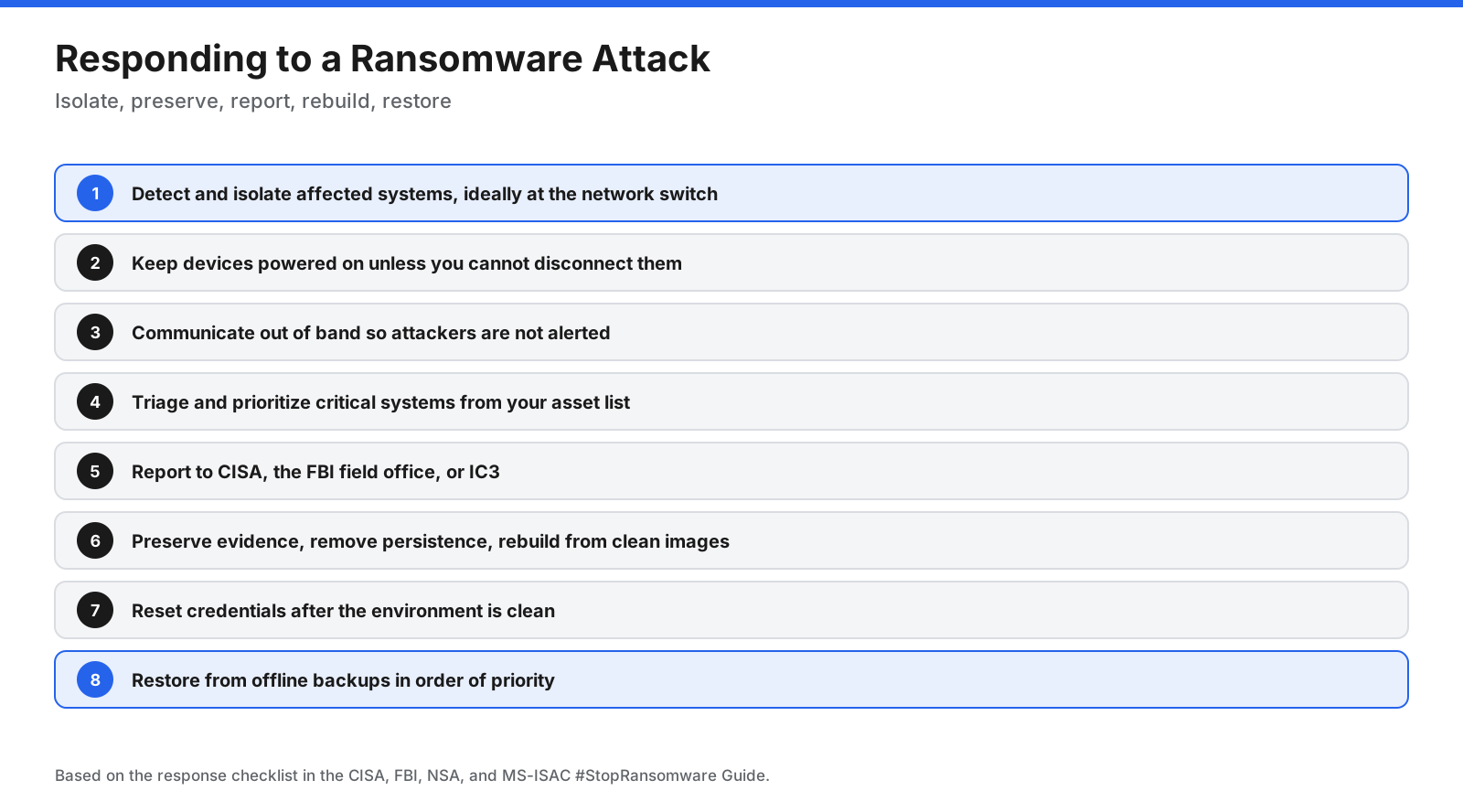
- Detect and isolate. Identify affected systems and isolate them. Where possible, disconnect them at the network switch level. Avoid powering devices off unless disconnection is impossible, because shutdown may destroy evidence held in memory.
- Communicate out of band. Use phones or separate accounts because attackers may be monitoring organizational email and chat.
- Triage critical systems. Prioritize business-critical assets and examine logs, alerts, and security tools for the access method and malware involved.
- Report the incident. Contact CISA and the FBI, through a local field office or IC3, and follow any sector-specific or regulatory reporting obligations.
- Contain and eradicate. Preserve forensic evidence, identify compromised accounts and systems, remove persistence, and rebuild from known-clean images.
- Reset credentials. Change passwords after the environment is clean, prioritizing administrator and service accounts.
- Recover and monitor. Restore from offline backups in business-priority order, monitor for reinfection, and document lessons learned.
Should You Pay the Ransom?
The FBI does not support paying a ransom. Payment does not guarantee recovery, may encourage further attacks, and does not guarantee that stolen data will remain private. Attackers may provide faulty decryptors, publish or sell stolen data anyway, or target the same victim again.
There may also be legal and sanctions risks. The US Treasury’s Office of Foreign Assets Control has warned that paying a sanctioned person or entity can violate sanctions rules. Prompt reporting and cooperation with law enforcement can be significant mitigating factors if a payment raises sanctions questions.
Organizations considering payment should involve legal counsel, their cyber insurer, and law enforcement before deciding. Verizon found 69% of ransomware victims in its data did not pay, while Chainalysis estimated that about 28% paid in 2025.
Can You Remove Ransomware and Recover Your Files?
Removing malware and recovering encrypted files are separate tasks. Security tools or rebuilding from clean images can remove the ransomware program, but that does not decrypt files already affected.
- Clean backups: Usually the most reliable recovery path when isolated or immutable copies survived the attack.
- Free decryptors: The No More Ransom project offers tools for some ransomware families and a Crypto Sheriff tool to help identify the family. A tool may work only for specific versions.
- Endpoint rollback: Some endpoint security products can restore files changed during an attack.
- Shadow copies and version history: Cloud storage and file services may offer earlier versions if attackers did not delete them.
Do not reconnect systems or restore backups until responders have addressed the attacker’s access and confirmed the recovery environment is clean. Otherwise, restored systems may be reinfected.
How Can You Prevent Ransomware?
Prevention works best as a program, not a single product. NIST’s ransomware risk profile maps the threat to the six functions of the Cybersecurity Framework 2.0: govern, identify, protect, detect, respond, and recover.
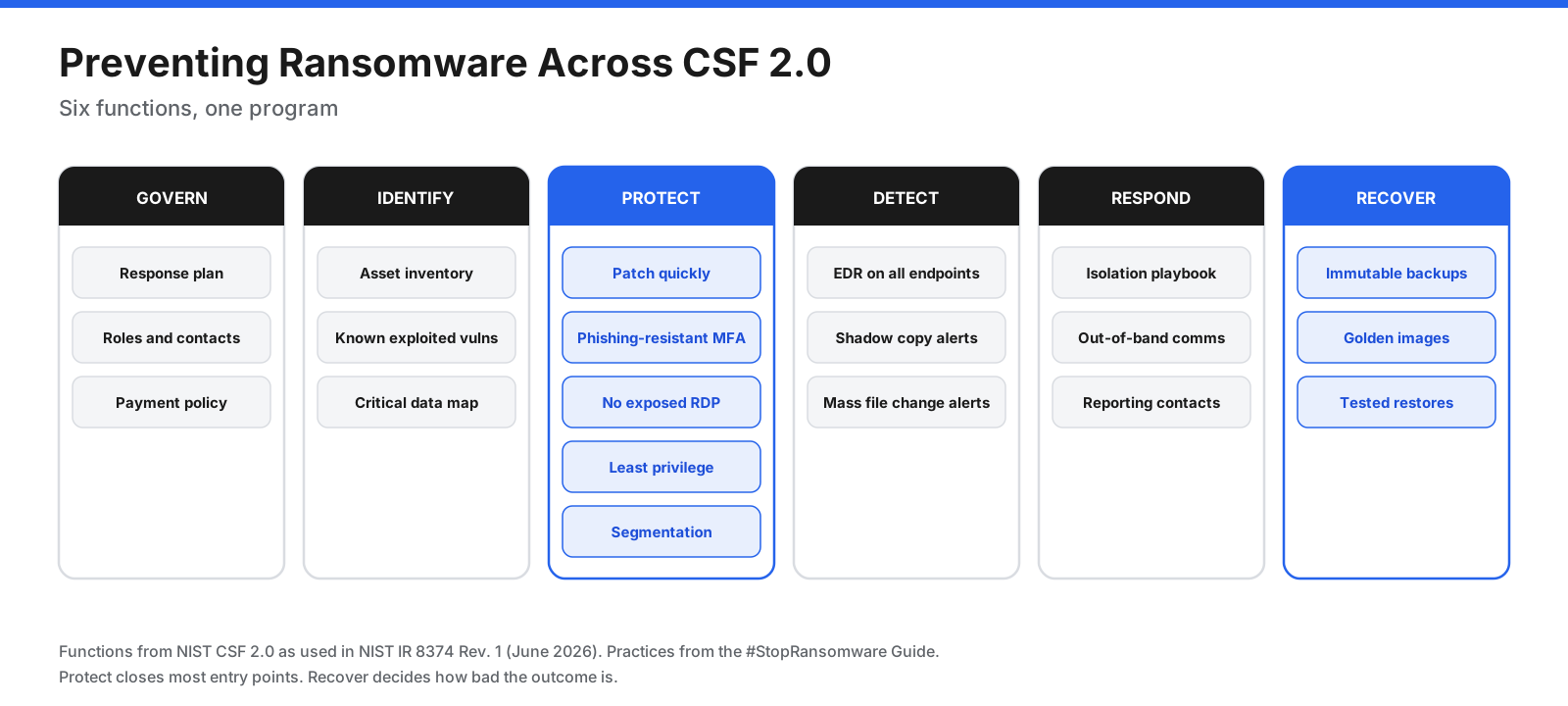
- Patch internet-facing systems quickly. Prioritize vulnerabilities known to be exploited, using resources such as CISA’s Known Exploited Vulnerabilities catalog.
- Use phishing-resistant multifactor authentication. Prioritize email, VPNs, remote access, and administrator accounts.
- Reduce remote access exposure. Do not expose RDP and other remote services directly to the internet. Disable unused ports and protocols, including SMBv1 where present.
- Apply least privilege. Use standard accounts for routine work and tightly control administrator privileges.
- Segment networks. Limit how far an intruder can move from one compromised device to backups, hypervisors, and critical servers.
- Use endpoint protection. Cover laptops and servers, enable tamper protection, and monitor alerts.
- Train staff. Help employees recognize phishing and report suspicious activity promptly.
- Keep tested backups. Maintain offline or immutable copies and test restores regularly.
- Exercise an incident response plan. Define who makes isolation, communications, and payment-policy decisions before an emergency.
Backups That Survive Ransomware
Attackers deliberately hunt for backups, so a backup system should withstand an attacker who has administrator rights. The classic 3-2-1 rule calls for three copies of data on two types of media, with one copy off-site. The 3-2-1-1-0 extension adds one immutable or air-gapped copy and zero errors confirmed through restore testing.
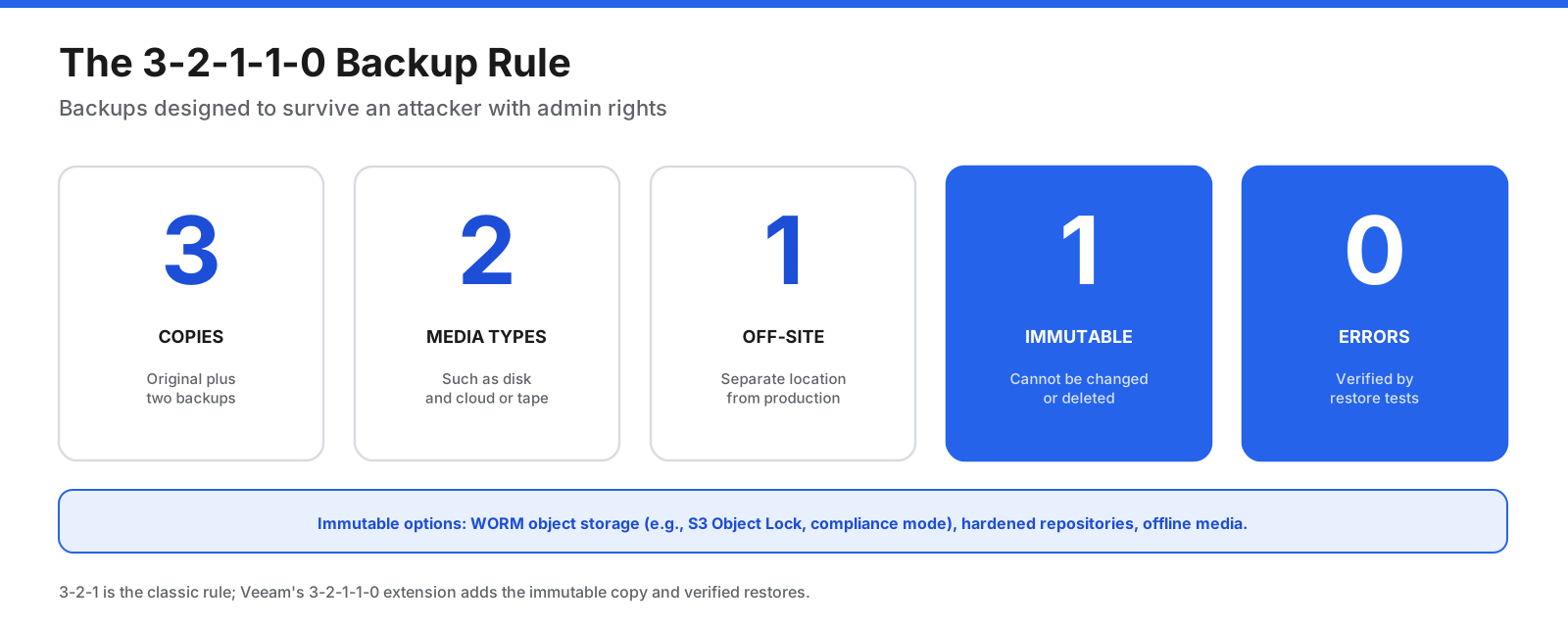
Immutability can come from object storage locks, hardened backup repositories, or offline media disconnected from the network. Amazon S3 Object Lock, for example, supports a write-once-read-many model. Separate backup credentials, multi-factor authentication, approval for destructive actions, and malware scanning before restore add further protection.
Restoring regularly is just as important. A backup that has never been restored is an assumption, not a recovery plan.
What Is the Best Ransomware Protection Software?
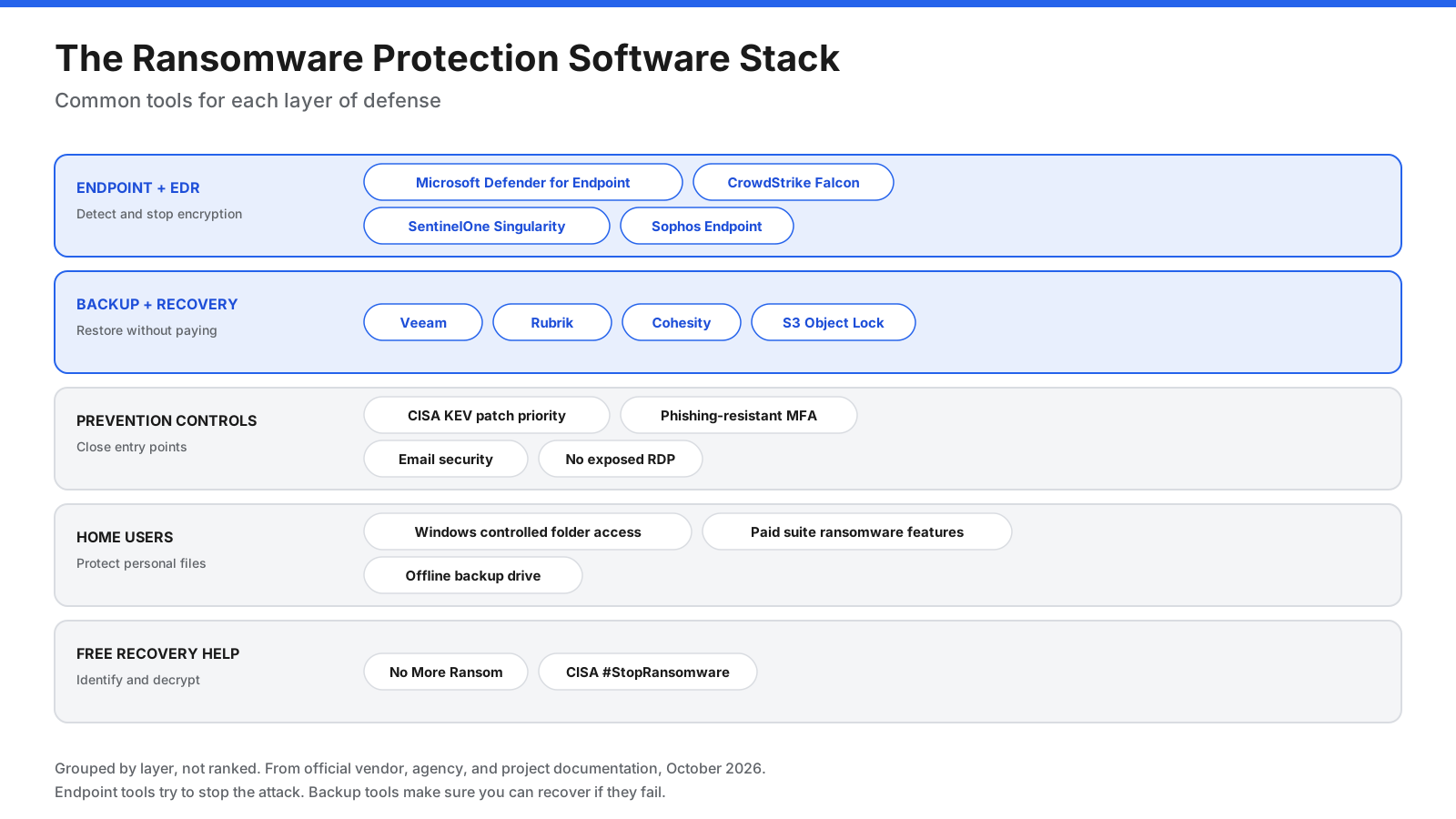
No single product stops every ransomware attack. Protection software addresses different stages of an incident, so organizations typically combine endpoint protection and detection, backup and recovery, preventive controls, and response capability. The tools below are grouped by layer, not ranked. Features change over time, so verify current product documentation before buying.
Endpoint Protection and EDR
Endpoint detection and response (EDR) and extended detection and response (XDR) tools monitor behavior on laptops and servers, block malicious activity, and help responders investigate incidents.
- Microsoft Defender for Endpoint and Microsoft Defender Antivirus: Controlled folder access can block untrusted apps from changing files in protected folders. Attack surface reduction rules include protections against ransomware-related behavior and credential theft. Microsoft notes that controlled folder access is turned off by default and must be enabled.
- CrowdStrike Falcon: Offers endpoint prevention, EDR/XDR, ransomware protection capabilities, and managed detection and response through Falcon Complete.
- SentinelOne Singularity: An XDR platform with ransomware rollback features that can use Windows Volume Shadow Copy Service to restore files to a pre-attack state.
- Sophos Endpoint: Includes CryptoGuard, which monitors for malicious encryption, blocks suspicious processes, and offers automatic file rollback and adaptive attack protection.
When comparing EDR tools, examine independent test results, tamper protection, coverage for servers and hypervisors, whether rollback works on file shares, and whether your team can respond to alerts around the clock.
Backup and Recovery Platforms
Backup platforms determine whether an organization can recover without paying. Veeam promotes immutable backup copies and SureBackup recovery verification. Rubrik describes immutable storage, behavioral anomaly detection, and orchestrated recovery. Cohesity offers immutable snapshots, DataLock storage, anomaly detection, and its FortKnox isolated cyber vault. Cloud object immutability, such as Amazon S3 Object Lock, can also protect backup copies from deletion before their retention date.
Look for immutability that cannot be bypassed with stolen administrator credentials, separate authentication for backups, approval for deletions, malware scanning before restore, and documented recovery times for critical systems.
Prevention Controls That Close Entry Points
- Vulnerability and patch management: Prioritize issues in CISA’s Known Exploited Vulnerabilities catalog.
- Phishing-resistant MFA: Use FIDO2 security keys or passkeys for remote access, email, and administrators.
- Email security and awareness: Reduce phishing as an initial access route.
- Privileged access management: Limit and monitor administrator accounts.
- Network segmentation and remote access controls: Keep RDP and management interfaces off the public internet.
Ransomware Protection for Home Users
Individuals can reduce risk with built-in and commercial protections. Windows controlled folder access can protect selected folders from untrusted apps; it must be enabled in Windows Security. Some paid consumer security suites include ransomware-specific protection or remediation. Cloud storage with version history and an offline backup drive can provide additional recovery options.
Free Recovery Resources
- No More Ransom: Offers free decryptors for some ransomware families and the Crypto Sheriff identification tool.
- CISA #StopRansomware: Offers response guidance, alerts, and a checklist for handling ransomware incidents.
How to Choose Ransomware Protection Software
- Start with recovery. Confirm that an immutable or offline backup exists and that critical systems can be restored within an acceptable time.
- Cover every endpoint and server. Include servers and hypervisors that ransomware may target.
- Close common entry points. Patch known exploited vulnerabilities, use phishing-resistant MFA, and remove exposed RDP.
- Plan for 24/7 response. Decide whether internal staff or managed detection and response will handle alerts overnight and on weekends.
- Test the plan. Run tabletop exercises and restore tests, then measure actual recovery time.
How Do You Report a Ransomware Attack?
In the United States, the FBI asks victims to contact their local FBI field office or report through the Internet Crime Complaint Center at IC3.gov. CISA also accepts incident reports. Reporting helps law enforcement track groups and may assist with fund recovery. Organizations in regulated sectors should check their reporting obligations, and anyone whose personal data was exposed may need to be notified under applicable breach laws.
Ransomware Glossary
- Encryption: Converting data into a form that cannot be read without a key.
- Double extortion: Combining encryption with the threat to leak stolen data.
- Leak site: A website used by a ransomware group to publish or threaten to publish victims’ data.
- RaaS: A criminal business model in which developers rent tools to affiliates.
- Affiliate: A criminal who carries out attacks using a RaaS operator’s tools.
- Initial access broker: A criminal who sells access to compromised networks.
- Lateral movement: Moving from one compromised system to others inside a network.
- Shadow copies: Windows snapshots that may help restore earlier versions of files.
- Immutable backup: A backup that cannot be altered or deleted for a set period.
- EDR: Endpoint detection and response software that monitors activity, detects threats, and supports investigation.
- Decryptor: A tool that restores files encrypted by a specific ransomware family.
Frequently Asked Questions
What is ransomware in simple terms?
Ransomware is malicious software that locks files or a computer and demands money to unlock them. Many attackers also steal data and threaten to publish it.
What happens if you get ransomware?
Files or systems may become unusable, and a ransom note demands payment. Isolate affected systems, report the incident, preserve evidence, and restore only from clean backups after the attacker has been removed.
Can you get rid of ransomware?
Security tools or rebuilding a system can remove the malware, but that does not decrypt files. Recovery depends on backups, a decryptor for that ransomware family, or a product rollback feature.
How does ransomware spread?
It can enter through exploited vulnerabilities, phishing, stolen credentials, exposed remote access services, or compromised suppliers. Attackers may then use administrator credentials, remote management tools, and file shares to move through a network.
Should I pay the ransom?
The FBI does not support paying. Payment does not guarantee recovery or prevent data leaks, and payments to sanctioned groups can create legal risks. Involve legal counsel, your insurer, and law enforcement when making incident decisions.
Can antivirus stop ransomware?
Modern antivirus and EDR tools can block many attacks, especially known malware and recognizable encryption behavior. Attackers may try to disable security tools, so tamper protection, prevention controls, and tested backups remain important.
What is double extortion ransomware?
Double extortion combines encryption with data theft. Even if a victim restores from backups, attackers threaten to publish or sell the stolen data unless a ransom is paid.
Do backups protect against ransomware?
Backups help only if attackers cannot reach or delete them. Keep at least one immutable or offline copy, separate backup credentials, and test restores regularly.
What is the best ransomware protection software?
There is no single best tool for every organization. Many combine endpoint protection and EDR, such as Microsoft Defender for Endpoint, CrowdStrike Falcon, SentinelOne Singularity, or Sophos Endpoint, with immutable backup platforms such as Veeam, Rubrik, or Cohesity, plus patching, phishing-resistant MFA, and email security.
Can Macs and phones get ransomware?
Windows systems, servers, and hypervisors are common targets, but threats exist for other platforms and attackers also target cloud storage. Keep devices updated, install apps from trusted sources, and maintain backups.
Summary
Ransomware is malware that encrypts or locks systems and demands payment, often alongside data theft and leak threats. Modern attacks may involve initial access, credential theft, lateral movement, deletion of backups, data theft, encryption, and extortion. Hybrid encryption can make files unrecoverable without the attacker’s key, which is why clean backups are central to recovery.
Defending against ransomware means closing entry points with patching and phishing-resistant MFA, detecting intruders early with endpoint protection, limiting their movement, and keeping immutable, tested backups. Official guidance discourages paying ransoms. With layered defenses and a rehearsed recovery plan, organizations are better prepared to contain an incident and restore services.















































































































