

Perplexity and ChatGPT are often mentioned together, but they started from different ideas. Perplexity was built as an answer engine: you ask a question, it searches the web, and it gives you an answer with numbered citations. ChatGPT is a general assistant for writing, reasoning, coding, data analysis, and creative work. It can search the web when a question needs current information.
In 2026, the products overlap more than ever. Perplexity offers deeper research, model choice, file and app creation, and Perplexity Computer. ChatGPT offers web search, deep research, coding tools, and multi-step work. The right choice depends on whether your main task is finding and verifying information or creating and building something with it.
- Choose Perplexity for fast, sourced answers, current information, research, and access to models from several AI companies.
- Choose ChatGPT for writing, creative work, coding, data analysis, voice, and agents that produce finished work.
- Use both if you want to research and verify in Perplexity, then draft, analyze, or build in ChatGPT.
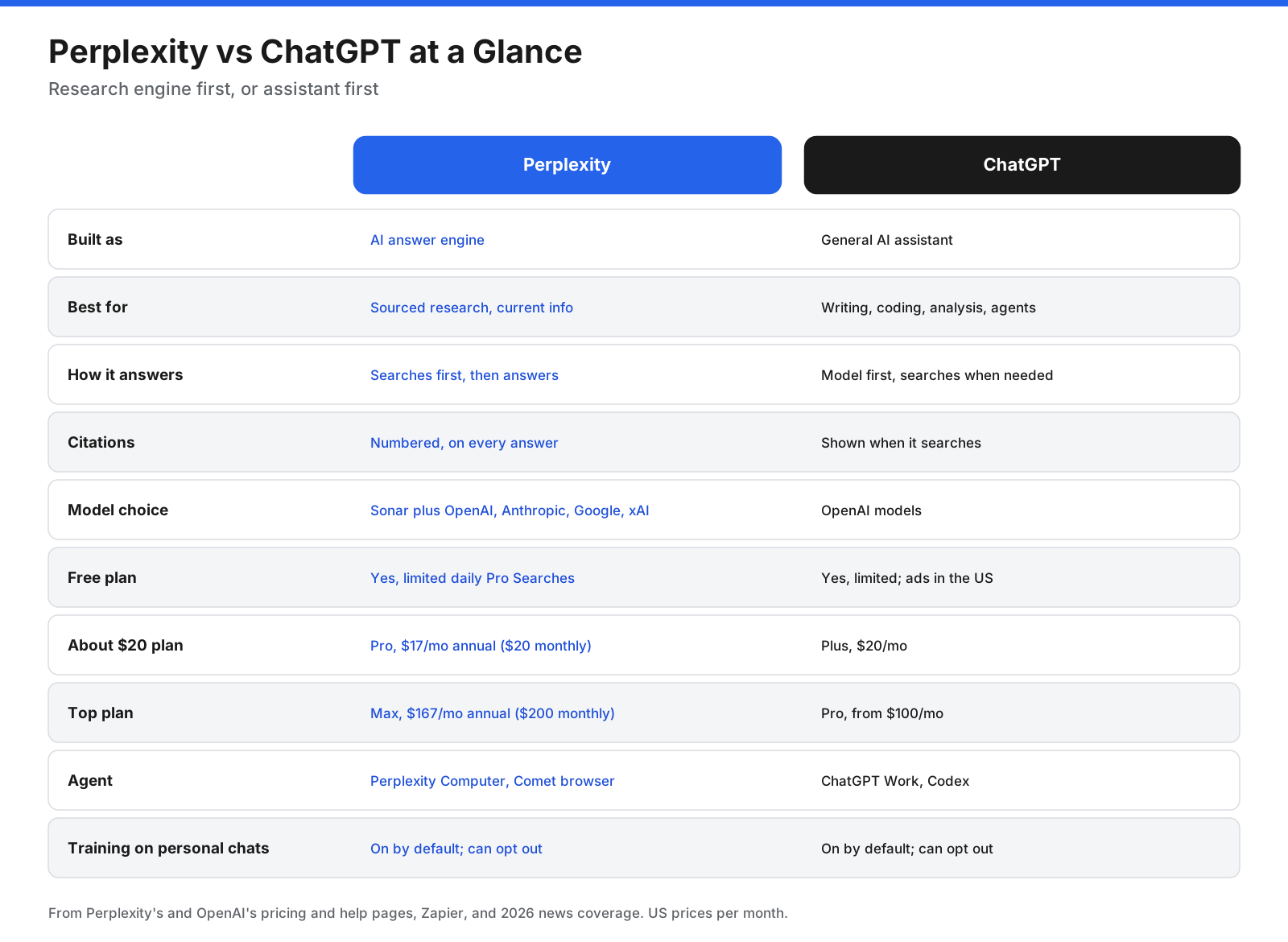
Perplexity vs ChatGPT at a Glance
| Category | Perplexity | ChatGPT |
|---|---|---|
| Built as | AI answer engine | General AI assistant |
| Best for | Sourced research and current information | Writing, coding, analysis, and agents |
| How it answers | Searches first, then answers with citations | Answers from the model and searches when needed |
| Model choice | Sonar plus selected models from OpenAI, Anthropic, Google, and xAI on paid plans | OpenAI models |
| Free plan | Limited daily searches | Limited usage; ads may appear for some US users |
| Popular paid plan | Pro: $17/month billed annually or $20 monthly, per the supplied draft | Plus: $20/month, per the supplied draft |
| Agents | Perplexity Computer and Comet browser | ChatGPT Work and Codex |
Prices and limits change frequently. Verify current plan details on each provider’s official pricing page before subscribing.
What Is the Difference Between Perplexity and ChatGPT?
The main difference is where each answer starts. Perplexity starts with a web search. It reads current sources, writes a concise answer, and shows numbered citations. ChatGPT starts with its model and searches when it decides the question needs current or specific information.
That distinction affects how each tool fits into your work. Perplexity makes it easy to trace factual claims back to sources. ChatGPT is more flexible for work that does not depend on the web, such as drafting a story, revising a long document, analyzing a spreadsheet, or building code.
Perplexity also lets paying users choose from a selection of models from several AI companies. ChatGPT focuses on OpenAI’s models and tools.
How Does Each Tool Answer a Question?
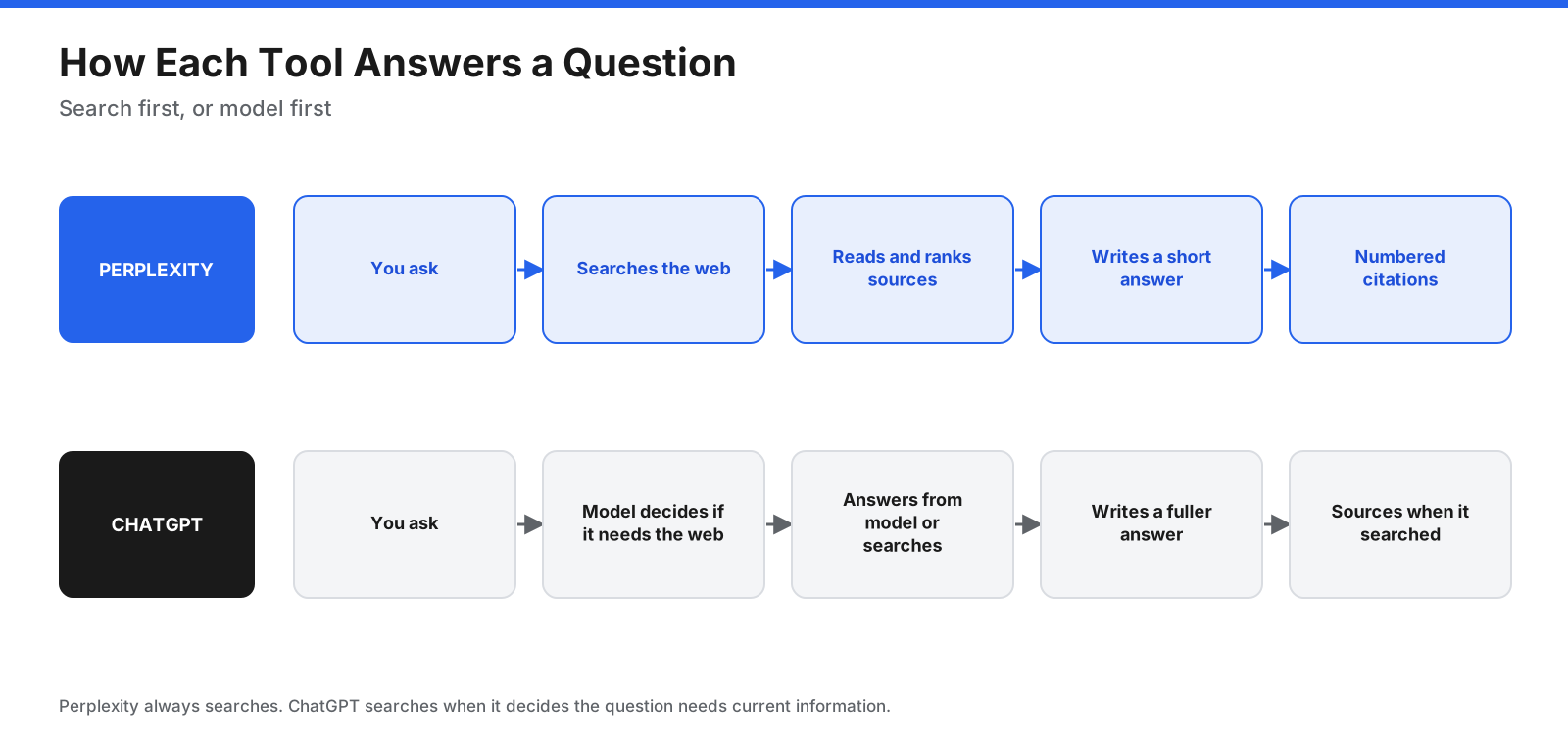
Perplexity interprets a question, searches articles and other sources, and compiles relevant information with citations. Follow-up questions remain connected to the research thread. ChatGPT tends to be more conversational and can produce longer drafts, but when current facts matter, ask it to search and check the sources it provides.
How Do They Compare Task by Task?
Web Search and Current Information
Perplexity is designed for questions about news, prices, product comparisons, and fast-changing topics. ChatGPT can search too, but it may answer directly unless you ask it to look something up.
Verdict: Perplexity is the better starting point for current information.
Citations and Source Quality
Perplexity numbers its citations and links them to sources, making it easier to verify claims. That does not guarantee that every answer is correct or that every source is authoritative. Open the cited pages before reusing important facts.
Verdict: Perplexity for visible, easy-to-check citations.
Deep Research
Both products offer research modes that gather information across multiple sources and produce longer reports. Perplexity emphasizes research speed and source visibility. ChatGPT lets users refine research tasks and use the results in broader writing and analysis workflows.
Verdict: Perplexity for sourcing and research-focused workflows; ChatGPT for more customizable reports and follow-on work.
Writing and Creative Work
ChatGPT is a strong fit for brainstorming, storytelling, rewriting, and adapting tone. Perplexity can write summaries and research-based drafts, but its workflow is shaped more closely around search results.
Verdict: ChatGPT.
Coding and Data Analysis
ChatGPT can help analyze spreadsheets, run code, create charts, and work on software projects. Perplexity is useful for coding questions that need current documentation and can help create simple apps, but its main advantage remains research.
Verdict: ChatGPT for coding and data analysis; Perplexity for finding current technical references.
Files, Images, and Voice
Both tools accept files and can summarize documents. ChatGPT is better suited to analyzing data and turning source material into new outputs. ChatGPT also offers image generation and voice features. Perplexity supports image generation and limited video features on eligible plans, according to the supplied draft.
Verdict: ChatGPT for file analysis, image creation, and voice; compare current plan limits if video generation is important.
Model Choice, Agents, and Organization
Perplexity offers model choice across several providers on paid plans, plus Spaces for organizing research and Comet for browsing with an assistant. ChatGPT offers projects and custom GPTs for repeatable workflows, along with tools aimed at coding and multi-step work.
Verdict: Perplexity for model choice and research organization; ChatGPT for reusable assistants and work that produces documents or code. Agent capabilities change quickly, so verify what each plan currently includes.
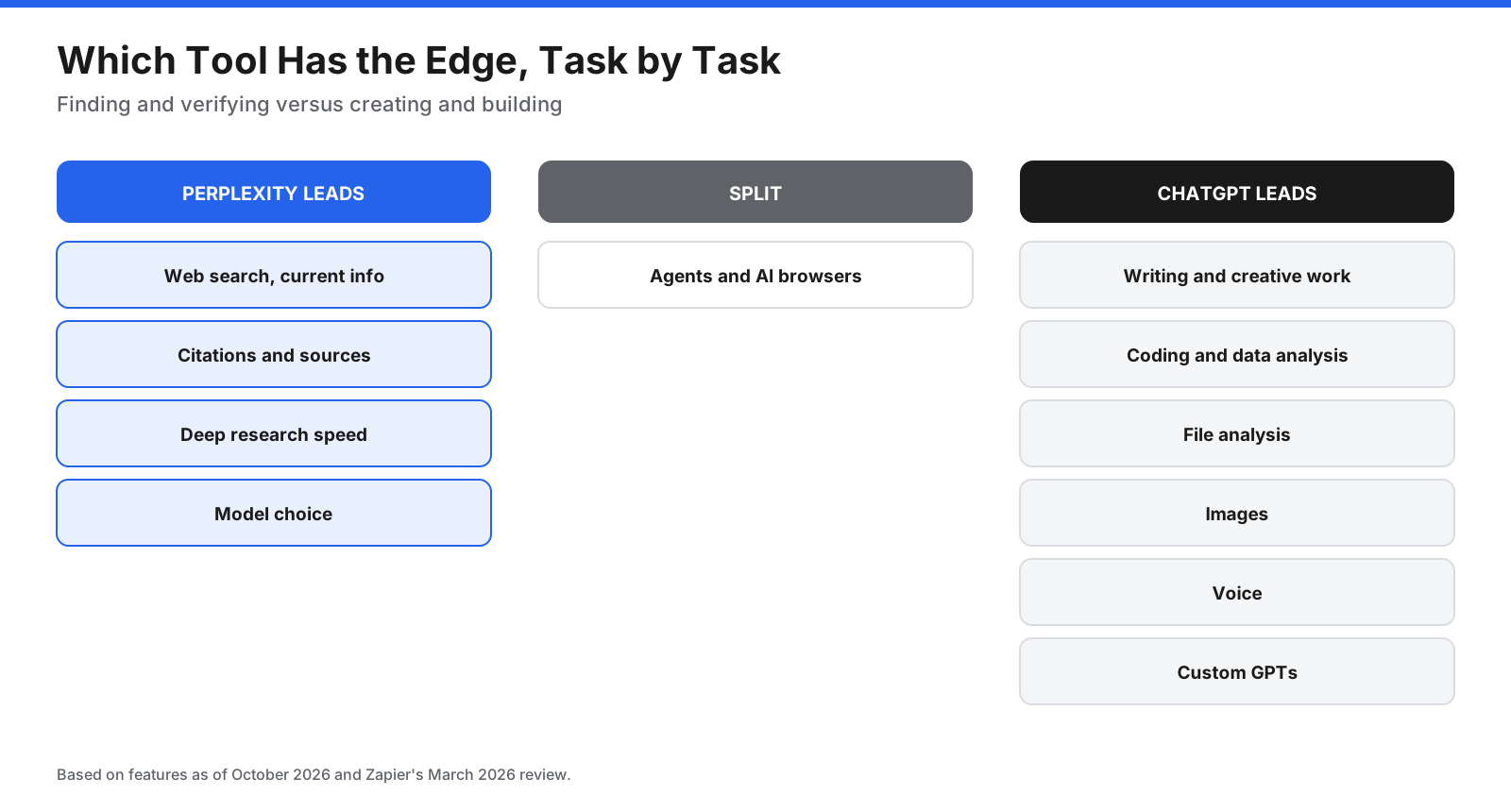
Which Tool Fits Which Kind of Question?
| Task | Better starting point | Why |
|---|---|---|
| Breaking news or recent events | Perplexity | Fresh search with visible sources |
| Product and price comparisons | Perplexity | Current pages and citations are easy to check |
| Academic or market research | Perplexity | Research mode and sources help with background reading |
| How-to and troubleshooting | Either | Perplexity adds citations; ChatGPT offers conversational follow-up |
| Writing and brainstorming | ChatGPT | Flexible drafting and revision |
| Data analysis and charts | ChatGPT | Can work with data and run code |
| Software and coding tasks | ChatGPT | Tools for coding and larger projects |
A useful rule: start with Perplexity when the answer exists on the web and you need to find and verify it. Start with ChatGPT when the answer needs to be created, calculated, or built.
How Much Do Perplexity and ChatGPT Cost?
The supplied article draft lists free tiers for both services, Perplexity Pro at $17 per month billed annually or $20 monthly, Perplexity Max at $167 monthly on annual billing or $200 monthly, ChatGPT Go at $8 in the US, ChatGPT Plus at $20, and ChatGPT Pro from $100. It also lists business plans with per-seat pricing. These prices are time-sensitive and should be checked against official pricing pages before purchase.
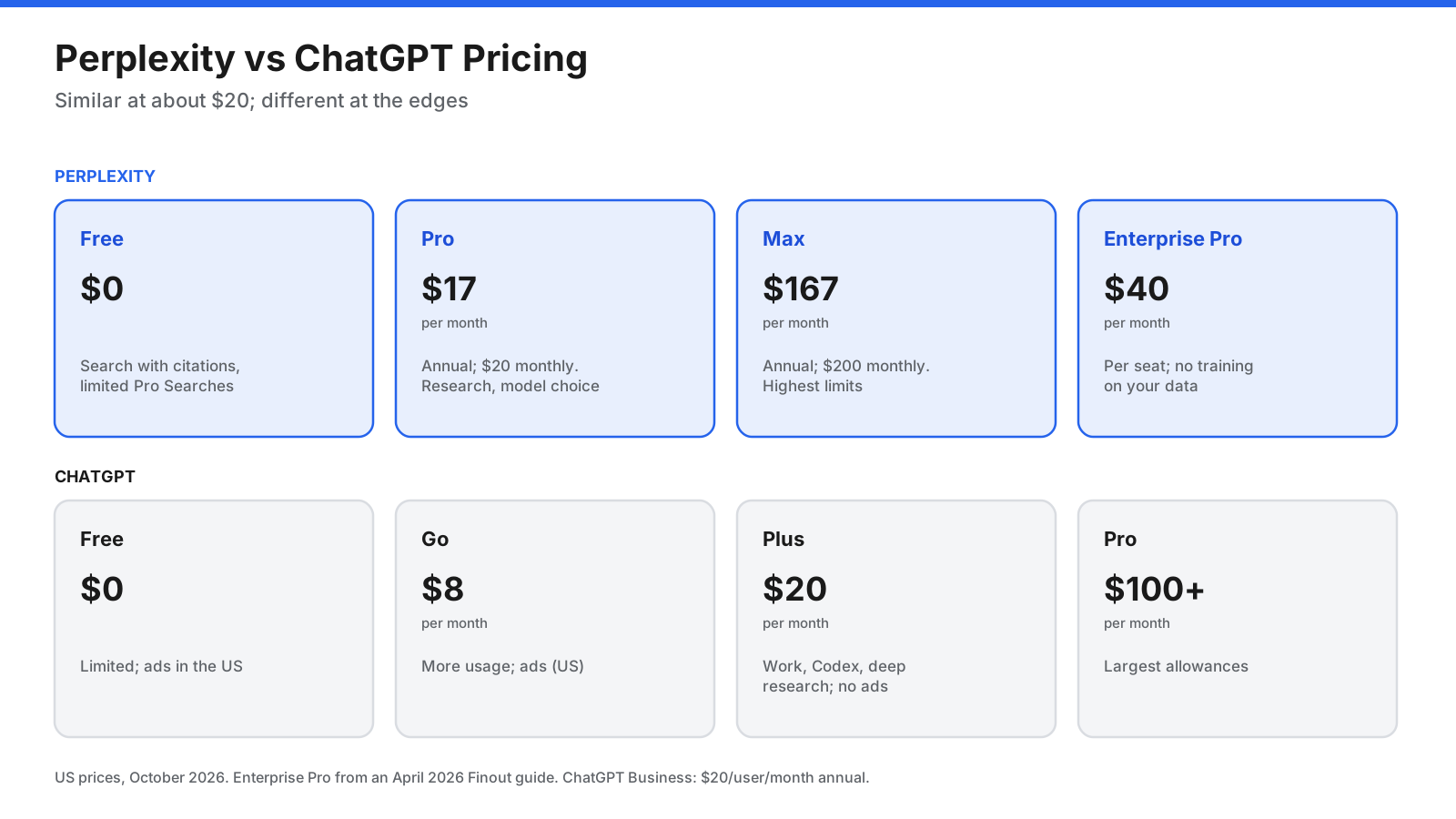
Perplexity Pro vs ChatGPT Plus: What Does About $20 Buy?
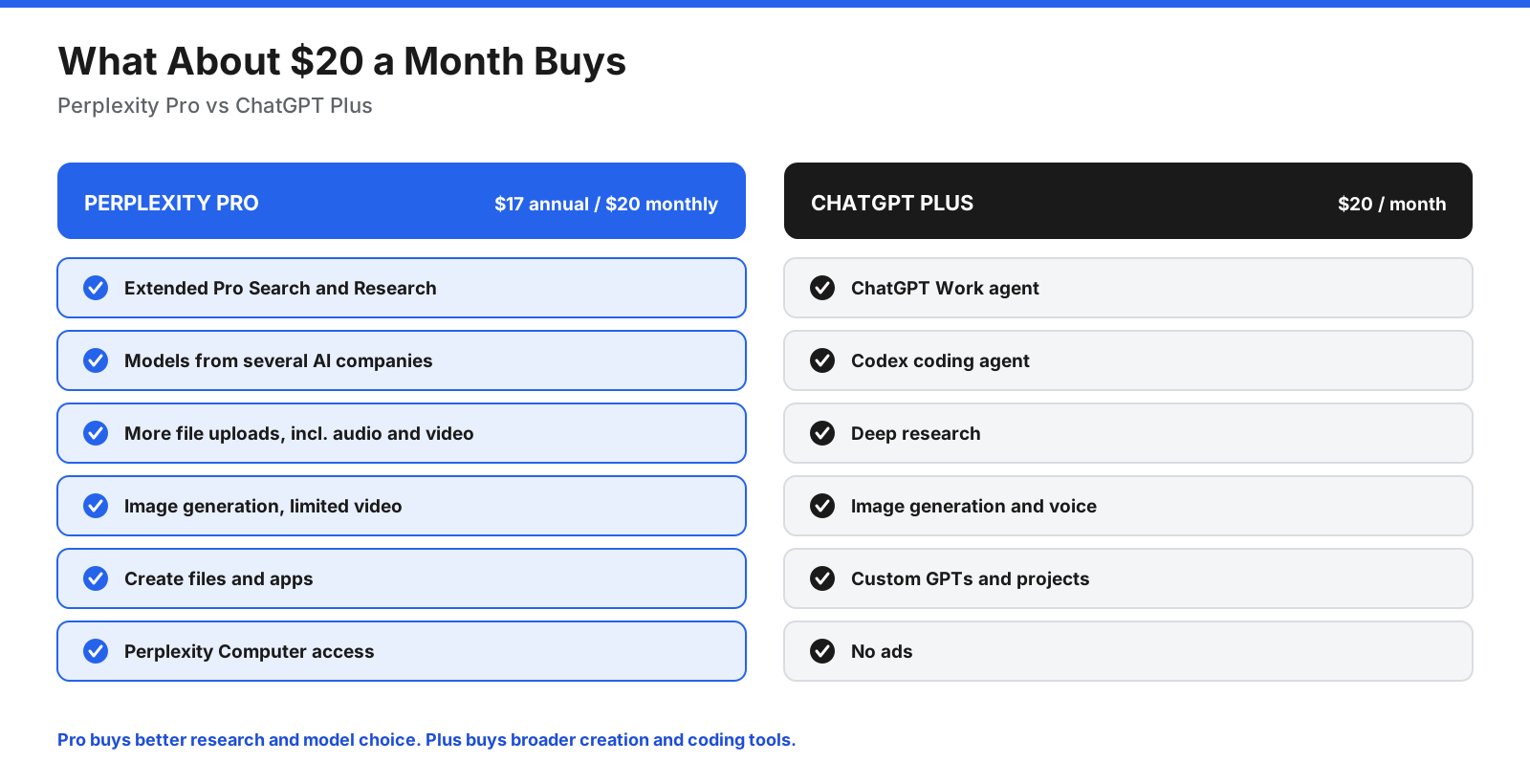
Perplexity Pro may be better value if you research daily, need citations, and want to try different models without paying for several subscriptions. ChatGPT Plus may be better value if you write, code, analyze data, or want tools that help produce finished files. The right plan depends on your usage limits, not just the headline price.
How Do Perplexity and ChatGPT Handle Your Data?
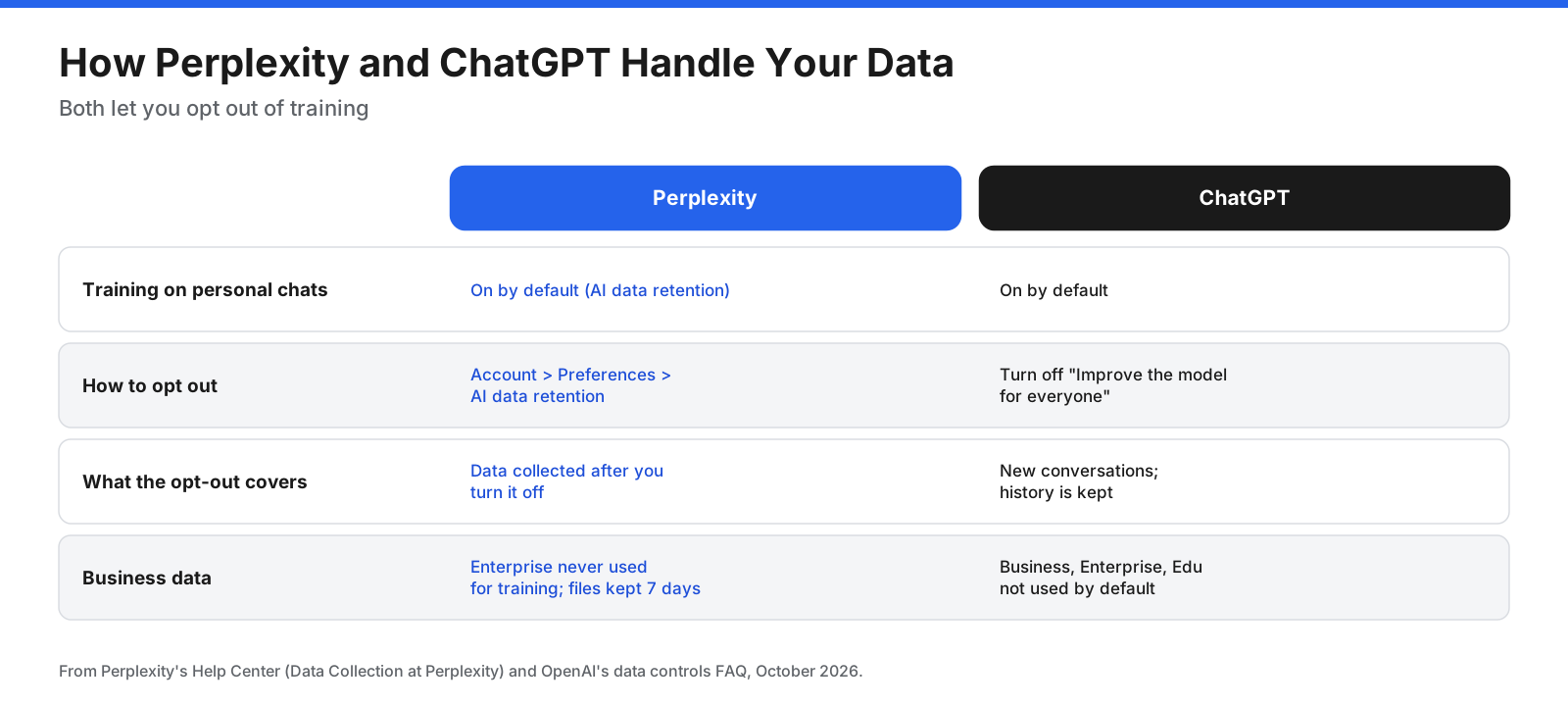
According to the supplied draft, Perplexity’s AI data retention is enabled by default on individual Free, Pro, and Max plans, with an opt-out in Account Preferences. The draft says the opt-out applies to data collected after the change, while enterprise data is excluded from training.
For ChatGPT, the draft says users can turn off “Improve the model for everyone” to exclude future chats from training, while business, enterprise, and education workspace data is not used for training by default. Settings and policy details can change, so check the current privacy help pages before sharing confidential information.
Verdict: Similar in that both provide controls. Review the settings on day one and avoid entering sensitive personal or company data into consumer plans unless your organization’s policy permits it.
Are There Legal or Trust Concerns to Know About?
The supplied draft describes copyright disputes involving both companies and allegations made in lawsuits concerning Perplexity’s use of publisher content. It also describes a legal dispute between Amazon and Perplexity over Comet’s shopping features. These are legal proceedings and allegations, not by themselves findings that a company is liable. If source rights and content provenance matter to your organization, review the latest case status and your own policies.
Which Is Better for Business Teams?
Perplexity may suit research-heavy teams such as analysts, marketers, consultants, and sales teams that need sourced answers. ChatGPT may suit teams that want one general assistant for writing, analysis, coding, and multi-step work. Some organizations can benefit from both: research in Perplexity, followed by drafting and analysis in ChatGPT.
What Are the Downsides of Each?
Perplexity: It may be less suitable for long creative drafts and complex coding; its model quotas and plan details can change; it faces publisher-content disputes; and users should review data-retention settings on personal plans.
ChatGPT: Its citations may be less directly tied to individual claims; it may not search unless asked; model choice is limited to OpenAI’s models; and some low-cost plans may include ads in the US.
Which Should You Choose: Perplexity or ChatGPT?
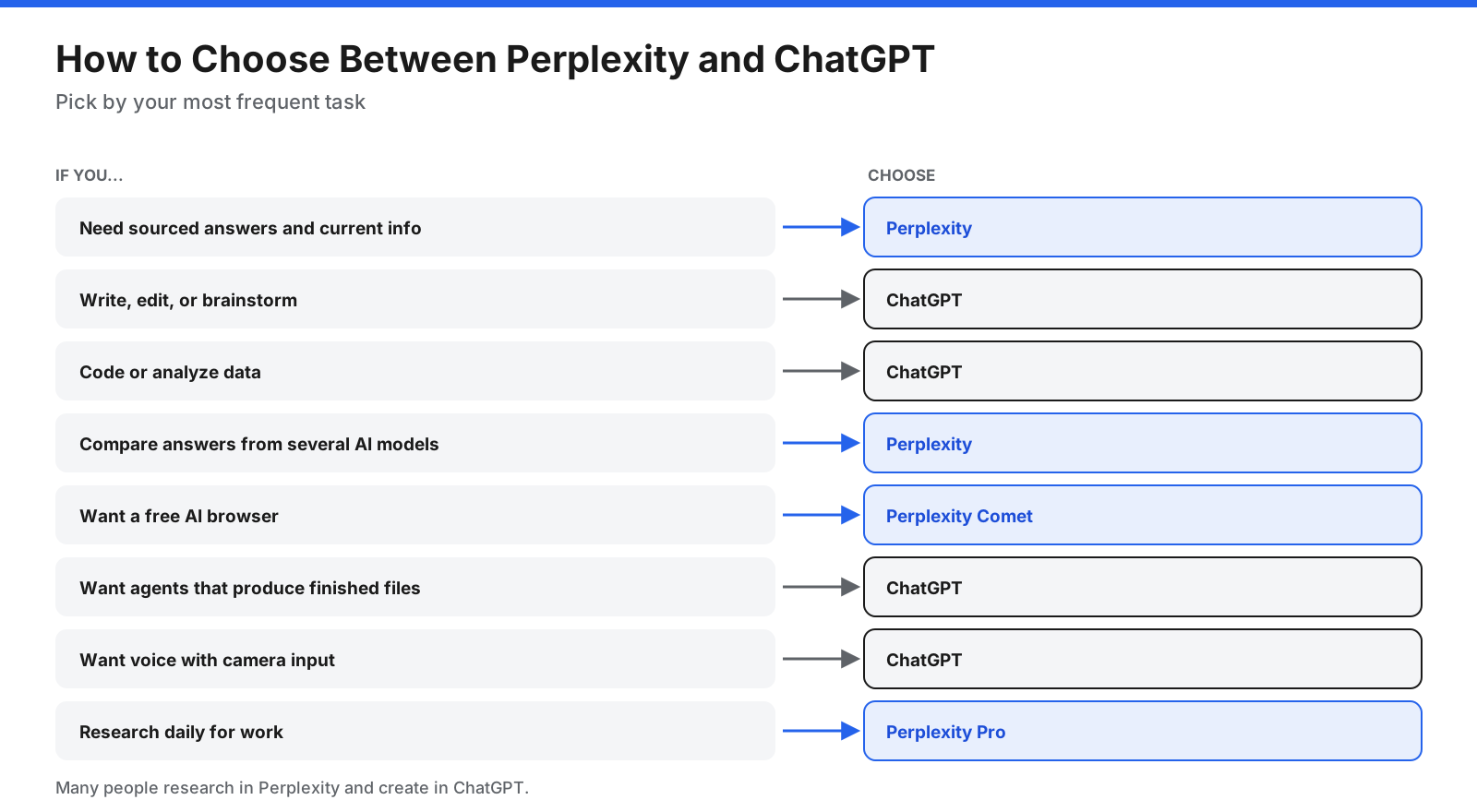
- Choose Perplexity if you research, fact-check, follow news, or compare products and need sources you can verify quickly.
- Choose ChatGPT if you write, create, code, analyze data, or want one assistant for most of your work.
Try the same five tasks from your normal week in both free plans. Judge the answers on accuracy, how easy they are to verify, and how much editing the output needs.
How Can You Use Perplexity and ChatGPT Together?
- Research in Perplexity. Ask the question, review citations, and save useful sources.
- Check key facts. Open citations for numbers and claims you plan to reuse.
- Draft in ChatGPT. Turn verified notes into an outline, email, report, or presentation.
- Build or analyze. Use ChatGPT for spreadsheets, code, and charts based on your research.
- Fact-check the final draft. Ask Perplexity to check claims added during drafting.
How Can You Get Better Answers From Each Tool?
In Perplexity: Ask specific questions with dates, locations, or names; use Research mode for topics needing many sources; open citations for claims you will reuse; and try another model if an answer seems thin.
In ChatGPT: Ask it to search when you need current information; provide your audience, goal, and format; upload the source files you want it to use; and use projects or custom instructions for recurring work.
Frequently Asked Questions
Is Perplexity better than ChatGPT?
Perplexity is a better fit for research, current information, and citations you can verify. ChatGPT is a better fit for writing, coding, data analysis, voice, and creative work. The best option depends on your most common tasks.
Is Perplexity more accurate than ChatGPT?
Perplexity shows numbered citations for its web-grounded answers, which makes checking facts easier. Both tools can make mistakes or misread sources, so verify important claims.
Does Perplexity use ChatGPT?
Perplexity is a separate product, but its paid plans offer access to selected models from OpenAI and other providers, alongside Perplexity’s own Sonar model.
Is Perplexity free?
Yes. Its free plan includes search with citations and a limited number of Pro Searches. Check the current plan page for daily limits.
Is Perplexity Pro worth it?
It may be worth it if you research often and want deeper searches, model choice, and more file uploads. If you mainly write or code, ChatGPT Plus may be a better fit.
Is Perplexity Pro or ChatGPT Plus better?
Perplexity Pro focuses on research and model choice. ChatGPT Plus focuses on writing, coding, data analysis, voice, and broader assistant workflows. Compare current limits and pricing before choosing.
Can Perplexity write essays and code?
Yes. Perplexity can write and answer coding questions, and some paid features support document and simple app creation. ChatGPT may be better suited to long-form writing and complex coding.
Is Perplexity safe to use?
Both tools offer privacy settings and business plans with additional data protections. Review current data-retention and training settings, and avoid putting sensitive information into consumer plans unless permitted.
Can Perplexity replace Google Search?
For many research questions, Perplexity can summarize multiple pages with citations. Traditional search may still be faster for finding a specific website, local business, or shopping listing.
Which is better for students?
Perplexity can help find and cite sources. ChatGPT can explain concepts, provide practice questions, and help improve drafts. Follow your school’s rules for AI use and citation.
What about Claude and Gemini?
Claude and Gemini are other AI assistants that may fit particular tasks. Perplexity’s paid plans may provide access to selected models from both providers, depending on current availability.
The Bottom Line
Perplexity and ChatGPT have moved closer together, but they still tend to excel at different jobs. Perplexity is a strong choice for research, current information, visible citations, and trying models from several providers. ChatGPT is a strong choice for writing, creative work, coding, data analysis, voice, and work that produces finished outputs.
If you can only choose one, start with your most frequent task. If you can use both, research in Perplexity and create in ChatGPT. Confirm current prices, feature limits, and privacy settings on each company’s official pages before subscribing.















































































































