

Notion is one of the most widely used workspace apps. It combines notes, documents, wikis, databases, and project boards in one place, and it adds AI features on top. That flexibility is the reason many people choose it, and it is also the reason many people start looking for something else.
Some users find the blank canvas slow to set up. Others want their notes stored as local files, need strong offline access, prefer an open-source or self-hosted tool, or want a dedicated wiki or project management app instead of building one from scratch. Pricing matters too, because Notion’s full AI features sit on its Business plan.
This guide covers 12 Notion alternatives, grouped by what they do best. For each one, you will find its main features, published pricing as stated in October 2026, limitations, and who it suits. This is a vendor-neutral comparison. No company paid for placement, and outside reviewer opinions are attributed where used.
Quick Answer: The Best Notion Alternatives
- Best for personal notes you own as files: Obsidian
- Best for docs that work like apps: Superhuman Docs (formerly Coda)
- Best for docs plus project management: ClickUp
- Best team wiki: Confluence or Slite
- Best for Microsoft 365 users: Microsoft Loop
- Best for privacy and local-first storage: Anytype
- Best open-source, self-hostable workspace: AppFlowy or AFFiNE
- Best for structured databases: Airtable
- Best design and writing experience: Craft
- Best object-based personal knowledge base: Capacities
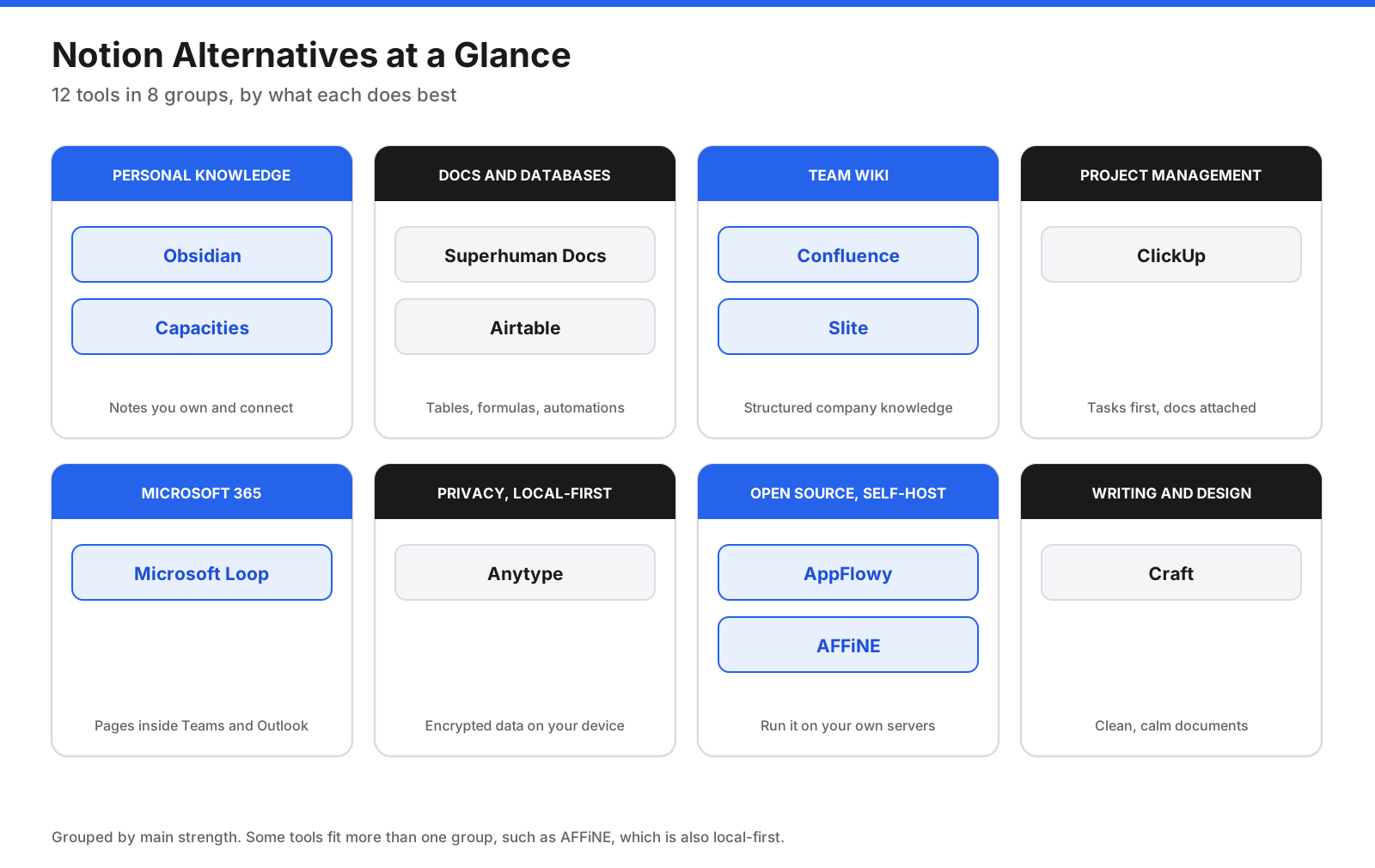
The 12 alternatives fall into eight groups. Most people only need to compare the two or three tools in their group.
Why Do People Look for Notion Alternatives?
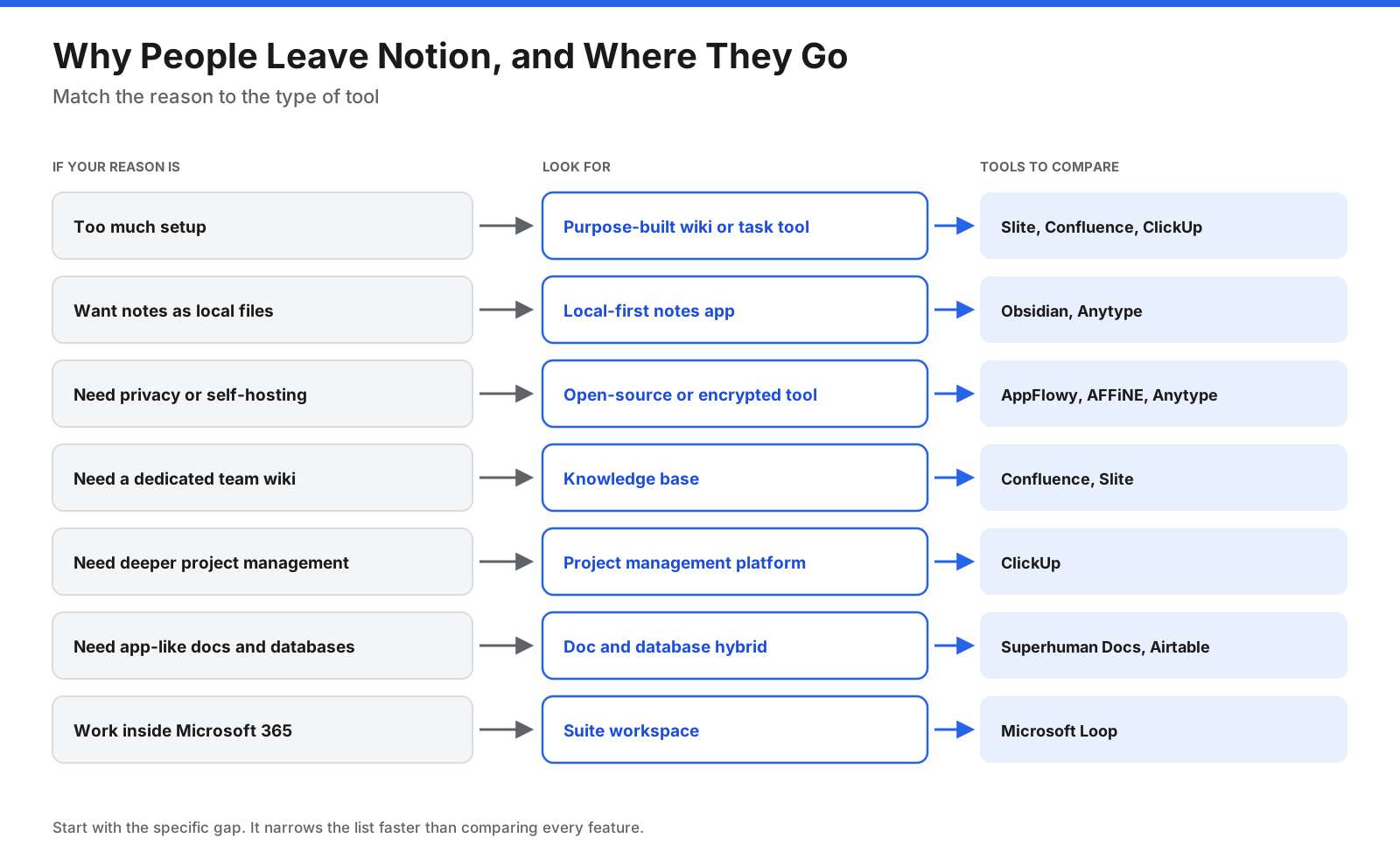
Notion does a lot of things well, so most people switch because of a specific gap rather than general dissatisfaction. The most common reasons fall into a few groups.
Setup time. Notion gives you building blocks, not a finished system. You can create almost anything, but you have to design it first. Some people would rather use a tool that works out of the box for one job, such as a wiki or task tracker.
File ownership and offline use. Notion stores your content in its cloud. It lets users mark pages for offline use, but a workspace is not a folder of files on your computer. Users who want plain files they can open with any editor often move to local-first apps.
Privacy and hosting. Some teams and individuals need end-to-end encryption, data on their own servers, or open-source code they can inspect. Notion does not offer self-hosting.
Team knowledge management. Notion can work as a wiki, but larger teams sometimes want features built for that job, such as page verification workflows, structured spaces, or tight links to an issue tracker.
Project management depth. Notion databases can track tasks, but dedicated project tools offer workload views, time tracking, and more automation.
Cost. Notion’s Plus plan is listed at $10 per seat per month billed annually ($12 monthly), and Business at $20 billed annually ($24 monthly), according to the pricing details summarized for this guide. Business is where Notion Agent, AI Meeting Notes, and Enterprise Search are listed. Check Notion’s pricing page before buying because plan details can change.
What Should You Look for in a Notion Alternative?
Before you compare features, decide which parts of Notion you actually use. A personal note-taker and a 200-person company need very different things.
- Primary use: Personal notes, team wiki, project tracking, or databases. Pick a tool built for your main job.
- Data storage: Cloud only, local-first with optional sync, or self-hosted on your own servers.
- Databases and views: Check whether you need tables, boards, calendars, timelines, relations, and formulas.
- Collaboration: Look at live co-editing, comments, guest access, and permissions.
- Offline access: Confirm whether you can read and edit without an internet connection.
- AI features: Compare writing help, search across your content, meeting notes, and which plan includes them.
- Import from Notion: Check whether the tool can bring in pages, databases, and links.
- Platforms: Check desktop, web, iOS, Android, and Linux support.
- Price model: Billing may be per seat, per editor, flat team pricing, or free with paid sync.
- Security and admin: Consider single sign-on, audit logs, encryption, and compliance needs for business use.
What Are the Best Notion Alternatives?
Prices below are per user per month unless stated. Annual billing is shown first where the vendor publishes both. Confirm the current pricing and plan limits on each vendor’s site before committing.
1. Obsidian
Obsidian is a note-taking app that stores everything as plain Markdown files in a folder on your device, which Obsidian calls a vault. Because the files are yours, you can open them in any text editor, back them up however you like, and keep using them even if you stop using Obsidian.
The app is known for linking. You connect notes with internal links, see backlinks, and explore relationships in a graph view. A large plugin and theme library lets you add features, from task management to spaced repetition. Obsidian Bases adds database-style views built from note properties.
Main features: Local Markdown files, internal links and backlinks, graph view, Canvas for visual boards, Bases for database-style views, community plugins and themes, and desktop and mobile apps.
Pricing: The app is free, including for work use. A commercial license is optional at $50 per user per year. Obsidian Sync costs $4 per user per month billed annually ($5 monthly), and Obsidian Publish costs $8 per site per month billed annually ($10 monthly).
Where it falls short: Obsidian is built for individuals. It has no built-in live co-editing, and shared vaults through Sync are not the same as a shared team workspace. Getting the most out of it often means choosing and configuring plugins, which takes time. Zapier’s review describes it as a tool for “fearless tinkerers.”
Best for: Individuals who want full ownership of their notes, offline access, and a flexible personal knowledge base. Official Obsidian website.
2. Superhuman Docs (formerly Coda)
Coda was renamed Superhuman Docs on July 8, 2026, when it joined the Superhuman suite alongside Grammarly. The product combines documents with tables, formulas, buttons, and automations, so a doc can behave like a small app.
Where Notion databases are mainly for organizing information, Superhuman Docs tables can calculate, trigger actions, and pull data from other tools through integrations called Packs. Teams use it for planning docs, trackers, and lightweight internal tools.
Main features: Docs with built-in tables, formulas and buttons; Packs that connect to outside tools; automations based on time or table changes; AI features listed as beta at launch; and Maker billing, so only people who create docs pay.
Pricing: The Free plan is $0. Pro costs $12 per Doc Maker per month billed annually ($15 monthly), and Business (formerly Team) costs $33 billed annually ($40 monthly). Existing Coda customers keep their current rates while they stay on their plan.
Where it falls short: The formula language and building blocks take time to learn. The July 2026 price increase also makes new paid plans more expensive than before.
Best for: Teams that want docs to calculate, automate, and connect to other tools, and have a few people willing to build. Official product website.
3. ClickUp
ClickUp is a project management platform that also includes documents, wikis, whiteboards, chat, and goals. If you use Notion mainly to track tasks and projects, ClickUp gives you more structure for that job, with docs available alongside.
Main features: Tasks with list, board, calendar, Gantt and other views; docs and wikis connected to tasks; whiteboards and chat; automations and dashboards; and ClickUp Brain AI as a paid add-on.
Pricing: The Free Forever plan has limited storage. Unlimited is listed at $7 per user per month billed annually ($10 monthly), and Business at $12 billed annually ($19 monthly). Enterprise pricing is custom. The Brain AI add-on is listed at $9 per user per month. ClickUp’s pricing page has shown more than one set of plan names, so verify the current structure before buying.
Where it falls short: ClickUp has many features, and new users can find the interface busy. Its docs are useful, but they are not as flexible as Notion pages for freeform knowledge work.
Best for: Teams that use Notion mostly for project and task tracking and want deeper project management. Official ClickUp website.
4. Confluence
Confluence is Atlassian’s team wiki and knowledge base. It organizes content into spaces and page trees, with templates for meeting notes, product requirements, and technical documentation. Its close link to Jira makes it a common choice for software and IT teams.
Main features: Spaces and nested page trees, templates for common team documents, Jira integration, whiteboards and databases, Rovo AI features on paid plans, page permissions, and admin controls.
Pricing: Confluence has a free plan for up to 10 users with 2 GB of storage. Standard and Premium are priced per user, and the per-user rate changes with team size. Published third-party summaries vary, so use Atlassian’s pricing calculator for your team size.
Where it falls short: Confluence is built for structured documentation, not personal notes or flexible databases. Some users find its editor and navigation heavier than Notion’s.
Best for: Teams already using Jira and organizations that need a structured, permissioned company wiki. Official Confluence website.
5. Microsoft Loop
Microsoft Loop is Microsoft’s collaborative workspace. It has workspaces and pages similar to Notion, plus Loop components, which are small live blocks such as tables, checklists, and notes that stay in sync when shared in Teams chats, Outlook emails, and other Microsoft 365 apps.
Main features: Workspaces and pages for shared projects, Loop components that sync across Teams and Outlook, templates for planning and meeting notes, Copilot features with a Copilot license, and storage and compliance managed through Microsoft 365.
Pricing: Microsoft’s support site says the Loop app is available to people with a work or school account, with full features depending on SharePoint or OneDrive licensing. Copilot in Loop needs a separate Copilot plan. If your organization already pays for Microsoft 365, Loop may cost nothing extra. Check Microsoft’s site for personal account access.
Where it falls short: Loop does not have Notion-style relational databases. It makes the most sense inside the Microsoft ecosystem.
Best for: Organizations that run on Microsoft 365 and want shared pages inside tools they already use. Official Microsoft Loop website.
6. Anytype
Anytype is a local-first workspace that keeps your data on your device and syncs it between devices with encryption. Its project describes zero-knowledge encryption and offline-first local storage with optional peer-to-peer sync. It is source available under the Any Source Available License, not a standard open-source license.
Anytype organizes everything as objects with types and relations, so you can build databases, tasks, notes, and collections in a way that feels close to Notion.
Main features: Local-first storage with encrypted sync, objects and relations for flexible structure, sets and collections for database-style views, shared spaces for collaboration, and desktop and mobile apps.
Pricing: Anytype is free to start, and the free plan works locally. Paid plans add network storage and sharing. A September 2026 pricing summary lists paid tiers starting at about $4 per month billed annually, but the official pricing page did not show prices when checked, so confirm on its site.
Where it falls short: The object model takes time to understand, and it has fewer integrations than cloud tools. Its collaboration features are newer than those of established team tools.
Best for: Privacy-minded individuals and small groups who want a Notion-like structure without storing data in someone else’s cloud. Official Anytype website.
7. AppFlowy
AppFlowy is an open-source workspace designed as a direct Notion alternative. It is licensed under AGPL-3.0, and you can use its cloud service or host it yourself. It covers documents, databases with grid, board, and calendar views, and AI features. Desktop apps run on macOS, Windows, and Linux, with iOS and Android apps as well.
Main features: Documents and databases, AI writing and search, self-hosting, publishing pages, and desktop and mobile apps including Linux.
Pricing: Personal is free, with 100 MB of storage, 7 MB file uploads, and 7-day version history. Pro costs $12 per member per month billed annually ($16 monthly), with unlimited storage and 90-day version history. Guest editors are free. Self-hosting is available and priced separately.
Where it falls short: AppFlowy is younger than Notion, so its template library and integrations are smaller. Self-hosting also means you handle updates, backups, and security.
Best for: People and teams who want a Notion-style workspace with open-source code and the option to self-host. Official AppFlowy website.
8. AFFiNE
AFFiNE combines documents and an infinite whiteboard in one workspace. You can write a page and then switch to an “edgeless” canvas to arrange the same content visually. AFFiNE describes itself as local-first, with optional cloud sync. Its editor and desktop app are MIT licensed, while the server backend uses an enterprise license. It can be self-hosted.
Main features: Docs and whiteboard in the same workspace, database blocks for tables and boards, local-first storage with optional cloud sync, self-hosting, and an AI add-on.
Pricing: The free cloud plan includes 10 GB of cloud storage, 10 MB file uploads, up to 3 members per workspace, and 7-day version history. Pro costs $6.75 per month. Team costs $10 per seat per month. A one-time Believer plan costs $499.99. The AI add-on costs $8.90 per month billed annually. Self-hosting is free, with a paid team tier.
Where it falls short: AFFiNE is newer, and its database features are lighter than Notion’s. The backend license is not fully open source, which matters if you plan to modify the server.
Best for: Visual thinkers who want docs and whiteboards together, with local storage and a self-hosting option. Official AFFiNE website.
9. Craft
Craft is a document and note app known for its clean design and native feel on Apple devices. It is also available on Windows and Android. Pages are built from blocks, and you can nest pages inside pages, add cards, and share documents as web pages.
Main features: Block-based documents with nested pages, apps for iPhone, iPad, Mac, Windows and Android, polished document sharing, AI assistant with monthly credits, and API and MCP access.
Pricing: The free plan includes 1,500 blocks and 1 GB of storage. The pricing page lists Plus at $8 and $6.40 per month, with the lower figure shown in its comparison table. Family costs $12 to $15 per month for 2 to 6 accounts, and Team costs $50 per month for up to 10 accounts. Check the billing period on Craft’s site.
Where it falls short: Craft is built for writing and personal organization rather than databases or project tracking. Its block limit on the free plan can be reached quickly with regular use.
Best for: Writers and Apple users who care about design and want a calmer writing space than Notion. Official Craft website.
10. Capacities
Capacities is a personal knowledge app organized around objects rather than pages. You create types such as books, people, meetings, and projects, and each object gets its own properties and connections.
Main features: Object types with custom properties, daily notes and backlinks, offline support on the free plan, AI features on paid plans, and sync across devices.
Pricing: Basic is free and includes unlimited objects and offline support. Pro costs $9.99 per month, with a 16 percent discount for yearly billing. Believer starts at $12.49 per month. A Plus add-on with a larger AI budget costs $8.33 per month billed annually. The free plan does not include AI.
Where it falls short: Capacities is built for one person. Its pricing page does not describe team plans, and free users can only share notes as view-only.
Best for: Individuals building a structured personal knowledge base who want something simpler than Obsidian and more structured than plain notes. Official Capacities website.
11. Slite
Slite is a knowledge base for teams. It focuses on keeping company docs organized, findable, and up to date, with AI search that answers questions from your documents.
Main features: Team knowledge base with collections, Ask AI search, doc verification to flag outdated content, AI writing assistant, and Slite Agent and search across connected tools on Pro.
Pricing: Basic costs $10 per user per month billed annually, and Pro costs $20. Enterprise pricing is custom. Slite offers a 14-day free trial but no permanent free plan.
Where it falls short: Slite is a documentation tool, not an all-in-one workspace. It has no free plan, and some reviewers find its interface busier than Notion’s.
Best for: Teams whose main use of Notion is an internal wiki and who want built-in AI search and document verification. Official Slite website.
12. Airtable
Airtable is a relational database with a spreadsheet-style interface. If you mainly use Notion’s databases, Airtable gives you more power for structured data, with linked records, many field types, automations, and custom interfaces.
Main features: Relational tables with linked records, grid, Kanban, calendar, gallery, timeline and form views, Interface Designer for custom dashboards and apps, automations, and AI features.
Pricing: Airtable has a free plan for individuals and very small teams. Team costs $20 per seat per month billed annually, and Business costs $45. Enterprise Scale is custom. Seats are charged for users with edit access, and read-only collaborators are free on Team and Business.
Where it falls short: Airtable is not a document or note tool. Long-form pages and wikis are outside its strengths, and it gets expensive as editor counts grow.
Best for: Teams that use Notion mainly for databases and need more structure and scale. Official Airtable website.
How Do the Prices of Notion Alternatives Compare?
Prices vary because tools charge in different ways. Some charge per seat, some only per editor or Doc Maker, some charge a flat team price, and some are free with paid sync.
| Tool | Free plan | Entry paid price | How you are billed |
|---|---|---|---|
| Notion | Yes | $10 (Plus, annual) | Per seat |
| Obsidian | Yes, full app | $4 (Sync, annual) | Per user, for sync |
| Superhuman Docs | Yes | $12 (Pro, annual) | Per Doc Maker |
| ClickUp | Yes | $7 (Unlimited, annual) | Per user |
| Confluence | Yes, up to 10 users | Varies by team size | Per user |
| Microsoft Loop | With Microsoft 365 work accounts | Part of Microsoft 365 | Per Microsoft 365 license |
| Anytype | Yes | About $4, check site | Per member |
| AppFlowy | Yes | $12 (Pro, annual) | Per member |
| AFFiNE | Yes | $6.75 (Pro); $10 (Team) | Per account or seat |
| Craft | Yes | $6.40 to $8 (Plus) | Per account or flat team price |
| Capacities | Yes | $9.99 (Pro, monthly) | Per account |
| Slite | No, 14-day trial | $10 (Basic, annual) | Per user |
| Airtable | Yes | $20 (Team, annual) | Per editor seat |
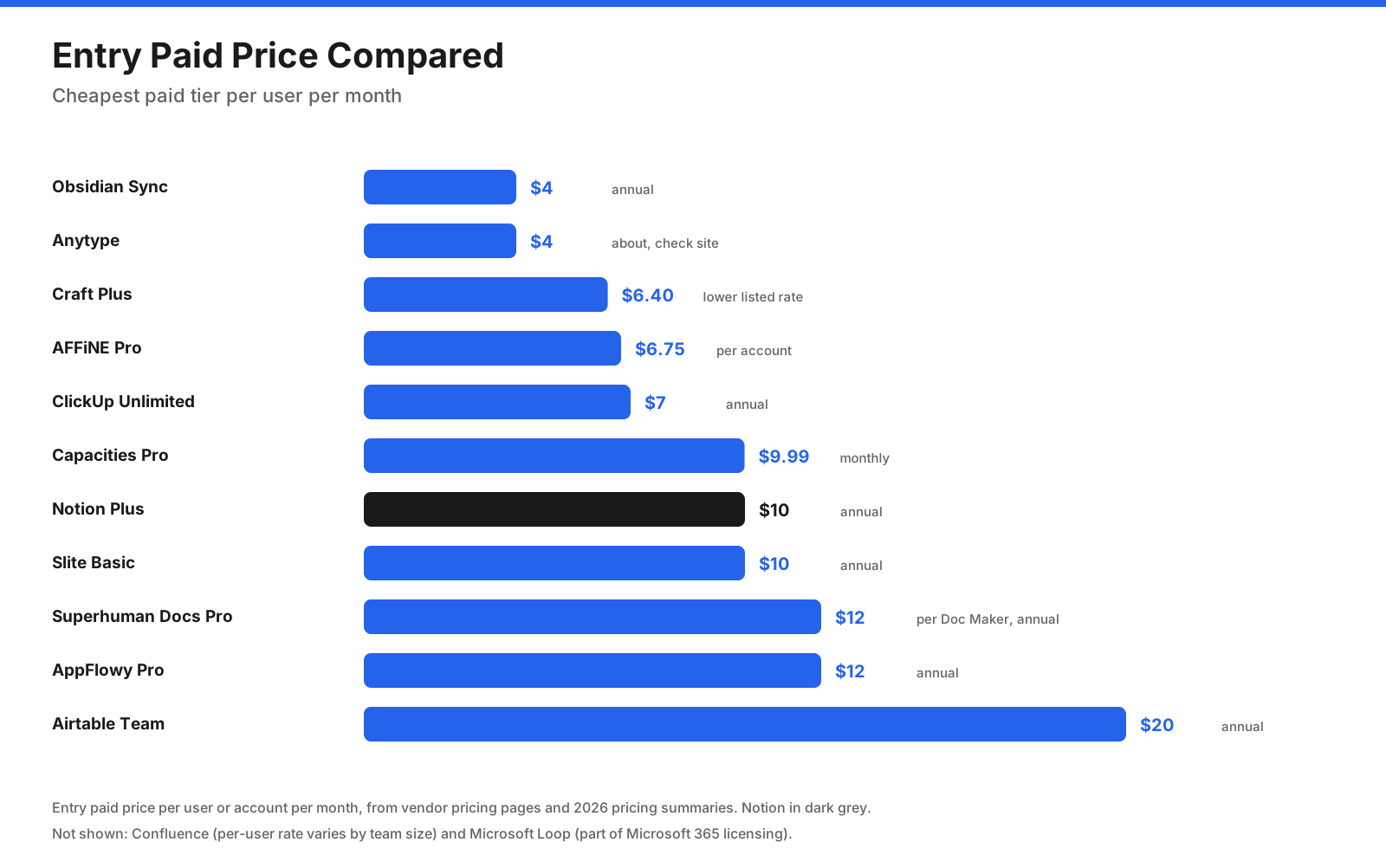
Billing model matters as much as list price. Superhuman Docs only charges people who create docs, so a team with many readers and a few builders can pay less than the list price suggests. Airtable only charges editors. Craft and AFFiNE offer flat or bundled team prices. Obsidian’s app is free, so you only pay if you want its sync or publishing services.
What Do the Free Plans Include?
Most Notion alternatives have a free plan, but the limits differ. Some cap storage, some cap blocks or members, and some keep the full app free and charge for sync.
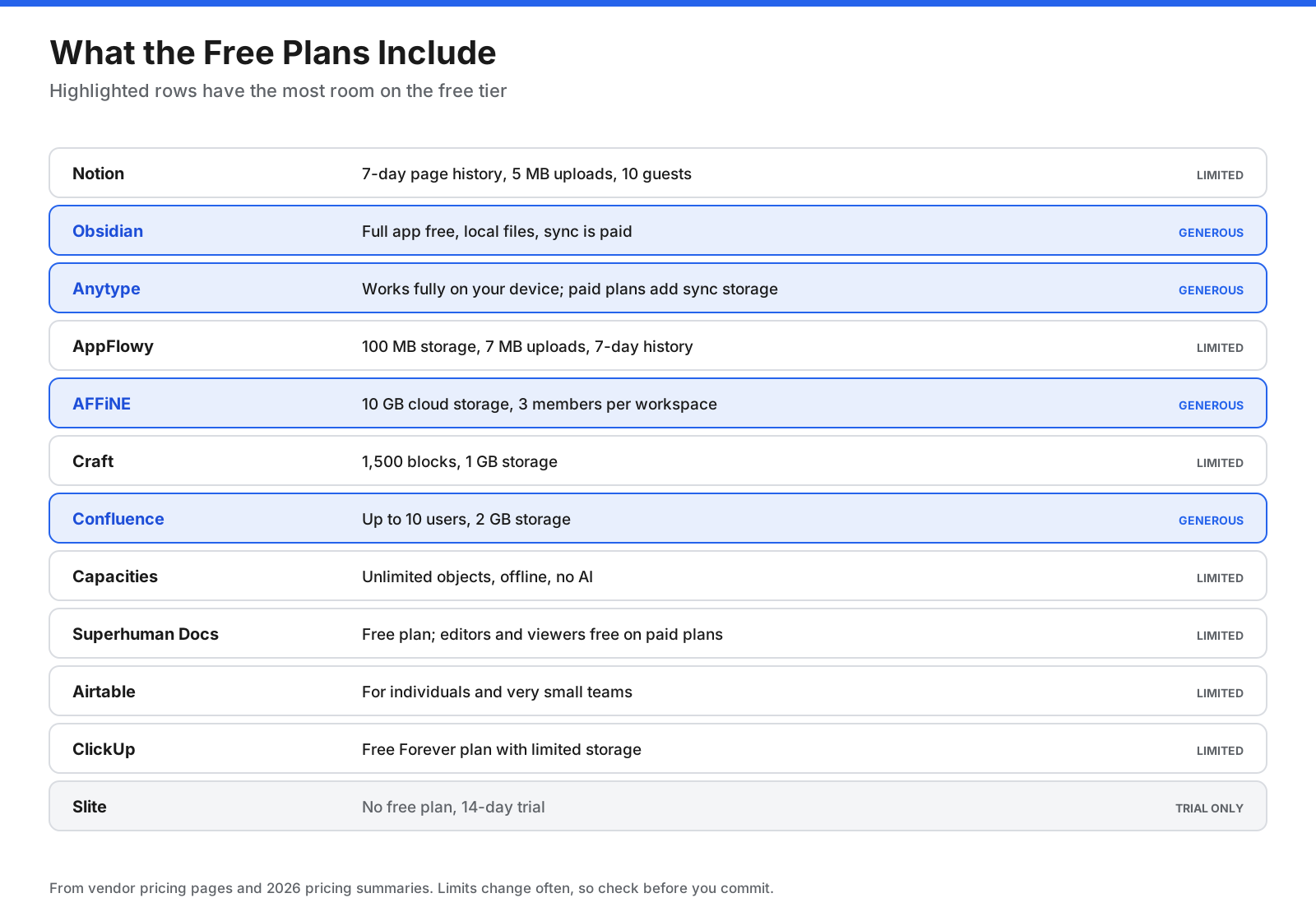
If you want the most generous free option for personal use, Obsidian stands out because the full app is free and your notes live on your device. For small teams, Confluence’s free plan covers up to 10 users, and AFFiNE’s free cloud plan includes 10 GB of storage for up to 3 members per workspace. AppFlowy’s free plan is limited on cloud storage, but self-hosting removes that limit if you can run your own server.
Which Notion Alternatives Are Open Source or Self-Hosted?
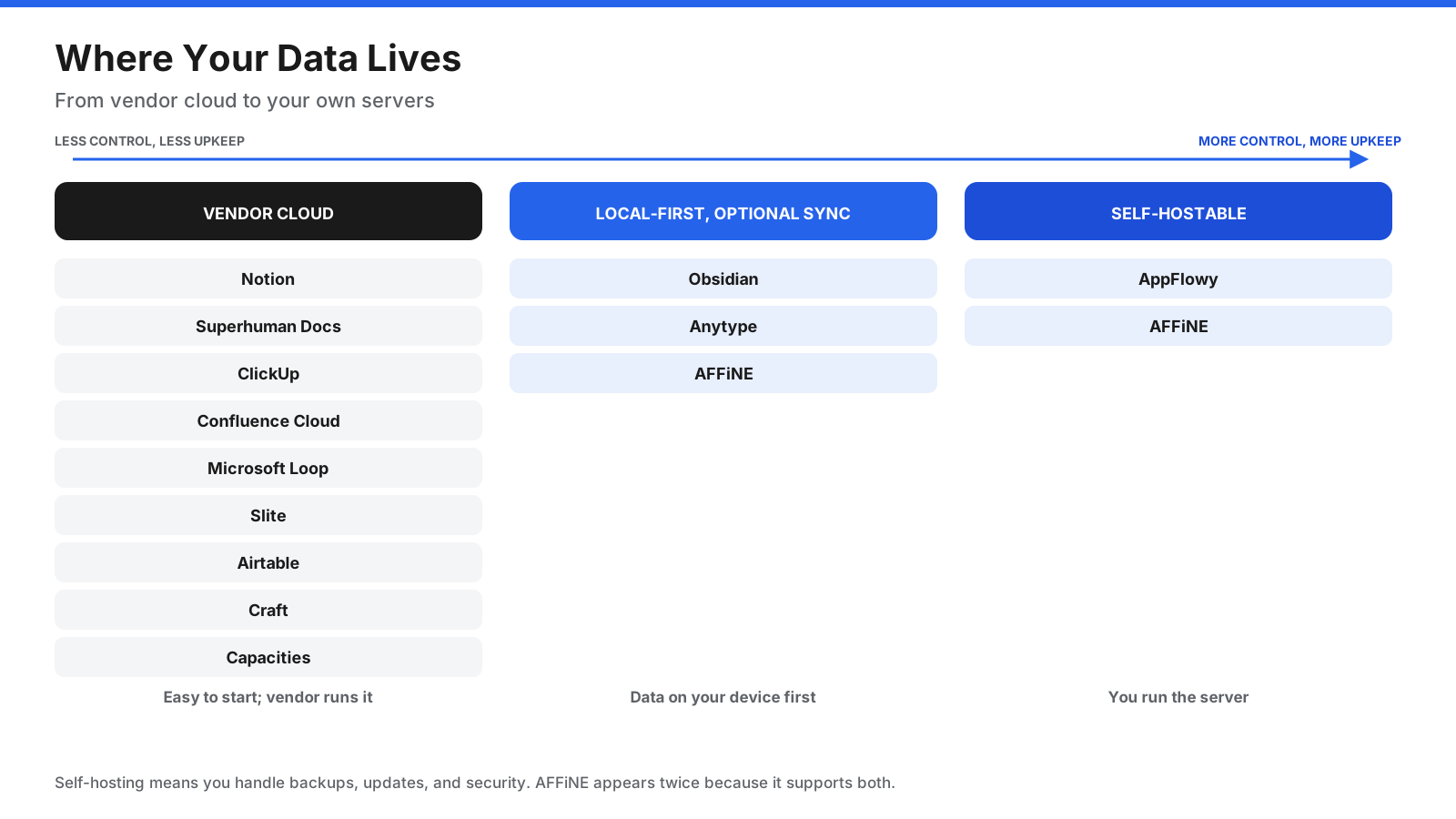
If you want to inspect the code, run the software on your own servers, or avoid depending on a single vendor’s cloud, check how each tool stores your data. The tools in this list fall into three groups.
Cloud-hosted. Notion, Superhuman Docs, ClickUp, Confluence Cloud, Microsoft Loop, Slite, Airtable, Craft, and Capacities store your workspace in the vendor’s cloud. Some offer offline access, but the main copy lives on their servers.
Local-first with optional sync. Obsidian, Anytype, and AFFiNE keep your data on your device first. Obsidian uses plain Markdown files. Anytype uses an encrypted object store. AFFiNE stores workspaces locally and can sync to its cloud.
Self-hostable. AppFlowy and AFFiNE can be run on your own servers. AppFlowy is open source under AGPL-3.0. AFFiNE’s editor is MIT licensed, while its server backend uses an enterprise license. Other self-hosted wiki tools, such as Docmost and Outline, are also popular for teams that only need documentation.
Keep in mind that “open source” and “source available” are not the same. Open-source licenses such as MIT and AGPL let you use, modify, and share the code under set conditions. Source-available licenses, such as Anytype’s, let you read the code but may restrict how you use or change it. If licensing matters to your organization, read the license file in each project’s repository.
How Do You Move Your Content Out of Notion?
Switching tools is easier with a plan. Notion lets you export pages and whole workspaces in Markdown and CSV, HTML, or PDF formats from its settings. What happens next depends on the tool you choose.
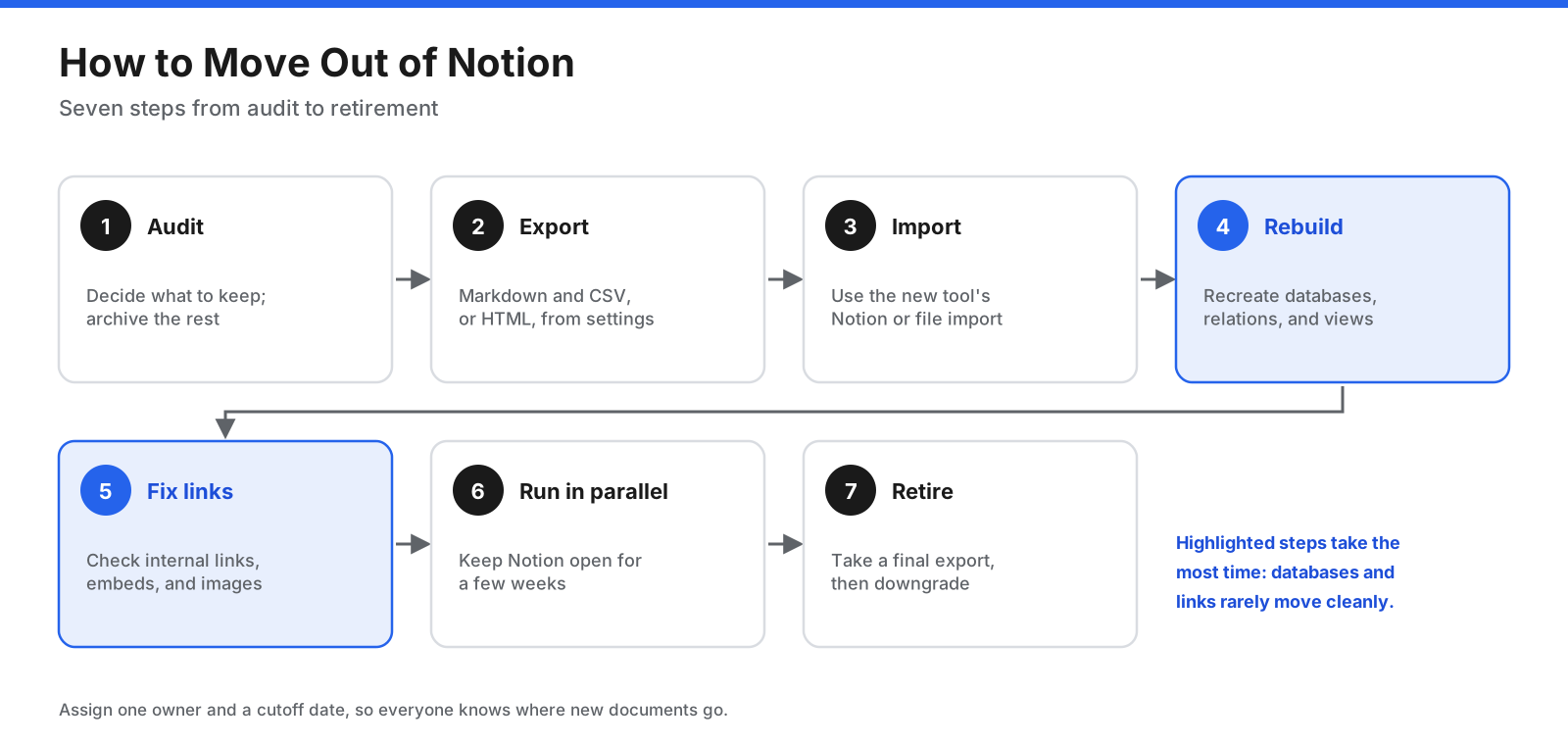
- Audit your workspace. List what you use: pages, databases, templates, and integrations. Archive what you no longer need so you do not migrate clutter.
- Export from Notion. Use Markdown and CSV for most tools, since this keeps text portable and turns databases into CSV files. HTML keeps more formatting.
- Import into the new tool. Several tools offer Notion import options. Obsidian, for example, has an official Importer plugin that supports Notion exports. Check each tool’s import documentation because support for databases and nested pages differs.
- Rebuild databases and views. Relations, rollups, and formulas rarely survive an export intact. Plan to recreate them in the new tool’s format.
- Fix links and embeds. Check internal links between pages, embedded files, and images. Broken links are common after a move.
- Run both tools in parallel. Keep Notion available for a few weeks so people can find anything that was missed.
- Retire Notion. Take a final full export as an archive, then cancel or downgrade your plan.
For teams, assign one owner for the migration and agree on a cutoff date. Moving a wiki is as much about habits as it is about software, so tell people where new documents should go from that date.
Which Notion Alternative Should You Choose?
The right tool depends on why you are leaving Notion and who will use the new tool. Use these questions to narrow your options.
Are you choosing for yourself or for a team? For personal use, compare Obsidian, Capacities, Anytype, and Craft. For teams, compare Confluence, Slite, ClickUp, Superhuman Docs, AppFlowy, and Microsoft Loop.
Do you need your data on your own device or servers? Choose Obsidian for local files, Anytype for encrypted local-first storage, or AppFlowy and AFFiNE if you want to self-host.
Is your main use a wiki, project tracker, or database? For a wiki, look at Confluence or Slite. For project tracking, look at ClickUp. For databases, look at Airtable or Superhuman Docs.
Does your company already use a suite? Microsoft 365 organizations should test Loop first. Atlassian customers using Jira should test Confluence first.
How much setup are you willing to do? If you want something that works quickly, choose a purpose-built tool such as Slite or ClickUp. If you enjoy building your own system, Obsidian and Superhuman Docs reward that effort.
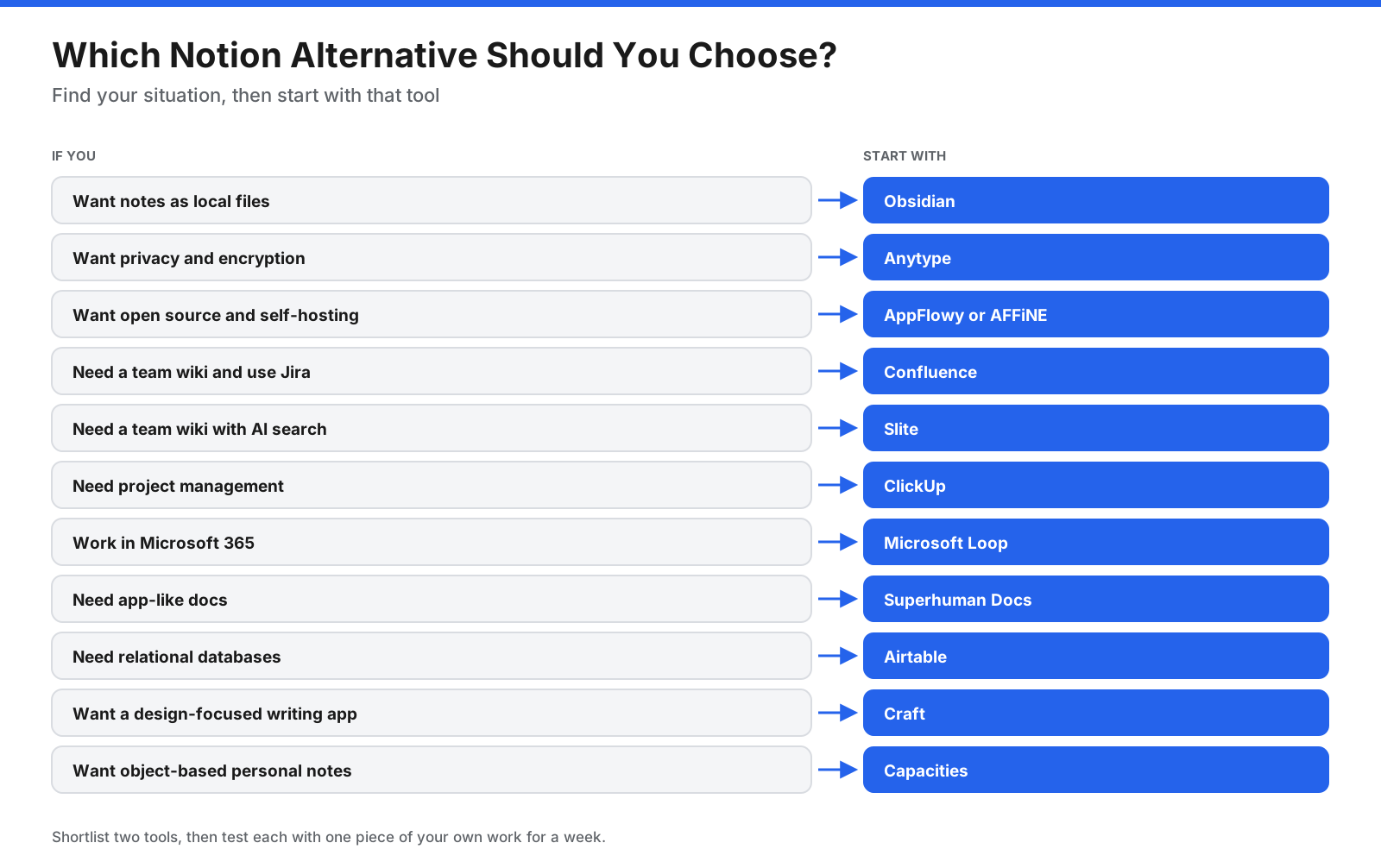
Once you have a shortlist, test each tool with one piece of work you actually do, such as a weekly meeting doc or a small project. A week of daily use tells you more than a feature list.
When Should You Stay With Notion?
Switching has a cost, and Notion remains a strong fit for many people. Consider staying if your workspace already works, your team has adopted it, and your main complaint is something a change in setup could fix.
Notion is still a good choice when you want one tool that mixes docs, wikis, databases, and light project tracking, and you value its large template gallery and integrations. Its free plan is useful for individuals, and the Plus plan suits small teams. If your only issue is offline access, Notion’s offline pages feature may cover it.
Frequently Asked Questions
Is there a better app than Notion?
There is no single better app, but there are better apps for specific jobs. Obsidian is better for local, file-based notes. Confluence and Slite are built for team wikis. ClickUp offers deeper project management. Airtable handles structured data better. The best choice depends on what you use Notion for.
What is the best free Notion alternative?
For personal use, Obsidian is one of the strongest free options because the full app is free and your notes are stored as files you own. Anytype, AFFiNE, AppFlowy, and Capacities also have free plans. For small teams, Confluence’s free plan covers up to 10 users.
What is the best open-source Notion alternative?
AppFlowy is the closest open-source match to Notion’s docs and databases, licensed under AGPL-3.0 and available to self-host. AFFiNE is another option, with an MIT-licensed editor and a docs-plus-whiteboard design. Anytype is source available rather than open source.
Is there a self-hosted Notion alternative?
Yes. AppFlowy and AFFiNE both offer self-hosting. For documentation only, teams also use self-hosted wiki tools such as Docmost and Outline. Self-hosting gives you control of your data but makes you responsible for updates, backups, and security.
Is Obsidian better than Notion?
Obsidian is better if you want local files, offline access, and a personal knowledge base you fully control. Notion is better for team collaboration, shared databases, and getting started without plugins. Many people use Obsidian for personal notes and a team tool for shared work.
What is the best Notion AI alternative?
Most tools on this list now include AI. Slite’s Ask answers questions from your team’s docs. ClickUp Brain works across tasks and docs as a paid add-on. Confluence includes Rovo AI features on paid plans. AppFlowy, Craft, Capacities, and AFFiNE offer AI on paid plans or as add-ons. Compare which plan includes the AI features you need.
Is there a Microsoft alternative to Notion?
Yes. Microsoft Loop is Microsoft’s closest equivalent, with workspaces, pages, and Loop components that sync across Teams and Outlook. Microsoft OneNote is another option for notes, though it does not offer Notion-style databases.
Does Google have a Notion alternative?
Google does not have a direct Notion equivalent. Google Docs, Sheets, and Drive cover documents, spreadsheets, and file storage, and many teams combine them for shared work. They do not offer Notion’s linked databases in a single workspace.
Can you use Notion offline?
Notion lets you make pages available offline. You choose which pages to download, and changes sync when you reconnect. If you need everything available offline by default, local-first tools such as Obsidian, Anytype, and AFFiNE are built that way.
Is Notion overkill for personal use?
It can be. Notion’s flexibility is useful if you enjoy building systems, but if you mainly write notes and keep lists, a simpler app such as Craft, Capacities, or Obsidian may suit you better and take less time to maintain.
Is Notion still relevant in 2026?
Yes. Notion continues to add features, including AI agents, meeting notes, and offline pages, and it remains one of the most widely used workspace tools. The growth of alternatives reflects different needs, such as privacy, local files, and specialized team tools, rather than Notion falling behind.
The Bottom Line
The best Notion alternative depends on the gap you want to fill. If you want to own your notes as files, choose Obsidian. If you want privacy and encrypted local storage, choose Anytype. If you want open-source software you can host yourself, choose AppFlowy or AFFiNE.
For teams, choose Confluence or Slite for a dedicated wiki, ClickUp for project management with docs attached, Superhuman Docs for app-like documents, Airtable for structured databases, and Microsoft Loop if you already work in Microsoft 365. For a calm, design-focused writing app, try Craft, and for an object-based personal knowledge base, try Capacities.
Pick two tools from your group, test them with your own work for a week, and check current prices on each vendor’s site before you commit, since plans and prices change often.















































































































