

Construction accounting software is accounting built around jobs instead of a single company ledger. It tracks the cost, billing, and profit of each project, handles progress billing and retainage, calculates work in progress (WIP), and runs the payroll contractors deal with every week, including multiple job sites, union rates, and certified payroll for public work.
General small-business accounting tools record what a company earns and spends. Construction firms also need to know whether each job is on budget, how much has been billed against the contract, how much retainage the owner is holding, and whether the company is overbilled or underbilled. When those answers live in spreadsheets, profit fade on a single job can go unnoticed until it is too late to fix.
This guide compares 12 construction accounting software options for 2027, from QuickBooks with construction add-ons to full construction ERP platforms. It explains what makes construction accounting different, which features matter, which tools fit different contractors, what the software costs, and how to implement a new system without disrupting payroll or open jobs.
Quick Comparison of Construction Accounting Software
| Software | Best for | Typical company size | Deployment | Pricing |
|---|---|---|---|---|
| FOUNDATION | Contractors with complex payroll and job costing | Small to midsize | Hosted or on-premises | Quote-based |
| Sage Intacct Construction | Cloud accounting for growing, multi-entity contractors | Midsize | Cloud | Quote-based |
| Sage 100 Contractor | All-in-one system for contractors leaving QuickBooks | Small to midsize | Desktop or hosted | Quote-based |
| Trimble Viewpoint Vista | Large contractors needing a full construction ERP | Midsize to large | Hosted cloud | Quote-based |
| Trimble Viewpoint Spectrum | Web-based ERP with equipment and service tools | Small to midsize | Web-based | Quote-based |
| Deltek ComputerEase | Specialty contractors needing payroll and field tools | Small to midsize | Cloud | Quote-based |
| Acumatica Construction Edition | Cloud ERP without per-user fees | Small to midsize | Cloud | Consumption-based quote |
| Premier Construction Software | General contractors and developers with many entities | Small to large | Cloud | Per-user subscription |
| CMiC | General and specialty contractors needing a single-database ERP | Midsize to large | Cloud or on-premises | Quote-based |
| Jonas Construction Software | Mechanical, electrical, plumbing, and service contractors | Small to large | Hosted cloud or on-premises | Quote-based |
| QuickBooks Online | Small contractors starting with job costing | Small | Cloud | From $140/month (Plus) |
| Knowify | Trade contractors pairing QuickBooks with AIA billing | Small | Cloud | From $99/month |
Most construction accounting vendors do not publish prices because costs depend on modules, users, and implementation. Deployment options can change, so confirm current details with each vendor before making a decision.
How Were These Tools Selected?
Each platform was reviewed against capabilities that matter most to contractors: job costing by phase and cost code, progress and AIA billing, retainage, work-in-progress reporting, construction payroll including certified and union payroll, subcontractor and compliance management, equipment costing, multi-entity support, and integration with project management tools. The list spans tools for contractors with a handful of employees through enterprise ERP systems for firms running hundreds of jobs. No single product fits every contractor, so each entry explains who it suits and where it falls short.
What Is the Best Construction Accounting Software in 2027?
1. FOUNDATION
FOUNDATION, from Foundation Software, is accounting software built specifically for contractors. It is known for job costing and construction payroll, and is used by general and trade contractors handling prevailing-wage and union work.
Key features: job costing by job, expenses, hours, and quantities with budget alerts; payroll for multiple jobs, localities, rates, and trades on a single timecard; certified payroll, prevailing wage, union compliance, EEO and new-hire reporting; WIP reports that flag overbilling and underbilling; and equipment and unit-price billing modules.
Pros: payroll depth for public and union work; designed entirely around construction. Cons: pricing is quote-based and advanced modules add to the total cost. Pricing: quote-based, with a free live demo. Best for: small and midsize contractors with complex payroll, prevailing wage, or union requirements. Official FOUNDATION website.
2. Sage Intacct Construction
Sage Intacct Construction is a cloud-native accounting platform for contractors and real-estate developers. It suits growing firms that run several legal entities and want real-time job-cost visibility from anywhere.
Key features: actual and committed cost tracking across projects and entities, including change orders; automatic overbilling and underbilling entries, WIP statements, and historical WIP data; AIA billing alongside fixed-price, time-and-materials, and cost-plus contracts; retainage receivable tracking and release; multi-entity consolidation and an open API; and integrations with Procore, Autodesk, and payroll providers.
Pros: strong multi-entity consolidation and reporting, with cloud delivery and automatic updates. Cons: payroll runs through integrated partners rather than a built-in module, and pricing is aimed at midsize budgets. Pricing: quote-based; Sage Construction Essentials is a lower-cost entry point for smaller firms. Best for: midsize and growing contractors that need cloud accounting and multi-entity reporting. Official Sage website.
3. Sage 100 Contractor
Sage 100 Contractor is an all-in-one construction accounting and management system for small and midsize contractors. It can be a step up for firms outgrowing QuickBooks or Sage 50.
Key features: job-cost and project information with industry reports; estimating that exports budgets, proposals, subcontracts, and purchase orders; certified payroll, AIA billings, and lien waivers; construction and service management; and integration with Sage Estimating and Sage Construction Management.
Pros: accounting, estimating, and payroll in one product, supported by an established reseller and consultant network. Cons: traditionally desktop-based, remote access may require hosting, and the interface can feel dated compared with newer cloud tools. Pricing: quote-based through Sage and its partners. Best for: small and midsize contractors moving up from QuickBooks who want an all-in-one system. Official Sage website.
4. Trimble Viewpoint Vista
Viewpoint Vista is an enterprise construction ERP from Trimble, used by larger general and specialty contractors. It combines accounting, payroll, project management, document control, and business intelligence.
Key features: accounts payable and receivable, general ledger, payroll, and cash management; coordination between office, field, and project teams; RFI and transmittal tracking with document management; business intelligence and standardized financial statement templates; and hosted delivery through Viewpoint’s enterprise cloud.
Pros: depth and configurability for large, complex contractors and connection to Trimble’s construction technology ecosystem. Cons: implementation is a significant project and smaller contractors may not need its breadth. Pricing: quote-based packages with optional add-ons. Best for: midsize and large contractors needing a configurable construction ERP. Official Trimble website.
5. Trimble Viewpoint Spectrum
Viewpoint Spectrum is a web-based construction ERP aimed at small and midsize contractors. It covers accounting, payroll, equipment, and service management, with mobile apps for the field.
Key features: accounting, HR, and payroll modules; equipment and materials management; service management and inventory; document control and project management; and dashboards, business intelligence, and automated workflows.
Pros: web access from the office or field and strong equipment and service features for self-performing contractors. Cons: configurability means setup takes time, and pricing is not published. Pricing: quote-based. Best for: small and midsize contractors that self-perform work and manage equipment or service crews. Official Trimble website.
6. Deltek ComputerEase
Deltek ComputerEase is cloud construction accounting software for small and midsize contractors, including specialty trades. It combines job costing, payroll, project management, equipment, and service management.
Key features: job costing by job, phase, and cost code with WIP reporting and committed-cost tracking; AIA progress billing, unit-based billing, and retainage management; union and certified payroll, prevailing wage, and fringe handling; service dispatch and work-order scheduling; and field apps for time, costs, daily logs, photos, and receipt scanning.
Pros: strong payroll and billing for specialty contractors, with cloud hosting and no servers to manage. Cons: pricing details require contacting sales, and it has fewer enterprise features than large ERP platforms. Pricing: quote-based, with a pay-as-you-start licensing approach. Best for: specialty and trade contractors needing construction payroll, AIA billing, and field tools in one cloud system. Official Deltek website.
7. Acumatica Construction Edition
Acumatica Construction Edition is a cloud ERP with construction-specific features for small and midsize firms. Licensing is based on applications and resources used rather than the number of users.
Key features: real-time job costing across materials, labor, services, and inventory; change-order workflows and project billing; subcontractor and vendor compliance through a portal; payroll application and mobile app for time, expenses, and approvals; and ERP modules for inventory, purchasing, and financials.
Pros: no per-user fees and broad ERP capabilities beyond construction accounting. Cons: implementation through partners adds cost and time, and some workflows need configuration. Pricing: consumption-based, tied to applications, transaction volume, and computing resources. Best for: small and midsize contractors wanting a full cloud ERP and broad user access. Official Acumatica website.
8. Premier Construction Software
Premier Construction Software is a cloud construction ERP for general contractors, owners, and land developers. It focuses on multi-project and multi-entity portfolios with real-time financial visibility.
Key features: detailed job-cost tracking; real-time WIP reporting; unlimited entities with consolidated reporting; construction billing and accounts payable; cash-flow forecasting, change-order management, and subcontract management.
Pros: strong multi-entity support for developers and builders, with cloud-native reporting. Cons: less focus on self-perform payroll and equipment than some competitors, and plan details require contacting the vendor. Pricing: per-user subscription plans. Best for: general contractors and real-estate developers managing many entities. The source brief did not include a verified official URL for Premier, so no vendor link is provided here.
9. CMiC
CMiC is an all-in-one construction ERP for general and specialty contractors, built on a single database so financial and project data share one source.
Key features: accounts payable, accounts receivable, billing, and consolidated general ledger on one database; financial data flowing to the general ledger and job costing at the same time; revenue projections, job and labor costs, equipment, materials, and subcontracts; construction payroll and human capital management; and integrations with subcontractor payment and performance tools.
Pros: one database reduces duplicate entry between accounting and projects and suits large, complex organizations. Cons: implementation is a major undertaking and pricing is aimed at larger contractors. Pricing: quote-based. Best for: midsize and large general and specialty contractors wanting one platform for financials and projects. Official CMiC website.
10. Jonas Construction Software
Jonas Construction Software is construction ERP for mechanical, electrical, plumbing, and service contractors. It combines accounting, job costing, and service management so work orders can flow straight to invoices.
Key features: accounts receivable and payable, general ledger, payroll, and multi-company support; labor, burden, and job cost in one ledger; job costing with change orders, RFIs, submittals, and daily logs; service management with work orders, dispatch, maintenance contracts, and a client portal; and equipment, inventory, and purchasing.
Pros: strong fit for contractors with both project and service work, with cloud hosting available. Cons: implementation can take several months to a year and pricing is not published. Pricing: quote-based. Best for: mechanical, electrical, plumbing, and HVAC contractors running project and service divisions. Official Jonas website.
11. QuickBooks Online
QuickBooks Online is a common starting point for small contractors. Job costing is available through QuickBooks Projects on Plus and Advanced plans, and many construction apps integrate with it.
Key features: project profitability and job-cost reports on Plus and Advanced; time and expense tracking by project, with labor costs syncing from QuickBooks Time and Payroll; estimates, deposits, and invoices with online payment; W-9 requests and 1099 mapping for subcontractors; and integrations with construction tools such as Buildertrend, Knowify, and JobTread.
Pros: familiar to many accountants and bookkeepers and relatively low cost compared with construction-specific systems. Cons: AIA billing, retainage, and WIP schedules generally need add-ons or spreadsheets; committed costs are harder to track by cost code; certified and union payroll often require separate tools; and multi-entity consolidation can involve manual work. Pricing: Plus costs $140/month for five users and Advanced costs $340/month for 25 users, with introductory discounts often available. Best for: small contractors with simple jobs who want basic job costing. Official QuickBooks website.
12. Knowify
Knowify is project and job management software for trade contractors that works alongside QuickBooks. It adds construction workflows such as AIA pay applications and retainage tracking while keeping the books in QuickBooks.
Key features: AIA pay applications with retainage tracking; job costing on Advanced and higher; estimating, contracts, change orders, and invoicing; time tracking and purchasing; and sync with QuickBooks Online, with QuickBooks Desktop available on Enterprise.
Pros: adds construction billing to QuickBooks without replacing it and offers an entry point for small trade contractors. Cons: job costing is not included on Core and it relies on QuickBooks for accounting and payroll. Pricing: Core starts at $99/month with one user, Advanced starts at $329/month with ten users, and Enterprise is priced on request; additional users cost $29/month. Best for: small trade contractors who want AIA billing and job management on top of QuickBooks. Official Knowify website.
What Makes Construction Accounting Different?
Job costing
Job costing assigns every cost—including labor, materials, equipment, subcontractors, and overhead—to a specific job and cost code. It lets you compare actual costs with the budget throughout a project rather than discovering problems at the end. Most construction systems organize costs by job, phase, and cost code, often using a standard such as CSI MasterFormat. Committed costs from purchase orders and subcontracts are tracked alongside actual costs so you can see total cost exposure before invoices arrive.
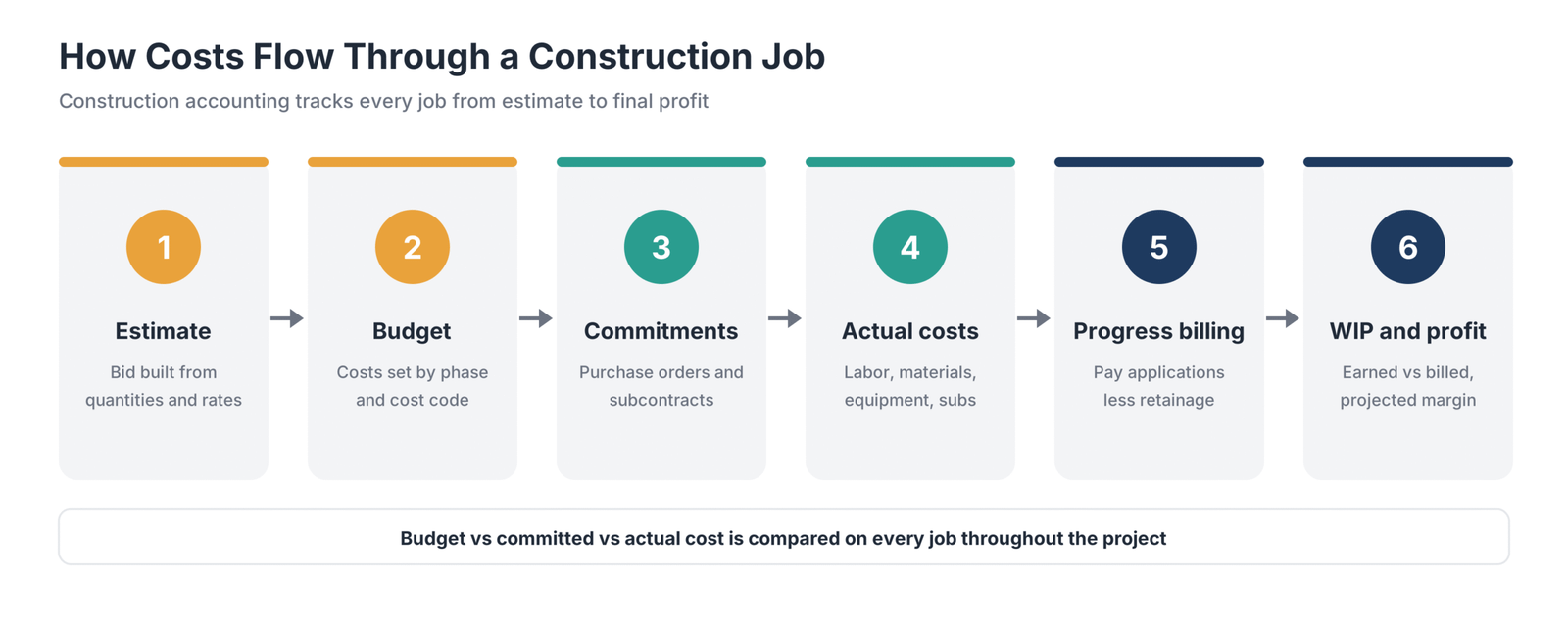
Progress billing and AIA pay applications
Contractors usually bill in stages as work is completed rather than sending one invoice at the end. Many owners and general contractors require AIA G702 and G703 forms, which list each line of the schedule of values, percentage complete, amount earned to date, retainage, and payment now due.
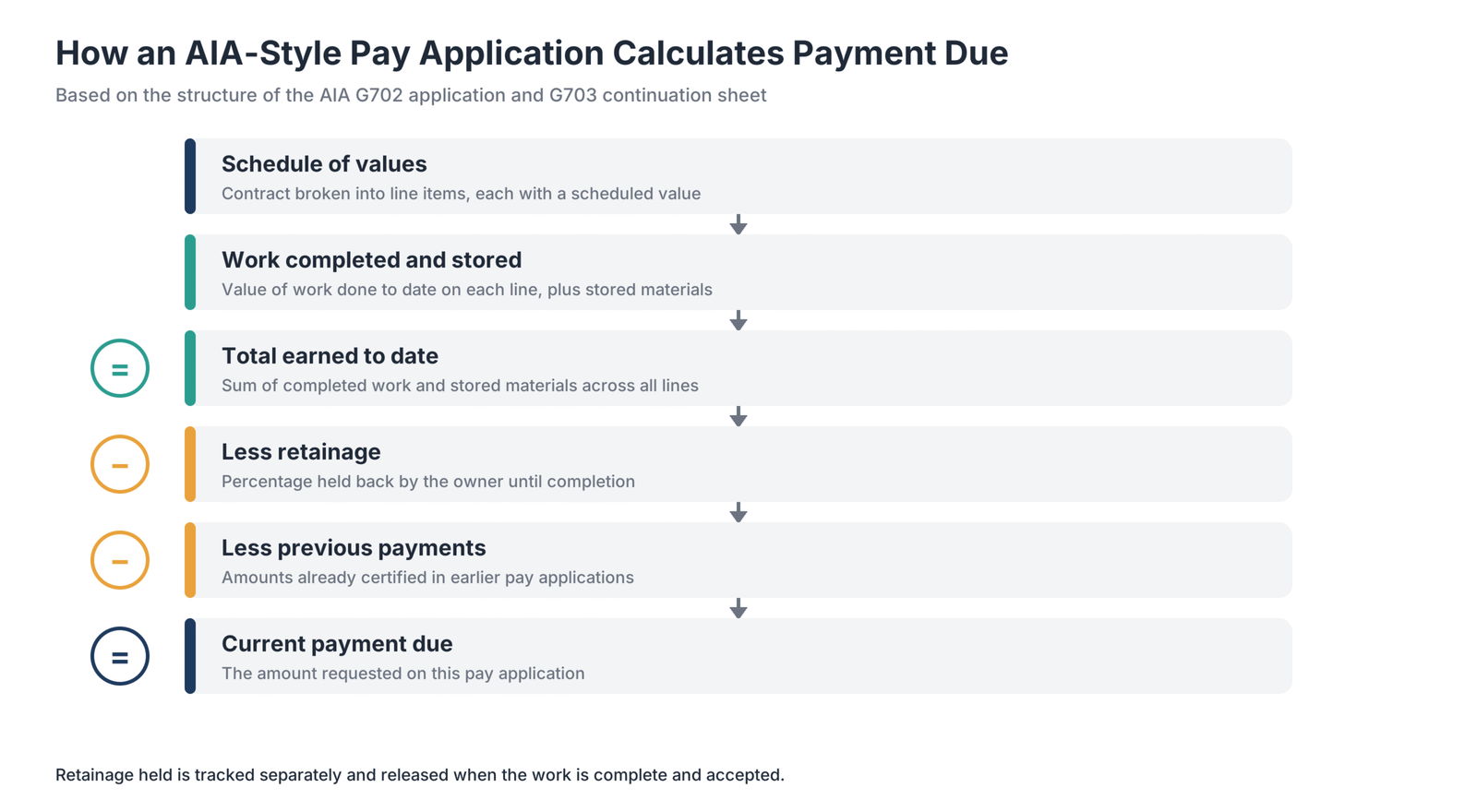
Retainage
Retainage is a portion of each progress payment that the owner or general contractor holds until the work is complete and accepted. Software should track retainage receivable from owners and retainage payable to subcontractors separately, then release it correctly at the end of the job.
Revenue recognition and work in progress
Many contractors with long-term contracts recognize revenue over time based on project completion, commonly using the cost-to-cost method. A WIP schedule compares what a job has earned with what has been billed. When billed amounts exceed earned revenue, the job is overbilled and recorded as a liability. When earned revenue exceeds billing, it is underbilled and recorded as an asset. Banks and surety companies review WIP schedules closely, so accurate reporting can affect bonding capacity and credit lines. Tax treatment can differ from financial reporting; confirm the right methods with a construction CPA.
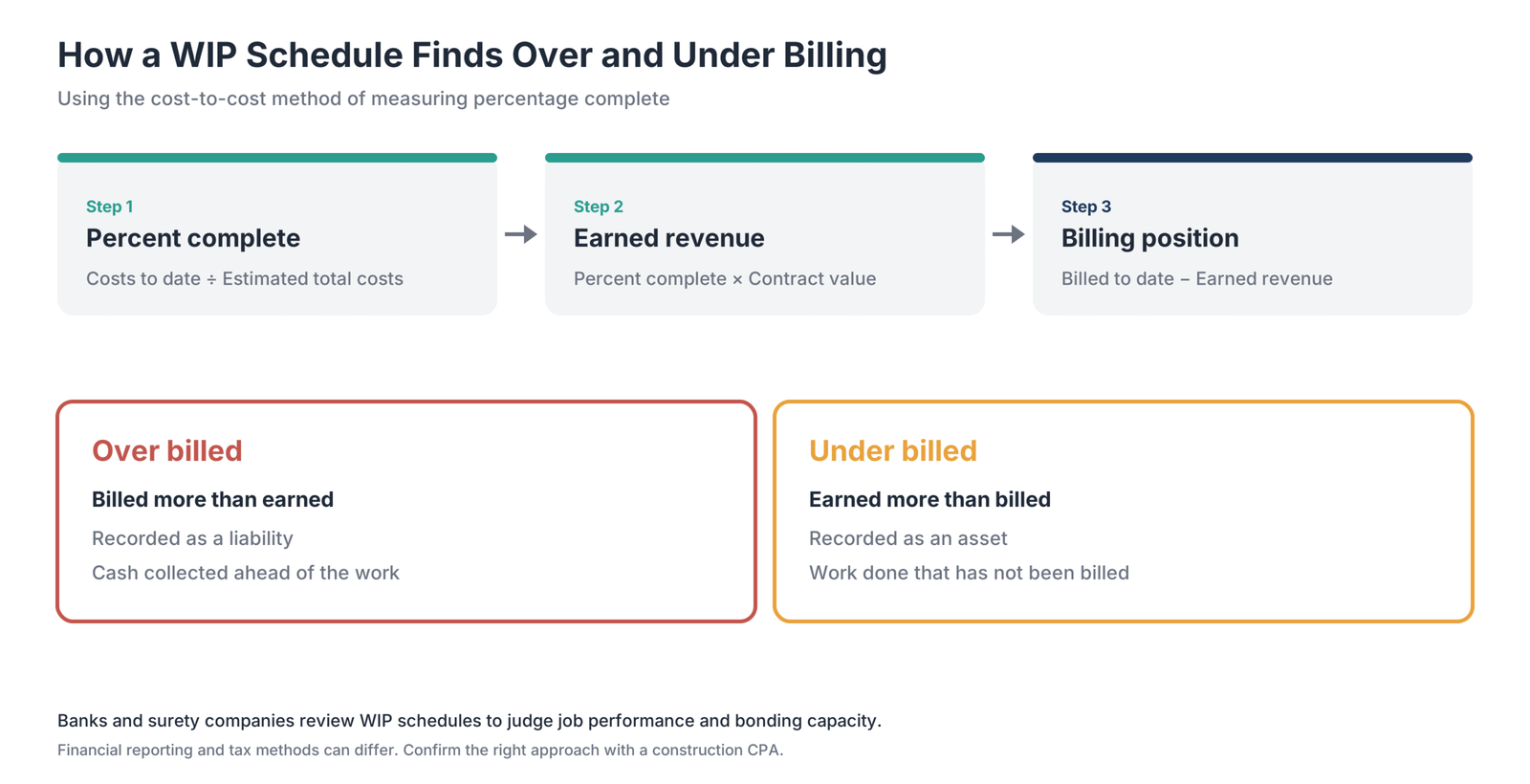
Change orders
Change orders adjust the contract value, budget, or both. Good software tracks pending and approved changes, updates budgets and billing, and passes changes through to subcontracts.
Certified payroll and prevailing wage
Public projects funded by federal money in the United States are generally subject to the Davis-Bacon Act, which requires prevailing wages and weekly certified payroll reports. Many states have similar prevailing-wage laws. Construction payroll software can produce reports from timecards automatically.
Union payroll and fringe benefits
Union contractors pay different rates by trade and local, plus fringe contributions to union funds. Construction payroll systems calculate these by job and trade and produce the remittance reports unions require.
Multi-state and multi-job payroll
Crews may work on several jobs and in more than one tax jurisdiction in the same week. Construction payroll allocates hours and taxes correctly across jobs, localities, and rates on a single timecard.
Equipment costing
Contractors that own equipment need to charge equipment time to jobs, track maintenance, and understand whether each piece of equipment pays for itself.
Subcontractor compliance and lien waivers
General contractors must track subcontractor insurance certificates, licenses, and lien waivers before releasing payment. Software that flags missing or expired compliance documents can reduce legal and financial risk.
What Features Should Construction Accounting Software Have?
Use this checklist to compare platforms. Not every contractor needs every feature, but most need the first six.
- Job costing by phase and cost code, including committed costs from purchase orders and subcontracts.
- Progress billing and AIA G702 and G703 support.
- Retainage tracking for receivables and payables.
- WIP reporting with automatic overbilling and underbilling entries.
- Construction payroll, including certified, prevailing-wage, union, and multi-state payroll.
- Change-order management connected to budgets and billing.
- Subcontract management with compliance tracking and lien waivers.
- Accounts-payable automation, invoice capture, and job-based approval routing.
- Equipment management with job-cost allocation.
- Service management for contractors with maintenance or repair divisions.
- Multi-entity accounting for firms with several companies.
- Mobile time entry and field apps that send hours and costs directly to job records.
- Integrations with project management and estimating tools.
- Dashboards for job profitability, cash flow, and backlog.
What Types of Construction Accounting Software Are There?
- General accounting with construction add-ons: QuickBooks Online or Xero paired with tools such as Knowify or Buildertrend can cover basic job costing and billing for small contractors at a lower cost.
- Construction-specific accounting systems: FOUNDATION, Sage 100 Contractor, and Deltek ComputerEase are built for contractors and include construction payroll, job costing, and billing.
- Cloud construction ERP for growing firms: Sage Intacct Construction, Acumatica Construction Edition, Premier, and Viewpoint Spectrum add multi-entity reporting, broader modules, and cloud access.
- Enterprise construction ERP: Viewpoint Vista and CMiC serve large contractors with complex organizations, multiple entities, and integrated project management.
- Service-focused construction ERP: Jonas Construction Software specializes in contractors combining project work with service and maintenance.
Which Software Fits Your Type of Contractor?
General contractors
General contractors need job costing, AIA billing, retainage, subcontract management, compliance tracking, and lien waivers. Sage Intacct Construction, Premier, FOUNDATION, and CMiC may fit, depending on company size and workflow complexity.
Specialty and trade contractors
Specialty contractors often self-perform work, so labor costing and payroll matter most, along with AIA billing to general contractors. Deltek ComputerEase, FOUNDATION, Viewpoint Spectrum, and Knowify for smaller firms are options to evaluate.
Mechanical, electrical, plumbing, and service contractors
Contractors with service divisions need work orders, dispatch, maintenance contracts, and service billing alongside project accounting. Jonas Construction Software, Viewpoint Spectrum, and Deltek ComputerEase cover both project and service workflows.
Home builders and remodelers
Residential contractors often need simpler job costing, customer-friendly billing, and selections or change-order tracking. QuickBooks Online paired with a residential construction management tool is a common starting point, with Sage 100 Contractor as a step up.
Heavy civil and public works contractors
Heavy civil contractors rely on equipment costing, unit-price billing, and certified payroll for public work. FOUNDATION, Viewpoint Vista, Viewpoint Spectrum, and CMiC address these requirements.
Real-estate developers and owner-builders
Developers need multi-entity accounting, consolidated reporting, and investor-ready financials across projects. Premier and Sage Intacct Construction are designed for multi-entity portfolios.
Can QuickBooks Handle Construction Accounting?
QuickBooks can handle construction accounting for small contractors with straightforward jobs. QuickBooks Online Plus and Advanced include project profitability and job-cost reports, track time and expenses by project, and integrate with construction apps that add estimating, scheduling, and billing.
QuickBooks reaches its limits when work requires features it was not designed for:
- AIA billing and retainage usually require an add-on such as Knowify.
- WIP schedules and overbilling or underbilling entries are typically prepared in spreadsheets.
- Committed costs from subcontracts and purchase orders are harder to track by cost code.
- Certified, prevailing-wage, and union payroll generally require separate software or a service.
- Multi-entity consolidation may require separate company files and manual work.
You may have outgrown QuickBooks if your WIP schedule takes days to update, you bid on public work requiring certified payroll, your surety or bank asks for more detailed job reporting, project managers cannot see costs without asking accounting, or you run multiple companies and consolidate using spreadsheets.
How Much Does Construction Accounting Software Cost?
Pricing varies because cost depends on selected modules, number of users, transaction volume, and implementation work.
Common pricing models
- Monthly subscriptions: QuickBooks Online Plus is listed at $140/month, Advanced at $340/month, and Knowify starts at $99/month in the source brief.
- Per-user subscriptions: many cloud construction platforms charge more as office and field users are added.
- Consumption-based pricing: Acumatica ties cost to applications, transactions, and computing resources rather than user count.
- Module-based pricing: construction-specific systems may charge for an accounting core, with payroll, equipment, service, or project management modules priced separately.
- Perpetual licenses and maintenance: some established vendors still offer licenses and annual maintenance or hosted options.
Implementation and ongoing costs
Most construction accounting systems involve one-time costs for setup, data migration, configuration, and training, plus ongoing support, hosting, and add-ons. Ask vendors to separate software fees from implementation and support, and confirm which modules are included.
How Do You Choose the Right Construction Accounting Software?
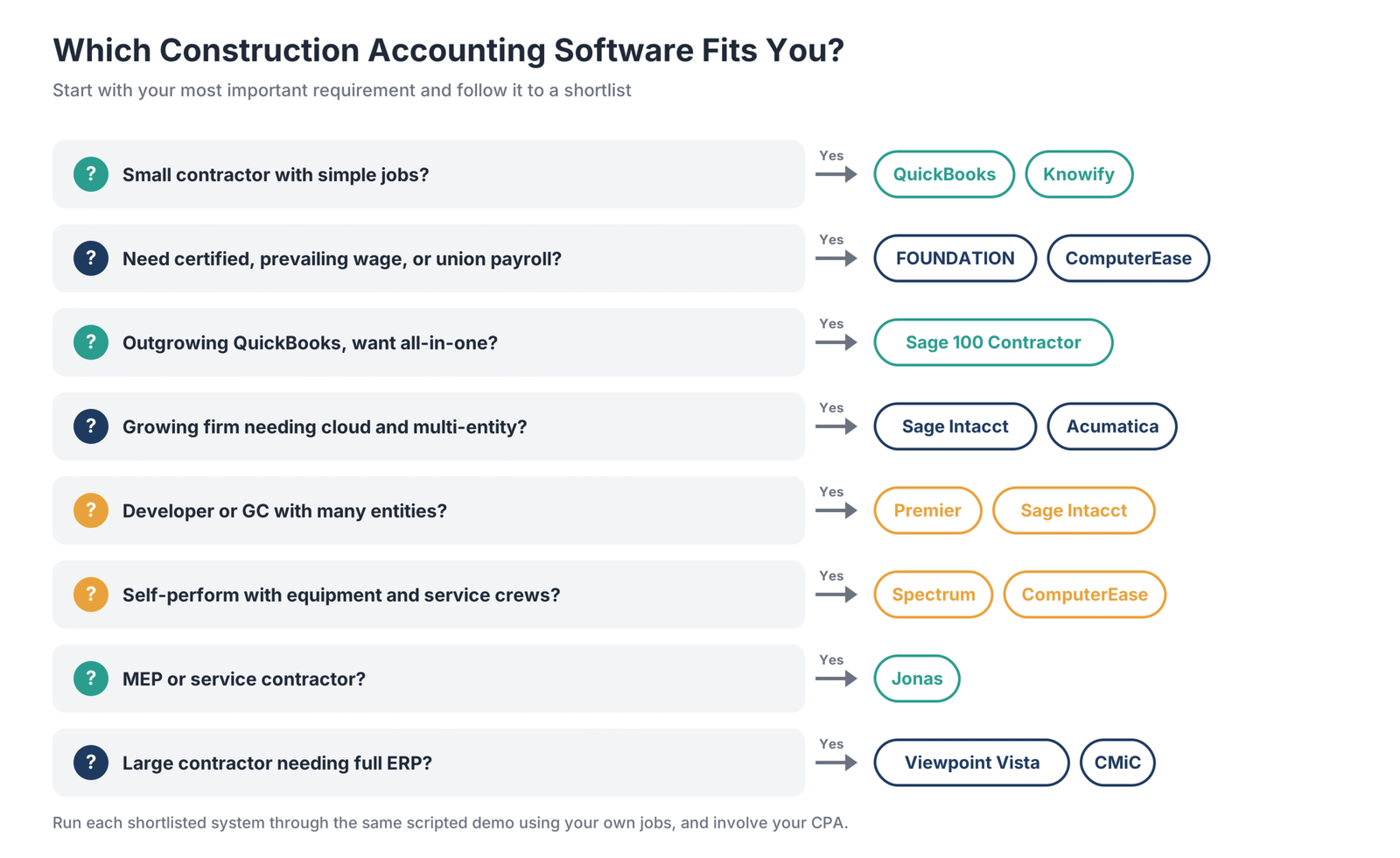
1. Map your workflows and pain points
Document how you estimate, budget, buy, pay subcontractors, run payroll, bill owners, and close each month. Note where spreadsheets, duplicate entry, or delays cause problems.
2. Define must-have features
Separate requirements you cannot work without, such as certified payroll or AIA billing, from features that would be useful later.
3. Consider company size and growth
Match the software tier to where your company may be in three to five years, not just where it is today. Changing systems is disruptive, so a platform you can grow into may save effort.
4. Check integrations
Confirm that the system connects to project management, estimating, time tracking, and document tools. Integration with platforms such as Procore can eliminate duplicate entry between field and office.
5. Involve your CPA and surety
Ask your CPA and surety which systems they work with and which reports they expect. Their input can help you choose software that produces the WIP schedules and financial statements they need.
6. Run scripted demos
Give each vendor the same scenarios based on your own jobs, such as an AIA pay application with retainage, a certified-payroll week, and a month-end WIP schedule. Compare how each system handles them.
7. Check references and total cost
Talk to contractors of similar size and trade who use the software, and compare total cost over several years, including implementation, training, and support.
How Do You Implement Construction Accounting Software?
Implementation is where much of the risk lies. These steps help you switch systems without disrupting payroll or open jobs.
- Clean up your chart of accounts and cost codes before migrating so the new system starts with a consistent structure.
- Choose a go-live date at the start of a fiscal year or quarter to simplify payroll and reporting.
- Plan how to move open jobs, including budgets, committed costs, billings to date, and retainage balances.
- Load year-to-date payroll if switching mid-year so tax filings and W-2s stay accurate.
- Set up integrations with project management, time tracking, and banking.
- Train office and field users on the workflows that affect them.
- Run parallel processes for at least one billing or payroll cycle to confirm that the new system matches the old results.
- Review your first WIP schedule in the new system with your CPA.
Frequently Asked Questions
What is construction accounting?
Construction accounting tracks revenue and costs by job rather than only at company level. It includes job costing, progress billing, retainage, revenue recognition based on project completion, WIP reporting, and construction payroll requirements such as certified and union payroll.
What is job costing in construction?
Job costing assigns every cost—including labor, materials, equipment, subcontractors, and overhead—to a specific job and cost code. It lets contractors compare actual costs with the budget throughout the project and see which jobs and activities are profitable.
Does QuickBooks do job costing?
Yes. QuickBooks Online includes job costing through QuickBooks Projects on Plus and Advanced plans, with project profitability and job-cost reports. It tracks time and expenses by project, but construction features such as AIA billing, retainage tracking, and WIP schedules may require add-ons.
What are the limitations of QuickBooks Online for job costing?
QuickBooks Online tracks costs by project, but has limited cost-code structure and committed-cost tracking, no built-in WIP schedule or overbilling and underbilling entries, and no native AIA billing or retainage tracking. Certified and union payroll often require separate tools.
What is WIP in construction accounting?
WIP, or work in progress, compares revenue a job has earned based on its percentage of completion with the amount billed so far. It shows whether each job is overbilled or underbilled and highlights changes in projected profit. Banks and surety companies rely on WIP schedules when evaluating contractors.
What is construction in progress accounting?
Construction in progress (CIP) is an asset account used by companies building long-term assets for their own use, such as a new facility. Costs accumulate in the CIP account until the asset is complete and placed in service. It is different from the WIP schedule contractors use to report on customer contracts.
What is retainage in construction?
Retainage is a portion of each progress payment that an owner or general contractor withholds until work is complete and accepted. Contractors track retainage receivable from owners and retainage payable to subcontractors.
What is certified payroll?
Certified payroll is a weekly report contractors submit on public works projects covered by prevailing-wage laws, such as the federal Davis-Bacon Act. It lists each worker, classification, hours, rates, and deductions, and certifies that prevailing wages were paid.
What is the best accounting software for a small construction business?
For a very small contractor, QuickBooks Online Plus with an add-on such as Knowify is a common starting point. Small contractors needing construction payroll, AIA billing, and WIP reporting in one system often evaluate FOUNDATION, Sage 100 Contractor, or Deltek ComputerEase.
Is there an app for construction accounting?
Most construction accounting platforms include mobile apps for time entry, expenses, receipt capture, daily logs, and approvals. Deltek ComputerEase, Viewpoint Spectrum, Acumatica, and Jonas offer field apps that send data to job-cost records.
What is the best multi-entity accounting software for construction?
Sage Intacct Construction and Premier Construction Software focus on multi-entity consolidation. Enterprise platforms such as CMiC and Viewpoint Vista also support multiple companies. The right choice depends on company size and whether integrated payroll and project management are needed.
Which Construction Accounting Software Should You Choose?
- Complex payroll and job costing: FOUNDATION is built for prevailing-wage and union contractors.
- Cloud accounting and multi-entity reporting: Sage Intacct Construction suits growing midsize firms.
- An all-in-one step up from QuickBooks: Sage 100 Contractor combines accounting, estimating, and payroll.
- A full ERP for large contractors: Viewpoint Vista and CMiC offer depth and configurability.
- Self-performing contractors with equipment: Viewpoint Spectrum covers equipment and service work.
- Specialty contractors in the cloud: Deltek ComputerEase combines payroll, AIA billing, and field tools.
- Cloud ERP without per-user fees: Acumatica Construction Edition gives broad user access.
- Developers and multi-entity builders: Premier Construction Software is designed for portfolios.
- MEP and service contractors: Jonas Construction Software connects service and project work.
- Small contractors starting out: QuickBooks Online Plus paired with Knowify covers the basics.
Shortlist two or three systems that match your company size and trade. Run each through the same scripted demo using your own jobs, involve your CPA, and compare total costs before signing.















































































































