

Zapier vs Make in 2026: Pricing, Features, and Which Automation Tool to Choose
Zapier and Make are two of the best-known no-code automation platforms. Both connect apps so an event in one app, such as a form submission, paid invoice, or new spreadsheet row, can trigger actions in others. Both now offer AI steps, AI agents, and connections for AI assistants through the Model Context Protocol (MCP).
They take different approaches. Zapier focuses on speed and simplicity: a workflow, called a Zap, is built as a list of steps, with broad app coverage. Make focuses on visual control: a scenario is built on a canvas where branches, loops, and data paths are visible. Make often costs less for the same volume of work, but the platforms count usage differently.
This guide compares workflow design, integrations, billing, pricing, AI, error handling, security, team fit, and how to choose. Pricing and feature references are framed as of October 2026, using the supplied article draft and its cited sources. Check vendor pages before buying because plans change.
Quick verdict
- Choose Zapier for quick setup, wide app coverage, built-in tools such as Tables and Forms, and workflows that non-technical teammates need to maintain.
- Choose Make for complex branching, loops, data transformation, detailed error handling, and high-volume workflows where cost per operation matters.
- Compare a real workflow in both tools. Tasks and credits are counted differently, so sticker prices alone do not settle which is cheaper.
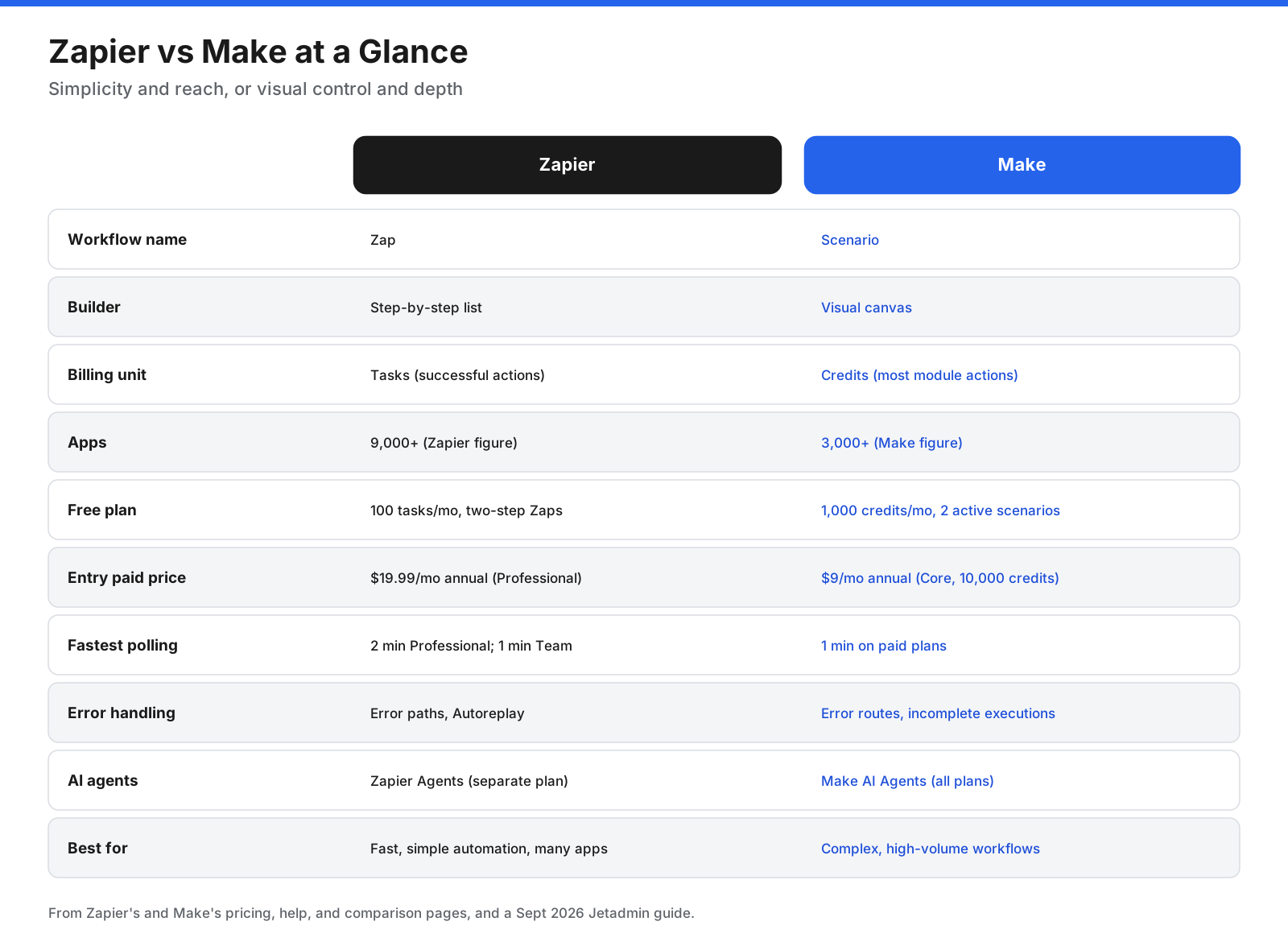
Zapier vs Make at a Glance
| Category | Zapier | Make |
|---|---|---|
| Workflow name | Zap | Scenario |
| Builder | Step-by-step list | Visual canvas |
| Billing unit | Tasks: successful actions | Credits: most module actions |
| App count | 9,000+ (Zapier figure) | 3,000+ (Make figure) |
| Free plan | 100 tasks/month, two-step Zaps | 1,000 credits/month, 2 active scenarios |
| Entry paid price | $19.99/month billed annually, Professional | $9/month billed annually, Core with 10,000 credits |
| Fastest polling | 2 minutes on Professional, 1 minute on Team | 1 minute on paid plans |
| AI agents | Zapier Agents, separate plan | Make AI Agents, available on all plans |
| Best for | Fast, simple automation across many apps | Complex, high-volume workflows |
What Is the Difference Between Zapier and Make?
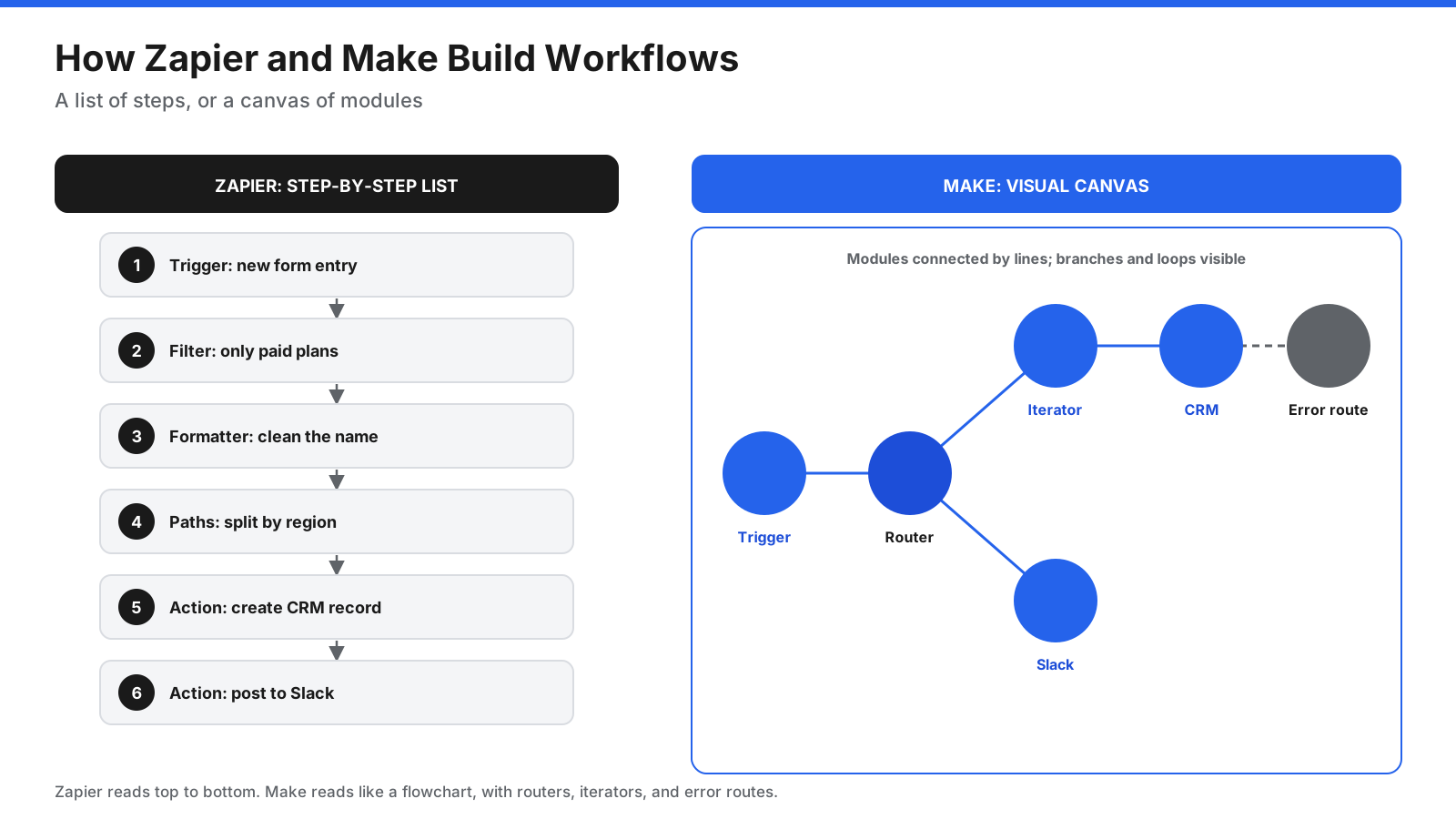
The core difference is how you build workflows and how you pay for them. Zapier’s builder is a vertical list: choose a trigger, add actions, and use Filters, Paths, and Formatter steps when needed. This keeps simple workflows quick to build and easy to read.
Make’s builder is a canvas. Each app action appears as a module connected by lines. Routers split the workflow into branches, iterators process lists, aggregators combine results, and error-handler routes catch failures. The canvas gives you a clearer view of complex logic, but it takes longer to learn.
Zapier says it supports more than 9,000 apps and cites 3.4 million customer companies. Make says it supports more than 3,000 apps and over 500,000 users. These are each vendor’s own figures. Both can connect to APIs through HTTP and webhook steps when a built-in integration is missing.
What Can You Automate With Zapier and Make?
- Lead handling: Send form or ad leads to a CRM, enrich them, notify sales, and add them to an email sequence.
- Sales and finance: Create invoices when deals close, record payments, and flag overdue accounts.
- Customer support: Create tickets from email or chat, route them by topic, and update customers when status changes.
- Operations: Sync records between tools, create onboarding tasks, and generate recurring reports.
- Content and marketing: Publish content across channels and track campaign results.
- AI workflows: Summarize messages, classify requests, draft replies for approval, or let an agent work through a queue.
Simple versions with one trigger and a few actions are usually quick to build in Zapier. Workflows with many branches, loops, or detailed data cleanup are often easier to manage in Make.
How Do Zapier and Make Compare Feature by Feature?
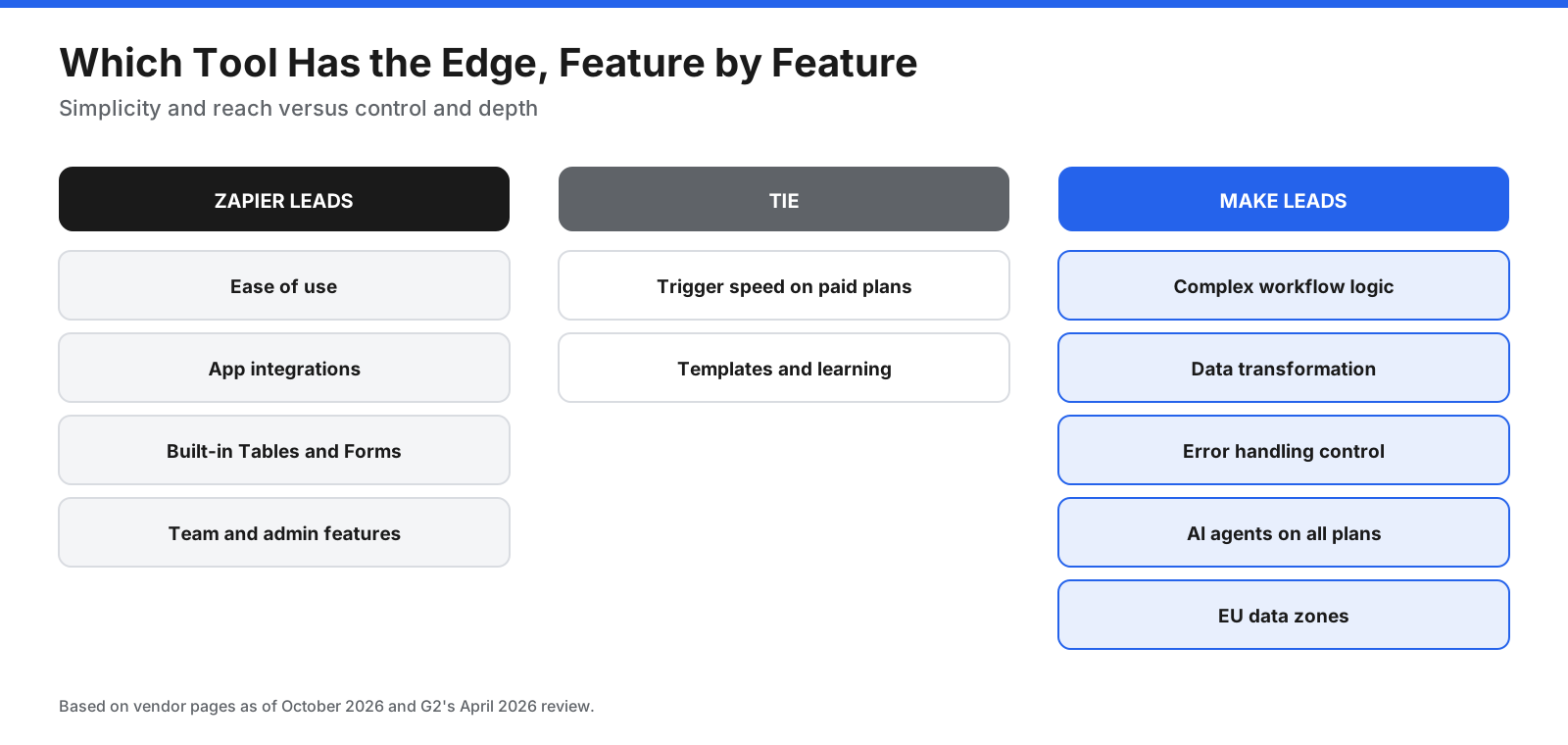
Ease of Use
Zapier is generally easier for beginners. Its step-by-step builder and plain-language Copilot help non-technical users get started. G2 user satisfaction data cited in the supplied draft scores Zapier slightly higher for ease of setup, at 88% versus 85% for Make. Make’s canvas has a steeper learning curve, but can be easier to reason about once workflows become complex.
Verdict: Zapier for beginners and non-technical teams.
Workflow Logic and Complexity
Make handles complex logic naturally. Routers create branches, iterators process lists, aggregators combine items, and the canvas shows the whole workflow. Zapier supports multi-step Zaps with Paths, Filters, Looping, and Formatter steps, but complex workflows can become long lists.
Verdict: Make for complex workflows.
App Integrations
Zapier’s broader app directory makes it more likely to support a niche app. Make argues that depth matters as well as breadth, and says many of its integrations offer more preset actions. Check the exact triggers and actions you need in both directories before committing.
Verdict: Zapier for breadth. Verify the specific actions in both.
Triggers and Speed
Polling triggers check for new data on a schedule. According to the supplied draft, Zapier polling runs every 15 minutes on Free, every 2 minutes on Professional, and every minute on Team and Enterprise. Make’s free plan has a 15-minute minimum interval, while paid plans can run every minute. Both support instant webhooks for apps that offer them.
Verdict: Tie for many paid-plan use cases; Make reaches one-minute polling on its cheapest paid plan.
Data Handling, APIs, and Custom Code
Make includes functions for text, dates, math, and arrays, plus modules for JSON, XML, and CSV. Zapier’s Formatter handles common transformations, while Code steps support JavaScript or Python. Both can receive webhooks and call APIs. Make’s mapping and HTTP tools suit API-heavy workflows, while Zapier’s Code steps can be handy for short custom logic.
Verdict: Make for heavy data transformation and API-heavy work.
Error Handling and Run History
Zapier lets users add error-handler paths on Professional and higher plans, and Autoreplay can retry failed steps. Its run history shows each step and the data passed through it. Make attaches error-handler routes to modules, supports incomplete executions that can be resolved later, and can roll back modules that support transactions. Its visual run history helps identify where data failed.
Verdict: Make for fine-grained control and visual debugging. Zapier’s error paths are simpler to set up.
AI Features and Agents
Zapier offers AI fields, AI enrichment on Team, Copilot for building Zaps, and AI steps. Zapier Agents are sold separately, and its MCP server lets AI assistants take actions across connected apps. Make AI Agents are available on all plans and can be built and debugged inside the scenario canvas. Maia helps create scenarios from plain-language instructions, and Make’s MCP Server connects AI tools to scenarios.
The companies make competing claims about the limits of each other’s agent products. Test both with the task you want an agent to perform.
Verdict: Make for agents included in every plan. Zapier for MCP access across its larger app library.
Built-In Tools
Zapier includes Tables for records, Forms for collecting information, and Chatbots, with plan-based limits. Make has data stores and Make Grid, but does not offer a comparable built-in form builder or table product.
Verdict: Zapier.
Templates, Learning, and Community
Both platforms offer templates. Zapier’s are organized by app and use case and open in the editor with fields pre-filled. Make’s blog lists thousands of scenario templates, Make Academy courses, and a community. Zapier takes less training to start; Make offers more structured learning for users who want to master its canvas.
Verdict: Tie. Zapier needs less training; Make offers more structured learning.
Collaboration and Team Features
Zapier’s Team plan adds shared workspaces, shared app connections, and SAML single sign-on. Make’s Teams plan adds team roles and shared scenarios. Zapier offers more extensive admin features for larger teams.
Verdict: Zapier for larger teams and admin controls.
Security, Compliance, and Data Residency
The supplied draft says both platforms are SOC 2 Type II and GDPR compliant, citing Zapier’s comparison page. Zapier adds audit logs, role-based access, SCIM provisioning, and app restrictions on Enterprise. Make lets organizations choose US or EU data zones, though some AI features always process requests in the US.
Verdict: Zapier for enterprise administration. Make for EU data-zone choice.
How Much Do Zapier and Make Cost?
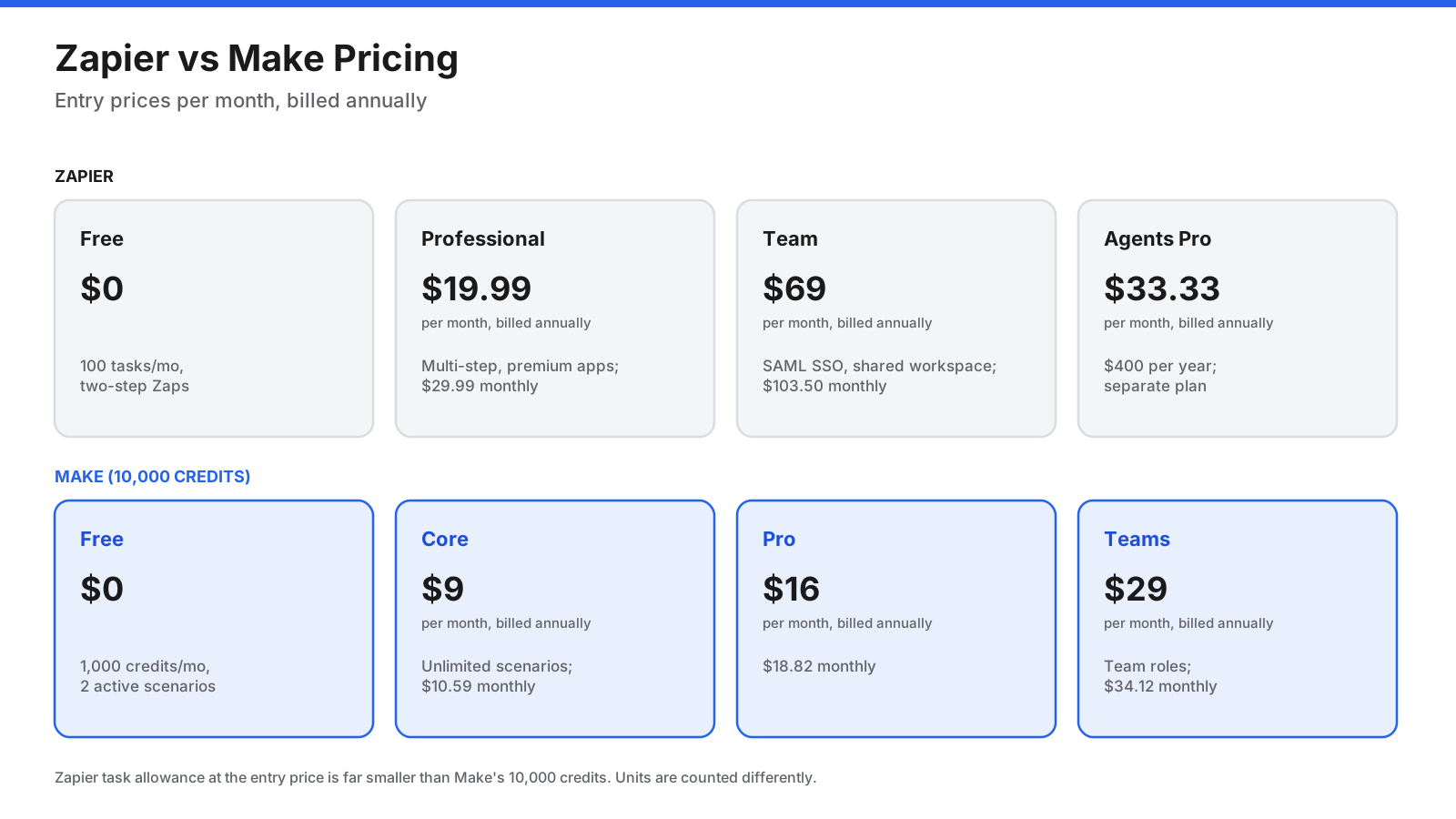
Zapier pricing in the supplied draft:
- Free: $0, 100 tasks per month, two-step Zaps, and 15-minute polling.
- Professional: From $19.99 per month billed annually, or $29.99 monthly, with multi-step Zaps, premium apps, and 2-minute polling.
- Team: From $69 per month billed annually, or $103.50 monthly, with shared workspaces, SAML SSO, and 1-minute polling.
- Enterprise: Custom pricing with annual task limits and advanced admin controls.
- Zapier Agents: Free tier with 400 activities per month, or Pro at $400 per year.
The supplied draft attributes the monthly Professional and Team prices to a September 2026 Jetadmin guide, while Zapier’s own pricing page lists starting prices.
Make pricing in the supplied draft, for 10,000 credits per month:
- Free: $0, 1,000 credits per month, and 2 active scenarios.
- Core: $9 per month billed annually, or $10.59 monthly, with unlimited active scenarios and 1-minute scheduling.
- Pro: $16 per month billed annually, or $18.82 monthly.
- Teams: $29 per month billed annually, or $34.12 monthly.
- Enterprise: Custom pricing.
The draft attributes Make’s paid prices to a September 2026 Jetadmin guide and Make’s blog. Its source checklist flagged paid-plan prices and app/customer counts for verification on publication day, so confirm those values on the vendors’ current pages before relying on them.
How Do Tasks and Credits Differ?
This is the most important detail when comparing costs. On Zapier, a task is used when an action step completes successfully. Triggers, polling, filters, Formatter, Paths, Tables, and Forms do not count, and failed actions are free, according to Zapier’s pricing page. A Zap with a trigger and three actions uses three tasks per run.
On Make, most module actions use credits, including reading, searching, creating, updating, transforming, and iterating data. Routers and error handlers are free. A scenario with a trigger and three actions uses at least four credits per run, and loops multiply credits by the number of items processed. Some AI features use more credits.
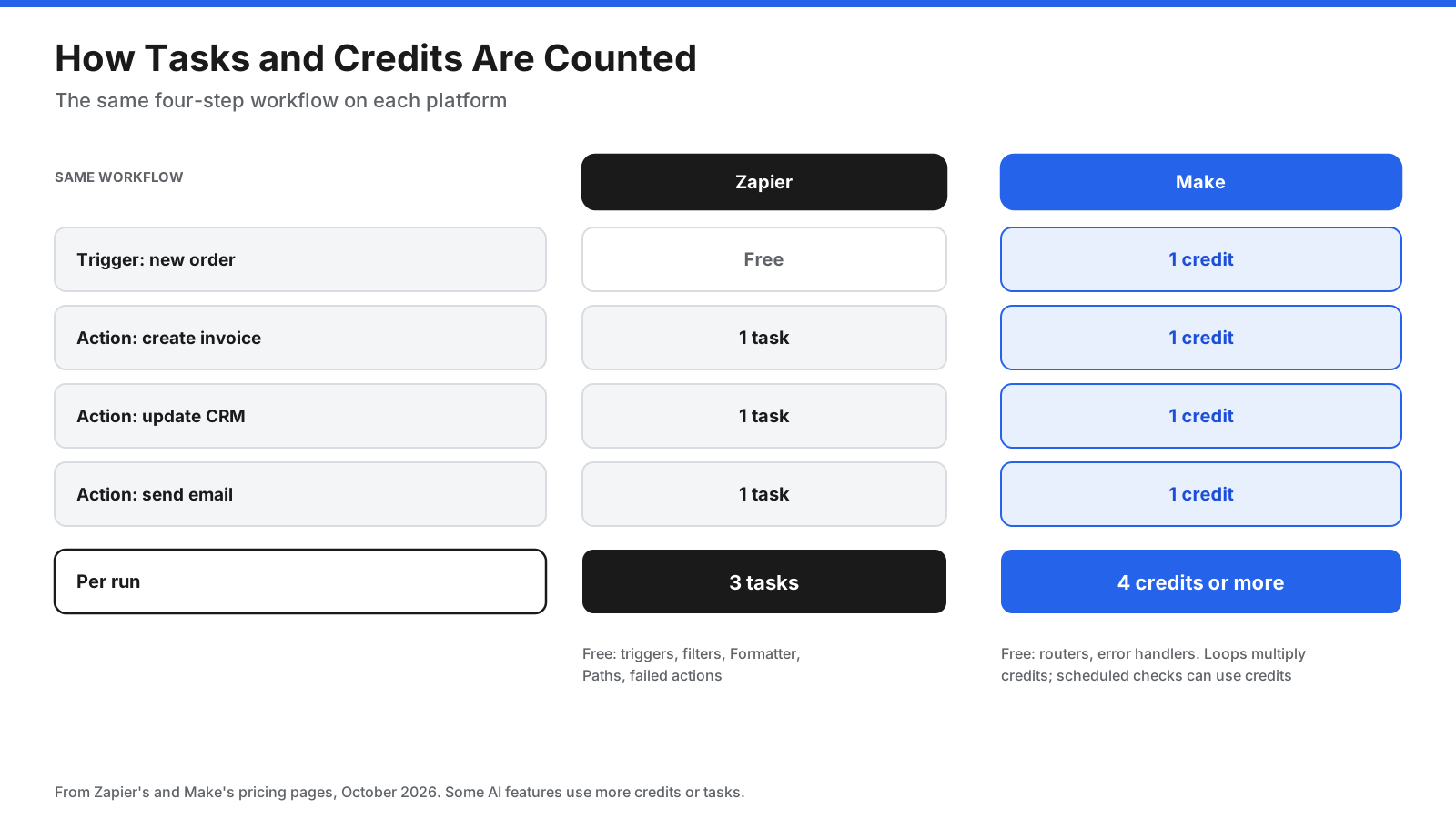
Make includes 10,000 credits on its cheapest paid plan, while Zapier’s entry Professional tier includes far fewer tasks. Make often costs less for multi-step workflows at moderate or high volume. Zapier can be competitive when workflows have few action steps and many filtered-out runs, since those do not use tasks. Estimate monthly usage using your own workflow steps and run frequency.
Which Is Cheaper, Zapier or Make?
Make is often cheaper per unit of work, especially when workflows have many steps, branches, or loops. Zapier may justify the higher price when you need an app only it supports, non-technical teammates maintain the workflows, built-in Tables or Forms replace separate tools, or many runs are filtered out before actions complete.
Make is often better value when you run high volumes, use complex workflows, want AI agents included in every plan, or have someone comfortable learning its canvas. A meaningful comparison should count the steps in a typical workflow and estimate monthly runs on both plans.
What Are the Downsides of Zapier and Make?
Zapier downsides:
- Higher cost per unit of work, especially at volume.
- Complex Zaps can become long lists that are harder to read.
- Agents are sold as a separate plan.
- The free plan is limited to two-step Zaps.
Make downsides:
- Steeper learning curve and more technical terms.
- Fewer apps than Zapier.
- Triggers, scheduled checks, and loops can consume credits in ways new users may not expect.
- Fewer built-in tools such as forms and tables.
Which Teams Should Choose Zapier or Make?
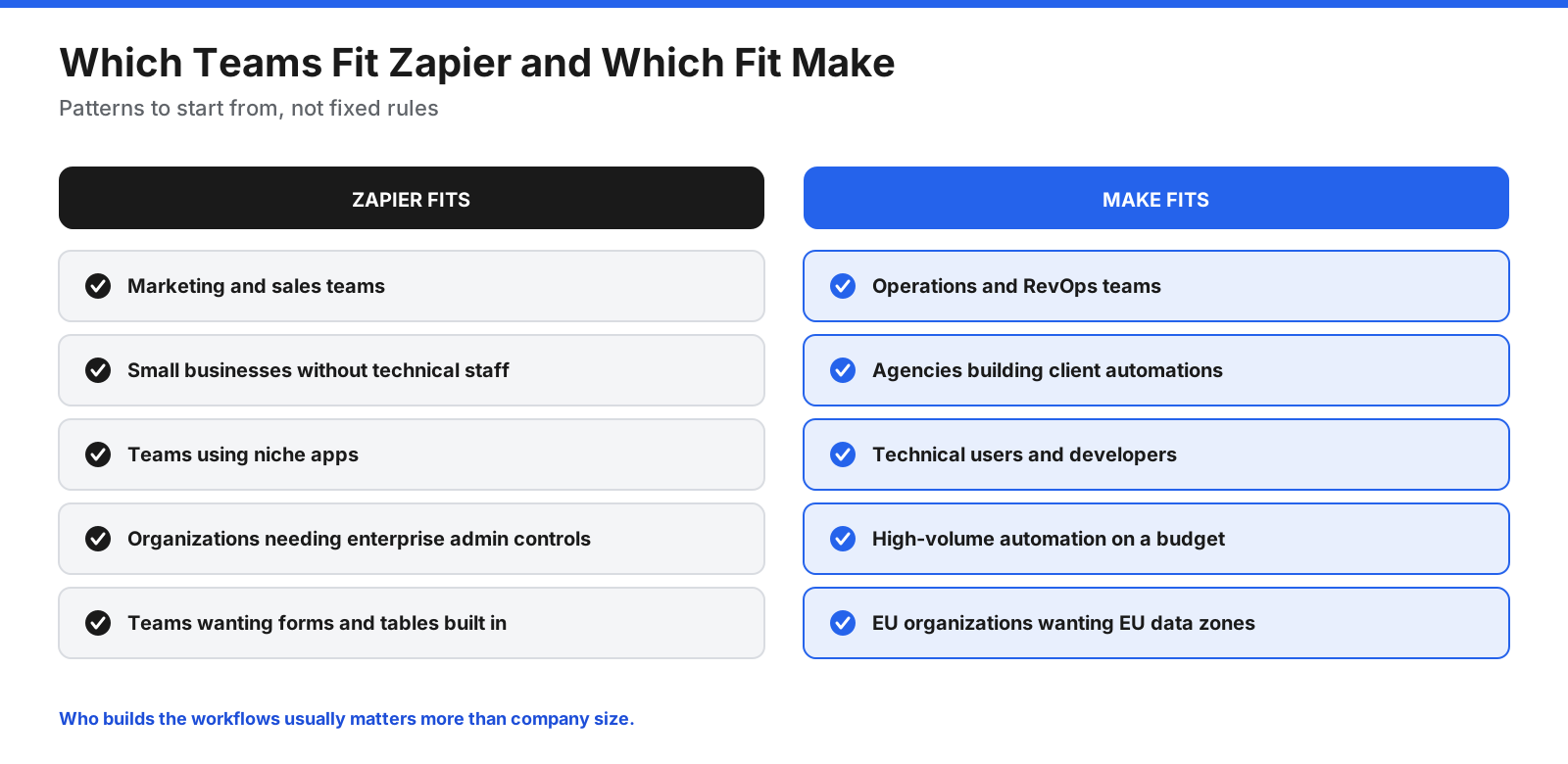
Zapier suits marketing, sales, and small business teams that want to connect apps quickly without technical help. It also suits larger organizations that need enterprise admin controls. Make suits operations teams, agencies, and technical users building complex, high-volume workflows who want to see and control every step.
Which Should You Choose: Zapier or Make?
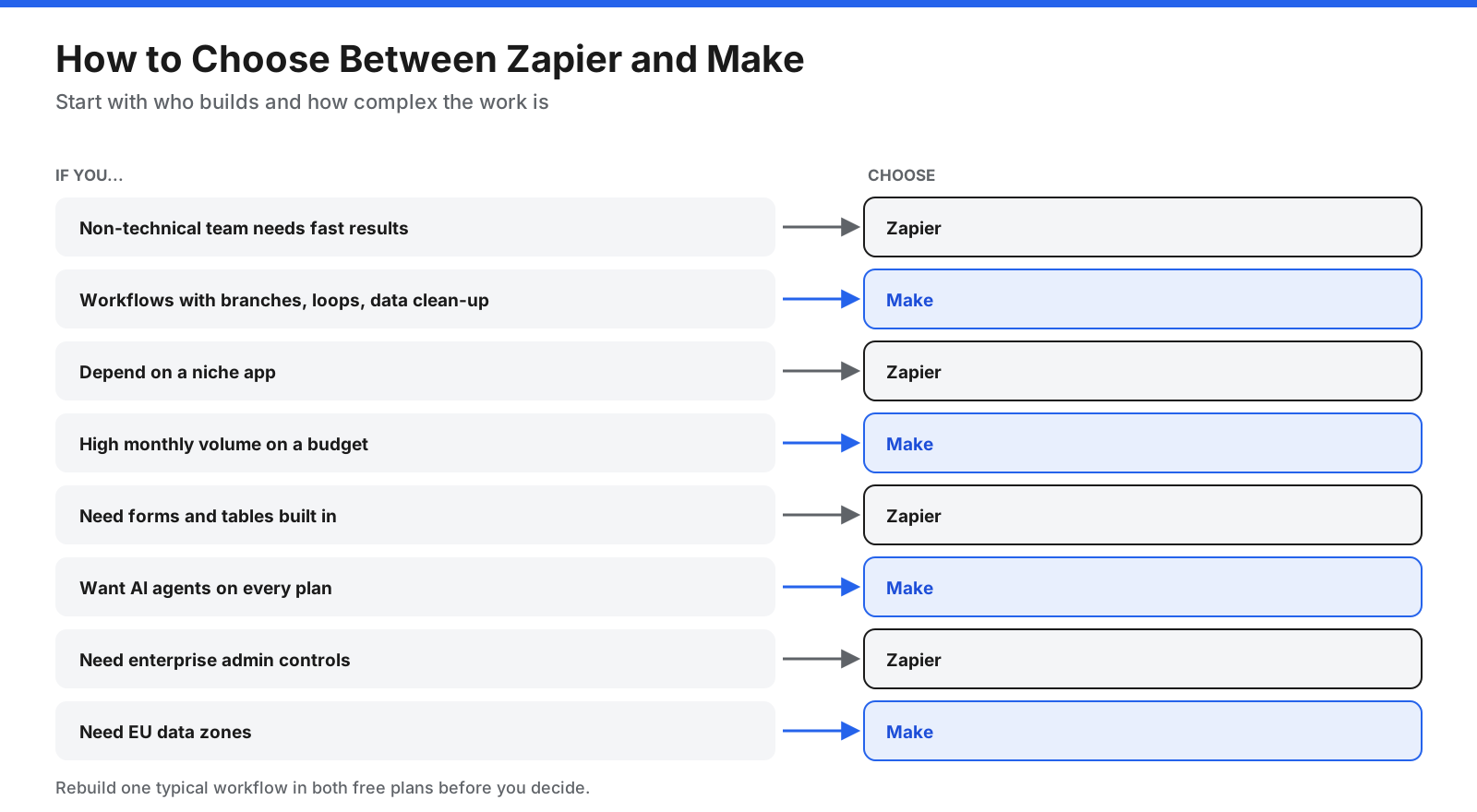
- Choose Zapier if non-technical teammates need fast results, you depend on a niche app, you want built-in forms and tables, or you need enterprise admin controls.
- Choose Make if workflows have branches, loops, or data cleanup, you run high volumes on a budget, you want AI agents on every plan, or you need EU data zones.
Check your five most important apps in both directories, then rebuild one typical workflow in each free plan. Compare setup time, readability, and estimated monthly task or credit usage.
How Do You Switch From Zapier to Make, or Back?
Neither platform imports workflows from the other, so you rebuild them. List workflows by importance and usage, confirm every required app and action exists in the new platform, and rebuild one workflow at a time. Run the old and new versions in parallel briefly with the new version writing to a test destination. Once results match, switch over, turn off the old workflow, and watch usage for the first month.
What About n8n?
n8n often comes up alongside Zapier and Make, especially for technical teams. It is a visual workflow tool with AI agent features that can run in n8n Cloud or be self-hosted. The supplied draft lists cloud plans from €20 per month for Starter, billed annually, and a self-hosted Community Edition. n8n counts usage by full workflow executions rather than individual steps. It suits developers who want self-hosting and code-level control, while Zapier and Make are easier for non-developers.
Frequently Asked Questions
Is Make better than Zapier?
Make is better for complex workflows, data transformation, and cost per step. Zapier is better for ease of use, app coverage, and built-in tools. The right choice depends on your workflow and who will maintain it.
Is Make cheaper than Zapier?
Usually, Make’s entry paid plan is less expensive and includes more usage units. But a task and a credit do not mean the same thing, so compare costs using your actual workflow.
Which is better for small businesses?
Small businesses without technical staff often find Zapier faster to adopt. Businesses with someone willing to learn a visual builder, or with high automation volume, may save money with Make.
Can Zapier and Make work together?
Yes. Each can trigger the other through webhooks. Some teams keep simple Zaps in Zapier and run complex scenarios in Make, but using both adds cost and maintenance.
Is Make easier than Zapier?
Zapier is generally easier for beginners. Make’s visual canvas can be easier to understand for complex workflows after you learn its terminology.
Is Zapier free?
Yes. The supplied draft lists a free plan with 100 tasks per month, two-step Zaps, and 15-minute polling.
Is Make free?
Yes. The supplied draft lists a free plan with 1,000 credits per month and two active scenarios, with a 15-minute minimum interval.
Is Zapier outdated?
No. Zapier continues to add AI features, Agents, MCP support, Tables, Forms, and Copilot. Some users choose Make or n8n for lower costs or more control.
Which is better, n8n or Make?
Make is easier for many non-developers and is fully hosted. n8n suits technical teams that want self-hosting, code-level control, and execution-based pricing.
Which is better for AI agents, Zapier or Make?
Make includes AI Agents on all plans and shows steps on its canvas. Zapier sells Agents separately but connects agents and its MCP server to a larger app library. Test both with your intended task.
Was Make called Integromat?
Yes. Make was formerly called Integromat.
Can Make do everything Zapier can?
Make can handle many of the same automation tasks and more complex ones, but supports fewer apps and lacks built-in forms and tables. Check that each app and action you need is available before switching.
The Bottom Line
Zapier and Make both automate work across your apps, but they suit different builders. Zapier is the better choice for speed, simplicity, broad app coverage, and teams without technical skills. Make is the better choice for complex logic, data transformation, detailed error handling, AI agents on every plan, and lower cost at volume.
Start with who will build your automations and how complex they are, then price one typical workflow in both free plans. Check current prices on each vendor’s site before you commit, since both update their plans often.















































































































