

Invoicing software helps you create, send, and track invoices, collect payments online, and record what each customer owes, all without spreadsheets or word processor templates. For a small business, it is often the most direct link between the work you deliver and the cash that arrives in your bank account.
Good invoicing software does more than produce a professional-looking PDF. It turns estimates into invoices, bills recurring clients automatically, sends payment reminders, accepts cards and bank transfers, and feeds payments into your books. The right tool can help you get paid faster and spend less time on billing each month.
This guide compares 12 invoicing tools for 2027, explains how invoicing software works, which features matter, what it costs once payment fees are included, which tools suit different business types, how e-invoicing rules are changing, and how to switch systems without disrupting cash flow.
Quick Comparison of the Best Invoicing Software
| Software | Best for | Free option | Starting paid price | Online card fee |
|---|---|---|---|---|
| FreshBooks | Service businesses billing time and projects | Introductory discount | $23/month | 2.9% + 30¢ |
| QuickBooks Online | Invoicing inside full accounting | QuickBooks Free: 2 invoices/month | $38/month | Varies by plan |
| Xero | Growing businesses needing accounting | Introductory discount | $27/month | Varies by provider |
| Zoho Invoice | Free, full-featured invoicing | Free, 500 invoices/year | Free | Varies by gateway |
| Wave | Free invoicing with bookkeeping | Free Starter plan | $19/month (Pro) | 2.9% + 60¢ |
| Square Invoices | Businesses already using Square | Free plan | $49/month (Plus) | 3.3% + 30¢ on Free |
| Stripe Invoicing | Online businesses and developers | Pay per paid invoice | 0.4% per paid invoice | Standard Stripe rates |
| PayPal Invoicing | Occasional invoices to PayPal customers | No monthly fee | Per transaction | 2.99% + 49¢ (cards) |
| Invoice Ninja | Low-cost invoicing and self-hosting | Free for 5 clients | $14/month | Varies by gateway |
| HoneyBook | Creative and client-based services | Trial | $29/month (annual) | From 2.7% + 10¢ |
| Bonsai | Freelancers and small agencies | Trial | $19/user/month (annual) | Varies by method |
| Jobber | Home and field service businesses | Trial | $29/month (annual) | 2.9% + 30¢ |
Prices and fees are published US rates at the time of writing and can change, especially introductory discounts. Confirm current terms on each vendor’s official website before committing.
How Were These Tools Selected?
Each tool was reviewed against the same criteria: ease of creating and customizing invoices; support for estimates, recurring billing, deposits, and automated reminders; payment methods and fees; accounting integrations; and how pricing scales as clients or team members are added. The list includes accounting platforms with strong invoicing, dedicated invoicing apps, payment processors with invoicing, client management platforms, and a field-service tool. The best fit for a freelance designer is not necessarily the best fit for an HVAC company.
What Is the Best Invoicing Software for Small Business in 2027?
1. FreshBooks
FreshBooks started as invoicing software for freelancers and has grown into accounting software for service businesses. Invoicing remains a strength, with time tracking, project billing, proposals, retainers, and automated follow-ups.
Key features: customized invoices and estimates; recurring invoices; scheduled late fees and reminders; deposits; proposals and retainers on higher plans; time tracking and project billing; and online card or bank payments through FreshBooks Payments or Stripe.
Pros: a clean client-facing workflow and strong reminder automation. Cons: plans cap billable clients—five on Lite and 50 on Plus—and extra team members cost $11 per user per month.
Pricing: Lite $23/month for five billable clients, Plus $43/month for 50, Premium $70/month for unlimited clients, and custom Select pricing. Introductory discounts are common. Card payments cost 2.9% + 30¢ and bank transfers 1%. Best for: freelancers, consultants, and service businesses billing by time or project. Official FreshBooks website.
2. QuickBooks Online
QuickBooks Online connects invoicing directly to the general ledger, sales tax, and financial reports. It is a practical choice if you want billing and bookkeeping in one system that many accountants already know.
Key features: customizable invoices and estimates; online card and bank payments through QuickBooks Payments; payment tracking and reminders; employee time added to invoices on Essentials and higher; and batch invoice creation on Advanced.
Pros: invoicing, payments, and accounting share data, and the platform is familiar to many accountants. Cons: Simple Start has a two-invoice-per-month limit unless QuickBooks Payments is used, and monthly pricing is high compared with dedicated invoicing apps.
Pricing: Simple Start $38/month for one user, Essentials $85/month for three, Plus $140/month for five, and Advanced $340/month for 25 users. QuickBooks Free was listed with up to two invoices per month and one bank connection. Payment processing rates vary by plan and payment type; check them during sign-up. Best for: small businesses that want invoicing built into full accounting. Official QuickBooks website.
3. Xero
Xero is a cloud accounting platform with invoicing, quotes, and bank reconciliation. Its plans do not charge per user, which can be cost-effective when several team members need access.
Key features: quotes that convert to invoices, online payments through connected providers, repeating invoices, automatic reminders, multi-currency invoicing on Established, and project time and cost tracking on Established.
Pros: no per-user license fee and strong reconciliation tools. Cons: the Early plan limits invoice volume to 20, and multi-currency and project tracking require the top plan.
Pricing: Early $27/month with quotes and 20 invoices, Growing $59/month, and Established $97/month; introductory discounts may apply. Payment fees depend on the connected provider, such as Stripe. Best for: growing businesses that want invoicing and accounting with unlimited users. Official Xero website.
4. Zoho Invoice
Zoho Invoice is a free invoicing application with features that many competitors reserve for paid plans. It suits small businesses that want recurring billing, a client portal, and polished invoices without a subscription.
Key features: customizable templates and estimates, recurring invoices, automated reminders, a self-service customer portal, time logging and project management, and online payments through supported gateways.
Pros: free subscription with recurring invoices, reminders, and a client portal. Cons: the researched plan limits use to 500 invoices per year, two users, three projects, and two organizations per account; growing businesses may need Zoho Billing.
Pricing: free. You pay the processing fees of your connected payment gateway. Best for: freelancers and small businesses sending fewer than 500 invoices a year. Official Zoho Invoice website.
5. Wave
Wave includes free invoicing in its Starter plan, alongside bookkeeping. Eligible businesses can send unlimited invoices and estimates and accept card payments on invoices.
Key features: unlimited invoices, estimates, and bills; card and bank payments; a mobile invoicing app; built-in bookkeeping; and automatic recording of invoice payments. Automated reminders, bank connections, and team access are included with Pro.
Pros: unlimited invoicing without a subscription and bookkeeping in the same tool. Cons: free-plan card processing has a higher fixed fee of 60¢ per transaction, and availability is limited to the United States and Canada.
Pricing: Starter is free; Pro costs $19/month or $190/year. Free-plan card payments cost 2.9% + 60¢, or 3.4% + 60¢ for American Express. On Pro, the first 10 card transactions each month carry no fixed fee. Best for: US and Canadian freelancers and service businesses that want free, unlimited invoicing. Official Wave website.
6. Square Invoices
Square Invoices is a natural choice for businesses already taking in-person payments with Square. The free plan includes invoices, recurring invoices, estimates, contracts, and projects.
Key features: recurring invoices, estimates, contracts, project tracking, payment schedules and custom templates on Plus, card-on-file payments, online cards, ACH bank payments, and shared customer data with Square point-of-sale tools.
Pros: a useful free plan and one system for in-person and invoice payments. Cons: free-plan card fees are higher, and Plus is priced per location.
Pricing: Free plan at no monthly cost; Plus $49/month per location with a 30-day trial. Online card payments cost 3.3% + 30¢ on Free and 2.9% + 30¢ on Plus. ACH costs 1%, with a $1 minimum and a $10 cap on Plus. Best for: retail, restaurant, and service businesses already using Square. Official Square Invoices website.
7. Stripe Invoicing
Stripe Invoicing is built on Stripe’s payments platform and suits online businesses, software companies, and teams that want invoicing connected to their systems through an API. There is no monthly fee; pricing is based partly on paid invoices.
Key features: hosted invoice payment pages, automatic collection using saved payment methods, customer portal and invoice analytics, reconciliation for ACH and wire payments, quotes on Plus, and an API for custom workflows.
Pros: no fixed monthly cost and flexibility for online and subscription businesses. Cons: it is less suited to nontechnical users seeking an all-in-one app, and invoicing fees are charged in addition to standard payment processing.
Pricing: Starter costs 0.4% per paid invoice, Plus costs 0.5% and adds quotes, and custom pricing is available for large volumes. Standard Stripe processing fees also apply. Best for: online businesses, startups, and teams with developer resources. Official Stripe Invoicing website.
8. PayPal Invoicing
PayPal Invoicing lets you send invoices from a PayPal Business account without setup or monthly fees. Customers can pay with PayPal, Venmo, cards, Pay Later, or bank transfer, depending on eligibility and location.
Key features: business-account invoicing, several payment methods, recurring invoices and reminders, and mobile invoicing through the PayPal Business app.
Pros: no monthly fee and a familiar payment experience for many customers. Cons: transaction fees can be higher than dedicated invoicing tools, and accounting/reporting features are limited.
Pricing and fees: no setup or monthly fee. The researched US rates were 3.49% + 49¢ for PayPal or Venmo invoice payments, 2.99% + 49¢ for cards, and 1% for bank payments capped at $10; international invoices may add 1.5%. Best for: businesses that invoice occasionally and have customers who prefer PayPal or Venmo. Official PayPal website.
9. Invoice Ninja
Invoice Ninja is an invoicing and billing platform with a hosted free plan and a version you can host yourself. It offers recurring billing, a client portal, and many payment gateway integrations.
Key features: unlimited invoices for up to five clients on the free plan, recurring invoices, client portal, multiple payment gateways, and custom invoice designs, automatic reminders, and API access on Pro. Enterprise adds multi-user access, bank sync, and PEPPOL e-invoicing.
Pros: low-cost paid plans and a self-hosted option. Cons: the hosted free plan is limited to five clients, and the interface may feel less polished than larger commercial platforms.
Pricing: free for five clients; Pro $14/month or $140/year; Enterprise starts at $18/month for one to two users. Processing fees depend on the gateway. Best for: freelancers and small businesses that want affordable invoicing or self-hosting. Official Invoice Ninja website.
10. HoneyBook
HoneyBook is a client management platform for photographers, designers, planners, and consultants. It combines invoices with proposals, contracts, scheduling, and automations so the client journey can happen in one place.
Key features: invoices and payments, proposals and contracts clients can sign and pay, payment schedules and reminders, a client portal, lead capture forms, scheduling, and workflow automation on higher plans.
Pros: combines booking, contracts, and invoicing in one flow and works well for project-based creative businesses. Cons: it may be more than you need for simple invoicing, and advanced automations require higher plans.
Pricing: Starter $29/month, Essentials $49/month, and Premium $109/month, billed yearly. Card fees were listed from 2.7% + 10¢, with ACH at 1.5%; verify the current card rate because vendor pages may show different offers. Best for: creative professionals and client-based service businesses. Official HoneyBook website.
11. Bonsai
Bonsai is a business management platform for freelancers and small agencies, combining proposals, contracts, invoicing, time tracking, and a client portal. Higher plans add project management and accounting integrations.
Key features: invoices and online payments on Essentials and higher, proposals and contracts, time and expense tracking, client portal and scheduling, and QuickBooks/Xero integrations on Premium.
Pros: covers a freelancer’s wider business workflow and offers proposal and contract templates. Cons: Basic does not include invoicing, and per-user pricing rises as the team grows.
Pricing: Essentials $19 per user/month and Premium $29 per user/month, billed annually; monthly billing costs more. Payment fees vary by method and are listed in Bonsai’s help center. Best for: freelancers and small agencies that want proposals, contracts, and invoices together. Official Bonsai website.
12. Jobber
Jobber is field-service management software for cleaning, landscaping, plumbing, HVAC, and other home-service businesses. Invoicing connects to quotes, scheduling, and completed jobs, so teams can bill when work is done.
Key features: invoices generated from quotes and completed jobs, card and ACH payments, Tap to Pay, automated email or text follow-ups on Connect and higher, progress invoicing, and batch invoicing.
Pros: ties billing to scheduling and job completion and is designed for mobile teams. Cons: it costs more than general invoicing tools, and automated follow-ups require Connect or higher.
Pricing: Core starts at $29/month for one user billed annually after an introductory period, or $49/month without commitment. Connect and Grow cost more as team size and features increase. Card payments cost 2.9% + 30¢, Tap to Pay 2.7% + 30¢, and bank payments 1%. Best for: home and field service businesses that schedule jobs and bill on site. Official Jobber website.
What Is Invoicing Software and How Does It Work?
Invoicing software automates the steps between finishing work and recording payment. Instead of building each invoice by hand, you set up customers, products or services, tax rates, and payment terms once, and the software handles the rest.
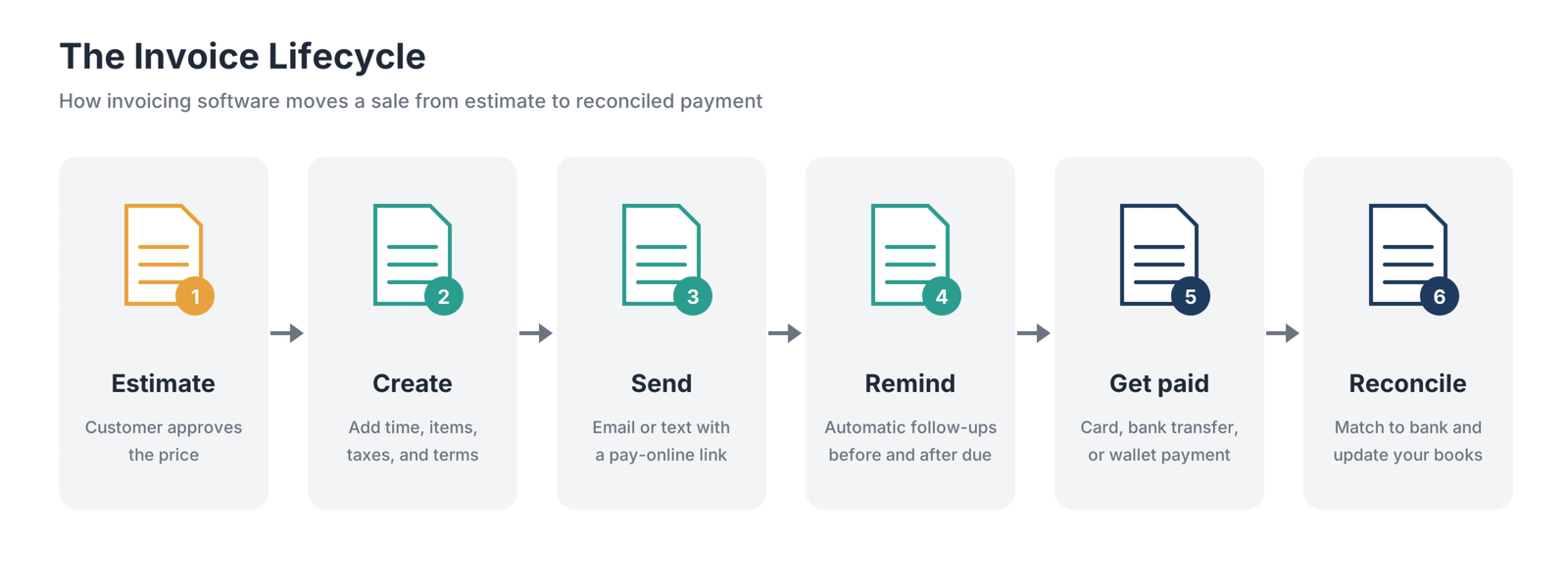
Most invoicing follows the same lifecycle:
- Estimate or quote. Send a price before work starts and let the customer approve it.
- Create the invoice. Convert the estimate, add time or expenses, and apply taxes and payment terms.
- Send the invoice. The customer receives an email or text with a link to view and pay.
- Remind and follow up. Automated reminders go out before and after the due date until the invoice is paid.
- Collect payment. The customer pays by card, bank transfer, or another supported method.
- Reconcile and report. Match the payment to the bank deposit and update the books; aging reports show what remains outstanding.
The main benefit is consistency: invoices go out on time, reminders are sent, and payments are recorded, reducing late payments and bookkeeping errors.
What Features Should Invoicing Software Have?
Custom templates and branding
Professional invoices with your logo, colors, and clear payment instructions make it easier for customers to pay. Look for templates you can customize without design skills.
Estimates and quotes
Estimates that convert into invoices in one click save time and keep pricing consistent from quote to bill.
Recurring invoices and retainers
Recurring invoices bill clients automatically on a schedule, which is useful for retainers, maintenance contracts, and subscriptions. Some tools can charge a saved card automatically.
Automated reminders and late fees
Automated reminders follow up on unpaid invoices without awkward emails. Scheduled late fees can encourage timely payment, but check that your contract and local rules allow them.
Online payments
Accepting cards, bank transfers, and digital wallets directly from an invoice can shorten the time to payment. Compare processing fees because they vary considerably.
Deposits and progress invoicing
Deposits secure commitment before work starts. Progress invoicing lets you bill in stages for larger projects, protecting cash flow during long jobs.
Time and expense billing
If you bill by the hour or pass expenses to clients, built-in time and expense tracking can add billable items to invoices automatically.
Multi-currency and tax handling
Businesses with international clients need invoices in the customer’s currency and correct tax treatment. Sales tax, VAT, and GST support varies by tool and plan.
Client portal and mobile invoicing
A client portal lets customers view invoices, download receipts, approve estimates, and pay in one place. Mobile apps let you create and send invoices from a job site or client meeting.
Accounting integration and reporting
Invoicing works best when payments flow into accounting automatically. Accounts-receivable aging reports show which invoices are overdue and help prioritize follow-ups and forecast cash.
E-invoicing support
If you sell to businesses in countries with e-invoicing mandates, your software may need to create structured electronic invoices and transmit them through networks such as PEPPOL.
What Types of Invoicing Software Are There?
- Accounting software with invoicing: QuickBooks Online, Xero, FreshBooks, and Wave combine billing with bookkeeping, reconciliation, and reports.
- Dedicated invoicing apps: Zoho Invoice and Invoice Ninja focus on billing and payments and may connect to separate accounting software.
- Payment processor invoicing: Square Invoices, Stripe Invoicing, and PayPal Invoicing add billing to a payments platform, with costs often tied to transactions.
- Client management platforms: HoneyBook and Bonsai combine invoices with proposals, contracts, scheduling, and project tracking.
- Field service software: Jobber connects invoicing to quotes, scheduling, dispatch, and completed jobs.
- Subscription billing platforms: These handle complex recurring revenue, usage-based pricing, and failed-payment retries for businesses that outgrow simple recurring invoices.
How Much Does Invoicing Software Cost?
The true cost has two parts: the subscription and the payment processing fees on each invoice paid online. For many small businesses, processing fees can cost more over a year than the software itself.
Subscription pricing models
- Free plans from Zoho Invoice, Wave, Square, Invoice Ninja, and QuickBooks Free cover basic invoicing, usually with limits on volume or features.
- Flat monthly plans from Xero, Wave Pro, and HoneyBook charge a set price.
- Per-client plans such as FreshBooks set prices by billable-client volume.
- Per-user plans such as Bonsai and Jobber charge for each team member.
- Per-location plans such as Square Invoices Plus charge for each business location.
- Per-invoice pricing such as Stripe Invoicing charges a percentage of each paid invoice instead of a monthly fee.
Payment processing fees
Card fees usually combine a percentage of the payment with a fixed fee per transaction. Bank transfers (ACH) typically cost less, and some providers cap the fee.
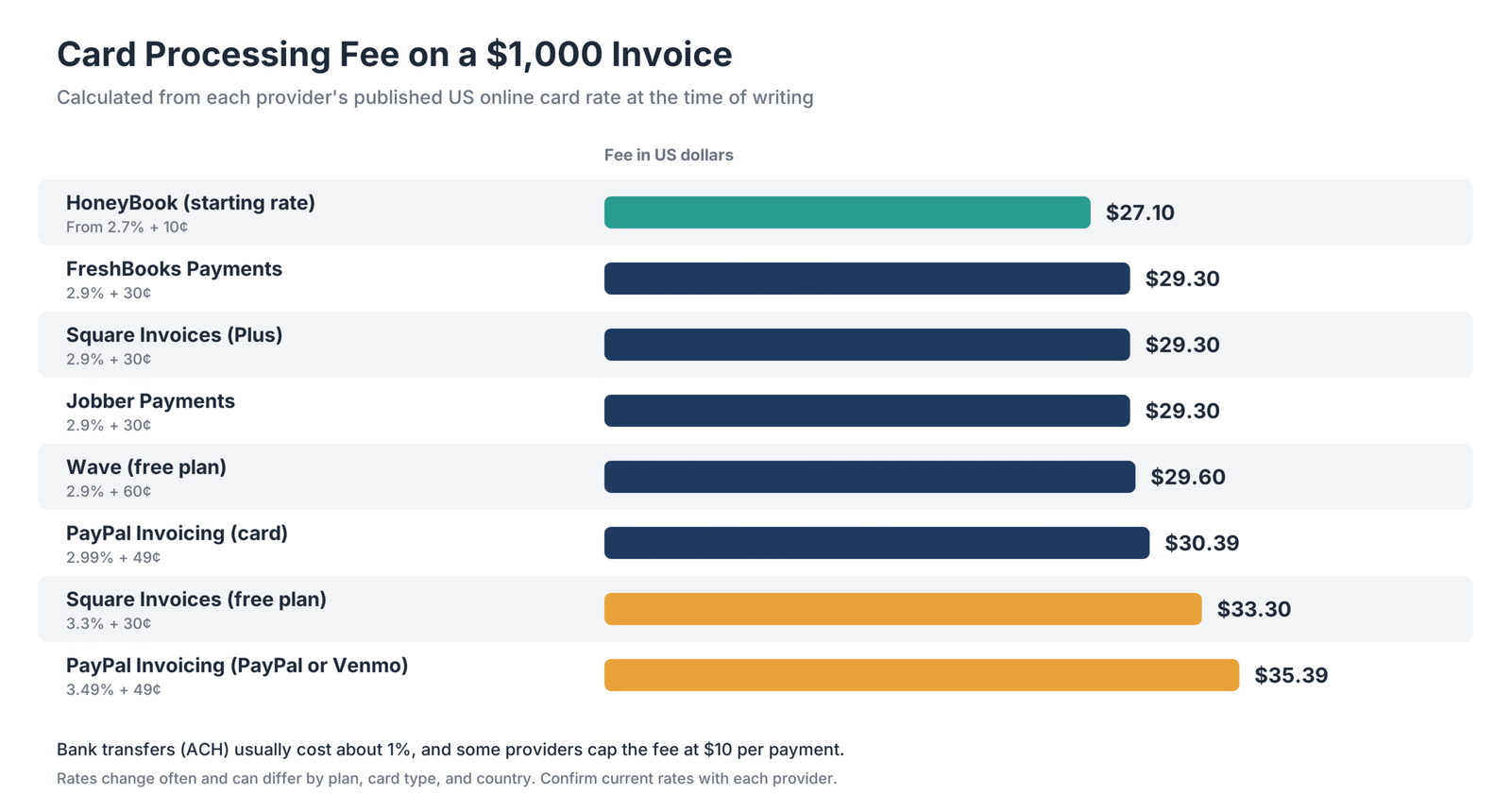
| Provider | Online card rate | Bank transfer (ACH) |
|---|---|---|
| FreshBooks Payments | 2.9% + 30¢ | 1% |
| Wave (free plan) | 2.9% + 60¢ | Varies |
| Square Invoices (free) | 3.3% + 30¢ | 1%, $1 minimum |
| Square Invoices (Plus) | 2.9% + 30¢ | 1%, capped at $10 |
| PayPal Invoicing (cards) | 2.99% + 49¢ | 1%, capped at $10 |
| PayPal Invoicing (PayPal or Venmo) | 3.49% + 49¢ | 1%, capped at $10 |
| Jobber Payments | 2.9% + 30¢ | 1% |
| HoneyBook | From 2.7% + 10¢ | 1.5% |
The difference between providers looks small on one invoice but adds up over a year. Encouraging customers to pay large invoices by bank transfer can be one way to reduce costs. Check the current rates for your country and account before making a decision.
Which Invoicing Software Fits Your Type of Business?
Freelancers and solo professionals
Freelancers need fast, professional invoices, online payments, and a simple way to track who has paid. Zoho Invoice and Wave cover basic needs for free, while FreshBooks and Bonsai add time tracking, proposals, and contracts.
Agencies and consultants
Agencies and consultants often bill retainers, hourly work, and project milestones across multiple clients. FreshBooks, Bonsai, and Xero handle time and project billing, while HoneyBook suits teams that want proposals and contracts linked to invoices.
Contractors and field service businesses
Contractors need to quote on site, take deposits, invoice when a job is complete, and accept payment in the field. Jobber is built for this workflow, and Square Invoices works well for businesses already using Square.
Product and retail businesses
Businesses selling products need itemized invoices, inventory, and sales-tax support. QuickBooks Online and Xero handle products and inventory, while Square suits businesses that combine in-person and invoiced sales.
Subscription and recurring-revenue businesses
Businesses that bill the same customers each month need recurring invoices, automatic charges, and failed-payment retries. Stripe Invoicing suits online and software businesses, while FreshBooks, Zoho Invoice, and Square cover simpler recurring billing.
Businesses with international clients
International billing can require multi-currency invoices, correct tax handling, and e-invoicing compliance. Xero Established supports multiple currencies, and Invoice Ninja Enterprise supports PEPPOL e-invoicing according to the researched plan details.
What Is E-Invoicing and Does It Affect Small Businesses?
E-invoicing means exchanging invoices in a structured digital format that the buyer’s system can read automatically, rather than sending a PDF by email. A PDF is a document image; an e-invoice is structured data that can flow into the recipient’s accounting system. PEPPOL is an international network and set of standards for exchanging e-invoices between businesses and governments.
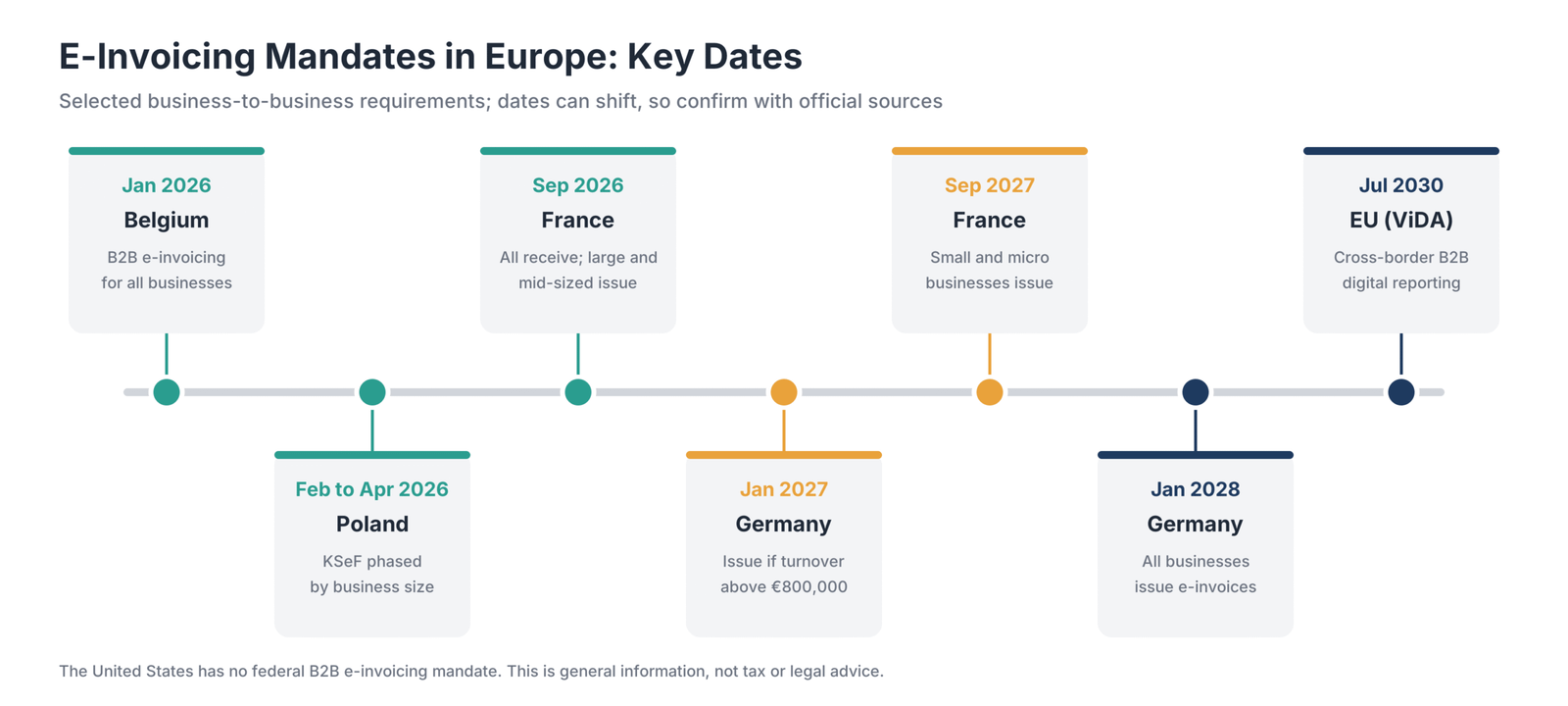
| Country or region | Requirement described in the source brief | Date |
|---|---|---|
| Belgium | Structured B2B e-invoices for all Belgian businesses | January 1, 2026 |
| Poland | KSeF e-invoicing, phased by business size | February and April 2026; microbusinesses by January 2027 |
| France | All businesses must receive e-invoices; large and mid-sized businesses must issue them | September 1, 2026 |
| Germany | Businesses above €800,000 turnover must issue e-invoices | January 1, 2027 |
| France | Small companies and micro-enterprises must issue e-invoices | September 1, 2027 |
| Germany | All businesses must issue e-invoices | January 1, 2028 |
| European Union | Digital reporting for cross-border B2B sales under ViDA | July 2030 |
The United States has no federal B2B e-invoicing requirement in the source brief, so many US small businesses can continue sending PDFs. If you sell to business customers in Europe, check the rules that apply to you, confirm that your software supports compliant structured invoices, and ask a tax adviser about your situation. Dates can shift, so verify requirements with official sources.
How Can Invoicing Software Help You Get Paid Faster?
- Send invoices immediately. Invoice as soon as work is done, or automate invoicing when a job is marked complete.
- Set clear payment terms. State the due date, accepted methods, and any permitted late fees on every invoice.
- Offer several ways to pay. Card, bank transfer, and digital wallet options remove friction for customers.
- Take deposits. Collect part of the payment upfront for large projects or new clients.
- Automate reminders. Schedule reminders before the due date, on the due date, and at intervals afterward.
- Use autopay for recurring clients. Charging a saved card or bank account removes the need for customers to act each month.
- Review aging reports weekly. Follow up personally on invoices that remain overdue after automated reminders.
How Do You Choose the Right Invoicing Software?
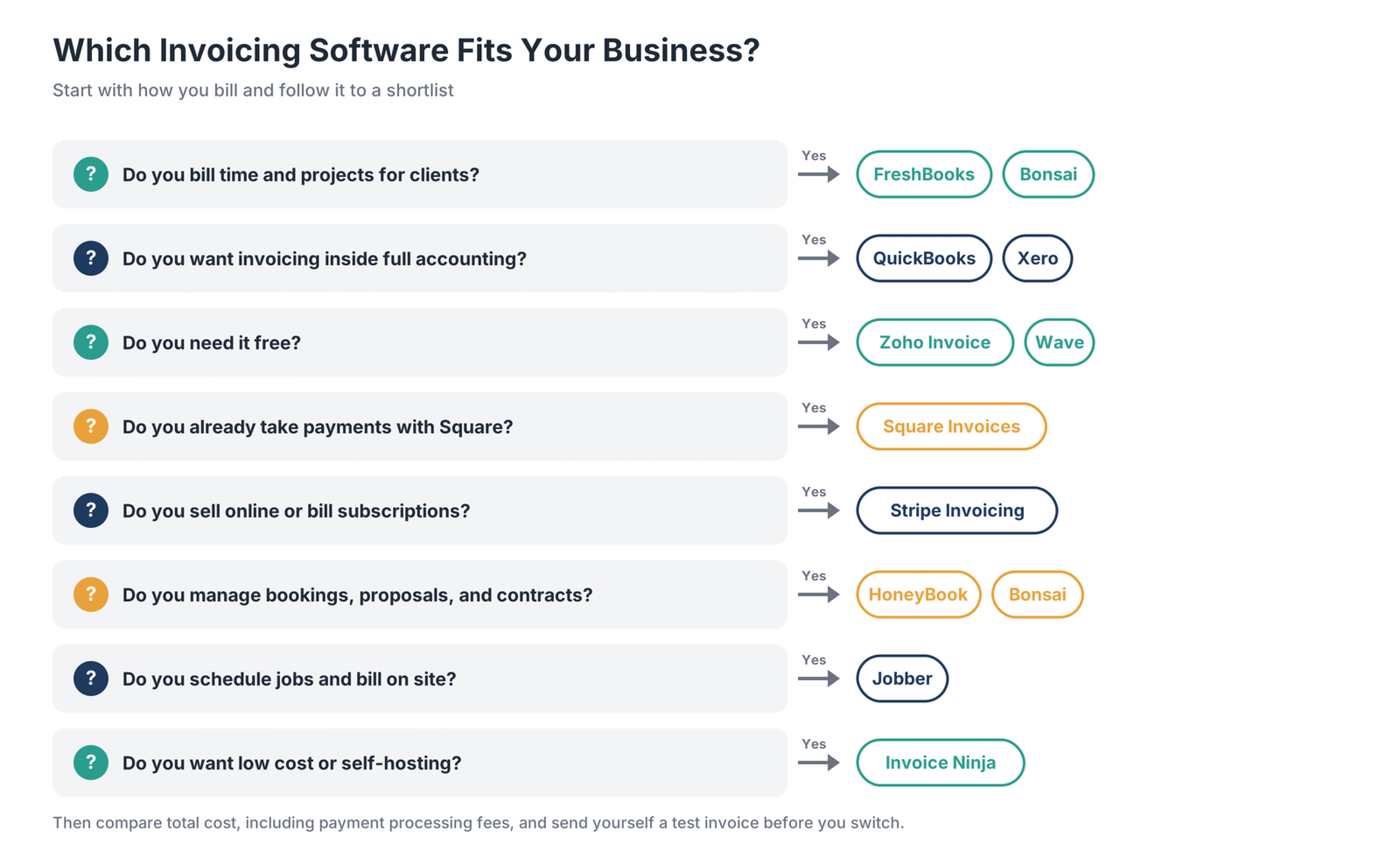
1. Define how you bill
Write down whether you bill by the hour, by project, by product, on a recurring schedule, or when jobs are completed. Your billing model points toward the right category of tool.
2. Count clients and invoices
Check plan limits against your volume. FreshBooks caps billable clients, Zoho Invoice caps invoices per year, Xero Early caps invoices, and Invoice Ninja’s free plan covers five clients.
3. Decide whether you need accounting too
If you want invoicing and bookkeeping in one place, consider QuickBooks Online, Xero, FreshBooks, or Wave. If you already have accounting software, a dedicated invoicing tool that integrates with it may cost less.
4. Compare total cost, including payment fees
Estimate monthly invoice volume and how customers usually pay, then add processing fees to the subscription. A free tool with high card fees can cost more than a paid tool with lower rates.
5. Check the customer experience
Send yourself a test invoice during a free trial. Check how it looks on a phone, how many steps payment takes, and which payment methods customers see.
6. Plan for growth
Consider how pricing changes as you add team members, clients, or locations, and whether the tool supports future needs such as multi-currency, recurring billing, or e-invoicing.
How Do You Set Up or Switch Invoicing Software?
- Pick a start date at the beginning of a billing period so new invoices go out from one system.
- Import customers and items such as products, services, rates, and tax settings.
- Set up payment methods and connect your bank account or payment processor.
- Recreate recurring invoices and confirm their next billing dates to avoid double billing.
- Customize templates and reminders with your branding, payment terms, and schedule.
- Connect accounting so payments flow into your books automatically.
- Finish open invoices in the old system until they are paid, then export your history for your records.
Is Free Invoicing Software Good Enough?
Free invoicing software is good enough for many freelancers and very small businesses. Zoho Invoice offers recurring invoices, reminders, and a client portal for up to 500 invoices a year. Wave offers unlimited invoices with built-in bookkeeping for eligible US and Canadian businesses. Square’s free plan includes estimates, contracts, and recurring invoices, while PayPal Invoicing has no monthly fee.
Limits show up as your business grows. Free plans may cap invoices or clients, charge higher payment fees, reserve reminders for paid tiers, or offer limited support. Compare processing fees carefully because they often fund the free software.
Frequently Asked Questions
What is the best invoicing system for a small business?
The best system depends on how you bill. FreshBooks is a strong choice for service businesses billing time and projects; QuickBooks Online and Xero suit businesses wanting invoicing inside full accounting; Zoho Invoice and Wave are free options; and Jobber is designed for field service businesses.
What is the best billing software for small businesses?
For one-time and project billing, FreshBooks, QuickBooks Online, and Xero are popular options. For recurring and subscription billing, Stripe Invoicing and Zoho’s billing tools handle automatic charges and retries. Choose based on whether you bill once per job or on a recurring schedule.
Is Zoho Invoice totally free?
Zoho Invoice is free within usage limits. The researched plan allows up to 500 invoices per year, two users, three projects, and two organizations per account. It includes recurring invoices, reminders, a client portal, and time tracking. Payment processing fees still apply through the connected gateway.
What is the best free invoicing tool for small businesses?
Zoho Invoice and Wave are strong free options. Zoho Invoice includes recurring invoices, reminders, and a client portal for up to 500 invoices a year, while Wave offers unlimited invoices with bookkeeping for US and Canadian businesses. Square Invoices and Invoice Ninja also have free plans.
What is invoicing software?
Invoicing software creates, sends, and tracks invoices and can collect payments online. It typically includes templates, estimates, recurring invoices, reminders, payment processing, and reports showing what customers owe.
How does invoicing work?
After you deliver work or goods, you send an invoice listing the amount owed, payment terms, and how to pay. You then record the payment when it arrives. Invoicing software automates steps from invoice creation to reminders and reconciliation.
What is automated invoicing?
Automated invoicing creates and sends invoices with less manual work. Examples include recurring invoices sent on a schedule, invoices created when a job is completed, reminders sent before and after due dates, and automatic charges to saved payment methods.
What is progress invoicing?
Progress invoicing bills a project in stages rather than charging the full amount at the end. You invoice a portion of the total as milestones are reached, helping cash flow during long projects. Jobber and QuickBooks Online support progress invoicing according to the source brief.
Which invoice software supports recurring billing?
Most tools on this list support recurring invoices, including FreshBooks, QuickBooks Online, Xero, Zoho Invoice, Square Invoices, Invoice Ninja, PayPal Invoicing, and Stripe Invoicing. Stripe and Square can also charge saved payment methods automatically.
What is PEPPOL e-invoicing?
PEPPOL is an international network and set of standards for sending structured electronic invoices between businesses and public bodies. If you invoice customers in countries that use PEPPOL, your software or connected service provider may need PEPPOL access.
What is a good invoicing tool for freelancers?
Freelancers often start with Zoho Invoice or Wave because both offer free plans. FreshBooks and Bonsai suit freelancers who also want time tracking, proposals, and contracts, while HoneyBook works well for creative freelancers managing bookings and client projects.
Which Invoicing Software Should You Choose?
- Service businesses billing time and projects: FreshBooks offers a polished invoicing workflow.
- Invoicing inside full accounting: QuickBooks Online and Xero connect billing to your books.
- Free invoicing: Zoho Invoice and Wave cover many small-business needs at no subscription cost.
- Businesses already using Square: Square Invoices keeps in-person and invoice payments together.
- Online and subscription businesses: Stripe Invoicing offers flexible pay-as-you-go billing.
- Occasional invoices for PayPal customers: PayPal Invoicing has no monthly fee.
- Low-cost or self-hosted invoicing: Invoice Ninja keeps costs down.
- Creative and client-based services: HoneyBook and Bonsai combine proposals, contracts, and invoices.
- Home and field service businesses: Jobber ties invoices to scheduling and completed jobs.
Start with a free plan or trial from the two tools that best fit your billing model. Send yourself a test invoice from each, compare the total cost including payment fees, and then move your customers over with a clear transition plan.















































































































