

What Is MCP? The Model Context Protocol Explained
MCP stands for Model Context Protocol. It is an open-source standard that defines how AI applications connect to external systems such as files, databases, business software, and online services. Instead of building a separate custom integration for every combination of AI app and tool, developers build to one shared protocol, and any MCP-compatible AI application can then use any MCP-compatible tool or data source.
A common way to picture MCP is as a universal port for AI. Before standard ports, every device needed its own cable. A shared standard meant one connector could work everywhere. MCP does the same for AI: it gives AI assistants and agents one consistent way to discover what a system can do, read information from it, and take actions in it.
This guide explains what MCP is in plain language, why it was created, how it works under the hood, what an MCP server is, how MCP compares with APIs, function calling, and retrieval-augmented generation (RAG), what it is used for, and how to use it safely. The explanation is vendor-neutral, so it applies whichever AI application or tools you use. MCP also has unrelated meanings in medicine and IT certification. This article covers the AI meaning.
Quick answer: MCP, the Model Context Protocol, is an open standard for connecting AI applications to external tools and data. An AI application (the host) runs an MCP client for each MCP server it connects to. Each server exposes capabilities in three standard forms: tools the AI can call to take actions, resources it can read for context, and prompts that package reusable instructions. Messages use JSON-RPC 2.0 and travel over standard input and output for local servers or over HTTP for remote ones. Because every server speaks the same protocol, one integration works with many AI applications.
Why Was MCP Created?
Large language models (LLMs) are capable at reasoning and writing, but on their own they are cut off from the systems where work happens. A model cannot see your calendar, query your database, read your project tickets, or update a record unless something connects it to those systems.
Before MCP, each connection had to be built by hand. Every AI application needed its own custom integration for every tool, and every tool vendor needed to build separate integrations for every AI application. This is often described as the N×M problem.
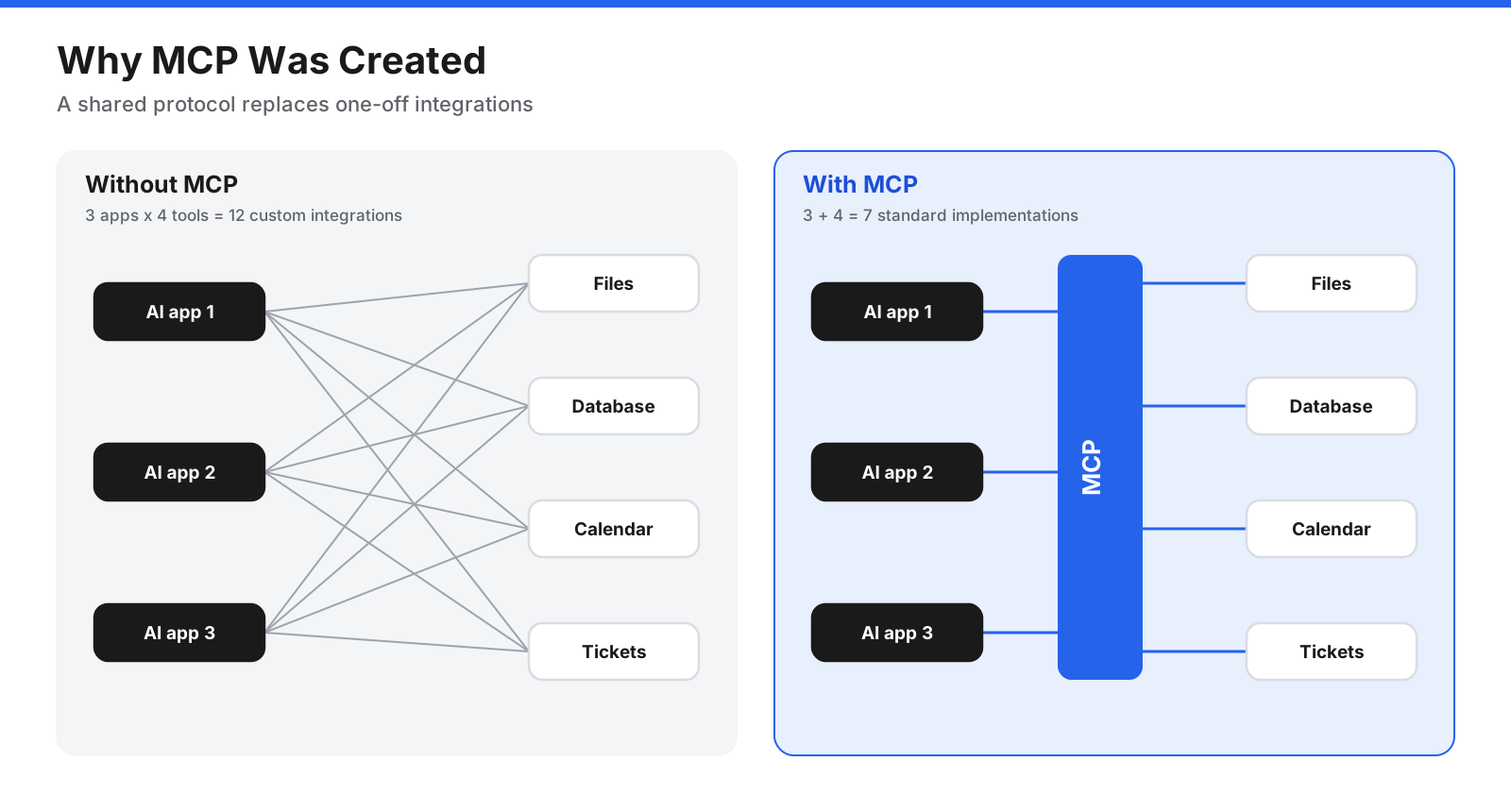
With three AI applications and four tools, you would need twelve separate integrations. Add one more application and you need four more. Each integration has its own authentication, data format, and error handling, and each one breaks independently when either side changes.
MCP turns this into an N+M problem. Each AI application implements MCP once as a client, and each tool or data source implements MCP once as a server. Any client can then talk to any server. Three applications and four tools need seven implementations instead of twelve, and the gap grows quickly as the ecosystem expands.
Beyond saving development effort, a shared standard brings other benefits. Tools become portable between AI applications, so switching assistants does not mean rebuilding every connection. Developers can rely on shared software development kits (SDKs), testing tools, and documentation. Security practices such as authorization and user approval can be built into the protocol rather than reinvented for each integration.
How Does MCP Work?
MCP follows a client-server design. Understanding the three participants and two layers explains almost everything about how it behaves.
Hosts, Clients, and Servers
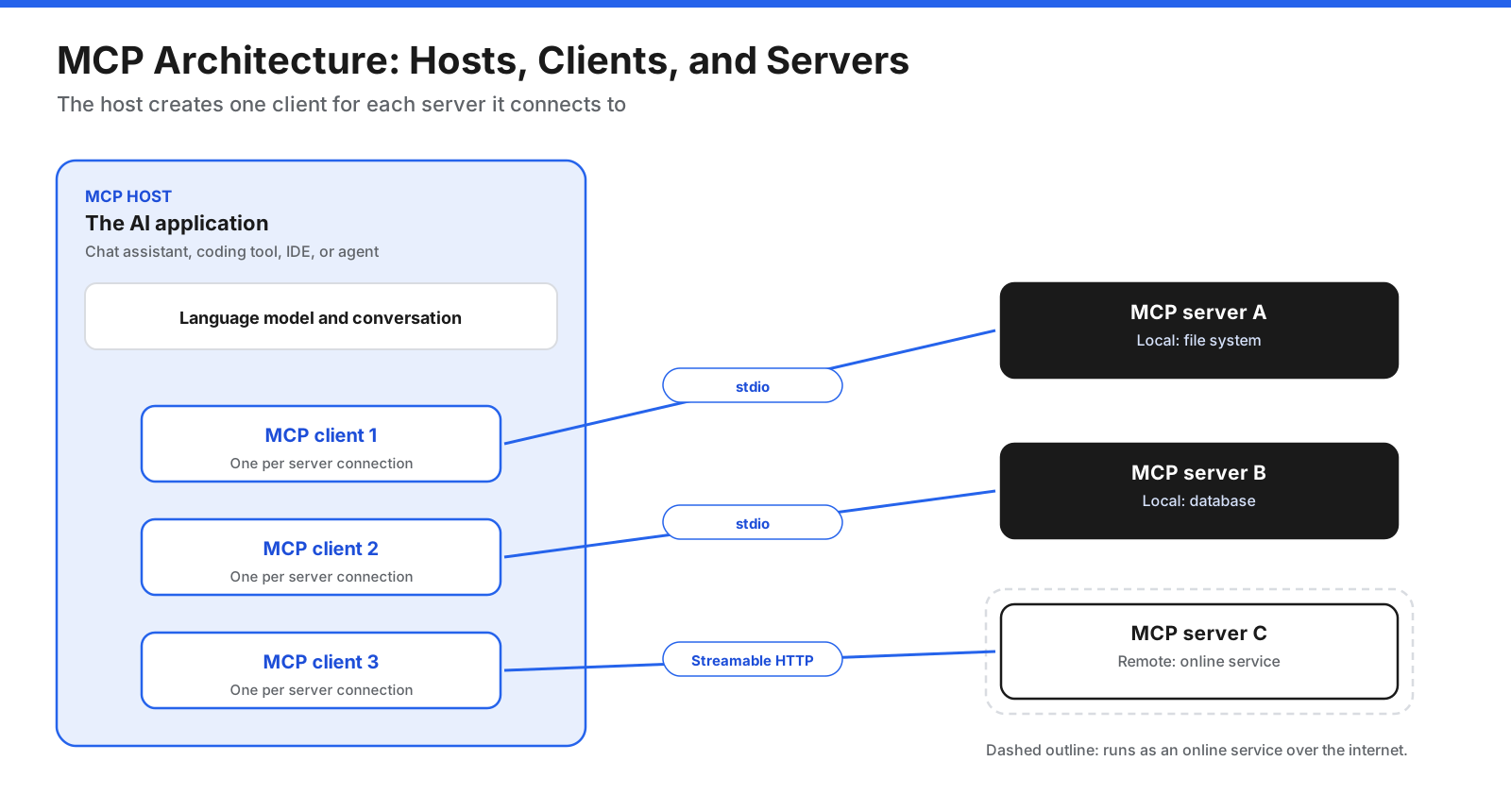
The MCP host is the AI application the user interacts with, such as a chat assistant, a coding tool, an integrated development environment (IDE), or a custom AI agent. The host manages the overall conversation, the language model, and the user’s permissions.
The MCP client is a component inside the host. The host creates one client for each server it connects to, and each client maintains a dedicated connection with its server. The client handles the protocol details: discovering what the server offers, sending requests, and passing results back to the host.
The MCP server is a program that provides context and capabilities. A server might expose a file system, a database, a code repository, a calendar, a ticketing system, a web browser, or any other system. Servers can run locally on the same machine as the host or remotely as a service on the internet.
When a user connects an AI application to three servers, for example a local file system, a company database, and an online project management service, the host creates three clients, one for each server.
The Data Layer and the Transport Layer
MCP is organized into two layers.
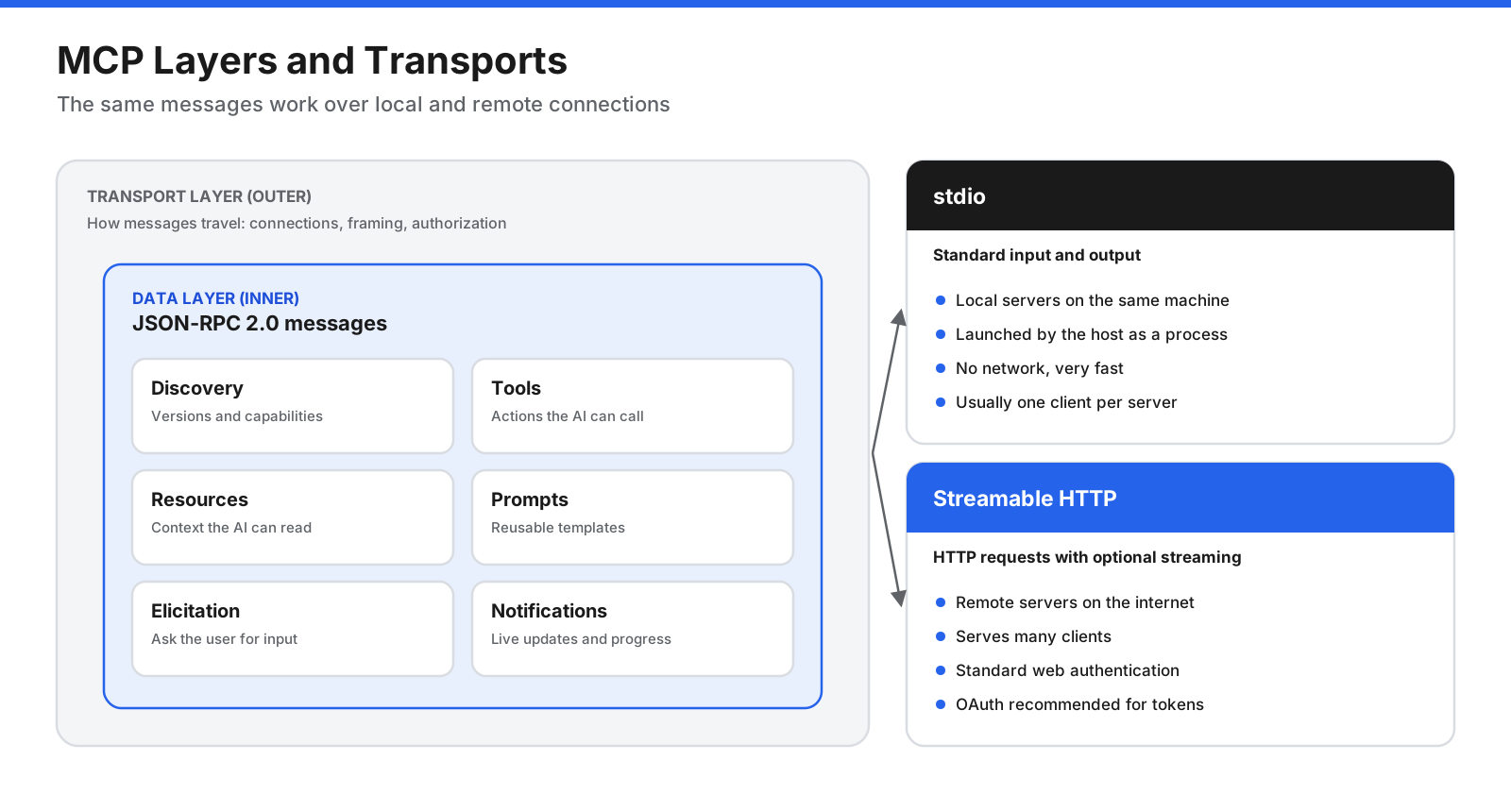
The data layer defines the messages clients and servers exchange. It uses JSON-RPC 2.0, a lightweight, widely used format for sending requests and responses as JSON. This layer covers discovery of a server’s capabilities and supported protocol versions, the core primitives (tools, resources, and prompts), and utilities such as notifications for live updates and progress tracking for long-running operations.
The transport layer defines how those messages travel. MCP supports two standard transports:
- Standard input and output (stdio) is used for local servers. The host launches the server as a process on the same machine and exchanges messages through the process’s input and output streams. There is no network involved, which makes it fast and simple. A local server typically serves a single client.
- Streamable HTTP is used for remote servers. Clients send messages with HTTP requests, and servers can stream responses back. This transport supports standard web authentication, and MCP recommends OAuth for obtaining access tokens. A remote server can serve many clients.
Because the data layer is the same for both transports, a server’s tools and resources work the same way whether it runs on your laptop or in the cloud. The protocol is versioned, with dated revisions of the specification. In recent revisions, every request carries the protocol version and the client’s capabilities, so a server can handle each request on its own, and clients can ask a server to describe its supported versions and capabilities through a discovery request.
A Request From Start to Finish
Here is what happens when a user asks an MCP-enabled AI assistant a question that needs an external system.
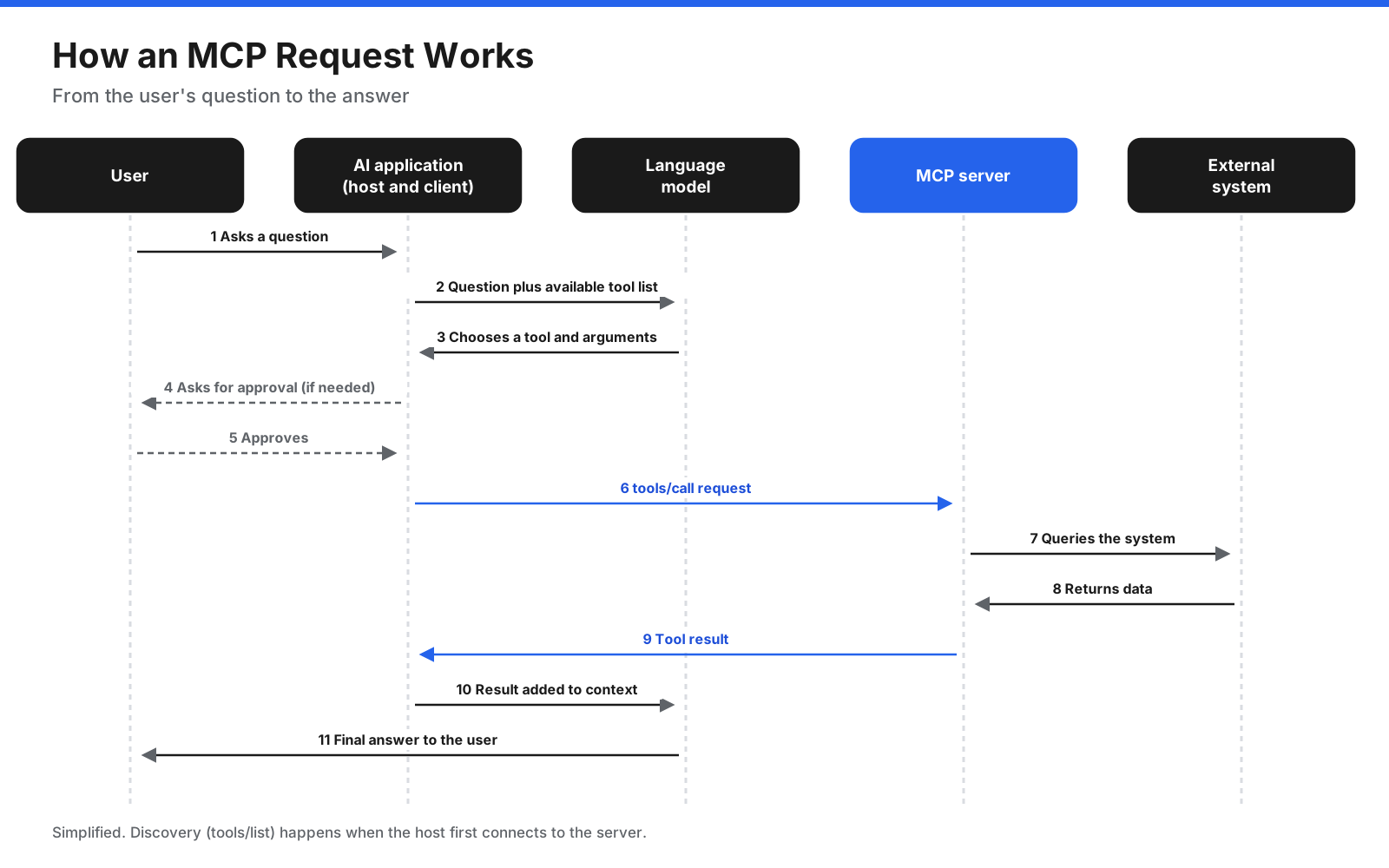
- Discovery. When the host connects to a server, its client asks what the server offers, for example by listing its tools with a
tools/listrequest. The server responds with each tool’s name, description, and input schema. - The user asks a question. The host sends the question to the language model along with descriptions of the available tools.
- The model chooses a tool. If the model decides a tool would help, it returns a tool call with the arguments it wants to use.
- Approval. The host can show the planned action to the user and ask for approval, which is especially important for actions that change data or have consequences.
- The client calls the server. The client sends a
tools/callrequest with the tool name and arguments. - The server does the work. The server runs the tool, for example by querying a database or calling an online service, and returns the result.
- The model answers. The host passes the result back to the model, which uses it to respond to the user or decide on the next step.
A simplified tool call request looks like this:
{
  "jsonrpc": "2.0",
  "id": 3,
  "method": "tools/call",
  "params": {
    "name": "get_order_status",
    "arguments": { "order_id": "ORD-12345" }
  }
}
In the full protocol, each request also carries metadata such as the protocol version and the client’s capabilities. SDKs handle these details automatically, so most developers work with simple function calls rather than raw messages.
What Can an MCP Server Provide?
MCP defines a small set of building blocks, called primitives, that describe what servers and clients can offer each other. Most of MCP’s usefulness comes from three server primitives.
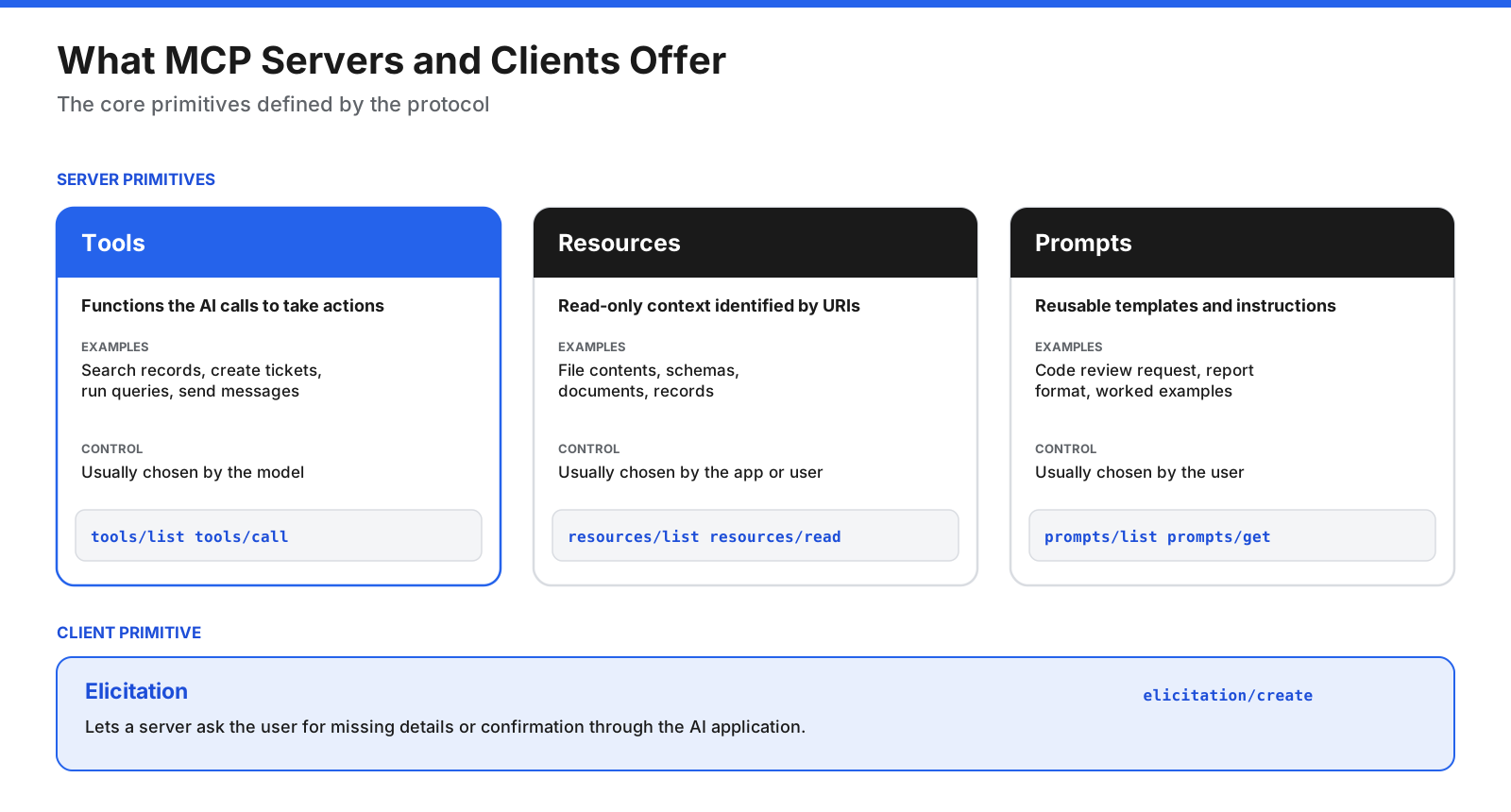
Tools are functions the AI application can call to perform actions, such as searching records, creating a ticket, sending a message, running a query, or editing a file. Each tool has a name, a description that tells the model when to use it, and an input schema written in JSON Schema that defines its parameters. Tools are typically controlled by the model, which decides when to call them, with the host able to require user approval.
Resources are sources of read-only context, such as file contents, database schemas, documents, or records. They are identified by addresses (URIs) and can be listed and read. Resources are usually selected by the application or the user to give the model relevant background information.
Prompts are reusable templates for interacting with the model, such as a structured code review request, a report format, or a set of worked examples. They are typically chosen by the user, often appearing as commands or menu options in the AI application.
Each primitive has standard methods for discovery and use, such as tools/list and tools/call for tools, and list and read or get methods for resources and prompts. Because listings are dynamic, a server can add or change capabilities while connected and notify clients that something has changed.
MCP also defines features that clients can offer to servers. The most important is elicitation, which lets a server ask the user for additional information or confirmation through the AI application, for example to clarify a missing detail or confirm an action. Earlier revisions also emphasized a feature called sampling, which let servers request a completion from the client’s language model, but the current revision of the specification deprecates it in favor of servers integrating directly with model providers when they need one.
Beyond the core, MCP supports optional extensions. These include support for long-running tasks that can be checked later and for interactive app interfaces that run inside AI clients.
What Is an MCP Server?
An MCP server is the piece most people encounter first, because connecting a server is how you give an AI application new abilities. In simple terms, an MCP server is a program that wraps a system, such as a database or an online service, and presents its capabilities to AI applications in the standard MCP format.
Common types of MCP servers include:
- File and document servers that let AI read, search, and organize local files or shared drives.
- Database servers that let AI inspect schemas and run queries, often in read-only mode.
- Developer tool servers for code repositories, issue trackers, build systems, error monitoring, and documentation.
- Business application servers for calendars, email, customer relationship management (CRM) systems, project management, and messaging.
- Browser and automation servers that let AI navigate websites, fill in forms, and test web applications.
- Data and analytics servers that connect AI to dashboards, reports, and data warehouses.
- Internal servers that companies build to expose their own systems and data to AI tools in a controlled way.
Local and remote servers serve different needs. A local server runs on your own computer, is launched by the AI application, and usually accesses local resources such as files or development tools. A remote server runs as an online service, is reached over HTTP, and typically requires you to sign in so the server can act on your behalf with your permissions. Many software providers now offer official remote MCP servers for their products, and AI applications often present these as connectors that users can add with a few clicks.
How Is MCP Different From APIs, Function Calling, and RAG?
MCP is often confused with technologies it builds on or works alongside. The differences are easier to see side by side.
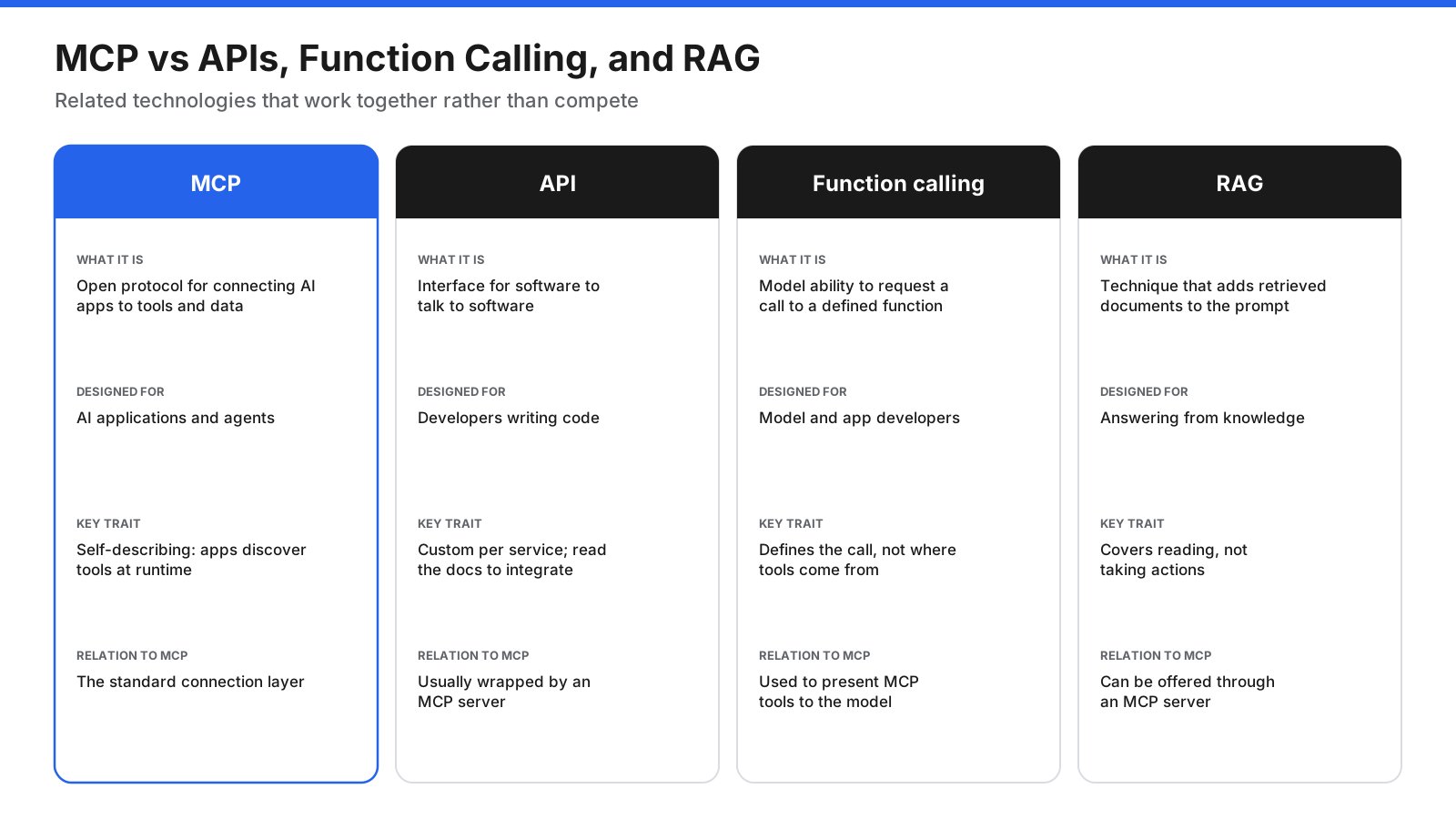
MCP vs APIs. An application programming interface (API) is how software talks to other software. Each API has its own endpoints, data formats, and authentication, and it is designed for developers who read the documentation and write code against it. MCP is designed for AI applications. An MCP server usually sits on top of one or more APIs and presents them in a standard, self-describing form: the AI application can ask the server what it can do and receive descriptions written for a language model. In other words, APIs remain the foundation, and MCP is a standard way for AI to discover and use them.
MCP vs function calling. Function calling, also called tool use, is a model capability: the model can respond with a structured request to call a function you defined. On its own, function calling does not say where functions come from, how they are discovered, or how they are run. MCP fills that gap. An AI application can collect tools from connected MCP servers, present them to the model through function calling, and route the model’s calls back to the right server.
MCP vs RAG. Retrieval-augmented generation (RAG) retrieves relevant documents and adds them to the model’s context so it can answer from that information. RAG is a technique, not a protocol. MCP can support RAG, for example through a server that exposes search over a knowledge base as a tool or resource, but MCP also covers actions, such as creating records or sending messages, that RAG does not.
MCP vs agent-to-agent protocols. Other emerging standards focus on how independent AI agents communicate and delegate work to each other. MCP focuses on how an AI application connects to tools and data. The two are complementary: an agent might use an agent-to-agent protocol to coordinate with other agents and MCP to reach the systems it works with.
What Is MCP Used For?
MCP is useful anywhere an AI application needs information or actions from outside the model. Common uses include:
- Personal productivity. AI assistants that read and summarize email, check calendars, schedule meetings, and find documents across storage services.
- Software development. Coding assistants that read code repositories, open and update issues, query error monitoring tools, run tests, and look up current documentation.
- Data analysis. Assistants that inspect database schemas, run queries, and turn results into summaries or charts in plain language.
- Customer support. Agents that look up orders and accounts, check policies in a knowledge base, and create or update support tickets.
- Business operations. Workflows that move information between CRM, finance, and project management systems on request.
- Internal knowledge. Company assistants that search internal wikis, policies, and records while respecting each user’s access rights.
- Design and content. Tools that pull assets from design files, generate drafts, and publish content to other systems.
What Are the Advantages of MCP?
- Build once, use everywhere. A single MCP server works with any MCP-compatible AI application.
- Faster integration. Shared SDKs, reference servers, and testing tools reduce the work of connecting AI to new systems.
- Portability. Organizations can change AI applications or models without rebuilding every integration.
- Self-describing capabilities. AI applications can discover tools and resources at runtime instead of relying on hard-coded integrations.
- Consistent security patterns. Standard approaches to authorization, user approval, and permissions apply across integrations.
- Open governance. As an open-source standard managed through a neutral foundation, MCP is not controlled by any single AI provider.
What Are the Limitations of MCP?
- Security depends on implementation. The protocol provides building blocks, but each host and server must apply them correctly.
- Quality varies between servers. Community servers range from carefully maintained to experimental, so vetting matters.
- Too many tools can confuse models. Connecting many servers adds many tool descriptions to the model’s context, which can increase cost and reduce accuracy. Hosts increasingly load tools progressively to manage this.
- The standard is still evolving. Revisions add and deprecate features, so implementations need to keep up with new versions.
- It is not a full agent framework. MCP standardizes connections. Planning, memory, and decision-making remain the job of the AI application.
Is MCP Secure?
MCP can be used securely, but connecting AI to live business systems introduces genuine risks. Most problems come from how servers are built, chosen, and permitted, rather than from the protocol itself.
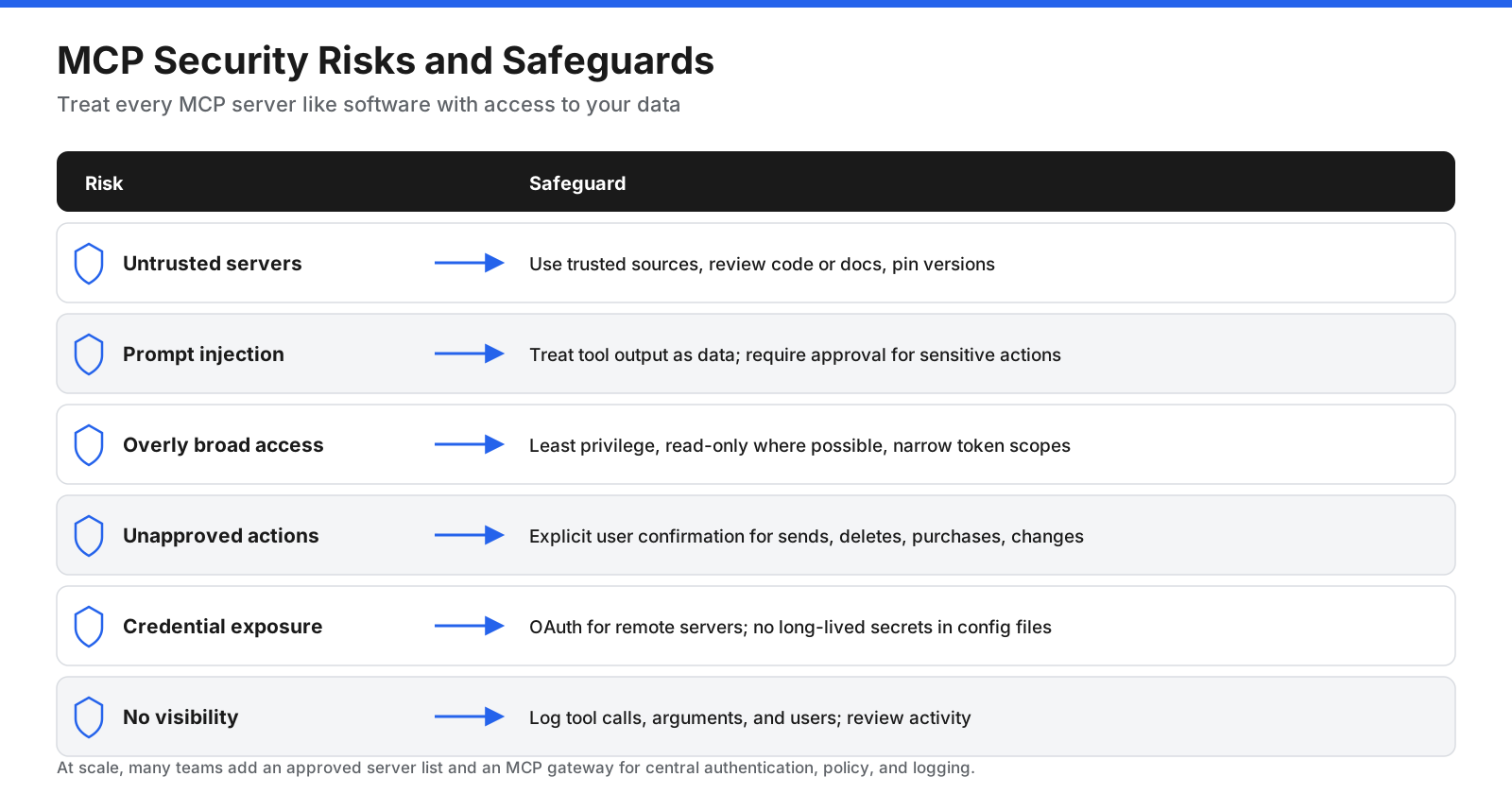
Key risks and how to manage them:
- Untrusted or malicious servers. A server can misbehave, collect data, or contain misleading tool descriptions designed to manipulate the model. Use servers from trusted sources, review their code or documentation, and pin versions so updates are deliberate.
- Prompt injection. Content that a server returns, such as a web page, email, or document, may contain hidden instructions intended to redirect the AI. Hosts should treat tool output as data, not commands, and require approval before sensitive actions.
- Overly broad permissions. A server with full access to a database or account can do far more damage than one limited to what the task needs. Grant the minimum permissions, use read-only access where possible, and scope tokens narrowly.
- Unapproved actions. Tools that send messages, delete data, make purchases, or change production systems should require explicit user confirmation.
- Credential exposure. Remote servers should use proper authorization flows, such as OAuth, rather than long-lived secrets pasted into configuration files, and tokens should be stored securely.
- Lack of visibility. Log which tools were called, with what arguments, and by whom, so you can review activity and investigate problems.
How Does MCP Handle Authorization?
Authorization works differently for local and remote servers. A local server runs on your own machine, so it usually acts with the access of your user account or with credentials you provide in its configuration. That makes it important to run only local servers you trust and to limit the folders, databases, or accounts they can reach.
Remote servers follow an OAuth-based approach. When you add a remote server, the AI application sends you to the service’s sign-in page, where you log in and approve the access the server is requesting. The application then receives an access token that it presents with each request. The server checks the token before acting, so it works only with the permissions you granted, and you can usually revoke that access later from the service’s account settings. This approach means you never have to paste passwords into an AI application, and access can be scoped to exactly what each server needs.
Organizations adopting MCP at scale often maintain an approved list of servers, route connections through a central MCP gateway that applies authentication, access policies, and logging, and run local servers in sandboxed environments.
How Do You Get Started With MCP?
How you start depends on whether you want to use MCP or build with it.
If you want to use MCP:
- Choose an MCP-compatible AI application. Many AI assistants, coding tools, and IDEs now support MCP. Check your application’s documentation for MCP, connectors, or integrations.
- Add a server. Many applications let you add remote servers as connectors by entering a URL and signing in. Local servers are usually added through a configuration file or settings screen that tells the host how to launch them.
- Review permissions. Check what each server can access and what actions its tools can take, and keep approval prompts turned on for sensitive actions.
- Try it out. Ask the assistant to perform a task that uses the server, and confirm it behaves as expected.
If you want to build with MCP:
- Pick an official SDK. MCP SDKs are available for many popular programming languages and handle the protocol details for you.
- Define your capabilities. Decide which tools, resources, and prompts your server should expose. Write clear names and descriptions, because the model relies on them to decide when to use each tool.
- Choose a transport. Use stdio for a local server that runs alongside the user’s AI application, or Streamable HTTP for a remote server that many users can reach.
- Add authorization for remote servers. Use an OAuth-based flow so users grant access with their own permissions.
- Test with the inspector. The official MCP Inspector lets you connect to your server, list its capabilities, and call its tools before connecting it to an AI application.
- Connect and iterate. Add your server to an MCP-compatible host, watch how the model uses your tools, and refine descriptions and results to improve accuracy.
A Short History of MCP
MCP has moved quickly from a single project to a widely adopted industry standard.
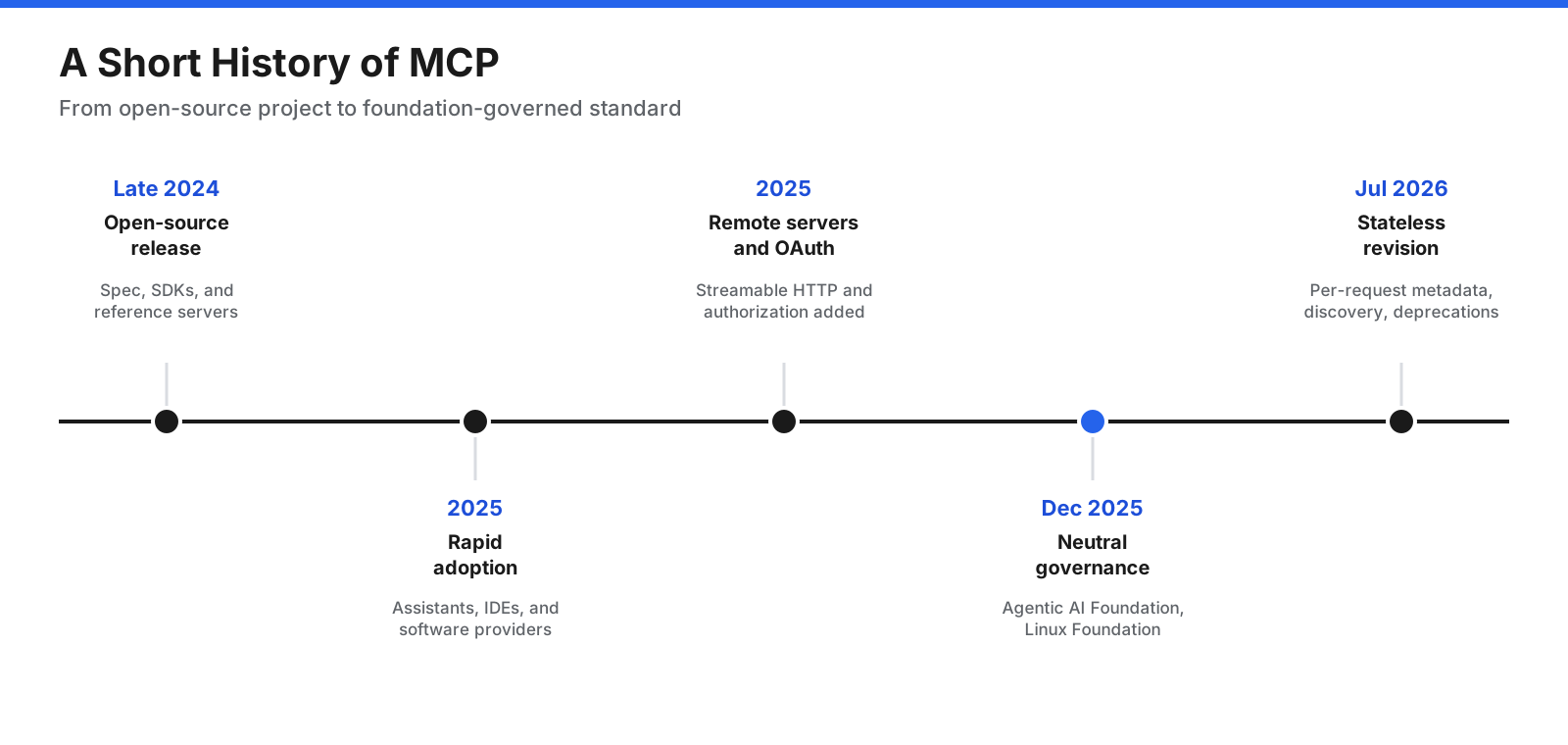
- Late 2024: Open-source release. MCP was published as an open-source specification with SDKs and a set of reference servers, aimed at solving the integration problem between AI applications and external systems.
- 2025: Rapid adoption. Major AI assistants, coding tools, IDEs, and software providers added MCP support, and thousands of community servers appeared. Specification revisions added the Streamable HTTP transport for remote servers, an OAuth-based authorization approach, and elicitation for requesting user input.
- December 2025: Neutral governance. MCP was donated to the Agentic AI Foundation, a directed fund under the Linux Foundation, placing the standard under neutral, community governance.
- 2026: Continued evolution. The July 2026 revision of the specification made requests stateless, with each request carrying its protocol version and capabilities, introduced a discovery request, and deprecated older features such as sampling. Extensions for long-running tasks and interactive apps continue to expand what MCP can do.
Frequently Asked Questions
What does MCP stand for in AI?
In AI, MCP stands for Model Context Protocol. It is an open standard that lets AI applications connect to external tools, data sources, and services in a consistent way.
What are the components of an MCP system?
An MCP system has three main participants. The host is the AI application the user works with. The client is a component inside the host that maintains a connection to one server. The server is a program that exposes tools, resources, and prompts from an external system. Messages between them use JSON-RPC 2.0 over either standard input and output or Streamable HTTP.
Is MCP the same as an API?
No. An API is a general interface that lets software talk to other software, and each one has its own design. MCP is a standard protocol designed specifically for AI applications. An MCP server usually wraps one or more APIs and presents them in a consistent, self-describing format that AI applications can discover and use without custom code for each one.
Which AI applications support MCP?
Many AI assistants, chat applications, coding assistants, and integrated development environments support MCP, along with a growing number of agent frameworks and business platforms. Support details vary, so check each application’s documentation for how to add local or remote MCP servers.
Do you need to know how to code to use MCP?
Not always. Many AI applications let you add remote MCP servers, often called connectors, by entering an address and signing in. Building your own MCP server does require programming, though official SDKs make the work much simpler.
Is MCP open source?
Yes. MCP is an open-source standard. Its specification, SDKs, and reference servers are publicly available, and the project is governed through the Agentic AI Foundation under the Linux Foundation.
What is an MCP connector?
“Connector” is a term many AI applications use for an MCP server that a user can add to the app, usually a remote server for an online service. Adding a connector gives the AI application access to that service’s tools and data, typically after the user signs in and grants permission.
What is an MCP gateway?
An MCP gateway is a central service that sits between AI applications and MCP servers. Organizations use gateways to manage which servers are approved, handle authentication, enforce access policies, and log activity across many users and servers.
MCP Is Becoming the Standard Connection Layer for AI
The Model Context Protocol gives AI applications a single, open way to connect to the tools and data where work happens. Instead of custom integrations for every pairing of AI app and system, hosts run MCP clients, systems expose MCP servers, and the two communicate through standard JSON-RPC messages over local or remote transports. Servers offer tools for actions, resources for context, and prompts for reusable instructions, and clients can ask users for input when a server needs it.
The benefits are clear for developers, organizations, and users alike: faster integration, portability between AI applications, and more capable assistants. So are the responsibilities. Choose servers carefully, grant only the access each one needs, keep humans approving consequential actions, and log what happens. With those practices in place, MCP makes it far simpler to turn a capable language model into an assistant that can actually get work done.















































































































