

Slack and Microsoft Teams are two of the most widely used workplace messaging platforms. Both offer channels, direct messages, file sharing, audio and video calls, app integrations, and AI features. The difference is how each tool is built: Slack is messaging-first, while Teams connects chat to the wider Microsoft 365 suite.
This comparison covers messaging, search, meetings, files, integrations, automation, AI, external collaboration, security, administration, pricing, and migration. Pricing and product details reflect the source draft’s October 2026 review date. Neither company paid for placement.
Quick Verdict
- Choose Slack if messaging is the center of your team’s work, you rely on many third-party apps, work closely with clients or partners in shared channels, or want AI features included in your chat plan.
- Choose Microsoft Teams if your company already pays for Microsoft 365, runs many formal meetings or webinars, or wants chat, email, files, and calling from one vendor.
- Check what you already pay for. Many Microsoft 365 business plans include Teams, so the cost question is often whether Slack is worth paying for on top.
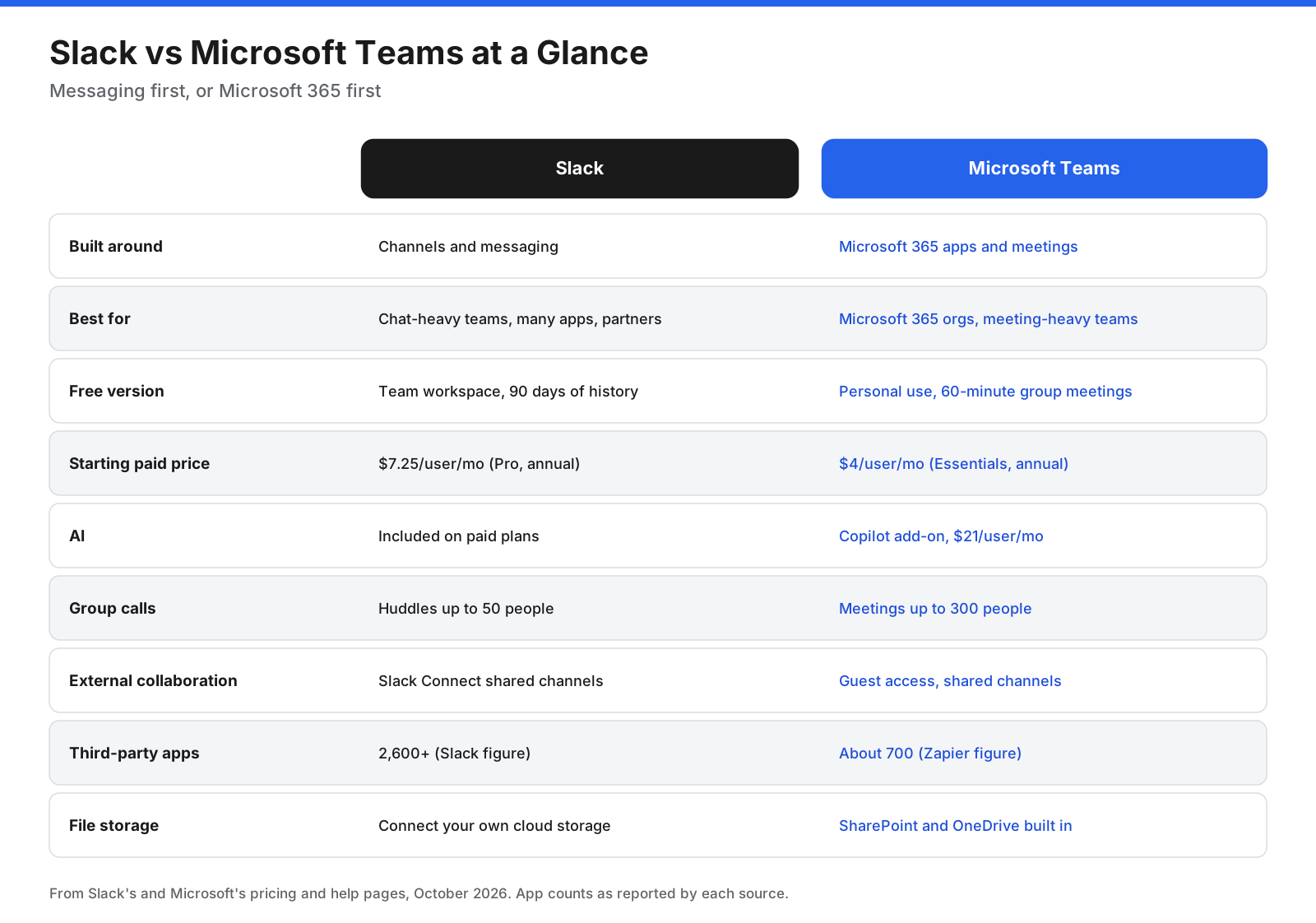
| Category | Slack | Microsoft Teams |
|---|---|---|
| Built around | Channels and messaging | Microsoft 365 apps and meetings |
| Best for | Chat-heavy teams, integrations, external partners | Microsoft 365 organizations and meeting-heavy teams |
| Free version | Team workspace with 90 days of history | Personal use, 60-minute group meetings |
| Starting paid price | $7.25 per user/month, Pro annual | $4 per user/month, Teams Essentials annual |
| AI | Included on paid plans, more on Business+ | Microsoft 365 Copilot add-on |
| Group calls | Huddles up to 50 people on paid plans | Meetings up to 300 people on business plans |
| External collaboration | Slack Connect shared channels | Guest access and shared channels |
| File storage | Connect your own cloud storage | SharePoint and OneDrive built in |
What Is the Difference Between Slack and Teams?
Slack is designed around conversation. Its interface centers on channels and direct messages, with quick switching, detailed search, and an app marketplace. Teams is designed as a hub for Microsoft 365, where chat sits alongside the calendar, meetings, files, and Office apps.
Slack has been part of Salesforce since 2021, and newer features connect it to Salesforce CRM data and AI agents. Teams is developed by Microsoft, and its features connect to Copilot, Outlook, and the wider Microsoft 365 platform.
What Do Slack and Teams Have in Common?
Both offer public and private channels, direct messages, threaded replies, mentions, reactions, file sharing, audio and video calls, screen sharing, guest access, workflow automation, AI features, desktop and mobile apps, and enterprise security controls on eligible plans. Your choice usually comes down to the ecosystem you already use, how much your team meets versus chats, and which plan fits your budget.
What Is Slack?
Slack is a channel-based messaging platform owned by Salesforce. A workspace can organize conversations by team, project, client, or topic. Threads keep side discussions out of the main channel, and huddles let people start quick audio or video calls.
Slack also offers Canvases for shared documents, Lists for tracking tasks and requests, Workflow Builder for routine automation, Slack Connect for shared channels with other companies, and AI features for summaries, huddle notes, and workspace questions on higher plans.
What Is Microsoft Teams?
Microsoft Teams is Microsoft’s collaboration app and part of Microsoft 365. Teams contain channels, and users can also have one-to-one and group chats, schedule meetings from a calendar, and make phone calls with Teams Phone.
Files shared in channels are stored in SharePoint, while files in chats are stored in OneDrive. Teams supports co-editing Word, Excel, and PowerPoint files, Planner boards, and workflows built on Power Automate.
How Do Slack and Teams Organize Conversations?
Slack uses a flatter structure: workspace, channels, messages, and threads, with direct messages and huddles alongside. Public channels are usually easy to discover and join. Teams uses a nested structure: organization, teams, channels, and posts or replies. Chats and meetings sit in separate areas, and team membership sets clearer boundaries between departments.
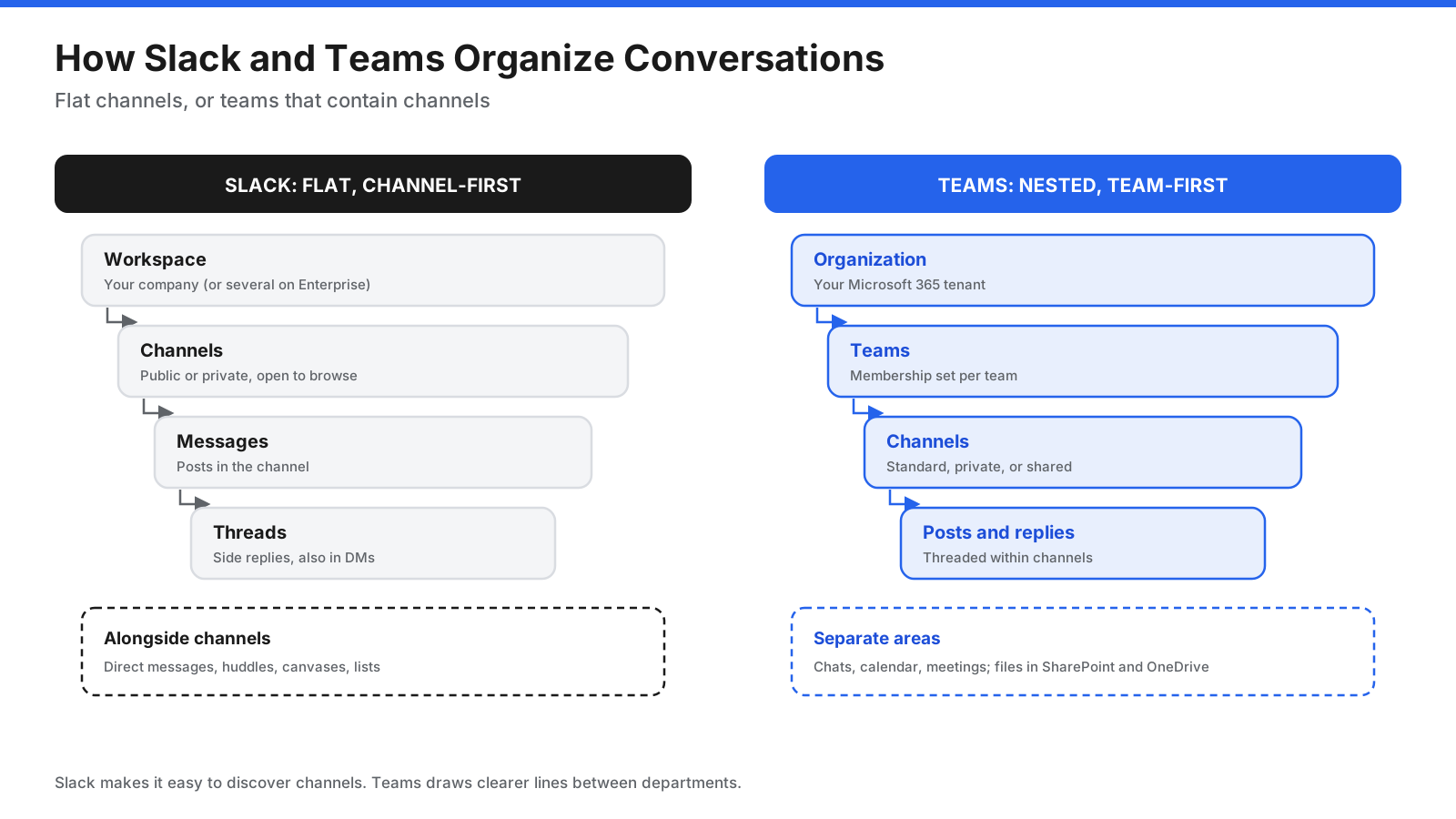
Zapier’s April 2026 comparison notes that Slack supports threads in both channels and direct messages, while Teams threads are limited to channels. This difference matters for teams that do most discussion in chats.
What Should You Look for When Choosing?
- Existing subscriptions: Teams may already be included in your Microsoft 365 plan.
- Communication style: Chat-heavy teams often prefer Slack. Meeting-heavy teams often prefer Teams.
- Integrations: Check that your most-used apps work well with your choice.
- External work: Shared channels and guest access work differently in each tool.
- AI budget: Compare what is included with what costs extra.
- Compliance: Review retention, eDiscovery, HIPAA, and data residency requirements.
- IT administration: Microsoft Entra ID and Intune can make Teams easier for Microsoft-centric organizations to manage.
How Do Slack and Teams Compare Feature by Feature?
Ease of Use and Interface
Slack’s interface is often described as cleaner and quicker to learn. Its sidebar shows channels, direct messages, and activity, and users can organize channels into custom sections. Zapier’s reviewer writes that Slack “just kinda feels nice to use.”
Teams has more areas to navigate, including chat, teams, calendar, calls, and apps. For people who work in Outlook and Office all day, this keeps the suite in one window. For people who mainly want chat, it can feel heavier.
Verdict: Slack is easier for most people to pick up. Teams makes more sense when the wider Microsoft 365 suite is part of daily work.
Messaging and Threads
Both offer channels, direct messages, mentions, reactions, formatting, and threads. Slack adds custom emoji, scheduled messages, reminders, and threads in direct messages. Teams adds channel post subject lines, announcements, and Loop components, which are live editable blocks.
Verdict: Slack has the edge for fast, organized messaging. Zapier calls it “the better messaging tool (by a bit).”
Search
Slack search filters by person, channel, date, and file type. Business+ and Enterprise plans add AI search across conversations. Teams search covers messages, people, and files across Microsoft 365, and Copilot adds AI answers for licensed users.
Verdict: Slack offers precise search within chat. Teams search is broader across Microsoft 365, especially with Copilot.
Notifications
Slack provides detailed notification controls by channel, keyword, and schedule, as well as do-not-disturb settings. Teams has per-channel settings, mobile quiet hours, and priority access, but notifications are spread across chat, channels, meetings, and activity.
Verdict: Slack offers more notification control and is easier to tune.
Video Meetings and Calls
Teams business meetings support up to 300 participants for up to 30 hours, according to Microsoft’s comparison page. Features include recording, transcripts, live captions, breakout rooms, and meeting notes. Business Standard adds webinars. Teams Phone is an add-on for business calling.
Slack huddles are designed for quick conversations. Paid plans support up to 50 participants, with up to 25 people on video at once; the free plan limits huddles to two people. Many Slack teams use Zoom, Google Meet, or Teams for larger meetings.
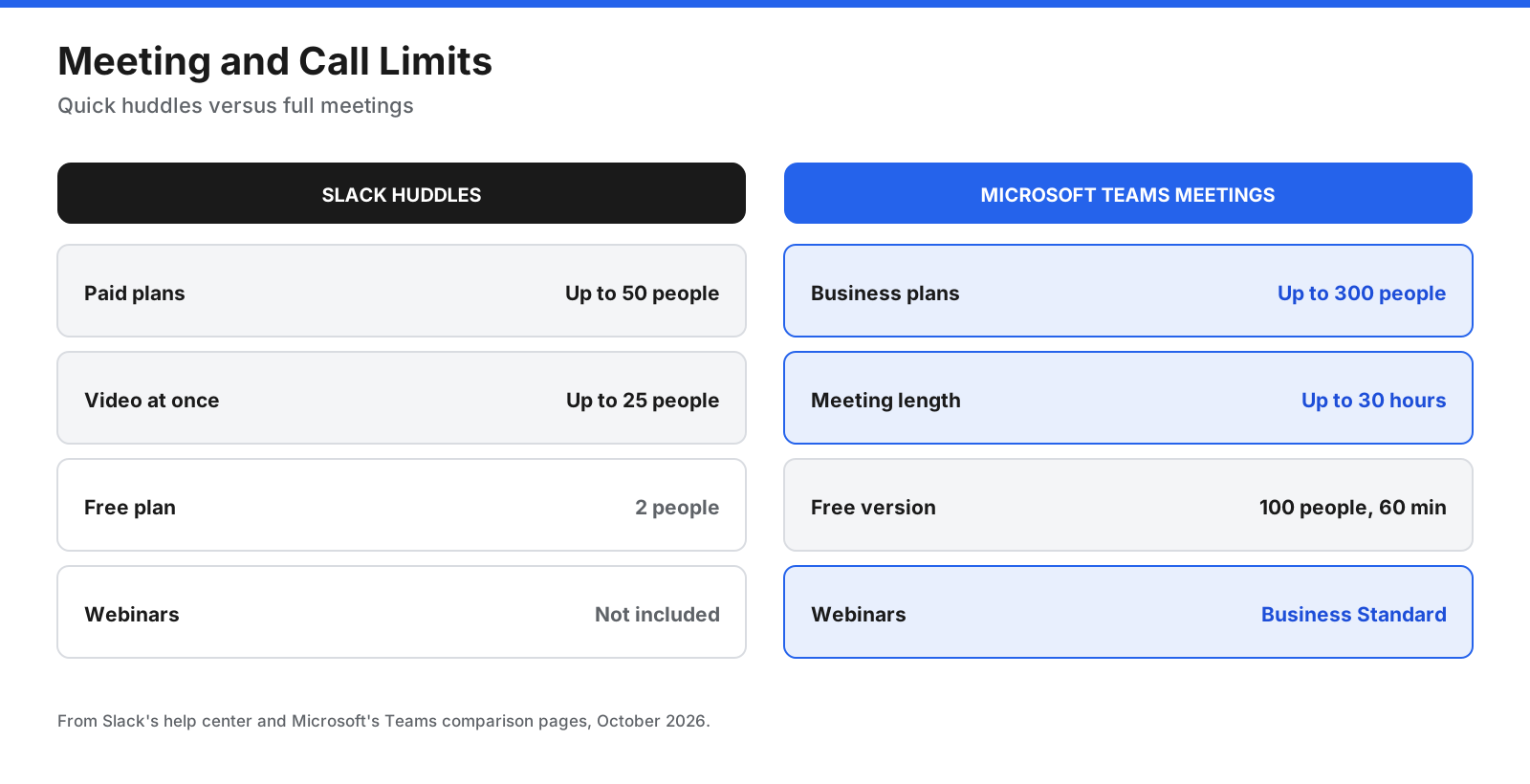
Verdict: Teams wins for meetings, webinars, and calling. Slack huddles suit quick team calls.
File Sharing and Documents
Slack uploads and previews files and connects to cloud storage such as Google Drive, OneDrive, Box, or Dropbox. Canvases provide shared documents inside channels, but Slack is not a full file storage system.
Teams stores channel files in SharePoint and chat files in OneDrive. Users can co-edit Word, Excel, and PowerPoint files inside Teams, with version history and Microsoft 365 permissions. Business Basic includes 1 TB of OneDrive storage per user, while Teams Essentials includes 10 GB per user, according to Microsoft’s comparison page.
Verdict: Teams is stronger for document storage and co-editing, especially for Office users. Slack works well when files live in Google Drive or another cloud tool.
Integrations and Apps
Slack’s own comparison page cites more than 2,600 integrations. Its API is also used for custom bots and alerts. Zapier’s review puts the Teams app store at about 700 integrations. Teams’ main strength is its native connection to Outlook, SharePoint, Planner, Power BI, and Dynamics 365.
Verdict: Slack wins for third-party integrations. Teams wins for Microsoft 365 integration.
Workflow Automation
Slack’s Workflow Builder creates request forms, approvals, and onboarding steps without code. Business+ adds conditional branching and AI-generated workflows. Teams uses the Workflows app built on Power Automate, which can automate across Microsoft 365 and hundreds of other services, though complex flows may need extra licensing or IT help.
Verdict: Slack is simpler for everyday automations. Teams with Power Automate goes further for organizations that invest in it.
AI Features
Slack includes AI on paid plans. Pro includes thread and channel summaries and huddle notes. Business+ adds Slackbot, daily recaps, file summaries, AI search, AI workflow generation, and translations. Enterprise+ adds enterprise search across connected tools.
Microsoft 365 Copilot is an add-on. The source draft lists Copilot Business at $21 per user per month, with a promotional rate of $18 for eligible customers between July 1 and December 31, 2026. Copilot can summarize meetings and chats, draft messages, and answer questions across email, files, and meetings. Free Copilot Chat features are also available to Microsoft 365 business users.
Verdict: Slack is the cheaper way to get AI in chat. Copilot does more across Microsoft 365 but adds significant per-user cost.
External Collaboration
Slack Connect lets users share channels with up to 250 other organizations on paid plans. Each company keeps its own workspace, settings, and data controls. Teams supports guest access, external chat with people in other Microsoft 365 organizations, and shared channels through B2B direct connect, which can need more admin setup in Microsoft Entra ID.
Verdict: Slack is easier for ongoing collaboration with other companies. Teams works well when both sides use Microsoft 365.
Security and Compliance
Both platforms encrypt data in transit and at rest and support single sign-on, two-factor authentication, retention policies, and audit logs on higher plans. Both have certifications such as SOC 2 and support GDPR compliance.
Teams benefits from Microsoft Purview tools for eDiscovery, data loss prevention, and retention. The source draft cites Zapier for HIPAA support on paid Teams plans. Slack’s pricing page places HIPAA support, data loss prevention, legal holds, information barriers, and Enterprise Key Management on Enterprise+.
Verdict: Teams offers more compliance tooling at lower price points. Slack’s advanced compliance features require Enterprise+.
Administration and Deployment
Teams is managed through the Microsoft 365 and Teams admin centers, with users, devices, and policies controlled through Microsoft Entra ID and Intune. Slack is managed through its own admin dashboard. Business+ adds SAML single sign-on and SCIM provisioning, and Enterprise+ adds organization-wide controls across multiple workspaces.
Verdict: Teams is easier for Microsoft-centric IT teams. Slack is simple to run for smaller companies and integrates with common identity providers.
Desktop and Mobile Apps
Both offer desktop apps for Windows and macOS, web apps, and mobile apps for iOS and Android. Slack also supports Linux. Teams on Linux is available through its web app and progressive web app.
Verdict: Both are well supported across devices. Slack has the edge for Linux users.
How Much Do Slack and Teams Cost?
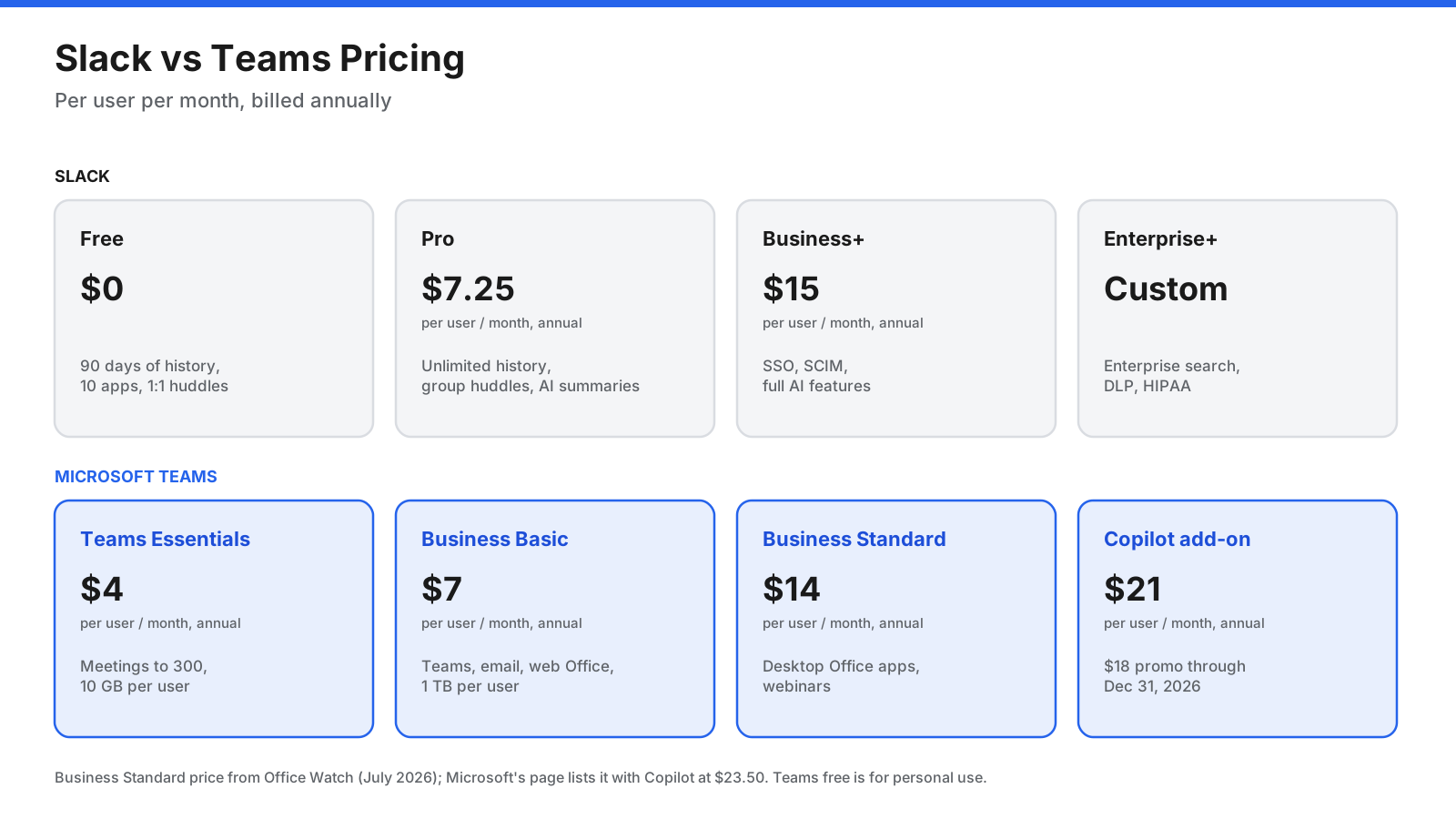
Pricing is one of the biggest differences, mainly because Teams usually comes bundled with Microsoft 365. Prices below are per user per month unless stated, and annual billing is shown where applicable. Confirm current rates with each vendor before buying.
Slack Pricing
- Free: $0, with 90 days of message history, up to 10 app integrations, and one-to-one huddles.
- Pro: $7.25 billed annually or $8.75 monthly, with unlimited history, group huddles, Slack Connect, canvases, lists, and AI summaries.
- Business+: $15 billed annually or $18 monthly, with SAML SSO, SCIM, data exports for all messages, conditional workflows, and expanded AI features.
- Enterprise+: Custom pricing, with enterprise search, advanced compliance, and multi-workspace management.
Microsoft Teams Pricing
- Teams free: $0 for personal use, with 60-minute group meetings, up to 100 participants, and 5 GB of storage.
- Teams Essentials: $4, with meetings up to 300 participants, 10 GB of storage per user, and no Office apps.
- Microsoft 365 Business Basic: $7, with Teams, web and mobile Office apps, business email, and 1 TB of storage per user.
- Microsoft 365 Business Standard: $14 after Microsoft’s July 2026 price change, according to Office Watch. Microsoft’s comparison page shows Business Standard with Copilot at $23.50.
- Microsoft 365 Copilot Business add-on: $21, or $18 under a promotion running through December 31, 2026.
Microsoft also sells Microsoft 365 suites without Teams, such as Business Basic without Teams at $5.40 per user per month, for companies that use another chat tool.
Free Plans Compared
Slack’s free plan lets a whole team use a shared workspace, but only the last 90 days of messages and files are visible. Since August 26, 2024, Slack may delete messages and files older than one year on free workspaces, and deleted data cannot be restored.
Teams’ free version is aimed at personal use, though Microsoft says small businesses can use it too. Group meetings are limited to 60 minutes and 100 participants, and each user gets 5 GB of storage. It does not include business features such as company-managed accounts or admin controls.
Verdict: Slack’s free plan is better for trying a team workspace. Teams’ free version suits personal use and small groups.
What Does Each Option Cost for a 50-Person Team?
List prices tell only part of the story. The chart below shows yearly costs for a 50-person team across common setups, using annual billing.
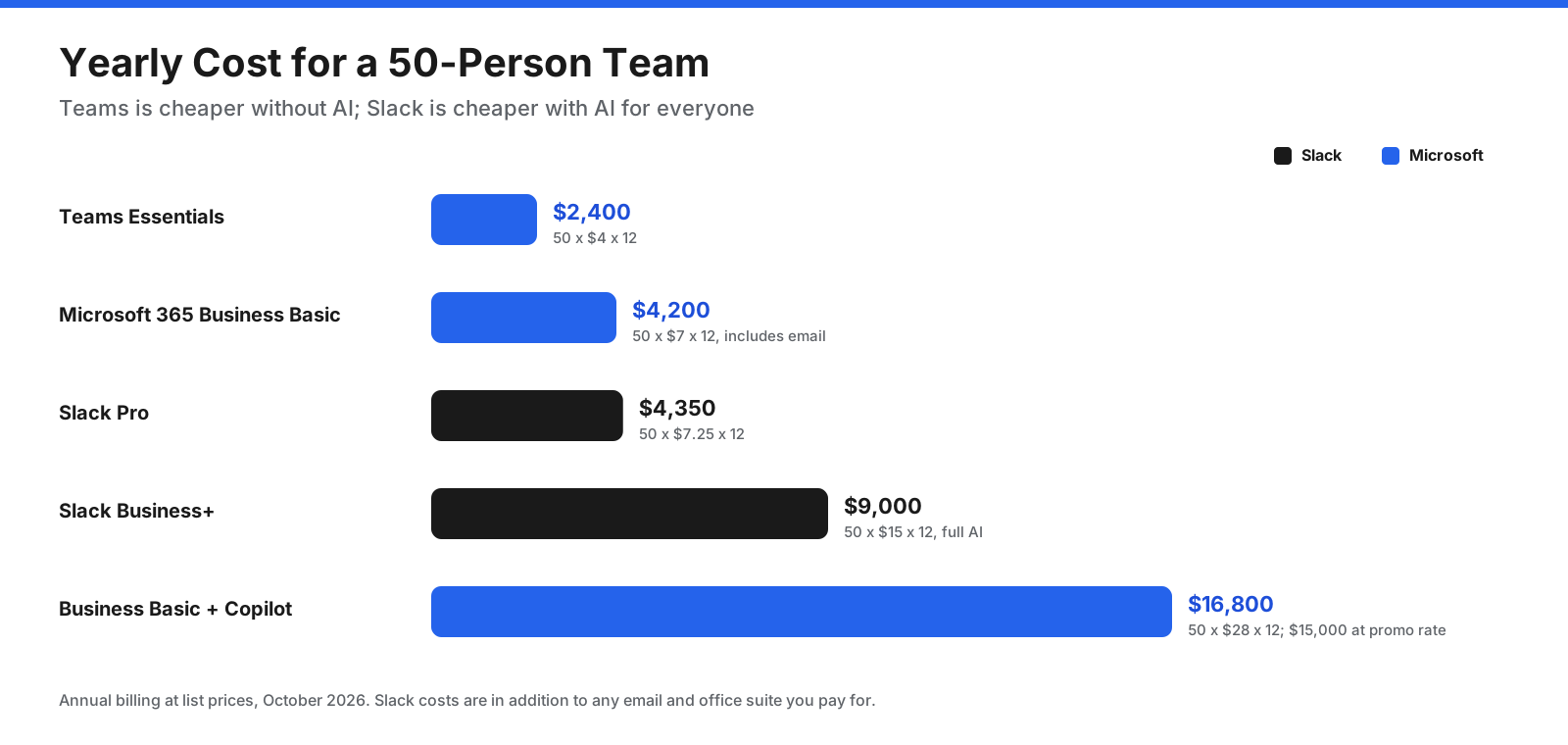
- Teams Essentials: 50 users at $4 is $2,400 a year.
- Microsoft 365 Business Basic: 50 users at $7 is $4,200 a year, including email and Office web apps.
- Slack Pro: 50 users at $7.25 is $4,350 a year, on top of email and documents.
- Slack Business+: 50 users at $15 is $9,000 a year.
- Business Basic plus Copilot Business: 50 users at $28 is $16,800 a year at list price, or $15,000 at the promotional Copilot rate.
If your company already pays for Microsoft 365, Teams adds no extra cost, and Slack becomes an additional expense. If you use Google Workspace for email and documents, Slack Pro and Teams Essentials are the more direct comparison.
What Are the Downsides of Slack and Teams?
Slack downsides:
- It does not include email, Office apps, or full document storage, so you still need another suite.
- Huddles are not built for large meetings or webinars.
- The free plan hides messages older than 90 days and may delete content older than one year.
- Advanced compliance features such as HIPAA support and data loss prevention require Enterprise+.
- Costs add up when you pay for Slack on top of Microsoft 365 or Google Workspace.
Microsoft Teams downsides:
- The interface is busier, and some users find it harder to navigate.
- Search within chats is less precise than Slack’s, according to Zapier’s review.
- External collaboration with non-Microsoft organizations takes more setup.
- Its third-party app ecosystem is smaller than Slack’s.
- Copilot AI adds a large per-user cost on top of the base plan.
Which Teams Should Choose Slack, and Which Should Choose Teams?
Slack tends to suit startups, software and engineering teams, agencies, and remote teams that do most of their work in chat. It also suits companies that use Google Workspace and want a messaging tool that connects to many other apps.

Teams tends to suit organizations that already run on Microsoft 365, especially larger companies, regulated industries, and teams that hold many scheduled meetings. It also makes sense for companies that want to replace a separate phone system with Teams Phone.
Can You Use Slack and Teams Together?
Yes, and many companies do. A common setup is Slack for daily messaging and Teams or another tool for meetings. Slack’s Microsoft Teams Calls app lets you start a Teams meeting from Slack, and Teams meetings can be joined from Outlook calendar invites as usual.
Running both tools has costs. You pay for two platforms, information splits across two places, and people have to remember where each conversation happens. Messages do not sync natively between Slack and Teams, so companies that need cross-platform chat use third-party bridging tools. If you run both, set clear rules, such as Slack for team chat and Teams for meetings and documents.
How Do You Switch Between Slack and Teams?
Switching between the two takes planning because message history, channels, and apps do not move over automatically.
Moving from Slack to Teams: Review your Slack plan, since it determines what you can export. Map Slack channels to teams and channels, copy files into channel document libraries, and find Teams equivalents for your apps. On Free and Pro, workspace owners and admins can export public channel messages. Business+ can export private channels and direct messages after approval. Microsoft notes that Teams does not currently support importing direct messages, so third-party tools or partners may be needed.
Moving from Teams to Slack: Slack does not offer a native Teams importer. Most companies recreate channels in Slack, move active files to cloud storage that connects to Slack, and use third-party migration tools if they need to bring chat history across.
In both directions, run the two tools side by side for a short period, set a cutoff date, train people on the new structure, and archive the old workspace once the move is complete.
Slack or Teams: How Should You Decide?
Start with what you already pay for, then decide whether chat or meetings matter more.
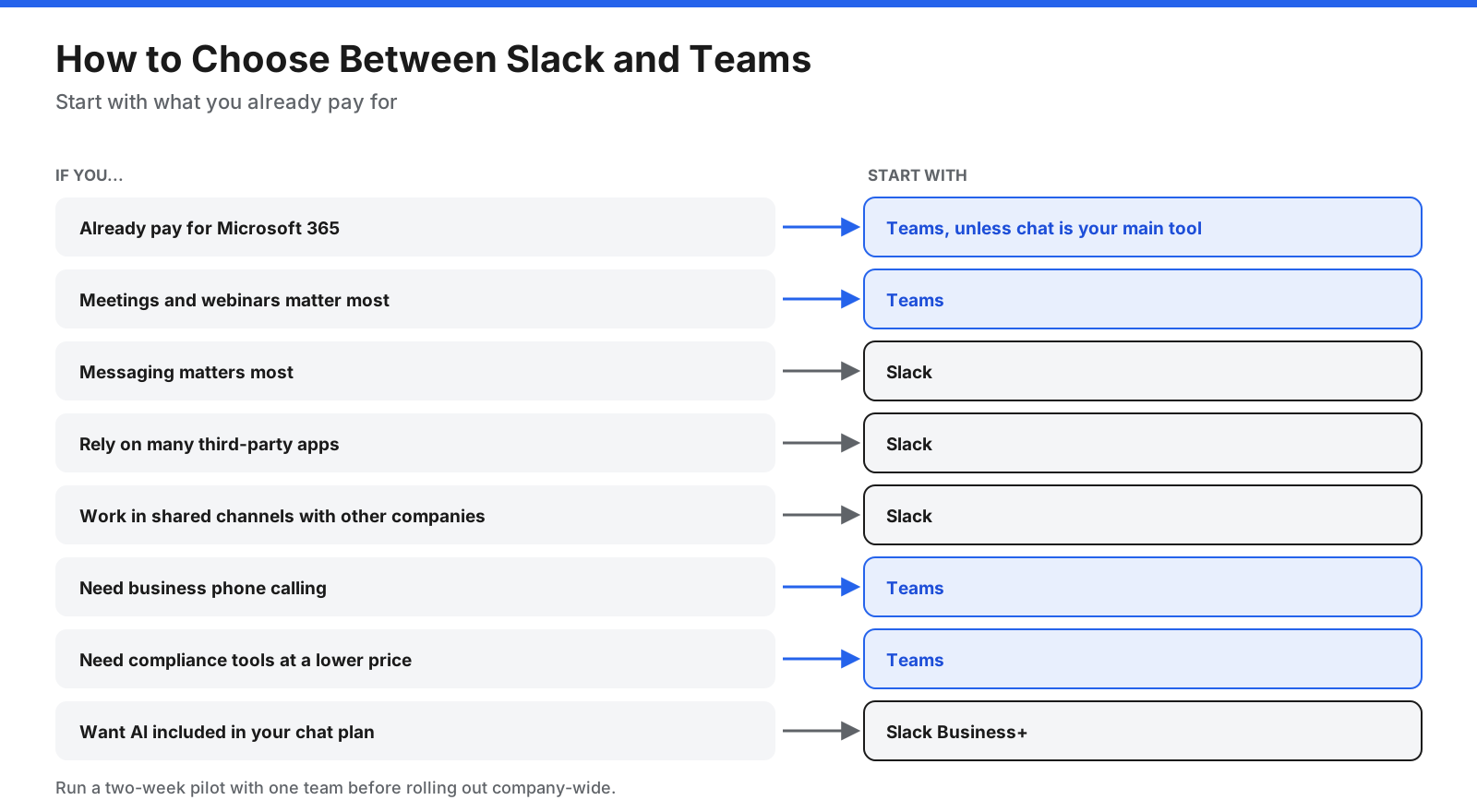
- Do you already pay for Microsoft 365? Start with Teams, since it is likely included. Add Slack only if your team clearly works better in it.
- Do you chat more or meet more? Chat-first teams should test Slack. Meeting-first teams should test Teams.
- Which apps matter most? Check your top five tools in both app directories.
- Do you work with other companies every day? Slack Connect makes this simpler.
- What is your AI budget? Compare Slack Business+ with the cost of Copilot on top of your Microsoft 365 plan.
Whichever you lean toward, run a two-week pilot with one team before rolling the tool out across the company.
Frequently Asked Questions
Is Slack better than Teams?
Neither is better for everyone. Slack is generally better for messaging, search, integrations, and external collaboration. Teams is generally better for meetings, document co-editing, calling, and organizations already using Microsoft 365. Zapier’s April 2026 comparison concludes there is no clear winner and recommends choosing based on your ecosystem and how your team communicates.
Why use Slack instead of Teams?
Teams choose Slack when chat is their main way of working. Slack offers a simpler interface, more precise search, threads in direct messages, more third-party integrations, Slack Connect, and AI features included on paid plans.
What are the disadvantages of Slack?
Slack does not include email, Office apps, or file storage, and huddles are limited to 50 people. Its free plan only shows 90 days of history, and advanced compliance features require Enterprise+. It can also be expensive if you already pay for Microsoft 365.
Does anyone still use Slack?
Yes. Slack remains widely used, especially among technology companies, startups, agencies, and engineering teams. Salesforce continues to develop it, with additions such as Slackbot, Slack CRM features, and enterprise search.
Is Microsoft Teams free?
Teams has a free version for personal use, with group meetings up to 60 minutes and 100 participants and 5 GB of storage. For business use, Teams Essentials costs $4 per user per month, and Teams is included in Microsoft 365 Business Basic and higher plans.
Is Slack free?
Yes. Slack’s free plan includes 90 days of message history, up to 10 app integrations, and one-to-one huddles. Content older than one year may be deleted on free workspaces.
Can Slack and Teams talk to each other?
Not natively. You cannot send a Slack message to a Teams channel without a third-party bridging tool. Slack does offer a Microsoft Teams Calls app, which lets you start and join Teams meetings from Slack.
Which is more secure, Slack or Teams?
Both are used by large enterprises. Teams includes more compliance tooling, such as Microsoft Purview, and supports HIPAA on paid plans according to the cited comparison. Slack offers advanced controls such as data loss prevention, legal holds, and Enterprise Key Management on Enterprise+.
Is Slack or Teams better for startups?
Many startups choose Slack because it is easy to set up, has a useful free plan, and integrates with developer and SaaS tools. Startups that run on Microsoft 365 for email may find Teams more economical.
Is Slack or Teams better for remote work?
Both support remote teams. Slack suits teams that rely on written, asynchronous communication and many integrations. Teams suits remote teams that rely on scheduled video meetings and shared Office documents.
Is Teams included in Microsoft 365?
Teams is included in Microsoft 365 Business Basic, Business Standard, and Business Premium. Microsoft also sells versions of these suites without Teams, and Teams Essentials is available on its own.
The Bottom Line
Slack and Microsoft Teams solve the same problem from different directions. Slack is the stronger messaging tool, with a cleaner interface, better search, a larger app ecosystem, easier collaboration with other companies, and AI included on paid plans. Teams is the stronger hub for Microsoft 365, with meetings, webinars, calling, document co-editing, and compliance tools, often at no extra cost if you already pay for Microsoft 365.
If your company runs on Microsoft 365 and meets often, Teams is the natural choice. If your team lives in chat, uses many third-party tools, or works closely with partners, Slack is worth the extra cost. Test both with your own team before deciding, and check current prices on each vendor’s site because plans can change.















































































































