

3D printing in architecture is the use of additive manufacturing to turn digital design models into physical objects, built up layer by layer. Architects use it in two very different ways: to produce scale models and prototypes from their design software, and, at full scale, to print building elements and even entire walls on site.
For most practices, the everyday use is model making. A desktop printer can turn a Revit, Archicad, Rhino, or SketchUp model into a physical massing study overnight, and a detailed presentation model in a day or two, without hours of hand-cutting foam board and basswood. At the other end of the scale, construction printers extrude concrete to form the walls of homes, and printed molds and formwork make complex concrete shapes possible.
This guide explains how to use 3D printing in architecture from start to finish. It covers the main applications, printing technologies and materials, a step-by-step workflow for printing a model from design software, software needed at each stage, large-scale construction printing, building-code questions, costs, benefits, limitations, and how to bring 3D printing into your practice.
How Are Architects Using 3D Printing?
3D printing supports nearly every stage of an architectural project, from the first concept sketch to fabrication. These are the most common applications.
Concept and Massing Models
Quick, low-cost prints let you test building form, height, and siting early in design. Because the print comes straight from the digital model, you can print several options side by side and compare them physically.
Presentation Models
Detailed models help clients, planning boards, and community groups understand a design far more easily than drawings or renderings. High-resolution printers capture facade articulation, openings, and landscape features with a finish that can be painted.
Site and Topography Models
Terrain models built from survey or GIS data show how a building sits in its context. Printing topography as a base, with the building as a separate removable part, makes it easy to swap design options on the same site.
Detail and Connection Models
Enlarged models of facade systems, joints, stairs, and structural connections help teams and fabricators understand how components fit together before anything is built.
Complex and Parametric Forms
Curved, faceted, and algorithmically generated geometry from tools such as Grasshopper is difficult to build by hand. 3D printing reproduces it directly from the digital model.
Molds and Formwork
Printed molds and formwork can shape cast concrete, plaster, or other materials into forms that would be costly to produce with conventional formwork. Some practices print a master piece, cast it, and use the cast to produce repeated elements.
Custom Building Components
Printers can produce bespoke parts such as decorative panels, lighting elements, structural nodes, and replacement pieces for heritage buildings, often in materials suited to permanent use.
Full-Scale Construction
Construction-scale printers extrude cement-based or earth-based materials to build walls and structures on site or in a factory. This is still an emerging approach, but it has moved from experiments to completed housing communities.
Which 3D Printing Technologies Work Best for Architectural Models?
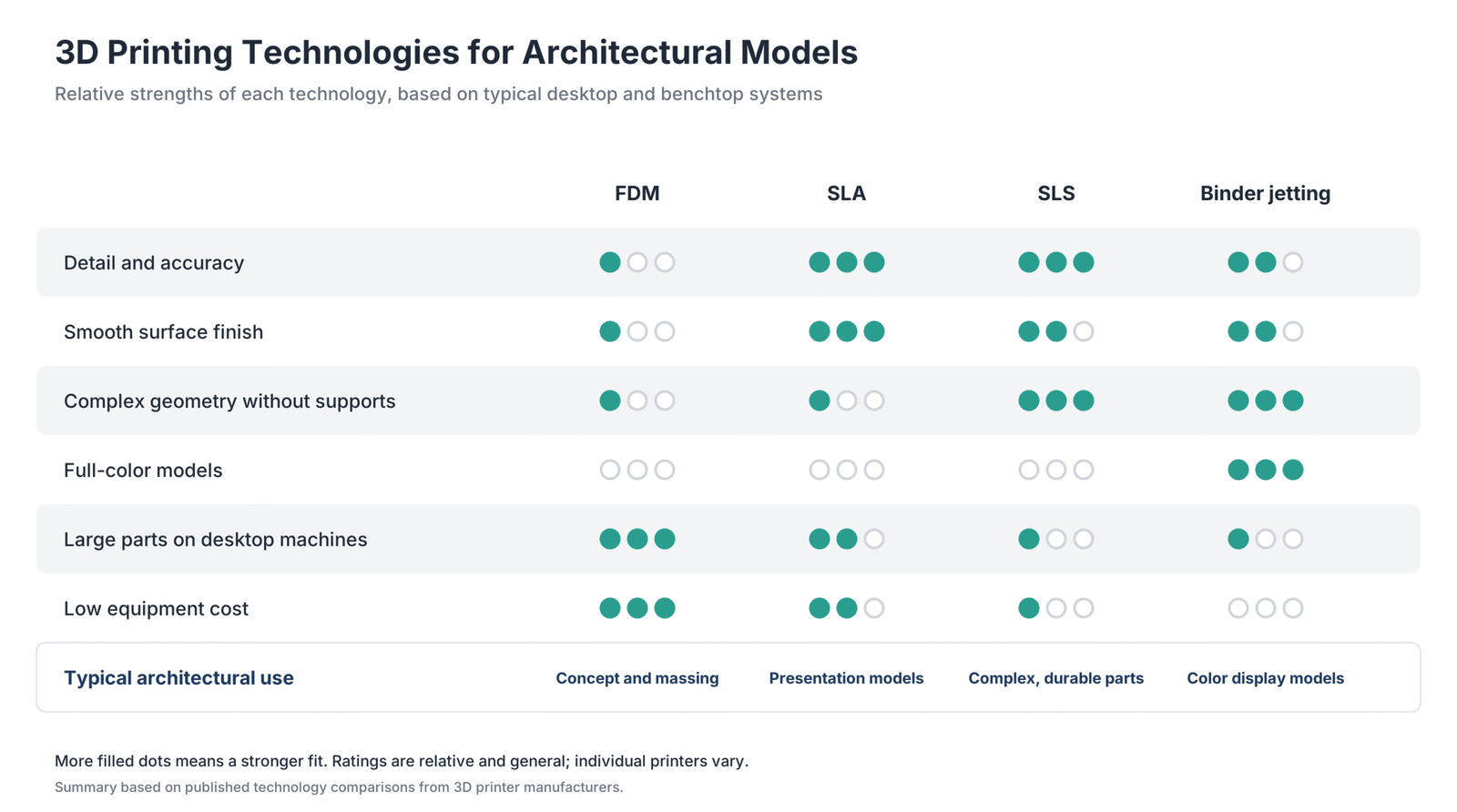
Four printing technologies are commonly used for architectural models. Each makes different trade-offs between detail, size, cost, and finish.
Fused Deposition Modeling (FDM)
FDM printers melt plastic filament and deposit it in layers. They are the most affordable option and can print large parts, which makes them ideal for early concept and massing models. Their resolution is the lowest of the four technologies, so fine details soften and visible layer lines usually need sanding for a presentation finish.
Stereolithography (SLA)
SLA printers cure liquid resin with a light source. They offer the highest resolution and accuracy of the plastic processes and a smooth surface that is easy to paint, which suits detailed presentation models. Desktop build volumes are smaller, so large models are often split into parts or printed on large-format machines.
Selective Laser Sintering (SLS)
SLS printers fuse powdered material, usually nylon, with a laser. Because the surrounding powder supports the part, SLS handles complex geometry, interior spaces, undercuts, and thin walls without support structures. The equipment costs more, so many practices use SLS through a print service.
Binder Jetting
Binder jetting bonds powder with a liquid binder and can produce full-color models straight from the printer. The parts are porous and brittle, so they suit static display models rather than models that will be handled often. Industrial machines are expensive, and most architects access full-color printing through service bureaus.
| Technology | Detail and accuracy | Surface finish | Typical architectural use |
|---|---|---|---|
| FDM | Lowest | Visible layer lines; may need sanding | Concept and massing models |
| SLA | Highest of the plastic processes | Smooth and paintable | Detailed presentation models |
| SLS | High | Slightly grainy; no support marks | Complex geometry and durable models |
| Binder jetting | Moderate | Matte, full color | Color display and site models |
How Do You 3D Print an Architectural Model?
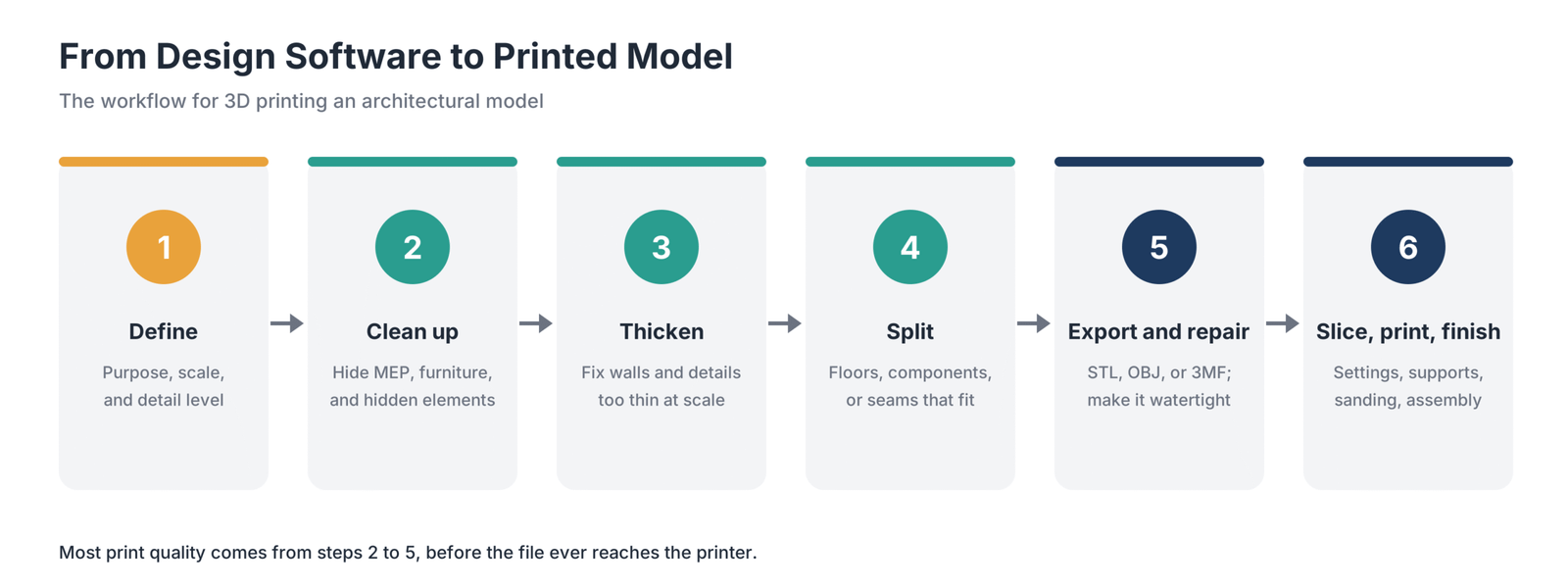
Printing a good architectural model depends far more on preparing the digital model than on the printer itself. A building model built for documentation contains far more detail than any printer can reproduce at scale, and some of it, such as zero-thickness surfaces, cannot be printed at all.
Step 1: Define the Purpose and Scale
Decide what the model needs to communicate before you touch the file. A massing model for a design review needs form and proportion, while a presentation model needs openings, materials, and landscape. The purpose determines the scale, level of detail, printing technology, and how many parts you need.
Scale also determines whether a model fits your printer. Divide the full-size dimensions by the scale factor to find the printed size, and compare it with your printer’s build volume. If the model is too large, plan to split it or choose a smaller scale.
Step 2: Prepare the Model in Your Design Software
BIM models from Revit or Archicad contain elements that do not translate to a physical model, such as ductwork, MEP systems, furniture, and multi-layer glazing. Create a dedicated 3D view or copy of the model for printing, and remove or hide everything the model does not need to show.
Surface and solid modelers such as Rhino and SketchUp give you more direct control. A common approach is to start from a simplified version of the design, scale it, and build an external shell with solid walls, slabs, and roofs. Model at full scale in your design software and convert to the print scale on export, so dimensions stay consistent across the project.
Step 3: Simplify and Thicken for Scale
When a building shrinks to model size, many elements become too thin to print. Window mullions, railings, canopies, and thin walls often fall below the minimum wall thickness that your printer and material can reproduce reliably.
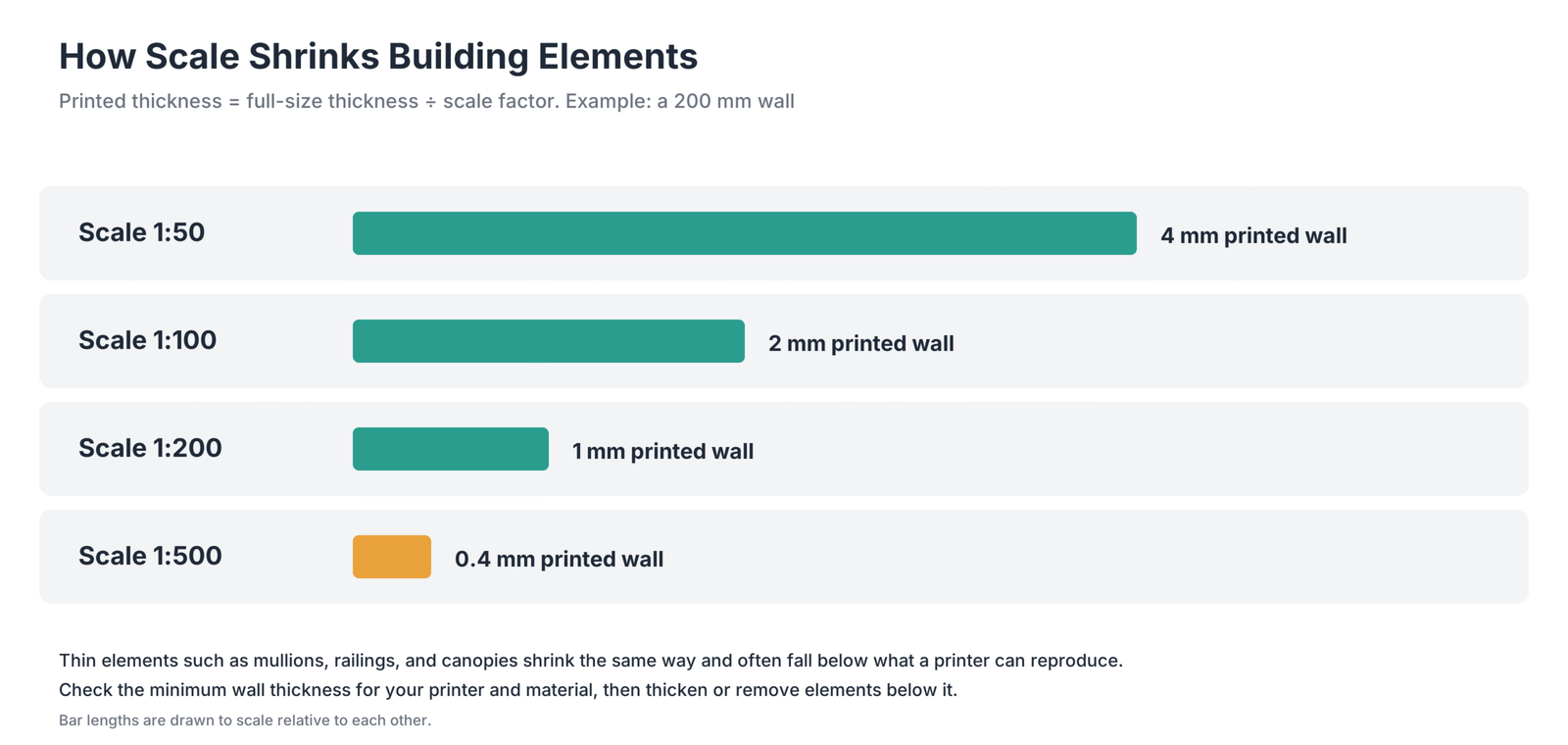
Check the minimum wall thickness and minimum feature size published for your printer and material, then work through the model:
- Thicken walls, slabs, roofs, doors, and window frames that fall below the minimum.
- Remove details too small to print, such as hardware, thin trim, and fine railings, or represent them with simplified solids.
- Merge overlapping or touching objects into single closed volumes.
- Close openings meant to read as glazing if you do not want see-through voids, or cut them cleanly if you do.
Step 4: Split the Model Into Printable Parts
Splitting a model makes large designs printable and lets you show more than the exterior. Common approaches include splitting by floor so interiors can be revealed by lifting off levels; by component, such as building, landscape, and context; or along straight seams that fit within the build volume. Plan how parts will join, either with adhesive or with mechanical connectors designed into the geometry.
Step 5: Export the Right File Format
Most printing workflows accept STL, OBJ, or 3MF files. STL is the most widely supported and stores geometry as a mesh of triangles. OBJ can carry color and texture information, and 3MF is a newer format that can store units, colors, materials, and multiple parts in one file. Rhino exports all three formats directly. Revit users commonly use Autodesk’s STL Exporter add-in, and Archicad and SketchUp offer STL export. Set export units and resolution carefully: a coarse mesh produces faceted curves, while a very fine mesh creates large files with no visible benefit.
Step 6: Check and Repair the Mesh
A printable model must be a closed, watertight solid with no holes, overlapping faces, or reversed normals. Exports from building models often contain small errors that cause failed or broken prints. Most slicers detect and repair common problems automatically. For more complex issues, mesh tools such as Autodesk Netfabb, Blender’s 3D Print Toolbox, or repair functions in your slicer can fix holes, merge shells, and correct normals.
Step 7: Slice the Model and Choose Print Settings
Slicing software converts the model into layers and machine instructions. Common slicers include UltiMaker Cura, PrusaSlicer, Bambu Studio, and OrcaSlicer for FDM printers, and PreForm for Formlabs resin and powder printers. Decide on layer height, orientation, supports, infill, and material. Preview the sliced layers before printing to catch thin walls, missing features, or unsupported areas.
Step 8: Print and Monitor
Start with a small test print of a critical area, such as the thinnest facade elements, before committing to a long print. Check the first layers closely, since most failures begin there.
Step 9: Post-Process and Assemble
- Remove supports and clean the part. SLA prints also need washing and post-curing.
- Sand support marks and FDM layer lines for a smooth finish.
- Prime and paint to unify color or show materials.
- Assemble split parts with adhesive or connectors.
- Combine printed parts with laser-cut, hand-built, or found materials for context, trees, and figures.
How Do You Prepare Models in Specific Design Software?
The general workflow is the same in every tool, but each program has its own habits and export options.
Revit
Create a dedicated 3D view for printing and use visibility and graphics settings to hide categories such as furniture, MEP systems, and annotation. A section box limits the export to the part of the building you want to print. Check that walls, floors, and roofs join cleanly, since gaps between elements become gaps in the print. Autodesk’s STL Exporter add-in is a common way to export, and many teams then finish the mesh in Rhino or a slicer.
Archicad
Use model view options and layer combinations to strip the model back to the elements you want to print, and simplify complex window and door objects. Export the 3D model using the formats available in your version, then check the mesh for gaps where elements meet.
Rhino
Rhino gives you control over printable geometry. Join surfaces into closed polysurfaces, use edge analysis tools to find naked edges that indicate gaps, and cap open shells. Rhino’s mesh repair tools can fix common problems, and the program exports STL, OBJ, and 3MF directly. Grasshopper is useful for generating topography, facade patterns, and parametric components ready to print.
SketchUp
SketchUp models print best when every group or component is a solid, meaning a closed volume with no holes or stray faces. Entity Info shows whether a group is solid, and extensions such as Solid Inspector help find and fix problems. STL export is available through the SketchUp STL extension.
How Do You 3D Print Topography and Site Models?
Site models show how a design responds to terrain and surroundings. They follow the same workflow as building models, with a few extra steps:
- Get terrain data from survey contours, a digital elevation model, or GIS sources for the site.
- Build a terrain surface in your modeling software from the contours or elevation data.
- Give the terrain a solid base by extruding it down to a flat bottom so it prints as a closed solid.
- Consider vertical exaggeration for very flat sites, so subtle level changes are visible, and label the model if you use it.
- Cut a pocket or pad where the building sits, so building options can be swapped in and out.
- Split large sites into tiles that fit your printer, with alignment features at the joints.
Should You Print In-House or Use a Service Bureau?
Both approaches have a place, and many practices combine them.
| Factor | In-house printing | Service bureau |
|---|---|---|
| Upfront cost | Printer, materials, and post-processing equipment | None |
| Turnaround | Fast, often overnight for small models | Depends on queue and shipping |
| Technologies | Usually FDM and SLA | Wide range, including SLS and full-color printing |
| Iteration | Easy to reprint changes quickly | Each revision adds cost and time |
| Skills needed | Staff to prepare files and maintain printers | File preparation only |
| Best for | Frequent study and presentation models | Occasional large, full-color, or specialty models |
Which Software Do You Need for Architectural 3D Printing?
Most practices already own the design software they need. Additional tools are usually free or bundled with the printer.
| Stage | Purpose | Common tools |
|---|---|---|
| Design and BIM | Create and clean up the building model | Revit, Archicad, Vectorworks |
| Surface and parametric modeling | Build shells, complex forms, and topography | Rhino, Grasshopper, SketchUp, Blender |
| Mesh repair | Make the model watertight and printable | Autodesk Netfabb, Blender 3D Print Toolbox, slicer repair tools |
| Slicing | Generate layers, supports, and printer instructions | UltiMaker Cura, PrusaSlicer, Bambu Studio, OrcaSlicer, PreForm |
| Construction printing | Generate toolpaths for building-scale printers | Proprietary software from construction printer manufacturers |
The best results come from setting up print-ready standards in your design software, such as dedicated 3D views, simplified families or components, and export settings, so every project starts from a consistent workflow.
Which Materials Should You Use?
Material choice depends on the technology, the purpose of the model, and whether it will be handled, displayed, or used outdoors.
Materials for Architectural Models
- PLA filament: inexpensive, easy to print, and available in many colors, making it ideal for massing and study models.
- PETG filament: tougher and more heat-resistant than PLA, useful for models that travel or are handled often.
- Standard and specialty resins: SLA materials offer fine detail; gray and white are popular for presentation models, and clear resin can represent glazing and water features.
- Nylon powder: SLS produces strong, durable parts with complex geometry.
- Gypsum-based and other full-color powders: binder jetting produces colored display models.
Materials for Construction-Scale Printing
- Cement-based mixes: the most common material for printed walls, formulated to be extruded and support the layers above as they cure.
- Earth and clay mixes: used in some projects for low-carbon structures made from local soil.
- Polymer composites: used in some factory-based printing of building panels and components.
How Does 3D Printing Work in Building Construction?
Construction-scale 3D printing uses large gantry or robotic-arm printers to extrude material layer by layer, usually to form walls. Most projects combine printed walls with conventional foundations, roofs, windows, mechanical systems, and finishes.
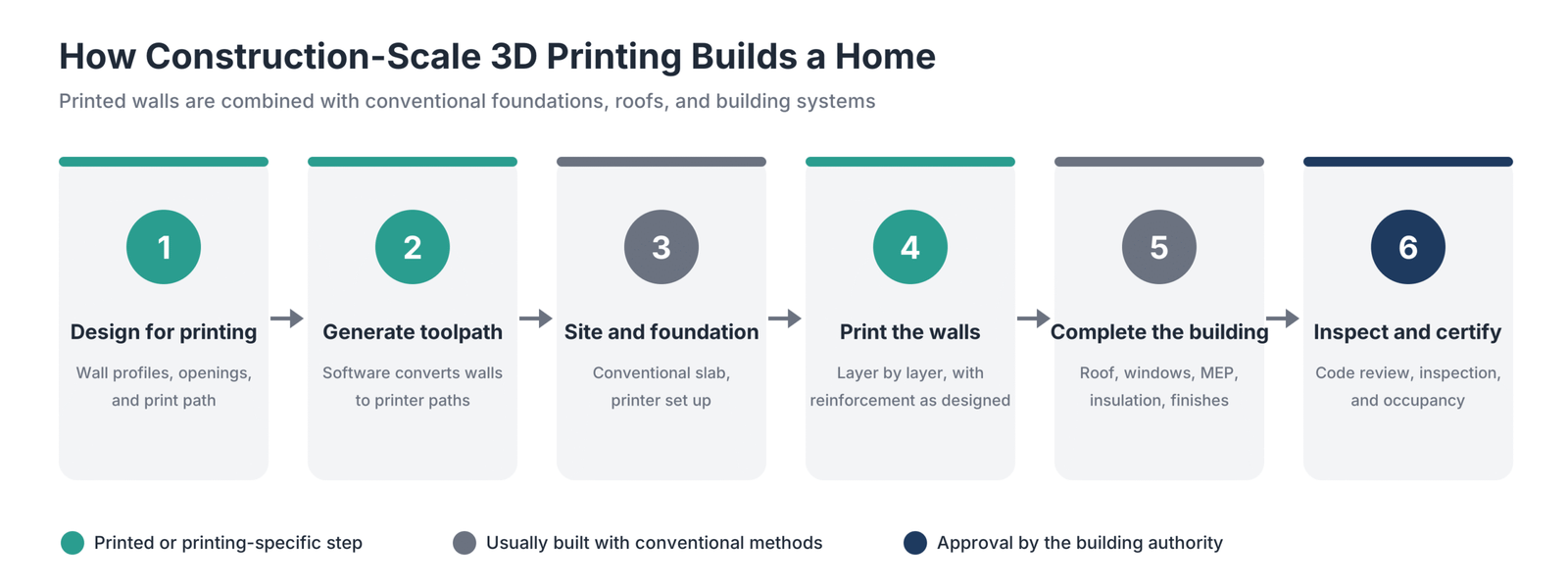
- Design for printing. The architect and printing team adapt the design to the printer’s capabilities, including wall profiles, openings, and print path.
- Generate the toolpath. Printing software converts wall geometry into the path the printer will follow.
- Prepare the site and foundation. A conventional foundation or slab is built, and the printer is set up on site.
- Print the walls. The printer extrudes wall material in layers, with crews installing reinforcement, openings, and conduits as required by the design and engineering.
- Complete the building. Roofs, windows, doors, mechanical, electrical, and plumbing systems, insulation, and finishes are installed, often using conventional methods.
- Inspect and certify. The building goes through inspection and approval like any other structure.
Printed housing has moved beyond prototypes. In Georgetown, Texas, construction technology company ICON worked with homebuilder Lennar and architecture firm Bjarke Ingels Group on Wolf Ranch, a planned community of 100 homes with 3D-printed concrete walls using ICON’s Vulcan printer.
Is It Legal to 3D Print a House?
Yes, 3D-printed houses can be legally built in the United States, but they must meet the building codes adopted in the jurisdiction where they are built, and permitting can involve more review than conventional construction.
- ICC-ES AC509 is an acceptance criterion for 3D automated construction technology for 3D concrete walls. It covers testing for structural performance, fire resistance, and material durability, including compressive strength, freeze-thaw, and shrinkage.
- UL 3401 is an outline of investigation for 3D-printed building construction. It evaluates whether a fabricator’s equipment, materials, and process consistently produce building elements that match the performance of tested samples.
- Appendix AW of the International Residential Code addresses 3D-printed building construction and references UL 3401. Like all appendices, it applies only where a jurisdiction adopts it.
If you are planning a printed building, talk to the local building department early, confirm which code editions and appendices apply, and work with a printing partner that has relevant evaluation reports and test data. Rules vary by location, so treat this as general information rather than legal advice.
What Are the Benefits of 3D Printing in Architecture?
- Faster iteration: printing directly from the design model shortens model making from days of hand work to hours of unattended printing.
- Better communication: physical models help clients and stakeholders understand space, scale, and form.
- Accuracy: printed models match the digital design, reducing the gap between what is modeled and what is shown.
- Design freedom: complex, curved, and parametric forms become feasible to produce.
- Reusability: digital files can be edited and reprinted as the design evolves.
- Less material waste: additive processes place material only where needed, compared with cutting shapes from larger stock.
- Reduced labor on site: construction printing can reduce manual labor for the wall system and shorten that phase of construction.
What Are the Limitations of 3D Printing in Architecture?
- Model preparation takes time; cleaning and thickening BIM models requires skill and planning.
- Desktop printers have limited build volume, so large models need splitting and assembly.
- Detailed or large models can take many hours or days to print.
- Finish quality varies; FDM models often need sanding and painting for presentation quality.
- Equipment, materials, maintenance, and post-processing add costs, especially for higher-resolution and powder-based printers.
- Construction printing has constraints: printed walls are only part of a building, designs must suit the printer, and code approval and financing can take extra effort.
- Teams need training in model preparation, slicing, and printer maintenance.
How Much Does 3D Printing Cost in Architecture?
The cost of 3D printing architectural models depends on whether you buy printers or use a service, and on the technology you choose. The source brief cites Formlabs’ printer information for indicative equipment ranges: budget FDM printers start at a few hundred dollars and mid-range FDM printers at around $2,000; professional desktop SLA printers start at around $3,500; benchtop SLS systems start at around $18,500; and binder jetting machines range from about $30,000 to more than $100,000. These are indicative ranges, not quotes; equipment models and prices change. Material, maintenance, and post-processing equipment add ongoing costs.
Many practices start by sending files to a 3D printing service bureau, which gives access to SLS and full-color printing without buying equipment. Once demand is steady, an in-house FDM or SLA printer may pay for itself through faster turnaround and fewer outsourced models. Construction-scale printing costs vary widely by project, location, design, and how much of the building is printed. Because printing typically covers walls rather than the whole building, overall savings depend on the full construction budget, not just the printed portion.
How Do You Start Using 3D Printing in Your Practice?
- Start with a service bureau for a few projects to learn which technologies and finishes suit your work.
- Buy an FDM printer for quick massing and study models once you print regularly.
- Add an SLA printer when you need detailed presentation models in-house.
- Create print-ready standards in your design software, including 3D views, simplified components, export settings, and naming conventions.
- Train a small group of staff to own model preparation, slicing, and printer maintenance.
- Build a library of reusable parts such as trees, figures, cars, and context blocks.
- Track turnaround and costs to decide when to expand capacity or add technologies.
What Are the Best Tips for Better Architectural 3D Prints?
- Model at full scale and convert to print scale on export.
- Check the minimum wall thickness for your printer and material before printing.
- Remove interior and MEP elements that will never be seen.
- Print context and landscape separately from the building.
- Orient parts so support marks fall on hidden faces.
- Run a small test print of the most delicate area first.
- Use neutral colors such as white or gray for presentation models, and add color selectively.
- Keep a record of settings that work for each printer and material.
Frequently Asked Questions
How can 3D printing be used in architecture?
3D printing is used to produce concept, massing, and presentation models, site and topography models, detail and connection models, molds and formwork, custom building components, and, at full scale, printed walls and structures. Most practices use it mainly for models printed directly from design software.
Which 3D printer is best for architecture?
The best printer depends on the model. FDM is best for low-cost concept and massing models, SLA for detailed presentation models with a smooth finish, SLS for complex and durable models, and binder jetting for full-color display models.
Is it legal to 3D print a house?
Yes, 3D-printed houses can be built legally in the United States when they meet locally adopted building codes. Frameworks such as ICC-ES AC509, UL 3401, and Appendix AW of the International Residential Code help building officials evaluate printed construction, but adoption varies by jurisdiction. Check with the local building department.
How is 3D modeling used in architecture?
3D modeling is used to design buildings, coordinate disciplines through BIM, create visualizations and walkthroughs, analyze performance, and produce construction documents. The same models can be prepared for 3D printing to create physical models.
How do you create architectural models with a 3D printer?
Define the model’s purpose and scale, prepare and simplify the model in your design software, thicken thin elements, split it into printable parts, export as STL, OBJ, or 3MF, repair the mesh, slice it with suitable settings, print it, and finish it by removing supports, sanding, painting, and assembling.
What file format is used for 3D printing architectural models?
STL is the most widely supported format. OBJ can store color and texture, and 3MF can store units, colors, materials, and multiple parts in one file. Most slicers accept all three.
What are 3D-printed houses made of?
Most 3D-printed houses have walls made from cement-based mixes formulated for extrusion. Some projects use earth or clay mixes, and some factory-built systems use polymer composites. Foundations, roofs, windows, and building systems are usually built with conventional materials.
Are 3D-printed houses cheaper?
They can reduce labor and time for the wall system, but walls are only one part of a home’s total cost. Land, foundations, roofs, windows, systems, finishes, permitting, and financing still apply, so overall savings vary by project and location.
Are 3D-printed houses safe and durable?
3D-printed houses that meet local building codes are designed to perform like other code-compliant homes. Evaluation frameworks such as ICC-ES AC509 test printed concrete walls for structural strength, fire resistance, and durability, including freeze-thaw and shrinkage performance.
Do 3D-printed houses crack?
Like other concrete structures, printed concrete walls can develop cracks from shrinkage or movement. Mix design, curing, reinforcement, and engineering all affect crack control, which is why printed wall systems are tested and evaluated before approval.
Getting Started With 3D Printing in Architecture
3D printing gives architects a faster, more accurate way to turn digital designs into physical objects, from overnight massing studies to detailed presentation models and, increasingly, printed building components and walls.
Start with the model-making workflow, since it delivers immediate value: set up print-ready views and export settings in your design software, choose FDM for quick studies and SLA or a print service for presentation work, and refine your process with each project. As construction printing matures and codes evolve, the same digital-to-physical skills will carry through to full-scale fabrication.















































































































