

Notion and Obsidian are two of the most popular apps for notes, knowledge management, and personal organization. Both let you write notes, link ideas, and organize information, but they are built around different ideas.
Notion is a cloud workspace. Its pages, blocks, and databases make it easy to collaborate, track projects, and keep team knowledge in one place. Obsidian is a local app. Your notes are plain Markdown files in a folder you control, linked together and extended with plugins.
This guide compares the two apps feature by feature, then covers pricing, privacy, data ownership, who each app suits, how to move between them, and how to choose. The comparison reflects the source document’s October 2026 framing. Check each company’s current pricing and help pages before subscribing.
Quick verdict:
- Choose Notion if you work with other people, want databases and project tracking alongside your notes, or want built-in AI and many app integrations.
- Choose Obsidian if you want ownership of your notes as local files, strong offline use, deep linking between ideas, and extensive customization.
- Use both if you want Notion for shared team work and Obsidian for private thinking and long-term notes.
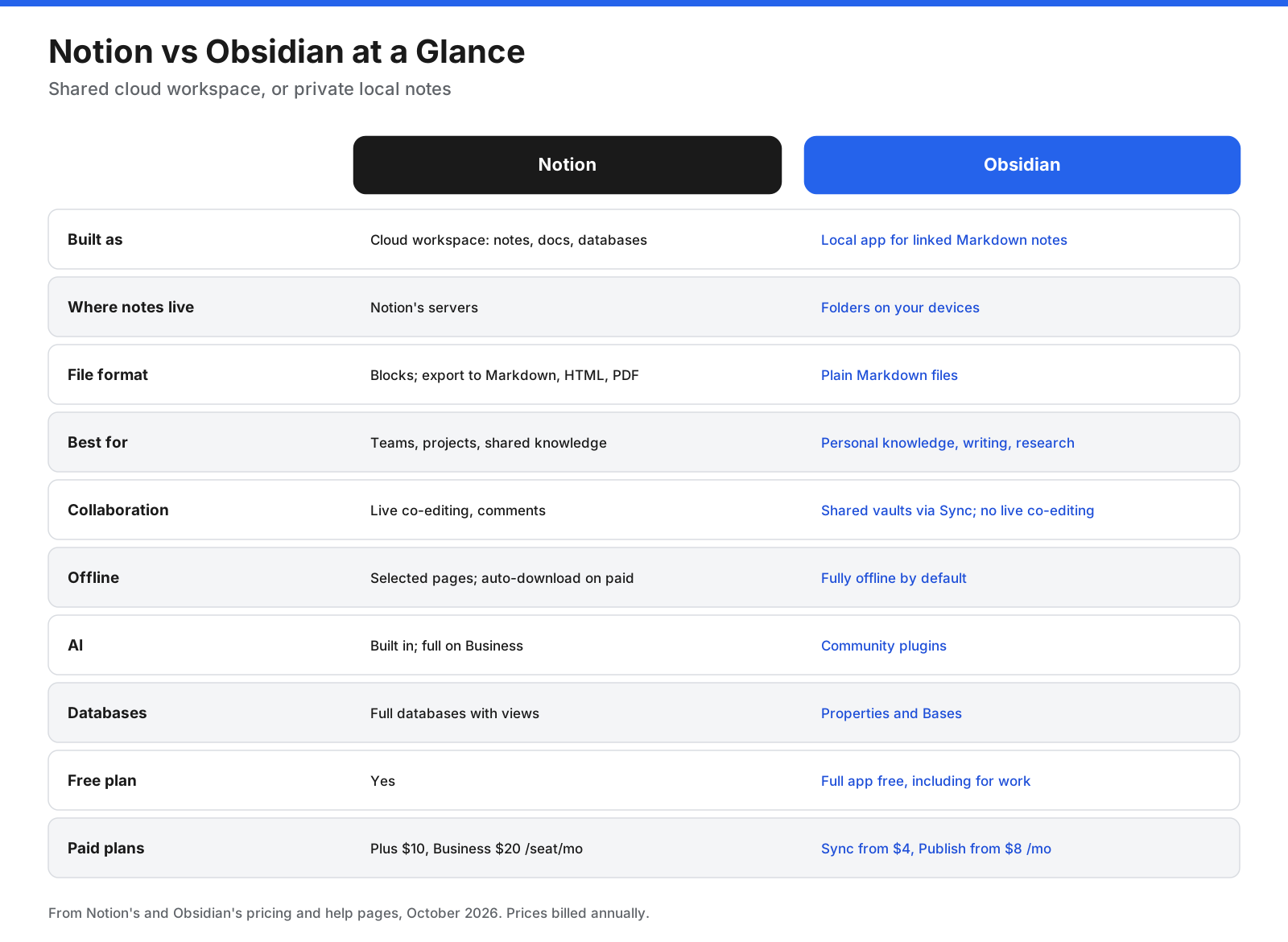
Notion vs Obsidian at a Glance
| Category | Notion | Obsidian |
|---|---|---|
| Built as | Cloud workspace for notes, docs, and databases | Local app for linked Markdown notes |
| Where notes live | Notion’s servers | Folders on your own devices |
| File format | Notion blocks; export to Markdown, HTML, or PDF | Plain Markdown files |
| Best for | Teams, projects, shared knowledge | Personal knowledge management, writing, research |
| Collaboration | Live co-editing, comments, sharing | Shared vaults through paid Sync, but no live co-editing in the same note |
| Offline | Selected pages; paid plans download recent and favorite pages automatically | Fully offline by default |
| AI | Built in; full features on Business | Community plugins |
| Databases | Full databases with views | Properties and Bases |
| Free plan | Yes | Full app is free, including for work |
| Paid plans | Plus $10, Business $20 per seat/month billed annually in the source document | Sync from $4, Publish from $8/month billed annually in the source document |
What Is the Difference Between Notion and Obsidian?
The core difference is where your notes live and who the apps are built for.
Notion stores your workspace in the cloud. Sharing is simple: invite a teammate and you can both edit the same page. Notion combines notes with databases, boards, calendars, forms, and AI in one workspace. The trade-off is that your workspace depends on Notion’s service, and full offline use takes some setup.
Obsidian stores notes on your device as plain text files. You can open them with another text editor, back them up however you like, and keep them if you stop using Obsidian. The app focuses on writing and linking ideas, and its plugin library adds features. The trade-off is that Obsidian is built for individuals, with no live co-editing, and you assemble more of your system yourself.
How Do Notion and Obsidian Store Your Notes?
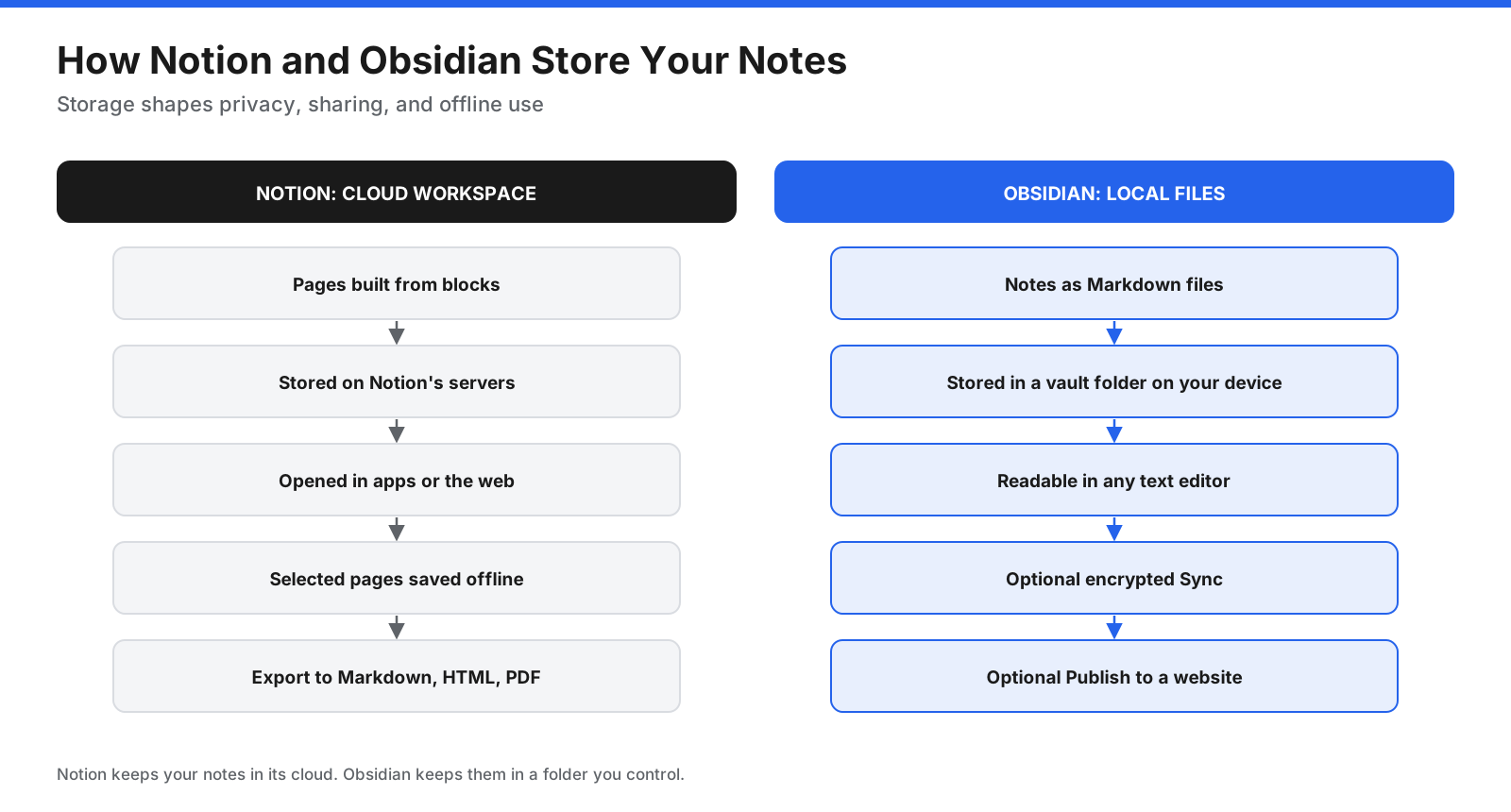
In Notion, each page is a set of blocks: paragraphs, headings, to-dos, images, embeds, and databases. You access your workspace through the apps or a browser, and can export pages to Markdown and CSV, HTML, or PDF. The source document says Notion supports offline pages on all plans, while paid plans also download recent and favorite pages automatically.
In Obsidian, a vault is a folder of Markdown files and attachments such as images and PDFs. Obsidian reads and writes those files directly. To use the same vault across devices, you can pay for Obsidian Sync, which the source document describes as end-to-end encrypted with AES-256, or use your own sync method, such as a cloud drive or Git.
What Is Notion?
Notion is an all-in-one workspace for notes, documents, wikis, databases, and projects. You build pages from blocks, link pages together, and create databases with table, board, calendar, timeline, and gallery views. Teams use it for company wikis, meeting notes, product roadmaps, content calendars, and project tracking.
Its AI features include Notion Agent for multi-step tasks, AI Meeting Notes, and Enterprise Search across connected apps, listed in the source document as Business-plan features. Notion also offers forms, simple websites, Notion Calendar, and integrations with apps such as Slack and Google Drive.
What Is Obsidian?
Obsidian is a note-taking and knowledge management app built around local Markdown files. Its signature features are internal links, backlinks, and a graph view that shows how notes connect. Canvas provides an infinite board for visual thinking, and Bases displays notes as database-style views built from their properties.
The source document says Obsidian is free for all purposes, including commercial use. Optional paid services add encrypted sync between devices and publishing notes as a website. Community plugins and themes let you change how the app looks and works.
How Do Notion and Obsidian Compare Feature by Feature?
Each section below compares one area and ends with a short verdict.
Ease of Use and Setup
Notion is easier to start with. You sign up, pick a template, and start writing in a familiar editor. Building a complex system takes time, but simple use is quick.
Obsidian asks more of you at the start. You create a vault, decide how to organize folders and links, and may choose plugins to add features. The source document attributes to Zapier’s reviewer the view that Obsidian is a tool for power users who enjoy tinkering.
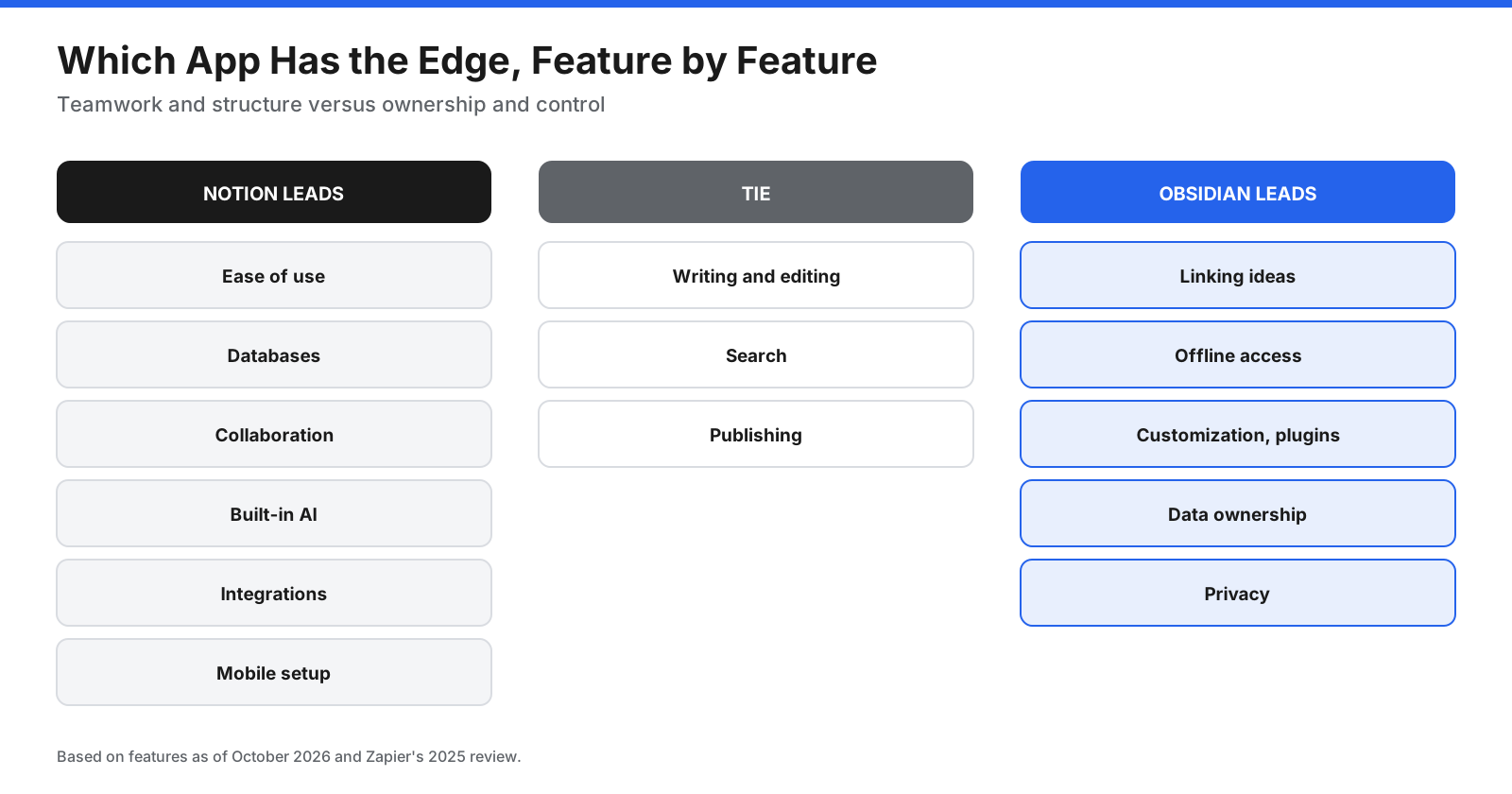
Verdict: Notion for most people. Obsidian suits those who enjoy shaping their own setup.
Writing and Editing
Notion’s block editor works well for mixed content: text, checklists, images, tables, and embeds on the same page. You can drag blocks around and change one type into another.
Obsidian is built for writing in Markdown, with live preview so formatting appears as you type. It is focused and keeps text portable. The source document describes Zapier’s review as rating note-taking a tie, with different strengths.
Verdict: Tie. Notion for rich, mixed pages. Obsidian for focused writing and long-form text.
Linking and Connecting Ideas
Both apps let you link pages. Notion supports page links, mentions, backlinks, and relations between database entries.
Obsidian puts linking at the center. Typing double brackets creates a link to any note, even one that does not exist yet. Backlinks, unlinked mentions, and graph view show how ideas connect across a vault.
Verdict: Obsidian.
Databases and Structured Information
Notion’s databases can track projects, tasks, contacts, reading lists, or content in tables, boards, calendars, timelines, and galleries, with properties, filters, formulas, relations, and rollups.
Obsidian handles structure through properties on each note and Bases, which displays notes with those properties in tables and other views. It can support personal tracking, but is not designed as a full team database tool.
Verdict: Notion.
Collaboration and Sharing
Notion was built for teams. Several people can edit the same page at once, leave comments, mention each other, and share pages with guests or publicly on the web. Permissions control access.
Obsidian is designed for individuals. Obsidian Sync lets you invite others to a shared vault, according to the source document, but there is no live co-editing of the same note with cursors and comments.
Verdict: Notion, clearly.
AI Features
Notion has AI built in. The source document says writing help, summaries, Notion Agent, AI Meeting Notes, and Enterprise Search are included on Business and Enterprise plans, while Free and Plus get a limited trial.
Obsidian does not include built-in AI. Community plugins connect a vault to AI models for chat, writing, and search, often using your own API key. This gives you choice and control but requires setup.
Verdict: Notion for built-in AI. Obsidian if you want to choose your own models and keep control.
Offline Access
Obsidian works fully offline by default because your notes are files on your device.
The source document says Notion supports offline pages in desktop and mobile apps on all plans. You can mark pages available offline, and paid plans automatically download recent and favorite pages. Limits apply: only the first 50 rows of a database’s first view are saved offline, subpages are not downloaded automatically, and some blocks need a connection.
Verdict: Obsidian.
Search
Notion search covers pages and databases you can access, with filters for titles, people, dates, and teamspaces. The source document describes Enterprise Search on Business as a beta feature that can search connected apps such as Slack and Google Drive.
Obsidian search runs locally across files in your vault, so it works offline. Search operators can narrow results by file name, folder path, tag, or line, and the quick switcher jumps to a note by typing part of its name.
Verdict: Tie. Notion for searching across a team and connected apps; Obsidian for offline search with fine-grained operators.
Templates and Daily Notes
Notion offers templates for wikis, project trackers, meeting notes, habit trackers, and more. You can save pages as database templates, and buttons can create pages with preset content.
Obsidian includes core plugins for templates and daily notes. Community plugins add advanced templating with variables and logic. Users often build daily-note workflows that link out to topics and projects.
Verdict: Notion for ready-made templates. Obsidian for daily-note workflows you shape yourself.
Customization and Plugins
Obsidian’s community has built thousands of plugins and themes for task management, calendars, spaced repetition, citations, diagrams, and more. You can also edit CSS snippets to change the look.
Notion customization happens inside its building blocks: templates, databases, page layouts, buttons, and automations. It does not support third-party plugins that change the app itself.
Verdict: Obsidian.
Integrations
Notion connects to apps such as Slack and Google Drive and works with automation tools including Zapier. Its API lets developers build integrations.
Obsidian has no native integrations with outside apps in the same way, though community plugins connect it to tools such as calendars, Git, and AI services. Its Web Clipper saves web pages into your vault.
Verdict: Notion.
Mobile Apps
Both offer iOS and Android apps. Notion’s mobile app gives you the cloud workspace once you are online. Obsidian’s mobile app opens your vault on the phone, but you need a sync method, such as Obsidian Sync or a compatible cloud folder.
Verdict: Notion is simpler to set up on mobile. Obsidian is more private but needs a sync choice.
Publishing
Notion lets you publish pages to the web and build simple sites, with custom sites on paid plans according to the source document. Obsidian Publish turns selected notes into a website with a custom domain, graph view, and password protection. The source document lists it at $8 per site per month billed annually.
Verdict: Tie. Notion is quicker for simple public pages. Obsidian Publish suits personal knowledge sites and digital gardens.
What Does a Typical Setup Look Like in Each App?
A common Notion setup starts with teamspaces for each department or area of life. Inside them, databases hold projects, tasks, meeting notes, and documents, each with properties such as owner, status, and due date. Wiki pages link to databases, and linked views show filtered slices, such as tasks for the week. Templates make new entries consistent.
A common Obsidian setup starts with a vault and a small number of folders, often an inbox for new notes, a folder for permanent notes, one for projects, and an archive. Daily notes capture what happens each day and link to topics. Index notes, sometimes called maps of content, gather links to related notes. Tags and properties add structure, and Bases can show notes with certain properties as a table.
The Notion approach suits information many people need to update and track. The Obsidian approach suits ideas one person develops and connects over months or years.
How Much Do Notion and Obsidian Cost?
The two apps charge in different ways. Notion charges per seat for features. Obsidian gives the app away and charges for optional services.
Notion pricing per seat per month, as listed in the source document:
- Free: $0, unlimited blocks for individuals, 7-day page history, 5 MB file uploads, and up to 10 guests.
- Plus: $10 billed annually or $12 monthly, with unlimited blocks for teams, unlimited uploads, and 30-day page history.
- Business: $20 billed annually or $24 monthly, with Notion AI, SAML SSO, private teamspaces, and 90-day page history.
- Enterprise: Custom pricing, with advanced security, audit logs, and unlimited page history.
The source document notes that monthly prices came from a February 2026 summary, while Notion’s own page lists $10 and $20 and says yearly billing saves up to 20 percent. Verify the current prices before publishing or purchasing.
Obsidian pricing per user per month, as listed in the source document:
- App: Free for personal and commercial use.
- Sync Standard: $4 billed annually or $5 monthly, for one vault, 1 GB of storage, and one month of version history.
- Sync Plus: $8 billed annually or $10 monthly, for 10 vaults, 10 GB of storage, and 12 months of version history.
- Publish: $8 per site billed annually or $10 monthly.
- Commercial license: Optional, $50 per user per year, according to the source document.
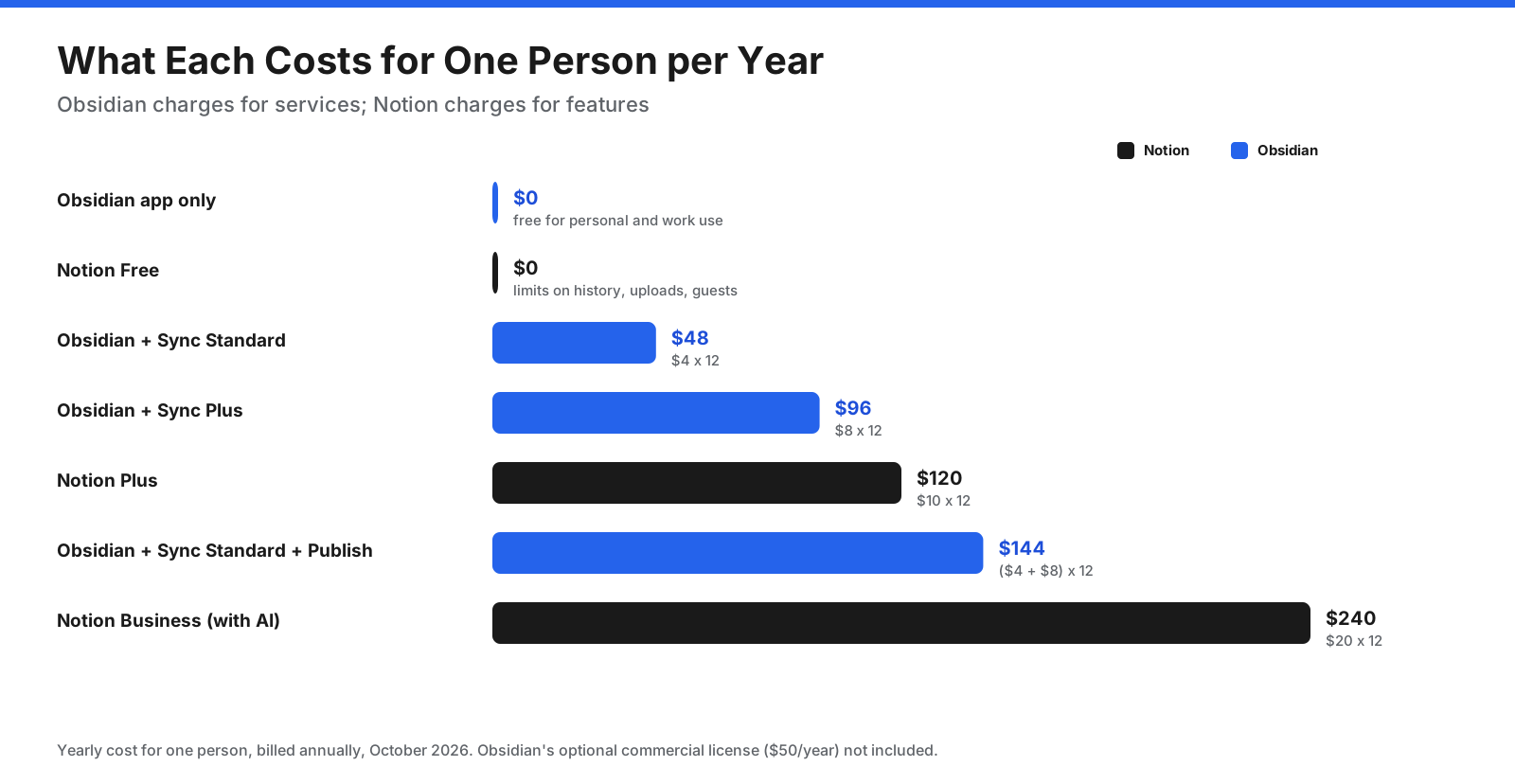
For individuals, Obsidian is usually the cheaper option, since the full app is free and sync is optional. For teams, Notion’s per-seat pricing buys collaboration features that Obsidian does not offer.
How Do They Compare on Privacy, Security, and Data Ownership?
For many people, this is the deciding factor.
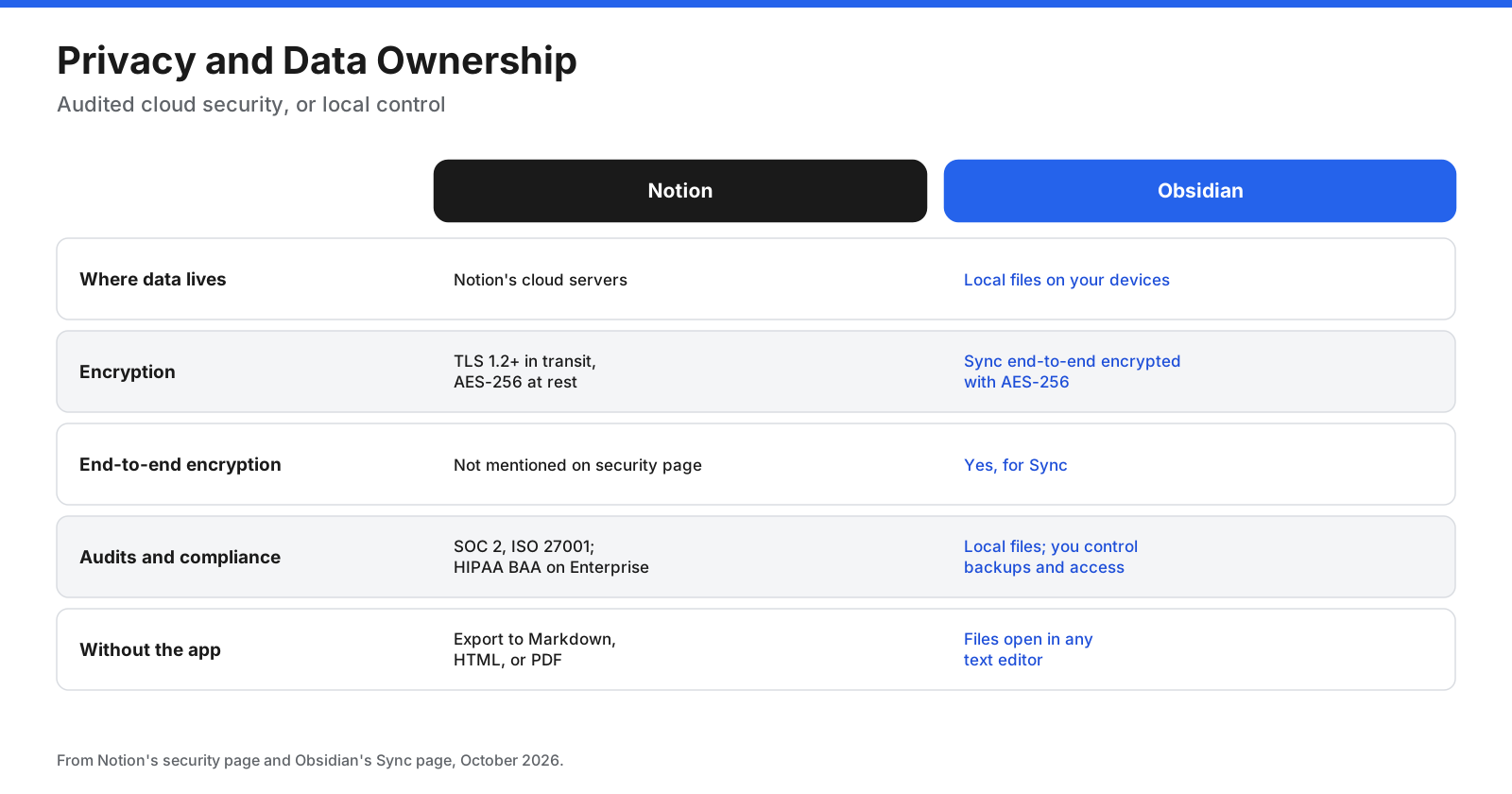
Notion: According to the source document’s account of Notion’s security page, data is encrypted in transit with TLS 1.2 or higher and at rest with AES-256. Notion undergoes annual SOC 2 and ISO 27001 audits. Data residency and a HIPAA Business Associate Agreement are available to Enterprise customers. The source document says the security page does not mention end-to-end encryption, and that non-Enterprise AI data is retained by AI providers for 30 days while Enterprise data has zero retention.
Obsidian: Notes are local files, so they stay on your devices unless you choose to sync or publish them. The source document says Obsidian Sync uses end-to-end encryption with AES-256. Because notes are plain Markdown, you can open, move, and back them up without Obsidian.
Verdict: Obsidian for privacy and ownership. Notion for organizations that need audited cloud security and admin controls.
What Do Reviewers Say?
The source document summarizes Zapier’s 2025 comparison as giving Notion the edge for ease of use, collaboration, and AI tools, and Obsidian the edge for customization and cost because the full app is free. It rated note-taking a tie. That matches the pattern in this guide: the more your notes involve other people, the more Notion makes sense.
Which App Fits Which Kind of User?
Different users get different value from each app.
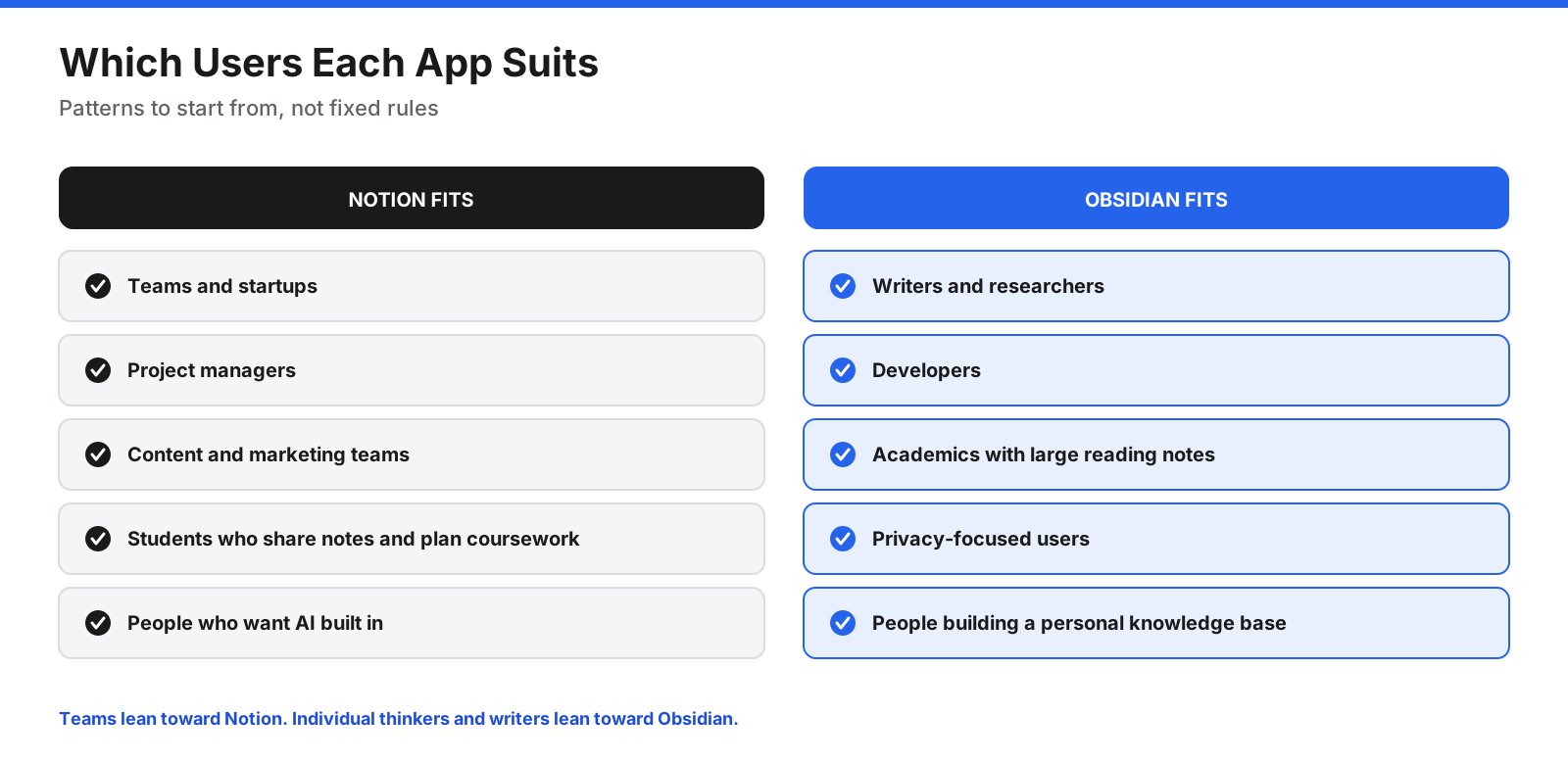
- Teams and startups: Notion, for shared wikis, project boards, and live collaboration.
- Project managers: Notion, for databases, timelines, and status tracking.
- Writers and researchers: Obsidian, for focused writing and linked notes that grow over years.
- Developers: Obsidian, for Markdown, Git-friendly files, and plugins. Notion is also common for team documentation.
- Students: Either. Notion suits course planning and shared notes. Obsidian suits connected study notes over time.
- Privacy-focused users: Obsidian.
Can You Use Notion and Obsidian Together?
Yes. A common setup is to use Notion for anything shared, such as team wikis, projects, and meeting notes, and Obsidian for personal thinking, research, journaling, and long-term notes that you want to own.
Decide clearly what goes where. For example, keep project status and team documents in Notion, and keep reading notes, ideas, and drafts in Obsidian. When a draft is ready to share, copy it into Notion. This avoids searching two apps for the same information.
How Do You Switch Between Notion and Obsidian?
Moving between the two is easier than it used to be.
From Notion to Obsidian: The source document says Obsidian’s official Importer plugin offers two methods. The recommended method connects to Notion through its API, preserves databases by converting them to Bases, and keeps formulas. The alternative imports a Notion HTML export, which does not preserve databases. The API importer only brings over each database’s primary view and can be slow for large workspaces because of Notion rate limits.
From Obsidian to Notion: Notion can import Markdown files from a vault. Internal links, plugins, and Bases views will not carry over in the same form, so expect to rebuild some structure.
In either direction, start with a small test import, check links and attachments, then move the rest in stages.
What Are the Downsides of Notion and Obsidian?
Notion downsides:
- Full AI features require the Business plan in the source document.
- Offline use takes setup and has limits on databases and subpages.
- Your workspace depends on Notion’s cloud service, and its security page does not mention end-to-end encryption.
- Large, complex workspaces can take time to design and maintain.
Obsidian downsides:
- No live co-editing for teams.
- Setup and plugin choices take time.
- No built-in AI, so AI features depend on community plugins.
- Syncing across devices needs a paid Sync plan or your own method.
- Community plugins vary in quality and maintenance, so a plugin you rely on could stop being updated.
How Do You Get Started With Each App?
Getting started with Notion:
- Create a free account and pick a template close to your needs, such as a task list or notes database.
- Add a few pages you would normally write elsewhere, such as meeting notes or a reading list.
- Try one database view, such as a board or calendar, to see whether structured tracking helps you.
- Invite one person and edit a page together to test collaboration.
Getting started with Obsidian:
- Download the app and create a vault in a folder you back up.
- Write a handful of notes and link them with double brackets.
- Turn on the daily notes and templates core plugins.
- Add one or two community plugins only when you feel a clear need.
Which Should You Choose: Notion or Obsidian?
Start with whether you work alone or with others.
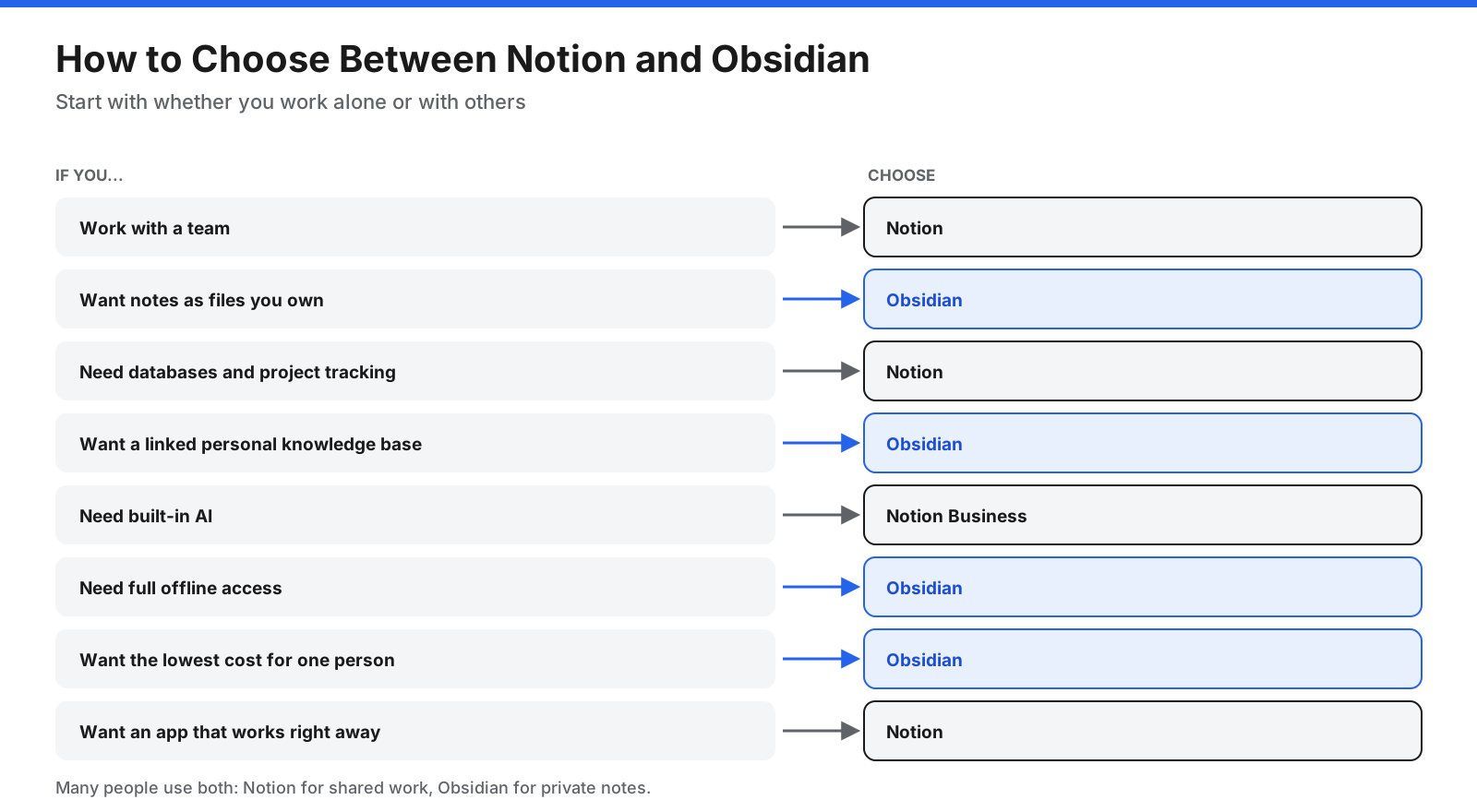
- Choose Notion if you collaborate, manage projects, need databases, or want built-in AI and integrations.
- Choose Obsidian if you work mostly alone, care about privacy and owning your files, want strong offline use, or enjoy building a system that fits you.
If you are unsure, try both for two weeks with the same set of notes. Notice which one you open without thinking, and which one helps you find old notes when you need them.
Frequently Asked Questions
Is Obsidian better than Notion?
Obsidian is better for private, offline, file-based notes and linking ideas. Notion is better for teamwork, databases, and built-in AI. Neither is better for everyone; the right choice depends on whether you work alone or with others.
Is Obsidian free?
Yes. The source document says the app is free for personal, commercial, and nonprofit use. Sync and Publish are optional paid services.
Is Notion free?
Yes. Notion’s free plan offers unlimited blocks for individuals, with limits on page history, file uploads, and guests. Teams of two or more on the free plan have a block limit according to the source document.
Can Obsidian replace Notion?
For personal notes, journaling, and research, yes. For team collaboration, shared databases, and project management, Obsidian is not a direct replacement because it lacks live co-editing.
Why are people leaving Obsidian?
People who move away from Obsidian often mention setup time, plugin management, lack of live collaboration, and the need for a sync plan across devices. Others move from Notion to Obsidian for offline use and file ownership.
What are the downsides of Obsidian?
The main downsides are a steeper learning curve, no live co-editing, no built-in AI, and reliance on community plugins for many features. Syncing across devices requires Obsidian Sync or your own setup.
Is Notion still relevant in 2026?
Yes. The source document notes features such as Notion Agent, AI Meeting Notes, offline pages, and Enterprise Search, and its use for team wikis and project management.
Does Obsidian have AI?
Obsidian does not include built-in AI. Community plugins add AI chat, writing help, and smart search, usually by connecting to an AI provider with your own API key.
Can you use Obsidian without paying for Sync?
Yes. Obsidian works without Sync. You can keep a vault on one device, or sync the folder yourself with a cloud drive or Git. Obsidian Sync is a straightforward option across phones and computers and adds end-to-end encryption and version history.
Is Notion or Obsidian better for a second brain?
Obsidian is a common choice for a personal second brain because linking, backlinks, and graph view are designed for connecting ideas over time. Notion works well if your system focuses on projects, resources, and tasks in databases.
Is Obsidian good for teams?
Obsidian can work for small teams through shared vaults in Sync, but it lacks live co-editing, comments, and the permission controls Notion offers. Teams that need collaboration often choose Notion or a similar cloud tool.
Which is better for students, Notion or Obsidian?
Notion suits students who plan coursework, track assignments, and share notes. Obsidian suits students who want connected study notes over several years and want to keep them as files they own.
Is there anything better than Obsidian?
That depends on what you need. The source document mentions Anytype for encrypted local-first notes with database-like structure, Capacities for object-based personal notes, and Obsidian for Markdown-based personal knowledge management.
The Bottom Line
Notion and Obsidian solve note-taking from opposite directions. Notion is the better choice for teams, projects, databases, and built-in AI, with everything in a shared cloud workspace. Obsidian is the better choice for individuals who want private, offline notes stored as files they own, with deep linking and extensive customization.
If you work with others, start with Notion. If you mainly think, write, and research on your own, start with Obsidian. If you do both, use each for what it does best, and check current prices on each company’s site before you subscribe.















































































































