

Phishing is the most reported type of cybercrime in the United States. The FBI’s Internet Crime Complaint Center (IC3) received 191,561 phishing and spoofing complaints in 2025, more than for any other crime type. Instead of breaking through technical defenses, an attacker persuades a person to open the door.
Phishing, defined: Phishing is a social engineering attack in which a criminal impersonates a trusted person or organization, usually through email, text message, phone call, or a fake website, to trick the target into revealing credentials or financial information, sending money, or installing malware.
This guide explains how phishing works, its major types, technical warning signs, multi-factor authentication (MFA) bypasses, email authentication, reporting, and the main categories of anti-phishing software. It is informational and vendor-neutral, with tools grouped by function rather than ranked.
Where Does the Word “Phishing” Come From?
“Phishing” is a variation of “fishing.” The attacker casts a lure and waits for a victim to bite. The term emerged in the mid-1990s among people attacking America Online accounts. A cracking toolkit called AOHell let users impersonate AOL staff and ask other users for passwords through instant messages. The “ph” spelling is commonly linked to “phreaking,” an earlier hacker term for manipulating telephone networks.
Early phishing often relied on mass messages with obvious spelling errors. Modern phishing uses cloned login pages served over HTTPS, compromised legitimate accounts, QR codes, voice calls, paid search ads, and reverse proxies that capture session tokens. The goal remains the same: get a person to act against their own interest.
How Big Is the Phishing Problem?
Three independent data sources show the scale from different angles.
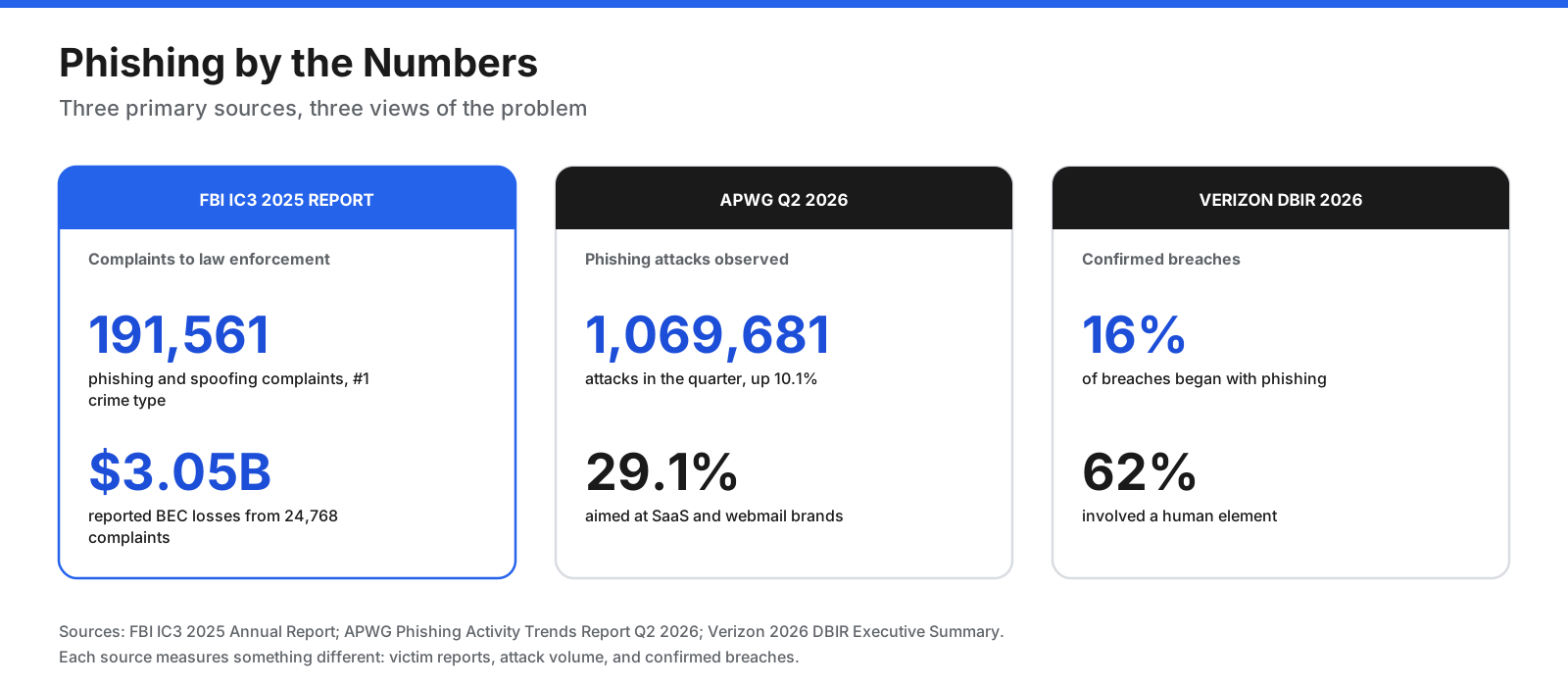
- Complaints to law enforcement: The FBI’s 2025 IC3 report recorded 191,561 phishing and spoofing complaints. Business email compromise (BEC) generated 24,768 complaints but reported losses of about $3.05 billion.
- Attack volume: The Anti-Phishing Working Group (APWG) counted 1,069,681 phishing attacks in the second quarter of 2026, up 10.1% from the first quarter. SaaS and webmail brands were the most targeted sector at 29.1%.
- Breaches: Verizon’s 2026 Data Breach Investigations Report found phishing was the initial access vector in 16% of breaches, and a human element was present in 62%.
These numbers differ because IC3 counts victim reports, APWG counts phishing sites and campaigns, and Verizon counts confirmed breaches. Together they show that phishing is common and frequently starts serious incidents.
How Does a Phishing Attack Work?
MITRE ATT&CK catalogs phishing as technique T1566, electronically delivered social engineering. A phishing operation usually follows six stages.
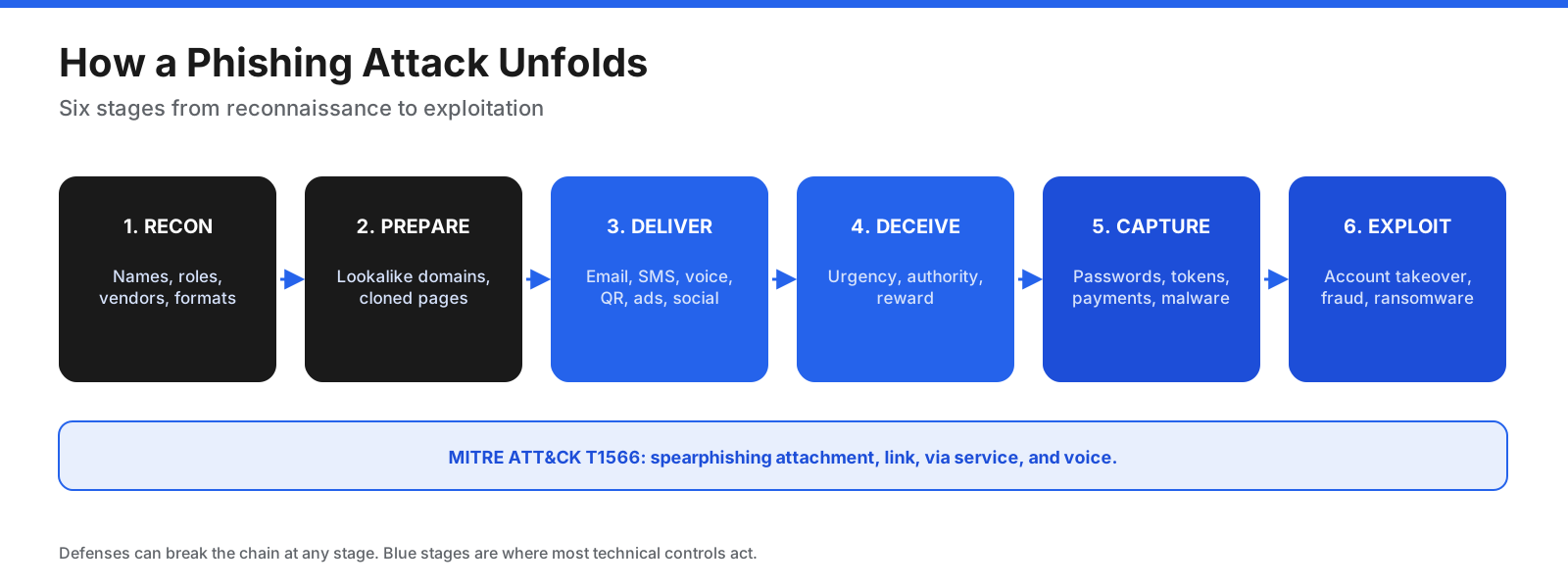
- Reconnaissance: The attacker gathers employee names and roles, email formats, vendors, recent company news, and software details.
- Preparation: The attacker registers lookalike domains, sets up email infrastructure, clones a login page, or prepares a malicious document.
- Delivery: The lure arrives through email, SMS, voice, QR code, social media, collaboration apps, or a paid search ad.
- Deception: The message persuades the target to click, open a file, call, reply, scan a code, or approve a sign-in.
- Capture: The target enters credentials, approves a fraudulent MFA prompt, sends money, or runs malware.
- Exploitation: The attacker takes over accounts, redirects payments, steals data, sends more phishing, or deploys ransomware.
Credential phishing aims to steal usernames, passwords, and session tokens. Malware phishing tries to run malicious code. Direct fraud, such as BEC, may simply persuade a victim to send money.
Why Does Phishing Work?
Phishing exploits predictable human responses rather than software flaws. Common triggers include:
- Urgency: “Your account will be suspended today.”
- Authority: The message appears to come from an executive, IT department, bank, or government agency.
- Fear: Warnings about suspicious sign-ins, overdue invoices, or legal action.
- Reward: Refunds, prizes, gift cards, or job offers.
- Curiosity: Shared documents, delivery notifications, or voicemail alerts without context.
- Familiarity: References to actual colleagues, vendors, or recent events.
Generative AI has weakened one traditional warning sign: poor spelling and awkward grammar. Attackers can produce fluent, well-formatted messages, so context and verification matter more than writing quality.
What Are the Types of Phishing?
Phishing types differ by channel, targeting, and technique. Many attacks combine multiple types, such as a smishing text that leads to an adversary-in-the-middle login page.
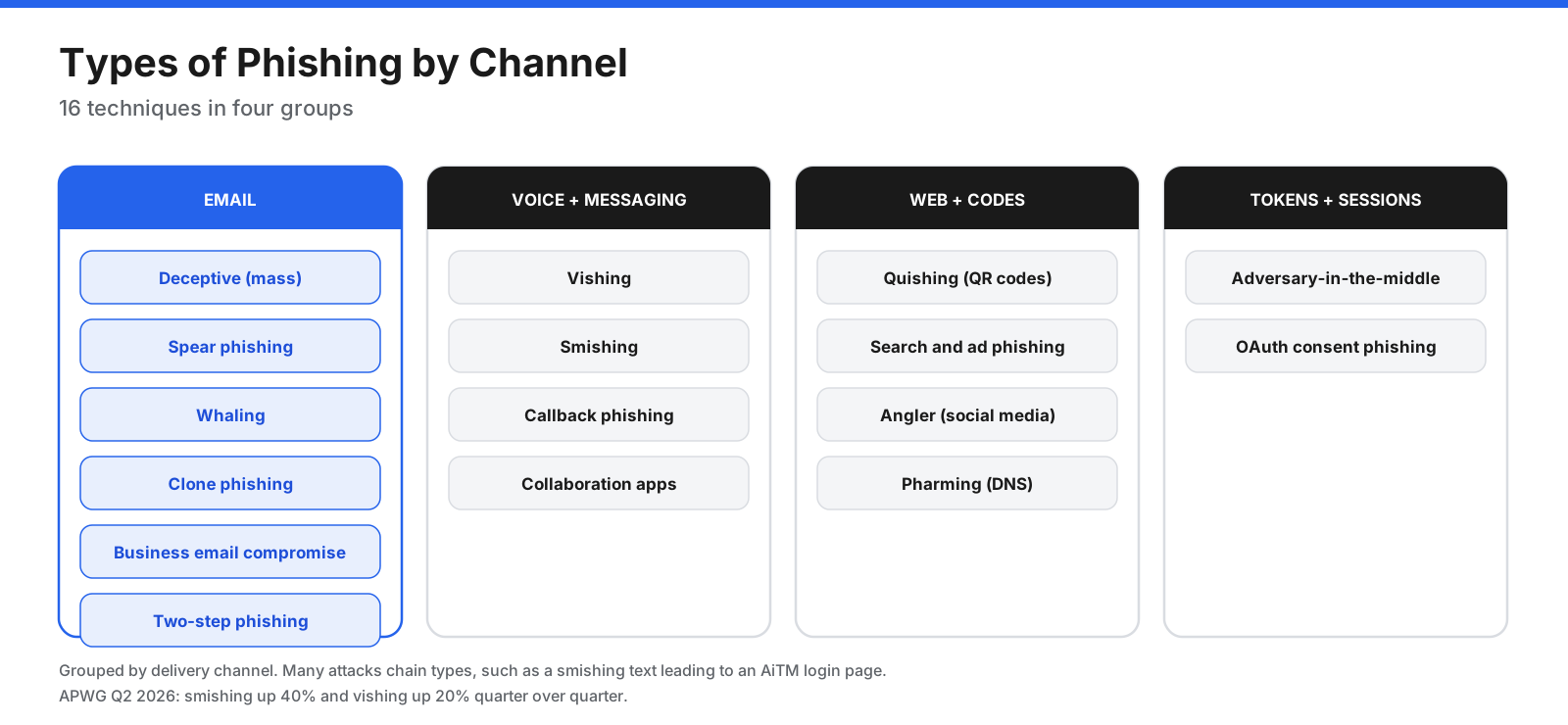
| Type | Channel | How it works |
|---|---|---|
| Deceptive mass phishing | Generic messages sent to many people while impersonating well-known brands. | |
| Spear phishing | Email or messaging | Personalized messages aimed at specific people using researched details. |
| Whaling | Spear phishing aimed at senior executives. | |
| Clone phishing | A copy of a legitimate message with links or attachments swapped. | |
| Business email compromise (BEC) | Impersonation or takeover of an executive or vendor account to request payments or data. | |
| Vishing | Voice | Phone calls impersonating banks, support desks, or government agencies. |
| Smishing | SMS and messaging apps | Texts with malicious links, often about deliveries, tolls, or bank alerts. |
| Callback phishing | Email plus voice | An email asks the victim to call a number where an attacker takes over. |
| Quishing | QR code | A QR code leads to a phishing site, often on a phone outside corporate controls. |
| Search and ad phishing | Web | Fake sites are promoted through search results or paid ads. |
| Angler phishing | Social media | Fake support accounts steer customers to phishing pages. |
| Pharming | DNS | DNS tampering redirects users from a legitimate domain to a fake site. |
| Adversary-in-the-middle (AiTM) | Web proxy | A reverse proxy relays a genuine sign-in page and steals the session cookie after MFA. |
| OAuth consent phishing | OAuth | A malicious app asks the user to grant access to a mailbox or files. |
BEC deserves special attention because of its financial impact. BEC messages often contain no malicious link or attachment, so traditional filters that look for malicious content can miss them. Verify payment changes through a separate, trusted channel.
What Does a Phishing Email Look Like?
Modern phishing emails can look polished, so the most reliable signs are often technical rather than visual. This illustrative example uses a placeholder brand and the reserved domain example.com.
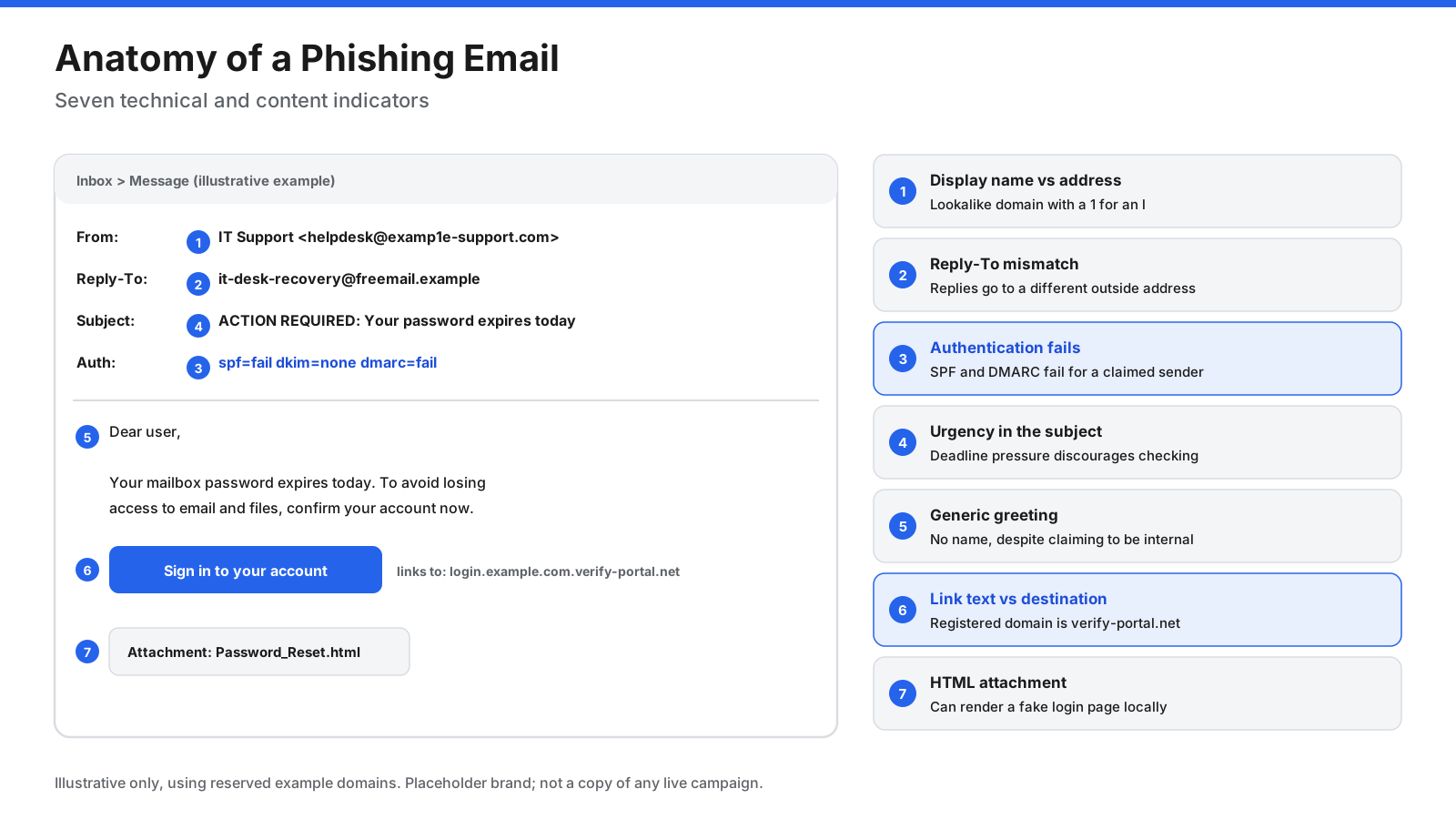
Sender and header tricks:
- Display-name spoofing: The friendly name says “IT Support,” but the actual address belongs to an outside domain.
- Lookalike domains: Attackers swap letters, add words, or use a different top-level domain.
- Homoglyphs and punycode: Characters from other alphabets can resemble Latin letters. Punycode domains may begin with “xn--”.
- Reply-To mismatch: Replies go to a different address from the apparent sender.
- Authentication failures: SPF, DKIM, or DMARC failures on a message claiming to be from a known brand are warning signs.
Link and content tricks:
- The visible link text differs from the destination.
- A subdomain such as login.example.com.attacker.net belongs to attacker.net, not example.com.
- Redirect chains and URL shorteners hide the final destination.
- HTTPS does not prove safety. It encrypts the connection but does not establish that a site is legitimate.
- HTML attachments can render a fake login page locally.
- Urgent deadlines, requests for secrecy, unexpected invoices, and unusual payment changes deserve independent verification.
How Do Phishing Attacks Bypass Multi-Factor Authentication?
MFA blocks many credential attacks, but not all methods offer equal protection.
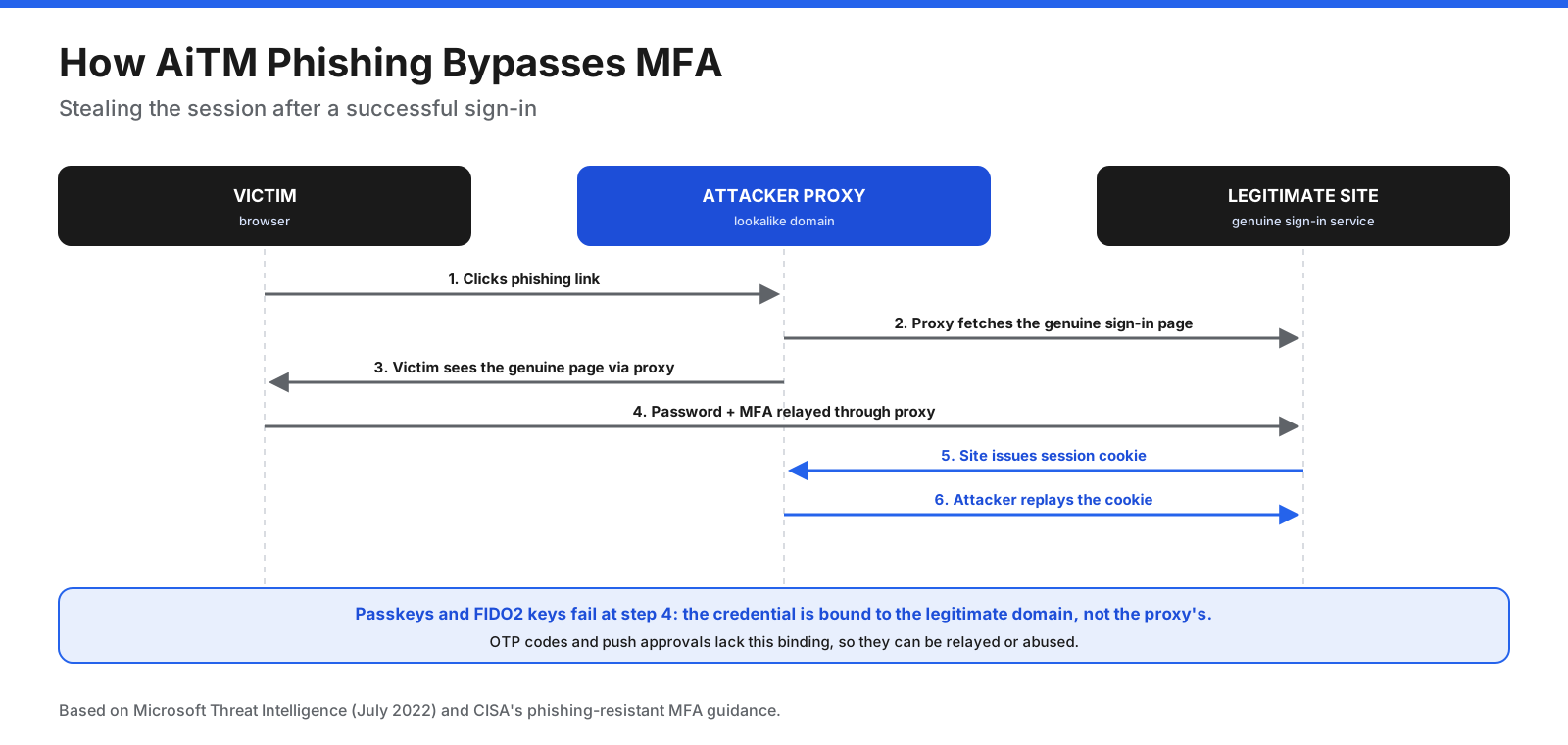
Adversary-in-the-middle (AiTM) phishing: The attacker runs a proxy between the victim and the genuine sign-in page. The victim enters a password and completes MFA. The proxy captures the resulting session cookie, which the attacker replays to access the account. This steals the result of a successful sign-in rather than defeating the second factor itself.
- MFA fatigue: Repeated push requests pressure a user into approving one. Number matching helps reduce this abuse.
- One-time code relay: A fake page asks for an authenticator or SMS code and immediately submits it to the real site.
- Phishing-resistant MFA: Passkeys and FIDO2/WebAuthn security keys bind credentials to the legitimate domain, so a lookalike or proxy domain cannot use them.
SMS codes, authenticator one-time codes, and simple push approvals can still be phished or abused. Prioritize phishing-resistant MFA for administrators, remote access, email, and high-risk accounts.
How Do SPF, DKIM, and DMARC Stop Email Spoofing?
Email was designed without built-in sender verification, so anyone can put an address in the visible From field. Three DNS-based standards help close that gap.
- SPF (Sender Policy Framework): A DNS record lists servers allowed to send mail for a domain. SPF checks the envelope sender, not the visible From address.
- DKIM (DomainKeys Identified Mail): A cryptographic signature lets the receiver verify that signed parts of a message were not altered and were signed by the stated domain.
- DMARC (Domain-based Message Authentication, Reporting, and Conformance): DMARC aligns SPF or DKIM with the visible From domain, tells receivers whether to deliver, quarantine, or reject failing messages, and provides aggregate reports.
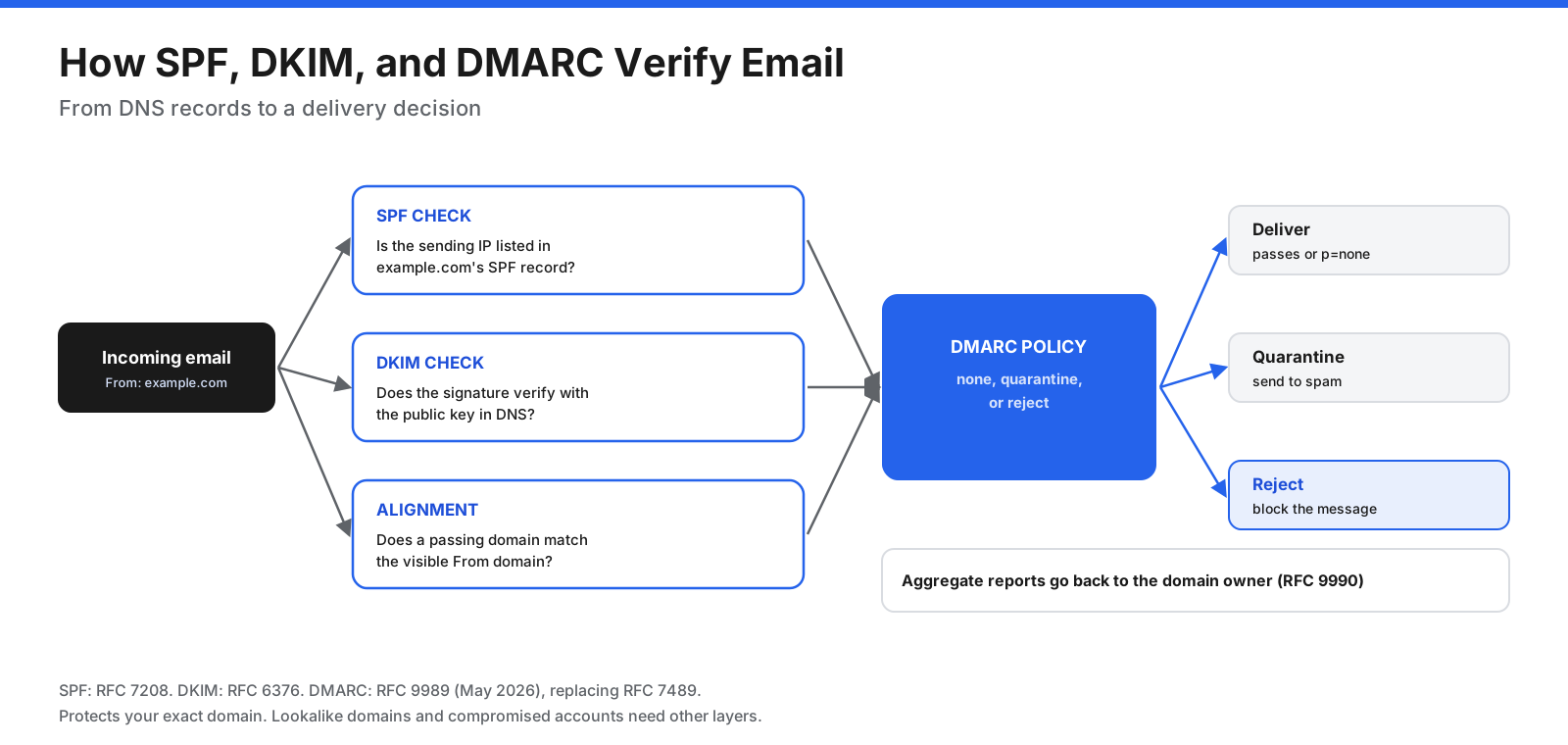
Email authentication has limits. It does not stop lookalike domains, compromised legitimate accounts, or messages from free webmail addresses, so it must be combined with other controls.
How Can You Spot a Phishing Message?
- Check the sender’s full address, not just the display name, and compare the domain character by character.
- Hover over links on a computer or long-press on a phone to inspect the destination.
- Question urgency and secrecy. Pressure to act immediately is a classic manipulation tactic.
- Verify through a separate channel using a phone number or website you already know.
- Be suspicious of unexpected attachments and QR codes, especially HTML files, archives, and documents that ask you to enable content.
- Never approve an MFA prompt you did not start.
- Confirm changes to vendor bank details by phone before paying.
- Use the report button instead of simply deleting suspicious messages.
How Do You Know If You Got Phished, and What Should You Do?
Warning signs include password reset emails you did not request, sign-in alerts from unfamiliar locations, messages sent from your account that you did not write, new inbox rules, unfamiliar MFA methods, and unexplained charges or transfers.
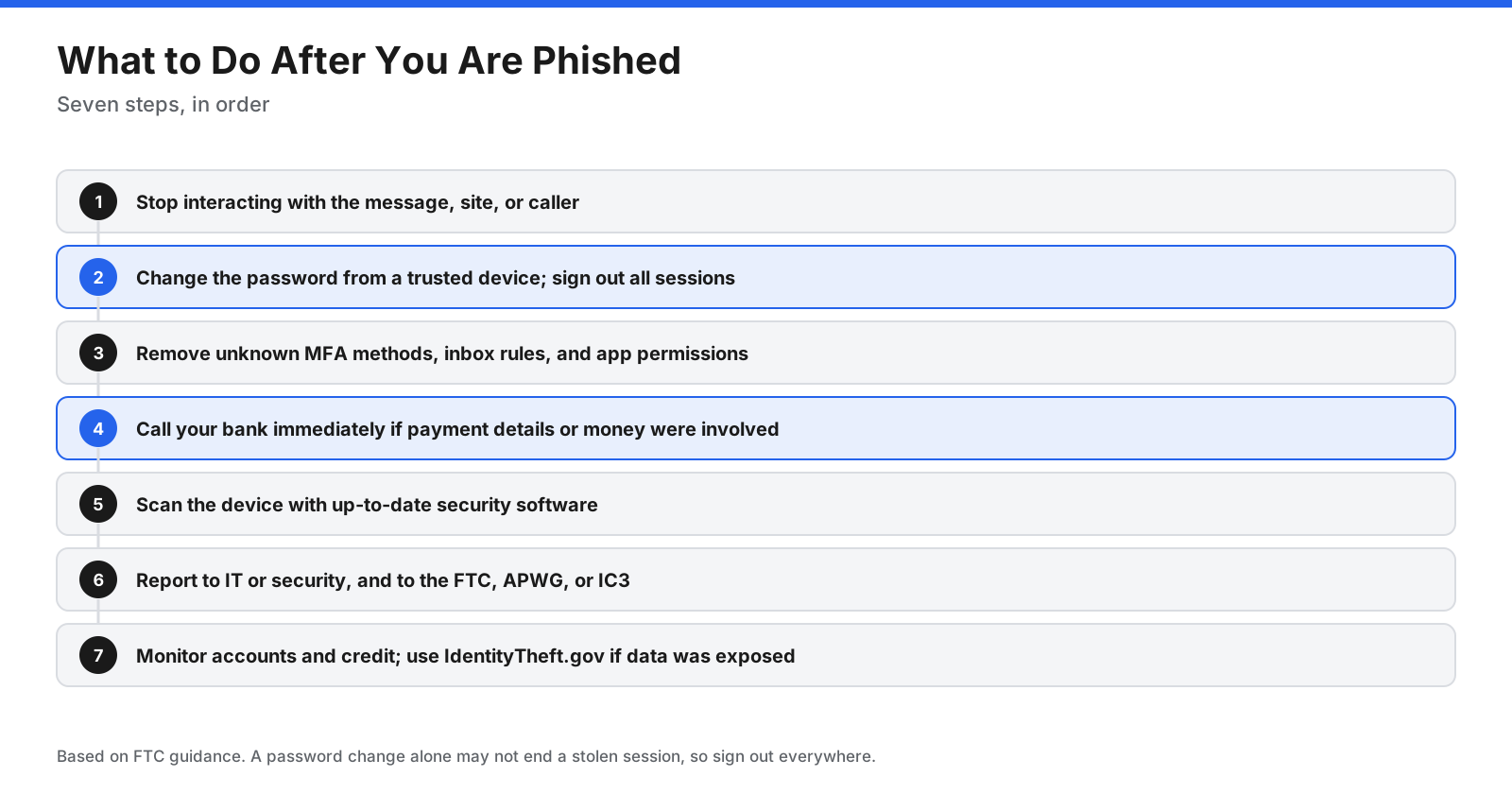
- Stop interacting with the message, site, or caller.
- Change the password from a trusted device and sign out of all sessions if possible. A password change alone may not end a stolen session.
- Review account security: remove MFA methods, app permissions, forwarding rules, and recovery options you do not recognize.
- Contact your bank or payment provider immediately if you shared card details or sent money.
- Scan your device with updated security software if you clicked a link or opened an attachment.
- Report the incident to your organization’s IT or security team.
- Watch for follow-up fraud. If personal or financial data was exposed, use the appropriate identity-theft and credit-monitoring resources.
How Do Organizations Defend Against Phishing?
No single control stops phishing. Organizations layer defenses so that a lure missed by one layer can be caught by another.
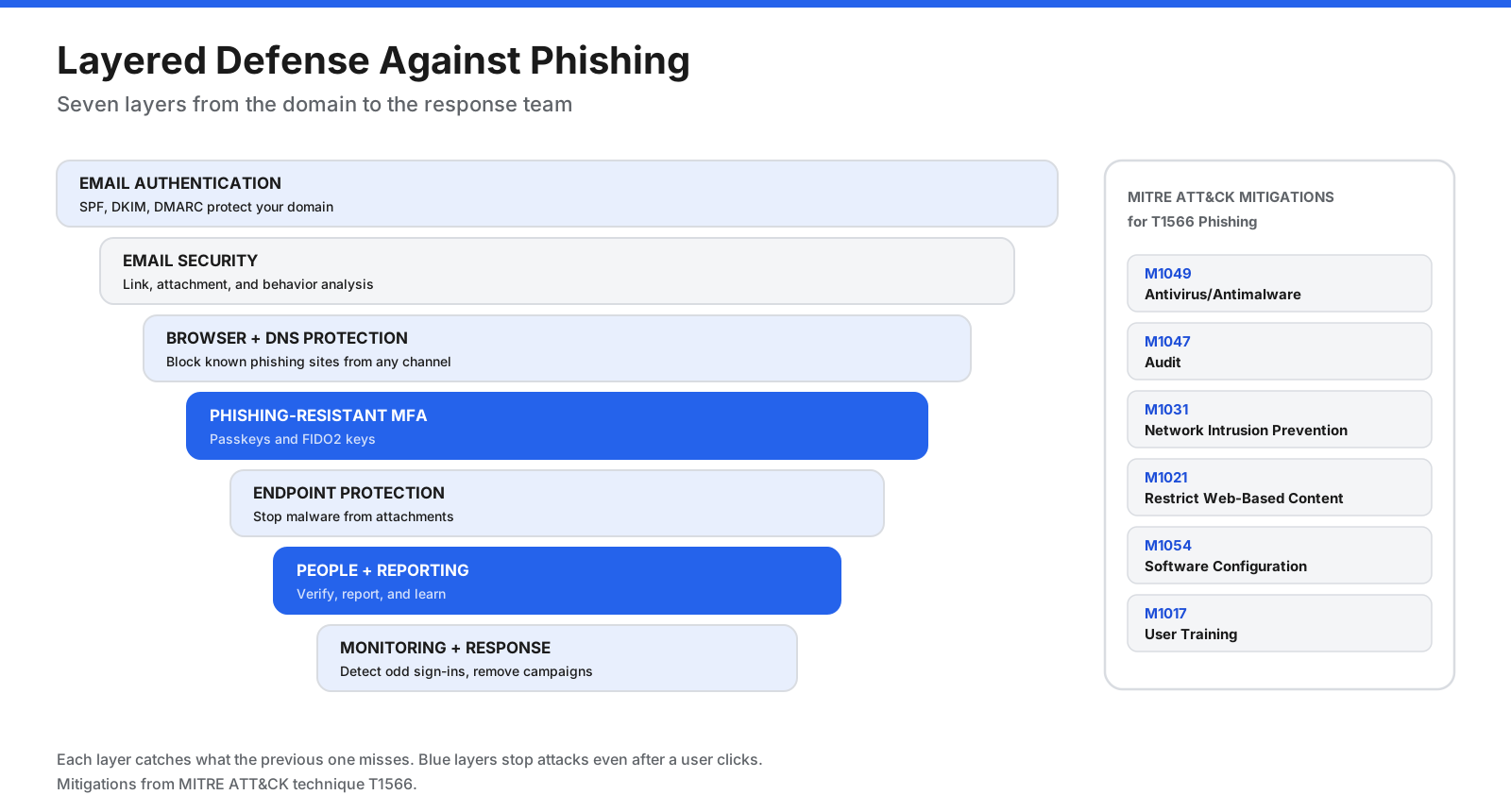
- Domain protection: Configure SPF, DKIM, and DMARC, and monitor lookalike domain registrations.
- Email security: Scan links and attachments, inspect sender behavior, and detect BEC patterns.
- Web and DNS filtering: Block known malicious domains from email, SMS, QR codes, and social media.
- Strong authentication: Prioritize passkeys or FIDO2 security keys for administrators and high-risk users.
- Conditional access: Apply sign-in policies based on device health and risk.
- Endpoint protection: Detect malware delivered through phishing.
- Payment controls: Verify vendor bank changes and large transfers out of band.
- Awareness and simulation: Teach staff to recognize and report phishing. Use simulations to coach, not punish.
- Monitoring and response: Alert on anomalous sign-ins and suspicious mailbox rules, and remove phishing campaigns from inboxes when discovered.
What Is the Best Anti-Phishing Software?
Anti-phishing software is not a single product category. Tools address different layers, and most organizations combine several. The examples below are grouped by function rather than ranked. Product capabilities, packaging, and pricing change, so confirm current details with each provider.
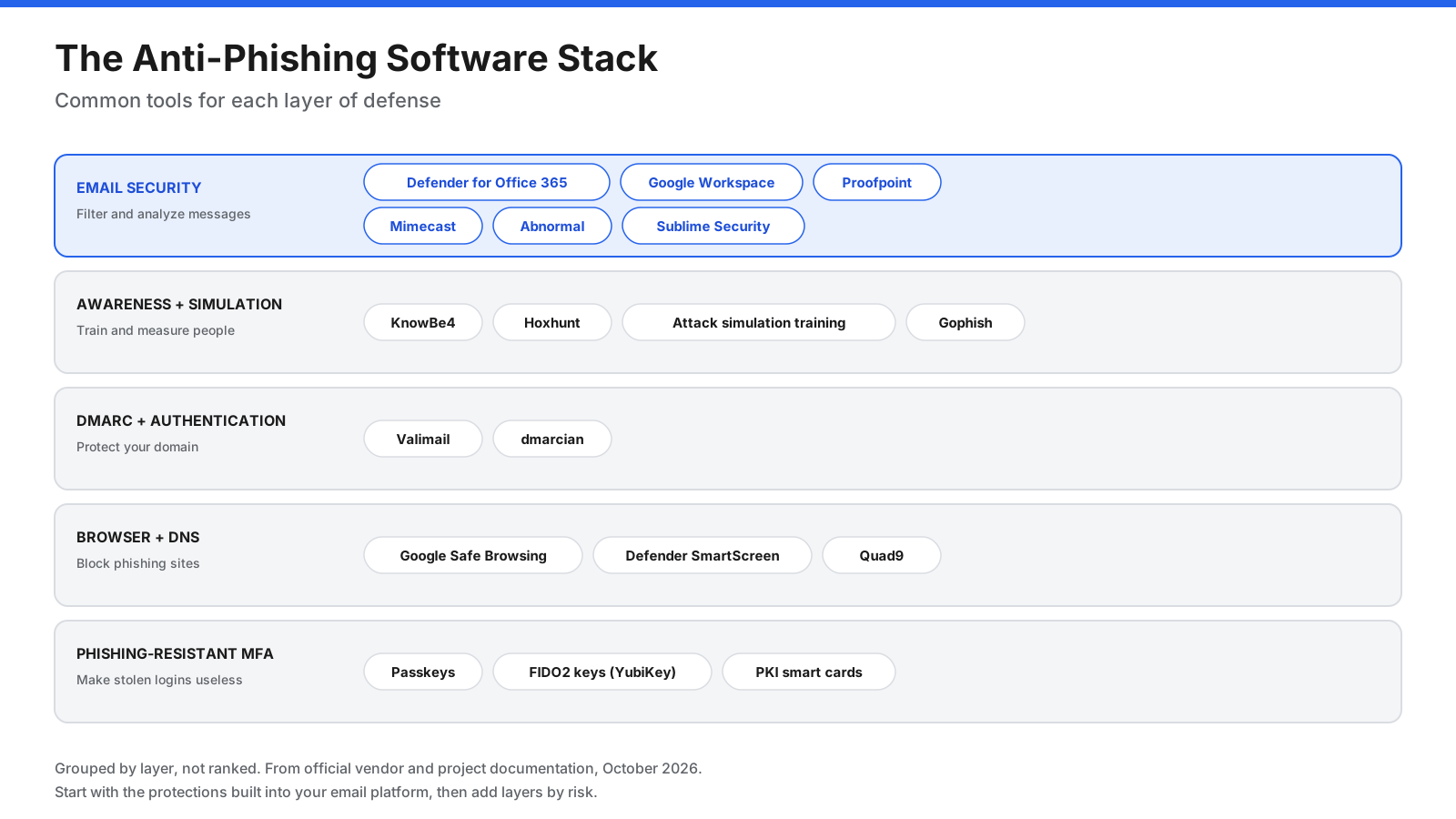
Email Security Platforms
Email security platforms inspect messages before or after delivery. A secure email gateway sits in the mail flow, while API-based tools connect directly to Microsoft 365 or Google Workspace.
| Tool | Deployment | Notable capabilities described in the source |
|---|---|---|
| Microsoft Defender for Office 365 | Microsoft 365 | Safe Links, Safe Attachments, impersonation protection, and, in Plan 2, attack simulation and automated investigation. |
| Google Workspace protections | Gmail | Admin controls for suspicious attachments, links behind shorteners, untrusted domains, spoofing, and unauthenticated mail. |
| Proofpoint Core Email Protection | API or gateway | Behavioral detection for BEC, URL and attachment sandboxing, and post-delivery removal. |
| Mimecast Email Security | Gateway or API | Click-time URL protection, QR-code phishing detection, attachment sandboxing, and impersonation detection. |
| Abnormal Inbound Email Security | API | Behavioral baselines for employees and vendors to detect BEC and vendor fraud. |
| Sublime Security | Cloud API | Triage of user-reported emails and organization-specific detection rules. |
A common starting point is to enable and tune built-in protections in Microsoft 365 or Google Workspace, then add a behavioral tool for BEC or a gateway for on-premises mail.
Security Awareness Training and Phishing Simulation
| Tool | Type | Notable capabilities described in the source |
|---|---|---|
| KnowBe4 Security Awareness Training | Commercial | Training library, simulated phishing and vishing, reporting button, and risk reporting. |
| Hoxhunt | Commercial | Adaptive simulations across email, SMS, phone, and Teams, micro-training, and triage. |
| Microsoft Attack simulation training | Microsoft 365 | Simulated phishing campaigns and training within Microsoft 365. |
| Gophish | Open source | Phishing simulation toolkit for authorized business and penetration-testing programs. |
The most useful metric is often the reporting rate: the share of people who report a simulated or live phish. Reporting helps security teams remove a campaign for everyone.
DMARC and Email Authentication Tools
- Valimail: Provides DMARC monitoring and reporting, with paid enforcement capabilities.
- dmarcian: Provides DMARC monitoring and deployment tools, including domain and record checkers.
Browser and DNS Protection
- Google Safe Browsing: Warns users before they visit known dangerous sites or download harmful files.
- Microsoft Defender SmartScreen: Reputation-based protection in Edge and Windows that warns about reported phishing and malware sites and downloads.
- Quad9: A free nonprofit DNS resolver that blocks lookups for known malicious domains.
Phishing-Resistant Authentication
- Passkeys: FIDO credentials stored on a phone, computer, or security key and unlocked using a device method such as a PIN or biometric.
- FIDO2 security keys: Hardware keys such as YubiKey devices support phishing-resistant WebAuthn authentication.
- Certificate-based authentication: PKI smart cards and certificates are another phishing-resistant option in some environments.
How to Choose Anti-Phishing Software
- Start with the protections you already own. Tune Microsoft 365 or Google Workspace and configure SPF, DKIM, and DMARC.
- Identify the main risk. Credential theft points to phishing-resistant MFA; payment fraud points to BEC-focused detection and verification controls.
- Choose the architecture. API-based tools suit cloud email; gateways suit inline filtering or on-premises mail.
- Cover channels beyond email with browser, DNS, and awareness controls.
- Make reporting easy with a report button connected to triage.
- Measure click and reporting rates, time to remove campaigns, and DMARC enforcement status.
How Do You Report Phishing?
- At work: Use your email client’s report button or your organization’s reporting process. In supported Outlook versions, choose Report, then Report phishing. Gmail users can report phishing from the message menu.
- Phishing emails: The FTC recommends forwarding them to reportphishing@apwg.org.
- Phishing texts: Forward them to 7726 (SPAM) to notify your mobile carrier.
- Fraud reports in the US: Report to ReportFraud.ftc.gov and the FBI’s IC3 at ic3.gov.
- Impersonated companies: Look for the company’s abuse or phishing reporting address on its official website.
Phishing Glossary
- Phishing kit: A packaged set of fake pages and scripts used to launch phishing sites.
- Credential harvesting: Collecting usernames and passwords through fake login pages.
- Spoofing: Forging a sender address, caller ID, or website to impersonate someone else.
- Lookalike domain: A domain registered to resemble a legitimate one.
- Punycode: Encoding for internationalized domain names that may disguise lookalike characters.
- AiTM: A phishing technique that proxies a genuine sign-in page to steal session cookies after MFA.
- Session cookie: A token that keeps a user signed in after authentication.
- SEG: A secure email gateway that filters messages before they reach mailboxes.
- DMARC alignment: The requirement that the domain verified by SPF or DKIM matches the visible From domain.
- Phishing-resistant MFA: Authentication such as FIDO2 or passkeys that binds credentials to the legitimate domain.
Frequently Asked Questions
What is phishing in simple words?
Phishing is when a criminal pretends to be someone you trust, such as your bank, employer, or a delivery company, to trick you into sharing passwords or payment details, sending money, or opening a harmful file.
What is one example of phishing?
A common example is an email that appears to come from your company’s IT department, warns that your password expires today, and asks you to click a button. The button leads to a fake login page that captures your password.
How do I know if I got phished?
Warning signs include password reset emails you did not request, unfamiliar sign-in alerts, messages sent from your account that you did not write, new mailbox forwarding rules, unfamiliar MFA methods, and unexplained charges.
How can I stop phishing emails?
Use your provider’s filters and report button, verify unexpected requests through a separate channel, use passkeys or FIDO2 security keys, and avoid acting on unexpected links or attachments. Organizations should also deploy SPF, DKIM, DMARC, and email security.
What is the difference between phishing and BEC?
Phishing is a broad category of deceptive messages, often aimed at credentials or malware. BEC impersonates or takes over an executive or vendor account to redirect payments or obtain data, frequently with no malicious link or attachment.
What is spear phishing?
Spear phishing targets a specific person or role using researched details such as names, projects, and colleagues.
What is smishing?
Smishing is phishing through SMS or messaging apps, often using fake delivery, toll, or bank alerts.
What is quishing?
Quishing is phishing through QR codes that direct the user to a phishing site.
Can MFA stop phishing?
Passkeys and FIDO2 security keys help block credential phishing and AiTM attacks because credentials are bound to the legitimate domain. SMS codes, authenticator codes, and simple push approvals can still be phished or abused.
Is phishing illegal?
Phishing typically violates laws involving fraud, identity theft, and unauthorized computer access. In the United States, victims can report it to the FTC and FBI IC3.
What is the best anti-phishing software?
There is no single best tool. Organizations often combine email security, awareness training, DMARC tools, browser and DNS protection, and phishing-resistant MFA.
What should I do if I clicked a phishing link?
Close the page and do not enter information. If you entered a password, change it from a trusted device and sign out of sessions. Report the incident to IT, and contact your bank immediately if you shared payment details.
How do I report a phishing email in Outlook?
In supported Outlook versions, select the message, choose Report, then Report phishing. Depending on your organization’s settings, the report goes to Microsoft, your security team, or both.
Summary
Phishing is social engineering delivered through email, text, voice, QR codes, ads, and fake websites. Attacks follow a lifecycle from reconnaissance to exploitation, rely on urgency and familiarity, and increasingly target session tokens and payments rather than passwords alone.
Effective defense combines SPF, DKIM, and DMARC, email security, browser and DNS protection, phishing-resistant MFA, trained users, and incident response. No single control stops every attack. Use layered defenses, verify unusual requests through a separate channel, and make reporting easy.















































































































