

Best Free Antivirus in 2026: Independent Lab Results, Trade-Offs, and What You Actually Need
Free antivirus software has become very good. In recent independent tests, the free editions of Avast and AVG and the Microsoft Defender Antivirus included with Windows blocked threats at rates close to paid suites. For many people, the best free antivirus is already on their computer.
That does not make every option equal. Free products differ in detection rates, false alarms, system impact, extra features, upgrade prompts, and privacy practices. This vendor-neutral guide compares the main options using published results from AV-TEST and AV-Comparatives, plus official product information. It does not rely on our own malware testing and contains no affiliate links.
Key findings at a glance
- Microsoft Defender is a strong default. It earned AV-TEST TOP PRODUCT in April and June 2026 and recorded zero false positives in AV-Comparatives’ February to May 2026 Real-World Protection Test.
- Avast Free and AVG AntiVirus Free led the free editions tested directly. Both scored 6 out of 6 in all three AV-TEST categories in April and June 2026 and 99.3% in AV-Comparatives’ Real-World test.
- Paid-suite results are not free-edition results. The labs tested paid products for Bitdefender, Avira, and Malwarebytes, so those scores should not be treated as direct scores for their free versions.
- Malwarebytes Free is an on-demand scanner, not always-on antivirus. It can work as a second-opinion cleanup tool alongside a primary antivirus.
- Kaspersky is not sold or updated in the US following the 2024 Commerce Department prohibition.
- Antivirus is only one layer. Updates, safe browsing, strong passwords, and backups still matter.
Is free antivirus good enough in 2026?
For most home users on Windows, yes. The main thing free versions tend to leave out is not core malware detection, but extra layers such as ransomware file recovery, identity monitoring, multi-device coverage, live support, and a quieter experience without upgrade prompts.
If you mainly want solid malware protection on one Windows PC, a free option can be enough. If you need a family plan, extensive identity protection, or other paid-only features, compare paid suites based on the features you will actually use.
How did we evaluate free antivirus software?
This comparison uses published results from two independent labs and official vendor information. AV-TEST scores products in Protection, Performance (system slowdown), and Usability (false alarms), each out of 6. A score of 17.5 or more out of 18 earns its TOP PRODUCT award. AV-Comparatives tests protection against live web-based threats and malicious files, and reports false positives.
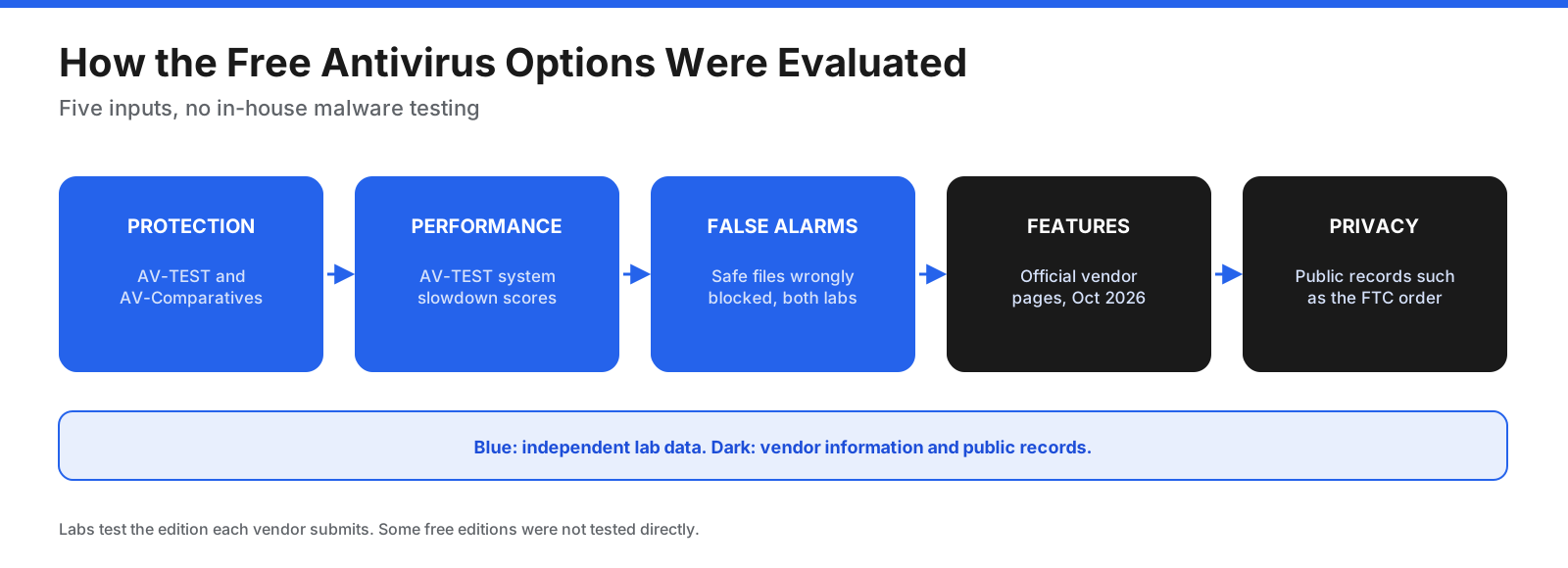
One limitation matters: labs test the edition each vendor submits. Avast and AVG were tested as free editions, but Bitdefender, Avira, and Malwarebytes were tested as paid suites. Paid-suite results are useful context, not direct scores for the free versions.
What do the independent lab results show?
AV-Comparatives Real-World Protection Test, February to May 2026
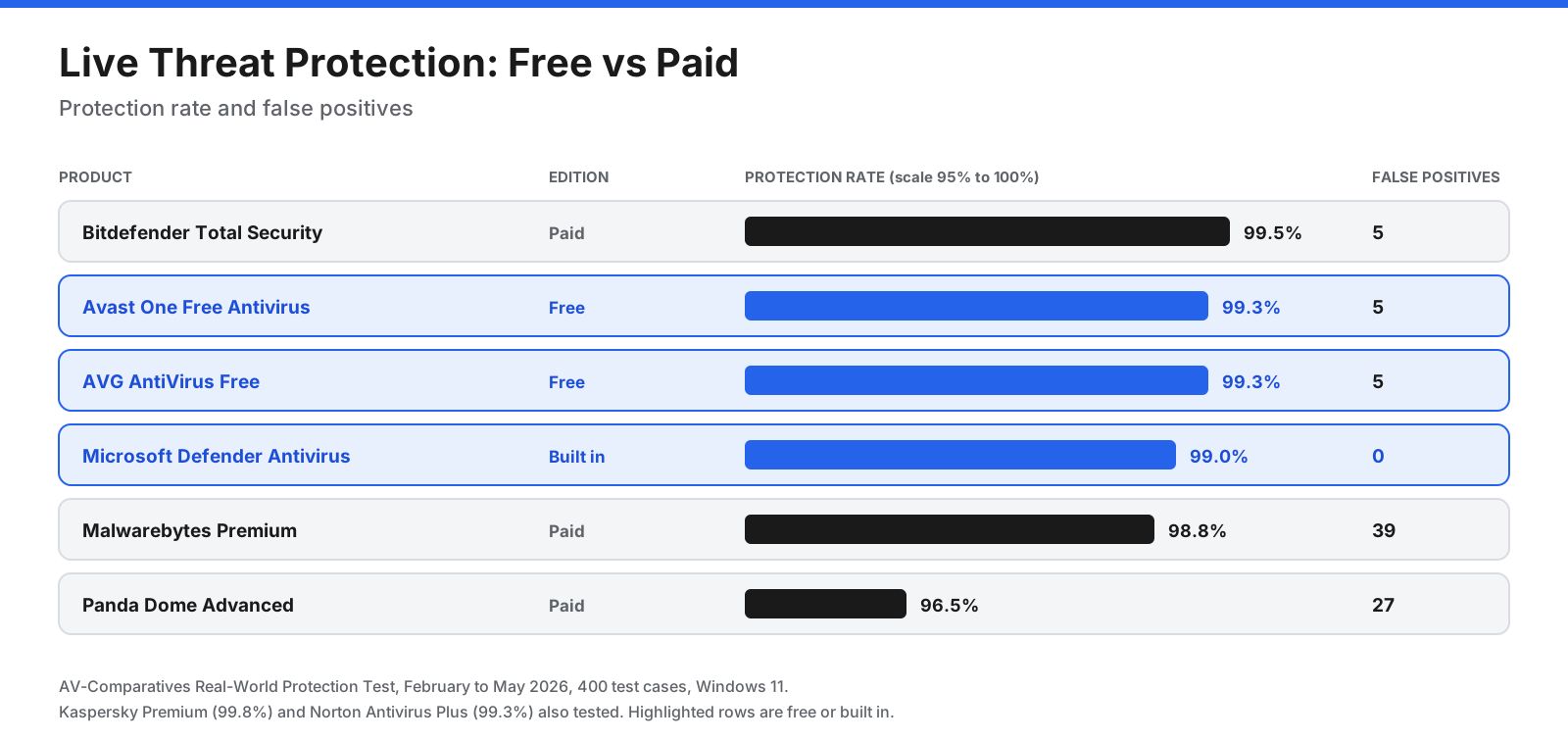
AV-Comparatives tested 20 products against 400 live threat cases on Windows 11. Protection rate counts blocked threats, with user-dependent cases counted as half. False positives are safe files or sites wrongly blocked.
| Product | Edition | Protection | Compromised cases | False positives |
|---|---|---|---|---|
| Kaspersky Premium | Paid | 99.8% | 1 | 3 |
| Bitdefender Total Security | Paid | 99.5% | 2 | 5 |
| Avast One Free Antivirus | Free | 99.3% | 3 | 5 |
| AVG AntiVirus Free | Free | 99.3% | 3 | 5 |
| Norton Antivirus Plus | Paid | 99.3% | 3 | 5 |
| Microsoft Defender Antivirus | Built into Windows | 99.0% | 4 | 0 |
| Malwarebytes Premium | Paid | 98.8% | 5 | 39 |
| Panda Dome Advanced | Paid | 96.5% | 14 | 27 |
Avast and AVG matched Norton’s paid product in this test. Defender blocked one fewer case but had zero false positives, the cleanest result. Malwarebytes Premium and Panda Dome Advanced produced more false alarms than the leading options.
AV-Comparatives Malware Protection Test, March 2026
This test checked detection of about 10,000 malicious files. Online protection, including cloud lookups, was above 99% for almost every product.
- Avast Free and AVG Free: 99.97% online protection, with 9 false alarms.
- Microsoft Defender Antivirus: 99.93% online protection, with 3 false alarms. Its offline detection rate was lower, at 89.2%, showing greater reliance on cloud lookups.
- Bitdefender Total Security: 99.94% online protection, with 4 false alarms. This is the paid suite, not Bitdefender Antivirus Free.
- Malwarebytes Premium: 99.59% online protection, with 23 false alarms.
AV-TEST Windows 11 results, April and June 2026
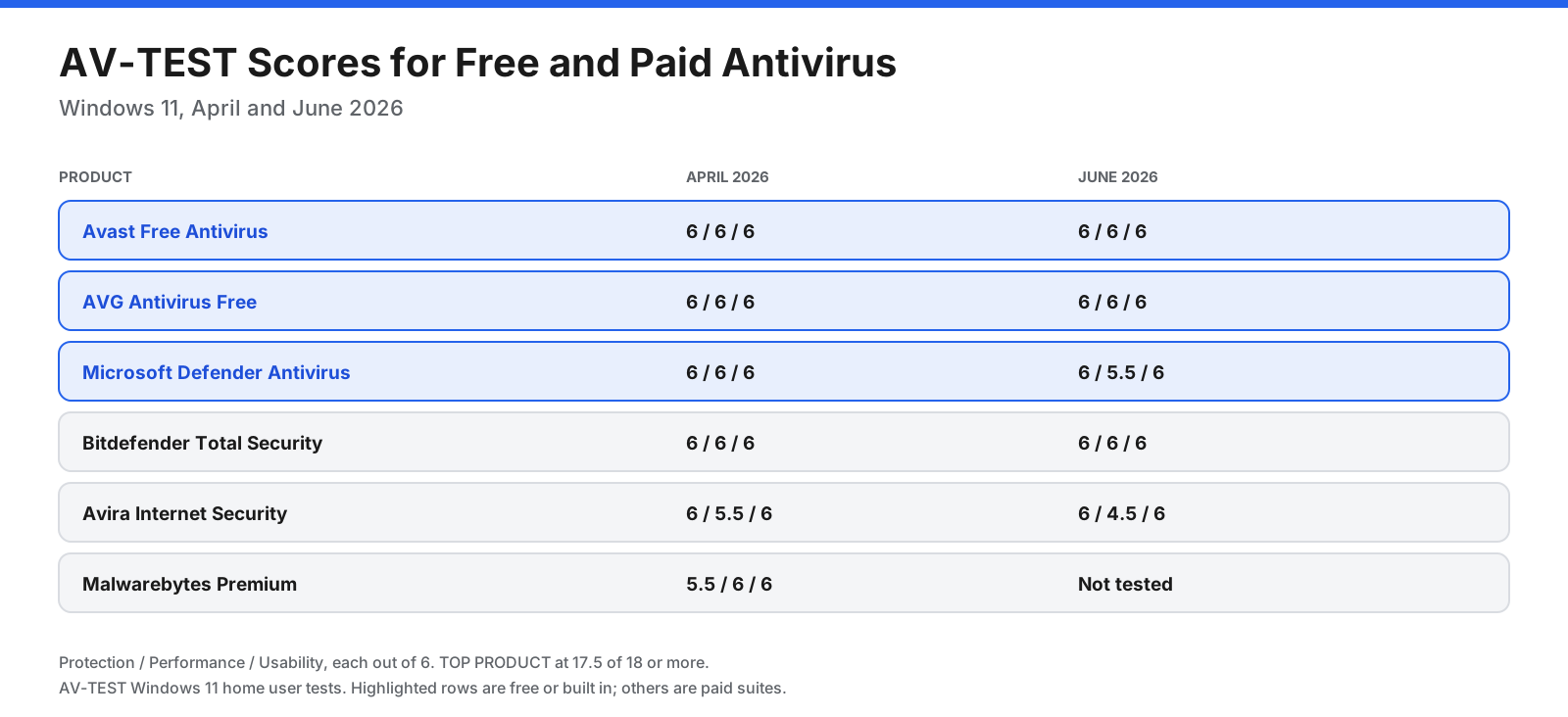
AV-TEST gives up to 6 points each for Protection, Performance, and Usability. Higher Performance scores mean less slowdown; higher Usability scores mean fewer false alarms.
| Product | April 2026 (P / Perf / U) | June 2026 (P / Perf / U) | Award |
|---|---|---|---|
| Avast Free Antivirus | 6 / 6 / 6 | 6 / 6 / 6 | TOP PRODUCT both |
| AVG AntiVirus Free | 6 / 6 / 6 | 6 / 6 / 6 | TOP PRODUCT both |
| Microsoft Defender Antivirus | 6 / 6 / 6 | 6 / 5.5 / 6 | TOP PRODUCT both |
| Bitdefender Total Security | 6 / 6 / 6 | 6 / 6 / 6 | TOP PRODUCT both |
| Avira Internet Security | 6 / 5.5 / 6 | 6 / 4.5 / 6 | TOP PRODUCT, then Certified |
| Malwarebytes Premium | 5.5 / 6 / 6 | Not tested | TOP PRODUCT in April |
Avira’s Performance score fell to 4.5 in June, costing it the TOP PRODUCT award that month. Lab results change, so review more than one round before choosing.
What are the best free antivirus options?
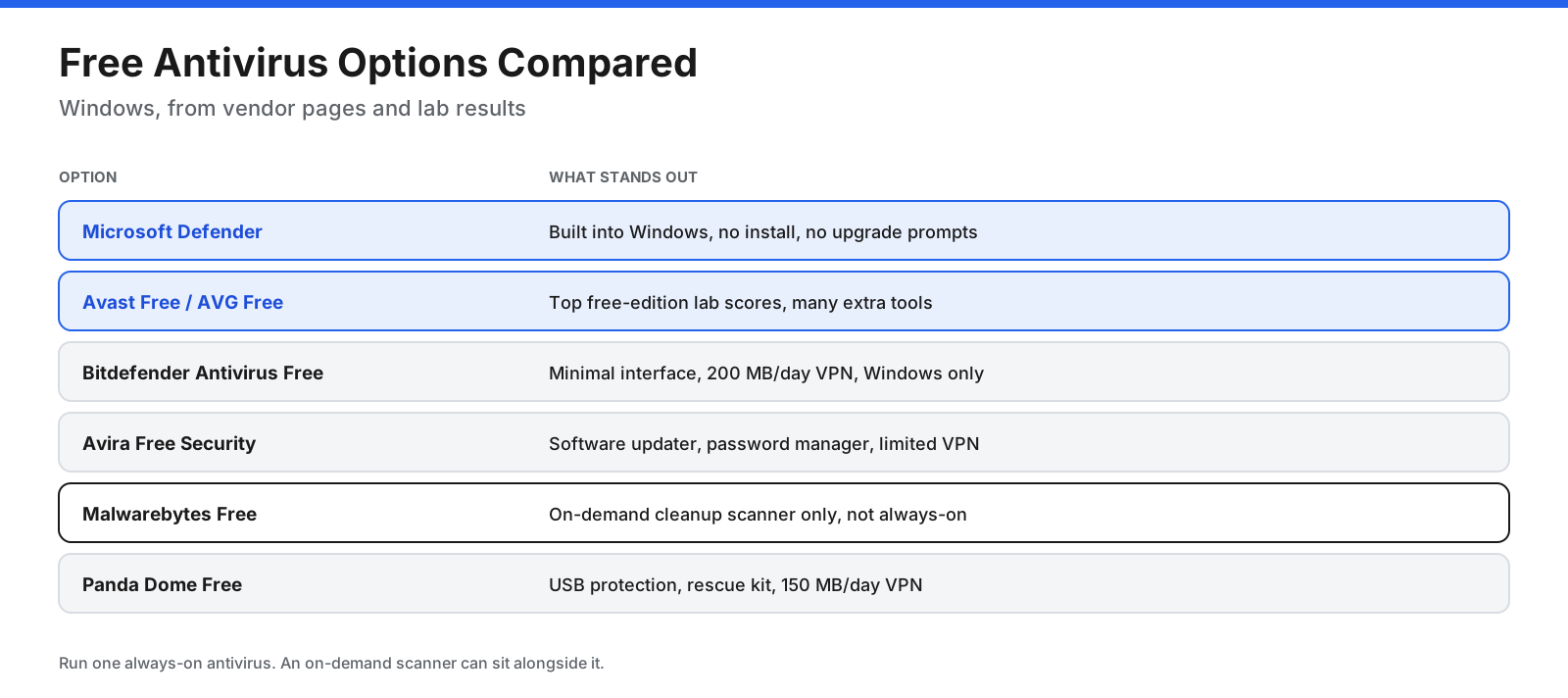
These are the main options for Windows, with notes on where the products fit best.
1. Microsoft Defender Antivirus
Best for: Windows users who want solid protection with nothing to install and no upgrade prompts.
Defender is built into Windows 10 and Windows 11 and runs through the Windows Security app. It provides always-on malware protection and works alongside other Windows Security features, including the firewall and SmartScreen protection against unsafe sites and downloads.
Lab results: TOP PRODUCT in AV-TEST’s April and June 2026 tests. It scored 99.0% with zero false positives in AV-Comparatives’ Real-World test. Offline detection in the March 2026 Malware Protection Test was lower than some rivals, at 89.2%.
Strengths: Already installed, updated through Windows Update, no advertising prompts, and very few false positives in the cited test.
Trade-offs: Fewer extras than third-party suites, greater reliance on cloud lookups, and controlled folder access for ransomware protection must be enabled manually if you want it.
2. Avast Free Antivirus
Best for: Windows users who want strong free-edition lab results and extra tools.
Avast Free includes on-access file scanning, behavior monitoring, web protection against phishing and malicious downloads, email protection, a ransomware shield, Wi-Fi checks, a rescue disk, and alerts if an email password appears in a data leak, according to Avast’s product information. Separate free products are available for Mac, Android, and iPhone.
Lab results: 6 out of 6 in every AV-TEST category in April and June 2026, 99.3% in AV-Comparatives’ Real-World test, and 99.97% online protection in the March Malware Protection Test.
Strengths: Top lab scores for a free edition, extra security features, and versions for several platforms.
Trade-offs: Upgrade prompts are common. In 2024, the US Federal Trade Commission finalized an order against Avast over its past sale of browsing data. Review privacy settings before deciding. Avast also says the free version may ask you to reactivate after 12 months.
3. AVG AntiVirus Free
Best for: People who want Avast-level protection with a different interface.
AVG and Avast are sister brands under Gen Digital, and their free products share detection technology. Their scores were identical in the tests cited here: 6 out of 6 in each AV-TEST category in April and June 2026, 99.3% in the Real-World test, and 99.97% online protection in the Malware Protection Test.
Strengths: Strong lab results and free apps for Windows and Android.
Trade-offs: The same parent company and similar upgrade prompts as Avast. There is no benefit to running both products together.
4. Bitdefender Antivirus Free
Best for: Windows users who want a lightweight antivirus with few interruptions.
Bitdefender’s free edition lists always-on protection, virus scanning and removal, basic ransomware protection, Advanced Threat Defense, and a basic VPN with 200 MB per device per day. It is Windows-only.
Lab results: The labs tested Bitdefender Total Security, the paid suite, not the free edition. Total Security scored 6 out of 6 in every AV-TEST category in April and June 2026 and 99.5% in AV-Comparatives’ Real-World test. Treat these as context rather than a direct score for the free version.
Strengths: Simple interface and strong paid-suite lab results.
Trade-offs: Windows only and fewer features than paid plans, including no paid ransomware file recovery, anti-tracking, or full vulnerability scan.
5. Avira Free Security
Best for: Users who want antivirus and extra utilities in one package.
Avira Free Security combines always-on protection and cloud detection with a software updater, password manager, browser extension with phishing protection, limited VPN, and system cleanup tools.
Lab results: AV-TEST tested Avira Internet Security, the paid product. It scored 6 for Protection in April and June 2026, but Performance dropped from 5.5 to 4.5, so it earned TOP PRODUCT in April and Certified status in June.
Strengths: Software updater and password manager included in the free package.
Trade-offs: Higher performance impact than rivals in June, a limited VPN, and older Windows versions are no longer supported.
6. Malwarebytes Free
Best for: A second-opinion scan when you suspect an infection.
Malwarebytes Free is an on-demand scanner that removes infections already on your device. It is not a replacement for always-on antivirus. Always-on, ransomware, and web protection are features of paid Premium Security.
Lab results: The labs tested Malwarebytes Premium, which scored 98.8% in the Real-World test with 39 false positives.
Strengths: Useful for cleaning up adware and unwanted programs, and can sit alongside a primary antivirus because it scans when you ask.
Trade-offs: No always-on protection in the free version. Do not use it as your only security tool.
7. Panda Dome Free
Best for: Users who want USB drive protection and a simple free option.
Panda’s free plan includes always-on malware and spyware protection, USB drive protection, a rescue kit, and a VPN capped at 150 MB per day.
Lab results: AV-Comparatives tested Panda Dome Advanced, the paid product, which scored 96.5% in the Real-World test with 27 false positives. Its online protection score in the Malware Protection Test was 99.17%, with 54 false alarms.
Strengths: USB protection and a rescue kit.
Trade-offs: Lower cited lab scores and more false alarms than leading options, plus strong promotion of paid plans.
What about Kaspersky Free?
Kaspersky products scored well in lab tests, with Kaspersky Premium reaching 99.8% in AV-Comparatives’ Real-World test. However, Kaspersky is no longer an option in the United States. In June 2024, the US Commerce Department’s Bureau of Industry and Security prohibited Kaspersky from selling its software in the US and allowed signature and code updates only until September 29, 2024. Outside the US, availability depends on local rules and the vendor’s terms.
What does free antivirus leave out?
Free editions focus on finding and blocking malware. Paid upgrades commonly add extra layers.
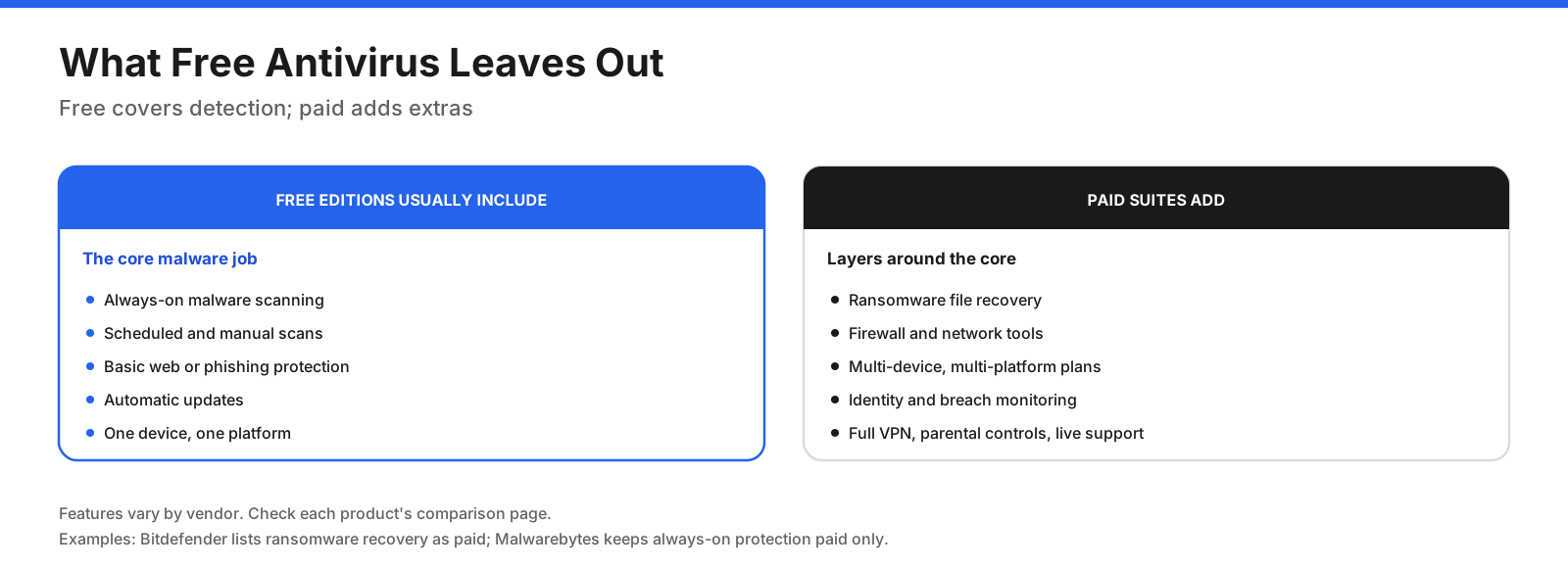
- Ransomware recovery: Some vendors reserve file recovery for paid plans.
- Multi-device licenses: Free editions usually cover one device or platform.
- VPN: Free VPNs may have strict daily data limits.
- Always-on protection: Malwarebytes Free is on-demand only.
- Support: Free users usually get help articles and forums rather than live support.
- Identity protection: Data-breach monitoring and identity services are generally paid features.
How do free antivirus companies make money?
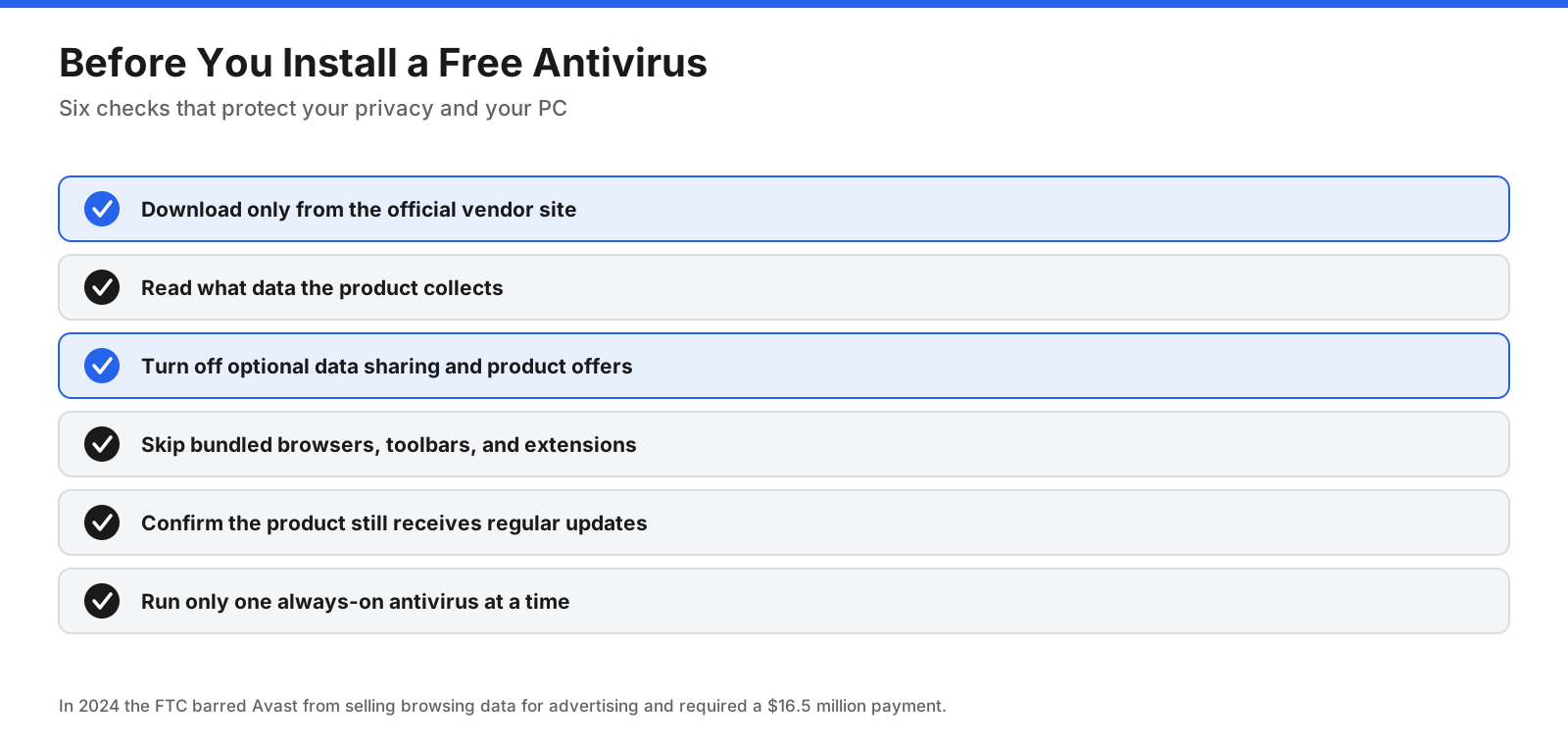
Free products are often funded through upgrade sales, bundled offers, and sometimes data-related business models. In June 2024, the US Federal Trade Commission finalized an order against Avast. The FTC alleged that Avast collected browsing information through its browser extensions and antivirus software and sold it through subsidiary Jumpshot to third parties after promising protection from online tracking. The order banned Avast from selling or licensing browsing data for advertising and required a $16.5 million payment.
This does not mean every free product has the same practices. Read the privacy policy and review data-sharing and marketing settings after installation.
Do you need antivirus on Mac, Android, and iPhone?
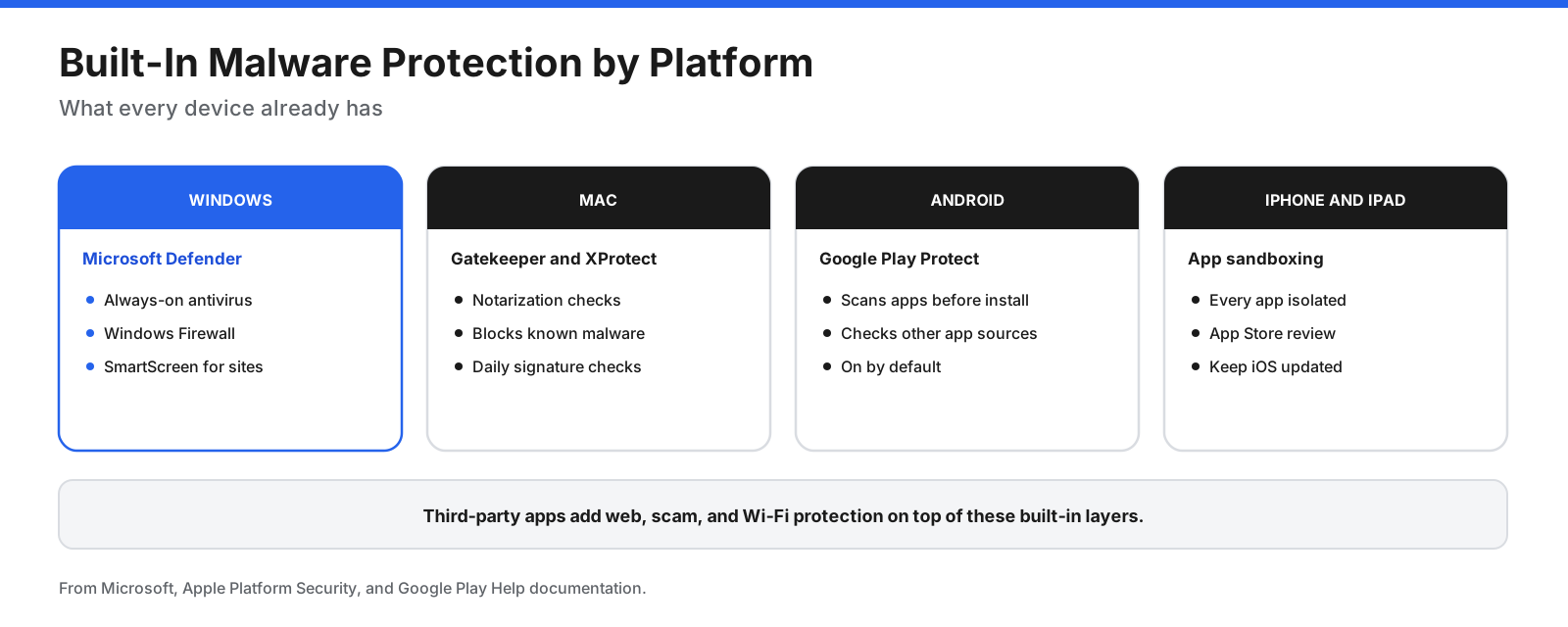
Each major platform includes built-in protection. Third-party apps add extras, but the case for them differs by device.
Mac
Yes, free antivirus for Mac exists, and macOS includes protection already. Apple’s Platform Security guide describes Gatekeeper and notarization to check apps before launch, XProtect to detect and block known malware, and automatic security updates. Avast and Avira offer separate free Mac products for additional web protection or manual scanning.
Android
Android devices with Google Play include Google Play Protect, which scans apps before installation and checks for harmful behavior. It is on by default. Avast, AVG, and other free apps add features such as web filtering and Wi-Fi checks, which may help if you often install apps from outside Google Play.
iPhone and iPad
Traditional antivirus does not work the same way on iPhone. Third-party apps are sandboxed, so security apps tend to focus on web and scam protection, Wi-Fi checks, and identity alerts rather than scanning other apps’ files. Keep iOS updated and install apps only from the App Store.
Which free antivirus should you choose?
- Least effort on Windows: Microsoft Defender is already installed and has no upgrade prompts.
- Strong free-edition lab results and extra features: Avast Free or AVG Free, with privacy settings reviewed after installation.
- A quiet, minimal tool: Bitdefender Antivirus Free.
- Extra utilities: Avira Free Security includes a software updater and password manager.
- Suspect an existing infection: Use Malwarebytes Free as a second-opinion scan alongside your main antivirus.
- Mac, Android, or iPhone: Start with built-in protection and add an app only to address a specific gap.
- Several people and devices: Compare paid multi-device plans, since free products usually cover fewer devices.
Can you run two antivirus programs at once?
Running two always-on antivirus programs is not recommended. They can conflict, slow your system, or interfere with each other’s scans. Windows generally disables Microsoft Defender’s active antivirus mode when another compatible antivirus is installed and can re-enable it if that protection lapses. An on-demand scanner such as Malwarebytes Free can be used alongside a primary antivirus.
How do you install free antivirus safely?
- Download from the official vendor website, not from pop-ups or third-party download sites.
- Choose the free edition carefully because download pages may default to a paid trial.
- Read installer screens and decline browsers, toolbars, and other software you do not need.
- Uninstall your previous third-party antivirus before switching products.
- Update the product and run a full scan after installation.
- Review privacy settings, turn off optional data sharing if you do not want it, and confirm always-on protection is active.
- Check Windows Security to confirm Windows recognizes the installed product.
What else keeps you safe besides antivirus?
- Install operating system, browser, and app updates promptly.
- Use a password manager and unique passwords for each account.
- Turn on two-factor authentication, especially for email and banking.
- Keep a backup that is not permanently connected to your computer.
- Be cautious with links and attachments, especially unexpected messages.
- Use a standard user account for daily work where possible.
Common mistakes with free antivirus
- Installing several always-on antivirus products. One is usually enough, with an occasional on-demand scanner if needed.
- Downloading installers from third-party sites that may repackage software.
- Ignoring expiry or reactivation messages that may leave protection inactive.
- Trusting browser pop-ups that claim your device is infected and urge you to click a fix button.
- Relying on a product that no longer receives updates.
Frequently asked questions
What is the best free antivirus?
In the cited independent tests, Avast Free and AVG Free had the strongest results among free editions tested directly. Microsoft Defender performed closely and had zero false positives in the Real-World test. Choose based on whether you prefer extra features or simple built-in protection.
Is there a free antivirus that actually works?
Yes. Microsoft Defender, Avast Free, and AVG Free all earned AV-TEST TOP PRODUCT in June 2026 and blocked 99% or more of threats in AV-Comparatives’ February to May 2026 Real-World test.
Is Microsoft Defender good enough?
For most home Windows users, yes. It earned TOP PRODUCT in April and June 2026 and had zero false positives in the cited Real-World test. Its offline detection was lower than its online result.
Is free AVG better than Windows Defender?
They are close. AVG blocked 99.3% of threats and Defender 99.0% in the cited Real-World test, while Defender had no false positives compared with AVG’s five. AVG has extra features; Defender has no upgrade prompts.
Is Avast Free really free?
Yes, the core antivirus is free, although Avast promotes paid products inside the app and may ask users to reactivate after 12 months. Review its data-sharing settings.
Which antivirus is free for a lifetime?
Microsoft Defender is included with Windows at no extra cost. Other vendors offer free editions without a fixed end date, but terms can change, so confirm that the product remains active and updated.
What are the top three antivirus programs?
Rankings depend on the test and date. In the cited February to May 2026 Real-World test, Kaspersky Premium scored 99.8%, Bitdefender Total Security 99.5%, and Avast Free, AVG Free, and Norton Antivirus Plus each scored 99.3%. Kaspersky is not available in the US.
Is there a free antivirus for Mac?
Yes. macOS includes XProtect and Gatekeeper, and Avast and Avira offer free Mac apps.
Do I need antivirus on my iPhone?
Not in the traditional sense. iPhone security apps focus on web, scam, Wi-Fi, and identity features rather than scanning other apps’ files. Keep iOS updated and install apps only from the App Store.
What is the best free antivirus for Android?
Google Play Protect is built in and on by default. Avast and AVG offer free apps with additional web filtering and related features.
Can free antivirus remove existing malware?
Always-on antivirus can scan for and remove infections. Malwarebytes Free is designed for on-demand cleanup, while some rescue disks can scan a system before Windows starts.
Does free antivirus slow down your computer?
The leading free products had little impact in the cited AV-TEST rounds. Avast and AVG scored 6 out of 6 for Performance in April and June 2026, while Defender scored 6 and 5.5. Older or low-memory PCs may still notice scans.
The bottom line
The best free antivirus for most Windows users is Microsoft Defender, Avast Free, or AVG Free. All three performed strongly in the cited independent tests. Defender had the fewest false alarms, while Avast and AVG offer more extras. Bitdefender suits people who want a minimal tool, Avira adds utilities, and Malwarebytes Free works as a second-opinion cleanup scanner.
Run only one always-on antivirus, review privacy settings, and keep your system and apps updated. Check newer lab results before deciding because scores change every testing round.















































































































