

LastPass was once one of the most popular password managers, used by millions of people and businesses to store and fill in their passwords. That changed after the 2022 breach, in which attackers stole copies of customer vault backups. Investigators later linked cryptocurrency thefts to vaults taken in that breach, and in late 2025 the UK’s data protection regulator fined LastPass over its security failings.
Many people have since moved to another password manager, and many more are still deciding whether to. This guide explains what happened in the breach, what it means for former users, which passwords to change first, and how the main alternatives compare on security, features, and price. It also walks through moving your vault out of LastPass safely.
Products are compared using provider pricing and documentation. No provider paid for placement, and every pick includes trade-offs.
Quick Picks: Best LastPass Alternatives
- Best overall LastPass alternative: Bitwarden, for open-source code, a generous free plan, and direct LastPass import.
- Best for ease of use and families: 1Password, whose Secret Key adds protection if vault data is stolen.
- Best for privacy: Proton Pass, with built-in email aliases and a capable free plan.
- Best for business security controls: Keeper, with detailed admin and sharing controls.
- Best simple paid option: NordPass, for a clean, straightforward app.
- Best offline option: KeePassXC, which keeps your vault in a file you control, with no company cloud.
- Best for large family groups: Dashlane, whose Friends and Family plan covers up to 10 accounts.
- Best built-in option: Apple Passwords or Google Password Manager, if you use only one ecosystem.
Prices in this article reflect provider pricing pages checked in October 2026 unless noted. Password manager prices change often, so check the current price before buying.
Why Are People Leaving LastPass?
The main reason is the 2022 breach and what followed it. A second reason is the limits of LastPass’s free plan.
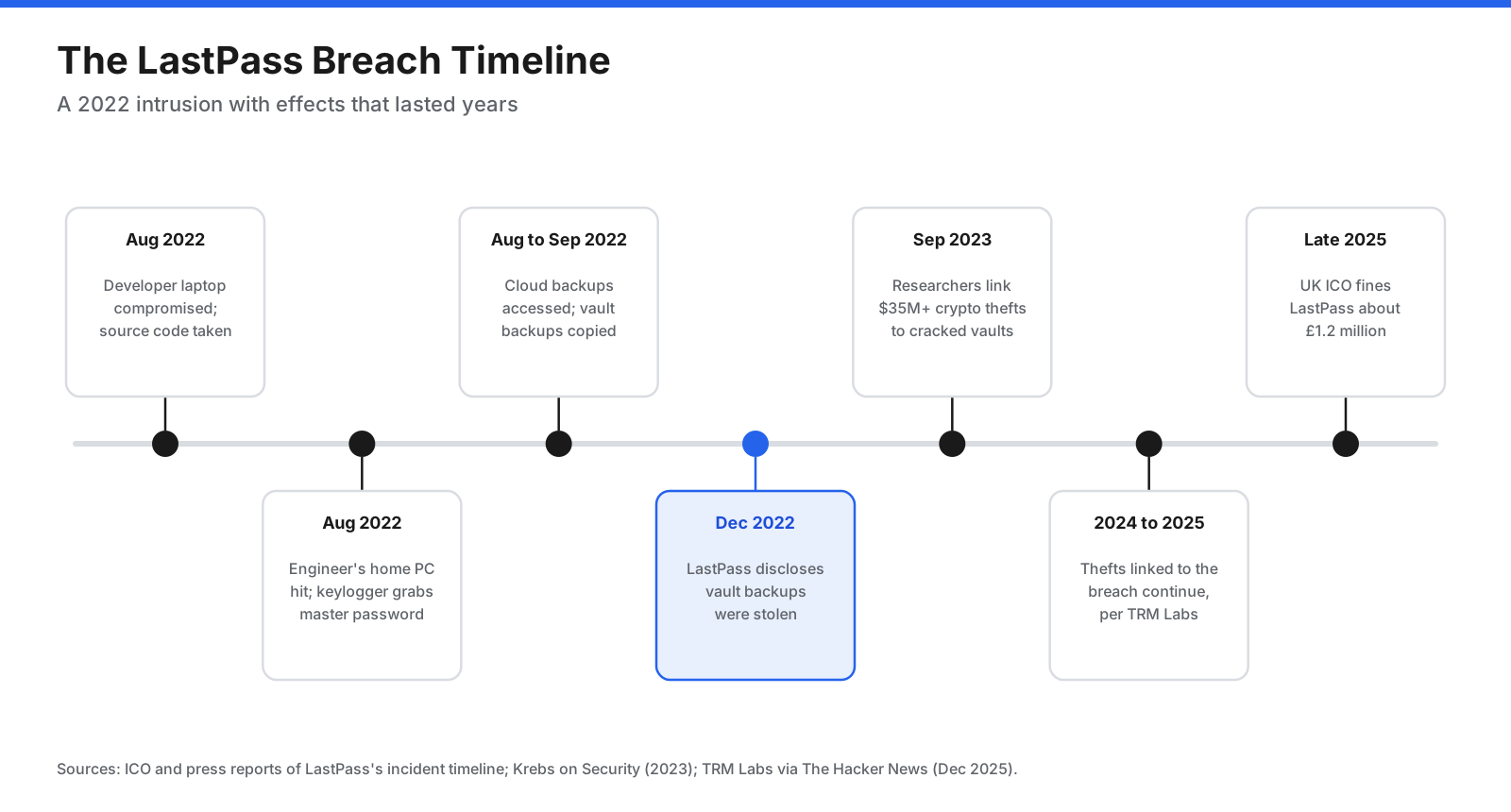
What happened. In August 2022, an attacker compromised a LastPass developer’s laptop and took source code and technical information. Days later, the attacker targeted a senior engineer’s personal computer through a vulnerability in third-party media software, installed a keylogger, and captured the engineer’s master password. That gave access to keys used to unlock LastPass’s cloud backup storage. Over the following weeks, the attacker copied customer vault backups. LastPass disclosed in December 2022 that vault data had been stolen.
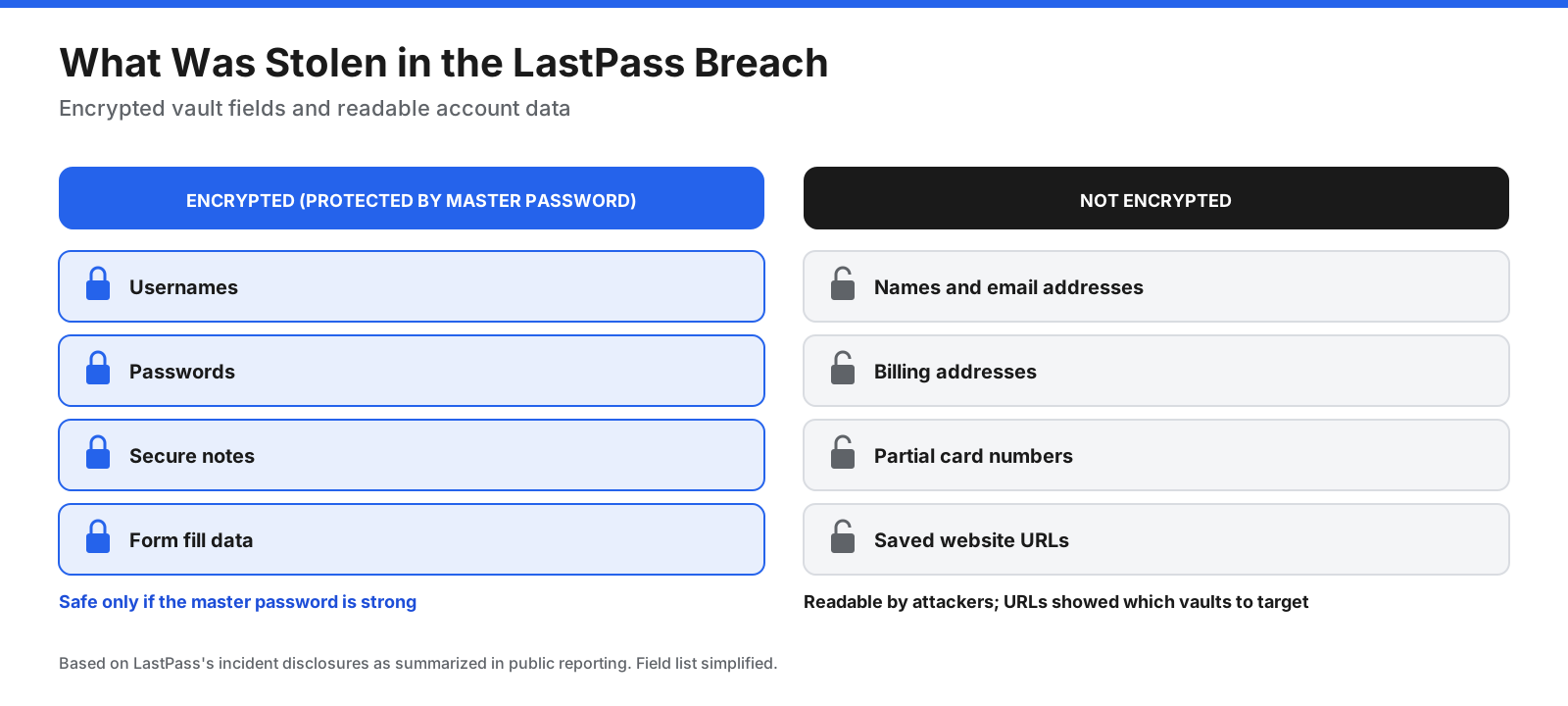
What was taken. The stolen backups contained encrypted and unencrypted data. Usernames, passwords, and secure notes inside vaults were encrypted with each user’s master password. Some data was not encrypted, including customer names, email addresses, billing addresses, partial card numbers, and saved website URLs. That gave attackers clues about which accounts might be worth targeting.
What followed. Because attackers have copies of the vaults, they can try to guess master passwords offline, without LastPass being able to stop each attempt. In September 2023, security researchers linked more than $35 million in cryptocurrency thefts to cracked LastPass vaults, often belonging to people who had stored crypto wallet recovery phrases in them. TRM Labs reported that thefts linked to the breach continued into late 2025. In late 2025, the UK Information Commissioner’s Office fined LastPass about £1.2 million, citing failings that included allowing a senior employee’s personal and business vaults to share one master password.
Free plan limits. LastPass’s free plan works on only one device type: computers or mobile devices, not both. For people using a laptop and phone, that can make the free plan difficult to use. Several alternatives offer free plans that sync across devices.
Is LastPass Still Safe to Use?
LastPass still uses zero-knowledge encryption, which means your vault is encrypted on your device with a key derived from your master password, and LastPass does not have that key. That design is why many vaults stolen in 2022 remain unreadable when protected by a long, unique master password.
The breach exposed weaknesses around that design: how internal keys were protected, how much data was left unencrypted, and how much a user’s safety depended on the strength of a password they may have chosen years ago. Whether LastPass is safe enough for you today is a judgment call. LastPass says it made security changes in response to the incident, while many security professionals recommend other providers.
If you had a LastPass account before the end of 2022, the copy of your vault taken in the breach will never change, even if you have since changed your master password or left LastPass. Protecting yourself means changing passwords that were stored in it.
What Should You Do If You Used LastPass Before 2023?
If you had a LastPass account in 2022, assume an encrypted copy of your vault from that time is in an attacker’s hands. Changing your master password now protects your current vault, but not the old copy. The passwords inside it are only safe if they have since been changed.
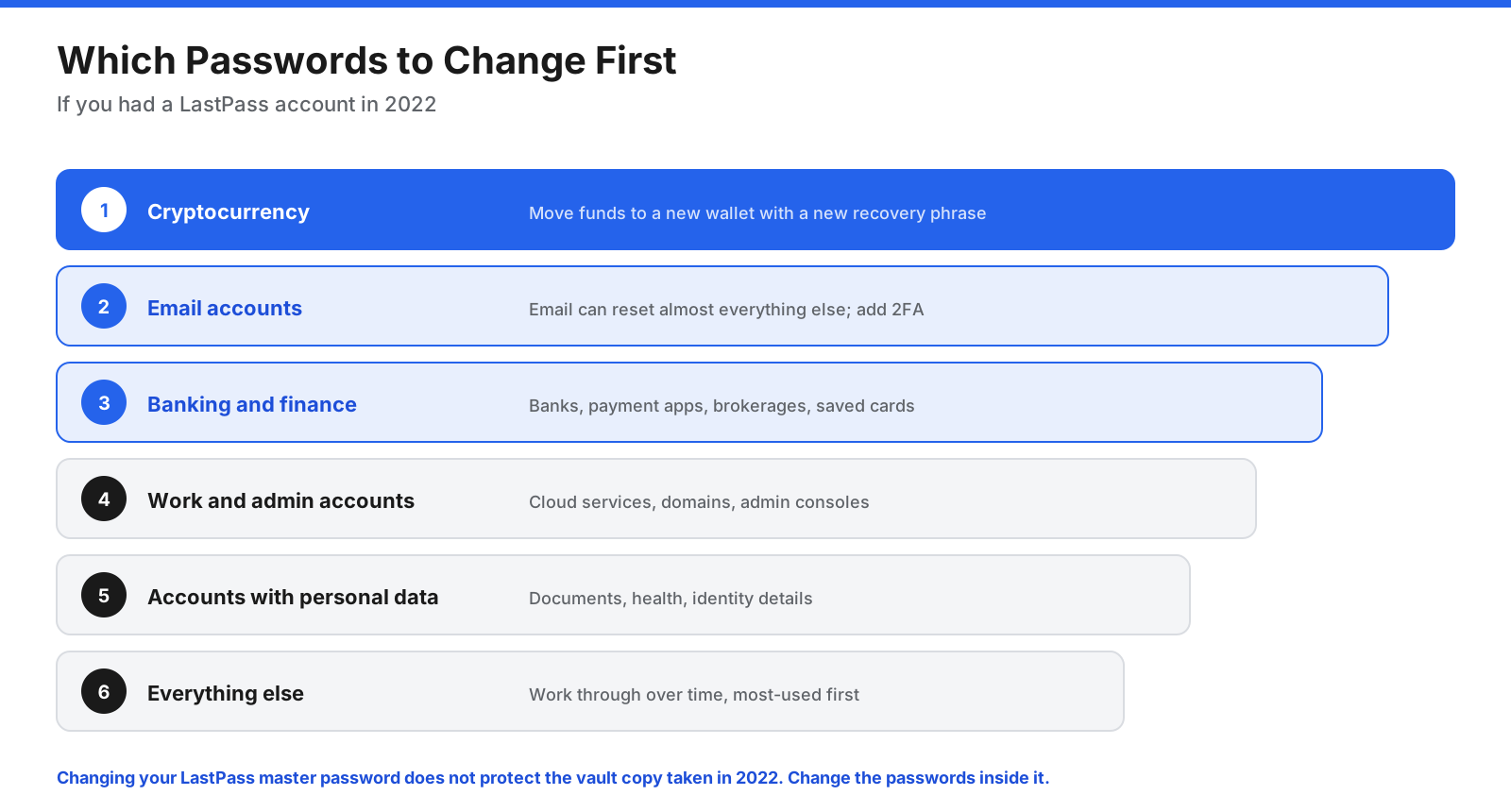
- Cryptocurrency. If you stored wallet recovery phrases, private keys, or exchange passwords in LastPass, move funds to a new wallet with a new recovery phrase. Changing a password alone is not enough because a recovery phrase cannot be changed.
- Email accounts. Your email can be used to reset other passwords, so change it next and turn on two-factor authentication.
- Banking and financial accounts. Change passwords for banks, payment apps, brokerages, and accounts with saved payment details.
- Work and admin accounts. Change passwords for work systems, cloud services, domain registrars, and accounts with administrator access.
- Accounts with personal data. Change passwords for accounts holding sensitive documents, health information, or identity details.
- Everything else. Work through remaining accounts over time, starting with ones you use often.
Also review secure notes, such as Wi-Fi passwords, software license keys, door codes, or answers to security questions, and change them where possible.
What Should You Look for in a LastPass Alternative?
If you are leaving because of the breach, check how each alternative handles the issues the breach exposed.
- What is encrypted. Ask whether the provider encrypts all vault data, including website URLs and item names, not just usernames and passwords.
- Protection beyond the master password. Some providers add a second secret, such as 1Password’s Secret Key, so stolen vault data cannot be cracked with the master password alone.
- Transparency. Look for independent security audits, a clear incident history, and ideally open-source code that experts can review.
- Cross-device free plan. If you want a free plan, check that it syncs across computers and phones.
- Import from LastPass. A direct importer or well-documented CSV import makes the move easier.
- Two-factor authentication. Check support for authenticator apps, security keys, and passkeys to protect the account itself.
What Are the Best LastPass Alternatives?
1. Bitwarden: Best Overall LastPass Alternative
Bitwarden is an open-source password manager with zero-knowledge encryption and one of the most generous free plans available. Its code is public, and the company publishes independent security audits.
Pricing: The free plan includes unlimited passwords on unlimited devices, passkey management, a password generator, email alias integration, and sharing with one other user. Premium costs $19.80 per year ($1.65 per month). Families costs $47.88 per year ($3.99 per month) for up to six users. Teams costs $4 per user per month and Enterprise $6 per user per month, billed annually.
Compared with LastPass: Bitwarden’s free plan syncs across all devices, which LastPass’s free plan does not. Premium costs less than LastPass Premium. Open-source code and published audits give users more visibility into how data is protected. Organizations can also self-host Bitwarden.
Moving from LastPass: Bitwarden offers a direct import from LastPass. Choose LastPass as the import format and follow the prompts, or import a LastPass CSV export. Attachments do not transfer and must be uploaded by hand.
Trade-offs: The apps are functional rather than polished, and autofill can feel less smooth than premium competitors. Best for: Most people leaving LastPass, especially those who want a free plan that works everywhere.
2. 1Password: Best for Ease of Use and Families
1Password is known for polished apps and a security design that adds a Secret Key to your master password. The Secret Key is generated on your device and never sent to 1Password; your vault cannot be decrypted without both secrets.
Pricing: There is no free plan, but there is a 14-day free trial. Individual costs $3.99 per month and Families costs $5.99 per month for up to five people, both billed annually. Business plans are also available.
Compared with LastPass: The Secret Key addresses the risk that hurt LastPass users: even if an attacker stole vault data and guessed a weak master password, they would still need the Secret Key stored only on your devices. Watchtower flags weak, reused, and compromised passwords.
Moving from LastPass: 1Password supports importing data from LastPass. Follow its import guide, then delete any export file you created. Trade-offs: There is no free plan, it costs more than many alternatives, and its code is not open source, though it publishes independent security assessments. Best for: Families and individuals who want polished apps and extra protection beyond the master password.
3. Proton Pass: Best for Privacy
Proton Pass comes from Proton, the Swiss company behind Proton Mail and Proton VPN. Its apps are open source and use end-to-end encryption.
Pricing: The free plan includes unlimited logins, notes, and credit cards on unlimited devices, two vaults, and 10 hide-my-email aliases. Pass Plus costs $35.88 per year, and Pass Family costs $59.88 per year. Proton Unlimited, which bundles Proton’s other services, costs $119.88 per year.
Compared with LastPass: The free plan syncs across devices and includes email aliases, which let you sign up for sites without revealing your main email address. Proton is based in Switzerland and builds its products around privacy.
Moving from LastPass: Export your LastPass vault as a CSV file, then open Proton Pass settings, go to Import, select LastPass, and upload the file. Delete the CSV afterward. Trade-offs: Proton Pass is newer than many competitors, and some advanced business admin controls are less mature. Best for: Privacy-focused users and anyone who wants email aliases built into a password manager.
4. Keeper: Best for Business Security Controls
Keeper is a zero-knowledge password manager focused on business and enterprise security, including detailed admin controls, role-based permissions, and compliance features.
Pricing: Keeper did not display prices on its personal pricing page when checked, so visit its site for current figures. The Family plan covers five users, each with a private vault, and includes 10 GB of secure file storage. A 30-day free trial is available.
Compared with LastPass: Keeper offers granular sharing and administration controls for organizations replacing LastPass Business. It also offers secure file storage and breach monitoring as part of plans or add-ons.
Moving from LastPass: Keeper supports importing from other password managers, including LastPass. Check Keeper’s import documentation for current steps. Trade-offs: Several useful features are sold as add-ons, which can raise the total price, and the interface has more options than casual users need. Best for: Businesses that need strong admin controls and security-conscious individuals who want extras such as encrypted file storage.
5. NordPass: Best Simple Paid Option
NordPass comes from the company behind NordVPN. It focuses on a clean interface and uses the XChaCha20 encryption algorithm.
Pricing: NordPass did not display prices on its pricing page when checked, so visit its site for current figures. Premium covers one user, and Family covers six. The free plan includes password storage and autofill, but multi-device access is listed as a paid feature. The free plan comes with a 30-day Premium trial.
Compared with LastPass: NordPass is a straightforward replacement for people who mainly want autofill and password storage without many extra settings. Paid plans add password health reports and a data breach scanner.
Moving from LastPass: NordPass supports importing passwords from other managers, including through CSV files. Check its import guide for LastPass steps. Trade-offs: The free plan is limited, and multi-year promotions mean you should compare the renewal price, not just the first-term price. Best for: People who want a simple paid password manager with minimal setup.
6. KeePassXC: Best Offline Option
KeePassXC is a free, open-source password manager that stores your vault in an encrypted file on your own device. There is no KeePassXC cloud service and no account to create.
Pricing: Free.
Compared with LastPass: There is no company server holding copies of your vault, so a provider breach cannot expose a central KeePassXC vault in the same way. You decide where the vault file is stored and how it is backed up or synced.
Moving from LastPass: Export your LastPass vault as a CSV file and import it into KeePassXC using the CSV import option, mapping columns to the right fields. Delete the CSV afterward. Trade-offs: You are responsible for syncing the vault file between devices and for backups. Mobile use requires separate compatible apps, making it less convenient for families. Best for: Technical users who want full control over where their passwords are stored.
7. Dashlane: Best for Large Family Groups
Dashlane is a polished password manager with extras such as a VPN on its Premium plan.
Pricing: Dashlane ended its free plan on September 16, 2025, and now offers a 14-day free trial instead. It did not display prices on its personal pricing page when checked, so visit its site for current figures. Premium includes a VPN for public Wi-Fi, and the Friends and Family plan covers 10 accounts under one subscription.
Compared with LastPass: Friends and Family covers more people than LastPass Families, which covers six. Dashlane includes phishing alerts and a VPN on Premium.
Moving from LastPass: Dashlane supports importing from other password managers using CSV files. Check its import guide for current steps. Trade-offs: There is no longer a free plan, and Dashlane is generally among the more expensive options. Best for: Large families and friend groups who want one subscription for up to 10 people.
8. Apple Passwords and Google Password Manager: Best Built-In Options
If you use only Apple devices, or only Chrome and Android, the password manager built into your devices may be enough. Apple Passwords is built into iPhone, iPad, and Mac, while Google Password Manager is built into Chrome and Android.
Pricing: Free with your device or Google account.
Compared with LastPass: Both are free, sync across devices in their own ecosystem, support passkeys, and warn you about compromised passwords. Neither requires installing anything.
Moving from LastPass: Both can import passwords from a CSV file. Export from LastPass, import, and delete the CSV. Trade-offs: They work best inside one ecosystem. Apple Passwords is limited outside Apple devices, and Google Password Manager is tied to Chrome and your Google account. Sharing and secure notes are more basic than in dedicated password managers. Best for: People who use only Apple or only Google devices and want a free, simple option.
How Do the LastPass Alternatives Compare?
The table compares free plans, starting prices, family plan sizes, open-source availability, and import options, with LastPass included as a baseline. LastPass prices come from a July 2026 third-party summary because its pricing page did not display figures; check current prices.
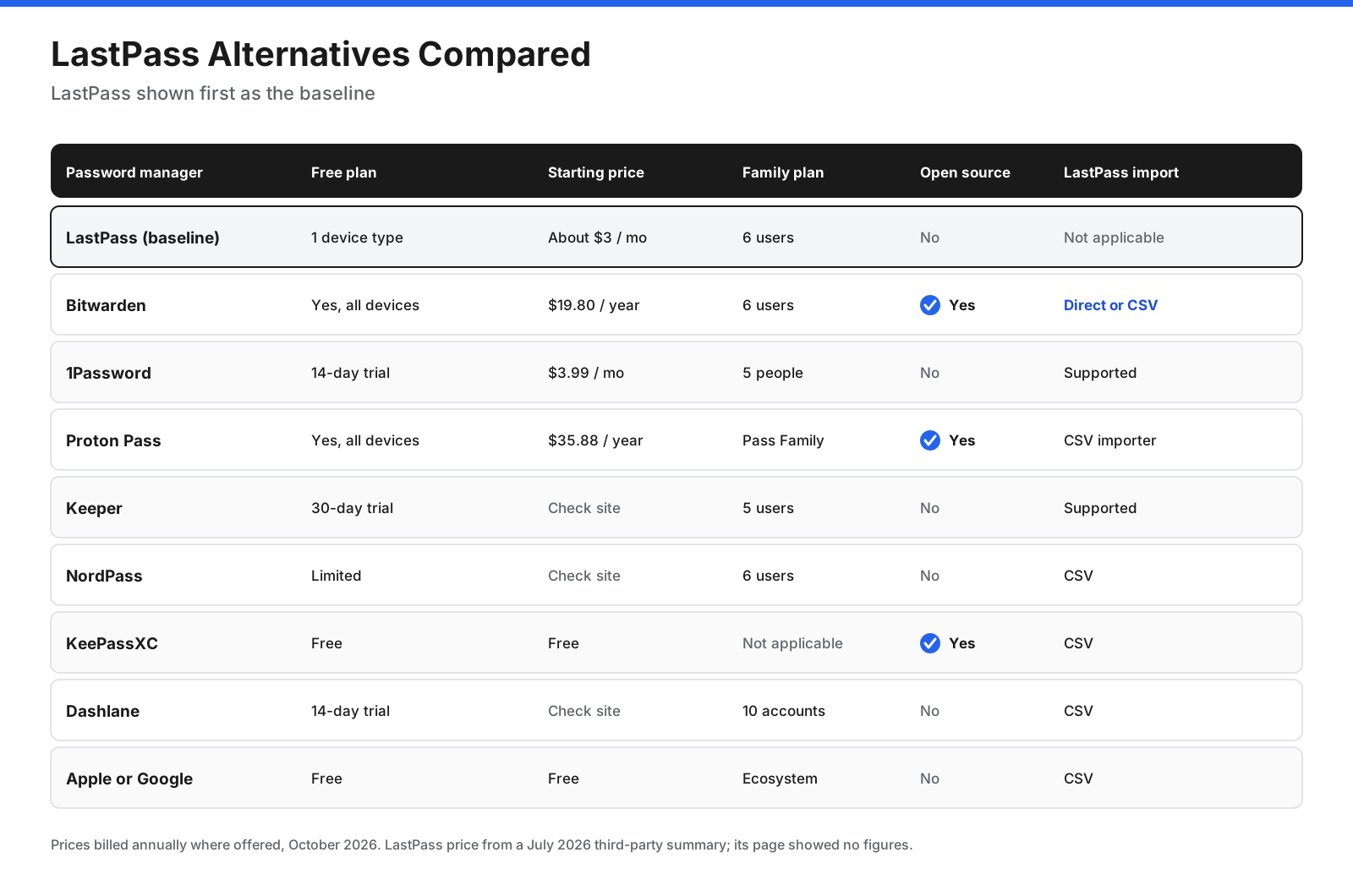
| Password manager | Free plan | Starting paid price | Family plan | Open source | LastPass import |
|---|---|---|---|---|---|
| LastPass (baseline) | One device type only | About $3/month | 6 users | No | Not applicable |
| Bitwarden | Yes, all devices | $19.80/year | 6 users | Yes | Direct or CSV |
| 1Password | 14-day trial | $3.99/month | 5 people | No | Supported |
| Proton Pass | Yes, all devices | $35.88/year | Pass Family | Yes | CSV |
| Keeper | 30-day trial | Check site | 5 users | No | Supported |
| NordPass | Limited | Check site | 6 users | No | CSV |
| KeePassXC | Free | Not applicable | Not applicable | Yes | CSV |
| Dashlane | 14-day trial | Check site | 10 accounts | No | CSV |
| Apple or Google | Free | Not applicable | Ecosystem sharing | No | CSV |
What Is the Best LastPass Alternative for Business?
Businesses replacing LastPass Teams or Business should look at admin controls, user provisioning, and how shared credentials are handled, not just price.
- Bitwarden Teams and Enterprise cost $4 and $6 per user per month billed annually. Bitwarden can be self-hosted, and its direct LastPass importer supports business accounts.
- 1Password Business combines the Secret Key design with admin controls, reporting, and integrations with identity providers. Check its site for current business pricing.
- Keeper Business and Enterprise focus on granular permissions, role-based access, and compliance reporting. Check Keeper’s site for current pricing.
For reference, LastPass Teams and Business were listed at about $4 and $7 per user per month billed annually in mid-2026, according to third-party pricing summaries. When migrating a business, plan the folder and sharing structure before importing, test with a small group first, and change shared credentials for critical systems after the move.
How Do You Move Your Passwords Out of LastPass?
Moving to a new password manager takes many people less than an hour. The key is to handle the export file carefully and finish the job by closing your LastPass account.
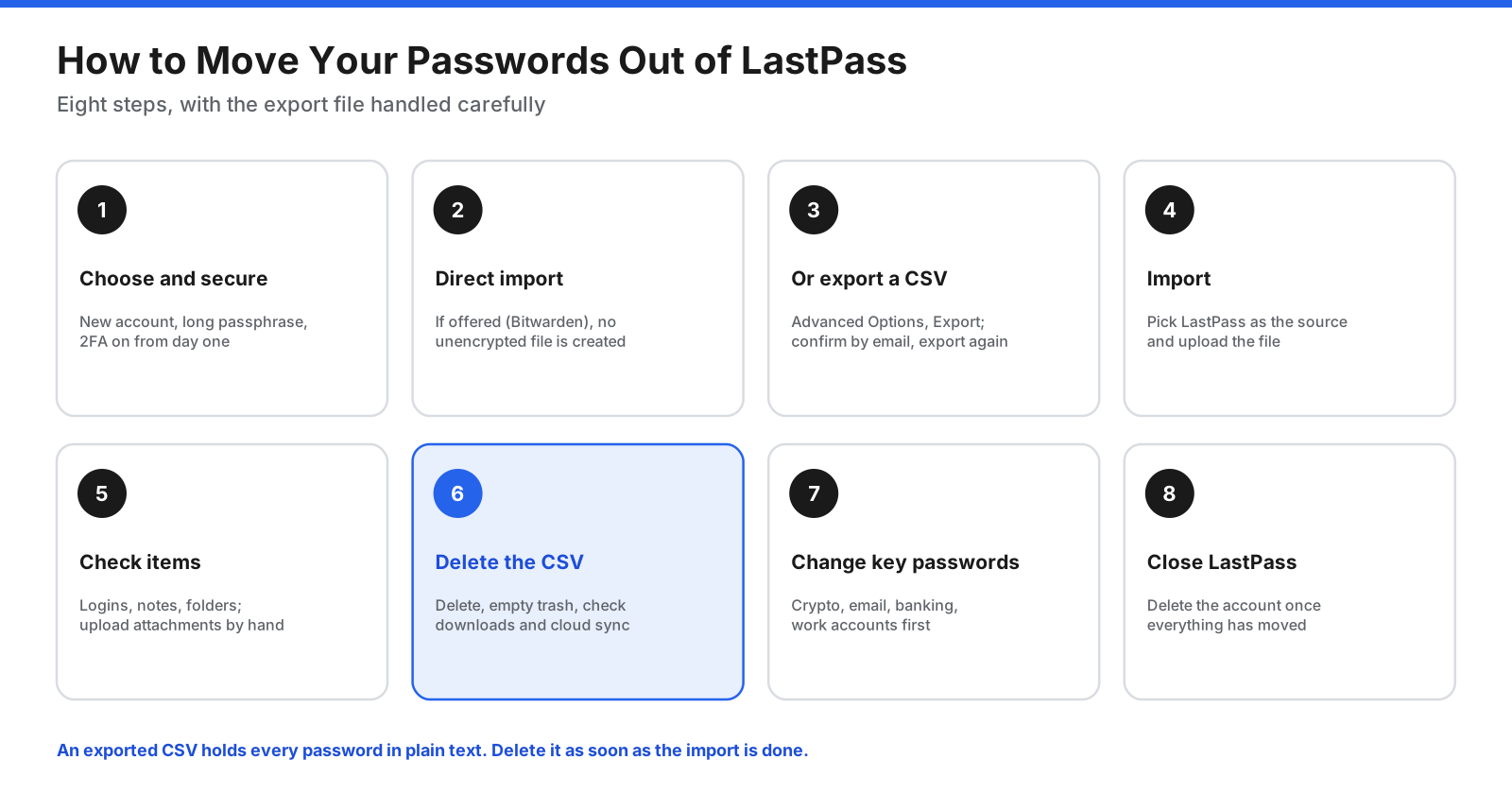
- Choose your new password manager and create an account with a strong, unique master password. Turn on two-factor authentication straight away.
- Use a direct import if one is available. Bitwarden can import directly from LastPass using your LastPass credentials, avoiding an unencrypted file.
- Otherwise, export a CSV from LastPass. In the web vault, go to Advanced Options and choose Export. LastPass emails you to confirm, then run the export again. From the browser extension, the path is Account, Fix a problem yourself, Export vault items, then Export data for use anywhere.
- Import into your new manager. Select LastPass as the source if the option exists, and upload the CSV file.
- Check your items. Confirm logins, secure notes, and folders came across. Attachments usually do not transfer, so upload important files by hand. Some special characters, such as ampersands, may appear encoded in exports and need fixing.
- Delete the CSV file securely. It contains every password in readable form. Delete it, empty your trash or recycle bin, and remove copies in downloads folders or cloud sync.
- Change high-priority passwords using the order above, starting with cryptocurrency, email, and banking.
- Delete your LastPass account once you are confident everything has moved. Closing it removes your current data from LastPass, although it cannot affect copies taken in 2022.
How Do Stolen Vaults Get Cracked?
Understanding how attackers use stolen vaults explains why the strength of your master password matters so much, whichever password manager you use.
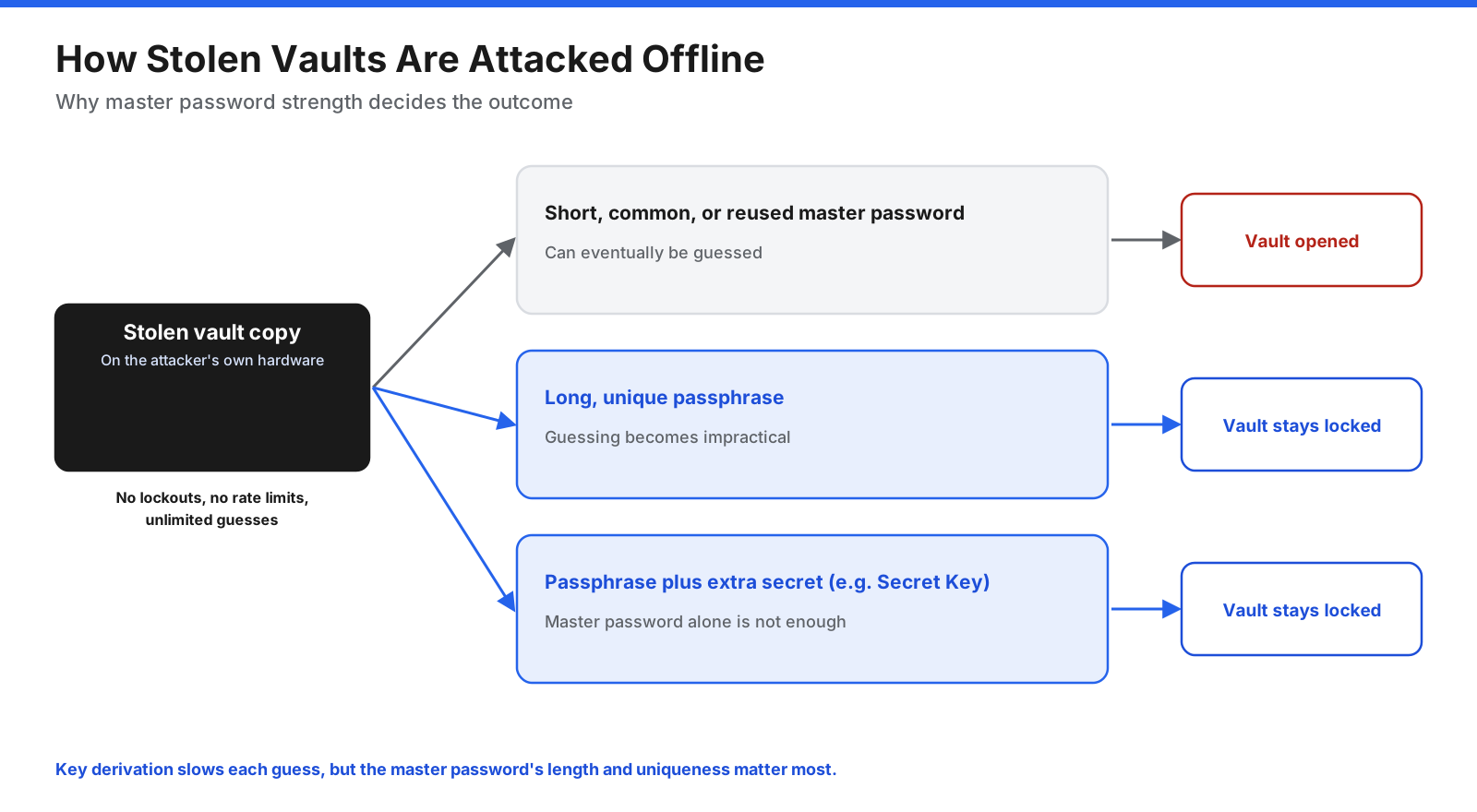
When you log in to a password manager online, the service can limit how many times someone tries to guess your password. Once an attacker has a copy of your encrypted vault, that protection is gone. They can try guesses on their own computers.
Password managers slow this down by running the master password through a key derivation function many times before it becomes an encryption key, so each guess takes longer. But the biggest factor is the master password itself:
- Short, common, or reused master passwords can eventually be guessed, especially if they appeared in earlier data breaches.
- Long, unique passphrases, such as several random words, are impractical to guess even with very fast hardware.
- An additional secret, such as 1Password’s Secret Key, means a stolen vault cannot be opened with the master password alone.
Whatever password manager you choose, use a long, unique master passphrase that you do not use anywhere else.
Which Password Manager Has Never Been Hacked?
No password manager can promise it will never be breached, and “never been hacked” is hard to verify. What you can check is how each provider is designed to limit the damage if it is. Look for encryption of all vault data, published independent audits, open-source code where possible, and extra protections such as 1Password’s Secret Key. Offline tools such as KeePassXC avoid central servers entirely, which removes the risk of a provider breach but makes you responsible for your own backups.
Your own setup matters too: use a strong, unique master password, turn on two-factor authentication, and keep highly sensitive secrets, such as cryptocurrency recovery phrases, offline where possible.
How Do You Choose the Right LastPass Alternative?
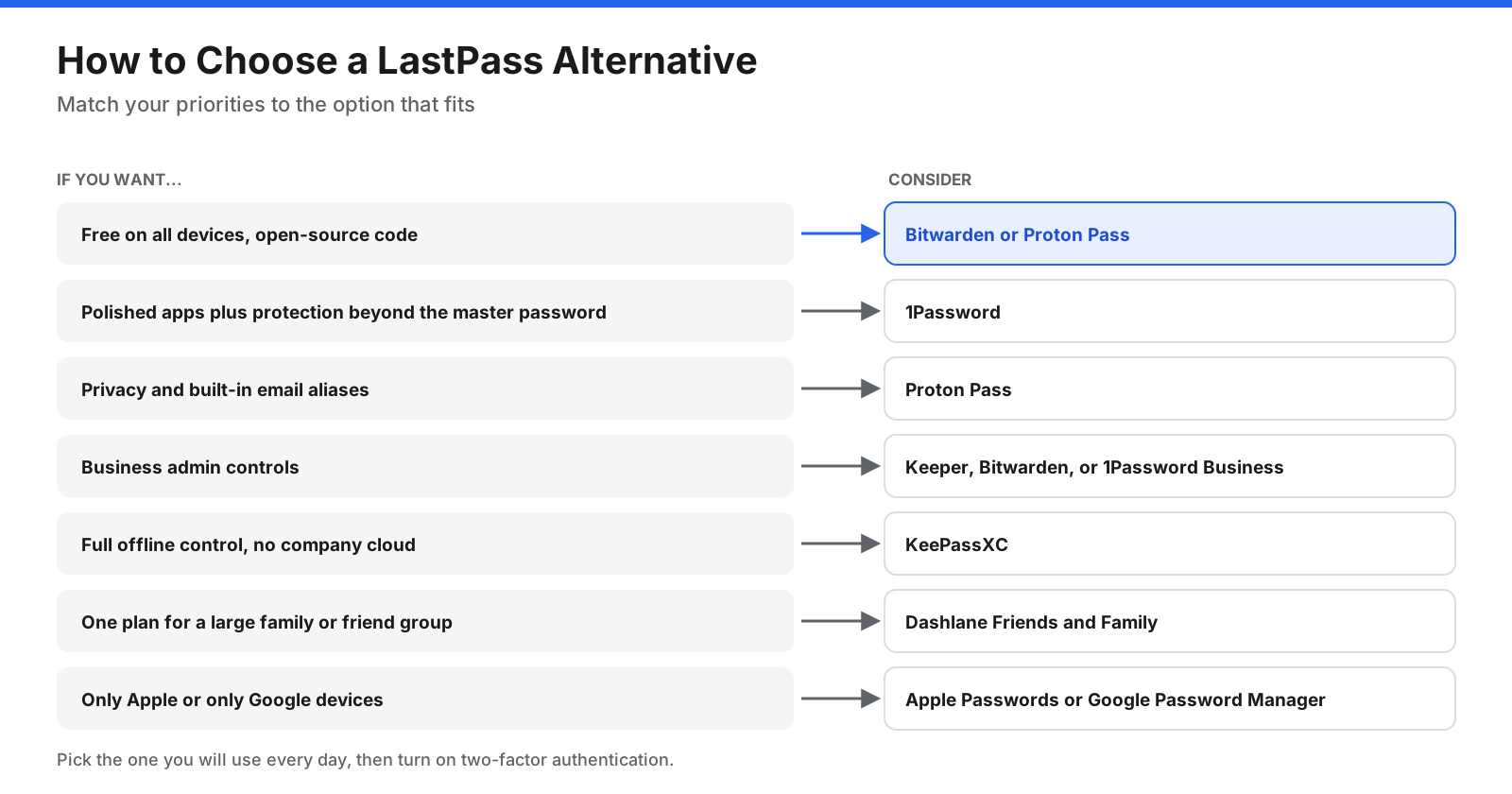
- Free on all devices, with open-source code: Bitwarden or Proton Pass.
- Polished experience and protection beyond the master password: 1Password.
- Privacy and email aliases: Proton Pass.
- Business admin controls: Keeper, Bitwarden, or 1Password Business.
- Full offline control: KeePassXC.
- A large family or friend group: Dashlane’s Friends and Family plan.
- Only Apple or only Google devices: Apple Passwords or Google Password Manager.
Frequently Asked Questions
Why are people leaving LastPass?
Mainly because of the 2022 breach, in which attackers stole encrypted vault backups along with unencrypted data such as website URLs. Researchers later linked cryptocurrency thefts to cracked vaults, and the UK’s data protection regulator fined LastPass in late 2025. LastPass’s free plan, which works on only one device type, is another common reason.
Is LastPass still trusted?
Opinions are divided. LastPass still uses zero-knowledge encryption and has said it made security changes after the breach, but many security professionals recommend other providers because of how the breach happened and how long its effects lasted.
What is the best free alternative to LastPass?
Bitwarden and Proton Pass both offer free plans that sync across unlimited devices. KeePassXC is free and fully offline. If you use only Apple or only Google devices, their built-in password managers are also free.
Is Bitwarden better than LastPass?
For most people, yes. Bitwarden’s free plan works on all devices, its Premium plan costs less, its code is open source, and it publishes independent security audits. It also has a direct importer for LastPass. LastPass’s apps may feel more polished to some users.
Do I need to change all my passwords after leaving LastPass?
If you had a LastPass account in 2022, yes, over time. Leaving LastPass or changing your master password does not protect the vault copy stolen in 2022. Start with cryptocurrency, email, banking, and work accounts, then work through the rest.
Is it safe to export my LastPass vault?
Yes, if you handle the file carefully. The CSV export contains your passwords in plain text, so import it straight away, then delete it and empty your trash. Bitwarden’s direct import avoids creating the file at all.
What is the best LastPass alternative for business?
Bitwarden, 1Password Business, and Keeper are common choices. Bitwarden offers low per-user pricing and self-hosting, 1Password adds its Secret Key design and polished admin tools, and Keeper focuses on granular permissions and compliance.
The Bottom Line
The 2022 breach showed that a password manager’s design choices, such as what it encrypts and how it protects internal keys, matter as much as encryption itself. If you used LastPass at the time, moving your vault is only half the job. Changing your most important passwords, starting with cryptocurrency, email, and banking, protects you from the vault copy that was stolen.
For most people, Bitwarden is the easiest switch, with a free plan that works on every device and a direct LastPass importer. 1Password is a strong choice if you want polished apps and the extra protection of a Secret Key. Proton Pass suits privacy-focused users, Keeper suits businesses that need detailed controls, and KeePassXC suits people who want no cloud at all.
Whichever you choose, use a long, unique master passphrase, turn on two-factor authentication, delete any export files, and close your LastPass account once everything has moved.















































































































