

Zoom became the default name for video meetings, and for many people it still is. It is reliable, easy for guests to join, and works on almost any device. But depending on how you meet, another platform may be a better fit.
The most common frustration is the free plan’s 40-minute limit on group meetings. Others include paying for Zoom on top of Google Workspace or Microsoft 365, wanting browser-only guest access, or needing open-source or end-to-end encrypted calls.
This guide compares 10 Zoom alternatives using provider pricing and documentation. It covers free plan time limits, costs, the best tool for different kinds of meetings, and meeting security. No provider paid for placement, and every pick includes trade-offs.
Quick Picks: Best Zoom Alternatives
- Best for Google Workspace users: Google Meet, with free one-to-one calls of up to 24 hours.
- Best for Microsoft 365 users: Microsoft Teams, with free group meetings of up to 60 minutes.
- Best for enterprise meetings: Webex, with paid plans from $144 per year.
- Best free option with no time limit: Jitsi Meet, which is open source and can be self-hosted.
- Best for browser-only meetings: Whereby, where guests join from a link with nothing to install.
- Best budget business option: Zoho Meeting, with a free plan for 60-minute meetings.
- Best for established business meetings: GoTo Meeting, with plans for up to 250 participants.
- Best for online classes: BigBlueButton, an open-source virtual classroom.
- Best for private calls: Signal, with end-to-end encrypted calls of up to 50 people.
- Best for Apple users: FaceTime, which non-Apple users can join from a web link.
Prices are based on provider pricing pages checked in October 2026 unless noted. Check current prices before buying.
Why Look for a Zoom Alternative?
People look for alternatives to Zoom for several recurring reasons:
- The 40-minute limit. Zoom’s free Basic plan limits group meetings to 40 minutes with up to 100 participants. Longer calls may require restarting or upgrading.
- Paying twice. Google Workspace includes Google Meet, and many Microsoft 365 plans include Teams. If your organization already pays for one of these, a separate Zoom subscription may be an extra cost.
- Cost. Zoom Workplace Pro costs $14.16 per user per month billed annually, or $16.99 billed monthly. Business costs $18.33 per user per month billed annually, or $21.99 monthly.
- Guest experience. Some users prefer browser links that do not require guests to install an app or create an account.
- Privacy and control. Organizations with strict privacy needs may want end-to-end encryption, open-source software, or meetings hosted on their own servers.
- Specialized needs. Teachers may need whiteboards and learning management system integration, while larger organizations may need meeting room hardware and calling.
None of this makes Zoom a bad choice. It remains a widely supported meeting platform. The question is whether it is the best fit for how you meet.
How Long Do Free Video Meetings Last?
Free plan time limits are one of the biggest reasons people search for Zoom alternatives. These limits apply to group meetings; several tools allow longer one-to-one calls.
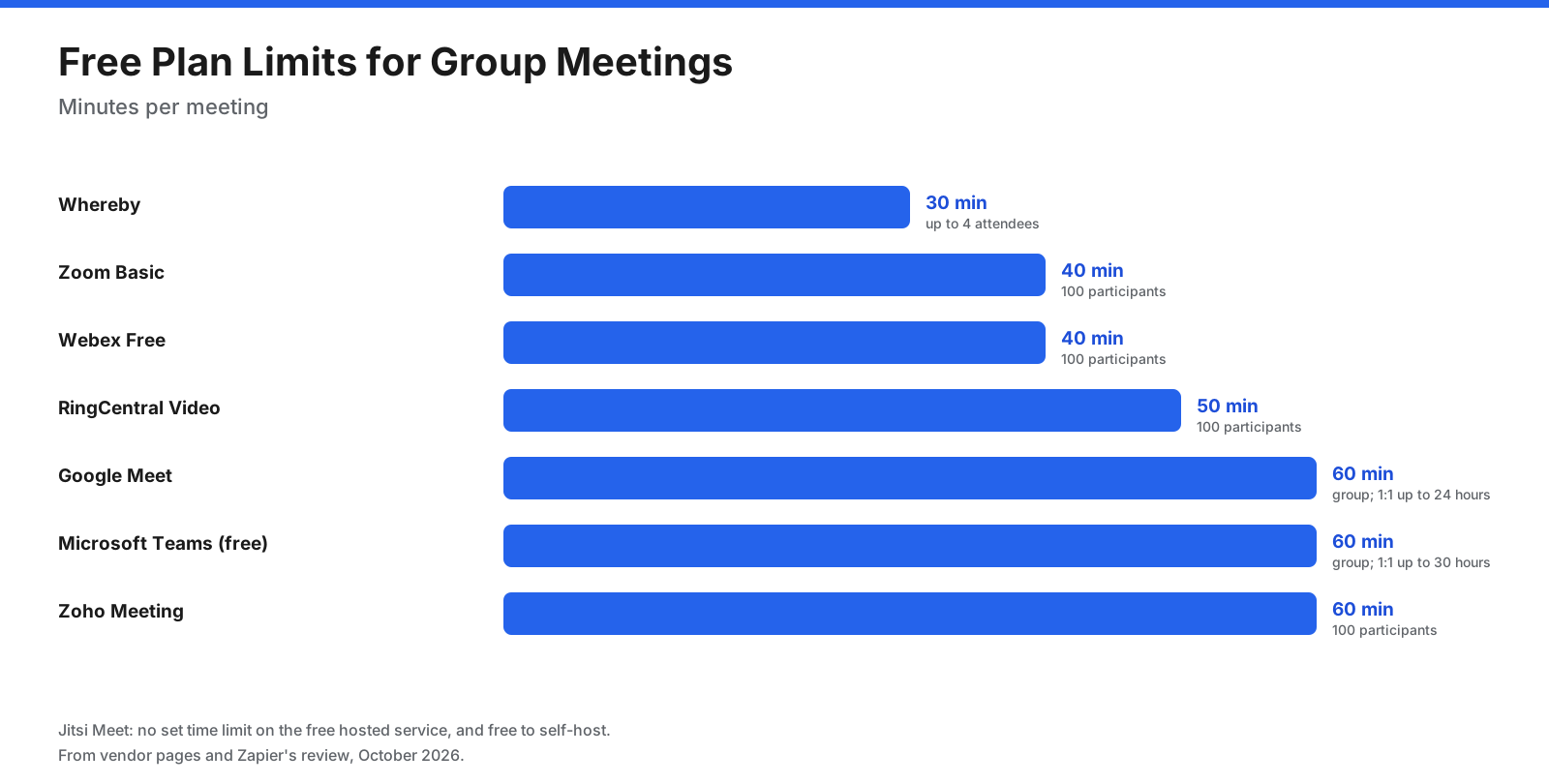
- Zoom Basic: 40 minutes per meeting, up to 100 participants.
- Webex Free: up to 40 minutes, up to 100 participants.
- Whereby Free: up to 30 minutes, with up to 4 attendees.
- Google Meet: 60 minutes for meetings of three or more people, and up to 24 hours for one-to-one calls, with up to 100 participants.
- Microsoft Teams Free: 60 minutes for group meetings and up to 30 hours for one-to-one calls, with up to 100 participants.
- Zoho Meeting Free: up to 60 minutes, with up to 100 participants.
- Jitsi Meet: no set time limit on the public service or when self-hosted.
- BigBlueButton: no set limit when self-hosted, since you control the server.
If you need free group meetings longer than an hour, Jitsi Meet is the main mainstream option. Otherwise, a low-cost paid plan may be the simplest answer.
What Types of Zoom Alternatives Are There?
Zoom alternatives fall into four groups. Knowing which group fits your needs narrows the choice quickly.
- Suites with built-in meetings. Google Meet and Microsoft Teams come with Google Workspace and Microsoft 365. Their meetings connect to your calendar, email, chat, and documents.
- Dedicated meeting platforms. Webex, GoTo Meeting, and Zoho Meeting focus on meetings and webinars, with features such as recording, larger participant limits, and room systems.
- Browser-based and open-source tools. Whereby, Jitsi Meet, and BigBlueButton run in the browser, and open-source options can be self-hosted.
- Personal and private calling apps. Signal and FaceTime are built for personal calls, with a focus on privacy and simplicity.
What Should You Look for in a Zoom Alternative?
- Meeting length and size. Check the time limit and participant cap on the plan you would use, for both group and one-to-one calls.
- Guest experience. Can guests join from a browser without installing an app or creating an account?
- Recording and transcripts. Check whether recording is included, where recordings are stored, and whether transcripts and AI summaries are available.
- Collaboration features. Look for screen sharing, whiteboards, breakout rooms, polls, chat, and hand raising.
- Integrations. Check calendar integration and connections to your chat, CRM, or learning management system.
- Security. Look for waiting rooms, passcodes, host controls, encryption, and end-to-end encryption for sensitive meetings.
- Price per host. Most meeting tools charge per host or organizer, not per participant. Count how many people need to start meetings.
What Are the Best Zoom Alternatives?
1. Google Meet: Best for Google Workspace Users
Google Meet is built into Gmail, Google Calendar, and Google Workspace. Anyone with a Google account can use it for free.
Pricing: Free with a personal Google account, with group meetings up to 60 minutes and one-to-one calls up to 24 hours for up to 100 participants. Google Workspace Business Starter costs $7 per user per month billed annually and allows group meetings up to 24 hours with 100 participants. Business Standard ($14) adds recording and 150 participants, and Business Plus ($22) allows 500. Workspace prices are from a mid-2026 pricing summary because Google’s page did not display figures when checked.
Compared with Zoom: Meet runs in the browser on computers and connects directly to Google Calendar and Gmail. If your organization uses Workspace, you may already be paying for it. The free group limit is longer than Zoom’s.
Trade-offs: Advanced features such as recording require higher Workspace tiers. Meet has fewer large-meeting and webinar features than Zoom and is less convenient for organizations outside Google’s ecosystem.
Best for: Google Workspace organizations and anyone who wants simple, browser-based meetings.
2. Microsoft Teams: Best for Microsoft 365 Users
Microsoft Teams combines chat, meetings, calling, and file sharing, and it is included in many Microsoft 365 business plans.
Pricing: The free version allows group meetings up to 60 minutes and one-to-one calls up to 30 hours, with up to 100 participants and 5 GB of storage per user. Teams Essentials costs $4 per user per month billed annually, with meetings up to 30 hours and 300 participants. Microsoft 365 Business Basic, including Teams, Outlook, and web Office apps, costs $7 per user per month billed annually.
Compared with Zoom: Teams Essentials is cheaper than Zoom Pro for meetings, and Teams connects closely with Outlook, SharePoint, and Office documents. For organizations already on Microsoft 365, it may remove the need for Zoom.
Trade-offs: Teams is heavier than Zoom if all you need is meetings, and external guests sometimes find joining less straightforward. Its full value depends on using other Microsoft 365 apps.
Best for: Organizations that use Microsoft 365 for email and documents.
3. Webex: Best for Enterprise Meetings
Webex, from Cisco, offers meetings, webinars, calling, and meeting room hardware, with a long track record in large enterprises.
Pricing: Webex Free allows meetings up to 40 minutes with up to 100 participants. Webex Meet costs $144 per year ($12 per month billed monthly) with meetings up to 24 hours and 200 participants. Webex Suite, which adds calling, costs $270 per year ($22.50 monthly). Enterprise is quote-based and supports up to 1,000 participants.
Compared with Zoom: Webex Meet costs less than Zoom Pro on annual billing and allows more participants on its entry paid plan. It is a strong choice for organizations that want meetings, calling, and conference room systems from one vendor.
Trade-offs: The free plan’s 40-minute limit matches Zoom’s. Some users find Webex less simple for quick meetings.
Best for: Mid-sized and large organizations, especially those using Cisco hardware or needing integrated calling.
4. Jitsi Meet: Best Free Option with No Time Limit
Jitsi Meet is a free, open-source video meeting platform. You can use the public meet.jit.si service or run it on your own server.
Pricing: Free. There is no set time limit on the public service, and self-hosted installations are limited only by server capacity.
Compared with Zoom: Jitsi Meet has no 40-minute limit, runs in the browser, and guests can join without an account. Because it is open source, organizations can host it themselves and keep meeting data on their own infrastructure.
Trade-offs: Since August 2023, creating a room on meet.jit.si requires signing in with a Google, GitHub, or Facebook account, though guests can still join without one. Call quality on the public service can vary with large groups, and it lacks the polished admin, recording, and support features of paid platforms. Self-hosting requires technical skills.
Best for: Individuals and small groups who need free meetings with no time limit, and organizations that want to self-host.
5. Whereby: Best for Browser-Only Meetings
Whereby is a browser-based meeting tool built around permanent room links. Guests click a link and join with no downloads or installs.
Pricing: Free includes one host, one room, up to 4 attendees, and meetings up to 30 minutes. Pro costs $10.99 per month for one host with three rooms, up to 100 attendees, and no time limit. Business costs $13.99 per host per month (minimum three hosts), with unlimited rooms and up to 200 attendees. Annual billing saves 17%.
Compared with Zoom: Whereby is simpler for guests: no app, no account, and the same room link every time. Paid plans have no meeting time limit and cost less than Zoom Pro.
Trade-offs: The free plan is limited to 4 attendees and 30 minutes. Whereby has fewer large-meeting and webinar features than Zoom.
Best for: Freelancers, consultants, coaches, and small teams who meet with clients and want the simplest joining experience.
6. Zoho Meeting: Best Budget Business Option
Zoho Meeting is the video meeting and webinar app in Zoho’s suite of business software.
Pricing: The free plan allows meetings up to 60 minutes with up to 100 participants. Paid Standard and Professional plans are sold in participant tiers from 10 to 250, with meetings up to 24 hours. Annual billing saves more than 15%. Zoho’s page did not display exact US dollar prices when checked, so visit its site for current figures.
Compared with Zoom: Zoho Meeting’s free plan allows 60-minute meetings, longer than Zoom’s 40 minutes. Pricing by participant tier means small teams may pay less. It connects with Zoho CRM and other Zoho apps.
Trade-offs: It has a smaller ecosystem of integrations outside Zoho and is less widely recognized by guests than Zoom or Google Meet.
Best for: Small businesses, especially those using other Zoho apps.
7. GoTo Meeting: Best for Established Business Meetings
GoTo Meeting, from GoTo (formerly LogMeIn), is a long-standing business meeting platform.
Pricing: Professional includes 150 participants and Business includes 250, priced per organizer per month and billed annually. Enterprise is quote-based. GoTo’s pricing page did not display dollar amounts when checked, so visit its site for current prices. A free trial is available.
Compared with Zoom: GoTo Meeting is a business-focused alternative with higher participant limits on entry plans than Zoom Pro.
Trade-offs: There is no ongoing free plan, and pricing is not transparent online. It offers fewer collaboration extras than Zoom Workplace.
Best for: Businesses that want a dedicated, established meeting platform.
8. BigBlueButton: Best for Online Classes
BigBlueButton is an open-source virtual classroom developed at Carleton University in Canada in 2007 and built specifically for online teaching.
Pricing: The software is free to self-host. Commercial hosting providers offer managed hosting for a fee.
Compared with Zoom: BigBlueButton is designed around teaching, with a multi-user whiteboard, document uploads, breakout rooms, polling, shared notes, and hand raising. It integrates with learning management systems including Canvas, Moodle Cloud, Sakai, D2L, and Schoology.
Trade-offs: It is built for education rather than business meetings. Self-hosting requires technical skills, and its interface is less polished than mainstream meeting tools.
Best for: Schools, universities, and online course providers.
9. Signal: Best for Private Calls
Signal is a free, open-source messaging app known for end-to-end encryption. It supports group video calls and call links.
Pricing: Free.
Compared with Zoom: Signal calls are end-to-end encrypted, so only participants can see and hear them. Call links let up to 50 people join a call, even without being in a shared group, and creators can require approval before people join.
Trade-offs: Everyone needs the Signal app and a Signal account. It has no business features such as recording, webinars, or admin controls.
Best for: Private personal calls and small groups that prioritize privacy.
10. FaceTime: Best for Apple Users
FaceTime is Apple’s built-in video calling app on iPhone, iPad, and Mac.
Pricing: Free on Apple devices.
Compared with Zoom: FaceTime is already installed on Apple devices and supports group calls of up to 32 people. FaceTime links let people on Android and Windows join from a web browser.
Trade-offs: Only Apple users can create calls, and it has no business features such as scheduling, recording, or admin controls.
Best for: Personal calls with friends and family who mostly use Apple devices.
How Do the Zoom Alternatives Compare?
The table summarizes free plans, starting prices, participant limits, and browser joining, with Zoom included as a baseline. Prices are for entry paid plans; several tools charge per host or organizer, not per participant.
| Tool | Free plan | Starting paid price | Entry participants | Browser joining |
|---|---|---|---|---|
| Zoom | 40 min, 100 people | $14.16/user/month annually | 100 | Yes |
| Google Meet | 60 min groups, 24 hr 1:1 | $7/user/month Workspace | 100 | Yes |
| Microsoft Teams | 60 min groups, 30 hr 1:1 | $4/user/month Essentials | 300 | Yes |
| Webex | 40 min, 100 people | $144/year | 200 | Yes |
| Jitsi Meet | No set limit | Free | Varies | Yes |
| Whereby | 30 min, 4 attendees | $10.99/month | 100 | Yes, no install |
| Zoho Meeting | 60 min, 100 people | Check site | 10 to 250 tiers | Yes |
| GoTo Meeting | Trial only | Check site | 150 | Yes |
| BigBlueButton | Free, self-hosted | Free | Server-dependent | Yes |
| Signal | Free | Free | Up to 50 | No, app required |
| FaceTime | Free on Apple | Free | Up to 32 | Yes, via link |
Is There Anything Cheaper Than Zoom?
Yes. For meetings alone, several options cost less than Zoom Pro per host per year. Google Workspace and Microsoft 365 also include email, storage, and other apps, so they replace more than Zoom.
- Zoom Pro: about $169.92 per user per year ($14.16 per month billed annually).
- Webex Meet: $144 per year.
- Whereby Pro: about $131.88 per year on monthly billing ($10.99 per month), less with annual billing.
- Google Workspace Business Starter: about $84 per user per year ($7 per month billed annually), including Gmail, Drive, and Docs.
- Microsoft Teams Essentials: $48 per user per year ($4 per month billed annually).
Free options include Google Meet and Microsoft Teams for meetings up to 60 minutes, and Jitsi Meet with no set time limit.
Which Zoom Alternative Is Best for Each Type of Meeting?
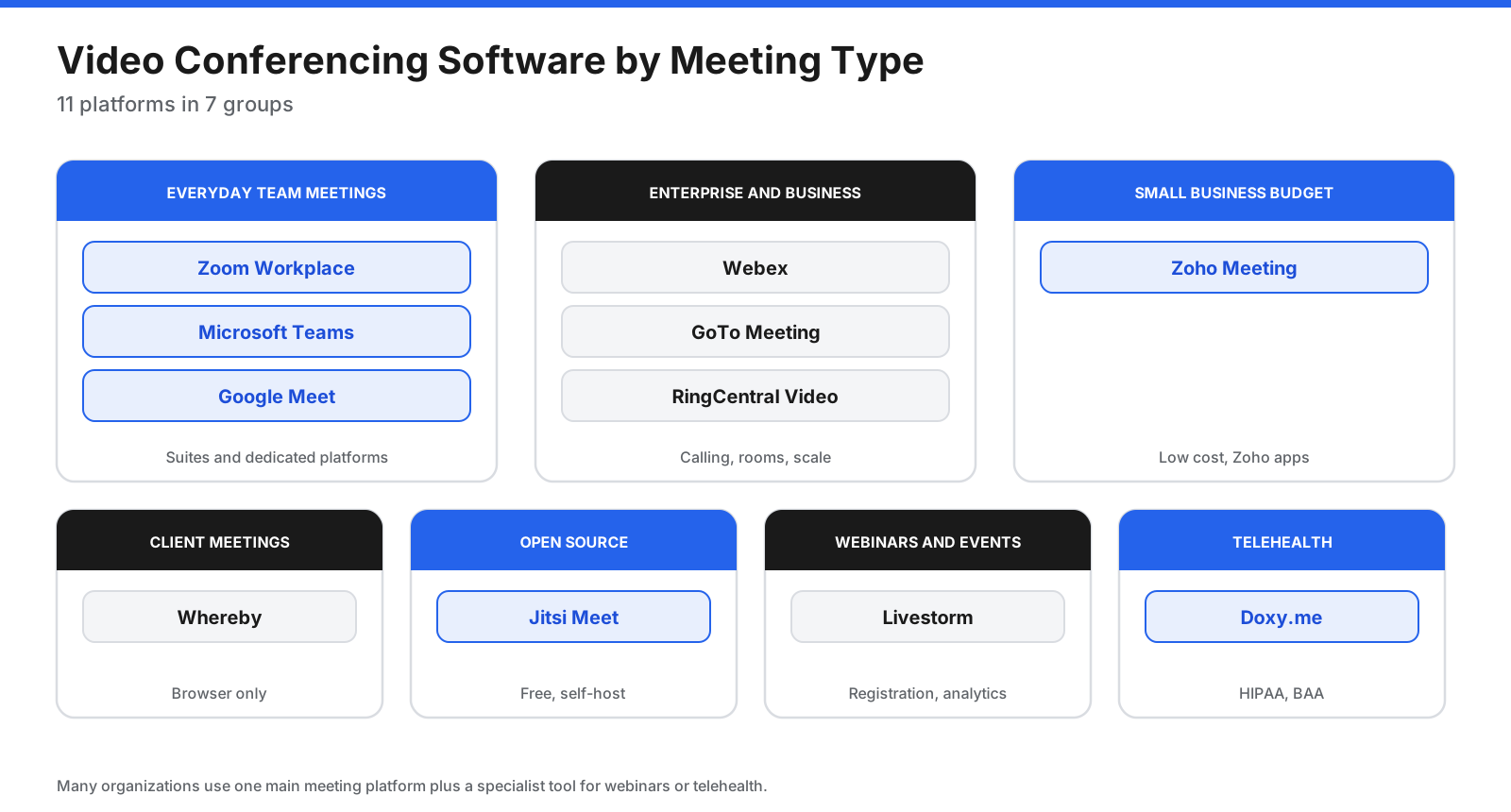
- Internal team meetings: Google Meet or Microsoft Teams, since they connect to the calendar and documents your team already uses.
- Client and sales calls: Whereby or Google Meet, because guests can join from a browser without installing anything.
- Large meetings and all-hands: Webex or GoTo Meeting, with higher participant limits on entry plans.
- Online classes: BigBlueButton, with whiteboards, breakout rooms, and LMS integration.
- Free long group calls: Jitsi Meet, with no set time limit.
- Private personal calls: Signal for end-to-end encryption, or FaceTime for Apple users.
How Do You Keep Video Meetings Secure?
Whichever tool you choose, a few settings and habits prevent most meeting security problems, such as uninvited guests disrupting a call.
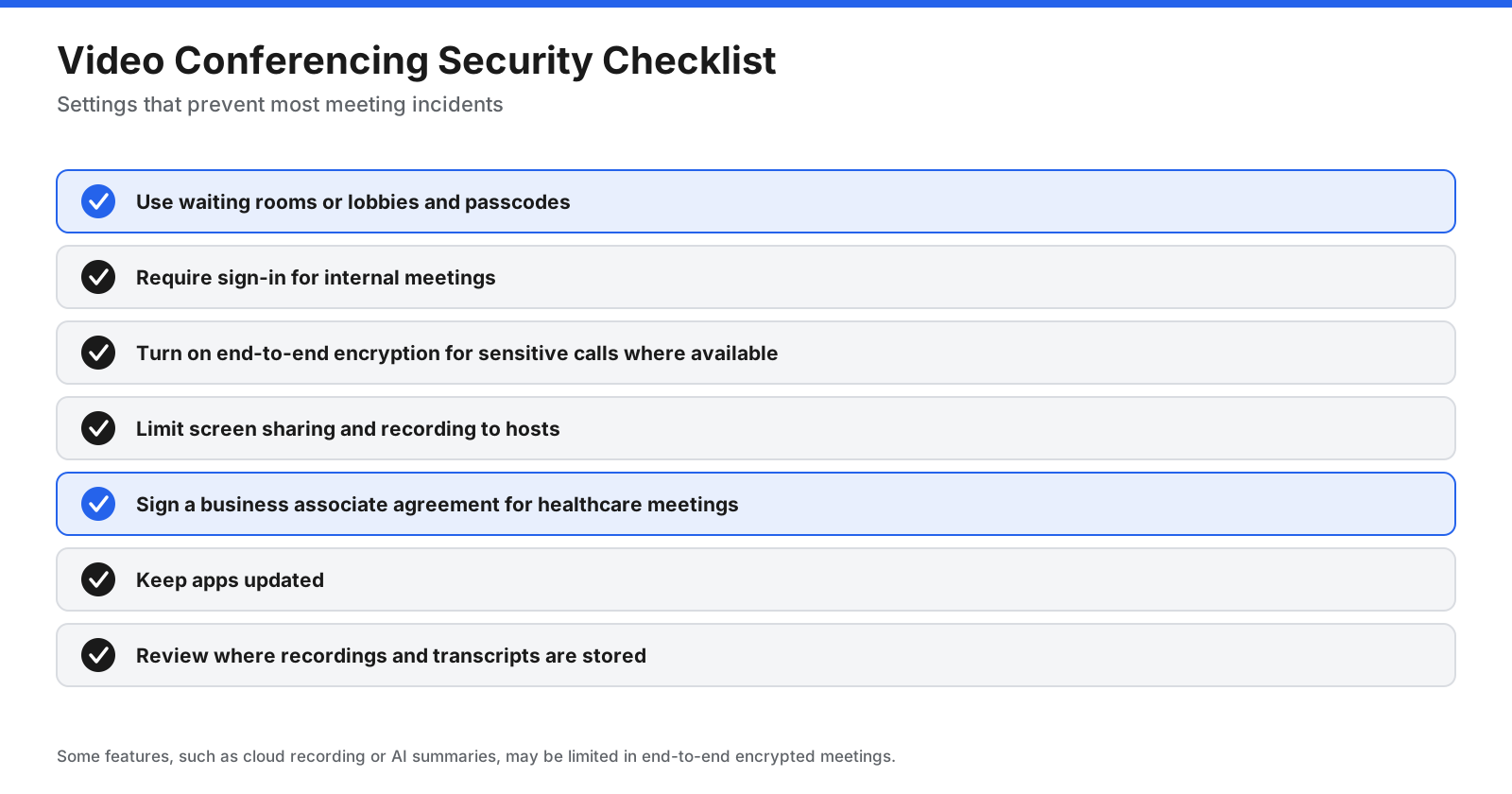
- Use a waiting room or lobby so the host admits each participant.
- Require a passcode for sensitive or recurring meetings.
- Do not post meeting links publicly, especially on social media.
- Limit screen sharing to the host unless others need to present.
- Lock the meeting once everyone expected has joined.
- Use end-to-end encryption for sensitive conversations where the tool supports it, such as Signal.
- Tell participants before recording, and check the consent rules that apply where you and your participants are.
- Keep apps and browsers updated to receive security fixes.
Why Don’t People Use Zoom as Much Anymore?
Zoom is still widely used, but its share of everyday meetings has changed since the early 2020s. Several things explain the shift:
- Bundled alternatives. Google Meet and Microsoft Teams come with Google Workspace and Microsoft 365, so many organizations use the meeting tool included with their existing suite.
- Hybrid work. As more meetings happen alongside chat, documents, and calendars, organizations prefer tools inside the same platform as the rest of their work.
- Free plan limits. The 40-minute cap on Zoom’s free plan pushes casual users toward Google Meet, Teams, or Jitsi Meet, which offer longer free meetings.
Zoom has responded by expanding into Zoom Workplace, with Team Chat, Docs, whiteboards, phone, and AI features. For many organizations, especially those that run large meetings and webinars, it remains a strong choice.
How Do You Switch from Zoom?
Moving meetings to a new platform is mostly about habits and links, not data.
- Check what you use Zoom for. List regular meetings, webinars, recordings, room systems, and integrations such as calendar and CRM connections.
- Download recordings you need to keep. Cloud recordings stay with your Zoom account, so download or move important recordings before cancelling.
- Set up the new tool’s calendar integration so new meetings automatically include the right link.
- Update recurring meetings. Replace Zoom links in recurring calendar invites, booking pages, email signatures, and documentation.
- Test with external guests to confirm they can join easily from different devices and browsers.
- Cancel or downgrade Zoom once recurring meetings and integrations have moved.
How Do You Choose the Right Zoom Alternative?
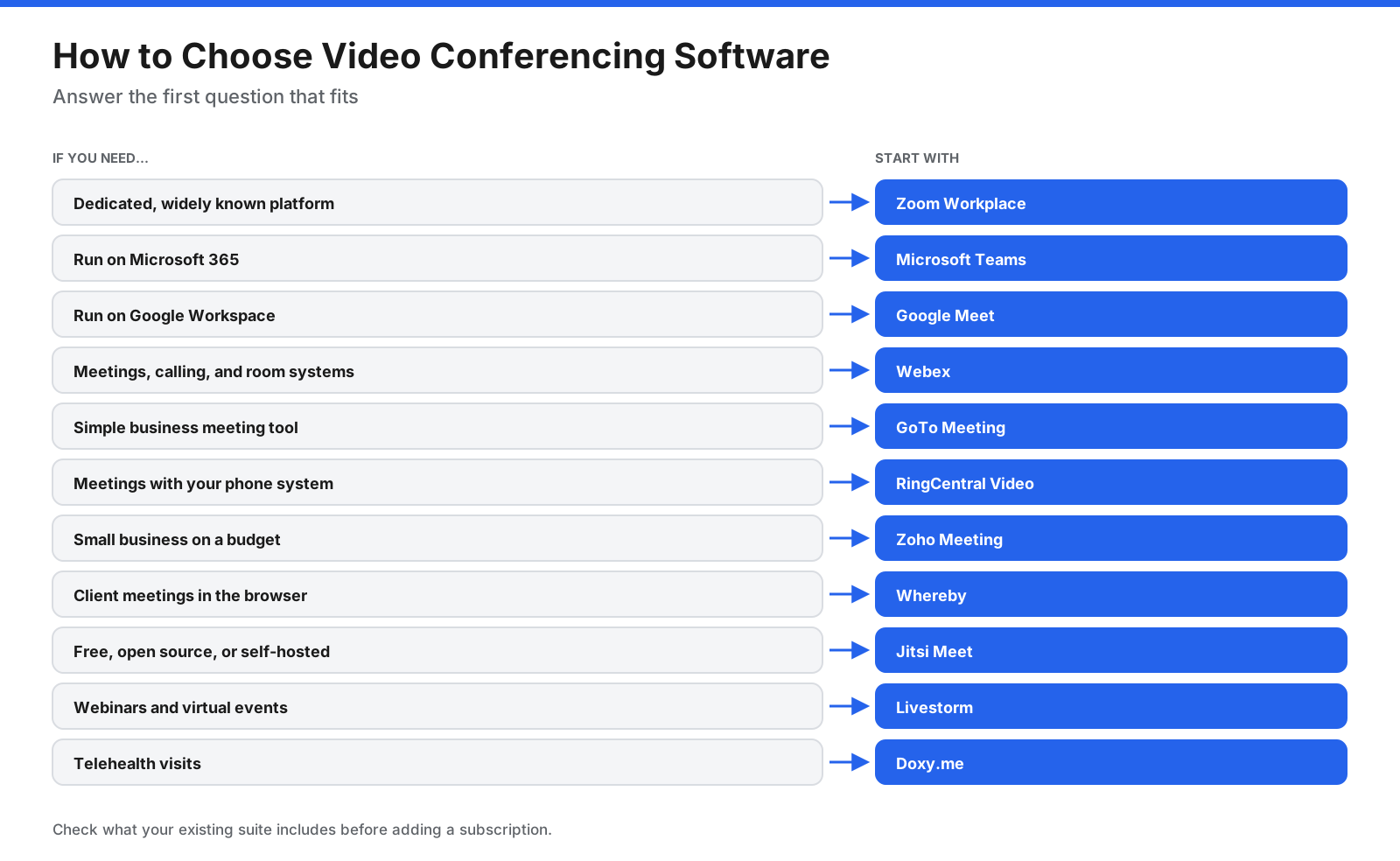
- You use Google Workspace: Google Meet.
- You use Microsoft 365: Microsoft Teams.
- You need enterprise meetings and calling: Webex.
- You need free meetings with no time limit: Jitsi Meet.
- You want guests to join with no install: Whereby.
- You want a budget business tool: Zoho Meeting.
- You run online classes: BigBlueButton.
- You need private, encrypted calls: Signal.
Frequently Asked Questions
What is the best free alternative to Zoom?
Google Meet and Microsoft Teams both offer free group meetings up to 60 minutes with up to 100 participants, longer than Zoom’s 40-minute free limit. Jitsi Meet is the best free option if you need meetings with no set time limit.
Is there a free Zoom alternative with no time limit?
Yes. Jitsi Meet has no set time limit on its public service, and none when self-hosted. BigBlueButton also has no set limit when you host it yourself. Google Meet allows free one-to-one calls up to 24 hours, and Microsoft Teams free allows one-to-one calls up to 30 hours.
Who is Zoom’s biggest competitor?
Microsoft Teams and Google Meet are Zoom’s largest competitors because they are included with Microsoft 365 and Google Workspace, which many organizations already use. Webex is a major competitor in enterprise meetings.
Is there a totally free version of Zoom?
Yes. Zoom’s Basic plan is free, but meetings are limited to 40 minutes with up to 100 participants. Zoom’s paid plans allow meetings up to 30 hours.
Is there anything cheaper than Zoom?
Yes. Microsoft Teams Essentials costs $4 per user per month billed annually, Google Workspace Business Starter costs $7 and includes Gmail and Docs, Webex Meet costs $144 per year, and Whereby Pro costs $10.99 per month. Zoom Pro costs $14.16 per user per month billed annually.
Is Google Meet better than Zoom?
Google Meet is better if your organization uses Google Workspace, since it connects directly to Gmail and Calendar and runs in the browser. Zoom is generally stronger for large meetings, webinars, and advanced meeting controls.
What is the best open-source alternative to Zoom?
Jitsi Meet is the best-known open-source alternative for general meetings, and BigBlueButton is a leading open-source option for online classes. Both can be self-hosted.
Which Zoom alternative is best for screen sharing?
Google Meet and Jitsi Meet are simple free options for screen sharing in the browser. Other business tools in this guide also support screen sharing on their free or entry plans.
What is the best alternative to Zoom Webinars?
For webinars rather than meetings, look at dedicated webinar products. Webex, GoTo, and Zoho offer separate webinar tools alongside their meeting products, with registration pages, attendee management, polls, and Q and A.
Is Whereby free?
Whereby has a free plan with one room, up to 4 attendees, and meetings up to 30 minutes. For longer meetings or more attendees, Whereby Pro costs $10.99 per month with no time limit and up to 100 attendees.
The Bottom Line
The best Zoom alternative is often the one you already pay for. If your organization uses Google Workspace, Google Meet covers most meetings, and if you use Microsoft 365, Teams does the same. Webex is a strong choice for enterprise meetings and calling, and costs less than Zoom Pro on annual billing.
For free meetings without a time limit, Jitsi Meet is the standout. Whereby offers the simplest experience for client calls, Zoho Meeting suits budget-conscious small businesses, and BigBlueButton is built for teaching. For private personal calls, Signal and FaceTime cover most needs.
Before switching, check the time limit and participant cap on the plan you would use, try a meeting with external guests, and confirm the price per host for everyone who needs to start meetings.















































































































