

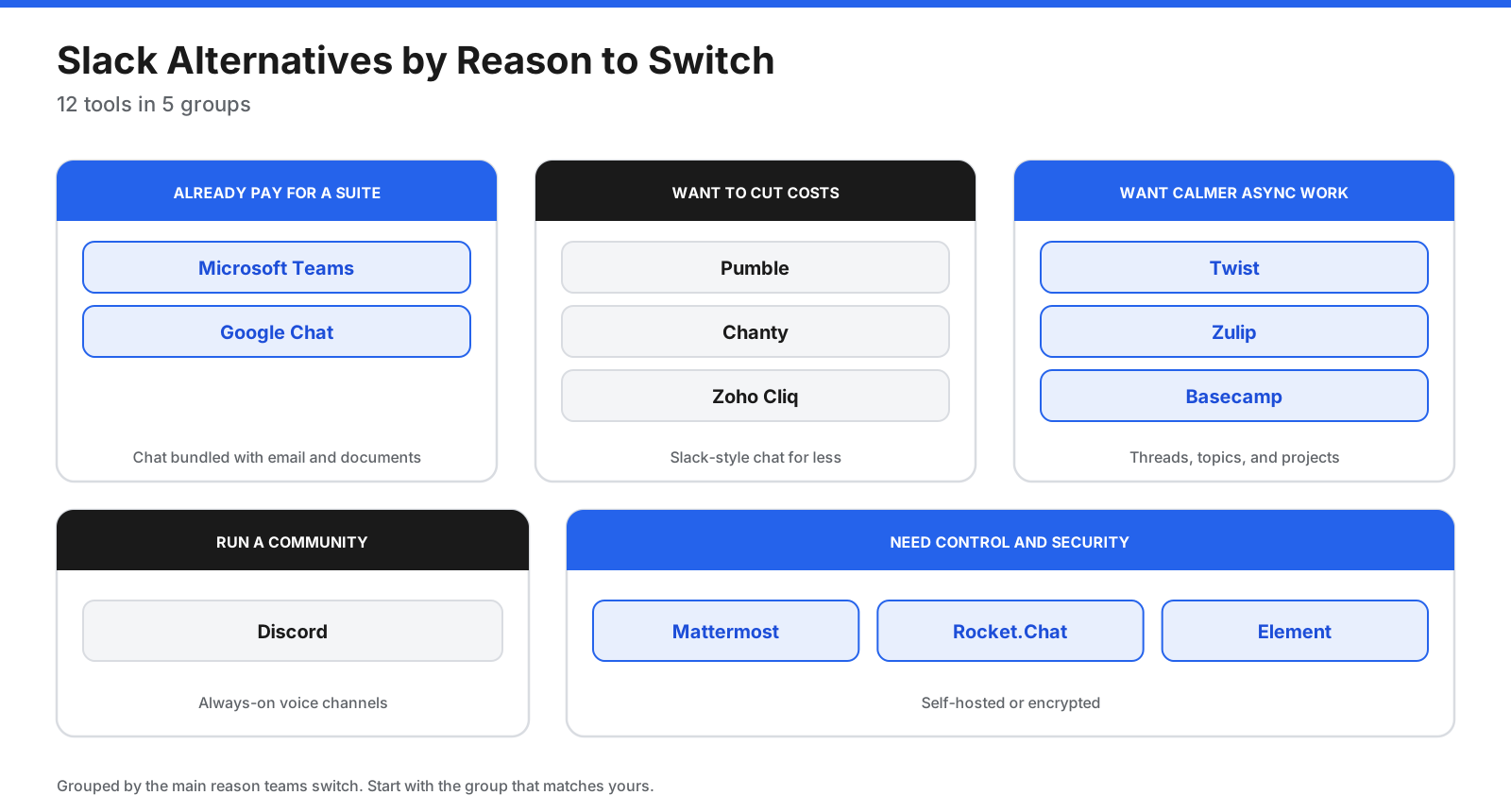
Slack set the standard for team chat, with channels, threads, huddles, and a huge app marketplace. It is still a strong product, but it is not the right fit for every team. Some teams find the per-user price hard to justify as they grow. Others hit the free plan’s history limits, want calmer communication with fewer notifications, need to run chat on their own servers, or already pay for a suite that includes chat.
There are strong alternatives for nearly every reason to leave. Microsoft Teams and Google Chat bundle chat with email and documents. Pumble and Chanty offer lower-cost options. Twist and Zulip are designed for more deliberate, asynchronous communication. Mattermost, Rocket.Chat, and Element offer open-source or self-hosting options.
This guide compares 12 Slack alternatives by strengths, published prices, limitations, and best-fit teams. It is a vendor-neutral list, with no sponsored placements. Prices and free-plan limits can change, so confirm current details on each vendor’s site before buying.
Quick Picks
- Best for Microsoft 365 organizations: Microsoft Teams
- Best for Google Workspace organizations: Google Chat
- Best low-cost chat with unlimited free history: Pumble
- Best for small teams on a budget with tasks built in: Chanty
- Best for Zoho users: Zoho Cliq
- Best for async, threaded communication: Twist
- Best for organized, topic-based conversations: Zulip
- Best all-in-one project and chat tool with flat pricing: Basecamp
- Best for communities and always-on voice: Discord
- Best for technical teams that self-host: Mattermost
- Best for secure deployments and customer chat: Rocket.Chat
- Best encrypted messaging on an open standard: Element
Why Do Teams Look for Slack Alternatives?
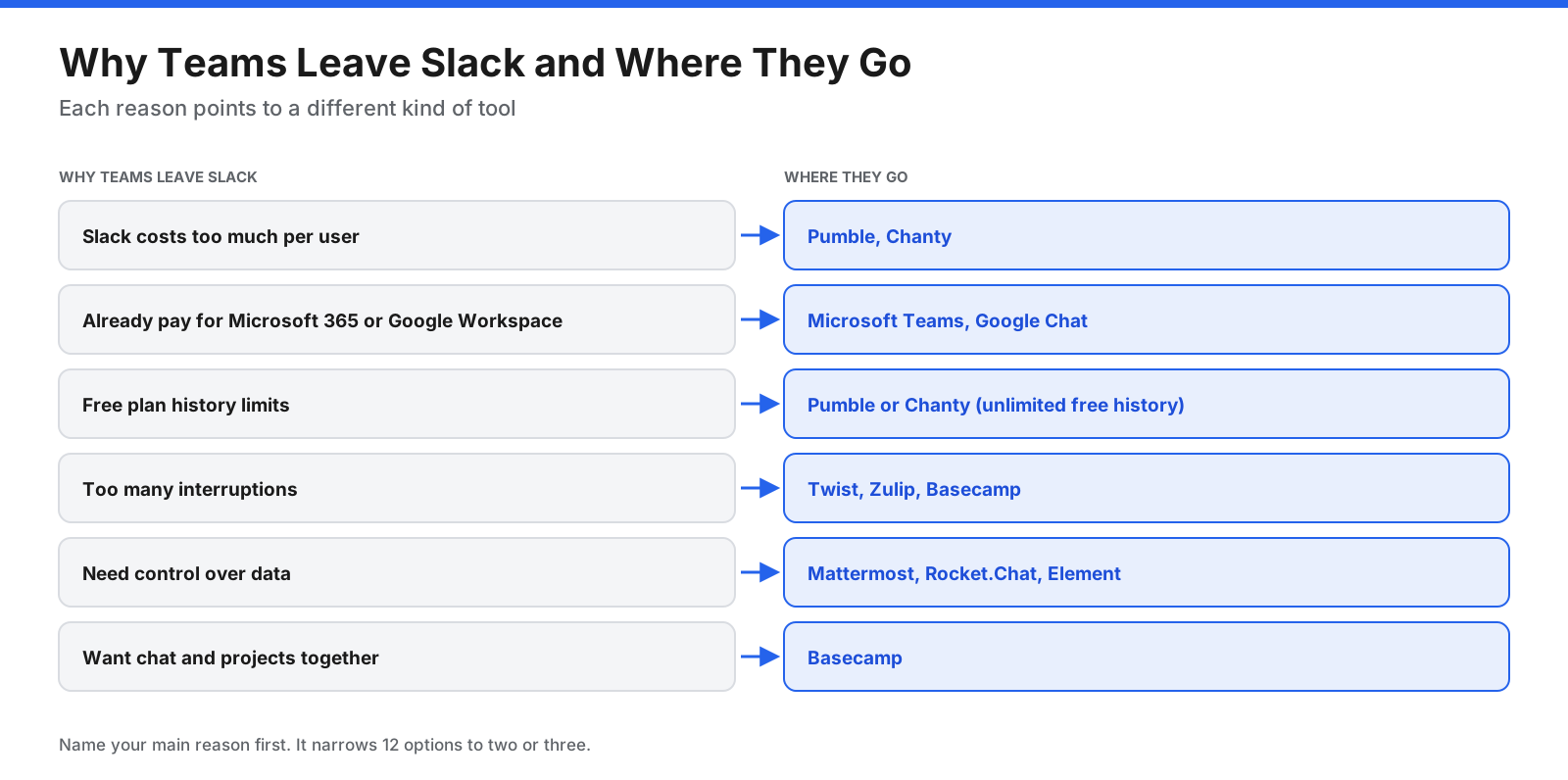
Cost. Slack’s published pricing lists Pro at $7.25 per user each month on annual billing ($8.75 monthly) and Business+ at $15 on annual billing ($18 monthly). For a growing company, that adds up, especially if it already pays for Microsoft 365 or Google Workspace.
Free-plan limits. Slack’s free plan shows 90 days of message and file history. Slack’s help center says free workspaces may lose messages and files once they pass a year old. Teams that want to retain searchable history without paying often look elsewhere.
Too many interruptions. Instant chat can create pressure to reply immediately. Teams working across time zones may prefer tools built for asynchronous, threaded discussion.
Data control. Some organizations need chat that runs on their own servers or supports end-to-end encryption.
Tool sprawl. Some teams want chat combined with projects and tasks rather than another separate app.
What Should You Look for in a Slack Alternative?
- Channels and threads: Public and private channels, threads, mentions, and reactions.
- Search and history: How far back you can search, especially on free plans.
- Calls and meetings: One-to-one and group calls, screen sharing, and meeting limits.
- Integrations: Apps you rely on, such as GitHub, Jira, Google Drive, or your CRM.
- External collaboration: Guest access and shared channels with clients or partners.
- Hosting and security: Cloud, self-hosted, or end-to-end encrypted, plus SSO and compliance.
- Pricing model: Per user, per seat, or flat rate, and which members count toward billing.
- Migration: Whether the tool can import your Slack history.
What Will You Miss When You Leave Slack?
Before switching, list the Slack features your team uses every day. Most alternatives cover the basics, but some features are harder to replace.
Slack Connect. Many alternatives offer guest access, but fewer support shared channels between separate organizations. Test external collaboration if you work closely with clients, agencies, or vendors.
The app directory. Slack has a large collection of third-party integrations. Check every integration your team depends on before committing to a smaller platform.
Workflow Builder. Slack can automate simple tasks such as request forms and onboarding messages. Some alternatives have bots and automation, while others rely on tools such as Zapier or Make.
Huddles. Most alternatives offer calls, but the experience and free-plan limits vary. Discord’s always-on voice channels are the closest match to a drop-in feel.
What Are the Best Slack Alternatives?
1. Microsoft Teams
Microsoft Teams is a common Slack replacement for organizations already using Microsoft 365. It combines chat and channels with video meetings, SharePoint and OneDrive file storage, and co-editing of Office documents.
Pricing: The supplied draft lists Teams Essentials at $4 per user each month with an annual commitment. Microsoft 365 Business Basic, which adds email and web Office apps, is listed at $7. Teams is included in most Microsoft 365 business plans.
Downsides: Setup can be difficult without IT support, chat search can be limited, and Slack offers more third-party apps.
Best for: Microsoft 365 customers who want chat, meetings, and documents in one place.
2. Google Chat
Google Chat is the chat tool inside Google Workspace. It works alongside Gmail, Drive, Docs, Calendar, and Meet, so teams can share and discuss files without leaving Google’s apps.
Pricing: Included with Google Workspace. The draft lists Business Starter at $7 per user each month on an annual plan, or $8.40 on a flexible monthly plan. Confirm these figures with Google before publishing price-sensitive material.
Downsides: It has a more limited feature set than Slack and makes the most sense for teams already using Google Workspace.
Best for: Google Workspace teams that want chat without paying for another standalone tool.
3. Pumble
Pumble is a low-cost Slack-style chat app from the company behind Clockify. It offers channels, threads, direct messages, voice and video calls, and guest access in a familiar layout.
Pricing: The free plan includes unlimited users, unlimited message history, and 10 GB of workspace storage, with one-to-one calls only. Pro is listed at $2.49 per seat monthly on annual billing ($2.99 monthly); Business is $3.99 ($4.99 monthly), and Enterprise is $6.99 ($7.99 monthly).
Downsides: The free plan allows only three apps and integrations, and its ecosystem is much smaller than Slack’s.
Best for: Small and medium teams that want Slack-like chat with full free history at a lower price.
4. Chanty
Chanty is a simple team chat app with built-in task management. You can turn messages into tasks and view them on task boards, which suits small teams that want chat and basic task tracking together.
Pricing: The free plan supports up to five team members with unlimited searchable history and unlimited one-to-one calls. Business costs $3 per user monthly billed annually or $4 monthly, with group calls and screen sharing. Nonprofits and educational institutions get a 50% discount.
Downsides: The five-user cap makes the free plan suitable only for very small teams, and integrations are limited compared with Slack.
Best for: Small teams that want affordable chat with simple task boards.
5. Zoho Cliq
Zoho Cliq is the chat app in the Zoho ecosystem, with channels, threads, meetings, bots, and automations. Its main advantage is its connection to Zoho CRM, Zoho Projects, and other Zoho apps.
Pricing: The free plan includes 10,000 searchable messages, 100 GB of storage per organization, and meetings up to 60 minutes for as many as 100 participants. Paid plans offer Standard, Professional, and Enterprise tiers, with 10% off for yearly billing. The draft did not have confirmed US-dollar prices.
Downsides: Its value is highest for organizations already using other Zoho apps.
Best for: Businesses that run on Zoho and want chat connected to their CRM and projects.
6. Twist
Twist, from the makers of Todoist, is built for asynchronous communication. Conversations happen in threads organized by topic within channels, so discussions stay focused and people can catch up when it suits them.
Pricing: The free plan includes one month of message history, up to five integrations, and 5 GB of storage. Older messages are hidden, not deleted, and return when you upgrade. Unlimited is listed at $6 per user per month; verify the billing period with Twist.
Downsides: Teams that rely on rapid back-and-forth chat may find the thread-first style slower. Its integration library is smaller than Slack’s.
Best for: Remote teams across time zones that want calmer, more organized communication.
7. Zulip
Zulip is an open-source chat app that organizes every message into a topic within a stream. It is available as a cloud service or self-hosted, making it useful for technical projects and long-running discussions.
Pricing: Zulip Cloud’s free plan includes 10,000 messages of search history and 5 GB of storage. Standard is listed at $6.67 per user per month billed annually ($8 monthly), and Plus at $10 ($12 monthly) with a 10-user minimum. Self-hosted Zulip is free, with paid plans for features such as unlimited mobile notifications and SSO.
Downsides: The topic-based model takes some getting used to for people coming from Slack.
Best for: Open-source projects, research groups, and teams that want organized, searchable discussions.
8. Basecamp
Basecamp combines project management with team communication. Each project includes message boards, to-dos, schedules, files, and Campfire group chat, with Pings for direct messages. Its flat pricing does not charge per user.
Pricing: The draft lists a free plan for one project and up to five users. Paid plans are Freelancer at $25 for three projects, Studio at $59 for 10 projects with unlimited users, Pro at $99 for 25 projects, and Unlimited at $299 per month billed annually.
Downsides: It is not a direct Slack clone. Teams that live in chat channels all day may miss Slack’s integrations and channel-based workflow.
Best for: Agencies and small businesses that want projects and communication in one place at a predictable cost.
9. Discord
Discord started as a chat app for gamers and is now widely used by online communities, open-source projects, and some startups. Its standout feature is persistent voice channels that people can drop into and out of, alongside text channels and screen sharing.
Pricing: Discord is free to use. Nitro Basic is listed at $2.99 per month and Nitro at $9.99 per month, raising upload limits to 50 MB and 1 GB respectively. Prices vary by country.
Downsides: Discord is not designed for business, so it lacks many admin controls, compliance features, and business integrations companies need.
Best for: Communities, creator groups, and informal teams that value voice channels.
10. Mattermost
Mattermost is a collaboration platform you can run on your own servers, aimed at technical teams and organizations with strict security needs. It offers Slack-style channels, threads, calls, incident-response playbooks, and developer-tool integrations.
Pricing: Professional, Enterprise, and Enterprise Advanced are sold as yearly subscriptions through sales. A free, limited edition is available for evaluation; paid prices are not listed publicly in the draft.
Downsides: Self-hosting requires technical staff, and paid pricing is quote-based.
Best for: Engineering, DevOps, and security teams that need control over their chat infrastructure.
11. Rocket.Chat
Rocket.Chat is an open-source communication platform that can run on-premises, in a private cloud, or fully air-gapped. Beyond team chat, it supports omnichannel customer communication, helping support teams handle messages from websites and messaging apps in one place.
Pricing: Rocket.Chat offers a free Starter workspace aimed at small businesses, nonprofits, and teams evaluating the platform. Commercial, government, and defense plans are quoted by sales.
Downsides: Setup and maintenance require technical resources, and paid pricing is not published.
Best for: Organizations that need secure, self-managed chat and teams that want customer messaging in the same platform.
12. Element
Element is a messaging app built on Matrix, an open protocol for secure, decentralized messaging. Element’s platform uses end-to-end encryption by default, can be self-hosted, and supports air-gapped deployments through its Sovereign edition.
Pricing: The Community edition is free and open source for non-professional use and evaluation. Enterprise is priced per seat per month, and Sovereign is priced per deployment through Element’s sales team.
Downsides: Setup can be difficult, and the experience may feel less polished than Slack for everyday chat.
Best for: Organizations that need encrypted, self-hosted communication based on an open standard.
How Do the Slack Alternatives Compare?
| Tool | Best for | Free plan | Entry paid price |
|---|---|---|---|
| Microsoft Teams | Microsoft 365 organizations | Personal use | $4/user/month annual (Essentials) |
| Google Chat | Google Workspace organizations | Personal Google accounts | $7/user/month annual (Workspace) |
| Pumble | Low-cost chat | Unlimited users and history | $2.49/seat/month annual |
| Chanty | Small teams with tasks | Up to 5 users, unlimited history | $3/user/month annual |
| Zoho Cliq | Zoho users | 10,000 searchable messages | Check site |
| Twist | Async teams | 1 month of visible history | $6/user/month, billing period to verify |
| Zulip | Topic-based discussions | 10,000 searchable messages | $6.67/user/month annual |
| Basecamp | Projects plus chat | 1 project, 5 users | $25/month flat |
| Discord | Communities and voice | Yes | Nitro Basic $2.99/month |
| Mattermost | Self-hosted technical teams | Evaluation edition | Quote |
| Rocket.Chat | Secure deployments, customer chat | Starter workspace | Quote |
| Element | End-to-end encryption | Community edition | Quote |
What Do the Free Plans Include?
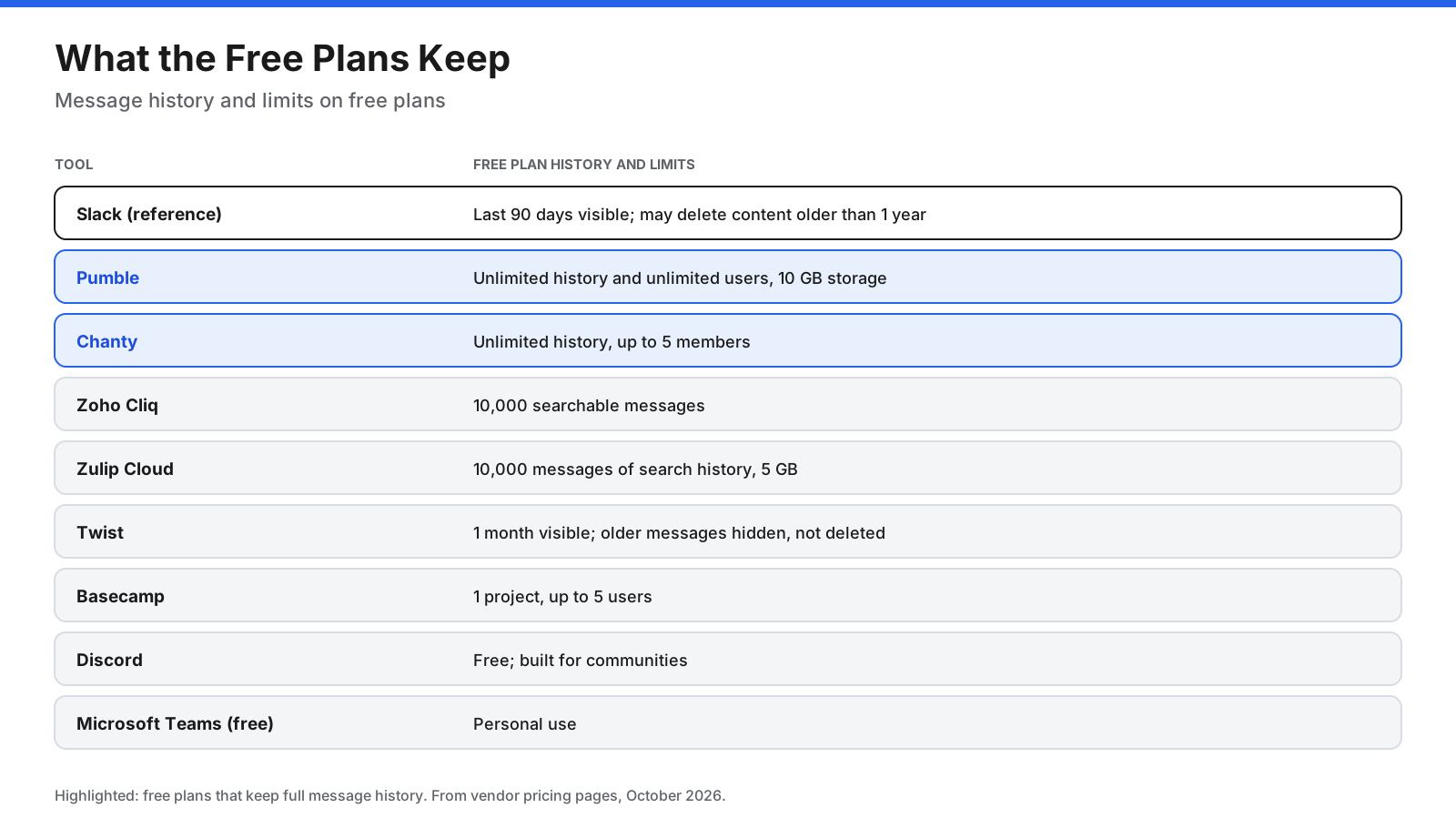
If you are leaving Slack because of free-plan limits, compare how much history each free plan keeps. Pumble stands out because its free plan keeps unlimited message history for unlimited users. Chanty also keeps unlimited history, but only for up to five members. Zoho Cliq and Zulip Cloud cap free search at 10,000 messages, while Twist shows only the last month. If your team wants a long record without paying, start with Pumble.
How Much Would a 20-Person Team Pay per Year?
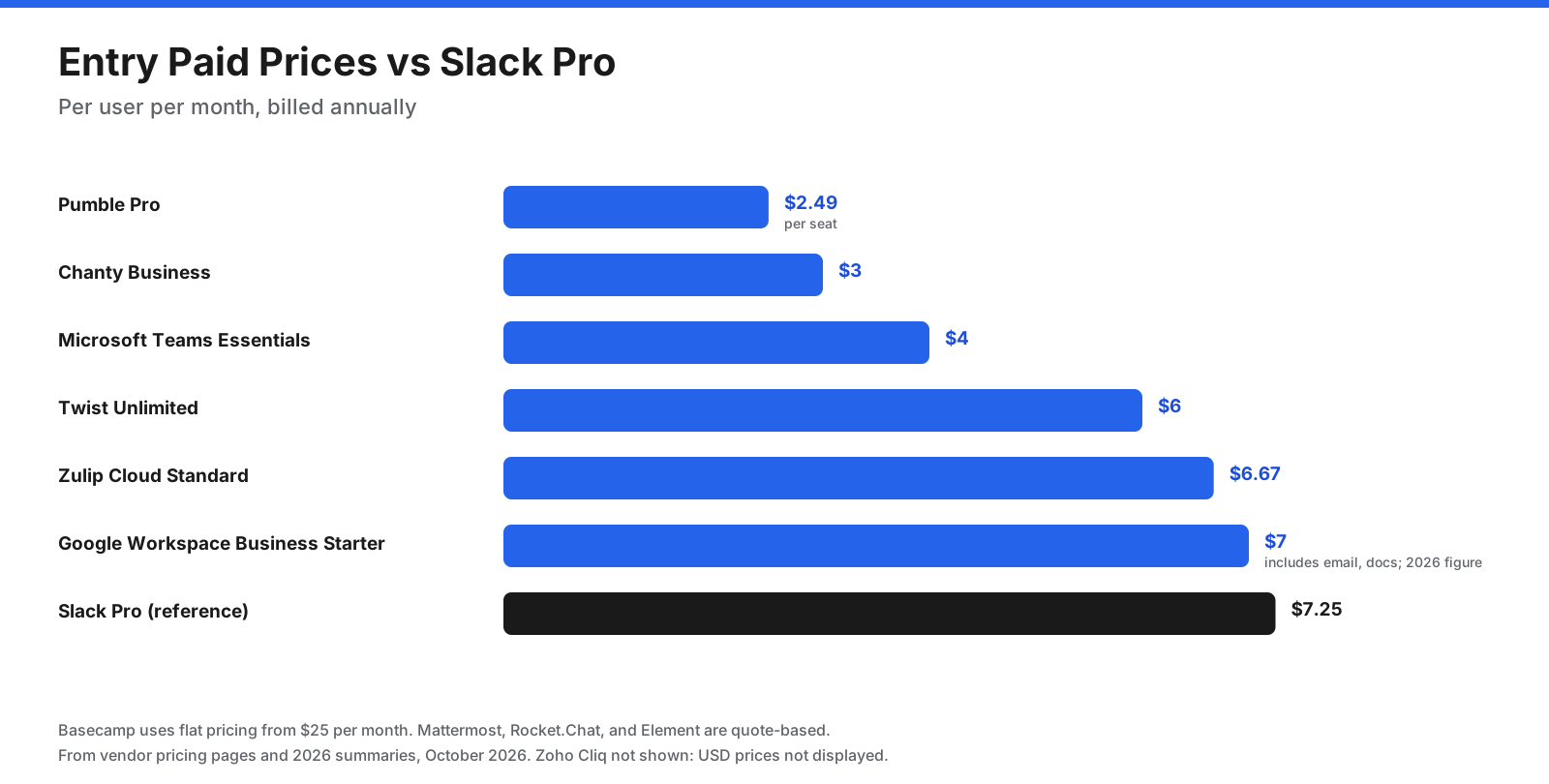
List prices are easier to compare when applied to an actual team size. For 20 people on annual billing, the draft calculates these estimates:
- Pumble Pro: 20 × $2.49 × 12 = about $598
- Basecamp Studio: $59 × 12 = $708, with unlimited users and 10 projects
- Chanty Business: 20 × $3 × 12 = $720
- Microsoft Teams Essentials: 20 × $4 × 12 = $960
- Twist Unlimited: 20 × $6 × 12 = $1,440
- Zulip Cloud Standard: 20 × $6.67 × 12 = about $1,601
- Google Workspace Business Starter: 20 × $7 × 12 = $1,680, including email and documents
- Slack Pro: 20 × $7.25 × 12 = $1,740
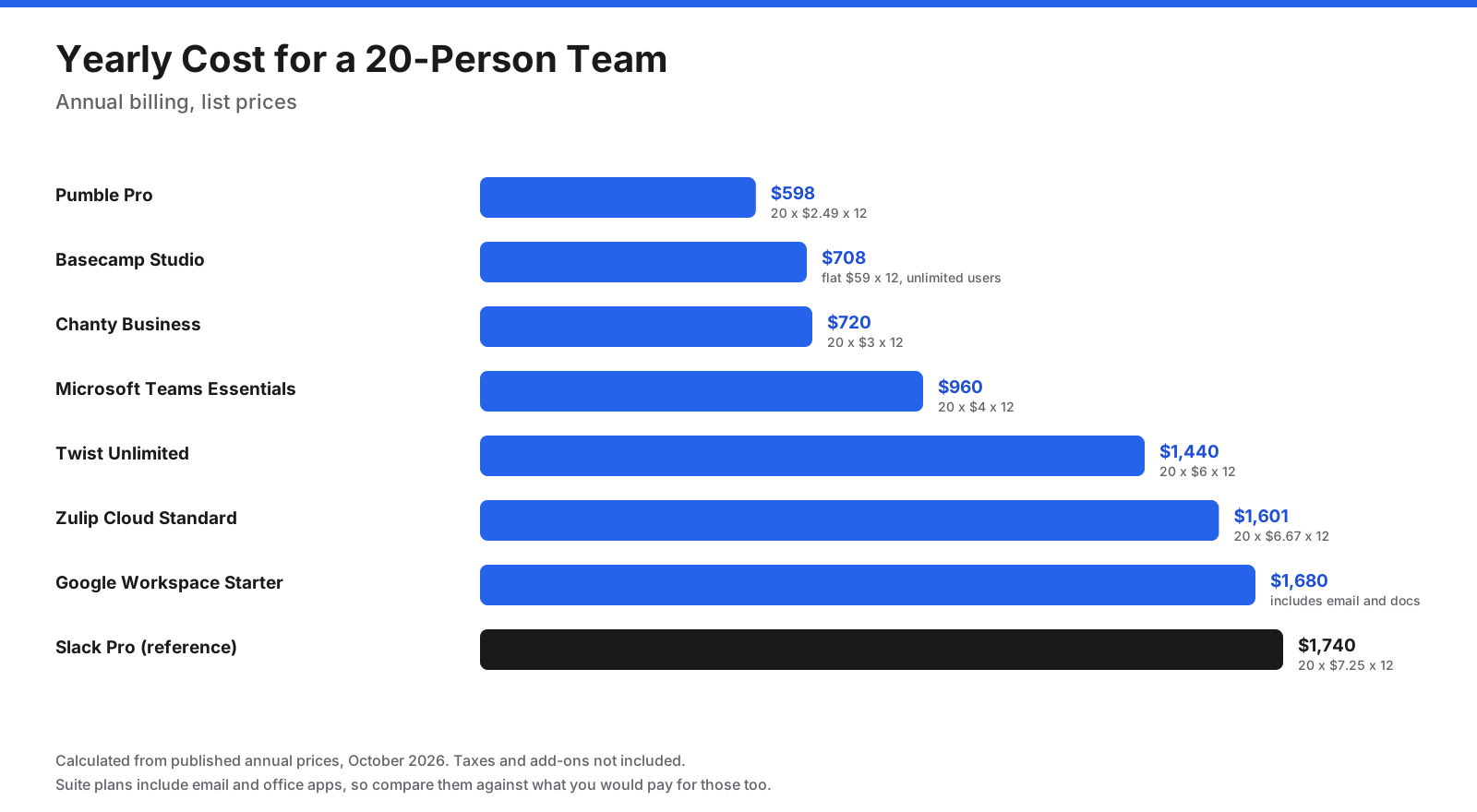
Google Workspace and Microsoft 365 plans include more than chat, so compare them against what you would otherwise pay for email and office apps.
Live Chat or Async: Which Style Fits Your Team?
Slack alternatives fall along a spectrum from instant chat to slower, more deliberate communication. Live chat tools such as Teams, Google Chat, Pumble, Chanty, and Mattermost suit teams that coordinate during the same working hours. Topic-based tools such as Zulip keep live chat but organize messages by topic. Async tools such as Twist and Basecamp put threads and longer posts first.
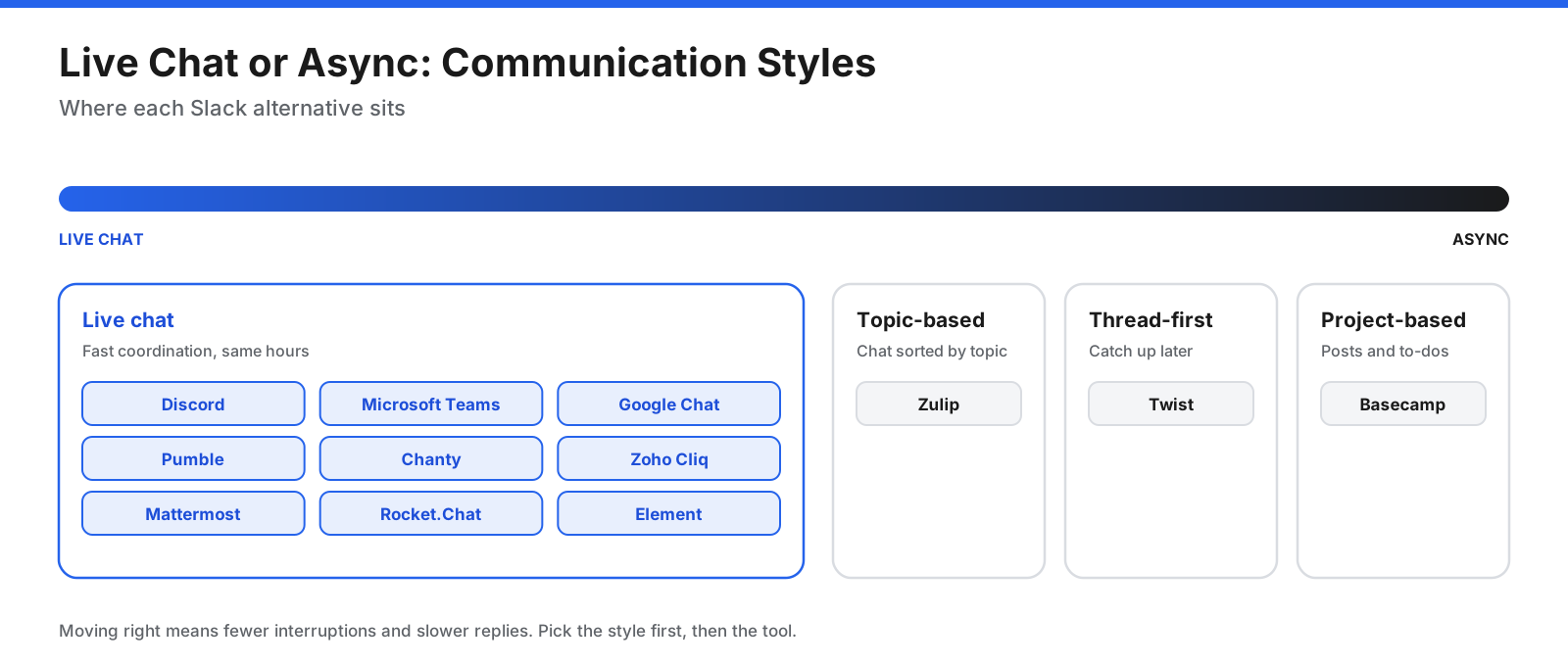
If your main problem with Slack is constant notifications and pressure to reply, moving to another live chat app may not fix it. Consider an async tool or agree on clearer communication norms.
Which Slack Alternatives Can You Self-Host?
For organizations that need control over where data is stored, three options stand out:
- Mattermost supports self-hosting across on-premises data centers and cloud platforms such as AWS and Azure, plus managed single-tenant cloud for Enterprise customers.
- Rocket.Chat supports on-premises, private cloud, isolated, and fully air-gapped deployments, with options for government and defense.
- Element uses the open Matrix standard with end-to-end encryption by default and supports self-hosted and air-gapped deployments.
Zulip can also be self-hosted, which suits open-source projects and research groups. Self-hosting gives you control, but your team becomes responsible for updates, backups, security, and uptime.
How Do You Move From Slack to Another Tool?
- Check what you can export. Slack says workspace owners and admins on Free and Pro can export public-channel messages, while Business+ workspaces can apply to export private channels and DMs.
- Look for an importer. Mattermost, Rocket.Chat, and Zulip publish documentation for importing data from Slack. Other tools may require starting fresh or using third-party tools.
- Recreate your channel structure. Simplify as you go and archive channels nobody uses.
- Reconnect key integrations. List the Slack apps your team relies on and find equivalents.
- Run both tools briefly. Set a cutoff date and keep Slack read-only for a few weeks.
- Agree on new habits. Decide which conversations belong in chat and which belong in threads, posts, or documents.
How Do You Choose the Right Slack Alternative?
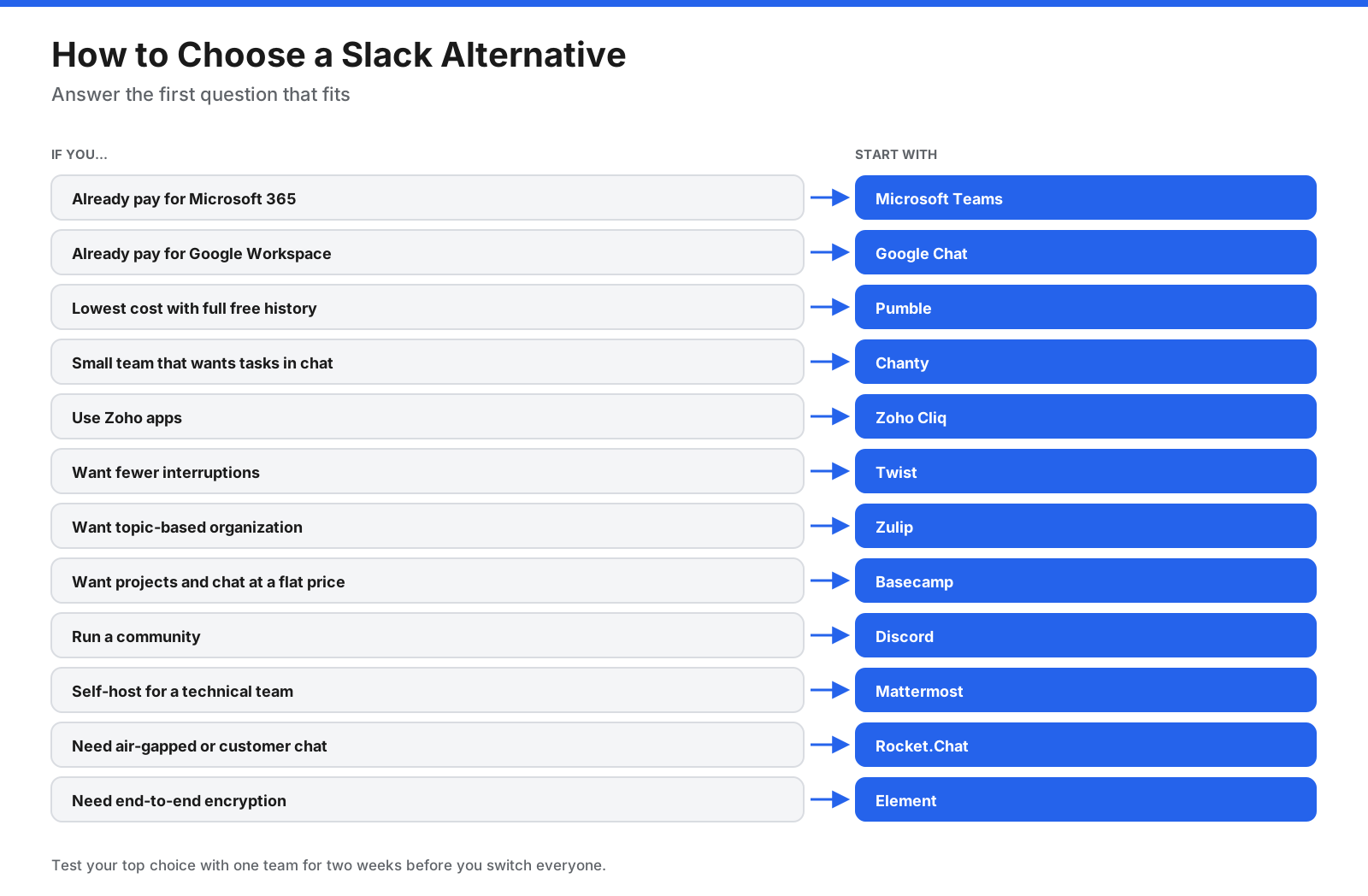
- Review your current subscriptions. Teams on Microsoft 365 or Google Workspace should test the included chat first.
- Name your main reason for leaving. Cost, history limits, interruptions, control, or tool sprawl.
- List must-have integrations. Confirm each one exists in the new tool.
- Test with one team for two weeks. Use it for daily communication.
- Compare total cost. Include every member who counts as a paid seat.
Which Slack Alternative Fits Your Team Size?
Very small teams (under 5 people). Chanty’s free plan covers up to five members with unlimited history, and Basecamp’s free plan covers one project with up to five users. Pumble’s free plan also works well at this size and leaves room to grow.
Small and mid-sized teams (5 to 50 people). Per-user pricing matters most here. Pumble, Chanty, and Microsoft Teams Essentials keep costs low, while Twist and Zulip suit teams that want async or topic-based communication. Basecamp’s flat price becomes more attractive as headcount rises.
Large organizations (hundreds of people or more). Admin controls, compliance, and identity management become priorities. Microsoft Teams and Google Chat fit organizations standardized on those suites. Mattermost, Rocket.Chat, and Element suit organizations that need self-hosting, air-gapped deployments, or strict data rules.
Communities and open groups. Discord and Zulip both work well for large open communities. Zulip’s topic model makes technical discussions easier to follow, while Discord suits casual, voice-heavy groups.
What Mistakes Should You Avoid When Switching From Slack?
- Switching style without meaning to. Moving to an async tool such as Twist changes how people work, not just where they type. Explain the new habits before the switch.
- Fixing the wrong problem. If notifications are the issue, a cheaper live chat app will not solve that. Consider async tools or clearer norms.
- Skipping the export. Export Slack data before cancelling a paid plan, because some history may become hidden or deleted on the free plan.
- Ignoring guests in the budget. Check how each tool counts guests and external users. Some count them as paid seats.
- Forgetting integrations. A missing integration can break a workflow that the whole team depends on. Test each one during the trial.
- No clear owner. Assign one person to manage the migration, answer questions, and archive old channels.
Frequently Asked Questions
What is the best alternative to Slack for most teams?
It depends on why you are switching. Microsoft Teams is a strong choice for Microsoft 365 organizations, Google Chat for Google Workspace users, Pumble for low cost, Twist for async work, and Mattermost or Element for self-hosting and security.
Who is Slack’s biggest competitor?
Microsoft Teams is a major competitor, mainly because it is included in many Microsoft 365 business plans. Google Chat is another option for organizations on Google Workspace.
What is the best free Slack alternative?
Pumble’s free plan includes unlimited users and unlimited message history, making it one of the strongest free alternatives. Chanty offers unlimited history for up to five users, and Discord is free for communities.
What is the best open-source Slack alternative?
Mattermost, Rocket.Chat, Zulip, and Element are open-source options. Mattermost suits technical teams, Rocket.Chat suits secure deployments and customer chat, Zulip suits topic-based discussion, and Element suits end-to-end encrypted communication.
Is Mattermost better than Slack?
Mattermost is better for organizations that need to self-host chat and control their data, especially technical and security-focused teams. Slack is easier to set up and has a larger app ecosystem for teams comfortable with a cloud service.
Is there a self-hosted Slack alternative?
Yes. Mattermost, Rocket.Chat, Element, and Zulip can run on your own servers. Rocket.Chat and Element also support fully air-gapped deployments.
Is there a Google alternative to Slack?
Yes. Google Chat is included with Google Workspace and works closely with Gmail, Drive, Docs, and Meet.
Is Discord good for business communication?
Discord works for informal teams and communities, especially those that value voice channels. It lacks many admin controls, compliance features, and business integrations companies need, so it is better suited to communities than regulated or larger businesses.
What is the cheapest Slack alternative?
Among paid plans in this comparison, Pumble Pro ($2.49 per seat each month on annual billing) and Chanty Business ($3 per user each month on annual billing) are among the cheapest. Both also offer free plans.
Does anyone still use Slack?
Yes. Many organizations still use Slack, particularly technology companies, startups, and teams that rely on many integrations. Teams often leave over cost, free-plan limits, or the need for self-hosting.
Can I use Microsoft Teams for free?
Microsoft offers a free version of Teams for personal use. For business use, Teams Essentials and Microsoft 365 business plans are paid.
Is Zulip free?
Self-hosted Zulip is free and open source. Zulip Cloud also has a free plan with 10,000 messages of search history and 5 GB of storage.
Which Slack alternative is best for async teams?
Twist is built around threads and catch-up reading, which suits remote teams across time zones. Zulip and Basecamp are also options, with Zulip organizing chat by topic and Basecamp combining message boards with project tools.
What is the difference between Mattermost and Rocket.Chat?
Both are open-source platforms you can host yourself. Mattermost focuses on technical teams, with features such as incident-response playbooks and developer-tool integrations. Rocket.Chat adds omnichannel customer communication and supports fully air-gapped deployments for government and defense.
Can you run Slack and another chat tool at the same time?
Yes. Running both for a few weeks lets people move over gradually, but set a firm cutoff date. Keeping two chat tools open for too long splits conversations and makes information harder to find.
The Bottom Line
Your reason for leaving Slack should decide your next tool. If you already pay for Microsoft 365 or Google Workspace, Teams or Google Chat may cost nothing extra. If price is the issue, Pumble and Chanty offer Slack-like chat for less, with full free history. If constant notifications are the problem, Twist, Zulip, and Basecamp offer calmer ways to communicate. If you need control over your data, Mattermost, Rocket.Chat, and Element let you host chat yourself.
Test your top choice with one team for two weeks, check that your key integrations work, and confirm current pricing directly with each vendor before switching.















































































































