

A webhook is an automated message that one application sends to another the moment something happens. When an event occurs, such as a payment going through, a form being submitted, or a new order being placed, the application where it happened sends an HTTP request to a web address you provided. That address belongs to the receiving application, which reads the message and reacts right away.
Webhooks are often described as “reverse APIs” or “push notifications for software.” With a typical API, your application has to ask another system for new information over and over. With a webhook, the other system tells your application when there is something new. That saves time, reduces wasted requests, and lets connected systems react almost instantly.
This guide explains what webhooks are, how they work step by step, what a webhook request looks like, how webhooks compare with APIs and polling, and what they are used for. It also covers how to create and receive webhooks, secure them, make them reliable, and understand their limits. The guidance is vendor-neutral and applies to any platform or programming language.
Quick answer: A webhook is an HTTP request, usually a POST with a JSON body, that an application sends automatically to a URL you specify when a particular event happens. You register a webhook URL with the sending application and choose which events you care about. When an event occurs, the sender delivers its details to your URL, and your application verifies the request, responds with a success code, and acts on the data. Webhooks push information as it happens, while traditional APIs require you to keep asking for it.
How Do Webhooks Work?
A webhook connects two systems: a sender (sometimes called the provider or source), where events happen, and a receiver (sometimes called the consumer or listener), which wants to know about those events.
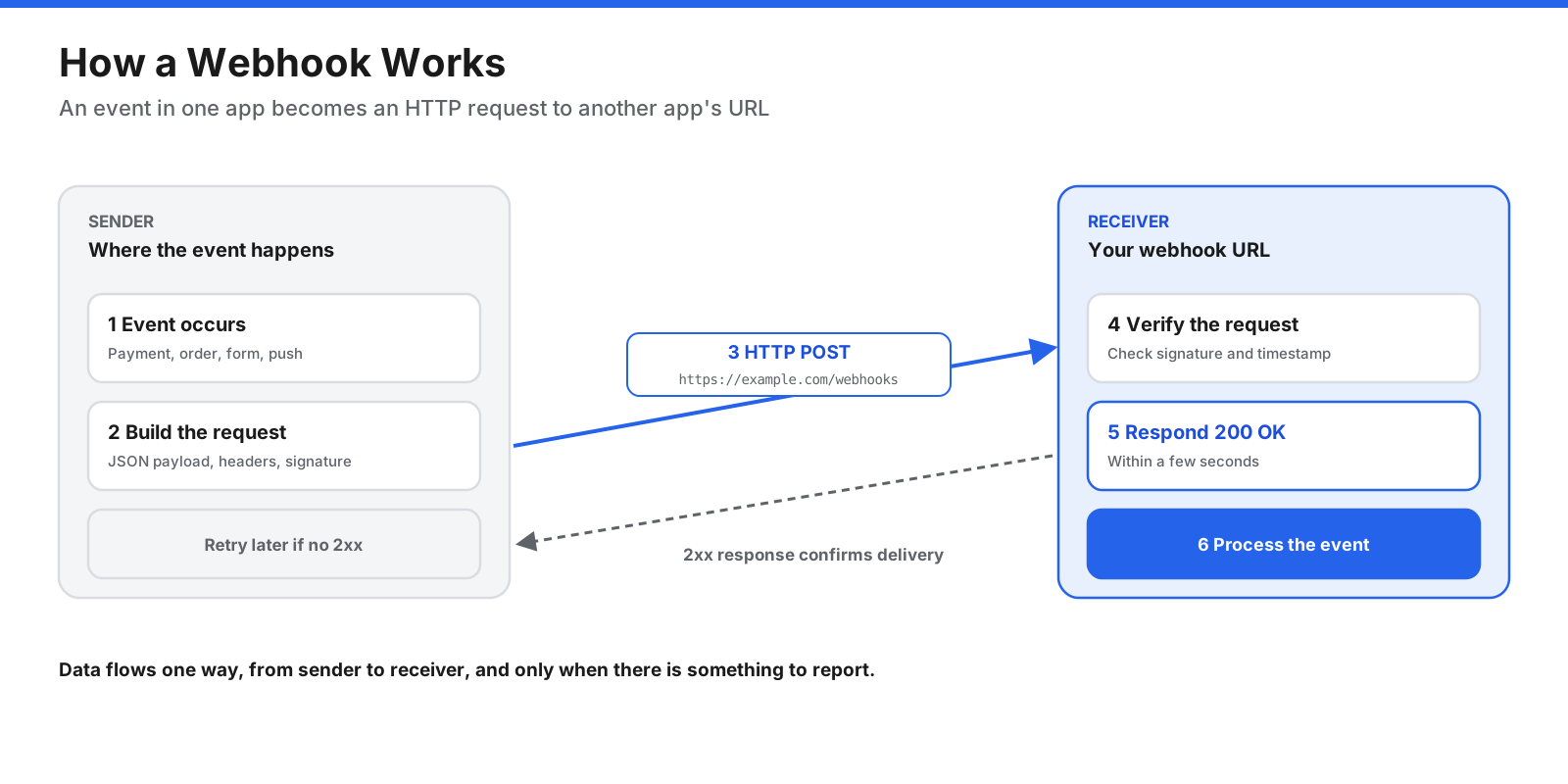
The sender pushes event details to the receiver’s URL the moment the event happens. The receiver acknowledges quickly, then does the work. The process usually works like this:
- The receiver creates an endpoint. The receiving application sets up a URL that can accept incoming HTTP requests, such as
https://example.com/webhooks/orders. - The receiver registers the URL with the sender. In the sender’s settings or through its API, you enter the webhook URL and choose which events should trigger a webhook, such as “order created” or “payment failed.” Many senders also provide a secret key for verifying requests.
- An event happens. A customer pays, a file is uploaded, a ticket changes status, or a build finishes.
- The sender delivers the webhook. It builds an HTTP request, usually a POST, containing details about the event in the body, typically formatted as JSON. It adds headers that identify the event and help prove the request is genuine, then sends it to your URL.
- The receiver verifies and acknowledges. Your endpoint checks that the request is authentic and responds quickly with a success status code in the 2xx range, such as
200 OK. - The receiver processes the event. Your application acts on the data by updating a database, sending an email, starting a workflow, or notifying a team.
- The sender retries if needed. If your endpoint does not respond, times out, or returns an error, most senders try again later, often several times over a period of hours.
The key idea is that communication flows one way, from sender to receiver, and only when there is something to report. The receiver does not have to ask.
What Does a Webhook Request Look Like?
A webhook is an ordinary HTTP request, so it has the same parts as any other web request: a method, a URL, headers, and a body.
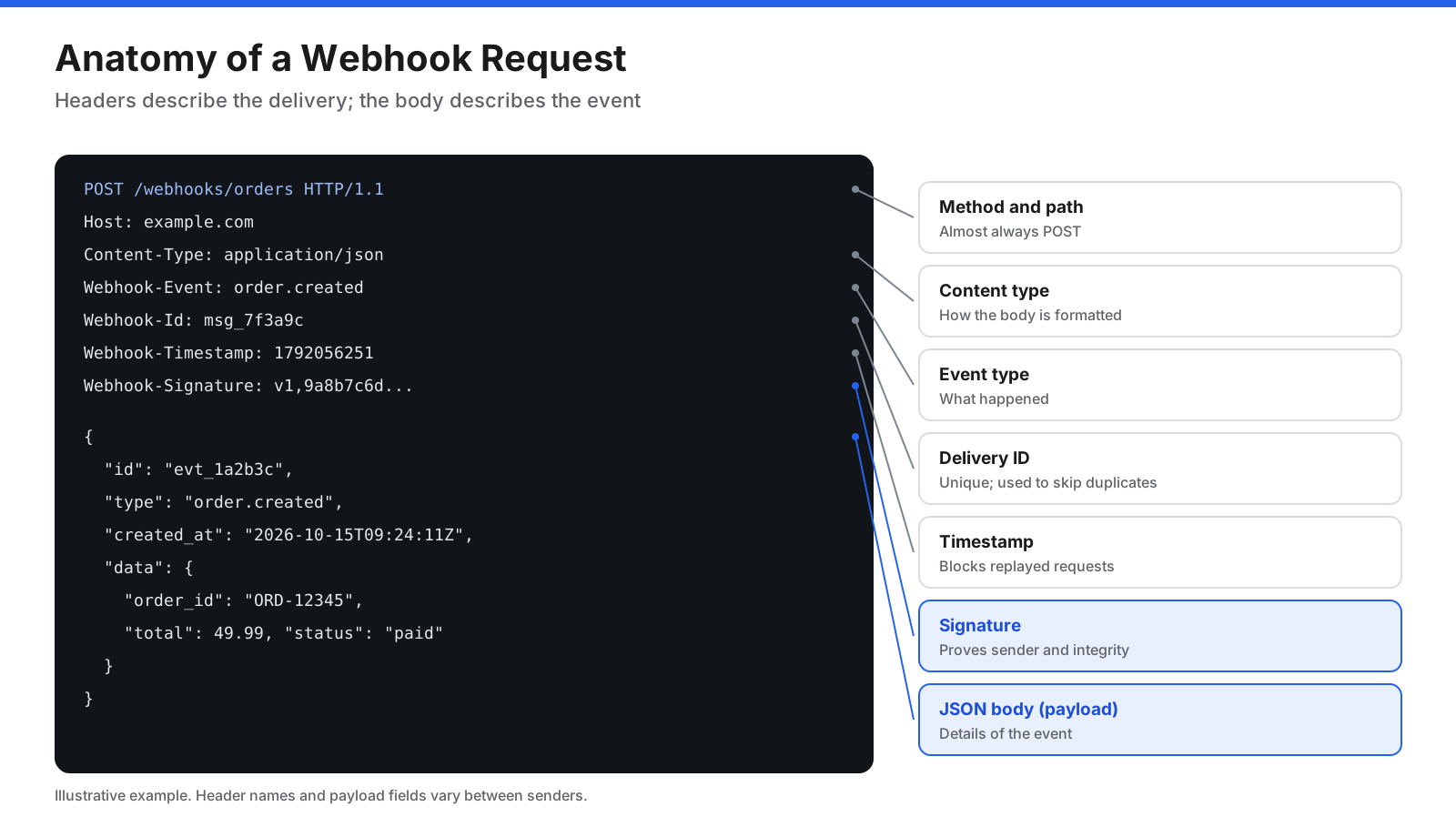
The method is almost always POST, because the sender is delivering data. The URL is the webhook URL you registered. Headers typically include:
- Content type: usually
application/json, telling the receiver how the body is formatted. - Event type: identifies what happened without requiring the receiver to parse the entire body.
- Delivery or message ID: a unique identifier that helps the receiver spot duplicate deliveries.
- Timestamp: shows when the webhook was sent and helps block replayed requests.
- Signature: a cryptographic code calculated from the body and a shared secret, allowing the receiver to check that the request came from the sender and was not altered.
The body, often called the payload, describes the event. A simplified example might look like this:
{
  "id": "evt_1a2b3c",
  "type": "order.created",
  "created_at": "2026-10-15T09:24:11Z",
  "data": {
    "order_id": "ORD-12345",
    "customer_email": "customer@example.com",
    "total": 49.99,
    "currency": "USD",
    "status": "paid"
  }
}
Payload designs vary. Some senders include all the details of the changed object, which is convenient but means larger messages that may contain sensitive data. Others send a “thin” payload with only the event type and an ID, and the receiver calls the sender’s API to fetch the full, current details. Thin payloads are smaller and avoid acting on stale data, at the cost of an extra request.
What Is a Webhook URL?
A webhook URL, also called a webhook endpoint or callback URL, is the web address where a receiving application listens for webhooks. It is the address you give to the sending application so it knows where to deliver event notifications.
A webhook URL should be:
- Reachable: publicly reachable by the sender over the internet, unless both systems sit on the same private network.
- Served over HTTPS: encryption protects data in transit, and many senders refuse plain HTTP addresses.
- Ready for POST requests: the endpoint should accept the request and respond quickly with a 2xx status code.
Some webhook URLs include a hard-to-guess token in the path as a basic layer of protection, but the URL alone should never be treated as security. Anyone who learns it could send fake requests, which is why signature verification matters.
Many communication and automation tools also provide incoming webhook URLs. These work in the opposite direction: the tool gives you a URL, and any system can send a message to it. Posting to a chat channel’s incoming webhook URL, for example, makes a message appear in that channel. Treat these URLs like passwords, because anyone who has one may be able to post to the destination.
What Is the Difference Between a Webhook and an API?
Webhooks and APIs are closely related. Webhooks use HTTP, the same technology most APIs use. The difference is who starts the conversation.
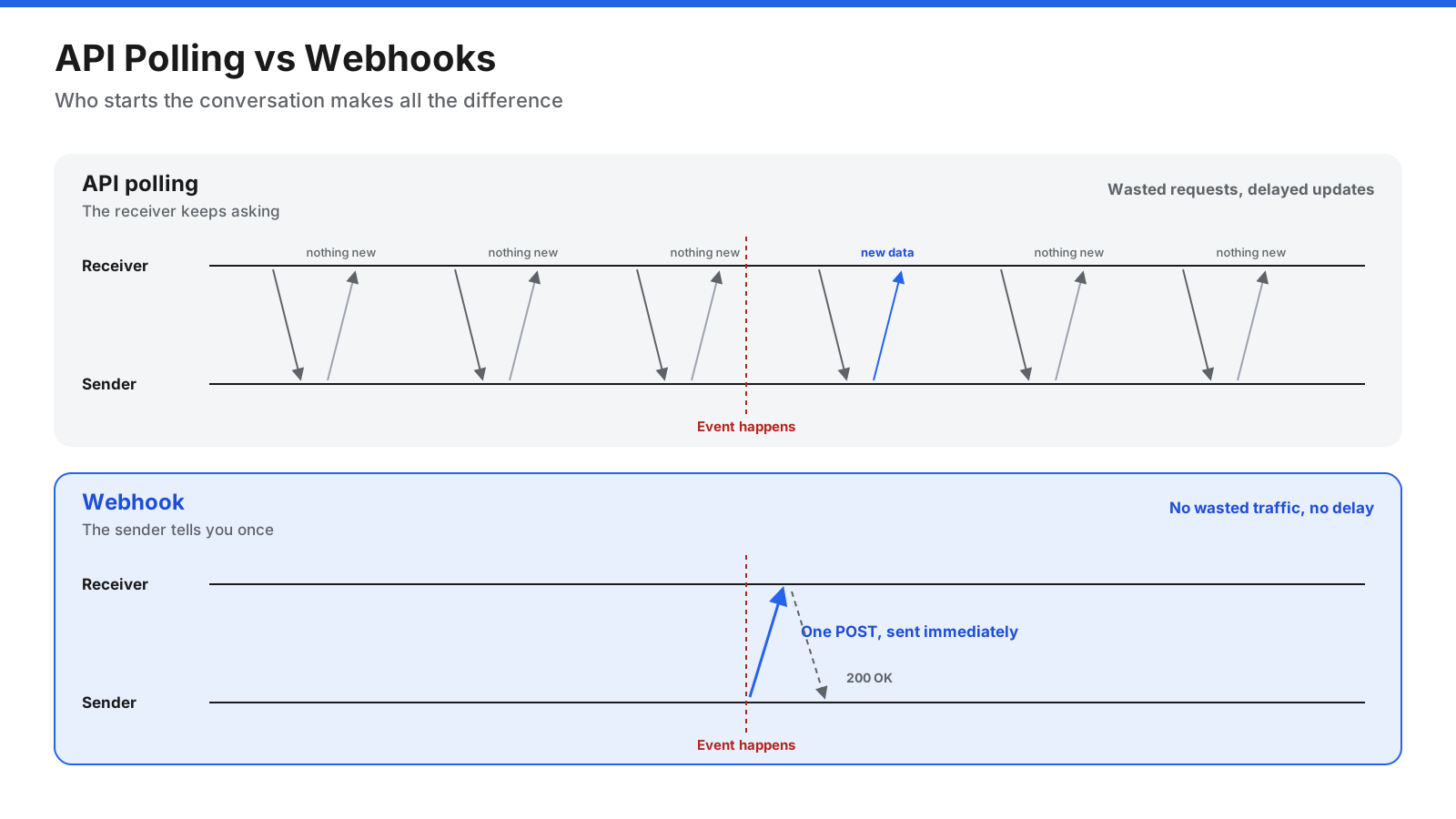
With an API, the client asks. Your application sends a request to another system and receives a response. If you want to know when something changes, you have to keep asking, a pattern called polling. Polling every few seconds wastes resources when most requests return nothing new, while polling less often means you learn about changes later.
With a webhook, the server tells. The system where the event happens sends a request to your application as soon as something changes. There is no need to repeatedly check for updates, and delivery can happen with very little delay.
| Comparison | API request and response | Webhook |
|---|---|---|
| Who starts the exchange | The client requests data | The sender pushes data |
| When data moves | Whenever the client asks | When an event happens |
| Timeliness | Depends on polling frequency | Usually near-instant |
| Efficiency | Repeated requests may return nothing new | One delivery attempt per event, with possible retries |
| Direction | Request and response | One-way event notification |
| Best for | Fetching, creating, updating, and deleting data on demand | Reacting to events as they happen |
In practice, webhooks and APIs work together. A webhook tells your application that something happened, and your application then uses the sender’s API to fetch more details or take follow-up actions. Many systems also offer an API to list recent events, which you can use to recover webhooks you missed.
How Do Webhooks Compare With WebSockets and Message Queues?
Webhooks are one of several ways to move event data between systems.
- WebSockets keep a persistent, two-way connection open between a client and a server so data can flow in both directions instantly. They suit live applications such as chat, dashboards, and multiplayer games, where a browser or app stays connected. Webhooks need no open connection: each event is a separate request, which suits server-to-server notifications.
- Message queues and event streaming platforms store events in a durable broker so consumers can read them at their own pace, replay them, and scale processing. They are common inside an organization’s own systems. Webhooks are simpler for cross-organization notifications, and many teams place incoming webhooks onto a queue for reliable processing.
- Server-sent events let a server push a stream of updates to a browser over one long-lived HTTP connection. Like WebSockets, they are mainly for live user interfaces rather than system-to-system integration.
What Are Webhooks Used For?
Webhooks appear almost everywhere two systems need to stay in sync. Common examples include:
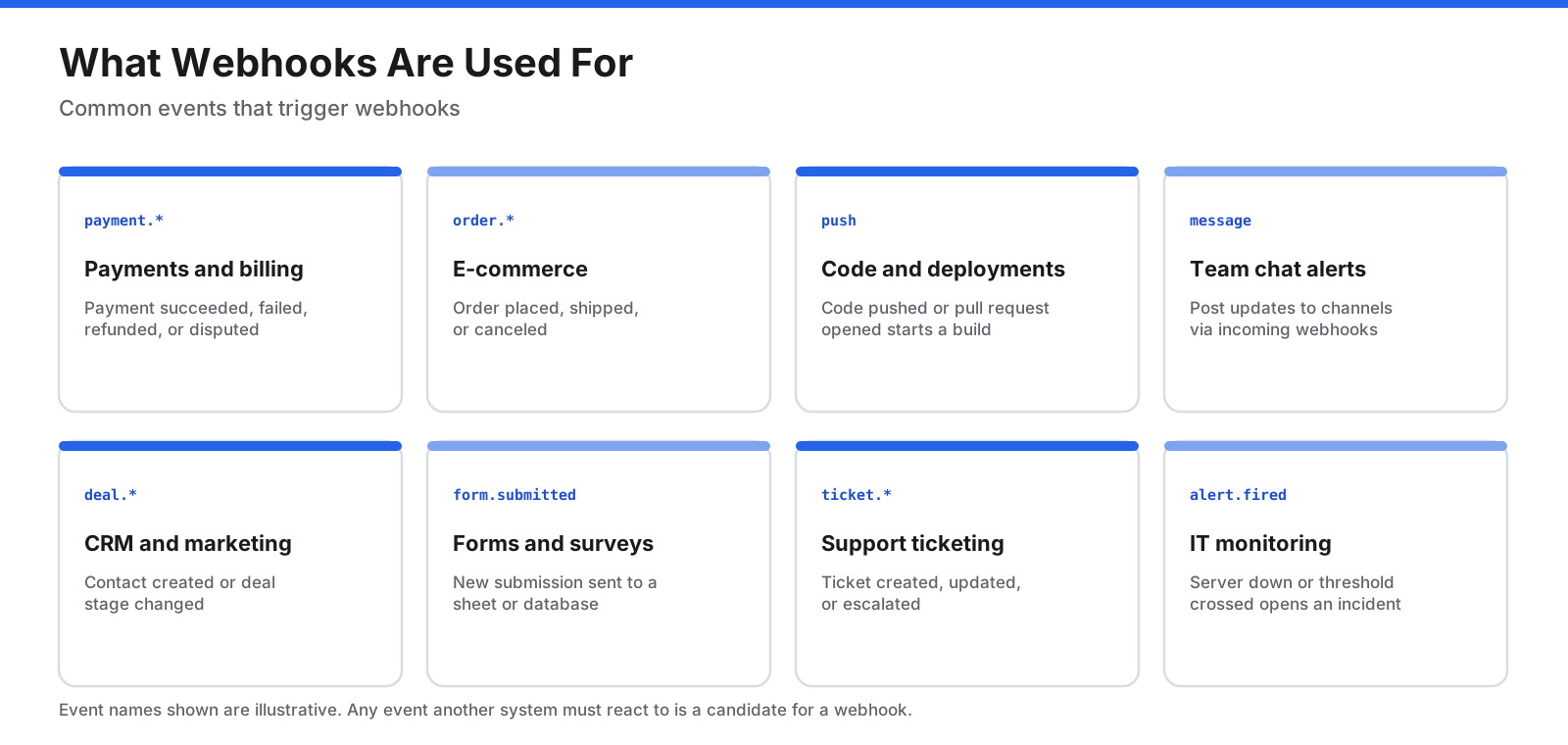
- Payments and billing. A payment processor notifies your application when a payment succeeds, fails, is refunded, or is disputed, so you can fulfill an order, retry a charge, or alert your finance team.
- E-commerce. A store sends webhooks when orders are placed, shipped, or canceled, which can update inventory systems, trigger shipping labels, and send customer notifications.
- Software development. Code hosting platforms send webhooks when code is pushed or a pull request opens, which can start automated builds, tests, and deployments.
- Team chat and notifications. Systems post alerts and updates to team chat channels through incoming webhooks, such as a message when a deployment finishes or a high-value deal closes.
- Customer relationship management and marketing. A CRM sends webhooks when a contact is created or a deal changes stage, which can sync records with other systems or start follow-up sequences.
- Forms and surveys. A form tool sends each new submission to a spreadsheet, database, or ticketing system the moment it arrives.
- Customer support. Help desk systems send webhooks when tickets are created, updated, or escalated, so other tools can respond or notify the right people.
- IT monitoring and alerting. Monitoring tools send webhooks when a server goes down, an error rate spikes, or a threshold is crossed, which can open incidents, page on-call staff, or trigger automated fixes.
- Automation platforms. No-code and low-code automation tools use webhooks as triggers, letting non-developers connect applications without writing code.
- AI agents and workflows. Webhooks can start an AI workflow when a new email, ticket, or document arrives, or notify a system when a long-running AI task finishes.
How Do You Create and Use a Webhook?
How you set up a webhook depends on whether you are receiving webhooks from another system or sending them from your own application. Most people start by receiving.
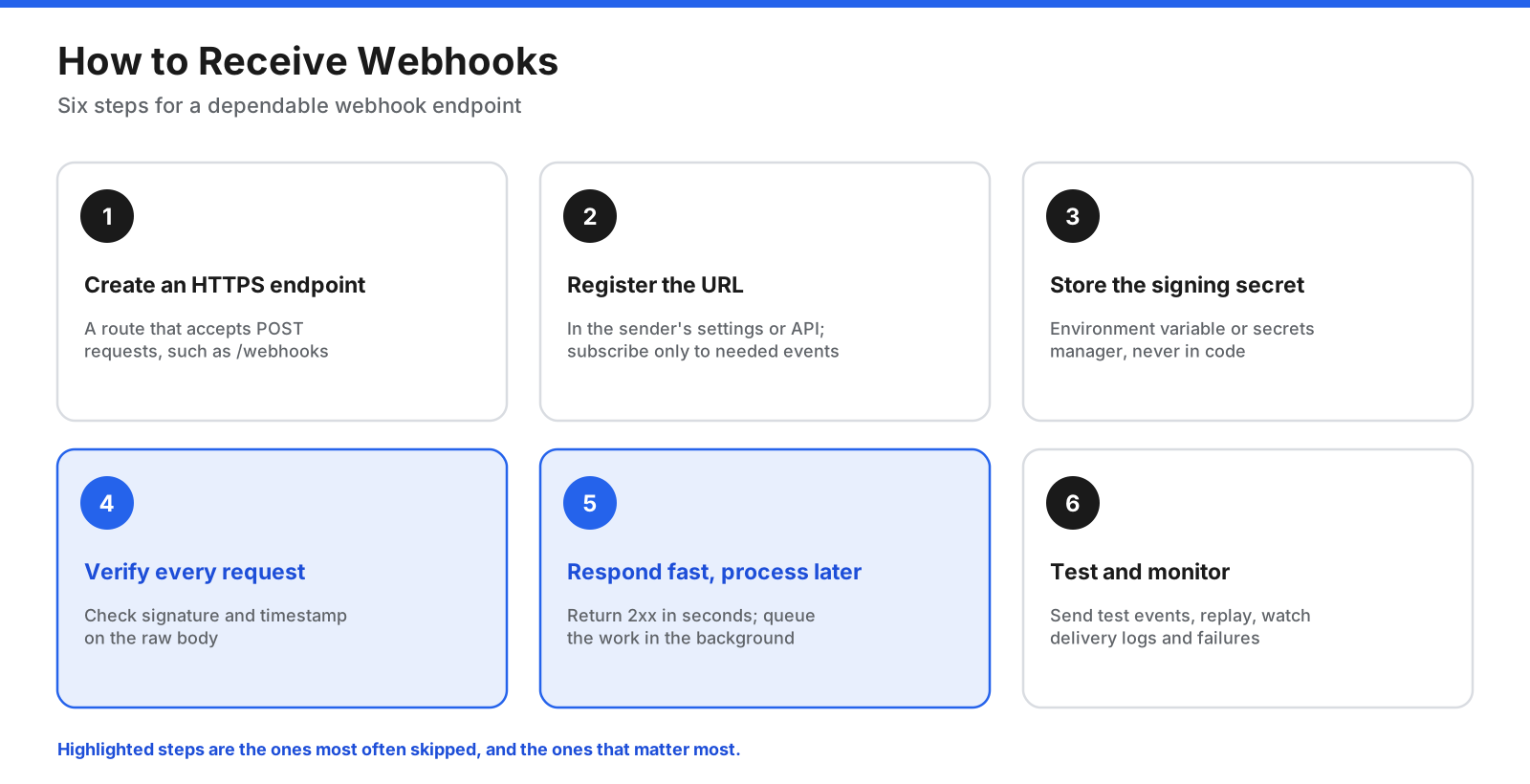
Verification and fast responses are the two steps most often skipped, and the two that matter most.
Receiving Webhooks Without Code
If you use a no-code automation platform, you can usually create a webhook trigger that gives you a unique URL. Paste that URL into the sending application’s webhook settings, choose the events you want, and send a test event. The automation platform shows you the incoming data, and you can map its fields to actions in other apps, such as adding a row to a spreadsheet or posting a message to a channel.
Receiving Webhooks in Your Own Application
- Create an endpoint. Add a route to your web application that accepts POST requests over HTTPS, such as
/webhooks/payments. - Register the URL with the sender. Enter it in the sender’s dashboard or register it through the sender’s API, and subscribe only to the events you need.
- Store the signing secret securely. Keep it in an environment variable or secrets manager, never in your source code.
- Verify every request. Check the signature and timestamp before trusting the data. Reject anything that fails.
- Respond quickly. Return a 2xx status code within a few seconds. If processing takes longer, save the event to a queue or database and handle it in the background, so the sender does not time out and retry.
- Process idempotently. Use the delivery or event ID to make sure that receiving the same webhook twice does not cause duplicate actions, such as charging a customer twice.
- Test and monitor. Use the sender’s test or replay features, check delivery logs, and alert on repeated failures.
Here is a simple, framework-neutral sketch in Python of verifying a signature calculated with HMAC SHA-256. Header names and the exact signing method vary between senders, so always follow the sender’s documentation.
import hmac
import hashlib
import time

def verify_webhook(raw_body: bytes, signature: str,
                   timestamp: str, secret: str) -> bool:
    # Reject old requests to limit replay attacks (5-minute window)
    if abs(time.time() - int(timestamp)) > 300:
        return False
    signed_content = timestamp.encode() + b"." + raw_body
    expected = hmac.new(secret.encode(), signed_content, hashlib.sha256).hexdigest()
    # Constant-time comparison avoids leaking information through timing
    return hmac.compare_digest(expected, signature)
Notice that the signature is checked against the raw request body. If your framework parses and reformats the JSON before you verify it, the signature will not match.
Testing Webhooks During Development
Webhook senders need a public URL, but your development machine usually is not reachable from the internet. Common solutions include tunneling tools that give your local server a temporary public address, request inspection services that show you exactly what a sender delivers, and the sender’s own command-line tools or dashboards that can send test events. Many senders also let you replay past events, which is useful for reproducing bugs.
Sending Webhooks From Your Own Application
If you build a product that other systems integrate with, offering webhooks lets your customers react to events without polling your API. A good webhook implementation:
- Lets users register endpoints, choose event types, and view delivery logs.
- Signs every request with a per-endpoint secret and includes a timestamp and unique delivery ID.
- Sends a consistent, documented payload format and versions it carefully.
- Retries failed deliveries with exponential backoff and disables endpoints that fail for a long time, notifying the owner.
- Offers a way to replay events and an API to list recent events.
- Times out slow endpoints and isolates deliveries so one failing customer does not delay others.
An open, community-driven specification called Standard Webhooks defines common conventions for headers, signatures, and payloads, which can save senders and receivers from inventing their own.
How Do You Secure Webhooks?
A webhook endpoint is a public URL that accepts data from the internet, so it needs protection. The safest approach layers several defenses.
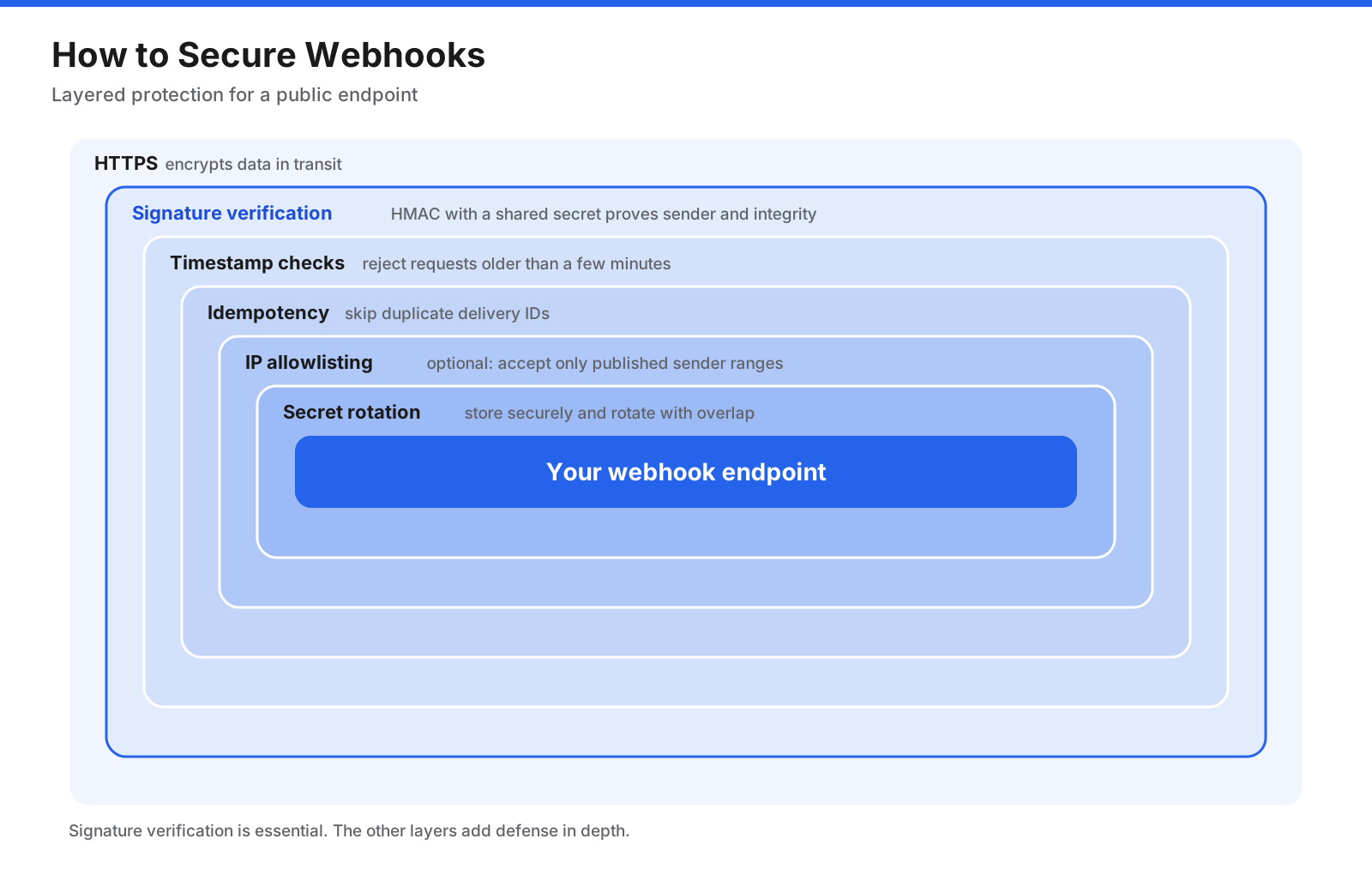
Signature verification is the most important layer. The others add defense in depth.
- Use HTTPS. Encryption in transit protects the payload and headers from being read or altered.
- Verify signatures. Most senders sign each request with a secret only you and they know, commonly using HMAC with SHA-256. Recalculate the signature from the raw body and compare it with the one in the header using a constant-time comparison. Reject anything that does not match.
- Check timestamps. Reject requests that are too old, typically more than a few minutes, to stop attackers from replaying a captured, validly signed request.
- Deduplicate with delivery IDs. Record the IDs of processed events and ignore repeats. This protects against both replays and normal retries.
- Allowlist source IP addresses where possible. Some senders publish the IP ranges they send from. Restricting your endpoint to those ranges adds a layer of protection, though IP lists can change, so signatures remain essential.
- Validate the payload. Check that the data matches the expected structure and values before acting on it, and never execute code or queries built directly from webhook content.
- Protect and rotate secrets. Store signing secrets securely, rotate them periodically, and support overlapping secrets during rotation so deliveries do not fail.
- Minimize sensitive data. Prefer thin payloads that carry IDs rather than personal or financial details, and fetch sensitive data through an authenticated API call when needed.
If you send webhooks, protect your own infrastructure as well. Customers can register any URL, so block deliveries to internal or private network addresses to prevent your webhook system from being used to reach systems inside your network, a risk known as server-side request forgery.
How Do You Make Webhooks Reliable?
Networks fail, servers restart, and code has bugs, so webhooks will occasionally be delayed, repeated, or missed. Reliable webhook handling plans for this.
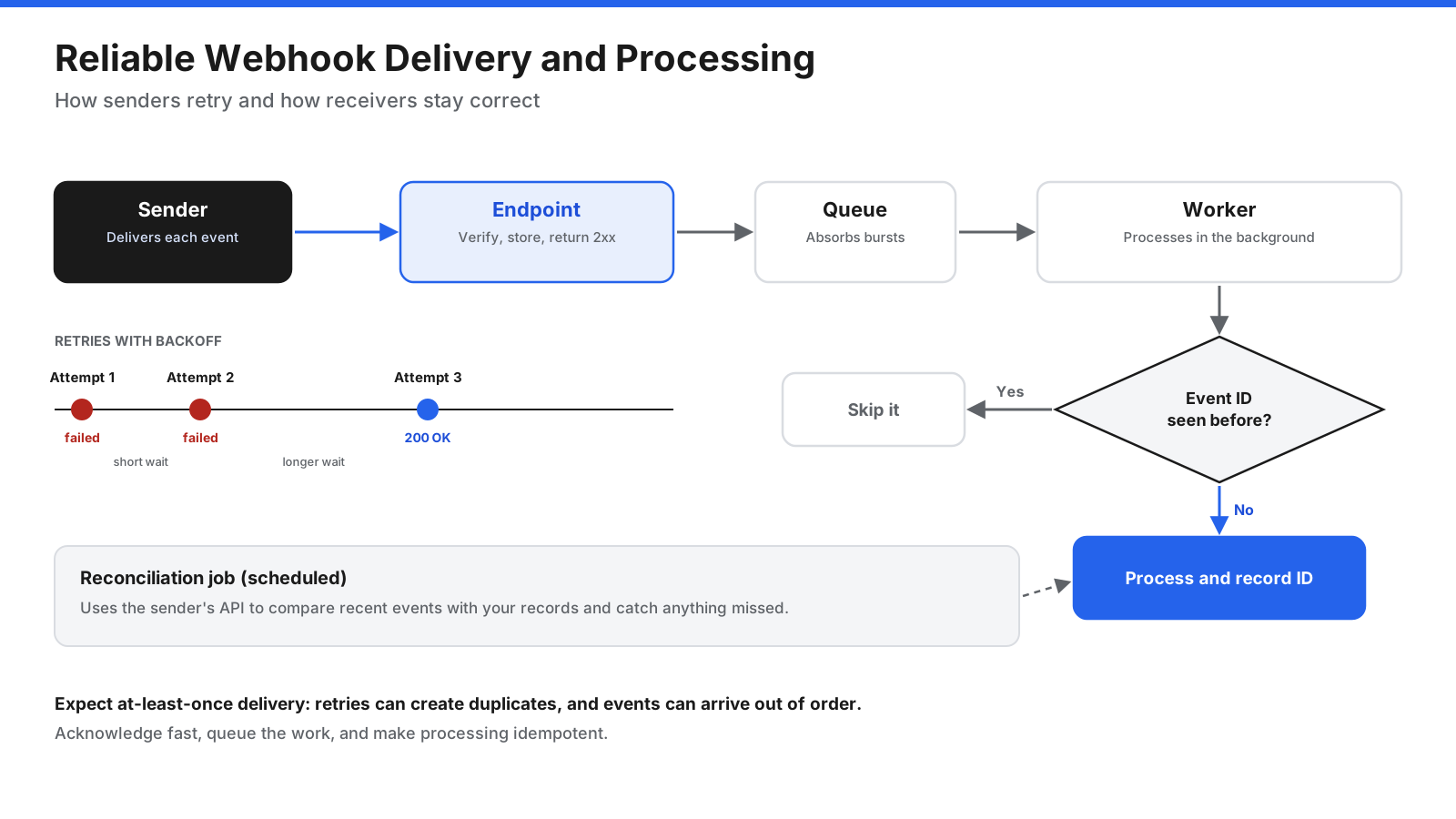
Expect at-least-once delivery. Most senders guarantee that they will try to deliver each event at least once, not exactly once. If your endpoint responds slowly or a network blip hides your success response, the sender will retry, and you may receive the same event twice. Make processing idempotent by storing each event ID and skipping events you have already handled.
Acknowledge first, process later. Respond with a 2xx code as soon as you have verified and stored the event, then process it asynchronously from a queue or background job. This prevents timeouts and protects you from bursts of traffic.
Do not rely on order. Webhooks can arrive out of order, especially after retries. If order matters, use timestamps or version numbers in the payload, or fetch the latest state from the sender’s API before acting.
Understand retry behavior. Senders typically retry failed deliveries with exponential backoff, waiting longer between each attempt, over a period that can range from minutes to days. After repeated failures, some senders disable the endpoint. Monitor your endpoint and make sure someone is alerted when deliveries fail.
Reconcile periodically. For important data such as payments, run a scheduled job that uses the sender’s API to compare recent events or object states with your records. This catches anything lost during an extended outage.
Return meaningful status codes. Use 2xx for success. Return 4xx codes only for permanent problems, such as a failed signature check, and 5xx codes for temporary problems you want retried. Some senders treat certain 4xx responses as final and stop retrying.
What Are the Disadvantages of Webhooks?
Webhooks are simple and efficient, but they come with tradeoffs:
- You need a public endpoint. The receiver must run a server reachable from the internet, which adds infrastructure and security responsibilities.
- Delivery is not guaranteed. Webhooks can be delayed, duplicated, or lost during outages, so critical workflows need retries, idempotency, and reconciliation.
- Debugging can be harder. Because the sender starts the exchange, you depend on delivery logs, replay tools, and your own logging to see what happened.
- Bursts can overwhelm receivers. A large batch of events, such as a bulk import, can send many webhooks in a short time.
- Formats vary between providers. Each sender has its own event names, payloads, and signing methods, so every integration needs its own handling unless both sides follow a shared convention.
- One-way only. A webhook notifies you, but you still need an API to fetch more data or take action in the sender’s system.
Despite these limits, webhooks remain a common way for web applications to notify each other of events because their benefits in speed and efficiency usually outweigh the extra care they require.
A Short History of Webhooks
The term “webhook” was coined in 2007 by developer Jeff Lindsay, who borrowed the idea of a “hook” from programming, where a hook is a place in code that lets custom behavior run when something happens. He proposed using simple HTTP callbacks so that web applications could notify each other of events, in the same way that hooks let programs react to events.
The idea spread as web services multiplied and developers looked for alternatives to constant polling. Payment processors, code hosting platforms, communication tools, and online stores adopted webhooks to let customers react to events within seconds. Automation platforms later made webhooks accessible to non-developers by turning them into simple triggers.
As webhooks became widespread, the lack of shared conventions became a pain point, since each provider used different headers, payloads, and signing methods. Community efforts such as the Standard Webhooks specification now aim to provide a common approach to signatures, metadata, and payload structure so that sending and receiving webhooks works the same way across providers.
Frequently Asked Questions
What is a webhook in simple terms?
A webhook is an automatic message one app sends to another when something happens. Instead of your app checking repeatedly for updates, the other app tells your app the moment there is news by sending details to a web address you set up.
What is the difference between a webhook and an API?
With an API, your application asks another system for data whenever it needs it. With a webhook, the other system sends data to your application automatically when an event happens. APIs are on demand, while webhooks are event-driven. They are often used together: a webhook signals that something changed, and an API call fetches the details.
How do I create a webhook?
To receive webhooks, create a URL in your application or automation tool that accepts POST requests over HTTPS. Then open the sending application’s webhook settings, enter your URL, choose the events you want, and save the signing secret it provides. Verify the signature on each incoming request, respond quickly with a 2xx status code, and process the event.
Are webhooks free?
Webhooks themselves are a technique, not a product, so there is no cost to use them in principle. Many applications include webhooks in their plans at no extra charge, though some limit them to paid tiers or cap the number of endpoints or deliveries. Receiving webhooks requires hosting an endpoint, which may involve server or automation platform costs.
Are webhooks secure?
Webhooks can be secure when implemented properly. Use HTTPS, verify the signature on every request using the sender’s shared secret, reject old timestamps to prevent replays, deduplicate events by ID, and avoid sending sensitive data in payloads. Without signature verification, anyone who discovers your webhook URL could send fake events.
What happens if a webhook fails?
If your endpoint is down, too slow, or returns an error, most senders retry the delivery several times with increasing delays. If deliveries keep failing, the sender may disable the webhook and notify the account owner. Monitoring your endpoint and reconciling data through the sender’s API helps you recover missed events.
What is an example of a webhook?
A common example is an online store and a payment processor. When a customer pays, the payment processor sends a webhook to the store’s URL with details of the successful payment. The store verifies the request, marks the order as paid, and sends the customer a confirmation email, all within seconds.
Is a webhook the same as a callback URL?
The terms are closely related. A callback URL is any address a system calls back to when something is ready or has happened. A webhook URL is a type of callback URL used specifically for event notifications, usually registered once and called many times as events occur.
Do webhooks use GET or POST?
Most webhooks use POST because the sender is delivering data in the request body. A few simple implementations send GET requests with event details in the URL, but this is less common and less secure, since URLs are often stored in logs. When you build or configure webhooks, POST with a JSON body is the standard choice.
Are webhooks instant?
Webhooks are near-instant. Most are sent within seconds of the event, and delivery itself usually takes well under a second. Delays can happen when the sender is processing a large volume of events, when your endpoint is slow or unavailable and the sender has to retry, or when the sender batches certain events. For workflows that cannot tolerate delay, combine webhooks with monitoring and reconciliation.
Can one event trigger webhooks to several URLs?
Yes. Many senders let you register multiple endpoints and choose different events for each one, so a single event can notify several systems at once. If a sender supports only one endpoint, you can point it at your own service or an automation platform that receives the webhook and forwards it to every system that needs it.
Webhooks Keep Systems in Sync Without Constant Polling
A webhook is a simple idea with a large impact: when something happens in one application, it sends the details to another application’s URL right away. That push-based approach replaces wasteful polling, keeps connected systems in sync, and powers everything from payment confirmations and order updates to deployment pipelines, chat alerts, and automated incident response.
Working with webhooks well comes down to a few habits. Register only the events you need, verify every request’s signature and timestamp, respond fast and process in the background, make your handling idempotent, and reconcile important data through the sender’s API. With those practices in place, webhooks become an efficient and dependable way to connect the applications your work depends on.















































































































