

Using AI for business means applying artificial intelligence to everyday work so that tasks get done faster, decisions rest on better information, and people spend more time on work that needs human judgment. It can be as simple as drafting emails and summarizing meetings with a chat assistant, or as involved as forecasting demand, screening invoices for errors, or running an AI agent that resolves routine customer requests from start to finish.
For most organizations, the hard part is not access to AI. Capable tools are now built into the software many teams already use. The hard part is knowing where AI will make a measurable difference, how to introduce it without creating new risks, and how to tell whether it is paying off.
This guide explains the main types of AI available to businesses, shows how departments can use them, gives you a method for choosing first projects, and walks through an eight-step plan to implement AI responsibly. It also covers how small businesses can start with little budget, how to measure return on investment, and which risks to manage. The guidance is vendor-neutral.
Quick answer: To use AI for business, start with a specific problem rather than a tool. List repetitive, time-consuming, or data-heavy tasks, pick one to three where AI could save time or improve quality, and check that you have the data and permissions those tasks require. Decide whether to use AI features already in your software, adopt a dedicated tool, or build something custom. Set rules for what data can go into AI tools, run a small pilot against a baseline, train the people involved, and keep a person reviewing outputs that matter. Scale only what the pilot proves.
What Types of AI Can Businesses Use?
AI covers several technologies. Knowing what each does well makes it easier to match a business problem to the right solution. Most business uses fall into six categories, and many tools combine several of them.
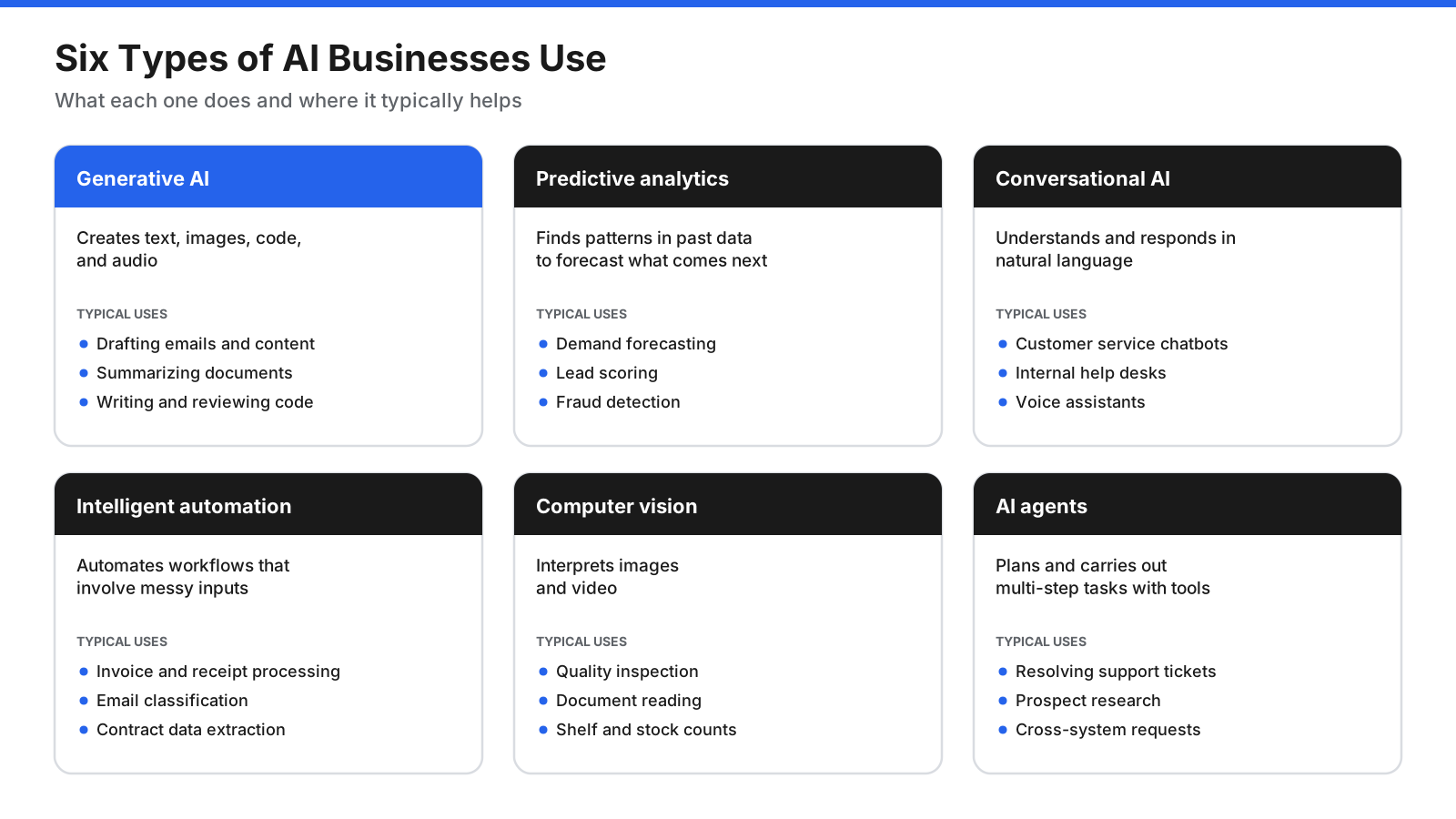
- Generative AI creates text, images, code, and audio. Chat assistants can draft documents, answer questions, summarize long material, and write code. It is useful across almost every department.
- Predictive analytics and machine learning find patterns in historical data to forecast what may happen next. Businesses use them to predict demand, flag customers likely to cancel, score sales leads, detect fraud, and set prices. These models need good historical data.
- Conversational AI lets people interact with software in natural language through chat or voice. It powers customer service chatbots, internal help desks, and voice assistants that answer calls and route requests.
- Intelligent automation combines AI with workflow automation. It can handle messier inputs than fixed rules alone, such as reading invoices in different layouts, classifying email intent, or extracting details from contracts.
- Computer vision interprets images and video. Uses include quality inspection on production lines, reading documents and receipts, counting stock on shelves, and monitoring safety on job sites.
- AI agents use an AI model to plan a series of steps, call tools such as databases, search, or business applications, and work toward a goal with limited supervision. Examples include resolving support tickets, researching prospects, and processing requests across systems.
How Are Businesses Using AI Across Departments?
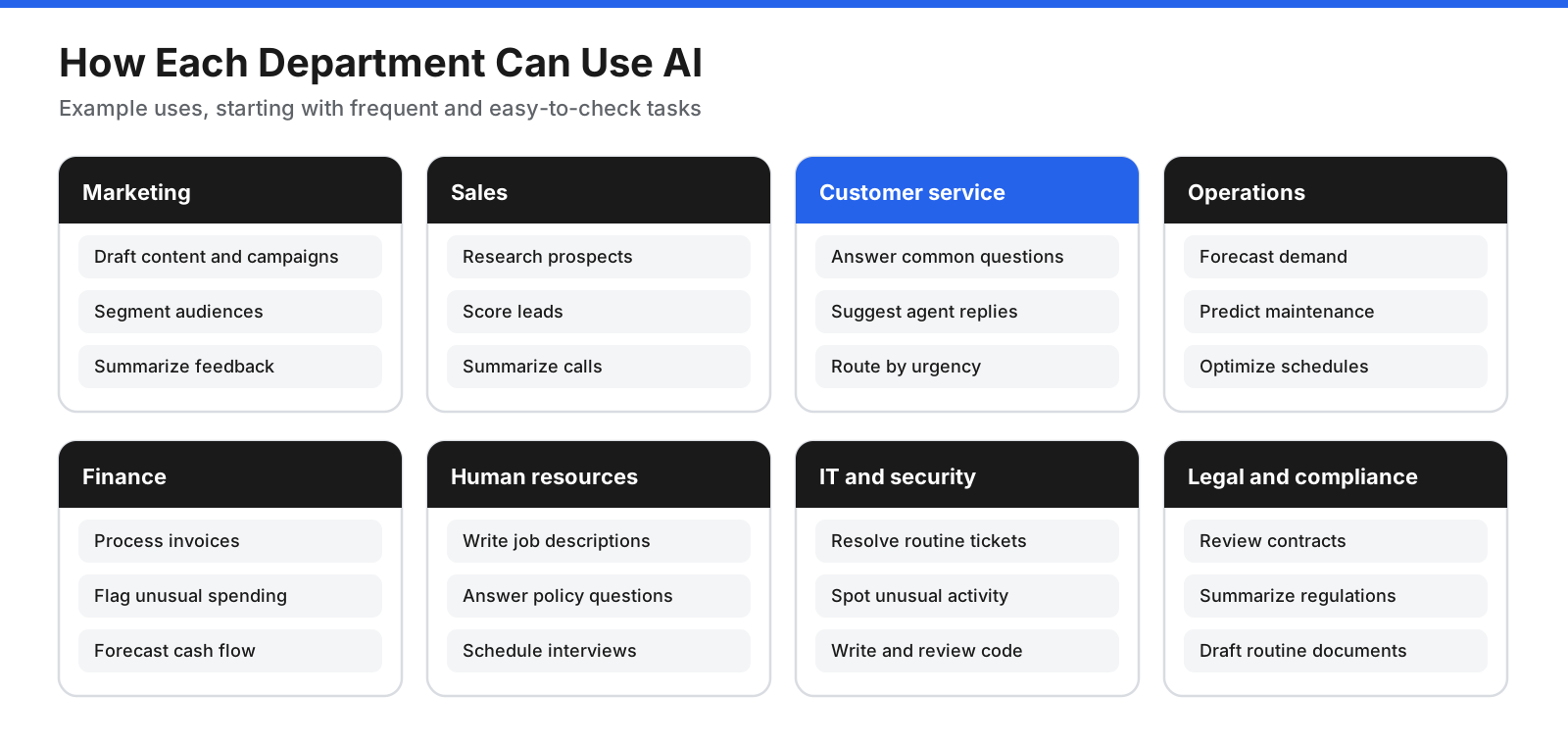
AI is not limited to technical teams. Nearly every function has tasks that involve reading, writing, sorting, predicting, or answering questions. These are often good candidates for AI assistance.
Marketing and content
Marketing teams use generative AI to draft blog posts, social updates, email campaigns, product descriptions, and ad variations, then refine them with a human editor. AI can summarize competitor messaging or cluster customer feedback into themes. Predictive models can segment audiences, estimate which customers may respond to an offer, and recommend send times. A person should remain responsible for accuracy, tone, and brand standards.
Sales
Sales teams use AI to research prospects before calls, draft personalized outreach, summarize call recordings, and update customer records. Predictive models can score leads and forecast pipeline outcomes, helping representatives focus on promising accounts and identify deals that may be stalling.
Customer service
AI chatbots and virtual agents can answer frequent questions, check order status, and hand complex issues to a person with a conversation summary. For human agents, AI can suggest replies, find help articles, summarize ticket histories, and detect sentiment so urgent or upset customers are handled first. A well-maintained knowledge base improves accuracy.
Operations and supply chain
Operations teams use predictive models to forecast demand, plan inventory, and schedule staff. AI can optimize delivery routes, predict equipment failures, identify product defects with computer vision, and help service businesses schedule appointments, match jobs to staff, or process work orders and purchase requests.
Finance and accounting
Finance teams use AI to read and categorize invoices and receipts, match payments to records, flag unusual transactions, and forecast cash flow. Generative AI can draft financial summaries and explain variances in plain language. Because accuracy matters, outputs should be reviewed and access to financial systems limited.
Human resources and recruiting
AI can help write job descriptions, schedule interviews, answer common questions about policies and benefits, draft onboarding materials, and summarize employee surveys. Candidate screening needs particular care because models can repeat historical bias. Keep people accountable for hiring decisions and check the rules that apply in each market.
IT and security
IT teams can use AI to resolve routine help desk requests, summarize and route tickets, write and review code, and generate documentation. AI-assisted monitoring can detect unusual system performance or network activity. Security teams may use it to filter phishing email, spot suspicious behavior, and prioritize alerts.
Legal and compliance
AI can help review contracts for unusual clauses, compare documents with templates, summarize regulations, and draft routine agreements for a lawyer to review. In this area, AI should speed up review rather than replace professional judgment.
How Do You Choose the Right AI Use Cases?
Many AI projects disappoint because they start with a tool and then look for a problem. Start with workflows and score each possible use case on two questions: how much value could it create, and how hard would it be to do well?
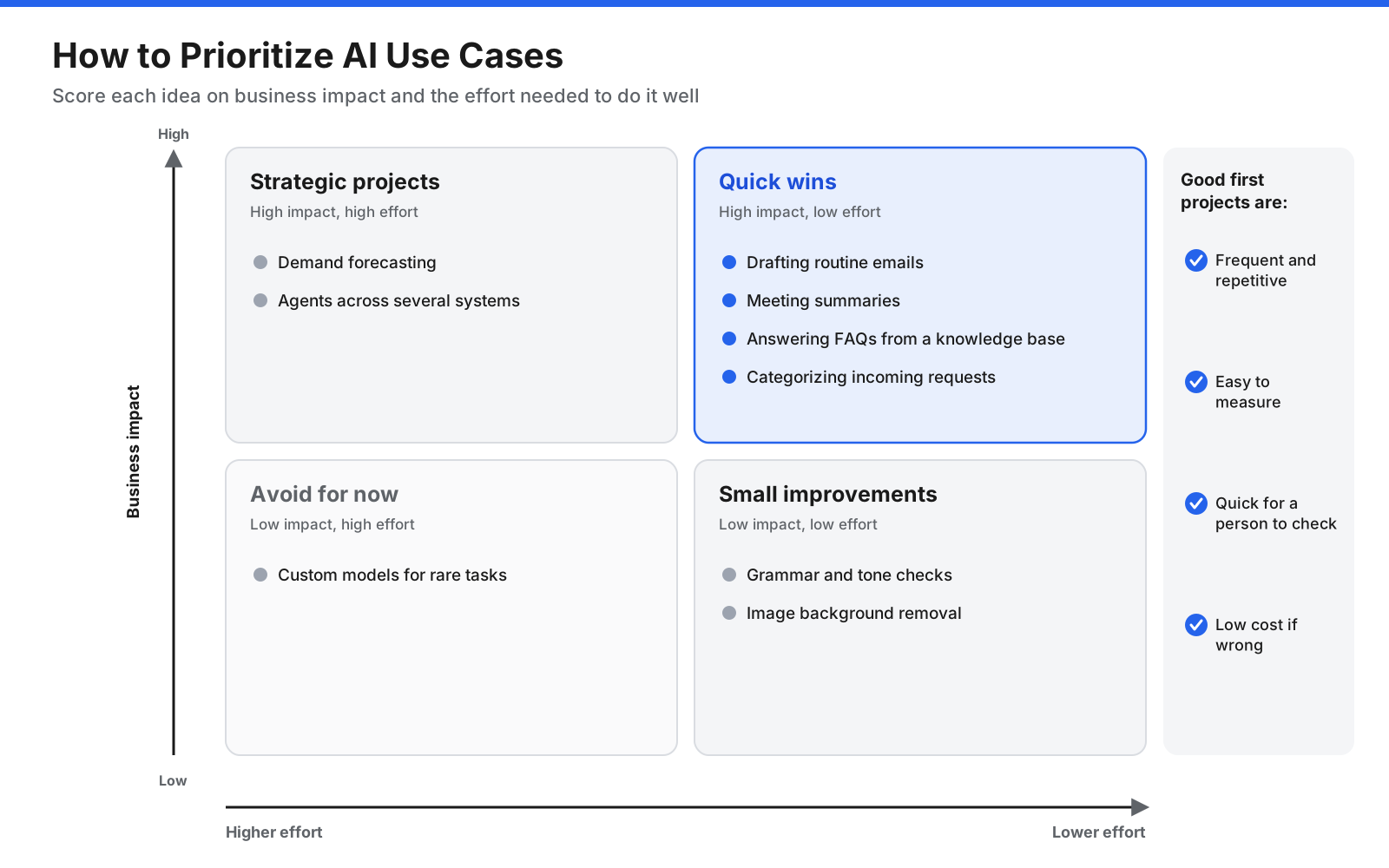
Estimate impact by asking how often a task happens, how much time or money it consumes, how many people it affects, and whether doing it faster or better changes an outcome customers or leaders care about. Estimate effort by checking whether data is available and clean, whether a ready-made tool can handle the task, how many systems must connect, and how serious a mistake would be.
Quick wins have high impact and low effort. Examples include drafting routine communications, summarizing meetings, answering common questions from a knowledge base, or categorizing incoming requests. Strategic projects such as demand forecasting or agents that act across several systems can be worthwhile, but usually after you have experience. Small improvements are easy to adopt when convenient. Leave high-effort, low-impact ideas for later.
Good early use cases are frequent and repetitive, easy to measure, and quick for a person to check. Mistakes should be easy to catch and fix rather than costly or public.
How Do You Implement AI in Your Business Step by Step?
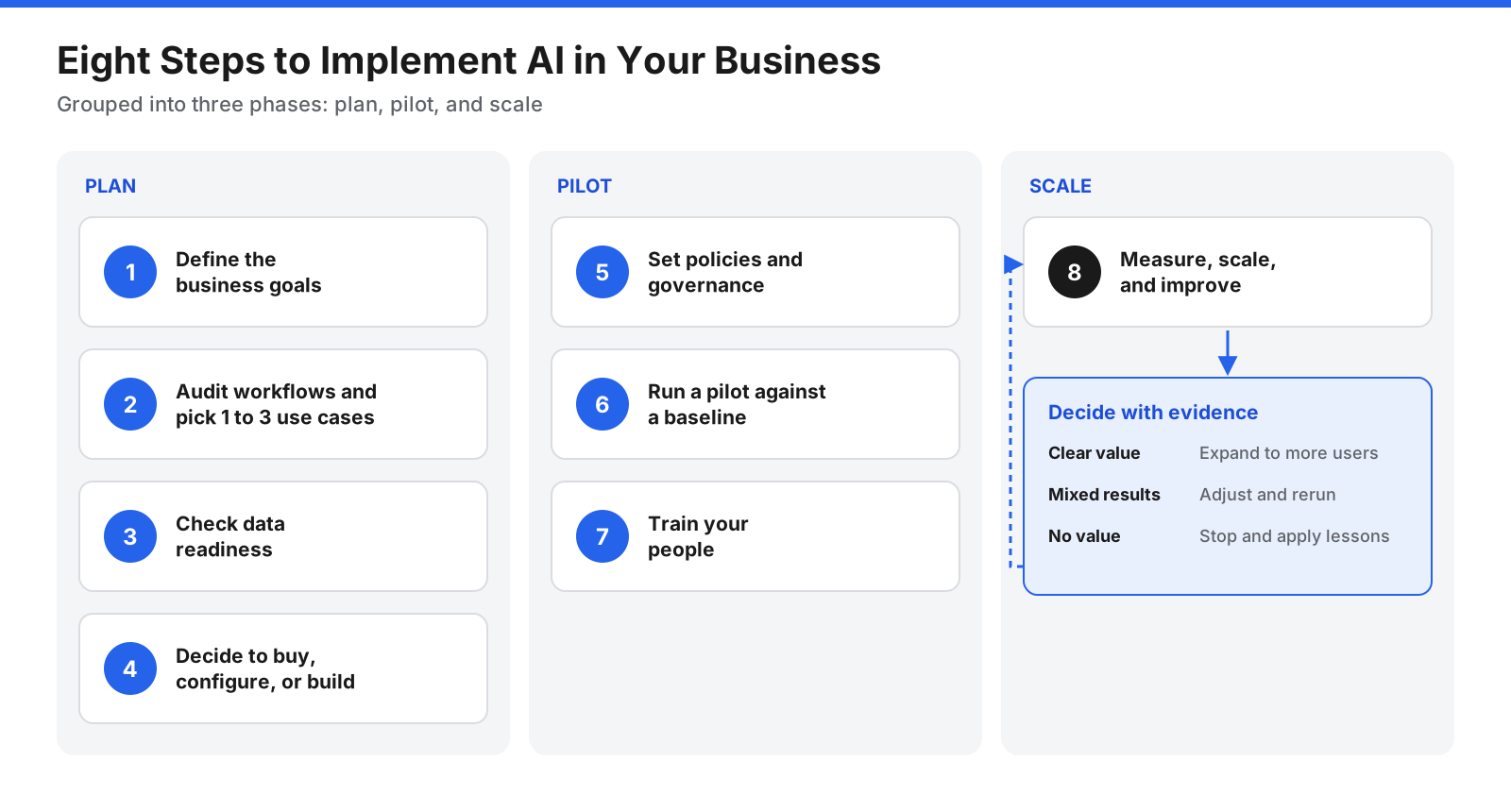
A structured process keeps a project focused and reduces risk. The following eight steps work for a small company or a large enterprise; only the scale changes.
Step 1: Define the business goals
Write down what you want to achieve in business terms. Examples include reducing customer email response times, cutting hours spent on month-end reconciliation, increasing qualified leads handled by each representative, or reducing order-processing errors. Clear goals keep the project focused and give you something concrete to measure.
Step 2: Audit workflows and pick one to three use cases
Walk through how work gets done in the target area. Talk to the people who do it every day; they know where time goes and which tasks cause friction. List each step, how long it takes, how often it happens, and what information it uses. Score candidate tasks with the impact-and-effort matrix, then choose one to three to start. A small number of well-run pilots teaches more than many simultaneous projects.
Step 3: Check data readiness
AI is only as useful as the information it works with. An assistant using an outdated help center can give outdated answers, and a forecast built on incomplete sales history can be unreliable. For each use case, ask whether the data exists in usable form, is accurate and current, is accessible to the tool, is permitted for this use, contains sensitive information, and has an owner responsible for keeping it accurate.
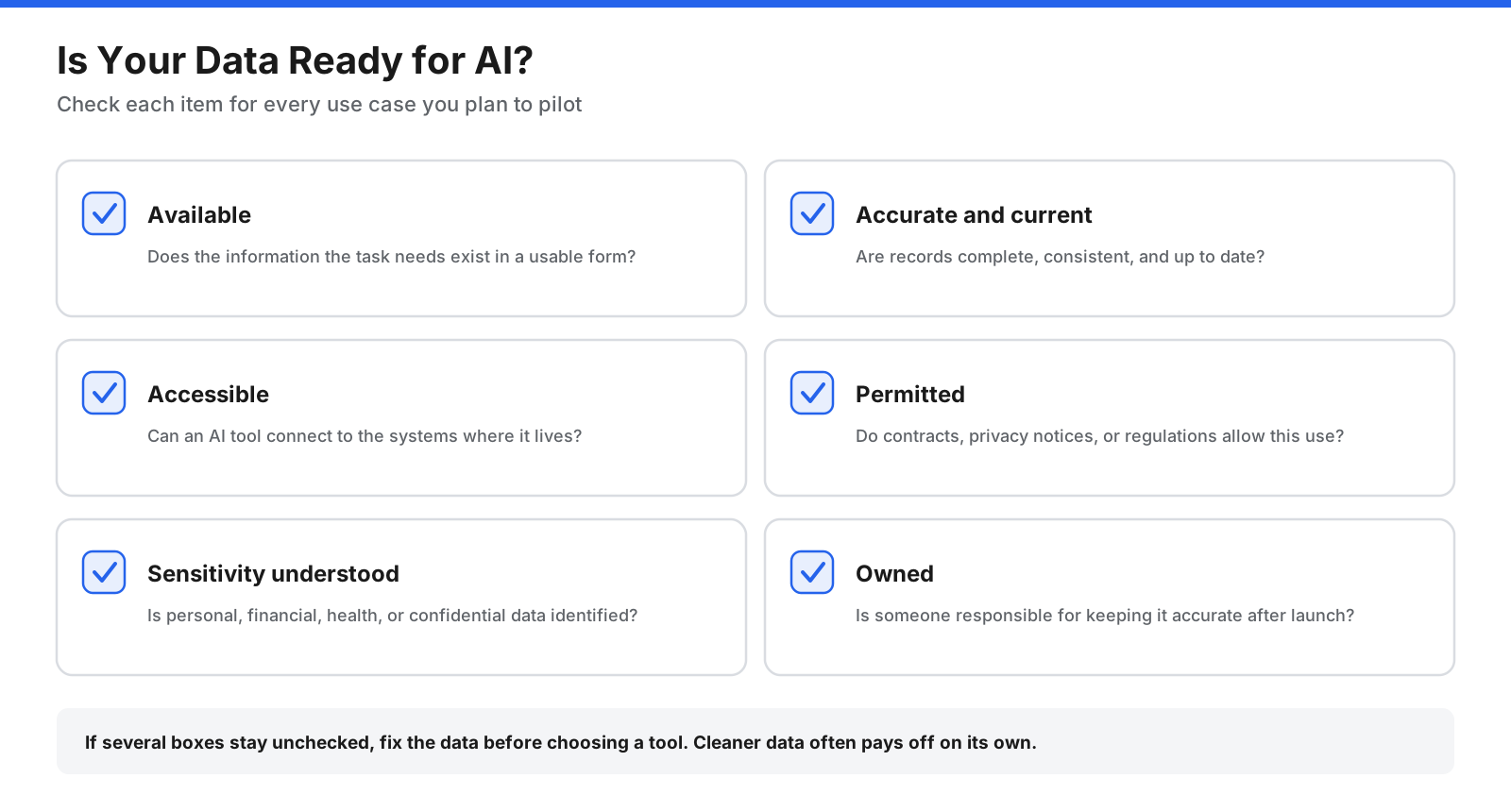
If there are gaps, address them before choosing a tool. Cleaning a knowledge base or consolidating customer records can improve operations even before AI is added.
Step 4: Decide whether to buy, configure, or build
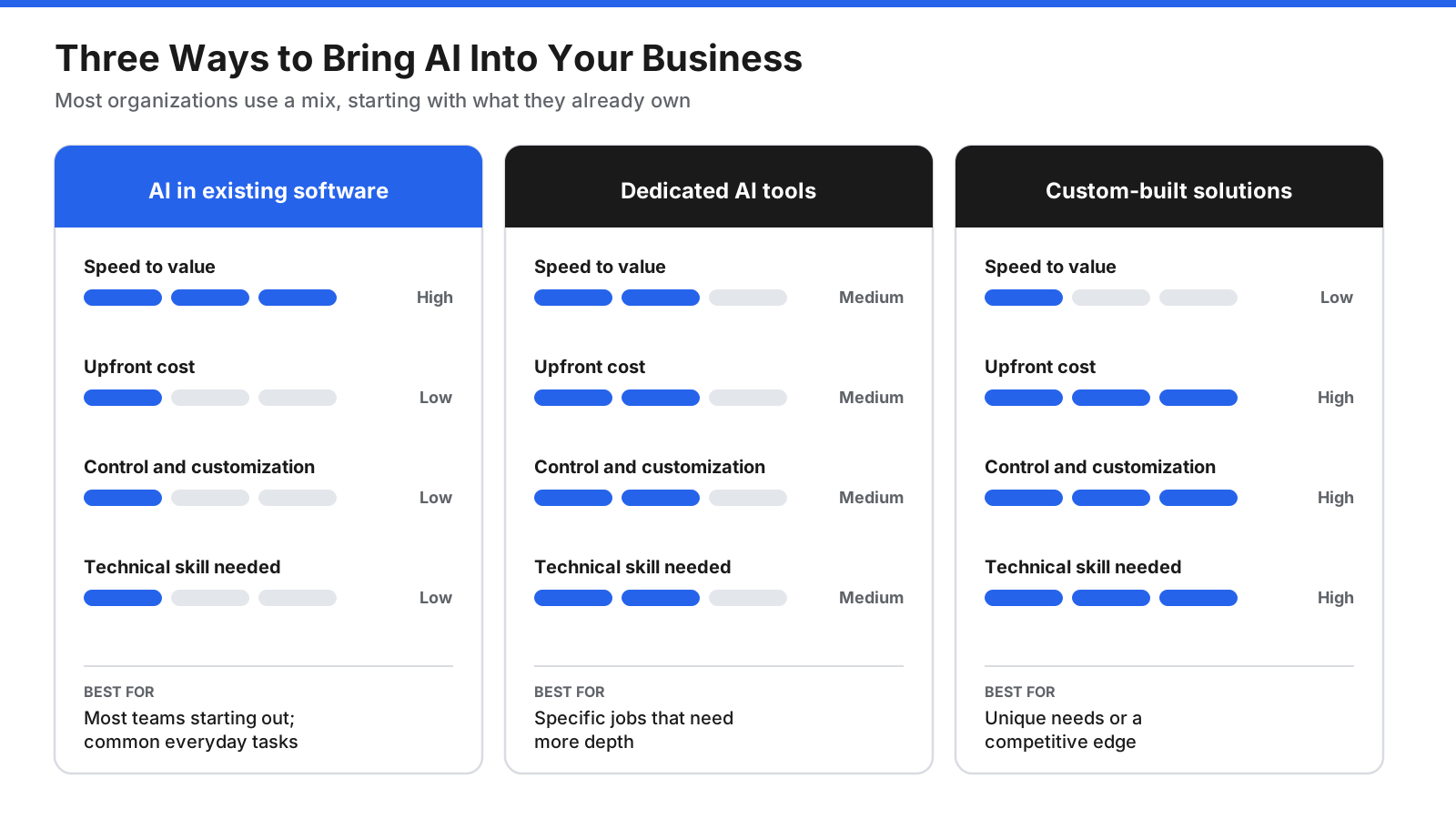
Use AI in software you already have. Office suites, CRM systems, help desks, accounting packages, and design tools increasingly include AI features. This is often the fastest and cheapest starting point because the AI may already work with your data and your team knows the interface.
Adopt dedicated AI tools. Standalone products handle jobs such as general-purpose chat, meeting transcription, customer service, or document processing. They may offer deeper capabilities but require setup, integration, and a security review.
Build a custom solution. Organizations with unusual needs may build applications using AI models through an API. This offers more control but requires technical skills, ongoing maintenance, and careful testing.
Compare data handling, whether vendor models train on your data, security and compliance certifications, integrations, how pricing scales with use, and how easily you could switch providers later.
Step 5: Set policies and governance
Set rules before adoption spreads. A workable AI policy should cover approved tools and how to request new ones; which data may and may not be entered; which outputs require human review; when customers or partners should be told AI was involved; and who is accountable for each system. Larger organizations may create a cross-functional group with IT, security, legal, and business leaders to review new uses and keep policies current.
Step 6: Run a pilot and measure against a baseline
Launch with a small group for a fixed period, often a few weeks to a few months. Measure current performance before the pilot begins so you have a baseline. Track metrics tied to your goals, such as time per task, error rates, response times, or customer satisfaction. Collect feedback about where the tool helps and where its output needs correction. Keep a person reviewing outputs throughout the pilot.
Step 7: Train your people
Training should cover how to use the tool, write clear instructions, check output for accuracy, and follow company policy. Be honest about limitations, including the tendency of generative AI to state incorrect information confidently. Address concerns about how AI may affect roles, involve staff in choosing use cases, and explain how it can remove tedious work while people retain judgment.
Step 8: Measure, scale, and improve
Compare pilot results with the baseline and goals. If the use case delivered clear value, expand it to more users or related tasks. If results were mixed, adjust the setup, data, or workflow and test again. If it did not work, stop and apply the lessons to the next idea. Continue reviewing accuracy, cost, user satisfaction, and compliance as models, vendors, and business needs change.
How Should Small Businesses Start With AI?
Small businesses often have an advantage: fewer systems to connect, faster decisions, and owners who know the workflows. You do not need a data science team or a large budget to begin.
- Start with a general-purpose AI assistant for writing and editing emails, proposals, and marketing content, summarizing documents, brainstorming, and research.
- Turn on AI features in tools you already pay for, such as email, office software, accounting, website builders, and CRM.
- Pick one customer-facing improvement, such as a website chatbot trained on your own FAQs, faster customer email replies, or AI-assisted appointment booking.
- Automate one back-office headache, such as categorizing expenses, processing invoices, summarizing calls, or drafting quotes.
- Write a one-page AI policy listing approved tools and data that must never be entered.
Keep a simple record of time saved. For a small team, saving even a few hours a week on routine work can free up meaningful time for customers and growth.
How Do You Measure the ROI of AI?
Return on investment (ROI) compares the value created with the total cost. The challenge is capturing both sides honestly.
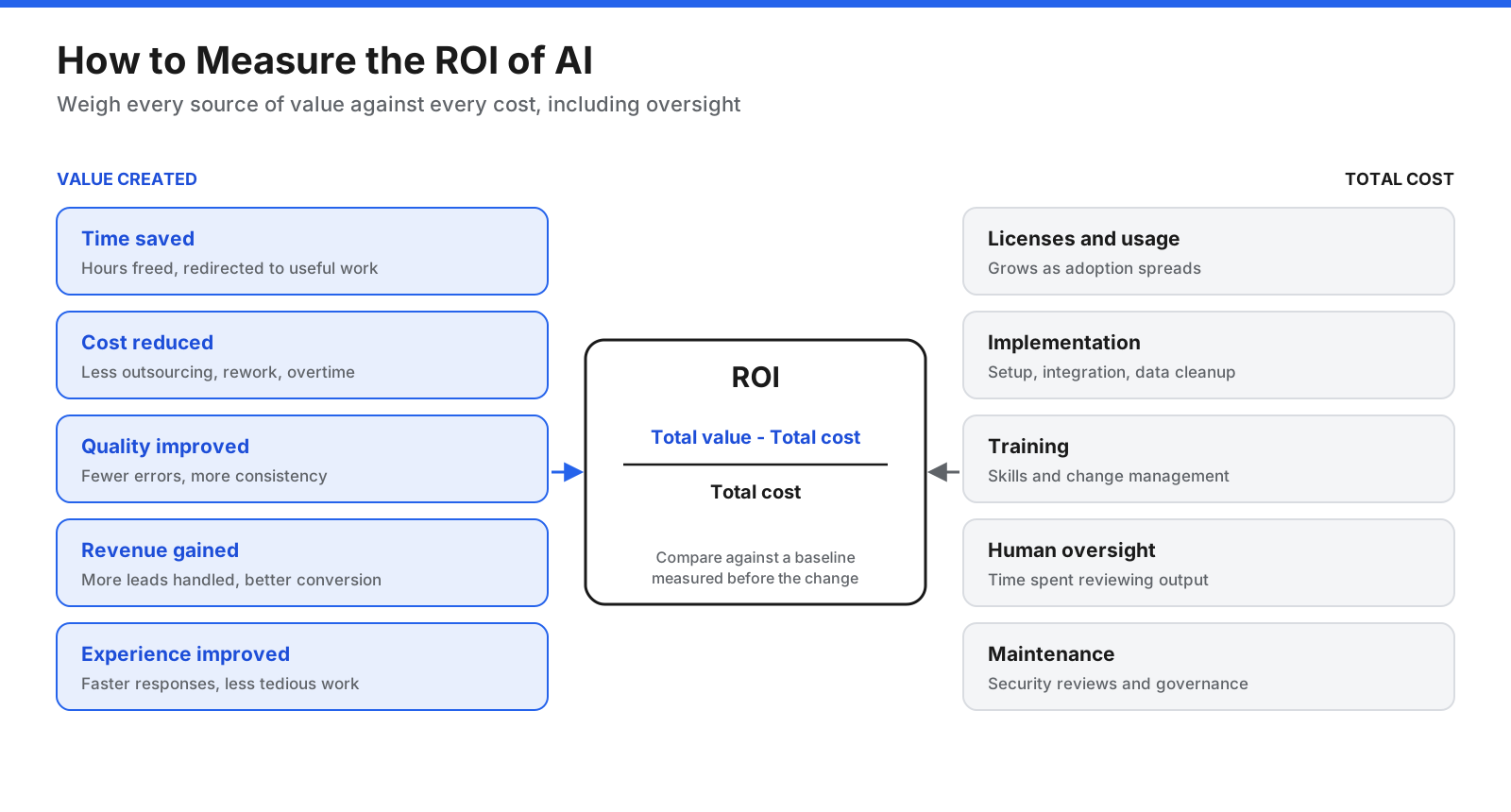
Measure value in five areas:
- Time saved: hours no longer spent on a task, multiplied by the cost of that time.
- Cost reduced: lower spending on outsourcing, overtime, errors, or rework.
- Quality improved: fewer errors, more consistent output, or better compliance.
- Revenue gained: more leads handled, higher conversion, or new services made possible.
- Customer and employee experience: faster responses, higher satisfaction, and less tedious work.
Count licenses and usage fees, implementation and data cleanup, training and change management, ongoing human review, maintenance, security reviews, and governance. The basic calculation is ROI = (total value – total cost) / total cost. Be careful about counting time saved as money saved. Time freed up creates value only if it is redirected to useful work, so track what people do with those hours.
What Are the Risks of Using AI in Business?
AI brings benefits, but it also introduces risks that need managing. Most can be controlled with clear policies, sensible tool choices, and human review.
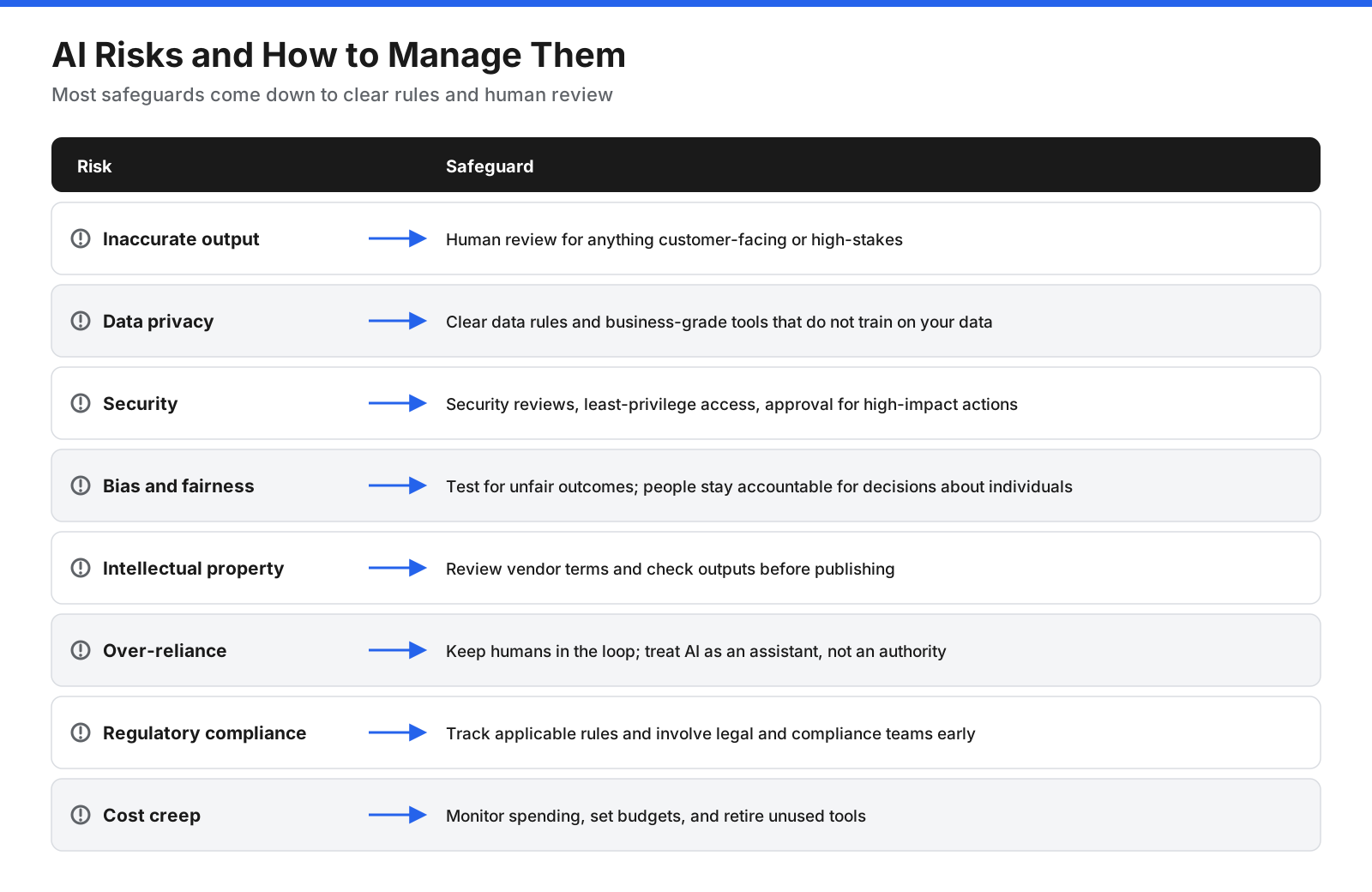
- Inaccurate output: Generative AI can produce confident but false statements. Require human review for customer-facing or high-stakes work and connect AI to trusted company sources where possible.
- Data privacy: Entering customer or employee information into the wrong tool can breach privacy laws or contracts. Set data rules, review vendor terms, and use business-grade accounts with suitable protections.
- Security: AI tools can create new entry points for attackers, and agents with broad access can be manipulated by malicious content. Run security reviews, grant minimum access, and require approval for high-impact actions.
- Bias and fairness: Models can reflect training-data bias, especially in hiring, lending, and pricing. Test for unfair outcomes and keep people accountable for decisions about individuals.
- Intellectual property: Ownership of generated content and the use of copyrighted material in training raise questions. Review vendor terms, check output before publishing, and avoid entering confidential material into unapproved tools.
- Over-reliance: Teams may stop checking output or lose skills. Keep humans involved and treat AI as an assistant, not an authority.
- Regulatory compliance: Rules vary by country and industry and continue to change. Track applicable regulations and involve legal or compliance teams early.
- Cost creep: Usage-based pricing can grow as adoption spreads. Monitor spending, set budgets, and review which tools are actually used.
What Are Common Mistakes When Using AI in Business?
- Starting with the tool instead of a business problem, which leads to projects without clear goals.
- Trying to do everything at once, spreading attention thin and making results difficult to judge.
- Skipping the baseline, which makes it impossible to show whether performance improved.
- Ignoring data quality, so AI built on outdated or messy information produces unreliable results.
- Leaving out the people who do the work, reducing adoption and encouraging workarounds.
- Removing human review too early, before unusual cases and everyday errors are understood.
- Having no policy, which can expose sensitive data to unapproved tools.
- Expecting immediate transformation instead of steady improvement across workflows.
Frequently Asked Questions
What is the best AI for business use?
There is no single best AI for every business. The right choice depends on the task, systems you already use, data protection requirements, and budget. Many organizations can start with AI built into existing software and a business-grade general-purpose assistant. Compare accuracy on your own tasks, data handling, security, integrations, and total cost as use grows.
What is the 30% rule in AI?
The 30% rule is an informal rule of thumb, not an official standard, and people use it in different ways. One version suggests AI handle much of routine work while people retain effort for judgment, creativity, and accountability. The useful principle is to keep humans reviewing outputs and owning important decisions.
How much does it cost to use AI in a business?
Costs vary widely. Businesses may start with general-purpose assistants or AI features in existing software for a modest monthly fee per user. Dedicated customer service, document processing, or analytics tools can cost more and may charge by usage. Custom solutions require development and maintenance budgets. Include setup, training, and review time in total cost.
Will AI replace employees?
AI is more likely to change many jobs than eliminate them outright. It can take over repetitive drafting, sorting, summarizing, and data entry, shifting people’s time toward work that needs judgment, relationships, and creativity. Some roles will change significantly, so invest in training and involve employees in decisions about AI use.
Do you need technical skills to use AI in business?
Not to get started. Most assistants and built-in AI features use plain-language instructions. Technical skills become important when integrating AI with internal systems, building custom solutions, or running agents that take actions across applications.
Is it safe to put company data into AI tools?
It depends on the tool and account. Business and enterprise versions may include commitments about training data and stronger security controls; free consumer versions may have different terms. Read data-handling terms, check security controls, and set a policy on which information employees may enter.
How do you know if your business is ready for AI?
You are ready to start if you can name a specific repetitive, time-consuming, or data-heavy task; the information it needs is reasonably accurate and accessible; and someone can own the project and measure results. You do not need perfect data or a large technical team for a small, well-chosen pilot.
What are AI agents for business?
AI agents use a model to plan and carry out multi-step tasks, such as researching a question, updating records, or resolving customer requests, by calling tools and business applications. They can save time on complex workflows but need careful setup, limited permissions, and human approval for consequential actions.
Start Small, Measure Honestly, and Scale What Works
Using AI for business is less about adopting the latest technology and more about applying it with discipline. Start with a clear business goal, not a tool. Map your workflows, choose a few high-impact, low-effort use cases, make sure the data is accurate and appropriate to use, and decide whether built-in features, dedicated tools, or custom solutions fit each need. Put a simple policy in place before adoption spreads.
Run small pilots against a baseline, train the people involved, and keep a person reviewing anything that matters. Measure value and cost honestly, scale what works, and stop what does not. Businesses can build lasting gains one improved workflow at a time.















































































































