

Low code is a way of building software applications with visual tools instead of writing most of the code by hand. On a low-code platform, you assemble an application by dragging components onto a screen, defining data in a visual editor, and connecting steps in a workflow diagram. The platform generates the underlying code, handles much of the infrastructure, and lets you add your own code where the visual tools fall short.
The idea is to make application development faster and accessible to more people. Professional developers use low code to skip repetitive work such as building forms, screens, and database connections. Business users with little or no programming background, often called citizen developers, use it to build simple apps and automate their own workflows. IT teams use it to deliver more internal tools without growing the development backlog.
This guide explains what low code is in plain language, how low-code platforms work, how low code compares with no code and traditional development, what you can build with it, and where its limits are. It also covers how to choose a platform, how to get started responsibly, how AI is changing low code, and how the approach developed. The guidance is vendor-neutral, so it applies to any platform.
Quick answer: Low code is a software development approach that uses visual interfaces, drag-and-drop components, prebuilt templates, and ready-made connectors to build applications with minimal hand coding. It sits between no code, which requires no programming at all, and traditional development, where everything is written by hand. Low-code platforms speed up the creation of business apps, workflows, portals, and integrations, while still allowing developers to write custom code for logic or features the visual tools cannot handle.
How Does Low-Code Development Work?
A low-code platform replaces many of the steps in traditional development with visual equivalents. Instead of writing code to create a database table, a screen, and the logic connecting them, you define each one through a graphical editor. The platform translates your choices into a working application.
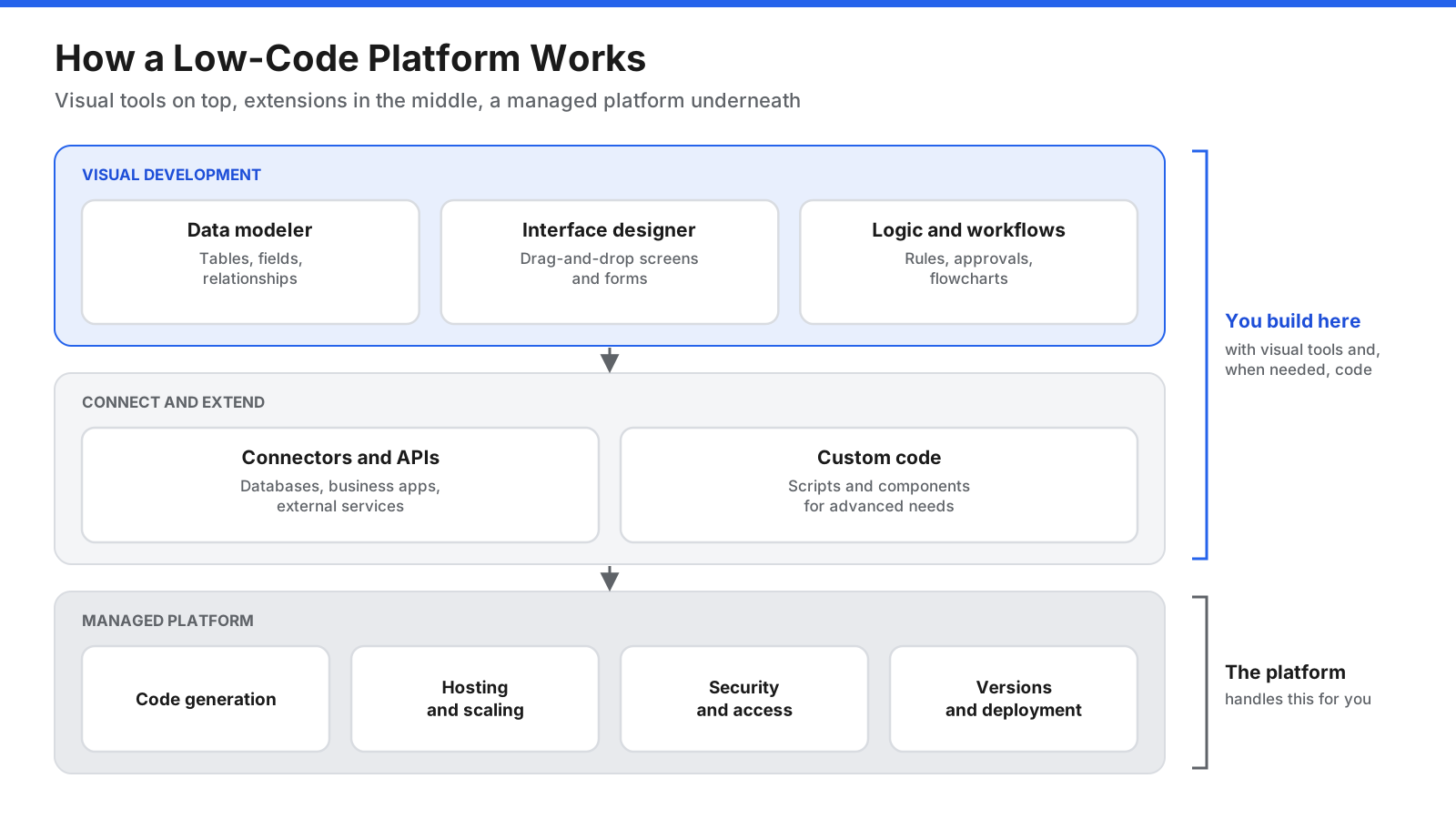
Most low-code platforms follow a similar pattern:
- Model your data. Define the information your app will store, such as customers, orders, or requests, along with its fields and relationships. Many platforms can also connect to existing databases or import spreadsheets.
- Design the interface. Drag components such as forms, tables, charts, buttons, and menus onto screens. Most platforms adjust layouts automatically for desktop and mobile.
- Define the logic and workflows. Describe what should happen when a user takes an action, such as validating a form, sending an approval request, or updating a record, using flowcharts, rule builders, or simple expressions.
- Connect to other systems. Prebuilt connectors link your app to email, databases, business applications, and application programming interfaces (APIs) without writing integration code from scratch.
- Add custom code where needed. When a requirement goes beyond the visual tools, developers write code in a supported language and plug it into the app as a custom component, function, or script.
- Test and deploy. Built-in tools let you preview the app, test it, and publish it, often with a single action. The platform typically handles hosting, scaling, and updates.
Because the platform manages so much of the setup, a working first version can often be built in days or weeks rather than months. Changes are faster too, since updating a visual model is usually quicker than rewriting code.
What Are the Key Features of a Low-Code Platform?
Low-code platforms vary widely, but most share a common set of capabilities.
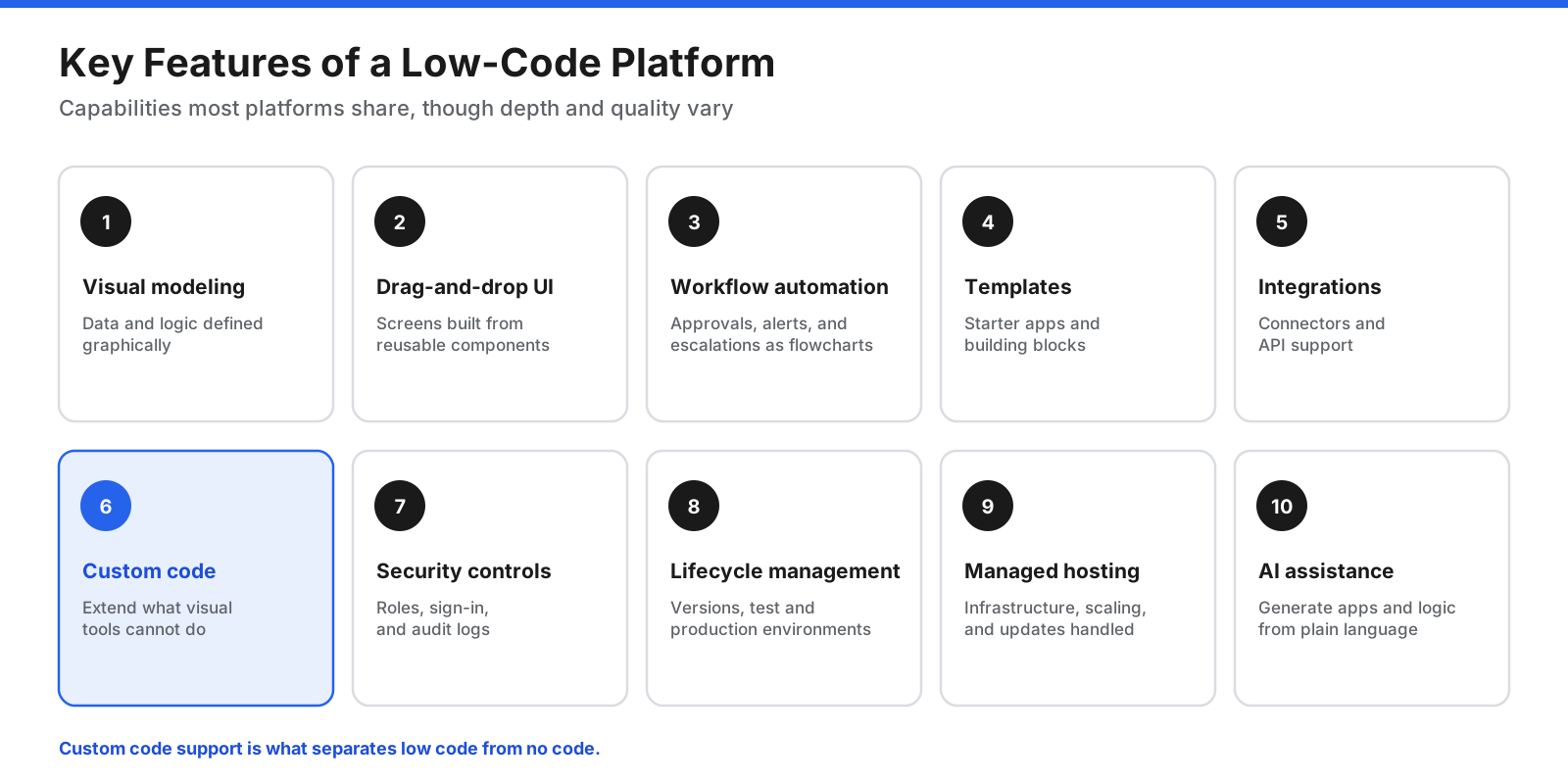
- Visual modeling. Data structures, processes, and application logic are defined graphically rather than in code.
- Drag-and-drop interface builder. Screens and forms are assembled from reusable components, usually with responsive layouts for different devices.
- Workflow and process automation. Multi-step processes such as approvals, notifications, and escalations are designed as flowcharts.
- Templates and reusable components. Starter apps and building blocks reduce the time needed for common patterns such as request forms, dashboards, and customer portals.
- Integrations and connectors. Prebuilt links to databases, business software, and external services, plus the ability to call APIs.
- Custom code extensions. Support for adding code when the visual tools are not enough, which separates low code from no code.
- Security and governance controls. Role-based access, authentication, audit logs, and administrative controls over who can build and publish apps.
- Application lifecycle management. Version control, separate testing and production environments, and deployment pipelines.
- Managed hosting and scaling. Many platforms run apps in the cloud and handle infrastructure, updates, and performance.
- AI assistance. Newer platforms let you describe an app, a screen, or a workflow in plain language and generate a starting version automatically.
What Is the Difference Between Low Code, No Code, and Traditional Development?
Low code is easiest to understand as one point on a spectrum of development approaches.
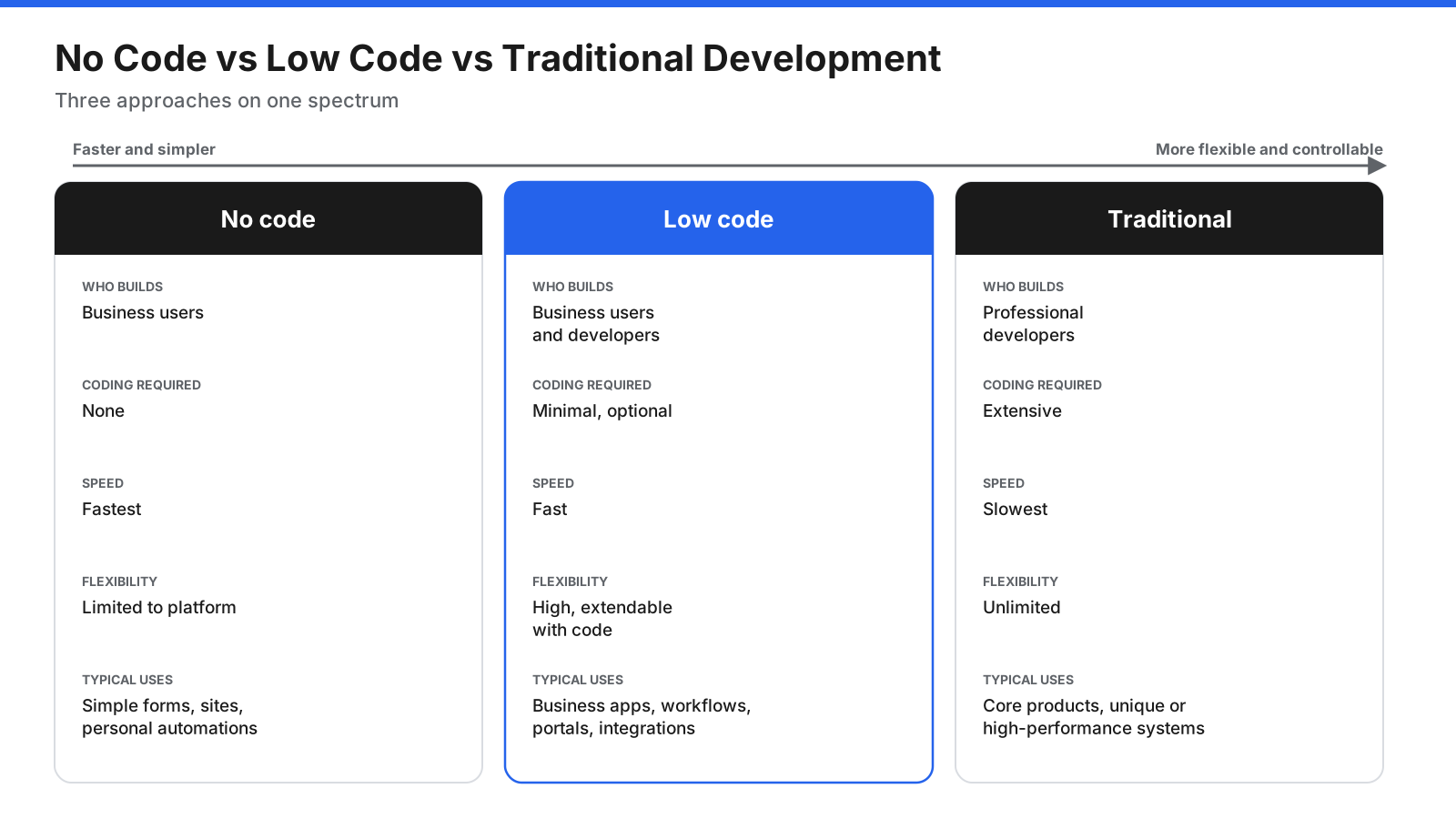
No-code platforms are designed for people who do not write code at all. Everything is done through visual tools and configuration. They are ideal for simple apps, forms, websites, and automations, but you are limited to what the platform offers. If a feature does not exist, you usually cannot add it.
Low-code platforms also rely on visual tools, but they let developers write code to extend or customize the app. This makes them suitable for more complex business applications and integrations. Business users can build simple apps, while professional developers can handle the advanced parts.
Traditional development, sometimes called high code or pro code, means writing the application by hand in programming languages and frameworks. It offers complete flexibility and control over performance, design, and architecture, but takes longer and requires skilled developers.
| Factor | No code | Low code | Traditional development |
|---|---|---|---|
| Who builds | Business users | Business users and developers | Professional developers |
| Coding required | None | Minimal, optional for advanced needs | Extensive |
| Speed to first version | Fastest | Fast | Slowest |
| Flexibility | Limited to platform features | High, extendable with code | Broad control over the implementation |
| Typical uses | Simple forms, websites, personal automations | Business apps, workflows, portals, integrations | Complex products, high-performance and unique systems |
| Main risk | Hitting platform limits | Vendor lock-in and unmanaged apps | Cost, time, and developer shortages |
The boundaries are not strict. Many no-code platforms offer limited scripting, many low-code platforms are usable without any code for simple apps, and traditional development increasingly uses AI tools and frameworks that generate code automatically. Most organizations use a mix of all three, choosing the approach that fits each project.
Who Uses Low Code?
Low code serves several groups, and it works best when they collaborate.
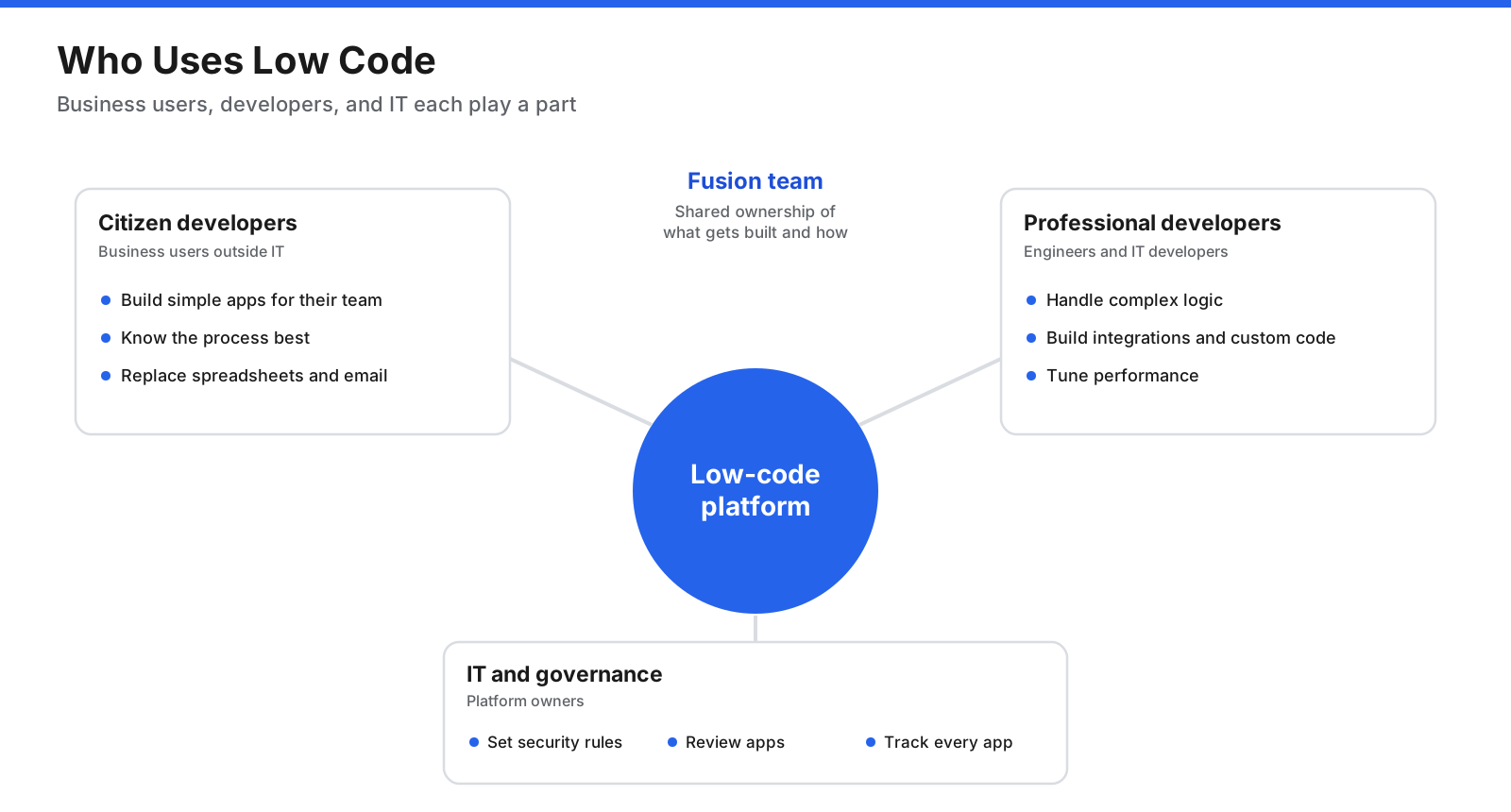
Citizen developers are employees outside IT, such as operations managers, analysts, or team leads, who build applications for their own work. They know the business problem better than anyone and can create simple tools such as request trackers, inspection checklists, or approval workflows without waiting for IT.
Professional developers use low code to deliver applications faster. The platform handles routine work such as screens, data access, and authentication, so developers can focus on complex logic, integrations, performance, and the parts of the app that need custom code.
IT teams manage the platform itself. They set standards, control access to data, review apps before they go live, and make sure everything meets security and compliance requirements. Without this oversight, low code can lead to a sprawl of unmanaged apps.
When these groups work together, often in what is called a fusion team, business experts define what is needed, developers build the harder parts, and IT keeps everything secure and supportable.
What Can You Build With Low Code?
Low code is used most often for internal business applications, but its reach has grown steadily.
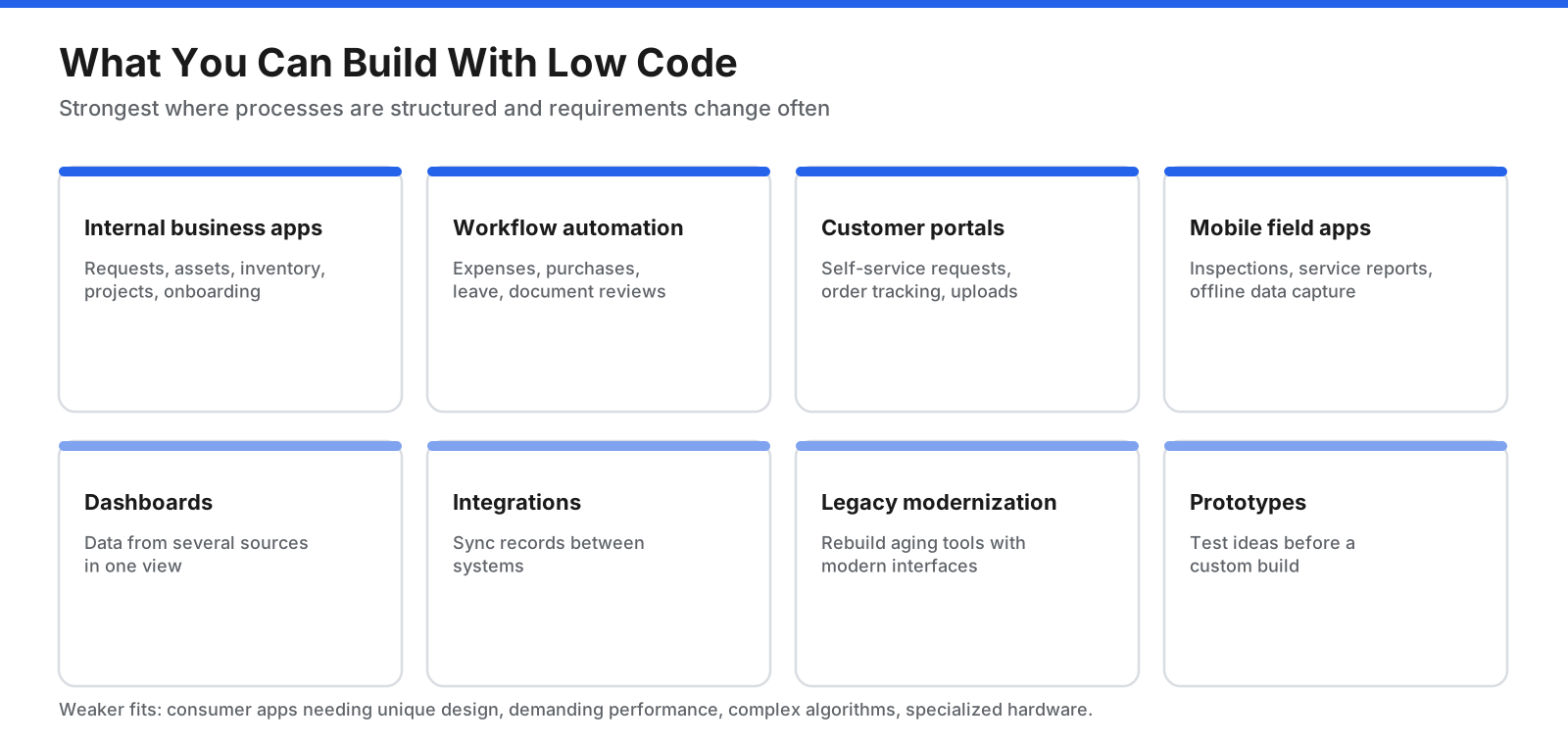
- Internal business applications. Tools for managing requests, assets, inventory, projects, onboarding, or vendor information, often replacing spreadsheets and email chains.
- Workflow and approval automation. Processes such as expense approvals, purchase requests, leave requests, and document reviews that move through several people and systems.
- Customer and partner portals. Self-service sites where customers submit requests, track orders, upload documents, or update their details.
- Mobile and field apps. Inspection checklists, service reports, and data collection forms used by staff in warehouses, stores, or on job sites, sometimes with offline support.
- Dashboards and reporting. Views that pull data from several sources into charts and summaries for managers.
- Integrations. Connections that move data between systems, such as syncing records between a sales system and a finance system.
- Legacy modernization. Rebuilding aging internal systems with a modern interface and better integrations, often in stages.
- Prototypes and minimum viable products. Quick working versions used to test an idea before investing in a fully custom build.
Low code is generally a weaker fit for consumer apps that need a highly distinctive design, software with demanding performance requirements, products with complex algorithms at their core, and systems that must run on specialized hardware.
What Are Examples of Low-Code Applications?
Seeing how common apps are put together on a low-code platform makes the idea more concrete. The examples below describe typical app types and the platform features each one relies on.
Expense approval app. Employees submit an expense with a photo of the receipt from a phone. The app checks that required fields are complete, routes the request to the right manager based on the amount and department, sends reminders if an approval is overdue, and passes approved expenses to the finance system. It uses a form builder, a workflow editor with approval rules, mobile support, and a connector to the accounting system.
Equipment inspection app. Field staff open a checklist on a tablet, record readings, take photos, and flag problems, even without an internet connection. When the device reconnects, results sync to a central database, and any failed item automatically creates a maintenance request. It uses offline data capture, a camera component, conditional logic, and integration with a maintenance system.
Customer service portal. Customers sign in to submit requests, upload documents, check the status of open cases, and read help articles. Staff see the same requests in an internal view where they assign, update, and close them. It uses authentication, role-based access that shows different screens to customers and staff, a data model for cases, and email notifications.
Employee onboarding tracker. When a new hire is added, the app creates tasks for HR, IT, facilities, and the hiring manager, such as preparing equipment, creating accounts, and scheduling training. Each team sees its own task list, and managers see a dashboard of progress. It uses workflow automation, task assignment, dashboards, and connectors to directory and messaging systems.
Operations dashboard. Managers see key figures from several systems, such as open orders, inventory levels, and service requests, on one screen with filters and charts. It uses connectors to each data source, a charting component, and scheduled data refreshes.
Each of these apps would take considerably longer to build entirely by hand. On a low-code platform, most of the work is configuration, with custom code reserved for any unusual calculation or integration.
What Are the Benefits of Low Code?
Organizations adopt low code for several reasons.
- Faster delivery. Visual tools, templates, and prebuilt components shorten the time from idea to working app, and changes can be made quickly as requirements evolve.
- Lower development costs. Less hand coding means fewer development hours for many projects, and some apps can be built without specialist developers.
- A smaller IT backlog. Business teams can build simple tools themselves, freeing developers to focus on the work that needs their skills.
- Closer alignment with the business. The people who understand a process can build or help shape the app, which reduces miscommunication between business and IT.
- Easier maintenance for standard apps. Platform updates, security patches, and infrastructure are often handled by the provider, and visual models can be easier for new team members to understand than unfamiliar code.
- Consistency. Shared components, templates, and governance rules help apps across the organization look and behave in similar ways.
- Faster experimentation. Teams can test ideas with working prototypes rather than documents and mockups.
What Are the Limitations and Risks of Low Code?
Low code is not the right answer for every project. Understanding its limits helps you avoid costly surprises.
- Vendor lock-in. Apps built on a low-code platform often depend on that platform to run. Moving to another platform can mean rebuilding from scratch. Check whether the platform can export standard code or data before you commit.
- Customization limits. Visual tools make common patterns easy but can make unusual requirements hard. Teams sometimes spend more effort working around the platform than they would have spent writing code.
- Performance and scalability. Platforms vary in how well they handle large data volumes, many users, or complex processing. Test performance with realistic loads.
- Shadow IT and app sprawl. When anyone can build an app, organizations can end up with many unmanaged apps holding sensitive data, with no one responsible for them when the creator leaves.
- Security and compliance gaps. Citizen developers may not know how to handle personal data, set permissions correctly, or meet regulatory requirements. Governance and review processes are essential.
- Licensing costs. Pricing based on users, apps, or usage can grow quickly as adoption spreads. A platform that is inexpensive for a pilot can become costly at scale.
- Hidden complexity. Simple apps are easy, but complex ones still require solid software design skills, testing, and documentation, even on a low-code platform.
When Should You Use Low Code?
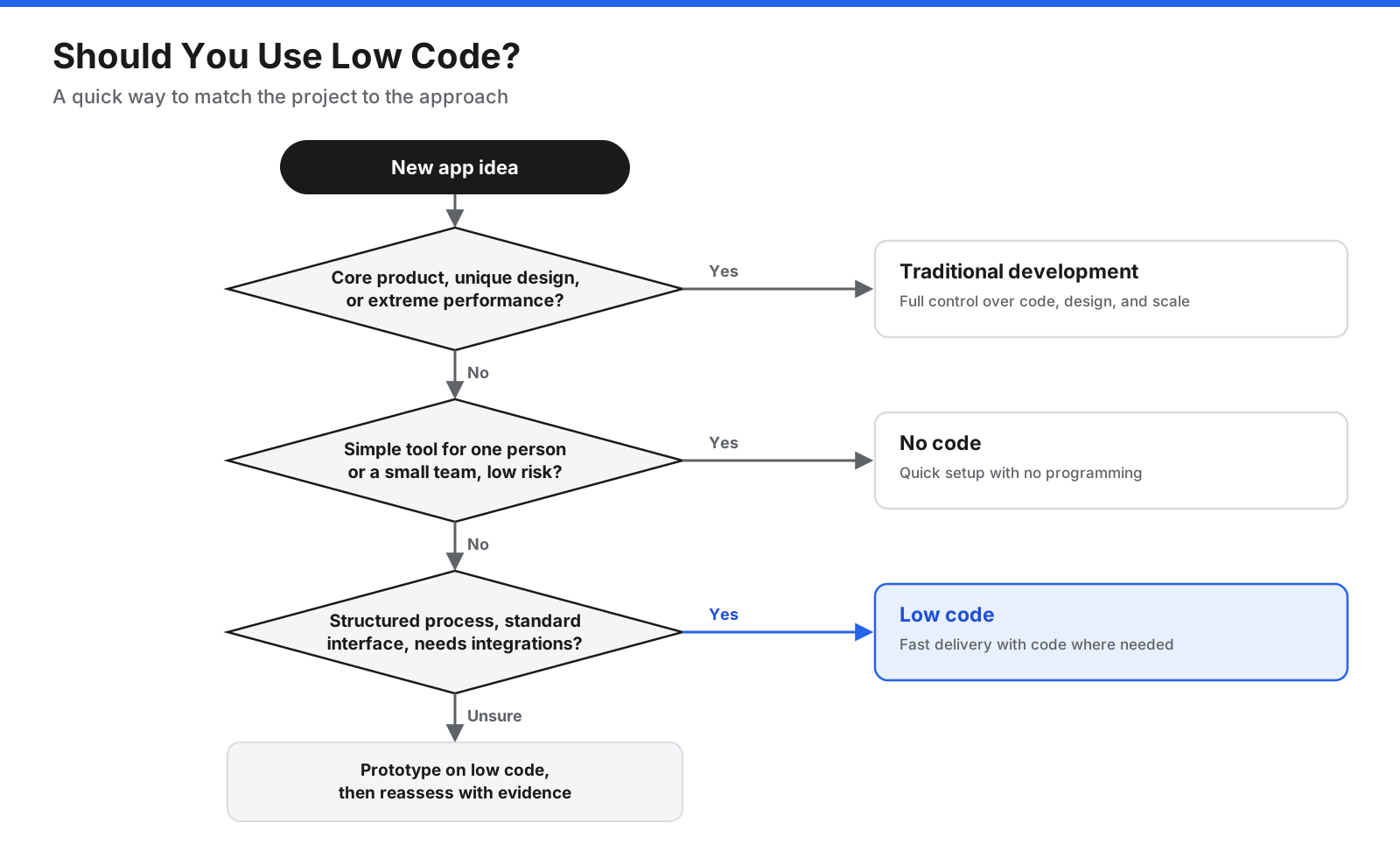
Low code is usually a strong choice when:
- The app supports an internal process or a structured customer interaction, such as requests, approvals, records, or forms.
- Requirements are likely to change often, so fast iteration matters.
- The interface can be built from standard components rather than a fully custom design.
- The number of users and the volume of data are within what the platform handles well.
- You need to connect several existing systems without building integrations from scratch.
Traditional development is usually the better choice when:
- The software is your core product and must stand out on design, features, or user experience.
- Performance, scale, or instant-response processing requirements are demanding.
- The app depends on complex algorithms, specialized hardware, or unusual technical architecture.
- You need full control over the code, hosting, and long-term direction without dependence on a single provider.
No code is often enough for simple, low-risk tools used by one person or a small team, such as a form that feeds a spreadsheet or a basic automation between two applications.
How Do You Choose a Low-Code Platform?
Platforms differ in their target users, strengths, and pricing models. Evaluate options against your specific needs rather than general feature lists. Key questions include:
- Who will build? Some platforms are designed mainly for business users, others for professional developers. Choose one that matches the skills of the people who will use it most.
- What will you build? Look for strengths in your main use cases, whether that is workflow automation, data-heavy business apps, customer portals, or mobile field apps.
- How well does it integrate? Check for connectors to the systems you already use and support for standard APIs.
- Can you extend it with code? Confirm which programming languages are supported and how custom code is managed, tested, and deployed.
- How does it handle security and compliance? Look at authentication options, role-based access, audit logging, data residency choices, and relevant certifications.
- What governance tools does it offer? Administrators should be able to control who can build, which data can be used, and how apps are reviewed and published.
- How does it perform at scale? Ask for evidence or run your own tests with realistic numbers of users and records.
- What does it really cost? Model pricing for your expected number of users, apps, and transactions over several years, not just for a pilot.
- How easily could you leave? Find out whether you can export your data, application logic, or generated code if you ever need to switch.
- What support and community exist? Documentation, training resources, and an active user community make adoption much smoother.
The most reliable test is a short proof of concept. Build one actual app from your list of use cases on each shortlisted platform and compare the experience, the result, and the effort involved.
How Do You Get Started With Low Code?
A structured rollout helps you capture the benefits of low code without creating new risks.
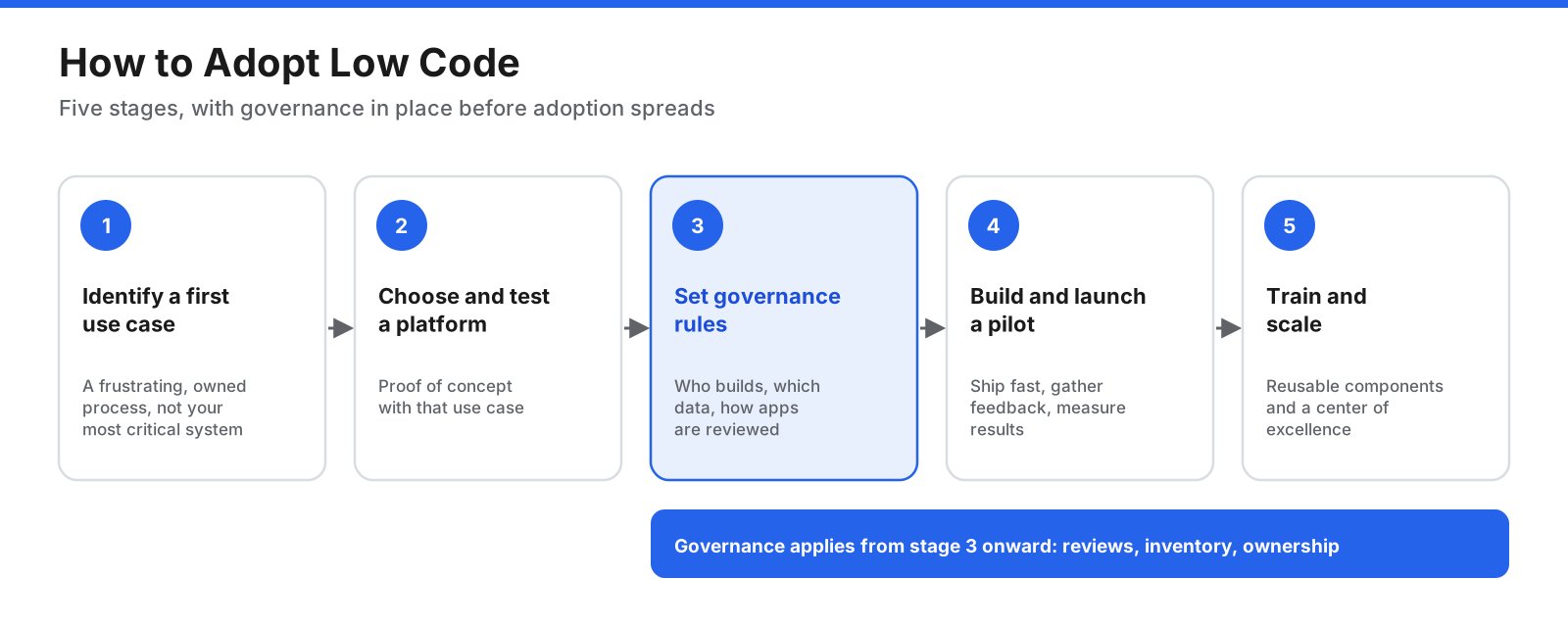
- Identify a first use case. Pick a process that is currently handled with spreadsheets, email, or paper, that people find frustrating, and that has a clear owner. Avoid starting with your most critical or complex system.
- Choose and test a platform. Shortlist platforms using the criteria above and run a proof of concept with your chosen use case.
- Set governance rules early. Decide who can build apps, what data they can use, how apps are reviewed before launch, and who supports them afterward. Define separate environments for building, testing, and running apps.
- Build and launch a pilot. Involve the people who will use the app from the start, release a first version quickly, gather feedback, and improve it. Measure results such as time saved, errors reduced, or requests handled.
- Train builders and scale. Offer training for citizen developers and developers, share reusable components and templates, and consider a small center of excellence that sets standards, supports builders, and keeps track of every app in use.
A simple governance framework usually answers five questions. Who is allowed to build and publish apps, and what training do they need first? Which data sources can low-code apps connect to, and which require approval? What review must an app pass before it reaches other users, such as a security check or a data protection review? Who owns each app once it is live, and what happens when that person changes roles? And how will you keep an inventory of every app, so that nothing important runs without anyone knowing about it? Writing down the answers before adoption grows is far easier than untangling dozens of unmanaged apps later.
How Is AI Changing Low Code?
Generative AI is reshaping low code in several ways.
Building from plain-language descriptions. Many platforms now let you describe an app, a screen, a data model, or a workflow in everyday language and generate a working starting point. You then refine it with the visual tools.
AI assistance while building. AI features can suggest the next step in a workflow, write formulas and expressions, explain errors, generate test data, and produce documentation.
AI inside the apps themselves. Low-code platforms increasingly offer components that add AI capabilities to the apps you build, such as summarizing documents, classifying requests, extracting information from forms, or powering a chat interface.
AI agents. Some platforms let you build AI agents that carry out multi-step tasks across connected systems, using the same visual tools and connectors as regular apps.
At the same time, AI coding assistants are making traditional development faster, which narrows the speed gap between low code and hand coding. Some newer tools generate standard code that you own and can edit freely, blending the speed of low code with the flexibility of traditional development.
Whatever tools you use, AI-generated apps still need the same review, testing, security checks, and governance as any other software, especially when they handle sensitive data or run important business processes.
A Short History of Low Code
Low code is newer as a term than as an idea. Efforts to let people build software with less hand coding go back decades.
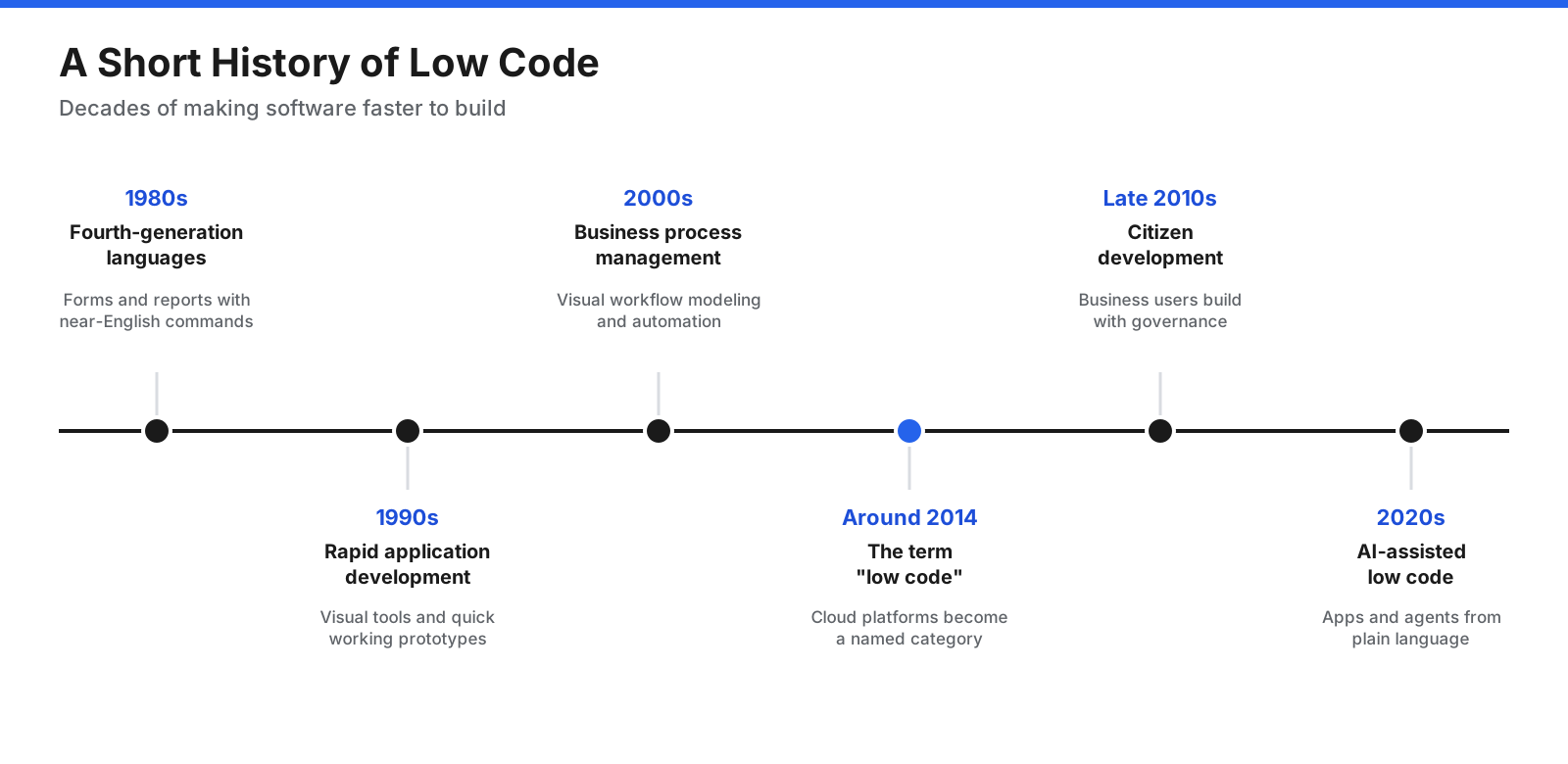
- 1980s: Fourth-generation languages. So-called fourth-generation languages and database tools let users create reports, forms, and simple applications with commands closer to plain English than traditional programming languages.
- 1990s: Rapid application development. Visual development environments let programmers drag interface elements onto forms and attach code to them. The rapid application development movement emphasized building working prototypes quickly and refining them with users.
- 2000s: Business process management. Business process management suites introduced visual tools for modeling and automating workflows across departments, a direct ancestor of modern low-code workflow features.
- Around 2014: The term “low code.” As cloud platforms matured, an industry analyst firm began using the term low-code to describe platforms that let developers build applications quickly with minimal hand coding. The label caught on and grew into a recognized software category.
- Late 2010s: Citizen development. Low-code and no-code platforms expanded to business users, and organizations began formal citizen developer programs with governance and training.
- 2020s: AI-assisted low code. Generative AI added natural-language app creation, AI-powered components, and agent-building tools, and began to blur the line between low code and traditional development.
Frequently Asked Questions
What is low code in simple terms?
Low code is a way to build software by arranging visual building blocks instead of writing most of the code yourself. You design screens, data, and workflows with drag-and-drop tools, and the platform creates the working app. You can still add code when you need something the visual tools cannot do.
Is low code the same as no code?
No. Both use visual tools, but no-code platforms are designed so that no programming is needed or possible, while low-code platforms let developers add custom code to extend the app. Low code handles more complex business applications, and no code suits simpler apps and automations built by non-technical users.
Is JavaScript low code?
No. JavaScript is a general-purpose programming language used in traditional development. However, many low-code platforms let developers write JavaScript, or another supported language, to add custom logic or components to an app built mostly with visual tools.
What is the difference between low code and traditional development?
Traditional development means writing an application by hand in programming languages, which offers full control and flexibility but takes more time and specialist skills. Low code replaces much of that hand coding with visual tools, templates, and connectors, which speeds up delivery for standard business applications but can limit customization and tie you to a platform.
Who can use low code?
Both professional developers and business users can use low code. Developers use it to build faster and focus on complex features. Business users, often called citizen developers, use it to build simple apps and workflows for their own teams. IT teams typically manage the platform and set the rules for how it is used.
Is low code hard to learn?
Building simple apps on most low-code platforms is fairly easy to learn, especially for people comfortable with spreadsheets or similar tools. More complex apps still require an understanding of data design, logic, security, and testing. Many platforms provide free training and templates to help new builders get started.
Will low code replace developers?
Low code is unlikely to replace developers. It changes the work they do by removing repetitive tasks and letting business users handle simple apps. Complex applications, integrations, custom components, performance work, and platform governance still require professional developers.
Is low code secure?
Low-code platforms can be secure, and many include built-in authentication, access controls, and audit logging. The bigger risk usually comes from how apps are built and governed, such as incorrect permissions or sensitive data used without oversight. Clear governance, app reviews, and training are what keep low-code development secure.
Low Code Works Best With Clear Goals and Good Governance
Low code is a development approach that replaces much of the hand coding in software projects with visual modeling, drag-and-drop interfaces, prebuilt components, and ready-made connectors. It sits between no code and traditional development, combining the speed of visual tools with the option to add custom code when needed.
Used well, low code helps organizations deliver business applications faster, reduce IT backlogs, and let the people who understand a process help build the tools for it. Used carelessly, it can create unmanaged apps, security gaps, rising license costs, and dependence on a single provider. The organizations that benefit most start with a clear use case, choose a platform through a hands-on test, set governance rules early, and treat low-code apps with the same care as any other software.















































































































