

Free bookkeeping software lets you record income and expenses, send invoices, reconcile bank accounts, and run basic financial reports without paying a monthly subscription. For freelancers, sole proprietors, and small businesses in their first year or two, it can replace a spreadsheet and keep your books organized for tax time at no cost.
“Free” covers three different models. Cloud services may offer a permanent free plan funded by payment-processing fees or paid upgrades. Desktop applications run on your own computer. Open-source platforms can be hosted by you, but you take responsibility for the server, updates, and backups.
This guide compares free and open-source bookkeeping software for 2026 across all three models. It explains what each free version includes, where its limits are, how providers make money, which hidden costs to watch for, and when it makes sense to upgrade. Free-plan terms change often, so confirm current details on each vendor’s official site before signing up.
Quick Comparison of Free Bookkeeping Software
| Software | Type | Best for | Main free-plan limit | Paid upgrade |
|---|---|---|---|---|
| Wave | Cloud free plan | Freelancers who invoice often | No automatic bank feeds | $19/month (Pro) |
| Zoho Books | Cloud free plan | Small businesses under $50K revenue | Revenue cap and 1,000 invoices/year | $15/month billed annually |
| QuickBooks Free | Cloud free plan | Solo owners starting out | Two invoices/month and one bank account | Paid QuickBooks plans |
| ZipBooks | Cloud free plan | Simple invoicing with bank syncing | Fewer advanced features | From $15/month |
| Invoice Ninja | Hosted free and self-hosted | Invoicing and getting paid | Five clients on hosted free plan | $14/month (Pro) |
| Odoo | Cloud free app and open-source edition | Businesses that may grow into an ERP | Free online plan limited to one app | Per-user subscription |
| Manager.io | Free desktop app | Full accounting offline | Single user on desktop | Cloud edition |
| GnuCash | Open-source desktop app | Double-entry bookkeeping offline | No cloud access or bank feeds | Free only |
| ERPNext | Open-source, self-hosted | Growing businesses needing full ERP | You manage hosting and setup | Hosting from $5/month |
| Akaunting | Self-hosted and cloud | One-person businesses wanting self-hosting | One user, 1,000 invoices; apps cost extra | From $72/year (self-hosted) |
| Bigcapital | Open-source, self-hosted | Technical teams wanting a modern ledger | You manage hosting and setup | Free to self-host |
Prices and limits reflect the article’s research at the time of writing and may change. Check official vendor pages for current availability, regional pricing, and plan terms.
How Were These Tools Selected?
Each tool was reviewed against the same criteria: whether its free version supports core bookkeeping tasks such as income and expense tracking, invoicing, and reconciliation; whether it uses double-entry accounting; what it limits (users, invoices, revenue, or bank connections); where your data is stored; and what upgrading costs. The comparison deliberately mixes cloud, desktop, and self-hosted tools because the best model depends on how you work. A freelancer who sends invoices from a phone has different needs from a business owner who wants records stored on an office computer.
What Is the Best Free Bookkeeping Software in 2026?
1. Wave
Wave is a well-known free bookkeeping tool for small businesses in the United States and Canada. Its free Starter plan includes unlimited invoices, estimates, bills, and bookkeeping records, making it a strong fit for freelancers and service businesses that bill clients regularly.
What the free plan includes: unlimited invoices, estimates, bills, and bookkeeping records; double-entry accounting and standard financial reports; online card payments on invoices; a mobile invoicing app; customer management; and a cash-flow dashboard.
Where it falls short: automatic bank transaction imports, auto-categorization, and automated payment reminders require Pro. Payroll and bookkeeping services are paid add-ons, and availability is limited to businesses in the US and Canada. Wave earns revenue through payment processing and paid upgrades. The article’s reviewed card-processing rate was 2.9% plus $0.60 per transaction, or 3.4% plus $0.60 for American Express, so fees may matter if you accept many card payments.
Upgrade cost: Wave Pro was listed at $19 per month or $190 per year in the US. Best for: US and Canadian freelancers and service businesses that invoice frequently and can enter or upload bank transactions themselves. Official Wave website.
2. Zoho Books
Zoho Books offers a capable free cloud accounting plan, provided your business stays under its revenue threshold. The reviewed plan included one user plus one accountant, up to 1,000 invoices and 1,000 bills or expenses per year, bank reconciliation, standard financial reports, 50 receipt autoscans per month, a customer portal, and online payment options.
Where it falls short: free use applies only while annual revenue is at or below $50,000. Automatic bank feeds are included from the Standard plan upward, and free-plan support is limited to email. The revenue cap is the key consideration: once you cross it, you need a paid plan, though your data can remain in the same system. Upgrade cost: Standard was listed at $15 per organization per month billed annually, or $20 billed monthly. Best for: small businesses below $50,000 in annual revenue that want a full accounting system with room to grow. Official Zoho Books website.
3. QuickBooks Free
QuickBooks Free is a no-cost entry plan aimed at solo owners and new businesses. The reviewed offer included automatic syncing for one bank account, up to two invoices per month, basic income and expense tracking, core reports including profit and loss, mileage tracking, and receipt capture.
Where it falls short: two invoices per month is too few for many service businesses, and only one bank account can be connected. Unlimited invoicing and multiple users require a paid plan. This option is most useful if you rarely invoice—perhaps because you sell through a marketplace or get paid through another platform—and mainly want transactions categorized automatically. Confirm availability and limits, including regional eligibility, directly with Intuit. Best for: solo owners who rarely send invoices and want automatic bank syncing for one account. Official QuickBooks website.
4. ZipBooks
ZipBooks offers a free Starter plan with unlimited invoicing, unlimited clients, bank account syncing, reconciliation for unlimited transactions, and basic financial reports. More advanced accounting and automation features are on paid plans, and its user community and integration selection are smaller than those of larger vendors. Paid plans were listed from $15 per month. Best for: small businesses that want simple invoicing and bank syncing at no cost. Official ZipBooks website.
5. Invoice Ninja
Invoice Ninja focuses on invoicing and payments rather than full bookkeeping. It offers a hosted free plan and a self-hosted version. The hosted plan includes unlimited invoices for up to five clients, recurring invoices, a client portal, online payments through multiple gateways, and invoice templates.
Where it falls short: the hosted plan is limited to five clients; custom invoice designs, automatic reminders, and API access require Pro. Because it is primarily an invoicing tool, you may still need separate bookkeeping software for a full general ledger. Ninja Pro was listed at $14 per month or $140 per year; Enterprise plans with multiple users and bank sync start at $18 per month. Best for: freelancers and small agencies whose main need is invoicing and collecting payments. Official Invoice Ninja website.
6. Odoo
Odoo is a modular business platform with apps for accounting, invoicing, sales, inventory, and more. It has two free routes: the hosted One App Free plan on Odoo Online and the open-source Community edition that you can host yourself. Under One App Free, one app and its dependencies are free, with Odoo handling hosting. Invoicing and Accounting count together because Accounting requires Invoicing. The Community edition is open source under the LGPL license and can be self-hosted without a license fee.
Where it falls short: adding a second unrelated app moves you to a paid plan, and the full Accounting app is part of Odoo’s paid edition while Community focuses on invoicing. The article’s research also noted that inactive free Odoo Online databases may be deleted after several months; confirm current terms. Best for: businesses that expect to grow into an ERP and want to start with free invoicing. Official Odoo website.
7. Manager.io
Manager.io’s desktop edition is a full-featured accounting application that runs on Windows, macOS, and Linux and stores data on your computer. The free desktop edition includes double-entry accounting, a general ledger, balance sheet and profit-and-loss reports, invoicing, quotes, bills, receipts, bank and cash accounts with statement import, inventory, fixed assets, payslips, multi-currency support, and tax codes for sales tax and VAT.
Where it falls short: the desktop edition supports one user at a time and has no automatic bank feeds. You are responsible for backing up your data file. The cloud edition for multiple users is paid, and you can move from desktop to cloud when ready. Best for: small businesses that want full accounting on one computer at no cost. Official Manager.io website.
8. GnuCash
GnuCash is a long-running open-source accounting program for Windows, macOS, and Linux. It uses double-entry bookkeeping and includes business features such as customer and vendor tracking, invoicing, bill payment, bank reconciliation, accounts receivable and payable, profit-and-loss and balance-sheet reports, multiple currencies, scheduled transactions, and QIF/OFX bank-data imports.
Where it falls short: there is no cloud access or mobile app, automatic bank feeds are unavailable in many regions, it is designed primarily for a single user, and it has a learning curve for people new to accounting. There is no dedicated payroll module. GnuCash is free under the GPL open-source license and has no paid tier. Best for: sole proprietors and very small businesses comfortable with accounting concepts who want an offline ledger and control over their data. Official GnuCash website.
9. ERPNext
ERPNext is an open-source ERP built on the Frappe framework and licensed under GPL-3.0. Its accounting module covers a general ledger, invoicing, payments, taxes, and financial reporting, and it can expand into inventory, purchasing, manufacturing, and HR. Features include double-entry accounting, a chart of accounts, multi-company support, sales and purchase invoices, bank reconciliation, multi-currency, tax templates, financial statements, budgets, and cost centers.
Where it falls short: self-hosting requires a server and technical skill to install, update, and back up. It may be much broader than needed if you only want basic bookkeeping. Self-hosting has no license fee; managed hosting on Frappe Cloud was listed from $5 per month for a single site, with a 14-day trial. Best for: growing businesses with technical support that want full-scale accounting and ERP. Official ERPNext website.
10. Akaunting
Akaunting is a web-based accounting application available in the cloud or on your own server. Its self-hosted Standard plan was listed with one company, one user, one accountant, up to 1,000 invoices, invoicing, expense tracking, transaction categories, a client portal, and community support.
Where it falls short: since version 3.1, Akaunting uses the Business Source License rather than a traditional open-source license, which restricts some commercial uses. No apps are included, so features such as double-entry, inventory, and payroll may require separate purchases. Self-hosted Premium was listed at $72 per year for 10 users and 10,000 invoices. Best for: one-person businesses that want a modern, self-hosted invoicing and bookkeeping tool. Official Akaunting website.
11. Bigcapital
Bigcapital is an open-source accounting platform licensed under AGPL-3.0. It has a modern web interface and can be self-hosted using Docker. Features include automated journal entries, a general ledger, invoicing, payment tracking and reminders, sales and purchases, inventory management, multi-currency and tax support, and profit-and-loss, balance-sheet, and cash-flow reports.
Where it falls short: self-hosting requires server management and technical skill, and the project has a smaller community than established tools such as GnuCash or ERPNext. The software is free to self-host; you pay for the server. Best for: technical users and small teams that want a modern open-source ledger on their own infrastructure. Official Bigcapital website.
Free vs. Open-Source Bookkeeping Software
- Freemium cloud software, such as Wave, Zoho Books, and QuickBooks Free, is free to use but owned and hosted by the vendor. The vendor sets the limits and can change them, and you access data through its service.
- Free desktop software, such as Manager.io’s desktop edition, runs on your computer at no cost. Your data stays on your machine, but the source code may not be public.
- Open-source software, such as GnuCash, ERPNext, and Bigcapital, publishes its source code under a license such as GPL or AGPL. You can run, inspect, and modify it, but you handle hosting and maintenance when self-hosting.
- Source-available software, such as Akaunting under the Business Source License, publishes code but restricts some commercial uses. Read the license before using it in a business.
Open source gives you more control and can reduce vendor lock-in. Freemium cloud software usually offers the easiest setup, automatic backups, and access from multiple devices.
What Are the Hidden Costs of Free Bookkeeping Software?
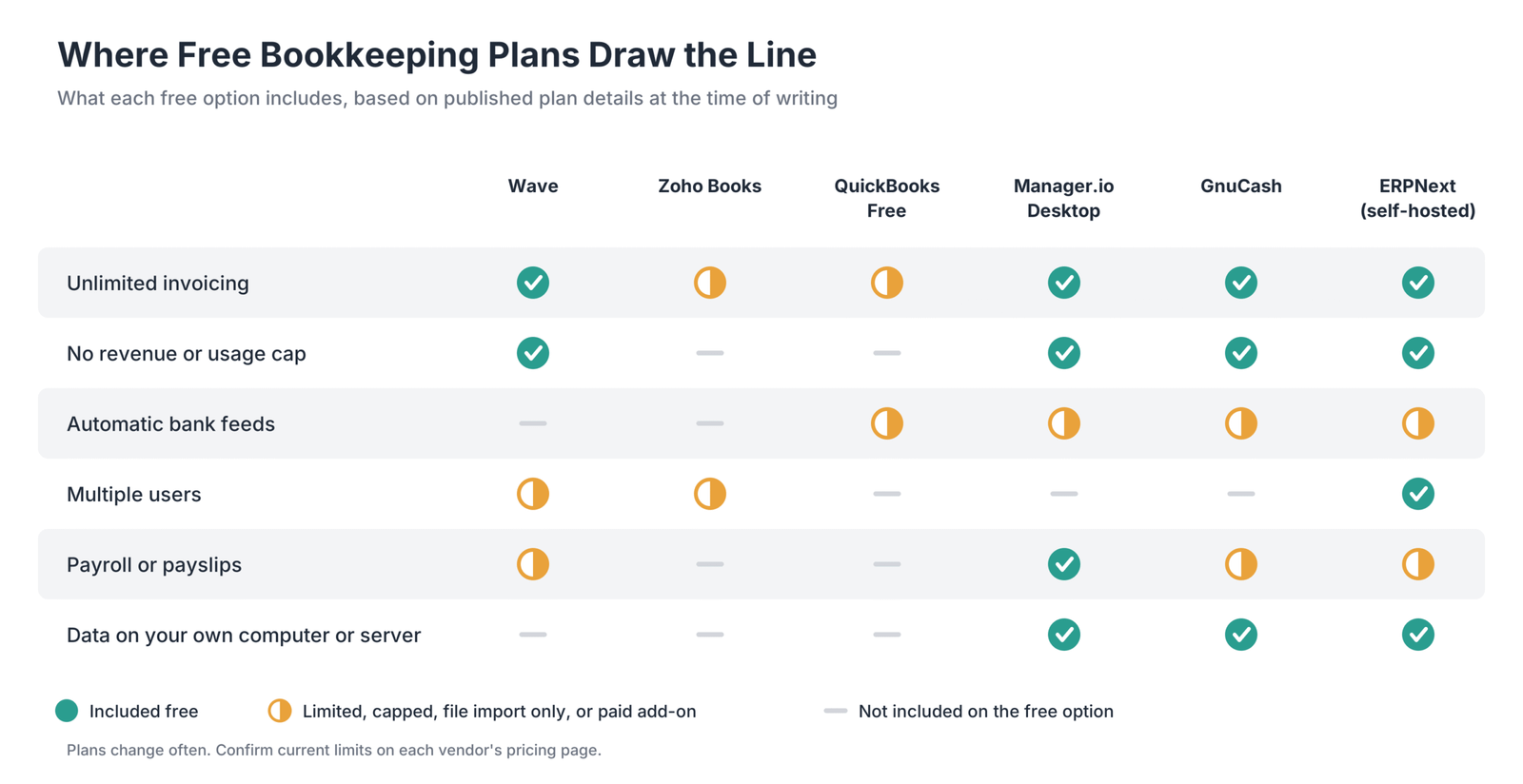
Free bookkeeping software is rarely free in every sense. Vendors need revenue, and self-hosted tools carry their own costs.
Payment Processing Fees
Free cloud tools may earn money when customers pay invoices by card. Wave’s reviewed rate was 2.9% plus $0.60 per card transaction, with a different rate for American Express. Fees vary, so compare them if you invoice large amounts.
Paid Add-Ons
Bank feeds, receipt scanning, payroll, automated reminders, and extra users are commonly held back for paid plans or add-ons. A free plan can become paid as soon as you need one of these features.
Usage and Revenue Caps
Some plans cap invoices, clients, bank accounts, or revenue. The researched examples included Zoho Books becoming paid above $50,000 in annual revenue, QuickBooks Free allowing two invoices per month, and Invoice Ninja’s hosted plan covering five clients.
Time Spent on Manual Work
Without automatic bank feeds, you may need to import statements or enter transactions by hand. For a business with many transactions, the time spent can cost more than a subscription.
Hosting and Maintenance
Self-hosted open-source tools may have no license fee, but you pay for a server and someone must install updates, apply security patches, and run backups. Include your own time in the cost.
Limited Support
Free plans often provide email or community support only. If something goes wrong at tax time, the lack of live help can be costly.
How Does Software Handle the Bookkeeping Cycle?
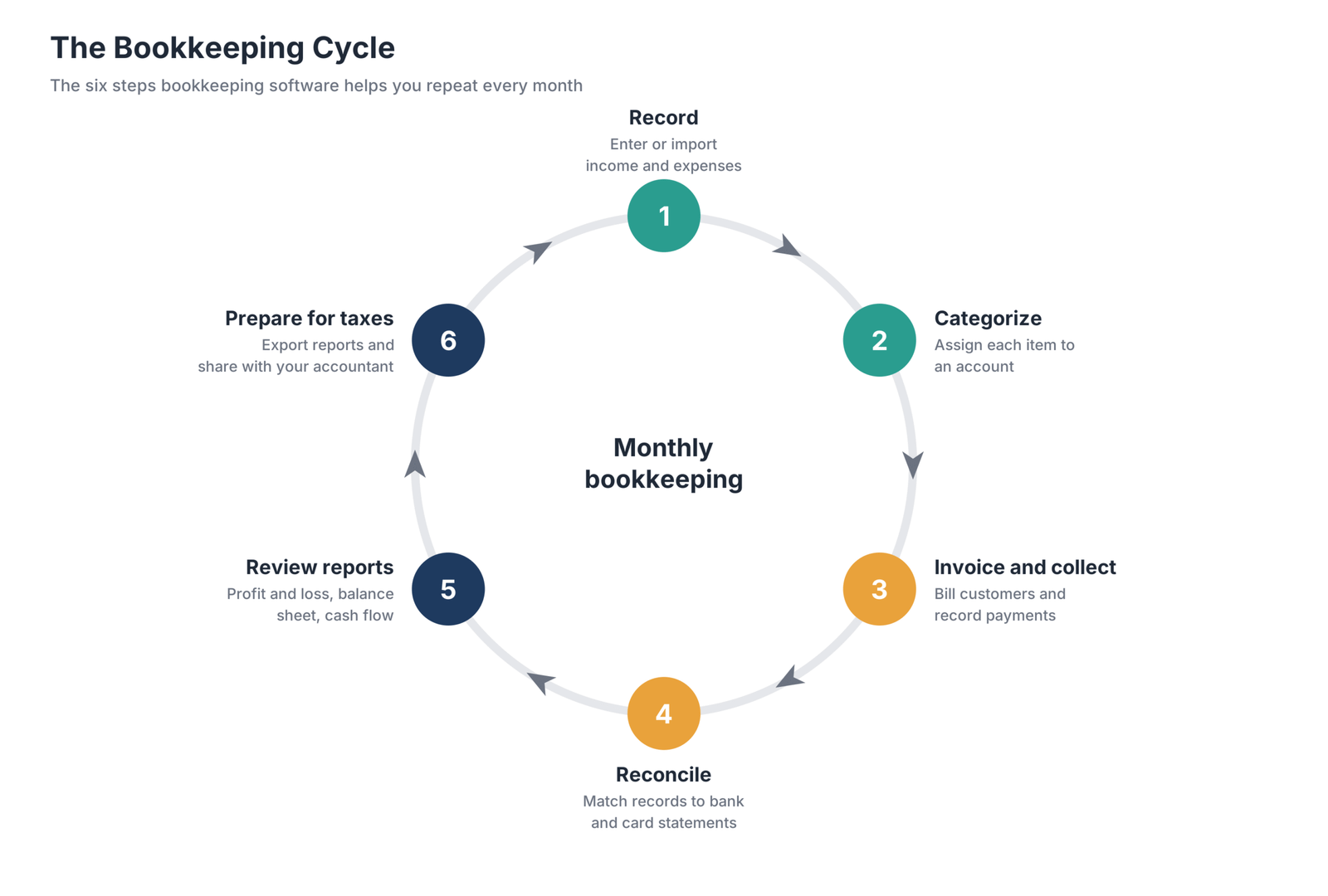
- Record transactions. Enter or import income and expenses from bank statements and receipts.
- Categorize. Assign each transaction to an account, such as sales, rent, or software.
- Invoice and collect. Send invoices, record payments, and track outstanding balances.
- Reconcile. Match your records against bank and card statements so balances agree.
- Review reports. Check profit and loss, balance sheet, and cash flow to understand performance.
- Prepare for taxes. Export reports and share records with your accountant.
Free tools cover much of this cycle. The steps most likely to require paid features are automatic transaction recording through bank feeds and collaboration at tax time.
How Do You Choose the Right Free Bookkeeping Software?
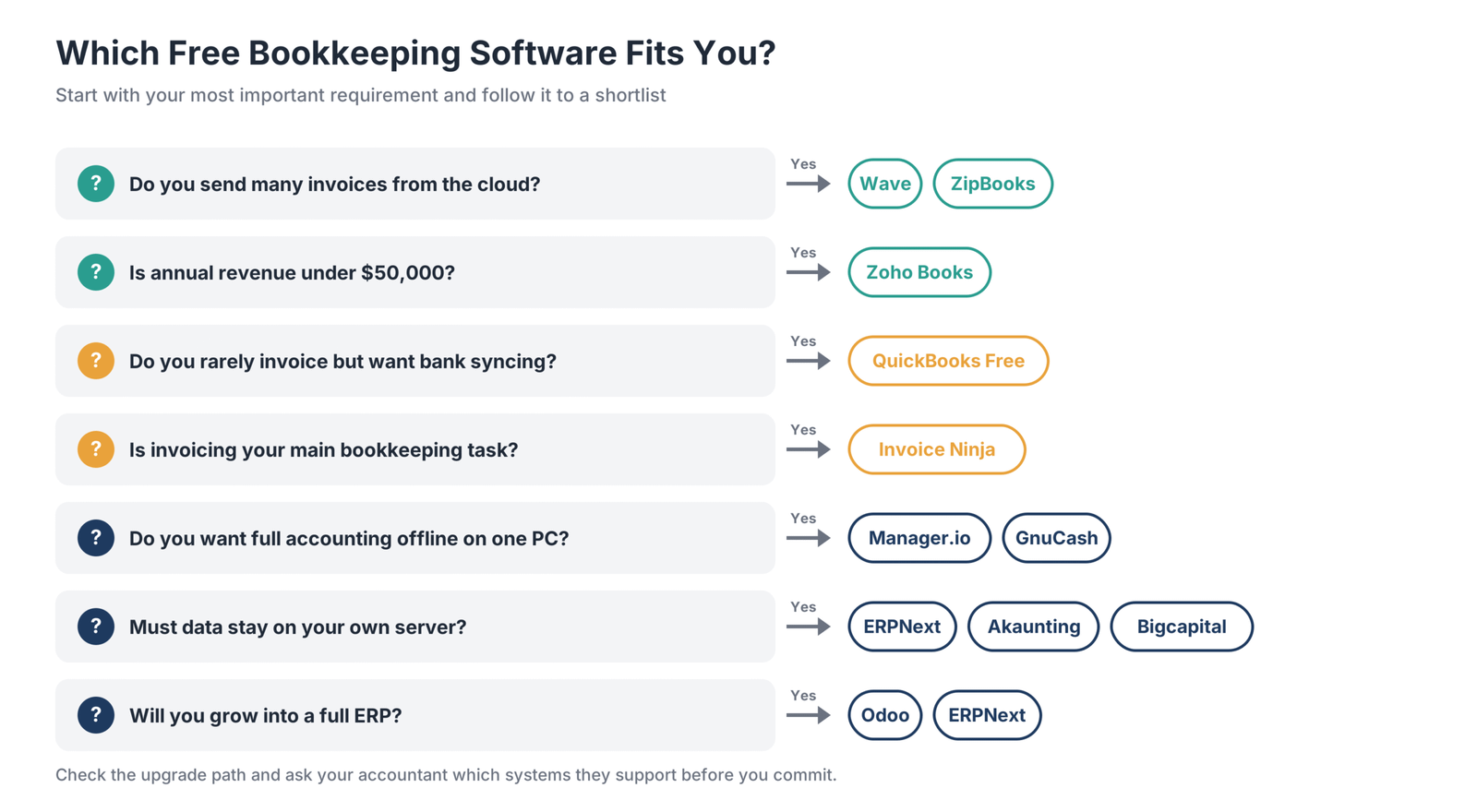
1. Decide Between Cloud, Desktop, and Self-Hosted
Cloud tools are easiest to start with and work from any device. Desktop tools keep data on your computer and work offline. Self-hosted tools give you control but require technical skill.
2. Count Your Invoices and Clients
If you send many invoices, avoid plans with invoice caps such as QuickBooks Free or client caps such as Invoice Ninja’s hosted plan. Wave, ZipBooks, Manager.io, and GnuCash do not cap invoices in the ways described in this comparison.
3. Check Whether You Need Bank Feeds
Automatic bank feeds can save time. QuickBooks Free was listed with one bank connection and ZipBooks with bank syncing on its free plan, while Wave and Zoho Books reserve automatic feeds for paid plans.
4. Plan for Users and Your Accountant
If a partner, employee, or accountant needs access, check user limits. Zoho Books includes one user plus an accountant in its free plan, and self-hosted ERPNext supports unlimited users.
5. Look at the Upgrade Path
Choose a tool you can grow into. Moving accounting data between systems is time-consuming, so a free plan with a reasonable paid tier may save effort later.
6. Confirm Your Accountant Can Work With It
Ask your accountant which systems they support. Choosing a platform they already know can make tax preparation faster and cheaper.
When Should You Upgrade to Paid Bookkeeping Software?
Free software works well until the time spent working around its limits costs more than a subscription. Consider upgrading when:
- You spend hours each month entering bank transactions manually.
- You have hit an invoice, client, or revenue cap.
- More than one person needs to work in the books.
- You need payroll, inventory tracking, or sales-tax automation.
- Your accountant needs features or integrations the free tool lacks.
- You need reliable support during tax season.
Upgrading within the same vendor—such as Wave Starter to Pro or Zoho Books Free to Standard—can keep your history intact and avoid migration.
Frequently Asked Questions
What is a free bookkeeping app?
A free bookkeeping app lets you track income and expenses, send invoices, and run financial reports without a subscription. Examples include Wave, Zoho Books’ free plan, QuickBooks Free, and open-source tools such as GnuCash. Most free apps limit features such as bank feeds, users, or invoice volume.
Is Wave really free?
Wave’s Starter plan was listed as free with unlimited invoices, estimates, bills, and bookkeeping records. Card payments incur processing fees, and automatic bank imports, payment reminders, and team access require Pro. Confirm current rates and terms on Wave’s website.
Is Zoho Books free for small businesses?
Zoho Books’ researched free plan applied to businesses with annual revenue of $50,000 or less. It included one user plus an accountant, up to 1,000 invoices and 1,000 expenses per year, and bank reconciliation. Above the threshold, a paid plan is needed; check the current regional price.
Is Xero bookkeeping software free?
The article’s research found that Xero did not offer a permanent free plan, instead providing a trial of paid plans. Check Xero’s official pricing page for current terms. If you need a free option, Wave, Zoho Books, or QuickBooks Free may be closer equivalents.
Is there free open-source bookkeeping software?
Yes. GnuCash is a free, open-source desktop accounting program for Windows, macOS, and Linux. ERPNext and Bigcapital are open-source platforms you can host yourself, and Odoo’s Community edition is open source. Akaunting publishes its code but uses the Business Source License, which limits some commercial uses.
What are some open-source billing software options?
Invoice Ninja offers a self-hosted invoicing version, while ERPNext, Odoo Community, Akaunting, and Bigcapital include invoicing alongside accounting. These options let you run billing on your own server rather than a vendor’s cloud.
Does Google have a free bookkeeping program?
Google does not offer a dedicated bookkeeping program. Small businesses can use Google Sheets templates to track income and expenses, but a spreadsheet lacks dedicated double-entry accounting, bank reconciliation, and invoicing features.
Can I do my own bookkeeping with free software?
Yes. Free bookkeeping software can handle core tasks such as recording transactions, invoicing, reconciling accounts, and producing reports. Learning basic accounting concepts helps, and many owners still use an accountant for tax filing and year-end review.
What limitations exist with free bookkeeping software?
Common limits include caps on invoices, clients, or revenue; no automatic bank feeds; single-user access; no payroll; and email-only support. Self-hosted open-source tools avoid many usage caps but require hosting, updates, and backups.
Which Free Bookkeeping Software Should You Choose?
- Frequent cloud invoicing: Wave offers unlimited invoices on its free plan for eligible US and Canadian businesses.
- Full cloud accounting under $50,000 revenue: Zoho Books has a capable free plan within its revenue cap.
- Automatic bank syncing with few invoices: QuickBooks Free connects one bank account in the researched offer.
- Simple invoicing and bank syncing: ZipBooks keeps core features free.
- Invoicing with a self-hosted option: Invoice Ninja suits freelancers and agencies.
- Full accounting on one computer: Manager.io’s desktop edition offers a broad feature set without a subscription.
- Open-source desktop ledger: GnuCash gives you offline bookkeeping and control over your data.
- Open-source ERP: ERPNext and Odoo Community can cover accounting alongside broader business processes.
- Modern self-hosted tools: Akaunting and Bigcapital offer web-based options you can run on your own infrastructure.
Start with the free plan that matches your invoicing volume and data preferences, keep records consistent from day one, and plan your upgrade path before you outgrow the free tier.















































































































