
How Is EDR Different from Antivirus? Detection, Response, and Which One You Need
Antivirus and endpoint detection and response (EDR) both run on your laptops, desktops, and servers, and both exist to stop attacks. They answer two different questions about the same device. Antivirus asks whether a file is malicious. EDR asks what is happening on the device and whether that activity looks like an attack in progress.
That difference matters more every year. Kaspersky's detection systems found an average of 500,000 new malicious files per day in 2025, which is exactly the kind of volume antivirus was built to handle. Yet the CrowdStrike 2026 Global Threat Report found that 82% of the detections it recorded in 2025 were malware-free. In those intrusions, attackers signed in with stolen credentials and used tools already installed on the machine, so there was no malicious file for a scanner to find.
EDR vs antivirus, in short: Antivirus prevents known and suspicious malware by scanning files and blocking or quarantining them, usually before they run. EDR continuously records activity on every endpoint, detects attacker behavior even when no malicious file exists, and gives your team the tools to investigate an incident and contain it, for example by isolating a device from the network.
This guide explains how each tool works, where they differ, what antivirus misses, where NGAV, EPP, XDR, and MDR fit, whether EDR replaces antivirus, and how to decide what your organization needs. It is vendor-neutral and written for IT teams, MSP clients, and business owners weighing their endpoint security options.
What Is Antivirus Software?
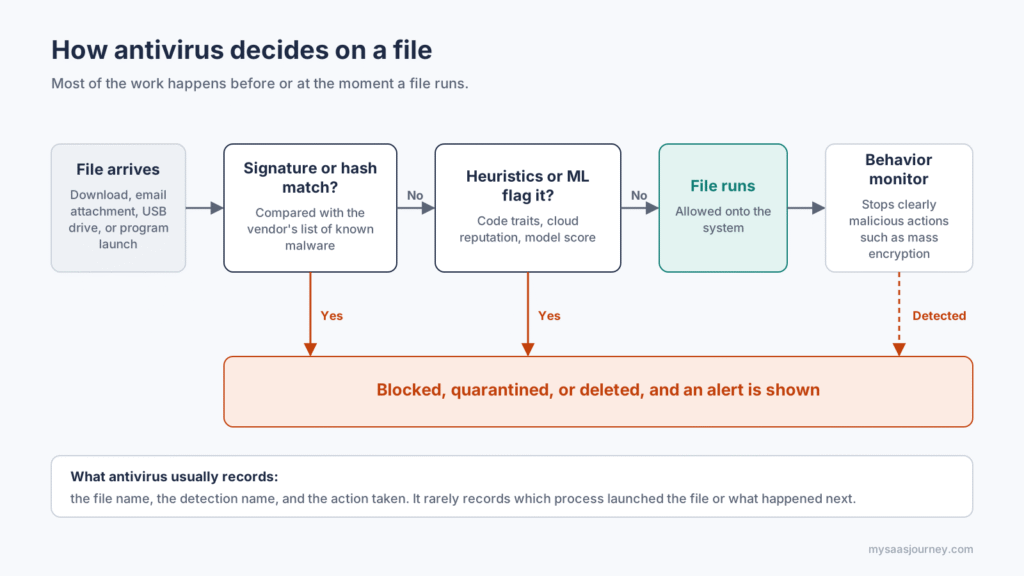
Antivirus software is a prevention tool that inspects files and programs on a device and blocks the ones it recognizes as malicious. Its core job is to make a verdict on each file, ideally before that file gets a chance to run.
Modern antivirus products combine several detection methods to reach that verdict:
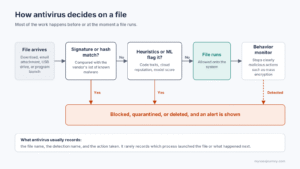
Signature and hash matching: The engine calculates a fingerprint of the file and compares it with the vendor's database of known malware. A match is blocked immediately. This method is fast and very accurate, but it only works for threats someone has already seen and catalogued.
Heuristic analysis: The engine examines a file's code and structure for traits common to malware, such as packed or obfuscated code and suspicious instructions. Heuristics help catch new variants of known malware families that do not yet have a signature.
Cloud reputation and machine learning: Many products send file metadata to the vendor's cloud for a reputation check, and use trained models to score files that have never been seen before.
Basic behavior monitoring: Some products watch a running program for clearly malicious actions, such as encrypting large numbers of files in a short time, and stop it.
Antivirus runs these checks in three situations. Real-time (on-access) scanning checks a file when it is downloaded, opened, or executed. Scheduled scans sweep the disk at set times. On-demand scans run when you start one manually. When something matches, the software blocks, quarantines, or deletes the file and shows an alert.
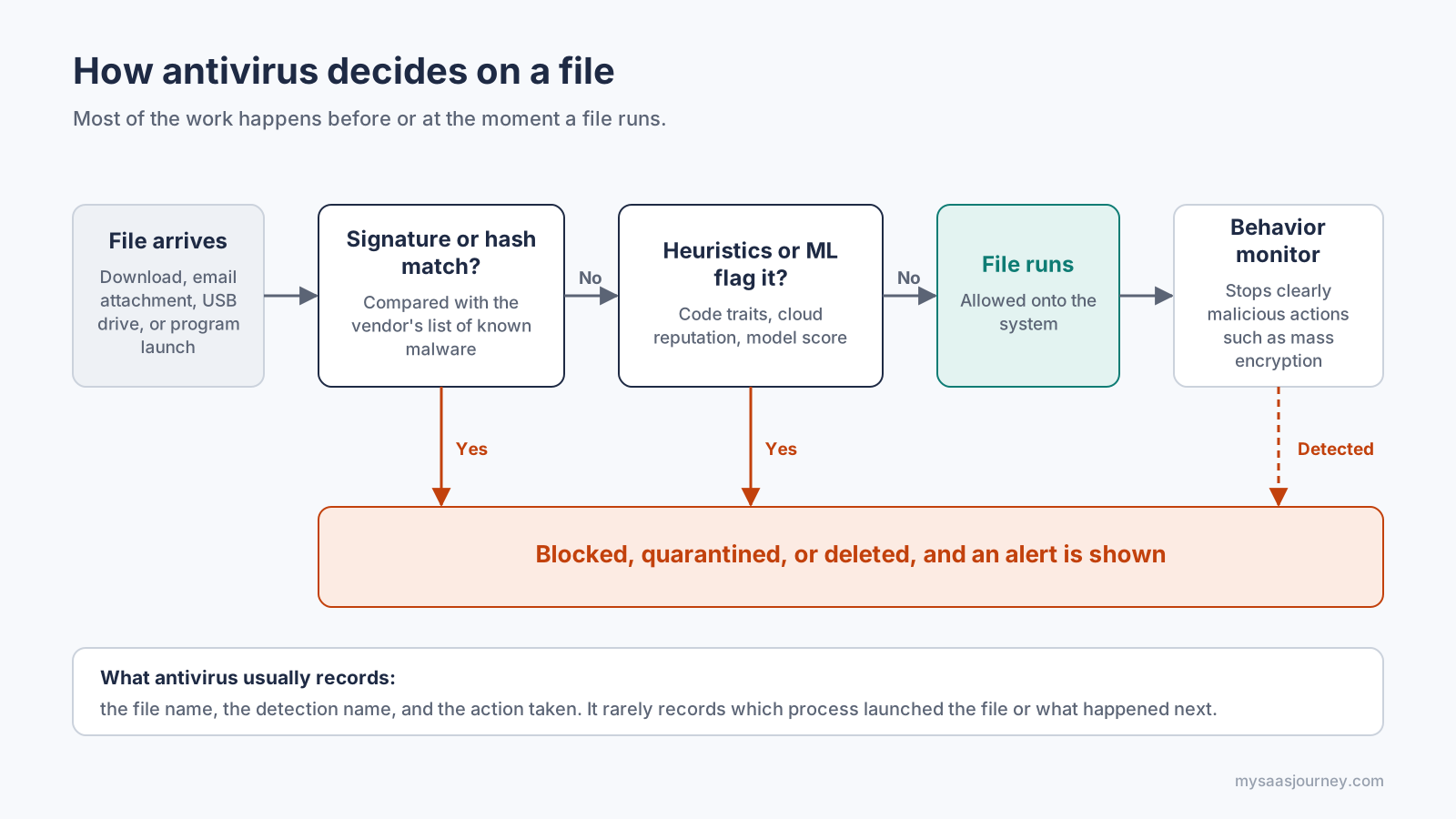
Antivirus makes a verdict on each file, usually before it runs.
What antivirus records afterward is usually brief. You get a log entry that says a file was detected and what was done with it. You rarely get the surrounding story, such as how the file arrived, which process launched it, or what else that process did on the machine.
Most operating systems now include a baseline antivirus. Windows ships with Microsoft Defender Antivirus, and macOS includes XProtect. If you are comparing standalone options for personal or small-business use, our guide to free antivirus covers independent lab results and the trade-offs of free plans.
What Is EDR (Endpoint Detection and Response)?
EDR is a security tool that continuously collects activity data from endpoints, analyzes it for signs of an attack, and gives security staff the means to investigate and respond. Where antivirus judges files, EDR watches behavior over time.
The category has a clear origin. In 2013, Gartner analyst Anton Chuvakin coined the term "endpoint threat detection and response" for tools focused on detecting and investigating suspicious activity on hosts. The name was later shortened to EDR.
An EDR platform has four working parts:
An agent on each endpoint. A lightweight sensor records process launches, command lines, parent and child process relationships, file changes, registry edits, network connections, logons, and script activity.
A telemetry pipeline and data store. Those events stream to a cloud or on-premises back end and are kept for a set retention period, so your team can search what happened days or weeks ago.
Detection and analytics. Behavioral rules, indicators of attack, machine learning models, and threat intelligence look for patterns that match attacker techniques. Many products label their alerts with the matching technique from the MITRE ATT&CK knowledge base, which tells an analyst what the attacker is likely trying to do.
An investigation and response console. Analysts see a process tree and timeline for each alert, can search across every device for the same activity, and can act remotely: isolate a device from the network, kill a process, quarantine a file, remove persistence, collect forensic data, or open a remote shell.
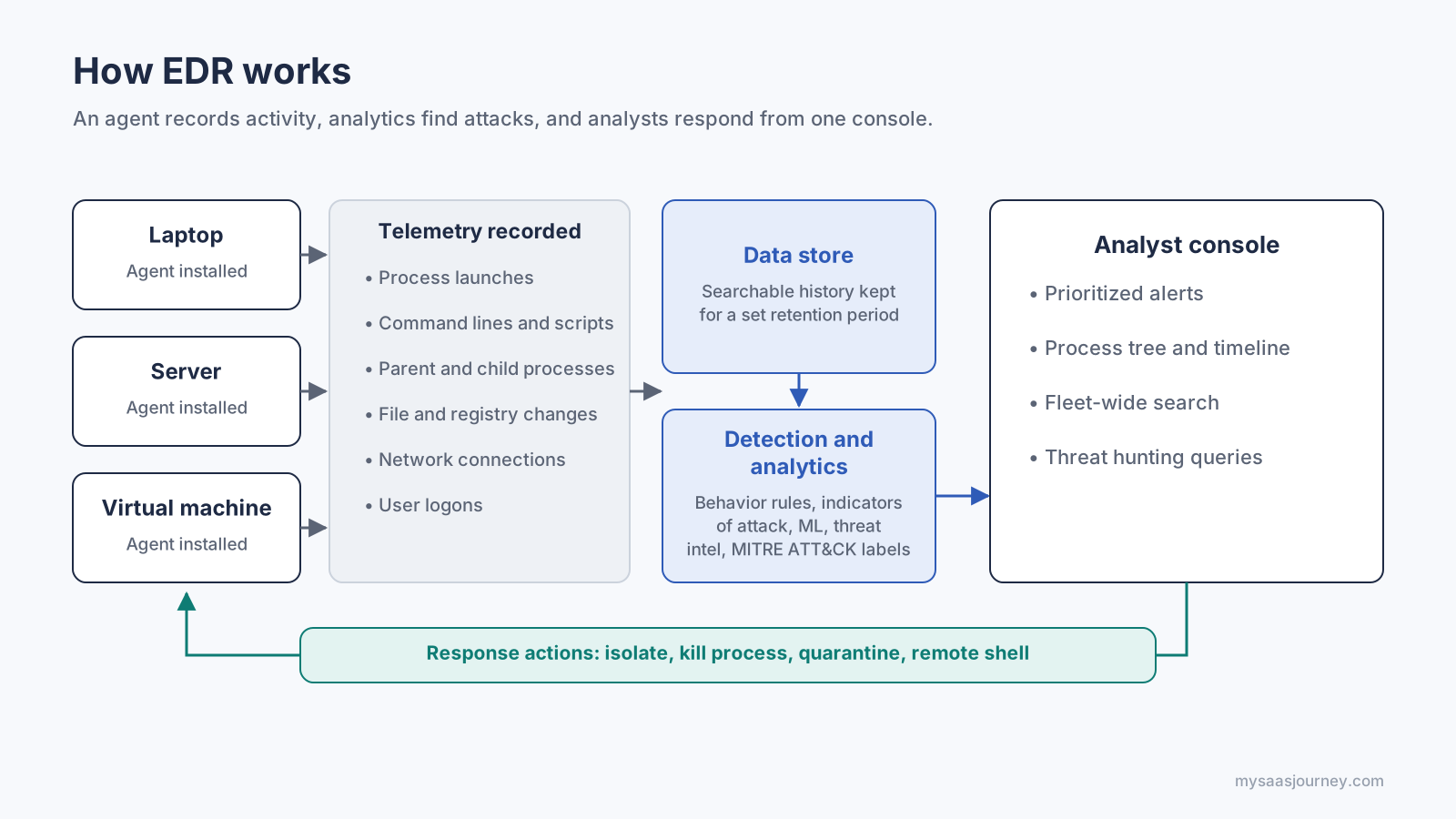
EDR records activity, finds attack patterns, and lets analysts respond from one console.
The mindset behind EDR is different from antivirus. Antivirus is built on the goal of stopping every threat at the door. EDR assumes that some attacks will get past prevention and focuses on finding them quickly and limiting the damage.
How Is EDR Different from Antivirus?
Antivirus focuses on stopping malicious files before they run. EDR focuses on detecting and responding to attacker behavior before, during, and after an intrusion. The table below compares them across the points that matter when you choose and run them.
| Area | Antivirus | EDR |
|---|---|---|
| Main job | Prevent malware from running | Detect, investigate, and respond to attacks |
| What it inspects | Files and programs | Processes, scripts, memory, network connections, logons, registry, and files |
| Detection method | Signatures, heuristics, reputation, machine learning | Behavioral analytics, indicators of attack, machine learning, threat intelligence |
| Fileless and living-off-the-land attacks | Limited coverage | Core use case |
| When it acts | Mostly before or at execution | Throughout the attack, including after access is gained |
| Data it keeps | Detection and quarantine logs | Searchable activity history for a set retention period |
| Response actions | Block, quarantine, delete | Isolate device, kill process, quarantine, remove persistence, remote shell, rollback on some platforms |
| Investigation support | Minimal | Process trees, timelines, fleet-wide search, threat hunting |
| Who runs it | Runs largely on its own | Needs people to review alerts and respond |
| Typical cost | Lower, often included with the operating system | Higher licensing, plus time from staff or a managed service |
Files Versus Behavior
Antivirus decides whether an object is bad. It asks, "Have I seen this file before, or does it look like malware?" EDR decides whether an activity is bad. It asks questions such as, "Why did a spreadsheet application just launch PowerShell with an encoded command?" Both questions are useful, but only the second one works when the attacker brings no file of their own.
Before Execution Versus the Whole Attack
Antivirus does most of its work at the moment a file is written, opened, or executed. If a threat passes that checkpoint, antivirus has little further visibility. EDR keeps watching after that point, through credential theft, lateral movement, and attempts to disable security tools, which is where many serious incidents unfold.
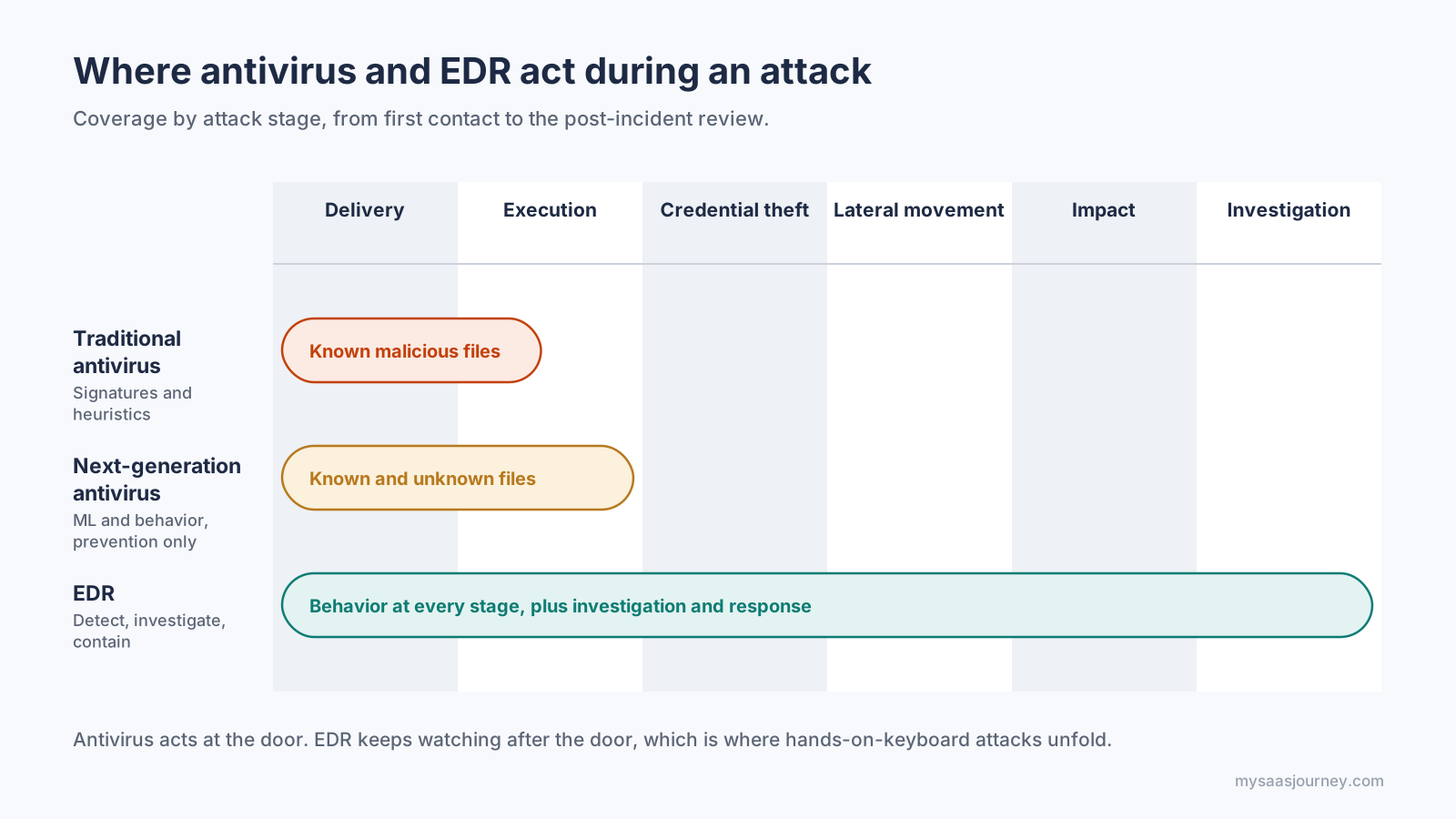
Antivirus works at the door. EDR keeps watching after it.
A Detection Log Versus a Searchable History
After an incident, antivirus can usually tell you that it removed a file. EDR can show which user account was active, which process started the chain, what it connected to, which files it touched, and which other devices show the same activity. That history is what makes root cause analysis, breach scoping, and insurance or regulatory reporting possible.
Quarantine Versus Containment
Antivirus acts on individual files. EDR acts on whole devices and processes. When ransomware operators are moving between machines, the ability to cut one laptop off from the network while keeping the management connection open can decide whether an incident stays small.
Software That Runs Itself Versus a Tool People Operate
Antivirus is designed to work with almost no human input, and it produces few alerts. EDR produces more alerts because it reports suspicious behavior, and some of that behavior turns out to be legitimate administrator activity. Those alerts need someone to triage them. An EDR that nobody watches gives you a record of an attack, but not much protection from it.
Cost and Resource Footprint
Baseline antivirus is often free or bundled with the operating system. EDR is licensed per endpoint, may charge more for longer data retention, and carries the hidden cost of analyst time. Agent performance has improved on both sides, but you should still pilot an EDR agent on representative machines before a full rollout.
What Does Antivirus Miss That EDR Catches?
Antivirus misses attacks that never place a recognizable malicious file on the device. That includes fileless techniques that run in memory, living-off-the-land attacks that abuse built-in tools such as PowerShell and Windows Management Instrumentation (WMI), sign-ins with stolen credentials, and brand-new malware that no engine has a signature for yet.
The gap is easiest to see in a common hands-on-keyboard intrusion pattern. Each stage below is mapped to its MITRE ATT&CK technique ID.
| Stage | Typical attacker action | What antivirus sees | What EDR sees |
|---|---|---|---|
| Initial access | A phishing email delivers a link or document (T1566) | May block a known malicious attachment | Records the email client or browser launching the download |
| Execution | A document macro starts PowerShell with an encoded command (T1059.001) | Usually nothing, because no new file is written | Flags an office application spawning PowerShell with obfuscated arguments |
| Credential access | The attacker dumps credentials from LSASS memory with a built-in or signed tool (T1003.001) | Often nothing, because the tool is legitimate | Flags an unusual process reading LSASS memory |
| Lateral movement | The attacker uses valid accounts over RDP, SMB, or WMI to reach other machines (T1021, T1078, T1047) | Nothing, because these are normal admin protocols | Connects remote logons and processes across devices into one incident |
| Defense evasion | The attacker tries to stop or uninstall security tools (T1562.001) | May be switched off | Alerts on the attempt, with tamper protection blocking it |
| Impact | Shadow copies are deleted and files are encrypted (T1490, T1486) | Behavior monitoring may stop the encryption process | Can isolate the device and kill the process, often earlier in the chain |
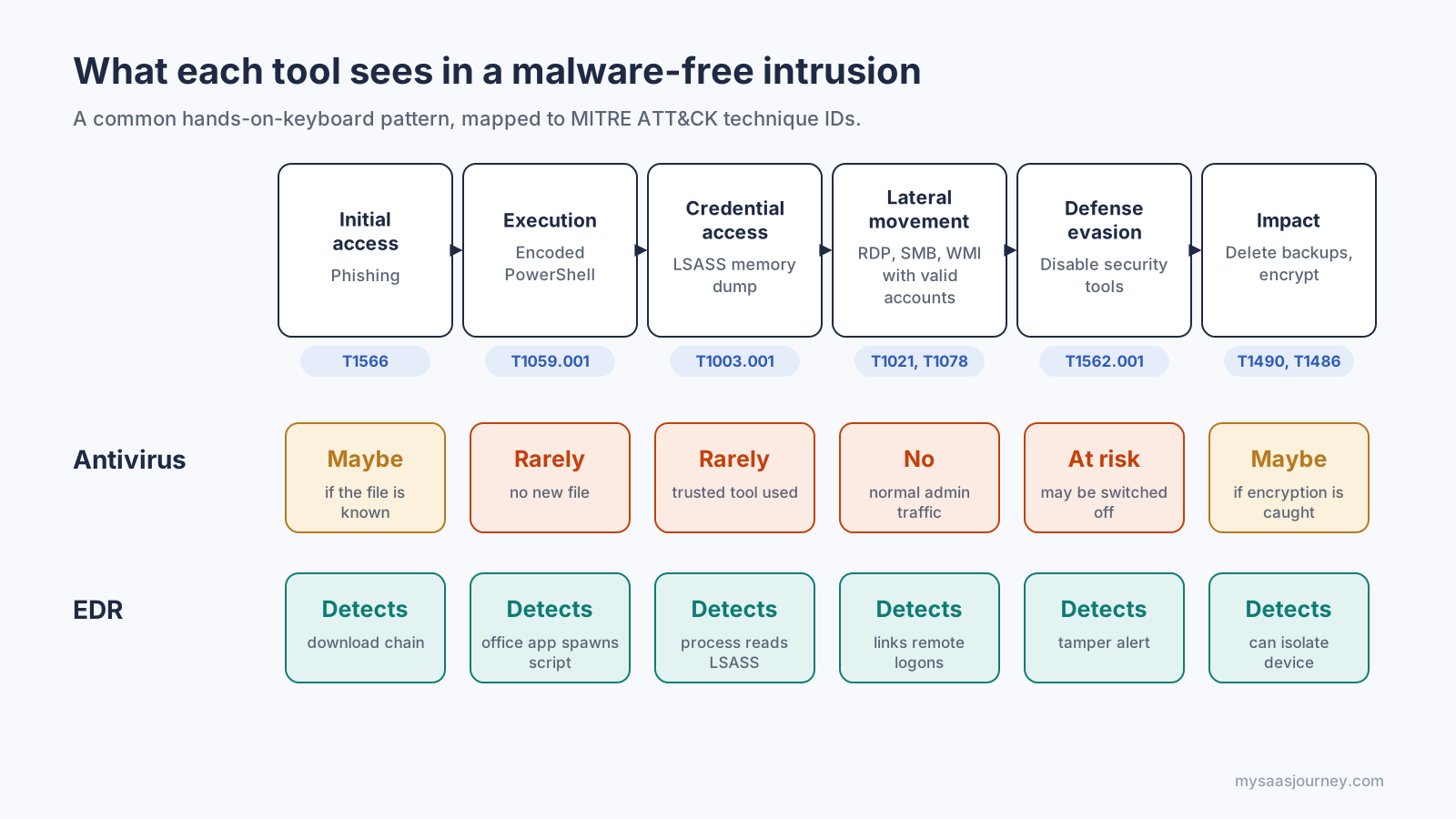
In a malware-free intrusion, EDR has a signal at every stage while antivirus has one or two.
In this pattern, antivirus has one or two chances to intervene: the attachment at the start and the encryption at the end. EDR has a signal at every stage, which gives your team time to act before the attacker reaches the data. You can read more about the final stage in our guide to ransomware.
Speed is the other reason this matters. The CrowdStrike 2026 Global Threat Report put the average eCrime breakout time, the time from initial access to lateral movement, at 29 minutes in 2025, with the fastest observed case at 27 seconds. A tool that only reports a quarantined file leaves you guessing during that window. A tool that shows the full chain, and can isolate a device in one click, lets you contain the intrusion while it is still on one machine.
Where Do NGAV, EPP, XDR, and MDR Fit?
Antivirus and EDR sit on a ladder of endpoint security categories, and each step adds a capability the one below it lacks. Knowing the ladder helps you read vendor feature lists, because the same acronyms show up on almost every product page.
Traditional antivirus: Signature-based scanning of files, with some heuristics. Good against known commodity malware.
Next-generation antivirus (NGAV): Prevention that relies less on signatures and more on machine learning and behavioral analysis, so it can block unknown malware before it runs. NGAV is still a prevention tool. It does not give you an investigation history or response actions after a threat gets through.
Endpoint protection platform (EPP): A centrally managed suite of prevention controls, usually NGAV plus host firewall, device control, application control, and web filtering.
Endpoint detection and response (EDR): Continuous recording, behavioral detection, investigation, and response on the endpoint itself.
Extended detection and response (XDR): EDR's approach applied across more data sources, such as email, identity, network, and cloud workloads, so one incident view can follow an attacker from a phishing email to a compromised account to a server.
Managed detection and response (MDR): A service rather than a product. An outside team of analysts monitors your EDR or XDR around the clock, investigates alerts, and takes response actions on your behalf.
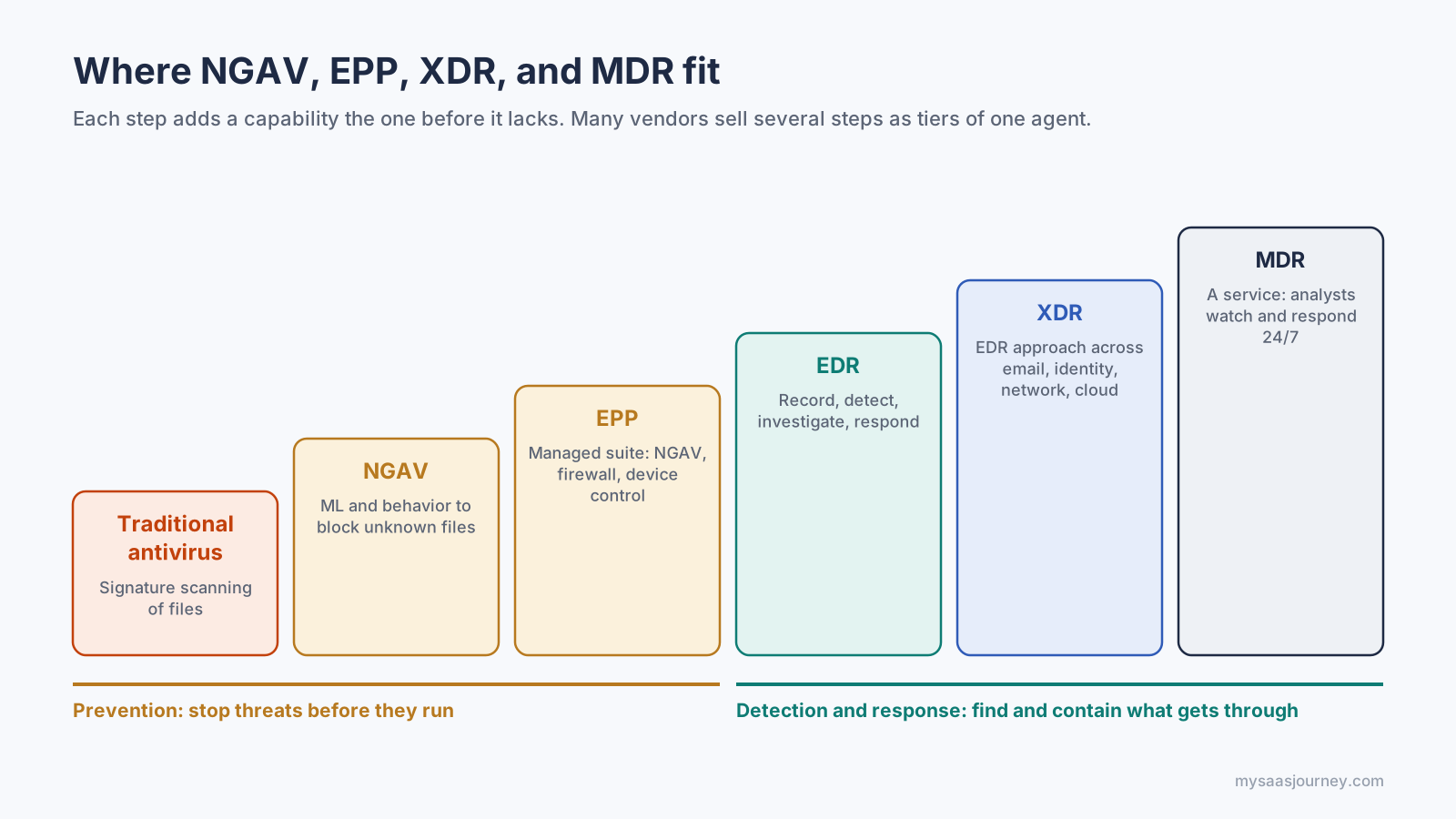
The first three steps prevent. The last three detect and respond.
The lines between these categories have blurred. Many vendors now sell EPP and EDR as tiers of one agent, and some include basic XDR features in their EDR tier. When you compare products, look past the label and check which capabilities each license tier actually includes.
Does EDR Replace Antivirus?
In most business deployments, yes. The majority of commercial EDR products ship in the same agent as a prevention engine, usually NGAV, so installing the EDR tier replaces your old antivirus rather than sitting beside it. You still get file scanning and blocking. You simply get it from the same platform that records and investigates behavior.
There are three points to check before you remove anything.
Confirm your EDR tier includes prevention. A few EDR tools are detection-only sensors and expect another product to block malware. If yours is one of them, keep an antivirus or NGAV engine in place.
Confirm your license tier includes EDR. Vendors often split prevention and EDR into separate plans. Microsoft Defender for Endpoint is a clear example: Plan 1 covers prevention features such as next-generation antimalware, attack surface reduction, and device control, while Plan 2 adds EDR, automated investigation, and advanced hunting. A product name on an invoice does not guarantee you bought the detection and response layer.
Do not run two full antivirus engines on one machine. Two engines that both scan every file can slow devices down, block each other, and even quarantine each other's files. Windows handles this by switching Microsoft Defender Antivirus off, or into a passive mode on some managed devices, when another antivirus product registers with Windows Security. Follow your EDR vendor's guidance on uninstalling the previous product.
You will also see vendors disagree on this question. Some recommend keeping a separate antivirus layer under the EDR as a first filter for commodity malware. Others recommend retiring legacy antivirus once EDR with built-in prevention is deployed. Both positions come down to the same test: make sure prevention, detection, and response are all covered, and that two products are not doing the same job twice.
When Is Antivirus Enough, and When Do You Need EDR?
Antivirus is enough when the cost of a compromise is low and nobody would act on detailed alerts anyway. EDR becomes necessary once you hold data or run systems that an attacker would want, and once you have someone, in-house or outsourced, who can respond to what it finds.
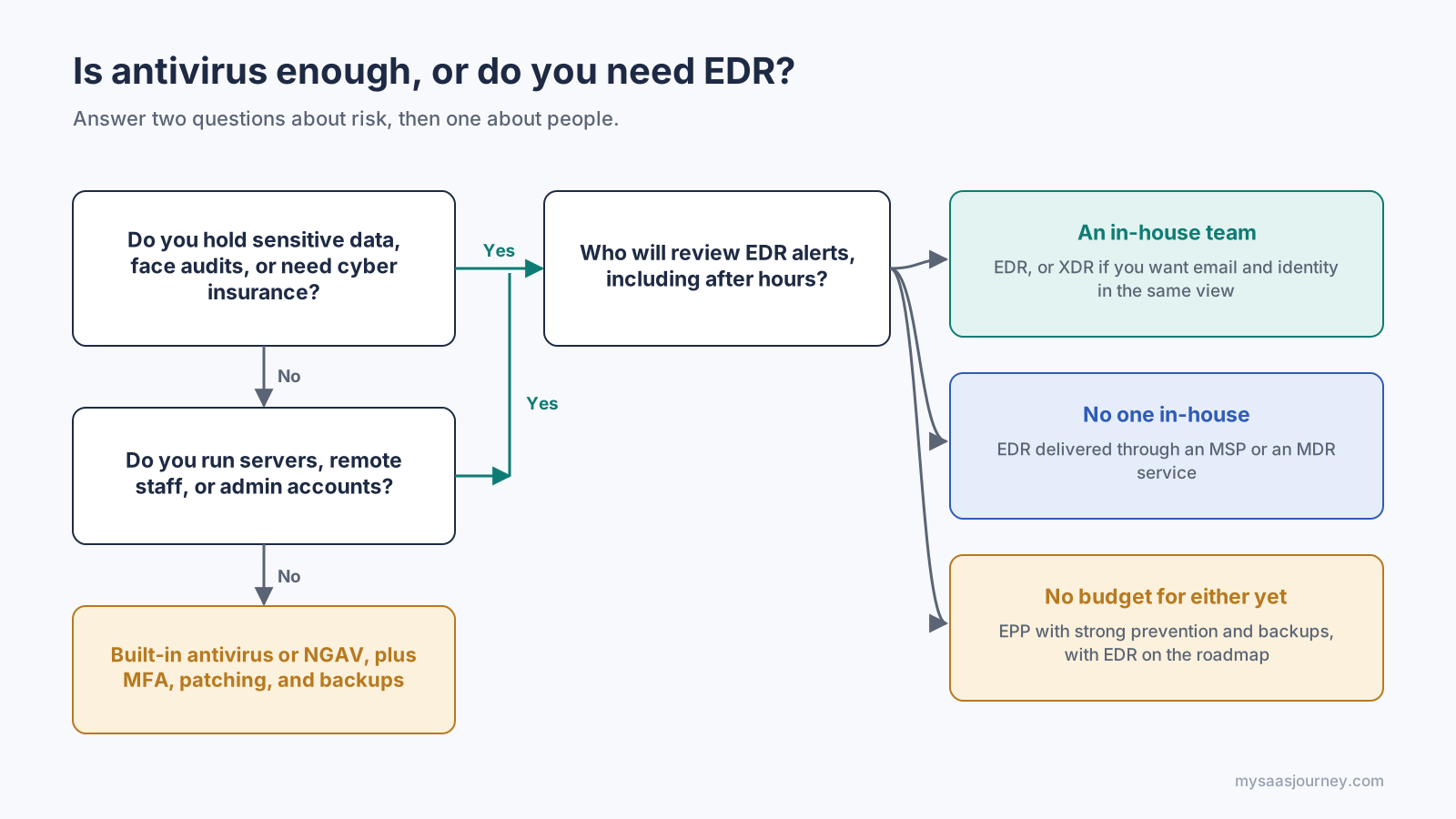
Two questions about risk decide whether you need EDR. One question about people decides how to run it.
Antivirus Is Usually Enough For
Personal devices and home users, where the built-in antivirus, automatic updates, and a password manager cover most everyday risk.
Very small businesses with a handful of devices, no regulated data, cloud apps protected by multi-factor authentication, and tested backups.
Low-risk, isolated machines such as a kiosk or a dedicated lab device with limited network access.
You Should Plan for EDR If
You store customer personal data, payment data, health records, or intellectual property.
You must meet frameworks or audits that expect continuous monitoring and documented incident investigation, such as HIPAA, PCI DSS, or SOC 2.
Your cyber insurance application asks whether EDR is deployed on all endpoints. Many applications now include this question, and the answer can affect your eligibility or premium.
You run servers, remote employees, or administrative accounts that would give an attacker wide access.
You have had an incident and could not tell how it started or which machines were affected.
Decide Who Will Watch the Alerts
EDR only pays off when someone reviews its alerts and acts on them. Larger organizations run that work in a security operations center. Smaller teams usually choose an MSP or an MDR service that monitors the EDR around the clock. If neither option fits your budget, an EPP with strong prevention and automatic remediation, combined with good backups and patching, is a more realistic choice than an EDR console no one opens.
How Do You Move From Antivirus to EDR?
Moving from antivirus to EDR works best as a staged rollout: inventory, pilot, switch, tune, and test. Rushing the switch across every device at once is the most common way to create protection gaps or performance complaints.
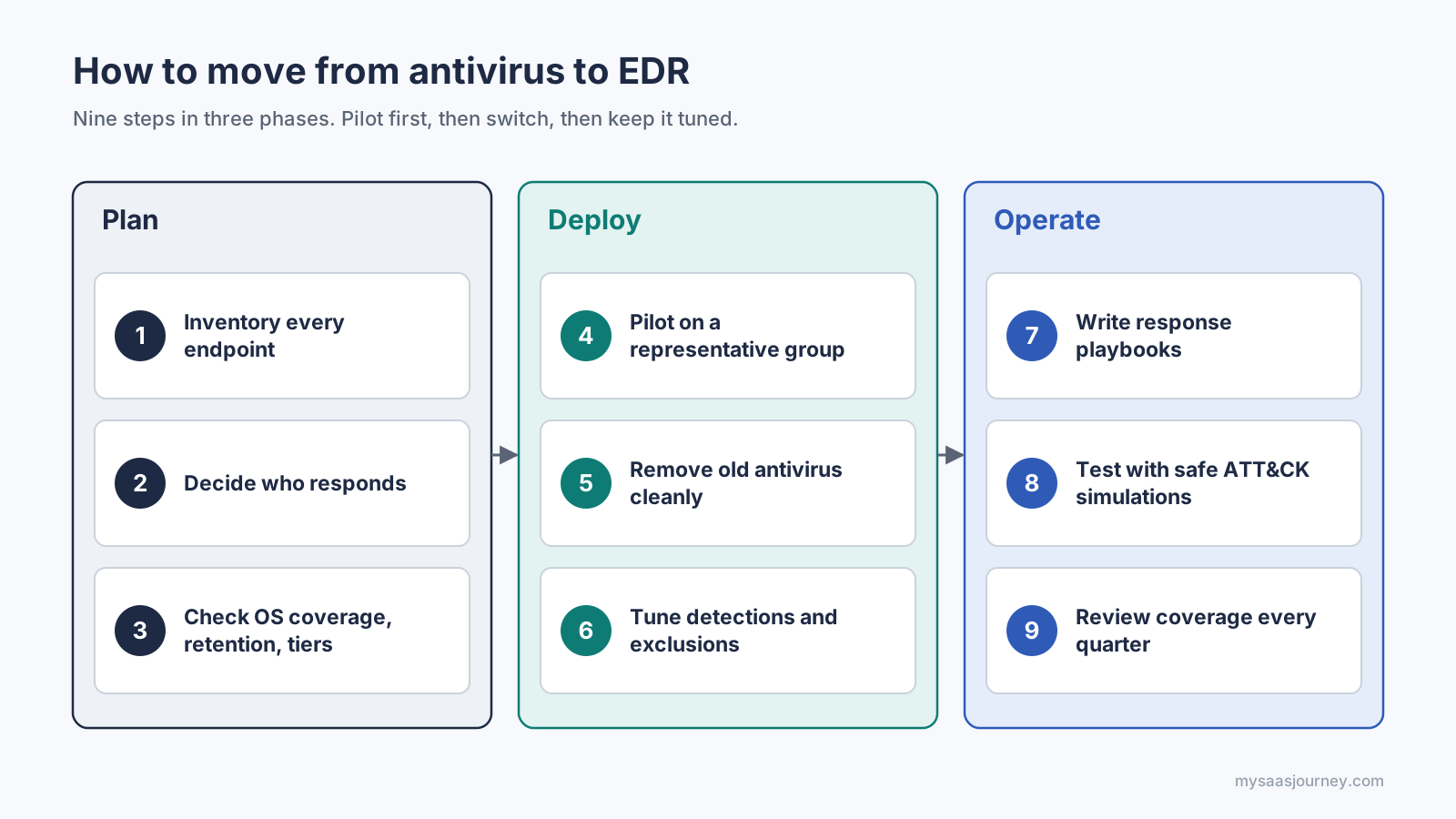
Pilot first, switch cleanly, then keep detections tuned.
Inventory every endpoint. List laptops, desktops, servers, virtual machines, and cloud workloads, along with their operating systems. Any device without the agent is a blind spot, so an accurate list matters. An IT asset management tool helps if you do not already have one.
Decide who will respond. Choose between an in-house team, your MSP, or an MDR service before you buy, and agree on who acts on alerts outside business hours.
Check coverage and features against your list. Confirm support for every operating system you run, the data retention period, the response actions available, tamper protection, and integrations with your ticketing system or SIEM. Confirm that the tier you are quoted includes EDR, not just prevention.
Pilot on a representative group. Install the agent on a mix of user types and servers, ideally in a detect-only mode at first. Measure performance and note which legitimate tools trigger alerts.
Remove the old antivirus cleanly. Use the outgoing vendor's removal tool, then confirm the new agent's prevention is active on each device so there is no window without protection.
Tune detections and exclusions. Add narrow exclusions for business applications that cause false positives. Avoid broad exclusions for whole folders or admin tools, because attackers rely on exactly those.
Write response playbooks. Decide which alerts justify isolating a device, who approves it, and how a device is restored. Record each incident with an incident report template and follow up with a root cause analysis.
Test with safe simulations. Run harmless tests mapped to MITRE ATT&CK techniques, such as those in open-source libraries like Atomic Red Team, and check that each one raises the alert you expect.
Review every quarter. Check agent coverage against your inventory, retire stale exclusions, and confirm the people on your response rota still know the process.
EDR and Antivirus Glossary
Endpoint: Any device that connects to your network and runs an operating system, such as a laptop, desktop, server, or virtual machine.
Signature: A unique pattern or hash that identifies a known piece of malware.
Heuristics: Rules that score a file as suspicious based on traits common to malware, without an exact signature match.
Telemetry: The stream of activity data an EDR agent sends from each endpoint, such as process launches and network connections.
Indicator of compromise (IOC): Evidence that an attack has already happened, such as a known malicious file hash or IP address.
Indicator of attack (IOA): A pattern of behavior that shows an attack in progress, such as an office application launching an encoded script.
Fileless attack: An attack that runs in memory or through built-in tools without writing a malicious file to disk.
Living off the land: Abuse of legitimate system tools, such as PowerShell or WMI, to carry out an attack.
Process tree: A view showing which process launched which, used to trace how an attack unfolded.
Isolation: An EDR action that cuts a device off from the network while keeping its connection to the security console.
Threat hunting: Searching EDR data for attacker activity that has not triggered an alert.
MITRE ATT&CK: A public knowledge base of attacker tactics and techniques, used to label and organize detections.
Frequently Asked Questions
What does EDR stand for?
EDR stands for endpoint detection and response. It describes security tools that record activity on endpoints, detect signs of an attack, and let a team investigate and respond.
Is EDR an antivirus?
EDR is not an antivirus. It is a detection, investigation, and response tool, while antivirus is a prevention tool. Many EDR products include an antivirus or NGAV engine in the same agent, which is why the two are often confused.
Does EDR replace antivirus?
In most business setups it does. Most commercial EDR platforms include their own prevention engine, so they replace a separate antivirus. Check that your EDR tier includes prevention before you remove the old product.
Can you run EDR and antivirus together?
You can run an EDR sensor alongside one antivirus engine, and some setups do exactly that. Avoid running two full antivirus engines on the same device, because they can conflict and slow it down.
Is Microsoft Defender an EDR?
Microsoft Defender Antivirus, built into Windows, is an antivirus. Microsoft Defender for Endpoint Plan 2 adds EDR capabilities such as behavioral monitoring, investigation, and advanced hunting. Plan 1 focuses on prevention.
Can EDR stop ransomware?
EDR can detect the steps that usually come before encryption, such as credential theft and lateral movement, and can isolate an infected device. That often stops an attack early. It works best alongside offline backups and fast patching.
Do small businesses need EDR?
A small business that holds customer data, faces compliance requirements, or needs cyber insurance usually benefits from EDR, often through an MSP or MDR service. A very small, low-risk office may be well served by built-in antivirus, MFA, and backups.
Does EDR slow down computers?
Modern EDR agents are designed to be lightweight because they record events rather than running constant full-disk scans. Impact still varies by product and workload, so test the agent on representative machines before a full rollout.
What is the difference between EDR and XDR?
EDR covers laptops, desktops, and servers. XDR applies the same detection and response approach across more sources, such as email, identity, network, and cloud, and correlates them into one incident view.
What is the difference between EDR and EPP?
An endpoint protection platform (EPP) focuses on prevention, combining antivirus or NGAV with controls such as firewall and device control. EDR focuses on detecting, investigating, and responding to threats that prevention misses. Many products now combine both.
Is EDR worth it for home users?
For most home users, no. Built-in antivirus, automatic updates, a password manager, and multi-factor authentication give strong protection without the need to review security alerts.
Summary
Antivirus and EDR protect the same devices in different ways. Antivirus inspects files and blocks known or suspicious malware, usually before it runs, and it does that with very little human effort. EDR records what happens on each endpoint, detects attacker behavior even when no malicious file exists, and gives your team the history and controls to investigate and contain an incident.
For home users and very small, low-risk offices, built-in antivirus plus updates, MFA, and backups is often enough. For organizations that hold valuable data, face compliance or insurance requirements, or run servers and remote teams, EDR is the stronger choice, as long as someone is responsible for its alerts. In most deployments, an EDR platform with built-in prevention replaces standalone antivirus, so the decision is less about choosing one over the other and more about which layers you need and who will run them. To compare tools in this space, browse our cybersecurity software category.