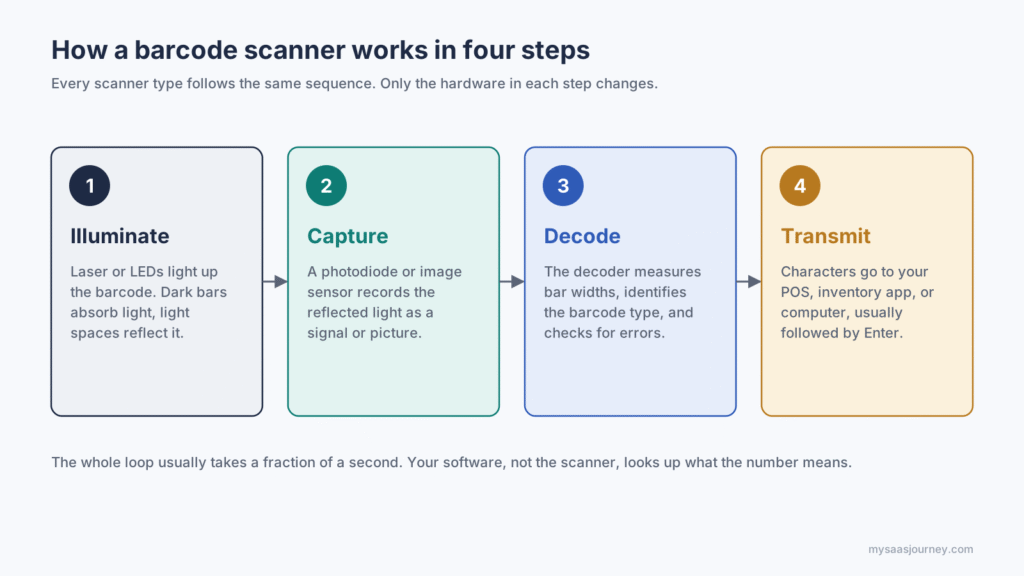

How a barcode scanner works, in short: A barcode scanner shines light on a barcode, measures how much light the dark bars and light spaces reflect, and turns that pattern into an electrical signal. A decoder translates the signal into the numbers or text the barcode stores, then sends that data to a computer, point-of-sale (POS) system, or app, usually in a fraction of a second.
That simple loop runs at enormous scale. GS1, the organization that manages retail barcode standards, says barcodes are scanned more than 10 billion times a day, roughly five decades after a pack of Wrigley's gum became the first product scanned at a Marsh supermarket in Ohio on June 26, 1974. The technology is also changing. GS1's Sunrise 2027 initiative aims for retail checkouts worldwide to read 2D barcodes, such as QR codes and GS1 DataMatrix, by the end of 2027, and many older laser scanners cannot read them.
This guide explains each step of a scan, how a barcode stores data, how the main scanner types differ, how the decoder and the connection to your software work, why scans fail, and how to choose the right scanner. It is vendor-neutral and written for retailers, warehouse teams, and anyone setting up barcode labeling and scanning software.
How Does a Barcode Scanner Work, Step by Step?
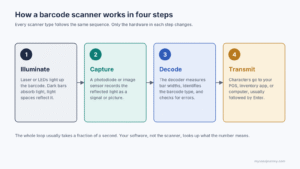
Every barcode scan follows the same four steps: illuminate, capture, decode, and transmit. The hardware inside the scanner changes from one type to another, but the sequence does not.
- Illuminate the barcode. The scanner lights up the code with a red laser, red LEDs, or white LEDs. Dark bars absorb most of that light, while light spaces reflect it back.
- Capture the reflected light. A light sensor records the reflection. Laser and pen scanners use a photodiode that measures brightness along one line. Imagers use a camera-style sensor that records a row of pixels or a full picture.
- Decode the pattern. The scanner's decoder converts the light pattern into a sequence of narrow and wide bars, recognizes the barcode type, checks it for errors, and translates it into characters.
- Transmit the data. The scanner sends those characters to a connected device, most often as if someone had typed them on a keyboard, followed by an Enter key.
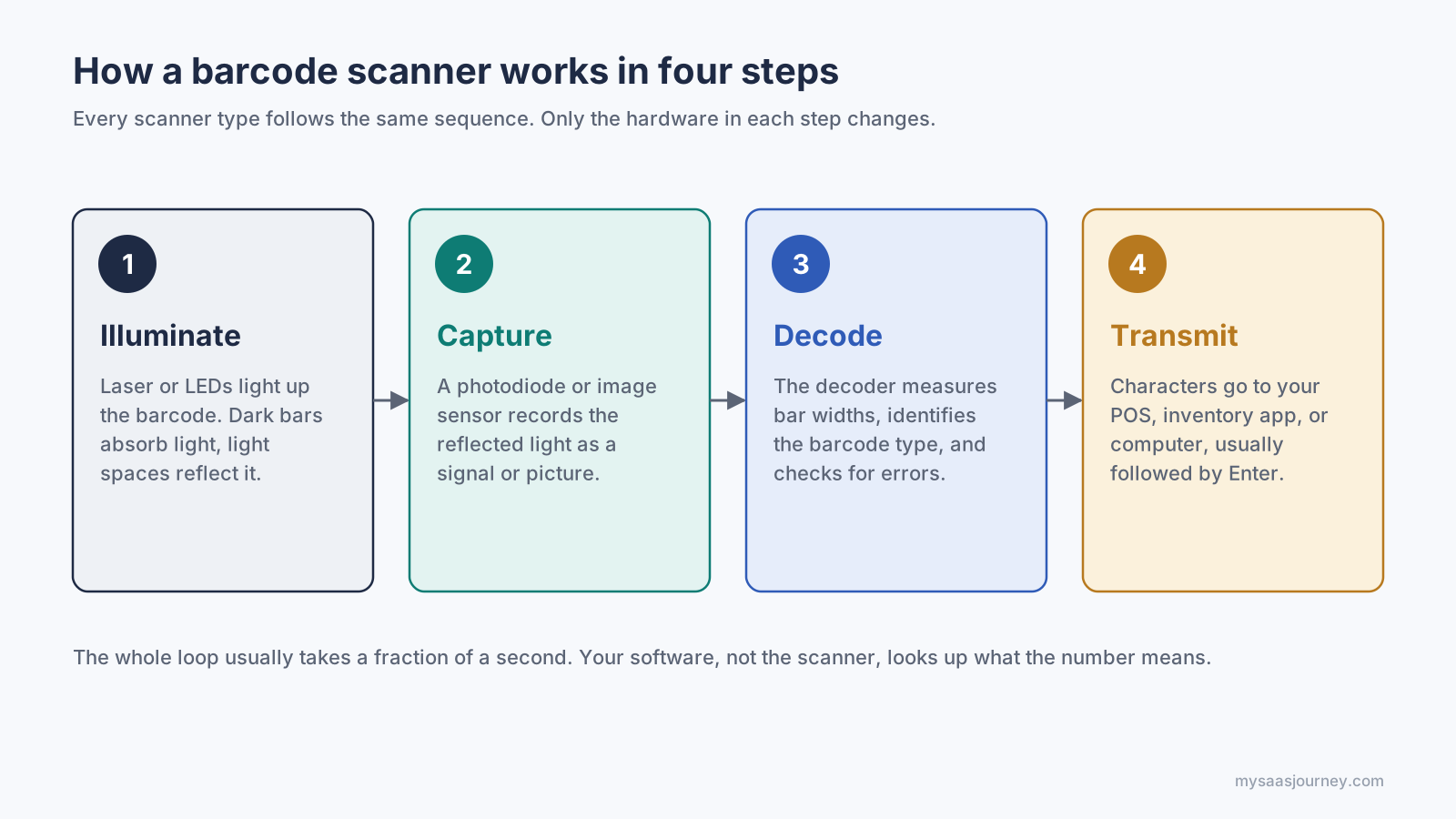
Every scanner type follows the same four steps.
The decoder does not know what the product is. A retail barcode usually carries only an identification number, such as a 12-digit UPC. Your POS, inventory, or warehouse software looks that number up in its own database to find the product name, price, or stock level. This is why the same scanner works across many different businesses: the meaning of each code lives in your software, not in the scanner.
How Does a Barcode Store Data?
A barcode stores data in the widths of its bars and spaces, not in their color or length. Each barcode type, called a symbology, has its own rules for how those widths map to digits or characters.
Parts of a 1D Barcode
The UPC-A code on most products sold in the United States is a good example of how a linear (1D) barcode is built:
- Quiet zones: Blank margins on both sides that tell the scanner where the code begins and ends. GS1 specifies a minimum of nine narrow-bar widths on each side.
- Guard patterns: Thin bar pairs at the start, center, and end that mark the code's structure and help the decoder measure bar widths.
- Data characters: Twelve digits, each built from two bars and two spaces that together span seven narrow units, called modules. The full symbol is 95 modules wide.
- Check digit: The last digit is calculated from the first eleven. If the decoder's math does not match it, the scan is rejected instead of returning a wrong number.
- Human-readable digits: The numbers printed under the bars, used for manual entry when a code will not scan.
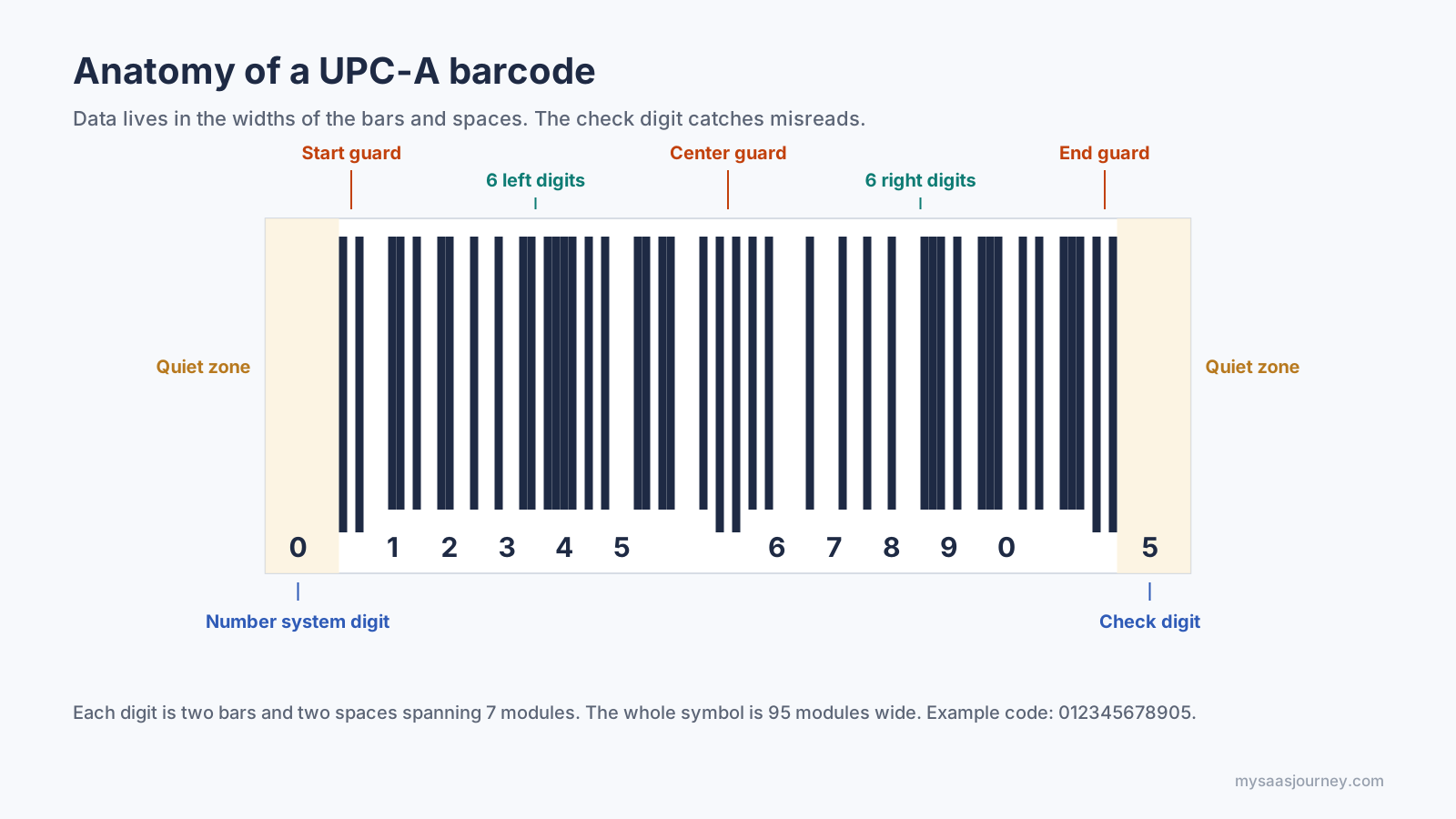
A UPC-A barcode stores 12 digits in 95 modules, with a check digit at the end.
The check digit is what keeps 1D scanning accurate. For UPC-A, the decoder multiplies the digits in odd positions by three, adds the digits in even positions, and checks that the total plus the check digit is a multiple of ten. A single misread bar almost always breaks that equation, so the scanner tries again rather than sending bad data.
How 2D Barcodes Differ
A 2D barcode, such as a QR code or Data Matrix, stores data in a grid of small squares in both directions. That lets it hold far more information in less space. A UPC-A holds 12 digits, while the largest QR code can hold up to 7,089 numeric characters. 2D codes also use Reed-Solomon error correction, so a QR code can still be read when part of it is damaged. Depending on the level chosen when the code is printed, a QR code can recover from roughly 7% to 30% of its area being unreadable.
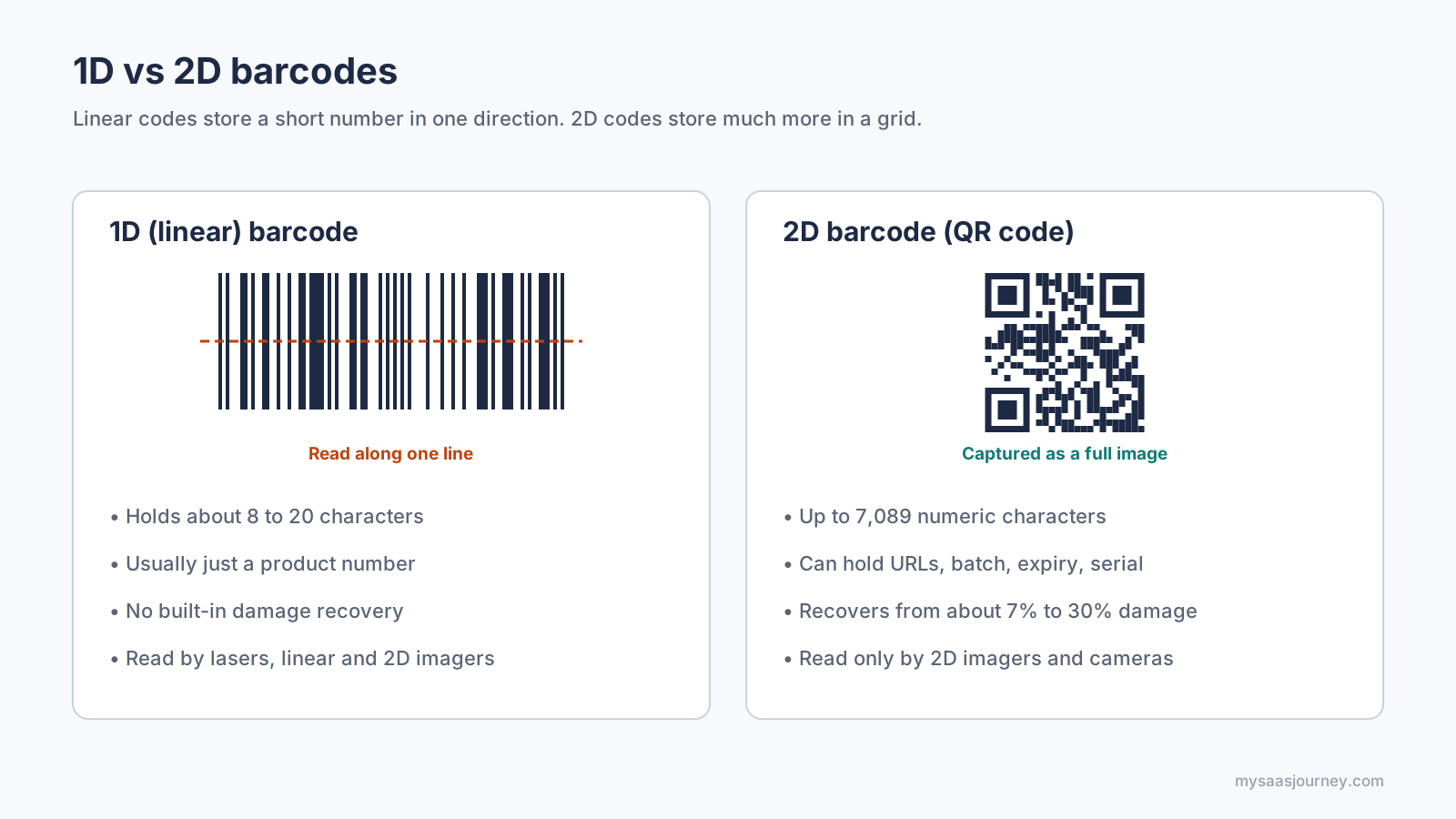
1D codes are read along a line. 2D codes must be captured as an image.
The difference that matters for your hardware is simple. A 1D barcode can be read along a single line. A 2D barcode must be captured as a full image, which only a 2D imager or a camera can do.
How Do Different Types of Barcode Scanners Work?
Barcode scanners differ in how they capture light: a pen reads one line by contact, a laser sweeps a beam, a linear imager photographs a single row, and a 2D imager or phone camera photographs the whole code. That capture method decides which barcodes each type can read.
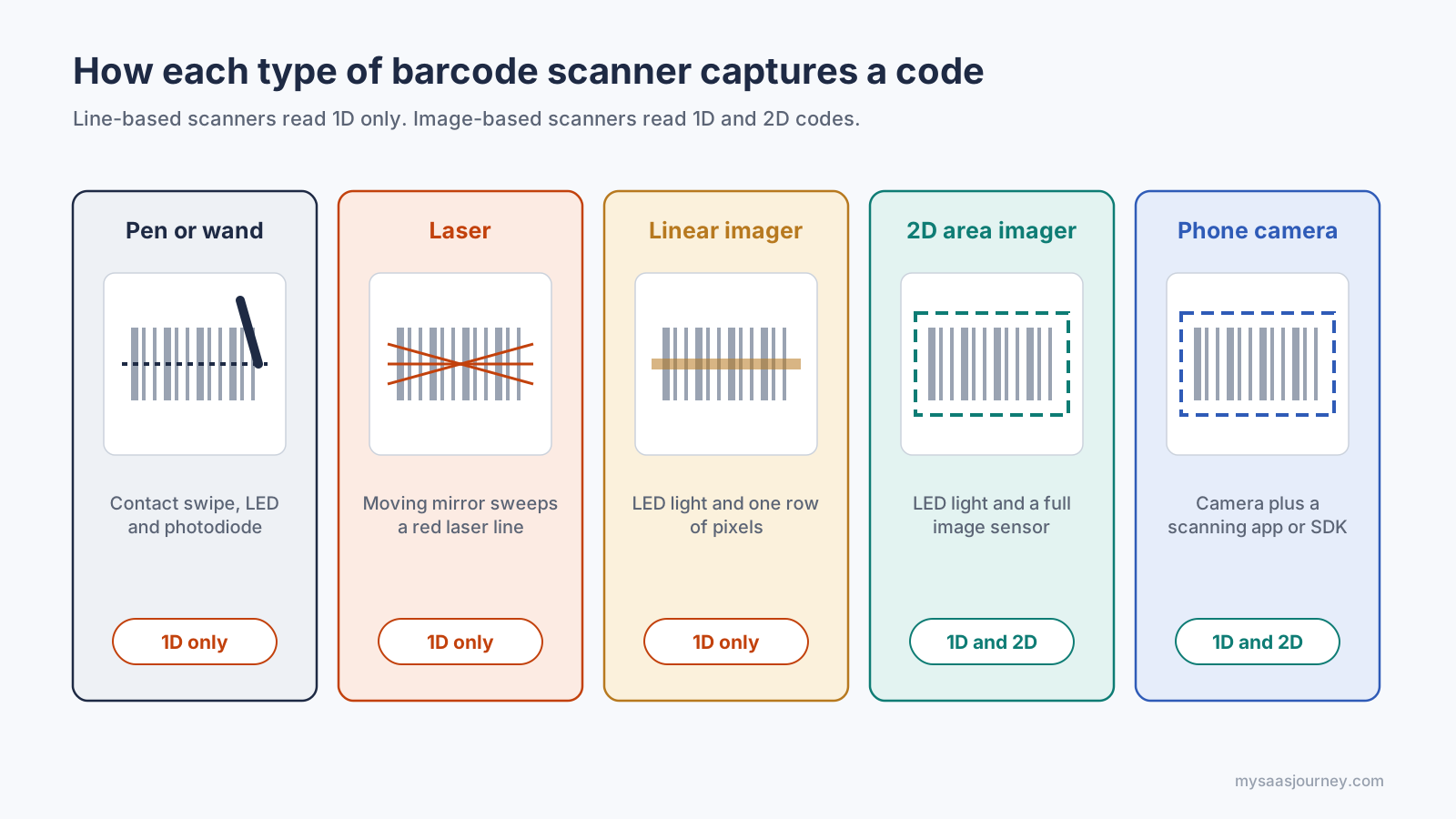
Line-based scanners read 1D codes only. Image-based scanners read 1D and 2D codes.
Pen or Wand Scanners
A pen scanner has an LED and a photodiode in its tip. You drag it across the barcode at a steady speed, and it records light changes as it passes each bar. Pens are the cheapest type, but they need contact with the label and a smooth swipe, so they suit low-volume desk work and are now uncommon.
Laser Scanners
A laser scanner points a red laser diode at a moving mirror, which sweeps the beam across the code many times per second. A photodiode measures the reflection and produces a wave-like signal of bright and dark. Single-line lasers need you to line the beam up with the bars. Omnidirectional lasers, like the ones built into supermarket checkout counters, cross several beams in a star pattern so the code can face almost any direction. Lasers read 1D codes quickly and at a distance, but they cannot read standard 2D codes and often struggle with barcodes shown on phone screens.
Linear Imagers (CCD Scanners)
A linear imager lights the code with LEDs and captures it with a single row of sensor pixels, often called a CCD (charge-coupled device) array. It works like a one-line camera. Linear imagers have no moving parts, so they are durable and inexpensive, and many can read 1D codes from screens. Like lasers, they cannot read 2D codes, and older models need to be held close to the label.
2D Area Imagers
An area imager captures a full image of the code with a camera sensor and finds the barcode in software. Because it sees the whole picture, it reads 1D and 2D codes in any orientation, including codes on phone screens, and it handles damaged or poorly printed labels better than a laser. Area imagers are now the standard choice for retail POS, healthcare, and logistics, and they are the type that meets the Sunrise 2027 goal of reading 2D codes at checkout.
Smartphone and Tablet Cameras
A phone becomes a scanner when an app or a software development kit (SDK) analyzes the camera feed. It works on the same principle as an area imager. Phone scanning costs little to start, but it is slower for high volumes and depends on lighting, focus, and battery life.
Scanner Types Compared
| Scanner type | How it captures | Reads 1D | Reads 2D | Reads phone screens | Typical use |
|---|---|---|---|---|---|
| Pen or wand | Contact swipe with LED and photodiode | Yes | No | No | Low-volume desk work |
| Laser | Moving laser beam and photodiode | Yes | No | Usually not | Checkout lanes, long-range warehouse scanning |
| Linear imager | LED light and one row of pixels | Yes | No | Often | Retail counters, offices |
| 2D area imager | LED light and full image sensor | Yes | Yes | Yes | POS, healthcare, logistics, ID and ticket scanning |
| Smartphone camera | Phone camera with scanning app or SDK | Yes | Yes | Yes | Field service, small shops, occasional inventory counts |
Scanners also come in different form factors: handheld units with a trigger, presentation scanners that sit on a counter and scan automatically, in-counter scanners built into checkout lanes, fixed-mount scanners on conveyor lines, wearable ring scanners, and rugged mobile computers with a built-in scan engine. The form factor decides how people use the scanner. The scan engine inside it decides what it can read.
How Does the Decoder Turn Light Into Data?
The decoder is the software, usually running on a chip inside the scanner, that turns a raw light signal or image into readable characters. It follows the same basic routine on every scan, often dozens of times per second until it gets a clean read.
- Find the code. An imager searches its picture for patterns that look like a barcode, such as parallel bars or the three square finder marks in the corners of a QR code. A laser or pen skips this step because it only sees the line it is pointed at.
- Separate dark from light. The decoder sets a brightness threshold and labels each part of the signal or image as dark or light. This step is where glare, shadows, and faded print cause trouble.
- Measure the elements. For a 1D code, the decoder measures the width of every bar and space relative to the narrowest one. For a 2D code, it maps each square in the grid to a 1 or a 0.
- Identify the symbology. The start pattern and structure tell the decoder whether it is looking at UPC, EAN, Code 128, Code 39, QR, Data Matrix, PDF417, or another type. Scanners only decode the symbologies that are enabled in their settings.
- Verify the result. The decoder checks the check digit on 1D codes or runs error correction on 2D codes. If the check fails, it discards the read and tries again.
- Format the output. The scanner adds any configured prefix or suffix, such as a carriage return, and sends the characters on.
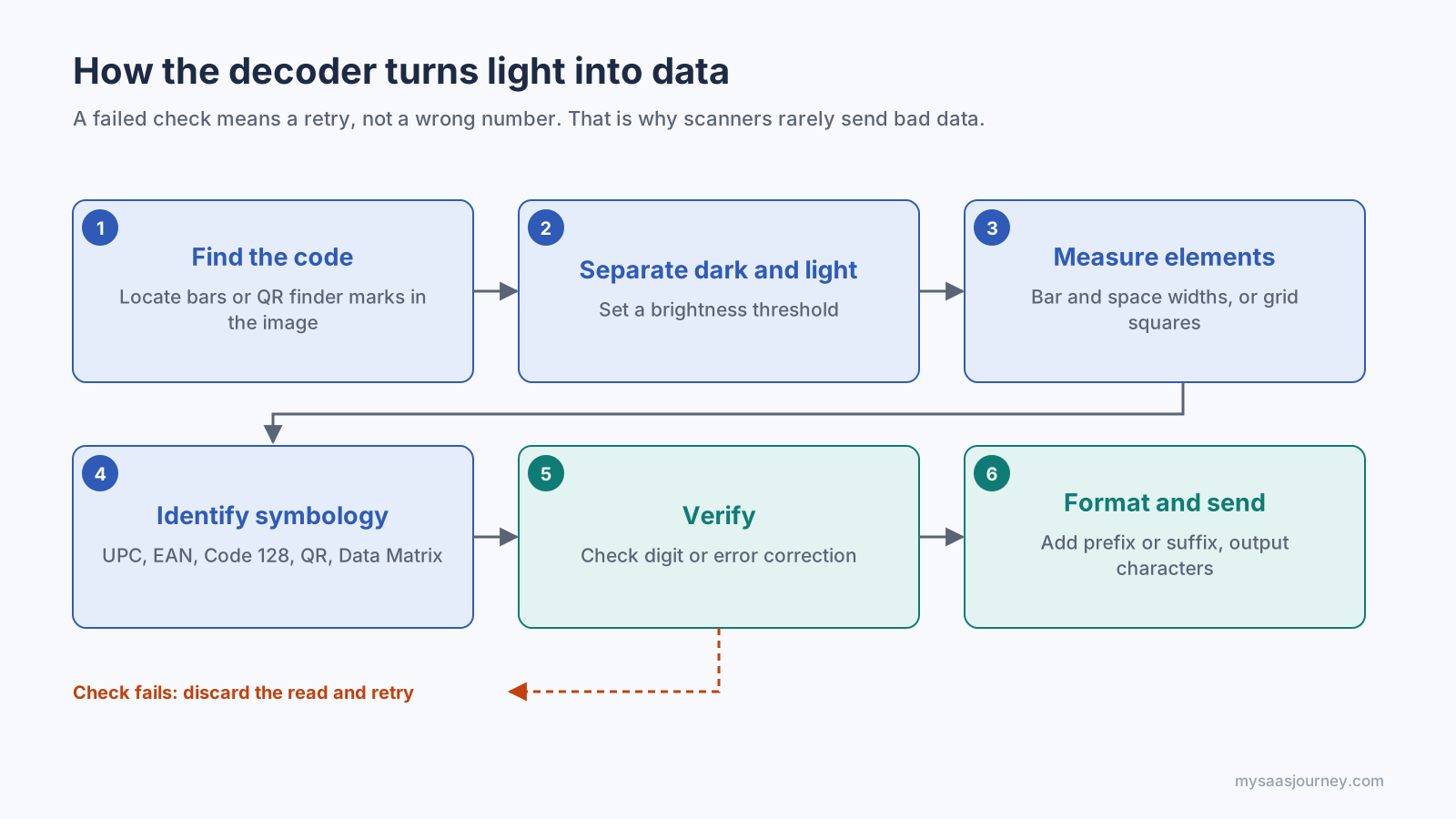
A failed check triggers a retry, not a wrong number.
This is why a good scanner rarely sends a wrong number. It is far more likely to fail to read a damaged code than to read it incorrectly, because the check digit or error correction rejects a bad read before your software ever sees it.
How Does a Barcode Scanner Send Data to a Computer?
Most barcode scanners send data to a computer by pretending to be a keyboard. The computer receives the decoded characters as if someone typed them, followed by an Enter key, so the scan lands in whatever field is active in your software. Other connection modes exist for systems that need more control.
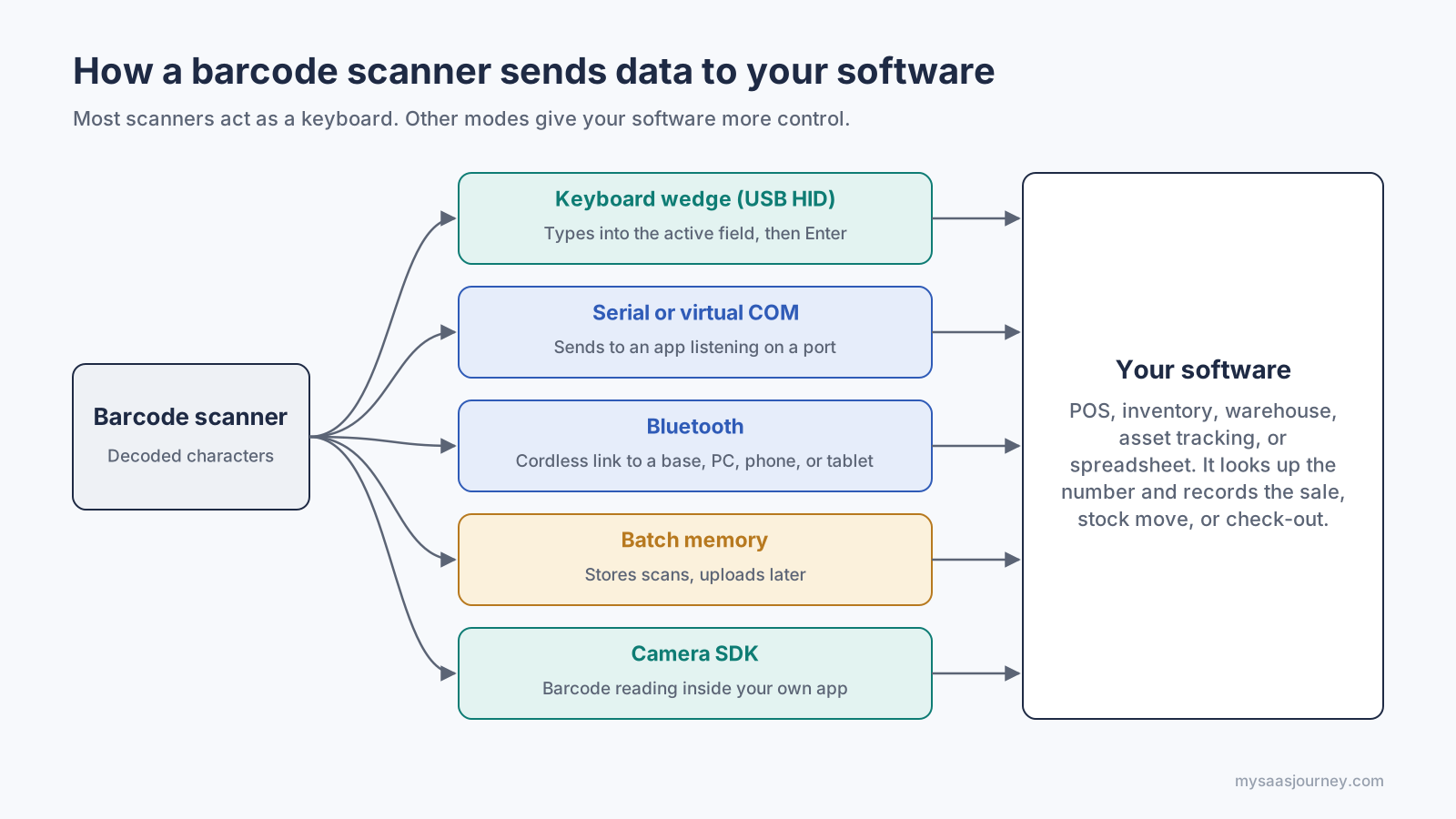
Most scanners act as a keyboard. Other modes give your software more control.
| Connection mode | How it works | Best for |
|---|---|---|
| Keyboard wedge (USB HID) | The scanner identifies itself as a keyboard and types the data into the active field | Spreadsheets, web apps, most POS and inventory software, plug-and-play setups |
| Serial or virtual COM port | The scanner sends data to a port that a specific application listens to | POS terminals, kiosks, and industrial systems that should receive scans even when no text field is selected |
| Bluetooth | A cordless scanner pairs with a base station, computer, phone, or tablet, usually as a keyboard | Warehouses, stockrooms, and mobile POS on tablets |
| Batch (memory) mode | The scanner stores scans in its own memory and uploads them later | Stock counts in areas with no connection |
| Camera SDK | A software library reads barcodes from a device camera inside your own app | Custom mobile apps for delivery, field service, and retail staff |
Scanners are configured by scanning special setup barcodes printed in the manufacturer's manual. Those codes change settings such as which symbologies are enabled, whether a Tab or Enter key follows each scan, and the keyboard language. A mismatched keyboard language is a common reason a scanner types the wrong characters.
If you are building scanning into your own software, a scanner SDK or the manufacturer's API gives your app direct access to scan events and settings instead of relying on keyboard input. Our guide to explains how that kind of integration fits together. Once scans reach your software, they can also trigger , such as reorder alerts when stock falls below a set level.
Why Won't a Barcode Scan?
A barcode usually fails to scan for one of four reasons: the scanner cannot read that barcode type, the label is damaged or poorly printed, the light conditions are wrong, or the scanner's settings do not match your software. Work through the table below before you replace any hardware.
| Symptom | Likely cause | How to fix it |
|---|---|---|
| Scanner beeps on some codes but ignores QR codes | It is a laser or linear imager that cannot read 2D codes | Use a 2D area imager or a phone camera |
| No beep on one specific barcode type | That symbology is disabled in the scanner's settings | Scan the setup code in the manual that enables it |
| Scanner will not read a code on a phone screen | Laser scanners and older imagers struggle with screen glare and backlighting | Raise screen brightness or use a 2D imager built for screens |
| Reads fail on shiny or curved packaging | Glare and reflection wash out the bars | Tilt the scanner slightly so it is not square to the surface |
| Reads fail on faded or wrinkled labels | Low contrast, smudged bars, or a cut-off quiet zone | Reprint at a higher print quality and keep the margins clear |
| Scans appear in the wrong field or run together | Missing or wrong suffix (Enter or Tab) | Set the suffix to match how your software moves between fields |
| Scan shows wrong characters, such as symbols instead of numbers | Keyboard language on the scanner does not match the computer | Set the scanner's keyboard country to match the operating system |
| Code scans in one app but not another | The software expects serial input or a specific format | Switch the scanner's interface mode or check the software's scanner settings |
Print quality causes more problems than most teams expect. Low-contrast colors, such as red bars on a white background under a red laser, can make a code invisible to the scanner. Black bars on a white background, a clear quiet zone, and a label printed at the right size give every scanner type the best chance of a first-time read.
How Do You Choose a Barcode Scanner?
Choose a barcode scanner by the codes you need to read first, then by where and how often you scan. For most businesses buying in 2027, a 2D area imager is the safest default because it reads 1D codes, QR codes, and phone screens, and it is ready for the move to 2D codes at checkout.
Answer these questions before you compare models:
- Which barcodes will you scan? If you will ever see QR codes, GS1 DataMatrix, digital coupons, mobile tickets, or IDs, you need a 2D imager. Laser and linear models only cover 1D codes.
- How far away is the code? Counter and shelf scanning works within arm's reach. Warehouse racking may need an extended-range scanner that reads labels several meters away.
- How many scans per day? A few dozen scans fit a phone app. Hundreds per hour at a checkout call for a presentation or in-counter scanner that reads hands-free.
- Do you need to move around? Cordless Bluetooth scanners and mobile computers suit stockrooms and warehouses. Corded scanners suit fixed counters and never need charging.
- How harsh is the environment? Look at the drop rating and the IP rating for dust and water if the scanner will be used in a warehouse, cold store, or outdoors.
- Will it work with your software? Confirm the connection mode, operating system support, and any SDK your POS, , or inventory software requires.
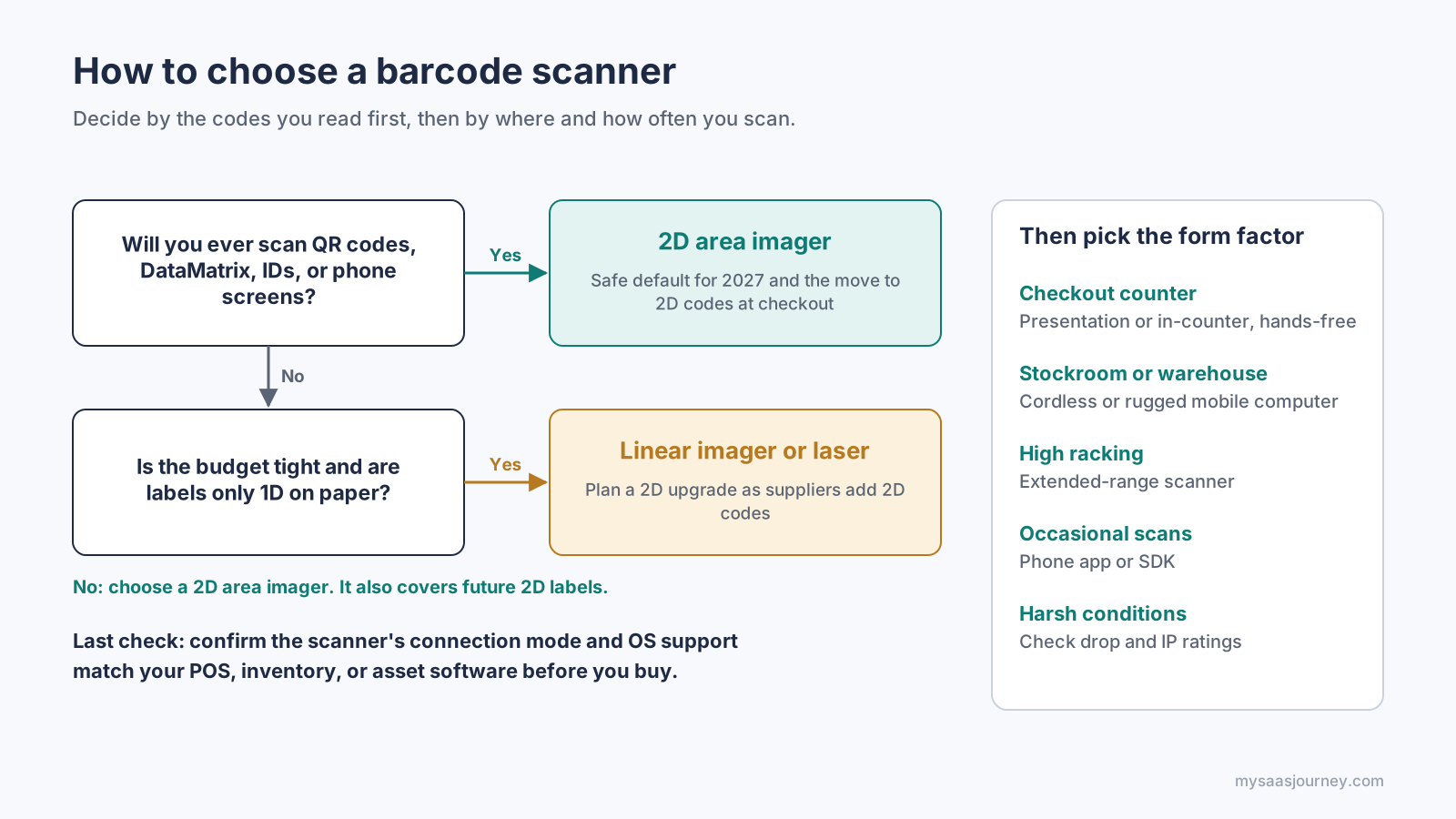
Pick the scan engine by the codes you read, then the form factor by where you scan.
The scanner is only half of the setup. You also need software that prints compliant labels and turns each scan into an action, such as a sale, a stock movement, or an asset check-out. Choose the software first, then buy a scanner it supports.
Barcode Scanner Glossary
- Symbology: A barcode type with its own encoding rules, such as UPC-A, EAN-13, Code 128, QR, or Data Matrix.
- 1D (linear) barcode: A barcode made of parallel bars and spaces that is read along one line.
- 2D barcode: A barcode that stores data in a grid of squares or dots, such as a QR code or Data Matrix.
- Module: The narrowest unit of width in a barcode. Every bar and space is a whole number of modules wide.
- Quiet zone: The blank margin on each side of a barcode that marks where it starts and ends.
- Check digit: A digit calculated from the others in the code, used to catch misreads.
- Decoder: The software that converts a captured light pattern or image into characters.
- Photodiode: A light sensor that turns reflected light into an electrical signal.
- CCD: Charge-coupled device, the light sensor array used in many linear imagers.
- Area imager: A scanner that captures a full image with a camera sensor and can read 2D codes.
- Keyboard wedge: A connection mode in which the scanner sends data as keystrokes.
- Suffix: A character the scanner adds after each scan, usually Enter or Tab.
- GS1: The global nonprofit that issues retail product numbers and maintains barcode standards such as UPC and EAN.
Frequently Asked Questions
How does a barcode scanner read a barcode?
A barcode scanner lights up the code, measures the light reflected by the bars and spaces, and converts that pattern into an electrical signal or image. A decoder then translates the pattern into numbers or text and checks it for errors before sending it on.
Does a barcode contain the price of a product?
In most cases it does not. A retail barcode such as a UPC holds an identification number. Your POS or inventory software matches that number to a price, description, and stock level in its own database.
Do barcode scanners need software?
A basic USB scanner needs no driver, because it acts like a keyboard and types into any open field. You still need software, such as a POS, inventory, or spreadsheet app, to do something useful with the scanned number.
Do barcode scanners need the internet?
A barcode scanner does not need the internet, because it decodes the barcode on its own. Your software may need a network connection to look up product details in a cloud database, but the scan itself works offline.
Can a barcode scanner read QR codes?
Only a 2D area imager or a phone camera can read QR codes. Laser scanners and linear imagers read 1D barcodes only, so check that a model is labeled as 2D before you buy it.
What is the difference between a laser scanner and a 2D imager?
A laser scanner sweeps a beam across a 1D barcode and measures the reflection. A 2D imager takes a picture of the code and decodes it in software, so it reads both 1D and 2D codes in any orientation, including from phone screens.
Can I use my phone as a barcode scanner?
Your phone can work as a barcode scanner. A barcode scanning app or a business app with a built-in scanner can read 1D and 2D codes with the phone's camera. Phones work well for occasional scanning, while dedicated scanners are faster and more durable for high volumes.
How far away can a barcode scanner read?
Most handheld scanners read from a few centimeters to about half a meter, depending on the barcode size. Extended-range warehouse scanners can read large labels on high racking from several meters away.
Can two products have the same barcode?
Identical products, such as every unit of the same item and size, share one product barcode. Different products should never share a number. Businesses that need to track individual units add serial numbers, often in a 2D code.
Are QR codes safe to scan?
The scan itself is harmless, but a QR code can link to a malicious website. Check the web address your phone shows before you open it, and be wary of codes stuck over posters or parking meters. Our guide to explains how QR code scams work.
What is GS1 Sunrise 2027?
Sunrise 2027 is an industry initiative led by GS1 that aims for retail point-of-sale systems worldwide to read 2D barcodes, such as QR codes with GS1 data and GS1 DataMatrix, by the end of 2027. Retailers using laser-only scanners will need 2D-capable hardware to take part.
Summary
A barcode scanner works in four steps: it lights up the code, captures the reflected light, decodes the pattern into characters, and sends them to your software. The barcode itself stores data in the widths of its bars and spaces, or in a grid of squares for 2D codes, and a check digit or error correction stops bad reads from reaching your system.
Scanner types differ mainly in how they capture the code. Pens and lasers read along one line, linear imagers photograph one row, and 2D area imagers and phone cameras photograph the whole code, which is why only they can read QR codes and screens. With GS1's Sunrise 2027 push toward 2D barcodes at checkout, a 2D imager that matches your software is the safest choice for most businesses this year. To compare the software side of a barcode setup, browse our ecommerce software category.