What Is AI Sales Assistant Software? Definition, Key Features and How It Works
AI sales assistant software is a category of sales tools that uses artificial intelligence to help sales reps and managers research prospects, write outreach, capture and summarize conversations, update the CRM, and decide which deals and tasks to work on next. It reads data from your sales systems, applies language models and machine learning to that data, and then suggests, drafts, or completes the next step. A person stays in control of what reaches the customer.
Sales reps spend a large share of their week on work that is not selling. They research accounts, write follow-up emails, update the CRM, take call notes, and search for the right deck before a meeting. Buyers, meanwhile, expect fast and relevant responses from sellers who already understand their business. AI sales assistant software exists to close that gap by taking routine work off the rep’s plate and putting useful context in front of them at the right moment.
The category goes by several names. You will see it called an AI sales assistant, an AI sales copilot, AI sales enablement software, or simply AI sales tools. Some vendors build it into a CRM, while others sell it as a standalone product that connects to the systems you already use. If you are new to the broader category, our guide on what artificial intelligence software is covers the foundations.
This pillar guide explains how AI sales assistant software works, the technologies behind it, the features that matter, how different sales roles use it, and how it compares with a CRM and an AI sales agent. It also covers metrics, pricing models, security, implementation, and the top use cases for AI in channel sales.
Key takeaways
- An AI sales assistant supports a human seller. It drafts, summarizes, recommends, and automates admin work, while the rep makes the final call on customer-facing actions.
- Most tools follow the same loop: connect to sales data, interpret context, act or suggest, and learn from outcomes.
- Core features cover prospect research, lead scoring, email drafting, meeting notes, CRM updates, deal insights, content recommendations, and coaching.
- An AI sales agent goes further than an assistant. It runs parts of the sales process on its own with limited human input.
- Channel sales teams use AI to match leads to partners, review deal registrations, answer partner questions, and spot partners at risk of disengaging.
- Results depend on clean CRM data, clear review rules, and starting with one workflow before adding more.
Why Are Sales Teams Adopting AI Sales Assistants?
Sales teams adopt AI sales assistants to recover selling time, respond to buyers faster, and make better decisions with the data they already collect. The pressure comes from three directions at once: heavy admin work, more complex buying groups, and more data than any rep can review by hand.
Admin work crowds out selling. Logging calls, updating opportunity fields, writing recap emails, and preparing for meetings take time away from conversations with buyers. Much of this work is repetitive and rule-based, which makes it a natural fit for automation.
Buying decisions involve more people. B2B purchases often include a decision-making unit with several stakeholders from different departments. Reps need to track who said what, which concerns each person raised, and how the deal is progressing across all of them.
Sales data has outgrown manual review. Teams now collect call recordings, email threads, website visits, buyer intent data, and product usage signals. Without help, most of that information never reaches the rep in a usable form. AI sales assistants turn it into summaries, alerts, and recommendations.
AI capabilities are now built into everyday tools. Generative AI has made drafting, summarizing, and answering questions in plain language widely available. Many SaaS vendors now offer AI features as add-ons, which our AI add-on price index tracks across a wide range of tools. For a wider view of CRM adoption and AI trends, see our CRM statistics roundup.
How Does AI Sales Assistant Software Work?
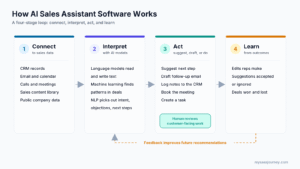
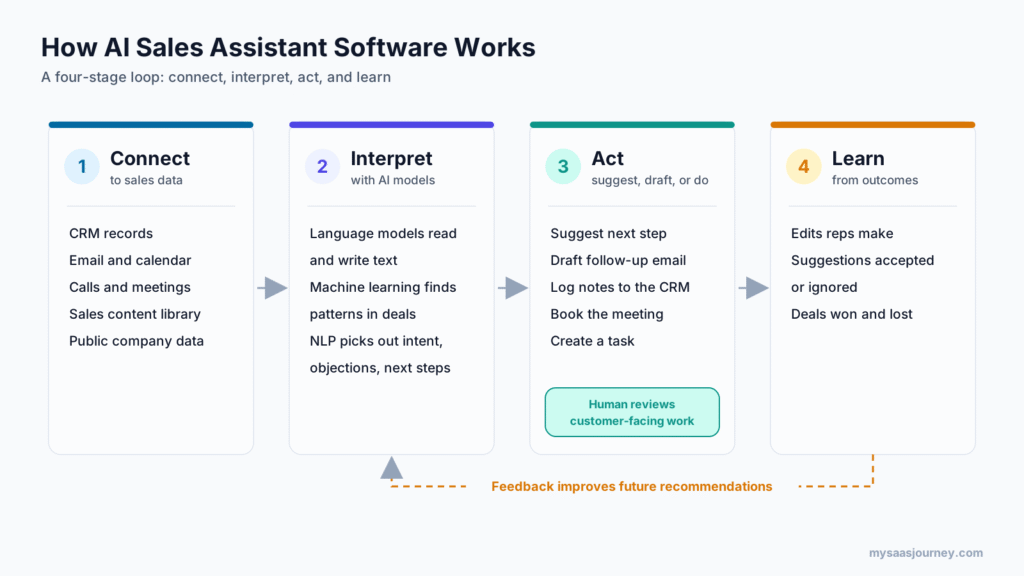
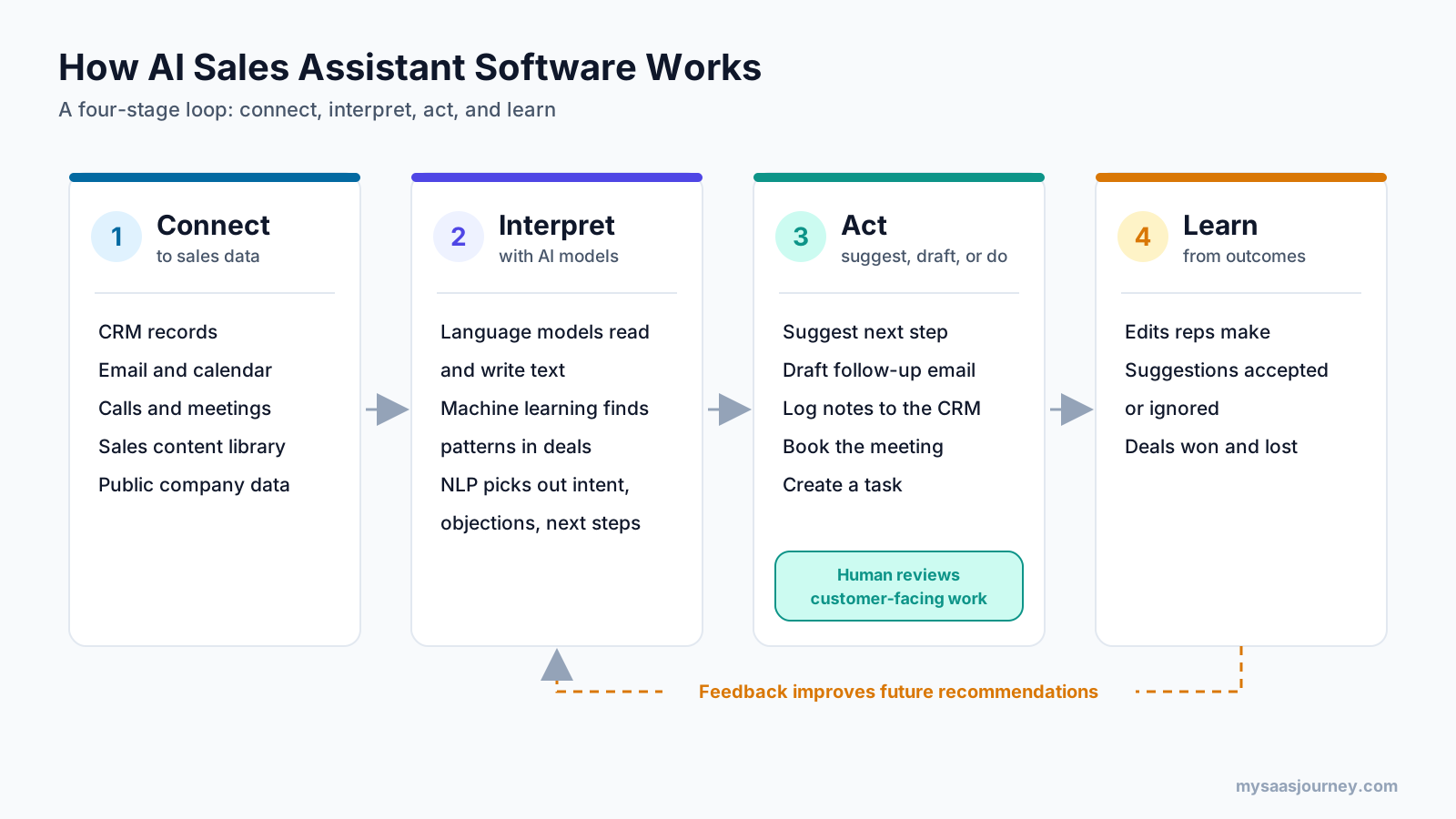
AI sales assistant software works in a four-stage loop. It connects to your sales data, interprets that data with AI models, suggests or completes the next action, and learns from how reps and buyers respond. The details differ by product, but this pattern is consistent across the category.
Stage 1: It Connects to Your Sales Data
The assistant first needs access to the systems where your sales data lives. That usually includes your CRM, email and calendar, calling or video meeting platform, and sales content library. Many tools also pull from public sources such as company websites, news, job postings, and professional networks to enrich account records.
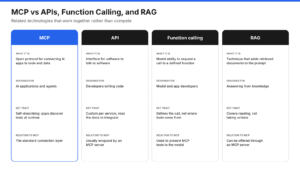
These connections run through APIs, webhooks, and native integrations. Some newer tools also support the Model Context Protocol (MCP), a standard that lets AI models connect to business applications in a consistent way.
The quality of this connection sets the ceiling for everything that follows. An assistant with access to complete activity history and accurate deal stages produces far better output than one working from a half-updated CRM.
Stage 2: It Interprets Context with AI Models
Once connected, the assistant uses several kinds of AI to understand what is happening in each account and deal. Large language models read and write text. Machine learning models find patterns in historical data. Natural language processing picks out intent, objections, next steps, competitor mentions, and buying signals from unstructured conversations. The next section explains each of these technologies in more detail.
Stage 3: It Suggests, Drafts, or Acts
The output of the AI layer is an action. Depending on the tool and your settings, the assistant might suggest the next best step on a deal, draft a follow-up email for the rep to review, log a call summary to the CRM, book a meeting, or create a task.
Well-designed assistants let you decide how much they can do without approval. Low-risk work, such as logging notes or updating a field, often runs automatically. Customer-facing work, such as sending an email, usually waits for a person to review and approve it.
Stage 4: It Learns from Outcomes
The final stage closes the loop. When a rep edits a draft, ignores a suggestion, or wins a deal the model flagged as weak, that feedback flows back into the system. Over time, recommendations become more relevant to your market, your buyers, and the way your team sells.
What Technologies Power an AI Sales Assistant?
An AI sales assistant combines large language models, natural language processing, machine learning, retrieval-augmented generation, speech-to-text, and integrations with your sales systems. Each technology handles a different part of the job, and the quality of a tool depends on how well it brings them together.
| Technology | What it does in an AI sales assistant |
|---|---|
| Large language models (LLMs) | Read and write text. They draft emails, summarize meetings, and answer questions about accounts in plain language. |
| Natural language processing (NLP) | Extracts meaning from conversations, such as intent, sentiment, objections, and next steps. |
| Machine learning (ML) | Finds patterns in historical data to score leads, predict deal outcomes, and flag risk. |
| Retrieval-augmented generation (RAG) | Pulls facts from your own content and records before the model writes a response, which keeps answers grounded in your data. |
| Speech-to-text | Converts calls and meetings into searchable transcripts that the other models can analyze. |
| Integrations and connectors | Move data between the assistant and your CRM, email, calendar, calling platform, and content library. |
Retrieval-augmented generation deserves special attention. It is the reason a well-built assistant can answer a question about your pricing policy or a specific customer without inventing details. Our explainer on what RAG is covers how the approach works. Transcription quality also matters more than most buyers expect, since every call summary and coaching insight depends on it. Our comparison of AI transcription software shows how tools differ on this point.
What Are the Key Features of AI Sales Assistant Software?
The key features of AI sales assistant software are prospect research, lead scoring, email drafting, meeting scheduling, call recording and summaries, real-time call guidance, CRM data entry, deal insights, content recommendations, and coaching. Most products cover several of these, and larger platforms cover all of them. The map shows where each one fits across the sales cycle.
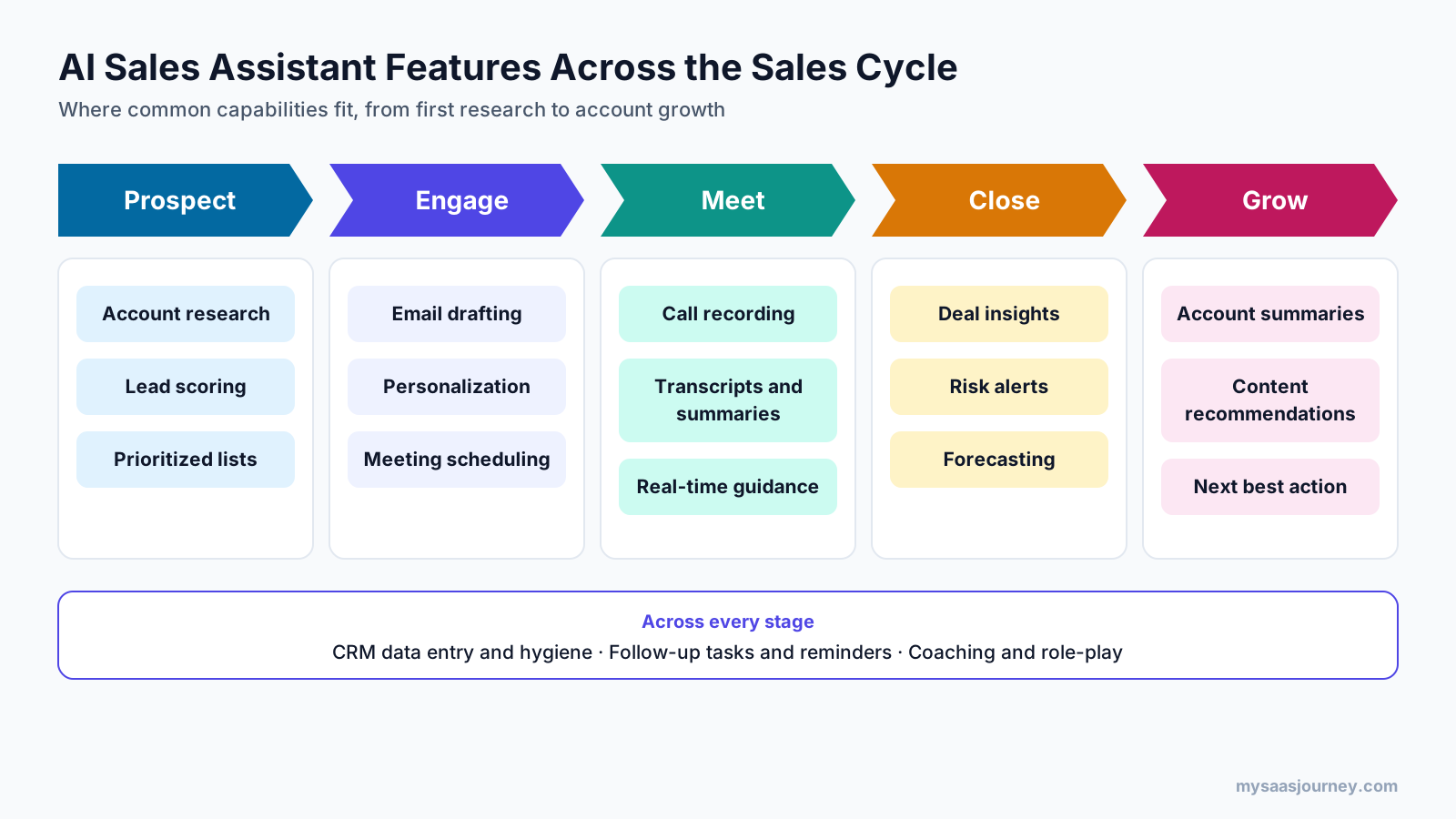
Prospect and Account Research
The assistant gathers information about a company and its buying committee before outreach or a meeting. It can summarize recent company news, funding, hiring trends, technology in use, and previous interactions with your team. Reps get a short brief instead of spending time across a dozen browser tabs.
Lead Scoring and Prioritization
Machine learning models rank leads and accounts based on fit and engagement. They look at signals such as firmographics, website visits, email replies, content downloads, and past deal patterns. This helps teams separate a marketing qualified lead from a sales qualified lead with more consistency, so reps see which accounts deserve attention today.
Email Drafting and Personalization
Generative AI writes first drafts of prospecting emails, follow-ups, and replies. Good tools pull in context from the account record and previous conversations, so the draft references what the buyer cares about. The rep edits and sends, which keeps the human voice in the message. If you want to compare general-purpose drafting tools, see our list of the best AI writing tools.
Meeting Scheduling
The assistant handles back-and-forth scheduling by reading calendar availability, proposing times, and sending invites. Some tools also prepare a pre-meeting brief and send reminders to reduce no-shows.
Call Recording, Transcription, and Summaries
During sales calls and video meetings, the assistant records the conversation, produces a transcript, and writes a summary. Summaries typically include key points, objections, agreed next steps, and owners. This replaces manual note-taking and gives managers a searchable record of customer conversations. Many teams start here, and our guide to the best AI meeting assistants compares notetakers by use case.
Real-Time Call Guidance
Some assistants listen during live calls and surface prompts on screen. They may suggest answers to common objections, flag when a competitor is mentioned, or remind the rep to ask a qualifying question during a discovery call. This feature is most useful for newer reps and for teams selling complex products.
CRM Data Entry and Hygiene
Manual CRM updates are one of the most common complaints in sales. An AI sales assistant can log calls and emails, update deal stages, fill in contact details, and create follow-up tasks automatically. Cleaner CRM data also improves every other AI feature that depends on it.
Deal Insights and Forecasting
By analyzing activity, engagement, and conversation data across the pipeline, the assistant flags deals that are going quiet, missing a decision-maker, or slipping past expected close dates. Managers get earlier warning about risk and a forecast grounded in buyer behavior rather than rep opinion alone. Some tools also calculate a weighted pipeline based on predicted close likelihood.
Sales Content Recommendations
This is where AI sales assistants overlap with AI sales enablement software. The assistant recommends the case study, battlecard, or deck that fits the deal stage, industry, and objections raised. Reps find the right material without searching a shared drive.
Coaching and Role-Play
Assistants can review recorded calls against a coaching framework and highlight moments where a rep handled a question well or missed an opportunity. Some tools add AI role-play, where reps practice a pitch or objection with a simulated buyer before a live call.
How Is AI Sales Assistant Software Different from Related Tools?
AI sales assistant software differs from related tools by its job. A CRM stores records, a sales engagement platform runs outreach sequences, a sales enablement platform manages content and training, and an AI sales assistant uses AI to act on that data inside the rep’s workflow. The lines blur because many vendors now add AI features to every product, so focus on the primary job each tool does.
| Tool category | Primary job | How it relates to an AI sales assistant |
|---|---|---|
| CRM | Stores customer, contact, and deal records | The assistant reads from and writes to the CRM. Many CRMs now include a built-in assistant. |
| Sales engagement platform | Runs multi-step outreach sequences across email and phone | The assistant writes and personalizes the messages that sequences send. |
| Sales enablement platform | Manages sales content, training, and playbooks | The assistant surfaces the right enablement content inside the rep’s workflow. |
| Conversation intelligence | Records and analyzes sales calls | Call summaries and coaching are often core assistant features. |
| Revenue intelligence | Analyzes pipeline and forecast health | Deal risk alerts and forecasting overlap with assistant features. |
| AI sales agent | Runs parts of the sales process on its own | An agent acts with more autonomy. An assistant keeps a person in the loop for key decisions. |
If you are still choosing a system of record, our comparison of the best free CRM software and our CRM software category are good starting points. An AI sales assistant adds the most value when it sits on top of a CRM your team already uses.
AI Sales Assistant vs AI Sales Agent
An AI sales assistant works alongside a rep and leaves key decisions to that person. An AI sales agent completes a sales workflow on its own, such as finding prospects, sending outreach, answering replies, and booking meetings, with limited human review. Both use the same underlying technology. The difference is how much the software does without a person approving each step.
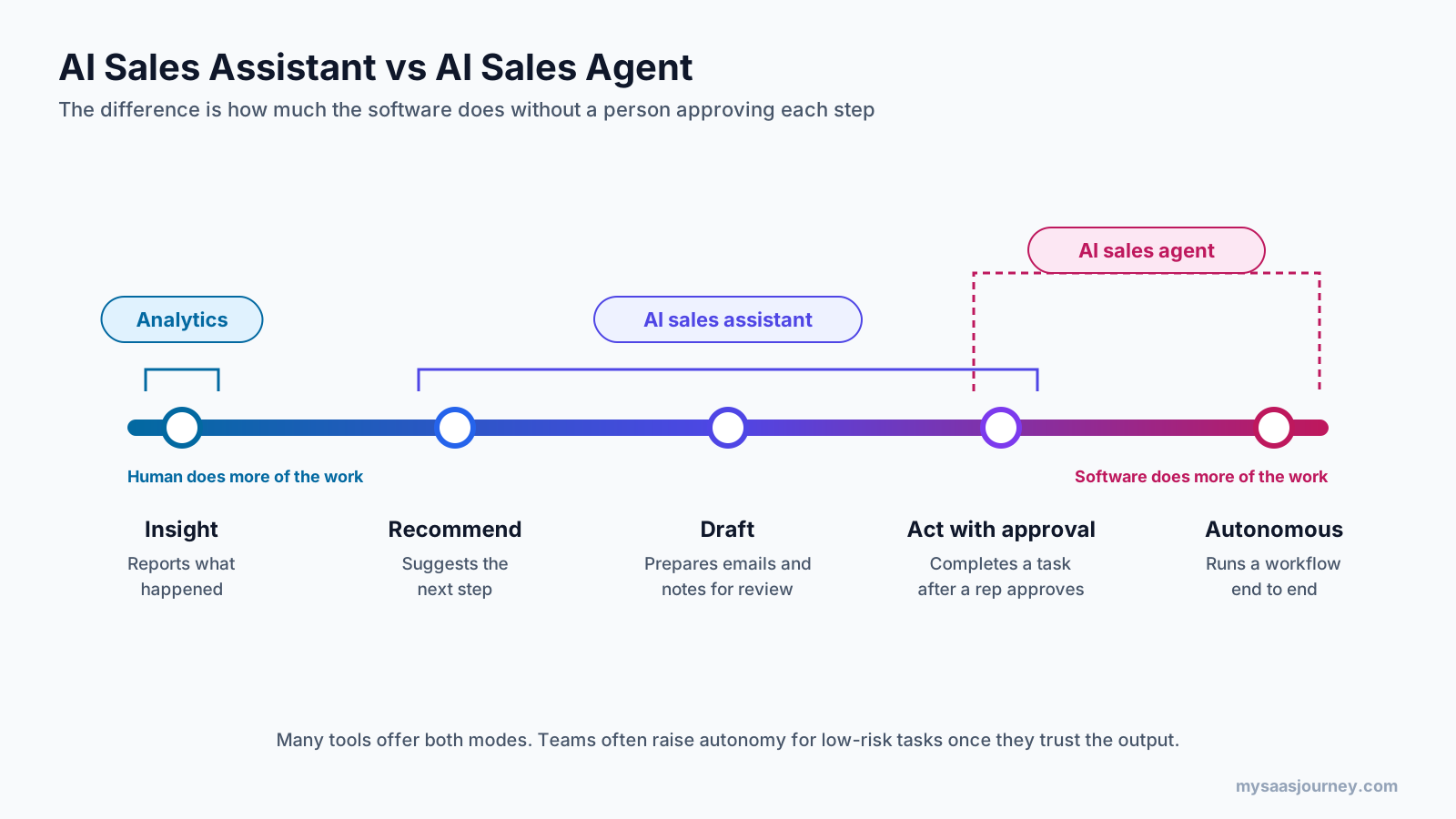
AI sales agents are sometimes called AI SDRs because they take on prospecting and first-touch outreach. Many products now offer both modes. You can start with assistant behavior and increase autonomy for specific, low-risk tasks once you trust the output. To see how agents work outside sales, read our roundup of the best AI agents or our guide on how to build an AI agent.
What Are the Main Types of AI Sales Assistants?
AI sales assistants fall into six main types: research and prospecting assistants, outreach and email assistants, meeting and conversation assistants, CRM and admin assistants, coaching assistants, and embedded CRM copilots. Some products fit into one group, while larger platforms span several.
- Research and prospecting assistants build target lists, enrich contact data, and write account briefs.
- Outreach and email assistants draft and personalize emails, suggest subject lines, and recommend send times.
- Meeting and conversation assistants record, transcribe, and summarize calls, then push notes and next steps to the CRM.
- CRM and admin assistants automate data entry, update records, and keep pipeline fields current.
- Coaching and practice assistants score calls, give feedback, and run AI role-play sessions.
- Embedded CRM copilots live inside a CRM and answer questions about accounts and deals in plain language.
When you evaluate tools, map them to these types first. It prevents you from buying three products that solve the same problem. Our list of SaaS AI tools for sales teams shows how products in this space position themselves.
How Do Different Sales Roles Use an AI Sales Assistant?
Each sales role uses an AI sales assistant for a different job. SDRs use it for research and outreach, account executives for meeting prep and follow-up, managers for coaching and forecasting, RevOps for data quality, enablement teams for content delivery, and account managers for renewals and expansion. Understanding this helps you configure the tool for the people who will use it every day.
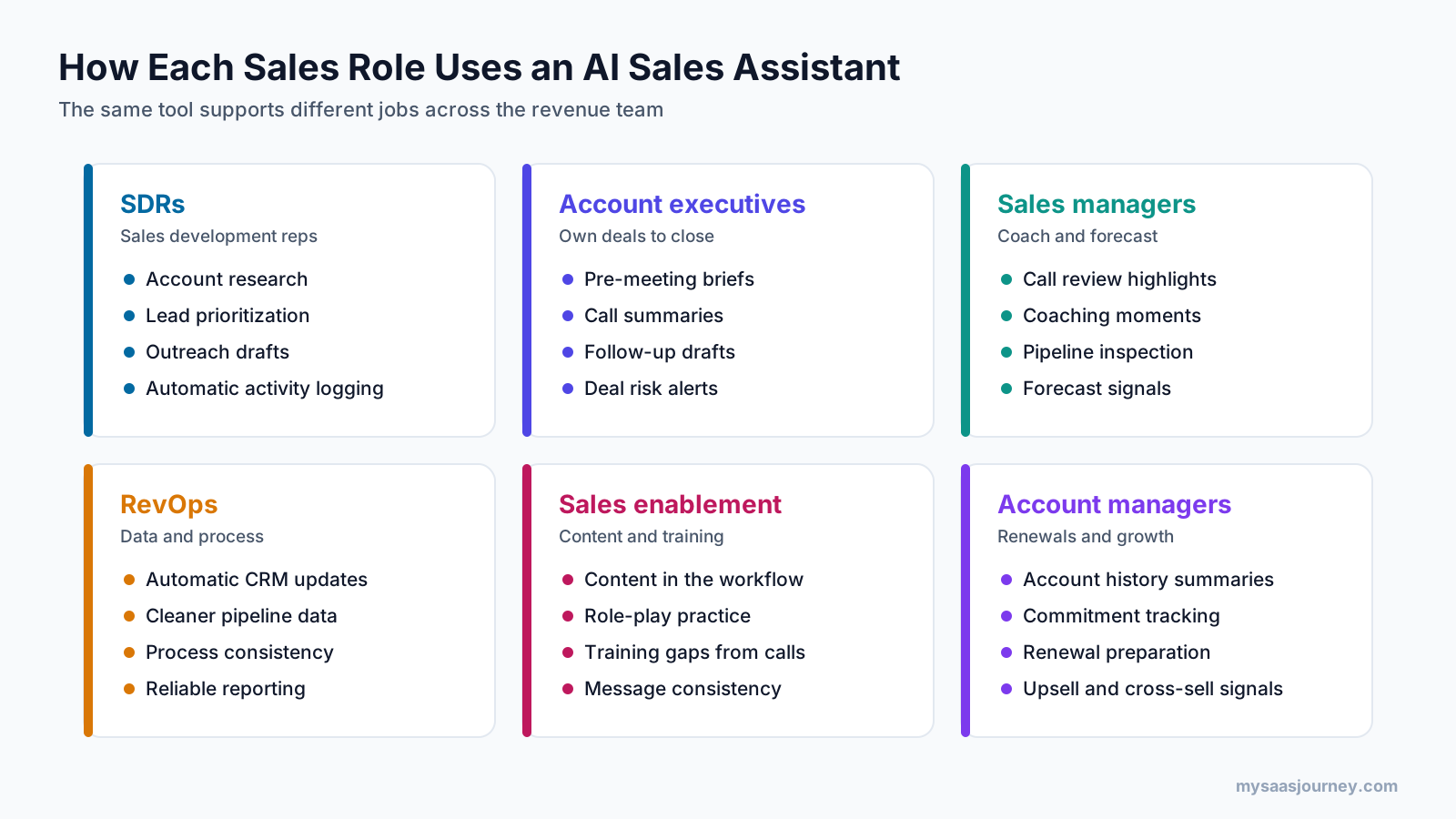
Sales Development Reps (SDRs)
SDRs handle prospecting and first contact. They use the assistant to research accounts, prioritize leads, draft personalized outreach, and log activity without manual entry. The goal is to spend more time on conversations and less time preparing for them.
Account Executives (AEs)
AEs manage deals from discovery to close. They use the assistant for pre-meeting briefs, call summaries, follow-up drafts, and reminders about open commitments. Deal insights help them spot missing stakeholders or stalled opportunities before the forecast call.
Sales Managers
Managers use the assistant to review calls without listening to every recording, coach on specific moments, and inspect pipeline health. Risk alerts and summaries help them focus one-on-one time on the deals and reps that need attention.
Revenue Operations (RevOps)
RevOps teams care about data quality, process consistency, and reporting. Automatic activity capture and field updates give them cleaner data, which improves forecasting and metrics such as pipeline velocity and sales cycle length.
Sales Enablement Teams
Enablement teams own playbooks, messaging, training, and content. The assistant becomes the channel that delivers that material to reps inside their workflow. Call analysis also shows enablement teams which topics, objections, and talk tracks need more training.
Account Managers and Customer Success
Teams responsible for existing customers use the assistant to summarize account history before renewal conversations, track commitments, and surface signals for cross-sell and upsell. Combined with a customer health score, these signals help them act before an account goes quiet.
What Are the Benefits of Using an AI Sales Assistant?
The main benefits of an AI sales assistant are more time for selling, faster follow-up, cleaner CRM data, better prioritization, more consistent messaging, faster ramp for new hires, and better visibility for managers. The value comes from giving time and focus back to the people who sell.
- More time for selling. Automating research, note-taking, and CRM updates frees reps to spend more of their day talking with buyers.
- Faster follow-up. Drafts and summaries are ready minutes after a call, so buyers hear back while the conversation is still fresh.
- Cleaner CRM data. Automatic activity logging gives managers and forecasting models a more accurate picture of the pipeline.
- Better prioritization. Lead scoring and deal alerts point reps toward the accounts most likely to move.
- More consistent messaging. Content recommendations and drafted emails help every rep stay aligned with approved positioning.
- Faster ramp for new hires. Call guidance, role-play, and searchable call libraries help new reps learn from the best conversations on the team.
- Better visibility for managers. Summaries and deal risk flags let managers coach on specific moments instead of reviewing hours of recordings.
What Are the Top Use Cases for AI in Channel Sales?
\n
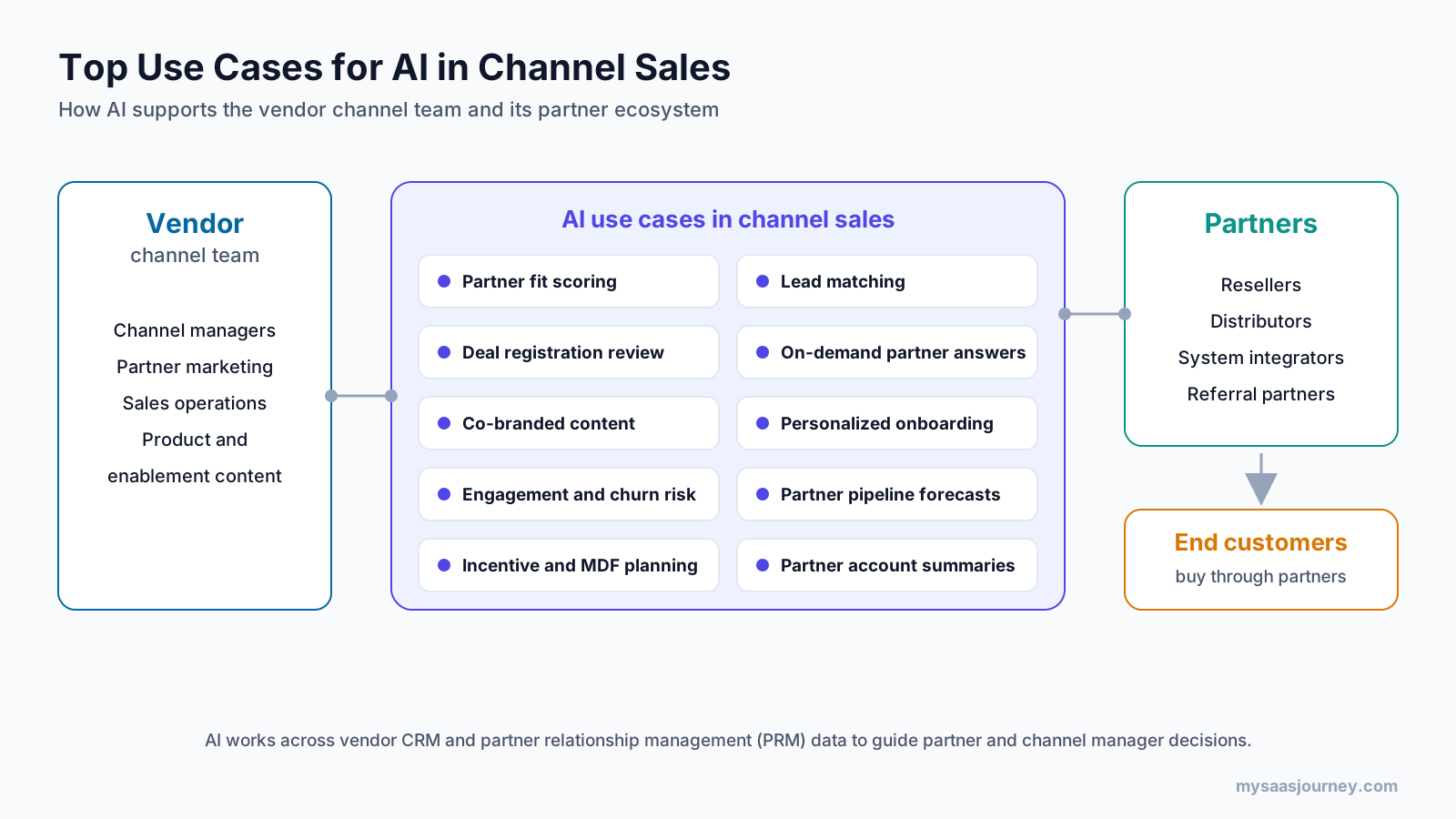
The top use cases for AI in channel sales are partner recruitment and fit scoring, lead matching, deal registration review, on-demand partner enablement, co-branded content, partner onboarding, engagement and churn risk scoring, channel pipeline forecasting, incentive and MDF planning, and partner account summaries. Each one helps channel teams manage partner data at a scale that manual processes cannot match.
Channel sales adds a layer of complexity that direct sales teams do not face. Vendors sell through resellers, distributors, system integrators, and referral partners. Each partner runs its own systems, sells multiple brands, and decides how much attention to give your products. Channel managers often oversee dozens or hundreds of partners with limited visibility into what those partners are doing. Most of this work runs through a partner relationship management (PRM) system alongside the vendor CRM.
Partner Recruitment and Fit Scoring
AI can analyze the profile of your best-performing partners, including the industries, regions, deal sizes, and services they cover. It then scores prospective partners against that profile. Channel teams recruit partners who are more likely to produce revenue instead of signing every company that applies.
Lead Matching and Distribution
When a lead comes in through marketing, AI can route it to the partner best suited to close it. It weighs factors such as geography, industry expertise, certifications, capacity, and past win rates. Faster and better routing improves the experience for the buyer and the partner.
Deal Registration Review and Conflict Detection
Deal registration protects partners from channel conflict, but reviewing every submission manually slows approvals. AI can check registrations against existing CRM records, flag duplicates or overlaps with direct deals, and score the likelihood that a registered deal is valid. Channel managers then focus their review time on the edge cases.
On-Demand Partner Enablement
Partners rarely read product documentation in advance. They look for answers when a customer asks a question. An AI assistant grounded in your product content, pricing rules, and playbooks can answer partner questions in plain language at the moment they need help. It can also recommend the right deck or case study for a specific deal.
Personalized and Co-Branded Content
Generative AI can produce partner-ready emails, landing page copy, and campaign assets tailored to a partner’s region, vertical, and audience. This makes it easier for partners to run campaigns for your products without starting from a blank page. Our guide to AI tools for marketing covers the content side in more depth.
Partner Onboarding
New partners need training, certifications, and portal setup before they sell. AI can personalize the onboarding path based on a partner’s experience and focus area, answer setup questions, and remind partners about incomplete steps.
Partner Engagement and Churn Risk Scoring
AI can track signals such as portal logins, content downloads, training completion, deal registrations, and pipeline activity for each partner. When engagement drops, the system flags the partner so a channel manager can step in before the relationship goes cold.
Channel Pipeline Forecasting
Partner-reported forecasts are often incomplete. AI models can estimate the likelihood of partner deals closing based on deal signals and historical patterns, which gives channel leaders a more reliable view of indirect revenue.
Incentive and Market Development Fund Planning
AI can analyze which incentives, rebates, and market development fund (MDF) activities have produced pipeline in the past. Channel teams can then direct budget toward the partners and programs that generate the best return.
Partner Account Summaries for Channel Managers
Before a quarterly business review or partner call, an AI assistant can summarize a partner’s pipeline, wins, open registrations, training status, and recent activity. Channel managers walk into the conversation prepared without assembling reports by hand.
Which Metrics Show an AI Sales Assistant Is Working?
The metrics that show an AI sales assistant is working are time saved on admin, follow-up speed, activity per rep, conversion rates between pipeline stages, win rate, sales cycle length, forecast accuracy, and tool adoption. Pick one or two metrics tied to the workflow you automated, record a baseline before rollout, and compare after 30 to 60 days.
| Metric | What it tells you | Best for measuring |
|---|---|---|
| Time spent on CRM updates and notes | Whether admin automation is saving rep time | CRM and meeting assistants |
| Time to follow up after a meeting | Whether buyers hear back faster | Meeting and email assistants |
| Meetings booked per rep | Whether research and outreach help is producing conversations | Prospecting and outreach assistants |
| Lead conversion rate | Whether scoring and prioritization focus reps on the right leads | Lead scoring features |
| Opportunity-to-close rate and win rate | Whether deal insights and coaching improve outcomes | Deal insights and coaching |
| Sales cycle length | Whether deals move faster through the pipeline | Deal management features |
| Forecast accuracy | Whether predicted results match actual results | Forecasting features |
| Weekly active users of the tool | Whether reps are actually using it | Every rollout |
Adoption belongs on this list because a tool that reps ignore produces no value, whatever its feature set. For a broader view of how to measure sales productivity, see our glossary entry on sales efficiency.
How Much Does AI Sales Assistant Software Cost?
AI sales assistant software is usually priced per user per month, through feature tiers, by usage, or as an AI add-on to an existing CRM or sales platform. The total cost depends on team size, which features you need, and how much the tool processes, such as call minutes or AI credits.
| Pricing model | How it works | What to watch for |
|---|---|---|
| Per user per month | A fixed fee for each seat | Costs grow with headcount, including occasional users |
| Feature tiers | Higher plans unlock advanced AI features | Key features such as forecasting may sit in top tiers only |
| Usage-based pricing | Charges by call minutes, records enriched, or AI credits | Monthly bills can vary with activity |
| AI add-on | An extra fee on top of an existing CRM or platform plan | Add-on fees can exceed the base plan for small teams |
| Annual contract with minimums | A committed spend for a set number of seats or usage | Less flexibility if adoption is slower than expected |
When you compare quotes, ask for the full cost of the features you will actually use, including onboarding, integrations, and any data enrichment credits. Our glossary entry on pricing models explains the common structures in more detail.
What Are the Limitations and Risks of AI Sales Assistants?
The main limitations of AI sales assistants are dependence on data quality, the risk of inaccurate AI output, privacy and consent obligations, over-automation, adoption challenges, and tool sprawl. Plan for each one before you buy.
- Data quality limits output quality. If your CRM is incomplete or out of date, scores, summaries, and recommendations will reflect those gaps.
- AI can be confidently wrong. Language models sometimes produce inaccurate facts or misread a conversation. Customer-facing content needs human review.
- Privacy and consent rules apply. Call recording, data enrichment, and automated outreach are subject to regulations such as GDPR and local call-recording consent laws.
- Over-automation can hurt your brand. High volumes of generic AI-written emails can damage sender reputation and annoy buyers.
- Adoption is not automatic. Reps abandon tools that add clicks or sit outside their daily workflow.
- Tool sprawl adds cost and confusion. Stacking several overlapping assistants makes it harder to measure impact and maintain data quality.
Security, Privacy, and Compliance Checks
An AI sales assistant touches customer conversations, contact details, and deal data, so security review is part of any evaluation. Ask each vendor the following questions:
- Where is customer data stored, and in which regions?
- Is data encrypted in transit and at rest?
- Does the vendor use your data to train shared AI models, and can you opt out?
- What access controls and audit logs are available?
- How long are recordings and transcripts kept, and can you set your own data retention policy?
- Which compliance certifications and reports can the vendor share?
- How does the tool handle consent for call recording across regions?
Teams that follow a zero trust security model should also confirm that the assistant supports single sign-on and role-based permissions.
How Do You Choose AI Sales Assistant Software?
Choose AI sales assistant software by identifying your biggest sales bottleneck first, then testing tools that solve that problem on your own data, integrate with your stack, give you control over automation, and meet your security requirements. Use the questions below to guide your evaluation.
- Where is your biggest bottleneck? Identify whether the problem is research, outreach, meeting follow-up, CRM hygiene, coaching, or forecasting. Pick a tool that solves that problem well.
- Does it integrate with your current stack? Confirm native integrations with your CRM, email, calendar, and calling or video platforms. Check whether data syncs in both directions.
- How much control do you have over automation? Look for settings that let you choose which actions run automatically and which need approval.
- How accurate is it on your data? Run a trial with your own accounts, calls, and emails instead of relying on a vendor demo.
- How does it handle security and privacy? Use the security checklist above and involve your IT or security team early.
- What does the pricing model look like? Estimate the full cost for your team size, including add-ons and usage charges.
- How much admin work does it require? Some tools need extensive setup, tagging, or prompt tuning. Factor in the time your operations team can give.
- How will you measure success? Agree on one or two metrics before the trial and record a baseline.
If your team is weighing a custom-built assistant against a commercial product, our guide on build vs buy for software covers the trade-offs. For a general evaluation framework, see how to choose the right software for your business.
How Do You Implement an AI Sales Assistant?
Implement an AI sales assistant by starting with one workflow, cleaning the data it depends on, running a pilot with a small group, setting review rules, training the team, measuring results for 30 to 60 days, and expanding in stages. A focused rollout produces better results than switching on every feature at once.
- Start with one workflow. Choose the single task that costs reps the most time, such as call notes or follow-up emails.
- Clean the data the tool depends on. Fix duplicate records, missing fields, and outdated deal stages in the CRM before the pilot.
- Run a pilot with a small group. Include a mix of experienced and newer reps so you see how the tool works for different skill levels.
- Set review rules. Decide which outputs need human approval and who owns quality checks.
- Train the team on the workflow, not only the tool. Show reps where the assistant fits in their day and what they should still do themselves.
- Measure for 30 to 60 days. Compare your chosen metrics against the baseline and collect feedback from reps and managers.
- Expand in stages. Add new features or teams only after the first workflow shows clear value.
For a wider view of rolling out AI across departments, read our step-by-step guide on how to use AI for business. If parts of your sales process run on rules rather than judgment, a workflow automation tool may handle them at lower cost than an AI assistant.
Common Mistakes to Avoid
- Buying before defining the problem. A broad platform bought without a clear use case often ends up underused.
- Skipping data cleanup. AI amplifies whatever is in your CRM, including duplicates and outdated stages.
- Sending AI drafts without review. Unchecked emails can include errors, wrong names, or an off-brand tone.
- Measuring too many things at once. A long list of metrics makes it hard to tell what changed and why.
- Ignoring rep feedback. The people using the tool every day will spot friction long before a dashboard does.
How Do AI Sales Assistants Fit into AI Sales Enablement?
AI sales enablement is the wider practice of using AI to give sellers the knowledge, content, coaching, and insights they need to win deals. AI sales assistant software is the main way that enablement reaches reps day to day. Content recommendations, call coaching, role-play, and deal guidance all deliver enablement inside the rep’s workflow instead of in a separate training portal.
If you are building an AI sales enablement strategy, treat the assistant as the delivery layer. Your enablement team still owns the playbooks, messaging, and training content. The assistant makes that material available at the moment a rep needs it, and its call analysis tells the enablement team where reps need more support.
What Is the Future of AI Sales Assistants?
AI sales assistants are moving toward more autonomy, deeper integration with business systems, and broader coverage of the full revenue cycle. Several trends are shaping the category.
- From assistant to agent. More products let teams hand specific workflows, such as meeting booking or follow-up sequences, to AI agents while keeping approval steps for sensitive actions.
- Standard connections to business data. Protocols such as MCP make it easier for AI models to read from and act in CRMs, calendars, and content systems without custom integration work.
- Voice and real-time support. Assistants are getting better at following live conversations and supporting reps during calls rather than only after them.
- Coverage beyond new business. Tools increasingly support renewals, expansion, and partner sales alongside prospecting and closing.
- Buyers who research with AI. As more buyers use AI search tools to shortlist software, sales teams need consistent, accurate information about their products across every channel. Our study on who AI search recommends for software looks at this shift.
Key Terms Glossary
- AI sales assistant: Software that uses AI to help sales reps with research, writing, note-taking, CRM updates, and prioritization while a person makes final decisions.
- AI sales agent: Software that completes sales workflows on its own with limited human review, such as prospecting and booking meetings.
- AI sales copilot: Another name for an AI sales assistant, often used for assistants built into a CRM.
- AI sales enablement: The use of AI to deliver sales content, training, coaching, and insights to sellers inside their workflow.
- Conversation intelligence: Technology that records, transcribes, and analyzes sales conversations.
- Deal registration: A channel sales process where partners register opportunities to claim them and avoid conflict.
- Market development funds (MDF): Budget a vendor gives partners to run marketing activities for its products.
- Partner relationship management (PRM): Software that manages partner onboarding, content, deal registration, and performance.
- Retrieval-augmented generation (RAG): A method that retrieves relevant facts from your own data before an AI model writes a response.
Conclusion
AI sales assistant software helps sales teams spend less time on research, notes, and data entry and more time with buyers. It connects to your sales data, uses language models and machine learning to understand context, and then drafts, recommends, or completes the next step while keeping a person in charge of what reaches the customer.
The strongest results come from teams that start with one clear problem, clean their CRM data, set review rules, and measure impact before expanding. The same approach applies in channel sales, where AI helps vendors match leads to partners, review deal registrations, and support partners with answers and content when they need them. To explore tools in this space, browse our AI software category.
Frequently Asked Questions
What is an AI sales assistant?
An AI sales assistant is software that uses artificial intelligence to help sales reps with tasks such as prospect research, email drafting, meeting notes, CRM updates, and deal prioritization. It works alongside the rep and leaves final decisions on customer-facing actions to a person.
What does AI sales assistant software do?
AI sales assistant software researches accounts, scores leads, drafts emails, schedules meetings, records and summarizes calls, updates the CRM, flags deal risks, recommends sales content, and coaches reps. It connects to your sales systems and uses AI to suggest or complete the next step.
Will AI sales assistants replace sales reps?
AI sales assistants are designed to remove repetitive work, not to replace the relationship-building, judgment, and negotiation that complex sales require. They change how reps spend their time rather than removing the need for reps.
What is the difference between an AI sales assistant and an AI sales agent?
An AI sales assistant supports a human seller by drafting, summarizing, and recommending. An AI sales agent completes parts of the sales process on its own, such as sending outreach sequences and booking meetings, with limited human review.
Is an AI sales copilot the same as an AI sales assistant?
Yes, in most cases. “Copilot” is a common product name for an AI sales assistant, especially one built into a CRM or productivity suite. Both describe AI that works alongside a seller rather than replacing them.
Will CRM be replaced by AI?
AI is unlikely to replace the CRM itself because sales teams still need a system of record for customers, contacts, and deals. What AI changes is how people use the CRM. Assistants increasingly update records automatically and let users ask questions about their pipeline in plain language.
How much does AI sales assistant software cost?
Pricing depends on the vendor and feature set. Common models include a monthly fee per user, tiered plans that unlock advanced AI features, usage-based pricing for call minutes or AI credits, and AI add-ons to existing CRM plans.
Is AI sales assistant software safe to use with customer data?
It can be, provided you review the vendor’s security practices. Check data storage locations, encryption, access controls, retention policies, compliance certifications, and whether your data is used to train shared AI models. Confirm that call recording follows consent laws in each region where you sell.
Can small businesses use AI sales assistants?
Yes. Many tools offer plans for small teams and individual sellers, and features such as meeting summaries and email drafting are included in common CRMs and productivity suites. Small teams often see quick value because each rep handles more of their own admin work.
How do you measure the ROI of an AI sales assistant?
Pick one or two metrics tied to the workflow you automated before rollout. Examples include hours spent on CRM updates, time to follow up after a meeting, meetings booked per rep, win rate, and forecast accuracy. Compare results against your baseline after 30 to 60 days.
How is AI used in channel sales?
In channel sales, AI is used to score and recruit partners, match leads to the right partner, review deal registrations, answer partner product questions, create co-branded content, track partner engagement, and forecast partner pipeline.
What data does an AI sales assistant need?
An AI sales assistant needs access to CRM records, email and calendar activity, call and meeting recordings, and sales content. Many tools also use public company data and buyer intent signals to enrich account records.
—