
Mortgage brokers commonly use general small-business accounting software such as QuickBooks Online, Xero, Zoho Books, or FreshBooks, connected to their loan origination system (LOS), CRM, and payroll. Larger multi-branch brokerages often move to mid-market platforms such as Sage Intacct or NetSuite. Mortgage-specific accounting systems such as Loan Vision and AMB are built mainly for mortgage bankers and lenders, so brokers usually need them only when they start funding loans themselves.
That short answer hides an important detail. A mortgage broker’s books are simple in some ways and demanding in others. Brokers do not fund loans, carry warehouse lines, or service loans, so they do not need the loan-level accounting that lenders use. But they do need to track compensation on every funded loan, split it accurately with loan officers, handle clawbacks, and produce the financial reports that regulators ask for.
This guide explains which accounting software mortgage brokers use at each stage of growth, how broker compensation affects your setup, what reporting rules your books must support in the US, UK, and Australia, and how to configure your software so month-end close takes hours instead of days.
Key takeaways
- Most small and mid-size brokerages can run their books on QuickBooks Online, Xero, Zoho Books, or FreshBooks. None of them track loans natively, so loan data comes from your LOS.
- Mortgage accounting software such as Loan Vision and AMB targets mortgage bankers, banks, and credit unions. Brokers rarely need it unless they become lenders.
- US broker compensation is paid by either the lender or the borrower on a given loan, never both, and it cannot vary with the loan’s terms. Your chart of accounts should reflect that split.
- Tracking revenue and commissions by loan officer and branch matters more than any single feature. Use classes, locations, tracking categories, or reporting tags.
- Your books must support regulatory reporting: the NMLS Mortgage Call Report and state financial statements in the US, the FCA’s RMAR in the UK, and commission and clawback tracking in Australia.
What Accounting Software Do Mortgage Brokers Use at Each Stage?
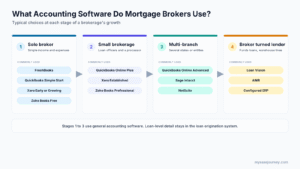
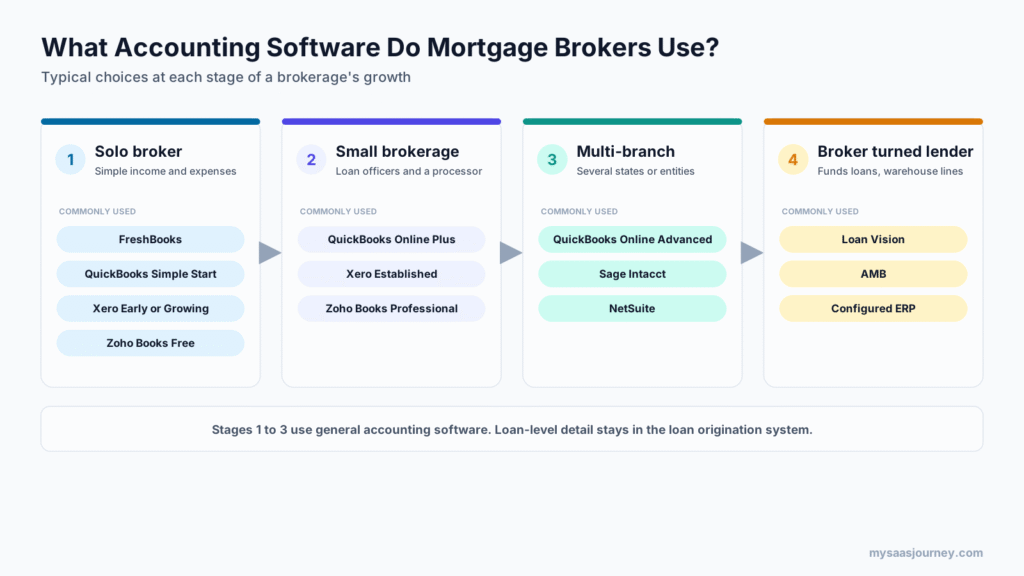
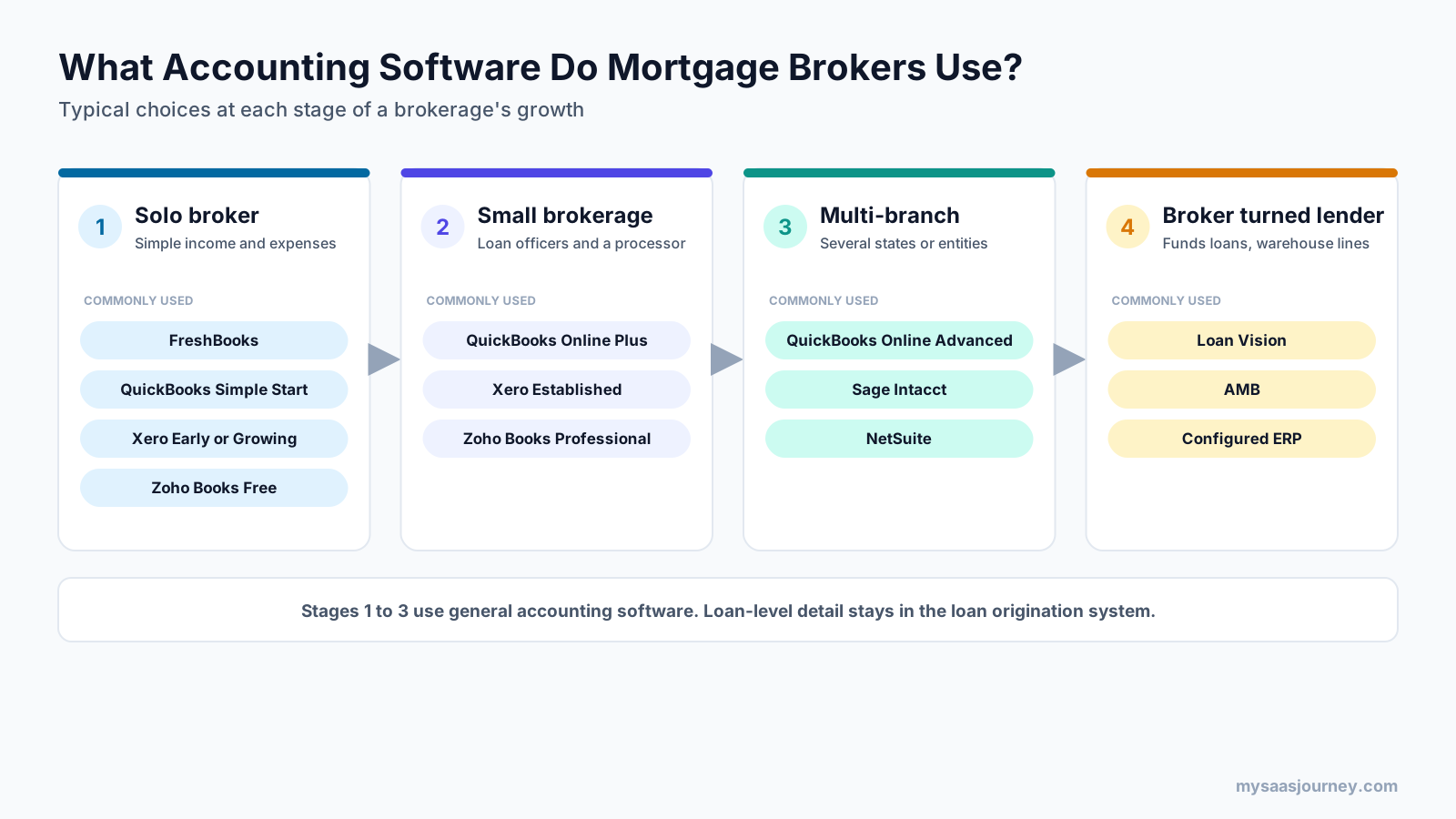
The software a mortgage brokerage uses depends mostly on its size and business model. Solo brokers need simple bookkeeping, brokerages with loan officers need commission tracking by person, multi-branch firms need multi-entity reporting, and brokers that start funding loans need mortgage banking software.
| Brokerage stage | Typical accounting software | Why it fits |
|---|---|---|
| Solo broker or self-employed loan officer | FreshBooks, QuickBooks Online Simple Start, Xero Early or Growing, Zoho Books Free or Standard | Low cost, simple income and expense tracking, bank feeds |
| Small brokerage with loan officers and a processor | QuickBooks Online Plus, Xero Established, Zoho Books Professional | Tracking by loan officer, payroll add-ons, project or class reporting, multiple users |
| Multi-branch or multi-state brokerage | QuickBooks Online Advanced, Sage Intacct, NetSuite | More users, unlimited classes and locations, multi-entity consolidation, approval workflows |
| Broker becoming a lender (correspondent or mortgage banker) | Loan Vision, AMB, or an ERP configured for mortgage banking | Loan-level accounting, warehouse funding, loan sale accounting, investor reporting |
The general accounting tools in the first three rows hold the general ledger, bank reconciliations, payables, and financial statements. Loan-level detail, such as loan amount, lender, borrower, and funding date, stays in your loan origination system and enters the books as summarized compensation entries.
Mortgage Broker vs Mortgage Lender: Why Your Software Choice Depends on It
A mortgage broker arranges loans that a lender funds, while a mortgage lender or banker funds loans with its own capital or a warehouse line. That difference decides whether you need general accounting software or mortgage banking software.
Many lists of “mortgage broker accounting software” mix the two. For example, Loan Vision’s website lists independent mortgage banks, banks, and credit unions as its segments and does not mention brokers. AMB, from Advantage Systems, describes its users as mortgage bankers, accountants, and branch managers. These tools offer loan-level accounting, commission management, and LOS integration because lenders must account for each loan they fund, hold, and sell.
A broker’s accounting needs are different:
| Accounting need | Mortgage broker | Mortgage lender or banker |
|---|---|---|
| Funds loans | No | Yes, with own capital or a warehouse line |
| Main revenue | Compensation from the lender or borrower | Gain on sale of loans, interest income, origination fees |
| Loan-level ledger | Not required in accounting software | Usually required |
| Warehouse line accounting | No | Yes |
| Loan sale and investor reporting | No | Yes |
| Commission splits with loan officers | Yes | Yes |
| Typical software | General small-business or mid-market accounting | Mortgage banking accounting or configured ERP |
If your brokerage plans to move into correspondent lending or become a mortgage banker, plan your accounting migration alongside your licensing change. Moving from a small-business ledger to a mortgage banking system is a significant project, and it is easier before loan volume grows.
How Do Mortgage Brokers Get Paid, and What Does It Mean for Your Books?
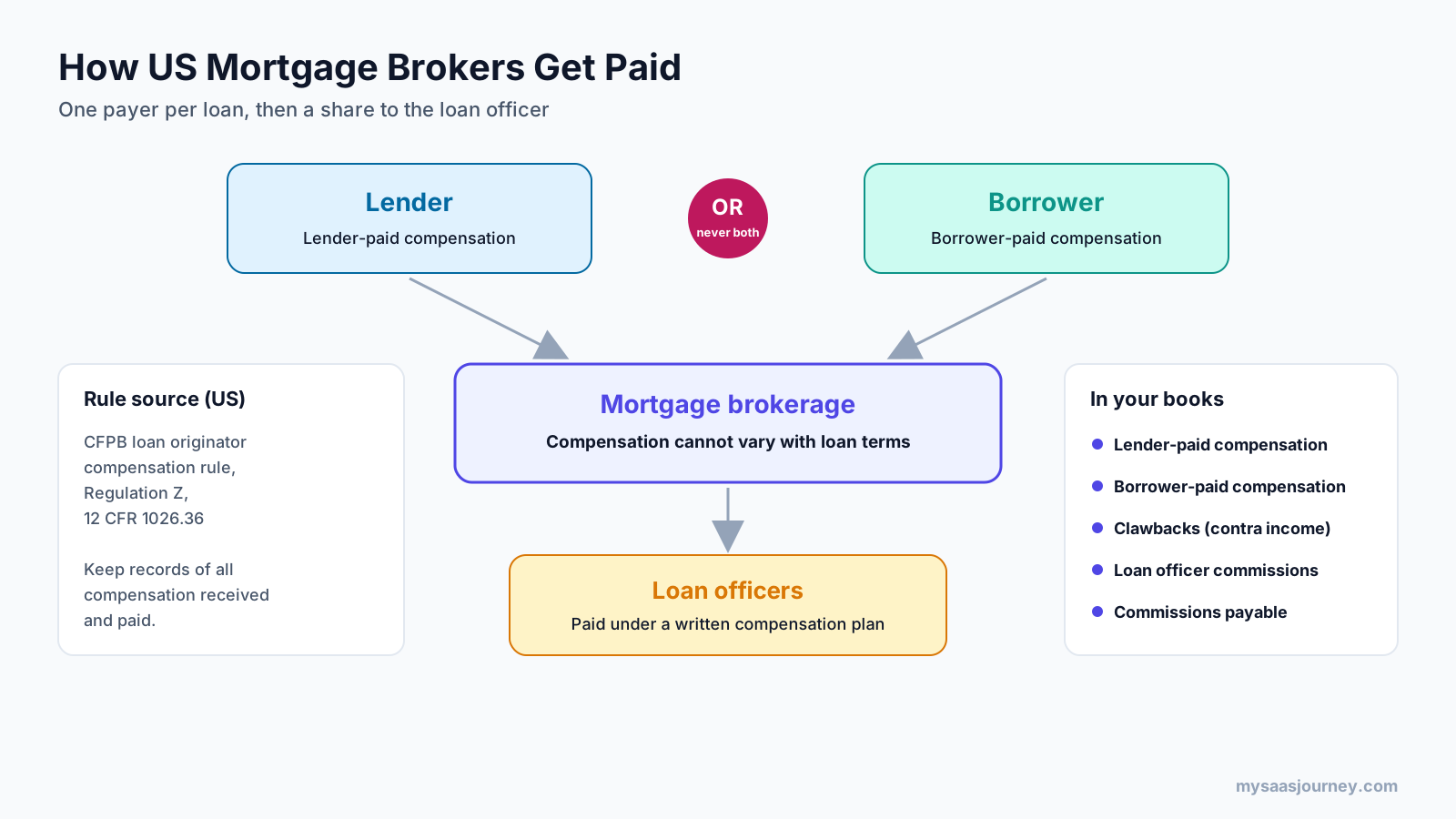
US mortgage brokers are paid either by the lender (lender-paid compensation) or by the borrower (borrower-paid compensation) on each loan, but never both, and the amount cannot vary with the loan’s interest rate or other terms. The brokerage then pays its loan officers a share of that compensation. Your accounting software should record each of these flows in a separate account.
United States: Lender-Paid and Borrower-Paid Compensation
The Consumer Financial Protection Bureau’s loan originator compensation rule under Regulation Z (12 CFR 1026.36) shapes how brokers are paid. According to the CFPB, a loan originator cannot be paid by both the consumer and another person such as the creditor, and compensation cannot increase because a consumer takes a loan with a higher rate or certain other terms.
For your books, this means:
- Separate revenue accounts for lender-paid and borrower-paid compensation, so you can show which type applied to each loan.
- Compensation records you can retrieve. Under the 2013 rule, a loan originator organization must keep records sufficient to evidence all compensation it receives from a creditor, a consumer, or another person, and all compensation it pays to its individual loan originators. Your accounting software, LOS, and payroll records together form that evidence.
- Loan officer compensation plans that pay on permitted factors, such as loan amount or volume, rather than on loan terms. Your commission calculations should follow the written plan exactly.
Brokers must also follow RESPA Section 8, which prohibits kickbacks and unearned fees for referrals of settlement services. Do not set up revenue accounts for referral payments from settlement service providers without legal advice.
United Kingdom: Procuration Fees and Client Fees
UK mortgage brokers usually earn a procuration fee (proc fee) paid by the lender when a mortgage completes, and many also charge clients a broker fee. Some brokers also earn commission on protection insurance they arrange. Record each income type in its own account, because the FCA’s Retail Mediation Activities Return (RMAR) asks for regulated revenue and financial results.
Australia: Upfront Commission, Trail Commission, and Clawbacks
Australian brokers are typically paid an upfront commission and an ongoing trail commission by the lender, usually through an aggregator. Reforms that took effect in July 2020, following the Hayne Royal Commission, link upfront commission to the amount the borrower draws down rather than the loan limit and ban campaign and volume-based commissions, according to Treasury’s consultation summary. Trail commissions were not banned.
Lenders can claw back upfront commission if a loan is repaid or refinanced early. Industry reporting by The Adviser describes a standard structure in which the full upfront commission is clawed back in the first year. Your books need a way to record clawbacks as reductions of revenue and to reconcile aggregator commission statements every month.
Which Accounting Software Do Mortgage Brokers Commonly Use?
QuickBooks Online, Xero, Zoho Books, and FreshBooks are the general accounting tools most often recommended for mortgage brokers, while Sage Intacct and NetSuite serve larger multi-entity brokerages. Prices below come from each vendor’s US pricing page in November 2026 and exclude promotional discounts.
| Software | Best for | Starting price (regular, monthly) | Tracking by loan officer or branch | Payroll |
|---|---|---|---|---|
| QuickBooks Online | US brokerages of most sizes, especially those with a QuickBooks-savvy CPA | $38 (Simple Start) | Classes and locations on Plus (up to 40) and Advanced (unlimited) | QuickBooks Payroll add-on |
| Xero | Brokerages in the UK, Australia, and New Zealand, and US firms that prefer Xero | $27 (Early) | Tracking categories and projects (Established plan) | Gusto-powered payroll add-on in the US |
| Zoho Books | Budget-conscious brokerages that want automation and API access | Free under $50K annual revenue, paid plans from $20 | Project profitability (Professional), custom fields | Integrations |
| FreshBooks | Solo brokers and very small teams | $23 (Lite) | Limited | Payroll add-on |
| Sage Intacct | Multi-entity and multi-branch brokerages | Quote | Dimension-based reporting and consolidation | Integrations |
| NetSuite | Larger brokerage groups with ERP needs | Quote | Subsidiaries and segments | Integrations or add-on |
QuickBooks Online
QuickBooks Online is a common default for US brokerages, partly because many accountants and bookkeepers who serve mortgage firms already use it. The Plus plan supports up to 40 classes and locations and project profitability tracking, which you can use to report revenue and commission expense by loan officer and branch. The Advanced plan supports 25 users, unlimited classes and locations, approval workflows, and free 1099 e-filing.
Pricing: Simple Start costs $38 per month, Essentials $85, Plus $140, and Advanced $340 at regular prices. A free plan is available for one user.
Watch out for: Simple Start and Essentials do not list class and location tracking. If you employ loan officers, start on Plus so you can report by person from day one.
Xero
Xero is widely used by small businesses in Australia, New Zealand, and the UK, and many broker-focused accountants in those markets work in it. It offers bank feeds, auto-reconciliation on the Growing and Established plans, and tracking categories for reporting by branch or loan officer. The Established plan adds projects, multi-currency, expense claims, and 180-day cash flow forecasting.
Pricing: Early costs $27 per month and is limited to 20 invoices and 5 bills, Growing costs $59, and Established costs $97 in the US. Payroll powered by Gusto costs $36 per month plus $6 per employee or contractor.
Watch out for: The Early plan’s bill limit is too low for most brokerages with regular vendor payments.
Zoho Books
Zoho Books is a lower-cost option with a free plan for businesses under $50,000 in annual revenue. Paid plans add API access, custom fields, approval workflows, project profitability, and budgets. It suits brokerages that already use other Zoho apps or want to automate journal entries from their LOS through the API.
Pricing: Free for up to $50,000 in revenue. Standard costs $20 per month billed monthly or $15 billed annually, Professional costs $50 or $40, and Premium costs $70 or $60.
Watch out for: Fewer accountants specialize in Zoho Books than in QuickBooks or Xero, so check that your bookkeeper is comfortable with it.
FreshBooks
FreshBooks is built for service businesses and freelancers, which makes it a fit for solo brokers who mainly need to track commission income and expenses. Team members cost $11 per month each.
Pricing: Lite costs $23 per month, Plus $43, and Premium $70 at regular prices.
Watch out for: The Lite plan does not include bank reconciliation or double-entry accounting reports. Choose Plus or above if your accountant needs a full balance sheet and reconciled accounts.
Sage Intacct and NetSuite
Brokerage groups with several legal entities, branches in many states, or plans to merge with other firms often outgrow small-business software. Sage Intacct and NetSuite are mid-market and enterprise platforms that support multi-entity consolidation, dimension-based reporting, and more detailed approval controls. Both are quote-based and usually require an implementation partner.
Loan Vision and AMB: When a Broker Becomes a Lender
Loan Vision lists loan-level accounting, AP and cash management, commissions, reporting, and LOS integration for independent mortgage banks, banks, and credit unions. AMB offers loan-level detail, commission calculations, and more than 500 reports for mortgage bankers and branch managers. These tools are worth evaluating only when your firm funds loans and needs to account for each loan from funding to sale.
What Other Software Feeds a Mortgage Broker’s Books?
A mortgage broker’s accounting software sits in the middle of a small technology stack: the loan origination system supplies funded loan data, the CRM supplies pipeline and referral data, payroll handles loan officer pay, and bank feeds and lender or aggregator statements confirm the money received.
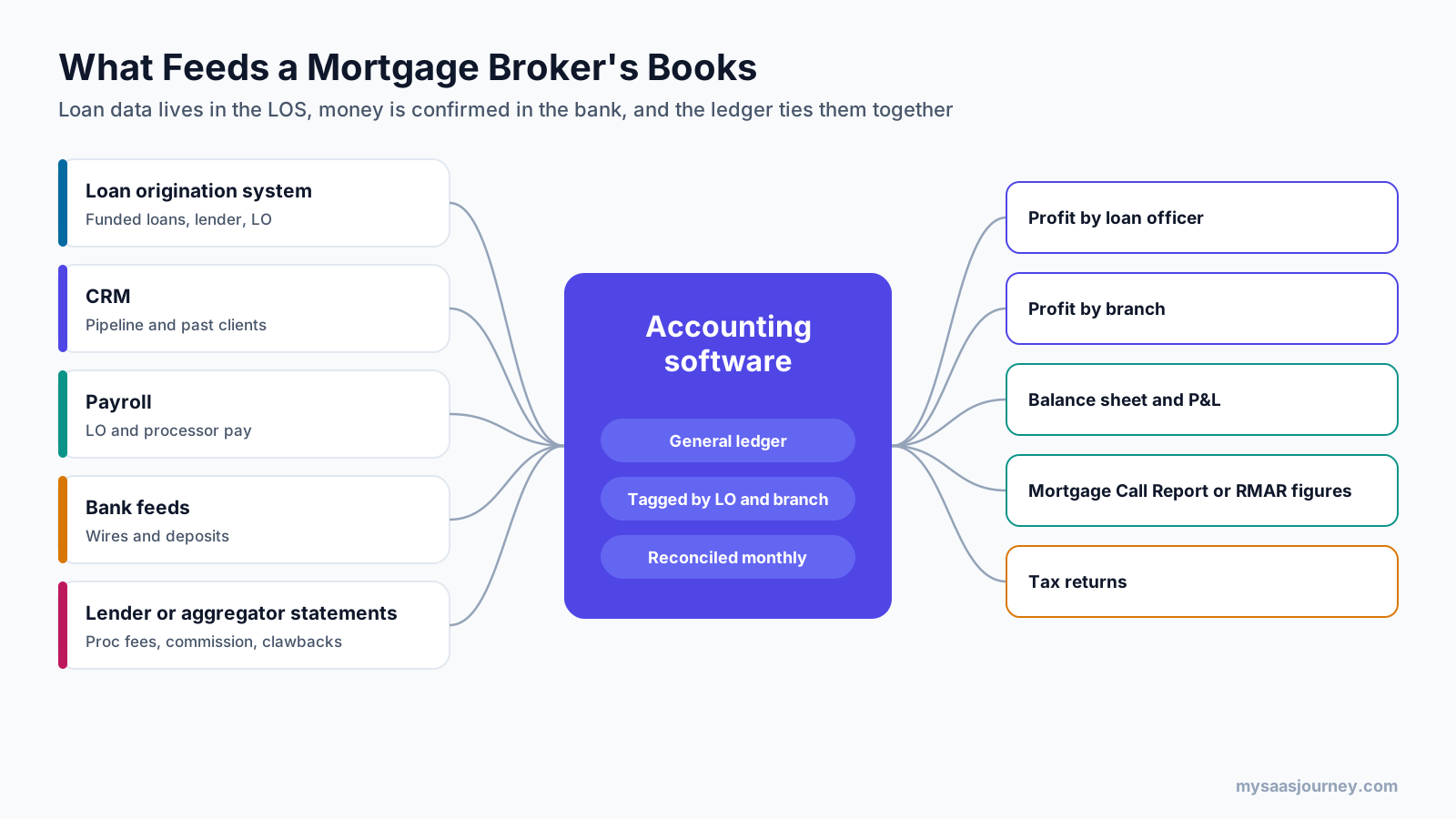
- Loan origination system (LOS). The LOS holds every loan file, including loan amount, lender, compensation, loan officer, and funding date. A funded loans report from the LOS is the starting point for your monthly revenue reconciliation.
- CRM. Your CRM tracks leads, pipeline, and past clients. It helps forecast commission income, but it is not a substitute for accounting software. If you are comparing options, see our list of the best free CRM software or browse our CRM software category.
- Payroll. Many brokerages pay loan officers and processors through payroll, with commission added to each pay run. Payroll should sync to your accounting software so commission expense lands in the right accounts and classes.
- Bank feeds. Daily bank feeds let you match lender wires and borrower payments to expected compensation.
- Lender and aggregator statements. UK proc fee statements and Australian aggregator commission statements list each payment and clawback, which you reconcile to your bank deposits.
- Document storage and security. Loan files contain sensitive borrower data. Use secure storage, strong passwords, and backups. Our guides to backup software and password managers cover the basics.
When systems do not integrate natively, you can connect them through an API or an automation platform. Our comparison of Zapier vs Make explains how those platforms work. Keep in mind that automated postings should still be reviewed before month-end close.
How to Set Up Accounting Software for a Mortgage Brokerage
Set up your accounting software with separate accounts for each type of compensation, tracking by loan officer and branch, a consistent rule for when revenue is recorded, and a month-end routine that reconciles funded loans to cash received. The steps below apply to QuickBooks Online, Xero, Zoho Books, and similar tools.
Step 1: Build a Mortgage-Specific Chart of Accounts
A generic small-business chart of accounts hides the details regulators and owners need. The sample below is a starting point for a US brokerage. Ask your CPA to adapt it to your entity type and state requirements.
| Account | Type | Purpose |
|---|---|---|
| Lender-paid compensation | Income | Compensation paid by the lender on funded loans |
| Borrower-paid compensation | Income | Compensation paid directly by the borrower |
| Other permitted fees | Income | Fees for services that are not loan origination, where your state and federal rules allow them |
| Compensation clawbacks and chargebacks | Contra income | Reductions when a lender reclaims compensation |
| Loan officer commissions | Cost of revenue | Commission paid to loan officers |
| Processor compensation | Cost of revenue | Pay for loan processors tied to loan volume, if applicable |
| Licensing and NMLS fees | Expense | State licenses, NMLS fees, and renewals |
| Surety bonds and insurance | Expense | State surety bonds and errors and omissions insurance |
| LOS, CRM, and pricing software | Expense | Technology subscriptions |
| Commissions payable | Liability | Commission owed to loan officers but not yet paid |
| Compensation receivable | Asset | Compensation earned on funded loans but not yet received |
Step 2: Track Revenue and Commissions by Loan Officer and Branch
Use classes and locations in QuickBooks Online, tracking categories in Xero, or reporting tags and custom fields in Zoho Books to label every compensation entry and commission expense with the loan officer and branch. This gives you profit by loan officer, supports commission disputes, and makes state-by-state reporting faster.
Step 3: Choose When to Record Compensation
Pick one consistent point at which you record compensation, and document it. Many brokerages record lender-paid compensation when the loan funds, because the amount is confirmed on the closing documents at that point. Others record it when cash arrives. Your choice affects your financial statements and taxes, so agree on it with your CPA.
Step 4: Record a Funded Loan (Illustrative Example)
The example below uses round numbers to show the entries. It is not tax or legal advice.
A loan officer closes a $400,000 loan with lender-paid compensation of 1.50 percent, which is $6,000. Under the brokerage’s written compensation plan, the loan officer earns 50 percent of that amount, which is $3,000.
| When | Debit | Credit | Amount | Tag |
|---|---|---|---|---|
| Loan funds | Compensation receivable | Lender-paid compensation | $6,000 | Loan officer, branch |
| Lender wire arrives | Operating bank account | Compensation receivable | $6,000 | Loan officer, branch |
| Commission earned | Loan officer commissions | Commissions payable | $3,000 | Loan officer, branch |
| Commission paid through payroll | Commissions payable | Payroll clearing or bank | $3,000 | Loan officer, branch |
If the lender later claws back the compensation, record a debit to compensation clawbacks and a credit to compensation receivable or cash. Then follow your compensation plan to decide whether any commission is recovered from the loan officer.
Step 5: Run a Monthly Close Routine
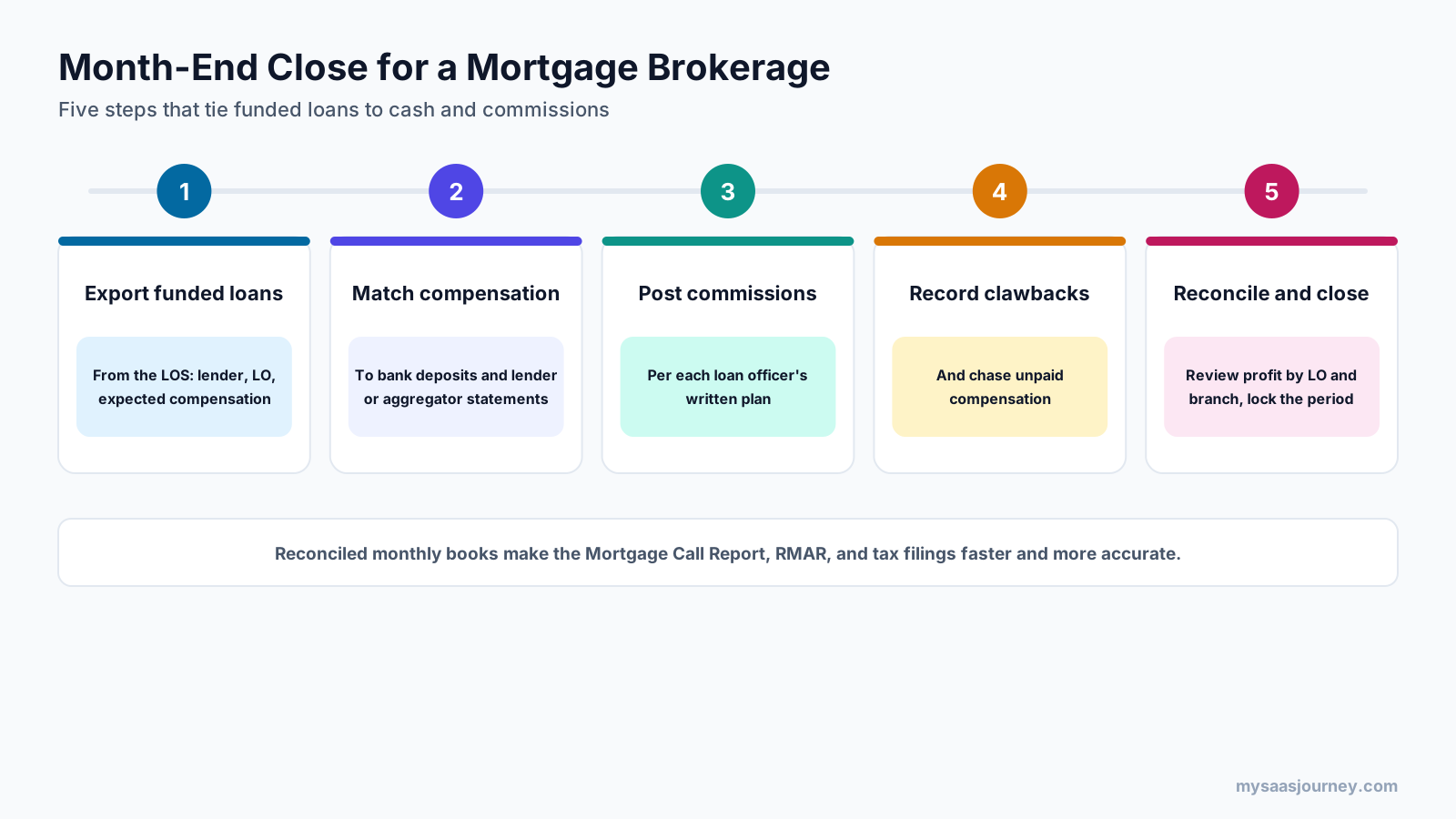
- Export funded loans from your LOS for the month, with lender, loan officer, and expected compensation.
- Match compensation received to bank deposits and to lender or aggregator statements.
- Calculate and post commissions according to each loan officer’s written plan.
- Record clawbacks and adjustments, and follow up on any unpaid compensation.
- Reconcile and close bank accounts, review profit by loan officer and branch, and lock the period.
A consistent close makes quarterly and annual regulatory filings much easier, because the numbers you report already tie to reconciled accounts.
What Reporting Rules Must a Mortgage Broker’s Books Support?
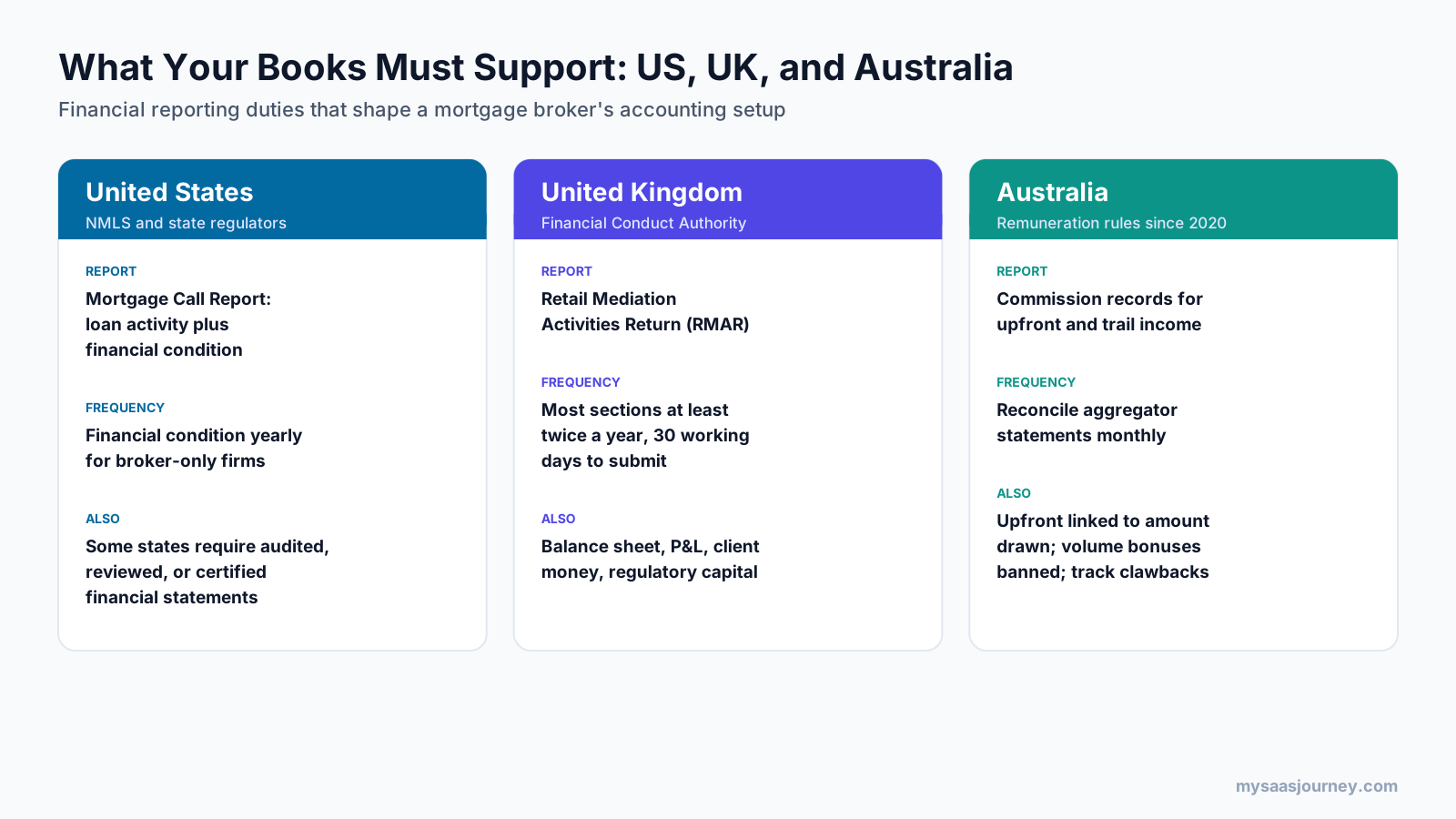
Your accounting software must produce the financial information regulators require: the NMLS Mortgage Call Report and state financial statements in the US, the FCA’s RMAR in the UK, and accurate commission records under Australia’s broker remuneration rules.
United States: NMLS Mortgage Call Report and State Financial Statements
Licensed mortgage companies file a Mortgage Call Report (MCR) through NMLS. The MCR has two parts: Residential Mortgage Loan Activity (RMLA) and Financial Condition (FC). According to NMLS, lenders and servicers file the financial condition section quarterly, while companies whose records show broker-only activity file it annually.
Some states also require financial statements. For example, Massachusetts requires mortgage brokers to submit audited or reviewed financial statements through NMLS within 90 days of fiscal year end, and North Carolina requires an audited or certified statement of financial condition within the same period. Requirements vary by state, so check each state where you hold a license.
Your accounting software supports these filings by producing an accurate balance sheet, income statement, and net worth figure from reconciled books.
United Kingdom: FCA Retail Mediation Activities Return (RMAR)
FCA-authorized mortgage intermediaries submit the RMAR. Its sections include a balance sheet (RMA-A), profit and loss account (RMA-B), and client money and assets (RMA-C), according to the FCA. The FCA says most sections are reported at least twice a year, based on your accounting reference date, with 30 working days to submit. Capital requirements under MIPRU also depend on your figures. The FCA’s guidance states a base requirement of £5,000 for firms that do not hold client money.
Set up your chart of accounts so RMAR figures come straight from your accounting software, especially regulated revenue by type.
Australia: Commission Records Under the 2020 Remuneration Rules
Australian brokers operate under a best interests duty and remuneration rules introduced in 2020. Your books should record upfront and trail commission separately, track clawbacks, and reconcile aggregator statements monthly. This supports tax reporting and helps you show how you are paid if a lender, aggregator, or regulator asks.
How to Choose Accounting Software as a Mortgage Broker
Choose accounting software by matching it to your brokerage stage, confirming it can track revenue and commissions by loan officer, checking payroll and LOS connections, and making sure your accountant can work in it.
Use this checklist when comparing options:
- Tracking by person and branch. Can you tag every entry with loan officer and branch on the plan you can afford?
- Payroll connection. Does commission flow from payroll into the right accounts automatically?
- LOS and CRM integration. Can you import funded loan data, or at least export and import it cleanly?
- Users and permissions. Can processors, bookkeepers, and your CPA have the right level of access?
- Bank feeds and reconciliation. Are your banks supported, and is reconciliation included in your plan?
- Reporting. Can you build profit by loan officer, profit by branch, and the balance sheet your state requires?
- Accountant familiarity. Is your CPA or bookkeeper comfortable with the software?
- Room to grow. If you plan to open branches or become a lender, how hard will it be to move later?
For a broader framework, see our guide on how to choose the right software for your business. You can also compare small-business tools in our guides to invoicing software and free bookkeeping software, or browse our financial management software category.
Common Bookkeeping Mistakes Mortgage Brokers Make
The most common mistakes are mixing personal and business money, recording all compensation in one account, skipping loan officer tracking, ignoring clawbacks, and leaving regulatory reports until the deadline.
- Mixing personal and business funds. Keep a dedicated business bank account and card from day one.
- Using one revenue account for everything. Separate lender-paid, borrower-paid, and other income so you can show how you were paid.
- Not tagging entries by loan officer. Without it, you cannot calculate profit by person or answer commission questions quickly.
- Recording compensation inconsistently. Pick funding date or cash receipt and apply it every month.
- Ignoring clawbacks. Unrecorded clawbacks overstate revenue and can lead to overpaid commissions.
- Calculating commissions outside the written plan. Spreadsheet adjustments that do not match the plan create compliance risk under compensation rules.
- Leaving regulatory filings to the last minute. Reconcile monthly so Mortgage Call Report, RMAR, or tax figures are ready when due.
Do Mortgage Brokers Need a Specialist Accountant?
A specialist is not required, but an accountant who understands mortgage compensation rules, state licensing requirements, and loan officer pay plans can save time and reduce compliance risk. Look for experience with your accounting software, with commission-based businesses, and with the financial statements your licensing states require. Ask whether they prepare audited or reviewed statements if your state needs them, or whether they work with a CPA firm that does.
Final Thoughts
Mortgage brokers do not need complex mortgage banking systems to keep good books. QuickBooks Online, Xero, Zoho Books, and FreshBooks cover the needs of most small and mid-size brokerages when they are set up with the right chart of accounts, tracking by loan officer and branch, and a disciplined month-end routine. Larger brokerage groups move to Sage Intacct or NetSuite for multi-entity reporting, and firms that start funding loans move to mortgage banking software such as Loan Vision or AMB.
The software matters less than the setup. Separate your compensation types, tag every entry by loan officer, reconcile funded loans to cash every month, and make sure your books can produce the reports your regulator expects.
Frequently Asked Questions
What accounting software do most mortgage brokers use?
Mortgage brokers commonly use general small-business accounting software such as QuickBooks Online, Xero, Zoho Books, or FreshBooks. QuickBooks Online is a common choice in the US, while Xero is widely used by small businesses in Australia, New Zealand, and the UK. Larger brokerage groups often use Sage Intacct or NetSuite.
Is QuickBooks good for mortgage brokers?
QuickBooks Online works well for many mortgage brokerages. The Plus plan supports up to 40 classes and locations for tracking revenue and commissions by loan officer and branch, and the Advanced plan adds unlimited classes, more users, and approval workflows. It does not track loans natively, so funded loan data comes from your loan origination system.
Can mortgage brokers use Xero?
Yes. Xero suits mortgage brokers who need bank feeds, reconciliation, and tracking categories for branch or loan officer reporting. Its Established plan adds projects and multi-currency, and payroll is available as an add-on in the US.
Do mortgage brokers need mortgage accounting software?
Usually not. Mortgage accounting software such as Loan Vision and AMB is designed for mortgage bankers and lenders that fund, hold, and sell loans. Brokers that do not fund loans can use general accounting software, provided it is set up to track compensation and commissions properly.
What is the difference between mortgage broker and mortgage lender accounting?
Brokers record compensation they earn for arranging loans and the commissions they pay loan officers. Lenders also account for the loans themselves, including warehouse funding, loan sales, interest income, and investor reporting, which requires loan-level accounting.
How should mortgage brokers record commission income?
Record lender-paid and borrower-paid compensation in separate income accounts, tag each entry by loan officer and branch, and choose a consistent point to record it, such as the funding date. Record clawbacks in a separate contra-income account. Confirm your method with your CPA.
How do mortgage brokers track loan officer commissions?
Most brokerages calculate commissions from a funded loans report in their loan origination system, using each loan officer’s written compensation plan. They then post commission expense in their accounting software, tagged by loan officer, and pay commissions through payroll.
Do mortgage brokers need audited financial statements?
It depends on the state. Some states require mortgage brokers to file audited, reviewed, or certified financial statements through NMLS each year, while others rely on the Mortgage Call Report’s financial condition section. Check the requirements for every state where you are licensed.
What reports do UK mortgage brokers submit to the FCA?
FCA-authorized mortgage intermediaries submit the Retail Mediation Activities Return (RMAR), which includes a balance sheet, profit and loss account, client money and assets section, and regulatory capital information. Most sections are reported at least twice a year.
How do Australian mortgage brokers account for trail commissions?
Australian brokers typically record upfront and trail commission separately, reconcile aggregator commission statements every month, and record clawbacks when lenders reclaim upfront commission. The right revenue recognition approach for trail commission depends on your circumstances, so confirm it with your accountant.