What Is Association Management Software? Definition, Key Features and How It Works
Association management software (AMS) is a cloud-based system that membership organizations use to manage member records, dues and renewals, events, continuing education, communications, committees, and finances from one central database. It gives association staff one place to run daily operations and gives members a self-service portal to join, renew, register for events, and update their profiles.
Associations run on relationships with members, volunteers, sponsors, and partners. As an organization grows, those relationships spread across spreadsheets, email lists, event tools, payment systems, and accounting software. Staff spend hours reconciling data between them, and members get an inconsistent experience. Association management software brings this work into a single system built around the member record.
You will also see the category called an association management system, AMS software, or membership management software. The terms overlap, and this guide explains where they differ. It also covers a related but separate category: community association management software, which homeowners associations (HOAs) and condominium associations use to manage properties and residents.
This pillar guide explains what association management is, who uses an AMS, how the software works, the features that matter, how it compares with a CRM, CMS, and LMS, the main types of AMS, pricing models, security checks, and how to choose and implement a system. For background on cloud software in general, our guide to what SaaS is covers the foundations.
Key takeaways
- An AMS is software built for membership organizations. Its core is a single member record that connects membership, dues, events, education, communications, and finance.
- Professional associations, trade associations, chambers of commerce, societies, and member-based nonprofits are the main users.
- An AMS goes further than a CRM. It handles association-specific work such as dues billing, renewals, chapters, committees, and continuing education credits.
- Community association management software is a different category. It serves HOAs and condominium associations and focuses on assessments, violations, maintenance, and owner portals.
- The right AMS depends on your organization’s size, membership model, revenue streams, and existing tools. Data migration and staff adoption usually decide whether an implementation succeeds.
What Is Association Management?
Association management is the work of running a membership organization. It covers recruiting and retaining members, collecting dues, planning events, delivering education and certification, supporting volunteers and committees, managing finances, and communicating with members. The goal is to deliver enough value that members keep renewing year after year.
Associations exist to serve a shared interest. A professional association supports people in the same occupation. A trade association represents companies in the same industry. A chamber of commerce supports local businesses. Each one depends on members who pay dues in exchange for benefits such as education, networking, advocacy, publications, and discounts.
Association management usually covers the following areas:
- Membership: recruiting new members, onboarding them, managing membership types, and driving renewals.
- Governance: supporting the board of directors, committees, chapters, and volunteer leaders.
- Events: planning conferences, meetings, webinars, and networking sessions.
- Education: delivering courses, tracking continuing education credits, and managing certifications.
- Finance: billing dues, collecting payments, managing budgets, and reporting to the board.
- Communications: keeping members informed through email, newsletters, publications, and online communities.
- Advocacy: representing members’ interests to government bodies, regulators, and the public.
Some associations hire their own staff for this work. Others outsource it to an association management company (AMC), which provides staff and services to several associations at once. In both cases, an association management system is the software that holds the work together.
Is an Association Management System the Same as Association Management Software?
Yes. “Association management system” and “association management software” describe the same thing, and both are shortened to AMS. The word “system” is often used when people talk about the central database at the heart of an association’s operations, while “software” is more common when people compare products.
The term “membership management software” overlaps with AMS but usually describes simpler tools. Membership management software focuses on member records, sign-ups, payments, and renewals. A full AMS adds events, education, committees, chapters, finance, and reporting. Small clubs and groups often start with membership management software and move to an AMS as their operations grow.
Who Uses Association Management Software?
Association management software is used by professional associations, trade associations, chambers of commerce, scientific and medical societies, member-based nonprofits, alumni associations, federations with chapters, and association management companies. Any organization that sells memberships and delivers ongoing member benefits can use an AMS.
| Organization type | What they need most from an AMS |
|---|---|
| Professional associations | Individual memberships, continuing education credits, certifications, and annual conferences |
| Trade associations | Company memberships with multiple contacts, sponsorships, exhibitor sales, and advocacy updates |
| Chambers of commerce | Business directories, networking events, sponsorships, and local member benefits |
| Scientific and medical societies | Journal subscriptions, abstract submissions, accreditation, and large conferences |
| Member-based nonprofits | Memberships combined with donations, volunteers, and fundraising campaigns |
| Federations and chapter-based organizations | Chapter rosters, dues splits between national and local levels, and chapter reporting |
| Alumni associations | Directories, reunions, mentoring programs, and giving |
| Association management companies | Several client associations managed from one platform with separate data for each |
The size of the organization matters as much as the type. A small association with a few staff members needs an AMS that is easy to set up and maintain. A large association with many departments needs deeper configuration, integrations, and reporting.
Why Do Associations Need an AMS?
Associations need an AMS when spreadsheets and disconnected tools can no longer support member growth, renewals, events, and reporting without excessive manual work. The common trigger is a staff team that spends more time managing data than serving members.
Member data is scattered. When membership lists, event registrations, course records, and payments live in separate tools, nobody has a complete view of a member. Staff cannot answer simple questions, such as which members attended an event but did not renew, without exporting and combining files.
Renewals depend on manual follow-up. Without automated reminders, invoices, and online payments, staff chase renewals by email and phone. Members who are not reminded at the right time often lapse without meaning to.
Members expect self-service. Members want to join, renew, update their details, register for events, and download certificates online without contacting staff. A system without a member portal creates extra work for everyone.
Small teams carry heavy workloads. Many associations run with lean staff. Automating routine tasks frees that team to focus on programs, advocacy, and member relationships.
Boards need reliable reporting. Boards expect accurate figures on membership growth, retention, event revenue, and finances. Reporting from one system is faster and more trustworthy than combining numbers from several tools.
How Does Association Management Software Work?
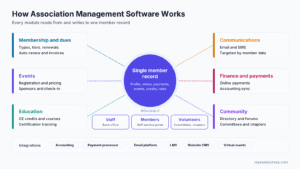
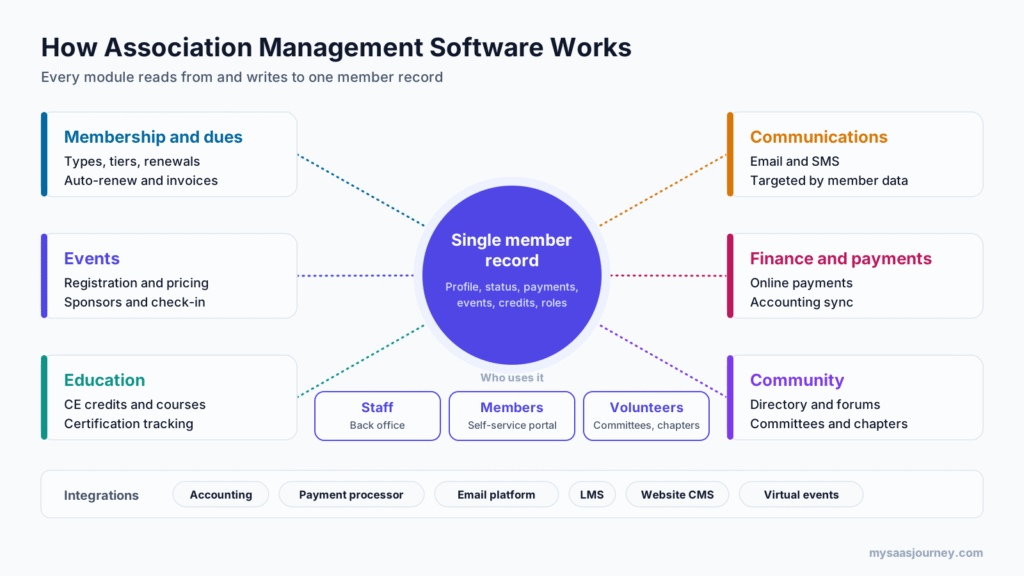
Association management software works by storing every member, organization, and transaction in one central database and connecting that record to modules for membership, events, education, communications, finance, and community. Staff manage operations in a back-office interface, members use a self-service portal, and automation handles routine steps such as renewal reminders and receipts.
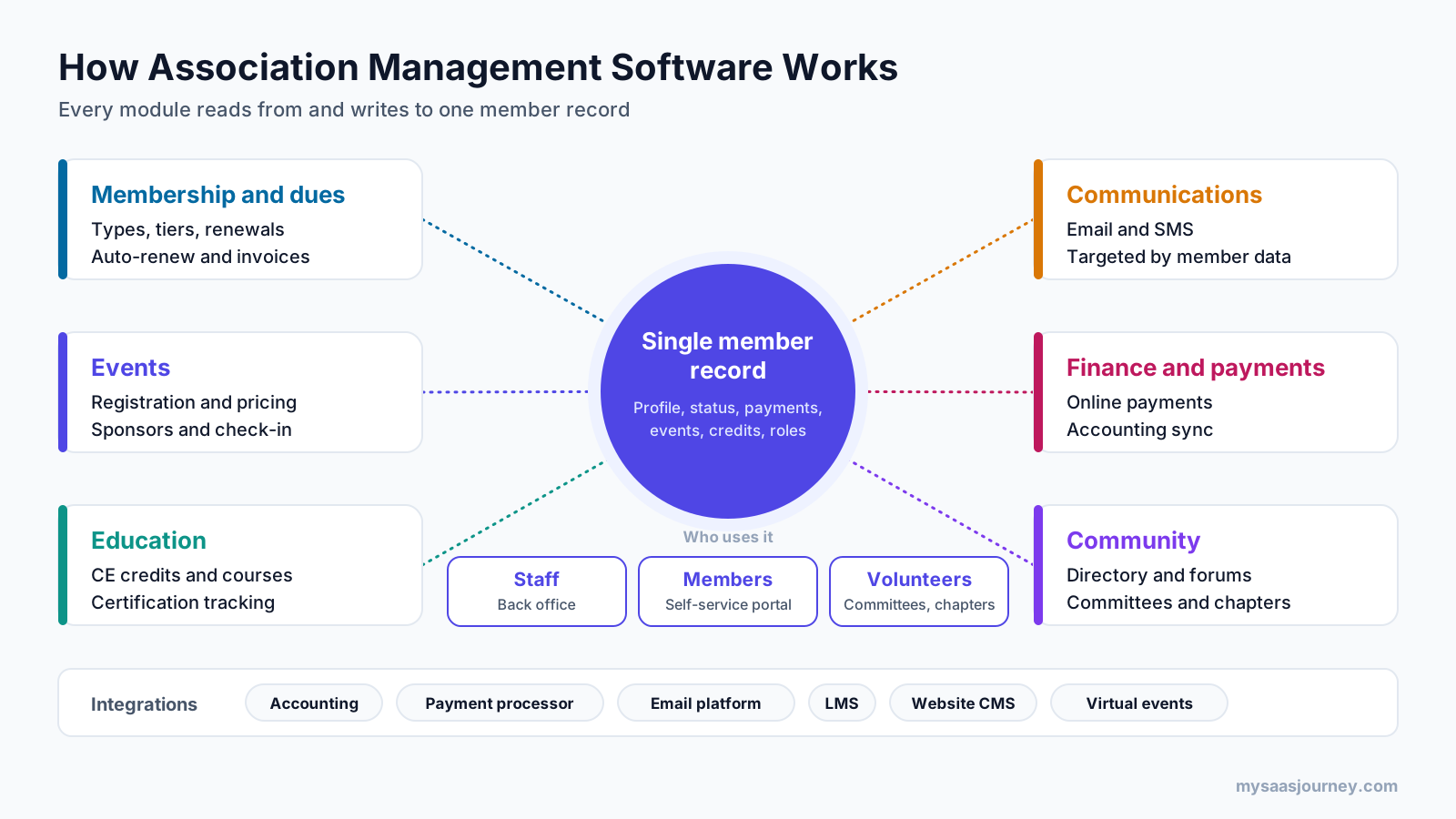
A Single Member Record
At the center of every AMS is the member record. It stores contact details, membership type and status, join and renewal dates, payment history, event attendance, course completions, committee roles, communication preferences, and notes. Organizational memberships link a company record to the individual employees who receive benefits.
Because every module writes to the same record, staff see the full relationship in one place. This is what separates an AMS from a collection of separate tools.
A Back Office for Staff
Staff use the AMS to set up membership types and pricing, create events, publish courses, send communications, process payments, and run reports. Role-based permissions control who can see and change each type of data, which matters when finance, events, and membership teams share the same system.
A Self-Service Member Portal
Members log in to a branded portal, usually connected to the association’s website. From there they can join, renew, pay invoices, update their profile, register for events, access courses, download certificates, and find other members in the directory. Every action updates the member record without staff involvement.
Workflow Automation
Automation handles the repetitive steps that used to fill staff calendars. Common examples include renewal reminder sequences, welcome emails for new members, payment receipts, event confirmations, certificate delivery after a course, and alerts when a member’s status changes. Our glossary entry on workflow automation explains the concept in more detail.
Integrations
An AMS rarely works alone. It connects to accounting software, payment processors, email marketing platforms, learning management systems, website content management systems, and virtual event tools. These connections run through native integrations, APIs, and webhooks. When a native integration is missing, teams often use automation platforms, which we compare in Zapier vs Make.
Reporting and Dashboards
Because all data sits in one database, the AMS can report on membership trends, renewals, revenue, event performance, and engagement without exporting data to spreadsheets. Dashboards give executives and boards a current view of the organization’s health.
What Are the Key Features of Association Management Software?
The key features of association management software are a member database, membership and dues management, online join and renewal, a member portal, event management, continuing education tracking, communications, online community, committee and chapter management, finance and payments, e-commerce, fundraising, engagement scoring, and reporting. Most AMS platforms include the core features and offer the rest as modules or integrations.
Member Database and Contact Management
The member database holds individual and organizational records, relationships between them, and the full history of each member’s activity. Good systems support custom fields, so you can track details specific to your profession or industry, such as license numbers or specialties. Member data can also be grouped by type, region, or interest, an approach our glossary covers under customer segmentation.
Membership and Dues Management
This module defines membership types, tiers, pricing, terms, and benefits. It supports individual, organizational, student, retired, and lifetime memberships, plus prorated dues and anniversary or calendar-year renewal cycles. Many systems also handle dues splits between national, state, and local chapters.
Online Join, Renewal, and Auto-Renew
Members can join and renew online, pay by card or bank transfer, and opt into automatic renewal. Automated reminder sequences go out before and after the renewal date. Failed card payments are a common cause of unintended lapses, a problem our glossary describes as involuntary churn, so look for card updater features and retry logic.
Member Portal and Directory
The portal gives members a self-service home for their account, invoices, registrations, courses, and documents. A searchable member directory helps members find each other and is often one of the most valued member benefits, especially in chambers of commerce and trade associations.
Event and Conference Management
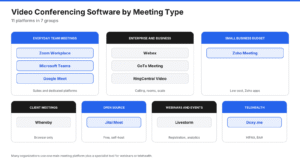
Event features cover registration, member and non-member pricing, session selection, speaker management, exhibitor and sponsor sales, badge printing, on-site check-in, and post-event surveys. Many associations also run virtual and hybrid events, which connect the AMS to platforms like those in our guide to the best video conferencing software.
Continuing Education and Certification
Professional associations often provide courses and track continuing education credits that members need to maintain licenses or certifications. The AMS records credits, tracks certification cycles, sends reminders before expiry, and issues certificates. Many associations connect a learning management system (LMS) so course completions flow back into the member record.
Communications
Email tools in the AMS send newsletters, renewal reminders, event announcements, and targeted messages based on member data. Some associations use the built-in tools, while others connect a dedicated platform such as those in our guide to the best email marketing tools. Text messaging is increasingly common for event reminders and urgent updates, and our list of SMS marketing tools covers that channel.
Online Community
An online community gives members a private space for discussion forums, groups, file sharing, and peer support. It keeps members engaged between events and gives the association insight into the topics members care about.
Committee, Volunteer, and Governance Management
This module tracks committee membership, terms of service, volunteer roles, board positions, and meeting documents. It helps staff manage nominations and elections and gives volunteer leaders access to the information they need.
Chapter Management
Associations with state, regional, or local chapters need tools to manage chapter rosters, chapter dues, chapter events, and chapter leadership. Good chapter management gives local leaders access to their own members while keeping data in one system for the national office.
Finance, Invoicing, and Payments
The AMS creates invoices, accepts online payments, records transactions, and tracks deferred revenue for multi-year memberships. Most associations sync this data with a separate accounting system. If you are comparing accounting options for a smaller organization, see our guides to invoicing software for small businesses and free bookkeeping software.
E-Commerce and Non-Dues Revenue
Associations earn revenue beyond dues from publications, merchandise, courses, sponsorships, advertising, and job board listings. An AMS with an online store and sponsorship tracking helps grow and measure these income streams.
Fundraising and Donations
Associations with a charitable foundation or advocacy fund need donation pages, campaign tracking, pledges, and donor acknowledgments. Some AMS platforms include fundraising tools, while others integrate with dedicated fundraising software.
Career Center and Job Board
A career center lets employers post jobs and members search and apply for them. It serves as both a member benefit and a source of non-dues revenue.
Engagement Scoring
Engagement scoring assigns points to member activities, such as attending events, completing courses, joining committees, and opening emails. A falling score is an early warning that a member may not renew. Our glossary entry on the customer engagement score explains how scoring models work.
Reporting and Dashboards
Standard reports cover membership counts, new members, renewals, lapses, revenue by source, event registrations, and education completions. Custom report builders and dashboards let staff answer new questions without technical help.
Mobile Access
Members increasingly renew, register, and check in to events on their phones. A mobile-friendly portal or a dedicated mobile app makes these tasks easier and supports on-site event experiences.
How Does an AMS Support the Member Lifecycle?
An AMS supports the member lifecycle by automating and tracking each stage: joining, onboarding, engaging, renewing, and winning back lapsed members. Because every stage writes to the same member record, the association can see where members drop off and act before they leave.
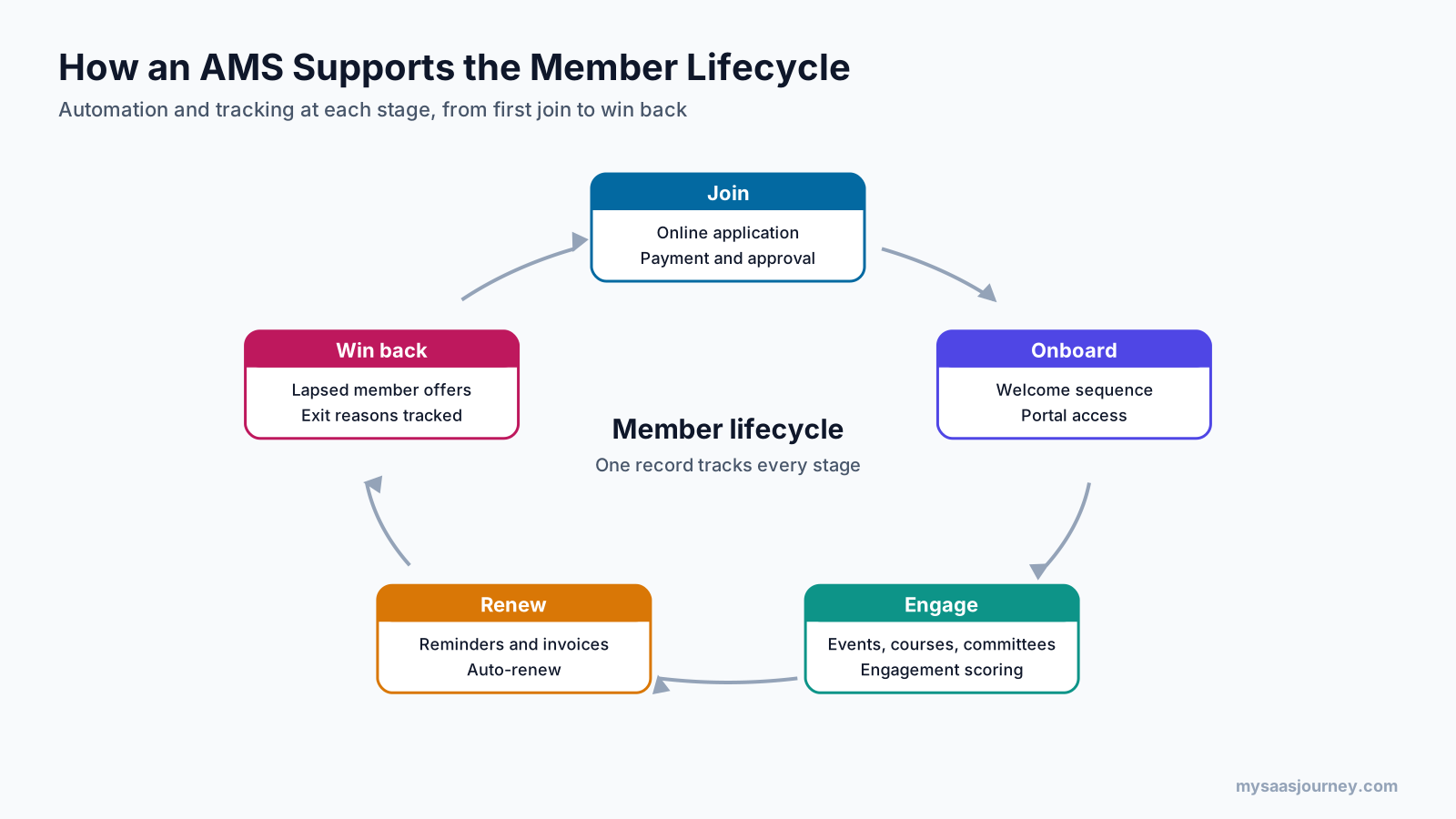
Join
Prospective members find the association, compare membership options, and sign up online. The AMS handles the application, payment, and approval steps, then creates the member record.
Onboard
New members receive welcome emails, portal access, and guidance on how to use their benefits. Strong onboarding helps members get value early, which our glossary covers under customer onboarding.
Engage
Members attend events, complete courses, join committees, and take part in the online community. The AMS tracks each interaction and updates the member’s engagement score.
Renew
Renewal reminders, invoices, and auto-renew settings run automatically. Staff can focus personal outreach on high-value members and members whose engagement has dropped.
Win Back
When members lapse, the AMS can trigger win-back campaigns with tailored offers and reminders of the benefits they are missing. Tracking why members leave helps the association improve its value over time.
How Is an AMS Different from a CRM, CMS, or LMS?
An AMS manages the full member lifecycle, including dues, renewals, events, education, and committees. A CRM manages contacts and sales relationships, a CMS manages website content, and an LMS delivers and tracks online courses. Associations often use all four, with the AMS acting as the system of record for members.
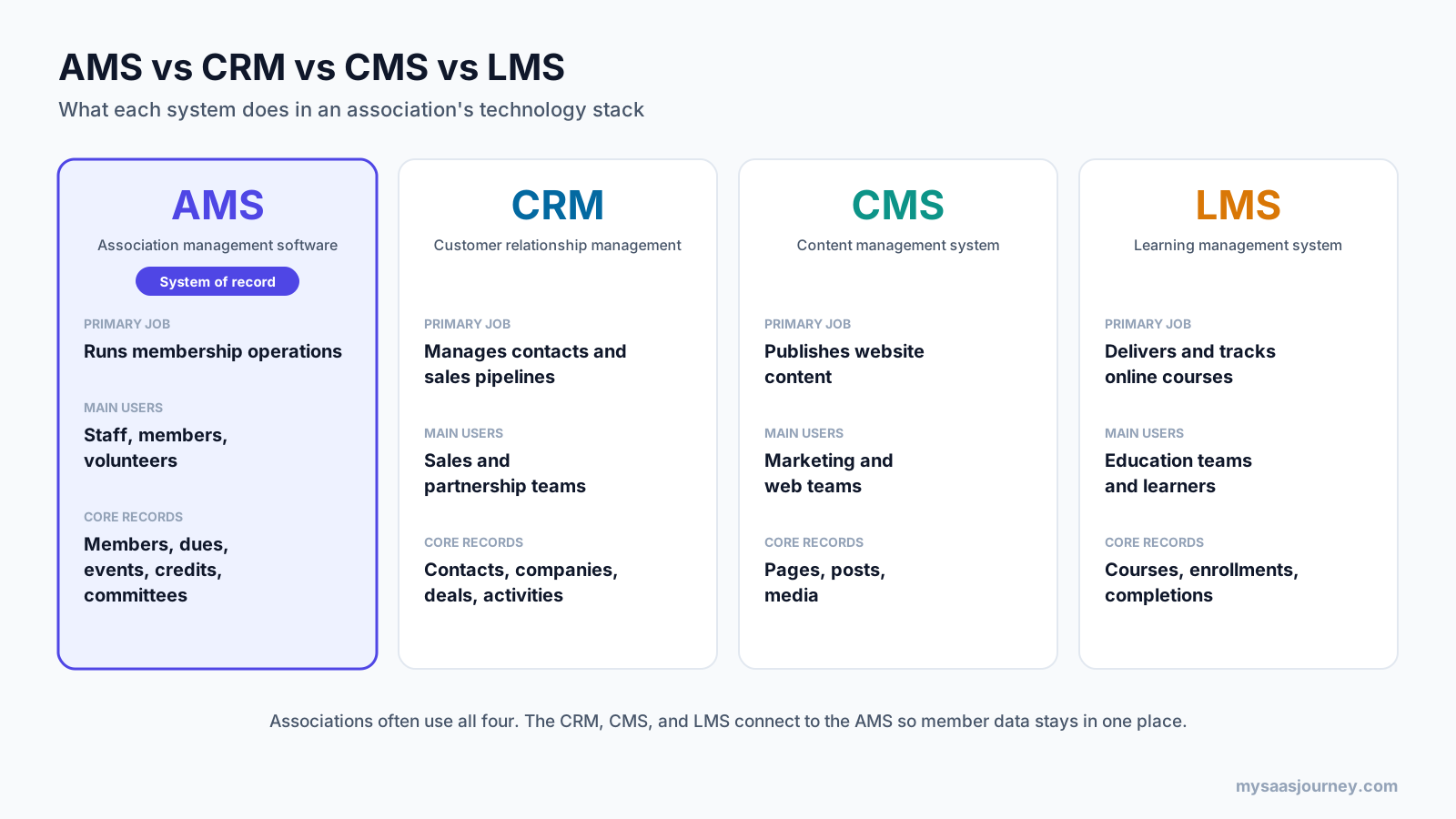
| System | Primary job | Core records | How it relates to an AMS |
|---|---|---|---|
| AMS | Runs membership operations | Members, dues, registrations, credits, committees | The system of record for the member relationship |
| CRM | Manages contacts, leads, and sales pipelines | Contacts, companies, deals, activities | An AMS includes CRM features. Some AMS products are built on a CRM platform. |
| CMS | Publishes website content | Pages, posts, media | The AMS connects to the website for login, join, renewal, and event pages. |
| LMS | Delivers and tracks online learning | Courses, enrollments, completions | Course completions and credits flow back into the AMS member record. |
The AMS vs CRM question comes up most often. A CRM is designed for selling to customers, with pipelines, deals, and forecasts. It can store member contacts, but it does not handle membership terms, dues billing, renewal cycles, chapter splits, or continuing education credits without heavy customization. If your organization mainly needs contact and pipeline management, our comparison of the best free CRM software and our CRM software category are a useful starting point. Once membership operations become the main workload, an AMS is the better fit.
The website side matters too. Most associations keep their website on a separate CMS or website builder and connect it to the AMS for member login and transactions. This keeps content publishing flexible while membership data stays in one place.
What Are the Main Types of Association Management Software?
The main types of association management software are all-in-one AMS platforms, CRM-based AMS platforms, and best-of-breed stacks that connect specialized tools around a core member database. Associations also choose between cloud and on-premise deployment, although almost all new AMS purchases are cloud-based.
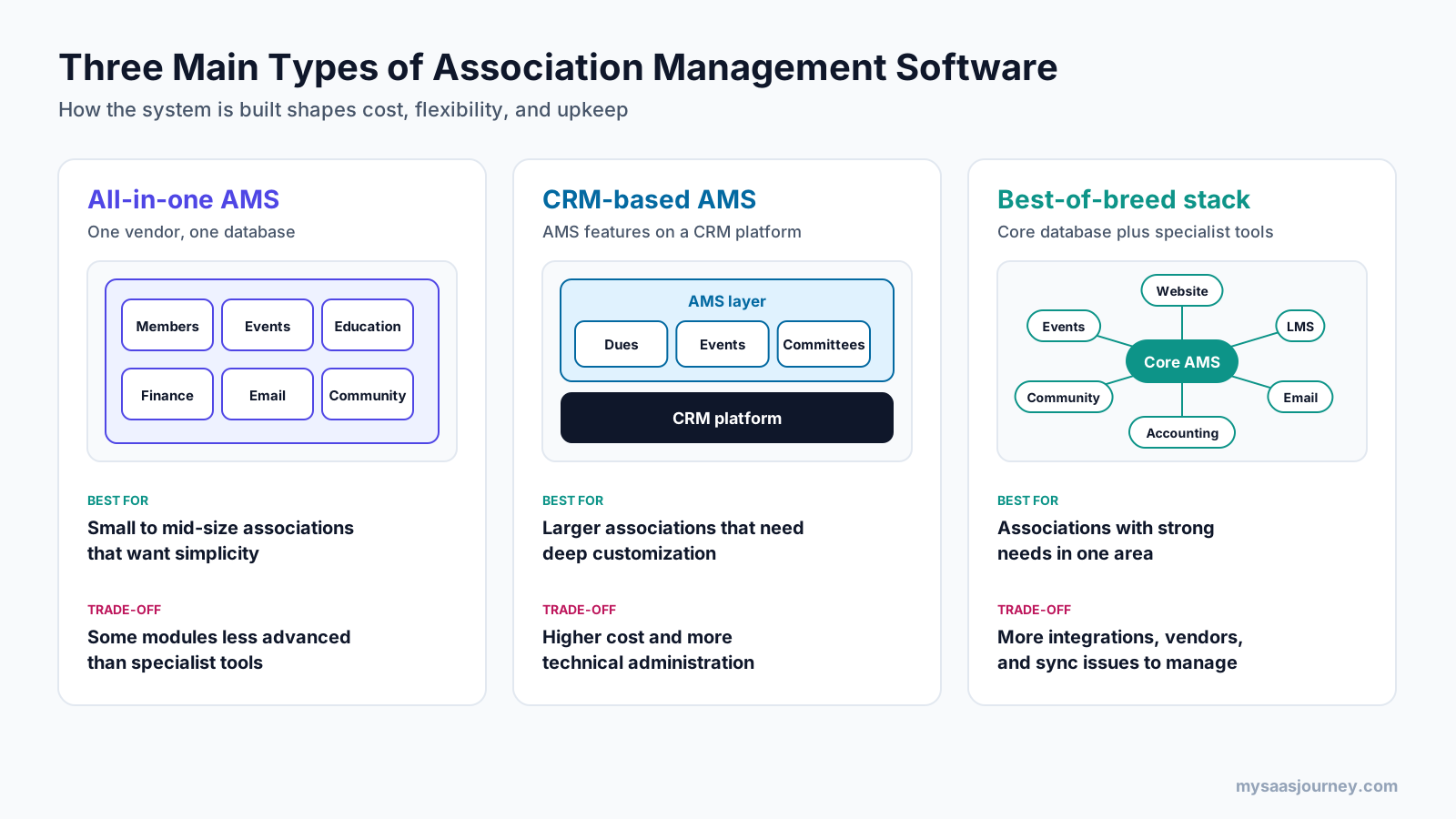
All-in-One AMS
An all-in-one AMS includes membership, events, education, communications, finance, and community in a single product from one vendor. It offers one login, one database, and one support team. The trade-off is that individual modules may be less advanced than specialized tools.
CRM-Based AMS
A CRM-based AMS is built on top of an established CRM platform and adds association-specific features such as dues, renewals, and committees. It suits larger associations that want deep customization and access to the CRM platform’s wider ecosystem. The trade-off is higher cost and a greater need for technical administration.
Best-of-Breed Stack
A best-of-breed approach uses a core AMS or membership database and connects specialized tools for events, learning, email, and community. It gives each department the strongest tool for its job. The trade-off is more integrations to maintain, more vendors to manage, and more places where data can fall out of sync.
Cloud vs On-Premise
Cloud-based AMS platforms are hosted by the vendor and accessed through a browser. The vendor handles updates, security, backups, and uptime. On-premise systems run on the association’s own servers and give more direct control but require internal IT resources. Our guide to cloud computing explains the differences between these models in more depth.
AMS by Organization Size
Vendors also design products for different organization sizes. Systems for small associations focus on fast setup, simple pricing, and ease of use. Systems for large associations offer complex membership structures, multi-chapter support, advanced reporting, and extensive integration options. Choosing a system built for your size avoids paying for complexity you do not need or outgrowing a tool too quickly.
What Is Community Association Management Software?
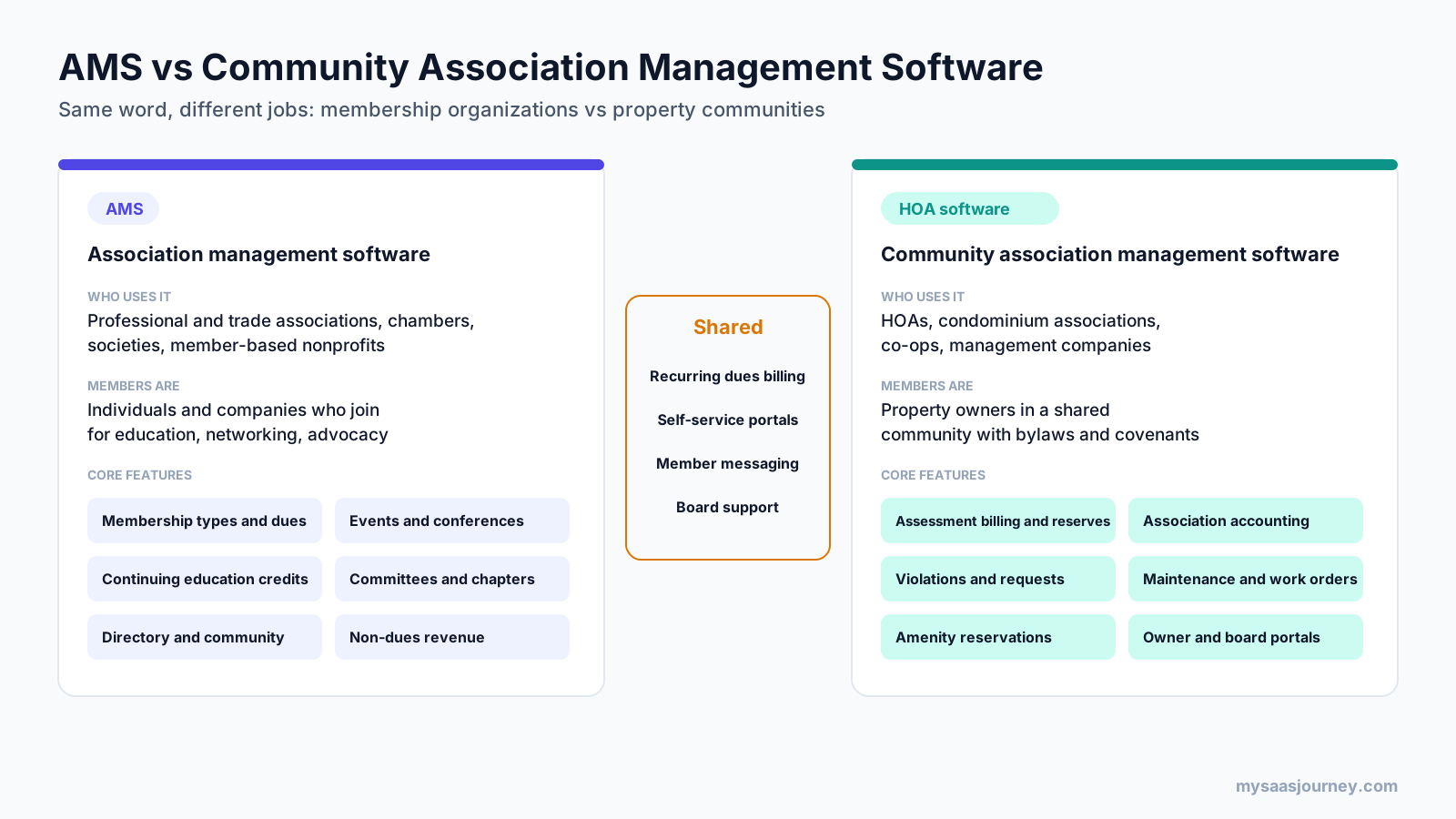
Community association management software is a separate category used by homeowners associations (HOAs), condominium associations, cooperatives, and the management companies that run them. It handles assessments, accounting, violations, architectural requests, maintenance, amenity bookings, owner communication, and board portals. It shares the word “association” with AMS but serves property communities rather than professional or trade membership organizations.
What Is Community Association Management?
Community association management is the profession of running the daily operations of a residential or commercial community association. According to the Community Associations Institute, community managers oversee work that combines financial management, facility maintenance, community development, volunteer coordination, and project management. CAI also reports that the United States had more than 373,000 community associations serving about 78 million residents in 2025.
Some community associations are run directly by volunteer boards. Many hire a community association management company, which provides a manager and back-office services. Community managers work for the association and its board, while property managers usually work for an individual owner or landlord to manage rental properties.
Key Features of Community Association Management Software
- Assessment billing and collection: recurring dues billing, special assessments, late fees, and online owner payments.
- Association accounting: budgets, reserve funds, bank reconciliation, and financial reports for the board.
- Violation tracking: recording rule violations, sending notices, and tracking resolution.
- Architectural requests: managing owner requests for exterior changes and board approvals.
- Maintenance and work orders: logging repair requests, assigning vendors, and tracking completion.
- Amenity reservations: booking clubhouses, pools, courts, and other shared spaces.
- Owner and resident portal: account balances, payments, documents, requests, and announcements.
- Board portal: financials, approvals, meeting materials, and governing documents.
- Communications: email, text, and announcement tools for residents.
Which One Do You Need?
If your organization’s members are professionals, companies, or individuals who join for education, networking, and advocacy, you need association management software. If your members are property owners in a shared community governed by bylaws and covenants, you need community association management software, often called HOA management software.
What Are the Benefits of Association Management Software?
The main benefits of association management software are a complete view of every member, less manual work, higher renewal rates, a better member experience, more non-dues revenue, accurate reporting, and better data security. The value grows as more of the association’s work moves into the system.
- One view of every member. Staff see every interaction and transaction in one record, which improves service and decision-making.
- Less manual work. Automated renewals, receipts, and confirmations free staff for programs and member relationships.
- Higher retention. Timely reminders, easy online renewal, and engagement tracking help members stay, which shows up in your renewal rate.
- Better member experience. Self-service tools let members do what they need at any time without waiting for staff.
- More non-dues revenue. Integrated events, courses, sponsorships, and stores make it easier to sell and track additional offerings.
- Accurate reporting. Boards and leaders get trustworthy figures from one source of truth.
- Stronger data protection. Centralized data with permissions and audit logs is easier to secure than files spread across personal drives and inboxes.
What Are the Challenges of Implementing an AMS?
The main challenges of implementing an AMS are data migration, implementation time, staff adoption, cost, integration complexity, over-customization, and vendor lock-in. Planning for each one early reduces the risk of a stalled or failed project.
- Data migration. Old records often contain duplicates, missing fields, and inconsistent formats. Cleaning and mapping data takes longer than most teams expect. Our glossary entry on data migration explains the process.
- Implementation time. Configuring membership types, events, finance rules, and integrations takes weeks to months, depending on scope. See our glossary entry on implementation time.
- Staff adoption. Staff who are comfortable with old processes may resist change. Training and visible early wins help.
- Cost. Subscription fees, implementation services, payment processing, and add-on modules can add up.
- Integration complexity. Each connected tool adds maintenance work and a potential point of failure.
- Over-customization. Heavy custom development can make upgrades difficult and tie the association to specialist consultants.
- Vendor lock-in. Moving away from an AMS later can be costly. Confirm how you can export your data before you sign.
Which Metrics Can You Track with an AMS?
An AMS lets you track membership growth, retention and renewal rates, lapsed members, engagement scores, event registrations, education completions, dues and non-dues revenue, and member satisfaction. These metrics help staff and boards see whether the association is delivering value.
| Metric | What it tells you |
|---|---|
| New members per period | Whether recruitment efforts are working |
| Renewal rate | The share of members who renew when their term ends |
| Retention rate | How well the association keeps members over time |
| Lapsed members and churn rate | How many members leave and when |
| Engagement score | How actively members use their benefits |
| Event registrations and attendance | Demand for events and the share of members who participate |
| Course completions and credits earned | Uptake of education programs |
| Dues revenue and non-dues revenue | How diversified the association’s income is |
| Net Promoter Score | How likely members are to recommend the association |
| Member lifetime value | The total revenue a member generates across their membership |
Pick a small set of key performance indicators that match your strategic plan and report on them consistently. A short, stable dashboard is more useful to a board than a long list that changes every quarter.
How Much Does Association Management Software Cost?
Association management software is usually sold as an annual or monthly subscription, priced by the number of member records, staff users, and modules, plus one-time implementation fees and ongoing payment processing fees. Entry-level plans for small associations cost far less than enterprise contracts for large organizations with complex needs.
| Cost component | How it is usually priced | What to check |
|---|---|---|
| Subscription | Monthly or annual, tiered by member records or contacts | What happens to the price when membership grows |
| Staff users | Per admin user or included in the tier | Whether volunteers and chapter leaders count as users |
| Modules | Core plan plus add-ons for events, learning, community, or fundraising | Which features you need are outside the base plan |
| Implementation | One-time fee for setup, configuration, and training | What is included and how many hours of support you get |
| Data migration | Included, fixed fee, or billed by effort | How many years of history the vendor will migrate |
| Payment processing | Percentage plus a fixed fee per transaction | Whether you must use the vendor’s processor |
| Support and training | Included, tiered, or billed separately | Response times and access to a named contact |
Ask every vendor for a total cost over three to five years, including implementation and processing fees. Our glossary entry on pricing models explains the common structures.
What Security and Privacy Checks Should You Run?
Before choosing an AMS, check how the vendor protects member data, handles payments, controls access, backs up data, and supports privacy regulations such as GDPR and CCPA. Associations hold personal details, payment records, and sometimes license or certification data, so security review is part of any evaluation.
- Payment security: confirm that card payments are processed in line with PCI DSS requirements and that card numbers are not stored in the AMS itself.
- Encryption: check that data is encrypted in transit and at rest.
- Access controls: look for role-based permissions, single sign-on, and multi-factor authentication for staff.
- Audit logs: confirm that changes to member and financial records are logged.
- Backups and recovery: ask how often data is backed up and how quickly it can be restored. Our guide to backup software explains backup approaches in general.
- Privacy compliance: confirm support for consent tracking, data access requests, and deletion requests under GDPR, CCPA, or other laws that apply to your members.
- Data retention: check whether you can set your own data retention policy.
- Data ownership and export: confirm that you own your data and can export it in a usable format at any time.
How Do You Choose Association Management Software?
Choose association management software by documenting your requirements, prioritizing the features that support your strategy, shortlisting systems built for your size and type of association, testing them with scripted demos, checking references, and comparing total cost of ownership. Involve staff from every department and at least one board or volunteer representative.
- Document your current processes. Map how membership, events, education, finance, and communications work today and where they break down.
- Define requirements and priorities. Separate must-have features from nice-to-have ones. Tie each requirement to a strategic goal.
- Consider your membership model. Individual, organizational, and chapter-based memberships each need different features.
- List required integrations. Include accounting, payments, email, LMS, website, and virtual event tools.
- Shortlist vendors built for your size. Exclude systems that are far too simple or far too complex for your organization.
- Run scripted demos. Give each vendor the same scenarios, such as a member renewing with a chapter dues split, so you can compare like for like.
- Check references. Speak with associations of similar size and type that have used the system for at least a year.
- Compare total cost of ownership. Include subscription, implementation, migration, processing, and staff time.
- Review the contract. Check data ownership, export rights, renewal terms, price increase limits, and support commitments.
If you are weighing a custom-built system against a commercial product, our guide on build vs buy for software covers the trade-offs. For a general framework, see how to choose the right software for your business.
How Do You Implement an AMS?
Implement an AMS in phases: plan the project, clean and migrate your data, configure the system, connect integrations, test with staff, train users, launch to members, and review results after launch. Most of the risk sits in data migration and staff training, so give those phases enough time.
- Plan the project. Name a project owner, set a timeline, and agree on scope. A project plan template helps keep tasks and owners clear.
- Clean your data. Remove duplicates, standardize formats, and decide which historical records to migrate.
- Migrate data. Map old fields to new ones, run test imports, and check the results with staff.
- Configure the system. Set up membership types, pricing, renewal rules, events, finance settings, and permissions.
- Connect integrations. Link accounting, payments, email, website, and learning tools, then test each connection.
- Test with real scenarios. Have staff complete common tasks, such as processing a renewal or registering a member for an event.
- Train staff and volunteers. Provide role-specific training and written guides. A shared knowledge base helps people find answers after launch.
- Launch to members. Announce the new portal, explain what has changed, and offer help for members who need to reset logins.
- Review and improve. Track adoption, collect feedback, and fix issues during the first few renewal cycles.
Common Mistakes to Avoid
- Migrating messy data. Bad data in the old system becomes bad data in the new one.
- Recreating every old process. A new AMS is a chance to simplify workflows, not copy outdated ones.
- Skipping member communication. Members who cannot log in or find their renewal page will contact staff or lapse.
- Underestimating training. Staff who are not confident with the system fall back on spreadsheets.
- Customizing too much too early. Use standard features first and customize only where there is a clear need.
What Are the Trends in Association Management Software?
The main trends in association management software are AI features, predictive retention analytics, deeper engagement tracking, integrated learning, mobile-first member experiences, and more flexible membership models. These trends reflect members’ expectations of the digital services they use elsewhere.
- AI assistance. AI tools help staff draft communications, summarize member feedback, answer common member questions, and find patterns in data. Our guide to artificial intelligence software explains how these capabilities work.
- Predictive retention. Models that combine engagement, payment, and activity data can flag members at risk of lapsing before the renewal date.
- Engagement-led strategy. Associations are measuring the value members get, not only whether they pay dues.
- Integrated learning. Education is a growing source of value and revenue, so tighter AMS and LMS connections are becoming standard.
- Mobile experiences. More renewals, registrations, and community activity happen on phones.
- Flexible membership models. Associations are testing subscription-style memberships, bundled tiers, and micro-credentials alongside traditional annual dues.
Key Terms Glossary
- Association management software (AMS): Software that membership organizations use to manage members, dues, events, education, communications, and finances in one system.
- Association management company (AMC): A firm that provides staff and services to manage one or more associations.
- Chapter: A regional or local unit of a larger association with its own members, leaders, and activities.
- Continuing education (CE) credits: Units that professionals earn through approved learning to maintain a license or certification.
- Dues: The fee members pay for membership, usually annually.
- Engagement score: A score based on member activities that indicates how actively a member uses their benefits.
- Non-dues revenue: Income from sources other than membership dues, such as events, courses, sponsorships, and publications.
- Community association: A residential or commercial community, such as an HOA or condominium, governed by an association of owners.
- Assessment: The fee that owners in a community association pay to fund operations and reserves.
Conclusion
Association management software gives membership organizations one system for the work that keeps members coming back: membership, dues, events, education, communications, and finance. It connects every interaction to a single member record, gives members self-service tools, automates routine tasks, and gives boards reliable reporting.
The right AMS depends on your membership model, organization size, revenue streams, and existing tools. Start by documenting how your association works today, choose a system built for your size, and invest time in data cleanup and training. If your organization manages a residential community rather than a professional or trade membership, look at community association management software instead. To compare tools that support member-based organizations, browse our CRM software category.
Frequently Asked Questions
What is association management software used for?
Association management software is used to manage member records, dues and renewals, event registration, continuing education, communications, committees, chapters, and finances in one system. It also gives members a self-service portal to join, renew, and register online.
What does AMS stand for?
AMS stands for association management software or association management system. Both terms describe the same type of software used by membership organizations.
What is the difference between an AMS and a CRM?
A CRM manages contacts and sales relationships, with tools for pipelines and deals. An AMS manages the full member lifecycle, including membership types, dues billing, renewals, events, continuing education, committees, and chapters. Many AMS platforms include CRM features, and some are built on CRM platforms.
What does association management do?
Association management covers the work of running a membership organization. That includes recruiting and retaining members, collecting dues, planning events, delivering education, supporting the board and committees, managing finances, and communicating with members.
Is membership management software the same as an AMS?
Not exactly. Membership management software usually covers member records, sign-ups, payments, and renewals. An AMS adds events, education, committees, chapters, finance, and advanced reporting. Small groups often start with membership management software and move to an AMS as they grow.
What is the best association management software?
The best association management software depends on your association’s size, membership model, budget, and required features. Shortlist systems built for organizations like yours, run scripted demos with the same scenarios, and speak with references before you decide.
Can small associations use association management software?
Yes. Many AMS products are designed for small associations with limited staff, offering simpler setup and pricing. Automation often has the biggest impact in small teams because each staff member handles many responsibilities.
How long does it take to implement an AMS?
Implementation time depends on data volume, the number of modules, integrations, and staff availability. Simple setups can go live in weeks, while larger associations with complex structures often need several months.
What is community association management software?
Community association management software is used by HOAs, condominium associations, and community management companies. It manages assessments, association accounting, violations, architectural requests, maintenance, amenity reservations, and owner and board portals.
What does a community association management company do?
A community association management company provides a community manager and back-office services to HOAs and condominium associations. Typical services include financial management, assessment collection, vendor and maintenance coordination, rule enforcement support, and board meeting support.
What is the difference between a community association manager and a property manager?
A community association manager works for an association and its board to manage shared property, finances, and governance for the whole community. A property manager usually works for an individual owner or landlord to manage rental units and tenants.
How much does association management software cost?
Pricing usually includes a subscription based on member records, staff users, and modules, plus implementation fees and payment processing fees. Ask vendors for a total cost over three to five years so you can compare offers fairly.