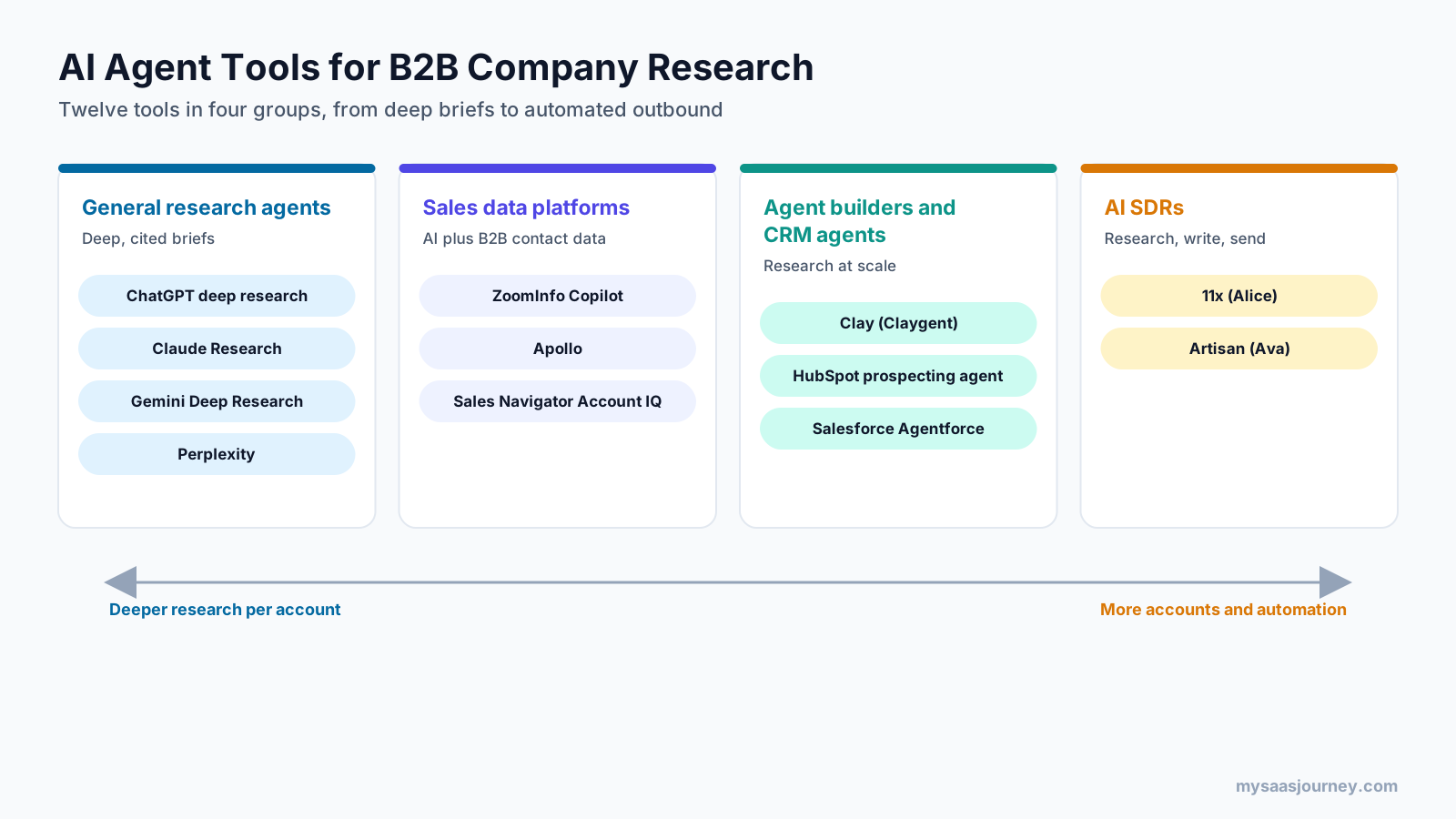
The best AI agent tools for B2B sales company research fall into four groups: general AI research agents (ChatGPT deep research, Claude Research, Gemini Deep Research, Perplexity), sales data platforms with AI research (ZoomInfo Copilot, Apollo, LinkedIn Sales Navigator), agent builders and CRM-native agents (Clay, HubSpot’s prospecting agent, Salesforce Agentforce), and AI SDRs that research before writing (11x, Artisan). The right choice depends on whether you research a few strategic accounts deeply or hundreds of accounts at scale.
Company research is the step that separates relevant outreach from generic outreach. Before a first call, a seller needs to know what the company does, what it is prioritizing, what has changed recently, who sits on the buying committee, and why your product matters to them now. Done manually, that takes a lot of tabs and a lot of time per account.
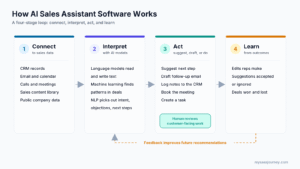
AI agents now do much of this work. They search the web and your data sources, read filings and news, pull contact and firmographic data, and write a structured brief. This guide compares 12 tools, explains what a good research brief contains, gives you prompts you can reuse, and shows how to check an agent’s work before it reaches a prospect.
If you are new to AI in sales, start with our pillar guide on what AI sales assistant software is.
Key takeaways
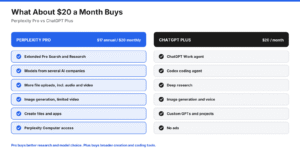
- General AI research agents give the deepest written analysis per account and cost about $17 to $20 per user per month at entry level, but they do not include verified contact data.
- Sales data platforms such as ZoomInfo, Apollo, and Sales Navigator combine AI summaries with B2B databases, which makes them better for finding the right people.
- Clay and CRM-native agents from HubSpot and Salesforce work best for running research across hundreds of accounts and writing results back into your systems.
- AI SDRs such as 11x and Artisan research accounts as part of automated outreach, so they suit teams that want research and sending in one tool.
- Every AI research output needs a human check. Ask for cited sources, verify facts that will appear in outreach, and confirm that information is recent.
Quick Comparison: AI Agent Tools for Company Research
| Tool | Type | Best for | Entry price (as published) |
|---|---|---|---|
| ChatGPT deep research | General research agent | Deep strategic briefs on priority accounts | Plus $20/month |
| Claude Research | General research agent | Research that combines the web with your connected tools | Pro $20/month or $17/month billed annually |
| Gemini Deep Research | General research agent | Teams working in Google Workspace | Google AI Pro $19.99/month |
| Perplexity | General research agent | Fast, citation-first company lookups | Pro $17/month billed annually |
| ZoomInfo Copilot | Sales data platform | Account prioritization and deal briefs from B2B data | Quote |
| Apollo | Sales data platform | Budget-friendly research plus contacts and sequences | Free plan; paid from $49/user/month billed annually |
| LinkedIn Sales Navigator | Sales data platform | People-centric account research on LinkedIn | Advanced $159.99/month |
| Clay (Claygent) | Agent builder | Custom research across large account lists | Free plan; Launch from $60/month |
| HubSpot prospecting agent | CRM-native agent | HubSpot users who want research inside the CRM | $1 per lead the agent recommends for outreach |
| Salesforce Agentforce | CRM-native agent | Salesforce users wanting account research and meeting prep | Consumption-based, quote |
| 11x (Alice) | AI SDR | Automated research plus outbound at scale | Quote |
| Artisan (Ava) | AI SDR | Outbound teams wanting research, data, and sending in one tool | Quote |
How We Chose These Tools
We selected tools that can research a company with AI and return a usable result for a seller, and we checked features and prices on each vendor’s own pages in November 2026. We did not accept payment for placement, and no vendor reviewed this article.
Our criteria:
- Research capability. The tool can gather and summarize information about a company, not only find contact details.
- Source quality. It cites sources, uses a verified B2B database, or both.
- Workflow fit. It works for individual sellers, at scale across account lists, or inside a CRM.
- Pricing clarity. We report published prices and flag quote-based or usage-based pricing.
- Category coverage. We included the four main types of tools buyers compare.
We relied on vendor documentation and pricing pages rather than paid trials of every product, so test your top two or three options on your own accounts before buying.
What Should an AI Company Research Brief Include?
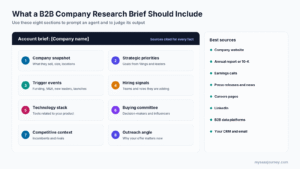
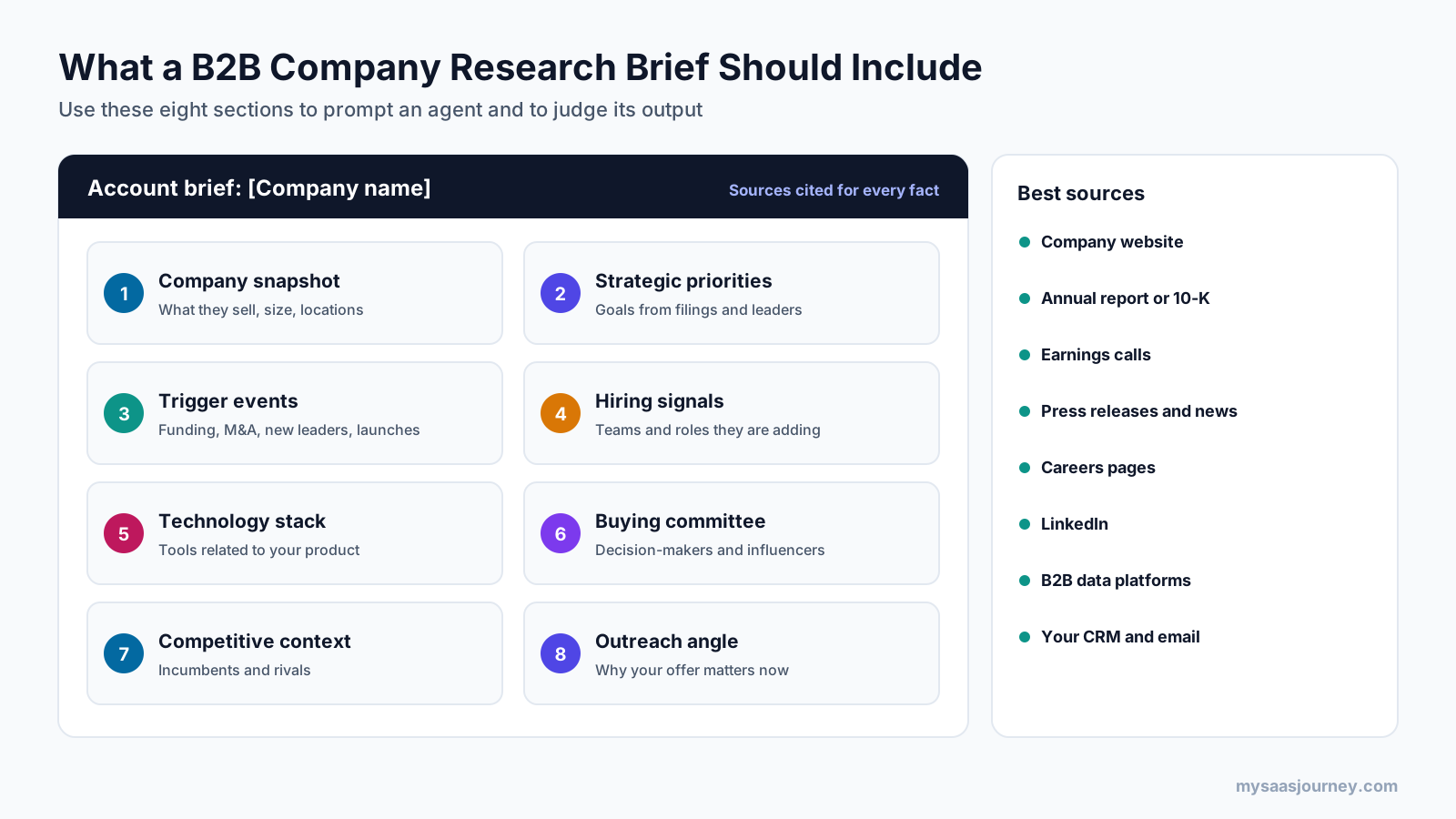
A useful B2B company research brief covers eight areas: a company snapshot, strategic priorities, recent trigger events, hiring signals, technology stack, the buying committee, competitive context, and a tailored outreach angle. Use this list to judge any tool’s output and to structure your prompts.
| Section | What to capture | Where agents find it |
|---|---|---|
| Company snapshot | What they sell, to whom, size, locations, ownership | Company website, B2B databases, LinkedIn |
| Strategic priorities | Stated goals, growth plans, risks | Annual reports, 10-K filings, earnings calls, investor presentations, leadership interviews |
| Trigger events | Funding, acquisitions, new leaders, expansions, layoffs, product launches | News, press releases, funding databases, signal feeds |
| Hiring signals | Roles and teams they are hiring for | Careers pages, job boards, LinkedIn |
| Technology stack | Tools they use that relate to your product | Technographic data, job descriptions, integration pages |
| Buying committee | Likely decision-makers and influencers, with roles | LinkedIn, B2B contact databases, CRM history |
| Competitive context | Incumbent vendors and competitors they mention | Case studies, reviews, job descriptions, news |
| Outreach angle | Why your offer matters now, with a specific hook | The agent’s synthesis, checked by the seller |
For public companies in the US, primary sources are free. Annual 10-K reports and quarterly filings are available through SEC EDGAR, and they often state strategic priorities and risks in the company’s own words. Point your research agent at these documents when accuracy matters.
Understanding the decision-making unit and the buyer persona behind each role helps you turn a buying committee list into targeted messaging.
The Best AI Agent Tools for B2B Sales Company Research
General AI Research Agents
General AI research agents run multi-step web research and write long, cited reports. They are the strongest option for deep briefs on strategic accounts, but they do not include verified contact databases. For a broader comparison of these assistants, see our guides to Perplexity vs ChatGPT, Claude vs ChatGPT, and ChatGPT vs Gemini.
1. ChatGPT Deep Research
Best for: sellers and account executives who need detailed strategic briefs on priority accounts.
ChatGPT’s deep research mode runs a longer, multi-step investigation and returns a structured report with sources. It works well for analyzing a company’s strategy, reading annual reports, and summarizing recent news into talking points.
Key research features
- Multi-step web research with cited sources
- File uploads, so you can add your own notes, call transcripts, or filings
- Apps for deep research on Plus and Pro, so research can draw on connected tools
Pricing: Plus costs $20 per month. OpenAI lists deep research as limited on the Free and Go plans, expanded on Plus, and at maximum capacity on Pro. Business plans are priced per user with a two-seat minimum.
Trade-offs: No built-in B2B contact data, and monthly deep research limits on lower plans restrict how many accounts you can research.
2. Claude Research
Best for: teams that want research to combine web sources with internal context from email, calendars, documents, and connected apps.
Claude’s Research feature runs multiple searches that build on each other and works through different angles of a question. It can search the web together with Google Workspace (Gmail, Google Calendar, and Google Docs) and other connectors you turn on, and it cites the sources it uses. Anthropic says most research reports finish in 5 to 15 minutes, with complex ones taking up to 45 minutes.
Key research features
- Multi-step research with citations
- Combines web research with connected tools, such as past email threads with an account
- Available on the web, desktop, and mobile apps
Pricing: Research is available on paid plans (Pro, Max, Ultra, Team, and Enterprise). Pro costs $20 per month, or $17 per month billed annually. Team standard seats cost $20 per seat per month billed annually or $25 billed monthly.
Trade-offs: No built-in B2B contact database, and research needs web search turned on.
3. Gemini Deep Research
Best for: teams that work in Google Workspace and want research inside the Google ecosystem.
Google’s Gemini Deep Research builds a research plan, reads web sources, and writes a structured, cited report. Paid Google AI plans give expanded access.
Key research features
- Autonomous research plans with cited reports
- Access through the Gemini app alongside Google’s other AI tools
Pricing: Google AI Pro costs $19.99 per month and includes expanded access to Deep Research. Limited access is available on the free plan.
Trade-offs: No B2B contact data, and research limits vary by plan.
4. Perplexity
Best for: quick, citation-first company lookups and fast answers to specific questions.
Perplexity is built around search with sources shown for each answer. Its deep research mode handles longer investigations, and paid plans can search across the web, files, and connected apps.
Key research features
- Answers with visible citations
- Deep research on paid plans
- App connectors and file search
Pricing: Pro costs $17 per month billed annually and includes deep research. Max costs $167 per month billed annually with higher limits.
Trade-offs: No B2B contact data, and quick answers can miss context that a longer research run would find.
Sales Data Platforms with AI Research
Sales data platforms combine AI summaries with their own B2B databases of companies and contacts. They are better than general agents for finding the right people, prioritizing accounts by buying signals, and keeping research inside sales workflows.
5. ZoomInfo Copilot
Best for: larger sales teams that want AI account prioritization and deal briefs grounded in a large B2B database.
ZoomInfo Copilot ranks accounts using ZoomInfo’s buyer signals and assembles contacts, org charts, account history, and company updates into deal briefs. It also offers natural-language research, buying group intelligence, account health alerts, and outreach openers based on company updates, intent data, and org changes.
Key research features
- Account ranking that updates as new signals arrive
- Meeting prep briefs with org charts and company updates
- Buying group intelligence
- Integrations with Salesforce, HubSpot, Outreach, Salesloft, and Gong
Pricing: Quote-based. ZoomInfo offers a free trial.
Trade-offs: Pricing requires a sales conversation, and the platform is more than a small team usually needs.
6. Apollo
Best for: small and mid-size teams that want AI research, contact data, and outreach sequences in one affordable tool.
Apollo combines a B2B contact and company database with sequencing, a dialer, and AI features. Apollo lists an AI Research Agent, an AI sequence builder, AI lead scoring, and intent topics among its AI capabilities. Its credits pay for data, including AI-researched data.
Key research features
- AI research on accounts and contacts
- Company and contact database with firmographic filters
- Intent topics and AI lead scoring
- Sequences and CRM integrations
Pricing: A free plan is available. Apollo lists Basic at $49 per user per month and Professional at $79 per user per month on annual billing, with AI research included in Professional. Credits are pooled across the team and do not roll over.
Trade-offs: Research depth is lighter than a dedicated deep research run, and credit usage needs monitoring.
7. LinkedIn Sales Navigator (Account IQ)
Best for: account executives who research through people, relationships, and LinkedIn activity.
Sales Navigator’s Advanced plan includes Account IQ and Lead IQ, which LinkedIn describes as instant, AI-powered account and lead insights. It is a strong source for mapping the buying committee, tracking job changes, and finding warm introduction paths.
Key research features
- AI-powered account and lead summaries (Account IQ and Lead IQ)
- More than 50 advanced search filters
- Account and lead alerts
Pricing: Core costs $119.99 per month. Advanced, which includes Account IQ and Lead IQ, costs $159.99 per month or $1,799.88 per year. Advanced Plus is custom priced.
Trade-offs: Research is centered on LinkedIn data, so you still need other sources for filings, tech stack, and detailed news.
Agent Builders and CRM-Native Research Agents
Agent builders and CRM-native agents run research automatically across lists of accounts and write results back into your systems. They suit RevOps-led teams that want consistent research at scale. Our guide on how to build an AI agent explains the building blocks.
8. Clay (Claygent)
Best for: RevOps and growth teams that want custom research across hundreds or thousands of accounts.
Clay is a data enrichment and workflow platform. Its AI research agent, Claygent, can visit websites and answer research questions for every row in a table, such as “Does this company sell to healthcare providers?” or “Summarize their latest product launch.” Clay combines this with enrichment from multiple data providers.
Key research features
- Claygent research agent on every plan
- Multi-provider enrichment waterfalls
- Signals, sequencer, and integrations on paid plans
- HTTP API and webhook integrations on Growth
Pricing: The Free plan includes 500 actions and 100 data credits per month. Clay’s plan grid lists Launch from $60 per month and Growth from $205 per month on monthly billing, with lower annual rates. Some headline figures on the pricing page differ from the grid, so confirm current prices before buying.
Trade-offs: Setup takes time and some technical comfort, and AI usage consumes credits or tokens.
9. HubSpot Prospecting Agent
Best for: teams that run on HubSpot and want research and outreach drafts inside the CRM.
HubSpot’s prospecting agent researches accounts, monitors buying signals such as funding rounds, leadership changes, and site visits, scores accounts against your ideal customer profile, finds contacts, and drafts personalized outreach grounded in those signals. HubSpot says it sources contacts from ZoomInfo, Apollo, Surfe, and Seamless.AI.
Key research features
- Account research and ICP scoring
- Buying signal monitoring
- Contact sourcing and enrichment
- Outreach drafts grounded in company signals
Pricing: Available in HubSpot’s Starter, Professional, and Enterprise editions. It runs on HubSpot Credits, and HubSpot charges $1 per lead for which the agent recommends outreach.
Trade-offs: Best value only if HubSpot is already your CRM.
10. Salesforce Agentforce
Best for: Salesforce customers that want account research, meeting prep, and prospecting inside Sales Cloud.
Salesforce offers an Account Research and Meeting Prep agent that automates research and generates account briefs, and a Prospecting agent that automates research to build a prioritized list of accounts and contacts within Salesforce.
Key research features
- Account research and meeting prep briefs
- Prospecting agent for net-new account and contact discovery
- Works with Salesforce data and permissions
Pricing: Agentforce uses consumption-based pricing. Confirm current rates and any required add-ons with Salesforce.
Trade-offs: Setup and pricing are more complex than standalone tools, and it is designed for Salesforce customers.
AI SDRs That Research Before Writing
AI SDRs research each account as part of automated outbound. They suit teams that want research, personalization, and sending handled by one agent. For more on the difference between assistants and autonomous agents, see our roundup of the best AI agents.
11. 11x (Alice)
Best for: outbound teams that want an AI SDR to research every account before writing.
11x describes Alice as its email and social agent, built to research every account and craft relevant messages. Its Deep Research feature combines real-time account updates, contact information, and CRM context, and its agents can act on signals such as funding, hiring, job moves, and tech stack changes.
Key research features
- Per-prospect deep research
- Live web search and a real-time company and lead database
- Signals for funding, hiring, job moves, and tech stack
- Integrations with HubSpot, Salesforce, Pipedrive, LinkedIn, Slack, Gmail, and Outlook
Pricing: Quote-based.
Trade-offs: Research is tied to automated outreach, so it suits teams ready to run AI-led outbound.
12. Artisan (Ava)
Best for: teams that want an AI BDR with its own B2B database, signals, and sending.
Artisan’s AI BDR, Ava, finds prospects, writes outreach, and books meetings. Artisan lists a database of more than 250 million verified B2B contacts, intent signals, and two-way Salesforce and HubSpot sync. Teams can approve messages before sending and set tone, calls to action, and banned phrases.
Key research features
- AI-powered prospect identification
- B2B contact and company data
- Intent signals
- Message approval and writing controls
Pricing: Quote-based, scoped to lead volume, mailboxes, and dialer seats. Plans include Team (around 2,500 leads contacted per month), Scale (around 6,000), and Enterprise.
Trade-offs: Built for outbound volume rather than deep strategic research on a few accounts.
How to Run Company Research with an AI Agent
Run company research with an AI agent in five steps: define your account list and research questions, let the agent gather sources, have it write a structured brief with citations, verify the key facts, and push the approved brief into your CRM.
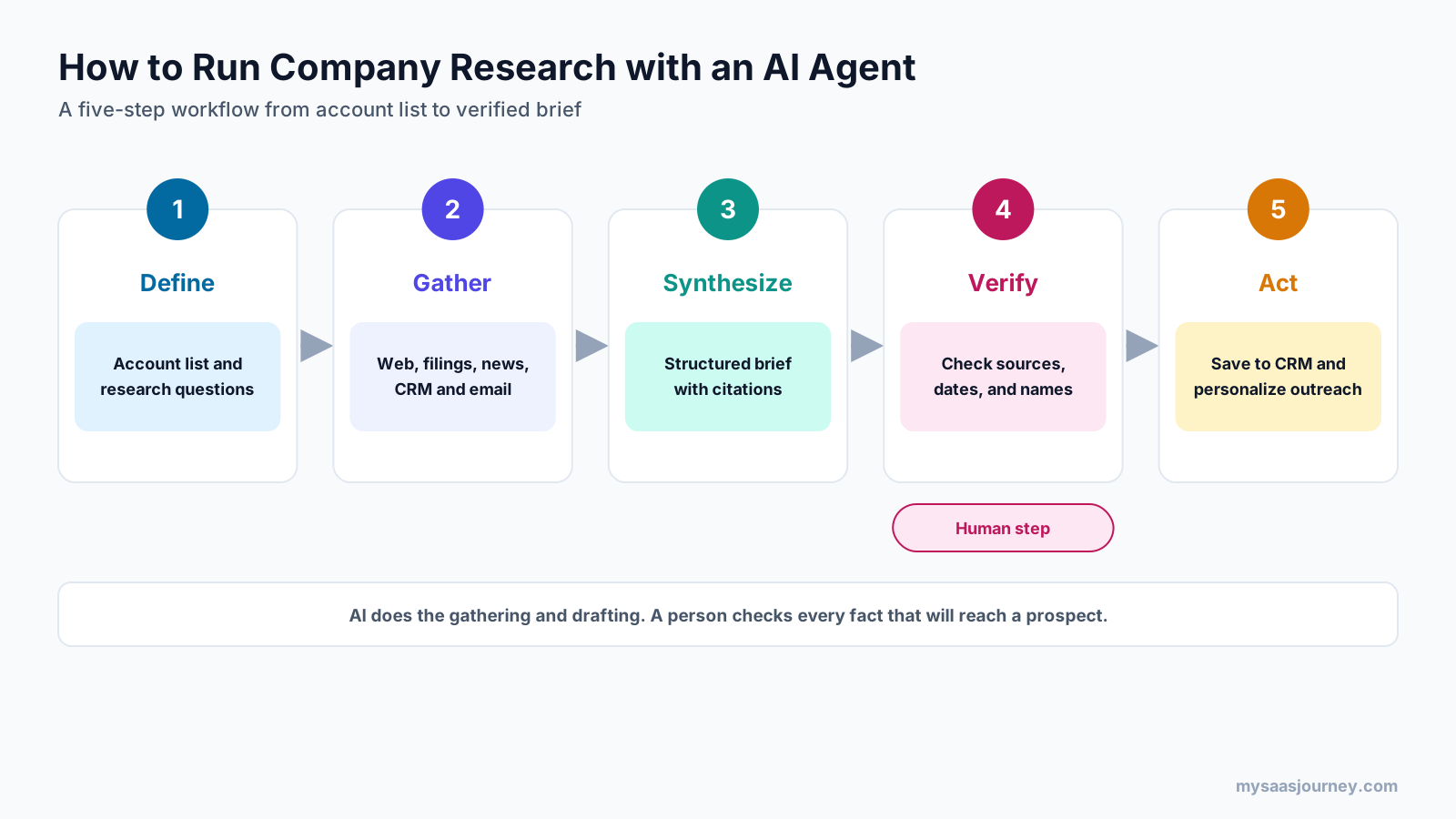
- Define the accounts and questions. Start from your ideal customer profile and a short list of questions that matter for your offer. Our glossary entry on total addressable market helps with list scoping.
- Let the agent gather sources. Point it at the company website, news, filings, careers pages, and your CRM or email history where the tool allows.
- Ask for a structured brief. Use the eight-section structure above and require a source for every factual claim.
- Verify before you use it. Check every fact that will appear in outreach against its source, and confirm dates.
- Push to the CRM and act. Save the approved brief to the account record so the next person does not repeat the work.
Prompt Template for General Research Agents
Copy and adapt this prompt for ChatGPT, Claude, Gemini, or Perplexity:
Research [Company name] ([website]) for a B2B sales conversation about [your product category].

Return a brief with these sections:
1. Company snapshot: what they sell, to whom, size, locations, ownership.
2. Strategic priorities for the next 12 months, using their own statements where possible
   (annual report, 10-K, earnings call, investor deck, leadership interviews).
3. Trigger events from the last 6 months: funding, acquisitions, leadership changes,
   expansions, layoffs, product launches.
4. Hiring signals: teams and roles they are hiring for that relate to [your product category].
5. Technology they use that relates to [your product category].
6. Likely buying committee: roles involved in buying [your product category].
7. Competitors or incumbent vendors they mention.
8. Three outreach angles that connect their priorities to [your value proposition].

Rules: cite a source with a date for every factual claim. Say "not found" instead of guessing.
Prefer primary sources over third-party summaries.
Prompt Template for Research at Scale
For Clay or another agent builder, keep each question narrow so the answer fits in one column:
Visit [website]. In one sentence, state whether the company sells to [target segment].
Then give the URL of the page that supports your answer. If unclear, return "unclear".
Narrow, verifiable questions produce more reliable results across large lists than open-ended requests.
How to Check an AI Agent’s Research
Check AI research by confirming that every fact used in outreach has a source, the source is recent and relevant, names and titles are current, and the agent did not fill gaps with assumptions. AI agents can misread pages, rely on outdated articles, or blend details from companies with similar names.
- Require citations. Do not use a fact in outreach unless you can open its source.
- Check dates. Funding rounds, leadership changes, and product launches go stale quickly.
- Confirm people and titles. Verify names and roles on LinkedIn or the company site before addressing anyone.
- Watch for name collisions. Make sure the agent researched the right company, especially with common names or subsidiaries.
- Prefer primary sources. Company filings, press releases, and official pages beat third-party summaries.
- Separate facts from inferences. Treat the agent’s outreach angles as hypotheses to test, not facts.
Data Privacy and Compliance
Company research mostly uses public business information, but contact data and CRM records include personal data. Use business plans with appropriate data controls rather than personal accounts, check how each vendor stores and uses your data, and follow privacy rules such as GDPR when you collect or process information about individuals.
How Much Do AI Company Research Tools Cost?
Entry prices range from about $17 to $20 per user per month for general research agents, $49 to $160 per user per month for sales data platforms with AI research, and usage-based or quote-based pricing for agent builders, CRM agents, and AI SDRs.
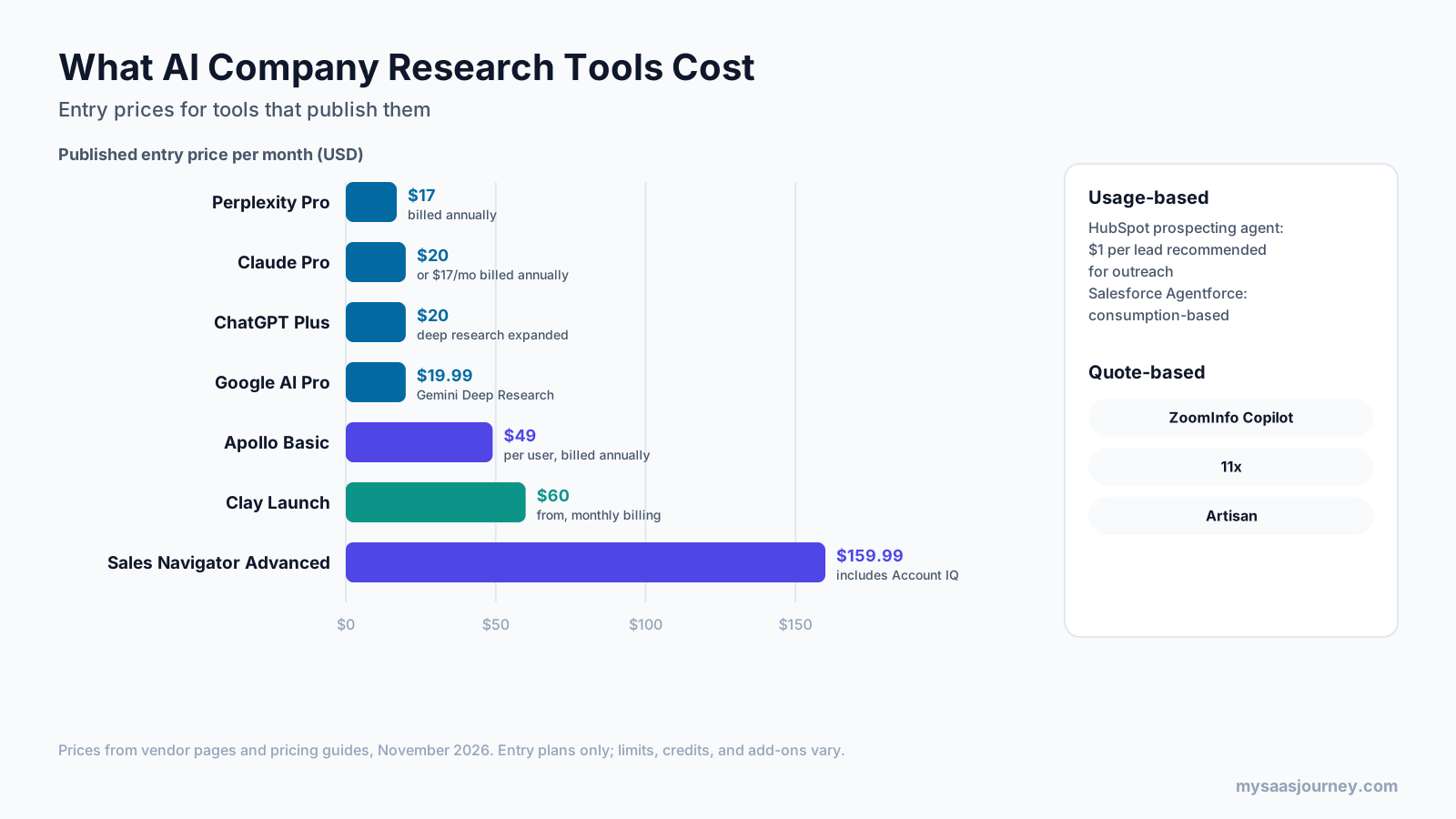
| Pricing model | Tools | What drives cost |
|---|---|---|
| Flat monthly subscription | ChatGPT, Claude, Gemini, Perplexity | Plan tier and research limits |
| Per user plus credits | Apollo, LinkedIn Sales Navigator | Seats and data credits |
| Credits or actions | Clay | Rows processed, enrichment, and AI usage |
| Per outcome | HubSpot prospecting agent | Leads the agent recommends for outreach |
| Consumption | Salesforce Agentforce | Agent actions or conversations |
| Quote | ZoomInfo, 11x, Artisan | Seats, volume, data, and modules |
To compare tools fairly, estimate your cost per researched account. Count how many accounts each seller researches per month, how deep each brief needs to be, and which tools you already pay for. Many vendors now charge separately for AI features, a trend our AI add-on price index tracks across SaaS tools.
Which AI Research Stack Fits Your Team?
Most teams combine one general research agent for deep briefs with one sales data platform for contacts and signals. Larger teams add an agent builder or CRM-native agent to research at scale.
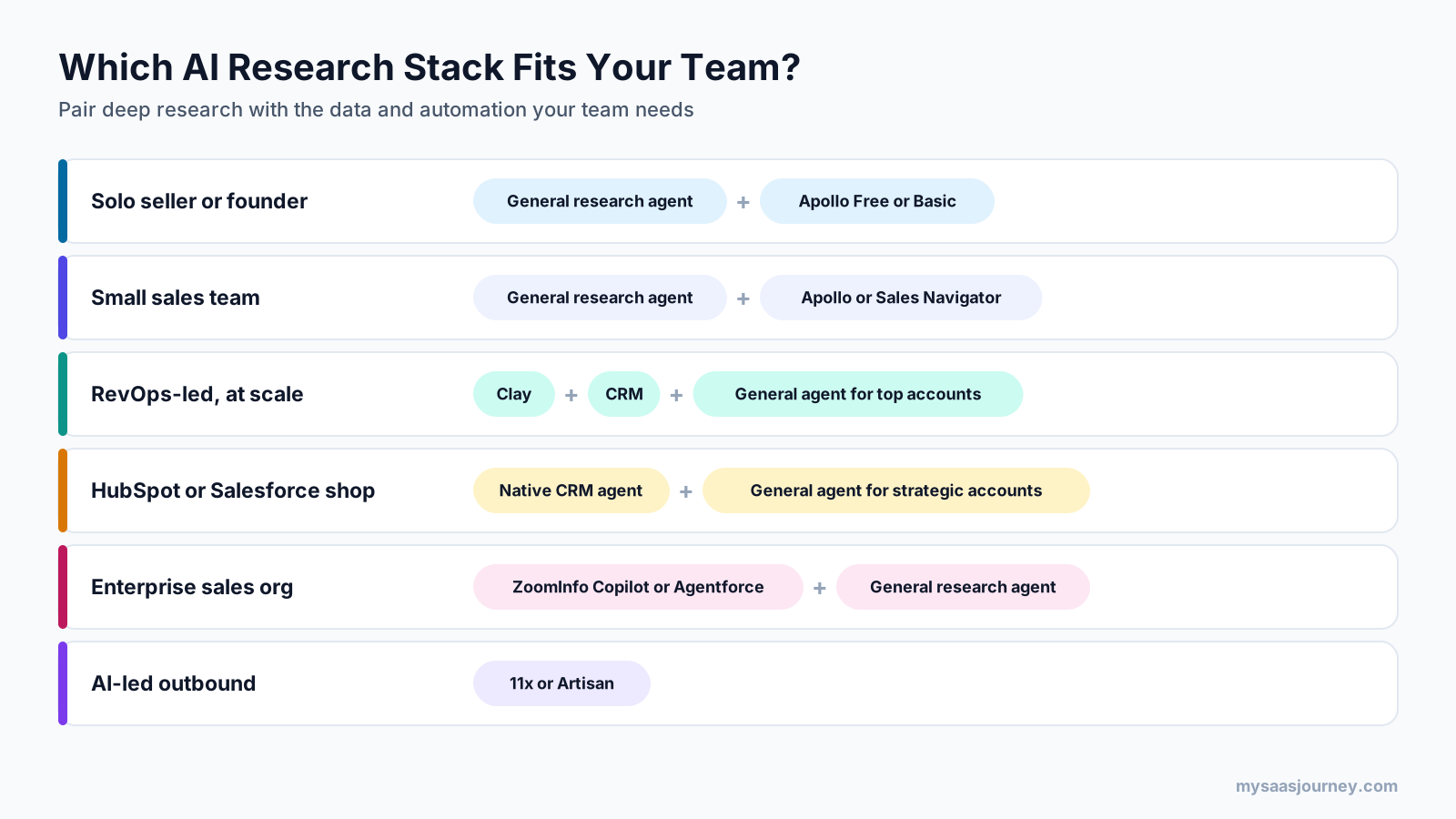
| Team type | Suggested stack | Why |
|---|---|---|
| Solo seller or founder | One general research agent plus Apollo’s free or Basic plan | Deep briefs and contacts at low cost |
| Small sales team | General research agent plus Apollo or Sales Navigator | Strategic research plus buying committee mapping |
| RevOps-led team researching at scale | Clay plus your CRM, with a general agent for top accounts | Consistent research across large lists |
| HubSpot or Salesforce organization | The CRM’s native agent plus a general agent for strategic accounts | Research stays in the system of record |
| Enterprise sales organization | ZoomInfo Copilot or Salesforce Agentforce plus a general agent | Signals, data, and governance at scale |
| Team ready for AI-led outbound | 11x or Artisan | Research, writing, and sending in one agent |
Whatever stack you choose, store research in your CRM. Our comparison of the best free CRM software and our CRM software category cover the options. If you need to connect research tools to other apps, our guide to Zapier vs Make explains the main automation platforms.
How to Choose an AI Agent Tool for Company Research
Choose by matching the tool to your research depth, account volume, data needs, and existing systems, then test it on accounts you already know well.
- Decide on depth versus volume. Deep briefs on 20 strategic accounts need a different tool than light research on 2,000.
- Check whether you need contact data. General agents do not supply verified emails and phone numbers.
- Confirm source transparency. Prefer tools that show where each fact came from.
- Check CRM integration. Research is most useful when it lands on the account record.
- Test on known accounts. Run each tool on companies you know well and score accuracy, depth, and freshness.
- Model cost per researched account. Include seats, credits, usage charges, and the time spent checking output.
For more context on AI in sales, read our guides to AI sales assistant software, SaaS AI tools for sales teams, and competitor analysis tools.
Final Thoughts
AI agents have made deep company research fast enough to do for every important account. General research agents such as ChatGPT deep research, Claude Research, Gemini Deep Research, and Perplexity produce the richest briefs. Sales data platforms such as ZoomInfo, Apollo, and Sales Navigator add the contacts and signals that general agents lack. Clay and CRM-native agents from HubSpot and Salesforce make research repeatable across large lists, and AI SDRs such as 11x and Artisan fold research into automated outreach.
The tool matters less than the process. Define what a good brief looks like, require sources, check the facts you plan to use, and save the result where your whole team can find it.
Frequently Asked Questions
What is the best AI agent for B2B company research?
For deep strategic briefs, general research agents such as ChatGPT deep research, Claude Research, Gemini Deep Research, and Perplexity produce the most detailed reports. For research combined with contact data and buying signals, ZoomInfo Copilot, Apollo, or LinkedIn Sales Navigator are better fits. For research at scale, Clay or a CRM-native agent works best.
Can ChatGPT do company research for sales?
Yes. ChatGPT’s deep research mode can investigate a company across many web sources and return a cited report covering strategy, news, and talking points. It does not include verified contact data, so pair it with a sales data platform to find the right people.
What should an AI account research brief include?
A strong brief covers a company snapshot, strategic priorities, recent trigger events, hiring signals, relevant technology, the likely buying committee, competitive context, and a tailored outreach angle, with a source for each fact.
Are AI research agents accurate?
They are useful but not always accurate. Agents can rely on outdated pages, misread content, or confuse companies with similar names. Require citations, check dates, and verify any fact you plan to use in outreach.
How much do AI tools for company research cost?
General research agents start at about $17 to $20 per user per month. Apollo lists paid plans from $49 per user per month billed annually, and LinkedIn Sales Navigator Advanced costs $159.99 per month. Clay offers a free plan with paid plans from $60 per month, HubSpot’s prospecting agent charges $1 per lead recommended for outreach, and ZoomInfo, Salesforce Agentforce, 11x, and Artisan are quote-based or consumption-based.
What is the difference between an AI research agent and an AI SDR?
An AI research agent gathers and summarizes information for a person to use. An AI SDR uses that research to write and send outreach and book meetings with limited human input.
Can AI agents research companies at scale?
Yes. Agent builders such as Clay and CRM-native agents from HubSpot and Salesforce can run research questions across large account lists and write the answers back into tables or CRM records. Keep each question narrow and verifiable for reliable results.
Where can I find reliable information about public companies?
For US public companies, SEC EDGAR provides free access to annual 10-K reports, quarterly filings, and other disclosures. These primary sources state strategy and risks in the company’s own words and are more reliable than third-party summaries.