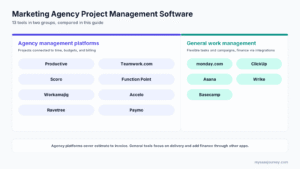
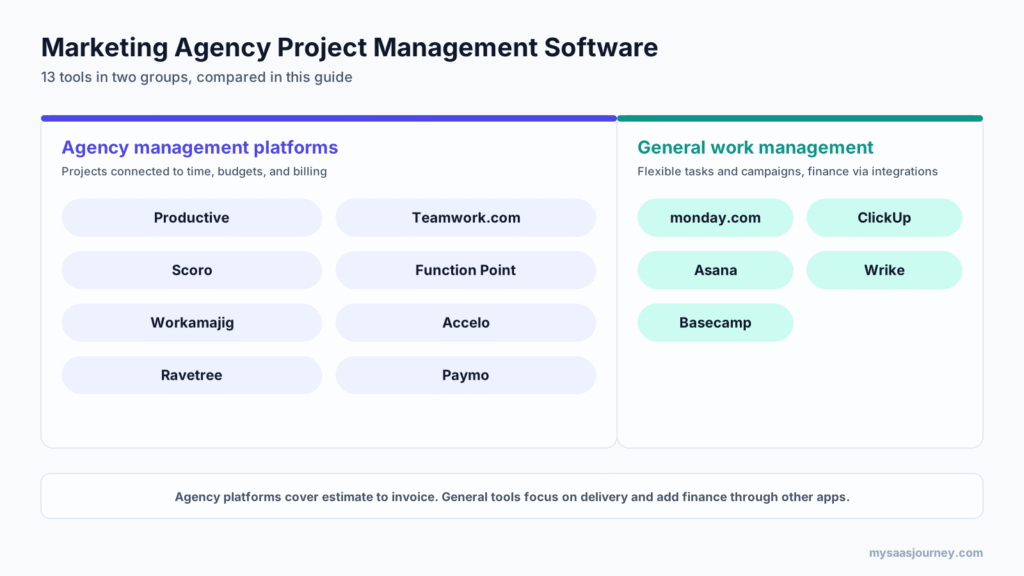

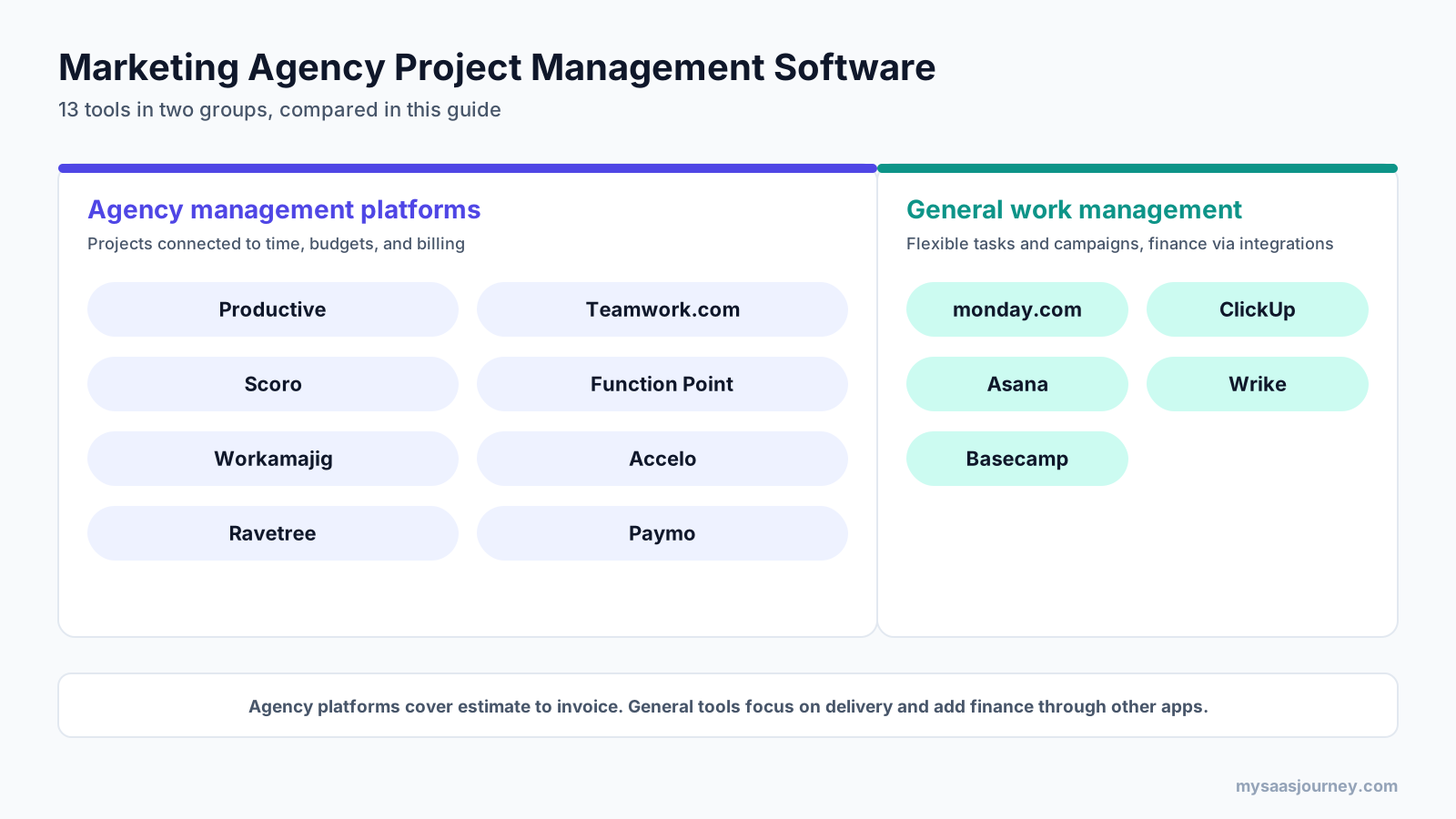
The best marketing agency project management software depends on how much of the agency business you want in one system. Productive, Teamwork.com, and Scoro connect projects with time, budgets, retainers, and profitability. Function Point and Workamajig suit creative and advertising agencies that need deeper job costing and accounting. Asana, monday.com, ClickUp, and Wrike suit agencies that mainly need flexible task and campaign management, while Basecamp suits small teams that want simple client collaboration.
Marketing agencies run on billable time. Every campaign has a scope, budget, deadline, client updates, and a team whose hours need to be planned and tracked. A general task tool can organize the work, but it may not show whether a retainer is profitable, who has capacity next week, or which client is drifting over budget.
This guide compares 13 tools, explains how agency project management differs from general project management, estimates costs for a 15-person agency, and compares client and freelancer access.
Key takeaways
- Agency platforms such as Productive, Teamwork.com, Scoro, Function Point, and Workamajig connect projects to time, budgets, retainers, and invoicing.
- For a 15-person agency, published list prices put many tools between about $250 and $800 per month. Basecamp Pro Unlimited is $199 per month on annual billing.
- Client and freelancer access can add hidden costs because some vendors count guests as paid users.
- Retainer tracking and capacity planning are often limited to mid-tier or upper plans.
- Implementation can take days for simple tools or months for platforms with built-in accounting.
Quick comparison: marketing agency project management software
| Software | Best for | Type | Starting price (published) |
|---|---|---|---|
| Productive | Projects, budgets, resources, profitability | Agency platform | $10/user/month |
| Teamwork.com | Client-service agencies and retainers | Agency platform | Free; Basics $9.99/user/month yearly |
| Scoro | Quote-to-cash in one system | Agency platform | $17/user/month; 5-user minimum |
| Function Point | Creative agency job tracking | Agency platform | $53/user/month |
| Workamajig | Creative agency accounting | Agency platform | $49/user/month for 10+ users |
| Accelo | Retainers and fixed-fee projects | Agency platform | Quote |
| Ravetree | Retainers, client portals, requests | Agency platform | $29/user/month yearly |
| Paymo | Small studios and freelancers | Agency-friendly | Free; Plus $15.90/user/month |
| monday.com | Visual campaign boards | General work management | $9/seat/month yearly |
| ClickUp | All-in-one workspace | General work management | Free; Core $12/user/month yearly |
| Asana | Structured workflows and guests | General work management | $10.99/user/month yearly |
| Wrike | Enterprise controls and resources | General work management | Free; Team $10/user/month |
| Basecamp | Simple collaboration and flat pricing | Project collaboration | Free; paid from $29/month |
How we chose these tools
Tools were selected for agency project delivery and evaluated against vendor product and pricing pages checked in November 2026. No vendor sponsored or reviewed this article, and no payment was accepted for placement.
We compared seven agency needs:
- Project and campaign management, templates, and dependencies
- Billable and non-billable time tracking
- Budgets, retainers, and over-budget alerts
- Resource and capacity planning
- Client collaboration, approvals, proofing, and access
- Estimates, invoicing, and profitability reporting
- Price transparency and the cost of the plan with the required features
We relied on vendor documentation and pricing pages rather than paid trials of every product. Shortlist two or three tools and test them with a live client project before committing.
Agency project management vs. general project management
Agency project management covers the full client lifecycle, from estimate to invoice. General project management focuses mainly on tasks and deadlines. The distinction matters because agency profit depends on how accurately you estimate, staff, track, and bill each job.
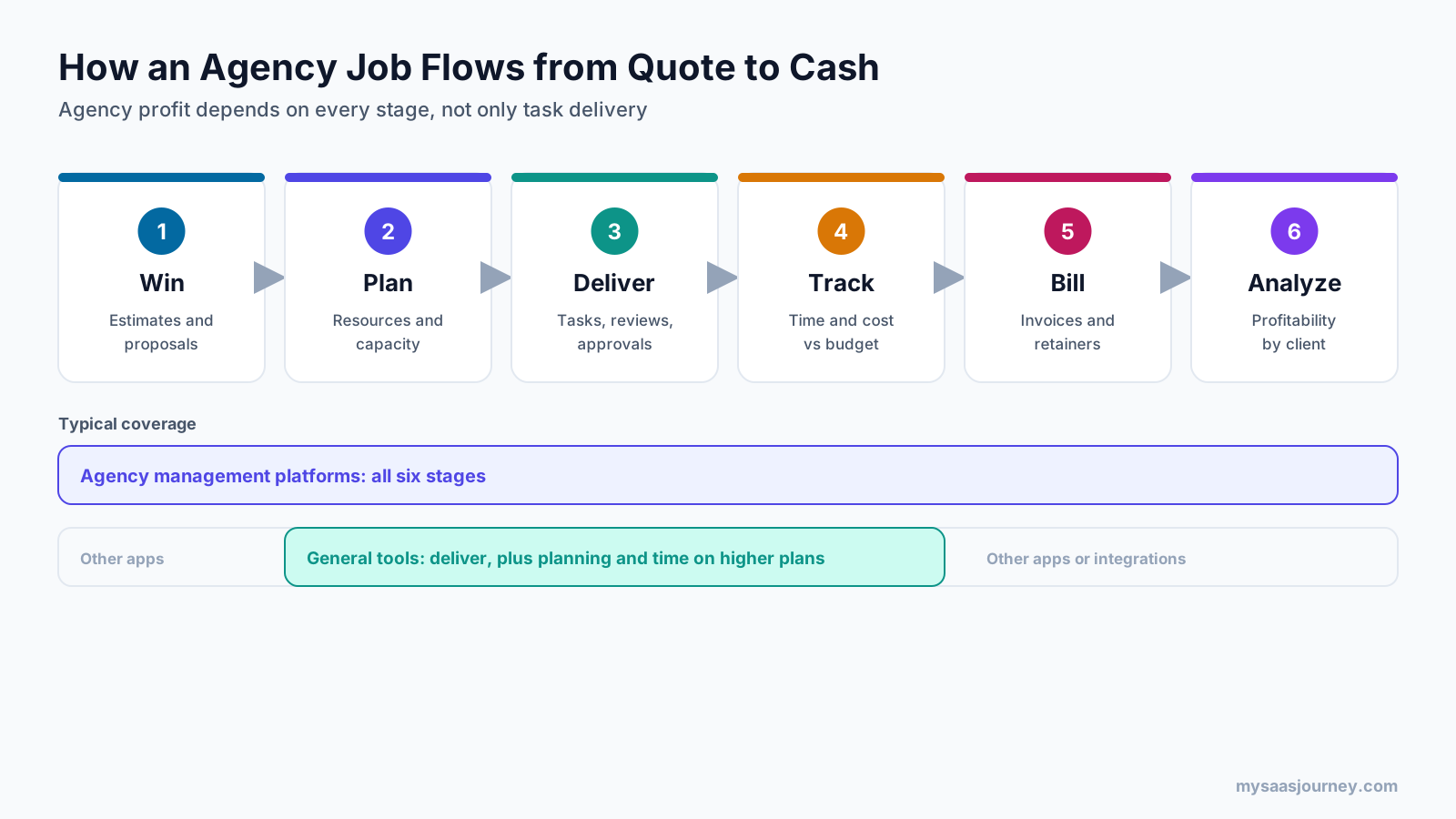
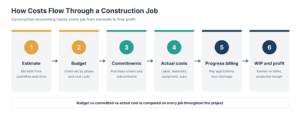
A typical agency job moves through six stages:
- Win the work with an estimate or proposal based on roles, rates, and scope.
- Plan resources by assigning people with the right skills and capacity.
- Deliver work with tasks, timelines, internal reviews, and client approvals.
- Track time and costs against the budget or retainer.
- Bill through invoices, retainer drawdowns, or milestone payments.
- Analyze profitability by client, project, service, and team member.
Asana, monday.com, ClickUp, and Wrike are strong at delivery and often cover parts of resource planning and time tracking on higher plans. Productive, Scoro, Function Point, and Workamajig aim to cover all six stages. If estimates and invoicing already work well elsewhere, a general tool may be enough. If profitability is hard to see, an agency platform may be a better fit.
The best marketing agency project management software
Agency management platforms
1. Productive
Best for: Digital and marketing agencies that want projects, budgets, resource planning, and profitability in one tool.
Productive’s Essential plan includes budgeting, resource planning, project and task management, time tracking, expense management, and reporting. Professional adds recurring retainer-style budgets, rate cards, billable-time approvals, advanced reports, and invoicing integrations. Ultimate adds revenue forecasting, scenario building, and multiple subsidiaries.
- Budgets, including recurring budgets on Professional
- Resource planning and time tracking
- Rate cards and billable-time approvals
- Advanced reporting and revenue forecasting on higher plans
Pricing: Essential is $10/user/month. Professional is $25 to $29/user/month depending on billing; Ultimate is custom. A 14-day trial is available. Confirm the current annual rate because the pricing page shows differing figures.
Trade-off: Retainer-style recurring budgets and rate cards require Professional.
2. Teamwork.com
Best for: Client-service agencies needing retainers, capacity planning, and collaboration.
Accelerate adds time budgets, retainers, workload planning, capacity views, utilization tracking, and invoices built from logged time. Optimize and Enterprise add financial and fixed-fee budgets, role- or skill-based scheduling, quotes and invoices with margin, and profitability insights.
- Retainers and time budgets from Accelerate
- Workload and capacity planning
- Proofing for client file approval
- Invoices from logged time; profitability insights on Optimize
Pricing: Free for up to 5 users and 5 projects. Basics is $9.99/user/month yearly with a 3-user minimum. Accelerate is $24.99/user/month yearly with a 5-user minimum. Higher plans are quote-based.
Trade-off: Profitability reporting and advanced financial budgets sit on quote-based plans.
3. Scoro
Best for: Agencies that want quotes, projects, time, resources, and invoicing in one system.
Scoro sells combinations of apps. Time-billing covers time tracking and invoicing; Projects and Resources adds delivery and resource planning; Quote to Cash covers estimates, delivery, time, and invoicing. End-to-end adds sales, resources, spending, advanced financials, work-in-progress reporting, and revenue recognition.
- Quotes and estimates with cost and margin planning
- Resource planning in selected combinations
- Retainers and invoicing
- Margin, work-in-progress, and revenue recognition reports on higher combinations
Pricing: From $17/user/month for Time-billing, $29 for Projects and Resources or Quote to Cash, and $57 for End-to-end. Five-user minimum; annual billing saves 13% to 17%. A 14-day trial is available.
Trade-off: The full agency feature set is on End-to-end, and onboarding packages vary.
4. Function Point
Best for: Creative and advertising agencies needing estimates, job tracking, resourcing, and financial reporting.
Plans include estimates and proposals, campaign and project hierarchies, Gantt charts and Kanban boards, billable timesheets, resource forecasts, batch invoicing, retainer management, and profitability reports. Optimize adds QuickBooks Online and Desktop integration and business intelligence reporting.
- Estimates, change orders, and revision tracking
- Resource forecasting by role and staff
- Retainer management and batch invoicing
- Profitability by client, project, and service
Pricing: Standardize is $53 or $58/user/month; Optimize is $62 or $68. Lower figures appear to be annual rates. New customers pay onboarding fees.
Trade-off: Higher per-user cost than general tools, plus onboarding fees.
5. Workamajig
Best for: Larger creative and advertising agencies wanting project management and agency accounting together.
Workamajig combines project management with resourcing, traffic, estimates, and accounting, including general ledger, P&L reports, multiple currencies, payables, and receivables. It also covers workload and freelancer/vendor management.
- Resourcing and traffic management by department, office, and role
- Estimates and estimates-versus-actuals
- General ledger, payables, and receivables
- Freelancer and vendor management
Pricing: $49/user/month for 10+ users, $47 for 25+, and $45 for 50+. Annual prepayment includes one free month. Enterprise is custom.
Trade-off: Implementation typically takes 2 to 3 months; pricing starts at the 10-user tier.
6. Accelo
Best for: Agencies running fixed-fee projects and ongoing retainers together.
Accelo offers project management, client management, a client workspace, resourcing and capacity planning, project financials, and business intelligence. It supports fixed-fee projects and retainers side by side.
- Retainers and fixed-fee projects together
- Client workspace for collaboration
- Resourcing and capacity planning
- Project financials and business intelligence
Pricing: Quote-based according to team size and goals.
Trade-off: Pricing is not publicly listed.
7. Ravetree
Best for: Agencies wanting retainers, client portals, and request intake.
Ravetree includes retainer alerts, request forms, client portals for status and file review, project templates that generate proposals, project financials, resource calendars, and time logs.
- Retainers with over-budget notifications
- Client portals and request forms
- Project financials and forecasting
- Resource calendars and time tracking
Pricing: $29/user/month yearly, $34 quarterly, or $39 monthly. Plans include unlimited projects, onboarding, training, and support.
Trade-off: The pricing page does not break features down by plan; confirm inclusions before buying.
8. Paymo
Best for: Small creative agencies, studios, and freelancers wanting time tracking, invoicing, and scheduling.
Paymo combines project management with time tracking and invoicing. Plus adds timesheet reports, project profitability, recurring invoices, estimates, expenses, and proofing. Pro adds proposals and contracts, Gantt charts, employee scheduling, workload, and leave management.
- Time tracking and invoicing on every plan
- Retainer and flat-rate projects
- Project profitability and proofing on Plus
- Employee scheduling and workload on Pro
Pricing: Free for 1 user, 1 client, and 2 projects. Solo is $9.90/month; Plus is $15.90 and Pro $23.90/user/month monthly. Annual billing offers discounts.
Trade-off: Larger agencies may need deeper resource planning and financial controls.
General work management tools agencies use
These tools are not built only for agencies, but many use them for campaign planning, creative workflows, and client collaboration. Most need integrations for invoicing and full profitability reporting. See our Asana vs monday.com comparison.
9. monday.com (monday work management)
Best for: Agencies wanting flexible, visual boards for campaigns and client projects.
Customizable boards, views, and automations support campaign workflows. Guest access starts on Standard, time tracking on Pro, and resource management is listed on Enterprise.
- Boards for campaigns, content calendars, and client projects
- Guest access from Standard
- Time tracking from Pro
- Automations and integrations on paid plans
Pricing: Free for up to 2 seats. Basic $9, Standard $12, and Pro $19/seat/month annually, with a 3-seat minimum. Enterprise is custom.
Trade-off: No built-in invoicing or retainer budgets; resource management is on Enterprise.
10. ClickUp
Best for: Agencies wanting docs, tasks, whiteboards, and chat in one workspace.
ClickUp combines tasks, docs, whiteboards, forms, and chat. Time tracking starts on Core, workload view on Business, and guest accounts are available on all plans. Attachment annotation starts on Business.
- Time tracking from Core
- Workload view from Business
- Guest accounts on all plans
- Forms for client requests
Pricing: Free plan available. Core lists at $12/user/month and Business at $25/user/month yearly; discounted prices may be shown. Enterprise is custom; extra AI credits cost $10 per 10,000 credits.
Trade-off: Broad features can make setup take longer, and there is no native invoicing.
11. Asana
Best for: Agencies wanting structured campaign workflows, approvals, and unlimited free guests.
Asana organizes work into projects, portfolios, and workflows. Advanced adds time tracking, workload management within a portfolio, proofing, and approvals. Paid plans include unlimited free guests. A Timesheets and Budgets add-on is available on Starter.
- Proofing and approvals on Advanced
- Time tracking and workload on Advanced
- Unlimited free guests on paid plans
- Portfolios for multi-client visibility
Pricing: Starter $10.99/user/month annually or $13.49 monthly. Advanced $24.99 annually or $30.49 monthly. Free Personal supports 2 users.
Trade-off: Most agency features sit on Advanced, and invoicing requires an integration.
12. Wrike
Best for: Larger agencies needing enterprise controls, advanced resource planning, and structured workflows.
Wrike offers project and task management with board and table views. Time tracking and advanced resource and capacity planning are listed on Pinnacle and Apex.
- Project and task management with multiple views
- Time tracking and advanced resource planning on Pinnacle and Apex
- Add-ons for integrations and data
Pricing: Free plan available. Team is $10/user/month for 2 to 15 users; Business is $25/user/month for 5 to 200 users, billed annually. Pinnacle and Apex are quote-based.
Trade-off: Time tracking and resource planning are listed only on higher, quote-based plans.
13. Basecamp
Best for: Small agencies wanting simple collaboration and predictable flat pricing.
Basecamp keeps communication, to-dos, files, and schedules together. Plans set limits on projects, storage, and users; clients and contractors count toward user limits, except Pro Unlimited.
- Flat pricing with no per-user fees
- Simple client collaboration
- Unlimited users on Pro Unlimited
Pricing: Free for 1 project and up to 3 users. Freelancer $29/month, Pro $79, Pro Plus $99, and Pro Unlimited $199/month annually or $329 monthly.
Trade-off: No native time tracking, budgets, or resource planning.
Feature comparison for agencies
The table reflects capabilities listed on vendor pricing or product pages and the plans where stated.
| Software | Time tracking | Budgets/retainers | Resource planning | Client access/approvals | Invoicing | Profitability |
|---|---|---|---|---|---|---|
| Productive | Yes | Yes; recurring on Professional | Yes | Not specified by plan | Integrations on Professional | Yes |
| Teamwork.com | Yes | Accelerate+ | Accelerate+ | Proofing; plan limits apply | Accelerate+ | Optimize |
| Scoro | Yes | Yes | Selected combinations | Not specified | Yes | Yes |
| Function Point | Yes | Yes | Yes | Not specified | Yes | Yes |
| Workamajig | Not detailed | Estimates vs actuals | Yes | Not specified | With accounting | P&L reports |
| Accelo | Not detailed | Yes | Yes | Client workspace | Not detailed | Project financials |
| Ravetree | Yes | Yes | Yes | Client portals | Not detailed | Project financials |
| Paymo | Yes | Retainer projects | Pro | Guests; proofing on Plus | Yes | Plus |
| monday.com | Pro+ | No | Enterprise | Guests from Standard | No | No |
| ClickUp | Core+ | No | Business+ | Guests on all plans | No | No |
| Asana | Advanced | Starter add-on | Advanced | Free guests; proofing on Advanced | No | No |
| Wrike | Pinnacle | Not listed | Pinnacle | Not listed | No | No |
| Basecamp | No | No | No | Clients count as users | No | No |
“Not specified” or “Not detailed” means the vendor pages reviewed did not state it. It does not mean the feature is missing. Confirm in a demo.
How much does agency project management software cost?
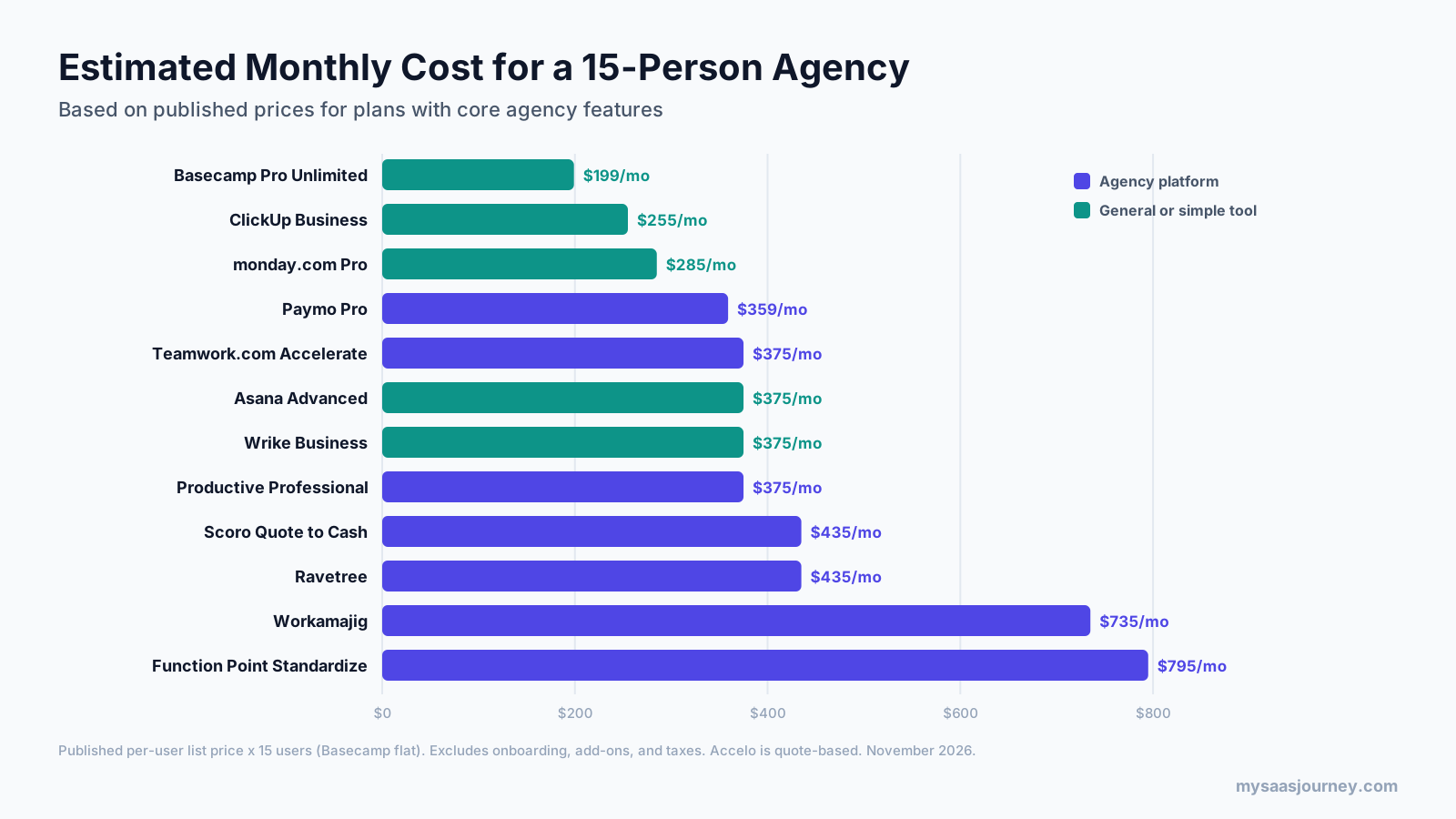
Most tools are priced per user per month. Using published list prices, a 15-person agency would pay roughly $250 to $800 per month for plans with core agency features, before onboarding fees or add-ons. Basecamp Pro Unlimited is $199/month on annual billing.
| Software and plan | Price used | Estimated monthly cost for 15 users |
|---|---|---|
| Basecamp Pro Unlimited | $199 flat, annual | $199 |
| ClickUp Business | $17/user, discounted yearly | $255 |
| monday.com Pro | $19/user, annual | $285 |
| Paymo Pro | $23.90/user, monthly | $359 |
| Teamwork.com Accelerate | $24.99/user, yearly | $375 |
| Asana Advanced | $24.99/user, annual | $375 |
| Wrike Business | $25/user, annual | $375 |
| Productive Professional | $25/user | $375 |
| Scoro Quote to Cash | $29/user | $435 |
| Ravetree | $29/user, yearly | $435 |
| Workamajig | $49/user, 10+ users | $735 |
| Function Point Standardize | $53/user | $795 |
| Accelo | Quote | Quote |
Estimates multiply published per-user prices by 15 and exclude onboarding, add-ons, taxes, and discounts. Plans have different feature sets: for example, Wrike Business does not list time tracking, while Workamajig and Function Point include deeper financial features. Compare the plan that meets your requirements. Our pricing models glossary explains per-seat and flat pricing.
How do these tools charge for client and freelancer access?
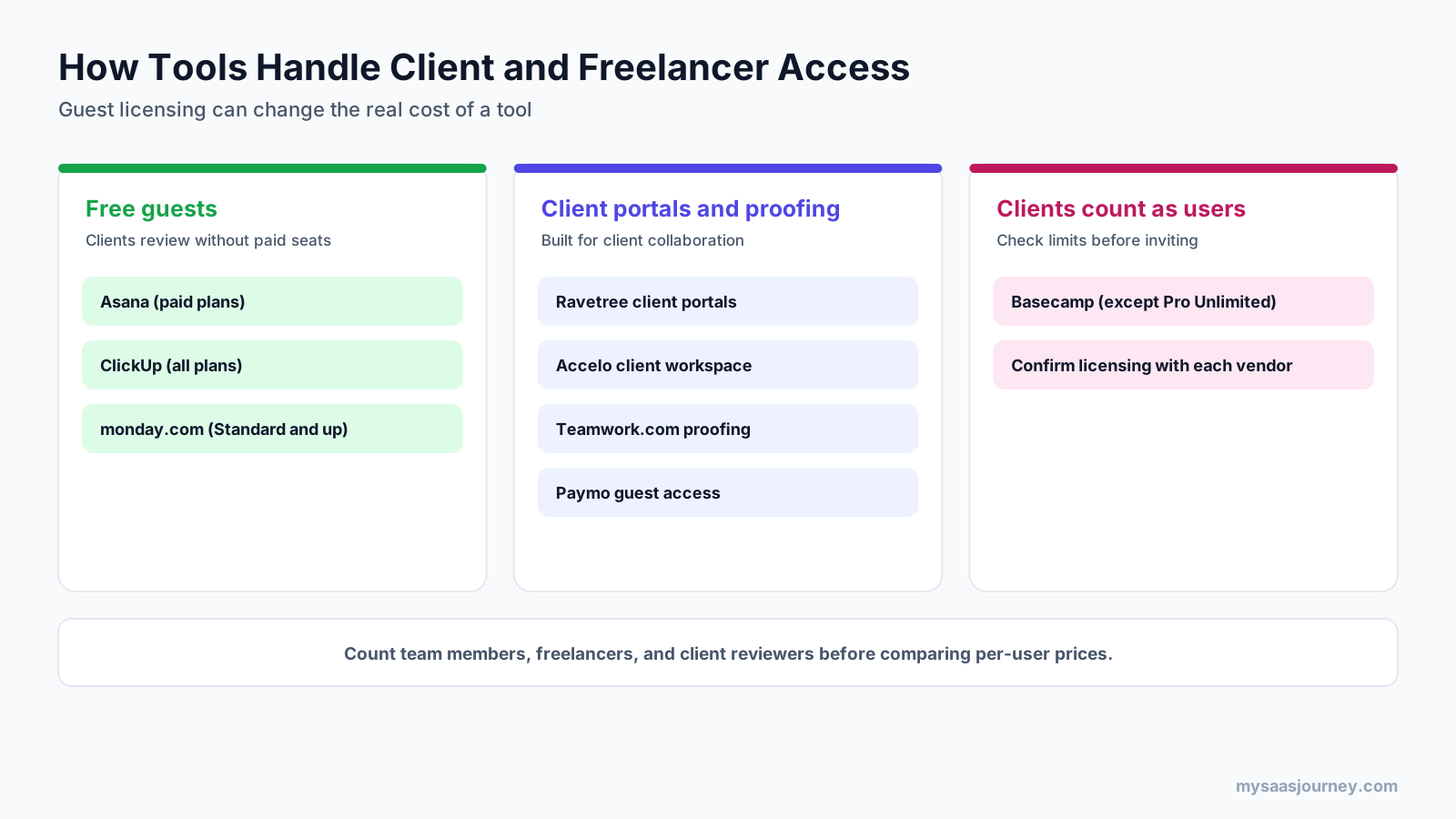
Client and freelancer access can change the real cost. Asana includes unlimited free guests on paid plans, ClickUp includes guest accounts on all plans, and monday.com adds guest access from Standard. Basecamp counts each person toward user limits, although Pro Unlimited has no user limit.
Before buying, list everyone who needs access:
- Team members who track time and manage tasks
- Freelancers and contractors who need to log time or view tasks
- Clients who review work, approve files, or submit requests
Ask each vendor how those people are licensed. A lower per-user price can cost more if freelancers need paid seats; free guests or a client portal can reduce costs for agencies with many clients.
Which agency project management software fits your agency?
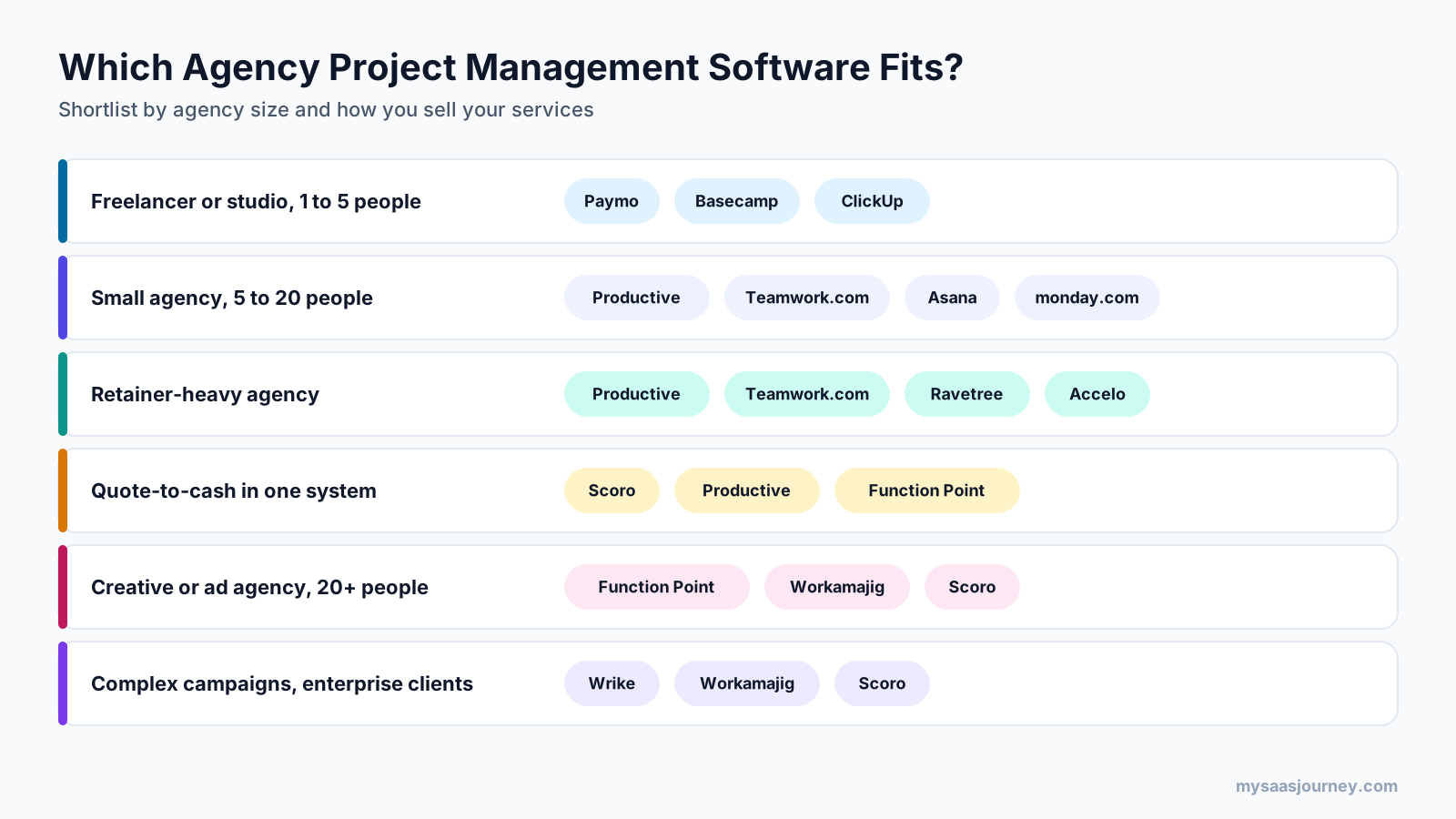
Match the tool to agency size, service model, and financial-control needs. Small teams often start with simple or general tools; growing agencies move to platforms for retainers and capacity planning; larger creative agencies may need built-in accounting.
| Your agency | Tools to shortlist |
|---|---|
| Freelancer or studio, 1 to 5 people | Paymo, Basecamp, ClickUp |
| Small marketing agency, 5 to 20 people | Productive, Teamwork.com, Asana, monday.com |
| Retainer-heavy agency | Productive, Teamwork.com, Ravetree, Accelo |
| Quote-to-cash in one system | Scoro, Productive, Function Point |
| Creative or advertising agency, 20+ people | Function Point, Workamajig, Scoro |
| Complex campaigns and enterprise clients | Wrike, Workamajig, Scoro |
| Agency using QuickBooks | Function Point Optimize, plus integrations |
| Many client reviewers | Asana, Teamwork.com, Ravetree |
If budget is the main constraint, our free project management software guide covers tools with usable free plans.
Key features to look for in agency project management software
The most important features connect delivery work to agency revenue:
- Project templates for campaigns, websites, and content programs
- Billable and non-billable time tracking; see our time tracking apps guide
- Budgets and retainers with alerts before work goes over scope
- Resource and capacity planning by person and role
- Client access, request forms, proofing, and approvals
- Estimates and invoicing, or integration with invoicing software; see our invoicing software guide
- Profitability reports by client, project, and service
- CRM, accounting, chat, and file-storage integrations; compare the best free CRM software
How to implement agency project management software
Implement in stages: set up rates, roles, and templates first, move one client or service line, train the team, then migrate the rest.
- Define your rate card, roles, and billable categories before importing data.
- Build templates for common projects and retainers. A project plan template can map phases and owners.
- Pilot the tool with one client or service line for a full billing cycle.
- Train the team on time tracking first; financial reports depend on accurate time data.
- Set up client access, request forms, and approval steps.
- Connect accounting, CRM, and chat integrations. For automation options, see Zapier vs Make.
- Review utilization, budget, and profitability after the first month; adjust templates and estimates.
Common mistakes agencies make
- Choosing on task features alone, then discovering retainers or invoicing require a higher plan
- Forgetting to count freelancers and client reviewers when estimating costs
- Skipping time-tracking discipline, which makes profitability reports unreliable
- Migrating every project at once instead of piloting first
- Rebuilding complex workflows before the team learns the basics
Final thoughts
The best marketing agency project management software connects delivery work to the money your agency earns. Productive, Teamwork.com, and Scoro give many growing agencies that connection in one platform. Function Point and Workamajig suit creative agencies needing deeper job costing and accounting. Accelo and Ravetree are worth considering for retainer-heavy agencies, and Paymo suits small studios on a budget. If you mainly need flexible campaign and task management, Asana, monday.com, ClickUp, Wrike, or Basecamp may be enough.
Shortlist two or three tools, run a real client project through each, and compare the total cost of the plan that includes the features you need, including client and freelancer access. See our AI tools for marketing guide or browse the productivity software category.
Frequently asked questions
What is the best project management software for marketing agencies?
It depends on your needs. Productive, Teamwork.com, and Scoro suit agencies wanting projects, time, budgets, and profitability together. Function Point and Workamajig suit creative and advertising agencies needing deeper financial tools. Asana, monday.com, ClickUp, and Wrike suit flexible campaign workflows.
What is the difference between agency management software and project management software?
Project management organizes tasks, timelines, and collaboration. Agency management adds estimates, time tracking against budgets, retainers, resource planning, invoicing, and profitability reporting.
What software is best for agency management?
Productive, Scoro, Teamwork.com, Function Point, Workamajig, and Accelo connect delivery to financial tracking. The right choice depends on agency size, retainers, and whether accounting should live in the same system.
How much does marketing agency project management software cost?
Most tools charge per user per month. Published entry prices start around $9 to $12/user for general tools and $10 to $53/user for agency platforms. For 15 people, plans with core agency features range roughly $250 to $800/month; Basecamp Pro Unlimited is $199/month annually.
Is there free project management software for marketing agencies?
Yes, with limits. Teamwork.com supports up to 5 users and 5 projects; ClickUp and Wrike have free plans; monday.com is free for up to 2 seats; Asana Personal supports 2 users; Paymo supports 1 user; and Basecamp supports 1 project. Agencies often outgrow free plans when they need time tracking, budgets, or client access.
Which project management tools let clients access projects for free?
Asana includes unlimited free guests on paid plans, ClickUp has guest accounts on all plans, and monday.com includes guest access from Standard. Basecamp counts clients toward user limits, except on Pro Unlimited.
Can agencies use Asana or monday.com instead of agency software?
Yes. They work for campaigns and creative workflows, but agencies often add separate invoicing tools. Retainer and profitability tracking is more limited than in platforms such as Productive or Scoro.
What is the best CRM for marketing agencies?
A CRM manages leads, deals, and client relationships; project management software manages delivery. Agencies often use HubSpot or Pipedrive alongside their project tool. Some agency platforms, including Scoro, also offer sales and quoting features.