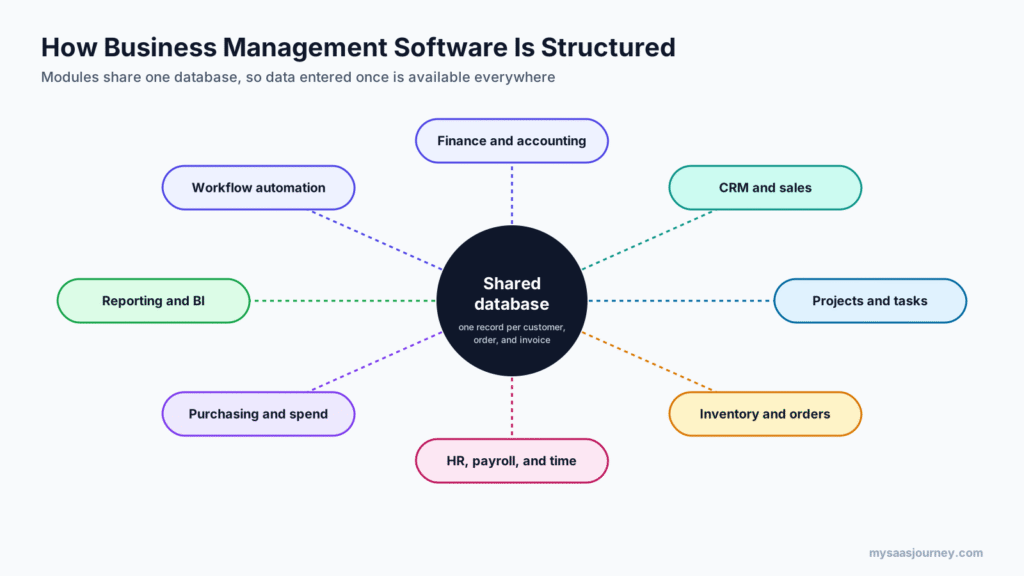
Business management software is a system that brings a company’s core operations, such as accounting, sales, projects, inventory, purchasing, and HR, into one connected platform. Instead of keeping customer, order, and financial data in separate apps and spreadsheets, every team works from a shared database, so information entered once is available everywhere and reports reflect the whole business.
The term covers a wide range of products. A 10-person service company might use an all-in-one suite such as Zoho One or Odoo. A distributor with warehouses and several legal entities might run an ERP system such as NetSuite or Microsoft Dynamics 365 Business Central. Many small businesses build the same capability from connected point tools, such as an accounting app, a CRM, and a project tool linked by integrations.
This guide explains what business management software is, how it works, the features it usually includes, the main types, what it costs, and how to choose the right approach for your business. It also clarifies related terms, including business process management software, business spend management software, and business financial management software.
Key takeaways:
- Business management software centralizes data and workflows across departments, reducing duplicate data entry and giving managers one view of the business.
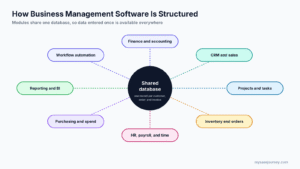
- Core modules usually include finance and accounting, CRM and sales, projects, inventory and orders, HR and payroll, purchasing, reporting, and workflow automation.
- The main types are all-in-one suites, ERP systems, connected best-of-breed stacks, industry-specific platforms, and focused process or spend tools.
- Published prices range from about $8 per user per month for limited-access users to more than $100 per user per month for full ERP licences, before implementation costs.
- The right choice depends on your size, how complex your operations are, and whether you value one vendor or the best tool for each job.
What Business Management Software Means
Business management software is any software designed to plan, run, and monitor the day-to-day operations of a business from one place. The defining feature is integration: modules share data, so a sale recorded in the CRM becomes an order, an invoice, and a line in the financial reports without anyone retyping it.
You will see the same idea described with several names:
- Business management system: often used interchangeably with business management software. Note that “management system” can also refer to frameworks such as ISO 9001 quality management systems, which are sets of policies and processes rather than software.
- Business management platform: usually a cloud-based suite that offers many apps on one platform.
- All-in-one business software: a suite that aims to replace several separate tools with one subscription.
- ERP (enterprise resource planning): the most established type of business management software, focused on finance and operations.
What business management software is not is a single-purpose app. A standalone invoicing tool or task manager manages one function. Business management software manages how functions connect. That said, a set of single-purpose apps can work as a business management system if they are integrated well, which is how many small businesses start. If you are still mapping out which kinds of software your company uses, our guide to the types of SaaS solutions every business needs gives a useful overview.
How Business Management Software Works
Business management software works by storing all core business records in a shared database and giving each team a module built for its work. Customers, products, employees, suppliers, and transactions each exist once. Every module reads and updates the same records.
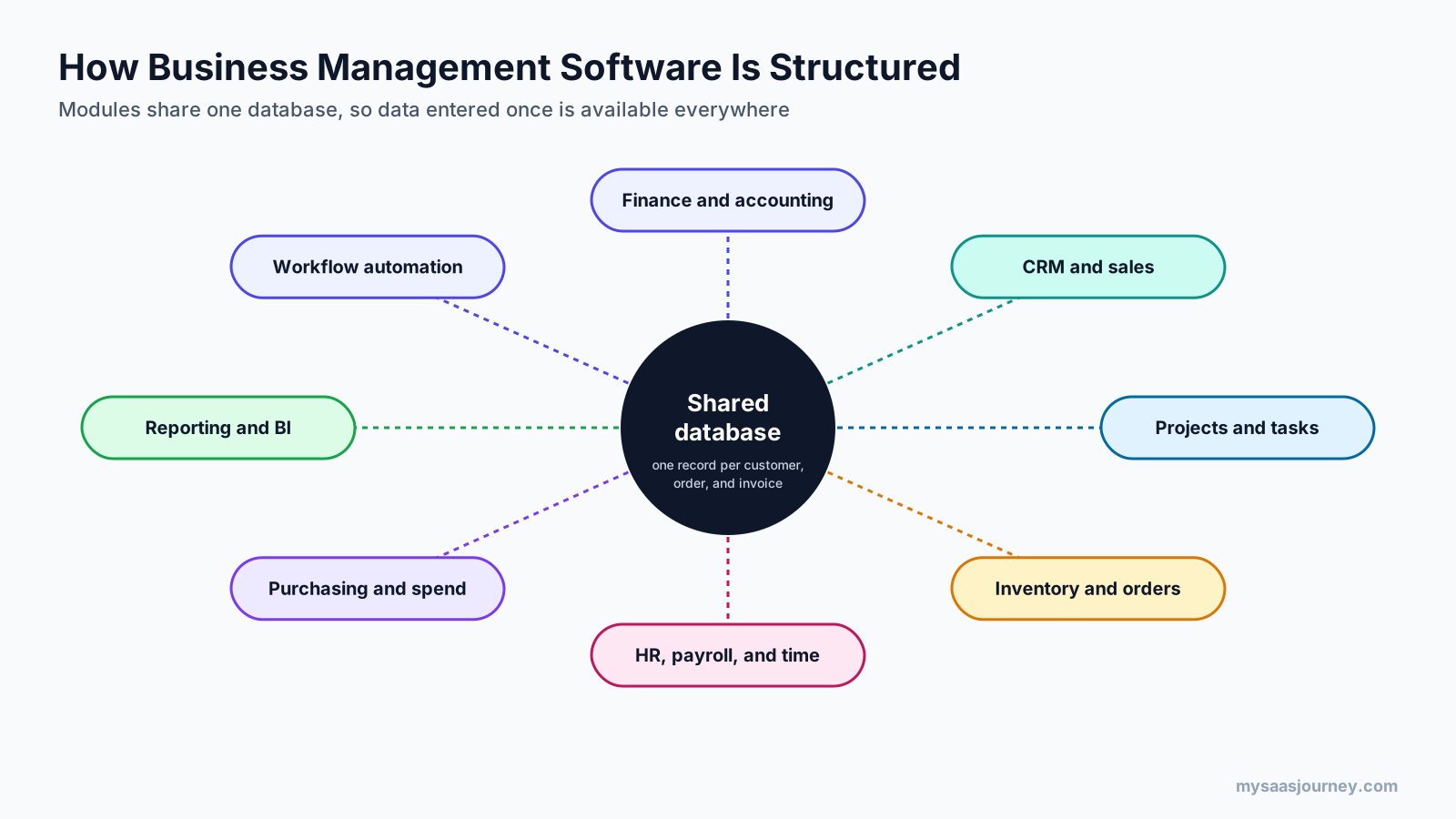
Three mechanisms make this work:
- A shared data model. A customer record created in the CRM is the same record that appears on the invoice in accounting and in the support history. When an address changes, it changes everywhere.
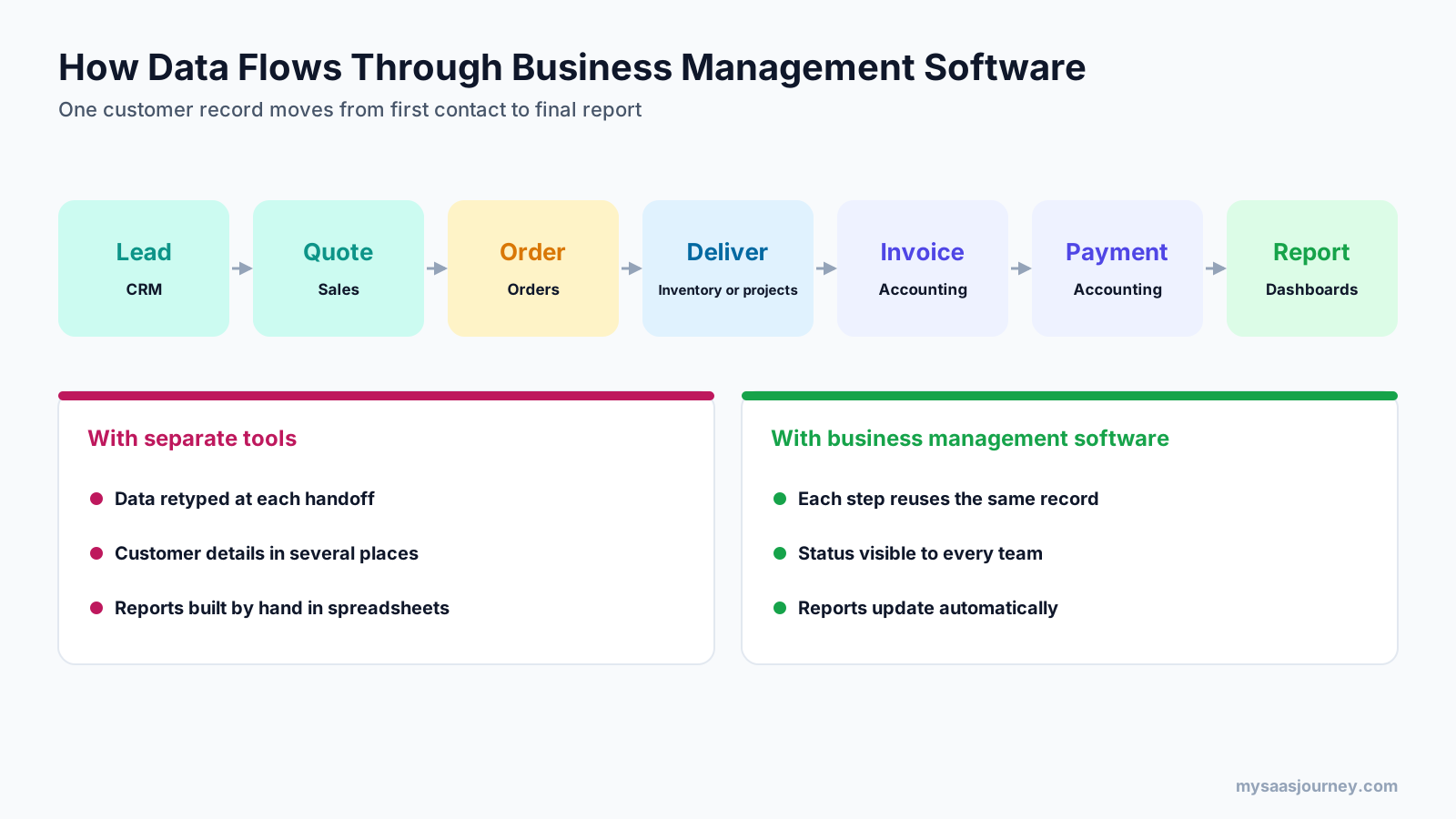
- Workflows that pass work between modules. Approving a quote can create a sales order, reserve stock, schedule a project, and prepare an invoice. Rules and automations move the work forward without manual handoffs.
- Reporting across modules. Because data lives in one place, dashboards can combine sales, delivery, cost, and cash figures as they change rather than waiting for someone to merge spreadsheets.
The diagram below shows how a typical customer moves through the system, and why it matters compared with running each step in a separate tool.
Most modern business management software is delivered as a cloud subscription, accessed in a browser and on mobile apps, with the vendor handling hosting, security updates, and new releases. Some ERP systems and open-source suites can also be installed on your own servers. Our guide to what cloud computing is explains the trade-offs between hosted and self-managed software.
Key Features of Business Management Software
Not every product includes every module, and depth varies widely. These are the features most business management software offers, either built in or through add-ons and integrations.
Financial Management and Accounting
Accounting is usually the core. Expect a general ledger, accounts receivable and payable, invoicing, bank reconciliation, tax handling, expense tracking, and financial statements. More advanced systems add multi-currency, multi-entity consolidation, budgeting, and revenue recognition. Because finance touches every other module, a strong accounting foundation is often the deciding factor when choosing a system. For simpler needs, see our comparisons of the best invoicing software for small business and free bookkeeping software.
CRM and Sales
Customer relationship management tracks leads, contacts, deals, and communication history, and turns won deals into quotes and orders. In an integrated system, sales teams can see invoices, payment status, and support tickets for each customer. Our glossary entry on CRM explains the basics, and our list of the best free CRM software compares standalone options.
Project and Task Management
Service businesses rely on project modules for planning work, assigning tasks, tracking time, and comparing budgets with actual costs. When projects connect to billing, time logged on a task can flow straight into an invoice. If projects are your main need, our guide to free project management software covers dedicated tools.
Inventory and Order Management
Product businesses need stock levels, purchase orders, sales orders, warehouse locations, and fulfillment tracking. Inventory modules update quantities as orders ship and goods arrive, and can trigger reorders when stock runs low. This is one of the main reasons growing product companies move from simple tools to an ERP.
HR, Payroll, and Time Tracking
HR modules store employee records, leave, onboarding, and performance information. Payroll calculates pay and taxes, though in many countries it is handled by a specialist provider connected to the system. Time tracking feeds both payroll and project costing. Our list of the best time tracking apps covers tools you can connect if your platform’s built-in option is limited.
Purchasing and Spend Management
Purchasing modules handle supplier records, purchase requests, approvals, purchase orders, and matching invoices to what was ordered and received. Spend management extends this to company cards, employee expenses, and budget controls, so finance can see and approve spending before it happens.
Workflow Automation and Process Management
Automation removes repetitive steps: routing approvals, sending reminders, creating tasks when a deal closes, or updating records when a payment arrives. Some platforms include visual workflow builders; others rely on integration tools. Our glossary entry on workflow automation and our guide to the best workflow automation tools cover this area in more depth.
Reporting, Dashboards, and Business Intelligence
Because all modules share data, business management software can report on the whole company: revenue by customer, project margins, cash flow, stock turnover, and team utilization. Many platforms include dashboards out of the box and connect to dedicated business intelligence tools for deeper analysis.
Collaboration and Document Management
Shared files, comments, internal chat, and client portals keep conversations attached to the records they relate to, rather than lost in email. Some suites include their own email, chat, and document apps.
Integrations and APIs
No platform does everything. Integrations connect business management software to payment providers, banks, ecommerce stores, payroll services, and industry tools. An open API lets developers build custom connections, and tools such as Zapier or Make link apps without code; our Zapier vs Make comparison explains how they differ.
Security, Permissions, and Audit Trails
With all business data in one place, access control matters. Look for role-based permissions, single sign-on, two-factor authentication, audit logs that show who changed what, and data residency options if you operate in regulated markets.
AI Features
Most vendors now add AI assistants that draft emails, summarize records, suggest next steps, categorize expenses, or answer questions about your data. Microsoft, for example, includes Copilot in Business Central, with some agents using credits sold separately. Treat AI features as helpful extras rather than a reason to choose a platform, and check what data they can access.
Types of Business Management Software
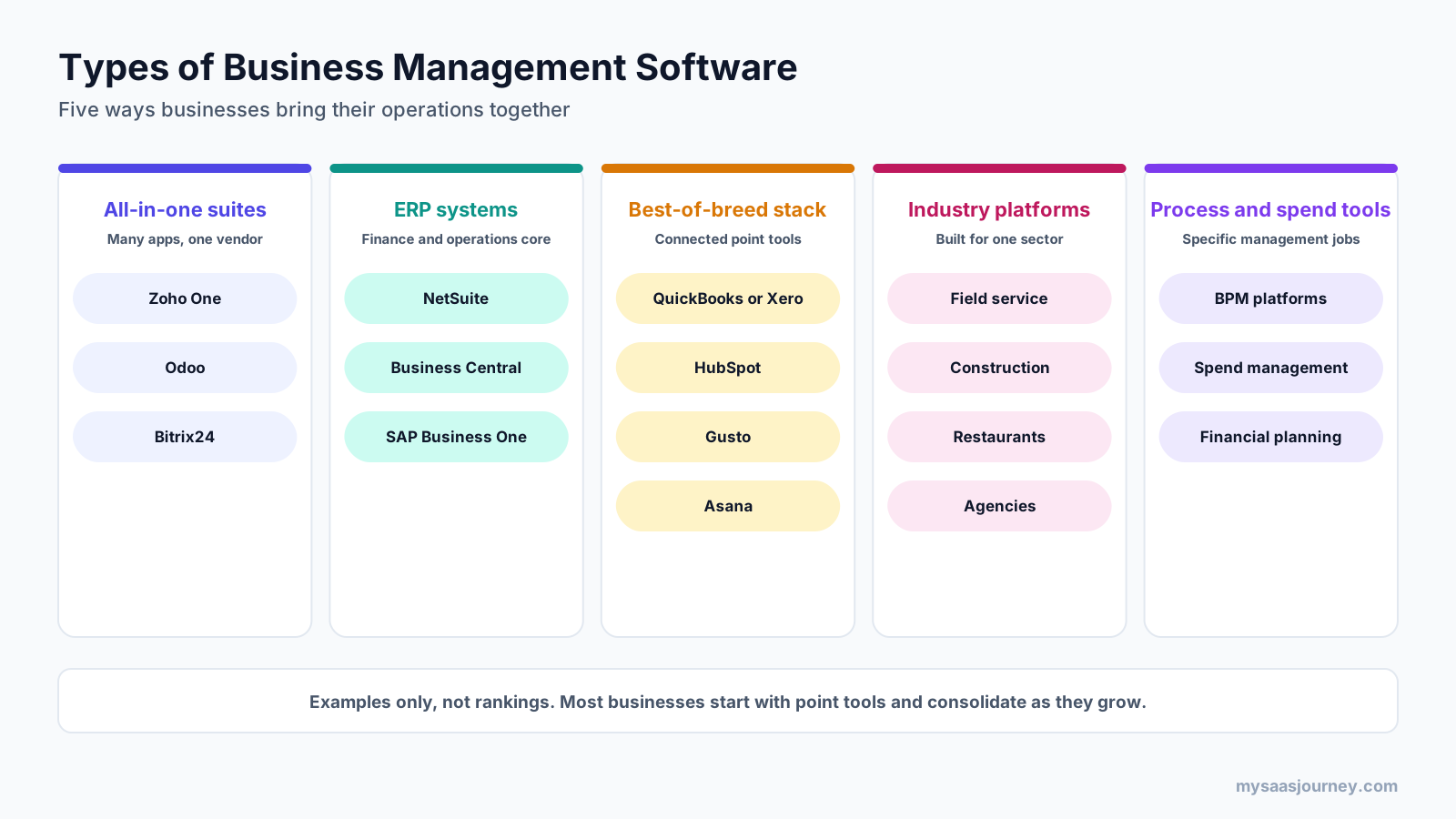
Business management software comes in five broad forms. Many companies combine more than one.
All-in-One Business Suites
All-in-one suites bundle many apps, such as CRM, accounting, projects, HR, marketing, and support, under one account and one subscription. Zoho One says its Standard edition includes more than 50 business apps, and Odoo’s paid plans include all of its apps for one per-user price. Bitrix24 is another example that combines CRM, tasks, and communication. Suites suit small and mid-sized businesses that want broad coverage without managing many vendors.
ERP Systems
Enterprise resource planning systems focus on finance and operations: accounting, inventory, supply chain, manufacturing, and multi-company management. Oracle NetSuite describes its ERP as an all-in-one cloud business management solution, and Microsoft Dynamics 365 Business Central covers finance, sales, purchasing, inventory, projects, and warehousing, with manufacturing and service management in its Premium edition. SAP Business One is aimed at small and mid-sized companies. ERP systems suit businesses with inventory, complex accounting, or several entities.
Best-of-Breed Stacks
Many businesses connect specialized tools instead of using one suite. A typical stack might combine QuickBooks or Xero for accounting, HubSpot for CRM, Gusto for payroll, and Asana for projects, linked by native integrations or automation tools. This approach gives you the strongest tool for each job but adds integration work and more subscriptions to manage. The best automation tools are often what hold these stacks together.
Industry-Specific Platforms
Vertical platforms are built for one sector, such as field service, construction, restaurants, agencies, healthcare practices, or membership organizations. They include workflows general suites lack, such as job scheduling and dispatch, construction job costing, or table management. Our guide to construction accounting software shows how industry needs shape software choice.
Process and Spend Management Tools
Some tools manage one cross-company discipline rather than a department, such as business process management or spend management. These are explained in more detail in the next section, because the terms are often confused with business management software.
Business Management Software vs Related Terms
Several similar-sounding categories cover different jobs. This table summarizes the differences, followed by short definitions of the most searched terms.
| Category | What it manages | Typical users | Relationship to business management software |
|---|---|---|---|
| Business management software | Operations across departments | Owners, managers, every team | The umbrella category |
| ERP | Finance, inventory, supply chain, manufacturing | Finance and operations teams | The most established type of business management software |
| CRM | Leads, customers, sales pipeline | Sales, marketing, service | Often one module within it |
| Business process management (BPM) software | Design, automation, and improvement of processes | Operations and process teams | Adds process design on top of, or across, other systems |
| Business spend management software | Purchasing, invoices, expenses, cards, budgets | Finance and procurement | A specialized finance layer |
| Business financial management software | Accounting, cash, budgeting, reporting | Owners and finance teams | The finance core of most systems |
What Is Business Process Management Software?
Business process management (BPM) software helps organizations map, automate, monitor, and improve their business processes, such as approvals, onboarding, claims handling, or order exceptions. Users design workflows visually, assign tasks and rules, and track how long each step takes so bottlenecks can be fixed. BPM software usually sits across other systems rather than replacing them, orchestrating work between the CRM, ERP, and people involved.
What Is Business Spend Management Software?
Business spend management (BSM) software gives finance teams control over company spending from request to payment. It typically combines procurement, purchase approvals, supplier management, accounts payable automation, corporate cards, employee expenses, and budget tracking. The goal is to see and approve spending before it happens, rather than discovering it when the invoice arrives.
What Is Business Financial Management Software?
Business financial management software handles a company’s money: bookkeeping, invoicing, bills, bank reconciliation, payroll links, tax, cash flow forecasting, budgeting, and financial reporting. For small businesses this is usually an accounting application. In larger companies, the finance modules of an ERP system play this role. It is the foundation that other business management modules connect to.
Benefits of Business Management Software
The value of business management software comes from connecting work that would otherwise be scattered across tools and people.
- One source of truth: everyone works from the same customer, order, and financial data, which reduces errors and disagreements over which spreadsheet is correct.
- Less duplicate data entry: information entered once flows through quotes, orders, invoices, and reports.
- Faster processes: automated handoffs and approvals shorten the time from sale to cash and from request to purchase.
- Better visibility: managers see live performance across sales, delivery, and finance instead of waiting for month-end reports.
- Easier compliance and audits: consistent records and audit trails make tax filings, audits, and customer data requests simpler.
- Room to grow: adding users, modules, or locations is easier than replacing several disconnected tools later.
- Fewer vendors to manage: suites reduce the number of contracts, logins, and invoices, though this depends on the type you choose.
Limitations and Risks
Business management software is a significant commitment, and it does not suit every business at every stage.
- Implementation effort: setting up modules, migrating data, and training staff takes time, and ERP projects often need a partner. Our glossary entry on data migration covers what moving data involves.
- Cost beyond the licence: implementation, customization, integrations, add-ons, and training can exceed the first year’s subscription.
- Compromise on depth: an all-in-one suite’s CRM or project module may be less capable than a dedicated tool.
- Vendor lock-in: once your processes and data live in one platform, switching becomes expensive.
- Change management: people used to their own tools may resist a new system unless the benefits are clear and training is good.
- Over-buying: small businesses sometimes pay for modules and complexity they never use.
How Much Does Business Management Software Cost?
Most business management software is priced per user per month, often with discounts for yearly billing. Prices vary from free plans for a single app to enterprise contracts quoted individually.
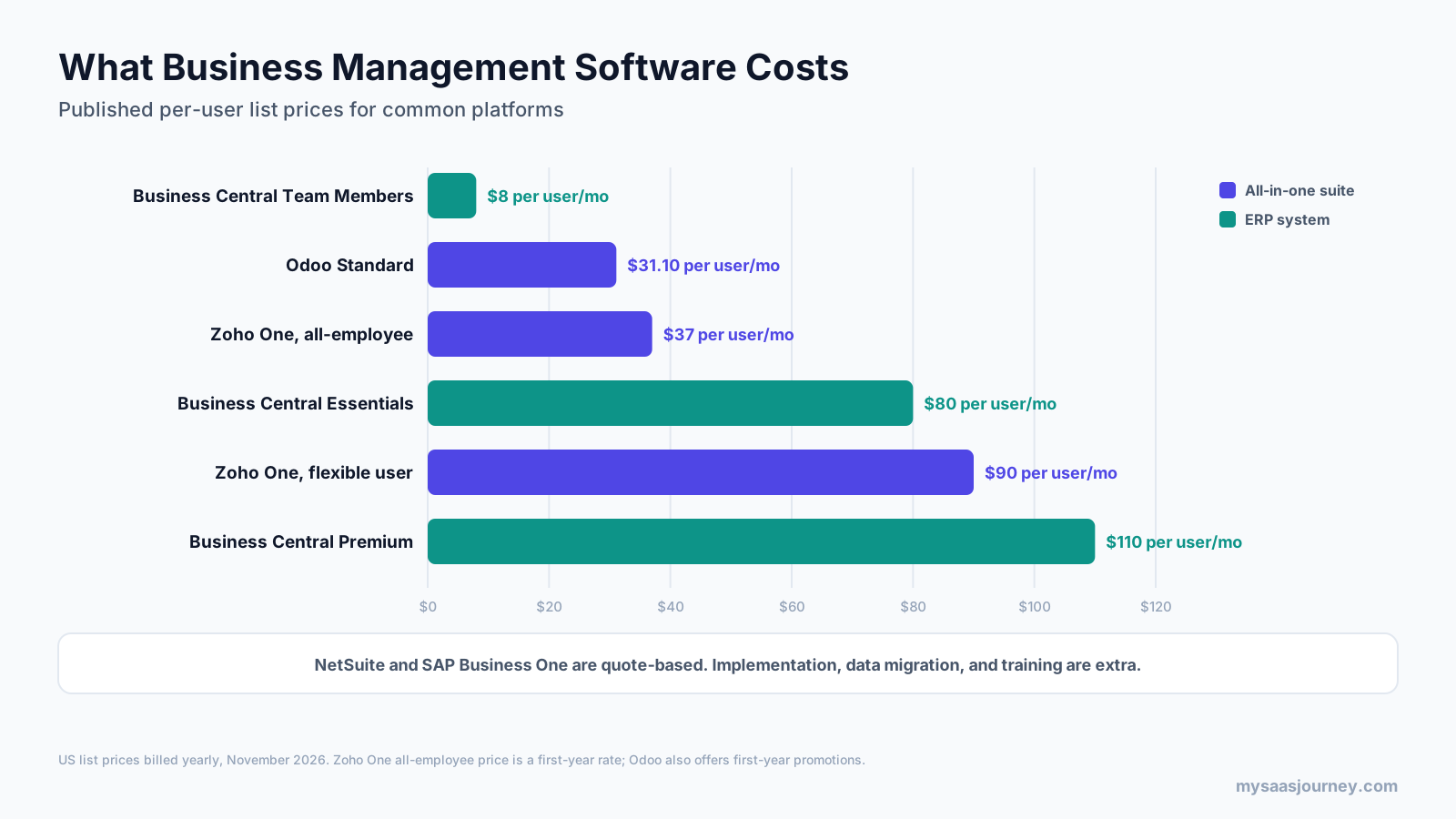
| Platform | Type | Published price (US, billed yearly) | Notes |
|---|---|---|---|
| Odoo | All-in-one suite | One App Free; Standard about $31.10 per user per month | All apps included on paid plans; first-year promotions often lower the price |
| Zoho One | All-in-one suite | $37 per employee per month (all-employee, first year); $90 per user per month (flexible user) | All-employee pricing requires licences for every employee |
| Microsoft Dynamics 365 Business Central | ERP | Essentials $80, Premium $110, Team Members $8 per user per month | 30-day free trial; some Copilot agents need credits sold separately |
| Oracle NetSuite | ERP | Quote | Annual licence based on core platform, modules, and users, plus one-time implementation |
| SAP Business One | ERP | Quote | Sold through partners |
Prices were checked on vendor pricing pages in November 2026, except Odoo, whose pricing page could not be read; Odoo figures come from recent third-party listings and vary by country. Treat these as starting points and confirm with each vendor.
Pricing Models You Will See
- Per user per month: the most common model, sometimes with cheaper licences for users who only view data or approve requests.
- All-employee pricing: a lower per-person price in exchange for licensing your whole company.
- Module-based pricing: a base platform fee plus charges for each module you add, common in ERP.
- Usage-based add-ons: AI credits, transactions, or storage charged by volume. Our glossary entries on pricing models and usage-based pricing explain these structures.
- Free and open-source options: some vendors offer a free single app or a self-hosted community edition, which saves licence costs but shifts hosting and support to you.
Costs Beyond the Subscription
Budget for implementation and configuration, data migration, integrations with tools you keep, training, customization, and ongoing administration. For ERP systems, implementation partners often charge a one-time fee that can be larger than the first year’s licences. If you are weighing building your own system instead, our guide on build vs buy compares the long-term costs.
All-in-One Suite vs Best-of-Breed Stack
The biggest strategic decision is whether to run your business on one platform or connect specialized tools.
| Factor | All-in-one suite or ERP | Best-of-breed stack |
|---|---|---|
| Data consistency | Strong, one database | Depends on integrations |
| Depth in each function | Good, sometimes basic | Strongest available for each job |
| Number of vendors | One or few | Many |
| Setup | Larger upfront project | Start small and add tools |
| Integration work | Mostly built in | Ongoing |
| Cost predictability | One main subscription | Several subscriptions that add up |
| Flexibility to switch tools | Lower | Higher |
A suite suits businesses that want consistency and fewer moving parts. A stack suits businesses with one or two functions that need specialist depth, such as a sales team that relies on an advanced CRM. Many companies use a hybrid: an ERP or suite as the core, with a few specialist tools connected to it.
How to Choose Business Management Software
Start from your processes and pain points, not from a feature list.
- Map your core processes. Write down how a customer moves from first contact to payment, how you buy from suppliers, and how you deliver work or products. Mark where data is retyped, delayed, or lost.
- Rank your must-have modules. Most businesses need strong accounting plus one or two operational areas, such as inventory for product companies or projects and time for service firms.
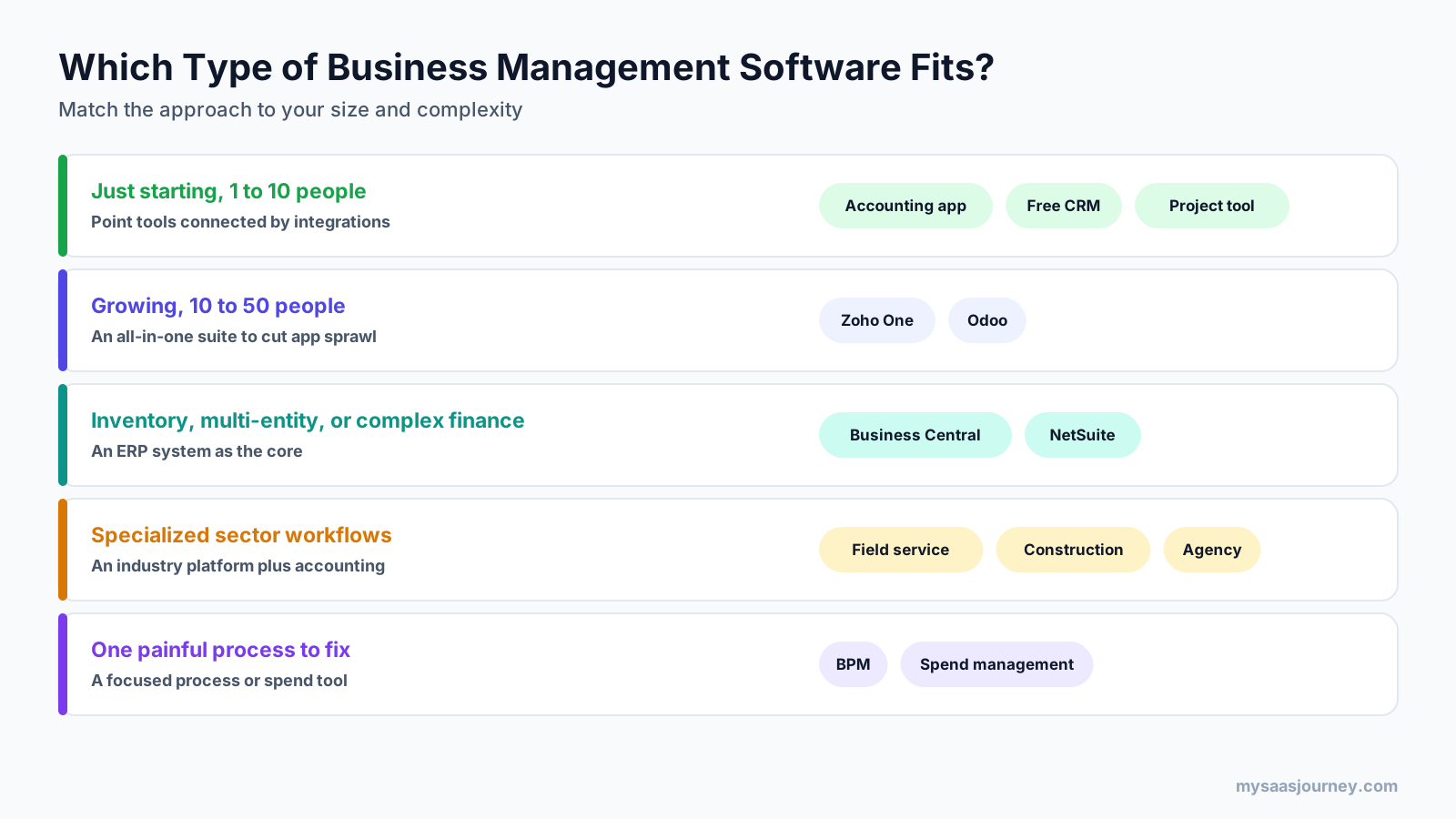
- Choose the type that fits your stage. Small teams can often connect point tools. Growing teams of roughly 10 to 50 people benefit from a suite. Businesses with inventory, multiple entities, or complex finance usually need an ERP. Specialized sectors may need an industry platform.
- Check integrations. List the tools you will keep, such as payment providers, banks, ecommerce, and payroll, and confirm each connects reliably.
- Calculate total cost. Include licences for every user type, add-ons, implementation, migration, and training over at least three years.
- Test with everyday scenarios. Use free trials to run one complete process, such as quote to invoice, with your own data and the people who will use it daily.
- Review security and support. Check permissions, audit logs, data location, uptime commitments, and what support is included in your plan.
- Plan for growth. Make sure the platform can handle more users, locations, currencies, or entities without a forced migration.
For a broader framework that applies to any software purchase, see our guide on how to choose the right software for your business needs.
How to Implement Business Management Software
A careful rollout matters as much as the product you pick.
- Assign an owner. Give one person responsibility for the project, with time set aside to manage it.
- Start with the core. Set up accounting and one high-value process first, then add modules in phases.
- Clean your data before migrating. Remove duplicates, fix customer and product records, and decide how much history to bring across.
- Configure, do not over-customize. Adapt your processes to standard features where possible; heavy customization makes upgrades harder.
- Connect the tools you are keeping. Set up and test integrations before going live.
- Train by role. Show each team the tasks they will actually do, and create short internal guides.
- Run in parallel briefly. For finance especially, compare results with your old system for one period before switching fully.
- Review after go-live. Collect feedback, fix friction points, and track whether the pain points you started with have improved.
Signs Your Business Needs Business Management Software
You may be ready for business management software if several of these sound familiar:
- The same customer or order details are typed into more than one tool.
- Month-end reporting depends on someone merging spreadsheets.
- Sales cannot see whether a customer has paid, or finance cannot see what sales promised.
- Stock levels are wrong often enough to cause missed or delayed orders.
- Approvals happen in email and get lost.
- You pay for many subscriptions that overlap.
- Adding staff or a new location creates more manual work rather than less.
If only one function is struggling, a focused tool may be enough. If problems appear at the handoffs between teams, an integrated system is likely the better fix.
Business Management Software for Small Businesses
Small businesses search for business management software more than any other group, and their needs differ from those of larger companies. A team of five rarely needs manufacturing planning or multi-entity consolidation. It needs to send quotes and invoices quickly, track customers, manage jobs or orders, pay staff, and know how much cash it has.
For most small businesses, the options look like this:
- Start with accounting. A cloud accounting app is the foundation, because it handles invoicing, bills, bank feeds, and tax from day one.
- Add a CRM when customer follow-up slips. Many CRMs offer free plans that are enough for a small team.
- Add a project or job tool if you sell services. Choose one that connects to your accounting app so time and costs flow into invoices.
- Connect the tools. Use native integrations first and an automation tool for gaps.
- Consider a suite when the stack gets unwieldy. Once you are paying for many overlapping subscriptions or retyping data between them, an all-in-one suite often costs less and saves time.
Small businesses should also watch for pricing traps. All-employee pricing can be cheaper per person but requires licensing everyone, and low first-year promotional prices may rise at renewal. Free plans are useful for testing but often limit users, records, or automation. Check what happens to your data and price as you grow before committing.
Trends Shaping Business Management Software
Business management software is changing quickly. These are the developments most likely to affect buying decisions in 2027:
- AI assistants and agents: vendors are adding assistants that summarize records, draft documents, and complete routine tasks such as processing payables or creating sales orders, often billed through usage credits.
- Consolidation of app stacks: many companies are reducing the number of separate subscriptions by moving to suites or platforms with broader coverage.
- Low-code customization: more platforms let non-developers build forms, workflows, and small apps on top of their data; our explainer on what low code is covers the approach.
- Embedded payments and finance: invoicing, payments, cards, and lending are increasingly built into business platforms rather than bought separately.
- Industry-specific editions: general vendors are releasing versions tuned for sectors such as professional services, construction, and retail.
- Security and data residency: buyers are asking more questions about where data is stored and how access is controlled, especially in regulated markets.
None of these trends changes the basics. The best system is still the one that fits your processes, connects your teams, and is used consistently.
Final Thoughts
Business management software exists to make a business run as one system instead of a collection of disconnected tools. Whether that system is an all-in-one suite, an ERP, a connected stack of specialist apps, or an industry platform, the goal is the same: enter data once, move work between teams automatically, and see the whole business clearly.
The right choice depends on your size, your processes, and how much specialist depth each team needs. Start by mapping where work breaks down today, choose the type of system that fixes those gaps, and test it with your own data before committing. A well-chosen system pays off in fewer errors, faster processes, and decisions based on current, shared information.
Frequently Asked Questions
What is business management software in simple terms?
Business management software is a system that helps a company run its main operations, such as accounting, sales, projects, inventory, purchasing, and HR, from one connected platform. It stores data in a shared database so information entered once is available to every team, reducing duplicate work and improving reporting.
What are some examples of business management software?
Examples include all-in-one suites such as Zoho One, Odoo, and Bitrix24; ERP systems such as Oracle NetSuite, Microsoft Dynamics 365 Business Central, and SAP Business One; and connected stacks built from tools such as QuickBooks or Xero, HubSpot, Gusto, and Asana. Industry platforms for field service, construction, or restaurants are also common.
What is the most commonly used business software?
The most widely used business software categories are accounting, email and office productivity, CRM, and project management tools. Among integrated business management systems, all-in-one suites and cloud ERP systems are common choices for small and mid-sized businesses, while larger enterprises typically run ERP platforms as their core system.
What is the best software for business management?
There is no single best option. Small teams often do well with connected point tools. Growing businesses of roughly 10 to 50 people often benefit from an all-in-one suite such as Zoho One or Odoo. Companies with inventory, multiple entities, or complex finance usually need an ERP such as Business Central or NetSuite.
Is ERP the same as business management software?
ERP is a type of business management software, but not the only one. ERP systems focus on finance and operations, such as accounting, inventory, supply chain, and manufacturing. Business management software is a broader term that also includes all-in-one suites, connected tool stacks, and industry-specific platforms.
What is business process management software?
Business process management (BPM) software helps organizations design, automate, monitor, and improve processes such as approvals, onboarding, or claims handling. It uses visual workflow builders, rules, and task routing, and it usually works across existing systems such as CRM and ERP rather than replacing them.
What is business spend management software?
Business spend management software helps finance teams control company spending from request to payment. It typically combines procurement, purchase approvals, supplier management, invoice processing, corporate cards, employee expenses, and budget tracking, so spending can be approved and monitored before it happens.
How much does business management software cost?
Most platforms charge per user per month. As of November 2026, published US prices include Odoo Standard at about $31.10, Zoho One at $37 per employee in the first year on all-employee pricing, and Business Central from $80 per user per month. NetSuite and SAP Business One are quote-based, and implementation costs are extra.
Do small businesses need business management software?
Not always at the start. Very small businesses can run well on a few connected tools. Business management software becomes valuable when data is retyped between tools, reporting takes hours, or growth adds manual work. At that point, consolidating into a suite or ERP usually saves more time than it costs.
Sources
| Source | Used for |
|---|---|
| https://www.zoho.com/one/pricing.html | Zoho One pricing models, app count |
| https://www.microsoft.com/en-us/dynamics-365/products/business-central/pricing | Business Central plans, prices, modules, trial, Copilot credits |
| https://www.netsuite.com/portal/products/erp.shtml | NetSuite modules, positioning, and pricing model |
| https://capterra.com/p/135618/Odoo/pricing/ | Odoo plan structure and Standard price (third-party, odoo.com could not be read) |
| https://www.erpresearch.com/pricing/odoo | Odoo first-year promotional pricing (third-party) |
| Ahrefs Keywords Explorer and SERP Overview (US, November 2026) | Keyword volumes, difficulty, SERP and People Also Ask analysis |