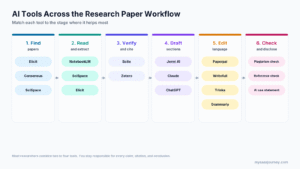
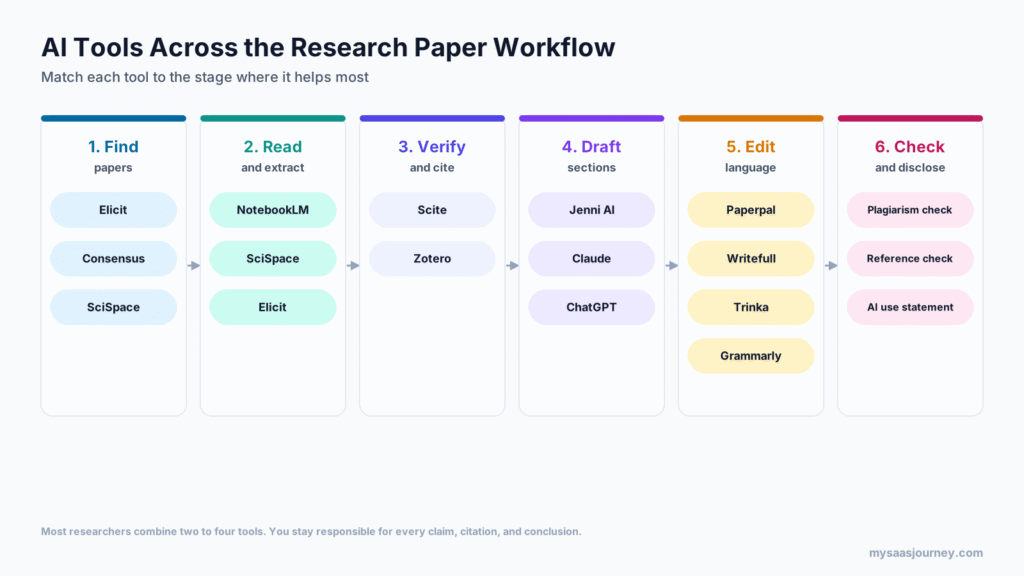
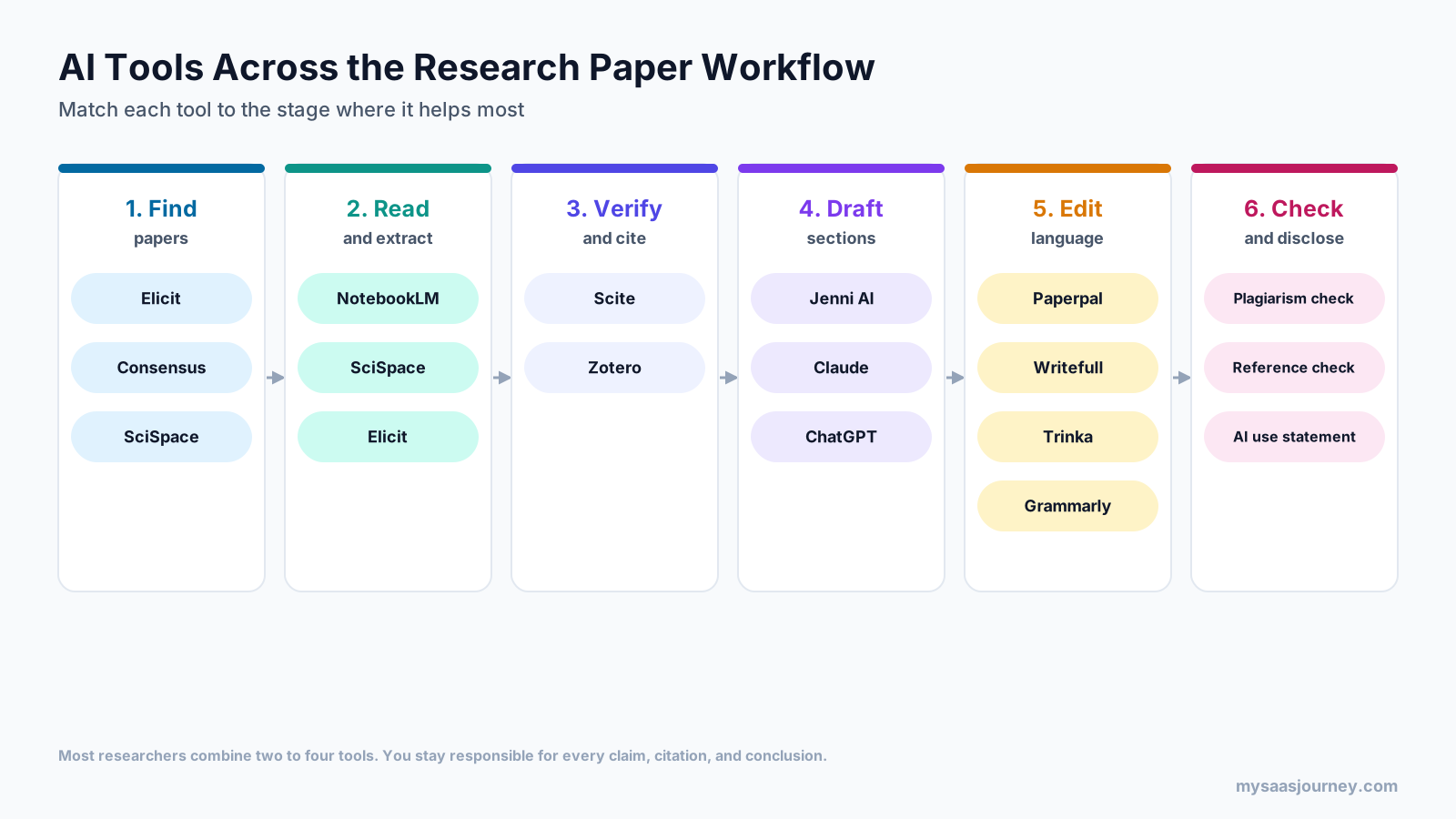
The best AI writing software for research papers depends on the stage of the paper you are working on. Elicit and Consensus are the strongest tools for finding and summarizing published studies. Scite helps you check how a paper has been cited, and Zotero manages your references for free. Jenni AI, Claude, and ChatGPT help you draft. Paperpal, Writefull, and Trinka are built specifically for editing academic English.
No single app does all of this well. Tools that write fluently can still invent sources, and tools that search scholarly databases rarely help you shape an argument. Most researchers get better results by pairing one search tool, one reference manager, and one editing tool than by asking a general chatbot to do everything.
This guide compares 13 AI tools for research papers by the job they do, what their free plans include, what they cost in November 2026, and how to use them without running into integrity problems.
Key takeaways:
- For finding evidence, start with Elicit or Consensus. Both answer questions from academic papers rather than the open web.
- To check citations, Scite shows whether later papers support, contrast, or simply mention a study. Zotero remains the best free reference manager.
- For drafting, Jenni AI is built for academic writing with in-line citations. Claude and ChatGPT are more flexible but need careful source checking.
- For academic editing, Paperpal and Writefull understand research writing conventions better than general grammar tools, and both work inside Word and Overleaf.
- Publishers and integrity bodies agree that AI cannot be listed as an author and that substantive AI use must be disclosed. You remain responsible for every claim and citation.
Quick Comparison of AI Writing Tools for Research Papers
| Tool | Best for | Free plan | Starting paid price |
|---|---|---|---|
| Elicit | Finding papers and extracting data for literature reviews | Yes, unlimited paper search | $11 a month billed yearly (Plus) |
| Consensus | Evidence-based answers from peer-reviewed research | Yes, limited Pro and Deep use | $15 a month, or $120 a year (Pro) |
| SciSpace | All-in-one literature search, PDF chat, and writing tools | Yes, limited | About $12 a month billed yearly (Premium) |
| NotebookLM | Summarizing and questioning your own sources | Yes, 50 sources per notebook | $4.99 a month via Google AI Plus |
| Scite | Checking how papers are cited | 7-day trial | $20 a month, or $144 a year (Basic) |
| Zotero | Managing references and citations | Yes, free software and 300 MB storage | $20 a year for 2 GB storage |
| Jenni AI | Drafting academic text with citations | Yes, 10 autocompletes a day | $12 a month (Plus) |
| ChatGPT | Flexible drafting, analysis, and deep research | Yes, limited | $20 a month (Plus) |
| Claude | Long-document reading, drafting, and research reports | Yes, limited | $20 a month, or $17 a month billed yearly (Pro) |
| Paperpal | Academic editing and submission checks | Yes, 200 suggestions a month | $25 a month, or about $139 a year (Prime) |
| Writefull | Academic language feedback in Word and Overleaf | Yes, limited suggestions | $65.52 a year (launch offer) |
| Trinka | Academic and technical editing with privacy controls | Yes, 5,000 words a month | About $6.67 a month billed yearly (Premium) |
| Grammarly | General writing support, plagiarism, and AI checks | Yes, 100 AI prompts a month | $12 a month billed yearly, or $30 monthly (Pro) |
How We Chose and Compared These Tools
Current search results for this topic are dominated by AI writing companies ranking their own products first. This guide takes a neutral approach and compares tools by the part of the research workflow they serve.
Each tool was assessed on five points:
- Source grounding: whether answers are based on scholarly literature or your own uploaded sources, with traceable citations.
- Academic fit: whether the tool understands research writing conventions, citation styles, and discipline-specific language.
- Integration: whether it works where researchers write, such as Microsoft Word, Overleaf, and Google Docs, and whether it connects to a reference manager.
- Privacy: whether the vendor states how uploaded drafts and data are stored and used.
- Pricing transparency: what the free plan includes and what one user pays per month and per year.
Prices were checked on vendor pricing pages and help documentation in November 2026. Where a vendor page did not display prices, figures come from recent third-party listings and are marked for confirmation. No vendor paid for placement.
What to Look For in AI Writing Software for Research Papers
Writing a research paper involves several distinct jobs. The right tool for one job is often the wrong tool for another, so it helps to map tools to stages before you compare features.
Answers Grounded in Verifiable Sources
The biggest risk with AI in academic writing is fabricated or misattributed references. General chatbots can produce citations that look correct but point to papers that do not exist or do not say what the text claims. Tools such as Elicit, Consensus, SciSpace, and Scite search indexed academic literature and link each answer to specific papers. NotebookLM answers only from the sources you upload. Whatever you use, open and read every source before you cite it.
Academic Language Support
General grammar tools are tuned for business and everyday writing. Academic editors such as Paperpal, Writefull, and Trinka are trained or tuned for research writing, so they handle technical terms, hedging language, passive constructions, and discipline conventions more reliably. This matters most for non-native English speakers preparing a manuscript for an English-language journal.
Citation and Reference Management
Look for tools that export to standard formats such as BibTeX, RIS, or CSV, or that connect with a reference manager such as Zotero. Jenni AI and Paperpal include citation tools, and Elicit can import from Zotero. Keeping one reference library as your source of truth prevents mismatches between your text and your bibliography.
Editor Integrations
Researchers mostly write in Microsoft Word, Overleaf (LaTeX), or Google Docs. Paperpal works in Word and, through a browser extension, in Google Docs and Overleaf. Writefull works in Word and Overleaf. Trinka and Grammarly offer Word add-ins and browser extensions. Drafting tools such as Jenni AI, ChatGPT, and Claude mostly run in their own editors, so you copy text across.
Data Privacy
Unpublished results, patient data, and grant drafts need care. Check whether a tool uses your uploads to train its models and how long it keeps them. Trinka, for example, states that its Premium plans do not use your content for AI training and delete files after 90 days, and it sells a Confidential Data plan with real-time deletion. For sensitive work, read each vendor’s privacy terms and your institution’s guidance before uploading anything.
Integrity and Disclosure
Some tools add plagiarism checks, AI detection, or reference checks that mirror what journals run at submission. These are useful for catching problems early, but they do not replace your own review. Plan to write an AI use statement if your journal or institution requires one.
AI Tools for Finding and Reading Research
These tools help you discover relevant studies, understand them quickly, and pull out the details you need for a literature review. If you also use general AI search engines for background reading, our comparison of the best AI search engines explains how they differ from academic search tools.
1. Elicit
Elicit is an AI research assistant built for literature reviews. You ask a research question, and it finds relevant papers, summarizes them, and extracts details such as methods, sample sizes, and outcomes into a table you can compare across studies.
Best for: literature reviews, evidence tables, and systematic review screening.
Key features:
- Search across more than 138 million academic papers, with unlimited search and summaries on the free plan
- Chat with full-text papers and view the source passage behind each answer
- Data extraction into customizable tables for comparing studies
- Research Agent and Research Reports for structured literature summaries
- A Systematic Review workflow on Pro that can screen up to 5,000 papers
- Zotero import, plus export and API access on paid plans
Pricing: The free Basic plan includes unlimited paper search, summaries, and chat with full-text papers, with limited use of reports. Plus is $11 per user per month billed yearly ($132). Elicit’s pricing page showed two different Pro prices when checked, $39 and $49 per user per month billed yearly, so confirm the current figure at checkout. Scale and Enterprise plans are available for teams.
Trade-offs: Elicit is strongest in empirical fields such as biomedicine, psychology, and social science, where papers report structured methods and results. It is less useful for humanities research. It does not draft your paper, and extraction accuracy still needs spot checks against the original papers.
2. Consensus
Consensus is an AI search engine that answers questions using peer-reviewed research. It summarizes what studies say about a question, links each point to the papers behind it, and shows how strongly the literature agrees.
Best for: quick, evidence-based answers to research questions and early-stage literature scoping.
Key features:
- Answers drawn from academic papers rather than general web pages
- A Consensus Meter showing how studies lean on yes or no questions
- Deep reviews that produce a structured synthesis across many papers
- Study Snapshots summarizing methods and findings for individual papers
- API and MCP access for connecting Consensus to other AI tools
Pricing: The free plan includes unlimited paper searches with limited Pro messages and up to 3 Deep reviews a month. Consensus’s pricing page did not display prices during this check. Its help center and recent third-party listings put Pro at $15 a month or $120 a year, with 15 Deep reviews a month, and Deep at $65 a month or $540 a year, with 200 Deep reviews. Some listings show Pro at $20 a month, so confirm at checkout. Students and clinicians may be eligible for discounts.
Trade-offs: Consensus works best for questions that published studies can answer directly. It is less suited to theoretical, historical, or qualitative topics. The jump from Pro to Deep is steep if you need only a few more reviews each month.
3. SciSpace
SciSpace bundles several research tools in one platform: literature search, AI chat with PDFs, an AI writer, a paraphraser, a citation generator, and an AI detector. It suits researchers who prefer one subscription over several separate tools.
Best for: students and researchers who want search, reading, and writing help in one place.
Key features:
- Search across more than 270 million research papers
- Chat with PDF to explain sections, equations, tables, and figures
- Literature review tool that summarizes and compares papers
- AI writer, paraphraser, and citation generator
- AI detector for checking text before submission
Pricing: SciSpace’s pricing page did not display prices during this check. Recent third-party listings show a free plan, Premium at $20 a month or about $12 a month billed yearly, and higher Advanced and Max plans for heavier use. Paid plans use monthly credits that do not roll over. SciSpace offers a 24-hour money-back guarantee.
Trade-offs: The all-in-one approach means each tool is less specialized than the best single-purpose alternatives. Credit limits can run out during an intensive review, so check your usage before a deadline.
4. NotebookLM
NotebookLM, which Google now also presents as Gemini Notebook, is an AI notebook that answers questions only from the sources you add. You upload papers, notes, or transcripts, and it summarizes them, answers questions with citations back to the exact passages, and can generate study guides and audio overviews.
Best for: synthesizing a set of papers you have already selected and checking what your sources actually say.
Key features:
- Answers grounded in your own uploaded sources, with in-line citations
- Summaries, briefing documents, study guides, and mind maps
- Audio and video overviews for reviewing material
- Free plan with up to 100 notebooks and 50 sources per notebook
Pricing: NotebookLM is free with a Google account. Higher limits come with Google AI plans: Google AI Plus at $4.99 a month raises the cap to 100 sources per notebook, and Google AI Pro at $19.99 a month raises it to 300.
Trade-offs: NotebookLM does not search for new papers, and it is not a drafting tool for a full manuscript. Its strength is grounded synthesis, which works the same way as retrieval-augmented generation; our explainer on what RAG is covers why grounding reduces fabricated answers.
AI Tools for Verifying and Managing Citations
Citations are where AI mistakes cause the most damage. These tools help you check that your sources exist, are relevant, and still credible, and keep your bibliography consistent.
5. Scite
Scite analyzes how research papers are cited by later work. Its Smart Citations classify citation statements as supporting, contrasting, or mentioning, so you can see whether a finding has held up before you build on it.
Best for: checking the credibility of key sources and finding contrasting evidence.
Key features:
- Smart Citations showing supporting, contrasting, and mentioning citation statements
- Smart Citation Reports for individual papers
- An AI assistant that answers questions with references to full-text research
- Citation alerts and collections for tracking papers
- Connectors for Claude and ChatGPT, plus an MCP server for AI tools
Pricing: Scite’s Basic plan costs $20 a month or $144 a year ($12 a month). Pro, Team, and Enterprise plans add more usage and API access. New individual subscribers may be eligible for a seven-day trial.
Trade-offs: Scite’s value depends on how well a field’s literature is indexed, so coverage is stronger in sciences than in humanities. Classification is automated, so read the citing passage before treating a paper as disputed.
6. Zotero
Zotero is a free, open-source reference manager that collects, organizes, and cites sources. It is not an AI writing tool, but it is the backbone of most reliable research writing workflows, and many AI tools import from or export to it.
Best for: every researcher who needs a dependable reference library.
Key features:
- Save papers, books, and web pages with one click through a browser connector
- Organize sources in collections with tags, notes, and annotated PDFs
- Insert citations and bibliographies in Word, LibreOffice, and Google Docs
- Thousands of citation styles, including APA, MLA, Chicago, and IEEE
- Group libraries for shared projects
Pricing: The Zotero software is free. Online storage for syncing files includes 300 MB free, with paid plans at $20 a year for 2 GB, $60 a year for 6 GB, and $120 a year for unlimited storage.
Trade-offs: Zotero does not write or summarize for you. Its job is accuracy and organization. If you keep annotated PDFs, a separate PDF tool can help; see our comparison of the best PDF editors.
AI Writing Assistants for Drafting
These tools help you turn notes and sources into text. Use them for outlines, first drafts of sections, and rewording, then revise heavily in your own voice. For a broader look at drafting tools beyond academia, see our guide to the best AI writing tools.
7. Jenni AI
Jenni AI is a writing assistant designed for academic papers. It suggests the next sentence as you type, helps you add citations from your library or uploaded PDFs, and keeps track of references in the document.
Best for: students and researchers who want help drafting while keeping citations attached to the text.
Key features:
- AI autocomplete that continues your writing in context
- In-line citations from a personal library of uploaded PDFs
- AI chat and edits for rewriting, expanding, or simplifying passages
- More than 10,000 citation styles, with library export to RIS, BibTeX, and CSV
- Review and workflow tools on paid plans
Pricing: The free plan includes 10 AI autocompletes a day, 10 PDF uploads, 5 AI chat messages, and unlimited citations. Plus is $12 a month with 5,000 autocompletes and 500 chat messages a month, and Pro is $29 a month with unlimited use. Jenni advertises up to 60% savings on yearly billing; check the in-app price for your currency.
Trade-offs: Autocomplete makes it easy to accept text you have not fully thought through. Check every suggested citation against the source, and rewrite generated passages so the argument is yours.
8. ChatGPT
ChatGPT is a general AI assistant that can help with outlining, drafting, rewording, analyzing data, and explaining difficult papers. Its deep research feature can produce structured reports with web sources.
Best for: flexible help across many tasks, including code and data analysis for research.
Key features:
- Drafting, summarizing, and rewriting in many styles
- File uploads for working with papers and datasets
- Deep research that compiles multi-source reports
- Projects for keeping files and instructions together
- Data analysis and code generation
Pricing: ChatGPT has a free plan with limited deep research and file uploads. Go costs $8 a month, Plus $20 a month with expanded deep research, and Pro starts at $100 a month for heavier use.
Trade-offs: ChatGPT searches the open web rather than a dedicated academic index, so its sources need careful checking, and it can still produce citations that do not exist. Many researchers use it for structure and language rather than for sources. For a side-by-side view, see our Perplexity vs ChatGPT comparison.
9. Claude
Claude is a general AI assistant known for handling long documents and producing careful, well-structured writing. It can read several long papers at once, compare arguments, and help draft and revise sections.
Best for: reading and comparing long papers, and revising drafts for clarity and structure.
Key features:
- Long-document reading for comparing papers and drafts
- Research feature on paid plans for multi-source reports
- Web search on all plans
- Projects for keeping sources and instructions together
- Connectors to other tools, including Scite’s Smart Citations
Pricing: Claude has a free plan with limited usage. Pro costs $20 a month or $17 a month billed yearly ($200 up front) and includes the Research feature. Max starts at $100 a month for heavier use.
Trade-offs: Like ChatGPT, Claude is not an academic database, so verify every source it names. The free plan does not include Research. If you are choosing between the two general assistants, our Claude vs ChatGPT comparison covers the differences in detail.
AI Editing Tools for Academic Language
These tools polish grammar, clarity, and academic tone without writing the content for you. They are the safest category of AI help for research papers, since most journals treat basic language editing differently from content generation.
10. Paperpal
Paperpal is an academic writing and editing assistant built for researchers preparing manuscripts. It combines language editing tuned to academic writing with plagiarism checks, citation tools, and submission readiness checks.
Best for: researchers preparing journal submissions, especially non-native English speakers.
Key features:
- Real-time academic language suggestions in Word, Google Docs, and Overleaf
- Rewriting, paraphrasing, translation, and research question answering
- Plagiarism checks, an AI detector, and a reference checker
- Journal submission readiness checks
- Citation generator, reference manager, and chat with PDFs
Pricing: Paperpal’s pricing page did not display prices during this check. Recent listings show a free plan with 200 language suggestions a month, 5 AI uses a day, and a monthly plagiarism check allowance. Paperpal Prime is listed at $25 a month, $55 a quarter, and $139 a year, while one recent review of Paperpal’s help center lists the annual price at $144. Institutional plans are available.
Trade-offs: Monthly word limits on plagiarism and reference checks may not cover a full thesis in one month. Paperpal is an editor first, so pair it with a dedicated search tool for literature work.
11. Writefull
Writefull provides academic language feedback inside Microsoft Word and Overleaf. Its suggestions are designed around the conventions of published research writing, which makes it a natural choice for LaTeX users.
Best for: researchers who write in Overleaf or Word and want academic language feedback without leaving the editor.
Key features:
- Language feedback tuned to academic writing in Word and Overleaf
- Sentence Palette with academic phrasing for common moves such as stating aims or limitations
- Search results in the Word add-in to check how phrases are used in published work
- Institutional licences offered through universities and publishers
Pricing: Writefull has a free plan with a subset of suggestions. Its pricing page listed Premium at a launch offer of $15.37 a month, $35.43 a quarter, or $65.52 a year when checked. Many universities provide institutional access, so check with your library first.
Trade-offs: Writefull focuses on language, not content generation or literature search. Some features are available in Overleaf before Word.
12. Trinka
Trinka is a grammar and language tool built for academic and technical writing. It checks for discipline-specific errors, enforces style guides, and includes publication tools such as a journal finder and citation checker.
Best for: researchers who want academic editing with strong privacy options.
Key features:
- Academic grammar, consistency, and technical spelling checks
- Style guide corrections for APA, AMA, ACS, AGU, and IEEE on paid plans
- Journal finder, consistency checks, and a citation checker on all plans
- Plagiarism and AI detection, translation, and citation formatting on higher plans
- Privacy controls, with no AI training on Premium content and a Confidential Data plan
Pricing: The free Basic plan includes 5,000 words of writing assistance and 5 AI writing requests a month. Trinka’s pricing page did not show Premium amounts during this check; third-party listings put Premium at about $20 a month or $6.67 a month billed yearly. The Confidential Data plan costs $300 a year.
Trade-offs: Trinka’s credit system for files, plagiarism reports, and citation formatting takes some getting used to. Its AI drafting features are lighter than dedicated writing assistants.
13. Grammarly
Grammarly is the most widely used general writing assistant. It is not built specifically for research, but its Pro plan adds plagiarism checks, AI text detection, and citation consistency checks that are useful before submission.
Best for: students and researchers who want one writing tool for papers, email, and everyday writing.
Key features:
- Grammar, clarity, and tone suggestions across apps and browsers
- Plagiarism checks and AI text detection on Pro
- Citation consistency checks on Pro
- 2,000 AI prompts a month on Pro
Pricing: The free plan includes grammar and spelling checks and 100 AI prompts a month. Pro costs $12 a month billed yearly ($144) or $30 billed monthly.
Trade-offs: Grammarly’s suggestions are tuned for general writing, so it can push academic text toward a less formal tone. It does not understand discipline conventions as well as Paperpal, Writefull, or Trinka.
Features Compared
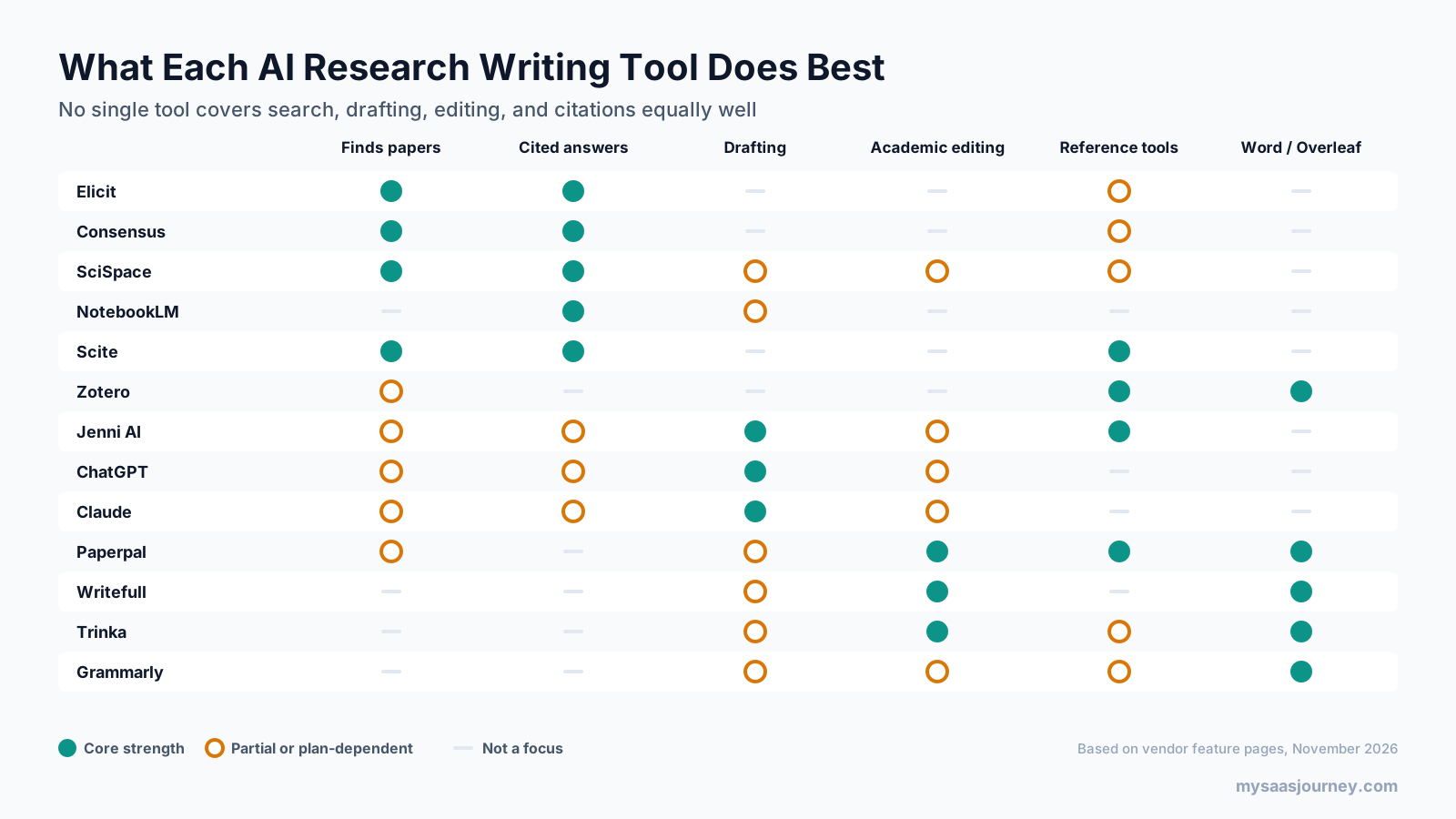
The pattern is clear. Search tools are strong on sources and weak on writing, writing tools are strong on prose and weak on sources, and editing tools are strong on language but leave content to you. That is why a combination of tools usually beats a single subscription.
Pricing Compared
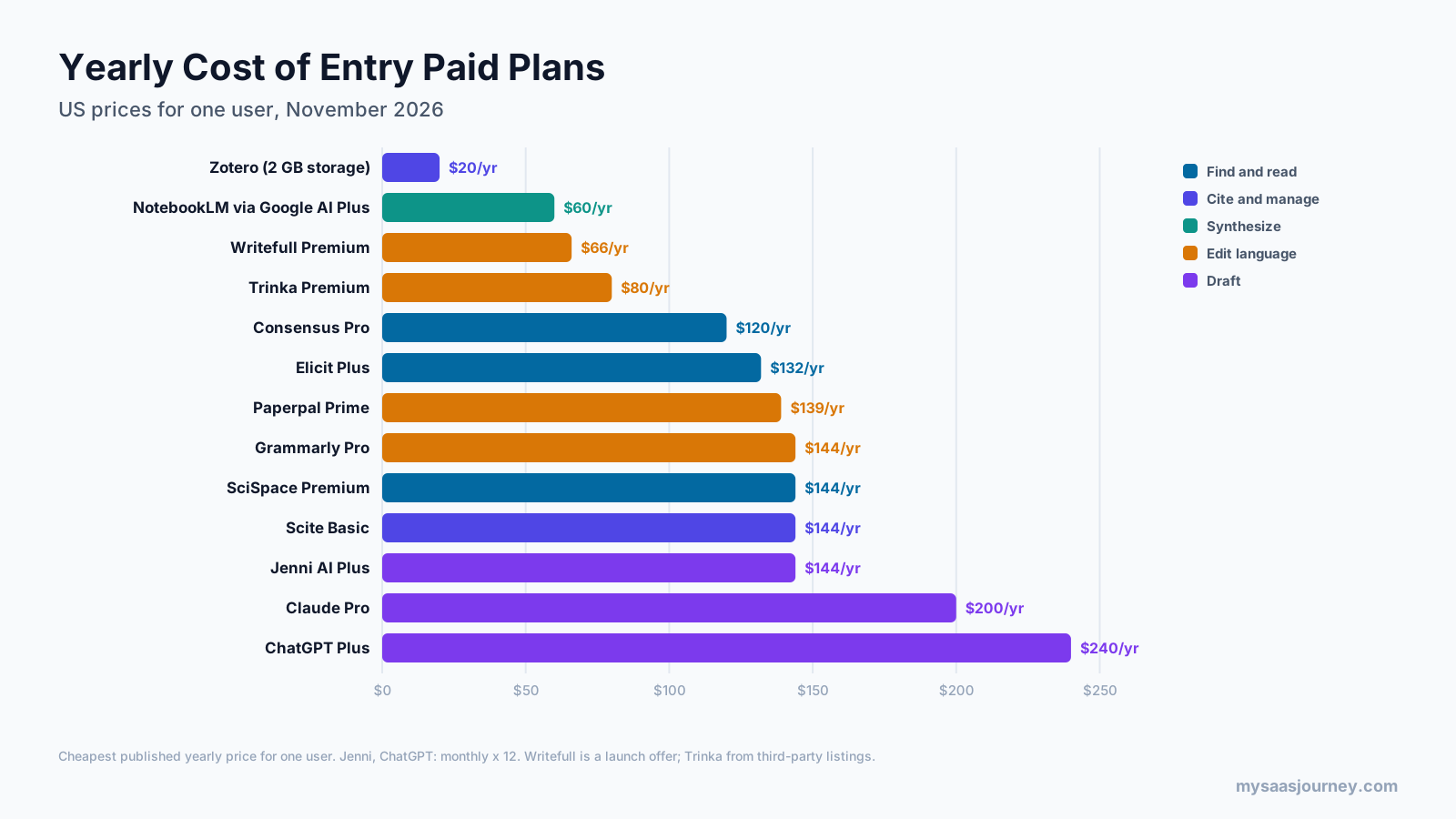
Most specialized research tools cost between $10 and $25 a month, with large discounts for yearly billing. General assistants cost about $20 a month. Zotero and NotebookLM can be used entirely for free.
| Tool | Entry paid plan | Monthly billing | Yearly billing |
|---|---|---|---|
| Zotero | 2 GB storage | Not offered | $20 a year |
| NotebookLM | Google AI Plus | $4.99 | Not listed |
| Writefull | Premium (launch offer) | $15.37 | $65.52 a year |
| Trinka | Premium | About $20 | About $80 a year |
| Consensus | Pro | $15 | $120 a year |
| Elicit | Plus | Not listed | $132 a year |
| Paperpal | Prime | $25 | $139 to $144 a year |
| Grammarly | Pro | $30 | $144 a year |
| SciSpace | Premium | About $20 | About $144 a year |
| Scite | Basic | $20 | $144 a year |
| Jenni AI | Plus | $12 | Discount offered |
| Claude | Pro | $20 | $200 a year |
| ChatGPT | Plus | $20 | Not offered for Plus |
Before paying, check whether your university already provides access. Many institutions license Writefull, Paperpal, Grammarly, or Scite for students and staff. Our AI add-on price index shows how AI pricing compares across software categories.
Best Free AI Tools for Research Papers
You can build a capable research writing setup without paying anything, as long as you accept tighter limits.
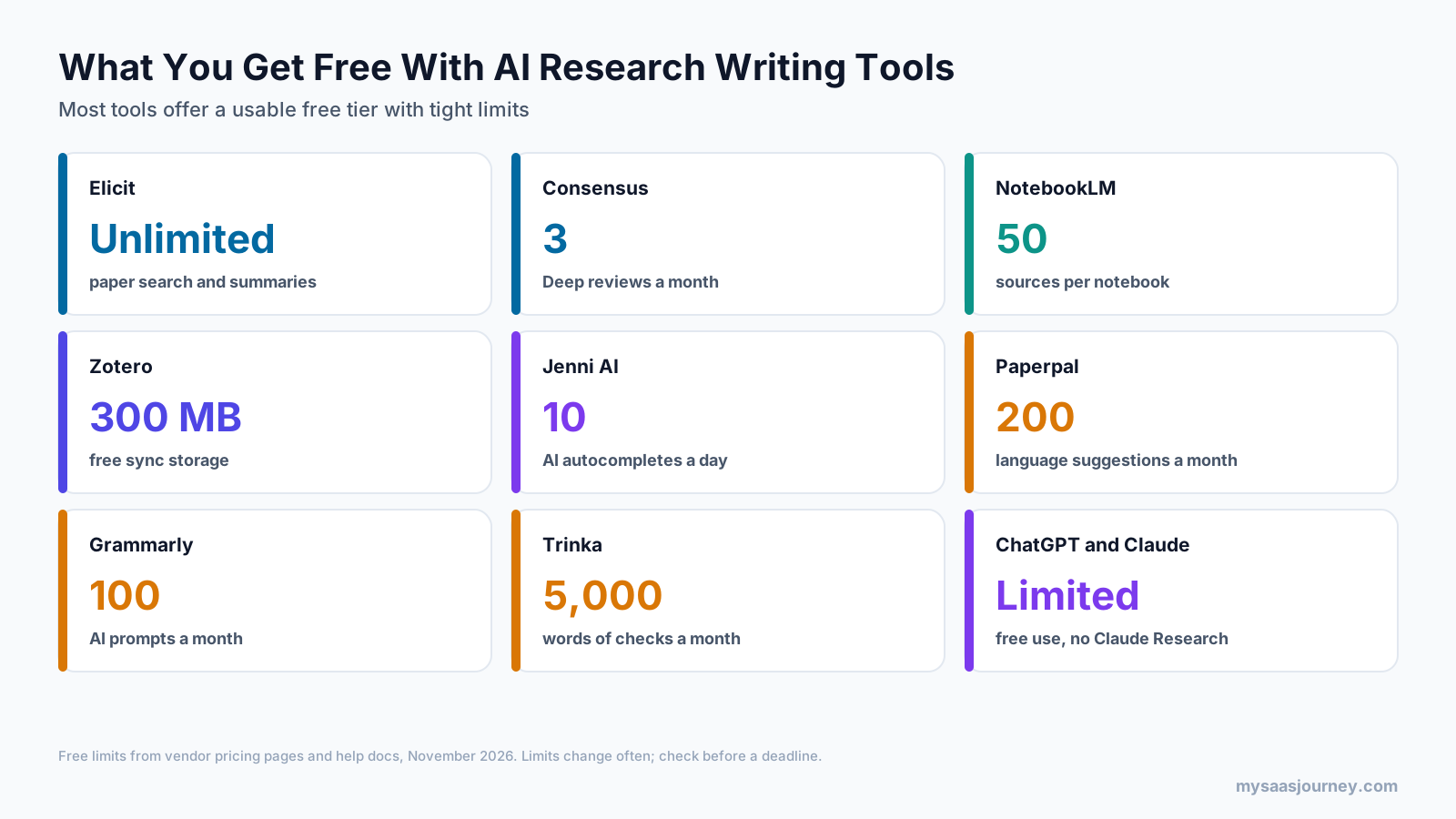
A free stack that covers most needs:
- Elicit’s free plan for finding and summarizing papers, with unlimited search
- Consensus’s free plan for quick evidence checks on specific questions
- NotebookLM for synthesizing the papers you select, with up to 50 sources per notebook
- Zotero for references and citations
- Paperpal’s or Trinka’s free plan for academic language checks on key sections
Free plans are best for coursework, short papers, and testing tools before a big project. For a thesis or journal submission, one paid editing tool and one paid search tool usually pay off in saved time. Our AI free tier limits report tracks free plan allowances across general AI assistants in more detail.
Best AI Tool by Research Paper Task
| Task | Best fit | Good alternative |
|---|---|---|
| Find relevant studies | Elicit | Consensus |
| Answer a specific evidence question | Consensus | Elicit |
| Extract data for a literature review table | Elicit | SciSpace |
| Screen papers for a systematic review | Elicit Pro | Specialized screening software |
| Understand a difficult paper | SciSpace Chat with PDF | Claude |
| Synthesize your chosen sources | NotebookLM | Claude |
| Check whether a finding has held up | Scite | Manual citation search |
| Manage references and citations | Zotero | Jenni AI library |
| Draft sections with citations | Jenni AI | Claude or ChatGPT |
| Edit academic English | Paperpal | Writefull or Trinka |
| Edit in Overleaf or LaTeX | Writefull | Paperpal |
| Check plagiarism before submission | Paperpal | Grammarly Pro or Trinka |
| Protect confidential data | Trinka Confidential Data | Institution-approved tools |
Recommended Tool Stacks
Most researchers do best with two to four tools rather than one. These combinations cover common situations:
- Undergraduate student on no budget: Elicit free, Zotero, NotebookLM, and Grammarly or Trinka free.
- Master’s or PhD thesis: Elicit or Consensus, Zotero, Scite for key sources, and Paperpal Prime or Writefull for editing.
- Researcher publishing in journals: Elicit or SciSpace, Zotero, Scite, Paperpal Prime for submission checks, and Claude or ChatGPT for revising structure.
- Non-native English speaker: Paperpal or Trinka for academic language, plus Writefull if you write in Overleaf.
- LaTeX and Overleaf user: Writefull, Zotero with your BibTeX workflow, and Elicit for literature.
If you keep research notes outside your writing tools, our comparison of Notion vs Obsidian can help you choose a note system that links ideas across papers.
How to Use AI in a Research Paper Responsibly
AI tools are now widely accepted in research writing, but the rules around them are firm. The International Committee of Medical Journal Editors (ICMJE), the Committee on Publication Ethics (COPE), and major publishers share the same core positions: AI tools cannot be listed as authors, because authorship requires accountability, and substantive use of AI must be disclosed.
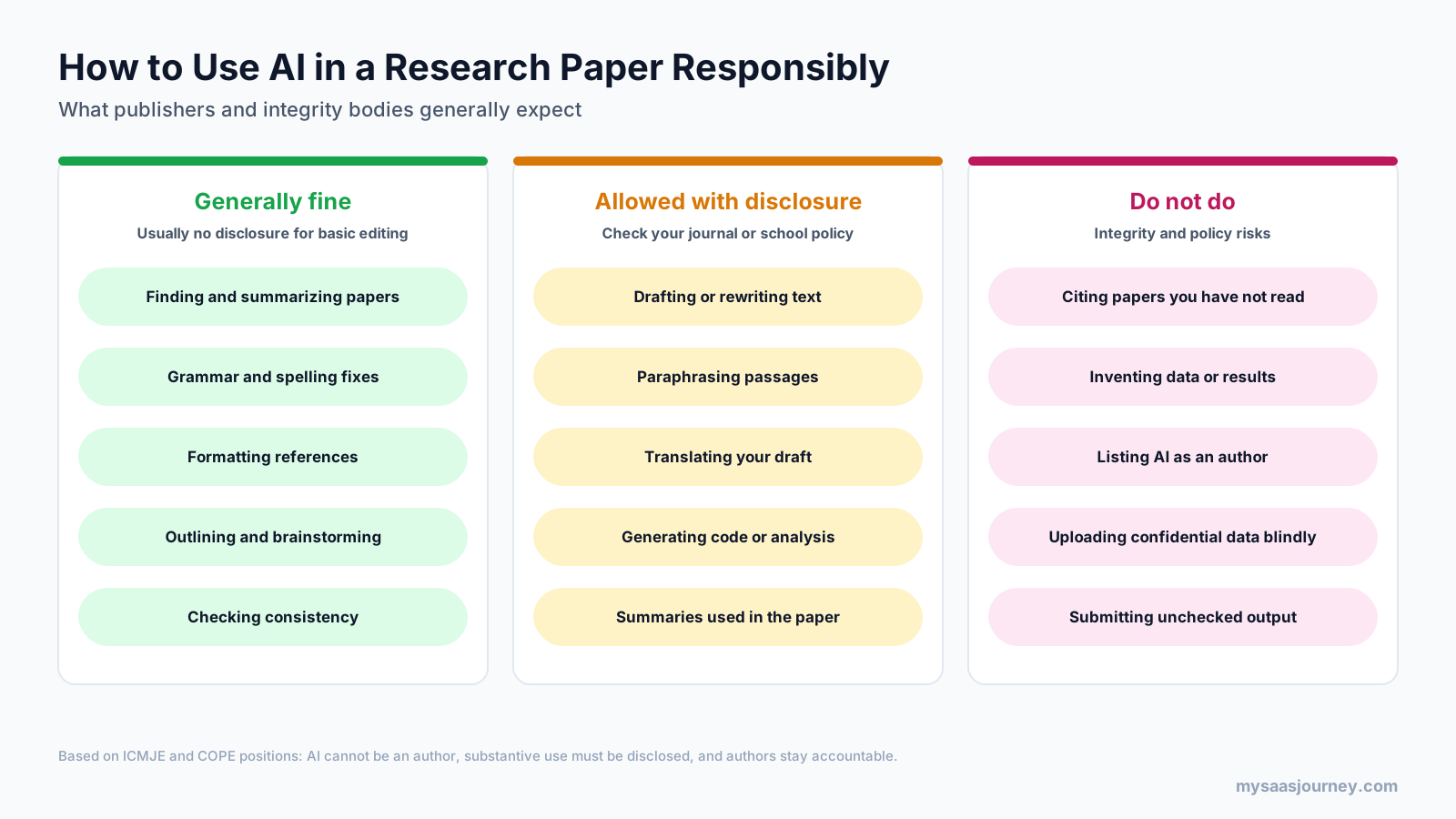
Follow these practices to stay on the right side of journal and university policies:
- Check the specific policy first. Journals, publishers, and universities set their own rules on top of the ICMJE and COPE baselines. Some exempt basic grammar and spelling tools from disclosure; others ask you to report any AI use.
- Read every source you cite. Never cite a paper because an AI tool suggested it. Open the paper, confirm it exists, and confirm it says what you claim.
- Keep the thinking yours. Use AI to find, organize, and polish, but make sure the research question, analysis, interpretation, and conclusions come from you and your co-authors.
- Disclose substantive use. A good AI use statement names the tool, describes what it was used for, and confirms that the authors reviewed and take responsibility for the output. For example: “The authors used [tool] to improve the language of the manuscript. The authors reviewed and edited all output and take full responsibility for the content.”
- Protect sensitive data. Do not upload confidential, identifiable, or embargoed data to tools that may store or train on it unless your institution has approved them.
- Keep records. Save prompts, versions, and notes on how AI was used, in case a reviewer or editor asks.
Can AI Detectors Flag Your Paper?
Some journals and universities run AI detection on submissions. Detectors estimate the likelihood that text was machine-generated, and they can produce false positives, especially on formal or formulaic academic prose. The safest approach is transparency: write the substance yourself, disclose AI assistance where required, and keep drafts that show how your text developed. To understand what detectors look for, see our explainers on how AI is detected in writing and how AI detection works.
Final Thoughts
There is no single best AI writing software for research papers, because a research paper is several jobs in one. The most dependable setup pairs a source-grounded search tool such as Elicit or Consensus with Zotero for references, Scite for checking key citations, and an academic editor such as Paperpal, Writefull, or Trinka for language. Add Jenni AI, Claude, or ChatGPT if you want help drafting, but treat their output as a starting point to verify and rewrite.
Start with the free plans, test each tool on a section of your current paper, and pay only for the one or two tools that save you the most time. Above all, keep your sources verified and your AI use disclosed. The tools can speed up your work, but responsibility for the paper stays with you.
Frequently Asked Questions
What is the best AI for writing research papers?
There is no single best tool. Elicit and Consensus are best for finding and summarizing studies, Scite for checking citations, Jenni AI for drafting with citations, and Paperpal or Writefull for academic editing. Most researchers combine a search tool, a reference manager such as Zotero, and an editing tool.
Is it allowed to use AI to write a research paper?
Generally yes, within limits. ICMJE, COPE, and major publishers allow AI assistance but say AI cannot be listed as an author and substantive use must be disclosed. Authors remain responsible for all content. Always check your journal’s or university’s specific policy, since rules on drafting and disclosure vary.
Is Paperpal better than ChatGPT for academic writing?
For editing academic English, yes. Paperpal is tuned for research writing, works inside Word, Google Docs, and Overleaf, and adds plagiarism and submission checks. ChatGPT is more flexible for brainstorming, drafting, and analysis, but it is not specialized for academic conventions and its citations need careful checking.
Is Jenni AI better than ChatGPT?
Jenni AI is better for drafting academic papers with citations attached, because it is built around an academic editor and reference library. ChatGPT is better for broader tasks such as data analysis, coding, and explaining concepts. Neither should be used to generate a full paper without heavy revision and source checking.
Can AI be detected in academic writing?
Sometimes. Many universities and journals use AI detectors, but detectors give probability estimates rather than proof and can flag human-written academic text by mistake. The best protection is to write the substance yourself, keep drafts that show your process, and disclose any substantive AI assistance as your institution requires.
Which AI is safest for academic writing?
The safest tools are those that ground answers in published sources and edit rather than generate content. Source-grounded tools such as Elicit, Consensus, Scite, and NotebookLM reduce fabricated citations, while academic editors such as Paperpal, Writefull, and Trinka improve language without writing your argument. Check each tool’s data privacy terms before uploading unpublished work.
What is the best free AI for research papers?
Elicit’s free plan is the strongest free option for finding and summarizing papers, with unlimited search. Pair it with NotebookLM for synthesizing sources, Zotero for references, and the free plans of Paperpal or Trinka for academic language checks. Together they cover most coursework and short papers at no cost.
Can AI tools find actual sources and citations?
Tools that search academic databases, such as Elicit, Consensus, SciSpace, and Scite, link answers to indexed papers. General chatbots can still produce citations that look correct but do not exist or do not support the claim. Whichever tool you use, open and read each source before citing it.
Sources
| Source | Used for |
|---|---|
| https://elicit.com/pricing | Elicit plans, prices, free plan features, systematic review limits |
| https://intercom.help/consensus-d118a252369c/en/articles/10087865-subscription-plans | Consensus plan limits |
| https://comparedge.com/tools/consensus-ai/cost-guide | Consensus prices (third-party, consensus.app pricing did not render) |
| https://scispace.com/pricing | SciSpace tools, paper count, money-back guarantee |
| https://aitoolsatlas.ai/tools/scispace/pricing | SciSpace Premium prices (third-party) |
| https://www.nlmtools.com/blog/is-notebooklm-free | NotebookLM free limits and Google AI plan prices (third-party summary of Google’s plans page) |
| https://scite.ai/pricing.md | Scite plans, prices, trial, connectors |
| https://www.zotero.org/storage | Zotero storage prices |
| https://jenni.ai/pricing | Jenni AI plans, prices, free limits |
| https://chatgpt.com/pricing | ChatGPT plan features |
| https://www.ssdnodes.com/learn/chatgpt-plus-price-and-limits | ChatGPT plan prices (pricing page did not render amounts) |
| https://claude.com/pricing | Claude plans, prices, Research feature |
| https://paperpal.com/pricing | Paperpal features and integrations |
| https://www.softwareadvice.com/product/511087-Paperpal/ | Paperpal Prime prices (third-party) |
| https://www.writefull.com/pricing | Writefull Premium prices and integrations |
| https://www.trinka.ai/pricing | Trinka plans, free limits, privacy terms, Confidential Data price |
| https://www.softwareadvice.com/productivity/trinka-profile | Trinka Premium price (third-party) |
| https://www.grammarly.com/plans | Grammarly plans and Pro features |
| https://casrai.org/guides/can-ai-be-listed-as-an-author | ICMJE and COPE positions on AI authorship and disclosure |
| Ahrefs Keywords Explorer and SERP Overview (US, November 2026) | Keyword volumes, difficulty, SERP and People Also Ask analysis |