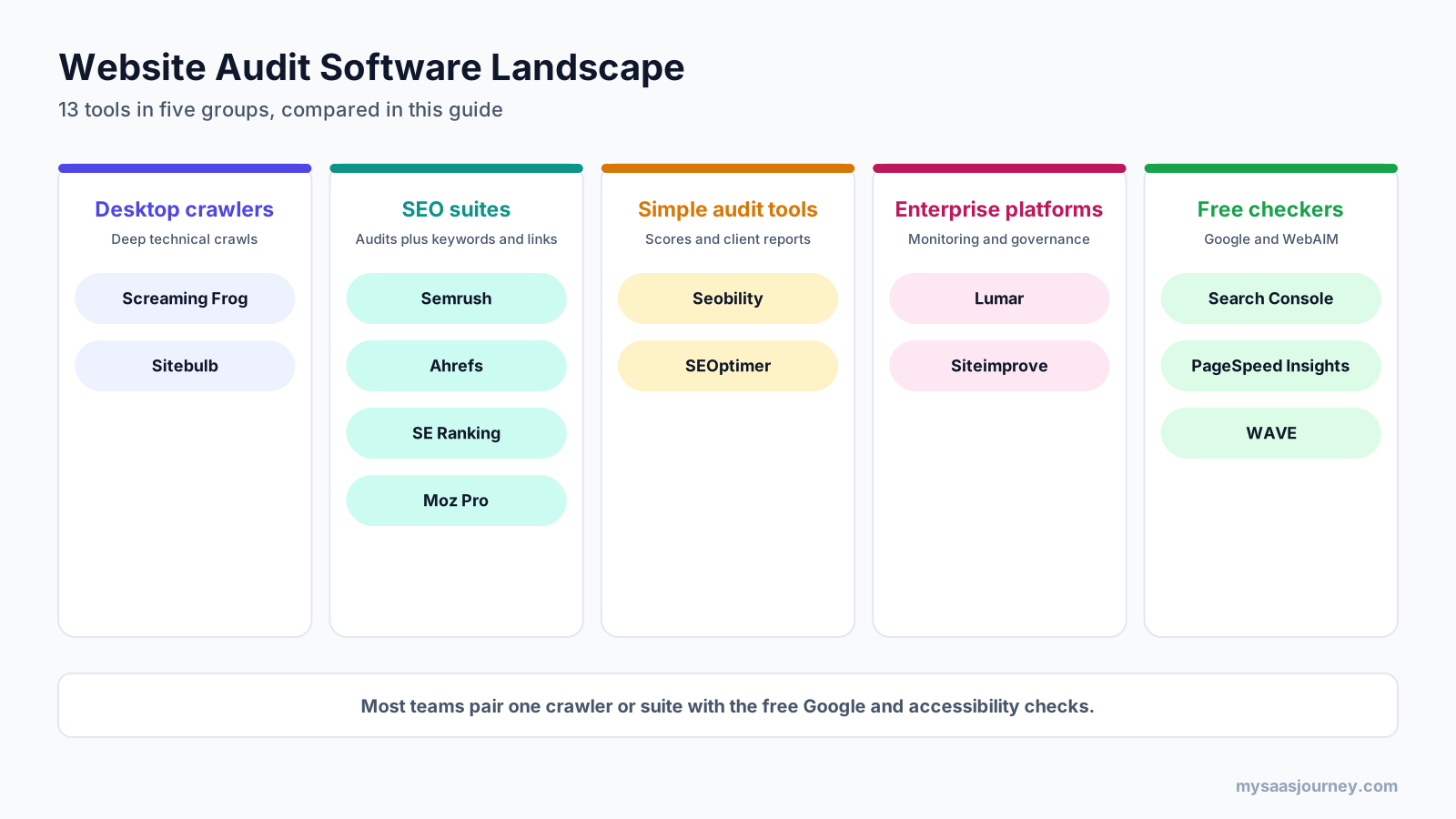
The best website audit software depends on what you need to check. Screaming Frog and Sitebulb are the strongest choices for deep technical crawls. Semrush, Ahrefs, SE Ranking, and Moz Pro suit teams that want audits inside a full SEO suite. Lumar and Siteimprove fit large sites that need ongoing monitoring and accessibility coverage. Google Search Console, PageSpeed Insights, and WAVE are the free checks every site should run.
That short answer hides the part that trips most buyers up. “Website audit” covers at least five different jobs: technical SEO, on-page content, page speed, accessibility, and ongoing monitoring. Most tools are excellent at one or two of those and thin on the rest. If you buy based on a single audit score, you can end up paying for a tool that never looks at the problem you actually have.
This guide compares 13 website audit tools by what they check, how many pages they can crawl, and what they cost, so you can build the right setup for your site and budget. It covers software that audits websites. If you are looking for site inspection apps for construction or safety audits, those are a different category.
Key takeaways:
- For technical SEO on a budget, a desktop crawler such as Screaming Frog (about $279 a year) or Sitebulb (from about $18 a month) gives you more depth per dollar than any suite.
- If you already pay for Semrush, Ahrefs, SE Ranking, or Moz Pro, you have a capable cloud site audit included, with scheduled recrawls and issue tracking.
- No SEO suite in this list is built for accessibility auditing. Pair it with WAVE, Lighthouse, or an enterprise platform if WCAG compliance matters to you.
- Free tiers are useful but narrow: 500 URLs per crawl in Screaming Frog, 100 pages a month in Semrush, and 5,000 crawl credits a month per verified site in Ahrefs.
- Pricing below was checked on vendor pages in November 2026. Several vendors show different figures in different places, so confirm before you buy.
Quick Comparison of the Best Website Audit Software
| Tool | Type | Best for | Free option | Starting paid price |
|---|---|---|---|---|
| Screaming Frog SEO Spider | Desktop crawler | Deep technical SEO crawls | Yes, 500 URLs per crawl | About $279 per user per year |
| Sitebulb | Desktop and cloud crawler | Prioritized, visual audit reports | 14-day trial | About $18 a month (Lite) |
| Semrush Site Audit | SEO suite | Teams already using Semrush | Yes, 100 pages a month | $139 a month (SEO plan) |
| Ahrefs Site Audit | SEO suite | Technical audits on verified sites | Yes, 5,000 credits a month per verified site | $129 a month (Lite) |
| SE Ranking Website Audit | SEO suite | High page allowances for the price | 14-day trial | $129 a month (Core) |
| Moz Pro Site Crawl | SEO suite | Weekly crawls with simple issue lists | Free trial | $99 a month (Standard) |
| Seobility | Simple audit tool | Small businesses and multiple small sites | Free plan | €59.90 a month (Premium) |
| SEOptimer | Simple audit tool | Agencies selling audits to clients | 14-day trial | $29 a month (DIY SEO) |
| Lumar | Enterprise platform | Large sites with dev and SEO teams | No | Quote |
| Siteimprove | Enterprise platform | Accessibility and content governance at scale | No | Quote |
| Google Search Console | Free Google tool | Indexing and field performance data | Free | Free |
| PageSpeed Insights and Lighthouse | Free Google tool | Speed and single-page checks | Free | Free |
| WAVE | Free accessibility checker | Page-level accessibility review | Free extension | API from $0.025 per credit |
How We Chose and Compared These Tools
The current search results for website audit software are mostly vendor homepages and vendor-written lists, which tend to rank their own product first. This comparison takes a different approach and groups tools by the job they do best.
Each tool was assessed on five points:
- Audit coverage: which of the five audit areas the tool checks well (technical SEO, on-page, speed, accessibility, monitoring).
- Crawl capacity: pages per audit and pages per month on the entry paid plan and the free tier.
- Pricing transparency: whether prices are published, and what one user and one site cost per year.
- Reporting: whether results are prioritized, exportable, schedulable, or white-label ready.
- Fit: the team size and site type the tool suits best.
Prices come from vendor pricing pages and help documentation checked in November 2026. Where a vendor page did not render prices (Sitebulb) or could not be reached (Moz), figures come from recent third-party listings and are marked for confirmation. No vendor paid for placement.
What Website Audit Software Checks
A website audit is a structured review of how well a site can be crawled, indexed, loaded, read, and used. Website audit software automates that review by crawling your pages the way a search engine or browser would, then flagging issues against a set of rules. Most tools group their findings into five areas.
Technical SEO and Crawlability
This is the core of most audit tools. The crawler follows links and reports broken pages, redirect chains, blocked resources, robots.txt rules, XML sitemap gaps, canonical conflicts, hreflang errors, duplicate content, and orphan pages. JavaScript rendering matters here. If your site builds content in the browser, a crawler that does not render JavaScript will miss links and text that Google can see.
On-Page and Content
On-page checks look at titles, meta descriptions, headings, thin pages, missing alt text, internal link counts, and structured data. Some tools add readability scores or spelling checks. These findings are the easiest to fix and the easiest to over-prioritize, because a missing meta description rarely matters as much as a template that blocks indexing.
Page Speed and Core Web Vitals
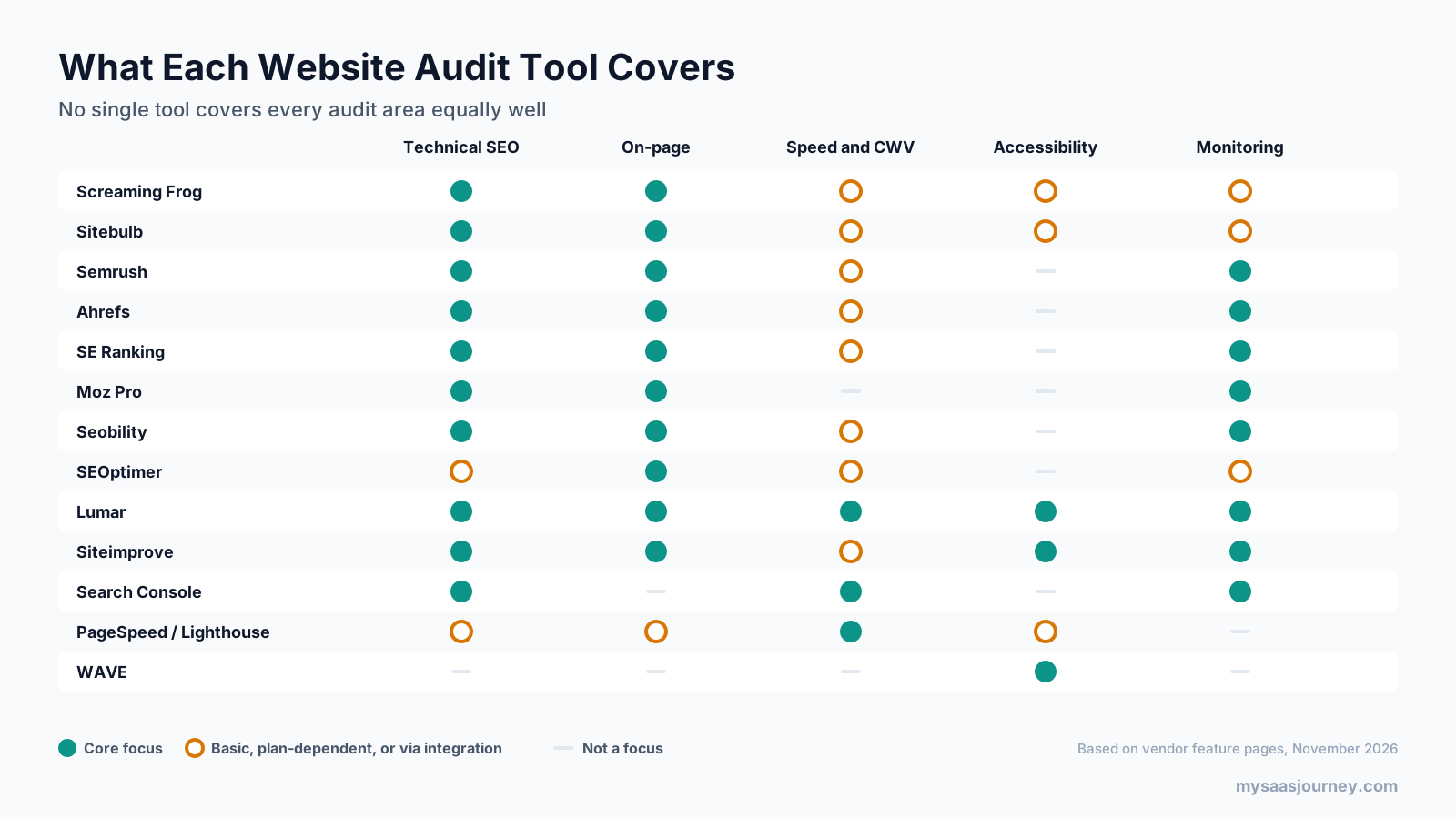
Speed audits measure how quickly pages load and become usable. Google’s Core Web Vitals (Largest Contentful Paint, Interaction to Next Paint, and Cumulative Layout Shift) are the common yardstick. Many crawlers pull this data from Google’s PageSpeed Insights API rather than measuring it themselves, which is why they appear as “basic” in the matrix above.
Accessibility
Accessibility audits check pages against the Web Content Accessibility Guidelines (WCAG): missing form labels, low color contrast, empty links, missing alt text, and keyboard traps. This is where most SEO tools stop. Only the enterprise platforms, the desktop crawlers’ accessibility modules, Lighthouse, and WAVE treat it as a full audit area. Automated checks also catch only part of what a full WCAG review covers, so they work best as an early warning system rather than a compliance sign-off.
Monitoring and Change Tracking
A one-time audit is a snapshot. Monitoring tools recrawl on a schedule, compare results over time, and alert you when something breaks, such as a release that adds a noindex tag across a section. Cloud suites and enterprise platforms do this well. Desktop crawlers can schedule crawls, but the machine has to be running.
A newer check to look for in 2027 is AI search readiness. Several tools now flag whether AI crawlers can reach your pages through robots.txt and whether content renders without JavaScript, since many AI crawlers do not execute scripts. If you track how AI answer engines cite software brands, our study of who AI search recommends for software shows why crawl access now matters beyond Google.
Desktop Crawlers for Technical Audits
Desktop crawlers run on your own computer. You pay once a year (or a low monthly fee), crawl as many sites as your machine can handle, and get the deepest technical detail available. The trade-off is that the crawl stops when your laptop sleeps, and sharing results with a team takes extra steps.
1. Screaming Frog SEO Spider
Screaming Frog SEO Spider is the most widely used technical SEO crawler and the default tool for many consultants and in-house SEOs. It runs on Windows, macOS, and Linux, crawls sites the way a search engine bot would, and lets you inspect every URL, header, and directive in detail.
Best for: technical SEOs and developers who want full control over how a site is crawled.
Key audit features:
- Broken links, redirects, response codes, canonicals, directives, hreflang, and pagination analysis
- JavaScript rendering for sites built with modern frameworks
- Integrations with Google Analytics, Search Console, and PageSpeed Insights to add traffic and speed data to each URL
- Accessibility auditing, custom extraction, and crawl comparison
- Scheduled crawls and command line automation for repeat audits
- AI integrations that can run prompts against crawled page content
Pricing: The free version crawls up to 500 URLs per crawl. A paid licence removes that cap and adds the advanced features. Screaming Frog lists the licence at €245 per user per year on its pricing page, which works out to about $279 or £199 depending on currency. Volume discounts start at five licences.
Trade-offs: The interface is dense and assumes you know what you are looking at. Crawl size is limited by your computer’s memory and storage, so very large sites need a well-configured machine or database storage mode. Each user needs a separate licence.
2. Sitebulb
Sitebulb is a crawler built around explanation. Instead of raw data tables, it groups findings into “Hints” with plain-language descriptions of why each issue matters and how to fix it, plus visual crawl maps. That makes it a strong choice when you need to hand an audit to a client or a developer who is not an SEO.
Best for: consultants and agencies who need clear, prioritized audit reports.
Key audit features:
- 100+ Hints on the Lite plan and 300+ on Pro, each with an explanation and priority
- JavaScript crawling, duplicate content detection, and crawl maps on all plans
- Accessibility audits, structured data checks, international and hreflang audits, and performance checks on Pro
- Audit comparisons, scheduled audits, and customized PDF reports on Pro
- MCP access, which lets AI assistants query audit data (see what MCP is if that term is new)
- A cloud version with automated recurring crawls and no project limits
Pricing: Sitebulb’s pricing page did not render plan prices when checked. Third-party listings checked in October 2026 show Lite at about $18 a month and Pro at about $42 a month for one user, with yearly billing saving 15%. Lite crawls up to 10,000 URLs per audit. Pro crawls up to 500,000 per audit by default, adjustable to 2 million. Sitebulb’s FAQ lists Cloud from £95 a month. Every plan starts with a 14-day trial equivalent to Pro.
Trade-offs: Accessibility and scheduling are Pro features, so the Lite plan is best for occasional audits of smaller sites. Like any desktop crawler, the desktop plans depend on your machine. Confirm current prices on the vendor’s page, since listings vary.
SEO Suites With Built-In Site Audits
If you already use an SEO platform for keyword research, rank tracking, or backlinks, its site audit is often the easiest place to start. These audits run in the cloud, recrawl on a schedule, and tie technical issues to the same projects you use for rankings. For a broader view of these platforms beyond auditing, see our guide to the best SEO tools for different SEO jobs.
3. Semrush Site Audit
Semrush Site Audit checks for technical, on-page, and performance issues and rolls them into a Site Health score. It is easy to set up, explains each issue, and connects findings to the rest of the Semrush toolkit.
Best for: marketing teams that already use Semrush for keywords and competitive research.
Key audit features:
- Thematic reports for crawlability, HTTPS, international SEO, internal linking, Core Web Vitals, and markup
- Scheduled recurring audits with crawl comparison over time
- JavaScript rendering on the higher toolkit tiers
- Exportable and scheduled PDF reports, plus a Zapier integration for issue alerts
- An “AI-ready” Site Audit on the Starter plan and above, according to Semrush’s pricing page
Pricing: Semrush’s pricing page lists a free plan, an SEO plan at $139 a month ($117.33 a month billed yearly), Starter at $199 a month, and Pro+ at $299 a month, with Advanced and Enterprise on custom pricing. The free plan audits up to 100 pages a month. Semrush’s help docs list 100,000 pages a month and 20,000 pages per audit for its Pro-level SEO toolkit, and 300,000 pages a month for the Guru-level toolkit. JavaScript rendering requires the Guru level or above, which Semrush maps to Pro+.
Trade-offs: The 20,000-page cap per audit on lower tiers means large sites need to be audited in sections. Accessibility is not a focus. Semrush recently restructured its plans, so check which toolkit level your plan includes before relying on the limits above.
4. Ahrefs Site Audit
Ahrefs Site Audit checks for over 170 technical and on-page issues and is one of the most generous free options for site owners, because Ahrefs Webmaster Tools lets you audit any site you can verify at no cost.
Best for: site owners who want a strong free cloud audit, and teams already using Ahrefs.
Key audit features:
- 170+ technical and on-page checks with issue explanations
- JavaScript rendering, custom crawl settings, and scheduled audits
- Change tracking between crawls and an internal link opportunities report
- Page speed data pulled into the audit
- Free access for verified sites through Ahrefs Webmaster Tools
Pricing: The free tier gives 5,000 crawl credits per verified project per month, and only pages that return a 200 status use credits, so redirects and broken URLs do not eat into the allowance. Paid plans on Ahrefs’ pricing page are Lite at $129 a month (100,000 crawl credits a month, 25,000 pages per project), Standard at $249 (500,000 credits, 50,000 pages per project), and Advanced at $449 (1.5 million credits, 250,000 pages per project). Enterprise starts at 5 million credits. Ahrefs also lists a $29 Starter plan, but its Site Audit limits were not stated.
Trade-offs: The free tier only covers sites you can verify, so it does not work for prospect or competitor audits. Paid Site Audit capacity is tied to the suite, which costs more than a desktop crawler if you only need audits. For a full head-to-head, see our Ahrefs vs Semrush comparison.
5. SE Ranking Website Audit
SE Ranking offers an automated website audit with 115+ checks inside a broader SEO platform. Its main advantage is page volume: the entry plan includes far more audit pages per month than comparable suites.
Best for: agencies and in-house teams that audit many pages but do not need the deepest backlink data.
Key audit features:
- 115+ checks across technical SEO, on-page, links, and performance
- Scheduled audits with comparison between crawls
- Issue explanations and white-label report options
- Rank tracking and competitor research in the same platform
Pricing: SE Ranking’s pricing page lists Core at $129 a month ($103.20 billed yearly) with 250,000 audit pages a month, and Growth at $279 a month ($223.20 yearly) with 2 million audit pages a month. Enterprise is custom. Yearly billing saves 20%, and the 14-day trial needs no credit card.
Trade-offs: Like the other suites, accessibility is not a focus, and you pay for keyword and rank tracking tools you may not need if auditing is your only use. SE Ranking’s entry price has risen in recent years, so older reviews often quote lower figures.
6. Moz Pro Site Crawl
Moz Pro’s Site Crawl runs weekly crawls of your campaign sites and lists issues by severity, from critical crawler errors to missing metadata. It is simpler than the other suites’ audits, which suits teams that want a steady health check rather than a deep technical tool.
Best for: small teams that want simple, recurring crawls alongside keyword and link research.
Key audit features:
- Weekly scheduled crawls of each campaign site
- Issue categories ranked by severity, with history over time
- On-Page Grader for checking individual pages against a target keyword
- Keyword research, rank tracking, and link data in the same subscription
Pricing: Moz’s pricing page could not be reached during this check. Recent third-party listings show Starter at $49 a month, Standard at $99, Medium at $179, and Large at $299, with about 20% off for yearly billing. Site Crawl is listed from the Standard plan, at around 100,000 pages crawled per week, and Medium and Large add more campaigns, pages, and seats. Confirm current limits and trial length with Moz.
Trade-offs: Site Crawl does not go as deep as Screaming Frog, Sitebulb, or Ahrefs, and speed and accessibility are not focus areas. It works best as an ongoing health monitor rather than a primary technical audit tool.
Simple and Client-Facing Audit Tools
These tools trade depth for clarity. They produce scored, readable reports that a business owner or client can follow, and they cost less than the full SEO suites.
7. Seobility
Seobility is a German SEO platform that crawls your site, scores technical and on-page health, and monitors sites continuously. It is popular with small businesses and freelancers managing a handful of sites.
Best for: small businesses and freelancers who want an affordable, always-on audit.
Key audit features:
- Technical and on-page audits with issue explanations
- Continuous monitoring with recrawls and change tracking
- Rank tracking and backlink checks in paid plans
- A free plan for a single project, plus free one-page SEO checkers
Pricing: Seobility’s pricing page lists Premium at €59.90 a month (3 projects, 25,000 pages per crawl, 300 ranking keywords), Professional at €99.90 a month (7 projects, 50,000 pages per crawl), and Agency at €209.90 a month (20 projects, 100,000 pages per crawl). Yearly billing saves 20%, prices exclude VAT, and each plan has a 14-day trial. Check the free plan’s current page limit on the pricing page before relying on it.
Trade-offs: Prices are in euros, so US buyers will see the cost move with exchange rates. Crawl depth and JavaScript handling are lighter than the dedicated crawlers.
8. SEOptimer
SEOptimer focuses on fast, readable audit reports. You enter a URL and get a graded report across SEO, performance, usability, and social signals. Its paid plans are built around agencies that want to brand those reports and use an embeddable audit form to capture leads on their own websites.
Best for: agencies and freelancers who sell audits or use them for lead generation.
Key audit features:
- Graded one-page and site-level audits with plain-language recommendations
- White-label PDF reports in 15 languages on agency plans
- An embeddable audit tool that captures leads, with webhooks and Zapier support
- Report templates and scheduled reports
Pricing: SEOptimer lists DIY SEO at $29 a month (4 site crawls a month for one website), White Label at $39 a month (10 crawls across multiple sites), and White Label and Embedding at $59 a month (50 crawls). Yearly billing saves 25%, bringing those plans to $21.75, $29.25, and $44.25 a month. Every plan has a 14-day trial.
Trade-offs: SEOptimer is a reporting and sales tool more than a deep crawler. Use it alongside a crawler when you need to diagnose complex technical problems. Its pricing page lists features inconsistently across tiers, so confirm what each plan includes.
Enterprise Website Audit and Governance Platforms
Large sites with thousands of pages, several teams publishing at once, and legal accessibility obligations need more than a periodic crawl. Enterprise platforms crawl at scale, monitor continuously, and route issues to the people who own them.
9. Lumar
Lumar (formerly Deepcrawl) is a cloud website intelligence platform for large sites. It combines technical SEO crawling with site speed, accessibility, and AI search checks, and adds automated QA testing that can catch problems before a release goes live.
Best for: enterprise SEO and engineering teams managing large or frequently changing sites.
Key audit features:
- Analyze: large-scale crawling with issue prioritization and team collaboration
- Monitor: change and trend tracking across multiple domains
- Protect: automated QA tests that catch SEO regressions before they reach the live site
- Impact: reporting that connects fixes to results
- Web accessibility metrics for WCAG issues, site speed metrics, and GEO metrics for AI search visibility
Pricing: Lumar does not publish prices. Packages are quoted based on the features and scale you need.
Trade-offs: Lumar is priced and built for enterprise teams, so it is more platform than a small site needs. Expect a sales process and onboarding before you see value.
10. Siteimprove
Siteimprove is a content governance platform used widely by universities, public bodies, and large organizations. Its strength is accessibility, with SEO, content quality, and analytics available as separate modules on the same monitoring core.
Best for: organizations where accessibility compliance and content quality matter as much as SEO.
Key audit features:
- Accessibility scanning against WCAG with guided remediation and compliance history
- Quality assurance checks for broken links, misspellings, and readability
- SEO monitoring for technical and content issues
- Analytics and policy modules for content governance across many sites
Pricing: Siteimprove sells by custom quote based on page count, modules, seats, and contract length. Third-party buyer reports describe contracts running into five figures a year for multi-module deals, but treat those as estimates rather than list prices.
Trade-offs: You pay per module, so buying SEO, accessibility, and QA together adds up quickly. Its SEO depth is not the main reason to choose it. Teams that need deep technical crawling often pair it with a dedicated crawler.
Free Website Audit Tools From Google and WebAIM
These three tools cost nothing and belong in every audit, whatever else you use. They provide data paid crawlers cannot fully replicate, such as Google’s own indexing view and real-user speed data.
11. Google Search Console
Google Search Console shows how Google itself sees your site. It is the only tool in this list with first-party data on indexing, manual actions, and performance data from actual Chrome users.
Best for: every site owner, as the source of truth for indexing and search performance.
Key audit features:
- Page indexing report showing which pages are indexed and why others are not
- Core Web Vitals report based on real-user field data
- HTTPS, sitemap, robots.txt, and structured data enhancement reports
- URL Inspection to test how Google renders a single page
- Email alerts for new issues, manual actions, and security problems
Pricing: Free.
Trade-offs: Search Console reports what Google found, not every issue on your site, and its data lags by days. It does not crawl on demand, so pair it with a crawler for full coverage.
12. PageSpeed Insights and Lighthouse
PageSpeed Insights and Lighthouse are Google’s free tools for testing individual pages. Lighthouse is an open-source tool that audits performance, accessibility, best practices, and SEO. PageSpeed Insights runs Lighthouse in the cloud and adds real-user data from the Chrome UX Report when enough traffic exists.
Best for: diagnosing speed problems and running quick quality checks on key templates.
Key audit features:
- Lab performance scores with specific fixes for slow pages
- Field Core Web Vitals data from real Chrome users, where available
- Accessibility, best practices, and basic SEO checks in the same report
- Lighthouse runs in Chrome DevTools, from the command line, or in continuous integration pipelines
Pricing: Free.
Trade-offs: Both tools test one page at a time. To check speed across a whole site, use a crawler that pulls PageSpeed data through the API, such as Screaming Frog or Sitebulb.
13. WAVE
WAVE, from the nonprofit WebAIM, is the most widely used free accessibility checker. Its browser extension marks errors, alerts, and contrast problems directly on the page, which makes issues easy to understand and hand to a developer.
Best for: content and design teams doing page-level accessibility reviews.
Key audit features:
- In-page markers for missing alt text, form labels, empty links, and structure problems
- Contrast checking and a structure view of headings and landmarks
- Browser extensions that test pages behind a login
- An API for checking pages at scale
Pricing: The browser extension is free. The WAVE API uses prepaid credits, costing $0.04 each for 250 to 999 credits, $0.03 for 1,000 to 9,999, and $0.025 for 10,000 or more. New accounts get 100 free credits, and a basic page check uses one credit.
Trade-offs: WAVE checks one page at a time and, like every automated tool, cannot confirm full WCAG conformance. Manual testing with a keyboard and screen reader is still needed for a complete accessibility audit.
Website Audit Software Pricing Compared
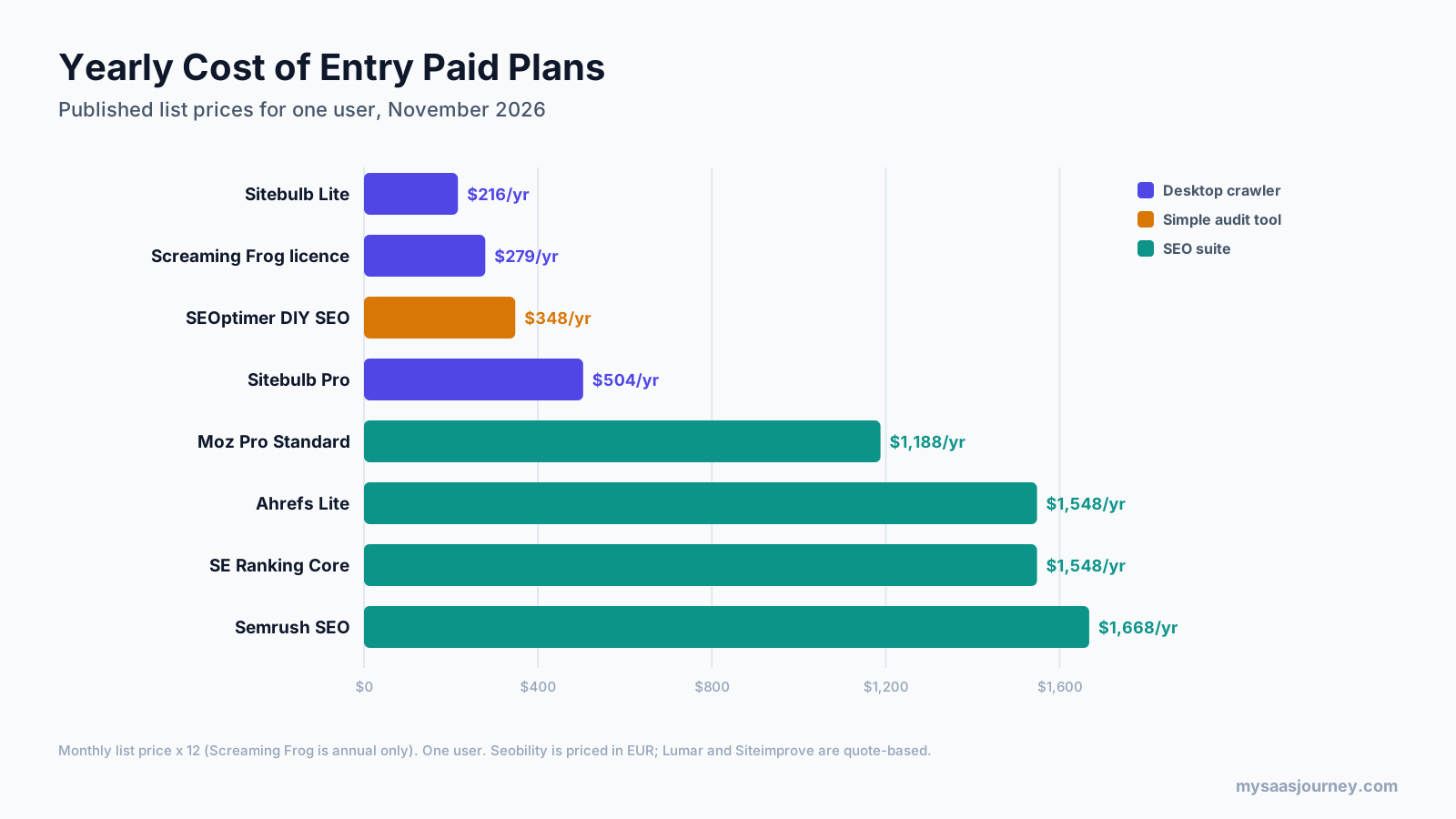
The cost gap between tools is large. A desktop crawler licence costs less in a year than one month of some suites. That does not make suites overpriced, since they include keyword research, rank tracking, and backlinks, but it does mean you should not buy a suite only for its audit.
| Tool | Entry paid plan | Monthly list price | Audit allowance on that plan | Yearly billing |
|---|---|---|---|---|
| Screaming Frog | Paid licence | Annual only, about $279 a year | Unlimited, limited by your computer | Annual only |
| Sitebulb | Lite | About $18 | 10,000 URLs per audit | 15% off |
| SEOptimer | DIY SEO | $29 | 4 site crawls a month, 1 site | 25% off |
| Seobility | Premium | €59.90 | 25,000 pages per crawl, 3 projects | 20% off |
| Moz Pro | Standard | $99 | About 100,000 pages a week | About 20% off |
| Ahrefs | Lite | $129 | 100,000 credits a month, 25,000 pages per project | Discount offered |
| SE Ranking | Core | $129 | 250,000 pages a month | 20% off |
| Semrush | SEO | $139 | 100,000 pages a month, 20,000 per audit (Pro-level toolkit) | $117.33 a month |
| Lumar | Custom | Quote | Custom | Custom |
| Siteimprove | Custom | Quote | Custom | Custom |
A few pricing details are worth checking before you commit:
- Screaming Frog shows its licence in euros on the pricing page (€245), with GBP and USD figures shown elsewhere. Your exact cost depends on currency at checkout.
- Sitebulb’s plan prices did not render on its own pricing page during this check. The figures above come from third-party listings and should be confirmed.
- Semrush’s toolkit limits are documented under its older plan names (Pro, Guru, Business). Ask which level your plan includes.
- Moz’s pricing page was unreachable during this check, so its figures come from recent third-party listings.
If you are weighing what these subscriptions should cost against other tools in your stack, our pricing model glossary entry explains flat, per-seat, and usage-based pricing.
Free Website Audit Tools and Their Limits
Free website audit tools can take a small site a long way. The question is whether their limits fit your site size and the type of audit you need.
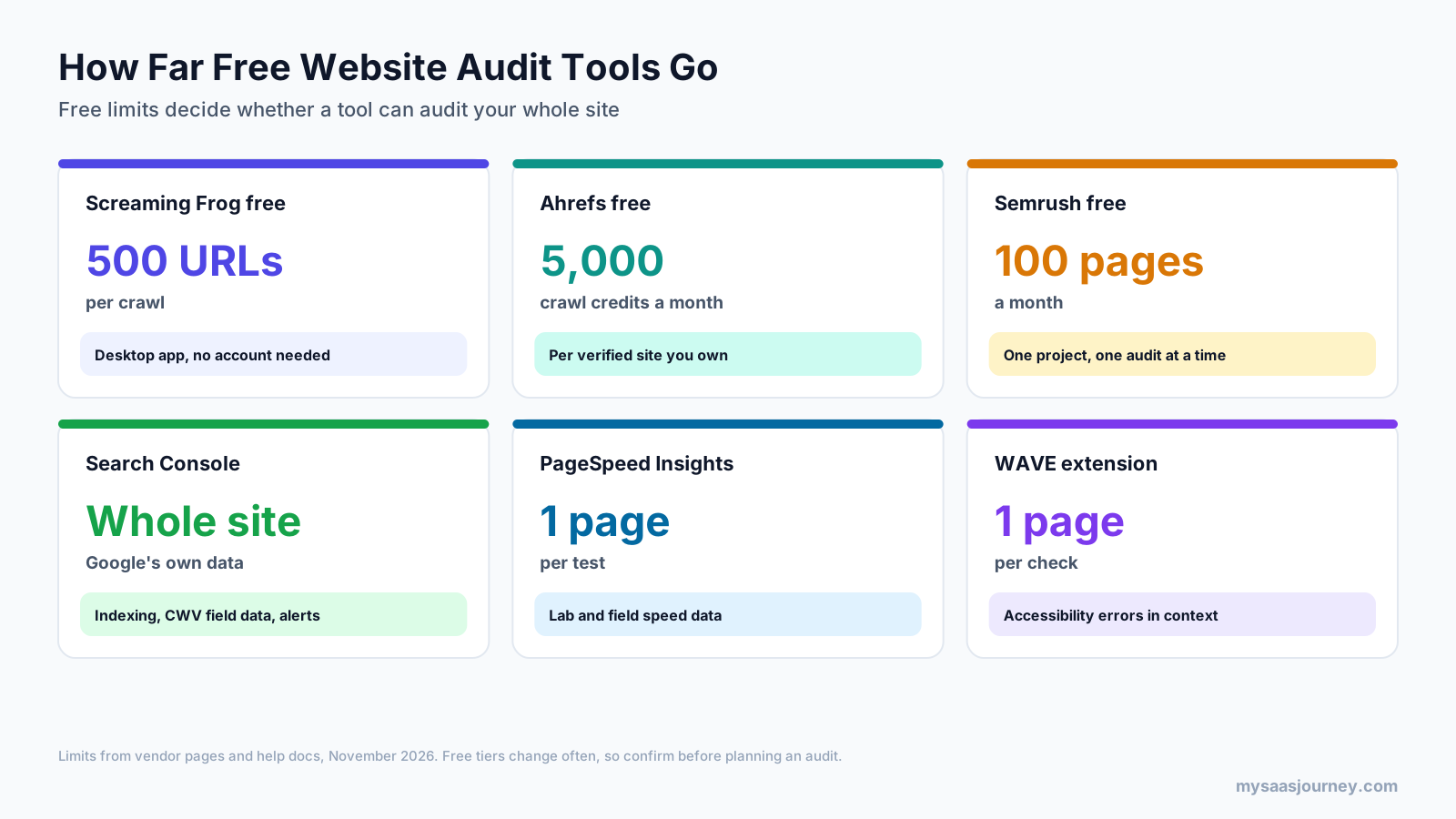
Three limit types decide whether a free tier works for you:
- Pages per crawl: Screaming Frog’s free version stops at 500 URLs per crawl. For a small business site, that often covers everything. For an online store with filters, it rarely does.
- Pages or credits per month: Semrush’s free plan audits 100 pages a month, which is enough to test the tool but not to audit a full site. Ahrefs gives 5,000 crawl credits per verified site per month, and only successful page loads count.
- One page at a time: PageSpeed Insights, Lighthouse, and WAVE test single pages. They are excellent for templates and key pages, but they do not crawl.
A workable free setup for a small site is Search Console for indexing, Screaming Frog free or Ahrefs Webmaster Tools for the crawl, PageSpeed Insights for your main templates, and WAVE for accessibility. If you are also building keyword research into a free workflow, see our list of the best free keyword research tools.
How to Choose Website Audit Software
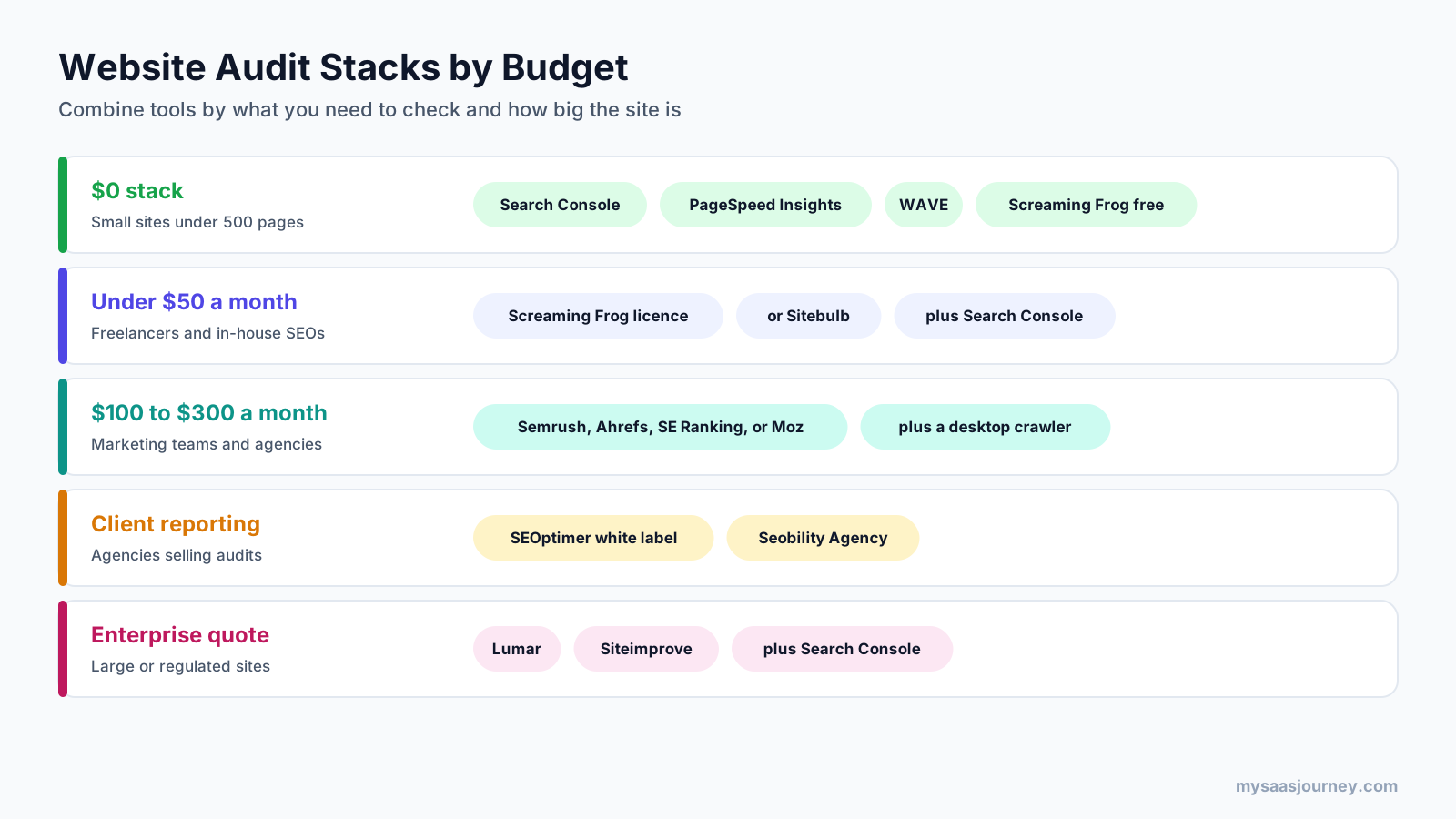
Start with three questions: what do you need to check, how large is the site, and who will read the results? The answers usually point to a combination of tools rather than one product.
| If you need | Start with | Add |
|---|---|---|
| Deep technical SEO on any site | Screaming Frog or Sitebulb | Search Console |
| Audits inside an SEO suite you already use | Semrush, Ahrefs, SE Ranking, or Moz Pro | A desktop crawler for deep dives |
| A free audit of your own site | Ahrefs Webmaster Tools or Screaming Frog free | Search Console and PageSpeed Insights |
| Branded audit reports for clients | SEOptimer or Seobility | A crawler for diagnosis |
| Accessibility checks | WAVE and Lighthouse | Siteimprove, Lumar, or Sitebulb Pro at scale |
| Monitoring a large, changing site | Lumar or a cloud suite | Search Console alerts |
| Speed and Core Web Vitals | PageSpeed Insights and Search Console | A crawler with the PageSpeed API connected |
Some other factors that change the answer:
- Site size: Check pages per audit, not only pages per month. A 50,000-page site cannot be audited in one pass on a plan capped at 20,000 pages per audit.
- JavaScript: If your site is built with React, Vue, or a similar framework, confirm JavaScript rendering is included on the plan you are buying. If you are still choosing a platform, our guide to the best website builders notes which ones produce crawl-friendly pages.
- Team access: Desktop licences are per user. Cloud suites usually charge extra seats. Enterprise platforms price by seat and module.
- Who fixes the issues: Developers need precise URLs and directives. Clients and executives need prioritized summaries. Pick reporting that matches the reader.
- Overlap with tools you already pay for: If your team already has a rank tracker or competitor tool, the audit inside that suite may be enough. Our comparisons of rank tracker tools and competitor analysis tools show which suites bundle what.
How to Run a Website Audit With These Tools
Software finds issues, but the audit process decides whether anything improves. This sequence works with any of the tools above.
- Set the scope and baseline. Decide which domains, subdomains, and sections you are auditing, and note current organic traffic, indexed pages, and Core Web Vitals from Search Console so you can measure the effect of fixes.
- Check indexing first. Review the Page indexing report in Search Console. Pages Google cannot or will not index explain more traffic problems than any on-page issue.
- Run a full crawl. Use your crawler or suite with JavaScript rendering on if your site needs it. Connect Search Console and Analytics so each URL carries traffic data.
- Sort issues by impact. Fix errors that block crawling or indexing first, then template-level problems that affect many pages, then individual page issues. A missing title on one page matters less than a canonical error across every product page.
- Test speed and accessibility on key templates. Run PageSpeed Insights and WAVE on your home page, main category or service pages, a typical article, and checkout or contact forms.
- Turn findings into tickets. Group fixes by owner (developer, content, design), include affected URLs, and set a priority. A shared plan works better than a PDF; our project plan template is one way to organize it.
- Recrawl and compare. After fixes ship, run the same crawl and compare results. Then schedule recurring audits so regressions surface quickly.
How Often Should You Audit Your Website?
Run a full website audit at least once or twice a year, and after any major change such as a redesign, platform migration, domain move, or large content restructure. Between full audits, schedule automated crawls weekly or monthly and keep Search Console alerts switched on.
The right frequency depends on how often your site changes. A small brochure site that rarely updates can rely on a yearly audit plus Search Console. An online store, publisher, or SaaS site that ships changes every week should run scheduled crawls every week, because one bad release can deindex a whole section before anyone notices. If you publish frequently on a CMS, the platform itself matters too; our comparison of blogging platforms covers which handle technical SEO basics for you.
Common Mistakes When Using Website Audit Tools
Chasing the Audit Score
Health scores are useful for tracking trends, but they weight issues differently across tools. A site can score 95 and still have its best pages blocked from indexing. Judge an audit by what you fix, not by the number.
Treating Every Warning as Urgent
Most crawlers flag hundreds of minor items, such as long titles or low word counts. Prioritize issues that affect crawling, indexing, and user experience on pages that matter for traffic and revenue.
Auditing Without JavaScript Rendering
On JavaScript-heavy sites, a crawler without rendering sees a different site from the one Google sees, which leads to false reports of missing content and links.
Ignoring Accessibility
SEO suites rarely check it, so teams assume the site is fine. Accessibility affects usability, legal risk in many markets, and overlaps with SEO in areas such as alt text, headings, and link text.
Running One Audit and Stopping
Sites change with every release. Without scheduled crawls or monitoring, new issues can sit unnoticed for months.
Paying for Overlapping Tools
Many teams pay for two suites and a crawler that report the same issues. Map what each tool covers before renewing.
Final Thoughts
There is no single best website audit software for every site, because “audit” covers several different jobs. For most teams, the strongest setup is one primary crawler or suite plus Google’s free tools and an accessibility checker.
If you want depth for the lowest cost, start with Screaming Frog or Sitebulb. If your team already lives in an SEO platform, use its built-in audit and add a desktop crawler for difficult problems. If you manage a large site with compliance obligations, shortlist Lumar and Siteimprove and ask for a trial crawl on your own domain. And whatever you choose, keep Search Console, PageSpeed Insights, and WAVE in the routine. They are free, and they show things paid tools cannot.
If you are building a wider marketing stack around your audits, our guide to AI tools for marketing covers content, SEO, and reporting tools that pair well with an audit workflow.
Frequently Asked Questions
What is website audit software?
Website audit software crawls a website and checks its pages against rules for technical SEO, on-page content, page speed, accessibility, and security. It reports issues such as broken links, redirect chains, indexing blocks, slow pages, and missing alt text, usually with a priority and a suggested fix, so you can improve search visibility and user experience.
What is the best free website audit tool?
For a full crawl, Screaming Frog’s free version (up to 500 URLs per crawl) and Ahrefs Webmaster Tools (5,000 crawl credits a month per verified site) are the strongest free options. Pair either with Google Search Console for indexing data, PageSpeed Insights for speed, and WAVE for accessibility. Together they cover most small sites at no cost.
How often should you do an SEO audit?
Do a full SEO audit at least once or twice a year and after any redesign, migration, or major content change. Sites that change weekly, such as stores and publishers, should also run automated crawls every week or month and monitor Search Console alerts so new problems are caught quickly.
Can website audit tools check accessibility compliance?
Some can check part of it. WAVE, Lighthouse, Sitebulb Pro, Screaming Frog, Lumar, and Siteimprove all test pages against WCAG rules. Automated tools only detect a portion of accessibility issues, though, so full compliance still requires manual testing with keyboards and screen readers by someone trained in accessibility.
What is the difference between a desktop crawler and a cloud audit tool?
A desktop crawler such as Screaming Frog or Sitebulb runs on your computer, offers deep control, and costs less, but crawl size depends on your hardware and scheduled crawls need the machine running. A cloud audit tool such as Semrush, Ahrefs, or Lumar runs on the vendor’s servers, recrawls on a schedule, and makes sharing easier, but limits pages by plan.
Do I need Screaming Frog if I already have Semrush or Ahrefs?
Not always. Suite audits cover most routine checks well. Many SEOs still add Screaming Frog for detailed investigation, custom extraction, very large or complex sites, and audits of sites they cannot verify. At about $279 a year, it is a small addition if you run technical audits regularly.
What should a website audit report include?
A useful website audit report includes the scope and date, a summary of the most important issues, indexing and crawlability findings, on-page issues, speed and Core Web Vitals results, accessibility findings, affected URLs for each issue, a priority for each fix, the owner responsible, and a plan to recrawl and confirm fixes.
Is a website audit the same as an SEO audit?
Not exactly. An SEO audit focuses on search visibility: crawling, indexing, on-page content, and links. A website audit is broader and can also cover accessibility, security, content quality, and user experience. Most website audit software starts with SEO and adds some of the other areas, which is why many teams combine more than one tool.
Sources
| Source | Used for |
|---|---|
| https://www.screamingfrog.co.uk/seo-spider/pricing/ | Screaming Frog licence price, volume discounts, free crawl limit |
| https://sitebulb.com/pricing/ | Sitebulb plan features, URL limits, trial, Cloud starting price |
| https://www.capterra.com/p/169089/Sitebulb/pricing/ | Sitebulb Lite and Pro prices (third-party listing) |
| https://www.semrush.com/prices/ | Semrush plan prices |
| https://www.semrush.com/kb/31-site-audit | Semrush Site Audit page limits and JavaScript rendering tiers |
| https://ahrefs.com/pricing | Ahrefs plan prices and Site Audit crawl credits |
| https://ahrefs.com/webmaster-tools | Ahrefs free Site Audit limits and checks |
| https://seranking.com/subscription.html | SE Ranking prices, audit pages, trial |
| https://seranking.com/website-audit.html | SE Ranking number of audit checks |
| https://www.softwareadvice.com/marketing/moz-pro-profile | Moz Pro plan prices (third-party listing) |
| https://www.seobility.net/en/pricing/ | Seobility plan prices and crawl limits |
| https://www.seoptimer.com/pricing | SEOptimer plan prices and features |
| https://www.lumar.io/pricing/ | Lumar products and quote-based pricing |
| https://siteimprove.com/en/request-a-quote/ | Siteimprove modules and quote-based pricing |
| https://developer.chrome.com/docs/lighthouse/overview | Lighthouse audit categories and how to run it |
| https://wave.webaim.org/api/ | WAVE API credit pricing |
| Ahrefs Keywords Explorer and SERP Overview (US, November 2026) | Keyword volumes, difficulty, SERP analysis |