An app development platform is a set of connected tools that helps you design, build, test, deploy, and manage software applications in one place. Instead of assembling a code editor, database, login system, hosting, and publishing tools separately, the platform provides them together, so you can go from idea to a working web or mobile app faster.
App development platforms range from professional tools that developers code in, such as Xcode, Android Studio, and Flutter, to low-code and no-code builders that use drag-and-drop interfaces, to AI app builders such as Base44, Lovable, and Emergent that generate an app from a plain-language description. They all aim to remove repetitive setup work, but they differ in how much control, flexibility, and coding skill they require.
This guide explains what an app development platform is, how it works, the features most platforms share, the main types, what cross-platform, low-code, and AI app development mean, typical costs, and how to choose the right platform for your project.
Key takeaways:
- An app development platform bundles the tools needed across the app lifecycle: design, build, data and integrations, testing, deployment, and monitoring.
- The main types are native SDKs, cross-platform frameworks, backend platforms, low-code platforms, no-code builders, AI app builders, and enterprise application platforms.
- Cross-platform development uses one shared codebase to ship apps for both iOS and Android, with frameworks such as Flutter, React Native, and Kotlin Multiplatform.
- AI app builders such as Base44, Lovable, and Emergent turn a text description into a working app with a backend, which suits prototypes and simple products.
- The right platform depends on what you are building, who will build it, how much control you need, and where the app must run.
What Is an App Development Platform?
An app development platform is software that provides the environment, building blocks, and services needed to create applications. Red Hat describes it as a bundle of connected technologies that helps teams build software quickly, and Salesforce defines it as a set of tools that helps teams build, deploy, secure, and manage applications.
In simple terms, a platform gives you three things:
- A place to build the app, such as a code editor, visual builder, or AI chat interface
- Ready-made parts, such as user interface components, a database, user login, and connections to other services
- A way to run and ship the app, such as hosting, app store publishing, and monitoring
The word “platform” is used loosely, so it helps to separate it from related terms:
- A framework is a code library that structures how you build an app, such as Flutter or React Native. A framework becomes part of a platform when it comes with tooling, services, and deployment.
- An SDK (software development kit) is the set of tools and libraries for building on a specific system, such as the iOS SDK or Android SDK.
- An IDE (integrated development environment) is the editor where developers write, run, and debug code, such as Xcode or Android Studio.
- A platform usually combines several of these with backend services and deployment, so you do not have to assemble them yourself.
App development platforms can target web apps, mobile apps for iOS and Android, desktop apps, or all three. A mobile app development platform is simply one focused on phones and tablets, with tools for building and publishing to the Apple App Store and Google Play.
How Does an App Development Platform Work?
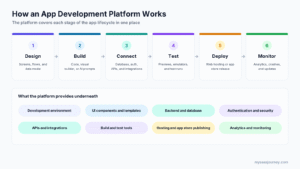
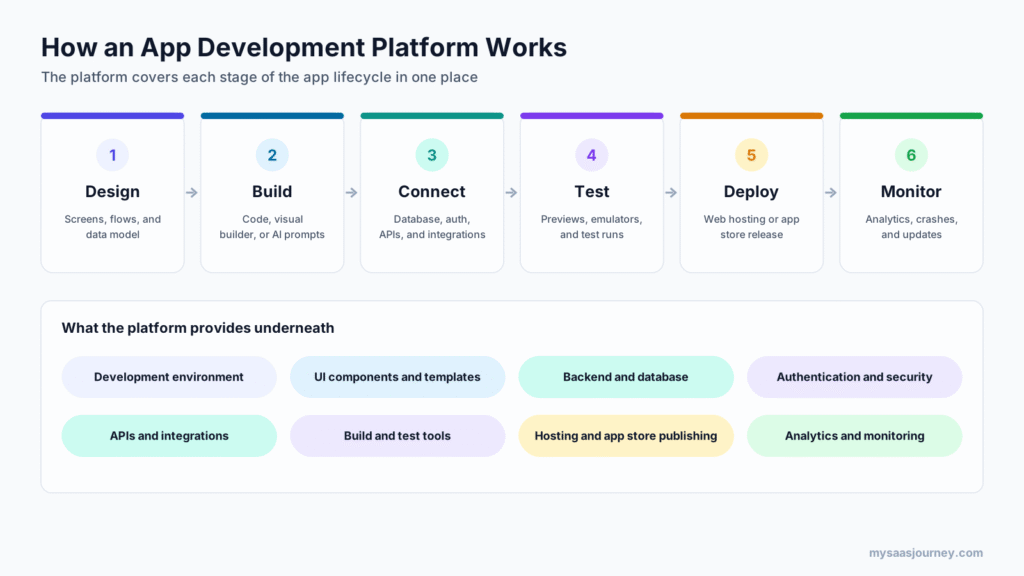
An app development platform works by providing tools and services for each stage of the app lifecycle, so the work flows from one stage to the next inside one system.
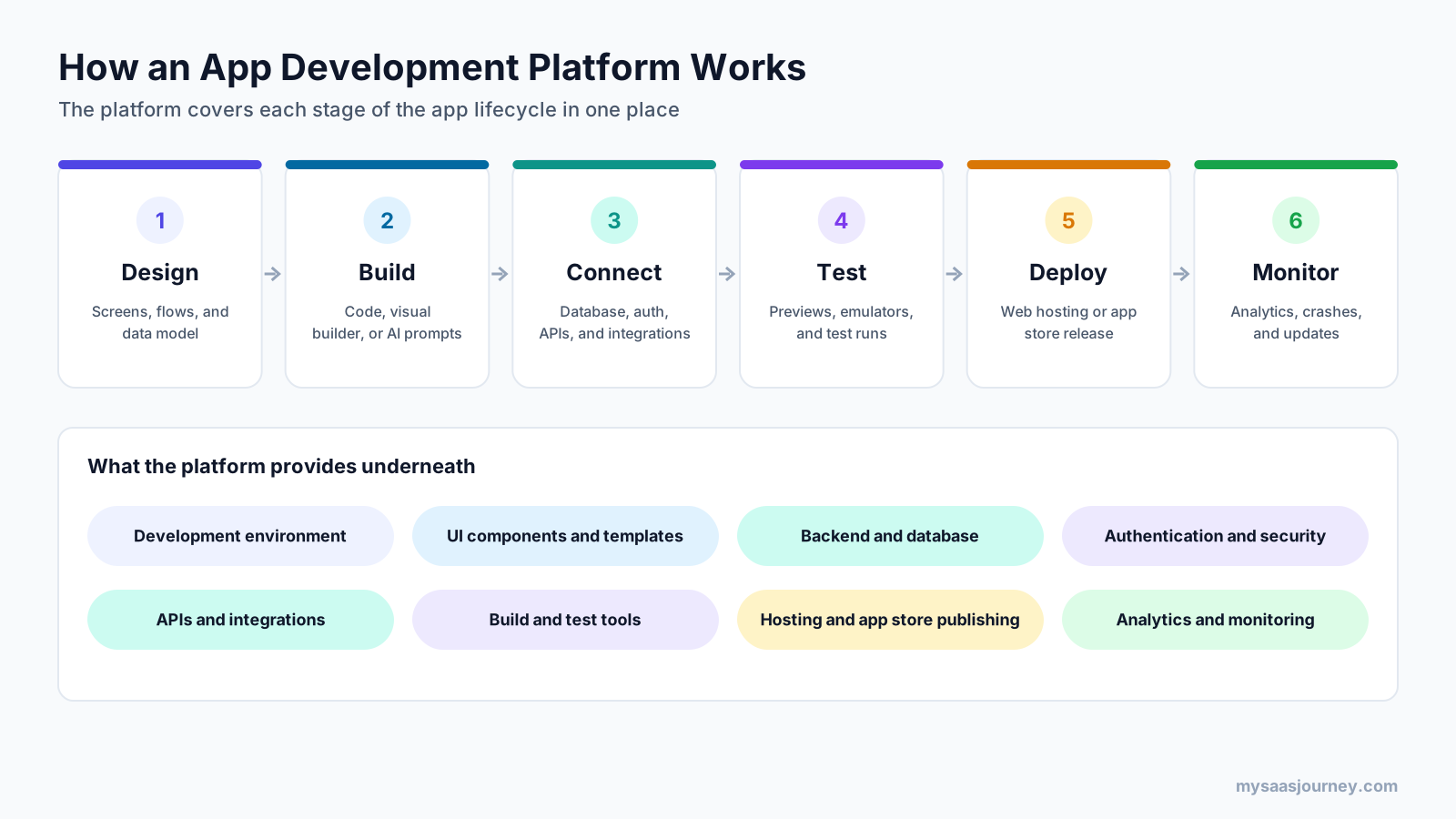
- Design: You plan screens, user flows, and the data your app will store. Many platforms include templates and UI components to start from.
- Build: You create the app by writing code, arranging components in a visual builder, or describing what you want to an AI assistant.
- Connect: You link the app to a database, add user authentication, and connect external services through APIs, such as payments, email, or a CRM.
- Test: You preview the app in a browser, on emulators, or on your own phone, and fix bugs before release.
- Deploy: You publish a web app to hosting, or package a mobile app and submit it to the Apple App Store and Google Play.
- Monitor: You track usage, crashes, and performance, then release updates.
Behind these stages, the platform handles infrastructure that would otherwise take significant time to set up: servers, databases, security, build pipelines, and hosting. That is the main reason teams use platforms: they spend more time on the features that make their app useful and less on plumbing. If APIs are new to you, our guide to what an API is explains how apps exchange data with other services.
Key Features of an App Development Platform
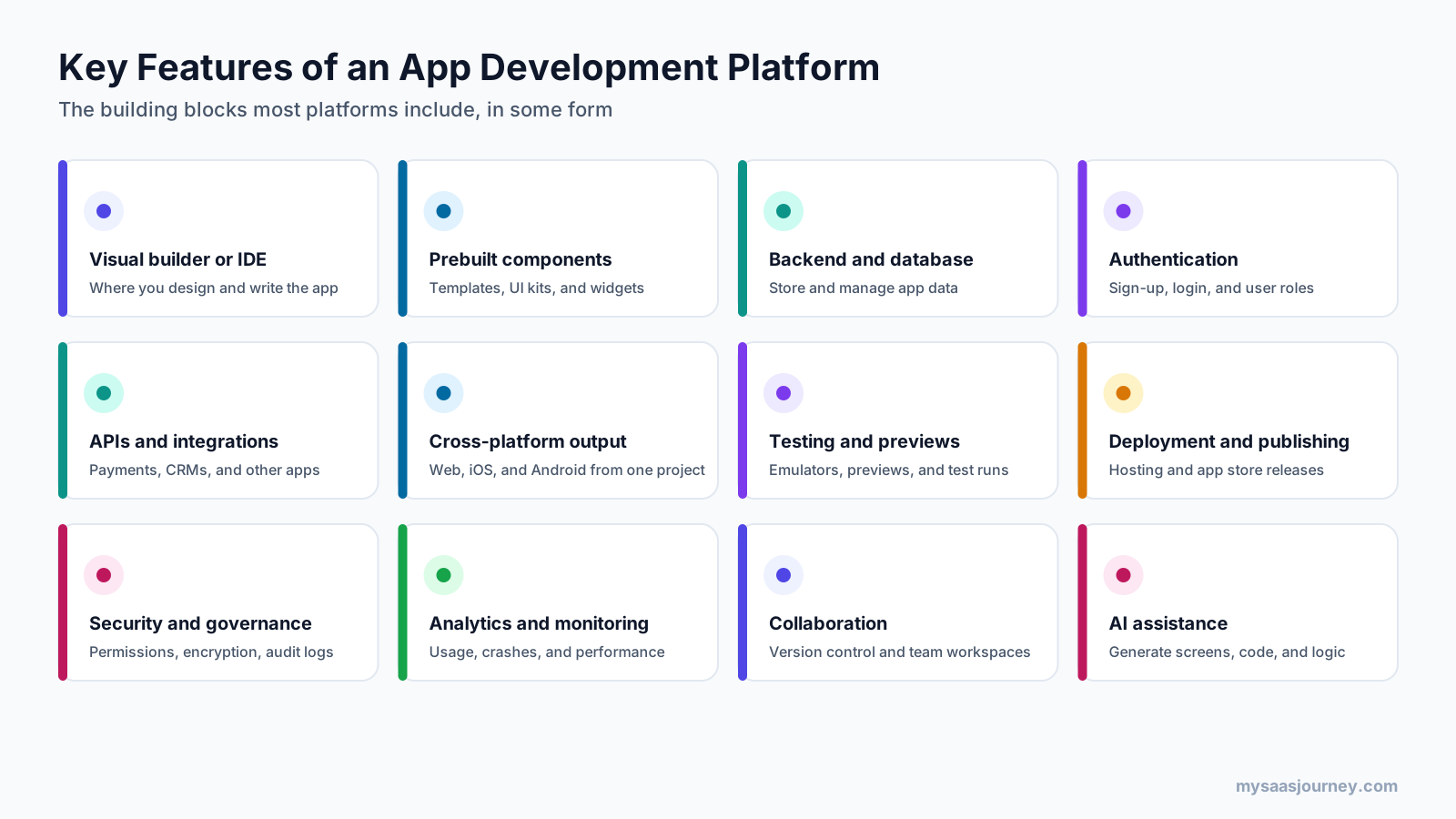
Most app development platforms include some version of the following features. How much each platform offers, and how much you can customize it, is what separates one type from another.
Development Environment
The development environment is where you build. For developers, it is an IDE with code editing, debugging, and build tools. For low-code and no-code platforms, it is a visual editor where you drag components onto screens. For AI app builders, it is a chat interface where you describe changes and see them applied.
Prebuilt Components and Templates
Platforms provide ready-made building blocks such as buttons, forms, lists, navigation, and full app templates. These save time and help keep the design consistent across screens.
Backend, Database, and Authentication
Almost every app needs to store data and know who its users are. Platforms either include a backend and database or connect to one, along with sign-up, login, password reset, and user roles. Backend as a service (BaaS) platforms such as Firebase, Supabase, and AWS Amplify specialize in this layer.
APIs and Integrations
Integrations connect your app to payment providers, email services, CRMs, analytics tools, and other software. Platforms offer prebuilt connectors, API tools, or both. Our explainer on what a webhook is covers how apps notify each other when something changes.
Cross-Platform Output
Many platforms let you build once and run on several targets, such as the web, iOS, and Android. This reduces the cost of maintaining separate apps for each operating system.
Testing and Previews
Testing tools include live previews, device emulators, test builds you can install on your own phone, and automated tests. Good testing support catches problems before users see them.
Deployment and Publishing
Deployment covers hosting for web apps and packaging for mobile app stores. Some platforms automate store submission, while others give you the build files to submit yourself.
Security and Governance
Security features include permissions, encryption, secure authentication, and compliance controls. Enterprise platforms add audit logs, single sign-on, and admin controls over who can build and publish apps.
Analytics and Monitoring
Analytics show how people use your app, while monitoring tracks crashes, errors, and performance so you can fix issues quickly.
Collaboration and Version Control
Team features include shared workspaces, comments, roles, and version history. Code-based platforms connect to Git services such as GitHub, and some AI builders sync code to Git as well.
AI Assistance
AI now appears across platforms, from code completion in IDEs to generating screens, data models, and logic from a prompt. In AI app builders, it is the main way you build.
Types of App Development Platforms
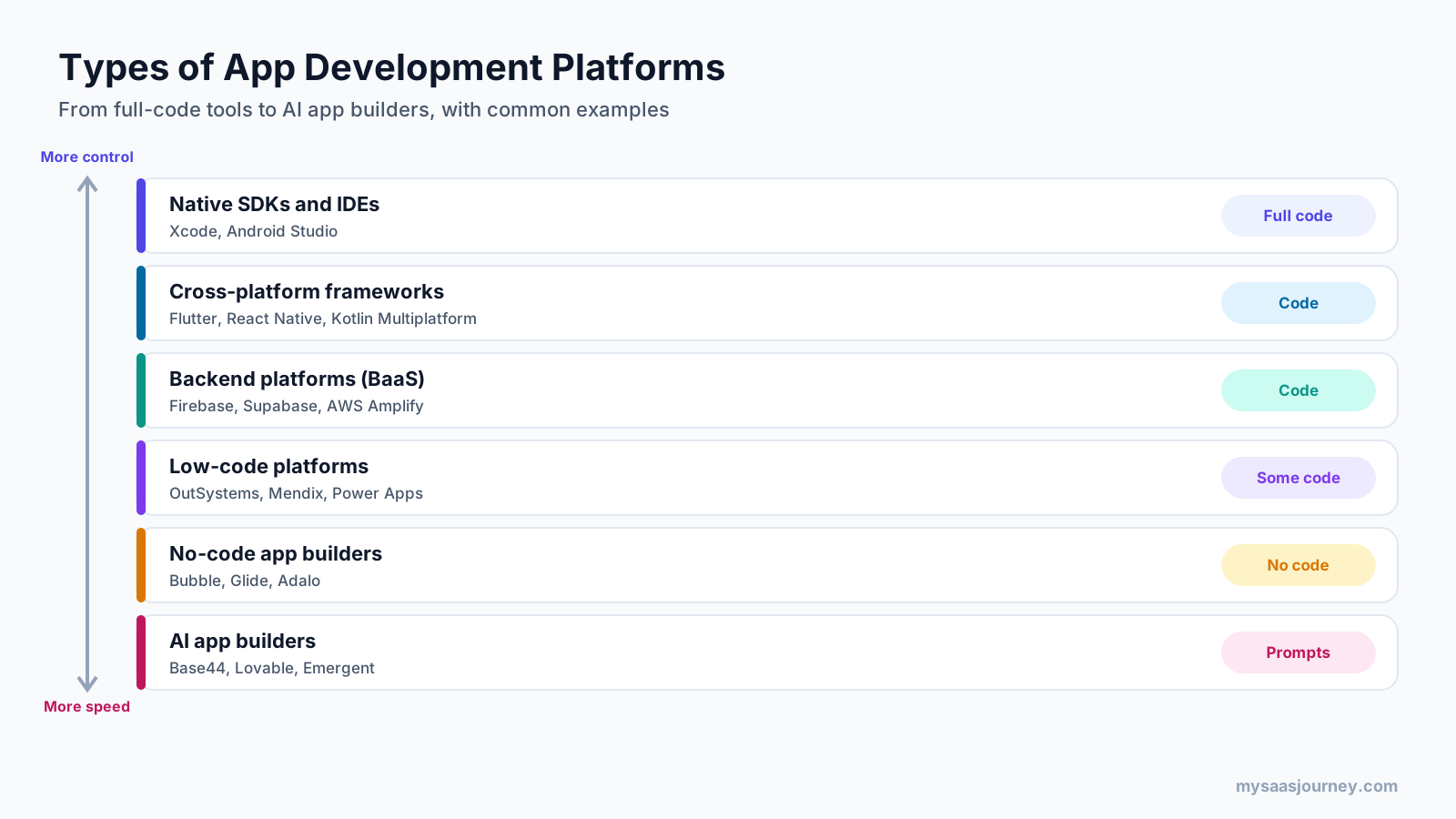
App development platforms sit on a range from full control to maximum speed. The more a platform does for you, the less code you write, but the fewer choices you have about how the app works under the hood.
Native Development Platforms
Native platforms are the official tools for each operating system: Xcode with Swift for Apple devices, and Android Studio with Kotlin for Android. You build a separate app for each platform, which gives the best performance and full access to device features, but costs the most time and needs specialist developers.
Cross-Platform Frameworks
Cross-platform frameworks let developers write one codebase and ship apps for both iOS and Android. Common examples include Flutter from Google, React Native from Meta, Kotlin Multiplatform from JetBrains, and .NET MAUI from Microsoft. They are covered in more detail below.
Backend as a Service (BaaS) Platforms
BaaS platforms such as Firebase, Supabase, and AWS Amplify provide the backend for your app: databases, authentication, file storage, and serverless functions. You build the front end with another tool and connect it to the BaaS. Several AI app builders use a BaaS behind the scenes.
Low-Code Platforms
Low-code platforms such as OutSystems, Mendix, and Microsoft Power Apps combine visual development with the option to add custom code. They are popular for internal business apps, where IT teams want speed with governance.
No-Code App Builders
No-code app builders such as Bubble, Glide, and Adalo let people without programming skills build apps through visual editors, templates, and settings. They suit simple customer-facing apps, internal tools, and early versions of a product.
AI App Builders
AI app builders such as Base44, Lovable, and Emergent generate a working app from a plain-language description, then let you refine it through conversation. This approach is often called vibe coding.
Enterprise Application Platforms
Enterprise platforms such as Red Hat OpenShift and the Salesforce Platform provide a standardized foundation for large organizations to build, deploy, secure, and run many applications across cloud environments. They focus on consistency, security, and operations at scale.
What Is Cross-Platform App Development?
Cross-platform app development is building one app that runs on several operating systems, usually iOS and Android, from a single shared codebase. Kotlin’s documentation describes it as building native-looking applications for multiple platforms using one codebase, while still allowing platform-specific code where needed.
Popular cross-platform frameworks include:
| Framework | Maintained by | Language |
|---|---|---|
| Flutter | Dart | |
| React Native | Meta | JavaScript |
| Kotlin Multiplatform | JetBrains | Kotlin |
| .NET MAUI | Microsoft | C# and XAML |
| Ionic | Open source | HTML, CSS, and JavaScript |
| NativeScript | Open source | JavaScript and TypeScript |
The main advantage is shared code. Instead of writing and maintaining two apps, your team writes most of the code once, which saves time and keeps features in sync across platforms.
The trade-offs are that some device features need extra plugins or platform-specific code, very demanding apps such as advanced games may perform better natively, and changes to iOS or Android components can occasionally break cross-platform behavior until the framework catches up.
Native vs Cross-Platform vs Web Apps
When you build for mobile, you choose between three approaches. Each has a place, and many products use more than one.
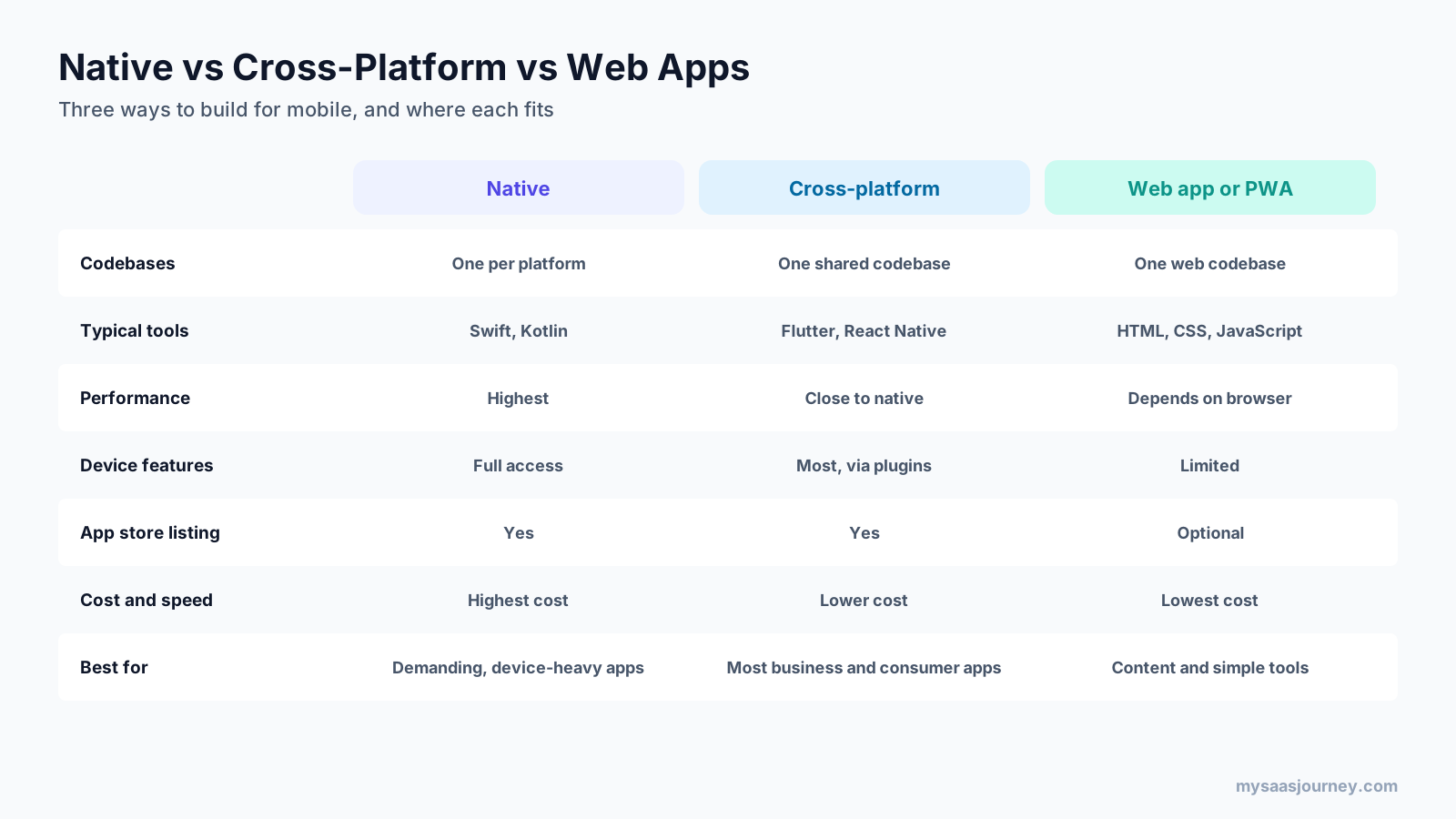
- Native apps are built separately for each platform with its official tools. They offer the best performance and device access, at the highest cost.
- Cross-platform apps share one codebase across iOS and Android. They cost less to build and maintain and perform close to native for most business and consumer apps.
- Web apps run in a browser. A progressive web app (PWA) is a web app that can be installed on a home screen and work with limited connectivity. Web apps are the cheapest to build and update, but have more limited access to device features.
Is PWA still a thing? Yes. PWAs remain a sensible choice for content apps, simple tools, and businesses that want an installable experience without app store distribution, though native and cross-platform apps still offer deeper device integration.
What Is a Low-Code App Development Platform?
A low-code app development platform is a tool that lets you build applications mainly through visual interfaces, drag-and-drop components, and prebuilt logic, with the option to write custom code when you need it. It sits between no-code builders, which require no code at all, and traditional development, where everything is coded by hand.
Low-code platforms are widely used for internal business apps, workflow tools, portals, and modernizing older systems, because they let IT teams and technical business users deliver apps faster while keeping security and governance controls. Our full guide on what low code is covers how low-code development works, its benefits and risks, and how to choose a platform.
What Are AI App Builders?
An AI app builder is a platform that creates a working application from a natural-language description. You describe what you want, such as “a booking app for a yoga studio with class schedules and payments,” and the AI generates the screens, database, user login, and logic. You then refine the app by chatting with it.
AI app builders work by combining large language models with a managed app stack. The AI writes and edits code, while the platform supplies hosting, a database, authentication, and integrations, so the app runs without manual setup. Our explainer on what artificial intelligence software is covers the wider category.
What Is Base44?
Base44 is an AI app builder that describes itself as a no-code AI platform for building apps and websites through vibe coding. You describe what you need in plain language, and it builds the front end, backend, database, user authentication, and payments. Wix acquired Base44 in June 2025 for about $80 million, and it continues to run as its own product.
Base44 has a free plan with 25 message credits a month and up to 5 apps. Paid plans billed yearly cost $16 a month (Starter), $40 (Builder), $80 (Pro), and $160 (Elite), with more message and integration credits at each tier. Base44 mainly produces web apps, so check its current options if you need native app store releases.
What Is Lovable?
Lovable is an AI app builder for creating apps, internal tools, and prototypes from prompts. Third-party reviews describe its output as React front-end code connected to a Supabase backend, and Lovable’s documentation includes a built-in backend called Lovable Cloud for database, storage, and compute. Git sync with GitHub, GitLab, and Bitbucket is included on every plan, so you can take the code elsewhere.
Lovable’s free plan includes 5 daily build credits, up to 30 a month. Pro starts at $25 a month for 100 credits, Business starts at $50 a month, and Enterprise is priced through sales. Credit costs vary by task, from under 1 credit for a small edit to around 2 for a landing page.
What Is Emergent?
Emergent is an AI app builder that uses AI agents to design, code, and deploy applications through conversation. It builds websites, web and mobile apps, SaaS products, dashboards, internal tools, automations, and AI agents.
Emergent’s free plan includes 10 credits a month with web and mobile builds. Standard costs $20 a month ($17 billed yearly) for 100 credits, private hosting, and GitHub integration. Pro costs $200 a month ($167 billed yearly) for 750 credits and custom agents. Business and Enterprise plans add team controls, SSO, audit logs, and deployment in your own cloud.
AI App Builders Compared
| Platform | What it builds | Backend | Free plan | Entry paid plan |
|---|---|---|---|---|
| Base44 | Web apps and websites from prompts | Built-in backend and database | 25 message credits a month | $16 a month, billed yearly |
| Lovable | Web apps, internal tools, prototypes | Lovable Cloud or Supabase | 5 daily credits, up to 30 a month | From $25 a month |
| Emergent | Web and mobile apps, SaaS, agents | Managed hosting, own cloud on Enterprise | 10 credits a month | $20 a month ($17 billed yearly) |
AI app builders are fast for prototypes, MVPs, internal tools, and simple products. For complex, high-traffic, or regulated apps, review the generated code, security, and data handling carefully, and plan for a developer to take over as the app grows.
What Can You Build With an App Development Platform?
App development platforms are used for almost every kind of software. Common examples include:
- Customer-facing mobile apps, such as booking, ordering, loyalty, and fitness apps
- Internal business tools, such as approval workflows, inventory trackers, field service apps, and employee portals
- Customer portals where clients log in to view orders, documents, or support tickets
- SaaS products and MVPs that founders use to test an idea with paying customers
- Dashboards that pull data from several systems into one view
- Marketplaces and community apps with user profiles, listings, and messaging
The more custom logic, traffic, and device access an app needs, the further toward the code end of the platform range you will usually move.
App Development Platform vs Website Builder
A website builder is designed to publish pages of content, such as a company site, blog, or online store, with templates and a visual editor. An app development platform is designed to build software that users interact with: logging in, entering and changing data, and completing tasks.
The line has blurred, because many website builders now add app features and many app builders can publish websites. As a rule, choose a website builder when your main goal is presenting information and selling online, and an app development platform when users need accounts, stored data, and workflows. Our guide to the best website builders covers the website side.
Benefits of Using an App Development Platform
App development platforms help teams of every size deliver software faster and with fewer separate tools:
- Faster delivery: Prebuilt components, backend services, and automation cut the time from idea to working app.
- Lower cost: Fewer specialist hires and less infrastructure work reduce development and maintenance costs.
- Wider participation: Low-code, no-code, and AI tools let product managers, designers, and business users build or contribute.
- Consistency: Shared components and standards make apps easier to maintain and keep the user experience consistent.
- Built-in security: Authentication, permissions, and encryption come set up rather than built from scratch.
- Easier maintenance: Central updates, hosting, and monitoring simplify running the app after launch.
- Multi-platform reach: Cross-platform tools let one team ship to web, iOS, and Android.
Limitations and Risks
Platforms trade some control for speed, and those trade-offs matter more as an app grows:
- Vendor lock-in: Apps built on proprietary no-code or AI platforms can be hard to move. Check whether you can export your code and data.
- Customization limits: Visual and AI builders may not support unusual features, complex logic, or specific integrations.
- Performance and scale: Some platforms struggle with large user bases or heavy data. Test with realistic load before launch.
- Security and compliance: Generated or visually built apps still need security review, especially when they handle personal or payment data.
- Usage-based costs: Credit- and usage-based pricing can rise quickly with heavy iteration or growth.
- Code quality: AI-generated code can be hard to maintain without developer review.
If you are deciding whether to build on a platform, buy an existing SaaS product, or commission custom software, our guide to build vs buy walks through the trade-offs.
Who Uses App Development Platforms?
Different platforms serve very different builders:
- Professional developers use native SDKs, cross-platform frameworks, and BaaS platforms to build high-quality consumer and business apps.
- Startups and founders use AI app builders and no-code tools to test ideas and launch MVPs before hiring a full team.
- IT teams use low-code and enterprise platforms to deliver internal apps, automate processes, and modernize older systems.
- Business users, sometimes called citizen developers, use no-code and low-code tools to build simple apps for their own teams.
- Agencies use a mix of platforms to deliver client apps quickly and at a predictable cost.
How Much Does an App Development Platform Cost?
Costs vary widely by platform type:
- Native SDKs and major cross-platform frameworks such as Flutter and React Native are free to use. Your costs are developer time, devices, and services.
- BaaS platforms usually offer free tiers and charge by usage as your app grows.
- AI app builders use credit-based subscriptions. Entry paid plans start at $16 a month billed yearly for Base44, $20 a month for Emergent, and $25 a month for Lovable.
- Low-code and enterprise platforms are often priced per user or per app and may require a sales conversation.
To publish mobile apps, you also pay the app stores. The Apple Developer Program costs $99 a year, and a Google Play developer account has a one-time $25 registration fee. Both stores also take a service fee on paid apps and in-app purchases.
Our glossary entry on pricing models explains seat-based, usage-based, and credit-based pricing in more detail.
How to Choose an App Development Platform
Start with what you are building and who will build it, then check control, cost, and long-term flexibility.
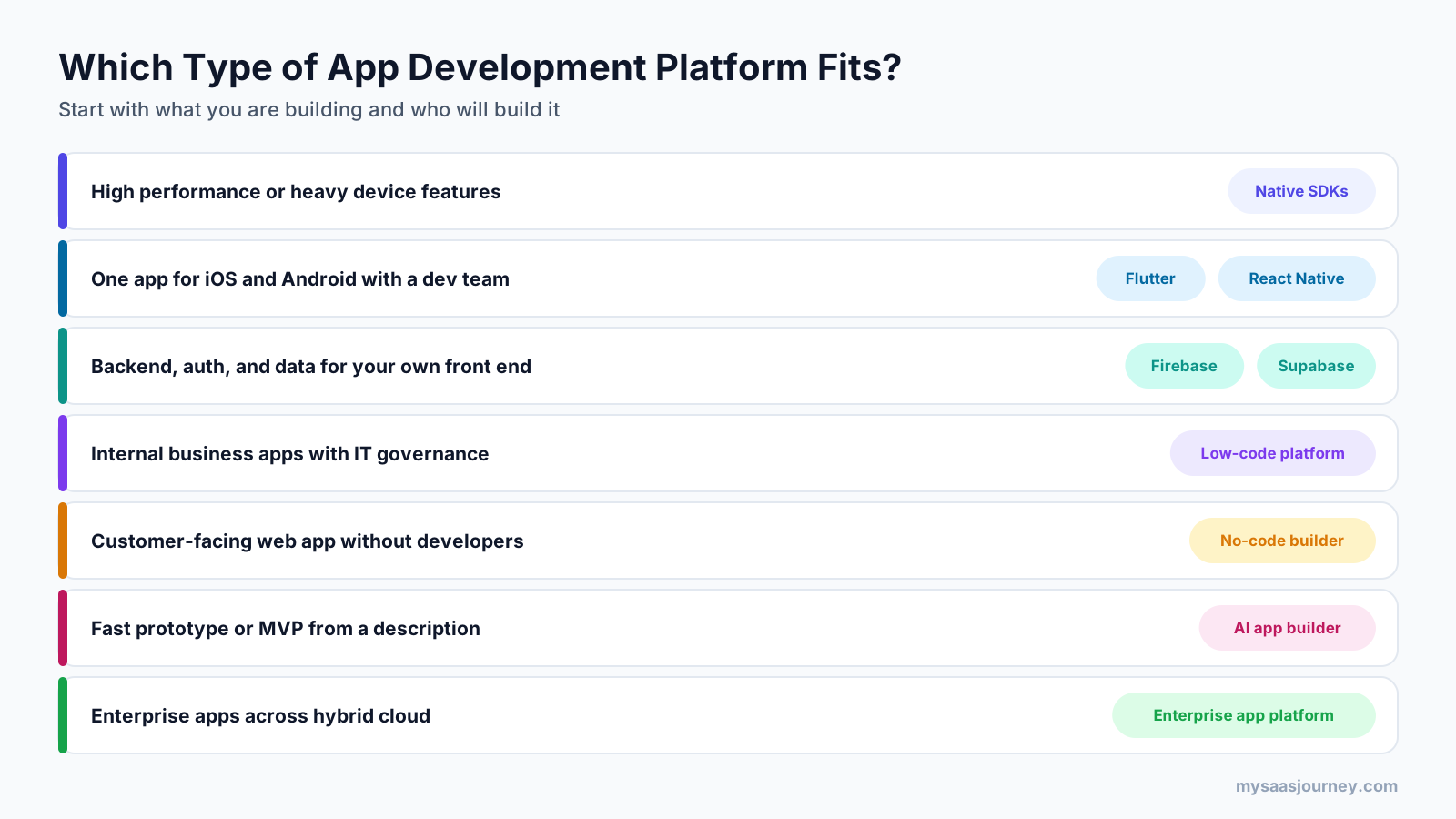
- Define what the app must do. List the core features, target devices, expected number of users, and any device features such as the camera, location, or offline use.
- Assess your team’s technical skills honestly. Developers can use native or cross-platform tools. Non-technical builders need no-code, low-code, or AI builders.
- Decide where the app must run. Web only, iOS and Android, or both, which affects whether you need app store publishing.
- Check your data and integration needs. Confirm the platform supports your database needs and connects to the tools your app must work with.
- Review security and compliance requirements early. Look for authentication options, permissions, encryption, and compliance features that match your industry.
- Plan for growth from the start. Check performance limits, pricing at higher usage, and whether you can export code and data if you outgrow the platform.
- Build a small prototype before committing. Use free plans and trials to build one key screen or workflow first.
For broader software buying decisions, our overview of types of SaaS solutions explains how app platforms fit alongside other business software.
How to Get Started With an App Development Platform
If you are new to building apps, a simple path looks like this:
- Write a one-page description of the app: who it is for, the problem it solves, and the three to five features it must have.
- Pick a platform type based on the decision guide above, then shortlist two or three platforms.
- Sketch the main screens and the data the app needs to store.
- Build a basic version on a free plan or trial, focusing on the most important workflow.
- Test with a few target users and collect feedback.
- Add authentication, integrations, and analytics once the core works.
- Publish to the web or app stores, then monitor usage and improve.
Trends Shaping App Development Platforms
Several shifts are changing how apps are built:
- AI-first building: AI app builders and AI coding assistants are making prompt-based development mainstream, and traditional platforms are adding AI features to generate screens, code, and tests.
- Agentic development: Platforms such as Emergent use AI agents that plan, build, test, and deploy with less step-by-step instruction. Our guide on how to build an AI agent covers the underlying ideas.
- Convergence of no-code and code: No-code tools are adding code export and Git sync, while developer platforms are adding visual and AI tools.
- Backend services as standard: Managed databases, authentication, and serverless functions are now the default foundation for new apps.
- Governance for citizen development: As more non-developers build apps, enterprises are adding controls for security, data access, and app approval.
- Cloud-native delivery: Containers, Kubernetes, and managed cloud services underpin enterprise platforms. Our explainer on what cloud computing is covers the basics.
Final Thoughts
An app development platform brings together the tools for designing, building, testing, deploying, and managing an app, so you spend less time on setup and more on what makes your app useful. The right platform depends on your goals: native SDKs for the highest performance, cross-platform frameworks for one codebase across iOS and Android, low-code platforms for governed business apps, no-code builders for simple apps without developers, and AI app builders such as Base44, Lovable, and Emergent for turning an idea into a working prototype quickly.
Define what you are building, match the platform to your team’s skills, and test with a small prototype before you commit. Above all, check how easily you can scale, secure, and move your app as it grows.
Frequently Asked Questions
What is an app development platform?
An app development platform is a set of connected tools for designing, building, testing, deploying, and managing applications. It typically includes a development environment, prebuilt components, a backend and database, authentication, integrations, and publishing tools, so you do not have to assemble each piece separately.
What is the difference between an app development platform and a framework?
A framework is a code library that structures how you build an app, such as Flutter or React Native. An app development platform is broader: it combines development tools with services such as databases, authentication, hosting, testing, and publishing. A framework is often one part of a platform.
What is the best app development platform?
There is no single best platform. Native tools such as Xcode and Android Studio suit high-performance apps, Flutter and React Native suit cross-platform apps built by developers, low-code platforms suit governed business apps, and AI app builders such as Base44, Lovable, and Emergent suit fast prototypes and simple products.
What is cross-platform app development?
Cross-platform app development is building one app that runs on several operating systems, usually iOS and Android, from a single shared codebase. Frameworks such as Flutter, React Native, Kotlin Multiplatform, and .NET MAUI let teams write most code once, saving time while still allowing platform-specific code when needed.
What is a low-code app development platform?
A low-code app development platform lets you build applications mainly through visual tools, drag-and-drop components, and prebuilt logic, with the option to add custom code. Examples include OutSystems, Mendix, and Microsoft Power Apps. They are popular for internal business apps that need speed and IT governance.
What is the Base44 app development platform?
Base44 is an AI app builder that creates apps and websites from plain-language descriptions, including the front end, backend, database, user authentication, and payments. Wix acquired it in June 2025. It has a free plan, and paid plans start at $16 a month billed yearly.
What is the Lovable app development platform?
Lovable is an AI app builder that turns prompts into web apps, internal tools, and prototypes. It includes a built-in backend and syncs code to GitHub, GitLab, or Bitbucket on every plan. The free plan gives 5 daily build credits, and Pro starts at $25 a month.
What is the Emergent app development platform?
Emergent is an AI app builder that uses AI agents to design, code, and deploy web and mobile apps through conversation. Its free plan includes 10 credits a month, Standard costs $20 a month or $17 billed yearly, and Pro costs $200 a month for more credits and custom agents.
Can I build an app without coding?
Yes. No-code app builders and AI app builders let you create apps through visual editors or plain-language prompts without writing code. They work well for prototypes, internal tools, and simple products. Complex, high-scale, or regulated apps usually still need developer involvement for customization, security, and performance.
What is SDK vs APK?
An SDK (software development kit) is the set of tools, libraries, and documentation developers use to build apps for a platform, such as the Android SDK. An APK (Android Package Kit) is the packaged file format used to distribute and install an Android app. You use an SDK to build an app that can be packaged as an APK.
Sources
| Source | Used for |
|---|---|
| https://www.redhat.com/en/topics/cloud-native-apps/what-app-dev-platform | Application development platform definition, components, and benefits |
| https://www.salesforce.com/platform/enterprise-app-development/best-application-development-platform/ | Application development platform definition and components |
| https://kotlinlang.org/docs/multiplatform/cross-platform-frameworks.html | Cross-platform definition and framework list |
| https://base44.com/pricing | Base44 description, backend, plans, and prices |
| https://en.globes.co.il/en/article-1001513267 | Wix acquisition of Base44 |
| https://docs.lovable.dev/introduction/subscription-plans | Lovable plans, prices, and Git sync |
| https://docs.lovable.dev/introduction/plans-and-credits | Lovable free plan credits and Lovable Cloud |
| https://usagepricing.com/blueprint/lovable | Lovable React and Supabase stack (third-party) |
| https://lovable.dev/pricing | Lovable credit cost examples |
| https://emergent.sh/pricing | Emergent description, plans, and prices |
| https://www.choicely.com/tutorials/how-much-does-it-cost-to-publish-an-app | Apple Developer Program and Google Play fees (third-party, citing Apple and Google) |
| Ahrefs Keywords Explorer and SERP Overview (US, November 2026) | Keyword volumes, difficulty, SERP and People Also Ask analysis |