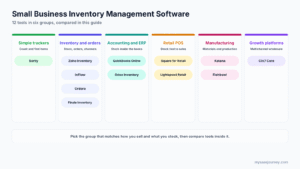
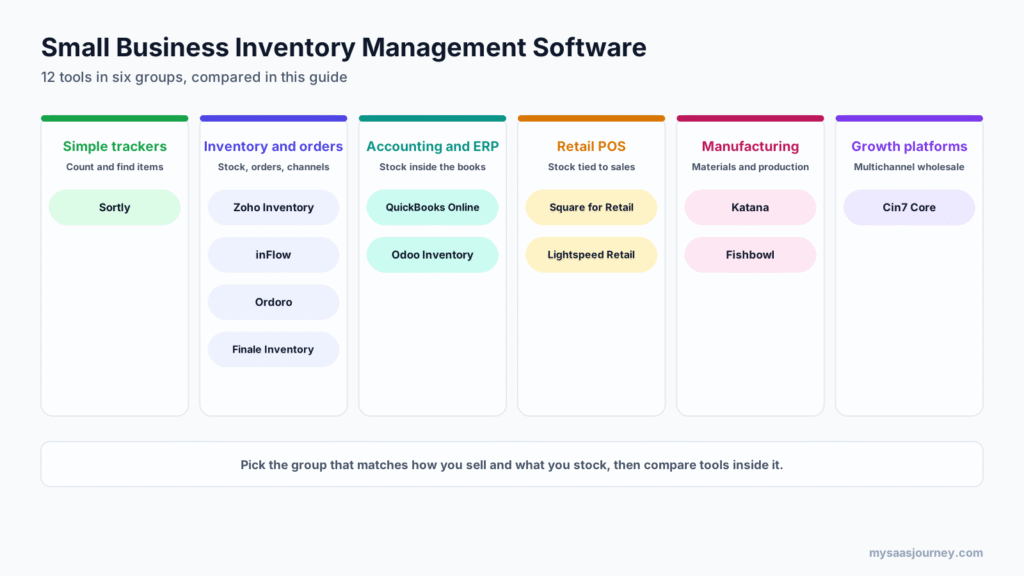
The best small business inventory management software depends on how you sell. Zoho Inventory is the best value for online sellers, with a free plan and paid plans from $29 a month. Sortly is the simplest choice for tracking supplies and equipment. inFlow and Cin7 Core suit wholesale and B2B businesses, Square for Retail and Lightspeed suit physical stores, and Katana and Fishbowl suit businesses that make their own products.
Inventory software ranges from a mobile app that counts items in a stockroom to a platform that syncs stock across Shopify, Amazon, and three warehouses. The cheapest tool that does the job is usually the right one, but a tool that is too simple will push you back to spreadsheets within a year.
This guide compares 12 inventory management tools for small businesses by what they track, how many orders and users each plan allows, what the free plans include, and what they cost in November 2026.
Key takeaways:
- For online sellers on a budget, Zoho Inventory offers the most for the money, with marketplace and shopping cart integrations and a free plan for up to 50 orders.
- For simple counting and tracking, Sortly’s mobile app and QR labels are the easiest place to start, with a free plan for 100 items.
- For retail stores, a POS with built-in inventory, such as Square for Retail or Lightspeed, avoids syncing two systems.
- For manufacturers, Katana and Fishbowl handle bills of materials and production that general inventory tools do not.
- Watch plan limits on orders, users, locations, and integrations. These, not the headline price, usually decide what you pay.
Quick Comparison of Small Business Inventory Software
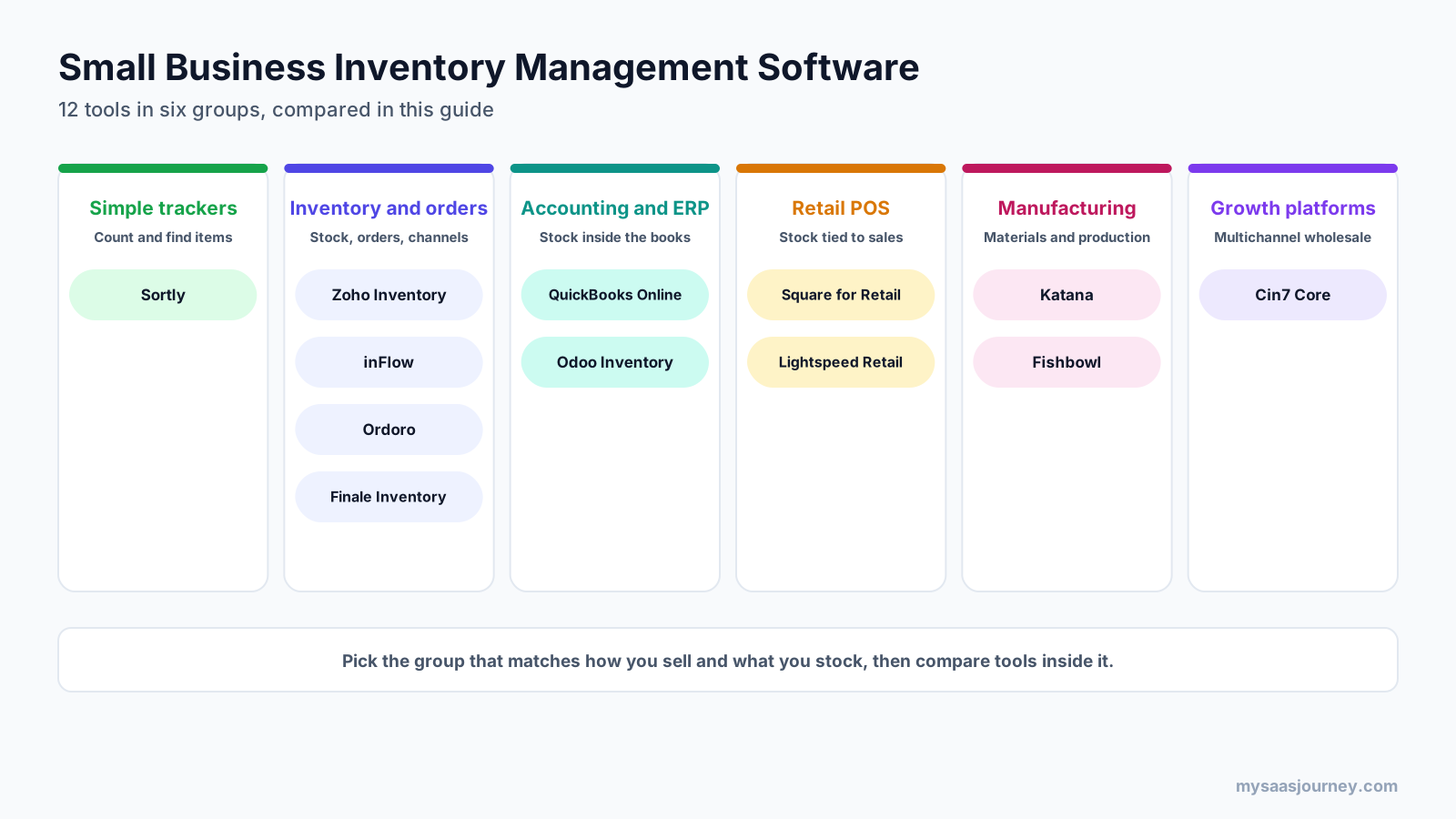
| Tool | Best for | Free plan | Starting paid price |
|---|---|---|---|
| Zoho Inventory | Online sellers on a budget | Yes, 50 orders, 1 user | $29 a month billed yearly |
| Sortly | Supplies, tools, and simple stock | Yes, 100 items, 1 user | $49 a month ($24 first year) |
| inFlow | Wholesale and B2B product businesses | No, free trial | $161 a month |
| Odoo Inventory | Inventory inside a full business suite | Yes, one app with unlimited users | About $31.10 per user a month |
| QuickBooks Online Plus | Simple stock alongside accounting | No | $140 a month |
| Square for Retail | Small retail stores | Yes, basic inventory | $49 a month per location |
| Lightspeed Retail | Retail stores with larger catalogs | No | $89 a month |
| Cin7 Core | Growing multichannel and wholesale brands | No, free trial | $349 a month |
| Katana | Small manufacturers and makers | Yes, 30 SKUs | Custom quote |
| Fishbowl | Manufacturing and warehouses on QuickBooks | No | $229 a month billed yearly |
| Ordoro | Ecommerce shipping and inventory | Yes, shipping only | $349 a month (inventory) |
| Finale Inventory | High-volume ecommerce warehouses | No | From $499 a month |
How We Chose and Compared These Tools
Search results for small business inventory software are dominated by vendor homepages and vendor-written lists. This comparison is independent and groups tools by the type of business they serve.
Each tool was assessed on five points:
- Core inventory features: stock tracking, barcode or QR scanning, reorder alerts, purchase orders, and multiple locations.
- Sales channel fit: ecommerce and marketplace integrations, POS, or B2B ordering.
- Plan limits: orders, users, locations, SKUs, and integrations included on each plan.
- Accounting connections: built-in accounting or reliable sync with QuickBooks and Xero.
- Pricing transparency: published prices, free plans, trials, and add-on costs.
Prices come from vendor pricing pages checked in November 2026. Where a vendor page could not be read, figures come from the vendor’s own blog or recent third-party listings and are marked for confirmation. No vendor paid for placement.
What Inventory Management Software Does
Inventory management software tracks how many units of each product you have, where they are, and what is coming in or going out. It updates stock automatically when you sell, receive, transfer, or adjust items, so you know what to reorder and avoid both stockouts and excess stock.
Most small business inventory tools work in the same basic way:
- You create items with SKUs, costs, prices, and reorder points.
- Stock increases when you receive purchase orders or record production.
- Stock decreases when sales orders, POS sales, or online orders are fulfilled.
- Barcode or QR scanning speeds up receiving, picking, and counting.
- Alerts flag items that fall below their reorder point.
- Reports show stock value, best sellers, slow movers, and cost of goods sold.
- Integrations sync orders from your sales channels and send transactions to your accounting software.
If you want to understand the hardware side, our guide on how a barcode scanner works explains scanner types and how they connect to inventory apps. Inventory software is also different from asset tracking: inventory is stock you sell or use up, while assets are equipment you keep. For tracking laptops and equipment, see our guide to IT asset management software.
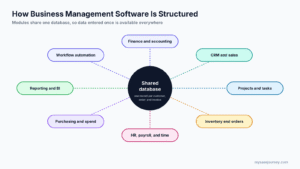
Inventory is one module of a wider business system. Our pillar guide on what business management software is explains how inventory connects to accounting, sales, and purchasing.
Inventory and Order Management Tools
These tools manage stock, purchasing, and sales orders across channels. They suit online sellers, wholesalers, and businesses that need more than a counting app but less than a full ERP.
1. Zoho Inventory
Zoho Inventory is a cloud inventory and order management tool with strong value for small online sellers. It connects to major marketplaces and shopping carts, handles multiple warehouses on paid plans, and integrates with the rest of Zoho’s business apps.
Best for: online and multichannel sellers who want low entry pricing.
Key features:
- Integrations with Amazon, eBay, Walmart, Etsy, Shopify, and WooCommerce
- Shipping integrations with UPS, USPS, FedEx, and Easyship
- Composite items, dropshipping, and backorders, even on the free plan
- Barcode generation, stock counting, serial and batch tracking, and a vendor portal on Premium
- Customer portal, multi-warehouse support, and an online store builder on higher plans
Pricing: Zoho Inventory’s free plan includes 50 orders, 1 user, and 1 location. Paid plans, billed yearly per organization, are Standard at $29 a month (500 orders a month, 3 users, 2 locations), Premium at $79 (3,000 orders, 5 users, 4 locations), Plus at $129 (7,500 orders, 10 users, 6 locations), and Enterprise at $249 (15,000 orders, 10 users, 10 locations). Add-ons include extra users at $7.50 a month and extra locations at $10 a month.
Trade-offs: Barcode features, stock counts, and serial tracking start on Premium, so many growing sellers will need that tier. Accounting sits in separate Zoho apps, which work best together.
2. inFlow
inFlow is an inventory and order management system built for product businesses such as wholesalers, distributors, and light manufacturers. It covers purchasing, sales orders, barcoding, and a B2B ordering portal for customers.
Best for: wholesale and B2B businesses managing stock across locations.
Key features:
- Purchase orders, sales orders, invoicing, and reorder management
- Barcode scanning with a mobile app
- Multiple locations and sublocations on higher plans
- Showroom, a B2B portal where customers can place orders
- Bills of materials for assembling or manufacturing products
- Integrations with accounting and ecommerce platforms
Pricing: inFlow’s pricing page could not be read during this check. In a July 2026 pricing guide on its own blog, inFlow lists Entrepreneur at $161 a month (2 team members, 100 sales orders a month, 1 integration, 1 location), Small Business at $436 a month (5 team members, 1,000 sales orders, 2 integrations, unlimited locations), and Mid-Size at $874 a month, each discounted 20% on annual billing. Some third-party listings still show older prices of $186 and $999, so confirm at checkout.
Trade-offs: The Entrepreneur plan’s 100 sales orders a month and single location fill up quickly. inFlow costs more than Zoho Inventory at the entry level, with the gap justified mainly by B2B and manufacturing features.
3. Ordoro
Ordoro combines shipping, inventory, and dropshipping tools for ecommerce sellers. Many businesses start with its shipping app and add inventory management as they grow.
Best for: ecommerce sellers who need shipping and inventory in one place.
Key features:
- Multichannel inventory sync across sales channels and warehouses
- Kitting and bundles
- Shipping labels and carrier rate shopping
- Purchase orders, bills of materials, manufacturing orders, stocktakes, and forecasting on Inventory Premium
- Dropshipping workflows with supplier routing
Pricing: Ordoro’s free Essential plan covers shipping only, with 100 labels a month. Inventory Advanced costs $349 a month for 1,000 orders a month with unlimited warehouses, channels, and users, and Inventory Premium costs $499 a month. Shipping plans start at $59 a month. Every plan includes a 15-day free trial with no credit card required.
Trade-offs: Purchase orders and stocktakes are in Inventory Premium, not Advanced. The jump from free shipping to paid inventory is large for very small sellers.
4. Finale Inventory
Finale Inventory is built for ecommerce businesses with established warehouse operations. It focuses on accurate stock across many sales channels and barcode-driven warehouse workflows.
Best for: established ecommerce sellers with high order volume and their own warehouse.
Key features:
- More than 40 sales channel integrations
- Barcode WMS module for receiving, picking, packing, and cycle counts on Growth and Enterprise
- Multi-warehouse inventory, kitting, and bundles
- QuickBooks integration and accounting workflow support
- Support for high order volumes and large catalogs
Pricing: Essentials starts at $499 a month for one to two warehouses, Growth starts at $799 a month and includes the Barcode WMS module, and Enterprise is custom priced. Standard onboarding is included, and most customers choose 12, 24, or 36-month terms.
Trade-offs: Finale is priced for businesses that already have meaningful volume. Very small sellers will find Zoho Inventory or Ordoro easier to justify.
Simple Inventory Trackers
5. Sortly
Sortly is a mobile-first inventory app for tracking items, supplies, tools, and equipment. It uses photos, folders, and QR or barcode labels to make counting and finding items simple, without sales order or accounting complexity.
Best for: small businesses tracking supplies, tools, parts, or a stockroom rather than selling through many channels.
Key features:
- Visual item records with photos, folders, and custom fields
- QR code labels on Advanced, and QR and barcode labels on Ultra
- Mobile scanning for checking items in and out
- Low-stock alerts and simple reports
- Jobs for tracking items assigned to projects
Pricing: The free plan covers 100 unique items, 1 user, and 1 custom field. Paid plans list at $49 a month for Advanced (500 items, 2 users), $149 for Ultra (2,000 items, 5 users), and $299 for Premium (5,000 items, 8 users), with 50% off the first year for new subscribers and 20% off yearly plans afterward. Paid plans have a 14-day free trial that requires a credit card.
Trade-offs: Sortly is not built for multichannel order management or purchasing workflows at scale. Item limits are low on lower plans, so check your SKU count first.
Inventory Inside Accounting and ERP
6. QuickBooks Online Plus
QuickBooks Online Plus adds inventory tracking to QuickBooks accounting. If your business already runs on QuickBooks and your stock needs are simple, it can save you a separate subscription.
Best for: small businesses with simple stock that already use QuickBooks for accounting.
Key features:
- Inventory quantity and value tracking with FIFO costing
- Purchase orders and low-stock reminders
- Class and location tracking
- Project profitability and budgeting
- Up to 5 users
Pricing: QuickBooks Online Plus lists at $140 a month after Intuit’s August 2026 price increase, according to multiple pricing guides; some listings still show the earlier $115 price. Inventory tracking is not included in Simple Start or Essentials.
Trade-offs: QuickBooks Online uses FIFO costing only, has no true multi-warehouse management, and lacks sales orders. Businesses with growing inventory usually connect a dedicated tool such as inFlow, Fishbowl, or Finale. For accounting alternatives, see our guide to free bookkeeping software.
7. Odoo Inventory
Odoo is an open-source business suite where Inventory is one of many connected apps, alongside Purchase, Sales, Manufacturing, eCommerce, and Accounting. It suits businesses that want inventory to sit inside a full system from the start.
Best for: small businesses that want inventory, accounting, and other operations in one suite.
Key features:
- Multi-warehouse inventory with routes, transfers, and reordering rules
- Barcode app for receiving, picking, and counts
- Purchase, manufacturing (MRP), and ecommerce apps on the same database
- Built-in accounting on paid plans
- Free single-app plan and a self-hosted Community edition
Pricing: Odoo’s pricing page could not be read during this check. Recent third-party listings show One App Free, which gives you one app such as Inventory with unlimited users, and a Standard plan at about $31.10 per user per month billed yearly, which includes all apps. Odoo often discounts the first year, and prices vary by country.
Trade-offs: Odoo is powerful but takes more setup than single-purpose tools, and many businesses use an implementation partner. Per-user pricing adds up for larger teams. Our pillar on business management software explains when a full suite makes sense.
Retail POS With Inventory
For shops, the point of sale is where most stock leaves the building. A POS with built-in inventory updates stock with every sale and avoids syncing a separate tool.
8. Square for Retail
Square for Retail is a POS system with inventory built in. Its free plan covers basic stock tracking, and the Plus plan adds the purchasing and reporting tools most growing stores need.
Best for: small and new retail stores that want low upfront costs.
Key features:
- Free POS with item library, stock tracking, low-stock alerts, and barcode scanning
- Vendor management, purchase orders, automatic purchase orders, and cost of goods sold reports on Plus
- Barcode label printing and item bundles on Plus
- Transfer orders and cross-location returns on Premium
- Square Online for selling online from the same item library
Pricing: Square for Retail Free has no monthly fee. Recent listings put Plus at $49 a month per location and Premium at $149 a month per location in the US, with card processing fees on every plan and lower rates on higher tiers. New sellers get a 30-day trial of Plus.
Trade-offs: Costs scale per location, and processing fees often outweigh the subscription. Square’s inventory tools are designed for retail, not wholesale or manufacturing.
9. Lightspeed Retail
Lightspeed Retail is a POS built for retailers with larger or more complex catalogs, such as bike, apparel, sporting goods, and specialty stores. Inventory features are included on every plan.
Best for: established retail stores with large catalogs and supplier ordering.
Key features:
- Inventory management, purchase orders, and landed costs on all plans
- Mobile Scanner app for counts and receiving
- Wholesale and supplier catalog connections
- Insights for forecasting, order recommendations, and custom reports
- AI Doc Import, which creates draft purchase orders from supplier invoices, included on Plus
Pricing: Lightspeed Retail lists Basic at $89 a month, Core at $149, and Plus at $289, each with one register. Annual billing saves up to 18%, and extra registers and locations are add-ons. Payment processing fees apply.
Trade-offs: Lightspeed costs more than Square at the entry level. Its strength is depth for larger catalogs, which very small shops may not need.
Inventory for Manufacturers
If you turn raw materials into finished goods, you need software that understands bills of materials, production, and component stock.
10. Katana
Katana is a cloud manufacturing and inventory platform built for small manufacturers, makers, and direct-to-consumer brands that produce their own goods.
Best for: small manufacturers and makers selling through ecommerce.
Key features:
- Bills of materials, routings, and production planning
- Live raw material and finished goods tracking
- Purchase orders and supplier management
- Ecommerce integrations, including Shopify
- Accounting integrations with QuickBooks Online and Xero
Pricing: Katana’s free plan includes unlimited users and up to 30 SKUs, with unlimited SKUs for the first 15 days. The paid Advantage plan is sold as a custom annual contract scoped to each business.
Trade-offs: Katana no longer publishes paid plan prices, so you need a sales conversation to compare costs. The free plan is useful for testing but too small for most active product lines.
11. Fishbowl
Fishbowl is an inventory, warehousing, and manufacturing system with a long history of pairing with QuickBooks. It offers cloud inventory tiers for distributors and advanced editions for manufacturing and multi-warehouse operations.
Best for: product businesses and manufacturers that want deeper inventory control alongside QuickBooks.
Key features:
- Cloud inventory and warehousing with tiered plans
- QuickBooks Online and Xero sync on Essentials
- Unlimited warehouses on Growth and demand forecasting on Scale
- Advanced Manufacturing with bills of materials, MRP, work orders, and lot traceability
- Advanced Warehouse with 3PL and EDI workflows
Pricing: Fishbowl’s inventory tiers are Essentials at $229 a month (2 users), Growth at $429 a month (5 users), and Scale at $729 a month (10 users), billed yearly. Advanced Warehouse starts at $595 a month and Advanced Manufacturing at $675 a month, with final pricing quoted by users and deployment.
Trade-offs: Fishbowl’s comparison table lists two-way QuickBooks Online sync on Growth and Scale as coming soon, so confirm current status if that matters to you. Manufacturing features are in the higher-priced Advanced editions.
Growth Platforms
12. Cin7 Core
Cin7 Core (formerly DEAR Inventory) is an inventory and operations platform for brands selling through several channels, including ecommerce, marketplaces, wholesale, and retail. It is one step below a full ERP.
Best for: growing product brands that sell wholesale and online and need one source of stock truth.
Key features:
- Multichannel inventory and order management
- Purchasing, warehouse management, and stock transfers
- Production and bills of materials
- B2B ordering and wholesale price tiers
- Integrations with ecommerce platforms and accounting software
Pricing: Cin7 Core lists Standard at $349 a month (5 users, 6,000 sales orders a year, 2 integrations), Pro at $599 a month (10 users, 24,000 orders a year, 4 integrations), and Advanced at $1,199 a month (15 users, 120,000 orders a year, 6 integrations). Onboarding is included, with group, one-to-one, and partner-led options.
Trade-offs: Cin7 Core is priced for businesses with meaningful order volume. Small sellers usually start with Zoho Inventory or inFlow and move up when channel complexity grows.
Features Compared
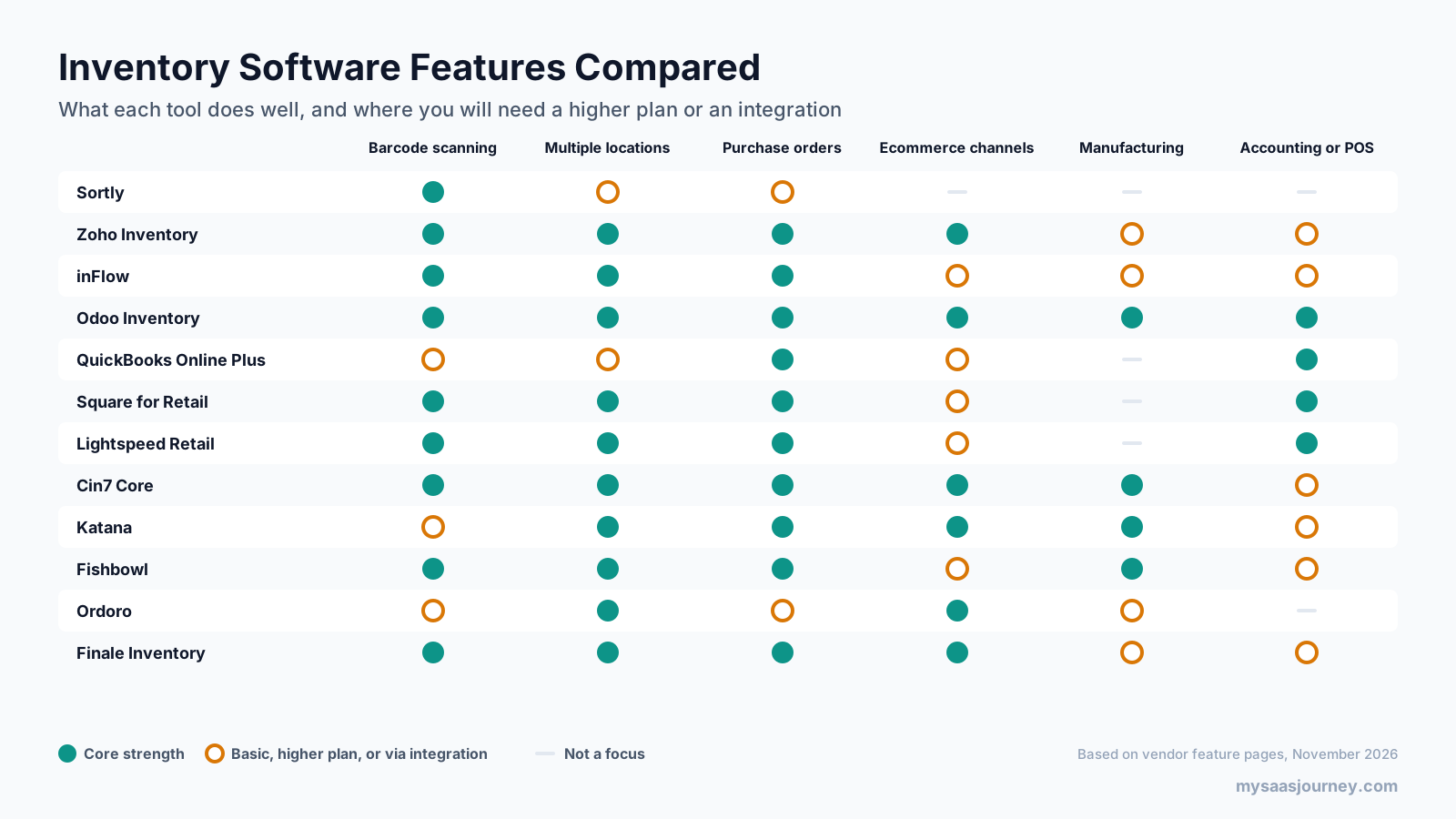
Three patterns stand out. Retail POS tools are strongest where sales happen in person but lighter on ecommerce. Inventory and order tools are strongest on channels and purchasing but rely on separate accounting. Manufacturing tools add production planning that the others lack. Odoo covers the most ground, at the cost of more setup.
Pricing Compared
Small business inventory software ranges from free plans to several hundred dollars a month. The headline price matters less than the limits attached to it.
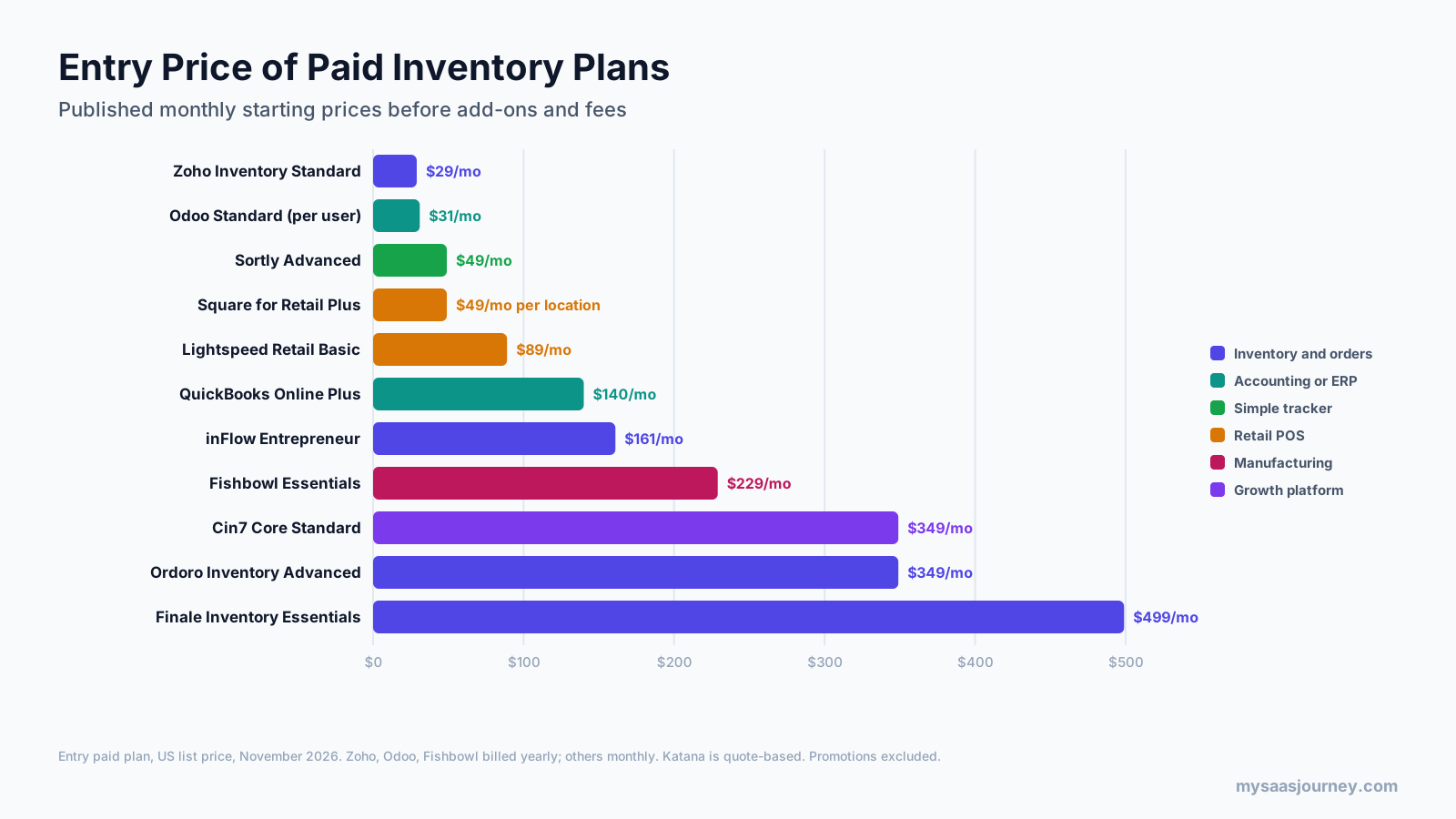
| Tool | Entry paid plan | Price | Key limits on that plan |
|---|---|---|---|
| Zoho Inventory | Standard | $29 a month billed yearly | 500 orders a month, 3 users, 2 locations |
| Odoo | Standard | About $31.10 per user a month billed yearly | All apps included |
| Sortly | Advanced | $49 a month ($24 first year) | 500 items, 2 users |
| Square for Retail | Plus | $49 a month per location | Processing fees apply |
| Lightspeed Retail | Basic | $89 a month | 1 register |
| QuickBooks Online Plus | Plus | $140 a month | 5 users, FIFO only |
| inFlow | Entrepreneur | $161 a month | 2 users, 100 sales orders a month, 1 location |
| Fishbowl | Essentials | $229 a month billed yearly | 2 users |
| Cin7 Core | Standard | $349 a month | 5 users, 6,000 sales orders a year |
| Ordoro | Inventory Advanced | $349 a month | 1,000 orders a month |
| Finale Inventory | Essentials | From $499 a month | 1 to 2 warehouses |
| Katana | Advantage | Custom | Annual contract |
How Much Does Inventory Management Software Cost?
Most small businesses pay between $0 and $500 a month for inventory software. Simple trackers and entry plans cost under $50 a month, inventory and order tools for growing sellers typically cost $150 to $500 a month, and manufacturing or high-volume platforms cost more. On top of the subscription, budget for:
- Extra users, locations, or order volume beyond plan limits
- Integration add-ons and premium connectors
- Barcode scanners, label printers, and mobile devices
- Card processing fees on POS systems
- Onboarding, data migration, and training
Our glossary entries on pricing models and data migration explain how these costs are structured.
Best Free Inventory Management Software
Several tools offer free plans that work for very small businesses or for testing before you buy.
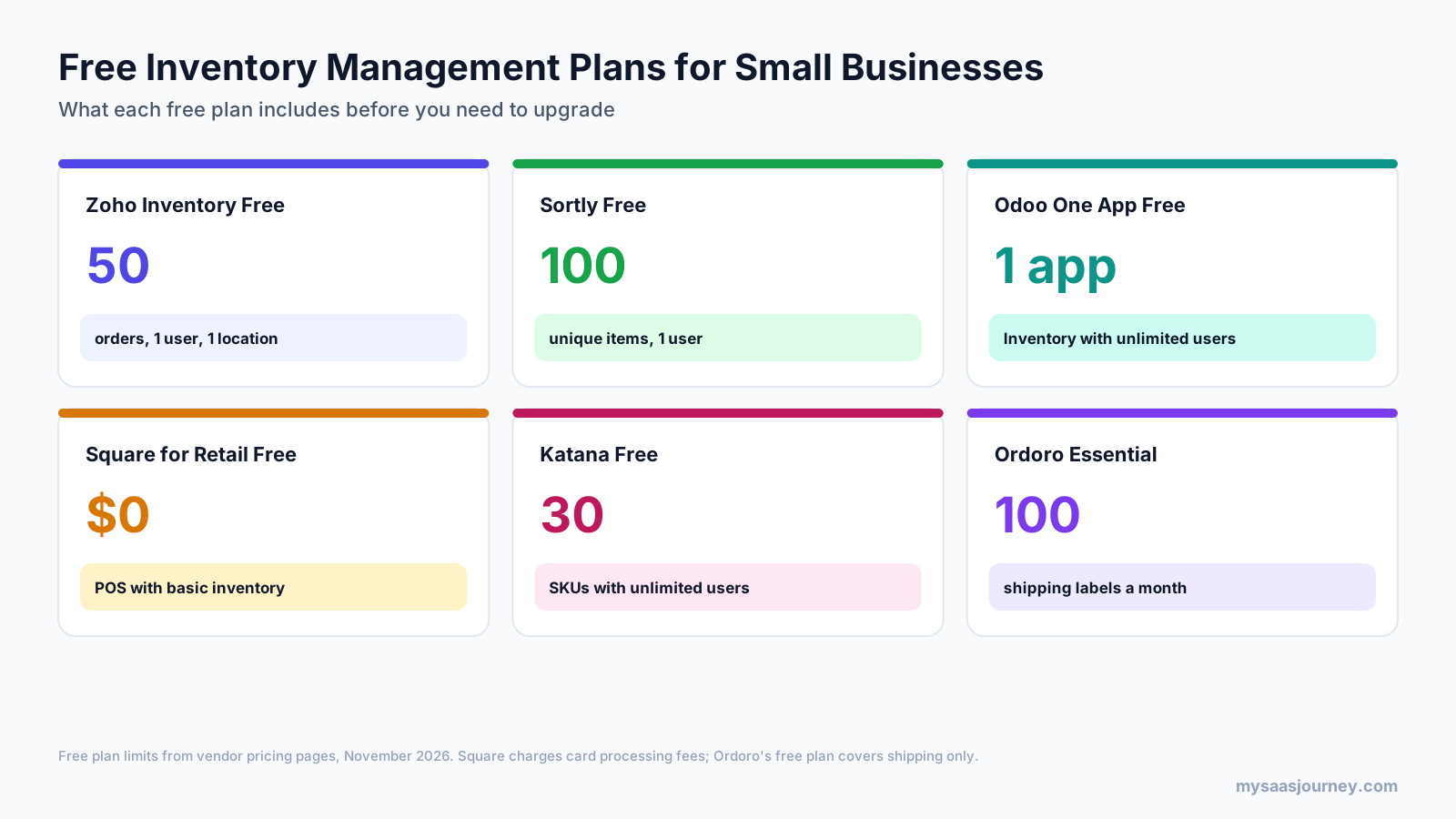
- Zoho Inventory Free is the best free option for online sellers, with order management, composite items, and dropshipping for up to 50 orders.
- Sortly Free is the simplest option for tracking up to 100 items with one user.
- Odoo One App Free gives you the Inventory app with unlimited users, as long as it is the only Odoo app you use.
- Square for Retail Free suits shops that sell in person, with basic stock tracking inside a free POS.
- Katana Free lets manufacturers test production tracking with up to 30 SKUs.
- Ordoro Essential is free for shipping labels only, not inventory.
Free plans are best for getting started or testing a workflow. Once you add users, locations, or more orders, a paid plan usually costs less than the time lost working around limits.
How to Choose Small Business Inventory Software
Start with how you sell and what you stock, then check limits and integrations.
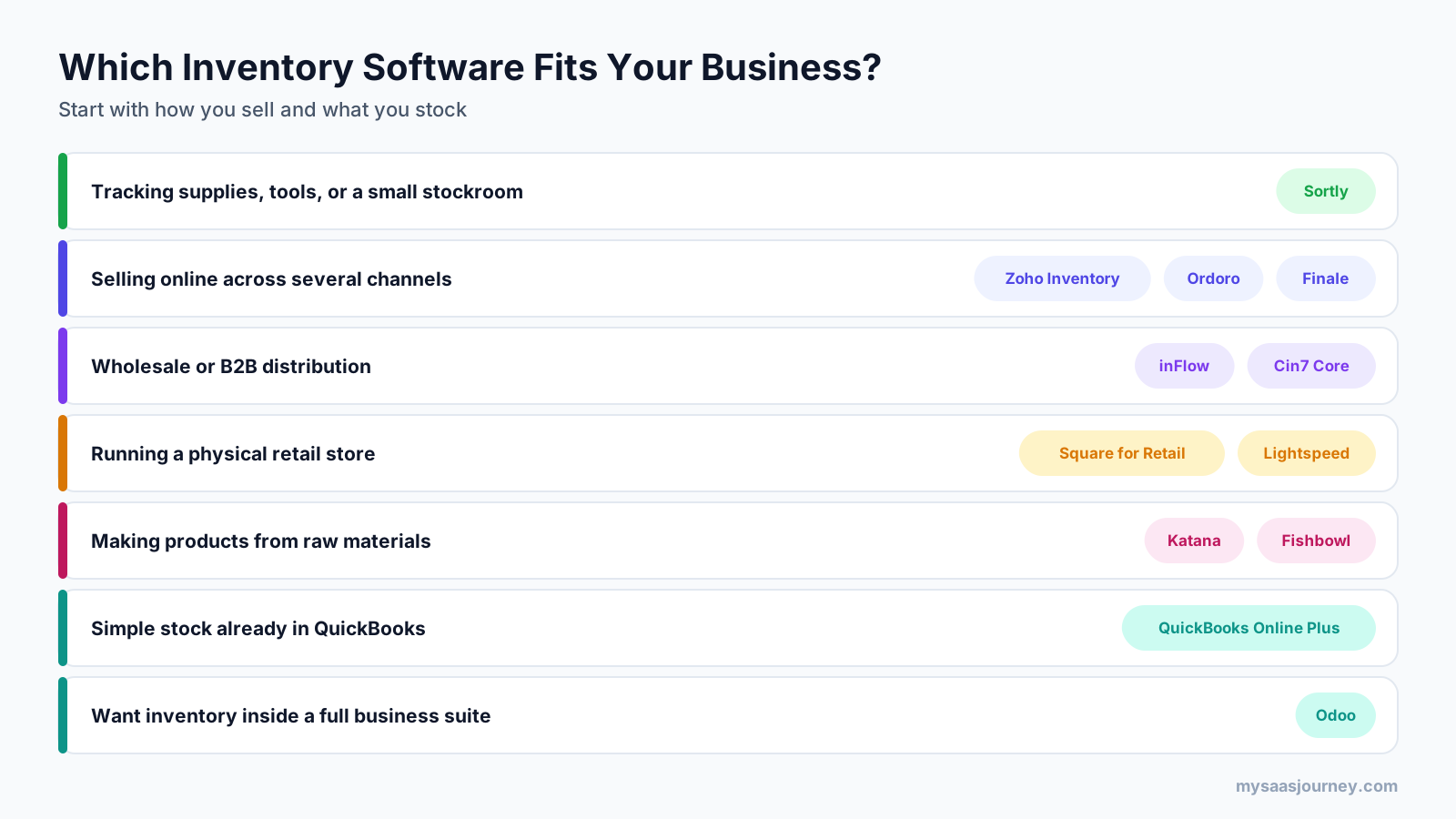
- Identify your business model. Online sellers, wholesalers, retailers, manufacturers, and service businesses tracking supplies each need different features.
- Count your SKUs, orders, users, and locations. Compare these against plan limits, and allow for a year of growth.
- List your sales channels. Confirm native integrations for every store, marketplace, and POS you use.
- Check accounting sync. Make sure stock, sales, and purchases flow cleanly to QuickBooks, Xero, or your accounting system.
- Decide on barcoding. If you will scan items, confirm which plan includes barcode features and which hardware works with it.
- Look at purchasing. If you reorder often, choose a tool with purchase orders, reorder points, and supplier records.
- Test with your own data. Use a free plan or trial to receive stock, make a sale, and run a count before committing.
- Plan the switch. Clean your item list, set opening stock carefully, and run a full count at go-live.
For a general framework that applies to any software purchase, see our guide on how to choose the right software for your business needs.
When to Move Beyond Spreadsheets
Spreadsheets work for a handful of products, but they break down when several people update stock, when you sell through more than one channel, or when you need to know stock levels without counting. Signs you have outgrown them include frequent stockouts, overselling online, time spent reconciling counts, and no reliable view of stock value. Even a free plan from the list above is usually more accurate than a shared spreadsheet.
Connecting Inventory to the Rest of Your Business
Inventory software works best when it shares data with your store, accounting, and invoicing tools. Most tools in this guide offer native integrations, and automation platforms can fill gaps; our Zapier vs Make comparison explains how they connect apps. If you invoice B2B customers outside your inventory tool, our guide to the best invoicing software for small business covers options that sync with stock. If you are still setting up your online store, our comparison of the best website builders notes which platforms integrate with inventory tools.
Final Thoughts
There is no single best inventory management software for every small business, because a stockroom, an online store, a retail shop, and a workshop need different tools. For most online sellers, Zoho Inventory offers the best value. Sortly is the easiest way to get control of supplies and equipment. Square for Retail and Lightspeed fit physical stores. inFlow and Cin7 Core suit wholesale and multichannel brands, and Katana and Fishbowl suit manufacturers.
Start with a free plan or trial, test it with your own products and orders, and check the limits that will matter in a year, not just today. The right tool should save you from stockouts, overselling, and manual counts while connecting cleanly to how you sell and how you keep your books.
Frequently Asked Questions
What is the best inventory management software for small businesses?
It depends on how you sell. Zoho Inventory is the best value for online sellers, Sortly is best for simple tracking of supplies and equipment, inFlow suits wholesale businesses, Square for Retail and Lightspeed suit retail stores, and Katana suits small manufacturers. Compare plan limits on orders, users, and locations before choosing.
What is the best free inventory management app for small businesses?
Zoho Inventory’s free plan is the strongest for online sellers, covering up to 50 orders with one user and one location. Sortly’s free plan is the simplest for tracking up to 100 items. Odoo offers its Inventory app free with unlimited users if it is the only app you use, and Square for Retail includes basic inventory in its free POS.
How much does inventory management software cost?
Small business inventory software typically costs $0 to $500 a month. Entry plans such as Zoho Inventory Standard start at $29 a month billed yearly, retail POS plans start around $49 to $89 a month, and inventory and order platforms such as inFlow, Cin7 Core, and Ordoro range from about $161 to $349 a month for entry plans.
How does inventory management software work?
Inventory management software records each product with a SKU, cost, and reorder point, then updates stock automatically as you receive purchase orders, make sales, transfer items, or adjust counts. Barcode scanning speeds up these steps, alerts flag low stock, and integrations sync orders from sales channels and send transactions to accounting.
Does QuickBooks have inventory management?
Yes, QuickBooks Online Plus and Advanced include basic inventory tracking with FIFO costing, purchase orders, and low-stock reminders. QuickBooks Online lacks multi-warehouse management and sales orders, so businesses with growing or complex inventory often connect a dedicated tool such as inFlow, Fishbowl, or Finale Inventory.
What is the best inventory POS software for small businesses?
Square for Retail is the best starting point for small shops, with a free POS that includes basic inventory and a Plus plan at $49 a month per location that adds purchase orders and cost reports. Lightspeed Retail, from $89 a month, suits stores with larger catalogs and more supplier ordering.
Can I manage inventory with Excel or Google Sheets?
You can for a small number of products and a single person updating stock. Spreadsheets become unreliable when several people edit them, when you sell through more than one channel, or when you need live stock levels. Free plans from Zoho Inventory, Sortly, or Odoo are usually a better next step than a more complex spreadsheet.
What inventory software do contractors use?
Contractors and field service businesses usually track materials and tools rather than retail stock. Sortly is popular for tracking tools, parts, and job materials with mobile scanning, while field service and construction platforms often include materials tracking tied to jobs. Larger contractors may use inventory features inside their accounting or ERP system.
Sources
| Source | Used for |
|---|---|
| https://www.zoho.com/us/inventory/pricing/ | Zoho Inventory plans, prices, limits, add-ons, integrations |
| https://www.sortly.com/pricing/ | Sortly plans, prices, limits, label features, trial terms |
| https://www.inflowinventory.com/blog/inventory-management-software-cost/ | inFlow plan prices and limits (vendor blog, pricing page could not be read) |
| https://www.capterra.com/p/78431/inFlow-Inventory/pricing/ | inFlow plan limits and older listed prices (third-party) |
| https://www.ordoro.com/pricing | Ordoro shipping, inventory, and dropshipping plans |
| https://www.finaleinventory.com/pricing | Finale Inventory plans and features |
| https://www.certumsolutions.com/library/quickbooks-online-plans-compared | QuickBooks Online Plus price after August 2026 increase (third-party) |
| https://capterra.com/p/135618/Odoo/pricing/ | Odoo plan structure and price (third-party, odoo.com could not be read) |
| https://erpresearch.com/erp-add-ons/pos/square-for-retail | Square for Retail US plans and prices (third-party, Square page could not be read) |
| https://www.lightspeedhq.com/pos/retail/pricing/ | Lightspeed Retail plans and inventory features |
| https://www.cin7.com/pricing/ | Cin7 Core plans, prices, and limits |
| https://katanamrp.com/pricing/ | Katana free and Advantage plans |
| https://www.fishbowlinventory.com/pricing | Fishbowl plans, prices, and QuickBooks integration status |
| Ahrefs Keywords Explorer and SERP Overview (US, November 2026) | Keyword volumes, difficulty, SERP and People Also Ask analysis |