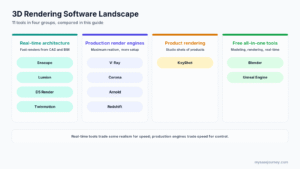
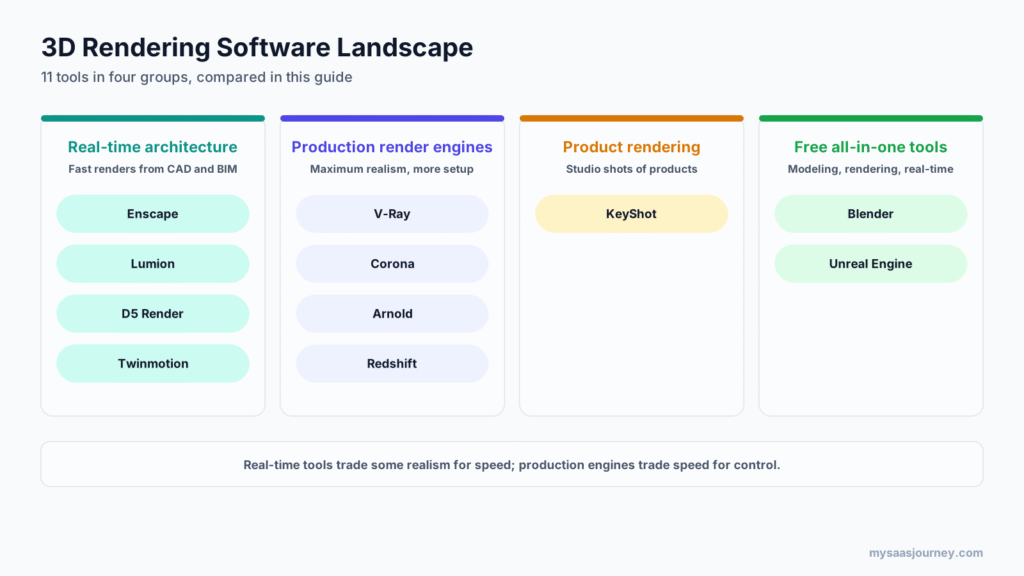

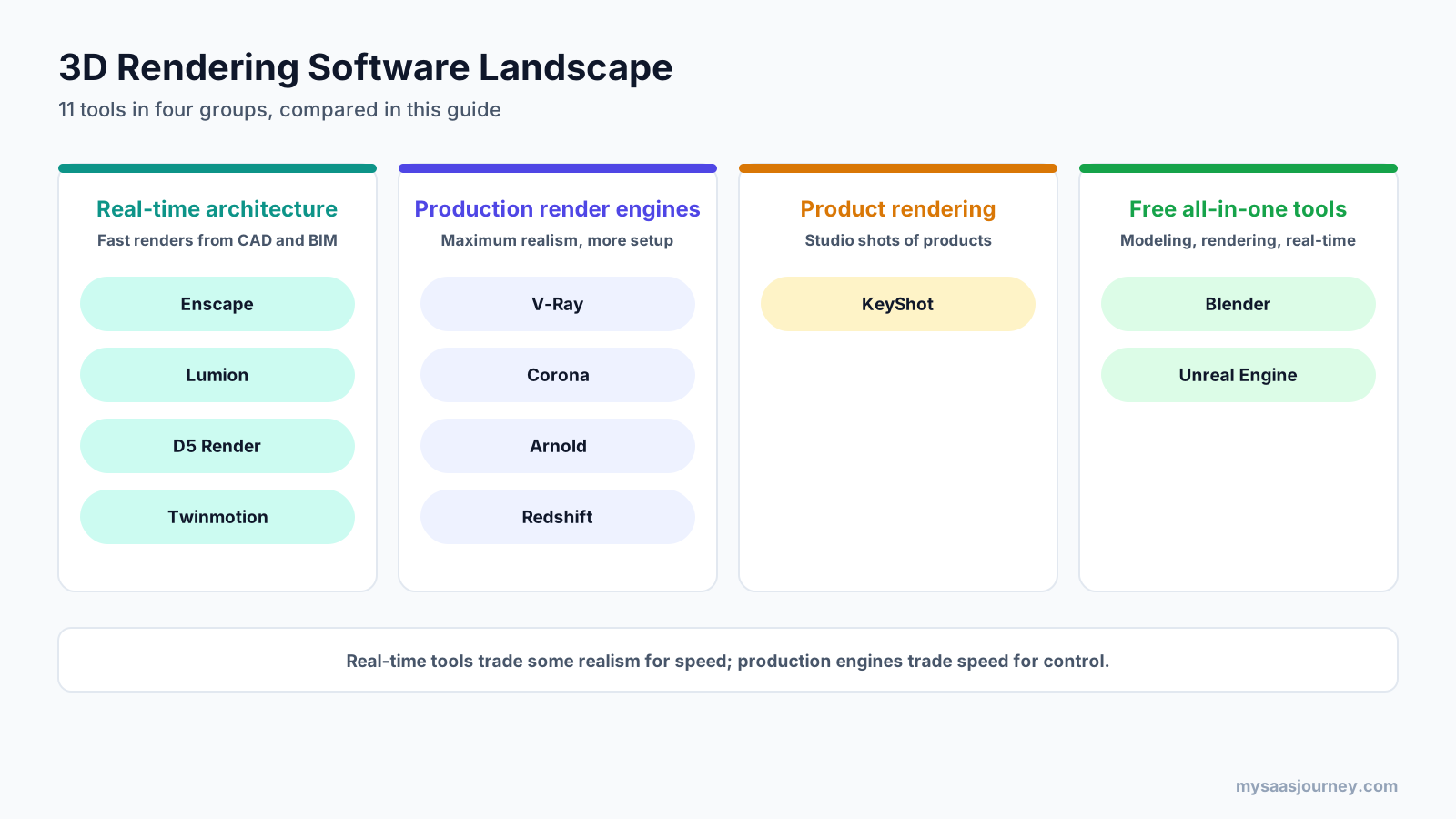
The best 3D rendering software depends on what you render. For architecture, Enscape is the best tool for live design reviews, while Lumion and D5 Render produce polished marketing images and films quickly. V-Ray and Corona give the most control for photorealistic architectural and VFX work. KeyShot leads for product rendering, and Blender is the best free option for almost any type of 3D work.
Rendering tools have split into two camps. Real-time renderers show near-final images as you work and export in seconds or minutes. Production renderers trace light more accurately and take longer, but give you finer control over every material and light. Most professionals use one of each, so the right question is less “which tool is best?” and more “which tool fits each stage of my work?”
This guide compares 11 3D rendering tools by use case, realism, speed, platform support, and current pricing, including which tools run on a Mac and what to look for in a MacBook if you render on Apple hardware.
Key takeaways:
- For architects working in Revit, SketchUp, Rhino, or Archicad, Enscape renders inside your design tool and is the fastest way to review designs visually.
- For high-impact architectural visuals, Lumion and D5 Render are quicker to learn than V-Ray or Corona, but both run only on Windows.
- Twinmotion is free for companies earning under $1 million a year, including commercial work, and runs on Windows and Mac.
- KeyShot is the standard for product and industrial design rendering, at $1,299 a year for its Professional plan.
- Blender is free and open source, with both a real-time engine (Eevee) and a path tracer (Cycles), and runs on Windows, macOS, and Linux.
Quick Comparison of the Best 3D Rendering Software
| Tool | Best for | Type | Platforms | Starting price |
|---|---|---|---|---|
| Enscape | Live design reviews inside CAD and BIM | Real-time plugin | Windows, macOS (most hosts) | $574.80 a year (Solo) |
| Lumion | Fast architectural stills and films | Real-time standalone | Windows (Pro) | $1,149 a year (Pro) |
| D5 Render | Real-time archviz with AI tools | Real-time standalone | Windows | Free (non-commercial); $360 a year (Pro) |
| Twinmotion | Free real-time archviz for small firms | Real-time standalone | Windows, macOS | Free under $1M revenue; $445 a year |
| V-Ray | Photoreal archviz and VFX across many host apps | Production engine | Depends on host app | $540 a year (Solo) |
| Corona | Simple, realistic archviz in 3ds Max and Cinema 4D | Production engine (CPU) | Depends on host app | About $414 a year (Solo) |
| Arnold | Film, animation, and VFX in Maya and 3ds Max | Production engine | Windows, macOS, Linux | $430 a year |
| Redshift | Fast GPU rendering for motion design | Production engine (GPU) | Windows, macOS, Linux | About $264 a year, or in Maxon One |
| KeyShot | Product and industrial design rendering | Standalone | Windows, macOS | $1,299 a year (Professional) |
| Blender | Free modeling, animation, and rendering | All-in-one | Windows, macOS, Linux | Free |
| Unreal Engine | Interactive, VR, and configurators | Real-time engine | Windows, macOS, Linux | Free under $1M revenue |
What 3D Rendering Software Does
3D rendering is the process of turning a 3D model into a 2D image or animation by simulating how light interacts with materials, surfaces, and cameras. Rendering software takes your geometry, materials, lights, and camera settings, then calculates each pixel of the final image.
There are two main approaches:
- Real-time rendering calculates images fast enough to update as you move through a scene, often many frames per second. It uses the GPU heavily and is ideal for design reviews, walkthroughs, and VR. Enscape, Lumion, D5 Render, Twinmotion, and Unreal Engine work this way.
- Offline or production rendering spends more time per image, tracing many light paths to produce physically accurate lighting, reflections, and materials. It suits final marketing images, film, and VFX. V-Ray, Corona, Arnold, and Redshift are production engines.
The line between them is blurring. Real-time tools now include hardware ray tracing and path tracing modes, and production engines offer interactive previews. Still, the trade-off remains: real-time gives speed, production gives control.
Rendering tools also differ in how they fit your workflow. Plugins such as Enscape and V-Ray run inside your modeling software. Standalone tools such as Lumion, D5 Render, Twinmotion, and KeyShot import or live-sync your model into a separate application. Blender combines modeling, animation, and rendering in one program.
Real-Time Rendering Software for Architecture
These tools are built for architects, interior designers, and visualization teams who need attractive images and walkthroughs quickly, without deep rendering expertise.
1. Enscape
Enscape, from Chaos, is a real-time rendering plugin that runs inside Revit, SketchUp, Rhino, Archicad, and Vectorworks. You open a live render window beside your model, and every change appears immediately, which makes it the most convenient tool for design reviews and client meetings.
Best for: architects who want to render while they design, without leaving their CAD or BIM tool.
Key features:
- Live link with Revit, SketchUp, Rhino, Archicad, and Vectorworks
- Real-time walkthroughs, panoramas, and video export
- VR support on Windows
- Built-in asset library and atmosphere settings
- Mac version for SketchUp, Rhino, Archicad, and Vectorworks
Pricing: Chaos lists Enscape Solo at $574.80 a year ($47.90 a month equivalent), Premium at $670.80 a year, and Collection at $730.80 a year. Add-ons include Veras for AI-assisted visualization.
Trade-offs: Enscape’s image quality is good but not as photoreal as dedicated production engines or Lumion and D5 for marketing work. On Mac, Revit is not available (Revit has no Mac version), and VR and hardware ray tracing are not supported.
2. Lumion
Lumion is a standalone real-time renderer known for producing atmospheric architectural images and films quickly. It imports models from SketchUp, Revit, Archicad, Rhino, and other tools through LiveSync and includes one of the largest built-in libraries of trees, people, vehicles, and materials.
Best for: architecture firms producing marketing stills and animations on Windows.
Key features:
- Live sync with SketchUp, Revit, Archicad, and Rhino
- Large library of more than 10,000 assets on Pro
- Weather, seasons, landscapes, and effects for atmospheric scenes
- Animation and video rendering tools
- AI upscaling on Pro
Pricing: Lumion is subscription-only. Recent listings based on Lumion’s buy page put Lumion View at $229 a year, Lumion Pro at $1,149 a year, and Pro Floating (formerly Studio) at $1,499 a year, with about 20% off three-year plans. Lumion’s pricing page did not render during this check, so confirm current figures.
Trade-offs: Lumion Pro runs only on Windows and needs a strong graphics card. It is also the most expensive real-time option on this list. Lumion View is a lighter plugin aimed at early design stages.
3. D5 Render
D5 Render is a real-time ray-traced renderer for architecture, interiors, and landscape design. It has grown quickly thanks to a capable free version, live sync with major design tools, and built-in AI features.
Best for: architects and interior designers on Windows who want high-quality real-time renders at a lower cost.
Key features:
- Real-time ray tracing for realistic lighting and reflections
- LiveSync with SketchUp, Revit, Rhino, Archicad, 3ds Max, and others
- 16K image and panorama rendering, even on the free plan
- VR walkthroughs, frame sequence rendering, and AI features on Pro
- More than 13,000 models and materials on Pro
Pricing: D5 Community is free for non-commercial use. D5 Pro costs $30 a month billed yearly ($360) or $38 billed monthly. D5 Teams costs $59 per seat a month billed yearly.
Trade-offs: D5 runs only on Windows and needs a graphics card with hardware ray tracing support. The free Community plan cannot be used for commercial work.
4. Twinmotion
Twinmotion, from Epic Games, is a real-time visualization tool built on Unreal Engine. It is designed to be easy to learn, with drag-and-drop materials and assets, and links to Revit, Archicad, SketchUp, and Rhino.
Best for: small architecture firms, students, and Mac users who want capable real-time rendering at low or no cost.
Key features:
- Unreal Engine rendering with real-time lighting and a path tracer for final images
- Direct links with Revit, Archicad, SketchUp, Rhino, and other tools
- Walkthroughs, panoramas, VR, and video export
- Seasons, weather, and vegetation tools
- Windows and macOS support
Pricing: Twinmotion is free for individuals and companies with under $1 million in annual gross revenue, students, and educators, including commercial work. Larger companies pay $445 per seat a year, which also includes Twinmotion Cloud. It is also part of the Unreal Subscription at $1,850 per seat a year.
Trade-offs: The path tracer is not supported on macOS. Twinmotion is easier than Unreal Engine but offers less control, and Twinmotion Cloud requires a paid seat even under the revenue threshold.
Production Render Engines
Production engines aim for the highest realism and control. They usually run as plugins inside 3D modeling and animation software and are standard in high-end architectural visualization, film, and VFX.
5. V-Ray
V-Ray, from Chaos, is one of the most widely used production renderers in architecture, design, and visual effects. It works inside many host applications and supports CPU, GPU, and hybrid rendering.
Best for: visualization professionals who need maximum control and work across several 3D applications.
Key features:
- Integrations with 3ds Max, Maya, Cinema 4D, Houdini, SketchUp, Rhino, Revit, and more
- CPU, GPU (NVIDIA CUDA and RTX), and hybrid rendering
- Physically based materials, lighting, and camera controls
- Chaos Cosmos asset library and Chaos AI credits on all plans
- Interactive rendering and denoising
Pricing: Recent pricing guides based on Chaos’s V-Ray buy page list V-Ray Solo at $540 a year, Premium at $778.80 a year, and Collection at $1,210.80 a year. Chaos’s own pricing page did not list V-Ray amounts during this check, so confirm before buying. A Student Collection is available for $149 a year.
Trade-offs: V-Ray has a steeper learning curve than real-time tools. Mac availability depends on your host application: 3ds Max, for example, runs only on Windows.
6. Corona
Corona, also from Chaos, is a CPU-based production renderer known for producing realistic results with simple settings. It is a favorite of architectural visualization artists who work in 3ds Max or Cinema 4D.
Best for: archviz artists in 3ds Max or Cinema 4D who want photorealism with less tweaking.
Key features:
- Physically based rendering with simple, artist-friendly controls
- Interactive rendering for fast lighting and material adjustments
- Light mixing to adjust lights after rendering
- Chaos Cosmos assets and scanned materials
- CPU rendering, with GPU used for AI denoising
Pricing: Recent listings based on Chaos’s published rates put Corona Solo at about $414 a year and Premium at about $562.80 a year, while older listings show Solo at $394.80. Confirm the current price with Chaos.
Trade-offs: Corona renders on the CPU only and supports only 3ds Max and Cinema 4D. It is less suited to animation-heavy work than GPU engines.
7. Arnold
Arnold, from Autodesk, is a Monte Carlo ray tracing renderer used widely in film, television, and animation. It is built into Maya and 3ds Max and also available for other hosts and as a standalone renderer.
Best for: animation, film, and VFX artists working in Maya or 3ds Max.
Key features:
- Physically based rendering for characters, hair, skin, and volumes
- CPU and GPU rendering with switching between them
- Integration with Maya, 3ds Max, Houdini, Cinema 4D, and Katana
- Runs on Windows, macOS, and Linux
- Flow Render cloud rendering in tech preview, with free monthly hours for current subscribers
Pricing: A single-user Arnold subscription costs $430 a year or $55 a month. Arnold is also included with Maya and 3ds Max subscriptions.
Trade-offs: Arnold is aimed at film and animation pipelines rather than quick architectural visuals. GPU rendering requires an NVIDIA graphics card.
8. Redshift
Redshift, from Maxon, is a GPU-focused production renderer popular in motion graphics, advertising, and design. It is especially common among Cinema 4D artists and is included in the Maxon One bundle.
Best for: motion designers and studios that want fast, high-quality GPU rendering.
Key features:
- GPU rendering with CPU support
- Integrations with Cinema 4D, Maya, 3ds Max, Houdini, and Blender
- Out-of-core memory handling for scenes larger than GPU memory
- Apple silicon support on Mac
- Included in Maxon One with Cinema 4D, ZBrush, and Red Giant
Pricing: Maxon’s pricing page could not be read during this check. Third-party listings show a standalone Redshift subscription at about $264 a year. It is also included in Maxon One.
Trade-offs: Redshift is a production engine, so it requires a host application and rendering knowledge. Its value is strongest if you already use Cinema 4D or Maxon One.
Product Rendering Software
9. KeyShot
KeyShot is a standalone renderer built for product, packaging, and industrial design. It is known for fast, realistic results with a drag-and-drop workflow, accurate materials, and studio lighting presets.
Best for: product designers, engineers, and marketers creating product shots and animations.
Key features:
- Drag-and-drop materials and lighting environments
- Real-time ray-traced viewport with CPU and GPU modes
- Plugins and import for SolidWorks, Rhino, Creo, and other CAD tools
- Product animations, configurators, and turntables
- KeyShot Studio AI features included in all plans
Pricing: KeyShot Studio Professional costs $1,299 a year and Business costs $1,599 a year, with Enterprise on custom pricing and a three-year option that locks in pricing. Add-ons include KeyShot Studio VR at $1,188 a year. An education license costs $95 a year, and the 14-day trial needs no credit card.
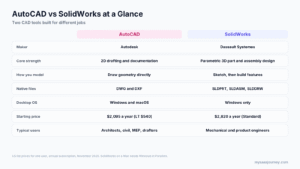
Trade-offs: KeyShot is priced for professional product teams and is less suited to large architectural scenes. If you design products in a parametric CAD tool, our AutoCAD vs SolidWorks comparison explains which modeling tools pair best with product rendering.
Free 3D Rendering Software
10. Blender
Blender is a free, open-source 3D creation suite covering modeling, sculpting, animation, simulation, and rendering. It includes two render engines: Cycles, a path tracer for photorealistic results, and Eevee, a real-time engine for fast previews and stylized work.
Best for: anyone who wants professional-grade rendering for free, from students and freelancers to studios.
Key features:
- Cycles path tracing with CPU and GPU support
- Eevee real-time rendering
- Full modeling, animation, and simulation tools in the same application
- Large add-on ecosystem and community
- Runs on Windows, macOS (including Apple silicon), and Linux
Pricing: Free for any use, including commercial work.
Trade-offs: Blender’s interface and workflow take time to learn, especially for architects used to CAD tools. Architectural asset libraries and BIM links are less developed than in dedicated archviz tools.
11. Unreal Engine
Unreal Engine, from Epic Games, is a real-time 3D engine used for games, film, architecture, and product configurators. It offers the highest ceiling for interactive and VR experiences, with Lumen real-time lighting and a path tracer for final frames.
Best for: interactive walkthroughs, VR, virtual production, and configurators.
Key features:
- Real-time global illumination and reflections with Lumen
- Path tracer for high-quality final images
- VR and interactive application development
- Large marketplace of assets
- Runs on Windows, macOS, and Linux
Pricing: Unreal Engine is free for students, hobbyists, and companies with under $1 million in annual gross revenue. Non-game companies above that threshold pay $1,850 per seat a year for the Unreal Subscription, which also includes Twinmotion. Game developers pay a royalty instead once revenue passes the threshold.
Trade-offs: Unreal Engine has a steep learning curve and is more than most firms need for still images. Twinmotion offers an easier path to the same technology.
Features Compared
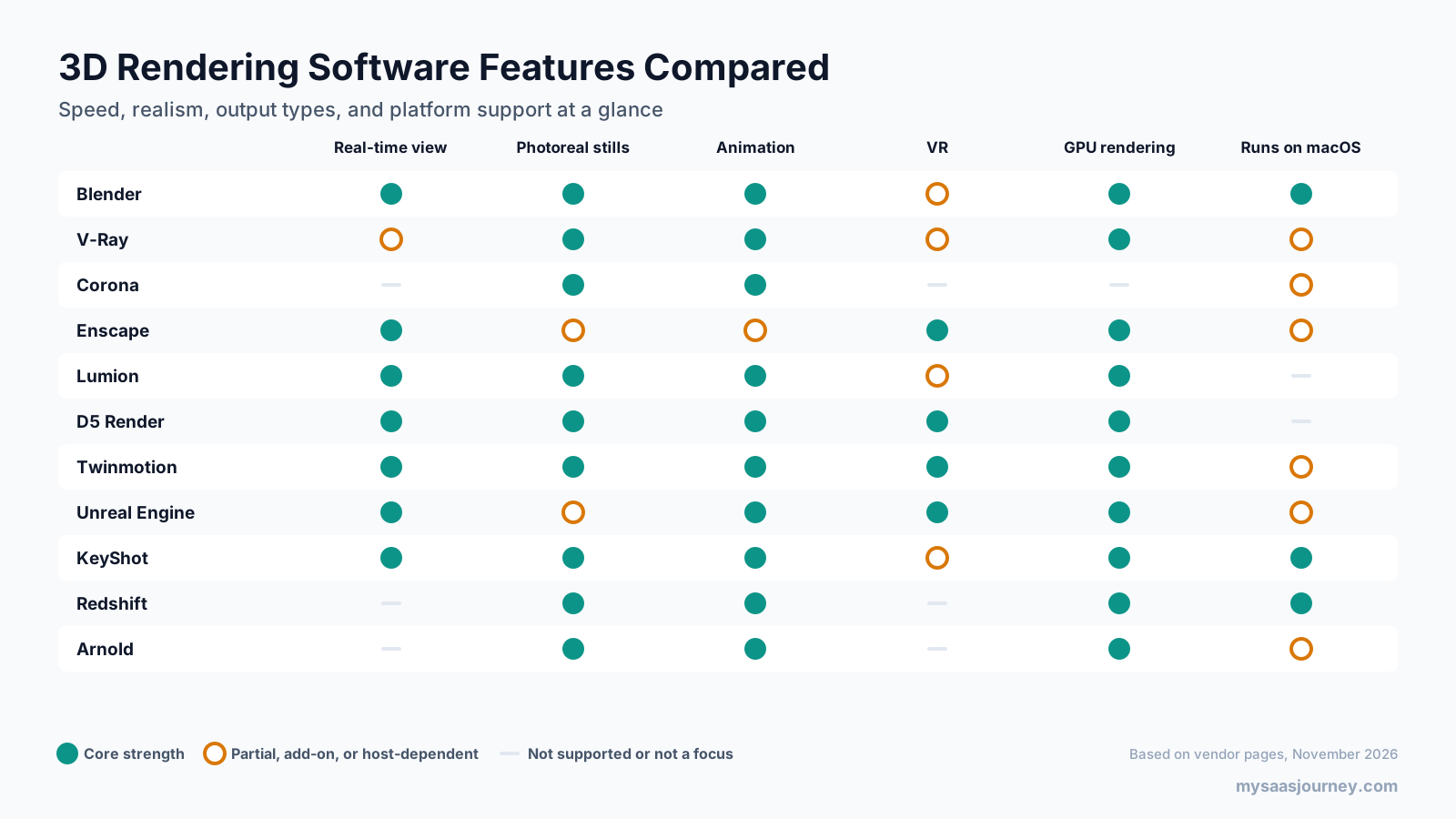
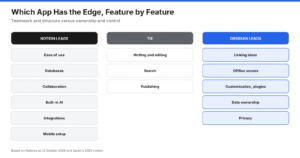
Two patterns stand out. Real-time architectural tools lead on speed, VR, and ease of use, while production engines lead on photorealism and control. Platform support also divides the field: several of the most popular archviz tools run only on Windows.
Pricing Compared
3D rendering software ranges from free to more than $1,000 a year per seat, and several tools are free below a revenue threshold.
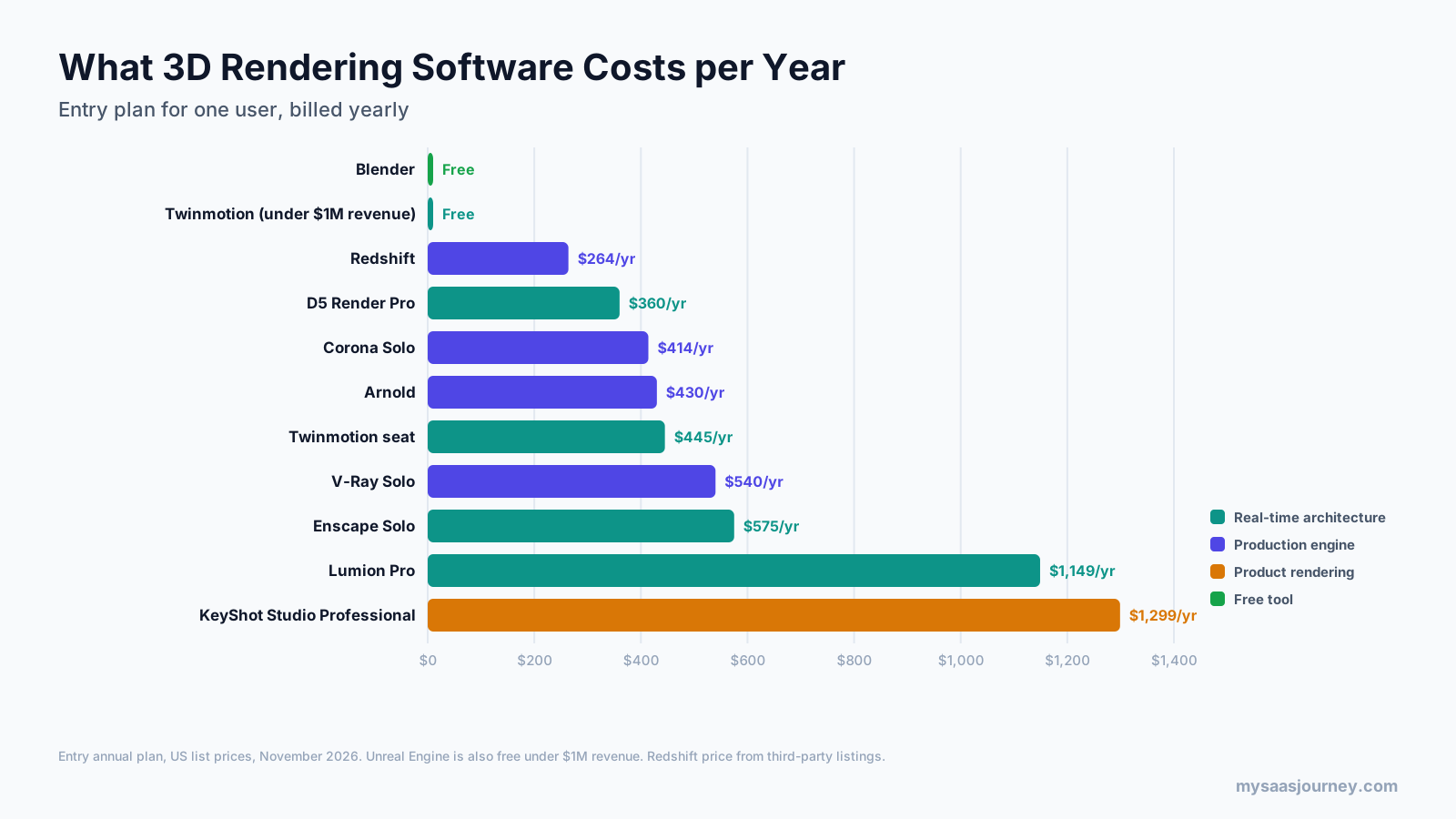
| Tool | Free option | Entry paid plan | Yearly price |
|---|---|---|---|
| Blender | Free for all use | Not applicable | Free |
| Unreal Engine | Free under $1M revenue | Unreal Subscription | $1,850 per seat |
| Twinmotion | Free under $1M revenue | Seat | $445 |
| D5 Render | Community (non-commercial) | Pro | $360 |
| Redshift | No | Subscription | About $264 |
| Corona | Trial | Solo | About $414 |
| Arnold | Trial | Single user | $430 |
| V-Ray | Trial | Solo | $540 |
| Enscape | Trial | Solo | $574.80 |
| Lumion | Trial | Pro | $1,149 |
| KeyShot | 14-day trial | Studio Professional | $1,299 |
Before you compare prices, check:
- Whether you need a separate host application. V-Ray, Corona, Arnold, and Redshift need a modeling or animation tool such as 3ds Max, Cinema 4D, Maya, or SketchUp, each with its own subscription.
- Named versus floating licenses. Solo plans are usually tied to one user or machine, while Premium and floating plans can be shared.
- Hardware. Real-time tools and GPU engines need a capable graphics card, which can cost more than the software.
- Cloud rendering and asset libraries. Some plans include credits or larger libraries; others charge extra.
Our glossary entry on pricing models explains seat-based and usage-based pricing in more detail.
How Much Does 3D Rendering Cost?
The software cost ranges from nothing for Blender and Twinmotion (under the revenue threshold) to about $1,150 to $1,300 a year for Lumion Pro or KeyShot. Hiring someone to produce renderings is a different cost: rendering studios price by image, view, or animation length, and quotes vary widely with complexity, so ask several providers for quotes on the same brief.
Best Free 3D Rendering Software
If budget is the deciding factor, these options are free in most situations:
- Blender: free for any use, with Cycles and Eevee render engines.
- Twinmotion: free with commercial rights for companies under $1 million in annual revenue.
- Unreal Engine: free under the same $1 million threshold for non-game companies.
- D5 Render Community: free for non-commercial use, with 16K stills and LiveSync.
Free plans from Blender and Twinmotion are the strongest for commercial work. If you are starting a design practice or studying architecture, Twinmotion and D5 Community are the easiest free entry points for architectural rendering, while Blender is the most flexible long-term skill.
Which MacBook Is Best for 3D Rendering?
Before choosing a MacBook, check whether your rendering software runs on macOS at all. Lumion Pro and D5 Render are Windows-only, and some V-Ray and Corona versions depend on Windows-only host applications such as 3ds Max.
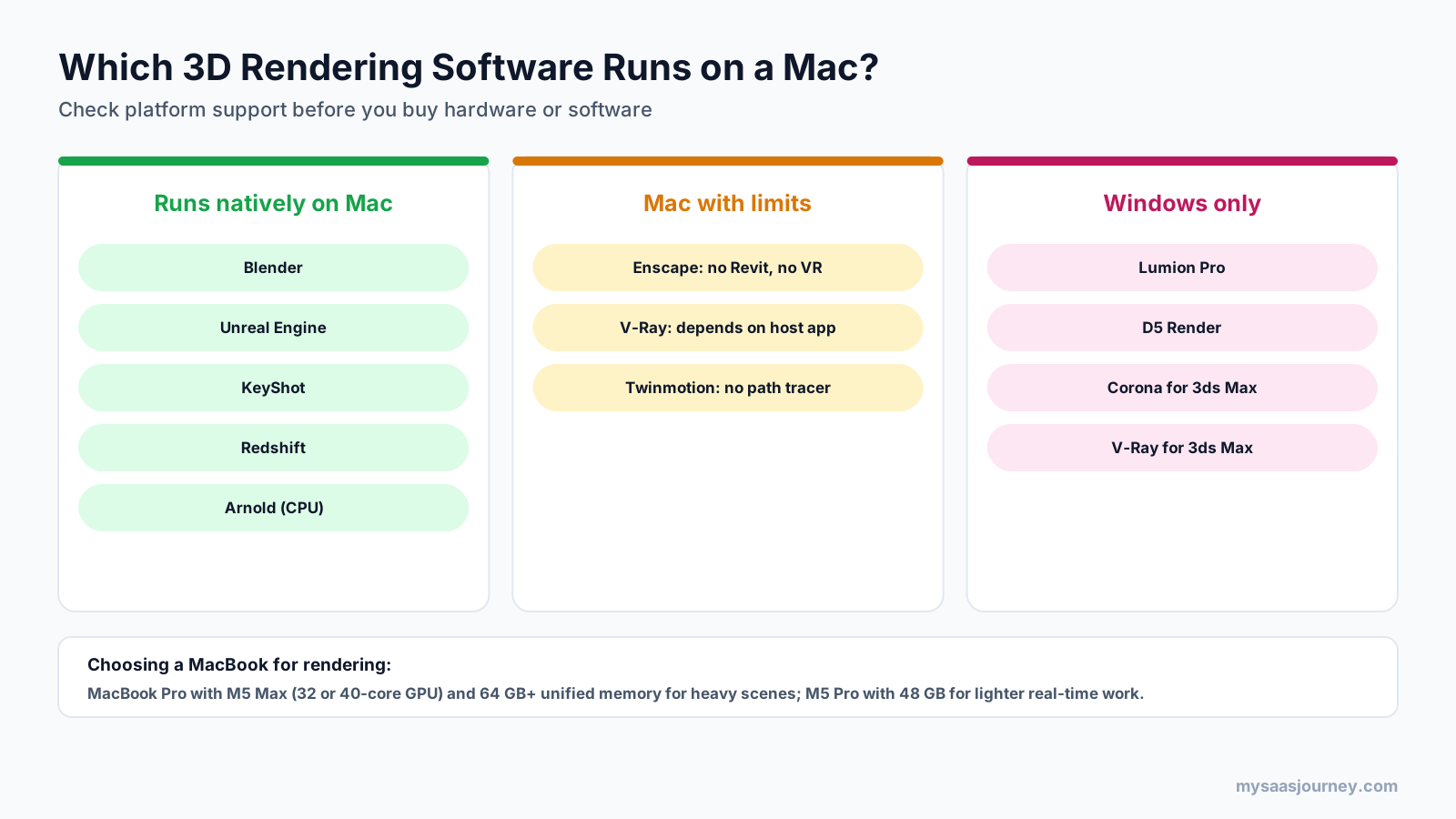
If your tools run on Mac, these are the current MacBook options for rendering:
- MacBook Pro with M5 Max: the best MacBook for 3D rendering. Apple offers it with a 32-core or 40-core GPU, up to 128 GB of unified memory, and up to 614 GB/s of memory bandwidth on the 40-core version, plus hardware-accelerated ray tracing.
- MacBook Pro with M5 Pro: a capable choice for real-time architectural rendering and lighter production work, with up to a 20-core GPU and up to 64 GB of unified memory.
- MacBook Air: fine for learning and simple scenes, but not designed for sustained rendering workloads.
Because Apple silicon shares memory between the CPU and GPU, unified memory matters more than it would on a Windows laptop. For large architectural scenes or production rendering, aim for an M5 Max with at least 64 GB. For real-time design reviews in Enscape or Twinmotion, an M5 Pro with 48 GB is a sensible minimum. Choose the 16-inch model if you render for long periods, since it handles sustained heat better.
If you need Windows-only tools on a Mac, you can run them on a remote Windows workstation or cloud GPU. Our guide to the best remote desktop software covers tools that handle graphics-heavy apps, and our explainer on what cloud computing is covers how cloud GPUs work.
How to Choose 3D Rendering Software
Start with what you render and who sees the result, then check your modeling tool, operating system, and budget.
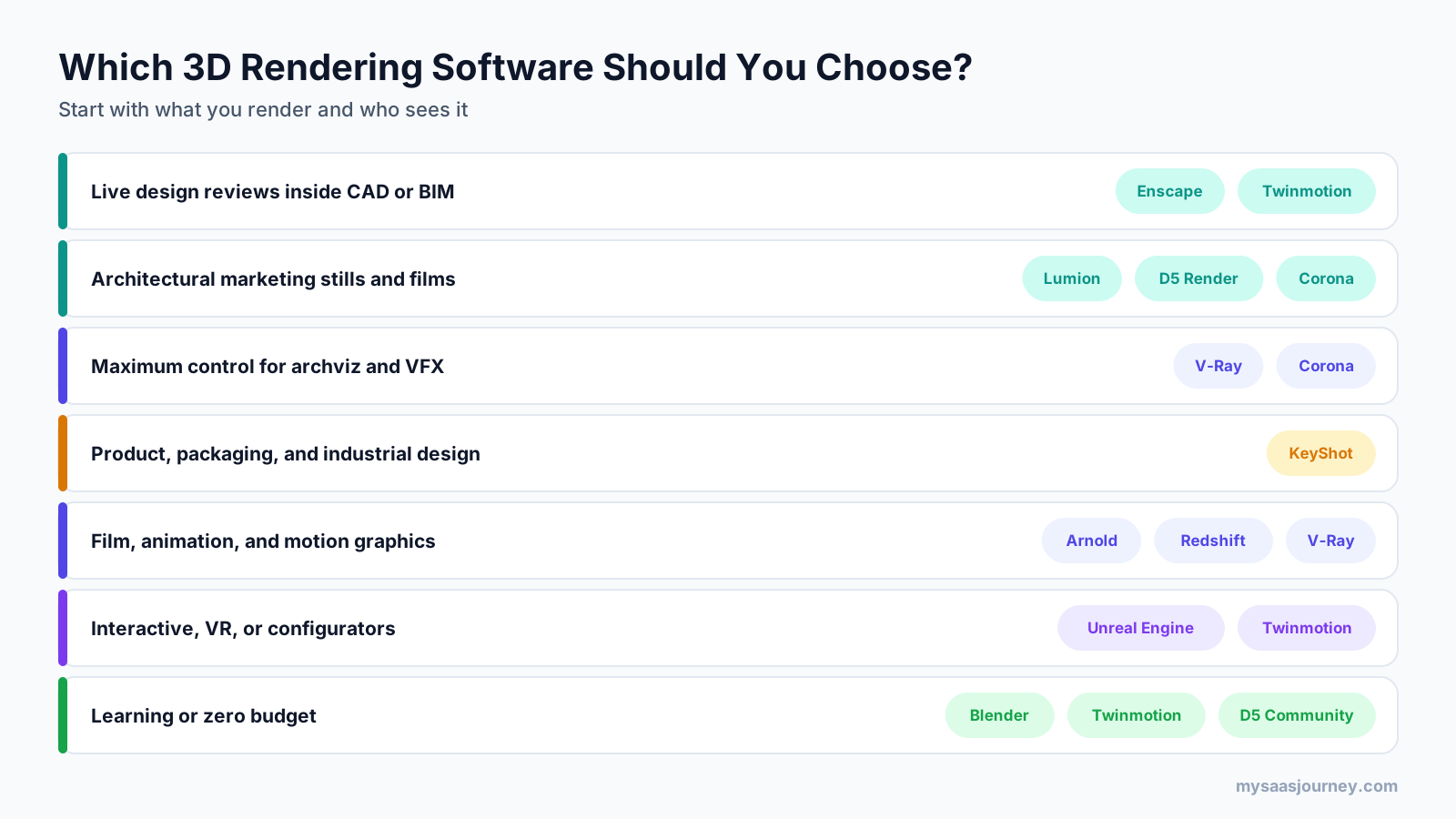
- Define your main output. Live design reviews, marketing stills, animations, product shots, and VR each favor different tools.
- Check your modeling software. Plugins such as Enscape and V-Ray must support your host app, and standalone tools need a reliable live link or import.
- Confirm your operating system. If you work on Mac, rule out Windows-only tools before comparing features.
- Match realism to the audience. Internal design reviews rarely need production-level realism; competition entries and marketing campaigns often do.
- Check your hardware. Real-time and GPU renderers need a capable graphics card; CPU engines such as Corona benefit from many CPU cores.
- Compare total cost. Include host software, hardware, cloud rendering, and asset libraries, not just the renderer license.
- Test with your own project. Use free versions and trials to render one of your own scenes before committing.
If you are evaluating software for a team or firm, our guide on how to choose the right software for your business needs offers a broader buying framework.
Rendering Software for Architecture
Architecture is the largest use case for many of these tools. A common setup in architecture firms pairs a real-time tool for daily design work with a production engine or Lumion for final marketing images:
- Design development and client meetings: Enscape or Twinmotion
- Marketing stills and films: Lumion, D5 Render, or Corona
- Competition and high-end visualization: V-Ray or Corona, often with post-production
For physical models alongside digital renders, our article on 3D printing in architecture covers how firms use printed models in presentations.
AI Rendering Tools
AI image tools are increasingly used for early concept images and style exploration. Several rendering vendors now include AI features, such as Chaos’s AI credits and Veras, D5’s AI tools, and KeyShot Studio AI. These are useful for quick variations but do not replace accurate geometry, lighting, and materials for final deliverables. Our guide to the best AI image generators covers general-purpose AI image tools.
Sharing Renders and Animations
Rendered animations and high-resolution images produce large files. If you edit walkthrough videos after rendering, our list of the best free video editing software covers editors that handle high-resolution footage, and our comparison of cloud storage apps covers options for sharing large files with clients.
Final Thoughts
There is no single best 3D rendering software, because a live design review, a marketing film, a product shot, and a VFX shot each need different strengths. For most architects, the best starting point is Enscape for design work and Lumion, D5 Render, or Twinmotion for presentation visuals. For maximum realism and control, V-Ray and Corona remain the standards in architectural visualization, while Arnold and Redshift lead in animation and motion design. KeyShot is the clear choice for product rendering, and Blender is the best free tool for almost any 3D work.
Check platform support first, especially if you work on a Mac, then test two or three tools on one of your own projects. The right renderer is the one that produces the quality your audience expects in the time your schedule allows.
Frequently Asked Questions
What is the best 3D rendering software?
It depends on your work. Enscape is best for live architectural design reviews, Lumion and D5 Render for fast architectural marketing visuals, V-Ray and Corona for maximum archviz realism, Arnold and Redshift for animation and VFX, KeyShot for product rendering, and Blender for free all-round 3D work.
What is the best free 3D rendering software?
Blender is the best free 3D rendering software for most people, with the Cycles path tracer and Eevee real-time engine, free for commercial use. Twinmotion and Unreal Engine are free for companies with under $1 million in annual revenue, and D5 Render Community is free for non-commercial use.
Is D5 Render still free?
Yes, D5 Render Community is free, but only for non-commercial use. It includes LiveSync with design tools and 16K image rendering. Commercial or professional work requires D5 Pro, which costs $30 a month billed yearly or $38 billed monthly, and D5 runs only on Windows with a ray-tracing graphics card.
What rendering software do architects use most?
Architects commonly use Enscape for design reviews inside Revit, SketchUp, Rhino, or Archicad; Lumion, D5 Render, or Twinmotion for presentation stills and films; and V-Ray or Corona for high-end photorealistic visualization. Many firms combine a real-time tool for daily work with a production engine for final marketing images.
Which MacBook is best for 3D rendering?
The MacBook Pro with M5 Max is the best MacBook for 3D rendering, with up to a 40-core GPU and 128 GB of unified memory. Choose at least 64 GB for heavy scenes, or an M5 Pro with 48 GB for real-time work. Check first that your software runs on macOS, since Lumion Pro and D5 Render are Windows-only.
Is Blender good enough for professional rendering?
Yes. Blender’s Cycles engine produces professional-quality photorealistic renders, and Blender is used by freelancers and studios for commercial work. Its limitations are a steeper learning curve for CAD users and fewer built-in architectural libraries and BIM links than dedicated archviz tools such as Enscape, Lumion, or D5 Render.
What is the difference between real-time and offline rendering?
Real-time rendering updates images instantly as you move through a scene, which suits design reviews, walkthroughs, and VR. Offline or production rendering takes longer per image but calculates light more accurately, producing the highest realism for final marketing images, film, and VFX. Many professionals use both at different stages.
How much does 3D rendering software cost?
3D rendering software ranges from free to about $1,300 a year. Blender is free, Twinmotion and Unreal Engine are free under $1 million in revenue, D5 Pro costs $360 a year, V-Ray Solo $540, Enscape Solo $574.80, Lumion Pro $1,149, and KeyShot Studio Professional $1,299. Host software and hardware add to the total.
Sources
| Source | Used for |
|---|---|
| https://www.chaos.com/pricing | Enscape plan prices and add-ons |
| https://learn.enscape3d.com/?p=63437 | Enscape host apps and macOS feature limits |
| https://www.renderahouse.com/blog/vray-pricing | V-Ray plan prices (third-party, citing Chaos buy page) |
| https://superrendersfarm.com/article/corona-vs-vray-render-farm-2026 | Corona prices, host apps, CPU rendering (third-party) |
| https://www.renderahouse.com/blog/lumion-pricing | Lumion plan prices and Windows-only status (third-party, citing Lumion buy page) |
| https://www.d5render.com/pricing | D5 Render plans, prices, free plan terms |
| https://www.d5render.com/post/system-requirements-for-d5-render | D5 Render Windows and GPU requirements |
| https://www.twinmotion.com/license | Twinmotion free threshold and seat price |
| https://www.cgchannel.com/2026/04/epic-games-releases-twinmotion-2026-1/ | Twinmotion 2026 platform support |
| https://www.unrealengine.com/blog/we-are-updating-unreal-engine-twinmotion-and-realitycapture-pricing-in-late-april | Unreal Subscription pricing and free threshold |
| https://www.keyshot.com/pricing/ | KeyShot Studio plans, add-ons, education price, trial |
| https://www.cgchannel.com/?p=174937 | Arnold subscription prices and Flow Render preview |
| https://www.autodesk.com/products/arnold/buy | Arnold operating system support |
| https://us.fitgap.com/products/008665/redshift | Redshift subscription price (third-party, Maxon page could not be read) |
| https://support.apple.com/126318 | MacBook Pro M5 Pro and M5 Max specifications |
| Ahrefs Keywords Explorer and SERP Overview (US, November 2026) | Keyword volumes, difficulty, SERP and People Also Ask analysis |