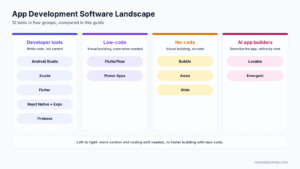
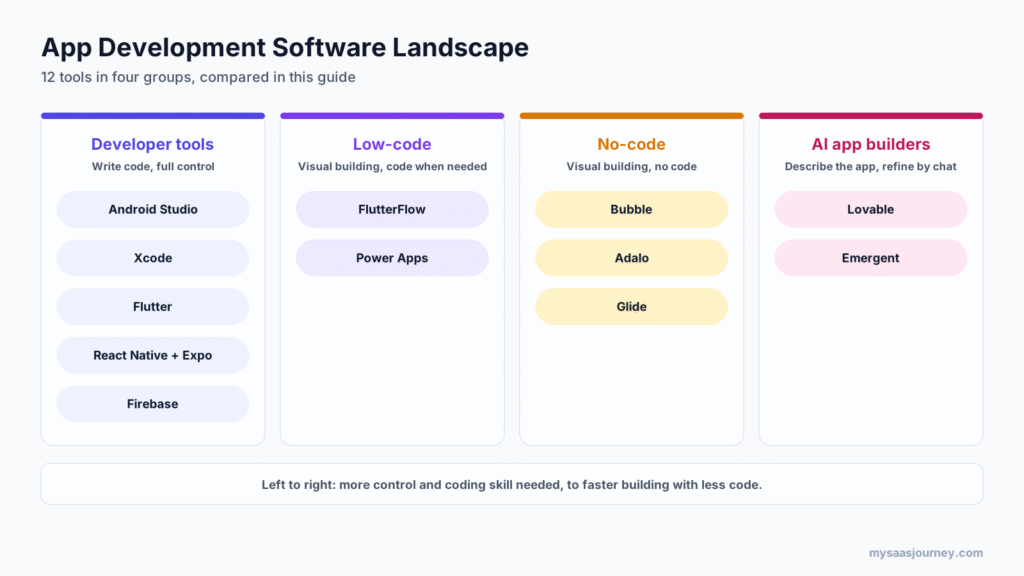
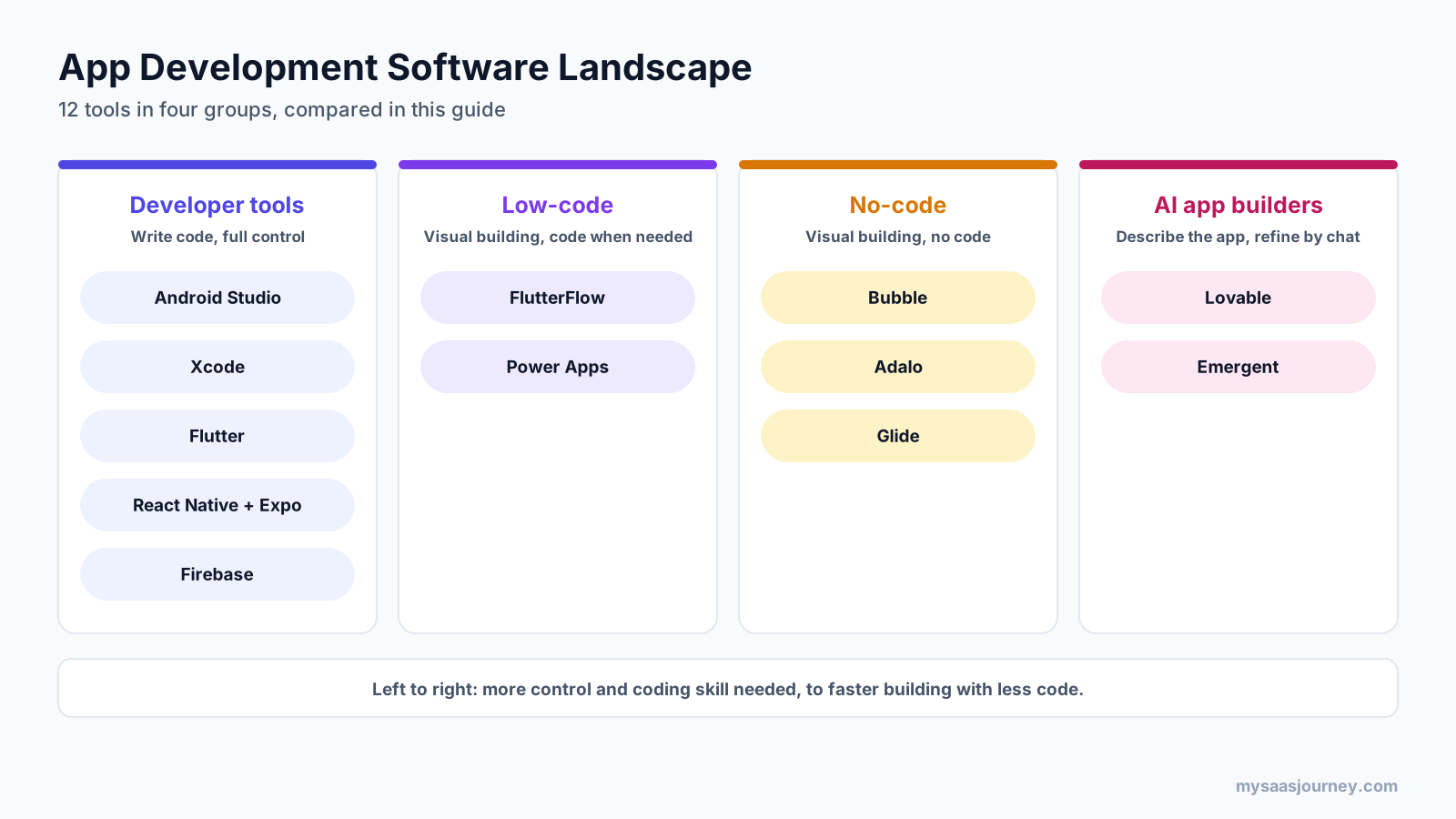
The best app development software depends on who is building the app and where it needs to run. For developers, Android Studio and Xcode are the standard tools for native Android and iPhone apps, while Flutter and React Native with Expo let one codebase ship to both. FlutterFlow is the best low-code option when you want visual building with exportable code. Bubble and Adalo lead for no-code apps that publish to the app stores, Glide is the quickest way to turn a spreadsheet into an internal tool, and Lovable and Emergent turn a plain-language description into a working app.
There is no single best tool, because a fitness app for millions of users, an inventory tracker for a ten-person team, and a weekend MVP need very different things. This guide compares 12 app development tools by use case, platform support, coding required, app store publishing, and current pricing.
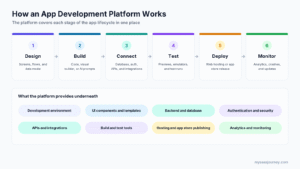
If you are new to the category, our guide to what an app development platform is explains the types, features, and how they work.
Key takeaways:
- The professional developer tools, Android Studio, Xcode, Flutter, and React Native, are free. Your costs come from developer time, devices, cloud services, and app store fees.
- Flutter and React Native with Expo are the best mobile app development platforms for teams that want one codebase for iOS and Android.
- FlutterFlow, Bubble, and Adalo can publish to the Apple App Store and Google Play on paid plans, while Glide builds progressive web apps that cannot be listed in the stores.
- AI app builders such as Lovable and Emergent are the fastest way to a working prototype, with paid plans from $20 to $25 a month.
- Publishing to both app stores costs $99 a year for Apple and a one-time $25 for Google Play, on top of any tool subscription.
Quick Comparison of the Best App Development Software
| Tool | Best for | Type | Builds for | Starting price |
|---|---|---|---|---|
| Android Studio | Native Android apps | Developer IDE | Android | Free |
| Xcode | Native iPhone, iPad, and Mac apps | Developer IDE | Apple platforms | Free (Mac required) |
| Flutter | One codebase for mobile, web, and desktop | Cross-platform framework | iOS, Android, web, desktop | Free |
| React Native + Expo | JavaScript teams building for iOS and Android | Cross-platform framework | iOS, Android, web | Free; Expo Starter $19 a month plus usage |
| Firebase | Backend, auth, and analytics for any app | Backend platform | iOS, Android, web | Free Spark plan; Blaze pay as you go |
| FlutterFlow | Visual building with code export | Low-code | iOS, Android, web | Free; Basic $29 a month billed yearly |
| Power Apps | Internal apps in Microsoft 365 | Low-code | Web and Power Apps mobile app | Free developer plan; $20 per user a month |
| Bubble | No-code web and native mobile apps | No-code | Web, iOS, Android (mobile in beta) | Free; Starter $32 a month billed yearly |
| Adalo | No-code mobile apps for the app stores | No-code | iOS, Android, web | Free; Builder $52 a month billed yearly |
| Glide | Internal tools from spreadsheets and data | No-code | Progressive web apps | Free; Basic $25 a month |
| Lovable | Web apps and prototypes from prompts | AI app builder | Web | Free; Pro from $25 a month |
| Emergent | Web and mobile apps built by AI agents | AI app builder | Web and mobile builds | Free; Standard $17 a month billed yearly |
How We Chose These Tools
We started with the main ways people build apps today: native development, cross-platform frameworks, backend platforms, low-code, no-code, and AI app builders. We then picked the most widely used or most capable tool in each group and assessed each one on:
- Platform reach: whether it builds native iOS and Android apps, web apps, or both
- Skill required: how much coding knowledge you need to get a working app
- Ownership and portability: whether you can export the code and move it elsewhere
- Backend and integrations: database, authentication, APIs, and connections to other services
- App store publishing: whether it produces apps you can list on the Apple App Store and Google Play
- Pricing transparency: free plans, published prices, and how costs grow with usage
Prices come from vendor pricing pages checked in November 2026. Where a vendor page did not state something, we used recent third-party sources and say so.
Developer Tools for Native and Cross-Platform Apps
These tools are for developers who write code. They give the most control and performance, and they are free to use.
1. Android Studio
Android Studio is Google’s official integrated development environment (IDE) for building Android apps. It includes a code editor, visual layout tools, an Android emulator, debugging and profiling tools, and everything needed to package apps for Google Play.
Best for: developers building native Android apps in Kotlin or Java.
Key features:
- Code editor with Kotlin support and Jetpack Compose tools for building interfaces
- Android emulator for testing on many virtual devices
- Profilers for performance, memory, and network use
- Build tools for creating app bundles and APKs for Google Play
- AI coding assistance built into the IDE
Pricing: Android Studio is free. Publishing to Google Play requires a Google Play developer account with a one-time $25 registration fee.
Trade-offs: Android Studio builds Android apps only, so you need a separate tool or a cross-platform framework to reach iPhone users. It also assumes programming knowledge.
2. Xcode
Xcode is Apple’s free IDE for building apps for iPhone, iPad, Mac, Apple Watch, and Apple TV. It includes the Swift language, SwiftUI for building interfaces, a device simulator, and tools for testing and submitting apps to the App Store.
Best for: developers building native apps for Apple devices.
Key features:
- Swift and SwiftUI for building native Apple interfaces
- Simulator for testing across iPhone and iPad models
- Debugging and performance tools
- TestFlight and App Store Connect workflow for beta testing and release
- AI coding assistance in recent versions
Pricing: Xcode is free. Distributing apps on the App Store requires the Apple Developer Program at $99 a year.
Trade-offs: Xcode runs only on macOS, so you need a Mac. It builds for Apple platforms only, so Android needs a separate project.
3. Flutter
Flutter is Google’s open-source framework for building apps for iOS, Android, web, and desktop from one codebase, using the Dart language. It draws its own interface, so apps look consistent across platforms.
Best for: teams that want one codebase for mobile, web, and desktop with close-to-native performance.
Key features:
- One codebase for iOS, Android, web, Windows, macOS, and Linux
- Hot reload to see code changes instantly while the app runs
- Large library of prebuilt widgets for building interfaces
- Large package ecosystem for device features and services
- Works with Android Studio, VS Code, and other editors
Pricing: Flutter is free and open source.
Trade-offs: Your team needs to learn Dart, which is less common than JavaScript. Some platform-specific features still need native code or plugins.
4. React Native With Expo
React Native is Meta’s open-source framework for building native iOS and Android apps with JavaScript or TypeScript and React. Expo is a framework and set of cloud services on top of React Native that handle builds, updates, and app store submission, which makes React Native much easier to start with.
Best for: web and JavaScript teams that want to build native mobile apps.
Key features:
- Native iOS and Android apps from one JavaScript or TypeScript codebase
- Reuses React skills from web development
- Expo cloud builds for iOS and Android, including iOS builds without a local Mac
- Over-the-air updates for pushing fixes without a new store release
- Store submission tools included on Expo’s free plan
Pricing: React Native is free and open source. Expo’s free plan includes 15 Android and 15 iOS builds a month and updates for 1,000 monthly active users. Starter costs $19 a month plus usage, and Production costs $199 a month plus usage.
Trade-offs: Heavy animations and complex native features may need native modules. Expo usage costs can grow with more builds and users.
5. Firebase
Firebase is Google’s app development platform for backend services. It gives your app authentication, databases, file storage, hosting, analytics, crash reporting, and push notifications without running your own servers. You build the front end with another tool, such as Flutter, React Native, or a native IDE.
Best for: developers who need a ready-made backend for mobile and web apps.
Key features:
- Authentication, Cloud Firestore, Realtime Database, and Cloud Storage
- Hosting and Cloud Functions for server-side logic
- Crashlytics, Analytics, Performance Monitoring, and Cloud Messaging
- Remote Config, A/B Testing, and App Distribution for testing builds
- Firebase AI Logic for adding AI features to apps
Pricing: The Spark plan is free with no payment method required, including up to 50,000 monthly active users for authentication. The Blaze plan charges pay-as-you-go rates beyond the free quotas, and eligible new users get $300 in free credit.
Trade-offs: Firebase is a backend, not a full app builder. Usage-based billing on Blaze needs monitoring, and moving off Firebase later can take work. Our explainer on what cloud computing is covers how managed cloud services like this are billed.
Low-Code App Development Platforms
Low-code tools combine visual building with the option to add custom code. Our guide on what low code is explains the approach in more depth.
6. FlutterFlow
FlutterFlow is a visual app builder that generates Flutter code. You design screens with drag-and-drop tools, connect data and logic, and on paid plans you can download the code or deploy directly to the app stores.
Best for: founders, designers, and developers who want to build visually without giving up code ownership.
Key features:
- Visual builder for screens, navigation, and logic
- Generates Flutter code for iOS, Android, and web
- Code download and APK download on paid plans
- App store deployment from the platform on paid plans
- Real-time collaboration on Pro and Max
Pricing: The free plan allows 2 projects but no code download or store deployment. Basic costs $39 a month or $29 billed yearly ($351 a year). Pro costs $80 a month or $60 billed yearly, and Max costs $150 a month or $113 billed yearly. Enterprise is priced through sales.
Trade-offs: The free plan cannot publish apps. Complex apps still benefit from Flutter knowledge when you need custom code.
7. Microsoft Power Apps
Microsoft Power Apps is a low-code platform for building business apps that connect to Microsoft 365, Dataverse, and hundreds of other data sources. It is designed for internal apps, such as approvals, inspections, and data entry.
Best for: organizations on Microsoft 365 that want governed internal apps built by IT or business users.
Key features:
- Canvas and model-driven apps built with visual tools
- Dataverse database and connectors to Microsoft and third-party services
- Copilot assistance for building apps
- Integration with Power Automate for workflows
- Admin, security, and governance controls for IT
Pricing: The Power Apps Developer Plan is free for building and testing. Power Apps Premium costs $20 per user a month paid yearly, or $12 per user a month for organizations with at least 2,000 seats. Extra Dataverse storage costs $40 per GB a month.
Trade-offs: Power Apps suits internal users rather than public consumer apps. Per-user pricing adds up for large teams, and the best experience depends on the Microsoft ecosystem.
No-Code App Builders
No-code builders let you create apps with visual editors and settings, without writing code.
8. Bubble
Bubble is one of the most capable no-code platforms for building web apps, and it now builds native iOS and Android apps too. Its mobile builder uses React Native and shares the same database, workflows, and API connections as your web app.
Best for: founders and teams building full web apps, with native mobile apps from the same project.
Key features:
- Visual editor for complex web apps with custom logic and workflows
- Native iOS and Android apps built on React Native, sharing one backend with web
- Built-in database, user accounts, and API connector
- AI credits for building with AI on every plan
- On-device testing on the free plan
Pricing: Bubble’s free plan includes 50,000 workload units and on-device mobile testing. Paid plans billed yearly cost $32 a month (Starter), $119 (Growth), and $349 (Team), with Enterprise on request. A paid plan is needed to publish a live mobile app.
Trade-offs: Bubble launched native mobile in public beta in June 2025, and third-party sources still describe it as beta in late 2026. You cannot export Bubble code, and workload-based pricing needs monitoring as usage grows.
9. Adalo
Adalo is a no-code app builder focused on mobile apps that publish to the Apple App Store and Google Play. It offers drag-and-drop screens, a built-in database, and an AI assistant called Ada.
Best for: non-developers who want a mobile app listed in the app stores.
Key features:
- Drag-and-drop builder for mobile screens and navigation
- Built-in database with external data connections
- Publishing to the Apple App Store and Google Play on paid plans
- Ada AI assistant for building with prompts
- Unlimited test apps on the free plan
Pricing: Adalo’s free plan includes 500 records per app, 5 Ada AI prompts a month, and unlimited test apps, but no store publishing. Builder costs $65 a month or $624 a year with 2 published apps, and Business costs $200 a month or $1,920 a year with 5 published apps.
Trade-offs: The free plan cannot publish, and Builder is the most expensive entry plan on this list. Apps with complex logic or heavy data may hit limits.
10. Glide
Glide is a no-code platform for building business apps from spreadsheets and databases. It is one of the quickest ways to turn a spreadsheet into a polished internal tool for a team.
Best for: teams building internal tools such as inventory trackers, field apps, and portals.
Key features:
- Builds apps from Google Sheets, Excel, Airtable, and other data sources
- Polished templates and components for business apps
- Workflows for automating tasks
- Apps work on phones, tablets, and desktops
- Team collaboration on paid plans
Pricing: Glide’s free plan has no published apps. Basic costs $25 a month for 2 published apps, Plus $50 a month for 5, and Pro $125 a month for unlimited apps. Glide says annual plans are coming soon.
Trade-offs: Glide apps are progressive web apps. Glide’s help center confirms they cannot be published to the Apple App Store or Google Play, although users can add them to their home screen.
AI App Builders
AI app builders turn a plain-language description into a working app, then let you refine it through conversation.
11. Lovable
Lovable is an AI app builder for web apps, internal tools, and prototypes. You describe what you want, and it generates the app with a built-in backend, then you refine it in chat or edit the code.
Best for: founders and product teams who want a working web app or prototype quickly.
Key features:
- Builds full web apps from prompts
- Built-in backend (Lovable Cloud) for database, storage, and compute
- Git sync with GitHub, GitLab, and Bitbucket on every plan
- Custom domains and private projects on Pro
- Team controls and SSO on Business
Pricing: Lovable’s free plan includes 5 daily build credits, up to 30 a month. Pro starts at $25 a month for 100 credits, Business starts at $50 a month, and Enterprise is priced through sales, and annual billing lowers the monthly rate.
Trade-offs: Lovable builds web apps, not native app store apps. Credit costs vary by task, so heavy iteration can use credits quickly.
12. Emergent
Emergent is an AI app builder that uses AI agents to design, code, and deploy apps through conversation. It covers websites, web and mobile apps, SaaS products, dashboards, and automations.
Best for: builders who want AI agents to produce web and mobile apps end to end.
Key features:
- AI agents that design, code, and deploy apps
- Web and mobile app builds on every plan, including Free
- GitHub integration and private hosting on Standard
- Custom AI agents and a larger context window on Pro
- SSO, shared workspaces, and deployment in your own cloud on higher plans
Pricing: Emergent’s free plan includes 10 credits a month. Standard costs $20 a month or $17 billed yearly for 100 credits, and Pro costs $200 a month or $167 billed yearly for 750 credits. Business and Enterprise are priced through sales.
Trade-offs: Credits limit how much you can build on lower plans. Check how mobile builds are packaged for the app stores before you commit, since the pricing page does not detail store submission.
Features Compared
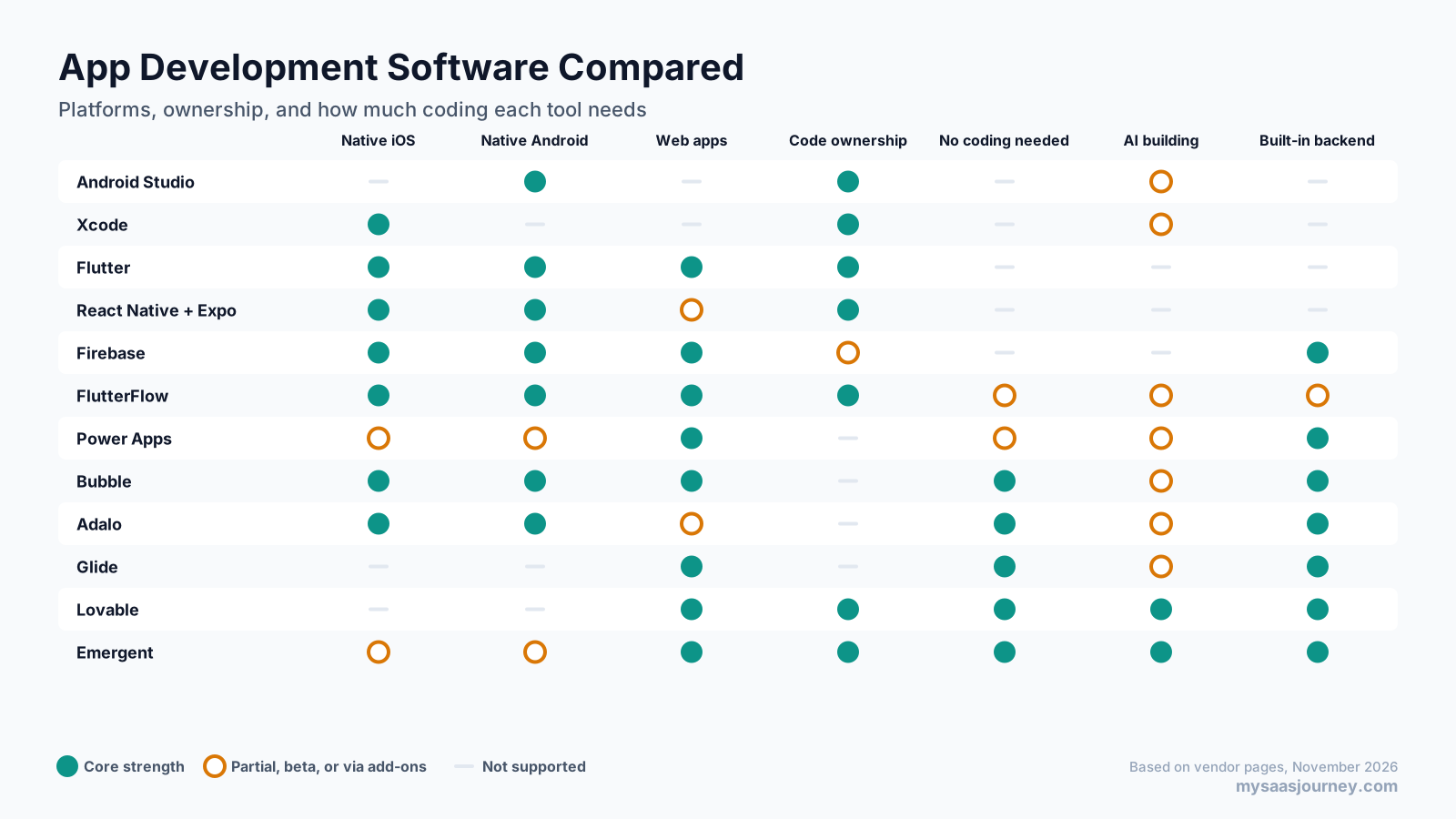
The matrix shows a clear trade-off. Developer tools give full code ownership and native performance but need programming skills. No-code and AI builders remove the coding, but most do not let you export code, and several build web apps rather than native apps. FlutterFlow and Lovable sit in between, with visual or AI building plus code you can take elsewhere.
Pricing Compared
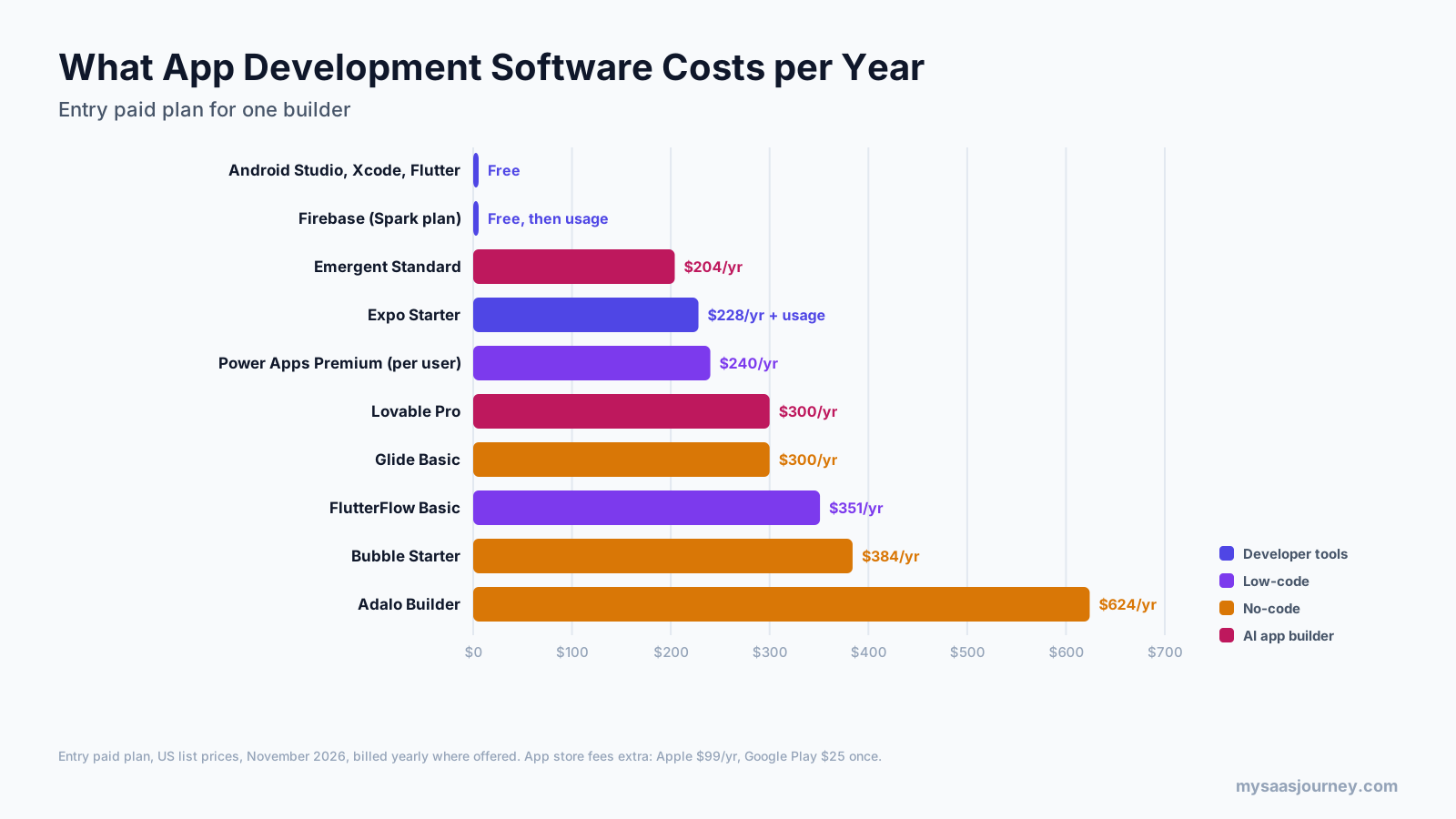
| Tool | Free option | Entry paid plan | Yearly cost |
|---|---|---|---|
| Android Studio | Free | Not applicable | Free |
| Xcode | Free | Not applicable | Free (Mac required) |
| Flutter | Free | Not applicable | Free |
| React Native + Expo | Free (15 iOS and 15 Android builds a month) | Expo Starter | $228 plus usage |
| Firebase | Spark plan | Blaze | Pay as you go |
| Emergent | 10 credits a month | Standard | $204 |
| Power Apps | Developer Plan | Premium | $240 per user |
| Lovable | 5 daily credits | Pro | From $300 |
| Glide | Free (no published apps) | Basic | $300 |
| FlutterFlow | Free (no publishing) | Basic | $351 |
| Bubble | Free | Starter | $384 |
| Adalo | Free (no publishing) | Builder | $624 |
Before you compare prices, check:
- App store fees: the Apple Developer Program costs $99 a year, and a Google Play developer account costs $25 once.
- Usage limits: credits, workload units, builds, records, and monthly active users are capped on most plans.
- Publishing rights: FlutterFlow, Adalo, and Glide need a paid plan before you can publish.
- Seats: most plans include one builder, and extra editors cost more.
Our glossary entry on pricing models explains usage-based and seat-based pricing in more detail.
Which Tools Publish to the App Store and Google Play?
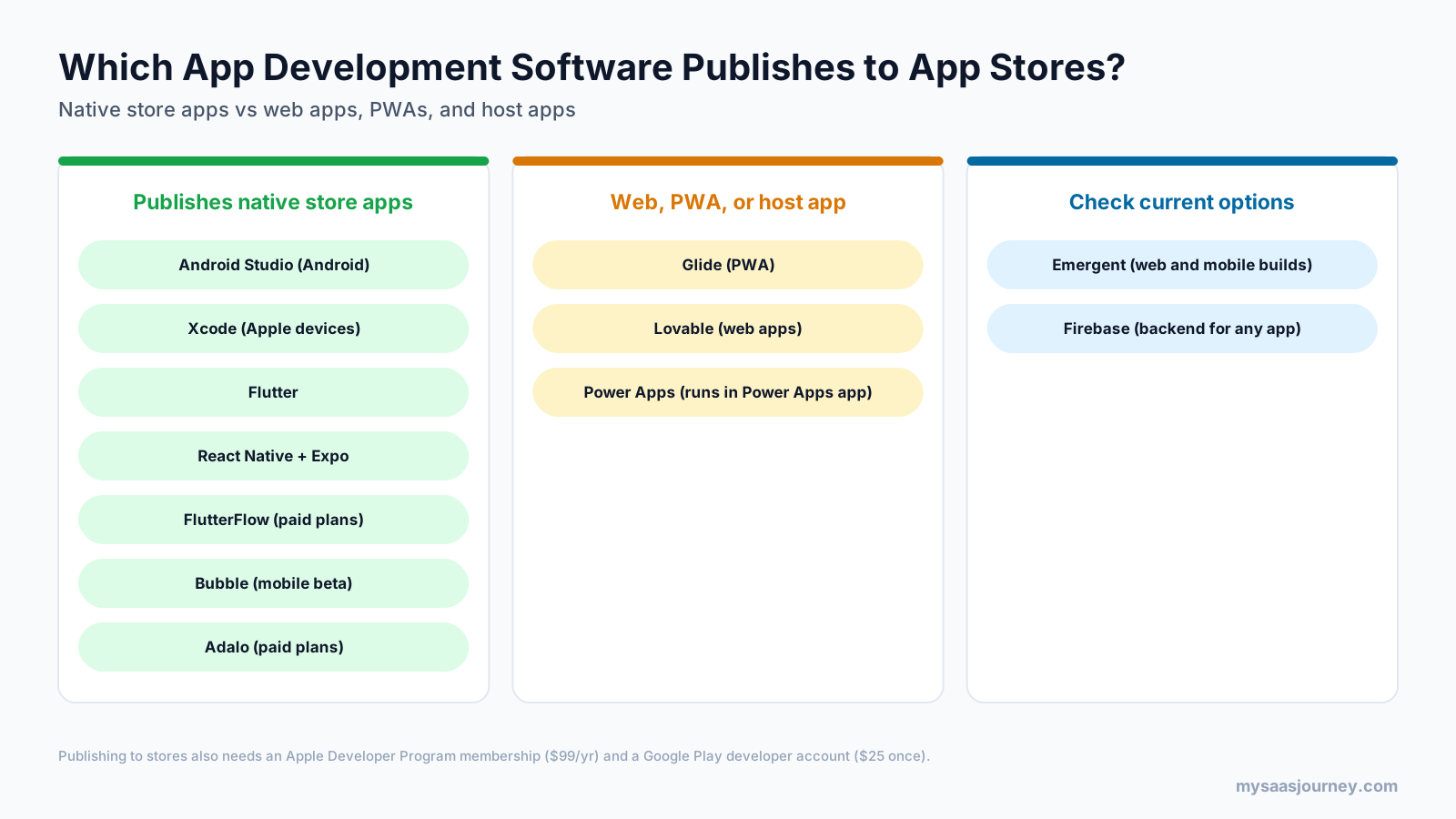
If your app must be downloadable from the Apple App Store or Google Play, narrow your list first:
- Native store apps: Android Studio, Xcode, Flutter, React Native with Expo, FlutterFlow on paid plans, Bubble (mobile beta), and Adalo on paid plans.
- Web apps, PWAs, or host apps: Glide builds progressive web apps, Lovable builds web apps, and Power Apps apps run inside the Power Apps mobile app rather than as standalone store listings.
- Check current options: Emergent offers mobile builds, and Firebase is a backend that works with any of the tools above.
A web app or PWA is often enough for internal tools and simple products, and it avoids app store review. Choose a native store app when users expect to find you in the stores, or when you need push notifications, offline use, and full access to device features. If you only need a marketing site rather than an app, our guide to the best website builders is a better starting point.
Best Free App Development Software
You can build and test an app without paying anything:
- Android Studio, Xcode, Flutter, and React Native are completely free, though Xcode needs a Mac and publishing has store fees.
- Expo’s free plan includes 15 iOS and 15 Android builds a month and store submission tools.
- Firebase’s Spark plan covers authentication, databases, hosting, and analytics within free quotas.
- Power Apps has a free Developer Plan for building and testing.
- Bubble, FlutterFlow, Adalo, Glide, Lovable, and Emergent all have free plans for building, but most limit or block publishing until you pay.
What is the best free app builder for iOS? For developers, Xcode is the free, official way to build iOS apps on a Mac, and Flutter or React Native with Expo can build iOS apps for free alongside Android. For non-developers, the free plans of Bubble, FlutterFlow, and Adalo let you build and test, but publishing to the App Store requires a paid plan plus Apple’s $99 yearly developer fee.
Best Mobile App Development Platform by Use Case
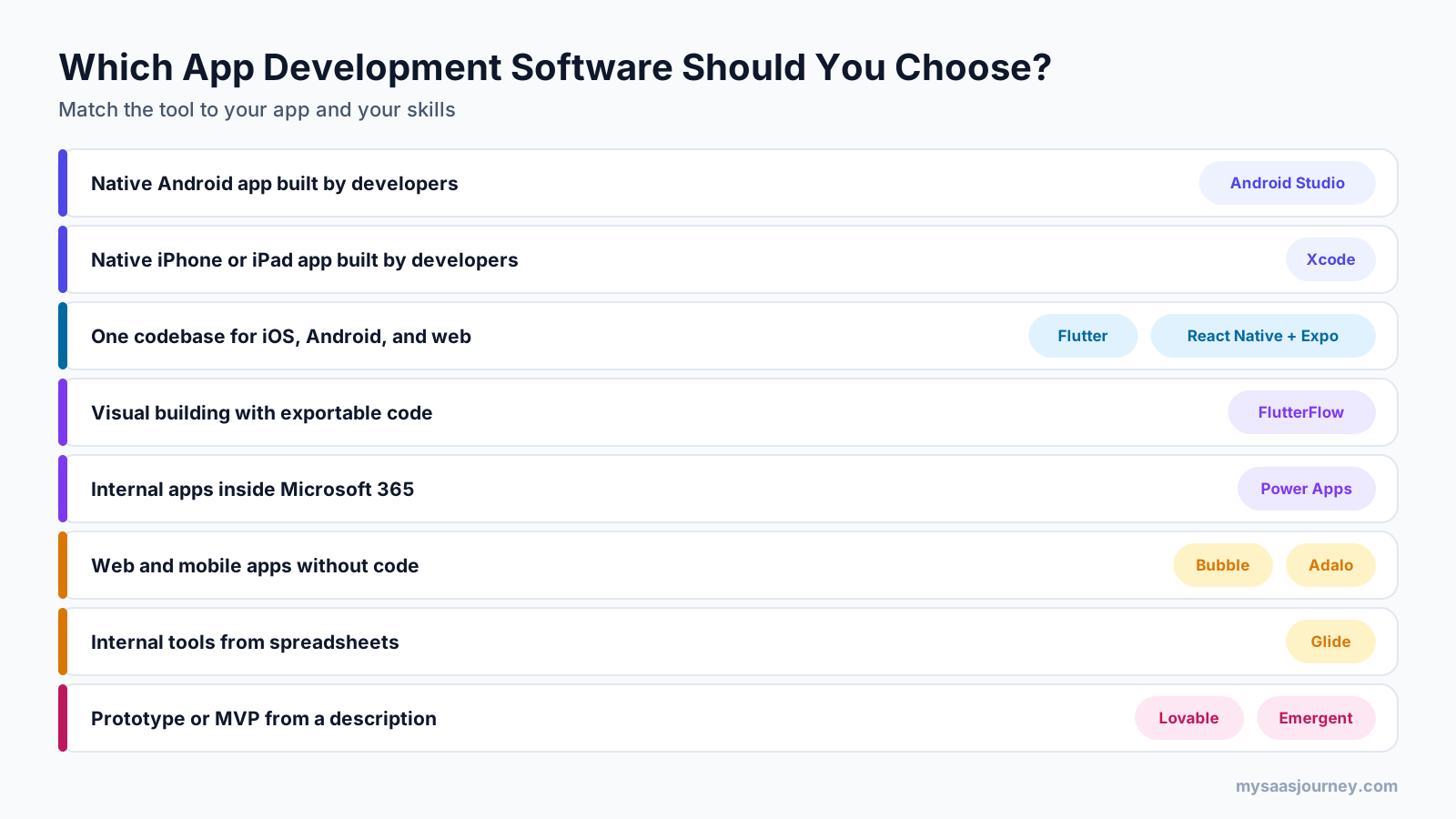
The best mobile app development platform depends on your team and goals:
- For the best performance and device access, build natively with Xcode and Android Studio.
- For one codebase across iOS and Android with a development team, choose Flutter or React Native with Expo.
- For visual building with code you own, choose FlutterFlow.
- For no-code mobile apps in the app stores, choose Adalo or Bubble.
- For internal business apps, choose Power Apps in Microsoft environments or Glide for spreadsheet-based tools.
- For a fast prototype or MVP, start with Lovable for web apps or Emergent for web and mobile builds.
How to Choose App Development Software
- Start with who will build the app. Developers can use any tool, while non-developers should focus on no-code, low-code, and AI builders.
- Decide where the app must run. If it must be in the app stores, rule out web-only and PWA tools first.
- Consider how complex the app will become. Simple tools and internal apps suit no-code, while complex logic and high traffic favor code-based tools.
- Check whether you can export your code. Code export through FlutterFlow, Lovable, or Emergent’s GitHub integration, or code-based tools, reduces lock-in if you outgrow the platform.
- Review the backend and integrations. Make sure the tool handles your data, user accounts, and the services your app must connect to. Our guide to what an API is explains how apps connect to other software.
- Model the full first-year cost. Add subscription, usage, extra seats, and app store fees for your first year.
- Build a small test version first. Use free plans to build one key screen or workflow before you commit.
If you are unsure whether to build an app at all, our guide to build vs buy compares custom software with off-the-shelf SaaS.
Can AI Build an App for You?
AI can now build much of a simple app for you. AI app builders such as Lovable and Emergent generate screens, databases, and logic from a description, and no-code tools such as Bubble and Adalo include AI assistants. General assistants such as ChatGPT and Claude can write code, explain errors, and plan an app, but you still need a development environment to run, test, and publish what they write. Our Claude vs ChatGPT comparison covers how the two assistants handle coding.
AI-built apps still need human review. Check security, data handling, and code quality before launching anything that handles personal data or payments, and expect to bring in a developer as the app grows.
Final Thoughts
The best app development software is the one that matches your skills, your target platforms, and how far you expect the app to grow. Developers building for performance should use Xcode and Android Studio, or Flutter and React Native with Expo for one shared codebase. FlutterFlow offers the best balance of visual building and code ownership. Bubble and Adalo are the strongest no-code routes to the app stores, Glide is the quickest path to internal tools, and Power Apps fits organizations already on Microsoft 365. For a fast start, Lovable and Emergent can turn an idea into a working app in hours.
Pick two or three tools that fit your situation, build the same small feature in each on a free plan, and choose the one that gets you there with the least friction and the clearest path to growth.
Frequently Asked Questions
What is the best app development software?
It depends on your skills and goals. Xcode and Android Studio are best for native apps built by developers, Flutter and React Native with Expo for one codebase across iOS and Android, FlutterFlow for visual building with code export, Bubble and Adalo for no-code apps, and Lovable or Emergent for fast AI-built prototypes.
Which software is used to develop apps?
Developers mainly use Android Studio for Android apps, Xcode for Apple apps, and cross-platform frameworks such as Flutter and React Native for both. Backend platforms such as Firebase handle data and user accounts. Non-developers use low-code tools such as FlutterFlow and Power Apps, no-code tools such as Bubble, Adalo, and Glide, or AI app builders.
What is the best mobile app development platform?
For most teams with developers, Flutter or React Native with Expo is the best mobile app development platform, because one codebase ships to iOS and Android. For the best performance, build natively with Xcode and Android Studio. For non-developers, Adalo and Bubble are the strongest no-code options for app store publishing.
What is the best free app development software?
Android Studio, Xcode, Flutter, and React Native are completely free for developers. Firebase’s Spark plan provides a free backend, and Expo’s free plan includes monthly iOS and Android builds. Bubble, FlutterFlow, Adalo, Glide, Lovable, and Emergent offer free plans for building, but most require a paid plan to publish.
What is the best free app builder for iOS?
Xcode is the free, official tool for building iOS apps, but it requires a Mac and programming skills. Flutter and React Native with Expo can build iOS apps for free, and Expo’s cloud builds can create iOS builds without a local Mac. Publishing to the App Store costs $99 a year through the Apple Developer Program.
Can ChatGPT create an app for me?
ChatGPT can write app code, explain errors, and help plan features, but it does not host, test, or publish apps by itself. You still need a development environment such as Xcode, Android Studio, or Expo. AI app builders such as Lovable and Emergent go further by generating, hosting, and deploying a working app from your description.
Do I need a Mac to build iOS apps?
You need a Mac to use Xcode, Apple’s official tool for building iOS apps. You can avoid a local Mac with cloud build services such as Expo’s, which build iOS apps on remote machines, or with no-code platforms that handle iOS builds for you. You still need an Apple Developer Program membership to publish.
How much does it cost to make an app?
The software can be free with Android Studio, Xcode, Flutter, or React Native, or cost roughly $200 to $650 a year for an entry paid plan on no-code and AI builders. Publishing costs $99 a year for Apple and a one-time $25 for Google Play. Developer time, design, and backend usage usually cost far more than the tools.
Is Flutter or React Native better?
Both are strong choices for building iOS and Android apps from one codebase. Flutter uses Dart and draws its own interface for consistent design across platforms, including web and desktop. React Native uses JavaScript and React, which suits teams with web development skills, and Expo makes building and publishing easier.
Sources
| Source | Used for |
|---|---|
| https://expo.dev/pricing | Expo plans, prices, builds, and free plan limits |
| https://firebase.google.com/pricing | Firebase Spark and Blaze plans, free quotas, and products |
| https://www.flutterflow.io/pricing | FlutterFlow plans, prices, code export, and store deployment |
| https://www.microsoft.com/en-us/power-platform/products/power-apps/pricing | Power Apps plans and prices |
| https://bubble.io/pricing | Bubble plans, prices, and mobile publishing requirements |
| https://bubble.io/support/en/articles/15278884-native-mobile-apps-and-plans-faq | Bubble native mobile apps on React Native |
| https://bubble.io/blog/native-mobile-beta/ | Bubble native mobile public beta launch |
| https://www.adalo.com/pricing | Adalo plans, prices, publishing, and free plan limits |
| https://www.glideapps.com/pricing | Glide plans and prices |
| https://help.glideapps.com/en/articles/10021560-is-glide-able-to-push-to-app-store | Glide apps are PWAs and cannot be published to app stores |
| https://docs.lovable.dev/introduction/subscription-plans | Lovable plans, prices, and Git sync |
| https://emergent.sh/pricing | Emergent plans, prices, and features |
| https://kotlinlang.org/docs/multiplatform/cross-platform-frameworks.html | Flutter and React Native owners and languages |
| https://www.choicely.com/tutorials/how-much-does-it-cost-to-publish-an-app | Apple Developer Program and Google Play fees (third-party, citing Apple and Google) |
| Ahrefs Keywords Explorer and SERP Overview (US, November 2026) | Keyword volumes, difficulty, SERP and People Also Ask analysis |